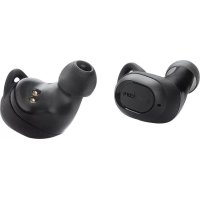
Liberty Lite - Earplug soundcore - Free user manual and instructions
Find the device manual for free Liberty Lite soundcore in PDF.



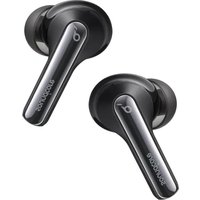
| Product Type | True Wireless Earbuds |
| Brand | Soundcore |
| Model | Liberty Lite |
| Bluetooth Version | 5.0 |
| Bluetooth Range | 10 m |
| Playback Battery Life | 3h30 |
| Charging Time | 1h30 |
| Power Input | 5 V, 0.5 A |
| Speaker | 6 mm × 2 |
| Impedance | 16 Ω |
| Frequency Response | 20 Hz - 20 kHz |
| Net Weight | 51 g |
| Features | Touch control, playback/call controls, Siri/voice assistant activation |
| Compatibility | Bluetooth devices |
| Box Contents | Earbuds, charging case, multiple size ear tips, charging cable |
| Maintenance | Clean with a soft, dry cloth |
| Safety | Do not expose to water or excessive humidity |
Frequently Asked Questions - Liberty Lite soundcore
User questions about Liberty Lite soundcore
0 question about this device. Answer the ones you know or ask your own.
Ask a new question about this device
Download the instructions for your Earplug in PDF format for free! Find your manual Liberty Lite - soundcore and take your electronic device back in hand. On this page are published all the documents necessary for the use of your device. Liberty Lite by soundcore.
USER MANUAL Liberty Lite soundcore
natural_image
Illustration of a computer mouse with connected cable, a user manual panel, and multiple circular earbuds (no text or symbols)

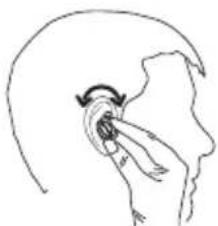
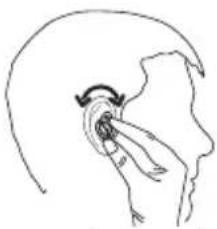
Wearing
natural_image
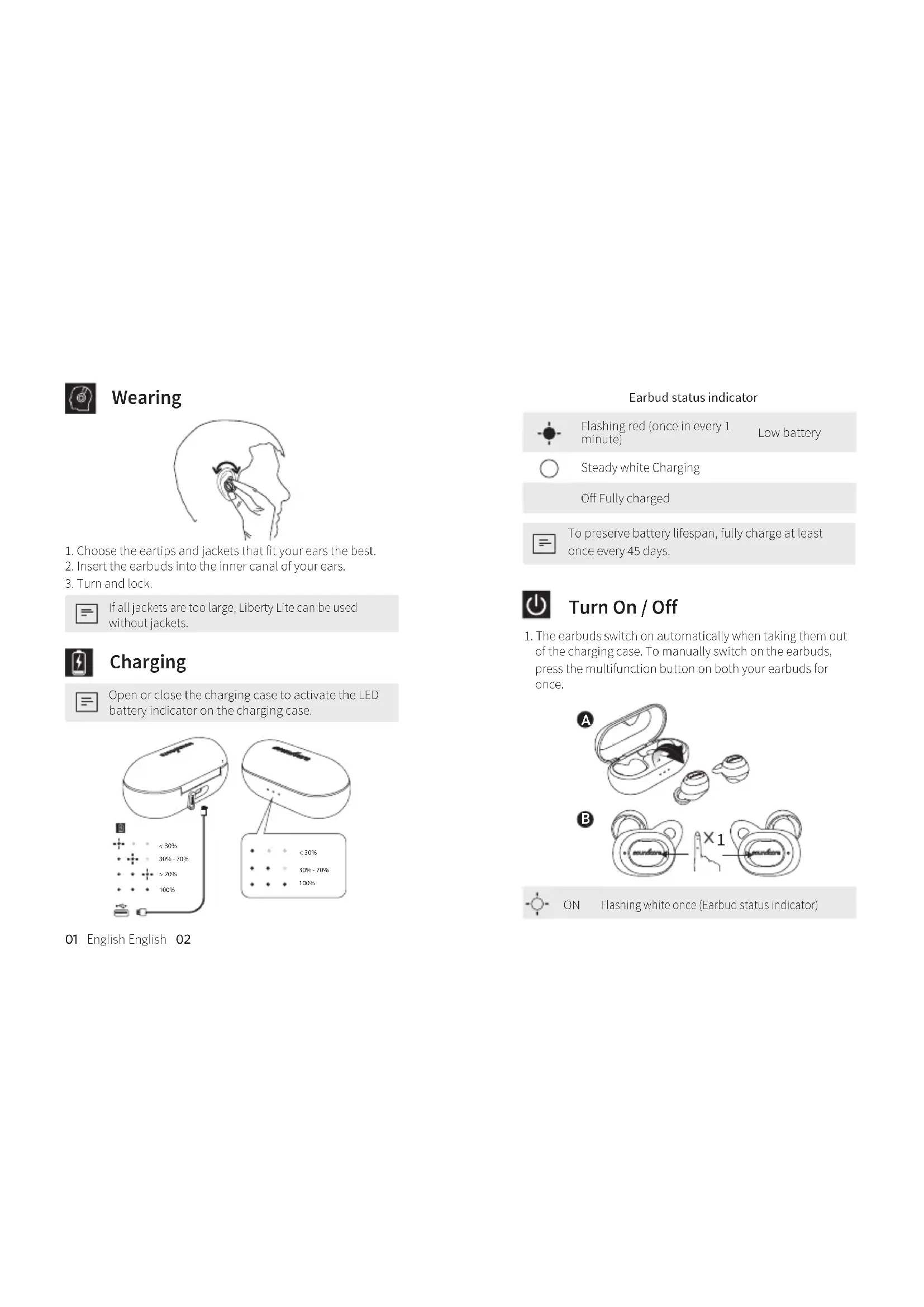
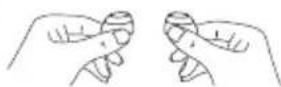
Simple line drawing of a hand pointing to the ear area, no text or symbols present- Choose the eartips and jackets that fit your ears the best.
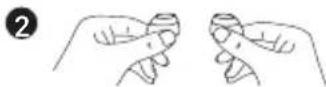
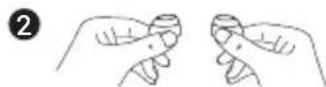
- Insert the earbuds into the inner canal of your ears.
- Turn and lock.

If all jackets are too large, Liberty Lite can be used without jackets.

Charging

Open or close the charging case to activate the LED battery indicator on the charging case.
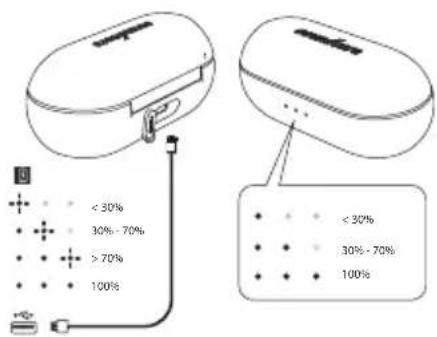
Earbud status indicator

Flashing red (once in every 1 minute)
Low battery

Steady white Charging
Off Fully charged

To preserve battery lifespan, fully charge at least once every 45 days.

Turn On / Off
- The earbuds switch on automatically when taking them out of the charging case. To manually switch on the carbuds, press the multifunction button on both your earbuds for once.
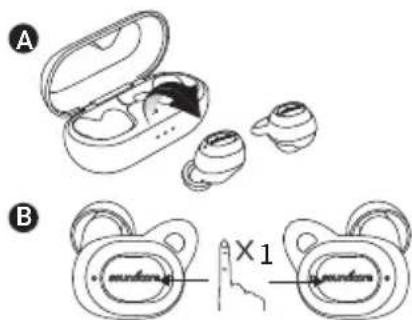

ON Flashing white once (Earbud status indicator)
- The earbuds switch off automatically when placing them back in the charging case. To manually switch off the carbuds, press and hold the multifunction button on both your earbuds for 5 seconds.
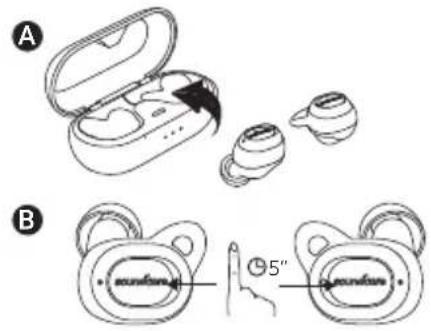
OFF Flashing red once(Earbud status indicator)

Pairing
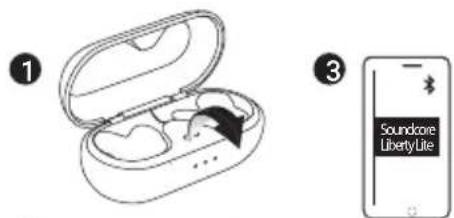
1. Bluetooth connection (Device)
Enter pairing mode when earbuds are switched on
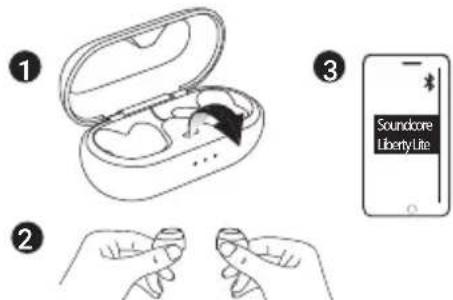
03 English English 04

Rapidly flashing white Pairing mode

Slow flashing white Connected to a device
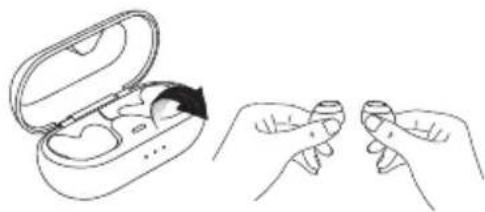
2. True Wireless Stereo connection (earbuds)
Enter True Wireless Stereo pairing mode when earbuds are switched on.
natural_image
Illustration of hands holding a small electronic device with an open case, showing the internal components and a hand gesture (no text or symbols present)
Rapidly flashing white (Right earbud)
Flashing white (Left earbud)
True Wireless Stereo pairing mode

Rapidly flashing white (Right earbud)
Slow flashing white (Left earbud)
True Wireless Stereo connection is successful (The right earbud is connected to the left earbud) but earbuds are not connected to your device

Slow flashing white (Both earbuds)
True Wireless Stereo connection is successful (The right earbud is connected to the left earbud) and earbuds are connected to your device

Controls
 | ||
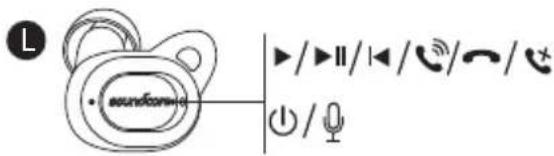
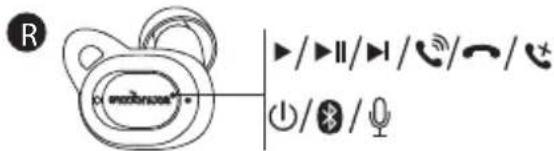
 | Press Play / pause | |
 | Press and hold for 1 second (The multifunction button on the right earbud) | Next track |
 | Press and hold for 1 second (The multifunction button on the left earbud) | Previous track |
 | Control volume via the connected device | Volume up / down |
 | ||
 | Press | Answer / End call |
 | Press and hold for 1 second | Reject call |
 | Press (The multifunction button on the right earbud) | Put current call on hold and answer incoming call |
 | Press and hold for 1 second (The multifunction button on the right earbud) | Switch between held call and active call |
| Transfer a call between headphones and mobile phone | ||
 | Slow flashing white (The right earbud) | On a call |
 | Slow flashing white (The right earbud) | Incoming call |


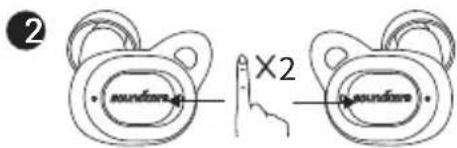
Double click the multifunction button on earbud
Activate Siri / other voice control software

Reset
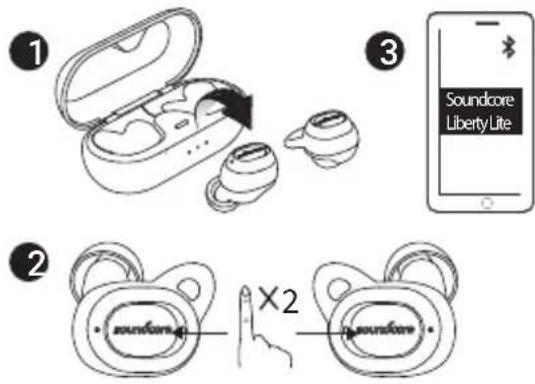
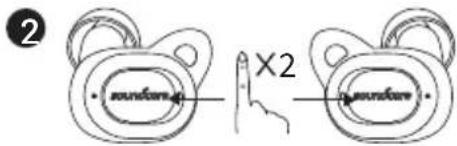
Reset the earbuds if you can hear one side only:
- Put the earbuds back to the charging case and take them out again.
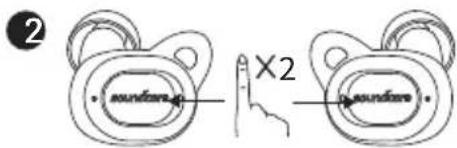
- Double click the multifunction button on both earbuds simultaneously.
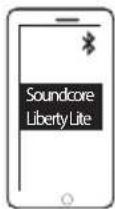
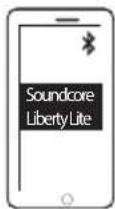
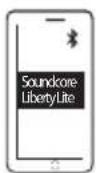
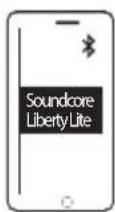
- Go to the Bluetooth® menu on your device and select "Liberty Lite".
Specifications

Specifications are subject to change without notice.
Input 5V 0.5A
...
Charging time 1.5 hours
Play time (varies by volume level and content)
3.5 hours
Weight (product net weight) 51 g/1.8 oz
Impedance
16Ω
Speaker 6 mm × 2
Frequency response 20 Hz - 20 KHz
Bluetooth version V5.0
Range 10 m / 33 ft

Das Tragen
natural_image
Line drawing of a human ear with a finger pointing to the ear area, showing motion (no text or symbols)natural_image
Line drawing showing hands holding a small electronic device with an open case, illustrating the process (no text or symbols)
natural_image
Simple line drawing of a hand holding an ear with a curved arrow indicating rotation (no text or symbols)15 日本語 日本語
イヤホンのステータス表示

赤色の点滅(1分ごとに1回)
電池残量が少なくなっています

白色の点灯 充電中
オフ 満充電

natural_image
Line drawing showing hands holding a small electronic device with an open case, no text or symbols presentnatural_image
Line drawing of a human ear with an arrow indicating rotation around the ear area (no text or symbols)natural_image
Line drawing showing hands holding a small electronic device with an open case and a close-up of its grip (no text or symbols)
natural_image
Line drawing of a human ear with a finger pointing to the ear area (no text or symbols)natural_image
Line drawing of an open wireless earbuds with two earbuds and a black arrow indicating rotation (no text or symbols)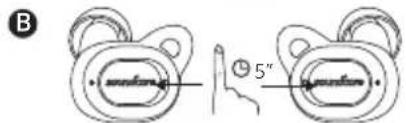
OFF

natural_image
Illustration of hands holding a small electronic device with an open case, showing the internal components and a black arrow indicating rotation (no text or symbols present)
natural_image
Line drawing of an open wireless earbuds with two earless pods, one partially open and one partially closed (no text or symbols)3
natural_image
Simple line drawing of a hand holding an ear with a curved arrow indicating motion (no text or symbols)natural_image
Line drawing of an open wireless earbuds with one partially open and another with a black arrow indicating rotation (no text or symbols)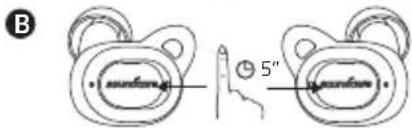

natural_image
Line drawing showing hands holding a small object with a device open, illustrating the process (no text or symbols)
natural_image
Line drawing of a human ear with a finger pointing to the ear area (no text or symbols)natural_image
Line drawing of an open wireless earbuds with a black arrow indicating rotation (no text or symbols)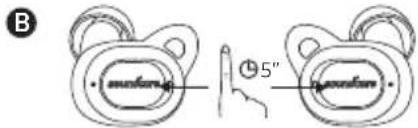
natural_image
Line drawing showing two hands holding a small electronic device with an open case, no text or symbols presentnatural_image
Line drawing of an open wireless earbuds with two earbuds and one earband, no text or symbols present3
natural_image
Simple line drawing of a human head with an arrow indicating motion or force (no text or symbols)耳机状态指示灯

闪烁红灯(每分钟一下)低电量

亮起白灯正在充电
熄灭已充满

natural_image
Line drawing of an open wireless earbuds with two earbuds and a partially open case (no text or symbols)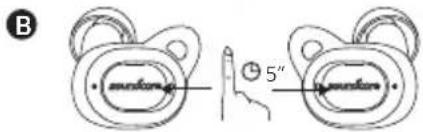
关
闪一下红灯(耳机状态指示灯)

配对
1. 蓝牙连接(设备)
耳机打开后,进入配对模式

快闪白灯配对模式

慢闪白灯 连接到设备
natural_image
Line drawing showing two hands holding a small object inside an open earbell (no text or symbols)
快闪白灯(右耳机)
闪烁白灯(左耳机)
natural_image
Line drawing of a human ear with a finger pointing to the ear area (no text or symbols)이어버드 상태 표시등

natural_image
Line drawing of an open wireless earbuds with two earbuds and a black arrow pointing to one (no text or symbols)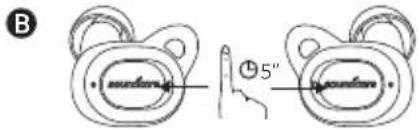
natural_image
Line drawing of an open electronic device with internal components and a black arrow indicating a specific area (no text or symbols)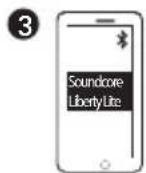
59 한국어
榊색으로 빠르게 깜박임 페어링 모드
natural_image
Illustration showing two hands holding a small object with a device open, one being rotated (no text or symbols present)natural_image
Simple line drawing of a human ear with an arrow indicating rotation or movement (no text or symbols)natural_image
Line drawing of an open wireless earbuds with two earbuds and a black arrow indicating the open device (no text or symbols)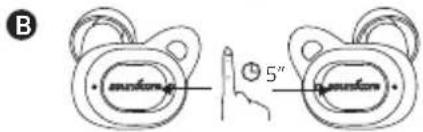
ВЫКЛ.

Быстро мигает белым
светом
Режим сопряжения

natural_image
Line drawing showing two hands holding a small electronic device with an open case, illustrating the process (no text or symbols present)
Быстро мигает белым
natural_image
Simple line drawing of a hand pressing down on a curved surface with an arrow indicating motion (no text or symbols)ية لغربية 71
natural_image
Line drawing of an open wireless earbuds with two earbuds and one earbell, no text or symbols present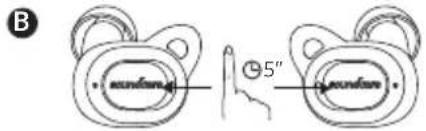
natural_image
Line drawing of an open electronic device with a black arrow pointing to the internal components (no text or symbols)3
2
73 ية لعربيه
natural_image
Line drawing showing two hands holding a small object inside an open earbuds (no text or symbols)natural_image
Line drawing of an open wireless earbuds with two earbuds and one earband, no text or symbols present
Declaration of Conformity
Hereby, Anker Innovations Limited declares that the radio equipment type A3901 is in compliance with Directive 2014/53/EU. The full text of the EU declaration of conformity is available at the following internet address:
www.soundcore.com
Maximum output power: 5.5 dBm
Frequency band: 2.4G band (2.4000GHz-2.4835GHz)
FCC ID:2AOKB-A3901 IC:23451-A3901
Anker Innovations Limited
Room 1318-19, Hollywood Plaza, 610 Nathan Road, Mongkok, Kowloon, Hong Kong
Customer Service
Kundenservice | カスタマーサポート | Service Client Servizio ai Clienti | Atención al Cliente Serviço de Apoio ao Cliente 客服支持 | 고객 서비스 | Обслуживание клиентов | خدمة العلاء

18-month limited warranty
18 Monate beschränkte Herstellergarantie | 18ヶ月保証 Garantie limitée de 18 mois Garanzia limitata 18 mesi Garantía limitada de 18 meses 18 meses de garantia limitada| 18个月质保期 18개월 보증 | Ограниченная гарантия на 18 месяцев ضمانة 18 شهراً محدودة

Lifetime technical support
Lebenslanger technischer Support テクニカルサポート | Support technique à vie Supporto tecnico a vita | Asistencia técnica de por vida Suporte técnico ao longo da vida útil do produto 终身客服支持 | 幽생기술 지원 Техническая поддержка на весь срок эксплуатации الدعم القيمة مدي الحيوة

service@soundcore.com

+1 (800) 988 7973 (US) Mon-Fri 9:00 - 17:00 (PT) +44 (0) 1604 936200 (UK) Mon-Fri 6:00 - 11:00 (GMT) +49 (0) 69 9579 7960 (DE) Mon-Fri 6:00 - 11:00 +81 03 4455 7823 (日本) 月-金 9:00 - 17:00 +86 400 0550 036 (中国) 周一至周五 9:00 - 17:30 +82-2-6464-7088 (한국) 월-금 9:00-17:30
For FAQs and more information, please visit:
soundcore.com/support


@SoundcoreAudio

@soundcoreaudio

@soundcoreaudio
- Wearing
- Charging
- Earbud status indicator
- Turn On / Off
- Pairing
- Bluetooth connection (Device)
- True Wireless Stereo connection (earbuds)
- Controls
- Reset
- Specifications
- Das Tragen
- イヤホンのステータス表示
- 耳机状态指示灯
- 配对
- 蓝牙连接(设备)
- 이어버드 상태 표시등
- Declaration of Conformity
- Customer Service
- 18-month limited warranty
- Lifetime technical support
Brand : soundcore
Model : Liberty Lite
Category : Earplug