Magnasphere 33 - Speaker MAGNAT - Free user manual and instructions
Find the device manual for free Magnasphere 33 MAGNAT in PDF.


User questions about Magnasphere 33 MAGNAT
0 question about this device. Answer the ones you know or ask your own.
Ask a new question about this device
Download the instructions for your Speaker in PDF format for free! Find your manual Magnasphere 33 - MAGNAT and take your electronic device back in hand. On this page are published all the documents necessary for the use of your device. Magnasphere 33 by MAGNAT.
USER MANUAL Magnasphere 33 MAGNAT
Important notes for installation / warranty card
DECLARATION OF CONFORMITY
Hereby, Magnat Audio-Produkte GmbH declares that the Magnasphere is in compliance with the essential requirements and other relevant provisions of directive 2014/53/EU. The Declaration of Conformity can be found at http://www.magnat.de in the download area of the device.
DÉCLARATION DE CONFORMITÉ
The Bluetooth ^® word mark and logos are registered trademarks owned by Bluetooth SIG, Inc. and any use of such marks by Magnat is under license. Other trademarks and trade names are those of their respective owners.
Qualcomm aptX

Qualcomm is a trademark of Qualcomm Incorporated, registered in the United States and other countries, used with permission. aptX is a trademark of Qualcomm Technologies International, Ltd., registered in the United States and other countries, used with permission.
aptX is a product of Qualcomm Technologies International, Ltd.

At the end of the product's useful life, please dispose of it at appropriate collection points provided in your country.
Congratulations on your fine new loudspeakers and thank you very much for choosing MAGNAT! You have made an excellent choice. The high-quality speakers produced by MAGNAT are renowned all over the world.
Please study the instructions and information below carefully before using your new loudspeakers.
IMPORTANT SAFETY NOTICE
Please read through the instruction manual carefully before starting to use the device. This manual contains important information concerning operation and safety aspects. It is imperative you observe all of the information. Keep the manual in a safe location.
- WARNING NOTICES: All of the warning symbols on the device, accessories and in the instruction manual itself must be adhered to.
- EXPOSURE TO HEAT: Only operate the device and accessories in a temperature range from 10°C to 40°C.
- The device should not be positioned near heat sources (heaters, ovens, radiant heaters, naked flames, etc.). When setting up close to an amplifier a minimum distance of 10 cm must be maintained.
- No naked flame sources, such as lighted candles, should be placed on the device.
- Pay attention to a sufficient ventilation of the device. The device may not be covered, e.g. by drapes, curtains. Maintain a distance of 20 cm to walls.
- EFFECT OF MOISTURE: The device should not be exposed to dripping or splash water. Neither should it be used to support vases or other containers filled with liquid. Do not expose the device to water or high levels of humidity. There is a danger of electric shock. In the event of contact with moisture or liquids remove the mains adapter immediately.
- FOREIGN MATERIAL: Ensure that no foreign material enters through the device openings and into the interior. This could trigger short circuits and even result in electric shock and fire.
- CLEANING: Please use a soft, dry cloth with no cleaning agents, sprays or chemical solvents, as these could damage the surfaces.
- ELECTRICAL CONNECTION: Please note the voltage levels on the information signs. The mains adapter for the device should only be operated with the voltage and frequency values specified on the signs.
- LIGHTNING PROTECTION/PREVENTIVE MEASURES: If the device is not going to be used for a prolonged period (e.g. when on holiday), it should be disconnected from the mains by removing the plug. The device should also be disconnected from the mains in the event of a thunderstorm. Doing this will prevent damage caused by lightning and overvoltage.
- MAINS CABLE: The mains cable must always be suitable for operation and it should only ever be laid out in a manner that prevents it from being trodden on. It should not be pinched by objects either, as this can damage the cable. When using plugs and power strips it must be ensured that the cable is not kinked at the point where it emerges from the socket. Do not connect or remove the mains cable with damp hands.
- The mains plug is used as the disconnecting device. Disconnecting devices shall remain readily operable.
- OVERLOAD: Sockets, power strips and extension cables should not be overloaded. If an overload occurs, there is a risk of electric shock and fire.
- SETTING UP: Please read the installation instructions.
- The device should only be positioned or mounted on a solid surface and not on moving base frames, otherwise there is a risk of injury.
- Only use attachments/accessories specified by the manufacturer.
- Use only the following power supply adapter: „KINGWALL Ltd., AS100-050-AD120“
- Batteries (battery pack or batteries installed) shall not be exposed to excessive heat, such as sunshine, fire and the like.
DAMAGE THAT MUST BE RECTIFIED BY A SPECIALIST:
If any of the following damage occurs, disconnect the device from the mains immediately and contact a specialist to conduct the repair work:
- The device should not continue to be operated if there is visible damage to the mains cable. A damaged cable should not be repaired, but must be replaced.
- Damage to the mains socket at the device.
- If moisture or water has entered the device or foreign objects have fallen into the device.
- If the device has fallen and the housing is damaged.
- If the device does not work properly, even though all of the information in the instruction manual has been observed.
Only those subsequent alterations approved by the manufacturer may be conducted.
Only original spare parts should be used for repair.
After conducting any repairs the safety of device should be checked to ensure it is functioning correctly and safely.
Repairs must always be conducted by qualified specialists, as you might otherwise be exposed to dangerous high voltage levels or other hazards.

The triangle with a lightning symbol warns the user that high voltage is used within the device which can result in electric shock.

The triangle with an exclamation mark informs the user that important operating and maintenance instructions (repair) are contained in the accompanying instruction manual, which must be observed.

Do not open! Risk of electric shock!
CAUTION: In order to avoid electric shock do not open the speaker housing/mains adapters or remove the covers. The user is not to conduct any repairs him/herself. Repairs should only be conducted by qualified technicians! Do not use any sockets or extension cables that do not fully accommodate the plug of the device.
INSTRUCTIONS FOR DISPOSAL
In accordance with European Directive 2002/96/EC all electrical and electronic appliances must be disposed of separately via local collection points. Please observe the local regulations and do not dispose of your old appliances with normal household waste.
BATTERY DISPOSAL
Old batteries are hazardous waste and must be disposed of in accordance with current regulations.
CONTENTS
(A) 1 x active loudspeaker Magnasphere 33/55
(B) 2 x power cables for the active loudspeakers
(C) Remote control including 2 batteries (AAA) and screwdriver to open the battery compartment
(D) Magnasphere TX11 transmitter unit
(E) Power supply for the transmitter unit including three mains adapters
(F) Analogue stereo cable (CINCH) 1.5m
(G) Analogue stereo cable (3.5mm jack plug), 1.5m
(H) Optical digital cable (TOSLINK) 1.5m
(I) USB audio cable (Type A – Type B) 1.5m
(J) 1 x user guide (including guarantee document)
(K) 2 sets of metal spikes (Magnasphere 55 only)
UNPACKING THE SPEAKER SET
Please unpack the speakers and accessories carefully and check the contents of the box using the list above. In the event of any transport damage, please contact your supplier. Keep the packing material in a safe location. The original packaging enables trouble-free transportation for any subsequent relocation and servicing requirements.
CONTROLS FOR ACTIVE SPEAKER, FRONT (FIG. 1)
(1) Power LED
Red, dimmed: Standby mode
Red, bright: Operating mode, connected to transmitter
Red, flashing: Operating mode, not connected to transmitter
(2) LED Display: The 3-digit display shows the selected input and information about the operating mode.
- Inputs
Ln1, Ln2: Analogue inputs
OP1, OP2: Optical digital inputs
USB: USB audio input
bt: Bluetooth® input
— : The input cannot be selected
If the display flashes, there is no audio signal available for the selected input.
• Volume display: When changing the volume, the current value (0 ... 40) is displayed. If the playback is muted (mute), the current value flashes.
• F-1, F-2, F-3: Selected transmitter ID
The display goes out approx 10 seconds after the last operation.
(3) Remote control sensor: always point the remote control towards this point on the speaker.
CONTROLS FOR ACTIVE SPEAKER (BACK SIDE) (FIG. 2)
(4) Mains connection
(5) Power switch
(6) SPEAKER CONFIG: Loudspeaker configuration
• LEFT: Stereo operation, left speaker
• MONO: Mono operation, the two stereo channels are added together
• RIGHT: Stereo operation, right speaker channel
(7) BASS: Bass reproduction adjustment -2dB, 0dB, +2dB
(8) TREBLE: Treble reproduction adjustment -2dB, 0dB, +2dB
(9) ZONE SELECT: Assignment of the speaker to a listening zone A, B or C
TRANSMITTER CONTROLS (FRONT, RIGHT SIDE) (FIG. 3)
(10) LED status display:
Red: Standby mode
Red, flashing: Operating mode, connected to the transmitter
Green: Operating mode, connection to speaker established
Blue, flashing: Bluetooth® pairing mode
Red/blue flashing: Establishing connection to loudspeaker
(11) BT-PAIR: Activates the Bluetooth® pairing mode
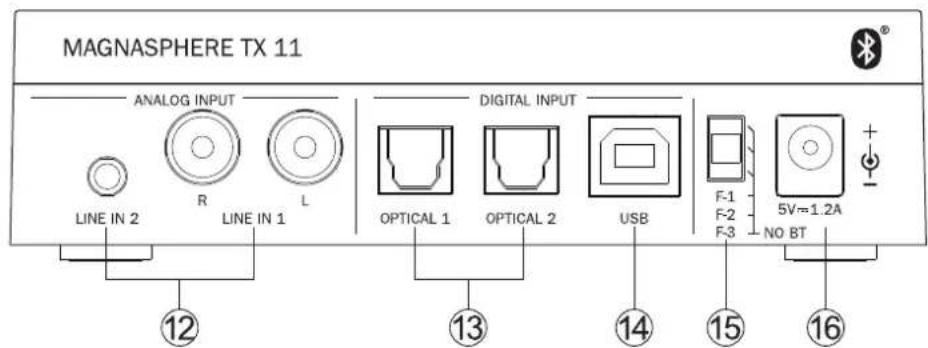
TRANSMITTER CONTROLS, CONNECTIONS (REAR) (FIG. 4)
(12) ANALOGUE INPUT, LINE IN 1 and LINE IN 2: Analogue inputs with RCA connector (LINE IN 1) or 3.5mm jack connector (LINE IN 2).
(13) DIGITAL INPUT, OPTICAL 1 and OPTICAL 2: Digital inputs with TOSLINK ^® connector.
(14) DIGITAL INPUT, USB: USB audio input with USB type B connector.
(15) Transmitter ID: Selects the transmission frequency
F-1: 5.2GHz (default setting)
F-2: 5.8GHz
F-3: 2.4GHz – Please note that, with this setting, the Bluetooth input is not available for system-related reasons!
(16) Voltage supply connection (E).
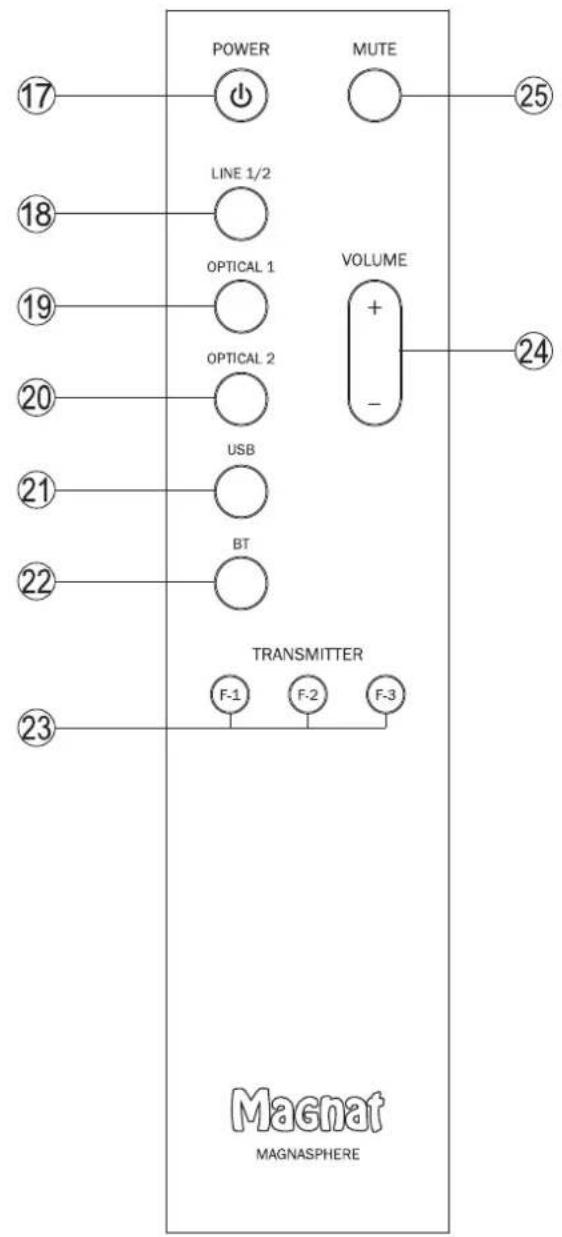
OPERATION WITH THE SYSTEM REMOTE CONTROL (FIG. 5)
(17) POWER: Switches on all speakers in a zone if these are in standby mode. Conversely, all the speakers in a zone can be switched from operating mode to standby mode.
(18) LINE 1/2: Switches the device over to the analogue inputs LINE 1 (press once) or LINE 2 (press twice). Ln1 or Ln2 is shown in the display.
(19) OPT 1: Switches the device over to optical digital input 1 OP 1 is shown in the display.
(20) OPT 2: Switches the device over to optical digital input 2 OP 2 is shown in the display.
(21) USB: Switches the device to the USb input. UB is shown on the display.
(22) BT: Switches the device to the Bluetooth® input. The blue LED status indicator (Fig. 1, (1)) flashes or illuminates (see section System installation - Connecting to a Bluetooth® audio source). bt is shown on the display.
(23) TRANSMITTER: Selects the transmitter ID (F1, F2, F3). The speakers connect to the transmitter, which is set to the corresponding transmitter ID (see transmitter controls, item 15). F-1, F-2 or F-3 is shown in the display.
(24) VOLUME: Increases (+) or decreases (-) the volume.
(25) MUTE: Switches the sound on and off.
LOUDSPEAKER SET INSTALLATION
Positioning the loudspeakers:
The Magnat Magnasphere speakers should, where possible, be set up without any obstructions and slightly inclined towards the listening position.
In addition, the Magnasphere 33 shelf-top speakers should be positioned more or less at ear level (shelf, sideboard or the like).
In the ideal configuration the speakers and the listening position should form an equilateral triangle. When the left and right speakers are the same distance from the listening position their sound arrives at the same time, resulting in a harmonious, natural music reproduction.
There should be a clear line of sight between the loudspeakers and the listening position. Any sound-absorbing or reflecting obstacles in the path will distort the sound.
Now configure the two loudspeakers using the switch at the rear (item 6) and select the same zone A, B or C for both speakers (rotary switch item 9).
Please note: All loudspeakers configured to the same zone are controlled synchronously (power, volume, input, transmitter selection). This means as soon as the settings of a loudspeaker are changed using the remote control, these changes also take effect for all speakers in the same zone.
Positioning the transmitter:
The transmitter should logically be positioned close to the audio sources being connected to the system (stereo system, TV, set top box, etc.).
CONNECTING AUDIO SOURCES TO THE TRANSMITTER
- Connecting to an analogue audio output with cinch output terminals (CD player, tuner, audio amplifier, AV receiver, etc.)
Connect the audio source to the LINE IN 1 input (item 12) using the cable supplied (F)
- Connecting to a headphone output or preamplifier output with a 3.5mm jack socket (e.g. smartphone)
Connect the audio source to the LINE IN 1 input (item 12) using the cable supplied (G)
- Connecting to a computer with a USB port
Connect the transmitter's USB audio input port (item 14) to a computer USB output using the type A to type B cable supplied (I). A driver is not required. If you are prompted to make a selection, please select the SPDIF interface „Magnat Magnasphere“.
- Connecting to digital audio sources
Connect one of the transmitter's digital audio inputs (item 13) to the digital output on your CD player/computer/games console/network player, etc. using an optical digital audio cable. The digital inputs can be selected separately, therefore it is possible to connect two digital sources simultaneously.
Please note: The digital inputs are suitable for stereo signals up to 24 bit/96kHz.
- Connection to a Bluetooth ^® device
Select the Bluetooth ^® input (remote control, item 22). If you have previously connected a Bluetooth ^® device, the loudspeaker will automatically attempt to re-establish a connection with this device. If this is the case, you may be required to manually reconfirm the connection on the source device.
If a connection has not already been made or the connection cannot be re-established, activate the „pairing mode“. To switch the loudspeaker to pairing mode, briefly press the BT PAIR button (Fig. 11, (8)) on the right of the transmitter. The LED on the front of the transmitter (item 10) will flash blue rapidly as long as the pairing mode is active.
Now activate the Bluetooth® mode on your source device. The speaker will appear in the list of Bluetooth® devices as „Magnat Magnasphere“. If it is not displayed in the list, set your source device to search for Bluetooth® devices manually and make sure that the speaker has been switched to the pairing mode.
Depending on the source device, you may be asked whether the password is to be accepted during the pairing procedure. You can confirm this by simply pressing „Accept“. If you are still asked for a password, use the default passwords „0000“ or „1234“. If you are asked if you want to establish a connection after pairing, please select „Yes“. When the device has been paired and connected successfully the Bluetooth® LED status indicator will illuminate continuously and the STBY-Pair LED goes out.
The loudspeaker supports the Qualcomm® aptX™ high quality audio transmission standard. If your source device also supports this standard, "Qualcomm® aptX™" will be selected automatically as the transfer mode when establishing a Bluetooth® connection.
Please note: Please check whether the output of the audio source
a) has a fixed volume level or
b) the level can be adjusted with the volume controller of the audio source.
In case a) you can adjust the volume using the remote control of the MAGNASPHERE; in case b) the level of the audio source should be set to a maximum level where no distortions can be heard at the highest volume setting of the MAGNASPHERE. The volume of the audio source should also be taken into account. No distortions should be evident here either.
CONNECTING THE POWER SUPPLY OF THE TRANSMITTER AND THE ACTIVE SPEAKERS
Two power cables are supplied for the two floor-standing speakers. The mains cable used in your country, however, may be different. If the mains cable is not compatible with your power sockets or if you are in any doubt, please contact your MAGNAT dealer.
-
Connect the power cables to the sockets (Fig. 4 (12)) and (Fig. 5 (24)) on the amplifier of the right and left speakers.
-
Plug the power cable into the power socket. Make sure that you are using the mains plug that is compatible with the socket (refer to the information above).
CONNECTING THE TRANSMITTER'S POWER SUPPLY
The power for the Magnasphere TX11 transmitter is supplied via a plug-in power supply.
The power supply is provided with 3 mains adapters:
-
Euro plug (type C, CEE 7/16)
-
Commonwealth plug (type G, BS 1363)
-
NEMA-1 plug (type A)
Please choose the mains adapter that fits your power sockets at home.
The adapter is inserted in the recess with the nose facing outwards and is pressed down until it clicks into place.
Then connect the cable with the plug to the socket (16) at the rear of the transmitter and plug the power supply into a socket.
INSERT THE BATTERIES IN THE REMOTE CONTROL
The battery compartment in the remote control is located on the lower narrow side and is secured with a Philips screw. Loosen the screw using the screwdriver provided and insert the batteries (2 x type AA) as illustrated on the back of the remote control.
Close the battery compartment and tighten the screw.
OPERATION OF THE MAGNASPHERE LOUDSPEAKER SET (SINGLE ZONE, STEREO OPERATION)
- Checking the zone: Makes sure the same zone is set for both speakers (rear of loudspeaker, item 9)
- Set the loudspeaker configuration: Set the switch (6) on the left speaker seen from the listening position to LEFT, and that on the right speaker to RIGHT.
- Select the transmission frequency (transmitter ID): The transmission frequency can be set via the transmitter ID switch on the transmitter (item 15):
• F1 (5.2GHz, default setting): Provides for very low interference at medium range (within a room or over 2-3 rooms)
• F2 (5.8GHz): Provides for very low interference at short to medium range (within a room or between 2 neighbouring rooms)
- F3 (2.4GHz): This setting enables greater ranges (also on neighbouring floors). As this frequency band is used by a very large number of devices (WLAN, Bluetooth®, etc.), disruptions in operation can occur in unfavourable conditions. Please note that, with this setting, the Bluetooth® input is not available for system-related reasons.
- Make sure the two speakers are connected using the power cables supplied and that the transmitter is connected to a mains socket via the power supply.
- Now switch on the two speakers via the power switch (item 5) at the rear. The speakers are now in standby mode, the LED in the speaker display (1) lights up red (dimmed).
- Switch on the speakers via the button (17) on the remote control. Select the transmitter ID selected under point 3 via the buttons 23. Once the speaker is paired with the transmitter, the LED (1) lights up red. The LED on the transmitter (10) lights up green.
- Select the desired input source via the buttons 18-22.
- Adjust the volume via button 25.
Please note:
- The Magnosphere speakers store the volume set when the system is switched off. This volume is reset automatically when the system is switched on again. However, if the volume is greater than 20, the volume is always set at 20 when the system is switched on again.
- If no signal is reproduced by the loudspeaker over a period of 12 minutes (display (2) flashes), the speaker switches to standby mode automatically.
- If a loudspeaker is not connected to a transmitter (no power to transmitter or different transmitter ID's set), the LED in the speaker display (1) and the LED on the transmitter (10) flash red, and the speaker switches to standby mode automatically after around 3 minutes.
The Magnasphere system can be expanded to up to 3 zones. The zones are named A, B and C.
The zone is configured using the ZONE SELECT switch (9) on the back of the loudspeaker.
All speakers assigned to the same zone (e.g. zone A) are controlled synchronously (power, volume, input). It does not matter which loudspeaker receives the remote control signal.
If a speaker is assigned to another zone (e.g. zone B), control is independent of the first zone (A). This means that volume and input can be set independently for each zone.
Please note:
- The USB input and the Bluetooth® input use the same transmission channel,
- i.e. if Bluetooth ^ is selected as the input in one zone, the USB input cannot be selected at the same time by another zone and vice versa. The following then appears in the display —
- The LINE 1 input and the LINE 2 input use the same transmission channel, i.e. if LINE 1 is selected as the input in one zone, the LINE 2 input cannot be selected at the same time by another zone and vice versa. The following then appears in the display ---. The LINE input can be changed by prolonged pressing of the LINE 1/2 button. However, this change then takes effect in all zones.
CAUTION
Interfering with the speaker or accessories shall result in the expiration of the operating licence. The supplied accessories are to be used for operation. Additional accessories must be intended for the purpose at hand and in perfect working order.
SPECIFICATIONS MAGNASPHERE 33
Configuration: Active stereo shelf-top loudspeaker set
2 way bass reflex, fully active
Speaker assembly: 1 x 170 mm bass
1 x 25 mm tweeter
System output power 130/220 watts (RMS/max.)
Output power per speaker: 65/110 Watt (RMS/Max.)
Frequency range: 28 - 50.000 Hz
Crossover frequency: 2.750 Hz
Efficiency:
Active
Mains voltage: 100/240 V AC / 50/60 Hz
Frequency band of the digital signal transmission: switchable 5.2GHz (F-1), 5.8GHz (F-2), 2.4GHz (F-3)
Sampling rates of the digital inputs: up to 96kHz / 24Bit
Dimensions (wxhxd):
loudspeaker 196 x 325 x 285 mm
Transmitter 124 x 35 x 100 mm
Remote control
38 x 165 x 14 mm
Weight:
speaker:
6.6 kg
Transmitter:
0.2 kg
Operating frequency:
2.4/5.2/5.8 GHz/ BT: 2402 - 2480 MHz
Maximum emitted power according to EN 62479:
17/12/12/11.5 dBm
Power consumption loudspeaker:
wireless network disabled (standby mode):
<0.5W
wireless network enabled (operation mode, no audio signal):
<2.0W
SPECIFICATIONS
Configuration: Active stereo shelf-top loudspeaker set
MAGNASPERE 55
2.5 way bass reflex, fully active
Speaker assembly: 1 x 170 mm bass
1 x 170 mm bass/mid-range loudspeaker
1 x 25 mm tweeter
System output power:
200/360 watts (RMS/max.)
Output power per speaker: 100/180 Watt (RMS/Max.)
Total output power:
220/440 Watt (RMS/Max.)
Frequency range: 24 - 50.000 Hz
Crossover frequency: 320 / 2.750 Hz
Efficiency:
Active
Mains voltage: 100/240 V AC / 50/60 Hz
Frequency band of the digital signal transmission: switchable 5.2GHz (F-1), 5.8GHz (F-2), 2.4GHz (F-3)
Sampling rates of the digital inputs: up to 96kHz / 24Bit
Dimensions (wxhxd):
speaker
196 x 955 x 330 mm
Transmitter 124 x 35 x 100mm
Remote control
38 x 165 x 14 mm
Weight:
speaker:
18.6 kg
Transmitter:
0.2 kg
Operating frequency:
2.4/5.2/5.8 GHz/ BT: 2402 - 2480 MHz
Maximum emitted power according to EN 62479:
17/12/12/11.5 dBm
Power consumption loudspeaker:
wireless network disabled (standby mode):
<0.5W
wireless network enabled (operation mode, no audio signal):
<2.0W
SUBJECT TO TECHNICAL CHANGE.
Très cher client,
text_image
BT-PAIR ⑪4
text_image
MAGNASPHERE TX 11 ANALOG INPUT R LINE IN 1 LINE IN 2 LINE IN 1 DIGITAL INPUT OPTICAL 1 OPTICAL 2 USB F-1 F-2 F-3 5V=1.2A NO BT ⑫ ⑬ ⑭ ⑮ ⑯ ⑰ ⑱ ⑲ ⑳ ⑪5
text_image
POWER LINE 1/2 OPTICAL 1 OPTICAL 2 USB BT TRANSMITTER F-1 F-2 F-3 Magnet MAGNASPHERE 25 24 23GB Congratulations! You have made a wise selection in becoming the owner of a MAGNAT HiFi equipment. Due to high quality MAGNAT products have earned an excellent reputation through the western world. And this high quality standard enables us to grant a 5-years warranty for MAGNAT HiFi speakers and a 2-years warranty for MAGNAT HiFi-electronic components.
The equipments are checked and tested continuously during the entire production process. In case you have problems with your MAGNAT HiFi equipment, kindly observe the following:
- The guarantee period commences with the purchase of the component and is applicable only to the original owner.
- During the guarantee period we will rectify any defects due to faulty material or workmanship by replacing or repairing the defective part at our discretion. Further claims, and in particular those for price reduction, cancellation of sale, compensation for damages or subsequential damages, are excluded. The guarantee period is not altered by the fact that we have carried out guarantee work.
- Unauthorized tampering with the equipment will invalidate this guarantee.
- Consult your authorized dealer first, if guarantee service is needed. Should it prove necessary to return the component to the factory, please insure that · the component is packed in original factory packing in good condition · the quality control card has been filled out and enclosed with the component, · your enclose your receipt as proof of purchase.
- Excluded from the guarantee are: • Illuminates • Wear parts • Shipping damages, either readily apparent or concealed (claims for such damages must be lodged immediately with forwarding agent, the railway express office or post office). • Scratches in cases, metal components, front panels, etc. (You must notify your dealer directly of such defects within three days of purchase.) • Defects caused by incorrect installation or connection, by operation errors (see operating instructions), by overloading or by external force. • Equipments which have been repaired incorrectly or modified or where the case has been opened by persons other than us. • Consequential damages to other equipments. • Reimbursement of cools, without our prior consent, when repairing damages by third parties.
F Toutes nos félicitations!