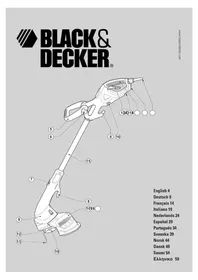
GL675 - Brush cutter BLACK & DECKER - Free user manual and instructions
Find the device manual for free GL675 BLACK & DECKER in PDF.


| Product type | Electric grass trimmer |
| Brand | Black & Decker |
| Model | GL675 |
| Power consumption | 400 W |
| No-load speed | 9 500 min⁻¹ |
| Weight | 2.8 kg |
| Power supply | Mains electric (230 V) |
| Insulation type | Double insulation (class II) |
| Handle length | Telescopic, 3 positions |
| Head orientation | Trimming and cutting mode (swiveling) |
| Cutting diameter | Not specified (estimated ~30 cm) |
| Line feed system | Automatic bump feed |
| Line type | Specific Black & Decker nylon line (ref. A6441) |
| Spool capacity | 2 cutting lines |
| Protection | Protective guard with line cutter blade |
| Safety | On/off switch, safety lock |
| Sound level | LpA: 81 dB(A); LwA: 96 dB(A) |
| Hand/arm vibration | < 2.5 m/s² |
| Intended use | Domestic: lawn edges, small areas |
| Included accessories | Cutting line spool, storage bag, manual |
| Repairability | Spare parts available (spool, line, guard) |
| Warranty | 2 years (warranty conditions) |
Frequently Asked Questions - GL675 BLACK & DECKER
User questions about GL675 BLACK & DECKER
0 question about this device. Answer the ones you know or ask your own.
Ask a new question about this device
Download the instructions for your Brush cutter in PDF format for free! Find your manual GL675 - BLACK & DECKER and take your electronic device back in hand. On this page are published all the documents necessary for the use of your device. GL675 by BLACK & DECKER.
USER MANUAL GL675 BLACK & DECKER
natural_image
Line drawing of a person using a handheld tool to clean or manage equipment (no text or symbols)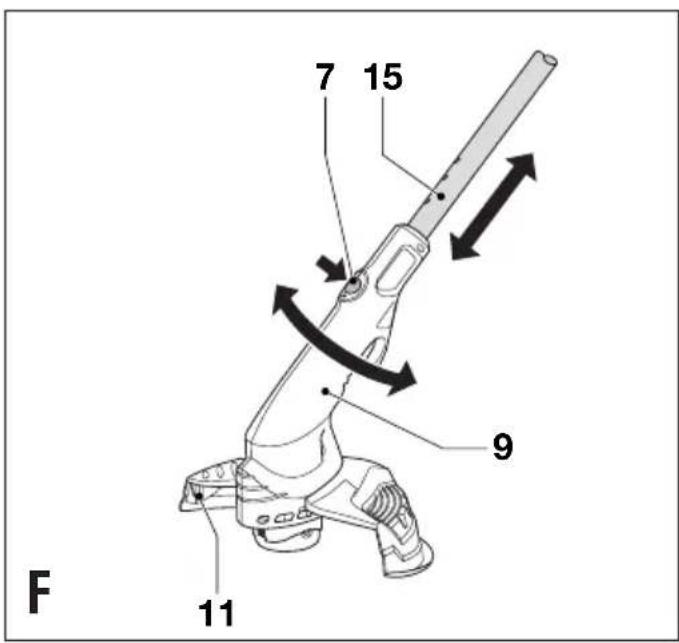
ENGLISH
Intended use
Your Black & Decker strimmer GL675 has been designed for trimming and finishing lawn edges and to cut grass in confined spaces. This tool is intended for consumer use only.
Safety instructions
◆Warning! When using mains-powered appliances, basic safety precautions, including the following, should always be followed to reduce the risk of fire, electric shock and personal injury.
◆Read all of this manual carefully before operating the appliance.
Before operating the appliance, make sure that you know how to switch it off in an emergency.
◆The intended use is described in this manual. The use of any accessory or attachment or performance of any operation with this appliance other than those recommended in this instruction manual may present a risk of personal injury.
◆Retain this manual for future reference.
Work area
◆Do not expose the appliance to rain. Do not use the appliance in damp or wet conditions.
- Only use the appliance in daylight or good artificial light.
Personal protection
◆Wear stout shoes or boots to protect your feet. Do not operate the appliance wearing open-toed sandals or when barefoot.
◆Wear long trousers to protect your legs.
Using your appliance
◆Be sure that the appliance is switched off when plugging in.
◆Stay alert. Watch what you are doing. Use common sense.
◆Do not operate the appliance when you are tired.
If the appliance begins to vibrate abnormally, switch it off and remove the plug from the socket. Allow rotating parts to stop and inspect the appliance for damage and loose parts.
- Never pull the cord to disconnect the plug from the socket. Keep the cord away from heat, oil and sharp edges.
If the mains cable is damaged during use, switch the appliance off and disconnect the plug from the mains immediately. Do not touch the mains cable before disconnecting from the mains.
Safety of others
Do not allow children or any person unfamiliar with these instructions to operate the appliance.
Do not allow children, visitors or animals to come near the work area or to touch the appliance or mains cable.
◆Remember that the operator may be held responsible for accidents or hazards occurring to other people or their property.
After use
◆Switch off, remove the plug from the socket and ensure that moving parts have stopped rotating before leaving the appliance unattended and before changing, cleaning or inspecting any parts of the appliance.
When not in use, the appliance should be stored in a dry place. Children should not have access to stored appliances.
Inspection and repairs
Before use, check the appliance for damaged or defective parts. Check for misalignment and seizure of moving parts, breakage of parts, damage to guards and switches and any other conditions that may affect its operation.
Do not use the appliance if any part is damaged or defective. Do not use the appliance if the switch does not turn it on and off.
◆Never use the appliance when any guard or enclosure is damaged or not in place.
◆Ensure that the appliance will operate properly and perform its intended function.
◆Have any damaged or defective parts repaired or replaced by an authorised repair agent.
Before use, check the mains cable for signs of damage, ageing and wear.
◆Do not use the appliance if the mains cable is damaged or defective.
◆If the mains cable is damaged or defective it must be repaired by an authorised repair agent to avoid a hazard.
◆Never attempt to remove or replace any parts other than those specified in this manual.
Electrical safety

This tool is double insulated; therefore no earth wire is required. Always check that the power supply corresponds to the voltage on the rating plate.
Additional safety instructions for grass trimmers
The following warning symbols are found on the appliance:

Read the manual prior to operation.

Wear safety glasses or goggles when operating this tool.
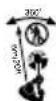
Keep people and animals at least 6 m away from the cutting area.

Do not expose the appliance to rain or high humidity.
◆Before using the appliance, check that your cutting path is free from sticks, stones, wire and any other objects.
Only use the appliance in the correct position, with the cutting line near the ground, as shown in the illustrations. Never switch the appliance on in any other position.
◆Switch on the appliance only when hands and feet are away from the cutting line.
◆Avoid body contact with the cutting line while the appliance is running.
◆Do not work on steep slopes. Be sure of your footing. Be aware that freshly cut grass is damp and slippery.
Take care when trimming near borders and gravel paths or roads, as stones and soil may be moved by the cutting line.
◆Do not put the appliance down until the cutting line has come to a complete standstill.
◆Use only the appropriate type of Black & Decker cutting line. Never use metal cutting line or fishing line.
◆After extending new cutting line, always return the appliance to its normal operating position before switching on.
Take care to keep the mains cable away from the cutting line. Always be aware of the position of the cable.
Features
This tool includes some or all of the following features.
- Trigger lever (on/off switch)
- Handle
- Cable restraint
- Power inlet
- Secondary handle
- Handle knob
- Adjustment button
- Cable storage hooks
- Motor housing
- Guard
- Line trimming blade (see fig. F)
- Spool housing
- Cutting line
- Line storage pouch
- Tube
- Spool storing position
Assembly
Warning! Before assembly, make sure that the tool is switched off and unplugged.
Fitting the guard (fig. A)
◆Remove the screw (17) from the guard (10).
◆Place the guard onto the tool as shown.
◆Firmly press the guard until it snaps into place.
◆Secure the guard with the screw.
Warning! Never use the tool unless the guard is properly fitted.
Fitting the secondary handle (fig. B)
◆Place the handle (5) on the tool as shown.
- Adjust the handle to the most comfortable position. Use the markings as a guide.
◆Pass the bolt (6) through the secondary handle and the main handle.
◆Screw the bolt into the far side of the secondary handle. Do not overtighten the bolt.
Storing the spool not in use (fig. C)
The cutting system not in use can be stored in the position provided (16).
◆Align the tabs on the cutting head with the cut outs (25) at the underside of the handle.
◆Push the cutting head into the handle until it snaps securely into place.
Releasing the cutting line
In transit, the cutting line is taped to the spool housing.
◆Remove the tape holding the cutting line (13) to the spool housing (12).
Connecting the tool to the mains
◆Connect the female plug of a suitable extension cable to the power inlet (4).
◆Loop the cable through the cable restraint (3).
◆Insert the mains plug into a mains outlet.
For wired in cable units: Make sure the cable is looped through the cable restraint prior to connecting the plug to the mains outlet.
Warning! The extension cable must be suitable for outdoor use.
Use
Warning! Let the tool work at its own pace. Do not overload.
Setting the tool to trimming or edging mode (fig. D, E & F)
The tool can be used in trimming mode as shown in fig. D or in edging mode to trim overhanging grass along lawn edges and flower beds as shown in fig. E.
Trimming mode (fig. D & F)
For trimming, the trimmer head should be in the position shown in fig. D. If it is not:
◆Depress the adjustment button (7).
◆Rotate the head (9), while releasing the button.
ENGLISH
- When the head is in position, the button will lock into place. Note: The head will only rotate in one direction.
Edging mode (fig. E & F)
For edging, the trimmer head should be in the position shown in fig. E. If it is not:
◆Depress the adjustment button (7).
◆Rotate the head (9), while releasing the button.
◆When the head is in position, the button will lock into place.
Note: The head will only rotate in one direction.
Adjusting the height of the tool (fig. F)
This tool has a telescopic mechanism, allowing you to set it to a comfortable height. There are three height settings.
To adjust the height setting, proceed as follows:
◆Depress the adjustment button (7).
◆Gently pull the tube (15) in or out of the motor housing (9) to the desired height, while releasing the button.
◆When the tube is in position, the button will lock into place.
Switching on and off
◆To switch the tool on, squeeze the trigger lever (1).
◆To switch the tool off, release the trigger lever.
Warning! Never attempt to lock the trigger lever in the on position.
Hints for optimum use
General
◆In order to achieve optimum cutting results, only cut dry grass.
Trimming
◆Hold the tool as shown in fig. D.
◆Gently swing the trimmer from side to side.
When cutting long grass, work in stages from the top. Take small cuts.
◆Keep the tool away from hard objects and delicate plants.
◆If the tool starts running slowly, reduce the load.
Edging
Optimum cutting results are achieved on edges deeper than 50 mm.
Do not use the tool to create edges. To create edges, use an edging spade.
◆Guide the tool as shown in fig. E.
◆To make a closer cut, slightly tilt the tool.
Maintenance
Your tool has been designed to operate over a long period of time with a minimum of maintenance. Continuous satisfactory operation depends upon proper tool care and regular cleaning.
Warning! Before performing any maintenance, switch off and unplug the tool.
◆Regularly clean the ventilation slots in your tool using a soft brush or dry cloth.
◆Regularly clean the cutting line and spool using a soft brush or dry cloth.
◆Regularly use a blunt scraper to remove grass and dirt from the underneath of the guard.
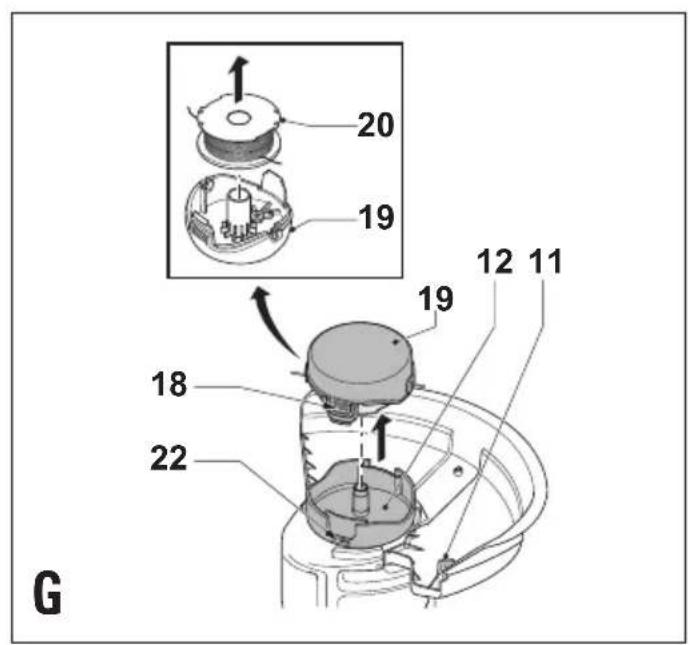
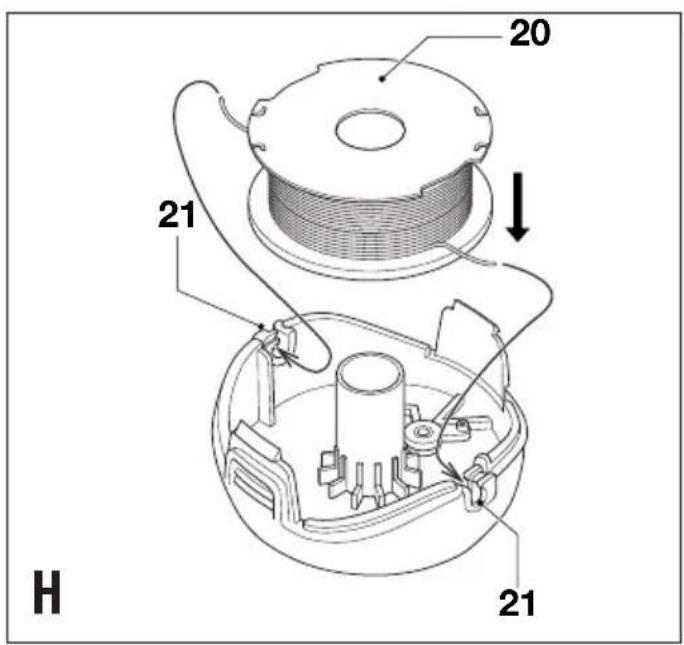
Fitting a new spool of cutting line (fig. G & H)
Replacement spools of cutting line are available from your Black & Decker dealer (cat. no. A6441).
Complete cassettes containing a spool of cutting line are also available (cat. no. 6488).
◆Unplug the tool.
◆Keep the tabs (18) depressed and remove the spool cover (19) from the housing (12) (fig. G).
◆Remove the empty spool (20) from the spool cover.
◆Remove any dirt and grass from the spool cover and housing.
Take the new spool and push it onto the boss in the spool cover. Rotate the spool slightly until it is seated.
◆Unclip the end of one of the cutting lines and guide the line into one of the eyelets (21) (fig. H). The line should protrude approx. 11 cm from the spool cover.
◆Unclip the end of the other cutting line and guide the line into the other eyelet. The line should protrude approx. 11 cm from the spool cover.
♦Align the tabs (18) on the spool cover with the cut outs (22) in the housing (fig. G).
◆Push the cover onto the housing until it snaps securely into place.
Warning! If the cutting lines protrude beyond the trimming blade (11), cut them off so that they just reach the blade.
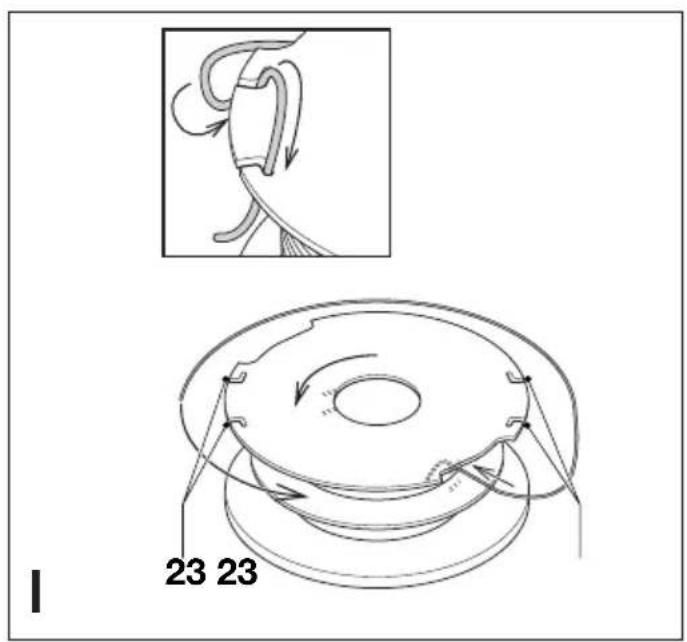
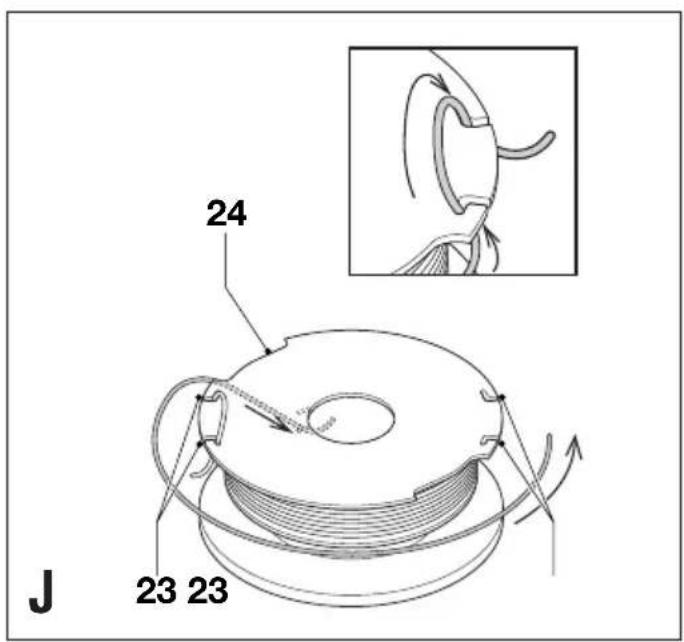
Winding new line onto an empty spool (fig. I, J & K)
You may wind new cutting line onto an empty spool. Replacement packs of cutting line are available from your Black & Decker dealer (cat. no. A6440).
◆Remove the empty spool from the tool as described above.
◆Remove any remaining cutting line from the spool.
- First wind new line onto the uppermost part of the spool:
- Feed 2 cm of cutting line into one of the slots in the upper section of the spool as shown.
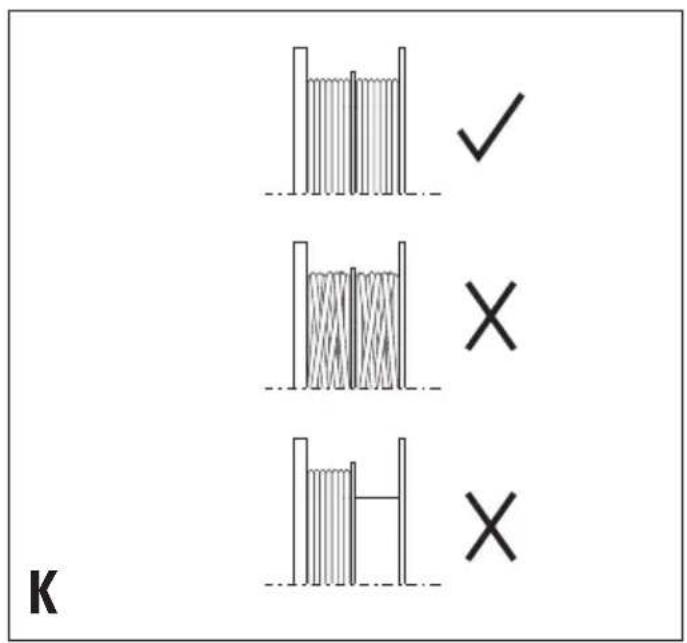
- Wind the cutting line onto the spool in the direction of the arrow. Make sure to wind the line on neatly and in layers. Do not criss-cross.
- When the wound cutting line reaches the recesses (24), cut the line.
- Temporarily park the line in the slots (23) on one side of the spool as shown.
◆Repeat the above procedure for the second cutting line on the lower section of the spool. Park the line in the unused slots (23).
◆Proceed as described above to fit the spool on the tool. Do not forget to release the cutting line from the parking slots (23).
Warning! Only use the appropriate type of Black & Decker cutting line. Ensure that cutting line is present in both sections of the spool (fig. K).
Troubleshooting
If your tool seems not to operate properly, follow the instructions below. If this does not solve the problem, please contact your local Black & Decker repair agent.
Warning! Before proceeding, switch off and unplug the tool.
Tool runs slowly
◆Check that the spool housing can rotate freely. Carefully clean it if necessary.
◆Check that the cutting line does not protrude more than 11 cm from the spool housing. If it does, cut it off so that it just reaches the line trimming blade.
Automatic line feed does not work
- Keep the tabs depressed and remove the spool cover from the housing.
◆Pull the cutting line until it protrudes 11 cm from the housing. If insufficient cutting line is left on the spool, install a new spool of cutting line as instructed above.
♦Align the tabs on the spool cover with the cut outs in the housing.
◆Push the cover onto the housing until it snaps securely into place.
◆If the cutting line protrudes beyond the trimming blade, cut it off so that it just reaches the blade.
If the automatic line feed still does not work or the spool is jammed, try the following suggestions:
◆Carefully clean the spool cover and housing.
◆Remove the spool and check if the lever can move freely.
◆Remove the spool and unwind the cutting line, then wind it on neatly again as described above. Replace the spool as instructed.
Protecting the environment

Black & Decker provides a facility for recycling Black & Decker products once they have reached the end of their working life. This service is provided free of charge.
To take advantage of this service please return your product to any authorised repair agent who will collect them on our behalf.
You can check the location of your nearest authorised repair agent by contacting your local Black & Decker office at the address indicated in this manual. Alternatively, a list of authorised Black & Decker repair agents and full details of our after-sales service and contacts are available on the Internet at: www.2helpU.com.
Technical data
| GL675 | ||
| Power input W 400 | ||
| No load speed min | -1 | 9.500 |
| Weight kg 2.8 | ||
EC declaration of conformity GL675
Black & Decker declares that these products conform to: 98/37/EC, 89/336/EEC, 73/23/EEC, EN 60335, EN 55014, EN 61000, 2000/14/EC, Lawn trimmer, L < 50 cm Annex VIII, No. 0086 B.S.I., HP2 4SQ, United Kingdom
Level of sound pressure, measured according to 2000/14/EC: L_pA (sound pressure): 81 dB(A), L_WA (acoustic power) 95 dB(A), L_WA (guaranteed) 96 dB(A)
Hand/arm weighted vibration, measured according to EN 786: <2.5 m/s ^4
Kevin Hewitt
Director of Consumer Engineering
Spennymoor, County Durham DL16 6JG,
United Kingdom
01-10-2002
Guarantee
Black & Decker is confident of the quality of its products and offers an outstanding guarantee. This guarantee statement is in addition to and in no way prejudices your statutory rights. The guarantee is valid within the territories of the Member States of the European Union and the European Free Trade Area.
If a Black & Decker product becomes defective due to faulty materials, workmanship or lack of conformity, within 24 months from the date of purchase,
ENGLISH
Black & Decker guarantees to replace defective parts, repair products subjected to fair wear and tear or replace such products to ensure minimum inconvenience to the customer unless:
◆The product has been used for trade, professional or hire purposes;
◆The product has been subjected to misuse or neglect;
◆The product has sustained damage through foreign objects, substances or accidents;
◆Repairs have been attempted by persons other than authorised repair agents or Black & Decker service staff.
To claim on the guarantee, you will need to submit proof of purchase to the seller or an authorised repair agent. You can check the location of your nearest authorised repair agent by contacting your local Black & Decker office at the address indicated in this manual. Alternatively, a list of authorised Black & Decker repair agents and full details of our after-sales service and contacts are available on the Internet at:
www.2helpU.com.
Spennymoor, County Durham DL16 6JG,
Royaume Uni
01-10-2002
Garantie
Spennymoor, County Durham DL16 6JG,
Regno Unito
01-10-2002
Garanzia
Director of Consumer Engineering
Spennymoor, County Durham DL16 6JG,
Verenigd Koninkrijk
01-10-2002
Garantie
Spennymoor, County Durham DL16 6JG,
Reino Unido
01-10-2002
Garantía
Director de Engenharia do Consumo
Spennymoor, County Durham DL16 6JG,
Reino Unido
01-10-2002
Garantia
Director of Consumer Engineering Spennymoor, County Durham DL16 6JG, Storbrittannien 01-10-2002
Reservdelar / reparationer
Director of Consumer Engineering
Spennymoor, County Durham DL16 6JG,
United Kingdom
Spennymoor, County Durham DL16 6JG,
UK
01-10-2002
Reservedele / reparationer
Director of Consumer Engineering Spennymoor, County Durham DL16 6JG, Iso-Britannia 01-10-2002
Spennymoor, County Durham DL16 6JG,
Ηνωμένο Βασίλειο
01-10-2002
Εγγύηση
• International, or local, 'advisable care plan this
approxurized fallsSIG calibration determination
◆ Data protection act: Tick the box if you prefer

♦ Kawikos
♦ Codigo ♦ Codigo postal ♦ Postnr
Codice postale ♦ Postcode
revendor - Artificialis layers address
♦ Dealer address ♦ Handelardese
1X0◆ 13◆
The image contains no text or characters.
No Nein Non No Nee
◆ Sim ◆ Ja ◆ Ja ◆ Kyllia ◆ Not
■ Yes Ja Qu! Si Ja
nqum oq aypoc?
koneesi? ◆ Eival to epoxyatio auto in
Aizulevony avertropoctou Hlucopniva apyoc
Dealer addresses Date of purchase
Handelarderesse Kaufatum
• Is just your first purchases! • Is it cases
[Non-Text]
• 10 everyday to identify opportunities?
◆ Onko kone laha?
♦ Er verktovet en gave? ♦ Er verktolet en gave?
regaloy ♦ Recabell esta terremetta comp
di un regaloi? ◆ Kreq u de machine als cadeau?
The Ground Truth image displays a single, solid horizontal line. According to Rule 2 (UNDERSCORE & LINE RULES), this is a stylistic or background line, not a placeholder underscore. Therefore, the OCR result must ignore it and output nothing or only meaningful text. The provided OCR content is "____", which consists of four underscores. This is an incorrect interpretation of the line as a placeholder, violating the rule that stylistic lines must be ignored. The OCR has hallucinated placeholder underscores where none should exist in the GT. Hence, the OCR result is inconsistent with the Ground Truth.
(No text)
(1)
Зробахд
Henderson's knowledge
Ar delta dit forsta B&D-verktyg? ♦ Er det
English Please complete this section immediately after the purchase of your
tool and send it to Black & Decker in your country. If you live in Australia or New Zealand, please register by using the alternative guarantee card supplied.


- ENGLISH
- Intended use
- Safety instructions
- Work area
- Personal protection
- Using your appliance
- Safety of others
- After use
- Inspection and repairs
- Electrical safety
- Additional safety instructions for grass trimmers
- Features
- Assembly
- Fitting the guard (fig. A)
- Fitting the secondary handle (fig. B)
- Storing the spool not in use (fig. C)
- Releasing the cutting line
- Connecting the tool to the mains
- Use
- Setting the tool to trimming or edging mode (fig. D, E & F)
- Trimming mode (fig. D & F)
- Edging mode (fig. E & F)
- Adjusting the height of the tool (fig. F)
- Switching on and off
- Hints for optimum use
- General
- Trimming
- Edging
- Maintenance
- Fitting a new spool of cutting line (fig. G & H)
- Winding new line onto an empty spool (fig. I, J & K)
- Troubleshooting
- Tool runs slowly
- Automatic line feed does not work
- Protecting the environment
- EC declaration of conformity GL675
- Guarantee
- Garantie
- Garanzia
- Garantía
- Garantia
- Reservdelar / reparationer
- Reservedele / reparationer
- Εγγύηση
Brand : BLACK & DECKER
Model : GL675
Category : Brush cutter