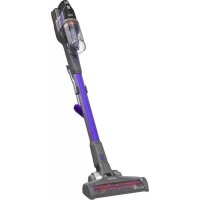
HHVJ315JMF71 - Hand vacuum cleaner BLACK & DECKER - Free user manual and instructions
Find the device manual for free HHVJ315JMF71 BLACK & DECKER in PDF.


| Product Type | Handheld Vacuum Cleaner |
| Brand | Black & Decker |
| Model | HHVJ315JMF71 |
| Power Source | Rechargeable battery pack, 120 V, 60 Hz AC charger |
| Initial Charge Time | At least 5 hours |
| Operating Modes | Normal (low speed) and PowerBoost (high speed) |
| LED Indicators | Charge LED, PowerBoost LED (green), FilterSense LED (red) |
| Filter Type | Cloth filter and plastic filter (washable) |
| Filter Maintenance | Regular cleaning with warm soapy water, replacement every 6 to 9 months |
| Dust Bowl | Removable, maximum capacity: up to the end of the intake chute |
| Integrated Accessories | Telescopic crevice tool, retractable brush |
| Usage | Household use only, for dry debris |
| Warranty | 2-year limited warranty |
| Replacement Filter Numbers | Cloth filter: VBF10 |
| Compliance | Class B (FCC and NMB-003 Canada) |
Frequently Asked Questions - HHVJ315JMF71 BLACK & DECKER
User questions about HHVJ315JMF71 BLACK & DECKER
0 question about this device. Answer the ones you know or ask your own.
Ask a new question about this device
Download the instructions for your Hand vacuum cleaner in PDF format for free! Find your manual HHVJ315JMF71 - BLACK & DECKER and take your electronic device back in hand. On this page are published all the documents necessary for the use of your device. HHVJ315JMF71 by BLACK & DECKER.
USER MANUAL HHVJ315JMF71 BLACK & DECKER
natural_image
Line drawing of a smart car charging device with attached cable (no text or symbols)Thank you for choosing BLACK+DECKER!
PLEASE READ BEFORE RETURNING THIS PRODUCT FOR ANY REASON.
If you have a question or experience a problem with your BLACK+DECKER purchase, go to http://www.blackanddecker.com/instantanswers If you can't find the answer or do not have access to the Internet, call 1-800-544-6986 from 8 a.m. to 5 p.m. EST Mon. - Fri. to speak with an agent. Please have the catalog number available when you call.
SAVE THIS MANUAL FOR FUTURE REFERENCE.
VEA EL ESPANOL EN LA CONTRAPORTADA.
It is important for you to read and understand this manual. The information it contains relates to protecting YOUR SAFETY and PREVENTING PROBLEMS. The symbols below are used to help you recognize this information.

DANGER: Indicates an imminently hazardous situation which, if not avoided, will result in death or serious injury.

WARNING: Indicates a potentially hazardous situation which, if not avoided, could result in death or serious injury.

CAUTION: Indicates a potentially haz ard ous situation which, if not avoided, y result in minor or mod er ate injury.
NOTICE: Used without the safety alert symbol indicates potentially hazardous situation which, if not avoided, may result in property damage.
IMPORTANT SAFETY INSTRUCTIONS
When using an electrical appliances, basic precautions should always be followed, including the following:
READ ALL INSTRUCTIONS BEFORE USING THIS APPLIANCE.
⚠ WARNING: Read all safety
warnings and all instructions. Failure to follow the warnings and instructions listed below may result in electric shock, fire and/or serious injury.
⚠ WARNING: Some household dust contains chemicals known to the State of California to cause cancer, birth defects or other reproductive harm such as asbestos and lead in lead based paint.
⚠ WARNING: To reduce the risk of fire, electrical shock or injury:
- WARNING: To reduce the risk of electric shock – Do not use outdoors or on wet surfaces.
- Do not allow to be used as a toy. Close attention is necessary when used by or near children.
- Use only as described in this manual. Use only manufacturer's recommended attachments.
- Do not use with damaged cord or plug. If appliance is not working as it should, has been dropped, damaged, left outdoors, or dropped into water, return it to a service center.
- Do not pull or carry by cord, use cord as a handle, close a door on cord, or pull cord around sharp edges or corners. Do not run appliance over cord. Keep cord away from heated surfaces.
- Do not unplug by pulling on cord. To unplug, grasp the plug, not the cord.
- Do not handle charger, including charger plug, and charger terminals with wet hands.
- Do not put any object into openings. Do not use with any opening blocked; keep
free of dust, lint, hair, and anything that may reduce air flow.
- Keep hair, loose clothing, fingers, and all parts of body away from openings and moving parts.
- Use extra care when cleaning on stairs.
- Do not use to pick up flammable or combustible liquids, such as gasoline, or use in areas where they may be present.
- Do not pick up anything that is burning or smoking, such as cigarettes, matches, or hot ashes.
- Do not use without dust bag and/or filters in place.
- Do not charge the unit outdoors.
- Use only the charger supplied by the manufacturer to recharge.
- Do not incinerate the appliance even if it is severely damaged. The batteries can explode in a fire.
- This appliance is intended for household use only and not for commercial or industrial use.
- Shock Hazard. To protect against risk of electrical shock, do not put unit or charging base in water or other liquid.
- Do not allow the cord to hang over the edge of a table or counter or touch hot surfaces. The unit should be placed or mounted away from sinks and hot surfaces.
- Plug the charger directly into an electrical outlet.
- Use the charger only in a standard electrical outlet (120V/60Hz).
- Unplug the charger from outlet before any routine cleaning or maintenance.
- This product includes rechargeable nickel cadmium batteries. Do not incinerate batteries as they will explode at high temperatures.
- Leaks from battery cells can occur under extreme conditions. If the liquid, which is a 20-35% solution of potassium hydroxide, gets on the skin (1) wash quickly with soap and water or (2) neutralize with a mild acid such as lemon juice or vinegar. If the liquid gets into the eyes, flush them immediately with clean
water for a minimum of 10 minutes. Seek medical attention.
- Do not look into the air vents when the unit is switched on, as sometimes there is a possibility of small debris being discharged from the air vents, especially after cleaning / replacement of the filters as debris inside the unit can be disturbed.
ADDITIONAL SAFETY WARNINGS
a) Prevent unintentional starting. Ensure the switch is in the off-position before connecting to battery pack, picking up or carrying the appliance. Carrying the appliance with your finger on the switch or energizing appliance that have the switch on invites accidents.
b) Recharge only with the charger specified by the manufacturer. A charger that is suitable for one type of battery pack may create a risk of fire when used with another battery pack.
c) Do not use a battery pack or appliance that is damaged or modified. Damaged or modified batteries may exhibit unpredictable behavior resulting in fire, explosion or risk of injury.
d) Do not expose a battery pack or appliance to fire or excessive temperature. Exposure to fire or temperature above 266°F (130°C) may cause explosion.
e) Have servicing performed by a qualified repair person using only identical replacement parts. This will ensure that the safety of the product is maintained.
⚠ WARNING: Do not attempt to modify or repair the appliance
SAVE THESE INSTRUCTIONS
Symbols
- The label on your tool may include the following symbols. The symbols and their definitions are as follows:
V....volts
A......amperes
Hz......hertz
W......watts
min......minutes
\~ or AC.....alternating current
or DC ..direct current
no no load speed
Class I Construction (grounded)
earthing terminal
⚠️ ......safety alert symbol
☐ ......Class II Construction (double insulated)
.../min or rpm...revolutions or reciprocation per minute
FUCTIONAL DESCRIPTION
- On/off power button
- Handle
- Nozzle
- Extendable crevice tool
- Crevice tool release button
- LED BATTERYSENSE (SMARTECH vacuums only)
- LED POWERBOOST indicator
- Dust bowl
- Dust bowl release button
-
Flip-up brush
-
FILTERSENSE LED (SMARTECH vacuums only)
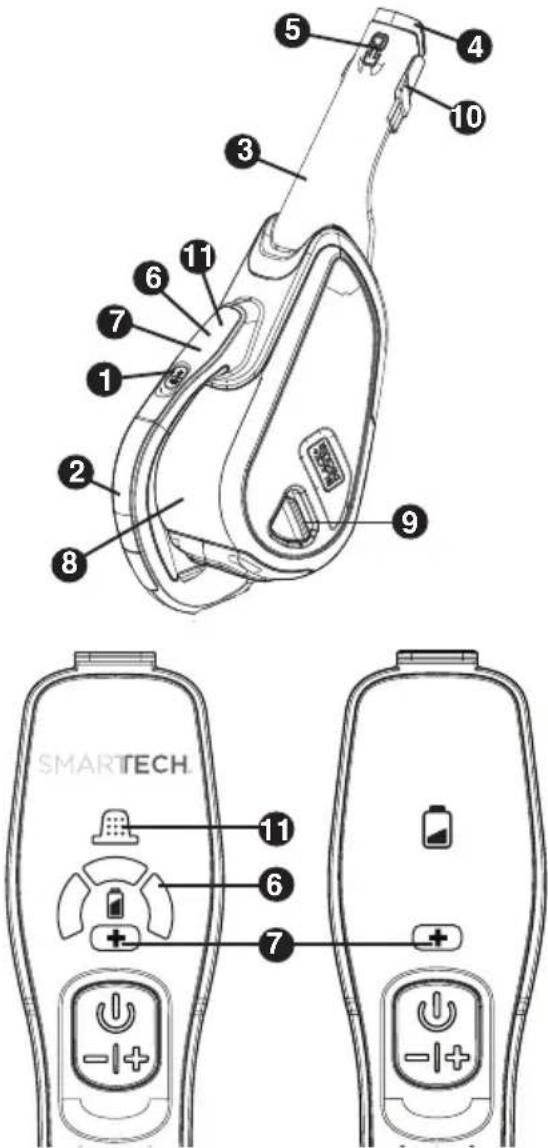
text_image
Technical diagram of a smartwatch with numbered components and labeled parts, including a main body and two side views of the device.Charging the battery
⚠ WARNING: For use
only with the supplied charger.
From new, the rechargeable cells of the product need a minimum charge time of 5 hours to ensure full power.
- Plug the jack plug of the charger into the charging socket of the tool as shown in Figure A. Plug the charger into any standard 120 Volt 60 Hz electrical outlet. The charging indicator will be lit.
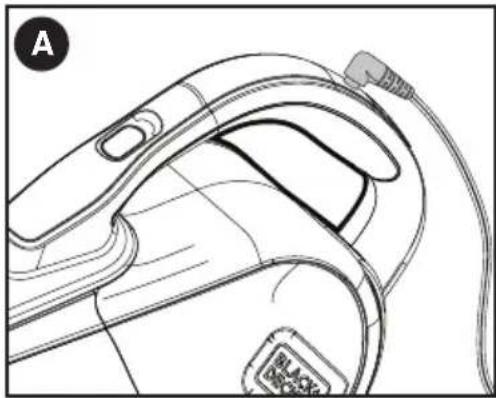
natural_image
Line drawing of a handheld device with attached cable and connector (no text or symbols)| LED Patterns | |
| Charging | |
| Battery Fault | |
| Charger Fault | |
| Battery Hot | |
While charging, the charger may get warm, this is perfectly normal and safe. It is safe to leave the appliance connected to the charger indefinitely. The charger automatically reduces power consumption when charging is complete.
- When charging is complete, the LED will turn off.
⚠ WARNING: Do not charge the battery at ambient temperatures below 39°F (4°C) or above 104°F (40°C).
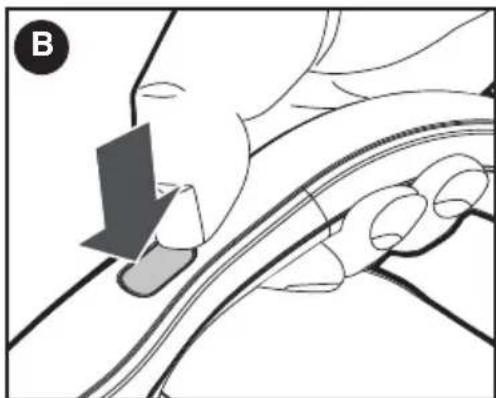
Switching on and off - Figure B
- To switch the appliance on, depress the on/off button (1). The battery indicator LED will illuminate and vacuum will begin in the low-speed mode.
- Depress the button a second time to engage the POWERBOOST mode. The green LED will also illuminate, indicating the vacuum is in the higher-speed mode.
- To switch the appliance off, depress the button a third time.
natural_image
Illustration of a hand holding a car with a finger pointing to the side (no text or symbols)POWERBOOST mode
The green LED will illuminate when the appliance is in POWERBOOST mode. The vacuum will operate at a higher suction level to pick up debris that requires more power.
Filter sensor (HHVJ315JMF ONLY)
Whenever a filter is blocked and needs cleaning, the red LED in the handle will illuminate. Clean dust from filter (See "Cleaning the Dust Bowl and Filter" section).
Nozzle / Accessories
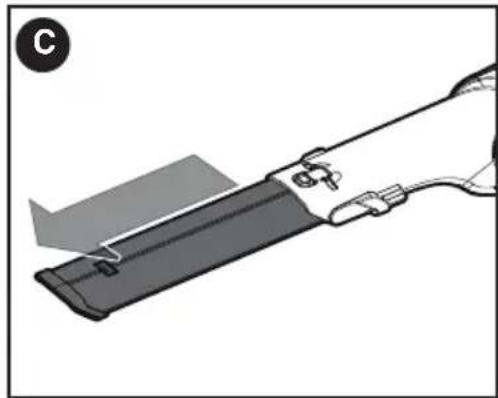
- A crevice tool (4) is built into the nozzle (3). Extend the crevice tool as shown in Figure C, until it clicks in place.
- To shorten the crevice tool, depress the crevice tool release button (5) as shown in Figure D and slide the crevice tool into the nozzle.
natural_image
Diagram of a cable or cable clamp with a handle and connector, no text or symbols present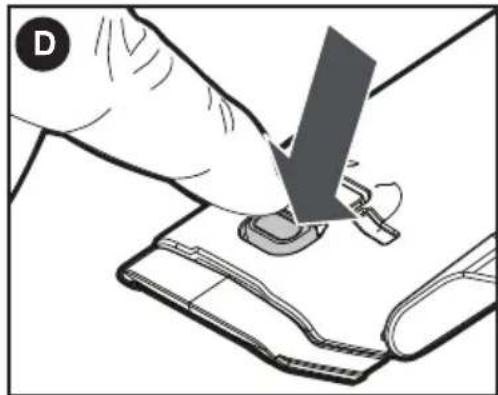
natural_image
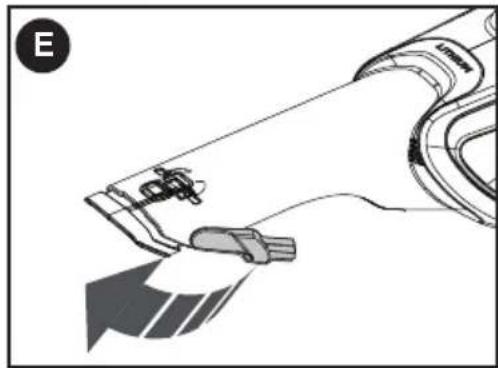
Illustration of a hand using a tool to press or install a small electronic component (no text or symbols visible)- A brush accessory is built into the nozzle and can be flipped upwards for use as shown in Figure E.
natural_image
Diagram of a robotic arm with a tool and directional arrow, no text or symbols presentDry pick up
- For everyday spills of dry material.
- Do not fill the dust bowl (8) beyond the end of the intake chute.
Optimizing the suction force
In order to keep the suction force optimised, the filters must be cleared regularly during use.
EMPTYING AND CLEANING THE PRODUCT
Removing the dust bowl and filters - Figures F & G
⚠ WARNING: The filters are reusable and should be cleaned regularly.
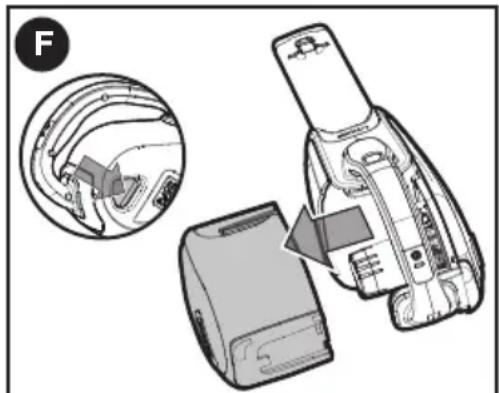
- Press the dust bowl release button (9) as shown in the insert of Figure F, then pull the dust bowl (8) straight off as shown in Figure F.
natural_image
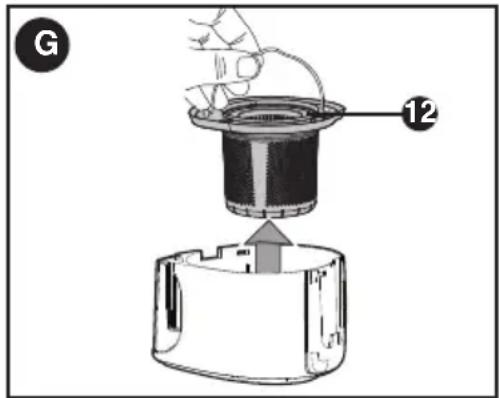
Diagram of a device's internal components, showing a close-up view and a disassembled part (no text or symbols present)- While holding the dust bowl over a bin or sink, pull out the filter (12) to empty the contents as shown in Figure G.
text_image
G 12• To replace the dust bowl, push it back onto the appliance until it clicks firmly into place.
⚠ WARNING: Never use the appliance without the filters. Optimum dust collection will only be achieved with clean filters.
Cleaning the dust bowl and filter
- The dust bowl and filter can be washed in warm soapy water.
- Make sure the filter and the dust bowl are dry before refitting.
For a more thorough cleaning
- Remove the dust bowl and filter assembly as described above.
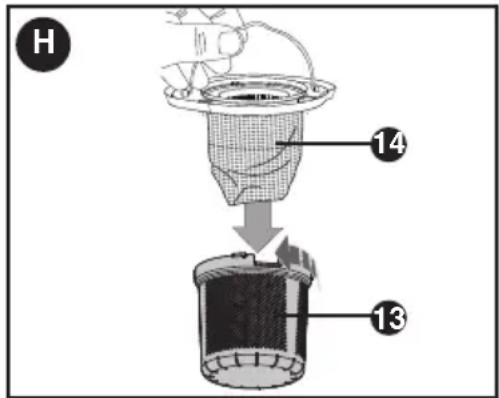
- To separate the plastic filter (13) from the cloth filter (14), twist the plastic filter in a counterclockwise direction and lift it off of the cloth filter as shown in Figure H.
- Shake or lightly brush any loose dust off both filters.
text_image
H 14 13- The dust bowls and filters can be washed in warm soapy water. Allow to dry before placing back into the vac.
- To replace the filters, slide the outer plastic filter over the cloth filter.
- Align the wings of the plastic filter with the slots in the cloth filter and twist in a clockwise direction.
- Place filters back into the bowl pressing firmly to ensure a secure fit.
- To replace dust bowl, place it back onto the handle until it "clicks" firmly into position.
IMPORTANT: Maximum dust collection will only be obtained with a clean filter and an empty dust bowl. If dust begins to fall back out of the product after it is switched off, this indicates that the bowl is full and requires emptying.
- Wash the filters regularly using warm, soapy water and ensure that they are completely dry before using again. The cleaner the filter is, the better the product will perform.
- It is very important that the filter is correctly in position before use.
Replacing the filters
The filters should be replaced every 6 to 9 months and whenever worn or damaged.
Replacement filters are available from your BLACK+DECKER dealer.
Catalog numbers:
- Cloth filter: VBF10
MAINTENANCE
Use only mild soap and damp cloth to clean the vac. Never let any liquid get inside the vac; never immerse any part of the vac into a liquid.
⚠ WARNING: Make sure the vacuum is completely dry before using it.
IMPORTANT: To assure product SAFETY and RELIABILITY, repairs, maintenance and adjustment (other than those listed in this manual) should be performed by authorized service centers or other qualified service organizations, always using identical replacement parts.
The RBRC™ Seal
The RBRC® (Rechargeable Battery Recycling Corporation) Seal on the lithium-ion batteries (or battery packs) indicates that the costs to recycle these batteries (or battery packs) at the end of their useful life have already been paid by BLACK+DECKER. In some areas, it is illegal to place spent lithium-ion batteries in the trash or municipal solid waste stream and the Call 2 Recycle® program provides an environmentally conscious alternative. Call 2 Recycle, Inc., in cooperation with BLACK+DECKER and other battery users, has established the program in the United States and Canada to facilitate the collection of spent lithium-ion batteries. Help protect our environment and conserve natural resources by returning the spent nickel cadmium, nickel metal hydride or lithium-ion batteries to an authorized BLACK+DECKER service center or to your local retailer for recycling. You may also contact your local recycling center for information on where to drop off the spent battery. RBRC® is a registered trademark of Call 2 Recycle, Inc.
Accessories
Recommended accessories for use with your appliance are available from your local dealer or authorized service center. If you need assistance regarding accessories, please call: 1-800-544-6986.
⚠ WARNING: The use of any accessory not recommended for use with this appliance could be hazardous.
This Class B digital apparatus complies with Canadian ICES-003.
This device complies with part 15 of the FCC rules. Operation is subject to the following two conditions: (1) This device may not cause harmful interference, and (2) this device must accept any interference received, including interference that may cause undesired operation.
NOTE: This equipment has been tested and found to comply with the limits for a Class B digital device, pursuant to Part 15 of the FCC Rules. These limits are designed to provide reasonable protection against harmful interference in a residential installation. This equipment generates, uses and can radiate radio frequency energy and, if not installed and used in accordance with the instructions, may cause harmful interference to radio communications. However, there is no guarantee that interference will not occur in a particular installation.

If this equipment does cause harmful interference to radio or television reception, which can be determined by turning the equipment off and on, the user is encouraged to try to correct the interference by one or more of the following measures:
- Reorient or relocate the receiving antenna.
- Increase the separation between the equipment and receiver.
- Connect the equipment into an outlet on a circuit different from that to which the receiver is connected.
- Consult the dealer or an experienced radio/TV technician for help.
Changes or modifications to this unit not expressly approved by the party responsible for compliance could void the user's authority to operate the equipment. This Class B digital apparatus complies with Canadian ICES-003.
SERVICE INFORMATION
All BLACK+DECKER Service Centers are staffed with trained personnel to provide customers with efficient and reliable power tool service. Whether you need technical advice, repair, or genuine factory replacement parts, contact the BLACK+DECKER location nearest you. To find your local service location, call: 1-800-544-6986 or visit www.blackanddecker.com
TWO-YEAR LIMITED WARRANTY
Black & Decker (U.S.) Inc. warranties this product to be free from defects in material or workmanship for a period of two (2) years following the date of purchase, provided that the product is used in a home environment. This limited warranty does not cover failures due to abuse, accidental damage or when repairs have been made or attempted by anyone other than BLACK+DECKER and its Authorized Service Centers. A defective product meeting the warranty conditions set forth herein will be replaced or repaired at no charge in either of two ways:
The first, which will result in exchanges only, is to return the product to the retailer from whom it was purchased (provided that the store is a participating retailer). Returns should be made within the time period of the retailer's policy for exchanges. Proof of purchase may be required. Please check with the retailer for its specific return policy regarding time limits for returns or exchanges. The second option is to take or send the product (prepaid) to a BLACK+DECKER owned or authorized Service Center for repair
or replacement at BLACK+DECKER's option. Proof of purchase may be required. BLACK+DECKER owned and authorized service centers are listed online at www.blackanddecker.com.
This warranty does not apply to accessories. This warranty gives you specific legal rights and you may have other rights which vary from state to state. Should you have any questions, contact the manager of your nearest BLACK+DECKER Service Center. This product is not intended for commercial use, and accordingly, such commercial use of this product will void this warranty. All other guarantees, express or implied, are hereby disclaimed.
LATIN AMERICA: This warranty does not apply to products sold in Latin America. For products sold in Latin America, check country specific warranty information contained in the packaging, call the local company or see the website for such information.
FREE WARNING LABEL REPLACEMENT: If your warning labels become illegible or are missing, call 1-800-544-6986 for a free replacement.
Imported by
Black & Decker (U.S.) Inc.,
701 E. Joppa Rd.
Towson, MD 21286 U.S.A.

text_image
BlackandDecker.com 1-800-544-6986BLACK+ DECKER™
ASPIRATEUR MODE D'EMPLOI
NUMERO DE CATALOGUE HHVJ215JD, HHVJ315JD, HHVJ315JMF
text_image
Technical diagram of a smartwatch with numbered parts and labeled accessories, including a battery and power button.natural_image
Line drawing of a handheld device with attached cable and connector (no text or symbols)natural_image
Illustration of a hand holding a curved object, possibly a device or tool, with no visible text or symbols.Mode POWERBOOST
natural_image
Diagram of a cable or cable connector with a gray rod inserted, showing internal components and a gray extension (no text or symbols)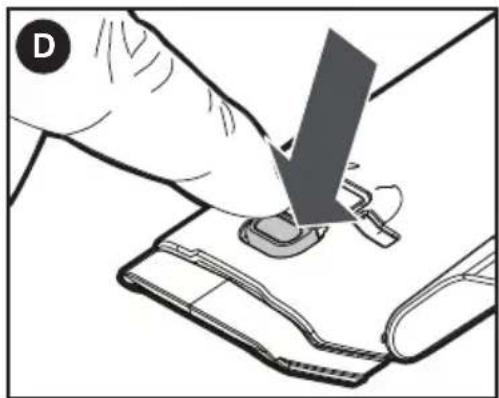
natural_image
Illustration of a hand using a tool to press or install a small electronic component (no text or symbols visible)natural_image
Diagram of a device with a handle and cable, showing mechanical components (no text or symbols)natural_image
Diagram of a device with internal components and a magnified inset showing a close-up view of the head (no text or symbols present)Black & Decker Canada Inc.
100 Central Ave.
text_image
Labeled diagram of a device with numbered parts for identification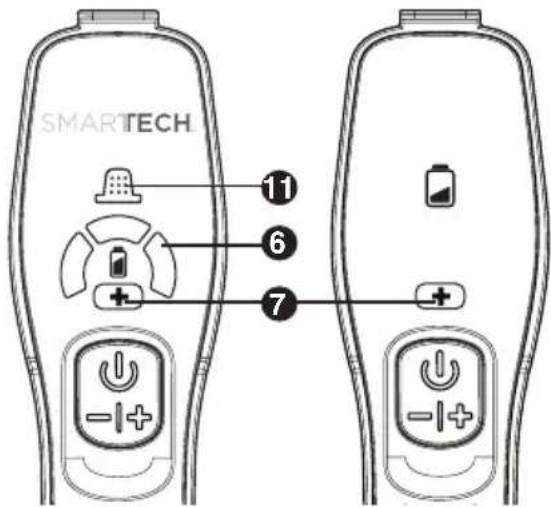
text_image
SMARTECH 11 6 7Carga de la batería
natural_image
Line drawing of a handheld device with attached cable and connector (no text or symbols)natural_image
Illustration of a hand holding a curved object with a dark object inserted, no text or symbols presentnatural_image
Diagram of a cable or cable device with a handle and connector, no visible text or symbols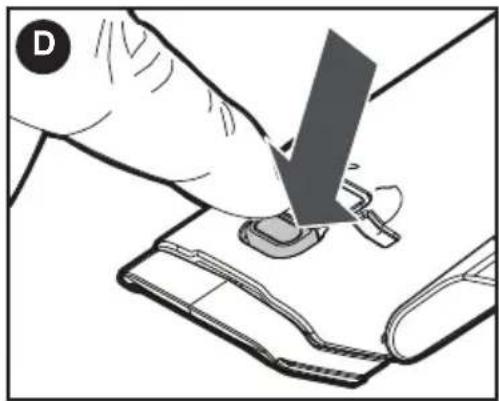
natural_image
Illustration of a hand using a tool to press or install a small electronic component on a device (no text or symbols visible)natural_image
Diagram of a mechanical device with a lever and handle, showing no text or symbolsAspirado en seco
natural_image
Diagram showing a device being inserted into a device, with an inset close-up of the internal components (no text or symbols present)Date of purchase · Fecha de compra Invoice No. · No. de factura
Col. Fracc. Universidad
Chihuahua, Chihuahua
Tel. 01 614 413 64 04
Fernando González Armenta
Bolivia No. 605
Col. Felipe Carrillo Puerto
Cd. Madero, Tamaulipas
Tel. 01 833 221 34 50
Cat. No. HHVJ215JD, HHVJ315JD, HHVJ315JMF
Copyright© 2016 BLACK+DECKER Printed in
Form No. 90632064
China January 2016