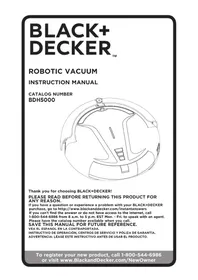
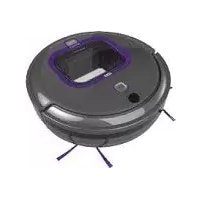
BDH5000 - Robot vacuum BLACK & DECKER - Free user manual and instructions
Find the device manual for free BDH5000 BLACK & DECKER in PDF.


| Product type | Robot vacuum cleaner |
| Brand | Black & Decker |
| Model | BDH5000 |
| Power supply | Rechargeable lithium-ion battery, 120V/60Hz AC charger |
| Runtime | Up to 30 minutes in cleaning mode, varies by mode |
| Charging time | Approximately 5 hours for a full charge |
| Cleaning modes | Spiral, cleaning, maximum, remote control |
| Dustbin capacity | Approximately 0.5 L (estimated) |
| Filter | Washable, replace every 6 to 9 months |
| Brushes | Main brush, rubber brush, side brushes |
| Sensors | Infrared for charging station, obstacle sensors |
| Charging station | Yes, with LED display and timer |
| Remote control | Yes, with directional control |
| Dimensions (estimated) | Diameter 30 cm, height 8 cm |
| Weight (estimated) | Approximately 3 kg |
| Noise level | Not specified, typical for a robot vacuum |
| Warranty | 1 year limited |
| Maintenance | Clean the dustbin, filter, brushes, and sensors regularly |
| Safety | Automatic shut-off if stuck, indoor use only |
Frequently Asked Questions - BDH5000 BLACK & DECKER
User questions about BDH5000 BLACK & DECKER
0 question about this device. Answer the ones you know or ask your own.
Ask a new question about this device
Download the instructions for your Robot vacuum in PDF format for free! Find your manual BDH5000 - BLACK & DECKER and take your electronic device back in hand. On this page are published all the documents necessary for the use of your device. BDH5000 by BLACK & DECKER.
USER MANUAL BDH5000 BLACK & DECKER
natural_image
Technical line drawing of a helmet or helmet component (no text or symbols)Thank you for choosing BLACK+DECKER!
PLEASE READ BEFORE RETURNING THIS PRODUCT FOR ANY REASON.
If you have a question or experience a problem with your BLACK+DECKER purchase, go to http://www.blackanddecker.com/instantanswers If you can't find the answer or do not have access to the Internet, call 1-800-544-6986 from 8 a.m. to 5 p.m. EST Mon. - Fri. to speak with an agent. Please have the catalog number available when you call.
SAVE THIS MANUAL FOR FUTURE REFERENCE.
VEA EL ESPANOL EN LA CONTRAPORTADA.
1 Spot button
2 Clean button
3 Max button
4 Power indicator
5 Handle
6 Infrared receiver
7 Charging electrodes
8 Front Cover
9 Dust bin
10 Fan cover
11 Power switch
12 Charging socket
13 Filter
14 Main brush
15 Rubber brush
16 Brush cover
17 Side brushes
18 Rechargeable battery
19 Sensors
20 Front wheel
21 Charging dock
22 LED screen
23 Battery Charger
24 Remote control
25 Additional mesh filter
26 Maintenance brush
IMPORTANT SAFETY INSTRUCTIONS
⚠ WARNING: Read all safety warnings and all instructions. Failure to follow the warnings and instructions listed below may result in electric shock, fire and/or serious injury.
⚠ WARNING: Some household dust contains chemicals known to the State of California to cause cancer, birth defects or other reproductive harm such as asbestos and lead in lead based paint.
⚠ WARNING: To reduce the risk of electric shock – Do not use outdoors or on wet surfaces.
- Do not allow to be used as a toy. Close attention is necessary when used by or near children.
- This product is not intended for use by anyone (including children) with inadequate physical, sensory, or mental abilities, or who lack the experience, knowledge or skills to operate the robot. Children should never be left alone with this product.
- Turn off the power switch when children or pets are alone with the appliance.
- Use only as described in this manual. Use only manufacturer's recommended attachments.
- If appliance is not working as it should, has been dropped, damaged, left outdoors, or dropped into water, return it to a service center.
- Do not step on or put objects on robot.
- Do not handle charger, including charger plug, and charger terminals with wet hands.
- This appliance should only be used for dry pick up. Do not use to pick up anything wet or liquids of any kind.
- Do not put any object into openings. Do not use with any opening blocked; keep free of dust, lint, hair, and anything that may reduce air flow.
- Keep hair, loose clothing, fingers, and all parts of body away from openings and moving parts.
- Do not pick up anything that is burning or smoking, such as cigarettes, matches, or hot ashes.
- Before use, remove any objects from the floor that may become tangled in the appliance, such as power cords, fragile items, strings, toys, or clothing.
- Remove any objects that become lodged in the appliance immediately.
- For rugs with tassels or loose fabric, fold them under the rug. The appliance may
grab and unravel the rug.
- Do not use without dust bin and/or filter in place.
- Do not charge the unit outdoors.
- Use only the charger supplied by the manufacturer to recharge.
- Do not incinerate the appliance even if it is severely damaged. The batteries can explode in a fire.
- This appliance is intended for household use only and not for commercial or industrial use.
- Keep sensors clean. Sensors may not work properly if they become blocked.
- The sensors on this appliance may not work properly on different floor types. Test the appliance on each surface before allowing it to operate independently.
- Shock Hazard. To protect against risk of electrical shock, do not put unit or charging base in water or other liquid.
- This appliance should not be used on floors with exposed electrical outlets.
- The unit should be placed or mounted away from sinks and hot surfaces.
- Plug the charger directly into an electrical outlet.
- Use the charger only in a standard electrical outlet (120V/60Hz).
- Unplug the charger from outlet before any routine cleaning or maintenance.
- Do not look into the air vents when the unit is switched on, as sometimes there is a possibility of small debris being discharged from the air vents, especially after cleaning / replacement of the filter as debris inside the unit can be disturbed.
- The infrared signal between the appliance and the charging dock may become compromised if more than one robot vacuums are used at the same time, or if used in a location exposed to a halogen lamp.
PROPER ROOM PREPARATION
- Place the cords from other appliances out of the area to be cleaned.
- Do not operate the vacuum in a room where an infant or child is sleeping.
- Do not operate the vacuum in an area where there are lit candles or fragile objects on the floor to be cleaned.
- Do not operate the vacuum in a room that has lit candles on furniture that the vacuum may accidentally hit or bump into.
- Do not allow children to sit on the vacuum.
- Do not use the vacuum on a wet surface.
SAVE THESE INSTRUCTIONS
Charging
Your vacuum can be manually charged via the jack plug or automatically charged via the charging dock.
- Before first use, the battery must be charged for at least 5 hours.
NOTE: While charging, the charger may become warm. This is normal and does not indicate a problem. The appliance can be left connected to the charger indefinitely.
⚠ WARNING: Do not charge the battery at ambient temperatures below 50 °F or above 104 °F.
LED INDICATORS
The power indicator (4) has various settings that show the charging status.
NOTE: If the power switch (11) is turned off, the power indicator will not illuminate.
| Pulsing Blue Charging—charged enough to vacuum | |
| Solid Blue Fully charged | |
| Solid Orange Low battery—can not vacuum | |
| All lights on Error, robot stuck |
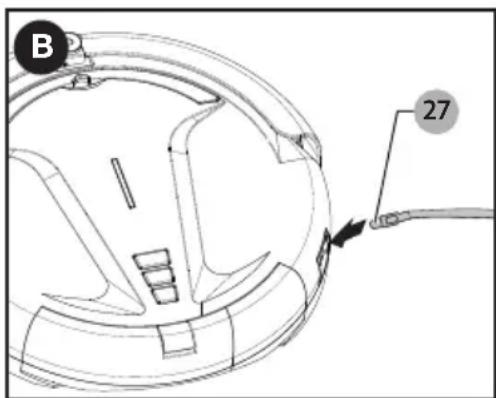
MANUALLY CHARGE (FIGURE A, B)
- Plug the battery charger (23) into a wall outlet.
- Slide the jack plug (27) end of the charger into the charging socket (12) of the vacuum.
- The power indicator (4) will blink, meaning the vacuum is charging. The power indicator will remain lit when the vacuum is fully charged.
AUTOMATICALLY CHARGE (FIGURE A, C, D)
- Plug the battery charger (23) into a
wall outlet.
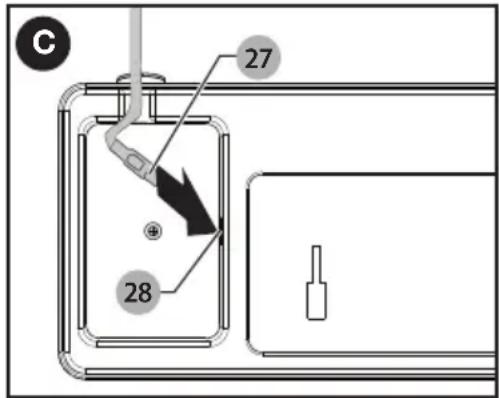
- Slide the jack plug (27) end of the charger into the charging dock's (21) charging socket (28) as shown in Figure C. The charging dock's LED screen (22) will turn on.
- Place the charging dock on the floor. NOTE: Do not place anything under the charging dock. It will prevent the vacuum from automatically charging.
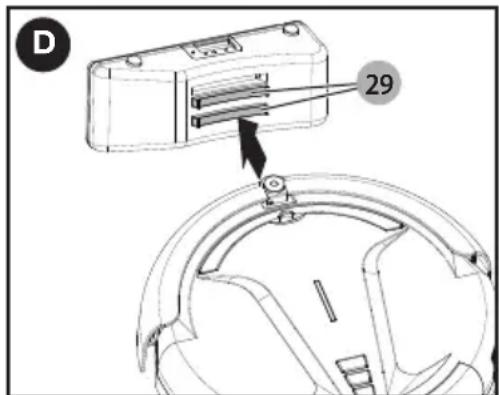
- Place the vacuum against the charging dock so that the charging electrodes (7) contact the two charging plates (29) as shown in Figure D.
- The power indicator (4) will blink and the charging icon on the LED screen (22) will scroll, meaning the vacuum is charging. The power indicator will remain lit when the vacuum is fully charged.
NOTE: The vacuum will search for the charging dock when it is low on battery. However, if the room is too large or the vacuum is obstructed from “seeing” the dock, it may fail to find the dock to automatically recharge. If this occurs, place the vacuum at the charging dock as described above.
Operation
SWITCHING ON AND OFF
In order for the vacuum to operate in any cleaning mode, the power switch (11) must first be switched on.
-
Press the side of the power switch marked "ON".
-
Choose the mode and press the corresponding button; spot (1), clean (2), or max (3); on either the top of the vacuum or the remote (24). The vacuum will begin cleaning.
- To stop the vacuum, press any button on the vacuum or remote.
- To turn the vacuum off completely, press the side of the power switch marked "OFF".
MODES
Spot mode - Press the spot button (1) to select this mode. The vacuum will clean in a spiral pattern for approximately 2-5 minutes. If the battery runs low, the vacuum will automatically search for the charging dock (21). This mode is ideal for cleaning small areas, about 11 sqft (1m²).
Clean mode - Press the clean button (2) to select this mode. The vacuum will clean for 30 minutes depending on the objects around it. If the battery runs low, the vacuum will automatically search for the charging dock (21). This mode is ideal for small rooms with less than 215 sqft (20m²).
Max mode - Press the max button (3) to select this mode. The vacuum will operate until the battery is low. When the battery runs low, the vacuum will automatically search for the charging dock (21). This mode is ideal for large rooms.
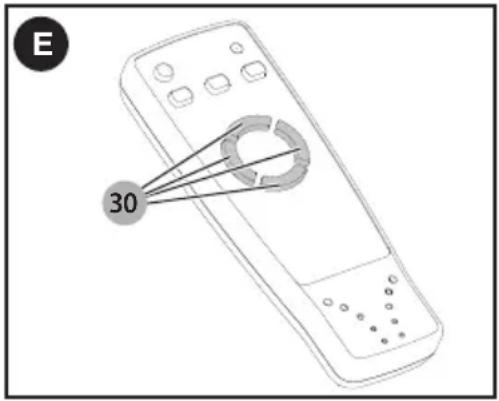
Driving with remote - This mode allows you to control where the vacuum goes.
- Press the side of the power switch (11) marked "ON".
- Press the cursor buttons (30) on the remote to make the vacuum go forward, backward, left, and right (Figure E).
NOTE: Repeatedly press the left, right, and backward buttons to make the vacuum move in that respective direction. Once the button is released, the vacuum will resume moving forward.
NOTE: The cursor buttons will not drive the vacuum if any of the preset modes are activated or if the power switch is "OFF".
SETTING THE CLOCK ON THE CHARGING DOCK (FIGURE A, F)
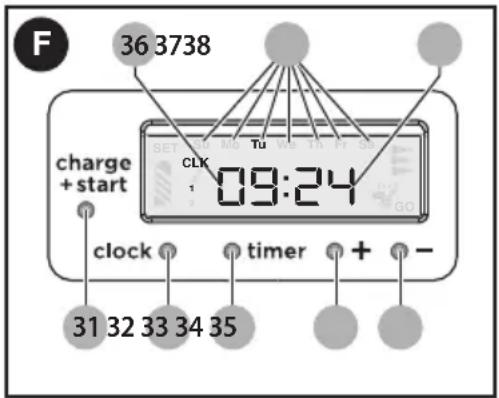
- Press the clock button (32) once. The hour digits (36) on the LED screen (22) will blink. Press the + or - buttons (34 and 35) to set the current hour.
- Press the clock button a second time. The minute digits (37) will blink. Press the + or - buttons to set the current minute.
- Press the clock button a third time. The day of the week (38) will blink at the top of the LED screen. Press the + or - buttons to set the current day of the week.
- Press the clock button a fourth time to exit clock set up.
AUTO CLEAN (FIGURES A, F, G)
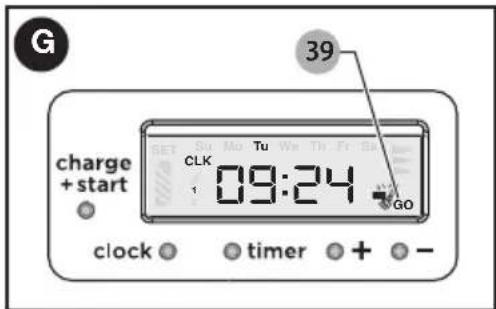
Once the battery is fully charged, the vacuum will automatically leave the charging dock (21) and clean under max mode.
-
Press the Charge+Start button (31) to quickly set the auto-go function. The “GO” icon (39) will appear in the bottom-right corner of the LED screen (22), indicating the auto clean function is active.
-
Press the Charge+Start button a second time to deactivate auto clean.
SETTING TIMER TO AUTO CLEAN (FIGURE A, F, H)
Setting the timer will allow your vacuum to automatically clean at a specific time.
- Ensure the auto clean function is deactivated. The "Go" icon (39) should be turned off.
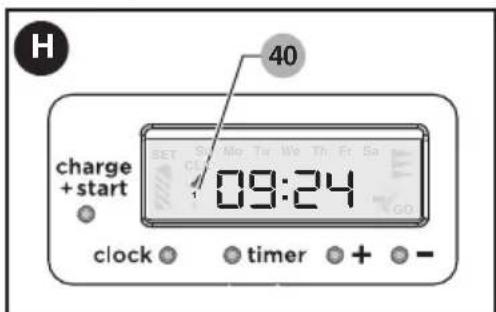
- Press the timer button (33). The hour digits (36) on the LED screen (22) will blink and the timer icon (40) will display. Press the + or - buttons (34 and 35) to set the desired hour of cleaning.
- Press the timer button a second time. The minute digits (37) will blink. Press the + or - buttons to set the desired minute of cleaning.
- Press the timer button a third time. The LED screen will display "OFF."
- Press the + button (34) to switch to "ON." The "1" under the timer icon will switch to "2".
- Press the timer button again to exit timer set up.
NOTE: In order for the vacuum to start cleaning at the set time, it must be charged via the charging dock (21) and turned on.
NOTE: During auto cleaning and schedule setting, the vacuum needs to be turned on and properly connected to the charging dock (21), otherwise the setting will be deactivated.
NOTE: If the battery is not fully charged or has been charging for less than 5 hours, the timer function will not be activated.
NOTE: If the charging dock (21) loses power, the clock and timer will need to be reset.
HANDLE
The vacuum is equipped with a handle to make carrying it easy and clean.
Maintenance
WARNING: Make sure the vacuum is completely dry before using it.
- Use only mild soap and damp cloth to clean the vac. Never let any liquid get inside the vac; never immerse any part of the vac into a liquid.
IMPORTANT: To assure product SAFETY and RELIABILITY, repairs, maintenance and adjustment (other than those listed in this manual) should be performed by authorized service centers or other qualified service organizations, always using identical replacement parts.
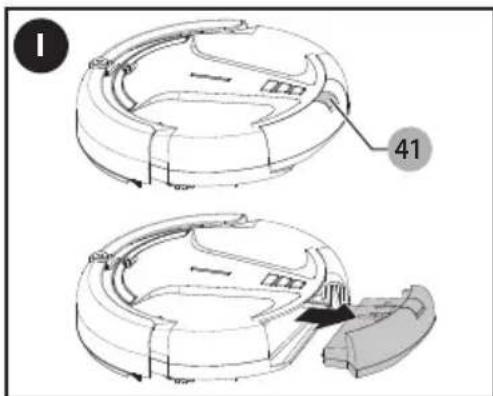
EMPTYING THE DUST BIN (FIGURE A, I)
- Turn the power switch (11) off.
- Press the dust bin release button (41) and slide the dust bin (9) out of the vacuum.
- Empty the contents of the dust bin.
- Replace the dust bin. Slide it back onto the vacuum until it clicks firmly into place.
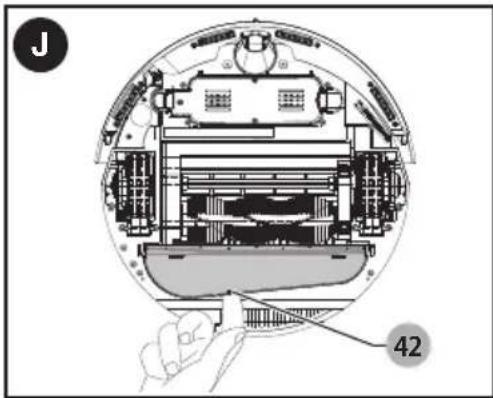
CLEANING THE INLET AND FAN COVER (FIGURE A, J)
- Turn the power switch (11) off.
- Place the vacuum upside down on a flat surface.
- Push in the tab (42) on the fan cover (10) and remove the cover.
- Clean out debris with the maintenance brush (26). This will ensure better air ventilation.
- Replace cover. Align the nubs at the ends of the cover before pressing down.
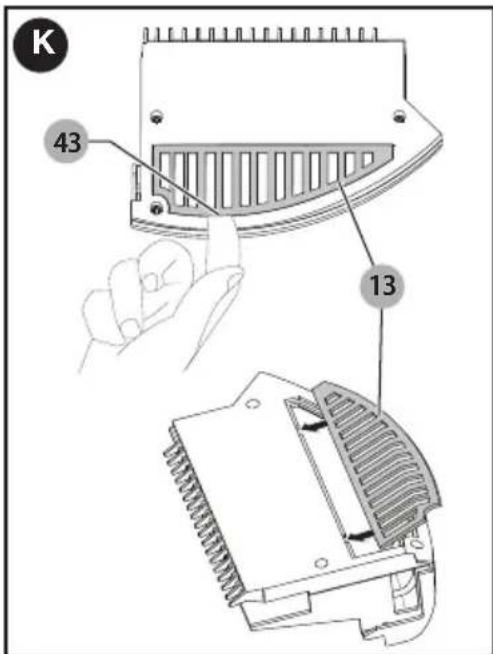
CLEANING THE FILTER (FIGURE A, K)
NOTE: The filter is washable and reusable and should be cleaned regularly.
- Turn the power switch (11) off.
- Remove the dust bin (9) as described above.
- Turn the dust bin upside-down and remove the filter (13) by pressing the release tab (43).
- Clean dust out of the filter. You can wash filter under warm water. Ensure filter is completely dry before reinstalling.
- Reinstall the filter into the dust bin. Align the two tabs of the filter with the notches in the dust bin.
⚠ WARNING: Never use the appliance without the filter. Optimum dust collection will only be achieved with a clean filter.
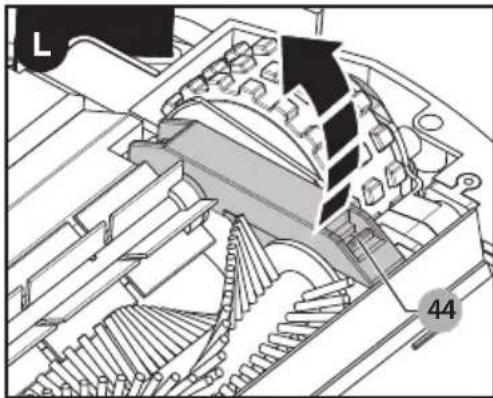
CLEANING THE BRUSHES (FIGURE A, L-N)
- Turn the power switch (11) off.
- Place the vacuum upside down on a flat surface.
- Press the release tab (44) on the brush cover (16) and lift up to open.
natural_image
Technical diagram of a mechanical assembly with gears and housing (no visible text or symbols)- Lift the main brush (14) and rubber brush (15) out of the brush cover, then pull them out away from the drive shafts (45) in the brush well.
- Remove all hair and debris using the maintenance brush (26).
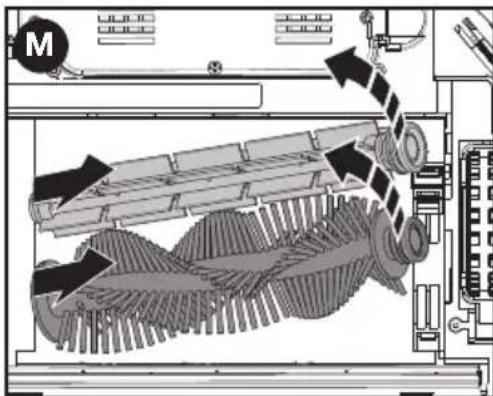
- The brushes have a "D" drive and must be installed correctly. Slide the correct side onto the drive shaft (45) and lower the other end into the support slot near the release tab.
- Close the brush cover. Ensure the cover has fully latched.
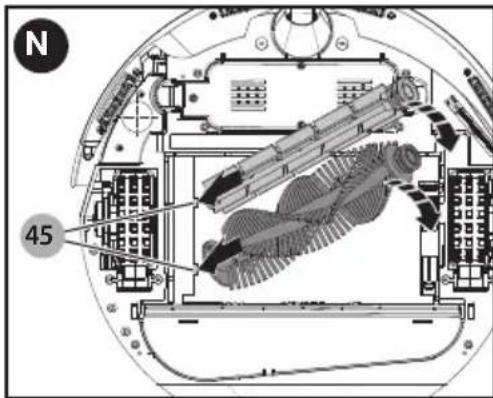
NOTE: Large debris such as hair and big dust can be removed from the brushes by using the comb end of the maintenance brush (26).
REPLACING THE BATTERY (FIGURE A, O)
- Turn the power switch (11) off.
- Place the vacuum upside down on a flat surface.
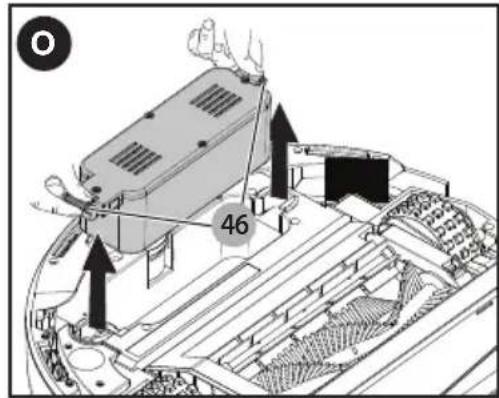
- With two hands, press in on the two
tabs (46) on the sides of the battery.
-
Lift the battery straight out of the vacuum.
-
To reinstall, slide the battery into place. Push down on the battery to ensure both tabs have fully latched in place.
Accessories
Recommended accessories for use with your appliance are available from your local dealer or authorized service center. If you need assistance regarding accessories, please call: 1-800-544-6986.
⚠ WARNING: The use of any accessory not recommended for use with this appliance could be hazardous.
REPLACING THE FILTER
The filter should be replaced every 6 to 9 months and whenever worn or damaged. Replacement filters are available from your BLACK+DECKER dealer.
The RBRC® Seal
The RBRC® (Rechargeable Battery Recycling Corp oration) Seal on the nickel metal hydride (or battery packs) indicates that the costs to recycle these batteries (or battery packs) at the end of their useful life have already been paid by BLACK+DECKER. In some areas, it is illegal to place spent nickel metal hydride batteries in the trash or municipal solid waste stream and the Call 2 Recycle® program provides an environmentally conscious alternative. Call 2 Recycle, Inc., in cooperation with BLACK+DECKER and other battery users, has established the program in the United States and Canada to facilitate the collection of spent nickel metal hydride batteries. Help protect our environment and conserve natural resources by returning the spent nickel metal hydride batteries to an authorized BLACK+DECKER service center or to your local retailer for recycling. You may also contact your local recycling center for information on where to drop off the spent battery. RBRC® is a registered

trademark of Call 2 Recycle, Inc.
Batteries for remote (AAA)
⚠ WARNING: Batteries can explode, or leak, and can cause injury or fire. To reduce this risk:
- Carefully follow all instructions and warnings on the battery label and package.
• Always insert batteries correctly with regard to polarity (+ and -), marked on the battery and the equipment.
- Do not short battery terminals.
- Do not charge batteries.
- Do not mix old and new batteries. Replace all of them at the same time with new batteries of the same brand and type.
- Remove dead batteries immediately and dispose of per local codes.
- Do not dispose of batteries in fire.
- Keep batteries out of reach of children.
- Remove batteries if the device will not be used for several months.
- Transporting batteries can possibly cause fires if the battery terminals inadvertently come in contact with conductive materials such as keys, coins, hand tools and the like. The US Department of Transportation Hazardous Material Regulations (HMR) actually prohibit transporting batteries in commerce or on airplanes (i.e. packed in suitcases and carry on luggage) UNLESS they are properly protected from short circuits. So when transporting individual batteries, make sure that the battery terminals are protected and well insulated individual batteries, make sure that the battery terminals are protected and well insulated from materials that could contact them and cause a short circuit.
One-Year Limited Warranty
Black & Decker (U.S.) Inc. warranties this product to be free from defects in material or workmanship for a period of one (1) year following the date of purchase, provided that the product is used in a home environment. This limited warranty does not cover failures due to abuse, accidental damage or when repairs have been made or attempted by anyone other than BLACK+DECKER and its Authorized Service Centers. A defective product meeting the warranty conditions set forth herein will be replaced or repaired at no charge in either of two ways: The first, which will result in exchanges
only, is to return the product to the retailer from whom it was purchased (provided that the store is a participating retailer). Returns should be made within the time period of the retailer's policy for exchanges. Proof of purchase may be required. Please check with the retailer for its specific return policy regarding time limits for returns or exchanges. The second option is to take or send the product (prepaid) to a BLACK+DECKER owned or authorized Service Center for repair or replacement at BLACK+DECKER's option. Proof of purchase may be required. BLACK+DECKER owned and authorized service centers are listed online at www.blackanddecker.com.
This warranty does not apply to accessories. This warranty gives you specific legal rights and you may have other rights which vary from state to state. Should you have any questions, contact the manager of your nearest BLACK+DECKER Service Center. This product is not intended for commercial use, and accordingly, such commercial use of this product will void this warranty. All other guarantees, express or implied, are hereby disclaimed.
LATIN AMERICA: This warranty does not apply to products sold in Latin America. For products sold in Latin America, check country specific warranty information contained in the packaging, call the local company or see the website for such information.
FREE WARNING LABEL
REPLACEMENT: If your warning labels become illegible or are missing, call 1-800-544-6986 for a free replacement.
TROUBLESHOOTING
| Problem Possible Cause Possible Solution | ||
| Vacuum stops cleaning. | Main brush is blocked or jammed.Battery charge is low. | Clean brush or removed debris using the maintenance brush.Charge battery. |
| Battery does not charge. | Battery is not installed correctly.Charger is not plugged in correctly. | Reinstall battery. Refer to section “Replacing the Battery.”Ensure the battery charger is fully plugged into outlet. |
| Vacuum only moves backwards or moves a few inches before backing up. | Floor has dark stripes or spots that the vacuum detects as a cliff.Sensors are blocked. | Only use vaccum on surfaces that do not have a large difference in color.Clean sensors with dry cloth. |
| Vacuum keeps moving in small circle. | A wheel is blocked. | Remove debris from blocked wheel. |
For assistance with your product, visit our website www.blackanddecker.com for the location of the service center nearest you or call the BLACK+DECKER help line at 1-800-544-6986.
BLACK+ DECKER™
ASPIRATEUR ROBOT
MODE D'EMPLOI
NUMERO DE CATALOGUE BDH5000
natural_image
Technical line drawing of a helmet or helmet component (no text or symbols)CHARGEMENT MANUEL (FIGURE A, B)
RÉGLAGE DE LA MINUTERIE DU NETTOYAGE AUTOMATIQUE (FIGURE A, F, H)
natural_image
Technical diagram of a mechanical assembly with gears and components, no visible text or symbolsnatural_image
Technical diagram of a mechanical device with internal components and directional arrows (no text or symbols)REPLACEMENT DU BLOC-PILES (FIGURE A, O)
REMPLACEMENT DES FILTRES
natural_image
Technical line drawing of a helmet or helmet component (no text or symbols)Gracias por elegir BLACK+DECKER!
Visite www.BlackandDecker.com/NewOwner
natural_image
Technical diagram of a mechanical assembly with gears and housing (no visible text or symbols)Date of purchase · Fecha de compra Invoice No. · No. de factura
Col. Fracc. Universidad
Chihuahua, Chihuahua
Tel. 01 614 413 64 04
Fernando González Armenta
Bolivia No. 605
Col. Felipe Carrillo Puerto
Cd. Madero, Tamaulipas
Tel. 01 833 221 34 50
- PLEASE READ BEFORE RETURNING THIS PRODUCT FOR ANY REASON.
- SAVE THIS MANUAL FOR FUTURE REFERENCE.
- IMPORTANT SAFETY INSTRUCTIONS
- PROPER ROOM PREPARATION
- SAVE THESE INSTRUCTIONS
- Charging
- LED INDICATORS
- MANUALLY CHARGE (FIGURE A, B)
- AUTOMATICALLY CHARGE (FIGURE A, C, D)
- Operation
- SWITCHING ON AND OFF
- MODES
- SETTING THE CLOCK ON THE CHARGING DOCK (FIGURE A, F)
- AUTO CLEAN (FIGURES A, F, G)
- SETTING TIMER TO AUTO CLEAN (FIGURE A, F, H)
- HANDLE
- Maintenance
- WARNING: Make sure the vacuum is completely dry before using it.
- EMPTYING THE DUST BIN (FIGURE A, I)
- CLEANING THE INLET AND FAN COVER (FIGURE A, J)
- CLEANING THE FILTER (FIGURE A, K)
- CLEANING THE BRUSHES (FIGURE A, L-N)
- REPLACING THE BATTERY (FIGURE A, O)
- Accessories
- REPLACING THE FILTER
- The RBRC® Seal
- Batteries for remote (AAA)
- One-Year Limited Warranty
- FREE WARNING LABEL
- BLACK+ DECKER™
- ASPIRATEUR ROBOT
- MODE D'EMPLOI
- CHARGEMENT MANUEL (FIGURE A, B)
- RÉGLAGE DE LA MINUTERIE DU NETTOYAGE AUTOMATIQUE (FIGURE A, F, H)
- REPLACEMENT DU BLOC-PILES (FIGURE A, O)
- REMPLACEMENT DES FILTRES
Brand : BLACK & DECKER
Model : BDH5000
Category : Robot vacuum