FPE1505 - TV VOXX - Free user manual and instructions
Find the device manual for free FPE1505 VOXX in PDF.


User questions about FPE1505 VOXX
0 question about this device. Answer the ones you know or ask your own.
Ask a new question about this device
Download the instructions for your TV in PDF format for free! Find your manual FPE1505 - VOXX and take your electronic device back in hand. On this page are published all the documents necessary for the use of your device. FPE1505 by VOXX.
USER MANUAL FPE1505 VOXX
natural_image
Line drawing of a flat-screen TV with a remote control unit beside it (no text or symbols)Before connecting, operating or adjusting this product, please read the manual
Important Information....1
Important Safety Precautions....2
Preparations ....5
Identification of Controls....7
Connections....10
Turning the Unit On and Off 14
Memorizing the Channels....15
Basic Operations 17
Setting Picture....18
Adjusting Image in D-Sub mode....19
Setting Sound....20
Other Functions ....21
Viewing Closed Captions....22
Parental Controls....23
Troubleshooting 28
Care and Maintenance....29
Specifications....30
WARNING: TO REDUCE THE RISK OF FIRE OR ELECTRIC SHOCK, DO NOT EXPOSE THIS APPARATUS TO RAIN OR MOISTURE.

CAUTION
RISK OF ELECTRIC SHOCK DO NOT OPEN

CAUTION-To reduce the risk of electric shock, do not perform any servicing other than that contained in the operating instructions
The lightning flash with arrowhead symbol,
within an equilateral triangle is intended to
alert the user to the presence of uninsulated

The exclamation point within an equilateral
triangle is intended to alert the user to the
presence of important operating and
"Note to CATV system installer: This reminder is provided to call the CATV system installer's attention to Article 820-40 of the National Electrical Code that provides guidelines for proper grounding and, in particular, specifies that the cable ground shall be connected to the grounding system of the building, as close to the
This product utilizes tin-lead solder, and fluorescent lamp containing a small amount of mercury. Disposal of these materials may be regulated due to environmental considerations. For disposal or recycling information, please contact your local authorities or the Electronic Industries Alliance: www.eia.org
FCC STATEMENT
FCC Notice
LCD TV: A CLASS B digital device
This equipment has been tested and found to comply with the limits for a Class B digital device, pursuant to part 15 of the FCC Rules. These limits are designed to provide reasonable protection against harmful interference when the equipment is operated in a commercial environment.
This equipment generates, uses, and can radiate radio frequency energy and, if not installed and used in accordance with the instruction manual, may cause harmful interference to radio communications. Operation of this equipment in a residential area is likely to cause harmful interference in which case the user will be required to correct the interference at his own expense.
FCC CAUTION:
Pursuant to 47CFR, Part 15.21 of the FCC rules, any changes or modifications to this monitor not expressly approved by the manufacturer could cause harmful interference and would void the user's authority to
WARNING: This is a CLASS B product. In a domestic environment this product may cause radio interference in which case the user may be required to take adequate
Electrical energy can perform many useful functions, but it can also cause personal injuries and property damage if improperly handled. This product has been engineered and manufactured with the highest priority on safety. But IMPROPER USE CAN RESULT IN POTENTIAL ELECTRICAL SHOCK OR FIRE HAZARD. In order to prevent potential danger, please observe the following instructions when installing, operating and cleaning the product. To ensure your safety and prolong the service life of your LCD TV product,
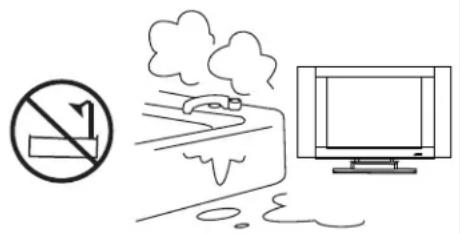
- Do not use this apparatus near water---for example, near a bathtub, washbowl, kitchen sink, or laundry tub, in a wet basement, or near a swimming pool, and the like.
Do not use immediately after moving from a low temperature to high temperature environment, as this causes condensation, which may result in fire, electric shock, or other hazards.
Apparatus shall not be exposed to dripping or splashing and no
-
Clean only with dry cloth---Unplug this product from the wall outlet before cleaning. Do not use liquid cleaners or aerosol
-
Ventilation---Do not block any ventilation openings. Install in accordance with the manufacturer instructions. The vents and other openings in the cabinet are designed for ventilation. Do not cover or block these vents and openings since insufficient ventilation can cause overheating and/or shorten the life of the product. Do not place the product on a bed, sofa, rug or other similar surface, since they can block ventilation openings. This product is not designed for built-in installation; do not place the
-
Heat sources---Do not install near any heat sources such as
text_image
Safety warning symbol showing no smoking and pollution, next to a computer monitor with smoke.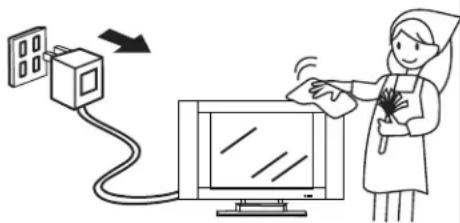
text_image
Illustration showing a medical procedure involving a device connected to a monitor, with a nurse holding a fan near the screen.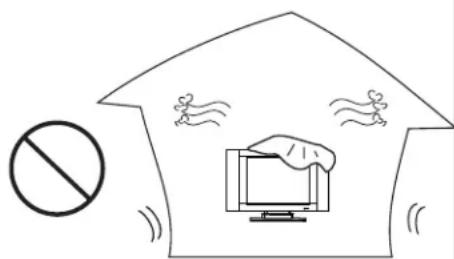
text_image
Diagram showing a prohibition symbol with a computer monitor and flying birds, indicating no protection or violation.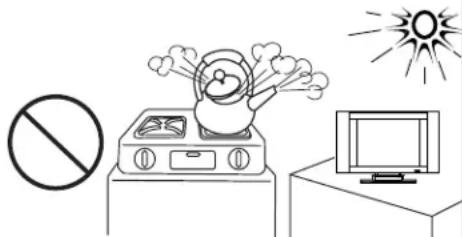
natural_image
Simple line drawing of a fire safety symbol: no sign, smoke, and explosion (no text or labels)-
Grounding or Polarization---Do not defeat the safety purpose of the polarized or grounding-type plug. A polarized plug has two blades with one wider than the other. A grounding type plug has two blades and a third grounding prong. The wide blade or the third prong are provided for your safety. If the
-
Power cord protection---Protect the power cord from being walked on or pinched particularly at
-
Attachments---Only use attachments/accessories specified by the manufacturer. Do not use
-
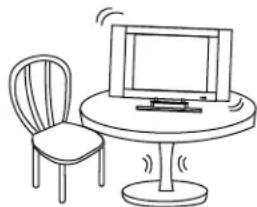
Stand---Use only with the cart, stand, tripod, bracket, or table specified by the manufacturer, or sold with the apparatus. Do not place the product on an unstable trolley, stand, tripod or table. Placing the product on an unstable base can cause the product to fall, resulting inserious personal injuries as well as damage to the product. When mounting the

natural_image
Simple line drawing of a desktop computer with monitor and chair (no text or symbols)- Move Carefully---When a cart is used, use caution when moving the cart/apparatus combination to avoid injury from tip-over. Sudden stops,

natural_image
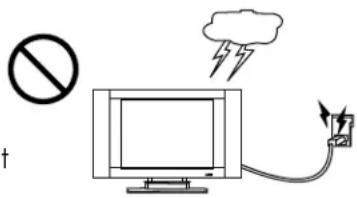
Silhouette of a person holding a device with a diagonal line, no text or symbols present- Lightning---Unplug this apparatus during lightning storms or when unused for long periods of time. For added protection for this television equipment during a lightning storm, or when it is left unattended and unused for long periods of time, unplug it from the wall outlet and disconnect the antenna. This will prevent
text_image
Diagram showing a prohibition symbol, a computer monitor with lightning bolts, and a power plug connected to it.-
Servicing---Refer all servicing to qualified service personnel. Servicing is required when the apparatus has been damaged in any way, such as power-supply cord or plug is damaged, liquid has been spilled
-
Replacement parts---In case the product needs replacement parts, make sure that the service person uses
-
Overloading---Do not overload wall outlets, extension cords, or convenience receptacles on other
-
Entering of objects and liquids---Never insert an object into the product through vents or openings. High voltage flows in the product, and inserting an object can cause electric shock and/or short internal
-
Damage requiring service---If any of the following conditions occurs, unplug the power cord from the AC outlet, and request a qualified service person to perform repairs.
a. When the power cord or plug is damaged.
b. When a liquid is spilled on the product or when objects have fallen into the product.
c. When the product has been exposed to rain or water.
d. When the product does not operate properly as described in the operating instructions.
Do not touch the controls other than those described in the operating instructions. Improper adjustment of controls not described in the instructions can cause damage, which often requires extensive adjustment work by a qualified technician.
e. If the product has been dropped or the cabinet has been damaged in any way.
f. When the product displays an abnormal condition or exhibits a distinct change in performance. Any
- Safety checks---Upon completion of service or repair work, request the service technician to perform
21.Wall or ceiling mounting---When mounting the product on a wall or ceiling, be sure to install the
-
Power source---This product is intended to be supplied by a listed power supply indicated on the marking label. If you are not sure of the type of power supply to your home, consult your product dealer or local power company. For added protection for this product during a lightning storm, or when it is left unattended and unused for long periods of time, unplug it from the wall outlet and disconnect the cable system. This will prevent damage to the product due to lightning and power line surges. When the unit has to be used with another power supply voltage, the power cable must be changed. Consult your product dealer. The socket outlet should be installed near the equipment and easily accessible. Use
-
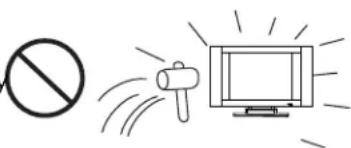
Panel protection---The LCD panel used in this product is made of glass. Therefore, it can break when the product is dropped or impacted upon by
natural_image
Simple line drawing of a prohibition symbol, a megaphone, and a television with rays (no text or labels)24.Pixel defect---The LCD panel is a very high technology product, giving you finely detailed pictures. Occasionally, a few non-active pixels may appear on the screen as a fixed point of blue, green or red.
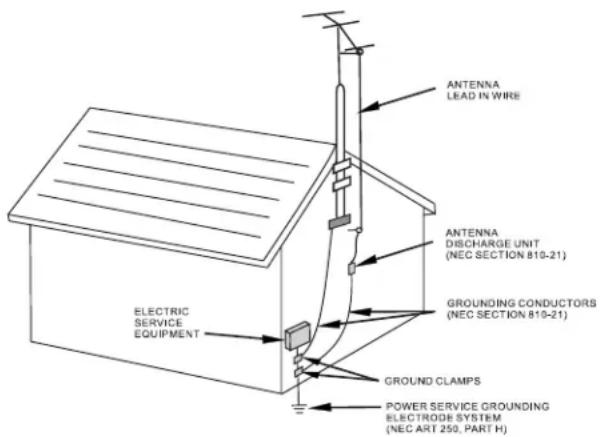
If an outside antenna is connected to the television equipment, be sure the antenna system is grounded so as to provide some protection against voltage surges and built-up static charges. Section 810 of the National Electrical Code provides information with respect to proper grounding of the mast and supporting structure, grounding of the lead-in wire to an antenna discharge unit, size of grounding conductors, location of antenna-discharge unit, connection to grounding electrodes, and
EXAMPLE OF ANTENNA GROUNDING AS PER
text_image
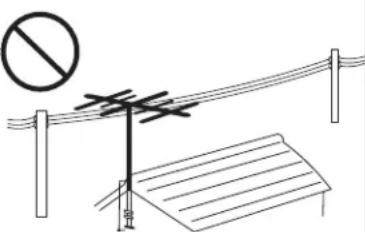
ANTENNA LEAD IN WIRE ANTENNA DISCHARGE UNIT (NEC SECTION 810-21) GROUNDING CONDUCTORS (NEC SECTION 810-21) ELECTRIC SERVICE EQUIPMENT GROUND CLAMPS POWER SERVICE GROUNDING ELECTRODE SYSTEM (NEC ART 250, PART H)■An outside antenna system should not be located in the vicinity of overhead power lines or other electric light or power circuits, or where it can collide with such power lines or circuits. When installing an outside antenna system, extreme care should be taken to keep from touching such power lines or circuits, as contact with them might be fatal.
natural_image
Diagram showing a prohibition symbol above an antenna and a roof structure (no text or labels)Using the Remote Control
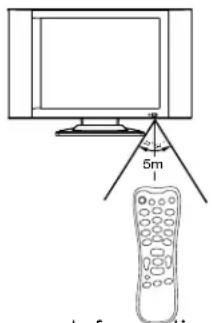
■ Use the remote control by pointing it towards the remote sensor window of the set. Objects between the remote control and sensor window may
Note: This illustration is for reference only. The remote sensor may be in
text_image
5m 1Cautions regarding use of remote control
■Do not expose the remote control to shock. In addition, do not expose the remote control to liquids, and do not place in an area with high humidity.
■ Do not install or place the remote control under direct sunlight. The heat may cause deformation of
■The remote control may not work properly if the remote sensor window of the main unit is under direct sunlight or strong lighting. In such a case, change the angle of the lighting or LCD TV set, or operate the remote control closer to the remote sensor window.
Batteries for the Remote Control
If the remote control fails to operate the LCD TV functions, replace the batteries in the remote control.
1 Open the battery
2 Insert two size-AAA
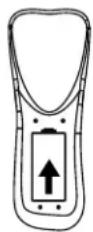
3 Replace the battery
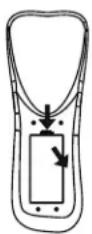
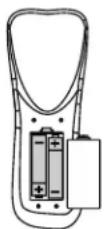
Install two "AAA" batteries matching the +/- polarities of the battery to the +/- marks inside the
Improper use of batteries can result in a leakage of chemicals and/or explosion. Be sure to follow the instructions below.
■ Place batteries with their terminals corresponding to the (+) and (−) indications.
■ Different types of batteries have different characteristics. Do not mix batteries of different types.
■ Do not mix old and new batteries. Mixing old and new batteries can shorten the life of new batteries and/or cause old batteries to leak chemicals.
■Remove batteries as soon as they are non-operable. Chemicals that leak from batteries can cause a rash. If chemical leakage is found, wipe with a cloth.
■ The batteries supplied with the product may have a shorter life expectancy due to storage conditions.
Antenna Connection
CABLE TV (CATV) CONNECTION
A 75-ohm coaxial cable connector is built into the set for easy hookup. When connecting the 75- ohm coaxial cable to the set, screw the 75-ohm cable to the ANT. Terminal.
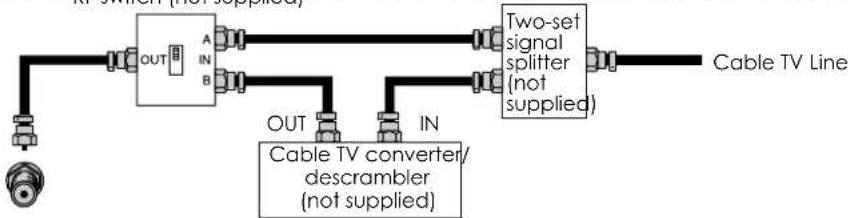
Some cable TV companies offer "premium pay channels". Since the signals of these premium pay channels are scrambled, a cable TV converter/descrambler is generally provided to the subscriber by the cable TV company.
This converter/descrambler is necessary for normal viewing of the scrambled channels. For more specific instructions on installing cable TV, consult your cable TV company. One possible method of utilizing the converter/descrambler provided by your cable TV company is explained below. Please
flowchart
graph LR
    A["Cable TV Line"] --> B["OUT"]
    A --> C["IN"]
    B --> D["A"]
    B --> E["B"]
    C --> F["OUT"]
    C --> G["IN"]
    D --> H["Two-set signal splitter (not supplied)"]
    E --> H
    F --> H
    G --> H
    H --> I["Cable TV converter/descrambler (not supplied)"]
"A" position on the RF switch (not supplied): You can view all unscrambled channels by using the TV's channel keys.
"B" position on the RF switch (not supplied) : You can view the scrambled channels via the
ANTENNAS
The antenna requirements for good color television reception are more important than those for black & white television reception. For this reason, a good quality outdoor antenna is strongly recommended. The following is a brief explanation of the type of connections that are provided with the various
-
A 75-ohm system is generally a round cable with F-type connector that can easily be attached to a terminal without tools (not supplied).
-
A 300-ohm system is a flat "twin-lead" cable that can be
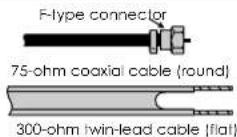
OUTDOOR ANTENNA CONNECTION
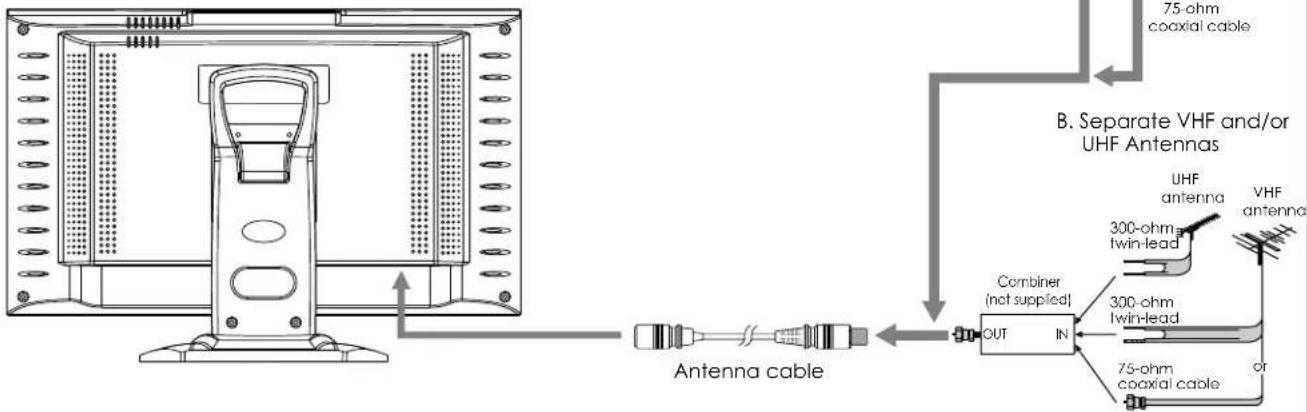
Use one of the following two diagrams if you connect an outdoor antenna.
A: Using a VHF/UHF combination outdoor antenna.
B: Using separate VHF and/or UHF outdoor antennas.
Connect the outdoor antenna cable lead-in to the ANT.
flowchart
graph TD
    A["Computer monitor"] -->|Antenna cable| B["Switch"]
    B --> C["Combiner (not supplied)"]
    C --> D["OUT IN"]
    D --> E["75-ohm coaxial cable"]
    D --> F["300-ohm twin-lead"]
    D --> G["VHF antenna"]
    D --> H["UHF antenna"]
    style A fill:#f9f,stroke:#333
    style B fill:#ccf,stroke:#333
    style C fill:#cfc,stroke:#333
    style D fill:#fcc,stroke:#333
    style E fill:#ffc,stroke:#333
    style F fill:#fcc,stroke:#333
    style G fill:#ffc,stroke:#333
    style H fill:#fcc,stroke:#333
A. Combination VHF/UHF Antenna
Main Unit
text_image
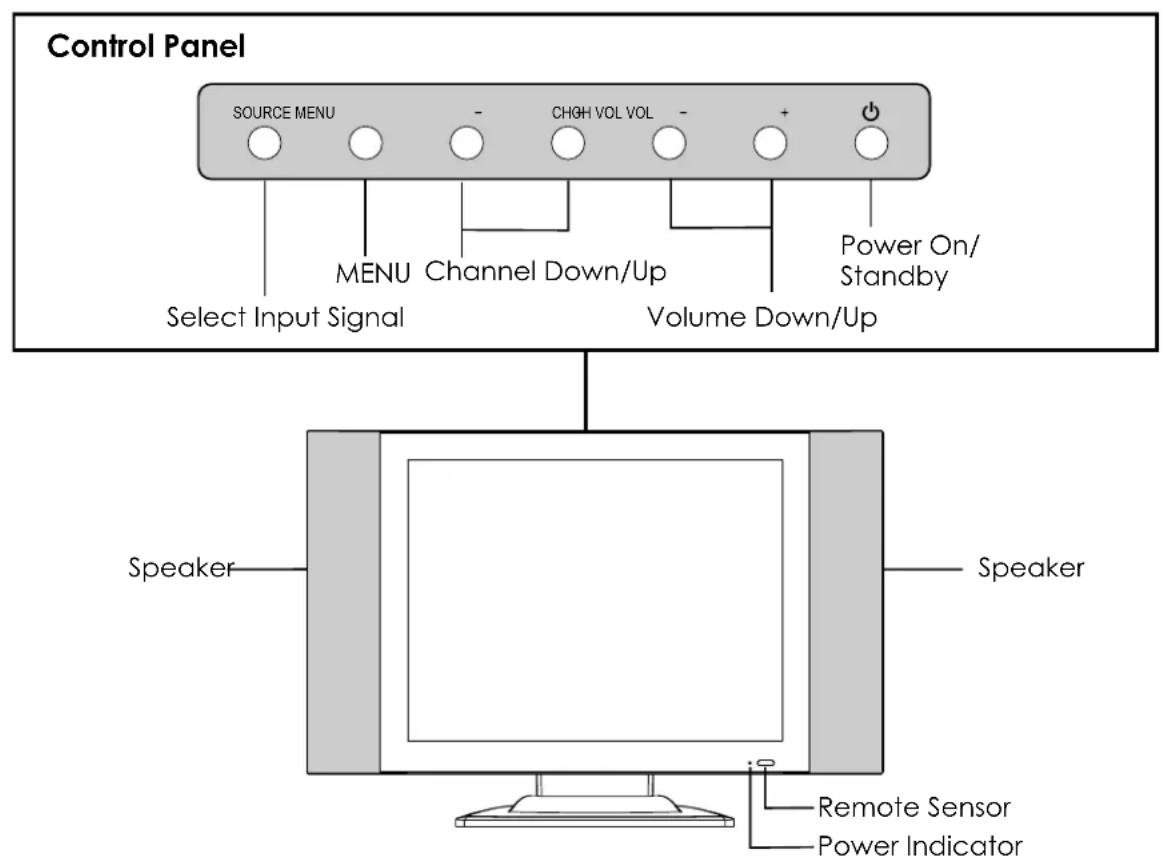
Control Panel SOURCE MENU - CHGH VOL VOL - + Power On/ Standby MENU Channel Down/Up Select Input Signal Volume Down/Up Speaker Speaker Remote Sensor Power Indicator1. SOURCE
To select the input signal source.
2. MENU
Press this button to access the MENU main page.
3. CH+/-
Press these two buttons to directly change the TV channel; In OSD MENU, press these buttons to choose the OSD items.
4. VOL+/-
Press the VOL+ or VOL- button to directly increase or decrease the sound volume level; In OSD MENU, press these buttons to adjust the value or setting of each item.
5. POWER ⏻
Functions of VOL+/-, CH+/-, MENU, SOURCE and POWER are also provided to the remote control. This
Main Unit
natural_image
Technical line drawing of a mechanical device with mounting flanges and a central handle (no text or symbols)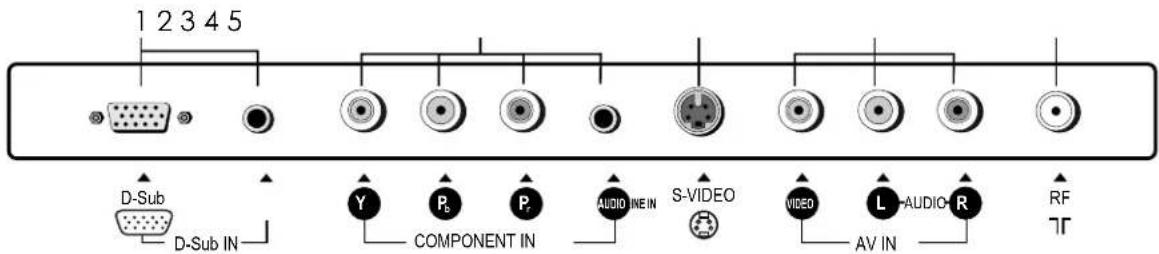
text_image
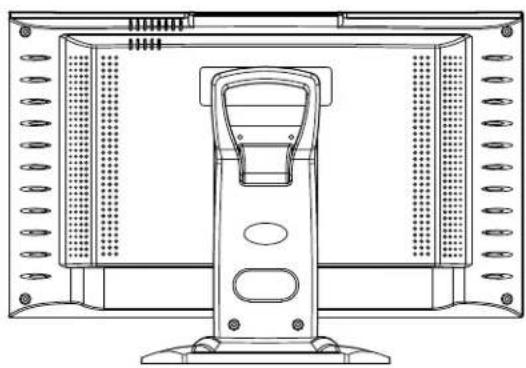
1 2 3 4 5 D-Sub D-Sub IN Y Pb Pr AUDIO IN S-VIDEO VIDEO L-AUDIO-R AV IN RF TR- D-Sub input /Audio Line in
Connect to the D-Sub/audio output jacks on your PC.
- Component inputs (Y, Pb, Pr, Audio L, R)
Connect to the audio and component output jacks of a DVD player or Set-Top Box.
- S-Video input
Receive a S-Video signal from external source such as VCR or DVD player.
- AV inputs (Video, Audio L, R)
Receive video/audio signals from external sources such as VCR or DVD player.
- Antenna input
Remote Control
text_image
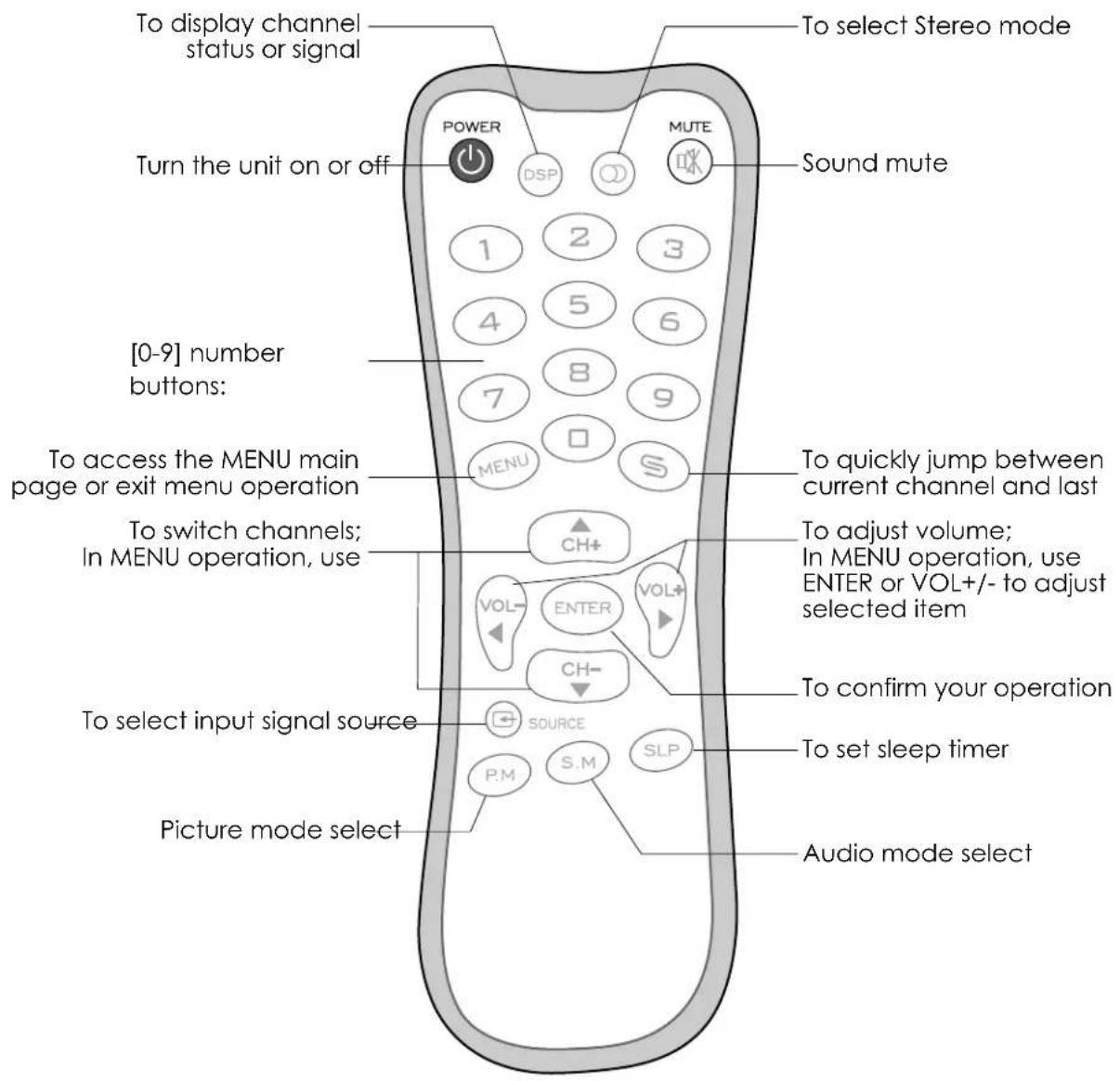
To display channel status or signal Turn the unit on or off POWER DSP MUTE Sound mute [0-9] number buttons: To access the MENU main page or exit menu operation To switch channels; In MENU operation, use To quickly jump between current channel and last To adjust volume; In MENU operation, use ENTER or VOL+/- to adjust selected item To confirm your operation To set sleep timer To select input signal source P.M S.M SLP to select signal source Picture mode select Audio mode selectCautions Before Connecting
- Carefully check the terminals for position and type before making any connections.
● The illustration of the external equipment may be different depending on your model. - Loose connectors can result in image or color problems. Make sure that all connectors are securely inserted into their terminals.
● Refer to the operating manual of the external device as well. - When connecting an external device, turn the power off on the panel to avoid any issues.
Connect a VCR
text_image
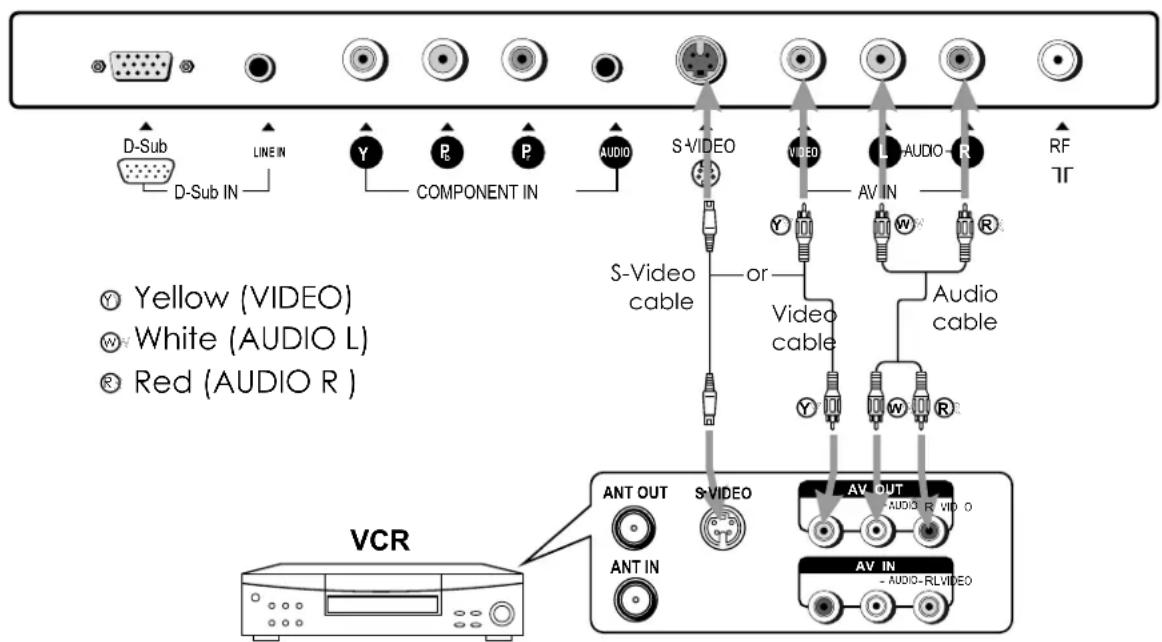
D-Sub D-Sub IN LINE IN Y P COMPONENT IN AUDIO S-VIDEO or S-Video cable Y VIDEO AV IN AUDIO-R RF TR Yellow (VIDEO) White (AUDIO L) Red (AUDIO R ) VCR ANT OUT ANT IN S-VIDEO AV OUT AUDIO-R VIDEO AV IN AUDIO-RLVIDEORear of the VCR
How to connect:
Connect the Audio/Video cables between the Audio (L/R)/Video jacks on the unit and VCR.
Note:
For better video, you can use the S-video jack if your source supports it.
The unit automatically identifies S-Video if you are using S-Video jack. We recommend you to
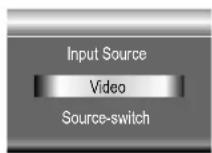
To play VCR
- Turn on your LCD TV, press SOURCE button repeatedly to select Video.
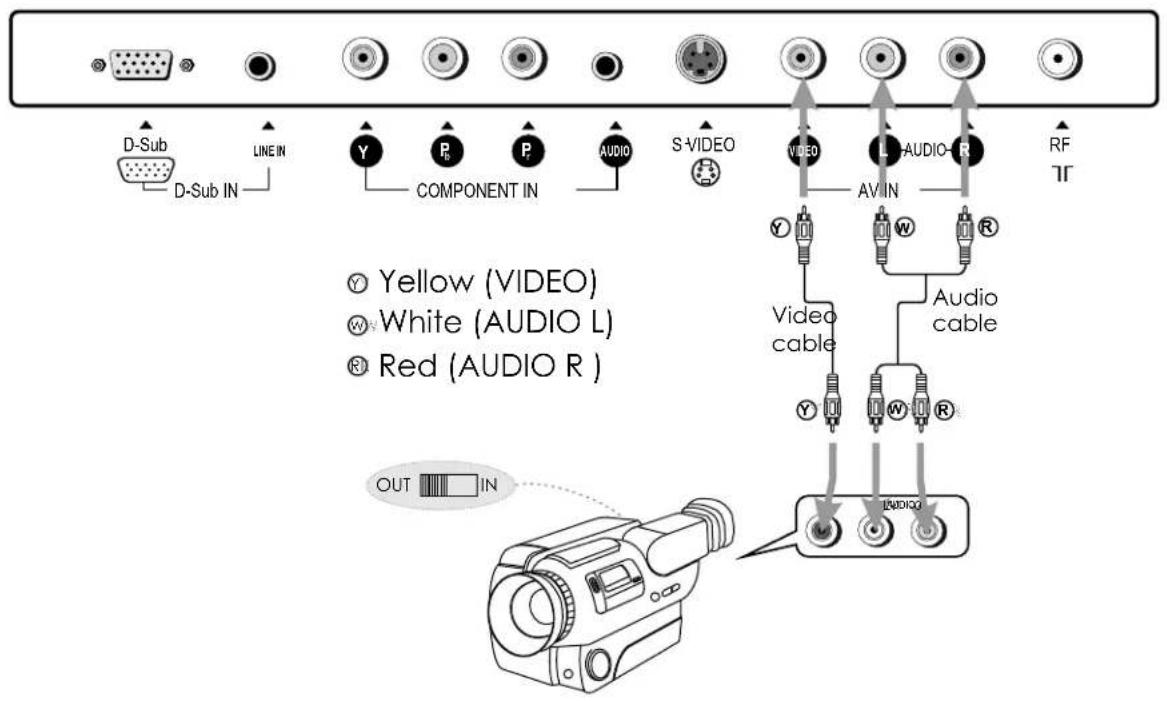
Connect a Camcorder
text_image
D-Sub D-Sub IN LINE IN Y COMPONENT IN P AUDIO S-VIDEO VIDEO AV IN L-AUDIO-R RF TT Yellow (VIDEO) White (AUDIO L) Red (AUDIO R) Video cable Audio cable OUT INHow to connect:
Connect the Audio/Video cables between the Audio (L/R)/Video jacks on the unit and camcorder.
To playback Camcorder
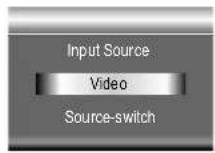
- Turn on your LCD TV, press SOURCE button repeatedly to select Video.
- Turn on your camcorder and set it to output mode. (For details, refer to your camcorder owner's
Note:
The operations of the camcorder may be different and is dependent
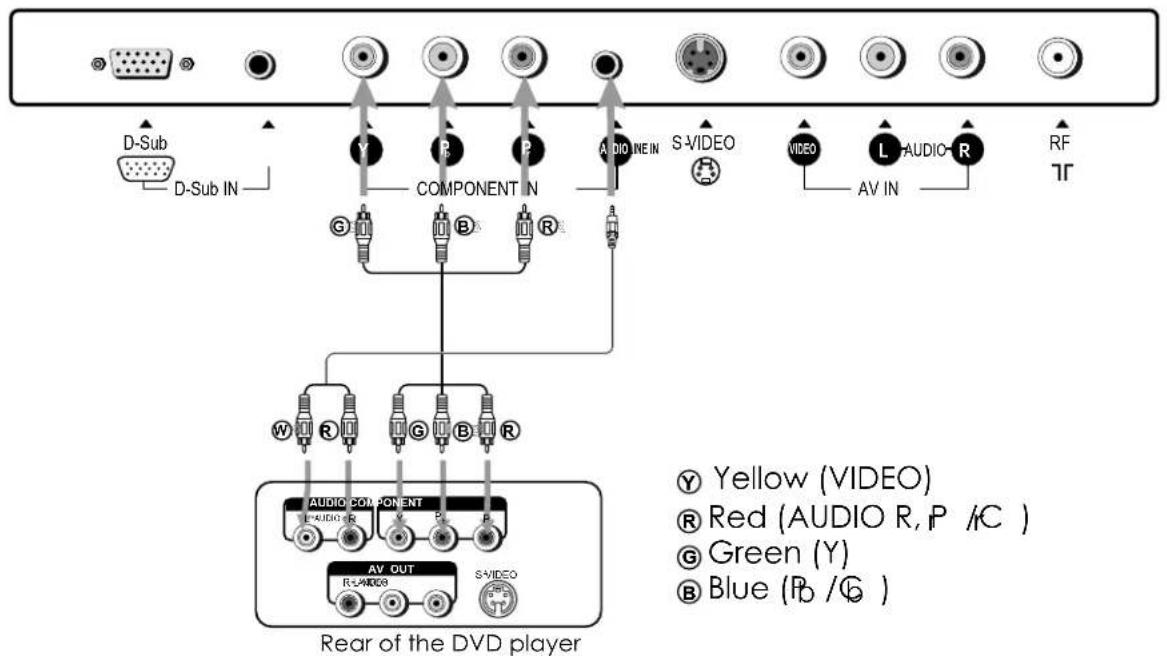
Connect a DVD player
text_image
D-Sub D-Sub IN COMPONENT IN AUDIO IN S-VIDEO VIDEO L-AUDIO-R AV IN RF TR W R G B R AUDIO COMPONENT R-LABO3 AV OUT S-VIDEO Yellow (VIDEO) Red (AUDIO R, P /C ) Green (Y) Blue (Pb /G ) Rear of the DVD playerHow to connect a DVD Player using Component Video Connections:
Connect the Video cable between the Y, Pb, Pr input jacks on the unit and Y, Pb, Pr (or Y, Cb, Cr) output jacks on the DVD player.
Connect the Audio cable between the AUDIO input jack on the unit and AUDIO output jacks on
To play DVD
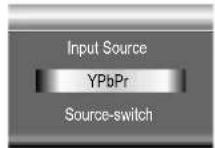
- Turn on your LCD TV, press SOURCE button repeatedly to select YPbPr.
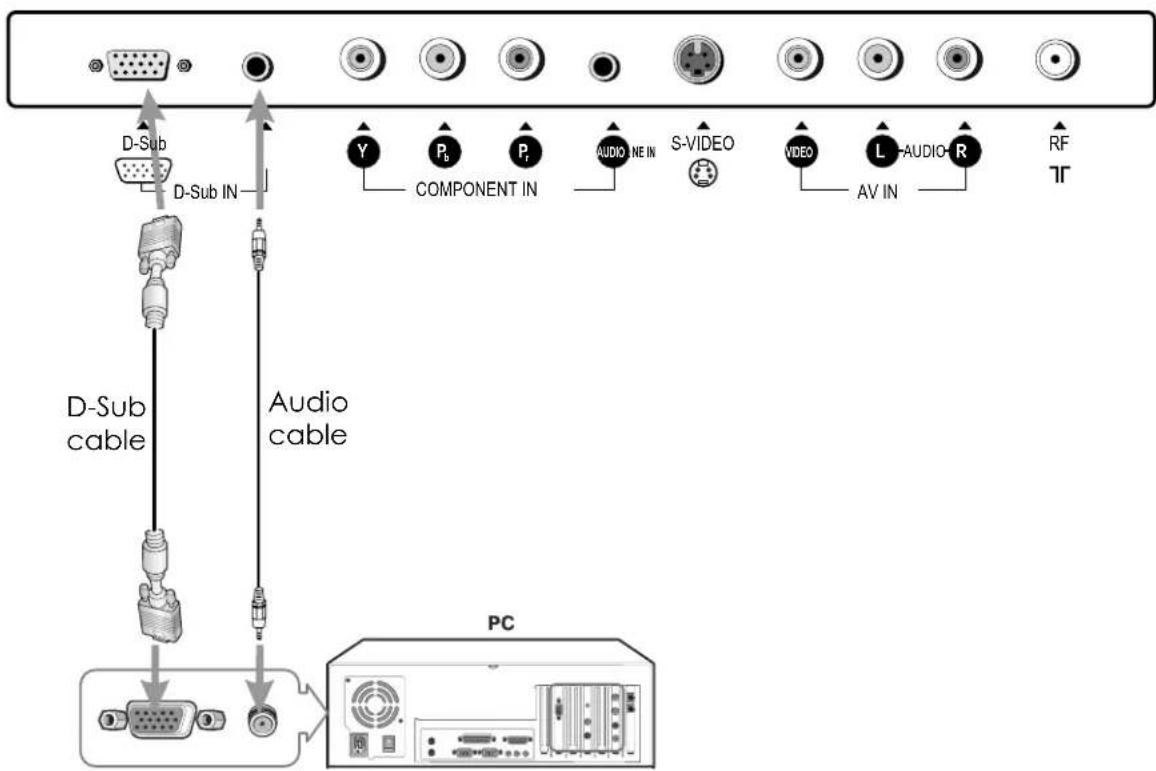
Connect a PC
text_image
D-Sub D-Sub IN Audio cable PC Y Pb Pr AUDIO NE IN S-VIDEO VIDEO L-AUDIO-R AV IN RF TTHow to connect:
Connect a D-Sub cable between the D-Sub jack on the PC and the D-Sub input jack on the unit. Connect an Audio cable between the AUDIO output on the PC and AUDIO input jack on the unit.
To Watch the PC screen
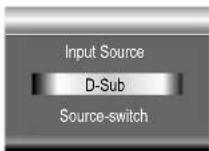
- Turn on your LCD TV, press SOURCE button repeatedly to select D-Sub.
Turning the Unit On and Off
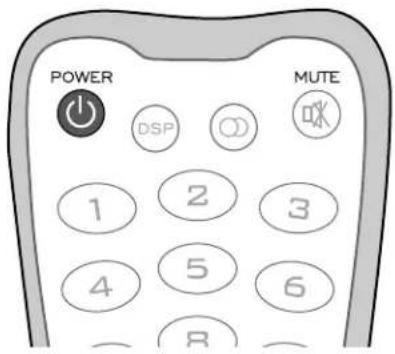
Turning On
Insert the power cord into the wall outlet.
Press the Power button on the remote control.
Turning Off
With the power on, press the Power button on the remote
Note:
[Non-Text]
text_image
POWER DSP MUTE 1 2 3 4 5 6 8Viewing the MENUs and Displays
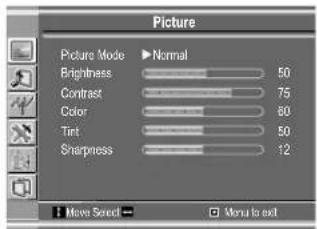
Your LCD TV has a simple, easy-to-use menu system that appears on the screen. This system makes it convenient and fast
Viewing the MENUs
1 With the power on, press the MENU button on the remote
2 Use the CH+/- to select submenu page. Use ENTER or
3 Use the CH+/- to select menu item. Use VOL+/- to adjust value of item. Use ENTER or VOL+/- to confirm. you can press the MENU button repeatedly to return or exit
Note:
To clearly introduce the menu operations, this operation manual provides a description based on operation with the remote control.
When performing confirmation in MENU operation, you
text_image
Picture Picture Mode ▶ Normal Brightness 50 Contrast 75 Color 80 Tint 50 Sharpness 12 ■ News Select ▶ Monu to exit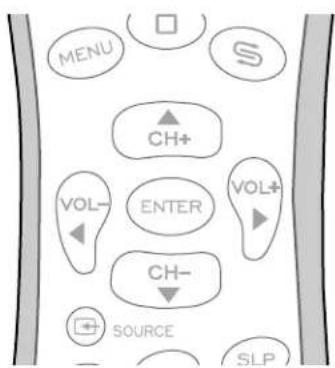
flowchart
graph TD
    A["MENU"] --> B["CH+"]
    C["VOL-"] --> D["ENTER"]
    E["CH-"] --> F["SLP"]
    G["S"] --> H["CH-"]
    I["SOURCE"] --> J["CH-"]
    K["VOL+"] --> L["CH-"]
Displaying Status Information
Press the DSP button on the remote control, the unit will display current status information such as
Your LCD TV can memorize and store all the available channels for both antenna and cable channels. After the available channels are memorized, use CH+/- to scan the channels.
Selecting the Signal Source
Before your LCD TV can memorize the available channels, you must specify the type of signal source that is connected to the unit. (i.e., an antenna or cable system)
If you are connected to an antenna, please select Antenna. If you connect cable, please select cable.
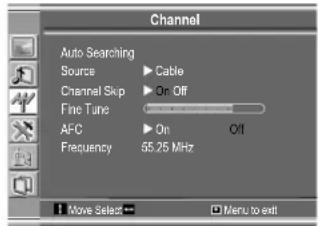
text_image
Channel Auto Searching Source ▶ Cable Channel Skip ▶ On Off Fine Tune AFC ▶ On O/I Frequency 55.25 MHz Move Select → □ Menu to exit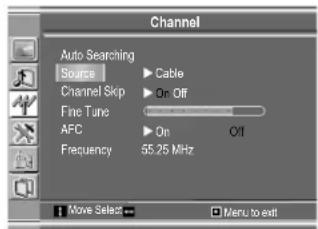
text_image
Channel Auto Searching Source Channel Skip Fine Tune AFC Frequency Cable On Off On Off 55.25 MHz Move Select Menu to exitStoring Channels in Memory Automatically
1
2
The unit will begin memorizing all the available channels. During the
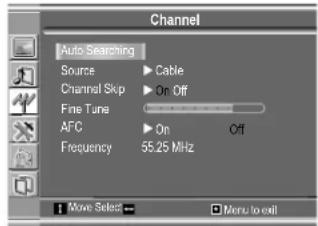
text_image
Channel Auto Searching Source ▶ Cable Channel Skp ▶ On Off Fine Tune AFC ▶ On Off Frequency 55.25 MHz Move Select → □ Menu to exit
Setting Auto Frequency Control (AFC)
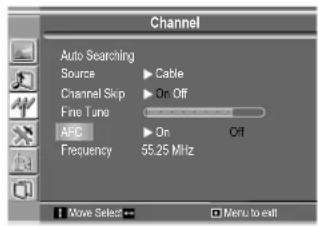
When the AFC is set to On, the unit will automatically tune the program frequency to provide the best possible picture and sound.
text_image
Channel Auto Searching Source ▶ Cable Channel Skip ▶ On Off Fine Tune ▶ Off AFC ▶ On Frequency 55.25 MHz Move Select ▶ Menu to exitManual Fine Tuning
text_image
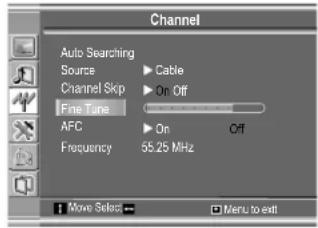
Channel Auto Searching Source ▶ Cable Channel Skp ▶ On Off Fine Tune AFC ▶ On Off Frequency 55.25 MHz 1 Move Select → □ Menu to exitAdding and Erasing Channels
text_image
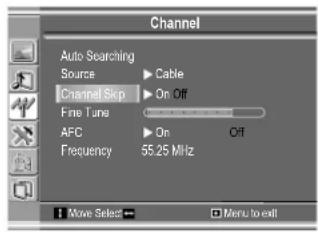
Channel Auto Searching Source ▶ Cable Channel Skip ▶ On Off Fine Tune AFC ▶ On Off Frequency 55.25 MHz Move Select → Menu to exitWhen the item is set to on, the selected channel will be erased.
When the item is set to off, the selected channel will be added.
The erased channels can not be selected by using the CH+/- buttons unless you use number
Changing Channels
Using the Channel Buttons (CH+ or CH-)
Press the CH+ or CH- to change channels.
When you press the CH+ or CH-, the unit changes channels in sequence. You will see all the channels that the unit has memorized.
Direct Accessing Channels
Press the number buttons to go directly to a channel.
To select a one-digit channel: press the 0-9 number buttons to input the channel number and press
ENTER or wait for some seconds to go to the selected channel.
To select a two-digit channel: press the 0-9 number buttons to input the channel number and press
ENTER or wait for some seconds to go to the selected channel.
To select a three-digit channel: press the 0-9 number buttons to input the channel number one by one,
Note:
Using the Return ↩ button
Press this button to switch between the current channel and the previous channel.
Adjusting the Volume
Using the volume buttons (VOL+ and VOL-)
Using the MUTE button
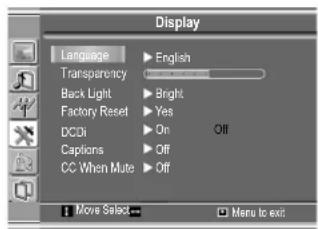
Selecting a MENU Language
text_image
Display Language ▶ English Transparency ▶ Back Light ▶ Bright Factory Reset ▶ Yes DCDi ▶ On Off Captions ▶ Off CC When Mute ▶ Off Move Select ▶ Menu to exitUsing the Preset Picture Mode
1
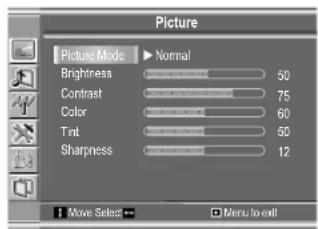
The picture page will be displayed automatically.
2
3
text_image
Picture Picture Mode ▶ Normal Brightness 50 Contrast 75 Color 60 Tint 50 Sharpness 12 Move Select → Menu to exitYou may also use the P.M button to quickly select picture mode.
There are three preset picture modes (Bright, Soft and Normal) and one user-set picture mode (User). Each preset mode has its own picture settings.
Bright: Select for a bright picture.
Soft: Select for a finely detailed picture.
Normal: Select for a normal picture.
Customizing the Picture
1
The picture page will be displayed automatically.
2
3
4
5

text_image
Picture Picture Mode User Brightness 55 Contrast 90 Color 50 Tint 49 Sharpness 12 Move Select Menu to exitIn TV/Video mode
| Option | Function | Operation | Range |
| Brightness Adjusts screen brightness for easier viewing of dark picture such as night scenes and black hair. | VOL+ lighter 0~100 | ||
| Contrast | Adjusts image contrast. | 0~100 | |
| Color Adjusts color saturation. | VOL+ deeper | 0~100 | |
| Tint Adjusts tint for image. | VOL+ greenish | 0~100 | |
| Sharpness | Adjusts image sharpness and displays a sharp image. | 0~24 | |
In D-Sub mode
| Option | Function | Operation | Range |
| Brightness Adjusts screen brightness for easier viewing of dark picture such as night scenes and black hair. | VOL+ lighter 0~100 | ||
| Contrast | Adjusts image contrast. | 0~100 | |
| Color Adjusts color saturation. | VOL+ deeper | 0~100 | |
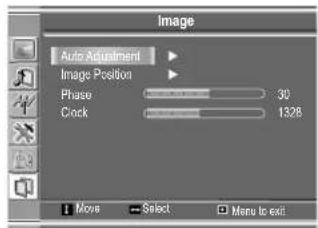
With working in D-Sub mode, this unit allows you to perform several adjustments for image
Adjusting the Picture Automatically
The unit automatically adjusts phase, clock or position, etc.
Adjusting Clock and Phase
text_image
Image Auto Adjustment Image Position Phase 30 Clock 1328 Moves Select Menu to exit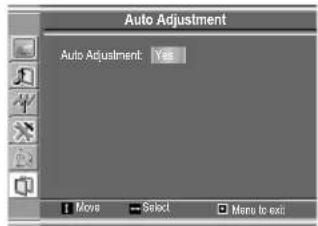
text_image
Auto Adjustment Auto Adjustment Yes ■ Move Select Menu to exit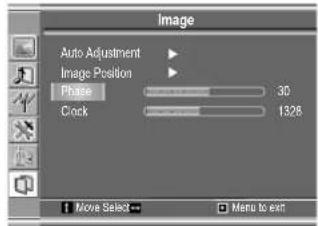
text_image
Image Auto Adjustment Image Position Phase 30 Clock 1326 Move Select Menu to exitAdjust the clock frequency of the set's internal clock signal. If shimmering or rainbow-like noise is apparent in
the image, try adjusting the clock frequency setting.
You may find that images blur, depending on the clock phase of your PC's Processor. If you
Adjusting the Image Position
The unit allows you to adjust the image position of the screen if it is not well-aligned.
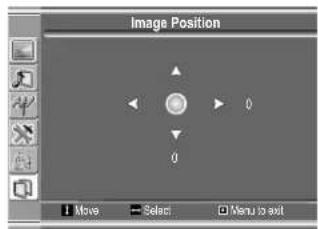
text_image
Image Position Move Select Menu to exitCustomizing the Sound
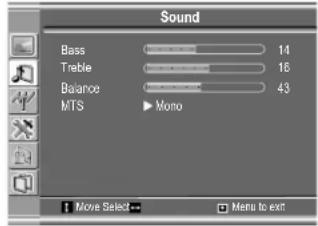
text_image
Sound Bass 14 Treble 16 Balance 43 MTS Mono Move Select → Menu to exit| Option | Function | Operation | Range |
| Bass | Adjusts Bass (low sounds) | VOL+ stronger | 0~31 |
| Treble | Adjusts Treble (high sounds). | VOL+ stronger | 0~31 |
| Balance | Adjusts volume balance (left and right volumes). | VOL+Higher volume from right speaker. | 0~100 |
Using the Preset Sound Mode
Use the S.M button to quickly select Sound mode.
There are three preset Sound modes (News, Movie and Music) and one user-set Sound mode (User).
Each preset mode has its own audio settings.
Movie: Select for a movie program.
Music: Select for a music program.
News: Select for a speech or conversation program.
Setting Stereo Mode
This function is available in TV mode only.
○
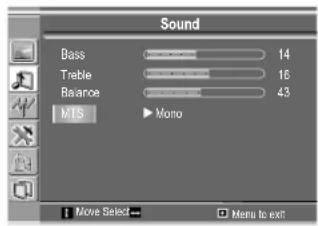
text_image
Sound Bass 14 Treble 16 Balance 43 MTS Mono Move Select Menu to exitAdjusting Menu Transparency
Adjusting Back Light
Setting DCDi Function
You may set this function to On when viewing motion picture,
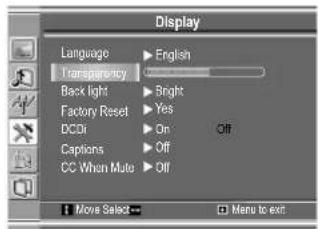
text_image
Display Language ▶ English Transparency Back light ▶ Bright Factory Reset ▶ Yes DCOx ▶ On ▶ Off Captions ▶ Off CC When Mute ▶ Off ■ Move Select ▶ Menu to exit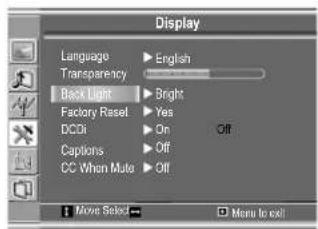
text_image
Display Language ▶ English Transparency Back Light ▶ Bright Factory Reset ▶ Yes DCDi ▶ On Off Captions ▶ Off CC When Mute ▶ Off Move Select → Menu to exit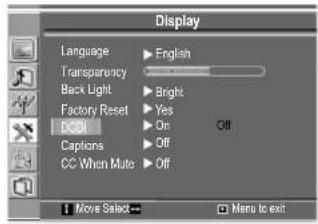
text_image
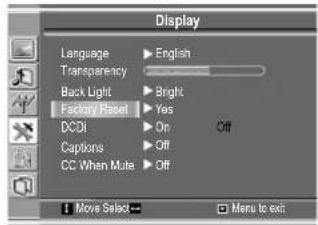
Display Language ▶ English Transparency ▶ Bright Back Light ▶ Yes Factory Reset ▶ On Off CDDI Captions ▶ Off CC When Mute ▶ Off Move Select ▶ Menu to exitLoading Default Values
Caution: please be careful to use the Factory Reset item. Once you confirm to use this function, all
Setting Sleep Timer
Press the SLP button repeatedly to set a sleep time to automatically

flowchart
graph LR
    A["Off"] --> B["30 min."]
    B --> C["60 min."]
    C --> D["90 min."]
    D --> E["120 min."]
text_image
Display Language ▶ English Transparency Back Light ▶ Bright Factory Reset ▶ Yes DCO1 ▶ On Off Captions ▶ Off CC When Mute ▶ Off Move Select ▶ Menu to exit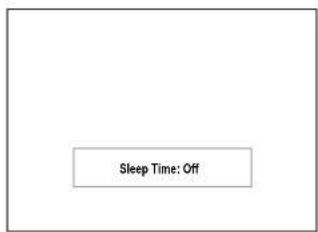
text_image
Sleep Time: OffThe unit decodes and displays the closed captions that are broadcast with certain TV shows. These captions are usually subtitles for the hearing impaired or foreign language translations. All VCRs record the closed caption signal from television programs, so home-recorded video tapes also provide closed captions. Most prerecorded commercial video tapes provide closed captions well. Check for the
Note:
The Caption feature does not work with YPbPr, D-Sub.

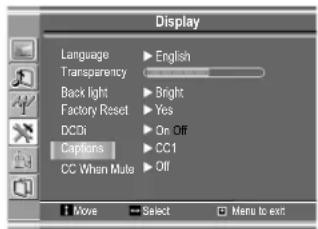
Setting Closed Caption
text_image
Display Language ▶ English Transparency Back light ▶ Bright Factory Reset ▶ Yes DCDi ▶ On Off Captins ▶ CC 1 CC When Mule ▶ Off Move ▶ Select □ Menu to exitYou may select between Off, CC1, CC2, CC3, CC4, T1, T2, T3 and T4.
The Closed Caption broadcasts can be viewed in two modes: CAPTION and TEXT. For each mode, four channels are available.
The [CAPTION] mode shows subscripts of dialogues and commentaries of TV dramas and news programs while allowing a clear view of the picture.
The [TEXT] mode displays various information over the picture (such as TV program schedule, weather forecast, etc.) that is independent of the TV programs.
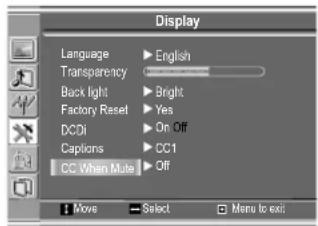
Setting CC When Mute
text_image
Display Language ▶ English Transparency ▶ Back light ▶ Bright Factory Reset ▶ Yes DC/Di ▶ On Off Captions ▶ CC1 CC When Mute ▶ Off Move ▶ Select ▶ Menu to exitParental Controls
This function allows TV programs to be restricted and TV usage to be controlled based on FCC data. It prevents children from watching violent or sexual scenes that may be harmful.
Restriction of TV programs includes two ratings that contain information about the program: the MPAA rating and the TV Parental Guidelines. The MPAA rating is restricted by age. TV Parental Guidelines are restricted by age and content.
[1] Movie Rating (MPAA)
| Rating | ||
| age based | G | GENERAL AUDIENCES. All ages admitted. |
| PG | PARENTAL GUIDANCE SUGGESTED. Some material may not be suitable for children. | |
| PG-13 | PARENTAL STRONGLY CAUTIONED. Some material may be inappropriate for children | |
| R | under 13. | |
| NC-17 | RESTRICTED. Under 17 requires accompanying parent or adult guardian. | |
| X | NO ONE 17 AND UNDER ADMITTED. | |
Note:
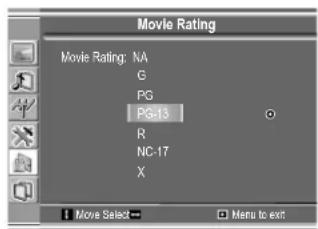
Example 1:
"PG-13" in the age based rating is blocked, this will automatically block the higher ratings "R", "NC-17", "X" also.
text_image
Movie Rating Movie Rating: NA G PG PG-13 R NC-17 X Move Select Menu to exitExample 2:
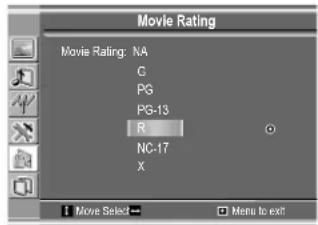
“R” in the age based rating is blocked, this will automatically block the higher rating “NC-17”, “X” also.
text_image
Movie Rating Movie Rating: NA G PG PG-13 R NC-17 X Move Select Menu to exit[2] TV Rating
| Rating | ←content based → | |||||
| D | L | S | V | FV | ||
| age based | TV-Y (All children) | × | × | × | × | × |
| TV-Y7 (Direct to Older Children) | × | × | × | × | ● | |
| TV-G (General Audience) | × | × | × | × | ||
| TV-PG (Parental Guidance) | ● | ● | ● | ● | ||
| Suggested) | ● | ● | ● | ● | ||
| TV-14 (Parents Strongly | ● | ● | ● | |||
× —— Content Rating can be set but this Rating is not normally broadcast by TV Station.
● —— Content Rating can be set.
D: Suggestive Dialog
L: Foul Language
S: Sexual Content
V: Violence
FV: F Violence
Note:
Age-based ratings can be modified by the content-based ratings but only in the combinations
Example 1:
When TV-Y7 in the age-based rating is set to BLOCK, this will automatically block the higher ratings: TV-G, TV-PG, TV-14 and TV-MA.
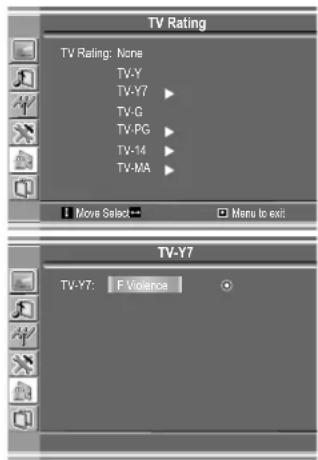
text_image
TV Rating TV Rating: None TV-Y TV-Y7 ▶ TV-G TV-PG ▶ TV-14 ▶ TV-MA ▶ ■ Move Select ■ □ Menu to exit TV-Y7 TV-Y7: F Violence ○Example 2:
When TV-14 in the age-based rating is set to BLOCK, this will automatically block the higher ratings: TV-MA.
In addition, if you block "L" sub-rating in TV-PG, then the TV-14 and TV-MA will automatically be blocked.
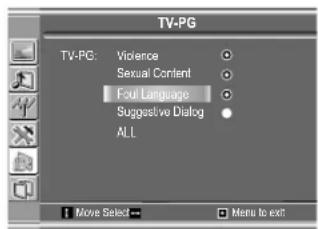
text_image
TV-PG TV-PG: Violence Sexual Content Four Language Suggestive Dialog ALL Move Select Menu to exitAccessing the Parental Controls Menu
The default password is 1111, you may change the password yourself.
Changing the Password
From the Parental Controls menu, press CH+/- repeatedly to select
Now the password is changed successfully. Be sure to write down your password and retain it for future use.
Turn On or Off Parental Lock Control Function
From the Parental Controls menu, press CH+/- repeatedly to select
If you want to validate Parental Lock Control settings, you need to set
Clear Parental Control Settings
From the Parental Controls menu, press CH+/- repeatedly to select
Caution: please be careful to use this function. Once you confirm to us
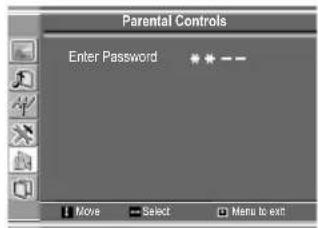
text_image
Parental Controls Enter Password Move Select Menu to exit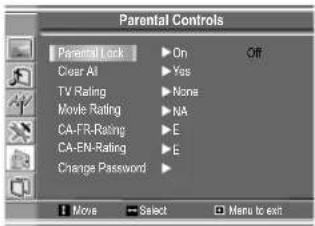
text_image
Parental Controls Parental Lock Clear AI TV Rating Movie Rating CA-FR-Rating CA-EN-Rating Change Password On Yes None NA E E Move Select Menu to exit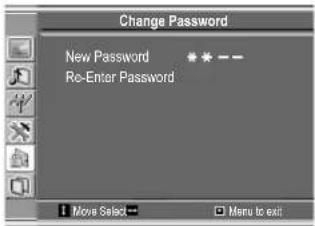
text_image
Change Password New Password * * —— Re-Enter Password Move Select Menu to exit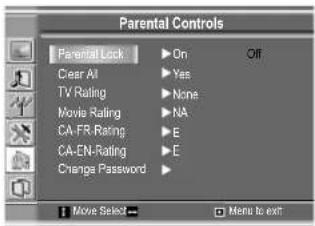
text_image
Parental Controls Parental Lock Clear AI TV Rating Movie Rating CA-FR Rating CA-EN-Rating Change Password On Yes None NA E E Move Select Menu to exit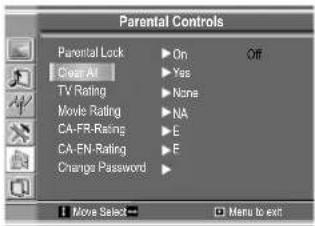
text_image
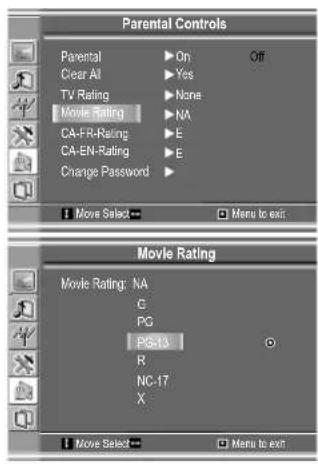
Parental Controls Parental Lock ▶ On Off Clear AI ▶ Yes TV Rating ▶ None Movie Rating ▶ NA CA-FR-Rating ▶ E CA-EN-Rating ▶ E Change Password ▶ Move Select Menu to exitAdjusting the Movie Rating
When "PG-13" in the age-based rating is blocked, this will automatically block the higher ratings "R", "NC-17", "X" also.
Adjusting the TV Rating
When TV-Y in the age-based rating is set to BLOCK, this will automatically block the higher ratings: TV-Y7, TV-G, TV-PG, TV-14 and TV-MA.
For those ratings with content sub-rating, the sub-rating page
When TV-PG in the age-based rating is set to BLOCK, this will automatically block the higher ratings: TV-14 and TV-MA.
Note:
Since a TV program may use either the MPAA rating or the TV
text_image
Parental Controls Parental ▶ On Off Clear All ▶ Yes TV Rating ▶ None Movie Rating ▶ NA CA-FR-Rating ▶ E CA-EN-Rating ▶ E Change Password ▶ ■ Move Select ▶ ■ Menu to exit Movie Rating Movie Rating: NA G PG PG-13 R NC-17 X ■ Move Select ▶ ■ Menu to exit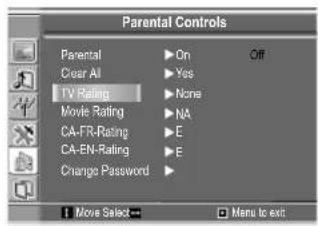
text_image
Parental Controls Parental ▶ On Off Clear AI ▶ Yes TV Rating ▶ None Movie Rating ▶ NA CA-FR-Rating ▶ E CA-EN-Rating ▶ E Change Password ▶ Move Select Menu to exit
text_image
TV Rating TV Rating: None TV-V TV-Y7 TV-G TV-PG TV-14 TV-MA Move Select More to exit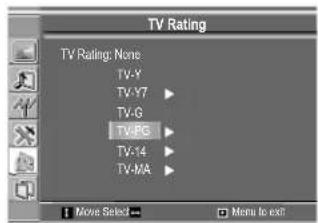
text_image
TV Rating TV Rating: None TV-Y TV-Y7 TV-G TV-P3 TV-Y4 TV-MA Move Select Menu to exit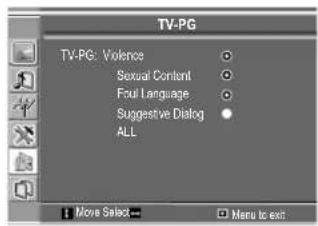
text_image
TV-PG TV-PG: Violence Sexual Content Foul Language Suggestive Dialog ALL Move Select Menu to exitAdjusting Canadian English Rating
1 From the Parental Controls menu, press CH+/- repeatedly to select
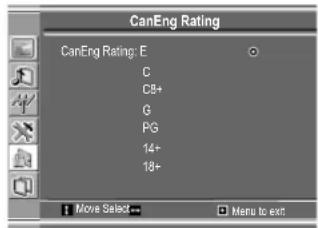
text_image
CanEng Rating CanEng Rating: E C C8+ G PG 14+ 18+CANADIAN ENGLISH RATING CHART
| E | Exempt - Exempt programming includes: news, sports, documentaries and other information programming, talk shows, music videos, and variety programming. |
| C | Programming intended for children under age 8. No offensive language, nudity or sexual |
| C8+ | Programming generally considered acceptable for children 8 years and over. No profanity, nudity or sexual content. |
| G | General programming, suitable for all audiences. |
| PG | Parental Guidance suggested. Some material may not be suitable for children. |
| 14+ | Programming contains themes or content which may not be suitable for viewers under the age of 14. Parents are strongly cautioned to exercise discretion in permitting viewing |
| 18+ | Intended for viewers 18 years and older and might contain depictions of violence. |
Adjusting Canadian French Rating
1 From the Parental Controls menu, press CH+/- repeatedly to select
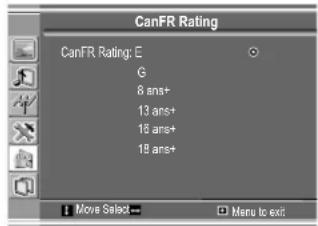
text_image
CanFR Rating CanFR Rating: E G 8 ans+ 13 ans+ 16 ans+ 18 ans+ Move Select... Menu to exit:CANADIAN FRENCH RATING CHART
| E | Exempt - Exempt |
| G | General - Programming intended for audience of all ages. Contains no violence, or the violence content is minimal or is depicted appropriately. |
| 8 ANS+ | 8+ General - Not recommended for young children. Programming intended for a broad audience but contains light or occasional violence. Adult supervision |
| 13 ANS+ | Programming may not be suitable for children under the age of 13 - Contains either a few violent scenes or one or more sufficiently violent scenes to affect them. Adult |
| 16 ANS+ | Programming may not be suitable for children under the age of 16 - Contains frequent scenes of violence or intense violence. |
| 18 ANS+ | Only for adult viewing.Could contain frequent violent scenes and extreme violence. |
Before calling for repair service, check the following items for possible remedies to the
| Symptoms | Check item |
| “Ghost” or double images | This may be caused by obstruction to the antenna due to high rise buildings or hills. Using a highly directional antenna may |
| No power | Check that the AC power cord is plugged into the mains socket.Unplug the power cord, wait for 60 seconds. Then re-insert plug |
| No picture | Check antenna connections at the rear of the unit to see if it is properly connected to the unit.Possible broadcast station trouble. Try another channel.Adjust the contrast and brightness settings.Check the Closed Captions control. Some TEXT modes could block the screen.Select a correct input.Is a non-compatible signal being input? |
| Good picture but no sound | Increase the VOLUME.Check that the unit is not muted. |
| Good sound but poor color | Adjust the contrast, color and brightness |
| Poor picture | Sometimes, poor picture quality occurs when having activated an S-VHS camera or camcorder connected and having connected another peripheral at the same time. In this case, switch off one of the other peripherals. |
| Horizontal dotted line | This may be caused by electrical interference (e.g. hairdryer, nearby neon lights, etc.).Turn off the equipment. |
| Television not responding to remote control | Check whether the batteries are working. Replace if necessary.Clean the remote control sensor lens on the unit.Do not use the remote control under strong or fluorescent |
| Snowy picture and noise | Check the antenna connection. |
| No stable or not synchronized D-Sub picture | Check if you have selected the correct D-Sub mode in your |
| No output from one of the speakers | Adjust Balance in the SOUND menu. |
| Control buttons do not work | Unplug the power cord, wait for some seconds. Then re-plug the power cord and turn on the unit again. |
☐ Do not use in hot or cold rooms (locations)
- When the unit is used in rooms (locations) with low temperature, the picture may leave trails or appear slightly delayed. This is not a malfunction, and the unit will recover when the temperature returns to normal.
- Do not leave the unit in a hot or cold location. Also, do not leave the unit in a location exposed to direct sunlight or near a heater, as this may cause the cabinet to deform and the LCD panel
Note:
If your problem is not solved, turn your unit off and then on again once.
LCD Display panel information
Important Information Regarding Use of Video Games, Computers, Captions or Other Fixed Image Displays.
The extended use of fixed image program material can cause a permanent "shadow image" on the LCD panel.
This background image is viewable on normal programs in the form of a stationary fixed image. This type of irreversible LCD panel deterioration can be limited by observing the following steps:
A. Reduce the brightness/contrast setting to a minimum viewing level.
Note:
The marking or retained image on the LCD panel resulting from fixed image use is not an operating
Cleaning and Maintenance
To clean this unit, wipe with a soft, dry cloth.
If the surfaces are extremely dirty, use a soft cloth dipped in a soap and water solution or a weak detergent solution.
- Use eyeglass cleaner to remove stubborn dirt from the LCD.
- Never use alcohol, paint thinner or benzine to clean this unit.
- Before using a chemically treated cloth, read the instructions that came with the cloth carefully.
Power supply: AC 100-240V 50/60Hz
Power Consumption: 48W (Max.)
Dimensions: 18.5 (W) x 7.09 (D) x 12.76(H) (inch)
Weight: 8.8 lb
Screen: 15"
TV system & channel coverage:
SYSTEM VHF UHF CATV
NTSC-M 2-13 14-69 1-125
Color system: NTSC
Speaker: 3W, 8Ω x 2
Note: Design and specification are subject to change without notice.

PRINTED IN
RECYCLED PAPER
Informations importantes ....1
DÉCLARATION RELATIVE AU FCC
Avis du FCC
natural_image
Simple line drawing showing a no-smoking sign, a road with a car, and a computer monitor (no text or symbols)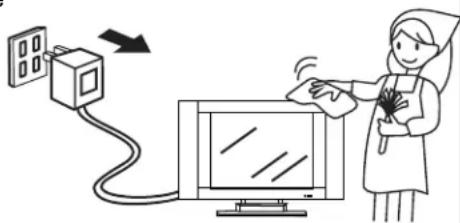
text_image
Illustration showing a medical procedure involving a device connected to a monitor, with a nurse holding the screen.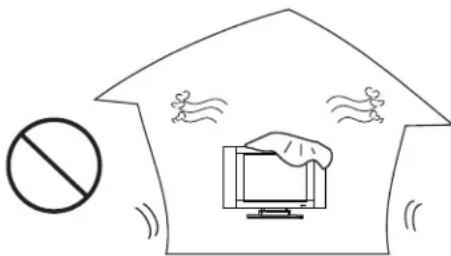
text_image
Diagram showing a prohibition symbol with a computer monitor and flying birds, indicating no protection or violation.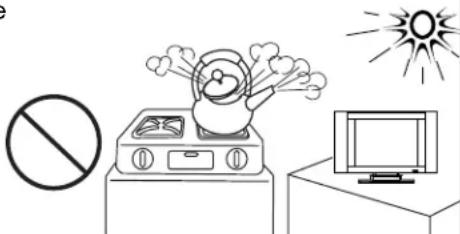
natural_image
Simple line drawing of a fire extinguisher on a stove, with no visible text or symbolsnatural_image
Simple line drawing of a chair, monitor, and prohibition symbol (no text or labels)natural_image
Silhouette of a person holding a device with a diagonal line, no text or symbols presenttext_image
Diagram showing a computer monitor with a lightning bolt emitting smoke, a prohibition symbol, and a plug inserted into the screen.natural_image
Simple line drawing of a prohibition symbol, a megaphone, and a television with radiating lines (no text or symbols)text_image
Diagram showing a prohibition symbol above a line with a grid of dots and a horizontal bar, likely illustrating a safety or monitoring concept.natural_image
Technical line drawing of a mechanical device with mounting flanges and a central handle (no text or symbols)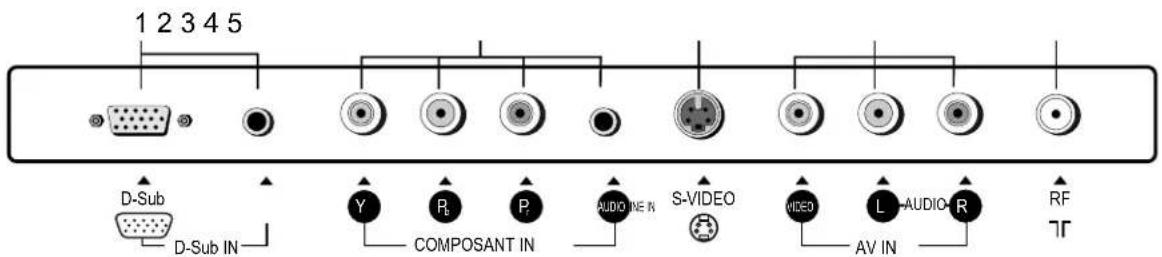
text_image
1 2 3 4 5 D-Sub D-Sub IN Y P P AUDIO IN S-VIDEO VIDEO L-AUDIO-R AV IN RF TR- Entrée Sub-D / Audio Line in
text_image
Sub-D Sub-D IN Câble Sub-D Câble audio Ordinateur personnel PCtext_image
Picture Picture Mode ▶ Normal Brightness 55 Contrast 75 Color 60 Tint 12 Sharpness 12 Move Select → Menu to exit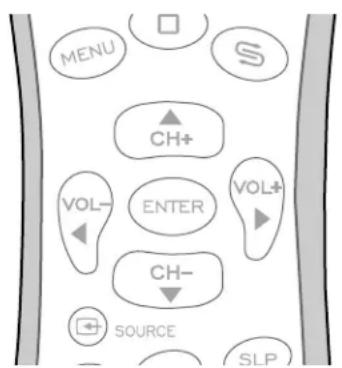
flowchart
graph TD
    A["MENU"] --> B["S"]
    B --> C["CH+"]
    C --> D["VOL-"]
    D --> E["ENTER"]
    E --> F["VOL+"]
    F --> G["CH-"]
    G --> H["SOURCE"]
    H --> I["SLP"]
text_image
Channel Auto Searching Source ▶ Cable Channel Skip ▶ On Off Fine Tune AFC ▶ On Off Frequency 55.25 MHz Move Select ▶ Menu to sell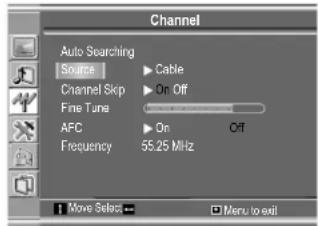
text_image
Channel Auto Searching Source Cable Channel Skip On Off Fine Tune AFC On Off Frequency 55.25 MHz Move Select Menu to exittext_image
Channel Auto Searching Source ▶ Cable Channel Skip ▶ On Off Fine Tune 55.25 MHz AFC ▶ On Off Frequency 55.25 MHz Move Select → Menu to exit
Réglage de la AFC
text_image
Channel Auto Searching Source ▶ Cable Channel Skip ▶ On Off Fine Tune ABC ▶ On Off Frequency 55.25 MHz Move Select → Menu to exittext_image
Channel Auto Searching Source ▶ Cable Channel Skip ▶ On Off Fine Time AFC ▶ On Off Frequency 55.25 MHz Move Select ▶ Menu to exittext_image
Channel Auto Searching Source ▶ Cable Channel Skip ▶ On Off Fine Tune AFC ▶ On Off Frequency 55.25 MHz Move Sales → Menu to exittext_image
Display Language ▶ English Transparency Back Light ▶ Bright Factory Reset ▶ Yes DCDi ▶ On Off Captions ▶ Off CC When Mute ▶ Off Move Select ▶ Menu to exittext_image
Picture Picture Mode ▶ Normal Brightness 55 Contrast 76 Color 60 Tint 49 Sharpness 12 Move Select ▼ Menu to exittext_image
Picture Picture Mode User Brightness 55 Contrast 90 Color 50 Tint 49 Sharpness 12 Move Select Menu to exitEn mode TV/Video
text_image
Image Auto Adjustment Image Position Phase 30 Clock 1328 Move Select Menu to exit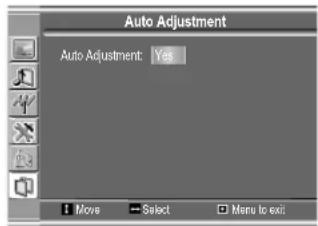
text_image
Auto Adjustment Auto Adjustment: Yes Move Select Menu to exittext_image
Image Auto Adjustment Image Position Phase 30 Clock 1326 Move Select Menu to exitAdjusting the Image Position
The unit allows you to adjust the image position of the screen if it is not well-aligned.
text_image
Image Position Move Select Menu to exittext_image
Sound Bass 14 Treble 18 Balance 43 MTS Mono Move Select → Menu to exittext_image
Sound Bass 14 Treble 16 Balance 43 MTS Mono Move Select → Menu to exitRéglage du menu Transparency (transparence)
text_image
Display Language ▶ English Transparency ▶ Back light ▶ Bright Factory Reset ▶ Yes DCDi ▶ On Off Captions ▶ Off CC When Mute ▶ Off Move Select → ▶ Menu to exit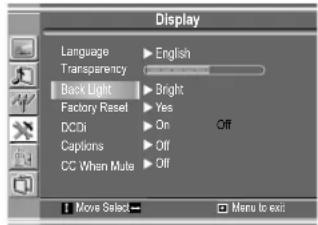
text_image
Display Language ▶ English Transparency ▶ Back Light ▶ Bright Factory Reset ▶ Yes DCDi ▶ On Off Captions ▶ Off CC When Mute ▶ Off Move Select ▶ Menu to exit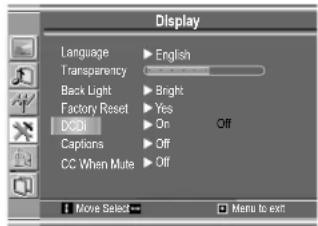
text_image
Display Language ▶ English Transparency ▶ Bright Back Light ▶ Yes Factory Reset ▶ On Off DCBt Captions ▶ Off CC When Mute ▶ Off Move Select → □ Menu to exittext_image
Display Language ▶ English Transparency ▶ Bright Back Light ▶ Yes Factory Reset ▶ On Off DCDi ▶ Off Captions ▶ Off CC When Mute ▶ Off Move Select ▶ Menu to exit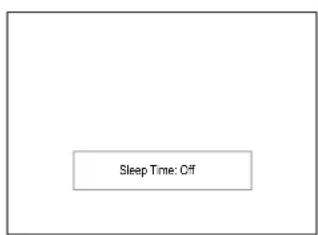
text_image
Sleep Time: Offtext_image
Display Language ▶ English Transparency ▶ Back Light ▶Bright Factory Reset ▶Yes DCDi ▶ On Off Captions ▶ CC1 CC When Muto ▶ Off ■ Move ▶ Select □ Menu to exittext_image
Display Language ▶ English Transparency ▶ Back Light ▶ Bright Factory Reset ▶ Yes DCDi ▶ On Captions ▶ CC1 CC When Muto ▶ Off Move ▶ Select ▶ Menu to exitContrôle parental
[1] Classification de films (MPAA)
text_image
Movie Rating Movie Rating: NA G PG PG-13 R NC-17 X Move Select Menu to exitExemple 2 :
text_image
Movie Rating Movie Rating: NA C PG PG-13 R NC-17 X Move Select... Menu to exitClassification télé [2]
D: dialogue suggestif
L: langage foul
S: content sexuelle
V: violence
FV: violence fictive
Remarque :
Choosing lower age-based rating blocks the higher age-based ratings regardless of content ratings settings.
Exemple 1 :
text_image
TV Rating TV Rating: None TV-Y TV-Y7 TV-G TV-PG TV-14 TV-MA Move Select... Menu to exit TV-Y7 TV-Y7: F ViolenceExemple 2 :
text_image
TV-PG TV-PG: Violence Sexual Content Four Language Suggestive Dialog ALL Move Select Menu to exittext_image
Parental Controls Enter Password ****— Move Select Menu to exit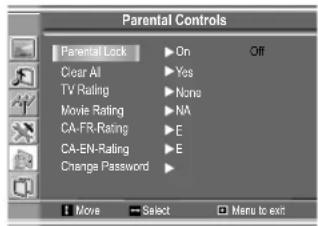
text_image
Parental Controls Parental Lock ▶ On Off Clear All ▶ Yes TV Rating ▶ None Movie Rating ▶ NA CA-FR-Rating ▶ E CA-EN-Rating ▶ E Change Password ▶ Move Select Menu to exit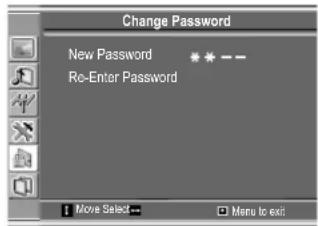
text_image
Change Password New Password ****** Re-Enter Password Move Select Menu to exit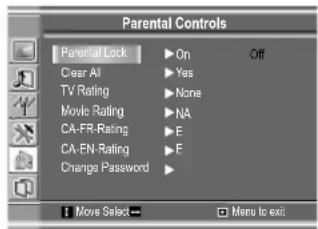
text_image
Parental Controls Parental Lock ▶ On Off Clear All ▶ Yes TV Rating ▶ None Movie Rating ▶ NA CA-FR-Rating ▶ E CA-EN-Rating ▶ E Change Password ▶ Move Select Menu to exit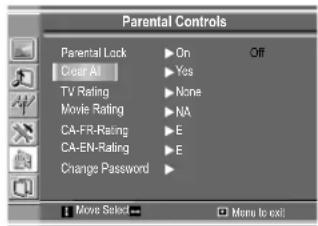
text_image
Parental Controls Parental Lock Clear AI TV Rating Movie Rating CA-FR-Rating CA-EN-Rating Change Password On Yes None NA E E Move Select More to exittext_image
Parental Controls Parental Clear All TV Rating Movie Rating CA-FR-Rating CA-EN-Rating Change Password On Yes None NA E E Move Select Menu to exit Movie Rating Movie Rating: NA G PG PG-13 R NC-17 X Move Select Menu to exit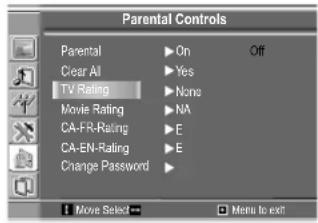
text_image
Parental Controls Parental ▶ On Off Clear All ▶ Yes TV Rating ▶ None Movie Rating ▶ NA CA-FR-Rating ▶ E CA-EN-Rating ▶ E Change Password ▶ Move Select Menu to exit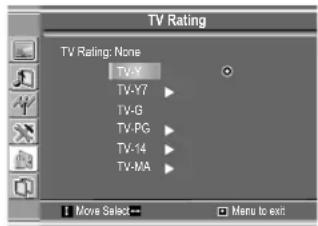
text_image
TV Rating TV Rating: None TV-X TV-Y7 TV-G TV-PG TV-14 TV-MA Move Select... Menu to exit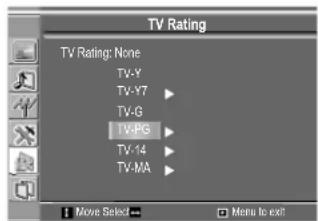
text_image
TV Rating TV Rating: None TV-Y TV-Y7 TV-G TV-PG TV-14 TV-MA Move Select Menu to exit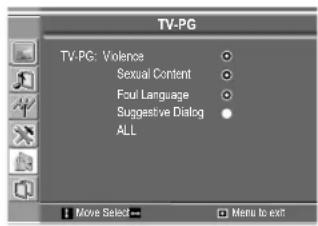
text_image
TV-PG TV-PG: Violence Sexual Content Foul Language Suggestive Dialog ALL Move Select Menu to exittext_image
CanEng Rating CanEng Rating: E C C8+ G PG 14+ 18+ Move Select → Menu to exitTABLEAU DE CLASSIFICATION CANADIENNE ANGLAISE
text_image
CanFR Rating CanFR Rating: E G 8 ans+ 13 ans+ 16 ans+ 18 ans+ Move Select Menu to exitTABLEAU DE CLASSIFICATION CANADIENNE FRANÇAISE
(Storage temperature: 0C to +50C
Working temperature: 5C to +40C)