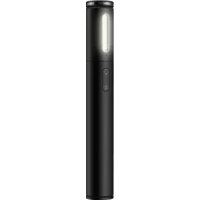
Selfie Stick - Photo accessory HUAWEI - Free user manual and instructions
Find the device manual for free Selfie Stick HUAWEI in PDF.



User questions about Selfie Stick HUAWEI
0 question about this device. Answer the ones you know or ask your own.
Ask a new question about this device
Download the instructions for your Photo accessory in PDF format for free! Find your manual Selfie Stick - HUAWEI and take your electronic device back in hand. On this page are published all the documents necessary for the use of your device. Selfie Stick by HUAWEI.
USER MANUAL Selfie Stick HUAWEI
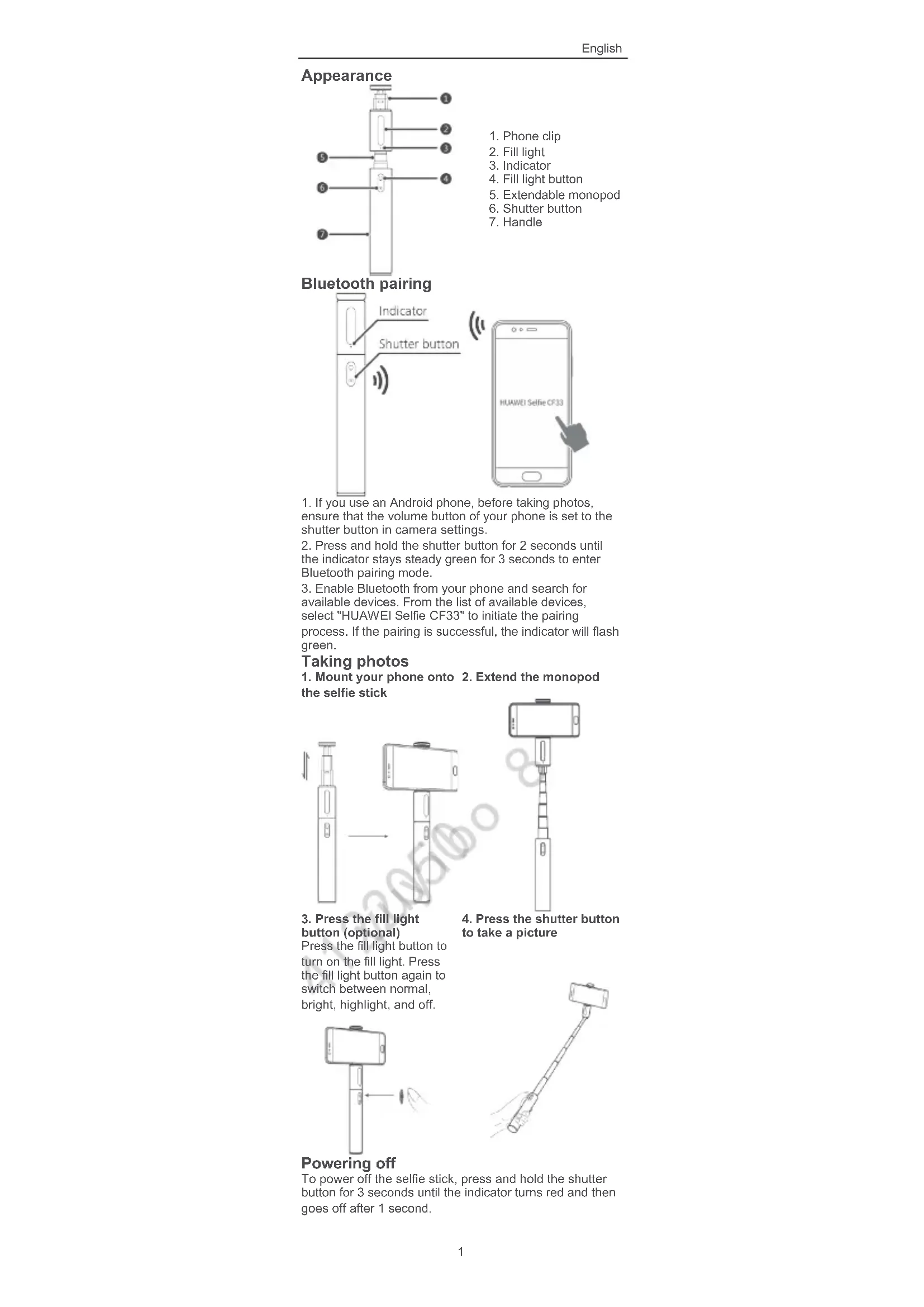
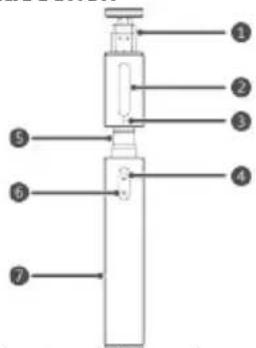
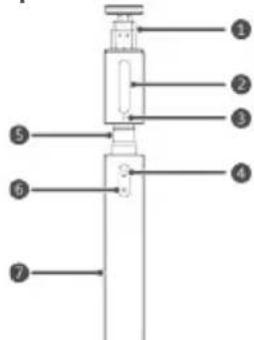
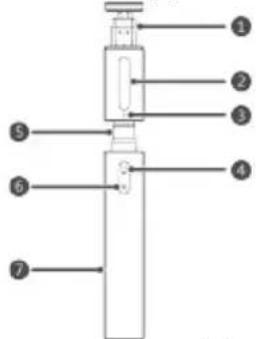
- If you use an Android phone, before taking photos, ensure that the volume button of your phone is set to the shutter button in camera settings.
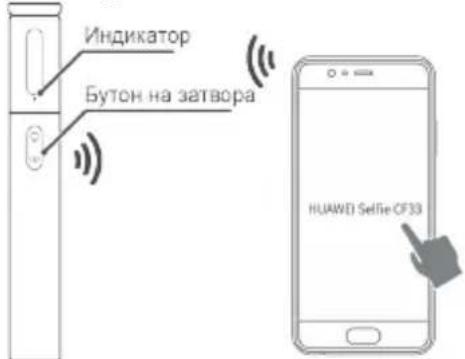
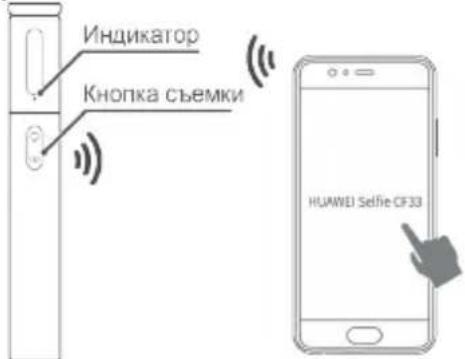
- Press and hold the shutter button for 2 seconds until the indicator stays steady green for 3 seconds to enter Bluetooth pairing mode.
- Enable Bluetooth from your phone and search for available devices. From the list of available devices, select "HUAWEI Selfie CF33" to initiate the pairing process. If the pairing is successful, the indicator will flash green.
Taking photos
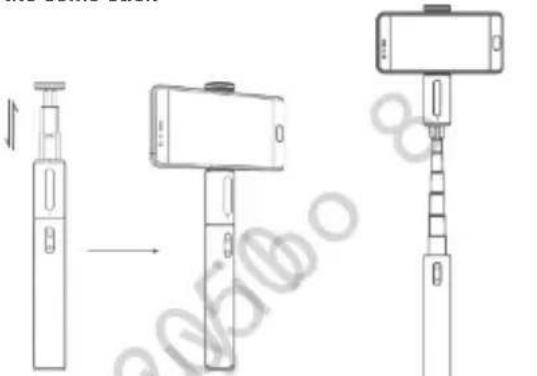
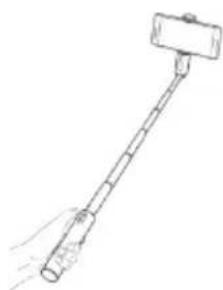
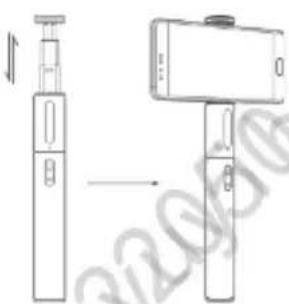
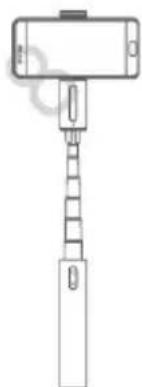
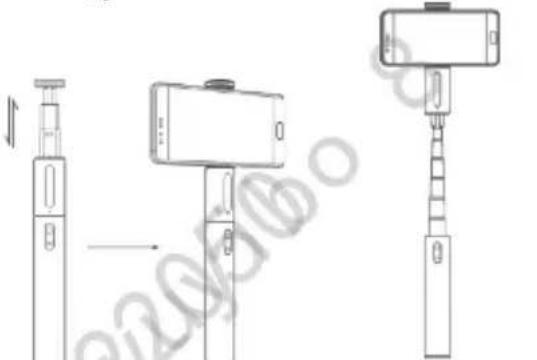
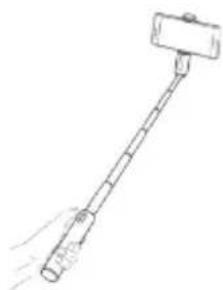
- Mount your phone onto 2. Extend the monopod the selfie stick
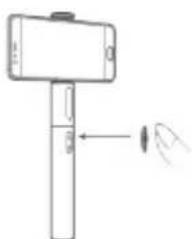
3. Press the fill light button (optional)
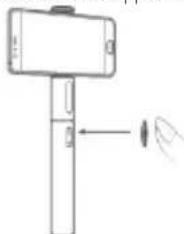
Press the fill light button to turn on the fill light. Press the fill light button again to switch between normal, bright, highlight, and off.
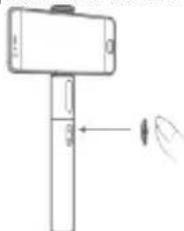
- Press the shutter button to take a picture
Powering off
To power off the selfie stick, press and hold the shutter button for 3 seconds until the indicator turns red and then goes off after 1 second.
Charging
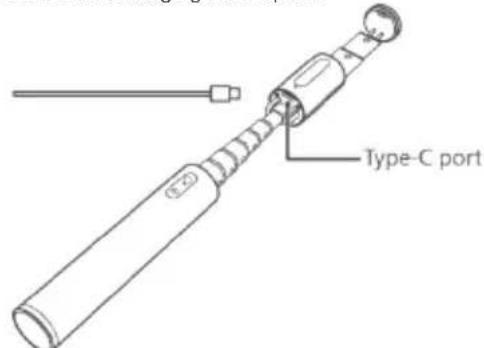
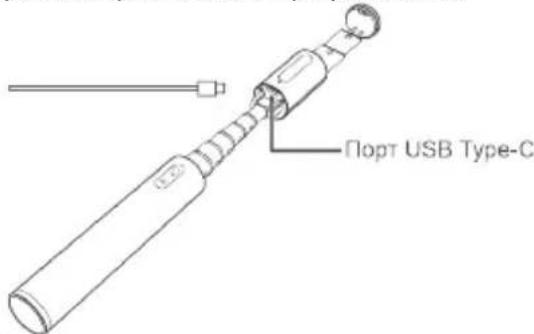
Use the Type-C USB cable to charge the device. The indicator remains steady red while charging, and turns green when the charging is complete.
Tips
After being connected to another device over Bluetooth, if your selfie stick is idle for more than 10 minutes, it will automatically enter Sleep mode. In this case, press the shutter button to restore the connection.
If the selfie stick is idle for more than 6 hours after entering Sleep mode, it will automatically power off.
If the battery is running low, the indicator on the selfie stick will flash red. Charge the selfie stick promptly.
- For some Android phones, you can double-press the shutter button to capture a snapshot.
Safety Information
- Some wireless devices may interfere with implantable medical devices and other medical equipment, such as pacemakers, cochlear implants, and hearing aids. Consult the manufacturer of your medical equipment for more information.
- Keep a minimum distance of 15cm between this device and implantable medical devices (such as pacemakers or cochlear implants) to prevent potential interference.
- For your safety, do not store or transport the device on its accessories with flammable liquids, gases, or explosives.
- Do not use the device or engage in other distractions while driving.
- Do not place the device directly above or within the reach of vehicle airbags. This is due to the fact that in the event of airbag deployment, the device could potentially take a strong impact and cause severe injuries to the people inside the vehicle.
- Avoid dusty, damp, or dirty environments. Avoid magnetic fields. Using the device in these environments may result in circuit malfunctions.
Use the device where the ambient temperature is between -10^ to +40^ , and store the device and its accessories where the ambient temperature is between -20^ to +60^ . Extreme heat or cold may damage the device - Do not place the device near exposed heat or ignition sources (such as heaters, microwaves, ovens, stove fire, candles, and so on).
- Keep the device and its accessories out of reach of children and pets to prevent accidental swallowing, choking, and other hazardous conditions.
Children should only use the device under close adult supervision. - Avoid disassembling or modifying the device and its accessories. Unauthorized disassembly and modifications could result in the void of the factory warranty. If the device fails, take your device and proof of purchase to an authorized service center for assistance.
- Do not place the battery in fire as this may cause fire and explosive hazards.
- Please dispose of the battery in accordance to local recycling laws and regulations. Do not dispose of the
battery in normal household waste. Improper handling of the battery may cause explosive hazards.
- Do not use the device at a place where the use of wireless devices is prohibited as it may interfere with other electronic devices and cause safety hazards.
- Avoid positioning the fill light directly to a person's eyes as this may cause short-term dizziness or visual impairment.
- This device is equipped with a non-removable internal battery. Do not attempt to replace the battery yourself to avoid damaging the battery or device. The battery should only be replaced by professional personnel at an authorized service center.
- Follow regulations set forth by hospitals and health care facilities. Do not use the device where prohibited.
Disposal and recycling information
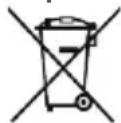

The crossed-out wheeled-bin symbol on your product, battery, literature or packaging reminds you that all electronic products and batteries must be taken to separate waste collection points at the end of their working lives; they must not be disposed of in the normal waste stream
with household garbage. It is the responsibility of the user to dispose of the equipment using a designated collection point or service for separate recycling of waste electrical and electronic equipment (WEEE) and batteries according to local laws.
Proper collection and recycling of your equipment helps ensure electrical and electronic equipment (EEE) waste is recycled in a manner that conserves valuable materials and protects human health and the environment, improper handling, accidental breakage, damage, and/or improper recycling at the end of its life may be harmful for health and environment. For more information about where and how to drop off your EEE waste, please contact your local authorities, retailer or household waste disposal service or visit the website http://consumer.huawei.com/en/.
Reduction of hazardous substances
This device and any electrical accessories are compliant with local applicable rules on the restriction of the use of certain hazardous substances in electrical and electronic equipment, such as EU REACH, RoHS and Batteries (where included) regulations, etc. For declarations of conformity about REACH and RoHS, please visit our web site http://consumer.huawei.com/certification.
EU regulatory conformance
RF Exposure
Your device is a low-power radio transmitter and receiver.
As recommended by international guidelines, the device
is designed not to exceed the limits established by the
European Commission for exposure to radio waves.
Statement
Hereby, Huawei Technologies Co., Ltd. declares that this device is in compliance with the essential requirements and other relevant provisions of Directive 2014/53/EU.
The most recent and valid version of the DoC (Declaration of Conformity) can be viewed at
http://consumer.huawei.com/certification.
This device may be operated in all member states of the EU.
Observe national and local regulations where the device is used.
This device may be restricted for use, depending on the local network.
Frequency bands and power
(a) Frequency bands in which the radio equipment operates: Some bands may not be available in all countries or all areas. Please contact the local carrier for more details.
(b) Maximum radio-frequency power transmitted in the frequency bands in which the radio equipment operates: The maximum power for all bands is less than the highest limit value specified in the related Harmonized Standard.
The frequency bands and transmitting power (radiated and/or conducted) nominal limits applicable to this radio equipment are as follows:
Bluetooth:20 dBm.
Accessories and Software Information
It is recommended that the following accessories should be used:
Batteries:SP281428SE;AHB401030PM
All RF parameters (for example, frequency range and output power) are not accessible to the user, and cannot be changed by the user.
For the most recent information about accessories and software, please see the DoC (Declaration of Conformity) at http://consumer.huawei.com/certification.
FCC Regulatory Compliance
RF Exposure
Your device is a low-power radio transmitter and receiver. As recommended by international guidelines, the device is designed not to exceed the limits established by the Federal Communications Commission for exposure to radio waves.
FCC statement
This equipment has been tested and found to comply with the limits for a Class B digital device, pursuant to Part 15 of the FCC Rules. These limits are designed to provide reasonable protection against harmful interference in a residential installation. This equipment generates, uses and can radiate radio frequency energy and, if not installed and used in accordance with the instructions, may cause harmful interference to radio communications. However, there is no guarantee that interference will not occur in a particular installation. If this equipment does cause harmful interference to radio or television reception, which can be determined by turning the equipment off and on, the user is encouraged to try to correct the
interference by one or more of the following measures: --Reorient or relocate the receiving antenna. --Increase the separation between the equipment and receiver.
--Connect the equipment into an outlet on a circuit different from that to which the receiver is connected. --Consult the dealer or an experienced radio/TV technician for help.
This device complies with Part 15 of the FCC Rules. Operation is subject
to the following two conditions: (1) this device may not cause harmful interference, and (2) this device must accept any interference received, including interference that may cause undesired operation.
Caution: Any changes or modifications to this device not expressly approved by Huawei Technologies Co., Ltd. for compliance could void the user's authority to operate the equipment.
Industry Canada compliance
RF Exposure
Your device is a low-power radio transmitter and receiver. As recommended by international guidelines, the device is designed not to exceed the limits established by Innovation, Science and Economic Development Canada for exposure to radio waves.
IC Statement
This device complies with CAN ICES-3 (B)/NMB-3(B). This device complies with Industry Canada licence-exempt RSS standard(s). Operation is subject to the following two conditions: (1) this device may not cause interference, and (2) this device must accept any interference, including interference that may cause undesired operation of the device.
Legal statement
Copyright © Huawei Technologies Co., Ltd. 2018. All rights reserved.
This document is for reference only. Nothing in this guide constitutes a warranty of any kind, express or implied. All pictures and illustrations in this guide, including but not limited to the phone color, size, and display content, are for your reference only. The actual product may vary. Nothing in this guide constitutes a warranty of any kind, express or implied.
Please visit http://consumer.huawei.com/us/support/index.htm for recent updated hotline and email address in your country or region.
The Bluetooth® word mark and logos are registered trademarks owned by Bluetooth S/G, Inc. and any use of
such marks by Huawei Technologies Co., Ltd. is under license.
Privacy protection
To understand how we protect your personal information, please visit http://consumer.huawei.com/privacy-policy and read our privacy policy.
For United States warranty card information, visit http://consumer.huawei.com/us/support/warranty-policy/index.htm.
H3rne
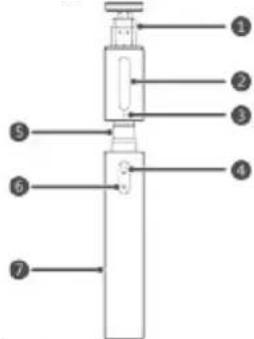
- Tepeon KIN
2.CBETINHa3a 3aTbBaHe - UNDKATOP
- ByToH 3a CBeTnHa 3a 3aBbBaHe
- PaTaTeRaTeH MoHONo
- ByToH Ha 3aTbopa
7.Дрьжka.
Bluetooth cDBoBaHe
- Ako non3BaTe Tenefoh C Android, npedn da HapabNTe CHMKN, ce yBepTe, ye 6yToHbT 3a cNla Ha 3Byka Ha TenefoHa e Hactpoeh Ha 6yToHa 3a 3aTBopa B HactpOnKIne Ha Kamepata.
- HatncheTe n 3aDpBxke 6yToHa Ha 3aTbopa 3a 2 CEkyHn DOkATO INNkAtoPbCT CBtHe B IINbTeH 3eJHe UCBT 3a Tpu CEkyHn 3a BIn3aHe B pexHM Ha Bluetooth CdB0BAHe.
- AKTINBupaIte Bluetooth OT TeneoHa cH NOTbpcTeIOCTbHnHy yCTpoiCTBa. OT CnncbKa C DocbHnHTe ycTPOcTBa n6pepe, HUAWEI Selfie CF33", 3a da 3anoHHe npoueca Ha cDBoBaHe. Ako cDboBaHeto e ycNeWHO, INHdkaTopbT Ue Mra B 3eNoHo.
PpaBeHe Ha cHmKn
- MoTHnpaTne TenePOna 2. Pa3TeRHeTe MOHONoHa cn Ha CTnKa 3a Cen#n
- Hatnche6ytoHa 3a CBETnHa 3a 3aTbJBAHe (onua)
HaTnCHTe 6yToHa CbC
3aTbNbaCa CBtInHa,3a
da BkIOuHTe 3aTbNbaaTa
CBtInHa.HaTnCHTe
OTHOBO 6yToHa 3a
3aTbNbaCa CBtInHa,3a
da IpeBKnIOvBaTe MEXdy
HOpMaHa,Apka,
OTKPOBaHe N3KnIOueHa.
4.3a Da HappaBnte CHIMKA,HaTNCHe6yToHa Ha 3aTBopa
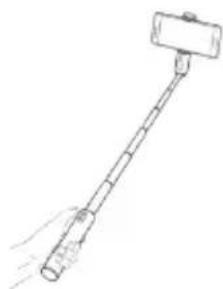
N3KIOUyBaHe Ha 3axpaHbAHeTo
3a da n3knHouHte cTnka 3a ceNpH,HaTnchHeTe n 3aDpbXte 6yToHa Ha 3aTBopa 3a 3 cekyHdIOkato INHdkatopbCT CBtHE B cepBcH CBeT TOBa N3rache Cne1 cekyHda.
3apexdane
3a da 3apeiTe yCtpoiCTBTo, n3non3BaIte USB ka6en TIN-C. IIO BpeMe Ha 3apeKdAne HnDnKaTOpbT CBETN NOCTOAnHb BuePbeHo. Korato 3apeKdAHeTO e npNKHOuHNo, CBETN B3eNeHO.
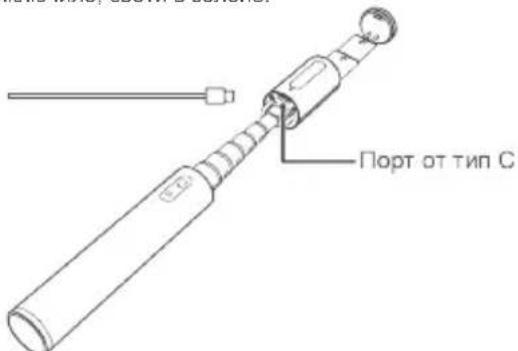
CbBETN
CneI KaTo CTe Ce CbBp3aHn C pyro yCTPOCTBO Upe3 Bluteooth, Ako BaunrT CTN 3a CE nHHe e AKTNBEH 3a NOBue O T 10 MNHTu, Toi ABTomTuH No E BnEe B pexm Ha 3acnBaHe. B To3n cIyau, 3a Da BB3cTaHOBtBe Bpb3KaTa, HATNCHE6 ByTOHa Ha 3aTBOPa.
AKO CTNKBT 3a CEHn HE e AKTNBEH 3a NOBue O T6 Yaca CNEI BNI3AHETO BPEKIM HA 3acnBaHe, ToABTOMATNUHO Ie Ce NkIOH.
Ako6atepnaTa e n3ToUeHa,INHnKaTOpbT Ha 6atepnaTa 3a CTnKa 3a cenΦn Μe 3aNoCHe Da MnRa B cepBeHO.3apeTe CTnKa 3a cenΦn He3a6abHO.
3a HkON Tepeohn C Android, 3a da 3achemete CHIMka, MOKeTe Da HaTNCHe TBA nTn 6yToHa Ha 3aTBopa.
HOpmaun3a6e3onacnocTta
Hakon63KHNyycTPOHCTBaMOKeJaCmyaBaTa paboTaHaMeINHCKn ycTPOHCTBa 3a NmIaHTnpaHe INpyro MeINuHCKoObpyDaHe, KATO NeiCmeKnbpN, KoxneapHn IMnPaHTn CnyXOBn anapatn.3a NOBue HnOpMaunce KOHCyttnpaTe C npOn3BODNTeHa MeINuHCKOTo O6OpYDaHe.
CnabTaMeHHMaHNO pa3cToHHe ot 15 cm MeKdy yCTpoICTBOTO HMMNaHTnpaHMeMnHckn yCTpoIcTBA (kato neCMeKbPn Nn KoxNepHn MMJIaHTn), 3a da npedOTbpatNTe Bb3MOKHTE CMVUeHn.
C orpeHa BaWata Be3oNaCHoc He cbXpaHbAaTe Hne npEBo3BaIte yCTpOcTBOTO nn AkceCoapnte My Cbc 3anaMIM TEuHOCTn, Ra3OBe NIN B3PbHN BeseCTBa.
- No Bpeme Ha 100npahe He n3non3BaTe yCTpoIcTbTO mH He OTKNOHBAITE BHIMAHHeTO Cn C npCpeCTBa.
He noctabnte yctpoctbTO DnpekTHo Ha nIN B 06cera Ha B3dywHnTe B3rnaBnU HA ABTOMObHa. PnunHATA 3a ToBa e, Ye B Cnyau Ha pa3rpbuahe Ha B3dyuHATA B3rnaBnUa, YCTPOCTBOTo MOKe Da npnuHn CnJIeH yad n Da IOBeDe Do TeKKn HapaHbAHn HA Xopata B ABTOMObHa.
- 1368raBae npaHn, BnaXn Hnn 3ambpceHn cpeHn. 1368raBaTe MaHHTn noneta. 13non3baHeto Ha yctpoiCTBOTo B Takaba cpea MoKe da DOBeDe Do HEN3npaBHOCT BBB BepuNTe.
- 13non3BaIte yCTpoiCTBOTo npTemnepaTypaHa OKoHnata cpea e Mejdy -10°C n +40°C n ro CbXpaHnBaIte, 3aeHNO C HrOBoITe npHaADnEhHOCTn, npTemnepaTypa Ha OKoHnTa cpea e Mejdy -20°C n +60°C. EkCTpEmHaTOnnHa Nn CTyD MoKe da NOBpeDi yCTpoiCTBOTo
He noctabraIte yCTpoIcTBOTo 6n30 do OTKpHTN HToHnHa ToTnHa nn 3anaJBaHe (kato
Блгарский
HarpeBaTeN, MKNPOBbJIHOBN ΦypH, ΦypH, NeKn, CBeuN T.H.).
- Na3ete yctpoctboto n npnaHnHexHOCTMe My daneoy Deu a I Domaun Hn JIOBmU, 3a da npedotbpaTne CnyauHo npereIbuaHe, 3a dywaBaHe n npytn Oanchyn cnoia.
- Deuata Tpr6Ba Da n3no13Ba yctpoiCTBOTo cAmo IOD npraKO Ha6nOHeHMeTo HA Bb3paCTeH.
- N364BaaTe pa3rno6BaHe mN MoDnФuipaHe Ha yctpoiCTBOTo n HerOBnTe npHaadNeXHOCTn. Hepa3peuHTo pa3rNo6BaHe mOmDnФuipaHe MOKe Da DOBeE Do OTnAdAe H aΦa6pMHaTa rapaHua. Ako C ycTpoiCTBOTo Bb3HNKHe IpobJEM, roOTHeCe 3aeHc DOKyMeHTa 3a NOKyPKa, ByyIbHOMoUe HeHTbp 3a OBCnyKBaHe 3a CBdEiCTBne.
He nocTaBnTe 6aTepeTnBaOrbH, TbKATO TOBa MoKe Da Cb3dae ONaCHOCT OT NOXAP N EKCnno3nA. - 13x8bplnte 6aTePnTa B CbOTBeTCTBne C MeCTHnTe 3aKoHn npa3npoeD5n 3a peuKnIpaHe. He 13X8bPnTe 6aTePnTa 3aeHNO C 6obKnHOBeHnTe 6bTOBn OTnDbu. HenpaBnHTo 60baPeHc E 6aTePnTa MoKe Da npMunHn OnaCHOCT OEckNo3n.
He n3no3BaIte yCTpoiCTBOTo HA MRCTO KbTeTo mNo13BaHTo Ha 6e3xMHyN yCTpoiCTBa e 3a6paHeHO, Tb KaT0 ToBA MoKe Da NoBnRe Ha dpyr n eneKtPOHH yCTpoiCTBa N da npedn3BnKa pck 3a 6e3oNaChOCTTa. - N36raBaiTe Da HacOyBaTe CBeTmHaTa DnpeKTHo B OHTe Ha YOBek, Tb KaTO TOBa MoKe Da IpnHn KpaTKoTpaino 3aMaBaHe nn yBpeXdaHe Ha 3peHneTo.
ToBa yCtpoiCTBO eObOpyDbaHO cHeOTcTpaHReMa BbTpeuHa 6aTePnA.3a Da mI3BeHHe TOBpeDa Ha 6aTePnA uNcYcPoTcTBOTO, He ce ONITBaTe camu da CMeHNTe 6aTePnA. BatePnTA Tp8Ba Da ce NODmEHcMoT O pOopecnoHale nepcoHAn B yTbJIHOMouH cepBn3E HcHTbp.
CnataBaIte pa3nope6bIte, onpeaeneHn ot 60JHnIuTe n 3dpabHIne cnyx6n. He n3noI3BaIte yctpoIcTBOTo, aKe e 3a6paHeHO.
HOpMaun3a n3XBpIHeTo nepeuKnnpaHeTo
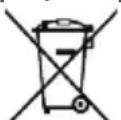
CmBbT Ha 3aDpaKan KOHTeHep 3a OTnAbu, Yka3aH Bbpx npOyKta, BaTePnTa, NMOUHNte MaTePnAnN INn ONaKBkATA HAnOMH, Ye BCNUeEeTKPOHHnpOyKTN n BapEn TpR6Ba Da BdaT PpeDaAH B CNEuAINHe NYHKTOBE, CJed KAto npKnHcN CpOKBT IM
Ha ekcnnoataa. Te He Tprba Da ce 3xBpIaT
3aeHcO cOctanHnTe 6bTOBn OTnabu. NTope6nteY
eOTOBOpEn 3a npeDABaHTo Ha o60pyDBAHeTO B
CneuaHNO OnpedeHnTe 3a Taun eN PyHKTOBE 3a
OTDeHIO peKnnpaHe Ha n3n3No OT yNtpe6a
ENEKTPuecko N eEKeTPOHO 60byHO 60epyDBAHe (OEEO) H
6atePnn CbflnacHO MeCTHO 3akOHoTaTeNCTBO.
PiabnHTO Cb6paHe N peKnnpaHe Ha o60pyDBAHeTO
nomara Da Ce rapaHTnpa, Ye n3XbPnHte
eNEKTPueckn N eEKeTPOHH ypei (EEY) ce peKnnpaT
no HauH, KoiTo 3ana3Ba ueHHTe MaepnaHn I
npedna3Ba YoBeWKOTO 3dpabe N npipodaTA.
HenpabnHTO 60paBeHe, cnuyHnTO cnYnBaHe,
NOpeKdAHe H/nn HNOxOJaTO peKnKnPaHe CneJ
pnkNIOUbaHe HA EKnCnOaTaunraTn IM MOke Da OKKaT
BpeHIO BnHnE Bbpxy 3apBeTO N OKOnHATA cpeA. 3a
NoBee HnFopMaunr OTHOCHO TOB, KbJe N KaK Da
npedaeTe eNEKTPueCKTO N eEKeTPOHHOTc
60bpHBAHe (EEO) 3a nXbPpHRe, Ce cbPpKeTe C
MEChNTe BNactN, TpbROBEu aNN cnyk6ta 3a
cb6paHe Ha OTNaDbu nn NoCetete ye6caitya
http://consumer.huawei.com/en/.
HamaJraBaHe Ha onaChnTe BeuecTba
Toba yctpoictBO n enektpnuecknte My akcecoapn ca B CbOTBETCTBE C MecTHNTe npNJIOXIMN pa3npoeD6N OTHOCHO orpaHnueHnra TpN n3NOJ3BaHeTO Ha ONpeJeHn ONaCH N BeueCTBA B enekTpncckTo n enektpnoHto 06opyDbaHe, kato dapeKtNBte H eO
REACH, RoHS u nüpektnbata 3a 6aTepeHnTE (KbJeTo ca BkIuOeH) u np. 3a DeKeIapauu 3a CbOTBeTCTBne cbrnacho REACH u RoHS, mon, nocetete hauny ye6caHt http://consumer.huawei.com/certification.
CbotBETCTBnE C HopMaTHNBHnTe N3NCKBaHHa EO
N3naraheHa paDnoecToTn
Baeweto yctpoiCTBO e HNCKO-MoHOCTeH paHIO npHemOnpndaBATEJ. KaKTo ce npenOpbUBA OT MeKdyHapOHNHe HAnbTcBn, yCtpoiCTBOTo e CbdaJeHO Taka, Ye da He HaAdbuaba ycTaHOBeHteOT Ebponeckata KOMNCnOrpaHmueHn3a n3naIaeHa paDnOBbHIn.
Deknapaun
C HactoTo Huawei Technologies Co., Ltd. deKnapupa, ye TOBa yCTpoiCTBO E C bOtBETCTBnE C OCHOBHIne 13NCKBaHnI N ApyTne npNoXmPi pa3npoe6n Ha DupeKTHBa 2014/53/EO.
Ha-HoBata n BaHnDa BepCna Ha DeKnapaua 3a
CbOTBETCTBNEMOKe Da Ce BnHa
http://consumer.huawei.com/certification.
ToBa yCTpoIcTBO MOKe Da pa6OTn BbB BCuHKn DbPkaBNyHeHN Ha EO.
CnAsBaIte HaunohHInHe MeCTHN pa3nope6b TAm, KbTeO ce nON3Ba yCTPOCTBOTO.
ToBa yCTPOINCTBO MOKe Da 6BJe OOrpaHnHeHO 3a yNtpe6a, B 3aBNCIMOCT OT MecTHaTAMpeKa.
YeCTOTHnJIeHTN3axpaHBaHe
(a) YeCTOTHN IeHTN, B KOnTo pa6oTn
paIIOOBOpUyBaHEnTo: HJKOn IeHTN MoKe Da He 6bDaT
DOCTbHN BbB BCNU KIN DbpXaBN NIN BCNU KIN O5NaCTN.
CbbpXeTe Ce C MeCTHn MpeKOB ONEpAToP 3a NoBeYe
noDpO6HoCTN.
(6) MaKcMaJIHa MoUHocCT Ha paIIOueCToTa, npedabAHb YeCToTHte JeHTN, B KOHO pa6OHTn paIIOooBOpyDbaHeTo: MaKcMaJIHaT a MoUHoc3a BCNUKeJeHTNe NO-MaNka OT Ha-BuCokata rpaHnHa CTOnHocT, NOCOeHa B CbOTBeTHna XapMOHNsPah CTaHdAPr.
HomHaHHTe rpaHnHa YecToTHHe NHTN MoHocTt Ha npedBaHe (nIbYeHa W/IN pOBeHe), npINOxMn 3a TOBa paNoobOpyDbaHe, ca CneHNTe: Bluetooth:20 dBm.
HΦopMaun OTHOCHO
npHnHaIeXHoCTNe I coΦTyepa
PnpopbHTeHNO e da ce n3no13BaT cneHNTE npHaNDNEXKHOCTN:
Batepnn:SP281428SE;AHB401030PM HnTo eINHOTnapaMeTpIe 3a paDIOueCTOn (HaNP., yeCTOEN 6xBAT N 3XoDA MoUHOCT) He e DOCTbNEH 3a notpe6HTENr I ToH He MOKe Da Tn IpOMeHr. 3a HaN-HOBATA INHOpMaUN OTHOCHO npHnADJeKHOCTNe I COFTyepa, BIXTe DEKnapauuNTA 3a CbOTBeTCTBVe Ha http://consumer.huawei.com/certification.
CbOTBcTBnepa3npoe6nteHaΦK ⅢnaRaHe Ha paAnocctOn
BaueTo ycTpoiCTBO e HNCKo-MoUHOCTeH paIIO npneMo npeDabaten. KaTO ce npenopbUba OT MeKJyHapOaHnTe HaTbCTBnA, yCToPcIcTBOTe cB3daJeHO TaKa, Ye Da He HAnXbPnIy YcTaHOBeHInTe Of PeepaJIHaT a KOMHCnI NO KOMYHNkAIaNTe OpraHNeHg 3a N3naRaHe Ha paNDOBJIHn.
DeknapaunHaΦKK
YCTPOICTBOTO E TECTBAHO NOTOBAPHa OrpaHnueHnra 3a UNPbOuN YCTPOICTBa OT KlaC B, CnpoeJtct 15 Ha npabunHnka H KaK. OrpaHnueHnra Ca cB3daen H 3a OcnIpyraBaHe Ha pa3yMHa 3aUnnTa CpeUy BpeHn CMyuHn npn HnCTannpaHe B XnInuHn CrpaHn.
ObopydBaHTo c3daBa, n3noI3Ba n 3JIbYBa
paIIOueCTOTHa eHeprn I MOKe Da npUHN BpeHN
CMyeHnB pAio KOMyHKaunTe, Bcnyau He ce
HCTaIInpa n3noI3Ba CBynaHO IHCTpykuHte. Hma
rapaHn, oBaHe, Ye B onpeJeHa IHCTanaun HaMa da
Bb3HNKaHt CmyeHnA. Ako obOpdyBaHTo npUHNBA
BpeHN CmyeHnB nPmeMaHTo Ha paIO nn
TeJeBnIOHn CnHan, KoEt MOKe Da yeCTaHOBn Ype3
N3KnIOuBaHe n BkIoUbaHe Ha ObopydBaHTo, Ce
npenOpbHa Notpe6ntenT Da ONITa Da OTCTpaHn
CMyueHnraTa No HAKO IT CNeDHnTE HaHHN:
--PpeHacOuBaHe IINI PpeMeCTBaHe Ha IIpneMaUaTa aHTeHa.
--YBeJIuHaBaHe Ha pa3CToHMeTo MeJy 6OpUdBaHeto npneMHnka.
-CBp3BaHe Ha 06OpyDbaHeTo KbM KOHTAKT OT BeprA, pa3NnHa OT Beprata, KbM KOrTO e CbBp3Ah npEmHnka.
--3a nOMOc ce KOHCyNTnpaTne C DoCTaBvNka Ha
O60pyBaHTo HIN C ONHTe paIIOTeBn3HOHe TExHKn. YcTpoIcTBOTe e cBrracyBaHo C aact 15 ot npaBnHnKa Ha K K .Pa6oTaTa e npedmet
Ha cneHnTe DBe ycNoBra: (1) UcTpoNCTBoTo He TpRbBa Da npuHnRa BpeDn CmUeHn n (2) UcTpoNCTBOTo TpRbBa Da MoKe da paOto Npn npOn3BOHn CmUeHn B IpNeMaHeto, BKIOHTeJHO CmUeHn KOUTo 6NaMOrn Da npuHnRt HenpaBnHnTO My dyHKuOHnPaHe.
BHHMaHHe: BcKaKbN IpOmeHn Nm MOuΦkaUH naCTpoICTBOTo, KOnTO He ca ODo6peHn N3pMHOOT Huawei Technologies Co., Ltd. 3a cBoTBeTcBne, MoKe da DoBeTaD o aHynpaHe Ha npaBoTo Ha Notpe6nteJa n3non3Ba TOBa o6OpyDbAHe.
CbotBetCTBne c Industry Canada
N3naraheHa paadnoyecToTn
BaWTe yCtpoiCTBO e HNCKO-MoUHOCTeH paDIO npneMo npeDaBteI. KaTc ce npenopbUba B MekdyHapOHNTE yka3AHHy, yCtpoiCTBOe e pOeKNTnpaHO da He NaDBnBnAba ORpaHnHEHnTA, yCTaHOBeHn B KaHaJa, 3a INHOBAuIN, HAYKa I KIOHOMnEecko pa3BnTHe 3a BB3DeiCTBne Ha paDIOBbLNHTe.
DeknapaunHaIC
ToBa yCTpoNCTBO cBOTBeTCTBa Ha CAN ICES-3 (B)/NMB-3(B).
ToBa yCTpoIcBTOBETCTBa Ha RSS cTahdapt(II) 3a 1N3KNKUeHnRA 3a NJIeHcHnPaHe Ha Industry Canada. Pa6oTa e o6eKt HcneHnTe De bye ycNoBN: (1)
YcTpoIcTBOTHe TpR6Ba Da npuHnRa CmyeHn H (2) YcTpoIcTBOTpR6Ba Da MoKe Da pa60Tu pIn pOn3BOJHn CMUeHn, BKNIOHTeNHO CmyeHn, KONTo 6Na MaorN Da npuHnHr HnpaBnHOTo My cyHKUOHNpaHne.
Opniuecka deKnapaun
ABtopcko npaBO © Huawei Technologies Co., Ltd.
2018. Bcnyk npaba 3ana3ehn.
To3n DOKyMeHT e cAmo 3a HOpopMaun. HnIo B
HAcTOnOIOTO pKOBODCTBO He npeDCTabIbRA KaKbATO n
da e rapaHua - h3pnuHa nn IpoDpa3bpaUca ce.
BcNcK CHMKN HIOCTpaUcn B HAcTOnO TO
pKOBODCTBO, BKIOHOTeHNO, HO He cAmO CBETbT N
rOlenHnA tHa HA TeNEoHa, HcbDbPkaHHeTo H
BUNIMATA INHOpMAuIGN, ca Camo 3a BaUe CBeDeHne.
PeaHnT npOdyKT MoKe Da ce pa3nUaBA OT T8x. HnIo
B HAcTOnOTo pKOBODCTBO He npEclTabIbRA KAKBaTO n
da e rapaHua - h3pnuHa nn IpoDpa3bpaUca ce.
BnKTe http://consumer.huawei.com/us/support/index.htm
3a NoCleJHaTa aKtyaInuHpaHa ropeua nn HmHnI n HmEnI
aDpc BbB BAuTa CTpaHa nn PERHO.
TbproBCKOTO HanMeHOBaHne n NorTo BluteothCa
3anaeHN TbproBCKn MapKn, npntExKaHne Ha Bluteoth
S/G, Inc., n yontpe6a Ta m O T Huawei Technologies Co.,
Ltd.e cnueHa.
3aunTaHa noBepuTeHnOCTTa
3a da paabepeTe KaK 3auNTabame BawaTa IuHa
Hnpopmaun, nocetete
http://consumer.huawei.com/privacy-policy andpocetete
haata ,Ponntka 3a noBepntelnoct.
3a Hnpopmaun 3a rapaunohnKa KapTa B CAU,
nocetete
http://consumer.huawei.com/us/support/warranty-
policy/index.htm.
Vzhled
Shoda organu Industry Canada
Expoize radiovemu zareni
Toto zafrzeni je nizkonapetovy radiosv prijima c a vysilac.
Zafrzeni je navrzeno tak, aby nepvekracovalo limity pro
vystaveni radiosvym vhnam, ktere stanovila agentura
Innovation, Science and Economic Development Canada.
Prohlášeni organu IC
Toto zaflzeni splnjue normu CAN ICES-3 (B)/NMB-3(B).
Toto zaflzeni je v souladu se standardy RSS organu Industry Canada tykajici se bezlicenciho pouziti. Pri provozu musi byt splnny nasledujici dve podminky: (1)
Toto zaflzeni nesmi zpusobovat ruseni a (2) toto zaflzeni musi akzeptovat jakekoliv ruseni, vctne takoveho, ktere by mohlo zpusokit jeho nespravnou funkci.
Pravni upozorneni
Autorska prava © Huawei Technologies Co Ltd. 2018.
Vsechna prava vyhrazena.
http://consumer.huawei.com/us/support/warranty-policy/index.htm.
http://consumer.huawei.com/us/support/warranty-policy/index.htm.
Apparence

Copyright © Huawei Technologies Co., Ltd. 2018.
http://consumer.huawei.com/us/support/warranty-policy/index.htm.
Aussehen
estabelecidos pela Innovation, Science and Economic Development Canada.
Declaracao da IC
Copyright © Huawei Technologies Co., Ltd. 2018.
http://consumer.huawei.com/us/support/warranty-policy/index.htm.
Aspect
Declaratie de conformitate FCC (Federal Communications Commission)
de Innovation, Science and Economic Development Canada.
Declaratia IC
http://consumer.huawei.com/us/support/warranty-policy/index.htm.
BHeuHn BnD
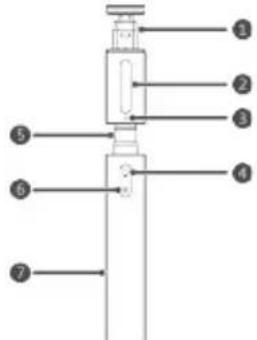
- Kapennehne
TeNecOHa
2.ПОДСВЕТКА
3.Инданкатор
4.KhONkaNoCDBETK
5.Teneckonnyeckar
Tpy6ka - Khonka cbeMKn
- Pyika
Conpexene no Bluetooth
- Npeep CbemKoI pOTo B HAcTpoKax KamepeB TeJeP0Ha Ha nPaTcOpMe Android HAcTpoTe KHONKy yEmhWeHn rPOMKOCTu KaK KHONKy CbEMKn.
2.ДлпперexodaВржIMcopяженnoBluetooth нхмпгиУджимBaHTeKONKyCbemKn2cekyHы, пoka Индikatop He 6уdET ropetb 3eJIeHbIM B TeueHne 3 сeкун.
3.BKIOHHTe BluTooth Ha BaUeM TeIePone H BbIOONHHe NnOcK DoCTynHBx BluTooth-yCTpOInCTB.CnICKe DoCTynHBx BluTooth-yCTpOInCTB BbIbepTe HUAWEI Selfie CF33, YTO6bI HauaTb npoueccc cOpRkEHN. Pocne yCTaHOBNeHcnpRkEHN INHkATop 6yDet MIRAtb 3eJIeHbIM.
CbeMkaΦOTO
1.ПикpenTe TeleefoH K 2.PackpoTe MOHOnOd MOHONoDy
- Haxmnte Ha KhoNkny NOcBETK (OncnoHaJIbHO)
HaKMTHe Ha KONky NOCBETKN, YTObbl BKNIOHTb NOCBETKY. NOBTOHO HAKMITE Ha KONky NOCBETKN DnrepeKNIQUEHmMekdy pEXIMAMn: O6bIHyn, AApKn, NOCBETKa, BBKIOUeHne NOCBETKN.
- Haxmte Ha KhoNky CbeMkn, YTO6bI cdeNaTb foTo
BbIKJIOUeyHe
TtobbblkHIOHTbMOHONo,HaxMITEu ydepKnBaIte KhoNkycbEMKn3cekyHdbi,NOKa HndnkatOp He 3aropntc KpaChbIMnHE bblKIOHTCpee31cekyHdy.
3apKa
ДязардкMononoda nCOnnb3ynte USB-ka6eIb Type-C.BoBpem3apdKnHnDnKATOP ropNTkpacHBIM.Korda3apdKa 3aBepSeHa,HnDnKATOP ropNT3eJIeHBIM.
COBETbl
Ecnn noKnHnBk Bluteoth-ycTpoCTBy MOHONoHe HcnoNb3yETcDOnbwe 10 MNHyT, OH ABTomaTHeCKn NepexOHT B CnAaNppeKIM. HaKMITE Ha KHONKY CbEMKIN, YTO6bl BBIECTN MOHONoI3 CNaTeo peKIMMa IN BOCCTaHOBTb Bluetooth-coeHNHeHc EcnNoCne nepexOda B cnau npexm MoHONoH He NCNOb3yeTcDoJIbWe 6 YacOB, OH ABtOMaTHeCKN BBKNIOaETcR.
Ecnb 6aTape MoHOnoJa pa3pKaeTcN, HnDkaTOp Ha MOHOnoJe HauHaet Mrratb KpaChbIM. 3apAnTe MOHOnoJ.
Ha HeKOTOpbIX TepehOax Ha NpTaPcOpMe Android MOxHc CdeNaTb CHMOK DBoHbIM HkaTneM Ha KHONKY CbEMKMOHONoJa.
HCTpykuni no TEXHnke 6e3onacHOCTN
HeKoTOpBie 6ecPcBoDhIbe yCtpoiCTBaMory T Oka3bBAtb HeRaTmbHoe BnnaHne Ha pa6Oty KApDIOCTmMyIaTOPOB, KOxNeapHbIX NmNnAHTaTOB n CnyOBbIX annapatoB.3a 6onee noDp6HOH INΦopMaUeN 06pauaTeCB K npOnBaODntEIO MeuunHCKoro 6OpyDobAHNA.
Bo n36exkanne nomex MMHmAbhoe pacctoHne MeJy beCnpBODhIM yCTPOIcTBOM KApIOCTMMyTOpOM INIKOxTeapHBIM mNnHaTATOM DOJTKHO COCTABTb 15 CM.
HeIb3xpaHHTbnnnnepeBOaHTb yCTpoCTBO nero akceccayapbl Bmecte C roptouHH,ra3oo6pa3HBIM NINB3pbYbATbIMNBEUcCTBaM.
He nCnoJIb3yIte yCTpoIcTBO BO BpEMBAQKeHnABTOMOBUN.
He NomeuAte yctpoCTBO HAD noDykoB 6e3oNaCHOCTn TpaHcnpTHORo CpeCDTBA INB HneocpeCtBeHHo BnI30CTn OT Hee.Bo Bpemr cpaBaBHAn noDyko 6e3oNaCHOCTNo yctpoCTBO TpaBMPOBaTB HAXODJUINxCB ABTOMOHNIE JIOEi
He nCnoIb3yIte H He 3apJxAte YcTPOcCTBO B NOMeUeHINX C NOBbUeHHO BIAKHOCTBO NIOBbUIM COepJxAHmE NbIN. N36eraTe BO3DeCTBn3JIeKTPOMaTHNtBIX NOnEi. NcNoIb3OBAHne YcTPOcTBa B ONCAHNO cpeMe MoKET npNBecTN K NOBpeXKeHINO erO MNkPOCXEM.
TemnepaTypa 3Kcnnyataun yCtpoCTBa n erokceccyapob: ot-10°Cdo+40°C.TemnepaTypaXpaHeHHy yCtpoCTBa n erO akceccyapob: ot-20°Cdo+60°C.3KcTpeMaIbHO BbICOKne INHn HN3Kne TemnepaTyblMOryt npmbecTN K NOBpeKeDeHNIO yCtpoCTBa.
He nomeaTe yctpoCTBO B6n3n NCTOCHKOB TEnla (Hapmep,paNaTcPOB,MNKPOBOJHOBBIX neey,IyXOBbIX WkaPOb,CBeeyN.T.I.)
Bo nabexaHne nporNaTbBaHn yctpoNCTBa, pckaydyuBn npyunx onacbIX nocneDCTBn xpaHInyeCTPOIcTB BO HEDOCTYHOM DnA DeTeM MecTe.
- DeTN MOrT NOJb30BaTbCBy YcTpOInCTBOM TOJbKO BnpNCyTCTBmB3pOCnBx.
He pa36paIte H Me MoDnHpUpyte yCTpoIcTBO n erO akceccyapbl. HecaHKIOHOHPoBaHbIe ONEpaUN C yCTpoIcTBOM MOrY T IpiBecT K aHHyNPOBaHIO rapaHTNI pOn3BOIDTeJI.B cIyue HeNCnpabHO pa60tbi yCTpoIcTBa 6paTNTecB B ABTOI3OBaHHbI cepBnchbl CEHTp.
Bo n36ekaHne BoaRopaHn nnB3pbBa He donyckaTe nonadHna 6atape B oroHb. - YtININ3NpyIte 6batapeB CooTBeCTCBM C MeCTHBIMN 3aKoHaMn INIOLOXeHnA M. He YtININ3NpyIte 6batapeB BMeCTe C 6bITOBbIMN OTXODAMN. HeHaJIeKaJee 6bpaueHne C 6batapeMn MOKeT npNBecTN K B3pBy.
Bo n36ekaHne o6pa30BaHHn nomex npyHX onachbIX nocNEcTBn He nCNoJIb3yIte yCTpoiCTBO B MeTax, rIe nCNoJIb3OaHHe 6ecnpoBODhix yCTpoiCTB 3anpeuEHO.
He HanpaBnIte y3KoHaPbAeHbI Nyu CBeta B rna3a. 3TO MOKeT pNBeCTN K TOnOBokpyKeHIO NkPaTKOBpeMeHHOMy HApUeHIO 3peHn. - DaaHoe yctpoiCTBO OcHaueHO HecbemHOB BCTpoeHHo 6atapeei.Bo m36ekAHne NOBpeKdEHnYyCTPOICTBA INI ERO 6atapen He IbTAHTecbCAMOCTOIeTbHO 3aMeHHTb 6atapeIO YCTPOICTBa. POBOPC 3aMeHb5 6atapen 06pauaHTecbABTOPINOBAHHb CepBNCHb CEHTp.
CobnDaaTe npaBnna, pInHrTbe B 60JIbHnaux MeINuHcKnx yUpeXdEHNax. He nCNoNb3yIte ycToiCTBO B MecTx, rDe erO nCNoNb3OBaHne 3anpeueHO.
HCTpykunnoynTnJn3aun
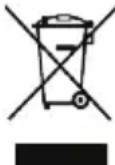
3NaOKIpeepKHyTOrO MycOpHOro 6aKa Ha yCTPOINCTBE,ero aKKMynTOpHO Batapee,B DOkyMeHTaUNnHa yNkOBOuHbIX MaTePnaJaxo3HaayeT, YTO BCE 3NeKTKPOHNbI yCTPOINCTBa N aKKMynTOpHbIE 6atapEn No 3abepWeHHn Cpoka KcNpyataunn DOnxHbI
nepedabatcB CNEUaIbHbIe NyKtBcBcopa nytunna3auuN He OJXhbl yHHTOxTaC BMeCTe C0bHbIM6bTObIMM OTXdAMm. NOb3oBaTeB 683aHytunn3npOBaTb ONcaHHe OBOpDobAHne BnykTax c6opa, CNEuaJIbHO npDeHa3aHuHbX DnA yTuIN3aunn Otpa6oTaHHORO 3NeKTPnueCKoro 3NeKTPoHHORO o6OpDobAHn AKKyMylTopHbX BatapeB, B COOTBeCTBm C MeCTbIMN 3aOHAmn NIOToXeHHMaMn. HAdnEkaunm c6opn yTuIN3aunn OOncaHHORO 3NeKTPoHHORO 3NeKTPnueCKoro 06OpDobAHn IO3BOJnAET NOBtPOHO INONb3OBaTb CEHNbIE MaTePnaJIb I 3aUnTIb 3dOpOBBe YelOBeka N OkpyKaioUyO CpeSy. B To Bpem KAK HeNaIeXaUee ObpaSeHne, CnyauHnaonOMka, NobpeXeHne N (In) HeNaIeXaUanr yTuIN3aunn yka3aHHORO 06OpDobAHn NO nCTeYehn Cpoka 3KcNIIyATAuM MoKeT pnuHHITb BpeD OKpykaOnse CpeN 3dOpOBbU YelOBeka. INI na NOnyuHema 6Ooe NoIpoBHO INΦopMaun O npabnax yTuIN3aunn 3NeKTPoHHbIX n 3NeKTPnueCKnx YcTPOINCTB 6OpaauTecB B MeCTHyIO rOpDcKyIO aDMNHCTpaUIO, Cnyk6y ByHHTOxHReN 6BiTOBbX OTXdOBo INI Mara3IN P03HHoT TopROBn, B KOtOpOM 6blNO npNo6peTeHo yCTPOINCTBO, INI Nocetnte Be6-caNT http://consumer.huawei.com/en/.
CokpaueHne BbIbpoCoB BpeHbIX BeueCTB
DaHHoe yCTpoHCTBO nIIObIe 3NEKTPoHHbIe AKeCCcyapbl OTBeuHaOT PnIMEHmblM 3aKOHAM oB OpAHnueHN IcNOb3OBAHnO anChbIX BeUeCTB B 3NeKTPoHHOM IeKTPuueckOM o6OpyDobAHm: PerJaMeHT EC no pernctpaun, OueHke, NOnyehnO pa3peWeHn I orpAHnueHIO pImHeHn XmMHuecknx BeUeCTB (REACH), DInpeKTbNA BC oE orpAHnueHn COepJahnI Bpehbx BeUeCTB (RoHS), DInpeKTbNA oBCNoNt3OBaHn NytINn3aCnAkkymJNaTOpHBx 6aTaPei. DnI NaYeeHn 60one NoDpObHn INHopMaun O COOTBeTCTBN YCTpoHCTBa Tpe6OBaHmM peJIaMeHTa REACH n DInpeKTbBl RoHS nocetnte Be6-caIT http://consumer.huawei.com/certification.
DeknapauncooTBetCTBnE
PaioohactoTHoe n3nyeHne
DaHnoe yCTpOCTBO RnBnETCr npneMonepeTaTHKOM
paHNOcHNHOB MaOn MOUHOCn. DaHnoe yCTpOCTBO
CKOHCTpyNPOBaHO B COOTBeTCTBN C MEXyHApOJHBIM
DnpeKtNBAMn No npeDeNbHOMy yPoBHIO oBlyueHnB
paHNoctoTHOM dHaIa3OHe, yCTaHOBNeHHOMy
EbponeckO KOMNCnEh.
Декnapaцья
HactoIIM KOMnAHnHuawei Technologies Co., Ltd. 3aBnEET, yTO daHHoe ycTPOCTBO COOTBeTCTByeT OCHOBHbIM Tpe6OBAHmN IpOcHM NIOJKeHNM DInpeKTHBbCobeta EbpOnbl 2014/53/EU.
AkyaIbHyIO BepCNO DeKnapaun COOTBeTCTBnM.CHa Be6-cainTe http://consumer.huawei.com/certification. DaHHoe yctpoiCTBO MOKeT NcNoJb3ObaTbcR BO BCex cTpaHax EC.
PnncnoB3oBaHm yctpoiCTBa co6IIOdaTe HaunohAhlbHbIe n perNoHaIbHbIe 3aKOHbl.
UcnoB3oBaHme daHHoro yctpoiCTBa MoKet 6blb OrpaHneHO (3abNCIT OT MeCTHO CETN).
Hana30HbI YaCTOT N MOUHOCTb
(a)Диana30HbI YacToT, B KOTopbIX pa6oTaet 3To
paHIOO6OpDyOBaHne: HeKOTOpbIe Diana30HbI YacTOT He
HCIOJIb3yIOcR B ONpeJeIeHHbIX CtpaHax IIN pERHOHax.
Bonee NpOboHyIO HnOpMauIO cnpaUNBaTe y
MeCTHOrO ONEpatopA CBsIi.
(b) MaKcMaJIbHAR paIIOvAcToTHa MoUHOCTb, nepeDabAeMaB B dIaIa3OHaX qACTOT, B KOTOpbIX pa6oTaET 3TO paIMco6OpyDoBaHHe: MaKcMaJIbHaR MoUHOCTb BO CEx DNaIa3OHaX MeHbIe MaKcMaJIbHOrO NOPOrBOrO 3HaueHnY, yKa3aHHORo B COOTBeTCTByIOuEM TaPmOHN3IpuOBAHOM CTaHdApTe.
HomHaIbHbIe NoporobBle 3NaueHnI dnaa3oHOB YacToT N BbIXOHDHO MOUHOCTN (u3nyaEMOn I (NJN) NepeDaBaEMOn), npMHeMaE bIe K 3TOMy padno60pdyoBaHHIO:
Bluetooth:20 dBM.
Hhopmaun o6 akceccyapax n
nporpaMMHOM oecneueHHN
C daHbIM ycTpoiCTBOM peKOMeHdyETcNcNoIb30BaTb CneNyUOUINE akCECCyApbl: AkMyJITOpHbIE 6aTapen: SP281428SE; AHB401030PM
Nolb3oBateIb He MeET DoCTyNA KaDnOvAcTOTHbIM
napaMeTpam yCTpoiCTBa (HaNPmEp, Dnana30H YaCTOT N
BbXoHNAR MOUHOCTb) I HE MoXET IN X3MEHNTb.
AKTyalbHyIO HcFopMaunIO 6b AkCEccyapax I
nporpaMMHom OBeCneueHm CM. B DeKNapaun
coOTBeTCTBna Ha Be6-caTe
http://consumer.huawei.com/certification.
Co6JIHOeHHe HOpMaTHNoBΦeepaIbHoN KOMnCCnNoCBa3n(FCC)
PapnoactoTHoe n3nyeHne
DaHHoe yCTPOHCTBO RBLRETCPnEMonepeaTHKOM paHIOCHHANOB MAOJ MOUHOCTN. DaHHoe yCTPOHCTBOCKOHCTpyHOBaHO B COOTBEcTBm C MEKdyHapOHNIMI dIpeKTHBAMN NO ppeJIbHOMY yPOBHI OblyueHnBpaHIOACTOHMOdAna3OHe, YCTAHOBJIeHHOMY FeepaHbHO KOMHCCNeI IO CB3N.
3aBHeHoe o co6JIOeHn HOpMaTHOB FCC
JaHoe 60bOyOBaHne 6bIIO npoTeTnpoBaHO npnHaHO COOTBETCTByOuIm HopmAm Knacca B DnIuPpOBbX yCtPOrCTB, COrJIACHO Yactn 15 PerJAmeHTa FCC.3TN HOpMb6bIIN pa3pa6oTaHbI DnI obScneueHn 3fFekTHBHO 3aUHTbOT BrpeHoro 3JeKtpOMarHHTHO n3NyHeHn B DOMaUHN XcNobHX DaHNoE yCtPOrCTBO rHepeRpyET, NcONlb3yET N MoKET n3Ny4aTB paHnoctOthyO 3HeprHIO. No3Tomy B cnyae HecoBLOdeHHCTpyKUnn IO yCTAHOBKe I 3KcNlyatauIN, DaHNoe yCtPoITCBO MOKET Bbl3bIBaTB NOMx pAnIOCB83N. KaK bI To Hn 5bINO, Het NIKAKOH rapAHTM, B KAKDOM KOHKPTHom CNYae, 4TO NOMEXn HE 6byT Bo3HkAtb. EcIN 3TO yCtPOrCTBO Bbl3bIAeT HeDoNcyTMBle NOMExn PnEma PaIINO- INI TeLEBn3NOHH CNrHAIOB (4TO MOKET 6bIbY cTahOBNeHO NTEm BBKIOUeHn IN BKNIOUeHn YcTPOrCTBa), NOJb3OBaTEJI MobKET NOnbITaBcra N36aBNTBCr OT NOMex NyTEM BblONlHEHn CNeDyOuNX DeIcTBNI:
-ImMeHHe HnpaBHeHHN INI nepeMeUeHHne npemHOaHTeHHbI.
--YBeJIuHHepePacCToHmMeKdyyCTpOHTBOMn npHHMaIOUmObOpyOBoAHem.
--IopKnIoueHHe yCtpoCTBa H npHmHaUoJero 6obopyoBaHH K pa3HbIM po3ETkAM 3JeKTpOHTaHn.
--Bb3OB cneuaancta no padno/TeJIeBnHHOHOMy 60bpyoBaHIO.
DaHHoe yctpoCTBO COOTBcTCTByeYactn 15
PePnAmEHTa FCC.Pa6ota ycTpoCTBa C83aHa
co CneDyUOuMIM DByMRAycNOBIMM: (1) daHHoe
ycTPOCTBO HE MOKET RABTBCA NCTOCHNKOM
HeDOYCTMbIX NOMEXN (2) daHHoe ycTPOCTBO DOJONHO
NORIOUaTB BCE INHUMMaEBMe IOMEXN, BKNIOVA Te,
KOTOpBle MOrTy OKa3aTb HHexeNaTeJIbHo BO3DeIcTBE.
BHMHnE! NIO6bIe N3MeHENr NIN MoNΦKauuN
daHHoro yctpoiCTBa, He OoO6peHHBe KOMnaHnei Huawei Technologies Co., Ltd., MoryT npBecTN K
aHHyInpOBaHIO npaba NOnb30BaTeNaHa 3KcNpyaTuHIO daHHoro yctpoiCTBa.
COOTBETCTBnE Tpe6oBaHnA MmHnctepCTBa npombiIeHHOCTn
KaHaDbI
PaHooactoTHoe n3nyeHne
HaHHOe yCTPOIcTBO RAJIIErTcR npHemonepeTaHkOM
paHIOCHnHAIOB MAIO MOUHOCTN. HaHOOyCTPOIcTBO
CKOHCTpyuPObaHO B COOTBeTcTBm C MEXdHyApOJbIMN
DInpeKTHBaMn NO pPeJeNbHOmy YpOBHIO OBnyeHnB
paHIOACToTHOM dnaNa3OHe, yctAHOBNeHHOMy
MHHCTepcTBOM npMbUJIeHHOCTH KaHaDbI.
DeknapauncooTBeCTBnTpe6oBaHnA
MHHCTBA pPOMBIWNEHOCTH KaHbI
HaHoe yCTPOBCTBO 0TBeuAET Tpe6oBaHm CAN ICES-3
(B)/NMB-3(B).
JaHHoe yCTPOINCTBO COOTBETCTBYeT 63NIIeH3IOHHbIM RSS-CTaHdaptam, yCTaHOBBHbIM MInHCtepCTBOM npomblIeHHOCTNa KaIadpa. Paobota ycTPOINCTBA CB3aHa CO CnEDyUHIMn DByMg YCNOBIMM: (1) daHHoe yCTPOINCTBO MEoKet RABTcNCTOCHKOM HeDOnyCTmBIX NOMex N (2) daHHoe yCTPOINCTBO DOJNHO NORNouATb BCE pINHMaemble NOMEXi, BKNIOuaTe, KOTOpBe MOrY OKa3aTb HKeJeNaTeNbHO BO3DeNCTBne.
PpaOBaHΦopMaun
Copyright © Huawei Technologies Co., Ltd., 2018. Bce npaba 3aunueHbl.
JaHHbI DOKyMeHT HocNT CnpaBOUHbI XapakTep.
PNOxKeHn HAcToIeO pyKOoDCTBa He
Nopa3yMeBAIoT HkAKINX TaPaHTN, ABHbIX INHHeBbIX.
Bce N3o6paKeHn B DaHOMpyKOoDCTBe, BKIOuay CBEt
In paMep ycTpoIcTba, a TAOke N3o6paKeHn Ha 3KpaHe,
npBaEbenI dN CnpaBKn. PnO6peTeHNpOdyKT
MOxET OTNuHaTbcS O T3o6paKeHHORO B DaHOM
pyKOoDCTBe. INoXeHn HAcTOIeO pyKOoDCTBa HE
NoPa3yMeBAIoT HkAKINx TaPaHTN, ABHbIX INH HeBbIX.
NHOpMaunO o TenePoHe ropuei nnHmN u adpece
3IeKTopHOH NoTybl CnykbI NOdepKKn KNHeTOB B
BaWei cTpaHe iNl pReHoCm. Ha Be6-cainTe
http://consumer.huawei.com/us/support/index.htm.
CNoBeCHbI 3NaK I NorOTn Bluetooth aBnIOTc
TOBaPbHM 3hAkAMn KOMnAHn Bluteoth SIG, Inc. n
ICnoNb3yOTc KOMnAHne Huawei Technologies Co., Ltd.
B pAMKax JIuceH3NI.
3aunTaJINyHbIX daHHbIX
Mepb, npnHmaeMbIe KOMpaHnei Huawei IaI 3auNTbB Aawnx IIuHbIX daHbIX, CM. Ha Be6-caiTe http://consumer.huawei.com/privacy-policy IN noNTnke KOHpndEuaJIbHocTN. DAnhble rapaHTnHorO TaHOHa, DeIcTByUoero B CUSA, CM. Ha Be6-caiTe http://consumer.huawei.com/us/support/warranty-policy/index.htm.
VzhPad
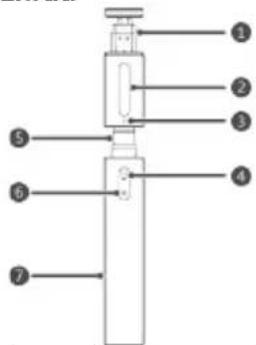
- Prichytka na telefon
- Vyplnenie svetlom
- Kontrolka
- Tlaicidlo vyplnenia svetlom
5.Roztahovaci
monopod - Tlaicidlo spuste
- Rukovat
Párovanie pomocou Bluetooth
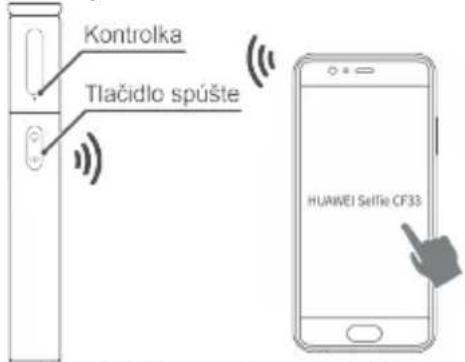
- Ak použivate Telefon so systémom Android, pred fotografovanim sa uistite, ze tlacidlo hlasitosti Telefonu je v nastaveniach fotaparatu nastavené na tlacidlo spúste.
- Podržte stlačené tlacidlo spúste na dve sekundy, kym kontrolka nebude tri sekundy svietit nazeleno, cim signalizujpe prechod do režimu párovania Bluetooth.
- V Telefoné Zapnine Bluetooth a vyhfadajte dostupné zariadenia. V zoźname dostupnych zariadeni vyberte polożku HUAWEI Selfie CF33, Čim sa spustí proces párovania. Ak boló párovanie uspešné, kontrlka bude blikat nazeleno.
Fotografiaanie
-
Upevnite Telefon do selfie tyce
-
Roztiahnite monopod
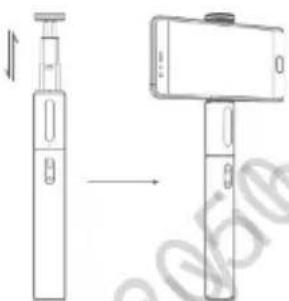
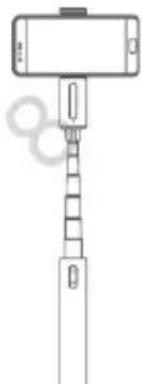
3. Stlacte tlaicidlo vyplenia svetlon (volitefné)
Stlacenim tlacidia vyplinenia svetlom zapnite vyplinienie svetlom. Opatovnym stlacenim tlacidia vyplinenia svetlom prepinaje medzi normalnym svetlom, jasnym svetlom, zvyraznenim a vypnutim.
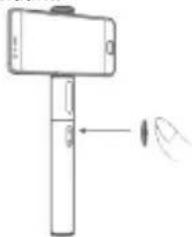
- Stlacenim tlacdida spuste zhotovte fotografiu
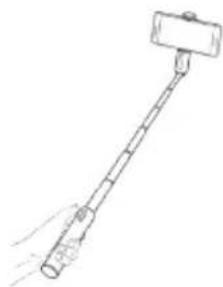
Vypnutie
Ak chcete selfie tyč vypnut, podržte stlačené tlačidlo spúšte na tri sekundy, kým kontrolka nezačne svieti' nazeleno a potom po Jednej sekunde nezhasne.
Nabijanie
Na nabijanie zariadenia pouzite USB kabel typu C. Kontrolka pochas nabijania svieti naerveno a po dokoneni nabijania svieti nazeleno.
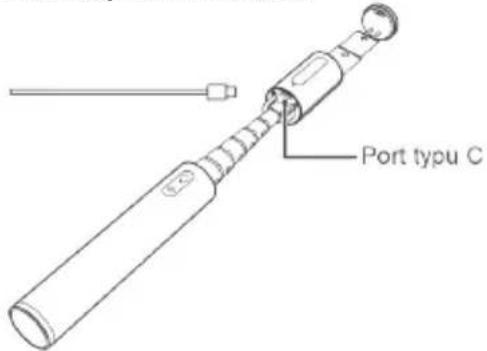
Tipy
- Ak je selfie tyč, ktorá je pripojená k inému zariadeniu cez Bluetooth, nečinná dlhsie ako 10 minút, automaticicky prejde do režimu spanku. V tomto pripadé stlacte tlacidlo spúste na obnovenie pripojenia. Ak je selfie tyč nečinná viac ako 6 hodín po prechode do režimu spanku, automaticicky sa vypne.
- Ak sa bateria onedlho vybije, kontrolka na selfie tyci blika načerveno. Selfie tyc okamžite nabite.
V niektorych Telefonoch so systemom Android mozete dvojitym stlacenim tlaicidia spuste zhotovit snimku.
Zhoda s Industry Canada
Vystavenie učinkom radiovych vln
Zariadenie je radiovy vsiela a prijima's nizkym vykonom. Ako odporucaju medzinarodne smernice, zariadenie je vyrobené tak, aby neprekracovalo limity organizatie Innovation, Science and Economic Development Canada pre vystavenie uçinkom radiovych yln.
Vyhlaseenie IC
Toto zariadenie spina predispy CAN ICES-3 (B)/NMB-3(B).
Toto zariadenie je v sulade s normou (normami) RSS Industry Canada s vynimkou na udelenie povolenia. Použivanie podlieha tymto dvom podmienkam: (1) toto zariadenie nesmie sposobovat rusenie a (2) toto zariadenie musi pohlcovat akékolvek prijinané rusenie
Telif Hakki © Huawei Technologies Co., Ltd. 2018.