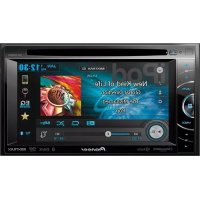
AVHX3600BHS - DVD player PIONEER - Free user manual and instructions
Find the device manual for free AVHX3600BHS PIONEER in PDF.



| Product Type | Car Multimedia DVD Player |
| Brand | Pioneer |
| Model | AVH-X3600BHS |
| Category | DVD Player |
| Screen Size | 6.95 inches (16:9 diagonal) |
| Screen Type | Touch LCD with LED backlight |
| Screen Resolution | 240 × 48 (text display) / video compatible |
| Supported Audio Formats | MP3, WMA, AAC, WAV (CD, USB, iPod) |
| Supported Video Formats | DivX, MPEG-1, MPEG-2, MPEG-4 (DVD, USB) |
| Max Output Power | 50 W × 4 channels |
| Continuous Output Power | 27 W × 4 (4 Ω, 50 Hz – 15 kHz, 5% THD) |
| Bluetooth | Built-in, profiles HFP, HSP, A2DP, AVRCP, PBAP, OPP, SPP |
| Radio | FM/AM with RDS, HD Radio (depending on region) |
| SiriusXM | Compatible (requires tuner and subscription) |
| Front Connectivity | 1 USB port (front), 1 AUX input (3.5 mm jack) |
| Rear Connectivity | Video output for rear monitor, backup camera input, AV input, radio antenna |
| Advanced Functions | AppRadio Mode, MirrorLink, MIXTRAX, auto EQ, advanced audio setup |
| Power Supply | 14.4 V DC (vehicle) |
| Operating Temperature | –4 °F to 110 °F (–20 °C to 43 °C) |
| Maintenance and Cleaning | Clean the screen with a soft, dry cloth; do not use chemical products |
| Safety | Parking brake lock; do not use video functions while driving |
Frequently Asked Questions - AVHX3600BHS PIONEER
User questions about AVHX3600BHS PIONEER
0 question about this device. Answer the ones you know or ask your own.
Ask a new question about this device
Download the instructions for your DVD player in PDF format for free! Find your manual AVHX3600BHS - PIONEER and take your electronic device back in hand. On this page are published all the documents necessary for the use of your device. AVHX3600BHS by PIONEER.
USER MANUAL AVHX3600BHS PIONEER
Important (Serial number)
The serial number is located on the bottom of this unit. For your own security and convenience, be sure to record this number on the enclosed warranty card.
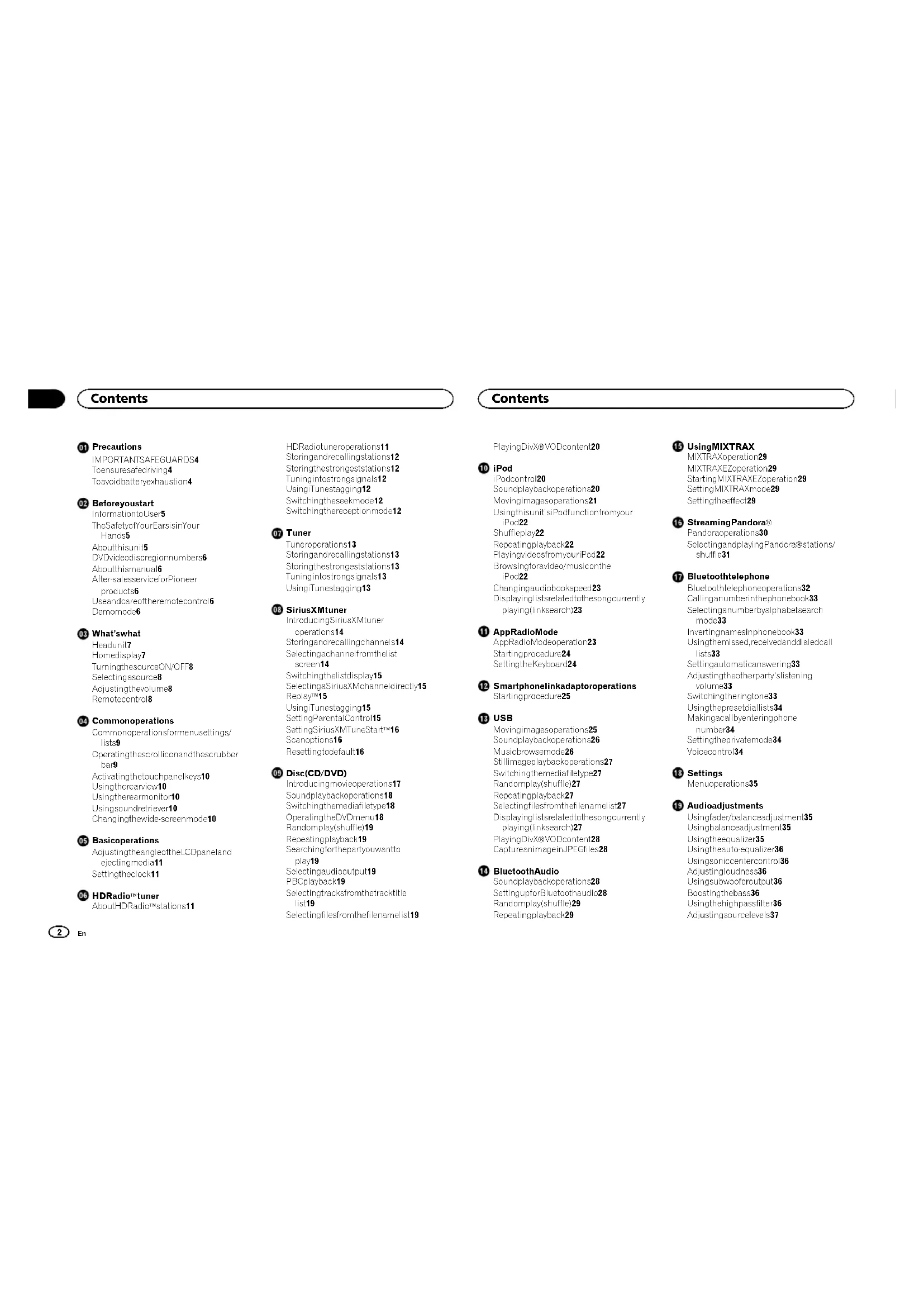
Toavodballeteryexhaustion4
02 Beforeyoustart
Information to User5
The Safely To Your Earsiness in Your Hands5
About this unit5
DVDdeodlscregionnumbers6
Abourthismanu6
ter-saiesserviceforPioneer
products6
Usandicaeothermotecontrol6
Dememode6
What'swhat
Headunit7
Horned spiay7
TumingthesourceON/OFF8
Selecting gas sources
Aduslingthevolume8
Remotecnrol8
04 Commonoperations
Common operation formenu设置t/ lists9
Operatingthescroll conandthescrubber bar9
Activatingtherouchpanekeys10
Usingtherearview10
Usingtherearmonitor10
Usinoscundretriever10
Changingthewide-screenncce10
05 Basicoperations
AdjustingtheangeofthelCDpanel
ejectingmedia11
Settingthecock11
06 HDRadioTMtuner
AboutHDMRadioTMstations11
HORadioluneroperations11
Storingandrecallingstations12
Strongthestrongestations12
Tuningintosstrongsignals12
UsingiTunestaggering12
Switchingtheseseekmode12
Switchingthereceptionmode12
07 Tuner
Tuneroperations13
Storngandrecallingstalons13
Storingthestrongestations13
Tuningintosstrongsignals13
UsingTunestaggering13
08SiriusXMturer
IntroducingSinsXM'unter
cnericps1
Storingandrecallingchannels14
SelectingachannelfromtheList
screen14
Switchingtheleistdispay15
SelectingaSiriusXmchanneldirectly15
Replay15
UsingiTuneStaging15
SettingParentalControl 15
SellingSiriusXMTuneStartTM16
Scancptions16
Resettingtodetail16
09 Disc(CD/DVD)
Introdu ngmovicoperations17
Soundplaybackoperations18
Switchingthemediafiletype18
OperatinotheDVdmenu18
Randomplay(shuffle)19
Repealingplayback19
Scarchingfortnepartwouwanto
play19
Selectingucjooput19
PBCplayback19
Selectingtrackfromtheracktitle
st19
Selectingfilestrfromthefileramelist19
Contents
PlayingDivX@VODcontent20
iPod
iPodcontro 20
Soundplaybackoperations20
Movingimagesoperatons21
Usingthisunit'siPodfunctionfromyou
iPod22
Shuffleplay22
Repeatingplayback22
PlayingvideocsfromyouiPod22
Browsingforvideo/music onthe
iPod22
Changingaudibiookspied23
Displayinglistsrelatedtothescngcurrently
playing(1inksea
AppRadioMode
AppRadioModeoperation23
Starlingprocedure24
SellingtheKeyboard24
Smartphonelinkadaptoroperations
Starlingprocedure25
USB
Movingimagesoperatons25
Soundpaybackoperations26
Musichrowsemode26
Stillimageplaybackoperals27
Switchingthemediaftleotype27
Random play (snuffle)27
Repealingplayback27
Selecting files from the file namelist27
Displayinglistsrelatedtothescngcurrently
playing(linksearch)27
PlayingDivX@VODconten128
CactureanimagnJPEGfes28
BluetoothAudio
Soundplaybackoperations28
SettingupforBletoolhoad 28
Randomplay(shuffle)29
Repeatnglayback29
15 UsingMIXTRAX
MIXTRAXoperation29
MIXTRAXFZoperation29
StartingMixTRAXEZoperation29
SettingMIXTRAXmode29
Settingtheeffect29
16 StreamingPandora®
Pandoraoperatons30
SelectingandplayingPandora&stations/
shuffle31
Bluetoothtelephone
Bluelocthlephoreoperations32
Callinganumberinthephonebook33
Selectinganumberbyalphabetseason
mode33
Inveringramesinphonebook33
Usingthemissed, received anddiedical
1is:s33
Adustine theothc party'slstoning
volume33
Switchingtheringlore33
Using the presctdiallsts34
Makingacallbyenteringphone
number34
Settingtheprivatemode34
Voicecontrol34
10 Settings
Menucoperations35
Audioadjustments
Usingfader/balance/adjustment35
Using balance adjustment 35
Usingtheequalizer35
Usingtheauto-equializer36
Usingasnicentecontrol36
Adustingloudress36
Usingsubwopteroutput36
Boostingthebass36
Using the high pass filler 36
Adjustingsourcelevels37
Contents
20 Settingupthevideoplayer
Settingthesubtitlelanguage37
Setngtheaudiolanguage37
Set ngthemenulanguage37
Set ngthemurti-angleDvDdspaay38
Setngtheaspectratic38
Set ngtheslideshowinterval38
Set ngparentallock38
Set ngtheDivXsubtitilefile39
DisplayingtheDivX@vODregistration
code39
Automat cplaybackofDVDs39
Systemsettings
Switchingtheauxiliarysetng40
SettingAVinput40
Set ngthenav gationsystem40
Sel nglthePandoraconnectnode40
SelectingMirrorLinkMode40
Updalnglhefirmwareforthemartphone
linkadaptor40
Displayingthessmartphonclinkadaptor
firmwarevers on40
Updalngfirmware41
Displayingthefirmwareversion41
SettingMIXTRAXmode41
Changing hapticreacjusimen (Brightness,Contrast,Color,Hue,Dimmer and Temperature)41
Selectingthesystemlanguage41
SettingSiriusXMTuneStart*42
Switchingsoundmuing/alternation42
Settingtherearoutputandsubwoofer controller42
Usingthekeyboard42
Set ngtheeverscrol42
Set ngtheBluetcotnaudo42
ClearingBluethm memory43
UpdatngBleetohsfoortware43
DisplayingtheBluetoothsoftware version43
Settingtherearviewcamera(backup
camera43
AutoFQauto equalizing43
Settingthevideoosignal44
22 Favoritemenu
Usingthefavoritemenu45
Bluetoothconnectionmenu
luetoothconnectionmenu
operations45
24 Themenu
Selectingtheilluminalioncolor46
SelectingtheOSD(on-screendisplay)
color46
Selectingthebackgrounddisp ay46
Otherfunctions
Ajustingheresponsepositionsofthe
touchpanels;TouchPanel
Calibratior47
UsinganAUxsource47
Reselingthemicroprocessor48
Oecatingthcsounomxcr48
26 Connection
connctingthepowercore50
Whenconnectingloseparalelysoldpower
amp51
Whenconnectingtheexternalvideo
componentandthedisplay51
When connecting with thereayview
camera52
iPodwithlightningconnector52
iPodwith30-pinconneclo-53
OptionalSmartphonelinkadaptor(CD
ML100connection53
OptionalSiriusXM Tunerconnection54
Installation
stallationusngthescrewholesonthe
sideoftheun54
Installingthemicrophone55
Contents
Additionalinformation
Troubleshooting56
Erromessage57
UnderstandinggauloEQerror
meeas60
Understanding messages61
Indicaorlis:61
Handlingguidelines62
Audioscompatibility(USB)63
Compressedfilecompaliblity/disca
USB64
iPodcompatbility64
Sequenceofaudiofoles65
Using the display correctly,
Bluetoothprofiles66
License: WarrantyDisclaimer&Limitationof
Liabilities 66
Language:cpdechantforDvD68
Specifications69
Precautions
ThankyouforpurchasingthisPIONEER product.
Toensurepropusere,p easereathroughthis manualbeforeusinghisproduct,itisespecially importantthatyoureandobserveWARN
INGsandCAUTIONsinthismanual. Please keepthemanualinasafeandaccessibleplacefor futurereference.
IMPORTANTSAFEGUARDS
Plesosmedallofthessconstructionsregarding yourclaysandretainthemfortutereference.
Donotinstalthedisplaywhereitmay (i)obstructthedriver'svision,(ii)impair theperformanceofanyofthevehicle's operatingsystemsafetyfeatures,includingairbags,hazardlampbuttonstor (iii)impairedriver'sabilitytosafely operatethevehicle.
2Donotoperatethisdisplayfidi doingsoin anywaywilldivertyourattentionfrom theaseparationofyourvehicle.Alwaysobservesafedrivingsruleandfollowalxistingtrafficregulations.Ifyouexperienceddifficultynoperatingthe systemorreadingthedisplay,parkyour vehicleinasafelocationandmakenecessaryadjustments.
3Please remember to wear your seatbelt at all times while operating your vehicle. If you are wearing an accident, your injuries can be considered abnormally severe if your seatbelt is not properly buckled.
Neveruseheadphoneswhiledriving. Topromotesaftycertainfunctions are disabledunlessstheparkingbrakeison, andthevehicleisnotinmotion.
6Neversethevolumeofyourdisplayso highbthayoucannothearoutsidetraffic andemergencyvehicles.
WARNING
- Donattempttoinstallservicetrhis productbyyourself.Installionrservicingfothisproductbypersonswithout trainingandexperienceinelectronic equipmentandautomotivaeaccessories maybedangerousandscouldexposeyou totherlskofelecricshock,injuryor otherhazards.
- Don't attempt to operate the vehicle while driving. Makes sure to off the road and don't your vehicle has a license before attempting to use the control system device.
Toensuresafedriving
WARNING
LIGHTGREENLEADATPOWERCONNECTIONISDESIGNEDTODETECTPARKEDSTATUSANDMUSTBECONNECTEDTTOHEPOWERSUPPLYSIDEOTHEPARKINGBRAKESWITCH.IMPROPERCONNECTIONORUSEOTHISLEADMAYVIOLATEAPPLICABLELAWANDMRESULTINSERIOUSUINJURYORDAMAGE.
Toavoldtharskefdamagaandinjuryandthe potentiatviolationofapplicablewls,thisunitis notfoureewthvideoscreentnatisviblto thedriver.
ToavoidthefskafcdontandhepotentiaIvlo
tiofoapplicabieaw,reviwngoffrontseit
voaohsfoeveroccurwhiethewehicis
beingdriven.
Insomecountiescrsstatestheviewtogmes onanisplayinaeewhileceowhypersons otherthanthedrivenmaybeillegal.Wheresuch regulationsapplytheytmezboebedyaradoth s unit'sviodefeaturesouinolteused.
Precautions
Whenyouattempttowatchchvideoimagewhile driving,thewarning"Viewingoffrontseat videosourcewhiheldrivingsstrictlyprohibited."willappearonthefrontdisplay. Towatchchvideoageconthefrontdisplay,park yourvehicleinsasafeplaceandapplytheparkingbrake.
Certifucntions(Videoviewingandcrsain touchpanelkeys)offeredbythisunitcould be dangrounand/ounlawfulfuscdwhlcldriving. Topreventsuch functions frombeing used while thevehicleislinemotion.Thereisan interocssystemthatsenscscwhentheparkingbrakeisot.fIf youattemptousethefunctionscdescribed abovewhiledriving,theywillbecomeisabled untilyoustopthovichicinaseplace,and(1) applytheparkingbrake.(2) releasetheparking brake andther(3) applytheparkingbrake again.Pleasekeepothbrakepedpalpushod downbeforeleasingtheparkingbrake
Whenusingadisplayconnected toearmonitoroutput
Therearmonloraolputlunthisumil(VOUT) is usedtoconnectancardisplaythatallowspesongersinschrearseatstowhatvidcs.
WARNING
NEVERinstallthereadisplaiyalocation whereethedrivencanwarbandwidecoswihdriding.
When usingtherearviewcamera
Withoptionalreciewcamer, thisunitcan beusedasanaidtokepeanecontralers,or whenbackinginfoaightparkingspot.
WARNING
- SCREENIMAGEMAYAPPEARREVISED.
- USEINPUTONLYFORREVERSEOR MIRRORIMAGEREARVIEWCAMERA. OTHERUSEMAYRESULTMININJURY ORDAMAGE.
CAUTION
- There are view camera functionistobused asanaiaotokepaneyeontrailers,orwhile backingup.Donutuseforenertaintment purposes.
- Fleascnotechattheedgesofotherearview camera images maydifferslightlyaccord. towhetherfullscreenimagesaredisplays whenbackingup andwhetheroimages areused for checkingtherearwhenthe hicleismovingforward.
Toavoidbatteryexhaustion
Keepvehicular engineer running when using thisunitovavoidtrainingthebaterypower
- When no powerissupplied to this unit, such as when the vehicle battery is being replaced, then microcomputer software returns to its initial condition. Werecommend that you transcribeheaur audioadjustment data.
WARNING
Donotusewithvehicletnstionoftearuae ACCosition.
Beforeyoustart
InformationtoUser
FCCID:AJDK071
MODELO:AVH-X560CBHS.AVH-X4600BT. AVH-X3600BHS.AV-HX2600BT
IC775E-K071
ThisdevicecompieswithPar.15ofFCC
RulesandIndustryCanadaiicence-exempt RSSstandard(s).Operationissubjectto the followingwconditions:(1)Thisdisevice may notcauseinterference,and(2)thisdevice mustacceptanyinterference,includinginterference. helmaycauseundesiredoperational ofthisdisevice.
Thistransmtermustnotbococ locatedoperatedinconjunctionwithanyotherantenna ortransmitter.
TheBluetoothannecnottberemovedor replacedby:=ser.
ThisequemoncompplieswithFCC/IC radia tionexposurelimitssetforfhorunconcontrolenvironmentandmeetstheFCC radio frequency(RF) ExposureGuidelinesinSupp ermentCToCET65 and RSS-1020fthelC
radiofrequency(RF)Exposureru.ies.This equipmenthasverylowleveloRTenergy thatitdeemedtoecomplywithoutmaximum permisiveexposuresevaluation(VPF).Buit idesirablethatshouldbeinstalledacoprodedeepkeepngtheradiatoratleast20cmormoreawayfromperson'sbodyst(excludingextremities,hands,wrists,feetandankles).
MODELNO:AVH-X1600DVD
Thisdevice.complieswithPar15cfhe/CC Rules. Operationissubjecttothofollowing twoconditions:
(1)thisdevice may not cause harmful interference and (2)this device cannot accept any interference. That may cause undesired operation.
Alterationormodificationscarriedoutwithoutappropriaterefortharmonizationmayinvaltdetheuser'srlighthooleasequipment.
Note
This equipment has been tested and found to comply with the Helimits for Class 5 digital device pursuant to Part 150th FCCRU. These Helimits require reasonable protection against harmful interference in accordance with the instructions, may cause harmful interference or electromagnetic communications. However, these considerations guarantee that harmful interference will not occur in particular installations. If this equipment does cause harmful interference, it is responsible to avoid any unauthorized use of the equipment.
- Reorientemoleaetherceivingannienne.
- Increase:theseparation betweenthequipment anddriconductor.
-ConnectthequipmentintocancuIeIona circuldifferentfromthatlwhichere- cevoirisconnected.
-Consultthedalerocranexperiencedradio/ TV:technicianforhelp
Beforeyoustart
TheSafetyofYourEarsisin YourHands
Getthemostoutofyourequipmentbyplayingit atasafolevel-a evelletahletsthesoundcome throughclearlywithoutannoyingblaringordis tortionand,mostimportantly,withoutaffecting yoursensit,wehearing.Soundcanbedecceiving. Overtime,yourhearing"comfortlevel"adaptsto nighenvolumesofsound,sowhensounds"normal"canactuallybeloudandharmfulyour hearing.Guarnagainthisbysettingyou equipmentatasafolevelBEFOREyourearing adapts.
ESTABLISHASAFELEVEL:
Selyourvolumecontrolalowselling.
Sowinlcireasethosscounountiue youcanhear itcomfortablydclcarly,withoutdistortie
Cnceyou,haveeselabishedaccormforable soundcleve,ssethdialandcavethere
BESURETOOBSERVETHE FOLLOWINGGUIDELINES
- Conduiturnepvolumesohighthatyou can'thearwhat'saroundyou.
- Usecautionortemporarilydiscontinueuse inpotentiallyhazardousissituations.
- Conctuseheadchoneswhileoperating maoymotectedvehicle;theuseofheadphones maycreateattaffazardanddisillegalin manyareas.
Aboutthisunit
Theluner frequency, onthisunisgrallocated forusinNorthAmerica.Uscinnothorcas mayresult inpoorrecognition.

WARNING
Handlingthccordthisproductorccdsassoc
ciatedwinaccessoriesoldwiththeproduct
mayexposeyoutochemica listedonproposition65knowntotheStateofCaliforniaand
othergovernmenttalentilisiostceasecancer and
birthdefectorotherreproductveharm.Wash
handsafterhandling.
CAUTION:
USEOFCONTROLORADJUSTMENTOR PERFORMANCEOFPROCEDURES
OTHERTHANTHOSESPECIFIEDHEREIN MAYRESULTTINHAZARDOUSRADIATION EXPOSURE.
CAUTION:
THEUSEOFOPTICALINSTRUMENTS WITHTHISPRODUCTWILLINCREASE EYEHAZARD.
CAUTION
ThisproductclassllasspcnproduclassifiedundertheSafetyllaserproducts,IEC60825-1:2007,andconainsaccesslMasermodule.Toonsurecontinuedsafety,donotmoreenvycoversoratemptlogainaccesstothesinsideoftheproduct.Referalsservicingtoqualifiedpersonnel.
CLASS 1 LASER PRODUCT
CAUTIONCLASS IM VISIBLE AND INVISIBLE LASER RADIATION WHEN OPEN.DON NOT VIEW DIRECTLY WITH OPTICAL INSTRUMENTS.
Beforeyoustart

CAUTION
- Donatolowthisunitto come incontact with liquidus. Electricalshockcoudresult. Also,damage tothisunit,smoke,encover heatingcoudresultfromcontact with liquids.
- Keepthis manual handy for future reference.
- Wayskeeprevolumowenoughtear outsounds.
Avoexposuretomeisture
Ifthebatteryisconnectedordischarged, anypresethememrywillbeeraed.
DVDvideodisregionnumbers
OnlyDVDvideodiscswithcompatiLeregion
numercsncnbpocldontthisplayer.Youcan
finotheregionnumbertheplayrenthebot
tomfthisunlndhismanual(re)to
Speciflcationsonpage69).
Aboutthismanual
Thisunifteuresanumberofsophisticated functionsteensuresupercerceptionand operation. Altthefunctionshavebeendesignforteceasestpossible,butmany arenotself-explanatory.Thisoperational wulwheloyoubenefulfymfromthisunit's potentalandtomaximizycourlinsteningenjoyment.
This manualuses diagrams of actual screens to describe operations, however the screen on someunit may not match those shown in this manual depending on themodel used.
After-saleservicefor Pioneerproducts
Peasecontcttheealerordratorfrom whereyoupurchasedhisunitforater-sales service(includingwarrantyconditions)any otherinformation.Incasethe necessary informationisnotavailable,pasecontctthecom panieslistedbelow:
Please contact shipyouunifortech companies at theheadressesliedbelowforrepairwithoutadvicecontact.
U.S.A.
PioneerElectronics(USA)Inc.
CUSTOMERSUPPORTDVISION
PC,Bex1760
LongBeach,CA9C801-17EC
803-421-1402
CANADA
PioneerElectronicsofCanada,Inc.
CUSTOMERSATISFACTIONDEPARTMENT
34FemerStree.
Unit2
Markham,OntarioL3R2Z5,Canada
1-877-283-5901
305-479-4411
Forwarthyinformationlesseesethe Limited Warrantysheeting udowiththisunit.
Useandcareoftheremote control
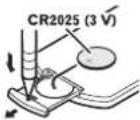
Installingthebattery
Slideherrayonthebackofthermolecontrol outandinerlchpaterywithheoL+and mns(-jpcposaldesignproperly.
- Whensing/forteh/estime, pullout the filmproducing from heresy.
Beforeyoustart

WARNING
- Keep the batterycutoffthereachof children. Should the batterybeswalled.com tala doctorimmediately.
- Batteries(baillierpackbatteries installed) mustn'tbeexposedtoexcessweheatsuch assunshine,freechthe like.

CAUTION
-
Removethi batteryithermotecontrolis nctusedforamonthlonger.
-
Thereisadangerofexolosionifthcbattery is incorrectlyreplaced.Replaceonlywith the samerecouquivalent type.
- Donothandethebatterywithmetalictools.
- Donatstorethebatterywithmetallicjcbucts.
- ifthebetterieswipethere motecontrol completelycleanand installnewbatten
-Whendisposingofusedbatteries.comply withgovernmentalregulationonsenvi rmentalpublicinstitutions'rulessthatapplyin yourcountry/area.
Perchlorate Material - special handling may apply.
See www.dtsco.ca.gov/hazardouswaste/perchlorate (Applicable to California, U.S.A.)
Usingtheremotecontrol
Pointthermotocontrollined/reactionthe fronipanelcopterate.
Theremoecgntmoiroyofunctionpropely indirectsunlight.
What'swhat
Headunit
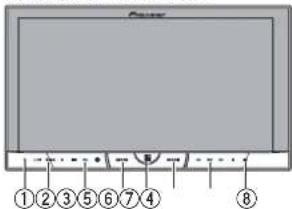
AVH-X5600BHSandAVH-X4600BT
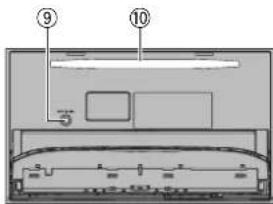
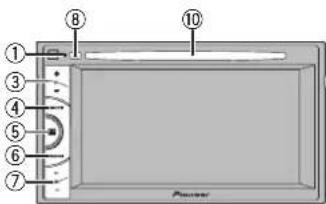
AVH-X3600BHS,AVH-X2600BTandAVH-X1600DVD
①RESET
ForcedetailsreferToResctingthemicroprocess
sorponpage48.
2SRC/OFF
③ + / - (VOLUME/VOL)
4 MUTE
Presstomute.Pressagaintounmute.
Homebutton
Displayingthehomedisplay.
TnedispiayeturnstotheLauncherscreen
whilea3ro partyapplicatiOnisbeing.sedin
AppRadioMode
Double-clickingtheiconontheLauncher
sccnreurnstbedislaytothcemdis
play.
MODE
WhenRGBinputisnotused
-PressMODEcolumnhelpplayT,Press
MODEagaintotumthocislayon
WhenRGBinputisused
-
Pressandhold MODElolumthedisplay off,PressMODEagaintolumthedisplay cn.
-
Whenthenavigationsystemconnected,pressMODELoswilchlothenavitationdisplay.
-
WhensniPhone.slalrunnganaplayclinicalsls.pnpssAppRadioModels
connected,pressMODEtoswtchtothe application spuyoucanuseltheapplicaitorybytouchingthedispay
- WhennasmartphoneworkwiththeMirrorLinkFunctionisconnected.press MODE loswicntnotheapplicationdisplay.You can-settheapplicationbytouching the display.
(TRK)
8△(eject)
AutoEQmicrophoneinputjack
UssloconnecnlautoEQmicrophone.
Discleadingslot
What'swhat
Notes
- Fordeta sonhowtopeateanavigation systemfromchisun,retertotisoperation manual.
Fordetal:sonhowtoconnnectiPocar USStorageDeviceCotthisunit referTo Whenconnectingwithtophoia/CO-UP01c cableonpage53. - ordata sonnowocnectionsmarphone. whitheMirrorLinkFunctionlothisunit refer toOptionalSmartphoneLinkAdaptor(CD: M10G)conneetionnonage53.
Homedisplay
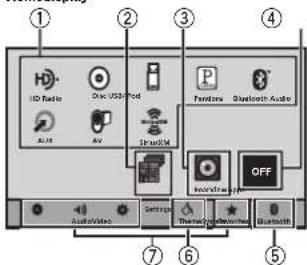
Homedisplay
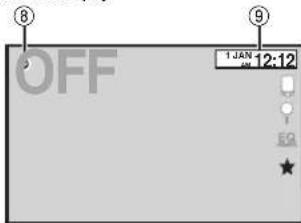
Sourceoffdisplay
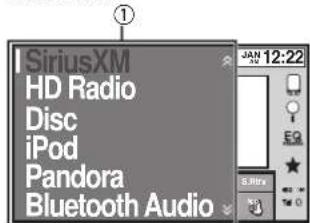
Sourceondisplay
①SourceIcon
Selectingafavoreresource.
When the source is not displayed, it can be displayed by pressing the home key or touching
②Apps/MirrorLinkkey
SwitchingtoAppRadioModeMirrorLink Mode.
③Rearviewkey
Displayingtherear viewimage.
For metals refer to Using thear view on page 10.
4Sourceoffkey
Turning the source off.
Bluetoothkey
DisplayingtheBluetoothconnectionmenu.
B)Themekey
DisplayingTheThemenu.
Menuicon
Displayingthemenu
Sourcekey
Displayingthesourcemenu.
What's what
Clockkey
Switching to clock adjustment is:
TurningthesourceON/OFF
(FunctiofoAvH-Xb600HSAVH-X4600BT)
Tumingthessourcausingthebuttons
TPressSRC/OFF:otumtnresourceon
Turn ngheusocoufus nghebucts TProssanchoholdSRC/OFFuntihesourceturns off.
Selectingasource
Availablesourcemodes
SiriusXM-SiriusXtuner
(AVH×580B+S/AVH×380B+S)
- HDRadio HDRadiotuner
(AVH-X560OB-S/AVH-X380OB-S)
Radio-Radchner
(AVH-X4500B)/AVH-X2600B/AYH-X1600DV)
Disc Built nDVandCDlayer
USB,IPod,or USB MTP-USB/IPod/MTP
Pandora-Pandora nernetradio
BluetoothAudio-Built-in Bluetooth audio (AVH-X5600B-S/AVH-X4600B7/AVH-X3600BHS/AVH-X2600B1)
AUX AUX
AV-AVipul
Selectingasource
Using SRC/OFF (Function of AVHEX600/BHS/AVHEX400BT) TPress SRC/OFF
- Using the touch panel keys on the home钥匙.
1 Touchresourceconandthetouchthe desiredsourcegame.
- When the source icon displayed, it can be displayed by touch-screening.
While operating the menu you can annotate the source code by clicking the sourcecode option.
Note
The USB/iPod conwill change as follows:
-
USB/IPod snispiedwher noderivicescon-nectad.
-
USB selfpowered user USBStorage devices connected to USB Intuit.
-
Podisdis ayedxwhenan Podscconnection USBInput
USBMTP.scspiayedwhenanMTF-compatibleAndroiddevice/unnnpAndroidOS4.0higherIsconnectedcyMI PconnectonusingaUSB cable.
What'swhat
Adjustingthevolume
- Press+/-(VOLUME/VOL)toadjustthe volume.
Remotecontrol
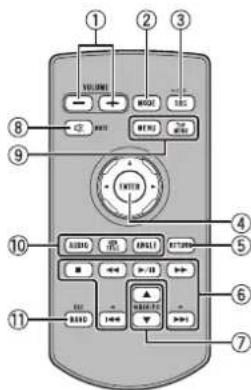
①+/(VOLUME/VOL)
2MODE
Turning the normal or displayoff.
SRC/OFF
Presslccychre hroughtheaal aiesources Pressand holdoturnresourceoff.
4Thumbpad
UseloselectaennuontheDVDMenu
⑤RETURN
PressdisplayPBC(payacccontrl)
menoucurringPSCplayback
(5)
Presstopausecorresumeplayback.
#
Pressloperformfasreverse.
Presstochangethefastreversespeed.
What'swhat
#
Presstoperformfasterward.
Presstonangethefatforwardspeed.
#
Pressloreturtothepreviouschapter).
#
Presstogotothenexttrack(chapter).
#
Presstostopplayback.
Ifyouresumeplayback,playbackwillstart
from the point where you stopped. Touchthe
keyagaintostopplaybackcompletely
FOLDER/P.CH
Pressselectthenextorpreviousdiscor
folder
Presstoreca radiostationfrecuunciesas
signedtopresetsuningkeys.
MUTE
Pressomute. Pressagantounmote.
9MENU
ErosstodisplaysDyDmenuuringDyD
cleyba
TOPMENU
PressstoreturntothetopmenouuringDVD
playback.
音频AUDIO
Pressstoangetheaudielanguageduring
DyDplayback
Presstosw tcha. dicoutputforDivX
MPEG-4
SUBTITLE
Fresstochanshehsuttlalanguagueduring
DVD/DivX/MPEG-4playback
ANGLE
Presstochangetheveewngangleduring
DVDplayback.
Commonoperations
BAND/ESC
Presstosectthetunerbanwhentuneris
selectedasasource.Aspusedtocancelthe
controlmodeoffunctions
Presstoswitchbetweenoceswhenplayingtherefollowingtypesedata:
Disc
Compressedaudioandaudiodata
(CD-DA)suchaswithCD-EXTRAand
MIXED MODECDS
-USBstorage device
Audicata,videodataandphotocata
Commonoperationsfor menusettings/lists

(FunctiofAVH-X660BHS)
AVHX4500B/AVHX3600BHS/
AVH-X2600BT
StartingtheBluebot telephone
20
fondctalsproteotyoeothtce
phoneonpape32

Displaying:holistmenu
Starting these search functions,

DisplayingtheEQAudofunc
liionmnu

DisplayingtheFavoritemenu.
Operatingthescrollicon andthescrubberbar
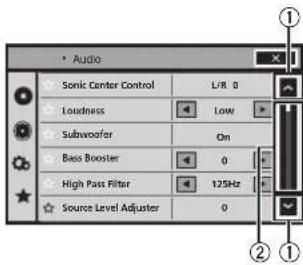
①ScrolIcon
Appearswhenselectab eitemssarehichden.
Touchthescrollicartovivanyhidden
Items
(2)Scrubberbar
Appearswhenitemscannnotbeisplayed asasingpageonly.
Dragthescrubberportoviewanyhdien
items
Aso,yucandragathelisttoviewanyhiden
items
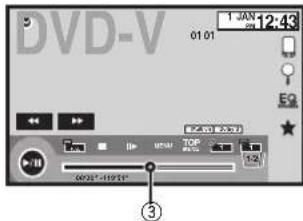
③Playbackpoint
Spcificingtheplaybackpoint
Dragtheplaybackpointontrescreen.
Commonoperations
Activatingthetouchpanelkeys Touchpanelkeys
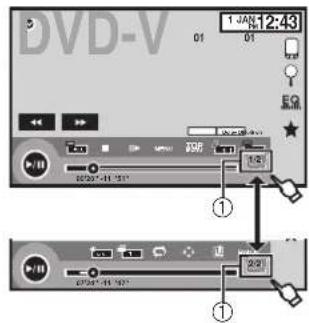
①Tabkey
Switchingcllouchpanelkeysontd-splay.
Usingtherearview
Are viewcamerasoidseparatelyrequired focusingtherearviewmode Thebelow function areavailable.
-ReViewcamera
Thisun canesetustcdisplaythereaviewimaginesublwhemycnurnoctheshiftvertoreTHEVERSE(R)cosition.
- Cameratorrearviewmode
There are two can beurned ondoni display at all times.
The mayewcamaneaeedstobeseetcasingherthanOflloumonreviewmode.
For details about these settings, refer to Settingthe renewcarview器(backupcarrer) onpage43.
Usingtherearviewkeytodisplaytherearview
Displayingthereaviewimageby turninghereawiewimageae Wherthereaviewimagedis displayed youcanswltchlohe sourredislaybytshnghiedis displayyoucanoparafontthe sourredislayemporariyalthis time,lyoussusperfamengan er onswthinateseasons the displaywlreultsbtheraniew image. Totomoffheraoviewimage presstshomebuttonforotu mo lthehormedisplayandhenress thiskeyagain.
Usingtherearmonitor
Connectingearharmonitor.soldseparately, to thisunitalowsimagesandvicedostocieweived fromtherseafoats.
Notes
You can now touch panelkeyanoconopro- Ionscreens from therea mention.
Imagesanddividedwillcontinueubedis- playedwhethenthcvencleiscin motionor stopcd.
Usingsoundretriever

Automatica lyenthancascom pressed aud candrestores rich sound.
Off
ismoreeffectivethan
Commonoperations
Notes
This functionis enabledfor playbackonthe sourceslisted below.
一CDDA
- MP3/WMA/AAC#1asorUSBMTpstorage devices
MP3/MMA/ACAAVflesssonUSBsstorage devices
MP3/WMA/AAC! JasonCDmedia
Pandora(Podwith30-pinconnectoronly)
- The soundtrackoversettingsturnedoff
when the MIXTRAXfunctionisused in USB sourcermode.
Changingthewide-screen mode

Selecting the appropriate screen ratio for this play as a video.
1 Displaythescreenmode.
2 Touchthedesiredwidemodesetting.
FULL(fullscreen)
The3:picture seniargacinthehoriztaldirectiononly,grantviewersal:STv picture(normalpicturewithoutanymissions.
ZOOM(zoom)
The4:3 picture seniargcintneshmarcoportion bothvertically andhorizontally;idea forcinasmededcture(wicscreeptctre).
NORMAL(normal)
The43:picture;displays playcdasis,granting;viewersrosense;discarilyastheproportionsarethesameascheatoftnormalpicture.
Notes
-Youcannodooperatirensfunctionwhiledriv-ing.
Differentsettings can best restore each videosource.
- When available, ewedinawidescreen modeltao doesnot matchitsoriginal aspect ratio, it may appear different.
Remember that using thewidemodefeature olthisystemcommercialsppublicview ingpurposesmayconstitutean infringement ontheauthor'srightsprotectedbytheCopyright law.
- Thevecicimgewillapearccarsserwhen v.ewedirZOOMmode
This function enables for playback on the sources file below.
- DISCVD.V.V.aao.CD.Dxv.MPEG-1, MPEG-2, MPEG-6
USB:DivX,MPEG-1,MPEG-2,MPEG-4,JPEG - iPod/Video
AV:AVdata
AUXVdata
Basicoperations
Adjustingtheangleofthe LCDpaneldejectingmedia
CAUTION
Keechandsandftingerscieroftheunith when opening closing,oradjusting.theCDpanel.Be especiallycautiousofchildren'shandsfingers.
AdjustingtheLCDpanelangle
Function ofAVH-X5600BH5/AVH-X4600ST)
1Press (eject)todisplaytheeeeejting menu.
2AdjusttheLCDpaneltoaneasilyview-ableangle.
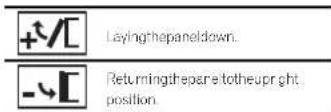
- Asthnes angiolessoated lineLCDpanelwithautomaticallyheadedtolthesespositionthenexttimecholLCDpanelisopond.
Ejectingadisc
(FunctiofAVH-X560BHS/AVH-X480CBT)
1Press (eject)todisplaythejecting menu.
2Ejectadisc.

Eectingad sc.
Ejectingadisc
FunctiondAV-HX3600BHS/AVH-X2600BT/AVH- X160DCD);
Press toejectadisc.
Settingtheclock
1TouchtheClockkey.
TheClockAdjustmentsscreenpears. RefertoClockKeypon pages.
You can select the timeclock format, Touch 12hr12 hour clock/24hr24 hour clock.
HDRadioTMtuner
AboutHDRadio™stations
Function:AVH-X5600BH/AVH-X3600BH) HDRadioonsofferhighqualityaud and dataservices.HDRaioistationsarerought to youcolocalFM/AVstations. HDRadiostationfeaturethe following:
-lichqualityaudio
FMulticasting
- Dataservices
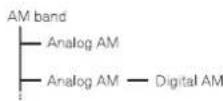
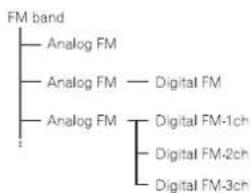
PSD
ProgramService Data Control/astroheparin peruser exoepirethroD-HDAcR technology. Present Bosigamino, artistidiaz IChs,HDL27 HD3ChemicoKuro andolhorm evelastarstrains.
HO2HO3
Adjaccipotraionma nataionsarextnolalTV channels. hD2HDC3 channels sporengrwn original musicswelleadocoppusinlr bandraonrgerno
Digital Sound
Digital, CD quality sound CD/Real Electronics, local radio, on/off broadband radio, g batorial, AMsounds, hcdcday, hmand, fVscunds, iKeaCD.
iTunes Tagging
Tunere Taggngnprssyoutheopportunity Ptoldiscover zwiderangeofcomertenthemestagrtation tcnlior alreovanceurourpcaedir thet lncs Stro.
Artist Experience)
Visual information related to contenting geodesic yoke, your IDRadio receiver, such asAlbumArt, historical photographs, still from livesaversatzamorhergetelated content.
HDRadio Technology
HDCRadio Technology,Manufacture under IonscrotionsqityDigitalCorporation,U.S. and ForeignPatents.HD Radio"anotherHD HD Radio,and "Arc" logos are proprietary marksoffBiquityDigitalCorp.
HDRadiotuneroperations
Touchpanelkeys
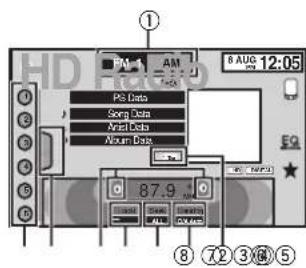
① Bandkey
Selectingband(FMorAM)bytouching.he
pankey.
Thetouchpankeyforthocctedbandis
highlighted.
HDRadio\*tuner
Switching between FM1, FM2, and FM3 by touchingthebandkey.
When AMsisedeue,you cannot switch to a other AMbanddoytouching the bandkey.
②Tagkey
Savingsinformation (tag) from the broadcasting star onto your iPod.
③Receptionmodekey
Switchingtotheanaogbroadcastofthemsatremperature.
4Seekmodekey
SwitchingbetweenDigitalbroadcastatingsessionseakdnonnormallyseek.
Localkey
Settingtheolocalsnakevel.
Tuningkey
Turinguporocownmanually.
Touchhandholddownfornorethaniewe-ondslockskipstations Seektuningstartssas soonasyourceno. Touchagaintocancel seektuning.
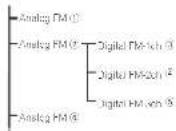
When an analogisation is received, turning downoperationis conducted within the analog broadcasting. (8) (2)
fad gilaibroadcastisnclye.received, tuning-up,popertationtuneinsinthenthanalogstation. (2 8)
Listkey
Displayingthepresechannellist.
Presetchannelkey
Selectapresetschannel.
Basicoperations
| Switchngppresetschannelsusngthebuttons [ ] Press ▲or ▲(TRK) |
| Squeltonigusingthebuttons [ ] Press and no ▲or ▲(TRK) |
Note
TouchpanelkeysnotlistedunderHDRadio tunnoperationsmeypearsonthedisplay. Refertodindicatorostpage61.
Storingandrecallingstations
You canaeasilystoreuptoxsxtationstearch bandasposets.
1Displaythepresetchannellistscreen.
Refer to IIndiFicnteroperationspage. Tepreselchannell slappers in hedit display.
2Touchandholddownoneofthepreset tuningkeystostoretheselectefrequency tothememory.
These radioiodistat on frequency has been stored in hermeticity.
3Touchthatappropriatepresettungkey toselectthedesiredstation.
Storingthestrongestations
BSM(beststationsmemory)automatically storeshestixshongestatalsontheorder of theirsignalsstrength.
Storing broadcastfrequencieswith BSMmyreplacerecordfrequencyyouhavenesavedusingthepresetuningkeys.
HDRadio™tuner
1Displaythepresetchannelistream. RefertoHDArectturnoperationsonpage Thepresetchannelistappen/sinthesdisl
2TouchBSMtoturnBSMon.
Thesisstrongestbroadcastfrequency eswill be stored underpresettuningkeysinorderofthinsignalsstrength.
Tocancelthestorageprocess.touncancel.
Tuningintostrongsignals
Localseekuningallowsoultune mionly theoserstal onswithsufficientlystrongsignalsforgoodreception.



Themoreireareon.hescreen.the fewer
thostationschatncbessolctoc. Onlystations
withnstrongcostsginsinyourlocalarcan
besected.
Ifthereafter, the sunlitwillbealertocelivebroadcastsfromwakerstations.
UsingiTunestagging
Note
Forceredetails aboutTuningstaging,refoTo AboutTuningstagingonpage55.
Storingthetaginformationto thisunit
1Tuneintothebroadcaststation.
25Storethetaginformationtothisunit. ReferentIDiskotursaropationsonpage1. Youcanstorethe informationitheTagnoctorisdisplaywhilethedesiredsongisbeing broadcast.
WhilstaringtheagdatonHisunlTagfieshe:
- Theaptinformationforupto50songscanbe storedonthisum.
Dependingonthe timingofwhen theaginformationiststorethataginformat onforhorsog playedbeforeafter thecurrentlyplayingsongmayalsubscribed.
3Whencompleted, indicatorturns offand indicatorisdisplayed.
Storingthetaggedinformation toyouriPod
1ConnectyouriPod.
WhenyouriPodscorneclotlothisunityour iPodstartstorlinghettaggedinformationautomatically.
2Whencompleted, Indicatorturnsoff andthe taggedinformationiststoredonyouriPod.
Switchingtheseekmode
Therearetwoseekuiungsettings oneisHD (Digital broadcastst at onssck)anchthe othereisALL(normalsee).
ALL-HD
Switchingthereceptionmode
Ifthereceptionto digital broadcast becomes poor, this unit is a manual cally switchestheana logbroadcastofthesamefrequency.Ifthis functionissettoD/AAUTO.thetunerswitches between digital broadcast and analog broadcast; automatically. IfthsfunctionissettoANALOG, the network will only receiveveanalog broadcasts.
D/AAUTO-ANALOG
Tuner
Tuneroperations
(FunctionofAVH-X4603BT/AVH-X2600BT/AVH- X1600DVD)
Touchpanelkeys
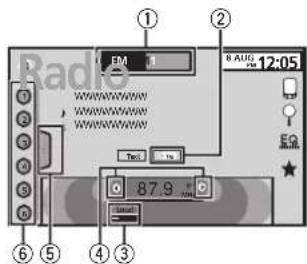
① Bandkey
Se ecting a bend (FM1, FM2 or FM3) by touchingtheletficon.SwitchinglotheAM panchbyou.chingthergnticn.
Theiconfortneselectabandishighlighted.
② Tagkey
Savinggoinformation(tag)from the broadcastingssllionloyuPd.
③Localkey
Setlingthelocalseeklevel.
4 Tuningkey
Tuningupordownmanually.
Touchhandholddownformorethnlosecondstokspitations.Socktuningstartassooanyou release.Touchagainocancelseektuning.
Listkey
Displaying the preseschannellis..
Presetchannelkey
Selectingapresetcannel
Basicoperations
Switchingresetchannelssusingthebuttons PressorTRK)
Seckuningusingthebuttons
Press and hold or TRK).
Notes
- ListenAW/rodowhilecaniPodscharged from thisunilmengeneralecise. Inthis case disconnectthe Podfrontshunit.
Touchpane keysnottlistedunderTuner operationsmayappearondhedisplay. Refer to indicatoristopage61.
Storingandrecallingstations
You can easily store up to 200 grams of stomach bandspresses.
1Displaythepresetscreen.
Referto/Tuneroperaionsonpage13.
Theoreselscreenaopearsintheislay.
2Touchandholddownoneofthepreset tuningkeystostorethereselectedfrequency tothememory.
Theselectrode radiation frequency has been stored inhomerecovery.
3Touchappropriatepresettungkey toselectthedesiredstation.
Storingthestrongeststations
BSV(beststationsmemory)automatically storeesthesiostregestationsintheorocer of the signalstressngt:
Tuner
Storing.broadcastfrequencieswithBSMmrayelplacebroadcastfrequenciesyouhavenesavedusingthepresentuningkeys.
1Displaythepresetscreen.
Refer to Tuneroperationsonpage 13. The offsetscreenepaarsintheclinicsy.
2TouchBSMtoturnBSMon.
Thesisstrongestbroadcastfrequencyswill be storedunderpresetuningkeysincrdertheir signalstrength.
To cancel the storage process, touch Cancel
Tuninginto strongsignals
Loca seektunigalowsyoutuneinpoonly thoseoradiostationswithsuffcientlystrongsigns for goodredction.
FMOff
……
A0Off
The more there are on the screens, the fewer those stations that can be selected. On stations with stronggest signals in your local area are selected.
Iftherearfewer thisunwillbeabiteoreceverbroadcastsfromwemskatalysts.
UsingiTunestagging
Note
FormoredetailsaboutTuningstagging,referto About:Tuningtaggingonpage65.
Storingthetaginformationto thisunit
Tuneintothebroadcaststation.
2Storethetaginformationtothisunit.
RefenoTunopcrationsonpage13.
You can store the information "the Tag indicatordisp ayedwhilethedesredson sbeing broadcast.
While storing the tag data on this unit Tag flashes.
- Togatinformationforupto50conscan be storedonthisunit.
Depending on timing, when the tag information stored, the tag informationforthas song playedbeforecafterinrecurrentlyplayingsongmay a.sobstored.
3Whencompleted, indicateorturns offand indicatorisdisplayed.
Storingthetaggedinformation toyouriPod
1ConnectyouriPod.
WhenyouriPodconnectedloshunityour iPodstartstorheltaggedinformatorm automatically.
2Whencompleted, Indicatorturnsoff andthetaggedinformationisstoredon yourPod.
SiriusXMTuner
IntroducingSiriusXMtuner operations
(FunctionsofAVX-5800BHS/AVX-3600BHS) You can use this unit controlSiriusXMCon nectVehicleTuner,which issoldseperately. Termoreintroductionohowtoinsla SiriusXM Connect VehicleTuner,consultthem installation guinecludecdowthctetuner.
Everything worth steningloisinSiriusXM. You'll find channelsandchannelsofprogramming, including commercial freemusic, plus thebestsports, news, folkandexclusive centeramen lammerLASiriusXMVehicleTunerand Subcriptionarequired.Formore information on visitwww.siriusxmm.com/tntheUSorwww.siriusxm.csinCanada.
TosubscribetotheSiriusXM SatelliteRadioservice
1SelectSiriusXMasasource. YoushoudbealertotuneintoChannel1it youcanmolgetChannel1makesurehlthyou SiriusXVConnectVehicleTunersinstalldcorrelyasdescribedbinHelunerinstallation guide.
2SWi7chtoChannelOandchecktheRadio ID.
TheSiriusXVI/RadioIDocanbofoundbytuning toChancel,Incaddition,thcRadioDislocato onlheboalcmoftheSiriusXIVConnec:Vehicle Tuner.
Please notethat ciriusXVR Radiol Ddoessnot includethe ettersLIO.SorF.
Youwillneedthisnumoorteactivetourscnscription.
3ActivatetheSiriusXMserviceonlineor byphone.
For US Subscriptions:
Visitwww.siriusen.com/actiayenow
CalSiRusXMLstorer@Canat1866639-2349
For Canadian Subseriptions: Visit www.xmradio.ca/ncce lekomACTIVATE RADIOInhotopprghcomer Call:87-438-9677
The SireusXM saell testis sendanactiOn
mssagctayourer Whentchetunerhasacovcd
thermessage SubscriptionUpdated idspayed.
Pressanykeyoclae theactivation mesege.
Theactivationproessua lyaktes0nutato
16minuteuymayakeuptoannourinsome
cases.Donoturnofftheunluyouleeartheat
vat onmeseagcypressinganykey.
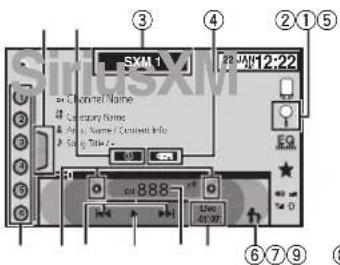
Touchpanelkeys
- Listkey
- Displaying the probes channellist.
Informationkey SwitchingtheSinusXMinformation, Categoryname-Contentinformation
Bandkey SelectingabandfromSXM1.SXM2or SXM3
4 iTunes songtaggingkey SavingTunes songtaggingfromthebrod castingstationyouriPod.
SiriusXMTuner
Searchkey Selectingachannelfromtheilistscreen.
ParentalControlkey TheParentalControlscreenpears.
Livekey Usereturntothe livebroadcastwhile in InstantReplaymode.
8 Directkey
Anumerickeypadapears,allowingyou to
enterSiriLuxMchannalnumbersrectly.
Pauseandplaykey UsewhelineInstantReplayoutmode.
Forward/Backwardkey
WineInstantReplaymode.setoskipup
ordownorpressandholdelfastforward
fastrewind.
Tuningkey Tuninguordowndmanually. Touchandholddownormonthantwoosoc-ondtoskioslations.SeeKunlingstarses soonasyou release.Touchagainlocancel
12 Presetchannelkey Rocal ngthocpresetchannelsbytouching tnokey. Staringhecurrentstationinthepreset channelllesbytouchingardholdingtrokey
Basicoperations
| Marlaituning(stocypost)usingthabuttons 1 Press ▲or ▲(TRK). |
| Seektuningusingthabuttons 1 Press and hold ▲or ▲(TRK). |
Note
TouchpanelkeysnotlisteduncerintroducingSiriusMturoperationsmayappearanchdisplay.
Refer to indicatoristonpage61
Storingandrecallingchannels
You can easily locate up to six channels across bandaspresets.
1Displaythepresetchannellistscreen. ReerolntroducingSinusMuneroperations on page4. Thepresetchannellistappcarsinhcdisplay.
2Touchandholddownnoneofthepreset tuningkeystostoretheselectcdchanneto thememory. Theselectcd channelhasbeenscoredinthememory.
3Touchtheappropriatepresetschannekey toselectthedesiredstation.
Selectingachannelfromthelistscreen
Selectingachannelfromtheall channellist
You can see echannelfromanyoffesavalbechannels:
1TouchthesearchkeytoopentHEList screen.
2Selecttheallchannels.
3Selectthedesiredchannel.
SiriusXmtuner
4Touchtheclosekeytoclosethelist screen.

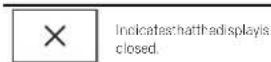
Disp ayisclosed.
Selectingachannelfromthe categorylist
You can select channel from the available categories.
Treat types of categories available will depend on the type of channels available.
1Touchthesearchkeytoopenthelist screen.
2SelectacategoryfromtheList.
3Selectthedesiredchannel.
4Touchtheleshorekeytoctosehlist screen.

Disayssed:
Switchingthelistdisplay
Youcanswionbetweenlistypeswhilealiskis showing.
- Touchlfnowhilealististshowingto switchbetweenlisttypes.
Enlist splayedwillswchotboonthe below typos ncoordergiven. Channel Name -Artist Name -Song Title-ContntIn
SelectingaSiriusXM channeldirectly
You can see this function directly by entering the desired channel number.
1Touchthedirectkeytoswichtodirect Inputdisplay.
2Touch0to9toinputthedesiredchannel number.
Tocance theinsutrumers touch
3SelecttheSiriusXMchanneloftheenterednumber.
TheSinusXchannelthencenterconnumber is selected.

Selecting theSinusXchannel of interesterednumber.
ReplayTM
You can pause, rewind and replay the current live channel reals well as witheryouculnetbone of your channels stored on the current bandofsets.
- TouchPause/Playkeytopauseorplay.
- TouchForwarderBackwardkeyslospthrought content. PressancholdthForward or Backwardskeyslofascanthrought content.
- Touch livkeytoxifRapaymocandgoto Lhivelpoinlinthebroadcast.
UsingiTunestaggering
FormorodetailsaboutTunestaggering,referto AboutTunestaggeringonpagc.
SiriusXmtuner
iTunestaggergingofSiriusXMsongs
Tuneintothebroadcaststation.
2TouchtheiTunes songtaggingkey.
Storethetaginformationotthisunit.
You can store the information if theTajndic a tor displaycdwhilethedesiredesiredsongisoeing
broadcast,
-
While沿着thetagclataomhiaunl Tag flashes.
-
Therapogenitationntuoto50sgscnbae sterodonthisunit.
-Dependingontheimmingofwhenmlaginformationistored,noteginformationforneshengplayedbeforeafterthocurrentplayingsongmeyalsoforesetired.
3Whencompleted,indicatorturns offand indicatorisdisplayed.
Storingthetaggedinformation toyouriPod
1ConnectyourPod. Whencyour Pod sconnectedtothisunit your iPodstartssloringthelaggedinformation automatically,
2Whencompleted, indicatorturnsoff andthetaggedinformationisstoredon yourPod.
SettingParentalControl
TheParentalControlFeatureallowsyoucolimit accessiblySiriusXMchannels,including thosewithmaturicontext. Whenthensbied,theParenta.Controlfeaturerequiresyoucenterapasscodelo:unetolthe lockedchannels.
1Touchtheparentalcontrolkeytoopen thepasscodeconformitionscreen.
2Usethenumererickepadtoenterthe four-digitpasscodeandthentouchtheEnter key.

Touchaconfimthapasscode.
Tredaualtpaccodeis000. Ifavaldpaccodeisentered,thechannellist appearsontheParentalControlscscreentogether withachonunlockicon.
3Thebelowoperationscanbecompleted fromtheParentalControlscreen.
Lockingchannels
Access to the current broadcast channel can be locked. You will need to input your password. Later on, you will be able to change this information.
- Tolockaspecificchannel, touchthe nameofthedesiredesirechanneltheist.
Alockedlockconnwillappearnexttohename ofalockchannel,
Touchnamedeflockedchannealsecond timecountoclockchannec
ClearAll(clearingthelocks fromallchannels)
You can enter the clock from all lock channels at timesame time.
TouchClearAlltounlockallockedchannelstahthesame time.
EditCode(changthepasscode)
You can change your身份证.
1TouchEditCodetoswitchtothepasscodeeditscreensheet.
SiriusXMTuner
2Usethenumercikepadtoenteranew four-digitpasswdandthentouchtheEnter key.

Tauchtoconfimtnepasscode.
Once thenewpasscadelset;theParentaContro screenwillopen.
Note
ICheckTuner sp sysinstead,referto
SinusXMSatelliteRadioonpage57.
SettingSiriusXMTuneStartTM
When tuning using the presel channelbutions, songscanplayfromthebeginning.tuneStart isenabled.
1Pressthehomebuttontoswitchtothe homedisplay.
2Touchthesystemkeytoopenthesystem menu.
3TouchSiriusXMTuneStartthenystem menutotimusSiriusXMTuneStartonorff.
On:The current broadband audioosongs displayed back from the start of this song.
Off: Telly broadcast displays recorded in the current audiochannel.
Scanoptions
Chenerendsongscanbeelayed backonthis unitbysonplay.
TuneStart may take few minutes to operate after apowercycle after changing into another preset band.
TuneScanTM
Scanthroungshorntprvewsotsongsyoumay havemissedonmus cchannelscstreonthe currentbandfrcsels.
1. TouchtheListkeytodisplaythepreset channellist.
2TouchTuneScan.
Tune Scan
Echosong rncemontcharne playstorightscondsatetime
RotertScanSanyOperationSonpage1E50a listoffunctions:thalicenbeusedcuringscan play.
Note
TuneScaniscomplicatedwithSVX20corlater tumorecedures.NotcompatiblewithSVX100.
Categoryscan
Scanthroungreechchannelinacategory.
1Touchthesearchkey.
2Touchthedesiredcategory.
3TouchScan.
Scan
Thelivebroadcast/foreach channelimmediatecategoryplaysfortkcecondsatlatte.
ReferToScanSysoperatiorsonpagetifora listfunctionsthatcenbeuseduringscan play.
SiriusXMTuner
Scanplayoperations
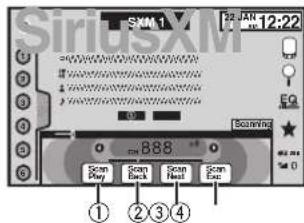
① Scanplaykey
Selectingthechannelsongplaying
② Scanbackkey
SwitchingtotheprevicssongduringTurescan.
Switchingtothepreviouschannelduringthecategoryscan.
3Scannextkey
SwitchingtothenextsongduringtheTuneScan
Switchingtothenextchanne during thecatogoryscan
4 Scanescapekey
Quittingscanclay
Resettingdefault
TheSirusXMsettingswillberesettohedeault settings.
1Turnthesourceoff.
ReferToTurningresourceON/OFFFor page8.
2Pressthehomebuttontoswitchtothe homedisplay.
Disc(CD/DVD)
Introducingmovieoperations
You can use this unit to view DVD/DVD/R/DVD-RW/CD/CD-R/CD-RW movies files.
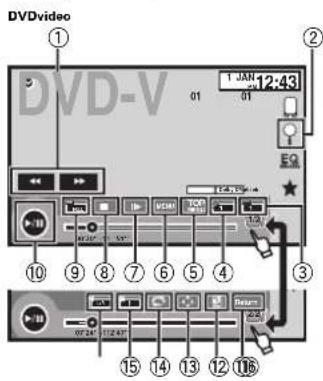
Touchpanelkeys
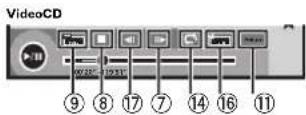
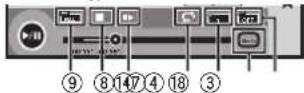
When playingadiscountcontainingamixtureofvariousmediaifetypes
1Fastforwardkey/Reverskey 1Fastforwardingoreversing
Touchchange the fast forward and reverse speed.
Searchkey
Starting these search function.
Switchsubtitlelanguagekey
WithDvDs/DxXfiesfeaturngmulti-subtile recordings, youansw tchbetweensucitie languagesurijingplayback.
4 Switchaudiolanguagekey
WithDVDs/DvXesthatroprovideds audio playbackindifferent languagesanddifferent audio systems.Do by DigitalDTS etc. youanswitchbetweencanuages/audio systemsduringplayback, Depdingonthcsctting.thevidemaynot beplaycdbackwithhaudiosystemusoc lorecord.the DVD.
$ TOPMENUkey
ReturninglotheiopmenuduringDVDoltsyback.
6 MENUkey
Displaying the DVD menu during DVD playback.
Slow-motionplaybackkey
Movingthesoslectionshcaderonframeat timduningplayback. Touchandro downthekeyformorethan twocondosts owdownplaybackpeed Touchingthekeyinncasestheplayback speecovercincrementalesettingsdun ng sowmotionplaybackfromDVDvideo/Video CD.
Stopkey
Stoppingplayback. Ifyouresumeplayback.playbackwillstart fromhepeoinwhereyoustopped.Touchthe keyagaintostcpplaybackcompletely.
Disc(CD/DVD)
Screenmodekey
Changingthescreenmode: RefertoChangingtheWide-screenmodeon page10.
10Pauseandplaykey
Returninglonermalobyback,uring paused.stopped,slowmotion,orframe-by frameplayback.
1 Returnkey
Returningtothespecifiedscenetowhch theDVDcurrentlybergplaycdhasbeenerocrampedmedreturn.
Th.stuctioncannnotbeuseditspecit ed scenehasnolbenpreprogrammedonthe DVDdisc.
Bookmarkkey
Duringplayback,ouchtheopoinatwhuchyouwantto resumeplaybackthenexttimethediscisacted.
You can sell one bookmark per DVD video. Your book is on shelf at
Toecheearbookkmrakonadic,touch andhold the keyduring playback.
Theodolid bookmarkis placed by the newone.
13Arrowkey
Displayngarrowskeystooperatcs:DvD menu.
iRepeatkey
Selectingtherepealrange
Viewinganglekey
With DVD featuring multi-angle (scenes shot from multiple angles) recordings you can switch among viewnganglosduring playback.
Audiooutputkey
Switchingtheaudocutout,whenplaying videoscrecoredwith LCPVaudoc.
Slowkey
Sceeeingdownthep aybackspeedinfotour steps duringslowmct onplaybeckonVideoc CD.
Thereisnosounddunrgsclwmotion playbeck.
Imagesdunmslwnottonplayeckmny beounctarepsomedsics.
- Reverses ow motion playback is not available.
Mediakey
Switchingbetweenmedialletpesiotlay onDVD/CD.
Basicoperations
ayirbackvidcos
Inserted description of helicoblastslot with melanosomes
Playbackwillautomaticallystart.
- tycuareplayingaDVorVideoCD.a menu maypeep,ReferoOpinglineDVormn onpage18andPBC2ybackonpage19.
- Whertheutomalatcplaybackfucnitorion, meun (wilskiphe)DVdrnuandaotalmalac ystartplaybackto mthofstacharodco nortisttle.RatoaMatcplaybackof DVdsonpase39.
- When theseurocolonsis not displayed it can be displayed on touchscreen.
farnesage spisplayadafierloadingcisc continaingDixVDCcontant.touch Play. RerntoPlayingDix VCDcontontonpego 20
Fecting disc
RefertoEjectionstagscorpage11
Selectingachactersusingtheabuttons
Press orTRK
Fasifowringreversingusingthebutions 1. Press and hold ▲ or ▶ (TRK).
- Fastforward*fastreversomayatalwaysbos possibleonsmedics.Insuccases.normaI playbackwillautomat callyresume.
- The fastforward/fastforwardspockdepoces on thelength of myot pressand hcdown or TRK).This function is not available for VideoCD.
Notes
ThisDVDLaperyanlappaybackxDxVfere
corpsorCD/RWvDV/RWvORMPEG/1
MPEG-2/MPEG-4(Pleasesee the following
sectionforifleshatcnbeplayedback.
(RetertOVDwEefesponpage63)
Don't send anything togethershana DVD-R/RworCD-R/Rwintohediscasting slot
Someoperationsmaynotbeavailablewhiethawatchingameduetotherapyprogrammingoffthedsc.Insuccases.the iccnappcarrsonthocsroan.
There may be touch panel keys not listed underinductingmovieoperations onpage 17thatapocarontscreen. Reportindicatorsonpage61.
WithsomeDVds,swiching betweenlanguageaudiosystemsmsayon yobpossibleusinggamncnudispay.
You can alsoswchobteenlanguages/ audio system using VideoSetup menu. For details, rotaSettingtheaudiolanguagepage page37.
Thisunit will return normal playback if you change the sound language during fast forward/face reverse, pause or slow motion play back.
WithsomeDVDs,swtchingbetwonsuttle languesmesayonlybecossibleusnga menusislay.
You canalsoswitch between subtitelanguage using VideoSetup menu,Forctais,refertoSettingthesubtitlelanguagepage37
Thisunitwillreturnonormalplaybackifyou changethesubtieltelanguageduringtestfor ward/fastreverse,peuseorslowmot on play back.
-During playbackfassaneshtrommullpeangles,thearngleiconsfslpve.UsetheVideoSetupmenutolumthangleicondislayonf.ortfindals,refoSettingthemultangleDVDdislayponpage38
Youwillreturnonorma playbackifyou changetheviewingangleduringfasfor ward/fastreverse,pausesslowmot onplay back.
Soundplaybackoperations
You can use this unitilotistento DVD-R/RDVD/RW/CD/RCD/RCD/Rwoundtilds.
Touchpanelkeys
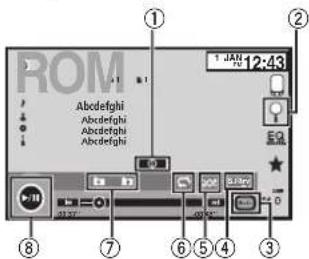
Informationkey
Switching the text nformata ndisplay this until when prepaying VIP3/WMA/AACfles.
Disc(CD/DVD)
Searchkey
Displayingstofracktllesfilenamesto selectonp#
Displaying the filename selects the files.
3 Medikey
Switchingbetweenmedalllepesonsa. DvDoC
Soundretrieverkey
ReferloUsingsoundretriersponpace10
5 Randomkey
Plavinsongsinrandonorder
6 Repeatkey
Selectingtherepeatrange.
Previousfolderkey/Nextfolderkey Selecting folder.
Pauseandplaykey
Pausingandstartlingplayback
Switchingthemediafiletype
Whenplayingad gitalmediacontainingamixtureofvariousmediafelycees.suchasesDivX,MPEG-1,MPEG-2,MPEG-4andMP3,youcan switch betweenmecocifliptyostoy.
- TouchMediatorswitchmediafiletypes.
CD-DA(audiodata)-Music/ROM(compressed audio)-Video(DivX.MPEG1,MPEG2,MPEG4 videolites)
Note
Audiodata(CD-DA) files on DVD-ROM cannot be played back on this unit.
OperatingtheDVDmenu
(FunctionsForDVVideo)
SomeDvDsalowyolomakeselectionfrom thediscocontentsusingamenu.
Using the arrow keys
1 DisplayarrowskeystooperatetheVD menu.
2 Selectthedesiredmenuitem.
Selectingthedesiredmenitem.
Enter
Starting playback from selected element.

OocysteineDyDmDyubiy decrying hemetulans

Backtoproviousdisplay.
WithonoparatingthodVDmonusysdirectytouch ingthermeruitemouchteicontoxperate.
Key
Return rgthernormal DVD videodiscs

Displaying arrow keys.
Disc(CD/DVD)
- Waystocisplay.hemer.uwildifferdepending onthed.
CopendingorthontocsfthcDvDDisc,this functionmayrownprogesskychasesuchuseseltheutschanskeystooperetheDyDmemu.
Randomplay(shuffle)
Touchtherandomkey.
On-Playback is an randomomerow in
thereapstrange,FolderandDisc
-Off Cancelrandomplay.
Repeatingplayback
Touchtherepeatkey.
Disc-Playthroughthecurrentdisc
Chapter-Repeatthecurrenctapter
Title-Repeatthecurrenttitle
Track-Repeat/RecurrentTrack
File-Roseatthecurrenftle
- Folder - Repeatthecurrent folder
- Disc/All - Repeat all files in the current disc
- All-RopostedFiles
Notes
This function cannot be operated during VideoCDelaybackfeaturing PBC playback control).
Ifyouperformchaptersearch,fastforward/reverse,frame by frameplaybackers owmpictionpayacck,therepeatclaywillstop.
- Whenplayingdiscswithcompressedaudio andaudiodata(CD-DA),playbackisrepeatedwithinntypeofdatacurrentlyplay ingeventDiscsselected.
-Ifyou'selectanetrchofoldercturingrepeat. play,therepeatpayrangecongesto 1 DisC/All.
If you perform tracksearchortheast/forward/resequencingFile, therepeatplayrange.changestoFolder.
- ifyouperformlittle/chaptersechiorfasfor ward/reversesecuringChapter,therepeatplay issoottautomatcay.
- ifyouperformtrackssearchorfastward/reverseduringTrack.therepeatplayrangechangestoDisc.
- When Folder is selected, it is not possible to playback as subfolder of the folder.
Searchingforthepartyyou wanttoplay
You can use research function to find the part you want to play.
ForDVDDvidocsc.YouCanseSelectTitle title), Chapter/chapter/10key(numerickeypad) ForvideoCDs,youCanseSelectTrack(trackor
10key(numeric keypad)
Chapter searchisnot available otherwise playsbackstopped.
-This function cannot be cooperated. Using someDvideoesoryCDplaybackfeaturing PBC(Playbackcontrol).
1Startthesearchfunction.
Referential introducing movie operations on page 17.
2Touchthedesiredsearchoption(e.g., Chapter).
3Touch0to9toinputthedesirednumber.
Tocance theenterednumbers touchC.
4Startplaybackfromtheselectedpart.

Registeringthnumbersand starting playback.
Note
Withdiscsfeaturimgeneru, you can issue the DVD Dvmutomakekeyourselection.
Disc(CD/DVD)
Refer to: Introducing McViooperations on page 17.
Selectingaudiooutput
WhenplayingDVVideoiscansccorderedwith LPCMaio,youcanswichtheaeouput. WhenplayingvideoCDs,youanswichbetweenstoccardmonauralaudoutput.
Thisfunctionisnoisvalsbiewhendisciplysbacksclopped.
- Touchtheaudiooutputkeytoswitch audioutotypes.
L+R-Leftandright
-Left Left
-Right-Right
-Mix-Mixicleftarccright
Note
You may apply the following functions depending on the condition and the payback location.
PBCplayback
(FunctionsforVideoCDs)
DuringplaybackofVideoCDs#featuringPBC (playboxcontrol),PBCo#scliplzied.
1Startthesearchfunction.
Refer to introducing movie operations on page 17.
2Touch10keytodisplaythenumerickeypad.
3Touch0to9correspondingtoamenuumber.
4Startplaybackfromtheselectedpart.

Reg stgrenthurnersenc
startingslayback
Notes
You cardisplayhemunubtouching ReturnundngPcplayback.Fordetails, refertolheinstrucionsprovidowththe disc.
- PBCplaybaockaVideoCDcanortecanee ed.
During sybacke videoCDsfeaturing PBC (playback control), you cannot select the core at play, or use these functions.
Selectingtracksfromthe tracktitlelist
You can see the tracksto playback using the track titleist whinisalistofthetrackscrecorded on adisc.
1Displaythetracktitlelist.
ReferloSoundplaybackoperationsonpage18.
2Touchyourfavoritetracktitle.
Playbackbegins.
Selectingfilesfromthefile namelist
(Functionsorcompressed audio/DivX/MPEG-1/ MPEG-2/MPEG-4)
Filenamestalslstoftengamesortolder namesfromwhichyoucanselecttableortold ertopayock.
1Touchthesearchkeytodisplaythefile (orfolder)namelist.
iPod
Searchkey
DisplayingiPodmenu.
Soundretrieverkey
RefertolIsingssoundretrieveronpage10.
⑦Podcontrolmodekey
Cordiing operationfrom your Podandlistening to itusing your car speakers.
Shufflekey
Playingsongsonthe Pediinrandoomorder
Repeatkey
Selectingtherepealrange.
Changespeedkey
Changingthe speed of a truck book payout enthiPod.
1Genre
Displaying the GenreslstonthiPod. Thealoumluleisdisplayedwhenyoulisten tromusictherianfPodmusic. (ExceptrPandora)
Albumtitle
Displaying the AlbumistontneiPod, Theartsharnereisdisplaywhencyculisten tromusictherhanipodmusic. (Except for Pandora)
3Pauseandplaykey
Feusingandstartingplayback.
Unitoperationkey
Performing operations: freemtis.unifandlisteningtothermusiconyouriFodusingyour car'speakers.
5Screenmodekey
Changingthescreermode.
Soundplaybackoperationsfor Bluetooth
(FunctionfAHV-X6600BHS/AVHV-X4600BT/AVHV-X36003HS/AVHV-X260GST)
When allofthefollowingsettingseramede, audiclan be neoyondonlitsunlisinga.
Bueloohconnecion.
1SetDeviceconnection.
Deviceconnectioncanbesatwhenallofthe
followingconditionsaremet.
IthPhoenisnotcornected.
NoBoutonconreion.
—Thesourcelistameckoff.
Turthesae
ReferToSourceoffkeyonpage1
2 PressShiftEnter button switch to the home dialyspl.
Touchhodesystemketoaenthesystem
T20
4 TouchDeviceconnectionorthesystem
TNDU
TouchiPhoneviaBluetoothtoSelect.
2ConnecttheiPhoneandthisunitvia
Bluetoothconnection.
RefertoBueletoothconnectionmenoonpage45
Note
Artworkwillnetbedisplayedwhonsoundplaybackoperationareperformedusinga.
Bluetoothconnection.
Movingimagesoperations
ForPodwith30-pinconnectorusers
You can use the unit to view Podmovie files.
- Depending on your Pod, there may be an additional cost to buy out your CD-IU201S/CD-IU201V (soloscoparate).Bursurfo.sccDILU091S/CD-IU201Vtoconnect your Pod.
For Podwithlightningconnectorusers
iPod
ToplaymoviefilesinPodwithsunt, con
ntingDigitalAVAdapter(AppleInc.proctds)
(so,dseparate)andinstalltheCarVi
dPlayerappocvnPoc.RefertotheCarVi
dApaermanuaformoreinformation.
RefertoAppRadioModeoperationonpage 23.
Touchpanelkeys
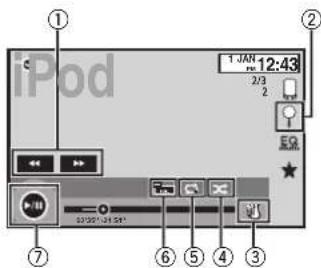
Fastforwardkey/Reversekey
Fasionwardingorreversing Touchochangethastforwardandroverse speed.
2Searchkey
Displayng Pdmenus.
③ iPodcontrolmodekey
Conducting operation from your Podank聆听:olusingyourcar's speakers.
4Shufflekey
Playing the video on your Podarandom order.
Repeatkey
Selectingthe repeatrange.
⑥Screenmodekey
Changingthecscreenmode. RefertoChangtingthewide-screenmodeon page10:
Pauseandplaykey
Returningnormalsplaybackduring paused,slowmct on or frame by frame play back.
Basicoperations
Pavir:backyideos
- Touch research keycapupitplus Pod menus.
2Secharnovetoplay.
RefertoPlayngvileosfcmyunPdoromagaa 22.
- When chesourceconisnotd splayed it
rbed splanberdtauch pheesreen - Disconnectionphonedstromtheild Podbeforeconnectingillthusigt.
- Depending on the PostHrodelandthe amount to be restored in the Pod, tmay take something from playback to begin.
- UseHeltbuchparknckkysloeslect.helPod afterconnect nghtt snt:
- NoDevice is displayed when disconnecting the Pod.
Fastforwardingreversingusingthebuttons.
Usingthisunit'siPod functionfromyouriPod
You can listen to applications yourPDF using the嘶'speakers when
AppModeisselected.
This function is compatible with the following iPod modules.
iPodnanostgeneration
- Podwithvideo
Notes
Video-related functions:renclavableto (Podwithlightningconnexbrusers)
- While this functionsinuses, the Podwillnot turnoffeveniftheigntionxysturnedof. OperateltheiPodouurnoffhecocower.
1TouchtheiPodcontrolmodekeyto switchtoAppMode.
2OperatetheconnectediPodtoselecta video/songandplay.
Notes
The following functions are still accessible from the unileventhecontrolmodelasset toAppMode
However, cooperation will depend on your application.
—Playing/hausing
Fastforwarding/reversing
Trackingup/down
—Movingtoachapteup/down
AppMode is compatible with the following AppModels:
iPostouch4thgenerational
-IPoctoucn3rdgeneratior
iPodtouch2ndgeneration
-iPodtouch sgeneration
iPodclassis160GB
iPodclassic120GB
-Post:assic
Podnanobstgenration
Papnngenration
Podnanocregeneration
Podnan62ndgenerational
Phone4S
—Phane4
Phone3GS
Phone3G
Phone
Shuffleplay
Touchtheshufflekey.
Songs-Playback videos/songs nthes
ectedistirrandomorder
Albums Playcay ceos/songstroman
dominsele:leiaumorder.
-Off-Turnoffshuffleay.
Repeatingplayback
Touchtherepeatkey.
One-Repeatusthecurrentvideofsona
All-Repeat all videos/songs in the selected listorthePdcd
PlayingvideosfromyouriPod
VideoscanipbyedonhisunifiliPodwiDvidoacosbilisssconnccted.
This unit can play back "Movies", "Music videos", "TV show", "Video Podcast" and "Rent-Cloud Movies" which are downloaded from the iTunesstore.
Note
ThunctionisnotavalibietoiPodwithlight ningenconnexorurs.
1TouchSearchtodisplayiPodmenus.
ReferToSearchkeyonage21
iPod
25witchtoiPodvideomode.
If you want to switch a Padside mode, touch the colon.

Switchingtail Podvideomode
3PlaythevideofromtheiPod.
IfyouwanttoswitchtoPodmusicmodetouch heican,

SwitchingtsPdtrusicmoe
Browsingforvideo/music ontheiPod
TomakeoperatingandsearchingeasyoperationscontrolPocwhththisunitaredesignedtoceassimlerothPocaspossible.
Note
Video-related functions are not available at the Pod with lightning connectors users.
Searchingforavideo/musicby category
1TouchthesearchkeytopulluptheiPod menus.
ReferoSearchkeyonpage21.
2Touchoneofthecategoresinwhichyouwantosearchforvideo/music.
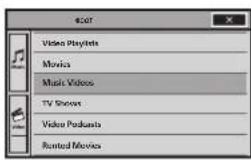
Category slst(fonvideo)
-VideoPlaylists(Videoplanliests)
Movies movies
MusicVideos(music videos)
TVShowsTVshows)
-VideoPodcasts(Videopodcasts)
· RentedMovies(rentedmoves)
VideoTunesU(VinaolTuresLi)
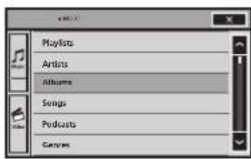
Category stasformusic
-Playlists(plays)
- Artists(artists)
-Albums(albums)
Songs(songs)
-Podcasts (podcasts)
- Genres(gerres)
Composers (composers)
Audiobooks [audobooks]
3Touchthetitleofthelistthatyouwant
toplay.
Repeath his operation until you find the desired video/music.
Notes
- Depending ontogenrationversion of the Pod some functions may not be available.
- You can apply any of the following methods to complete the application (MusicScope). The application will be available in our web site.
iPod
- Playlists that you create with the computer application (Music Sohere) are displayed in abbreviated form.
SearchingtheListbyalphabet
1Selectacategory.
ReferToSearching/avada/ta/musicbycategory onpage22.
2Switchtoalphabetsearchmode.

Switchingalonebetsearch
m008
Alphabetsearchmode slosplayed.
3Touchthe firstletterof the title of the video/songyouarelookingfor.
Whilesearchingtouchpankeyoperationis notavailable,
-Forefinetresearchwith had fienrentleter,ouch Cancel.
4Touchthetitleoftheilstthatyouwant toplay.
Receisthisoperationunilyoufindhedesired song/video.
Changingaudiobookspeed
- Touchthechangespeedkeytochange thespeed.

Playbackataspeedesthenan normal

Playbacknormaspeed

Playbacketaspeeddownerthan normal
Displayinglistsrelatedto thesongcurrentlyplaying (linksearch)
Touchtheardworktoopenia stoffhenamesof songsonthealbumcurrenthyplaying.Touche namefothesongyouwanttoplaytoslart play ingthatsong.
Note
Ipartoftherecordedinformationdoesn'tdisplay,ascrollkeypepearsontherghtsiderlist. Touchscreencolkeytosroll.
AppRadioMode
AppRadioModeoperation
ThisssystemmeanswitchtotheAppRadioMode, whichyoucandispaysandoperatedheapplicationforPhoneortheshcreen.
In AppRadioMode, you can operate applications with fingeringustressuchastaoing, dragging, scrolling or flicking on the screen of the system.
InstalltheApcRadioappponyouriPhone.

WARNING
CertainusesofaniPhoneorsmartphone maynotbelegalwhiledrivlnginyourjurisdiction,soyoumustbeawareofandobey anysuchrestrictions.
Ifindubtaostaparticulafunction,only performitwhilethecarisparked.
Nofeaturesshouldbeusedunlessittisafe tousounderthedrivingconditionsyou areexperiencing.

CAUTION
Whilediving,youcannclenterlexlanyour iPod.
Pioneersncllableforanyissuesthal mayariscfincimcorrectorilawccapp-basedcontent.
The content and functionality of the support applications are therefore responsibility of the Appproviders.
InAppRadioMode functional through the productislimitedwhindrivng with availablefunctionsdeterminebytheApp providers.
- Availability of AppRadioModefunctionalitydeterminedbytheApprovider and no.determined by Pioneer.
AppRadioModeallowaccesstoapplicationsotherthanthosolided(subjectctolimitsonwhiledriving)uttheextenitowhichcontentcanbeusedisdetermined. cytheAppovdres.
Important
- When listening to music and sounds from applications simultaneously, see the lowing section. Refer to Operating低声roomer image48.
Notes
- ApplicatiOnsoperablebyswitchingthissystemtoAppRadioModearconlythoseavailable forAppRadioMode
Please check Phone applicationssupported AppRadioModeat http://www.pioneerelectronics.com/ AppRadioMode
http://www.pioneerelectronics.ca/AppRadioMode
iPhonecompatibility
AppRadioModelcomposablewithfollowingPodmodels.
- IPodouchisthgenon(onlywithAVH-X560CBHS/AVH-X460CBT/AVH-X3600BHS/ AVH-X2600BT)
AppRadioMode
- iPodtouch4thgeneration
iPhone5onlywithAVI-X5600BH/SA/VI-X 4X600ST/AVH-X5600BS/AVH/X2600BT
-iPhcne4S
iPhone4
Startingprocedure
1InstalltheAppRadioapponyouriPhone.
2SetDeviceconnection.
Deviceconnection can be set when all of the
owingconditionsaremel
The Phoneisnotconnected.
—NoBluetooth connection.
—Ihesouceisturnedoff.
Tuneresourceoff.
ReferToSourceoffkeyonpage7.
[2]rossthehomeburtonostwcttothenome display.
3 |locnthsystemkeytoopointhcesystem menu.
4. Touch Deviceconnection on the system menu.
5outncthedesirndsetting.
—iPhoneviaBluetoothforPodwith(highTingcapconnectors)
—iPhoneviaUSBforPodwith30 pincon rectuors)
3AfterconfiguringDeviceconnection, connecttheiPhonetothisunit.
-ForiPodwithlightningconnectorusers
(Functions)AVH X6008HS/AVH X4600B7/AVH X3600B1/HAVH X2600B1)
-AiBleuTooth connection srequrefionPod with thightn connector. Refer to Bluetooth connection menuanpa45.
- Use the CD-ROM (separate) and LightningtoVGAAdapter(AppleInc-products) (separate) when you use this function.
ReerToIwhenconnectingwithoptionCD-1203cbasenpages2
-ForiPodwith30-pinconnectorusers
- UsocheCD:U261S(Soldsopeataly)when you'satstution.
RefertoWhenconnecting withoptionalCD
1U201Scableonpageb3.
45Startanapplicationavailablefor AppRadioModefromthePhone
Animageertheapplicationisdisplayedontere screenoththisystem.
- You can start an application available for AppRadioModeals. Also from mala launcher application.
5PressMODE.
Foroursafely.thekeyboardfunctionalityisonly availablewhenthevehicle sstoppedandthe parkingorake songaged.
Depending on the application, you can input text formatted display, in order to input text correctly using keyboarow which appcarsonthis unit, you need to set the language setting for keyboards and function and then languagesetting for the keyboards need to set this.
-KeyboardisavallableconinAppRadio
Mode
Whenyoulapalexinputaocanapplication foriPhone,keyboardwill be displayed onscreen.Youcan input thepesiredlexdirectly fromthissystem.
AppRadioMode
Tinelanguagepreferenceforthetokeyboardof thisystemshoudbesameeastnesitting on youriPhone. Ifthesettingsforthisproductandthe iPhonearedifferent,ycurnayntbeableto entercharactersproperly.
1Pressthehomebuttontwicetoswitch fromtheAppRadioModedisplaytothe homedisplay.
2Touchthesystemkeytoopenthesystem menu.
3TouchKeyboardtheSystemmenutestdecidedlanguage.
4Touchthedesiredlanguage.
French (French)-German (German)-Greek (Greek)-Russian (Russian)-English (US English)-English (UK) (UK English)-Dutch (Dutch)-Italian (Italian)-Norwegian (Norwegian)-Swedish (Swedish)-Finnish (Finnish)-Spanish (Spanish)-Portuguese (Portuguese)-Chinese(Simplified)(Simplified Chinese)-Chinese(Traditional)(Traditiona) Chinese)-Arabic (Arabic)-Hebrew (Hebrew)-Thai(Thai)
5TapthetextinputareantheapplicationscreenofthePhone
Touch to hotesthekeyboard.
Smartphonelinkadaptor operations
You can open your smartphone theme's display by using this function.
Onlycompatible blesmartphonesworkwiththe Mirgrid.lkfunction.
-Forcdetailshowtoconnnectwithsmartphoneinkcapotor(CD-ML100)(soldsepa rately),reterdoOptionSmartphoneink adaptor(CD-ML100)connnctiononpagel53
--ForctailsbackMirror.incksetting,referto
SelectingMirror.inkModem.page40.
-Forcetetailsabcutheshoundmixer,refereto Operatingsthesoundmixeronosage48.
Startingprocedure
1Connectyoursmartphonetohesmartphonelinkadaptor(CD-ML100)(sold separately)withtheRGBinput.
2PressMODE.
-PresschomobutontswitctshomedesplayandntentouchthemirrorLinkkeyostarth launcherapplication.
The smartphone's screen appears on the unit's display with you select MirrorLink and your carton. operalseyoursmarichroned插放。
3Operatetheapplication.
Presshomebutton;Displaysthe home screenceforMirrorButtons.
—PresshoomcuttertwiceD splaysthomecscreenfortheuril.
Press▶TRK):Displayghemeruscreenfor MirrorLink.
—Press :Displaystheproviabsscreen forMirrorLink.
For details refer to Headunitpage7.
You canope atleach cation sorthout panelscreen as well as your smartphone screen.

-
Donotoperaseysoursmartponethewhichever using.Obeya relevantsinyinourca.
-
You must agree to the above covertitle on the caution screen. Besure to follow these screen instructions.
USB
ThisunitiscompliantwithLSBMSC(Mass StorageClassandLSBMP(TMediaTransfer Protocol) You canalsouseUSBMTP connecting to MTP compatibleAndroid devices using USB cable), however, sometunctons are not supported for MTPconnect on.
USBMSCUSBMTP
| MP3√ | √ |
| WM4√ | √ |
| WAV- | |
| AAC√ | √ |
| DirX- | |
| MPEG-1- | |
| MPEG-2- | |
| MPEG-4- | |
| JPEG | √- |
| Musicbrowsermode | √- |
| MIXTR/AXE2 | √- |
Movingimagesoperations
(FunctionsfUSBMSC)
You can use this unit to view USB StorableDevice files.
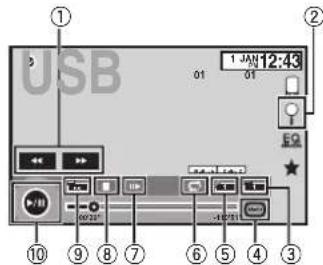
Touch panel keys
Fastforwardkey/Reversekey Fastforwardingoversing Touchtoonangetachastforwardandrevers speed.
Searchkey Displayingthefilenamelisttoselectthe filos.
Switchsubtitelanguagekey WithDivXfileseauguringmulti-subtilerecordings,youcanswitchbetweensubtitlelanguagesduringplayback.
4 Mediaky Switchingbetweennediatetypestoplay onMusic/Vdeo/Photo.
Switchchaudolanguagekey
WithDivXfilenst natprodesaudiplayback
Indifferentanguagesanddifferentaudio systems(DoloyDigital,DTS,etc.),you can
switchbetweenlanguages/audiosystemss duringpayback.
(6) Repeatkey Selectingtherapeutrange.
USB
RefertoRepeatingplaybaskionpage27.
Slow-motionplaybackkey
FunctionforDivXfle/MPEG-1/MPEG2/
MPEG-4
Vovingtheselectionaneheadonertrameata timeduring playback.
Toucharea:handholddownthekeyfornother thanwosecondostolowdnplaybackspeed
Stopkey
Stoppingpayback
youresumeplayback playbeckwillstartfrom thepcinlwhereyoucopped.Touthekeyagaintostoplaybackcompletely.
②Screenmodekey
Changingscreenmode
RofertoChangthewide-screenmodeon page10.
@Pauseandplaykey
Pausingpayback.
Returningonormalplaybackduring
paused,slowmotion,orframe-by-framelayback.
Basicoperations
| Playingback videos TConnect us.SBDevice. Playaccountautomaticallystart. When the source cannot be played, it can bed-splayedbytouching the screen. |
| Fastforwardingreversingusingthebuttons Press and hold or TRK. |
Notes
Touchonelkeysonollsc.ecnderMovingimagoperationsmayappearthediysplay,Reportindicationstfndpage61
You can also switch between languages/ audio systems using Video Setup menu, For details, refer to Setting the audio language on page 37.
Thisunitwillreturnonnormalplaybackifyou changetheauidiclanguageageduringtestfor ward/fastreverse,pauseorslowmot onplay back.
You can sow switch between subtitielanguagesusing VideoSetup menu. Iorelal's,refereto Settingthesubtitielanguagepage37.
Thisunitillreturnonormalplaybackyou changethesubtilteianguageduringfastfor ward/fastreverse,pauseorslownotplayback.
Soundplaybackoperations
You can use this unit to listen to USB Audio files.
MTPconnection
USBMTP connecting to WTP-compatible Android devices using a USB cable)issp portedonlyforM/3/WMA/AACisinsthisdiction.
Theplaytmernaynotaisolaycorrectly.
-WhempayngbackfilescrecordedaVBR varcbitebitfelletheplaymwnot becorrectlydisplayediffassforwardcrre seropoeationsareused.
Teensurepropereperatiorconnectthe clockconnectorcablefromthe Poddirectly tothisunit.
- While the PodSocket connected to this unit, the iPod cannot be turned on.
If the characters recorded on the USB storage device are not compatible with this unit, those characters will be displayed.
USB
Textinformationmynotecorrectydisp ayedependingonthererecordedenvironment.
sconnectshLSRportableaudcpayer/USBremorcerywhenyouaredoneusingit。
When you select SpearmanSelecting the backgrounddisplaypage46.theartworkis ntdisplayed.
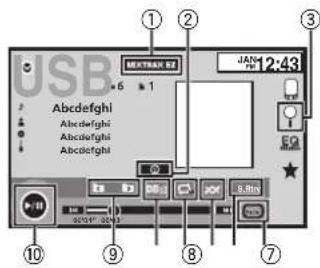
Touchpanelkeys
MIXTRAXEZkey
StartingM/XTRAXEZ (exceptor.SBMT*)
②Informationkey
Switching the text information to display this unit when playing MP3/WMA/AAC/WAV files.
Searchkey
Displaying the filenarmelistoselectthe files.
Medikey
Switchingbetoweenmedaftiltypestooley onUSB.
Soundtrieverkey
RefertoUsingsoundretrievercnnoage10.
Randomkey
Playingsonsinrandonorder.
Repeatkey
Selectingtherepeatrange.
DBkey
Creatngadstabesehlatemsbsbessearches byaristname,genre,andotheroptions. ReferetoMusicsbrowsemodeonpage/6.
Previousfolderkey/Nextfolderkey
Selectingatolder
Pauseandplaykey
Pausing and starting playback.
Basicoperations
Playing backracks.
1CTeNne:8,St,Sdve.4
Playback wie laetometicallylster. Whenthesesourcecienisnoid splayeditcar bed sleepabyctychurchingtheearein.
Fastforwardingreversingusingthebuttons 1 Press and hold or TRK.
Musicbrowsermode
(FunctionsorJSRMSC)
Thisunit creates an inindexorertactilitate browsing/crsong.You can search by thectegoreccssuchasalsoumsandartists.
CAUTION
This function isn't available when the USB storage device is locked.
USB
This functionistactavailablewhenthe free spaceefUSBstoragedeviceslessthan 5MB.
-Whilst risunitcreatesaninexedonctum theuricl.tlmaycause ossofdataoryour USBstoragedevice.
If you switch to video on PEG imaged display while data outputs being created, when a database record is created, an message appears and data seconptionsp.
1TouchDBtocreateatDatabaseinMusic browsermode.
ReferloSoundplaybackoperationsonpage26.
2When "SavetheDatabaseMemory?" isplayed,touch"Yes".
Savingofthocatabasicompleted.lyoudo notsaveitouch"No". When'esavingiscompleted."Completed savingDatabasetomemory,"appears. Musicbrowser.comedewist
3Displayalistandtouchthetagkey.
4Selectafile.
Stillimageplaybackoperations
(FunctionforUSBMSC)
youcan.sethisun'toviewstllimagessaved onUSBtostegradevice.
Touchpanelkeys
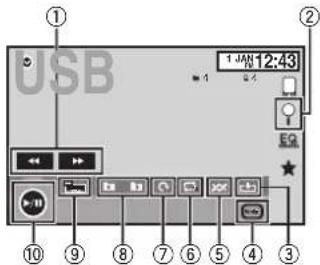
① Fastforwardkey/Reversekey Selectingapicture.
Searchkey Displaying the filename list to select the files.
3 Capturekey
Capturing man: magginJPEGfiles.
4 Mediakey
Switchingbetweenmediafidelityposwhen trerelsmorethancenemedialifelyesaved toUSBDevice.Thiskeydesopaintap
iftherissonlyonedemedialifelyosavedto theUSB device
5 Randomkey
Playingfilesinarandomorder.
6 Repeatkey
Selecting the repeat range.
⑦ Rotatekey
Rotatingthedisplayedpicture90'clockwise.
USB
Previousfolderkey/Nextfolderkey Selectagafolder.
④ Screenmodekey
Changingthescreenmode. Referto Changingthe wide-screenmodeon page13.
Pauseandplaykey
ringorpausingtheslidesshow.
Basicoperations
Playing skill Images
1 Connective USB device.
Playback will automatically start.
- When the source icon is not displayed, it can be displayed by touching the screen.
Selecting a file using the buttons 1 Press or TRK.
Past file searching
1 Press and hold (TRK).
- You can search 10 JFEG files at a time.
If there are fewer than 10 files, the search will cover the first or last file.
Notes
- Files are layered backinf (lenumber order)
endifoldersareskipped (they contain no files, (foldorder1(ROOT) contains no files, playacckcommenceswithfoldoe2.) - Touchplane keysrolledunderSTHmage playbackoperationsmayacperonthedisplay.
Referlcindicator/stonpage61.
Switchingthemediafiletype
- TouchMediatorswitchbetweenmedia filetypes.
Randomplay(shuffle)
- Touchtherandomkey.
- On - Play back files in random order within the repeat range. Folder and Media.
- Off-Cancel random play.
Repeatingplayback
Touchtherepeatkey.
- Folder - Repeat the current folder
All Repeat all files - When Folder is selected, it is not possible to play back a folder of that folder.
- If you select USB source, the repeat play range changes to All.
Selectingfilesfromthefile namelist
(Functionscompressedaudio/DivX/MPEG-1/ MPEG-2/MPEG-4)
OperationisheameashtforDisc. RefertoSelectingflesfromtheifenamelstion page:19.
Displayinglistsrelatedto thesongcurrentlyplaying (linksearch)
Touchtheartworklopenalistoftheramesof songsonthealthburncurrenllyplaying.Touchthe namcothespongyouwanttoplaytostartlayingthalsong.
Notes
Ipartorre:erecordedinformotioncnoesnot display,asclearkeyspearson,herghlside offlstTouchthescrolkeytosocrll.
This function is available for USB devices in MusicBrowsermode.

USB
PlayingDivX ^* VODcontent
OperationishoscamstatthatDisc. ReIerio/PlayingDivX 串 VCDcontiendcogset20
CaptureanimageeinJPEGfiles
You can capture imagedata and use it as wallpaper. Imagescanbecostandrecaledeasily inthisunit.
Onlyone magicbestanotedhonthisun. Clcimegeisoverwenthewenowe.
1Touch//Itopausetheslideshowwhen thedesiredimageisdisplayed.
2TouchCaptureotocapturethedesired image.
3When"Doyousavethisimage?"isdisplayed,touchYes.
While storing themagctothisunit, "Saving theimageDuringthesave.pleasedon't turnovertheengine,"Isdisplayed.When the processor finished, ImagesAVED.Isdisplayed.
Tocancelthestorageprocess,touch No
BluetoothAudio
Soundplaybackoperations
(FunctiofAVH-X5600BHS/AVH-X4600BT/AVH- X3800BHS/AVH-X2600BT) YoucanuselhisuniloliscentoBluethoohaudio files.
Notes
-DependingonthcBluetoothaudleplayer connecttootisunit,thavailadopersonswillbemlrdtolhefoowingtwolevls:
-A2DProfile(AdvancedAudioDistribution Profile):You can play audio songs your auction any.
-AVIRC Profi t e/Audior/ve cooRermoTeControl Plofice:You canerto rmplayback.pause playbeck selteportions,etc.
AsterolsawidevotyofBluetoothuopi ayersavabitontermek operations avabitewithspecfimode smayvarextensvily,Whentemptingtoruna Bluetoothaudioperusingthisunit,refer totheinstructionmanualthacarmewiththe payeraswellasthismanuaforassistance.
Athesignalfromyourcelulpronemey causencise,avodusingthewhyouarelitteningcsongsonyourBlue:sochaudip eyer.
TnscundflraBleuTochauDiplayer connectedtothisunitwillbemutedwhile callisinprogressionacellularponeconnectedtothisunitviaBleuTochowireless technology.
Theplaytimemaynotodisplaycorrectly.
-Dependingonthetype/Bluetooth audio paryeryouhaveconnectedtothisunit operation and information displaymaynot be availablcorsorefunctions.
Touchpanelkeys
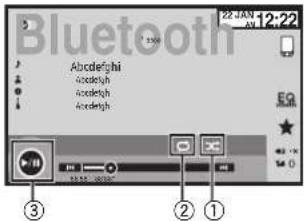
1Randomkey
Playingsonpsinrandomorder.
Repeatkey
Selectingtherepeatrange
3Pauseandplaykey
Pausingand startingpayback.
SettingupforBluetoothaudio
BeforeyoucanusetheBluetoothaudiofunction youmustestablisheBluetoothwirelessconnec tionbweenthemunitandyourBluetoothaudio player.
1Connection
First,younetoconnectaBluetoothaudio tshunt.
Fordelated instructions connecting your Bluetooth audiosthesis unit via Bluetooth wireless technology, refer to Bluetooth connection.
BluetoothAudio
Notes
- When playing back files recorded as VBR (variable bit rate) files, replaytime will not be correctly displayed. If the file is not properly converted into a .vbr file, the file will be replaced with a .vbr file.
Toesrepreperoperront,connectthe dockconnectorcablefromthe Pooddirectly tohisun. - While still Podscionedtoftthisunit, this Podsciongelbemrmedort.
IfchacteractersrecordedonyourBluecooth audiopayeronotcompatiblewithinthis unit,thosecharacterswillnotoclosely displayed. - Text information may not be completely displayed due to rounding, processing and storage.
Randomplay(shuffle)
Touchtherandomkey.
-On-Playbacftcsnrandomorper.
-Off-Cancelrandomplay
Repeatingplayback
Touchtherepeatkey.
One-Repeath the currentsiony
All Repeatal songs
UsingMIXTRAX
MIXTRAXoperation
MIXTRAXisoriginaitechnologyforcreating non-stopmixesofselectionsfrommycuaudiciorary.completeewithDeffectisthatmakeher soundasifDuisrighttherewithyouplaying themusic.
MIXTRAXEZoperation
You can use this nittoplay Pod/USB audio files. MIXTRAXF/usedtoaddvariotsoundefctsbetween songsforarrangingthepauses between songs Illowowsyouenjoylistening tomusic stop.
This functionsonlyavailablewhenafleone.
eUSBstoragedevceorasongomaniPodis
bngioyed.
This functionisnotavaliablenewthecorIolmodessseIAppMode.
Dependongonthef/song,soundstfcts maynotbeavailable.
- Depending on the type/song/non-sloppy-backmayorhcavalable.
Note
You cannot use this function with USBMTP.
StartingMIXTRAXEZoperation
- TouchMixTRAXEZ.
ReferoMIXTRAXEzkeyonpage20and26.
SettingMIXTRAXmode
Turnerdisfunctiontpaybackauckiofof usingMIXTRAX.
1Pressthehomebuttontoswitchtothe homedisplay.
2Touchthesystemkeytoopenthesystem menu.
3TouchMIXTRAXSetupuponthesystem
menu.
MIXTRAXsettingitemsaredisplayed.
- ShortPlaybackMode - When.JumedonSelect a audiotrack playbackxion.
60s(60sec.)-90s(80sec.)-120s(120sec.) 150s(150sec.)-180s(80sec.)-Random (random)-Offoff)
WhenRandomisselected then playbacktime varibles between 80s,90s,120s,150s,and 160s selected at random when the playback song changes.
Display Effect - When Display Effect is set toon, theartworkdispaycanbe removedacardongtsh amusictype. - Cut-In Effect - When Cut-In Effect is set to on, soundeffectswill playbetween tracts.
Effect Setting-Use Effect Setting to set up thescoundeffectyouwantto insertbetween tracks.
Settingtheeffect
You can change the setting/sterfixed sounds and acousticdefects.
Teresaresixdifferentfixedsoundsavalable thatcaneoinsertedforplaybackbetweentracks.
Thesoundeffectsareusedaseffectstosignal Inendoasongbeingplayadantothebeginningofthenthextosonginseries.
Theft xedsoundsandsounddefectsereas: combinationsxMIXTRAXsounds.
Fixedsounds
- Phaser - A fixed sound that sounds like sung-inways.
Roll-A fixed sound that repeats playback of acerisinsound.
UsingMIXTRAX
- Turntable-AfixedsoundthatmimicsDJ scratching.
Flanger2-Arushingsoundthatmimics thatrisingandfalsingsoundsejtengine. - Reverb - A fixed sound effect that creates a reverberation effect.
- Echo2 - A fixed sound effect that creates an echo/efect.
Soundeffects
Cross-Fade-Asoundeffectthatcereotesefaclidinandadocuteffectctcbwongsens.
Flanger 1. Arushing soundsthymimimigne.
Haarlingandlingsoundsofseijemigne.
- Echo1-A sound effect that creates an echo-ineffect.
Loop-Ascundfeehdthreepalsypaack ofonsectionnotasongtrack.
Note
CrossFadecannotbeseechedfor(Podaicld files.
Settingsoundsoundeffects aspresetsusingthepresetkey
TheStandardandSimplescoundeffectsareset alreadyysorefofaltpresets
- TouchStandardorSimpletocheckthe settings.
The registorapresounddefectorthesh key: Ithwasloucheddischessasappresel.
Registeringsoundsandsound effectsaspresets
Registeadesiredecombinations of sounds and sourceeffectistoCustom.
TouchCustomtceasilysethedesirescundor sourceeffect.
1TouchCustom.
2Addcheckmarktothedesiredsound effectbytouchingtheoption.
ThemedksoundeffectisregisteredasapreseltonCustom.
Notes
-Ifasoundeffectstouchedinheselection screenforStandardforSimple,theCustom screensisautomaticallydisplayedanothesoundeffect seregisterectoCustom
- You can listen to fixedsoundstheare examples bytouching the speakericon.
StreamingPandora
Pandoraoperations
ForiPhoneusers
ConreclaniPtoLSBinput
SelPandoraConnectionloiPhone
FunctionofAVH-X560CBHS/AVH-X460CBT/
AVH×3600EHSAVH×2600BT
Thisset is not required for AYH
X600DVD)
Forsmartphoneusers
(Functions:AVH X6000BHS/AVH X4600BT/AVH X6300G1/IS/AVI1X2600BT)
SetPandoraConnectiontoAndroid
ABlueToothconnecionisrequiredfor
Android devices, Referto Bluetooth connection menueonpage45.

Important
Requirements to access Pandora using the Pioneerceraudq/aecoproducts:
ConnectariToidsUSBInpUtorAnAndroid device using Bluetooth to play Pandora anthis unit.
Please update data/firmwerkeffte Pancreas application at the patient service office.
The latest version of the Pendorpa application can be downloaded on iTunes AppStore and Google Play.
- Createframe repaidaccountonline.You can create the account in the Pandora application from your iPhone on the website.TheURL in the following:
http://www.pandora.com/register
:IfedDataPlan?yourPhoneodos are provided tofruni mittedeltausage additional chargesfrom your carriamayapplyfreccessing the
FandorasevicaVialGanortfDSet network
- You need to connect the Internet via EDGE or Wi-Fi networkousetheservicefromPandora.
Limitations:
- Ongoinghealthavabilitytoothintemet,you may not be able to receive Pensionservice.
Pandorase service:ssubjectchangepwithoutnol ntoe. Theservicecould be affected byany other followingfimrawversionsof1hone,fimraw versionsofPandoraplication,changestoef Pandorumsusicervice.
CortainfuctionsofthePancoserviceonet availablewer accessing the service through the Pioneercraudiosysdeproducts. They include, burnout limitedtofoverfeing costngewstates, deleting stations, sending information about currentizations, but ngl-racks from iTunes, viewing additional audioinfo-nation, logging into Pancos, adjusting CellNetwork Audio Quality.
PandoraintermetradiosamusicservcentafilledwithPioneer.Noreinformationisavailables(http://www.pandora.com).
ThePandorabmobleapplication savallablefor mostPhonocanosmartphone.plesaveist www.pandora.com/everywhere/mobileforhe latestcomplaintibilinfoformation.
SettingthePandoraconnectmode
Function of AVH-X5003HS/AVH-X460037/AVH-X360038/SVH-X126C0BCT
Note
This function is not available when
Deviceconnection ssectoiPhonevia Bluetooth.
1Pressthehomebuttonotswitcho the homedisplay.
2Touchthesystemkeytoopenthesystem menu.
3TouchPandoraConnectionrepeatedly untilthedesiredsettingappearsonthe screen.
iPhone:An Phoneconnectedusinganactual cable.
Streaming Pandora
Android AnAndroiddeviceisconnectedusing Bluetooth.
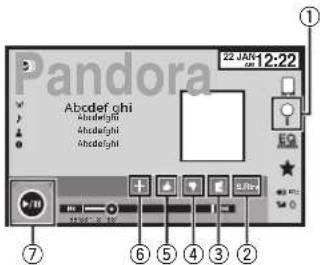
Touchpanelkeys
①Searchkey
Displaythoshuffle/standalone,Selectthe desiracionshuffle emocae.
Soundretrieverkey
(OnlyavailableooniPod) ReferToUsingsoundtrack/revonpage10.
③ Bookmarkkey
Storetrackinformation (Bookmark ) Bookmark scribesreviewed your profile
4Thumbs-downkey
Givinga'thumbs-down tells Pandoraycudo not kfcncurrenttrack, Pandorawillskipto trenextrack, andwillnotplaythatrackon thestatictionagain.
5Thumbs-upkey
Giving a thumbs up!Tells Pandorathayou likechrecurrenttrack. Pandorawill continue toplay thatrackandtrackslikeitontestation.
6Addstationkey
Anewstatoniscreated.
Streaming Pandora
Pauseandplaykey
Pausingandstartingplayback.
Basicoperations
Switch the source to Pandora.
| Playing tracks 1 Connect an iPhone to USB in/out. For an Android device, a Bluetooth connection is required as well. Refer to Pandora operations on page 30. |
| Skipings tracks 1) Press▶(TRK). |
| Add station A new station will be created from the information for the artist or track of the station currently being played. |
T Touch the Add staion key.
2) Touch Track (from track) or Artist (from artist). A new station is created.
- To cancel the Add station, touch Cancel
Dealing stations
1. Touch Yes
1 Display the shuffly/sterion list
21 Touch the Delestation key.
T
The stnch will be ce
To cancel, touch No.
Notes
Touch panel keys not listed under Pandora operationsmayappearonted spiy. Refer to indicatorstonpage61.
Pandoralimitistnumberofskisallowed ontheirservice.lifyouattemptosk.pracks beyondlimhil "Skiplimitrached."disploayed.lifyouhavorachedthnckipimitand youwea"thumbs-down",thocurrenttrack willcontinuetoplayb.bulyourfeecbackwill boregistered.
When the Connectkey displays can manually connectargisteredBluetooth device.
Selecting and playing Pandora stations/shuffle
TouchnelliforyourPandorastationstosect onceherntioblay.
1 Displaytheshuffle/stationlist.
ReferToSearchkeyonpage31
2 Changelthesortorder.

You can sort the items in the list alphabetically.

You can sort the items in the list in order of the dates on which the items were created.

You can scroll the titles in the list while you touch and hold down the scroll icon.
3 Selectshuffleorthothesiredstation.

Shuffle mode will play tracks from your selected stations. You can edit shuffle preferences on your mobile device.
Addingastationfromthe stationlist
1 TouchGenreinthestationlist.
2 Touchhestationinthegenrelistthat youwishtoadd.
3 Anewstationiscreated.
Note
Stations indicated by a shared stations.
Bluetoothtelephone
Bluetoothtelephone operations
(FunctionsOfAVH-X5600HS/AVH-X1600BT/AVH X3600BI-S/AVH-X2600BT) You can use Bluetooth TelephoneNumber.
Important
- Leavingtheunionstandoyconnectto yourphoneviaBluetoothwhileheengireis no.runningcandranthebattery.
- Advanced copositionshatrequire attention suchasclialngnumberscnthemonitor, usingglhphonebook.etc. areprohibited whiledriving.Siesuretoparkyouvehiclin asafeplaccandaplythc parkingbrakebeforeproceeding.
- Bluetooth connection manucannobasedelectrowhidciving.
- OperationsavaiaIaImaybelimiledepend ingontocellularphonconnectodtothis unit.
Ifyouareunablecomplete,heconnected on usingthisunit,usethedevicetoconnect to thourift.
Ifyouconnectmorethanonedevicestatime,connecteddevicemaynotoperatereproperty.Connectiondevicatatiismisrecommended.
Touchpanelkeys
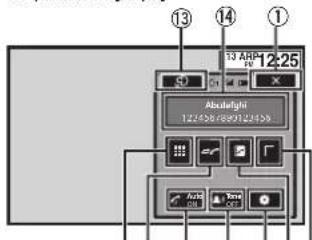
Telephonenumberbydysplay
2345Onkey
5Tonekey
Turningtheringtefenerccmingcallson prot.
Auto-answerkey
Turning automatic answers,
? Historykey
Switchingtothemissed,received and dialed calllists.
Keypadkey
Switchingthemedetectorhephine num berdirectly.
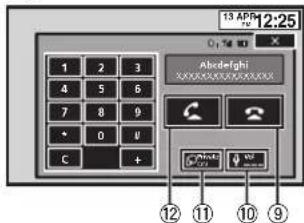
Whenswitchingtotheenteringphonenumber mode
① Closekey
Dislayiscosed
2 Presetdialkey
Displayingthe preset a screer
3 Phonebook key
Switchingtothepronebookmode
4 Settingkey
Displayingthe Bluetooth connection menu
Volumekey
Adjusting the other party's listening volume.
Privatemodekey
Turningwaterodeconerft.
Off-hookkey
Acceptnganincomngcall.
Makingaphonecall,whereselecting
phonenumber.
Switchingbetweencallarsonond.
Voicecontrolkey
Notes
- Privattermodecan yibecopersled while you srelating on the phone.
To end the call, both you and the other caller musthangyouyourphrases.
Touch panel keys not listed under Bluetooth telephone operationsmayappearonthedisplay.Referloindicationistionpage61.
Text information
Incomingcallnotice
Indicateshalanincomingcalhasbeeneeiveclandhasnotbeenheckedyet.
Not displayed for caralsmadedwhinyour celluarcheneisscnectedfromthis unit.
Setting up for hands-freephoning
Correction
Frst you need to connect a Bluetooth tel-. phone to this unit. For detail: instructions on connecting your phone to this unit via Bluetooth wireless tech- nology refer to Paiting from this unit on page 46.
Volume adjustment
Adjust the barepiece volume of your cellular phone to your preference. The unit will record the adjusted volume level as the default setting.
Notes
The volume of the cell is 100 ml.
To measure, you may vary depending on the type of cellular structure.
- Ithnerelsa largevolume difference between the ringtone and callor's voice, the overall volume level may become unstable.
- Makesureoadjustthevolumeetopaproperlevelbeirecointconnectingthecellularphonefromtheunitffhevolumeismuted(zereveljorycellularphone,thevolumelevelofyourcellularphonereseminsmutedevenafterthecellularphoneisdisconnected.
Bluetoothtelephone
Callinganumberinthe phonebook
Treactionsoryourhoneynowimalyte
transferredajamaticallywhenthephoneire
connects.iftisnot,useyourphonemento
transfertherectacts.Thevisibilityofthisunit
shoulddoconwhenyouusethephone menu。
ReferToSwitchingvisibleunitonpage46。
Afterfinding thenumberyouwanttocalinthe
phonebook,youcan see cllthentryandmake
tncall。
1Touchthephonebookkeytoswitchto thephonebookmode.
2Selectthephonenumberlist.
The detailed cophenomenonumberlist of the selected entryis displayed.
3Selectthephonenumber.
Ifyouwantostorethephenumbertouchand holdhels...
4Touchtheoff-hookkeytomakethecall.
5Touchtheon-hookkeytoendthecall.
Note
Thecontractsonyourhonewinnormalybe transferredautomaticallywhenhephoneis connected.iftisnot,useyourphonemenuo transferthecontacts.Thevisibilityfihisunit shouldceonwheryouusethephonemenuo.RotatoSwitchingvisibleunifonpag46
Selectinganumberby alphabetsearchmode
Ifalctofnumbersareregisteredinthephone book,youcansearchforthepronenumberby alphabetsearchmode.
1Touchthephonebookkeytoswitchto thephonebookmode.
2TouchABctoswitchtoalphabetsearch mode.
3Touchthefirstletteroftheentryyouare looking for.
ThePhoneBookentress startingwiththatieter (e.g.Ben"Brian and Burt when B' is se lected)willbedisplayed.
Theorderofnotfistramaandlashememaybeseffortfromthoftheleulaphore.
4Touchtheisttodisplaythephenonenumbernumberstofthesejectedentry.
If several phonenumbers are used in an entry set, see action-bytouch nothelat.
Ifyouwanttoswitchtothecalhistorylist,toucheon.

Switchingtothecallhistorylist:
5Touchtheoff-hookkeytomakethecall.
6Touchtheon-hookkeytoendthecall.
Invertingnamesinphonebook
When yourcellularhoneisconnected to this until the firststandinasamesofyourcontacts mayoceregisterstothophonebookinversord order.Yucaunusethisfunctiontochangetheorderback.
(Invertingthenameinthephonebook)
1Touchthephonebookkeytoswitchto thephonebookmode.
Bluetoothtelephone
2Invertnamesinphonebooks.

Invertingnames nphonebooks.
3"Wouldyouliketoinvertallnames?"appears.TouchYestocontinue.
Whilethcnamesareinvered. isdisplayed.
- If the inverts or fails, 'Invert Name Error' appears. Insuch as, tryagainfromthebeginning.
Note
Inverting the names of your contacts from this unit does not affect the data you'll use for your Bluetooth device.
Usingthemissed,received anddiallyedcalllists
The80mostrecentcallsdial,received,and missedarestored nthememory. Youcan browsethemancalnumbersfromtheselists.
1Touchthehistorykeytodisplaythecall historianlist.
2SelectMissedCalls, DiatedCallsor ReceivedCalls.

Displaying:hereceivedcalist.

Displaying:hecialedcall st.

Displaying.hemssedcaillist.
3TouchtheListnumbertoselectaphone number.
Name and phonenumeraredisplayedinthe dalselectist.
Ifyouwantostorethephonenumtouchand holdoholts.
4Touchtheoff-hookkeytomakethecall.
5Touchtheon-hookeytoendthecall.
Settingautomaticanswering
Ifthisfunctionisn.hisunitaautomaticallyanswersallincomingcalls.
Touchtheauto-answerkeytoturnautomatics answeringoronoff.
Adjustingtheotherparty's listeningvolume
Tomainlthegooodsoundquility.h.sunit canadajustheotherparty slisteningvolume.If trevoilumsisnotloudenoughtfortheother party,usethisfunction.
Touchthevolumekeytoselect Far-EndVOL. 1—2—3
This function can be performed even while taking on the phone.
- Settingscanbestoredforachdevc.
Switchingtheringtone
You can select whether somotousethisunit's ringcne./thisfunction.issleoon.hering toneforthisunitwillsound.
1Connectyourcellularphonetothisunit.
Bluetoothtelephone
2Touchhetonekeytoturnthertingtone onorff.
Using the preset dialists
You can easilyystoreuptosipxionen.mocras presels.
1Touchthemepresetdialkeytodisplaythe Presetscreen.
2Touchoneofthephonenumbertoselect.
Ifyouwantto delete apressethonumber, touchenholdtphonenumberberouwistcdete.
3Touchtheoff-hookeymakethecall.
4Touchtheon-hookkeytoendthecall.
Makingacallbyentering phonenumber
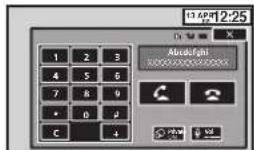
Settingtheprivatemode
Duringconversational,youscanwchctprivatemode(dalkdirectlyyourcelluarchone).
- Touchtheprivatemodekeytoturnprivatemodeonoroff.
Voicecontrol
if(yourcellarphoneissequipipedwiththevoice controlfreet,you can usevoicecommandstdo makecalls,forexample.
-Operatrananesdependentthetypeofcellularphone.Refertotheinstructionmanuallthatcarnewithyourcellularphoneforcedtaledinstnctions.
- WhenaniPhonerunningOG6, torlatens used.
SirIfyes!reeModelisavaliablewiththis product.
1Touchthevoicecontrolkey.
You canalsoswchstheveicecontroscreen.
bypressingandholdingdownthehome button whileresourceconson.
Bluetoothtelephone
25startvoicecontrol.

indeterminate count nuocalls camembodeun interrupted.

indicatesthatthedysplays closed.
Notes
- inorderforyouvoicocommandstoberecognizandintercnpdorcorrectyensurethatconditionsaresuitableforrecognition.
Pleasenotetranwinbocwingthroughthe veh cewinowcsandniosccomingromoutsidevehclearaninterferewithvoicecommancooperation.
-Forootmumpick-upthemicrophoneshould beplaceddirectlyinfrontoftherdrivera suitabledistance.
Speaking to the start of the Commission on the cause of cancer
Speakslowly,deliberately,andclearly.
Settings
Menuoperations Touchpanelkeys
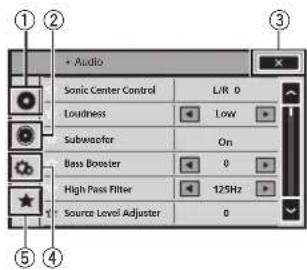
① Videosetupkey
ReferloSettingupthevideoplayeronpage 37.
②Audiofunctionkey
ReferioAudiagajusmentsonpage35.
③ Closekey
Reuminglothecurrensourcedisp ay
Systemkey
ReferToSystemsSettingssonpage40
Favoritekey
You can choose menuswithineachmen. (Audio of nct onmen,etc.)andregister themtothisfavoritemen. Refer to favoronmenonpage45.
Notes
-
You can display the VideoSetupmenu when a Discor USBSource is selected.
-
HypoesterVideoSetupmenu,playback isstopped.
-
You can not display the Audio function menu when the themeutefunction is nonJPC6file, isplaying.
1Pressthehomebuttonoswitnesstothe homedisplay.
2Touchanyofthefollowingtouchpanel keystoneselectthemenuobeadjusted.

3TouchFader/Balanceontheaudiofunctionmenu.
4Touch aortadjustthefront/rear speakerbalance. Range F15L/R0toR15L/R0
- Select F/R 0 L/R 0 when only using two speakers.
5Touch or toadjusttheleft/right speakerbalance. Bange F/R01 15Fe/R0815
Note
You canalsosethetate/baancebydraging thetohondishplayedtable.
Usingbalanceadjustment
BalancedisplayswenRearSpeakerissello SubwooferontnCsystemMenu. This setting willallowyouloadadjustthebalancebetween right/leftsoundoutcoul.
1Pressthehomebuttontoswitchtothe homedisplay.
2Touchtheaudiofunctionkeytoopenthe audiomeu.
3TouchBalanceontheaudiofunction menu.
4Touch < or> toadjusttheleft/right speakerbalance. Range:L15toR15
Note
Youcana sosettebianbeydraggingtheod onthedisplayable.
Usingtheequalizer
You can adjust the equalization term match the car's intercoracustic characteristics as desired.
Recallingequalizercurves
Theoraresevostoroedaizerocurveswhichucaneasileyrecalanytime.Heresalsiloftreedaizerocurves,
| Display | Equalizer curve |
| S.Bass | Super bass |
| Powerful | Powerful |
| Natural | Natural |
| Vocal | Vocal |
| Flat | Flat |
| Custom1 | Custom 1 |
| Custom2 | Custom 2 |
The theraqualizercurvesforCustom1and Custom2canboadjusted.
- You can not solve Custom 1 and Custom2 when using heiautoequalizer.
When Flat, nochanges are made to the sound. Your can check the effects sothe equalizer curves by switching allternatively between Flat and other equalizer curves.
Audioadjustments
1Pressthehomebuttonoswitnesstothe homedisplay.
2Touchtheaudiofunctionkeytoopenthe audiomeu.
3TouchGraphicEQontheaudiofunction menu.
You cannot selector adjust hwoequalizer curves ofCustom1andCustom2when using the autoequalizer.
4Touchthedesiredsetting.
S.Bass—Powerful—Natural—Vocal—Flat
Custom1—Custom2
Adjustingthe8-bandgraphic equalizer
You can adjust the evelo/earnbandfor the equalizer curves.
- AsperateCustom1curvecanbecreated
-
foreach(ifyourmakeadjustments whenacurveotherthanCustom2issued, thenequalizercurvesettingswill storeinCustom1.
-
ACustom2curve that scommonfll
sourcescanbecrested. If youmakeadjustmentswhentheCustom2curveisselected, theCustom2curvewillbeupdated.
1Pressthehomebuttonoswichttothe homedisplay.
2Touchtheaudiofunctionkeytoopenthe audiomenu.
3TouchGraphicEQontheaudiofunction menu.
4Touchthedesiredsetting.
5.Bass -Powerful -Natural -Vocal -Flat Custom1-Custom2
5Touchthetabletoadjustthelevelof the equalizerband.
Range:+12d8to-12dB
Usingtheauto-equalizer
Theauto-equalizerissnequalizercurvecreated byautoEQ(refertoAutoEC( auto-equalizing) on page43).
Youcanturnhhealequalizeronoro/f, Iyouconnectocction'mcrophonelothis unit,youcanusethisfunction.
1Pressthehomebuttonoswitchtothe homedisplay.
2Touchtheaudiofunctionkeytoopenth audiomenu.
3TouchAutoEQtoturntheauto-equalizer onoroff.
You can use the function fauroEQhasnet beencarriedoub.
Usingsoniccentercontrol
Sounchataisquitedfortehlisteningposition
nonaieslybecreatedwiththisfunction.
1Pressthehomebuttonoswitnesstothe homedisplay.
2Touchtheaudiofunctionkeytoopenthe audiomenu.
3TouchSonicCenterControlontheaudio functionmenu.
4Touch <ortseselectalstringeningposition. Range: Left7loRight7
Audioadjustments
Adjustingloudness
Loudnesscompensatedeficienciesinthe low-frequencyandhigh-frequencyrangessatlow volume.
1Pressthehomebuttonoswitchtothe homedisplay.
2Touchtheaudiofunctionkeytoopenthe audiome.
3Touchortoselectadesiredlevelfor loudness.
Off (off)-Low (low)-Mid (mid)-High (high)
Usingsubwooferoutput
Thisunfisiequippedwithasubwoooreourput whichcanbelumereconforow.
Trecub-Offrequency and dculp level can be adjusted when resLbwofoortoution.
1Pressthehomebuttontoswitchtothe homedisplay.
2Touchtheaudiofunctionkeytoopenth audiomenu.
3TouchSubwooferontheaudiofunction menu.
4TouchOnorFindnexttoSubwoofoerto
turnthesubwooferoutputonoroff.
5TouchNormalerForresenexttoPhase Oselectthephasesofsubwooferout.
6Touchor nexttoLeveltoadjustthe outputlevelofthesubwoofer. Range: +6to - 24
7Touchor nexttoFrequencyselect thecut-offrequency.
50Hz 63Hz 80Hz 100Hz 125Hz
Onlyfrequencyslowerthanthosetheselecdrangeareoutputtedfromthesubwoofo.
Boostingthebass
You can be at the bottom of this table.
1Pressthehomebuttonostwitchtothe homedisplay.
2Touchtheaudiofunctionkeytoopenthe audiome.
3Touchortoleselectadesireldlevel. Range:0to+6
Usingthehighpassfilter
Usehisdiction:whenwantingtolistenzyto hgh-frecuencysounds.Oniyfrequenc esighher thanthehigh-passfilter (IPF)cutoffareoutput fromthespeakers.
1Pressthehomebuttontoswitchtothe homedisplay.
2Touchtheaudiofunctionkeytoopenthe audiomeu.
3Touchor>nexttoHighPassFilter to selectcut-offrequency.
Off(of)50Hz-63Hz-80Hz-100Hz 125Hz
Onlyfrequenciesigherthanthose inte- lectedrangereouputfromthefrontotnear speakers.
Audioadjustments
Adjustingsourcelevels
with SLAsourceleveladjustment) the volume levelsof each source can be adjusted to prevent significant differences between sources.
- SettingsarebasedonTheFVvolumelevel, whichremainsunchanged.
1Pressthehomebuttontoswitchtothe home displayed.
2Touchtheaudiofunctionkeytoopenth e audiomenu.
3ComparetheFMvolumelevelwith the leveloftheseresourceyouwishestoadjust.
4TouchSourceLevelAdjusterontheaudio functionmenu.
5Touch ortadjustthesourcvolume. Range:+4to-4
Notes
- SourceLevelAdjusterisnotavailablewhen FMissesectedasthereource.
The AMVolumetre evolveansoead,used withthisfunction.
VideoCD,CD.compressedaudio,DivX, MPEG-1,MPEG-2andMPEG-4areautomaticallysettothesamesourceleveladjustment volume.
Settingupthevideoplayer
Settingthesubtitlelanguage
You can set adjectives, but it is often easier to use the adjective. When available, the adverb will be displayed in the selected language.
1Pressthehomebuttonoswitchtothe homedisplay.
2Touchvideosesetupkeytoopenthe videosesetupmenu.
3TouchSubtitleLanguageonthe VideoSetupmenu.
Asubt ielanguagemenursisplayed.
4Touchthedesiredlanguage.
The subtitlelanguageasset.
If you have selected Others refer to When you see lectOtherspanagsST.
Notes
- If these selected languages are not available, the language specifiers don't need to be applied.
- You canalsoswitchthesubtitelanguageby touching the switch'sutitlelanguages key during playback.
- Thesettingmadeherewillntceafected evenithesubtitleianguegelsswitcheduringplaybackusingtheswitchsubtitleianguageskey.
WhenyouselectOthers
Alanguagecodeinputpulldisplaysshownwhen Othersselected.RetortoLanguagecodechart for/Onpagc8.
- Touch0to9toinputthelanguagecode.
Tocance theenterednumbers touchC
Tong shertercode,touchthe following touch key.

Reg steringthecoc
Settingtheaudiolanguage
Youcansetthepreferredaudlanguage.
1Pressthehomebuttontoswitchtothe homedisplay.
2Touchthevideosetupkeytoopenthedeisodesetupmenu.
3TouchAudioLanguageontheVideo Setupmenu.
Anaudiolanguagemenuiscisplayed
4Touchthedesiredlanguage.
Tresaulo anguageisse.
If you have selected Others, refer to When you see lectOthers or page57.
Notes
If these selected language is not available, the language specification onthediscussed.
- You can also switch hcaudiolanguageto touchingtheswitchchaudiolangueskey duringy bypass.
Thesettingmadeherewillnotbeaffected evenithearaudiolanguagoseiswitnessdun ingplaybackusingthesewtchaudiolanguageskey.
Settingthemulanguage
Youcanschehptreporolanguageinwhichthemenu-recordedonadacisreadipyed.
1Pressthehomebuttonoswitnesstothe homedisplay.
Settingupthedevideoplayer
2Touchthevideosetupkeytoopenthe videosetupmenu.
3TouchMenuLanguageonthe
VideoSetupmenu.
Amenulanguagemenu sdisplied.
4Touchthedesiredlanguage.
Themenulanguageisset.
- if you have selected Others, refer to When you select Others campaign page3.
Note
If these selected language is not available, the language-specific edontheiciscs is played.
Settingthemulti-angleDVD display
Theleagheiconcanseselaslapears sceneswherethanglcanbeswitched.
1Pressthehomebuttontoswitchto the homedisplay.
2Touchthevideosetupkeytoopenthe videosetupmenu.
3TouchMultiAngleontheVideoSetupmenutotumangleicledisplayonoff.
Settingtheaspectratio
Thercaretwokindisotdisplay:awidescreendisp
laythathaswidth-to-heightratio(Tvaspect
rat)016.9,andregulardisplaythassatV
aspecto4.3 BesuretoselectthecorrrectTVas
pectforthedisplayconnectedtoVOUT
- When using regular display, select either LetterBox or PanScan. Selecting 16:9 may
resinurunaturalpicture. IfyouselecttheTwaespectratiheun's displaywillchangeetahesameled mg
1Pressthehomebuttontoswitchtothe homedisplay.
2Touchhevideosetupkeytoopenthe videosetupmenu.
3TouchTVAspectontheVideoSetup menutoselecttheTVaspectratio.
TouchTVAspectrepeated yuntithedesirecas
crticappears.
16:9-Wide screen picture (16:9) is displayed asinitial setting
Letter Box - The picture is the shape of a letterbox with blackband synthetopanibottomafthescreen
PanScan: The pictureiscutschshorten the righttandleftsidesoftheshcreen
Notes
- When playingDiscschaftonotspecify PanScan.Inediscisplayedbackin LetterBoxdisplayveen fyouselectthe PanScansetting Confirmwnethernetdisc packagebearsthe 16:9LB mark.
The Vaspectation cannot be changed for somediscs. For details, refer to the disc's instructions.
Settingtheslideshowhowinterval
JPEGioscanbeoviewcdasasi doshoworthis unit.Inthissetting,the intervalbetweeneach imagecansete.
1Pressthehomebuttonostwitchtothe homedisplay.
2Touchhevideosetupkeytoopenthe videosetupmenu.
Settingupthevideoplayer
3TouchTimePerPhotoSlideonthe
VideoSetupmenutoselecttheslideshowinterval.
TouchTimePerPhotoSliedereppeatedlyuntilthe desiredrisingappears.
- Ssec-JPEG message switch attnsolvet5 seconds
10sec-JPEG Images switch at intervals of 10 seconds
15sec-JPEG Images switch at intervals of 15 seconds - Manual-PEGimagescanbeawithed manually
Settingparentallock
SomeDVDvideo scslyyou separateallock torstrictchildrenfromviewingviolentand adult-orientcdscenes.Youcansetparentallock totheleshresirelevel.
Whenyouhaveparentallocklevelsetand payadisctaturingparentallock.code numberinputindicationsmaybedisplayed. Insuchases,playbackwillbeginwhenthe correctcodenumoorendered.
Settingthecodenumberandlevel
Acoder unemutatregisteredirccrderto. playbackscsswithparentlock.
1Pressthehomebuttontoswitchtothe homedisplay.
2Touchthevideosetupkeytoopenthedeisodesetupmenu.
3TouchParentalontheVideoSetupmenu.
4Touch0toToinputafourdigiode number.
Tocanceltheptererednumbers,touchC Toregisterthececote,cousthefollowing panelkey.

Registeringthecode.
Thecedenumberisset and theleve cannow be set.
5Touch1to8toselectthedesiredlevel.
6TouchEnter.
Theparentallocklevelisset.
- 8 - Playback of the entire disc is possible (initial setting)
- 7 to 2 - Playbook of discs for children and non adult one-on-one scissors impossible
1-Playback of discs for children only is possible
Notes
We recommend dinkepearecordfocody codonumbercascyoufotggtt.
- Thocparntallockdclstoredonthedisclose,lookforthelevindicationwrittenonthedispackage,includeledilureonthedisctsetfParcoltockthisunitsnotpossibleifparentallocklevelisnotstoredonthedisc.
- Withsomediscc.theparentallockmaybe activeonlyforcertain levelsofscenes.The playbackofhosesceneswillbeskipped.For details,refertothe instructionmanuaithat camewiththedisc.
Changingthelevel
You can change the set parentallocklevel.
1Pressthehomebuttonostwitchtothe homedisplay.
2Touchthevideosetupkeytoopenthedeisodesetupmenu.
3TouchParentalontheVideoSetupmenu.
Settingupthevideoplayer
4Touch0to9toinputtheregisteredcode number.
5Registeringthecode.

Regi stnngtheocse
Thissthecodenumandthelevelcan nowbechanged.
If you enter incorrect code number, the iconris displayed TouchCandenter,incorrectcode number.
ifyouforyoucodenum,referroufoyoufor youcodenumnumberpage39
6Touch1to8toselectthedesiredlevel.
7TouchEnter.
Trenewparentallocklevelissel.
Ifyouforgetyourcodenumber
PressRESET.
SettingtheDivXsubtitlefile
You can select when somotodisplayDivXtermalsubliues.
TheDivXsubtilitieswillbedisp ayedoven whenCustom selectededtoDivXexternal subtilitefiesexist.
1Pressthehomebuttontoswitchtothe homedisplay.
2Touchthevideosetupkeytoopenthedeisodesetupmenu.
3TouchDivX@SubtileonetheVideoSetup
menutoselectthethesedesiresdsubtilesetsetting.
Original-DisplaytheDisXsblites
Custom-Display the DivX external subtiies
Notes
Uto42characterscanbedisplayedonore line.lfmoertnan42charactersareset.the linebreaksandthecharactersaredisplayed pathenextline.
- Uto126characterscanbedispayedon onscreen. Ifmorethan126charactersare, Inexcesscharacterswillnotbedispl ayed.
DisplayingtheDivX 串 VOD registrationcode
InordertoplayDivXVOD( videoondemand)
contensionthisunit,thesunitmustfirstberegisteredwithinXvDDcontentsprovider.For registration, generateaDivXVODregistration
codenoadSubmit toyourprovider.
Kearecordthecoceasycuwillneededit whencureregistrycurunittoheDivXVOD provider.
1Pressthehomebuttonoswitchtothe homedisplay.
2Touchthevideosetupkeytoopenthe videosetupmenu.
3TouchDivX®VODontheVideoSetup menu.
RegistrationCode and DeregistrationCode appear:
```bash YourregalsationCode Yourregalsationcode.xlsx
Displayingthederegistrationcode
ifyou'reversiblederegisterederegisterbyenteringtredegistrationcode.
1Pressthehomebuttontoswitchtothe homedisplay.
Settingupthedevideoplayer
2Touchthevideosetupkeytoopenthe videosetupmenu.
3TouchDivX®VODontheVideoSetup menu.
4TouchDeregistrationCode.
Tocance cerigstratlon touchCancel.
5TouchOK.
Thederegistrationiscomplete.
AutomaticplaybackofDVDs
WhonDAvDoiscwithaDVDMonuIsinserted, thisunitwillcancthtemenuatomealyand startplaybackfromhefirstchapterofhefirst title.
- SomeDVD Damaynotoperateproperly. This function is not fully operable, Lurnthisfunctionffndstartplayback.
1Pressthehomebuttonoswichttothe homedisplay.
2Touchthevideosetupkeytoopenthedeisodesetupmenu.
3TouchDVDAutoPlayturnautomatic playbackon.
Ioturnautomatcpaybackoff.touh
DVDAutoPlayagain
Systemsettings
Switchingtheauxiliarysetting
Activatehissett ingwhenusing an auxiliary device connected to hisitisun.
1Pressthehomebuttontoswitchtothe homedisplay.
2Touchthesystemkeytoopenthesystem menu.
3TouchAuxInputthonthesystemmenuturnAuxInputonoroff.
SettingAVinput
ActivateIsseLngwherasingareexternal videocomponentconnectedtothisunit.
1Pressthehomebuttontoswitchtothe homedisplay.
2Touchthesystemkeytoopenthesystem menu.
3TouchAVInputonthesystemmenuturnAVInputonoroff.
Settingthenavigationsystem
ActivatehthessetngwhenconnectingPioneer Add on Navigation system(soseparately).
Deviceconnection canbesetwhensilfofthe followingconicarsmet.
TheiPhoneisnotconnected.
NoBluetoothconnection
—Thesourceistumedoff.
1Turnthesourceoff.
RefertoSourceoffkeyonpage7.
2Pressthehomebuttontoswitchtothe homedisplay.
3Touchthesystemkeytoopenthesystem menu.
4TouchDeviceconnectiononthesystem menu.
5TouchNAVItoselect.
SettingthePandoraconnect mode
ReferToSettingthePandorconnectmoden page30.
SelectingMirrorLinkMode
You can use the Web link to modify settings
whetheryousethe rnd party applications in your smartphone.
1Pressthehomebuttonoswitchtothe homedisplay.
2Touchthesystemkeytoopenthesystem menu.
3Touchthedesiredsettingnexto CD-ML100Setting.
-
CarMode—You can use the launcher applications in your smartphone or your seat screen.
-
AppListMode—You can use the third-party application or yoursmartphoneontheunit's screen.
Updatingthefirmwarefor thesmartphonelinkadaptor
T h s t u n c t i o n s u s e d t o p a d a t e s h a m m p r o f e n c e. linkadapt o f r i mwarew i t h l e a l a s s f i r m w a r e.
Systemsettings
Foraboutsmartphonelinkadaptorfirmware and奴peoting,referocourwebsite.
You can update only when smartphonelink adaptorisavailable.
Important
The USBsloreagedeviceforupdatingmust containonlythecorrectUpdatefile.Ifthe USBsloreagevicecontainsmultipletfiles, theupdatewill fail.
- Neverturn theunitofandreverdisconnect theUSBstomagodevicewhilthcftormwares beingupdated.
- You canonylstardthe firmwareupdalewhen the vehicle issstoppcoendheparkingbrake isengagcc.
1Downloadingthefirmwareupdatefiles.
2Connectblank(formatted)USBstorage deviceoteryourcomputer,andthenolocate andcopythecorrectupdatefileontothe USBstoragedevice.
3Turnthesourceoff.
ReferToTurningthcsourceON/OFForpage8.
4Pressthehomebuttontoswitchtothe home displayed.
5Touchthesystemkeytoopenthesystem menu.
6TouchCD-ML100Updateonthesystem menu.
7ConnecttheUSBstoragedeviceto the smartphonelinkadaptor.
ReferToConnectionForUpdatingSmartphone linkAdaptorfirmwareonpage53.
8TouchContinuetodaytheupdate mode.
Followthem-screeninstructionstofinshipupatingsthesmartphonelinkadaptor.
9RemoveUSBStorabledevicefrom the smartphonelinkadaptor.
10TurntheignitionswitchOFFandthento ACCorON.
Notes
If update failed, please consult your dealer or then earestauthorizedPIONEERServiceStation.
- You cannot postaweithecorrectedto Bluetooth.
Displayingthesmartphone linkadaptorfirmwareversion
Ifsmartphonelinkacceptorallscooperaleprop erly,yummayneedtoconsulturdealerepa rair.Insuchases,you maybeas kedtospecify thatfirmwareversion.Perfomthothefollowing pro ceduretochecktheversionconsmartphonelink adactor.
1Turnthesourceoff.
ReierloTumingthosourceON/Offonpage8
2Pressthehomebuttonoswttothe homedisplay.
3Touchthesystemkeytoopenthesystem menu.
4TouchCD-ML100FirmwareInfotodisplay totheversionofthefirmwareofsmartphoneLinkadaptor.
Systemsettings
Updatingfirmware
Tisfunctionisusedtoupdatahisunwiththetalstelfirmware.
Forsboulfirmwareandupdating,referetour website.
Important
The USBstorageevicstorupdatmgust containonlythecorrectupdatefileifthe USBstoragedevicewecontainsmultplefiles, theupdatewill fail.
- Evertumntneunortandneverdisconnect the USBstoredegedevicwhilethefirmwareis beingupdated.
- You can only start the firmware update when the vehicle isstopped and the parking brake isengaged.
1Downloadingthefirmwareupdatefiles.
2Connectblank(formatted)USBstorage device toyourcomputer, andthenolocate andcopythecorrectupdatefileonto the USBstogagedevice.
3Turnthesourceoff.
ReferToTurningthesourceON/OFFonpage8.
4Pressthehomebuttontoswitchtothe homedisplay.
5Touchthesystemkeytoopenthesystem menu.
You can check the current version of your unit's firmware. Touch Firmware Information on the systemmenutopopenthe
FirmwareInformationscreen
6TouchFirmwareUpdateonthesystem menu.
Treconfimationscreenappearsonthedisplay
7ConnecttheUSBstoragedeviceaccord ingtotheon-screenmessages.
8TouchContinuetodaythereadfile mode.
Checkenymessengerifwamingscreenappenanthedisplay.
9TouchStarttodisplaythedatatransfemode.
- Followcheon-screen instructions for finishing up the t-shirt.
This unit will reset automatically after the firmware updates completed if the phone is successful.
Note
If"UpdateFailed!"appearsonthiscreen.turn thegnitionswitchtoCTf,thenturnthegnition switchn'theACCpositionnroproceedancastart therecoverysequence.
Displayingthefirmware version
this, nifailstoolsoperaprpoher,youmay needtoconsultyoudealerformRepairInsuc cases,your maybaaskootspeciaphirmware version.Perfomthefollowingprocedurochecktheversiononthisisunit.
1Turnthesourceoff.
RefertoTumingthesourcoON/Offonpage8.
2Pressthehomebuttontoswitchtothe homedisplay.
3Touchthesystemkeytoopenthesystem menu.
4TouchFirmwareInformationtodisplayto theversionofthefirmwareofthisunit.
Systemsettings
SettingMIXTRAXmode
ReferToSettingMIXTRAXmodecnpage29
Changingthepicture adjustment(Brightness, Contrast,Color,Hue, DimmerandTemperature)
You can adjust the Brightness (brightness). Contrast (contrast), Color (color), Hue (hue), Dimmer (dimmer) and Temperature (temperature) /reachsource and viewcamera. -You can adjust just Color and Hue for the audio source.
- You cannot adjust Color and Hue for NAVI ApparscMirrorLink.
1Pressthehomebuttontoswitchtothe homedisplay.
2Touchthesystemkeytoopenthesystem menu.
3Ifyouareadjustedthe PictureAdjustment,selectthunit.
NAVI
ComplengngPictureAdjustmentfortheNavigationSystem whenDeviceconnection sasset toNAVI.
Apps
Complete ngPictureAdjustmenttotheAppRadioMode whenDeviceconnection sset goPhoneviaUSBoriphone viaBluetooth.
MirrorLink
ComplingPictureAdjustmentfortheMirrorLink Mode
Rear View
Adjusting!Picture Adjustment! Nonlinearly constrained
Source
Adjusting the Picture Adjustment Resource
4Touchanyofthefollowingtouchpanel keystoselectthefunctiontobeadjusted.
PictureAdjustmentilemsaredisplayed.
- Brightness-Adustathabblack intensity
-Contrast-Adjustistrecontrast
Color-Adjuststhecolorsaturation - Hue - Adjusts the tone of co or (red or green isomohasized)
-
Dimmer Adjuststhe brightnesssoftdisplay
Temperature Adjust stichocortometer treatment result: nicogetonetwhitebalance -
You can adjust Huespin by the heccaloid system isset to NISC.
-
With some reappearcoseras, o.cctreadjustimainthaynottherepossible.
5Touchortoadjusttheselecteditem.
Eachtimeyoutouch.>theleveloftheselecateditemocrososcdicrosses.
- Brightness, Contrast Color and Hue can be adjusted from +240a - 24
Dimmer can be adjusted from +1 to +48
Temperature can be adjusted from +3 to -3.
Notes
-You cannot operate this function while driving.
Different Brightness/Contrast/Dimmer settingscanocsettoownthenthellumination switchsonandwhenillself.
Selectingthesystemlanguage
Trésyslemanguagecanbeselected.
Systemsettings
Iftextinformations suchasthetitlename,artist namecremark sembeddedinaEuropean language,theycanalsobedisplayedonthisis unit.
Thelanguagecanbechangedforthefollowing:
Audjornu
Systemmenu
—VideoSet.upmenu
—Bluetoothmenu
—Languageforcautions
Someopersononsunititerepocho itedfromusewhiledrivingorrequirecarefulstattentionwhencorporated.Insuccases,acaautionwillappearthndisplay.Youanchangethelanguagetcutormmesgeswiththisetting.
- tffccmbedcianguaegcandhesecledianguagescttingarenoththesame,textintormationmaynoldisplayproperly.
Some characters may not be displayed properly.
1Pressthehomebuttontoswitchtothe homedisplay.
2Touchthesystemkeytoopenthesystem menu.
3TouchSystemLanguageonthesystem menuselectedthedesiredlanguage.
4Touchthedesiredlanguage.
English (English)—Français (French)—Espanol (Spanish)—Portugues (Portuguese)—中文 (Simplified Chinese)
SettingSiriusXMTuneStartTM
Refer to Setting SinusXM TuneStartTM on page 16.
Resetting狀態
OnceDemoModelsturnedon, theDemo screenshot appears.
RefertoDemomodeonpage6.
1Pressthehomebuttonostwitchtothe homedisplay.
2Touchthesystemkeytoopenthesystem menu.
3TouchDemoModeonthesystemmenu turnDownDemoOnenoroff.
-On-TheDemoscreenappears.
-Off-TheDemoscreendoesnotappear
Switchingsoundmuting/ attenuation
Inordetousethestunction, theunit'syellow blackledmustbeconnectedtoequipment withhamutefunction. RefertoConnectingthepowercordonpage50. Sounofromthissystemisautomaticallymurn orattenuatedwhensignaftomequipment withhamutefunctionisreceived.
-Soundfromthissystemreturnonormal whenthemutingorattenuationiscanceled.
1Pressthehomebuttontoswitchtothe homedisplay.
2Touchthesystemkeytoopenthesystem menu.
Systemsettings
3TouchMute/ATTunthedesiredsetting appears.
TouchMuse/ATTuntilnedesiredsettinggap pearsinthedisplay.
Mute-Muting
ATT-20dB- Attenuation (ATT-20dB has a stronger effect than ATT-10dB)
ATT-10dB Attenuation
- Off-Turns the sound muting/attention off
Notes
- When MuteDisdisplayed, the sounddisturbed offonceino audioadjustmentscan be made.
- When ATTI displayed, the scudisittenated randomly the volume can be adjusted. (No further load adjustment can be made.)
OperationreturnonnormalwhenhProne connectionisened.
Settingtherearoutputand subwoofercontroller
Th.sunit'sarearoutoul(rearspeakerleadssoutputandRCAreareoutpulcanbeusedforfull-rangespeaker(Full)orsubwoofer(Subwoofer)connection.IfyouwitanthereaputsettingtoSubwoofer,youcanconnectearspeakerleadrectyoeasubwooferwithoutusingan auxiliaryamp. Initially,theunitsetforarearfull-rangespeakerconnection(Full).
1Turnthesourceoff.
RefertoTumingthesourceON/OFFForpage8.
2Pressthehomebuttontoswitchtothe homedisplay.
3Touchthesystemkeytoopenthesystem menu.
4TouchRearSpeakeronthesystemmenu toswitchthesubwooeroutputfull-range speaker.
- Whennussooboworconnecttootheracutul,select full/full-rangespeaker;
- Whonasubwoofo is connected totherearout pul,select Subwoofo(s.subwoofo);
Notes
Evenifyouchangelhissetting,therewillbe nooutputunlessycuturnthesubwooferout put(refertoUsingssubwooferoutput on page36).
BothearsspeakerleadoutputandRCAear outputswitchedsimultaneously nthis setting.
Usingthekeyboard
Keyboard ssvasalableoninyinAppRadioMode. ReItoSetting hkeyCardo page24.
Settingtheeverscroll
WheneverscrollissettoOn,recordedtextinformatonscrollcontinuously nthedisplay SettoOffifyouprefertheinformationtoscrolljustonce.
1Pressthehomebuttonoswttothe homedisplay.
2Touchthesystemkeytoopenthesystem menu.
3TouchEverbScrollonthesystemmenutoturnerversibleonoroff.
SettingtheBluetoothaudio
(Functions of AVH-X5600HS/AVH-X4600BT/AVH- X3600BHS/AVH- X2602CET)
Systemsettings
You need to activate the Bluetooth Audio source in order to use a Bluetooth audiopilot.
1Pressthehomebuttonoswitchtothe homedisplay.
2Touchthesystemkeytoopenthesystem menu.
3TouchBluetoothAudioiothesystem
menutoturnBluetoothaudioioonorff.
ClearingBluetoothmemory
Important
NevertuntheunlottwhiletheBluetoothmemorysbeingcleared.
1Turnthesourceoff.
ReferloTumingthcourceON/Offonpage8.
2Pressthehomebuttontoswitchtothomodemplay.
3Touchthesystemkeytoopenthesystem menu.
4TouchBluetoothMemoryClearonthe systemmenu.
5TouchClear.
Afterselectingadesireditem,aconfirmation displayappears.TouchOKtodeletethememory.
- ifyoudonotwanttoclearhememory,touch Cancel.
UpdatingBluetoothsoftware
This truncationis used to detect the sun'thwith the latest Bluetooth software.ForabacusBluetooth softwaresnoupdalling,referloourwebsite.
Important
Neverturntheunifolladendervisconnecthe phonewhenhetscsswaressingupudated.
1Turnthesourceoff.
RefertoTumingthesourceON/OFFonpage8.
2Pressthehomebuttontoswitchtothe homedisplay.
3Touchthesystemkeytoopenthesystem menu.
4TouchBTSoftwareUpdate.
5TouchStarttodisplaythedatatransfer mode.
Tclowen-on-screen instructions to finish upldating the Bluetooth software.
DisplayingtheBluetooth softwareversion
thisunititfallstooperatproperly,youmay needtoconsultyourdealerforrepair.Insuc cases,yourmaybeaskedlospecifiethessoftware version.Performthefollowingprocedureeto checktheversiononthisunit.
1Turnthesourceoff.
ReferToTumingthesourceON/OFFonpage8.
2Pressthehomebuttontoswitchtothe homedisplay.
3Touchthesystemkeytoopenthesystem menu.
4TouchBluetoothVersionInformationto displaytotheversionoftheBluetoothmoduleofthisunit.
Systemsettings
Settingtherearview camera(backupcamera)
CAUTION
Pioneerrecommendstheuseofacamera whichoutputsmirror-reversedimages.Otherwise,thescreenimagewillappearreversed.
Thisunif featuresafuncn thalautomatically switcheshotherearviewcamervideoR.CIN whenanarcivewcamerinstedcanyour car andthshiftlevreismovetotheREVERSE
(R)position:(Formoredelais,consultyour dealer.)
You canalsosw tchtherearviewimagee pressingthetouchpanelkey. FordetailsrefertoUsingtherearviewcnpage 10.
Afteryousetuotherawiewcamerasetting movetheshift everto REVERSE(R)and confirmthathereavewcameravideosis shownonthedislay.
-
Changthissetting.iftedisplayswitchestothereviewcameravidebobyernowwhileyou aredrivingforward.
-
Tostopwstichinghereareviewcameravideo andreturntothesourcodisplay,ressand holdMUTE.
-
Touch.theRearViewsourceIconodisplay thenerviewcameraimagewhilodrivig. Touchthesourceiconagaintotumtheran viewcameraoff.Fordela1s,refertoSelecting asourceconpage8.
1Pressthehomebuttontoswitchtothe homedisplay.
2Touchthesystemkeytoopenthesystem menu.
3TouchCameraPolarityonthesystem
menutoselecttheappropriatesetting.
- Battery - When the polarity of the connected loaddispositivewithlotheshtlelorinRE
VERSE(R)pos lpon
Ground-Wonntampolocytrifcnecorracted leadisane atwewthilethes nithiouen RE
VERSE(R)position - Off-Whoanarcycamoraisnctconn nechtcdtshisurit
Thereviewkeyassetlingalsoturnsforthe horned splayscreen.
Asaloudtone(nose)maybeemittedfrom the speakerswhenmeasuringthecar'sinterior acousticcharacteristics.neverperformautoEQ whileciving.

CAUTION
Thoroughly check the conditions before performing nagaute EQasthospacters may be damaged in this function are performed when:
—These speakers are incorrectly connected. (For example, when a speaker is connected as assubwoofer.org.pl)
- Aspeakers connect to powermodelling output path the nthanspeaker's max murn inputpower capability.
Systemsettings
Ifthermophoneisplacedinsunsuitable poportionsmeasurementnemaybecome lodandmeasurementmteakaling time, resulting in batterydrainage. Resaure toplacethermophoneinthespecifiedloca tion.
BeforeoperatingtheautoEQ function
CamyoutaloEQnasquiletaplaceaspos-sible,withhecerengineandarcondi-ningswitchedoff.Alsoocutpowtorcarphonesorportabletelephonesinthecar,orremovethemfromhecarbeforecarryingoutaloQ.Soundsotherthanthermeasure-mentation(surrounddingsounds,enginesound,telephonesringgelc),maypreventcorrection measurementthecarinerioracousticharactersts.
Besureto carryouto Ausingtheop tionalmicrophone,Usinganthermico- phonemayoreventmeasurement,onesuit inincorrectmeasurementthecarinterior acousticharacteristics.
- IndortoperformatEQ thefrontspeakern mustbeconnected.
-Whenthisunitisconnectedtoopoweramp withininputlevelcontrol,autoECmonymote. possibieithoorepoweramp'sinputlevelset belowwithststandardslevel.
- Whenthismisunconnectedtoa poweramp
withanLP, turnthisLPoffbforperformingautoEQ. Alsoselthecut-offrequency
forthebuilt-in LPofanactives.subwooerto thehighestfrequency.
Thedistancheashencalcu atcsbycom
puterolbelneotlumme dylogiveaccu
rateresultsfortheccircunstances.sopiec
continutousctthisvalue.
Trefecledscundwilhinhcaris
stronganddeelysoccur.
TheLP FonactvesuowocforsorextermaI
-AutoEChangestheaudosettingsafclows:
Thefader/balanceseitsgreturnlothe centerposition(RefertolUsingfader/balanceadjustmentpagepage35).
TheequalizercurveswitchestoFlat. (RefertoRecalinaingqualizerzcrvceson page35.)
The front center andrea speakers will automatically beadusled to highpass filtering setting.
- Previous settings for autoFQwillbeoverwritten.
IfusinganAVH-X3600B-IS,AVH-X2600BTor AVH-X1600DVD,connectramicrophone lensor cable(soldsecarately)totheAUX inculinadvance.
PerformingautoEQ
1Stophecarinaplacethatisquiet, close allthedoors, windowsandsunroof,and thenturntheingeoneff.
Ifthrengineisleefrunning.engincisernay preventcorrectionfco.
2Fixtheoptionalmicrophoneinthecenter oftheheadrestofthedriver'sseat,facing forward.
TheautoEQmaydiferdepondingonwhereyou placechemicrophone,ldesirec,placechemicrochoneonthefrontpassengerseattocany outauteQF
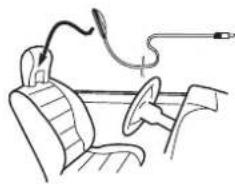
3TurntheigntionswitchtoONorACC. Ithecar'srcondiortherhealenstumoned, tumitoft.Noisefrom thefahinerearthcondiorerheatermaypreventcorrectautoEQ.
Systemsettings
4Pressthehomebuttontoswitchtothe homedisplay.
5Touchthesystemkeytoopenthesystem menu.
6TouchAutoEQMeasurementtoenter autoEQMeasurementmode.
7Plugthemicrophoneintothemicrophoneinputjackonthisunit.
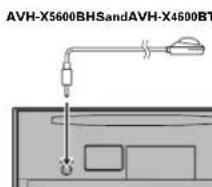
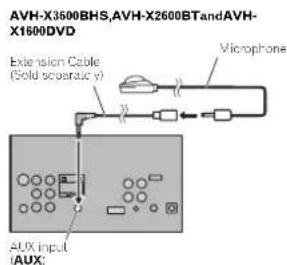
8TouchStarttostartautoEQ.
9Whenthe10-secondcountdownstarts, getoutofthecarandclosethedoorwithin 10seconds.
Amasurementone(noise)isemittedfrom the speakers,andauleQmeasermbeginges.
WhenautoEQiscompleted. Themeasurement hasfinished. PleasedconnectthemicrophoneandthenpushHOMEkey.isdisplayed. Whenlhecar's nterioraccust chacteristicans cannotbemeaurestdorrect y anterromessage willbedisplayed.(RefertoUnderstandingauto EQomemassagerpage60.)
Illibakesabulimini nemtionsforautoECmeasure mnttoecompliodwhoharthospakarsa con necto.
TastamaioEQ,lauchStop
10Storethemicrophonecarefullyinthe glovecompartmetorotonthersafeplace. Ifhemicrhone ssubectedirectsunghit foran extendedpedper,hightemperaturesmay causedstortion,colorchangormatfunction.
Settingthevideo signal
When you connect this sunil loanAveupment tothisunitelecthesuitablevideosgnalseting.
- AsthistfunctioninitiallysetoAuto, the unitwill automatically adjust the video signal setting.
You can operate its function online by the video signal input/online/AVinput.
1Pressthehomebuttontoswitchtothe homedisplay.
2Touchthesystemkeytoopenthesystem menu.
3TouchVideoSignalSettingonthesystem menu.
eoSignalSettingilemsaredisplayed.
AV-AdustineWidesional
AUX-AdjuststheALxvideos anal
Camera Adjust the camera's拍摄 video
Carmel signal
4Touch 四 _ 0 toselectthedesiredvideo signalappears.
Auto-PAL-NTSC-PAL-M-PAL-N-SECAM
FavoriteMenu
Usingthefavoritemenu
1Displaymenucolumnstoregister.
ReferToMenupoperationsonpage35
- Your customizable menusersexcess VideoSetup monu.
2Touchthestariconinthemenucolumn
forthedesiredmenutoregisterthemenu.
Testericonfortheselectedmenuisfilledin
- Tocarcillother registration, touch thearicon in themenuclumagain.
3Displaythefavoritemenuandchoosea
registeredmenu
ReferToMenuoperationsonpage36.
Note
You can register,upto12columns.
Bluetoothconnectionmenu
Bluetoothconnectionmenu operations
(FunctionsAFHV X6008HS/AVH X600BT/AVH X560C0B/SAVH-X620C03)
Note
Ifyouareusingacellularephonethatcanbe connectedviaBluetoothwireessstechnology, we recommend that you use a secure key. For this, you can use the following method:
1. Use the secure key to establish a connection between your phone and the Wi-Fi card.
2. Set up a secure key with a Wi-Fi card and a secure key card.
3. Use a secure key card to establish a connection between your phone and the Wi-Fi card.
4. Use a secure key card to establish a connection between your phone and the Wi-Fi card.
5. Use a secure key card to establish a connection between your phone and the Wi-Fi card.
6. Use a secure key card to establish a connection between your phone and the Wi-Fi card.
7. Use a secure key card to establish a connection between your phone and the Wi-Fi card.
8. Use a secure key card to establish a connection between your phone and the Wi-Fi card.
Pairingfromthisunit
1Pressthehomebuttontoswitchtothe homedisplay.
2TouchtheBluetoothkeytoopenth e Bluetoothconnectionmenu.
3TouchConnectiontoselectdevice.
4Starttosearch.

Startingusearch.
Whilesearching.is displayedwhenavailabledevicesarefound,thedevicenamesorBluetooth device configurations(Ifnamescan not beobligated)aredisplayed.
If you want to read the words in your答题 and use E-mail to both device addresses, touch the computer.

Switching between handheld device, narmeneaBlue toothdevice addresses.
-locarelsesearching,touchStop
- 11threcodvcsana radypaired MemoryFull
isld splayedand paringcarnitbe performed. In
sucncas, dolotcapaircdcvccfist. Rcterto
page45
巧 Inrodeoceanbefound,NotFounddisplaysplayed.Insuchcases,checkthesatususftheBluotocthdwcicandscarchagain.
5Touchdevicenametoselectthedevicewyouwanttoconnectto.
Whileconnecting, Pairingsisdisplayed. If the connectionistabilitieshed, Pairedisdisplayed.
ifyourdevice supportsSSP(Secr.No.S main Paing) int, six-digitNumberappearsonthedisplayofthis unit.Once he connectionistestablished,this humberdissappears.
iftheconnection fails, Error is plotted. Insuch cases, try again from the beginning.
The P1 Nocoeisotto 0000asthedefault,but can be changed.RotoTeEnting/Wiccdefor Bluetoothwirelessconnec tiononpage46.
- Oncetheccontraction established, the device namelsisysposed.
Touchmeevicenametodscnect.
If you want to delete an ined Bluetooth telephone, display Delete OK? Touch Yes/No delete device.

Delotingpaaireodovio.
- Neverturn theunitsfwnlntnepairedBoutto
telehoneispingdeleted.
Bluetoothconnectionmenu
ConnectingtoaBluetooth deviceautomatically
Ifthisfunctionisseltoon,aconnectionbetweenyourBlueoohdeviceandthisunitwilltakeplaceautomaticallyyassoonastnetwodevicearelessthanafewmeersapart. Initially,thisfunction isseltoon.
1Pressthehomebuttontoswitchtothe homedisplay.
2TouchtheBluetoothkeytoopenth e
Bluetoothconnectionmenu.
3TouchAutoConnecttoturnautomatic connectionon.
If your Bluetooth device is already a Bluetooth wireless connection, an请联系 this unit will automatically be established.
Tolumulamatal connectionoff,ouch AutoConnectagay.
I conNECTION fails. Autoconnection failed.
Retry? appears. Touch Yes reconnect.
4Onceyouturnyourvehicle'sACCswitch onagain,aconnectionestablishahautomatically.
Switchingvisibleunit
Thisfunctionsetswhethoromtomakthis unitvisibletocotherdevice. Initially,thisfunctionssleeton.
1Pressthehomebuttontoswitchtothe homedisplay.
2TouchtheBluetoothkeytoopenth e Bluetoothconnectionmenu.
3TouchVisibilitytoptselectivityoff. -Ioturny sibni tony touchVisibilityagain
EnteringPINcodeforBluetooth wirelessconnection
TconnectyourBluelohhdevice:thisunrirvia Bluelohlwirelessstechnology,youneedtoerla aPINcodcnooryuBleothdvcctovrifythe connection.Theedelaucicode000,butyou canchangeitwithhisfunction.
1Pressthehomebuttontoswitchtothe homedisplay.
2TouchtheBluetoothkeytoopenth e Bluetoothconnectionmenu.
3TouchPINCodeInputtoselect PINCodeInput.
4Touch0to9toinputpincode.
5AfterinputtingPINcode(upto8digits), storeinthisunit.

StoringthePINcodeainthisunit
DisplayingBluetoothDevice address
ThsunitdisplaysitsBuetothdeviceaddress.
1Pressthehomebuttontoswitchtothe homedisplay
2TouchtheBluetoothkeytoopenth e Bluetoothconnectionmenu.
3TouchDeviceInformationdisplaydeviceinformation.
TheBluetoothdeviceaddressisdisplayed.
Themenenu
Selectingtheilluminationcolor
This unit is equipped with multiple color illumination.
Directselectionfrompreset illuminationcolors
You can select an illumination color from the colorist.
1Pressthehomebuttontoswitchtothe homedisplay.
2Touchthethemeketoopenthethemesttings.
3Touchilluminationandthentouchicolor ontheist.
Red—Amber—Green—Blue—White—Custom—Rainbow
- WhenRainbowwas selected, the illumination co-correctational changes.
Customizingtheilluminationcolor
1Pressthehomebuttontoswitchtothe homdisplay.
2Touchthethemekeytoopenthethemesttings.
3Touchillluminationandthentouch Custom.
4Displaythecustomizingmenu.

Displayingthecustomizing menu.
5Touchtheolorbartocustomizethe color.
6Touch
7Touchandholdtheicontostorethecustomizedcolorinthememory.
Memo
Storingthecustomizcdolorin
The memory
The customized colorhasoene stored in the memory.
This color will be recalled from the memory. Then it's time you touch these amico.
SelectingtheOSD(on-screen display)color
TheOSDcolorcanbechanged.
1Pressthehomebuttonoswitnesstothe homedisplay.
2Touchthethemekeytoopenthethem settings.
3TouchScreen.
4Touchoneofthecolorsonthe1ist.
Selectingthebackground display
You can switch the background thetisdisplayed when listening to source.
1Pressthehomebuttonoswitnesstothe homedisplay.
2Touchthethemekeytoopenthethem settings.
3TouchBackground.
Themenenu
4Touchthedesiredsetting.
- Yourawlikethandconsettingsbyfickingthedisplay.
InoJPEGImagesarestoredirtthisunit,you
cannolselectphoto.Tos.toreJPEGimagelothis
unit,rotortocaptureimaginesJPEGflessonage 28.
IfyouwanttodetalatethecaputurecJPEGimage,
touchandholdthekeyoftheJPEGimage.
Otherfunctions
Adjustingtheresponse positionsofthetouchpanels (TouchPanelCalibration)
Iyoutcolthattouchpanelkyosontne scendvatefromtheactualsepositionsthatrespondyurlcouch,ajusttheresponsepositionsoftelchouchpanel.Thereareeltwajustmentmethodstour-pot-adjustmentinwhichyouclhurfocnnersofthescreenand16-pointadjustmentUniwchycoumakefine-adjustmentsontentincscreen.
^a Parkoyourcasafep aceandusethis function Denotoperatelwhilderiving.
- Touchscreenengentlyforadjustment.
Forcefullypressing:thetouchpanelmam damagethetouchanel.Donotuseasharp pointedtoolssuchasaballpointpenormechanicalpen.Doingsomaydamagetne screen.
- ifhtetouchpanelncntbeadjusteproperly,consultyourlocalPioneer dealer.
1Turnthesourceoff.
ReferToTurningthosourceON/Offonage8.
2Pressandholdthomebuttonstart TouchPanel.Calibration.
The tour point touch panel adjustmentscreen appears. Whentwo-pointapparatusonce, touchhooh.
3Toucheachofthearrowsonthefourcornersofthiscreen.
Tocarne theadjustment pressardholdthe homobutton.
4Pressthehomebuttontocompletefourpointadjustment.
Dataforheadadjustedpositonsissaved. Donotumoftheengnewtheltesalaisbeing saved.
5Pressthehomebuttonto proceed to 16-pointadjustment.
The 16 point touchpenelactjustmentscreenshotpears.
Toxicant:headjustlment,ressandholdthe home button.
6Gentlytouchthecenterofthe+markdisplayedtothescreen.
After you touch each item, the data for the adjusted position issave.
- Conotumofffhaerginehwihahedatahng saved.
7Pressandholdthehomebuttontocompletetheadjustment.
UsinganAUXsource
An auxiliary device can portable devices sold separately can be connected to this unit.
AboutAUXconnectionmethods
You can connect to any device without a connection.
Minipinplugcable(AUX)
Whenconnectinganauxiliarydevice,using miniolugcable
iPodsandsandab eudio videoolayerscan be connectoditsuniversity amiriipuglable.
IfanPodwithdecapabilitiesconne- cectedctthisunitwa3.5mmplug(four pole)cable(sucnastheCD-V150M),you can enjoy the decontentsoftheconnected iPod.
Aortableaudicvidocelayocaneconcoe batedbyusinga3.5mmplug(fourpore) withinRCAcabite(soldseparately).However,depending ontheceable,areversecom nction betweennered(rightside.audice cableandyellowovidocabernayberequiredorderforthessoundandvico imagefcberproducedcorrectly.
Otherfunctions
- InsertsthestereominoplugintotheAUX inputjacksonthisunit.
RefertoConnectingthepowercordionpage50.
Resettingthemicroprocessor
BypressingRESET,you can reset the microprocessesccrlitsinitialsettingswithout changingthe bookmark information.
Themicroprocessormust berseal inthe following situations:
Beforeusingthisunitfortheirst meeting installation
If the unit fails to operate properly
- Whenslangereincrccorrecrimmessagesppear onorthdisplay
1TurntheignitionswitchOFF.
2PressRESETwithapentiporther pointedinstrument.
ReferToWhat?
Note
SwitchyourengineONseltiehgnllionswitch IoACCONbeforepressingRESETnthefolliciwingsituations:
Aftercompletingconnections
-Whenerasingailshored settings
- When resetting the unitholts in the factory's settings
Operatingthesoundmixer
You can listen to the album and your iPhone smartphones simultaneously. The main sound from this unit. Thes sounds from the iPhone smartphones. You can control the volume of the sound on the screen.
1ConnectyouriPhoneSmartphone thenuitwiththeRGBinput.
ReferToWhenconnecting withoptional CD-M203 cableonpage52,
ReferToWhenconnecting withoptional CD-1201Scableonpage53.
RefertoOptionsSmartphoneseinkedeproctorCD ML160connectionpage53.
2Press + / - (VOLUME/VOL)todisplaythedounmixercontrolbar.
Thesoundmixersscreenappears.
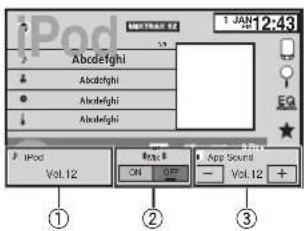
(1) Source sound - Press +/- (VOLUME/VOL) to adjust the volume of the main sound. The main sound volume levels displayed on the Source sound source: beer.
Mix-touch ON or OFF to switch the sound mixerconoff. The subsound smulewhen MixOFF.
SoTOnOWhonhyouw/Shoohoutoutsoundfor AppRadioMode.suchstneravigat ion sound,fromtheurini...
SettOFFwhenyou'shootoutputsoundfor AppRadioMode, suchmascul, astrse
③ AppSound-Touch+or-on the screen to adjustthesubsoundvolume.Thesubsound volumeleveldisplaycortheAppSound screer.
Notes
- You can not just revolume of themain sound on the screen.
The sound mixer control baris displayed for four seconds. If the screen disappears, press +/-(VOLUME/VOL) again. The screen repeats.
Connection

WARNING
InsomeocountrcsstcstheviewingimgeasongdispaysinsideahceenoypensotherhanicrivermeybellegalWhereshcregulationspalythomustbeocedyandthisunit'sDVDfeatureshouldn'tbeused.

CAUTION
Don'tdo an eintoengineeringcompartmenttoconnecttheyellowcableofthedispaynitionvehiclebattery,Enginevibrationmayeventuallycausetheinsulationtofallatthepointwherethewirepassesfrom thepassengercompartmentintotheengincemcompartment.lakesdtracareinscuringthewireathispont.
- Makesurethctcableswillnotinterferewith movingpartsoftheveide, suchasthesft lever, parking brakeonseatsldingmechanism.

WARNING
-Usespeakersover60W(culputvalue)and between40to80mpcdavalue).Do nclude10to3Ospeakers forth sunil.
The blackcablesground,when installing thisun torporeamp(soldseoretaly), makesretoconnectthegroundwirefirst. Makesrethatheground cableisproperly connectedtometalpartsofthecarbody using gaspactemerialsolldcommercially. The groundwireofthepowerampandthe oneofthisunitaranytherdevicemustoe connectedtothehecarsoparelatywith different screws. If the screwforthe groundwirecosensorfallscu,luidresullifine,generationsmokocarmefunction.
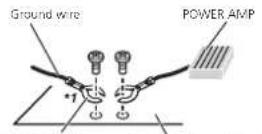
Other devices Metal parts of car's body
Another Electronic
Office in the
*1 Non supplied for this unit
Important
Thisunit cannot be installed in vehicle withoutACC(assistant)positionnontheligntionswitch.


ACCpositionNoACC position
- Use shunitwith a12-voltbatteryandnegativeroundingonly. Failuretosommayresulinairegormalfunction.
Tocreventashort-circuit,overheatingorma tfunction besuretobothewthecirects below. - Discovered (hereinaquivalentelementofthe batterybefore installation.
Connection
- Securehawringwiicableclampsoradheselape, wrapadhesivelaparoundwrtingthatcomsirtocontactwithmotalpartstoprotecthawiring.
- Placed cables away from movinggrids, such as ash-titrificcardroats.
- Placai cabsaway/fromhotplacos.sucn asseirathenserouelaei.
—Danioconnedtheyellowwaterbotshelfarray bypassingithroughtheholethengine compartment.
Coveniysconnectadcbacconnections withininsultriptpe.
Donotsnorter anycables.
-Neverculltheinsuatiofhepcwerceieof thisunit norderthanshepowerwith otherdevices.Thecurrentcapacitysthe cableislimited.
Useefuseofheraringprescribd. Neverwirenerenegativespeakercabledirectly teground. - Naverbandtogethe negativerecablessoftmultiplexspeakers.
Whenthis.nitson.controlsgainsaresent throughtheblue/whiteable.Connection hls cabletothssystemremotetocontro fcnextalpoweramportheventie sauto anten narelaycontrolterminalmax.300mA 12VDC).If the vehicleisequcpedwiths glassantenna,connecttcthtanentenna boostpowersuppuyterminai
-neverconnecttheblue/whitescabletothe powerterminalanexternalpoweramp. Also, neverconnecttitihe powerterminal of the autocontactenna. Doing something result in betterdrainoramalfunction.
Connection
Section
26
English
Connection
Connection
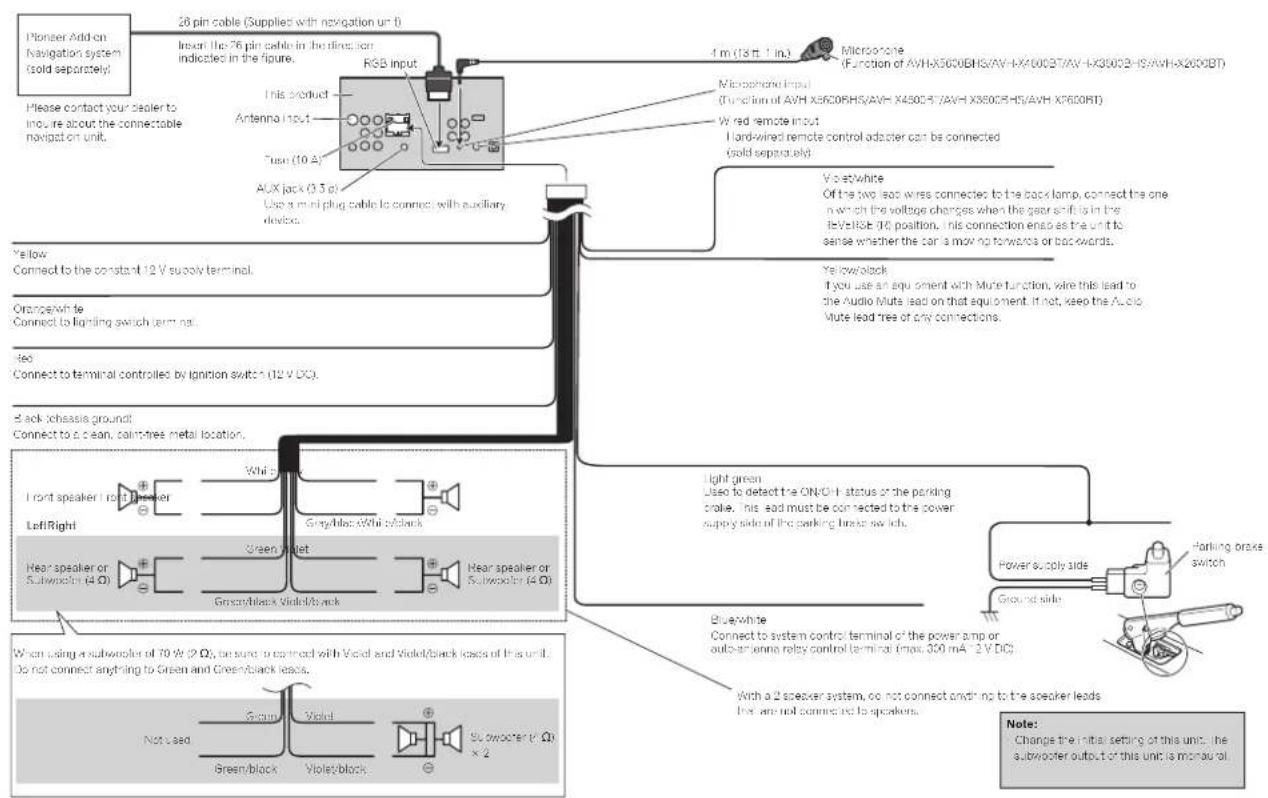
Connectingthepowercord
Connection
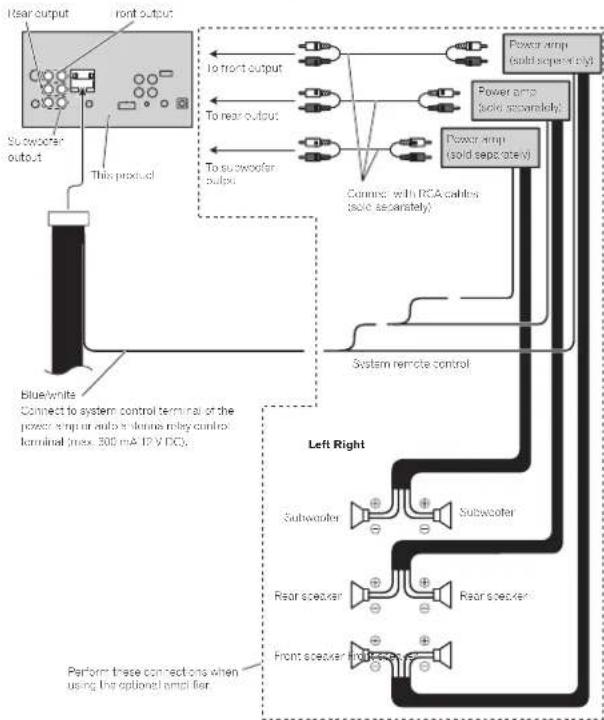
Whenconnectingtoseparatelysoldpoweramp
Connection
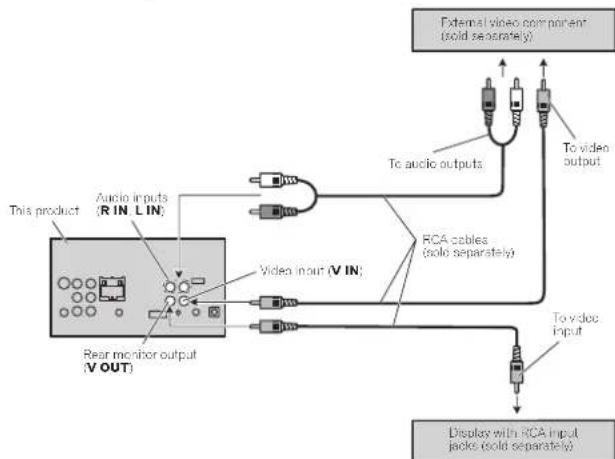
Whenconnectingtheexternalvideocomponentandthedisplay
-tisnecessarytochangeAVinputnthe systemmenuwhenconnectngtheexternal videocomponent. ReferloSettingAVinputonpage40
This product srawviceoouputstorconne-tionfacisplaytoenablepassengers/intherear seatwatchsthatCVD.etc.
WARNING
Neverinstalareardsplayingocationntris visiblothedrvenwhilehveleisin motion.
Connection
Whenconnectingwitharear viewcamera
If you switch then it will automatically switch therearviewimage Youneedtosetthe
CameraPolaritypropertyinthesystemunitto use.Fordetailsonsettings,refertoSettingthe reviewcamera(aboutcamera)onpage43. You can also switch tothereviewimageby pressing the touchpane key. Fordetails, refer to Usingthereviewonpage 10.

WARNING
USEINPUTONLYFORREVERSESEORMRORIMAGEREARVIEWCAMERA.OTHERUSEMAYRESULTLININJURYORDAMAGE.

CAUTION
- You mustuseacamerawhichoutputs mirrorreversedimages.
The screen image may appear reversed.
Therearviewcamerafunctionistbeused asaainaidotekeepeaneyontrailers,orwhih backingup.Donotuseforentertainment purposes.
- Objectsintheserviamyappearcloser
mrecridsinthantheyactuallyaie.
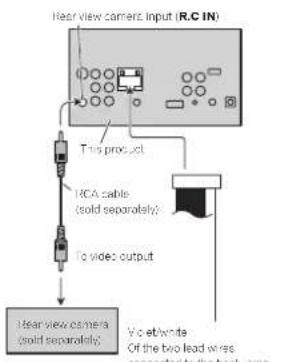
Connection
iPodwithlightningconnector Whenconnectingwithoptional CD-IU52cable
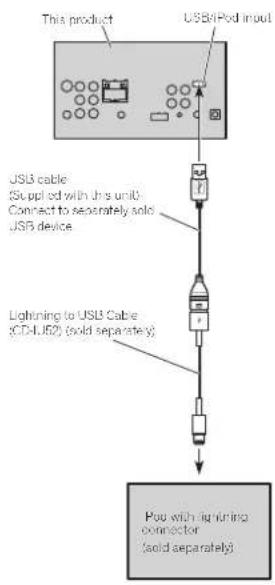
Whenconnectingwithoptional CD-IV203cable
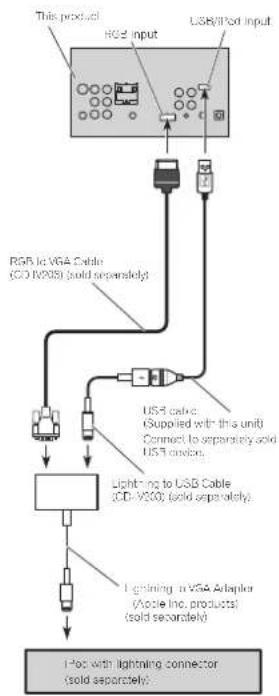
Connection
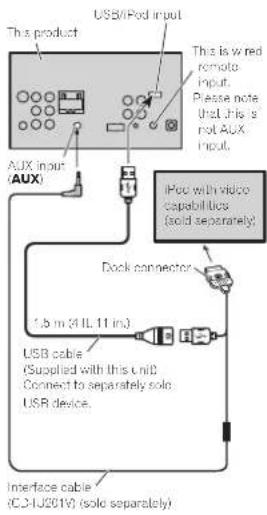
iPodwith30-pinconnector Whenconnectingwithoptional CD-IU201Vcable
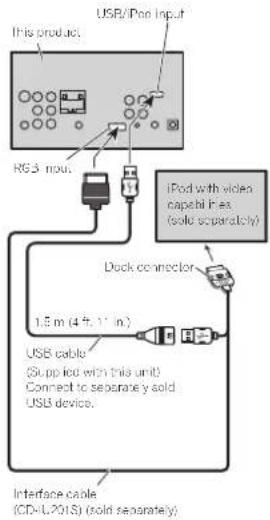
Whenconnectingwithoptional CD-IU201Scable
Connection
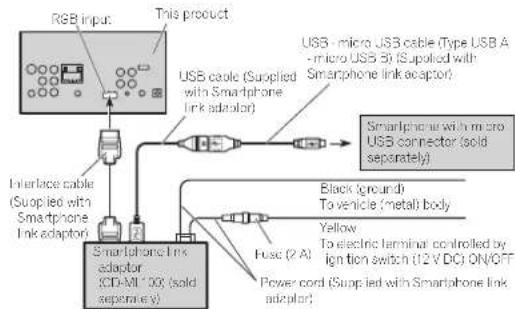
OptionalSmartphonelinkadaptor(CD-ML100)connection
ConnectionforupdatingSmartphonelinkadaptorfirmware
Evanfusicaand/orimagefilesaresavesontheUS Bstoregadvice,they cannot be playedback
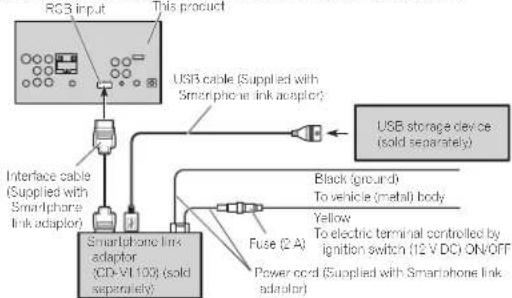

Connection
OptionalSiriusXMTuner connection
(Functions of AvH-X5600BHS/AvH-X3600BHS)
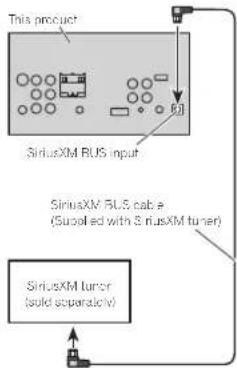
Amaximumof500mAcanbesuppliedfrom theunitotheSiriusXMuner.

En
Installation
Notes
- Check all connections and systems before final installation.
- Donutuseu unauthorized parts: sathis may cause malfunctions.
Consultoryourdealerinstaliationrequireningslingotheclosorthermodiflcationstochevehicle.
Donotinstalthisunthor: -mayinterferewithoperationofthevehicle. -mayacauseinurytopeasgpengaraesult ofsucupanstop.
Tose mconductor isservillbadamagfditloverheats.Installthisunilawayfromo. pacesuchsaacncharneatcrout ot. - Optimum performance obtained when the unit is installed along an angle of 50^ from 30^ .
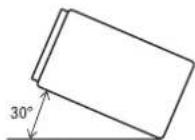
- When installing, toensure proper healtedis persalwhen usingthisunit, makesureyou leave amplitaspacebehind therearpanel and wrapanyloosecablessetheyarenotblocking events.
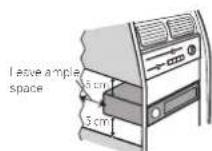
Tosometype/vehicles.lh.sunlcarnnotbe properlyinstalled.Insucnec,uselethopec-tionalinstallation(ADT-VA133).
Installationusingthescrew holesonthesideoftheunit
-Fasteningtheunittothefactoryradiomountingbracket.
Position Founitssothatitsscrewholesare alignedwhcthescrewholesofthebracket,and lightenshecrewsathreelocationsonesh side.
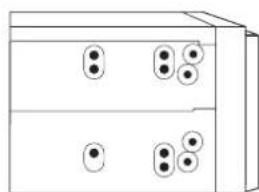
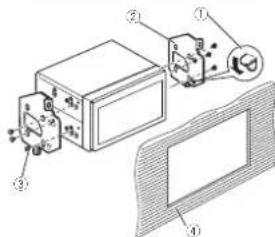
1fthnepawlgotsintheway,benditdown.
②Factoryracingountingbracket
3UseeHertRus8mm×8mm)orfushurface(5mm×9mm)screws,depocingonthekindofcreewsiththemountingbracketcrewholesswillaccuse.
4Dashboardorconsole
Installation
Installingthemicrophone
(FunctionsxAVH-X560CBHS/AVH-X460BST/AVH- X360BHS/AVH-X260BT)
CAUTION
Ilisextreme ydangcrustcallowthemicro- pioncactobecombowoundaroundnestor ingcolumnnshiffover.Besuretoinstalthe uninsucnawaythatilwilnotobscructariv ing.
Notes
Installthemicrophoneinapositionsontorientationthatwillenableittopickupthe voicocffhepersonoperatingthesystem.
- Couse separately solid clampstoseureline loadwhorcononecassarysindevehicle.
Wheninstallingthemicrophone onthesunvisor
1Fithemicrophoneleadintothegroove.
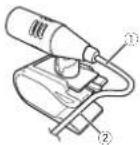
① Microphonelead ② Groove
2installthemicrophonecliponthesun visor.
Withthesunsurvisor,p,instaithem crohone clip.Loweringthesunsurvisorreduceshevoice recognitionrate.)
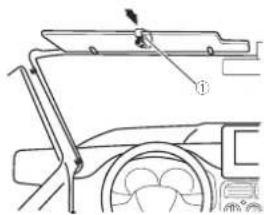
①Microphonocip
Wheninstallingthemicrophone onthesteeringcolumn
1Detachthemicrophonebasefromthemicrophoneclip.
Todeischemthromiconebasefromhemmero- pheneicdepip,slidethemcrophonesease.
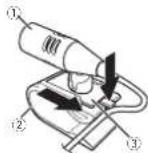
①Microphone
②Microphoneclip
③ Microphonebase
Installation
2Installhemicrophoneonthesteering column.
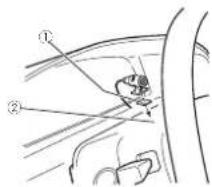
1Double-sided shape
(2)Install them proponeetherearsideofthe steeringcolumn:
Adjustingthemicrophoneangle
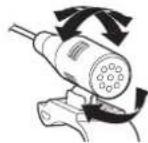
Troubleshooting
Symptoms:swollen,abdominal,causesinsurgiunon-identifiedLectRegular,Indentedlexis usedoindicalectionsjobaken.
Common
Thepowerwillnotturnon.
Theunitwillnotoperate.
Leadsandconnnectsareincorrectyconnected Confirmance:marthatalcontnctions are correct.
Theuseis shown: Rectify thecauseand then replace the use. Be sure to install the new camera setting. Noise and/other factors are causing the ciuit in microprocessor to operate incorrectly. Press RESET (F1048)
Operationwiththeremotecontrolisnotpossible. Theunitdoesnoperatoratecorrectiyevenwhen the appropriateremotecontrolbuttonsare pressed.
Batterypowerslow. Loadanewestberry.
Somooperationsareprohit bitcdwithcertaindiscs, Toperelatingwthotheridiscs:
Playbackisnotpossible.
Theiscisdidy.
Cleanthedisc.
Thetypeofscloseloadcd cannotplayecntthis until:
Checkmerishtype
The cieisolaeaded slotcompat blewiththyscoaesystem.
Changshelisetoentohatiscompat blowwith yourvidocsystem.
Thereisntrasound
Thevolumelevelwillnotrise.
Cab escerotonconnectecorrectly, Connecticutecorrectly
Theurishe performing still slownotion frame by frameplayback. There snsoudd ur ngill swnotion over frame-by-frameplayback.
#
Theocarkingbrakecable.netconnectoe.
conncttphosparkingbrakecable.andapplythe parkingbrake.
The parking brake is not applied. Connect the parking brakeable and apply the parking brake.
The iconisdisplayed, and operation is not possible.
Theoperationisprohibitedorthodox. Thisoperationisnotpossible.
The operationism is compatible with the configuration of this.
This operation is not possible.
Themedisplayedstops(pauses)andthunit cannotbeoperated.
The data:outlook:long-term breastin ringbyback. Stopplayback, endstart bybackagain
Thereisnosound
Thevolumelevelislow.
The volume is low.
Adjustthevolumelevel.
Theurantoustor Turchsetteru
Thesoundandvideoskip.
The firm倒闭 firm-secured firm-secured firm
Additional information
Flessizeandtransmissiionrateareaboveerecommnoadratos. CreatoaDivflictnatswithin the recommended size and transmisio rate
Theaspectratiocinsorrectandtheimageis stretched.
Theaespectation settings are correct for real display. Select the appropriate setting for yoururd display. (Page89)
Themotorsoundswhentheignitionswitchis turnedON(oristurnedtoACC).
Theunilisconfiinngwheheromolatiscis
Iocd. Thisisanormaloperatior.
Nothingisdisplayed.
Thetouchpanelkeyscannnotbeused.
Therearviewcameralstrconnected.
Connectearviewcamere.
CameraPolarity satincorrectsetting. Preslthernebuollonorelurnrtnolresource dis ayanothselenolecthincorrectsetting for CameraPolarity.(Page43)
Noxxxxappearswhenadisplayischanged (NoTitle,forexample).
Thee is nonbercadostintfomertion.
Switchthecisplayorplayanothertrocfoile.
Subfolderscannotbeplayedback.
Folderrepeataplayhasoenselected.
Selecttherepeatrangeagain
Therepeatrangechangesautomatically.
Anotherfolioerwasse eedderingrepeastplay, Selectchereepasstrangegain.
Tracksearchorthastforward/revoirsewasperformed curingfle neceotclay. Selectchheropaspanggeagain.
DVD
Playbackisnotpossible.
Theboadddischaesditerertrgionnumberfrom
This is
Replaced scwthfostarngthesam regnurnersbshsuiit.
Aparentallockmessageisdisplayedandplay
backisnotpossible.
Parentallocisactivated.
TunpontallockoforchargelevelXPage 38:
ParentallockcannotbCanceled.
Thecodelumberisinsorject.
Entertheoremcodernumber(Page39)
Youhavetorgotanyourcodenumber
PressRESET.(Page48)
Dialoglanguage(andsubtitlelanguage)cannot be switched.
The DVD being played does not feature multiple language recordings.
The language cannotbeswitch cheyhenot recordontheistic.
You can only switch between item指示ated in the
dscnneu
Switch the language using the screencen.
Nosubtitlesaredisplayed.
TheDVDbingpoyeddoes nortfeatresubtiies Subtitlesare nondispayedfftheyere not recordentheisso.
You can turn off switch between televisions indicated in the menu screen.
Switchthe language usingthedismenu
Additional information
Playbacknotperformedwiththeaudio languageandsubtitlelanguagesettingsselected inVideoSetupmenu.
The DVD being played does not feature a glossub-stitins in the selected ac-language.
Tlanguagcannobestwichedtheselected languagesnorecordeda ntheidiac.
Theviewinganglecannotbeswitched.
The DVDbeingplayeddoesn't featureascenesssheet frommmllngles.
Towewiring angiocanrntobsswitchedithroDVD does not feature rescenessrecorded from multiple angles.
You are trying to switch from multi angivowring for a scene that was recorded from multiple angles. Switch between multipleagings when watching scenesrecorderfrom multiple angles.
Theimageesextremelynuclear/distorted and darkduringplayback.
Somedscstreatasignahtprohibitoopying. Sincethisunlliscompartithwiththemalog copygeneratorormanagementsystemwhen ayingadsccthathassignalprohibiting copying, nortzortalspraseorthermpierfections mayocarwnieweivedonsomedisplays.This isnotamalfunction.
VideoCD
ThePBC playbackcontrol)menucnothob calledup.
TheVedCDBing ayeddoenstefurePBC. This operation not available for paoCDshat donotfucPCB.
Repeatplayandtrack/timesearcharenot possible.
The VideoCDbeingplayedfeaturesPBC. This operation is now available for VideoCDsthat features PBC.
IPod
TheiPoddoesnotoperatecorrectly.
Theecablesareincorrectlyconnected. DisconnectthecapecfornethiPod.Oncethe iPod'smianuoussisplayed,reconnectthe iPodandressel.
The Poderson is oio. Updatethe Poderson.
SoundfromtheiPodcannotbeheard.
The audio output direction may switch automatically when the Bluetooth command US/ST connection is used at the same port.
Useethel'pottochargerteeaudiocutypedirection。
Bluetoothaudio/telephone
The sound from the Bluetooth audio source is not played back.
Hericacal progressonal utotohcncted cellularpone. Thesoundwill be played backwhenthecais femntated
ABluetoh connected cllarphoneisre currently being operated. Donutusheccellarphoneaathstme.
Acilwsmadewhiahluotbtoeconnectedculear phoneandthenimmeditey terminated.Aasereult, communicatibetweenthis.nifandthecellular phoewasctternmatedproperly. ReconnecttheBluetoothconnectorbetweenthisunfandthecuIaphone.
Additional information
Errormessagese
Whocoucontactyoudcalcrcryourarest Pioneer/ServiceCenter, besurel onetheerrormessage.Emmormessagesa rewritteninbo dandauses irregular non indiectext Regular, indenied textusedsbndicationstocsetaken.
Common
AMPError
This isn't a tool for the purposes of the purpose of the purpose of the purpose of the purpose of the purpose of the purpose of the purpose of the purpose of the purpose of the purpose of the purpose of the purpose of the purpose of the purpose of the purpose of the purpose of the purpose of the purpose of the purpose of the purpose of the purpose of the purpose of the purpose of the purpose of the purpose of the purpose of the purpose of the purpose of the purpose of the purpose of the purpose of the purpose of the purpose of the purpose.
Tuner
NoDataProvided
Hisuntcanntrecceivartistname/songtllinfor mation. Movelthedesirablelocal onwiigood reception.
NoData
This can not receive program service name information.
Moven the desirable location with good reception.
Appendix
SiriusXMSatelliteRadio
CheckAntenna
Theaternnnacrrction sincorrect CheckthearnermacronationIfthermessage failed sappoarcovcnaortongcnihols swittnedofion,contactlcyunderanauthorizedPioneerServiceStationfor assistance.
CheckTuner
ThaSiHuaXMConnectVehicleTunerConnections Incorrectthepowerfalc.
Checklist:Uniterconnect on and battery voltage, if otherwise message failed or disappears even after the engine switch off/on contact your dealer an authorized Pioneer Service Station for assistance.
NoSignal
TheSiusXMConnectVehicleLunch shavingofficitycutecawingtheSinsxMsatolites gnal
- Verifiratteourvireinleissoindoorswithbasier viowothasouthernsky.
Vorhynchatho Sirla/KMagnetictcount antennaismoutdomealmelatsurfaceontheoursideHeveh cie. - IvocthesGirls XSIMontnaawayfrommany obstructions:
SubscriptionUpdated
ThisunishadetectedacanganeinyourSUSXM subscription status.
Pressarykeytoclear.hemessage.
NotAvailable
Thechannothayouanavocucstocisnetavali SinusXMchannel. CheckthisSinusXMchannelneup.
Additional information
ChannelNotSubscribed.CallSiriusXMto Subscribe.
The channel that you have requested is not included in your SiriusXM subscription package. Check the content of your SiriusXM subscription package.
ChannelLocked
Lookedytherielocal Parenta Cortice Feature, ReleaseMechanicallock.
DVD
DifferentRegionDisc
Theidocdoesnohvalhelesameserigionnumberss thisunit. RepieoctdovDwthorhcbaringthoccomct regiornumber.
Error-02-XX/FF-FF
Thecisciscity. Clearthedisc.
Thecisciscratched. Repeelcdhsc.
Theciscislaodadupsidadown. Checkthathdisc.slaodadcorrectly.
Theraiselectr calermechanicalerror. PressRESET.(Page4B)
UnplayableDisc
Thisyocd sccnntboplayocththisunit. Repeced sccwithonctnacnboplayocn Unsiun.
Theirarted sddosnosontahtanyplayablaRe Repieceh ed sc.
Protect
At the filesonthe inserted discare embedded with DRM. Repelehed s:
Skipped
The insertredicloscontainsDRMproteorefiles. PlayaradiofollenctemedecedewithWindows Media+DRM/9/10
TEMP
Thelenperaturesoftneunitiscubsidehernornalap
eratingrange.
Waituntheurirutretourstostattemperature
withhenornalapopernlimits.
ThisDivXrentalhasexpired.
The insertedeosiscountssexpiredDivXVODcont. Selectaflehtatcbrplayed
Videoresolutionnotsupported
TheInsertedeci sotansahigndefinltionDivX/ MPG-1/MPG-2/MPG-Affie. Selectafleifthat can beplayed
Itisnotpossibletowriteitintheflash.
Thisunit'sfashlashmemoryusedasthotemporarystor agecaistfull. Selectaclathcalcarbeplayed
YourdeviceisnotauthorizedtoplaythisDivX protectedvideo.
Thisunit'sDxVXregistratloncoodhesonbeenau
thorizedbytheDixXVODcontentsprovider.
Registerrshun totoheDixXVODcontents
provider.
UnplayableFile
Thisypefficlne notboplayodontnissun. Socteflichatranbopayed
Additional information
FormatRead
Sometimeatheralsadelaybetweenthestartofplay backerdweryoutahtohearthyssound. Waitunithemessegedisapoearsandyouhear sound.
Videoframeratenotsupported
Dixfelle'sframetierlemonnierthan30ps. Selectefliethatcarbeolied.
AudioFormatnotsupported
Thepathyofficlsnotsupportordcchisunit. Selectofleifelthatcanbeplayed.
Externalstoragedevice(USB)
UnplayableFile
Th stypefilescarnotbeplayednthisunit. Selectchefilethcanbenyied.
Ihorocanongs. Transfer haeudiofoleslotheUSBportableaudioso player/USBmemoryandcorrect.
SecuritytohconnectcdUSBmemoryisoc ad. Followthe USBmemory instructionstodisable security.
FormatRead
Sometimes stheralsdelaybetweenthestartofplay backerdweryyoutartohearyssound. Waituntthemessagedisapoearsandyouhear sound.
Skipped
Theconnected:USportableaudcpocr/USB memorycontainswATAllosthatancprotectedcy WindowsMedia*DRM/8/10 PlayaiofotlentempcedeowwnWindows Media*DRM/3/13
Protect
All the files on this connected USBport are .clio player/USBmemoriesprotectedbyWindows MediaDRMS/0. Transfinaud of filenotprotectedbyWindows MediaDRM/1Qtothe USBportable.eauio players/USBmemoriespconnect.
IncompatibleUSB
Theconnected USBDeviceisnot supported by this unit. CorrectaUSBportableaudioplayorc USB memorythatis USBMassStorageClass cormiant. TheUSBDeviceisnotformattedwith-AT12.FAT16 orFAT32. Theconnected USBDeviceshouldbformatera with FAT12.FAT16 orFAT32
CheckUSB
The USB connector for USB cable has short circuited. Check that the USB connector for USB cable is not caught in something damage. The connected USB storage device consumes more than maximum low available current. Disconn the USB portabla audioplayer/USB memory and don't use it. Tumthe ghillon switch off, then oACorONandthen connectacompliant USBportabla audioplayer/ USB memory.
Error-02-9X/-DX
Communicationsalles.
Performancedthefo followingoperations. TumthngnftionswnchOTandbackON. DisconnecttheUSBoptaleaudicp layer/USB memory. -Changetadifferentsource. Then,returntcheusBpsortableaudocplayer/ USBmemory.
Additional information
ThisDivXrentalhasexpired.
The inserted elementistoregdevicecontainsexposed D.vXvCDcontent.
Selectafethaansbeplayed.
Videoresolutionnotsupported
The nsered externalstrageredvicecontmahsigh definitionDirx/MPEG-1/MPEG-2/MPEG4-file. Selectati chancanbplayed.
Itisnotpossibletowriteitintheflash.
This is a flash memory used as a temporary storage area in the system.
Saeactafethatcanbeplayed.
YourdeviceisnotauthorizedtoplaythisDivX protectedvideo.
This unit's DivXregistrar code has been authorized by the DivXVOD content provider.
RegisterthisunittotheDivXVG Documents provider.
FormatRead
Sometimehorseladaebetweennostertoplay backhandwheryourisartohesransycnd.
Waltunffthemessagecigsappeesandsyouhear sound.
Videoframeratenotsupported
D. xylile'sframerate smorethan30fps. Selectafila ethacanbeplayed.
AudioFormatnotsupported
Thesityfepi nisrotsusporbdoIonsunL. Sclotafai chonan biopplied.
CreatingtheDatabasehasfailed.
ThamodewesswchothovideoordPTGImaged s playwh lethatabasedasbe gncres, Crestedethatabasedaeagin.(Page26)
iPod
FormatRead
Sometimesheradelaybetweenthestartofplaybackancowhenyoustanheranysound.
Watuntihomcessagsdappocarsendyoucar sound.
Error-02-6X/-9X/-DX
Communication failed. DisconnecthecatcefrommelPod.Oncathe IPost'smanneruusisplayred.recomectthe iPodandresett.
Podfailure. DisconnectthecaicefromhPoiDOncthe iPod'smimenuisosisplayed.reconnectthe iPodandresel1.
Error-02-67
The Podfimwareversisold, Undetached Podversion.
Stop
Thereasnosorps: TransfersongsothePoc.
Thereasongsinthecurrentlist. Sociologiststhatcortainsongs.
NotFound
Norelated songs.
TransfersongstotheiPoc.
iTunestaggering
I PodfullTAGsnottransferred.
MemoryUsedFortagInfo:monthePd stub, SynchelPodwithTuresarticlanupthe taggeplayout.
Additional information
MemoryfullTAGsnotstoredConnectiPod.
Thisun'sf asmemoryusecadthostemporarystor ageaneasful. Thetaginformationonthuntransferred to thePodautomaticallywhananiPodis conneces.
Tagtransferfailed.ReconnectyouriPod.
Insun'tstaginformationcarnotranstartother Fud ChecktherPoxandryagain.
Tagstorefailed.
TapinformationcarnotbestorednthisunT Trygain
Error-8D
Built-inFLASHROMencounteredenanced. Turn the operation OFF,ON.
Alreadystored
Tristaginformatiorisalreadystoredimermy Taginformationcanynybsavesdoncortany gluesongTAGinformation cannot be saved for theamesesongmopreethancnre.
Bluetooth
Error-10
The power failed forthe Bluetooth module of this unit. Turn the ignition switch CF and the ACCor CN. Ifhe error message sshld played after performing the above operation, please contact you dealer or authorized P oneer Service Station.
Pandora
Error-19
Communication failed.
Disclosed her capable from the Pod Oncethe Pod smainnunis displayed, reconnectting Podandresell.
StartupthePandoraApplicationfromyourDevice.
ThePandoraapplicationhasnestartedrunningget.
StarupthetPandoraapplicationfromyour iPhone.
Unabletosavethumbrating.Tryagainlater.
Unabotsosavethumating. Tyagainid
UntabletosaveBookmark Tryagainlater.
Uretablese Bookmark, Tyagiainlator.
Pandorasystemmaintenance.Tryagainlater.
Pandorsystemisundergoingmalntence. Iyagainlater.
Skiplimitreached.
Skiplimitreached. Dorosleeesetheskiplimit.
ThisversionofthePandoraApplicationisnot supported.
This version of the Pandora application sms supported. ConnectaniPhonethathasaccomptble versionofthePandoraapplicationinstalled ed.
CheckDevice
Deviceorromessage displayed inthPancoreappai cation. PleasecheckyourPhone.

Additional information
Pandorasunabletoplaymusic. Pleaseseeyour Device.
JnebletoptymsrfofPandora. Please check your Phone
Please create a statement.ApplicationonDevice.
Nostalionfand
Create a session in the Pandora application on your iPhone.
NoActiveStation
Nostationsolectod. Selectatson.
Communicationerroroccluded. Please reconnect yourdevice.
Ithere.snoACKaftnerCattemptredretresar 750ms.theaccessorynoudassumnetacomm u mci nionsinterrupledaradisconneclfr Pemoral link.
Please reconnec your Phone anotryagain
Devicehasnothenegistered.Goto"Bluetooth ConnectionMenu"toregister.
NoBluetoothdevcertfod.
FollowtheInstrucr sthataeorthe
screen.
Connectionfailed. Press "Connect" toetry.
Bluetooth connection failed.
FollowtheInstruetor crstatapperorthe screen.
Disconnected. Press "Connect" to connect the device.
Bluetooth connection lost.
FollowtheInstrucrionsthatappear on the screen.
MirrorLink
Theapplicationlistcouldnotbereadout.
Failed load the application list.
- Disinfectiblecablefrommesmorphorine, and nonconnecthemartrophocagattners fewseconds.
-Turntheight on switch OFF and thereto ACC oON
11thorrmosagolstilcspycdator performngheheadovacch,resetthe smarthanone.
Htcrormassagostillispysydafter performngnhtaovoeacti,pleasecctour your deaciraneauthorizedPionerServiceStation
ThereisnosupportedapplicationonyourMirrorLinkdevice.
Nosupportedapplicationscanbe found
-
Disconnect the cable from desmartphone, and then connect them smartphone aafeter fewseconds.
-
Urrthelight on switch Off and/or ACC aON.
1HthermormosageisstilisiispEyedator performngtheadeoayactor,settne smarthone.
IIT sercommassagosistisipc yedartfor performing the ooeaeacte, please contact your dealer onraneauthorizedPioneerServiceStation.
Communicationerroroccurred.
Theewassacommucnionerror,
Disconnectthecaicefromnosmartphone andthenconnectthesmartphoneagainafter fewseconds.
Additionalinformation
-Turntheignors switchOffandtheno ACC.
If the correct response is not available, please use the following information to complete the task.
ffthcmormasgoisstllopeyafortperformingtheaboveocetion,plecesecctorydealerorer unauthorizedPioneerServiceStation。
Launchingtheapplicationfailed.
Failed launch the application.
- Disconnectthe cable from smartphone, and then connect the smartphone again after few seconds.
Turntheignor switchCFTandthenoACC orON.
If there were more messages still displayed after performing heatoveraction, reset the smartphone.
llhererormessagesspltdisplayedafterperformingtheheatoveraction,pleasecorrectyourdealeronauthorizedfonerServiceStation
USBConnectionwastemporarilydisabledfordeviceprotection.DonnotconnectthisUSBdevicetoehunit.TostartUSB,restarttheunit.
Theislanovocurrenter Donotosuth sUSB storagedevic.
Turn the ignition switch OFF and thereto ACCor ON.
llthcormossegoishti displayed after performing the aboveoet, please contact your dealer or anauthorizedPioneerService Station.
UnderstandingautoEQerror messages
Whencorrectmeasurement:hearc sinterior acousticcharacteristicisnotpossibleusing auto-Q anerormessagemayappearthe disolys.Insuchcases,erefotherab ebelowto seewhattheproblemmisandhowitmaybecorrected. Afterchecking,frayagain.
From messagesarewritten in bold andcauses irregular non-indexed text. Regular, incented textused to indicate onstockaken.
Pleaseconnectthemicrophonefor
measurement.Whenfinished,pleasepush HOMekey.
Thermocrophaneisnotconnected.
Plugtheoptica microphonesecurely ntothe jack.
Error.Pleasecheckxxxxspeaker.
Thermophorencannottakuplthemasuringone offaspaek
-
Con't'mrthnatnespeaksarconnected correctly.
-
Correct the input voltage setting for power emponconnectedto these acakers.
Plugthemicrophonesecurekintotheask
Error.Pleasechecknoise.
Thesurroundingnoiselevelistohgh.
- Stopyour carriaplanetheftsqiel and switchfootneering airconditioner and heater.
- Settlem crophorecorrectly.
Error.Pleasesheckbattery.
Powers:notbeing supplied from the battery lotus unit.
-
Connect:habatterycorrectly.
-
Check the battery voltage.
Additional information
Understandingmessages
MessagesTranslation
Screenimagemay appearreversed.
Pioneerrecommends theuseofacamera whichoutputsmirrorreversedimages.Other,thescreen imagewillappeareversed.
Indicatorlist
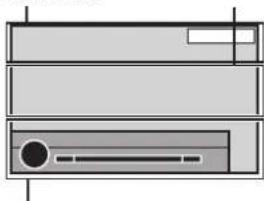
Area1Area2
Area3
Area1

Indicates that the return function is:

Ind calessthalthescursundsathe nated.
Area2

Showswhendownloadablesong information-tagifromaradiostationreceived. Disabilwthilessonginformation tagifroman-DRadiostationis beingsacvethout.

Ind catethathtdigitalformatis DollyDigital.

Indatedaththedigitalformatis MPEGAudio.
Additionalinformation
LPCM
Indicated halfthedigitalformals LinearPCM
48k16
Indicatesthesamillingfrequency.
DTS
Indicatedhatmedigitalformatis DTS.
1ch
2ch
Indicates the audichanne.
Multich
PBCOn
Ind cateshatad scwith?BCor istaingayed
81
-
Indicaesthetacelular phoneaccessed.
-
Indicatosthatarincom ing callthisbenreceivedand hasnothebemchedeketyl.
Indicates the battery strength of the cell's phone.
The eva showntheinci-tormaydifteontheactualbatterystrength.
-Ifthebatterystrengththionnot available, nothing displayed in thebatterystrength indicator area.
Indicationsthattnocorrctione Bluetoothdeviceonysupports Bluetooth telephone.

Indicaeaahthecconnected Buettoehdeeanlyssupports Buettohaucio.

Showthealbumluewhenreceiv ingthctaginformation. Showthealbumlit eotresong currentlybeingplayactorMP3/ WMA/AAC/WAVfies

Showsthesongtitwhenreceivingtheaginforation. Showsthosongtitcorthesong currentlyplayegpforMPWMAACAWAVIFs

Shows the comment currently being played.

Showstethatctonnamecumortly tunein.

Showsthartisthemowhen:
Seekingthelaginformation
Showsthartisthemcot
tactcurrentlybocinglyapfor
MPWMAAACAWViles

Showscellularphonointformation

Showsgeneralehoneinfoema tion:

Showshomephoneinformation

Showofficephone information

Showsotherphoneinformation.

Additional information
Showsthecomposename.
Showsthecatogynamc
ShowsthatfodarnamothefoldercantanngthoMP3/WMA/AAOllcurrentryyberingplayed.
ShowshalienameoftheMP3/ WMA/AACIocurrenlybeing played.
Showsthe aresetnum berof the station currently being tuned in to.
Showstachannalou currently beingtunedinto.
ShowsirusXMinformation.
Showsthat number currently being played.
Showthechaetorummaecurr tyebeing delayed.
Showsthe way,recurrently beingplayed.
ShowwhenthegameaefunctionisonwhihereceivingSiriusXMdations
Showstigehermonth ethicsongreenightlybeing played.
Area3

Indoctesthathevolumeisadjusted.

Shows when radosignal received.

Showhowenatralaudoguided/DRAdligsignalsreceived.

Showendigita audiot
DRadiognasrceived.

Showswhen-DRadostation information received.

TouchlbumBSMen

Indicates that AutoECison.

Showswhintnisunithastnesonginformation(eg).

Indoeteststhatuniquescurrentlyprocessnganooperationssuchasearch.

ShowwhencreatingthedatabasebaseMurscswermode.

ShowhowonsevngnodatabasinoMInMuscbsrvemode.

Indicatesignstrengthof thecellularhonghe.

IndicatedethanBleetottelefoneseconnected.
Additional information
Handlingguidelines Discsandplayer
Useiscsfeunnganyofthe followinggoos.


Use12-cmdiss.
The foiaowtypescfdiscscannnotbeusedwhth sun tnt.
DualDiscs
-6-cmdiscs Attempttouseesuchdiscswith
anagactermaycausetheunitormafunction.
Ondikshapadonis


- Damaged sites, including incisctostatome cracked chippedorawperd
CD-R/RWandDVD-R/RWD scathathaveri. befinalized
DVD-RAM
Donotouhtheredorecordesurfacefothetidis.
Storad scs inneircasesswennotinuse
Donotatacbclabels,writeonapplychemials totesh.raceoftheds.
Todaanad sc.wipethedesw.theasoftclothoutwardfromthecenber.
Condensation may temporarily impair the player's performance. Lettrest for about one hour just to warm up. Also, pay attention dampers off with asphyxiation.
Playbackfactormaynotocopiablebecaused ssccharacteristics,sdscform,recordedaplicati on,playbackenvvironment,storeconditions, andsonso.
Roadsrocksmayinternotdiscplaybeck.
Certain functions may not be available for some DVDvidioslcs.
Immyrolb@posibliotip: aybacksomeDVD videodiscs.
Thisunitisnotcompatible.blewtdiscerecordedin AVCHD(AdvancedVideoCodeeightDefinition) format.DonotInseAVCDiscasayoumaynot be abletobject.theodcs.
When using discsthat anoprinted on aolbsur facs, check their strucions santheawmingof thediscs. Depending on the discs, rinsing and ejecting may result in bepossession. Using such discs may result in damagctothis equipment.
Donstachthecommercialsayavailablelaesor othermaterialsthedics.
- Trademarks and other third parties' rights available.
- The labels may come off during playback and prevent rejection of the needed secs, which may result in damage to the equipment.
USBstoragedevic
Depending on external storage device (USB) the following problems may occur:
-Operatiorismayvary.
Thesstoragedevicemaynotberecopnized.
- Files may not be played back properly
Connector syiaUSBHubarenoltsupportes.

En
Additional information
Don't connect anything other than USB storage device.
FirmlysecuretheUSBstoragedevicewiendriving. Don't let the USB storage device fail in the floor, where it may become jammed or损坏 the brakeacceleratorpedal.
Depending on the storage device, the device may cause noisetoccuritetheradio.
Copyright protected by Elecrotestorecin the USSeVicasscan notboplayback.
You cannot connect USAbortao eudioa layer/ USBmeerythosthisitvUSHpn
Partitioned JBS memory is compatible with this unit.
Depending on the radio USB portable audio player/USB memory you use, the device may not be recognized due to audio lesms may not be played back properly.
DonotleavetheUSBportableaudicppler/USB memoryindirectsunlightfexenecadamounts offtime.Doing somecausefdevicetomefunctionfornextextremeintemperature.
iPod
To ensure proper operation, connect the dockconnector cable from the Pod directly to this unit.
Firmlysecurities@Poiwthewuring.Donaldelthe (Poifail@pnlaf.org, whereinaycome jammundortcbrakco/acccorstorpoca
AboutPodsettings
When anPiodaconnectedthisunchanges theEQ(eualzer)settingthePoctoffin order toloopliftherheacoustics.When youus connected Poc theQrotumstothorigonal setting
You cannot set/Repeattoffonthe Podwhen usingthisunit.Repeatsautomatically changed to Alther the Podconnected to this unit.
```java incompleteRobotExtraOnthePedWilInmobed splayedPlayUnit.
DVD-R/RWdiscs
UnfiredDVD-R/RWDiscoswhichhave been re- canted ntheVideoformal(Videodcmode) cannot boayedback.
Playback/FDV-R/RWdiscsmaynotbeposble, duode discharacteristics,scratchesorion theoise.orir.condensation.cct.cnthelonsof thisunit.
Depending on application settings and the environment, play a role in recording done.computer may not be possible. (Fordels, contact: menuactuator@thepurchase.)
CD-R/RWdiscs
WhenCD.R/Wdlscaused playbackis possiblelyordiscswithnhaveean/inalized.
PlaybackCD-R/RW/ discs recorded on a music CDrecorderoraocomputermaynotepadious duetodischaracteristics,scratchesorderton theic,scrindensationetc,onthelesefns thisunit.
Dependingortheaplicationsettingsandtheenviromment,playbackofdiscrepancedoncomputermaynotbepossibl.(Fordetails,contact themanufacturetorhoaeplication.)
Additional information
PlaybackofCD-R/RWDiscsmaybecomeimposb
blaincasodifirectexposuresandghthigh
temperatures,orthestorageconditionin sirthev
hcle.
Titlsanothetextinformationrecordedone CD-R/RWldscmaynotbedisplayedbithisunit (n.hecaseo/udiodata(CD-DA)).
JPEGpicturesfiles
JPEGishtoortointPhotographcExports Groupandcrtoastillmagacompression technologystandard.
Flaresarecompatiblewith BaselineJPGarcFXT 2.1stillimaguesuptoresolutionsf6192×7630 (FXITorminalased usingcommonlywith digitalsilkcameras.)
PlaybackEXIFormalffiesthatwerprocessed bycomputer may not be possible.
ThereisnoprogressivesEgcomsatbilty.
DivXvideofiles
Depending on the composition of heelfinformation, such as the number of feedstock or tank size; there may be slight delay when paying back deposits.
Some special operations may be performed in this module:
recomposition of functions
DivXfles.
Only DivXFileDownloadedFromaDivXpartner sitcarguaranteeforpropertoper on. Unauthorized xidXfisxmanrntoperaproperly
DRVrentalflescannebooperatetunlplaybackstarted.
Recommenderofilex2GB:leesswithtransmissionrate2Vbpccsres.
The Dcodech sun must be registered edoe. dxVDO pprovider norderlot playea x dxVDO files.Foat information on Dcode,referto DisloyingtheDxV 00Dregistation codepcage38
FormorodetailsabourDivx.viatthefollowing site:
http://www.divs.com/
MPEG-1/MPEG-2/MPEG-4videofiles
Elapsed episodebacktimemaynotbedisplaycor rectly.
Important
- WhennamingaJPGImagefile addthe corresponding file extensions on.jpg, jpgor.jpg).
Thisunitplaysbackfileswithcheesefilename extensions(Jpg,joegor,joej)asajPEG imagefe. tcpreventma functions, donot usetheseeextensonsforfilesother than JPEGimagefiles.
Audiocompatibility(USB)
WAV
Fileextension:wav
Quantizationbits8and16(LPCM),4(MS ADPCM)
Sampling frequency: 6xHc48kHz (LCPM), 22.05KHz34.1kHz(VSADPCM)
Additional information
iPhone3GS
iPhone36
iPhone
Dependrgonthegenerationovensionthe
I Pod,somefunctions may not be available.
Operationsmay varydepending onthossoftware version(s)Poi.
Abouttheftless/formatcompatibility,referto the Podmanus.
Audiobook, PodcastCompatible

CAUTION
Poneeracceptsresponsibilityforcatalost ontheiPod,evenifthadataislostwhenthis unissued.
AboutiTunestaggering
This function can be performed with the following
I Podmodels.
iPodtouch4thgeneration
--iPodtouch3rdgeneration
iPodtouch2ndgeneration
iPodtouchslgeneration
-Podclassic160GB
-Podclassi120GB
-Podclassic
-IPodwithyideo
-IPodnanolEthgeneration
-IPcodnanolsthgeneration
--iPodnon4thgeneration
--iPodnanodrgeneration
-1hone5
—iPhone4S
iPhone4
iPhone3CS
一iPhone3G
iPhone
Thesong information (tag) can be saved from the broadcast station youriPod.Thesongs will showup in play! stated Taggedplaylist!iTunehestimeyousyncyouriPod.Then you can directly buy the songyou want from the iTunesStore.
Thetagged songs and the song that you can buy from the iTunes Store may be different. Make sure to contact the phone before you make the purchase.
If you cannot use this function normally, update your Reformation.
Sequenceofaudiofiles
Theusocannotassigntoidernumborsand specifclycybacksequenceswithhisunit.
Exampleofahierarchy
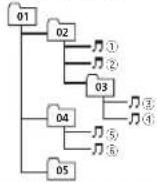
Level 1 Level 2 Level 3 Level 4
Folder Compressed
audofile
CtoQ5.Folder
number
ToPlayback
sequence
Disc
To dereslect onsequencecotheroperatior maydiferencedependongneheemcodingorwriting software.
Externalstoragedevic USB)
Theplaybacksequencichesthesamasthemercordedsequenceintheexternalstoragedevice (USB).
TosocCytheplaybacksequence,thelowing methodisrecommended.
Additional information
1Createafilenamethatincludesnumbers thatspecifyplaybacksequencethe.g. 001xxx.mp3aand099yy.mp3). 2Puttosefiles.nctafolder
3Bavelthefoherthatcontainstheftlesstothe extemsteongedevicse(USB)
However, depending on the system environment, your journey may be affected by the playback sequence.
TorJSportlab.eu dio players, the sequence differentanddependentsontheplayer.
Usingthedisplaycorrectly
CAUTION
lllifidiorforeignnallershuldgelinside thisunit,turnoffhepowerimmedieryand consultyourdaldortencancarstahztorized PIONEERServiceStalion.Donotusethe unlininthisconditionbecausedsccmay resultintheelectricshockortherfura.
If you are a member of the organization, please use the following information to complete your enrollment process.
Condlsssserrblemodifthisnil as
therarchhigh-voltagecomponentsin de
whichmaycausoelectrccnsoc4.Basurto
consulcycurdesalerchenearestauthcrized
PIONEERServiceStationforinternalinspc
tionadjustmentsorpmairs.
Handlingthedisplay
-
Nevertouchthescreenwithanythingbesidesourfingherwhenoperatngthetouchpanelfunction.Thescreencanscratcheasily.
-
WhenthedisplayissuedeductodirectsunlightforalongpencoofftimeitwillbecomeveryonrssultingpisscbidamagetotheLCDscreen.Youshouldavoidexposingtdisclayuntdirectsunlightmasmuchaspossible.
Theolplays should be used within the temperature rangeof 14^ to 140^ . Actemperatursin higherorderthanthis operation during temperature range. The display may not operate normally.
Thel CDscreenexposedorderioncreaseisvisibilitywithinthinevichie.Donot pressilsbongyilonilashtismaydarnageill. - DomustushtheLCDscreenforcefullyas thismayscratinit.
Liquidcrystallisplay(LCD)screen
- Heatfromtheatermaydamageel eLCD screen and coolair from theccoo ermy causmoisturoftoform inschohodisplayresulting in possiole damage.
- Smallblackotorswhiledcts(brighldots) mayappearonthecLCDscreen.These are optohoeharacteristicsotheLCDscreen andconsignicaleamalfunction.
- When using acellu arphone, keep the antennawayfromtheocisplaypreventdisruption oftheviceimagebythe appearanceofspots,coloredstripesetc.
LED(light-emittingdiode)backlight
- Allow temperatures, using the LEDbacklight, may increase imageagelandograactice. Imagequalitycollotheracteristics of the LCDscreen. Imagequalitywill improve withinincasingtemperature.
-Toprotocathel FDbacldight,thcdisplaywill
darkeninthefollowingenvironments: -Intdcrtdsunlight -Narthcheetontent

Additional information
Theo productltimeoftheLEDbacklight morethan 1000hours. Ihowever, it maydecreaseifused hightemperaturest.
- IftrelLEDbacklightreachestheendofits productlifetme,thescreenwilbecemedark andtheimagewinlongerbereprojected.In sucnces,pleaseconsultyourdeariorthe nearestauthorizedPIONEERServiceStation.
Keeping the displayngood condition
- When removing out from the screener cleaning the spay, first turn the system poweroff, then wipewithasoft drycloth.
-Whenwipingthescreen, takecarenotto scratchthe surface.Donutaseharshor abrasivechemicalcleaners.
Bluetoothprofiles
IncertcuseCBluetoothwirelesstechnology, devicesmustbe able tointerpretcertaintop files.Thunitiscompatiblewiththe following profiles.
- GAP(GenericAccessProfile)
SDP(ServiceDiscoveryProtocol) - OPP(ObjectPushProfile)
- HFP(HandsFreeProfile)
HSP(HeadSelProfile)
PBAP(PhoneBookAccessProfile)
A2DP(AdvancedAudioDistributionProfile)
AVRCP/AudioVideoRemoteControl(rolProfile) 1.3
SPP(SerialPortProfile)1.1
License,WarrantyDisclaimer &LimitationofLiability SAFETYPROVISIONS
Disclaimer
THEWARRANTYFSSFITORTHINPIONEERTS LIMITEDWARRANTYARETHECNLYWARRANTIESVADHYPIONERFORANYOTITSICEN SORS,ASAPPLICABLEPIONFRANDITS LICENSORSEXPRESSLYDSCLCLAIMALLOTHER WARRANTYES,EXPRESSORMIFIEDLINCUDINGWHOUTLIMITATION,WARRANTIESOF MERCHANTABILITYANDFITNESSFORAPARTICULARPURPOSE.
LimitationofLiability
TOTHEMAXVUMEXTEXTPERMISSIBLE UNDERAPPLICABLE LAW,NEITHERPIONEER NORITSLICENSORSWILLBELIABLETOYOU ORTOANYOTHERPARTYFORANYINDIRECT, CONSEQUENTIAL,INCIDENTAL,PUNITIVE,OR SPECIALDAMAGES,REGARDLESSOFTHE FORMOFACTION,WHETHERINCONTRACT ORINTORT,INCLUDINGNEGLIGENCE,EVENIF SUCHPARTIESHAVEBENADVISEDOTHEPOSSIBILITYOFSUCHDAMAGES.
TOTHEMAXIUMEXTE NTPERMISSIBLE UNDERAPPLICABLELAW.PIONEER.S ORITS LICENSORS, TOTALLIABILITYOFANY KIND ARISINGOUTOFORRELATEDTOYOUR USE OFTHEPRODUCTS,INCLUDING BUTNOTLIMITED TO ANYWARRANTYCLAIMS ORANYCLAIMSFORPROPERTIESDAMAGE,DEATH OR DISABILITY,REGARDLESSOTHERFDRUM ANDREGARDLESSOFFHETHERANYACTION ORCLAIMSBASEDONCONTRACT,TORT,(INCLUDINGNEGLENCE),STRICTPRODUCTU ABILITIES,ORANYOTHERLEGALTHEORY.WILL NOTEXCEEDONTHOUSANDDOLLARS(USD $1000).
Additional information
SOMEJURISDICTIONSDONTALLOWTHE EXCLUSIONOFDIAMGESORLIMITATIONOF LIABILITY,SOTHEABOVEXCLUSIONSOR LIMITATIONS,TOTHEEXTENTPROHIBITED BY APPLICABLELAW, MAYNOTAPPLYTOYOU, YOURSPFCITCRIGHTSMAYVARYFROMJURISDICTIONTOURISDICTION.
libpng
PleasebeswareindvancehalPoneerwillnot responddoquestionsconcerningthecontents ofthosoccurcecode.
ThislicnceawasoriginallywritteninEnglish andtransaligereonlylohelphereader understanditscontent.Therefore,pleasancote thatatranslatedlicncecisNOTlegallyidentified withtheoriginalEnglishlex.
This copyof thebnpognoticesis provided for yourconvention.Insocafanydiscspancy betweenthiscopyandheroicnesinthfile. pg.htssincludedinhelbpngdistribut on thcathershallprcval.
COPYRIGHT NOTICE, DISCLAIMER, and免责声明:
ifyoumod fylipopoumayinsertadditioa
nolmesimmed alefoyowingthissence.
ThiscodelseleaseduncertehelbingLicense.
libongversions1.2.6.August15.2004,through
1.5.0-January2011,areCopyright(c)2004,
2008-2010GlennRanders-Pennson,anddaredis
tributedaccordngtothesamedisclaimerand
licenseslippg-1.2.5withthe following
individual addedtolhelistofContributingAuthors
CosminTruta
libongversions.1.0.7.July1,2000.through1.2.5 -October3,2002,areCopyright(c)2000-2002 GlennRandersPehson,andaredistributecdacordingtothesamedisclaimerandicenses libong-1.0.6withtherefollowingeIndividualsadded tothe listofContributingAuthors
Simon-PierreCadieux
Eric.S.Raymond
GillesVolant
andthefollowingadditionstothedisclaim
er:
Thereisnowarnanyagainstinterferencewith yourenjoymentofthelibarayoragainstninfre ment.Thereisnowarnanythatoreffortsc thelibrarywifuftillanyouparticularpurposessmeeds.Thislibraryrisprovidedwith all faults,andtheentereriskofsatisfactoryquality, performance,accuracy,andeffortiswththe user.
liopngversions0.97,January1998,through 1.0.6,March20,2000,areCopyright(c)1998. 1999GlenRanders-Penson,andarcdistribu- tedaccompanyesamediscamerand - conscaibligo-0.96,with+ofollowing individualsaddedtotheftostContributingAu- hors:
TomLane
GennRanders-Pohrsen
WillemyanSchaik
liipngvions0.89,June1996,through0.96 May 1997,amcCopyright@1936,1997Andreas DilgerDistributedacordinglothesamedisclaimerandricesaessiblog-0.99,withthe followingindividuals:addictochondrist
ContributingAuthors:
John Bowler
KevinBracey
SamBushe!
MagnusHolmgren
GregRoclcs
TomTanner
liopngversions0.5,May1935.through0.88 January1996,areCopyright(c)1995,1996Guy Eric Schnaett.Gm.p42.Inc.
Forthepurposesofhiscopyrightandlicense, "ContributingAuthors"isdefinedasthefollow ingsetfndividuais:
Additional information
AndreasDilger
DaveMartindale
GuyEricSchalnat
PaulSchmidt
Tim Wegner
TRePNSG Reference, braryissupplied ASIA. TreContributingAuthorsandGroup42,Inc.dis claimll warranties,expressedorimplified including,withoutlimitation,thewarrantiesof
merchantabilityandfittnesortanypurpose. TheContributingAuthorsandGroup42,Inc.asa.sumenpliabilityto/direct.indirect,incidental, special,exemplary,orconsequentaldamages whichmayresulfromtheuseofthePNGReferenceLibrary.evenifadvisedtohepossiblityof suchdamage.
Permissionsherebygranled,ouse,copy,mod-ty,anddistributethiscourccode,or portions hereof,foringurres,without,subjectto The following restrictions:
- The original thissourcececocemusinlcbe misrepresented.
2.A drieders onstrus.mebipaimlymarked as suchdromus.nctbemisreprentecasing the original source.
- This Copyright Notice may not be removed after altered from any source, craller or the source distribution.
TheContributingAuthorsandGroup42,Inc. specificallypermiL,withoutfee,andencourage throusporthisourcoccoccascomponentstopartingtncPGSfiletomatinccmmercial products.Ifyouusehssourcdocemaproduct,acknowlogmentisnotrequired,butwould beappreciated.
A'png_gel copyright'functionisavailablefor convenient,seant about'boxesandtheles: printit%o,ong getcopyright(NULL); Also thePNGlogo inPNG/frmclfocoursels
s.policediffles'pngbar.png'and 'pngbar.jpg(88x3)' and 'pnggrow.png'(89x31). LibgrpOSiCertifedOpenSourceSoftware. OSiCertifedOpenSourcecertification marktotheOpenSourceinitiatve.
GlennRanders-Pehrson
glennpatusers.sourceforge.net January 6,2011
Copyrightandtrademarknotice
This itemincorporatospecificationtechnologicals, including:
1) the use of a high-quality, well-designed, and efficient technology service;
2) the use of a high-quality, well-designed, and efficient technology service;
3) the use of a high-quality, well-designed, and efficient technology service;
4) the use of a high-quality, well-designed, and efficient technology service.
Bluetooth
TheBluetooth®wordmarkandlogosarereg s terodtrademarksownedbyBluetoothSIG, Inc. andanyoecfuchmarksbypIONER CORPORATION sunderLicense Othertrade marksandtradenamesarethoseoftheirespectiveowners.
DVDvideo
DVD is trademark of DVDFormat/Logo Licensing Corporation.
iTunes
Apple and iTunes retraceemarks at Apple Inc., registered in the U.S. and other countries.
MP3
Supply of this product conveys salicenfice private, non-commercial, used products, including:
conveyi censornormpa ynghtoucthisproduc tionary commercial (i.e. revenue-generating) realtime broadcasting (ferreserial, satellite, caocand oranythoctrimal), broadcasting/ streamngvialternel, intraneisard/rother networksor notherectronic content distribution systems, such aspay-audioaud o-on-ommandaplications Anindeparentenc license for such use required.Fordetails,pleasevisit http://www.mp3licensing.com.
Additional information
WMA
WindowsMediaisetherarestedtrademark
ortrademarketMicrosoftCorporationinthe
UnitedStatesand/orthercountryside.
This product includes technologycopyrightedMicrosoftCorporat onandcannobasededor distributedwithoutalicensefromMicrosoftLicensing,Inc.
iPod&iPhone
iPhone.iPod,iPodclassic,iPodnano and iPod toucharachtrademarksofAppleInc., registered in the U.S.and other countries. LightningisstrademarkofAppleInc. "Made for iPoc"and "Made for iPhone" mcer thalatelelectronicaccessoryhasbeendesigned loconnectspecificallytoiPodoriPhone,respectively,andhasbeencertfiiedbythedeveloperto. moecAopieperformancecostances. Applics noresponsiblefortheoperationofthis device oritiscompliancewithsafetyandregulatory standards.Plesonotethatthousooth cascessorywihiPodoriPhonemayeffectwireess performance.
Android&GooglePlay
AndroidGooglePlayeretTrademarks.com GoogleInc.
DolbyDigital
ManufactureunderLicensefromDolby Laboratories.Dolycanthedouble Dsymbol areltrademarksofDolby laboratories.
DivX
DivX,DivXCertified and associaedogosare trademarksofRovCorporationortssusidaesandansuredusterclease.
Appendix
ABOUTDIVXVIDEO.Divx isdigitalvideo formatcreatedbyDivX.LLC.asubs diaryofRov Corporation. This sanctiificial DivXCert filed deviceatplaysDivXvideo.Visiotivc.com for moreinformation and softwarecolstoconvert yourhires intoDivXvideos.
ABOUTDIVXVIDEO-ON-DEMAND This DivXCertified devicemustbergedirin ordertoplaypurchasedDivXVideoonDemand (VOC) movies.Toobtainourregistrationcode, locatetheDivXVODSection"Displaythe DivX VODregistrationcode.Gotovoddivx.com formorer information nowtocompleteyour registration.
SiriusXMSatelliteRadio

SiriusXMandalrlatedmarksanclogosare trademarksiriusxMRadioInc.Ailrntreserved.
Pandora® internetradio
PANDORA.thePANDORAlogo,andthe PandoradadeorepressaretreademarksreregisteredtrademarksofPancoraMedia,Inc.Used withpermission.
MIXTRAX
MIXTRAXisatrademarkthePIONFER CORPORATION.
MirrorLink
MirrorLinkCertifedTM,TheDesignOnlyTM Certificati onl logo,Mirror linkandtheMirror link Logoarcertificationmarksanctradiomarksof TheCarConnectivityConsortumLL.Unauthor Izoduscisstrictlyprohibited.

Additional information
LanguagecodechartforDVD
| Language(code),inputcode | ||||
| Japanese (ja), 1001 | Dzongkha (dz), 0426 | Kurdish (ku), 1121 | Kinyarwanda (rw), 1823 | |
| English (en), 0514 | Ewe (ee), 0505 | Kom (kw), 1122 | Sanskrit (sa), 1901 | |
| French (fr), 0618 | Esperanto (eo), 0515 | Cornish (kw), 1123 | Sardinian (so), 1903 | |
| Spanish (es), 0519 | Estonian(eo), 0520 | Kingniz/Kyrgyz(ky), 1125 | Sindhi(sd),1904 | |
| German (de), 0405 | Basque (eu), 0521 | Latin (la), 1201 | Northern Sami(se), 1905 | |
| Italian(t), 0920 | Persian(la), 0601 | Luxembourghish(lb), 1202 | Sangno(sq), 1907 | |
| Chinese (zh), 2608 | Fulah (fl), 0606 | Ganda (gq), 1207 | Sinhale (si), 1909 | |
| Dutch, Flemish(nl), 1412 | Finnish (fn), 0609 | Limburgan (ll), 1209 | Slovak (sk), 1911 | |
| Portuguese (pl), 1620 | Fijar (fi), 0610 | Lurgia (lr), 1214 | Slovenian (sl), 1912 | |
| Swedish (sv), 1922 | Faroeese (fc), 0615 | Lae (lo), 1215 | Samoan (sm), 1913 | |
| Russian(ru), 1821 | Westem Frisian(af), 0625 | Lthuan an(lt), 1220 | Slovenian(sn), 1914 | |
| Korean (ko), 1115 | Irish (ig), 0701 | Luba-Katarga (uk), 1221 | Somali (sc), 1915 | |
| Greek (kl), 0512 | Gaeic (gd), 0704 | Latvian (lv), 1222 | Albanian (sq), 1917 | |
| Afrika (ea), 0101 | Galician (gl), 0712 | Malagasy (mg), 1307 | Serbian (sr), 1918 | |
| Azerbaijan (ab), 0102 | Guarani (gn), 0714 | Marshallace (mt), 1308 | Swati (ss), 1919 | |
| Avostan (ac), 0105 | Gujarati (gu), 0721 | Maori (mi), 1309 | Sotho,Southam(st), 1920 | |
| Afrikaans (az), 0106 | Manx (gy), 0722 | Macedonian (nik), 1311 | Sundanese (su), 1921 | |
| Akan (ak), 0111 | Hausa (ha), 0801 | Ma ayalami (mi), 1312 | Swahili (sw), 1923 | |
| Amhara (am), 0113 | Hebrew (he), 0805 | Morgolan (mn), 1314 | Tamil (te), 2001 | |
| Argonese (an), 0114 | Hindi (hi), 0809 | Marathi (mr), 1318 | Telugu (te), 2005 | |
| Arabic (ar), 0118 | Hindi Molu (no), 0815 | Malay (ms), 1319 | Tajik (tg), 2007 | |
| Assamese (as), 0119 | Croatian (hr), 0818 | Meltse (mt), 1320 | Thai (th), 2008 | |
| Avanc (av), 0122 | Haitian (ht), 0820 | Burmese (my), 1325 | Tigrinss (t), 2009 | |
| Aymeras (ay), 0125 | Hungarian (hu), 0821 | Nauru (na), 1401 | Turkmen (tk) 2011 | |
| Azorbaijani (az), 0126 | Armonian (hy), 0825 | Bokmal (nb), 1402 | Tagalog (tl), 2012 | |
| Basinskir(ba), 0201 | Hamerod(hz), 0826 | Ndebe e North(no), 1404 | Tswana(nu) 2014 | |
| Belarusian (be), 0205 | Interlingua (il), 0901 | Nepali (ne), 1405 | Tonga (to), 2015 | |
| Bulgarian (bg), 0207 | Indonesian (id), 0904 | Ndonga (ng), 1407 | Turkish (t), 2018 | |
| Bihari (bh), 0208 | Interlingua (ie), 0905 | Nynorsk (ny), 1414 | Tsanga (ts), 2019 | |
| Bis ama (bi), 0209 | Igbo (ig), 0907 | Norwegian (no), 1415 | Tatar (tt), 2020 | |
| Bambara(br),0213 | SichuanY(ji), 0909 | Ndebe e South(nr), 1418 | Twí(w),2023 | |
Additional information
| Language(code),inputcode | ||||
| Bonga i (br) ,0214 | Inupiaq (k) ,0911 | Navajc.Navano (ny) ,1422 | Tahltiany (cy) ,2025 | |
| Tibetan (oo) ,0215 | Ido (i) ,0915 | Chichewa (ny) ,1425 | Ughur(Lygnur(ug) ,2107 | |
| Breton (br) ,0218 | Icelandic (is) ,0919 | Ocotan (oc) ,1503 | Ukrainian (uk) ,2111 | |
| Bosnian (bs) ,0219 | Inuktut (ju) ,0921 | Ojiowa (cj) ,1510 | Lrdu (ru) ,2118 | |
| Cataran (ca) ,0301 | Javanese (jv) ,1022 | Oromo (or) ,1513 | Uzhek (uz) ,2126 | |
| Chechen (ce) ,0305 | Georgian (ka) ,1101 | Orya (or) ,1518 | Vanda (va) ,2205 | |
| Charrasco (ch) ,0308 | Kongo (kg) ,1107 | Ossetan (os) ,1519 | Vietnamese (vi) ,2209 | |
| Corsan (cc) ,0315 Kikuyu, Gilkuyu (ki) ,1109 | Panjato;Punjabi(pa) ,1601 | Volapikore (vo) ,2215 | ||
| Crea (cr) ,0318 | Kuenyama (kj) ,1110 | Pan (pi) ,1609 | Walloon (wa) ,2301 | |
| Czech (cs) ,0319 | Kazakh (kk) ,1111 | Polisni (pl) ,1612 | Wolot (wo) ,2315 | |
| Church Slavic (cu) ,0321 | Kalaaliisut (kl) ,1112 | Pashto.Pushto(ps) ,1619 | Xhosat(n) ,2408 | |
| Chuvash(yv) ,0322 | Central Khmer(km) ,1113 | Quechua(qu) ,1721 | Yiddish(yt) ,2509 | |
| Welsh (vj) ,0325 | Kenneda (kn) ,1114 | Romansh (rr) ,1813 | Yoruba (yo) ,2515 | |
| Danish (da) ,0401 | Kanuri (kr) ,1118 | Runci (rn) ,1814 | Zhuang,Chuang(za) ,2601 | |
| Divehi (dv) ,0422 | Kashmiri (ks) ,1119 | Romanian (ro) ,1815 | Zu u (zu) ,2621 | |
Additional information
Specifications
General
Powersource.1442DC108yto15.1Val
owable)
Groundingsystem.....negative type
Maximumprecurrentconsumption
10.04
DimensiorwXHxD)
Chssis. 78mX96mmX162mm
Continuous power output
22W×450Hz1c15000Hz
bH2
Load Impedance 4Ω (4Ω to 8Ω (2Ω for 10s)
alcyaie
Prcoutmaximunautoutesel
.0
Additionalinformation
Dividscodingformat.....HomeTheater/er34520
(ExcepuTuaRDHO),avi.
MPGc#depcnrcfomr
MPF0MPF02MP74
fargMSVPEG1fysr3
USB
USBstandardspecification
USB1,1,USB2,0fu Speed
Forcedes
US520bighspeedFor
aucicss
Maximmunmurnsuply
1.07
USEClass .MSCVMassStorageClass)
M PMedal transterProb
Flesystem. .TAT16,FAT32
MP3decod nfoformat...MPFG-1&2Auid sayer3
(Windows Media Place)
A/pcodingformar....MPEG-4/SiTu pesencopcd
017
WAVIMSCMoneonly:
WAVsignaIormat....LineARPCM,VSAIDPCM
Sample Frequency..1inepcPCV:16k1-72205k1-7
243.323.441
4
MSAGCM22064K
14.6.2
JPEG(MSCModeonly)
Hdscngrntal
PeyelGamol 622420
Paeep
MN=320×320m
DinXeoddinglormal/MSMocomnly
1
ExcepuutaardHcy
and
MPEGVideodecodinatmal(MSCModenly)
MPTG.MPTG2.MPTG4
(part2)MS-VPFG4ver3)
Usable sensitivty 9d3f0.8y75m mon:Sn
3013
Signal to nisceratio... 80dB(dg tallbroadcasting)
(1)F-A
AHX300EHSAVHx300PHS1
SignaIte niscrlig....720H analcoobroadeslril
(1)Angeweg
AMtuner
Frequencysange. 530k1zto1210x1z10d1b)
Usablesensitifity.25pV(SN2CnR)
Signal-to-noise ratio. 60dB (digital transmission)
Anetwork
(AV1X2500BISAV1X350CBIS)
Signal-to-noiseratio...62pR(analogbroadcasting)
(1-F-Anetwork)
Bluetooth
(AH-HX500BHS/AYH-46C0BT/AVH-X3600PHS/AVH
X2600H
Version...Blectoth8certified
P
(Powerr ass)
CEA2006Specifications

Poweroutpu 14Wrmsx4Channels:40
and≤%H2+N)
S/N ratio. 91 dBA(referenc:1W nlo
4Ω
Note
Specifcationsandthcns gnaresubjectto
modificatonswitncnvoice.
Tabledesmatieres
01 Précautions
REGLESDEPROTECTION IMPORTANTEST2
Pouruneconduiteenteotesecurite72
Modeedemonstration 75
Descriptionl'apparell Apparellceneral75
Atticheurd accuie
Mssen/hcrssservicedclasource76
Cheixd unesourc76
Reageucvulme77
Telecommande77
Opérationscommunes
Utilisationstandarddesementsceneru/ lists78
Utilisationgeliconecedefilementetda
barredeleclure78
Activationdosteouchesduclavier tactile78
Lecturea eatoire(shuffle)89
Repétitiondelalecture89
Recherchedelapartieuevccssounitez
89
Choixdelaosrcaudio90
LecturePBC90
Choixdesplagesesacertindelalisteoeestres
deplages90
Tabledesmatieres
Choxdesfchiersapartirdelalistedes
nonsdefichiers90
LectureducentenuVODd'unDivx@90
iPod
ContraldeiPd91
Utilisationdelalectureaudio91
Utilisationdesimagedesvideds92
Ullisalondelaefonl Poddecel
appareisuryctrePcc92
Lecturealeatp93
Repetionalelecture93
Lecturedevicepesanapartiderve
IPod93
Selectionetlecturedestationsceradic
Pandora/aleato102
TelephoneBluetooth
Utilisationdute telephoneBluetooth103
Appocfunnumroedanuare104
Selectondunnumeroalaidedumode
Accuntuaiondesgraves108
Uilisatond.rifitrapasse-haut108
Austiemenides neauxdes 100
sources108
Lecture/automat guedes/DVD111
Réglagessysteme
Miseenservicecucunorservicedefentree
auiiire111 PnndnnnnaeA
Regiagder entreeAHTI Regiagder utmoder
Regiagoadsmedenravgnnrrnn
Pandora111
SeleclndmodeVrrgLink111
Bleecm135 Misceurduo
Innssnnnsnsnsnsnsnsnsnsnsnsnsnsnsnsnsnsnsnsnsnsnsnsnsnsnsnsnsnsnsnsnsnsnsnsnsnsnsnsnsnsnsnsnsnsnsnsnsnsnsnsnsnsnsnsnsnsnsnsnsnsnsnsnsnsnsnsnsnsnsnsnsnsnsns
Bleetcoth115
Installation and microphone128
Misehorservicecelesource.
Descriptiondel'appareil
Bluetoothtouche
AffichagedumenudeconnexionBluetooth.
6themetouche
Affchapedumenutheme.
Icóngedmenu
Affichapedmenu.
Sourcetouche
Affichagedumenusource.
⑨ Clocktouche
Passageal'ecranderegagedelhorige.
Miseen/horsservicedela source
(FonctiondeAVH-X5600BHS/AVH-X4600BT)
Missouston slondclassouareal'sldocostu cies
AduayezsurSRC/OFpourmetrelsource oneservica.
Misehorstensioniora asurocoal aidedestou
Appuyesurcelletelouchepcurarrerlalecture.
Sivousreprezdelecture,cellederniereere preidacouvus'aviezarrlee.Toucheze noucaulatouchepourarretota emontla lecture.
FOLDER/P.CH
Spcificationdopointdelecture faiesgelisserdepointdelecturelaean.
Opérationscommunes
Indirectly derived: ages, s. cles, le, nandehinter prete, acceded idenf. fatic dedssions, legic, icides canax-H2O-L03, aims uocudau, coi, uocdormeus, li
H02/H03
Lescana1, ID21 ID3,caanx,IMocasaunadiscoantse caanprncip,offertunamusique nouel aetorcinale, ainqu/uneangrecane/degecarnesrruicaux.
Digital Sound
Somniur quodquodquillKDLaTechnologie IITRadio permaetaxionennderedelaLoSmedtreuinsigna numerieleur LesardelabandeAMs apperenieau sone tabande-Meussoniel tabande-MA aparenle acell,linCD
iTunes Tagging
LaftonionTunes Taggingnu spermeneauovir unelargegammenecontenusegelamend vnetquter kooconurupourcoguulatunlureucuracchachdars lacouquicunus
Artist Experience)
Information visuales lesseuaucontenuis unscienoei nepeepur IRDAIC commelesne sappedatbclum la photographicae ciencerie, lescuplured'emissionsnici rcel, uinauscienceoncomusics.
TechnologieHDRadioTM
Tecnologie HD-Radietahrquocousislicnce possedepar BiquityDigitalCorporation U.S. eldestrevelserngers.HDRRadioTMelloslogos HD,HRDaclof+Arc+sonfasmarques commercem a esceBllqityDigitalCorp.
SyntoniseurHDRadioTM
⑤ Touchedestationlocale
⑤ Touchedepreselection
Acoordmanuvelers ehautolebas. Enoncezlatoucheefagongprolongeependanplusoeiedeuxseqondespucnngcrerdes stations.Iacordauatmatiqueemaredes quevoisrelachzatecAppuyezanouveausurlatouchepcourannulerIacordautomaticue. Iorsouunestationanalogiquesestresque.Iacorderversbasesexteculelderemissionanalogique (6 2) Suncemssionnumenqonestpascnccoreque,Iacordervershealestexeculesumuaedelastationanalogiquesuswante. (3) (8)
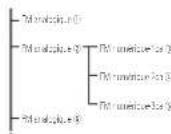
Touchedeliste
③Touchedestationlocale
Régieçod'acordaute-matéorésurune stationiscale.
Touchedepreselection
Accordmanuelsehauloulebas.
EnoncezlatouchedefaconprolongedependantplusdedeuxsecondspourignoronedestatsIaccorautomatquepedamarracquevocourselacheratoucheApoyezanouveausurlatouchepourannurleraccordatomique
⑤Touchedeliste
Attichedealistedescauxpresectiones.
11Touchedepreselection
Selectiondirected'uncanal SiriusXM
iPodnaroTerregeneration
-iPhcpe5
Lecture/cause
Avance/retour apide
Avance/retoundune
Avance/ajouedupchipta
Selection undossier.
Touchedemoded'ecran
Changemtldumodecran.
Reportz-vousalapago79,Changerlemode deanlarge.
Touchedepauseetlecture
Executionouinlerruptiunduciaporama.
Opérationsdebase
leerre'manrss
60s(80 sec.)—90s(90 sec.)—120s(120 sec.)
-150s(150 sec.)—180s(180 sec.) Aléatoire (alatoïre) Off(désacte) LorsquelierageLalatoire esteection et, tempsdeteclareverairene60s.90s, 120s.150sat180sdemanikraéatotia chacuechangementdeplagermusicalepen-pandalecture.
Supress on de stations
Touchedecontrolevocal
Remarques
Je noupcvexuululserimodepriveque Iorsqvouvusparlzautfikphon.
S.BassAccentuationdesgraves
PuisantAccertuaiondelapuisance
NaturelSonoritenele
Vocal
Plat Absencececon
Perso1 Courbepersonnaliseel
Perso2 Courboepersonnaliso2
Accentuationdesgraves
VouspouvezrenforcerleniveaLdesgraves.
1 Appuyesezuriatoucheaccuellpurpasseral'ecnand'acquel.
4Touchezlanguedesiree.
4Touchezlanguedesiree.
- Off-V/etherserviceacupure/etherton-cusor
Remarques
Yespoursupponmerleperipheique.

Red—Amber—Green—Blue—White—Personalisation—Rainbow
Installationdumicrophone
(FonctionlaVAXX560CCHS/AVH-X4600BT/VAX+X3600BHS/AVH-X2600BT)

PRECAUTION
Ilextextremementdangereuxdeaisleeireidou microphone enroulerautourdelacoonne directedonodu evierdevtease. Assurez-vous d'installercepsapareiletelemariereoulin genepaslaconduite.
Remarques
-Instai ezlemicropornedansunepositionen unereclntion qunquilpermetmedecapctor voixdelpersonnequiquiltelesysysteme.
- Ulszedesser-e-fiservucssaparente pourfixerilellac'scncesaairedansle vehicule.
Sivousinstallezlemicrophone surlepare-soleil
1Inserezlefldumicrophonedansla fente.
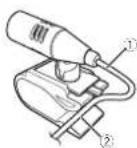
①Ficorn cophore ②Reinure
Installation
2installlezeclipmicrophoneSURPARESOELI.
Avecpare,soleireleve,instalizecionmicphone.(Abaisseriepare soleireduitileauxteconnaisancevoicae).
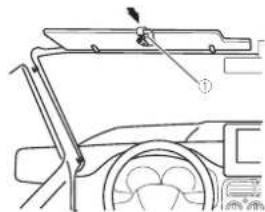
①Clprincphane
Sivousinstallezlemicrophone surlacolonnededirection
1Detachezlabasepourmicrophonedu clipmicrophone.
Lettate natereservice, Metted atte nateresorh
Sautdansl'audioetavideo.
'Apparatus Inespress fixfierment. Fixtoformornappi,appariel.
Larpetitiondelectureetarecherchedepeage/ rechterechemtampresenstospapabies.
LeCDVidencouncsdelecturependenciechargea functionPBC. Cetopoeationn'testposdisponibileveced
Audio/TelephoneBluetooth
LesondelasourcecaudioBluetoothn'estpaslu.
Unguapehencnccurunntefhoneportable Buortorncnpctre.
Lesonserafuquand acommunicationere.
RITIENIE.
Urticopeptide Blutooth connectostexon course utilisation.
Nulilisgeoslelelelepehreepoebapoeepour Instart.
Uraspealarefaivecuree eononeportable Bluetoothconnactaeusimmiedemantcoupell eresultaoue communicationerctapparil eletieononeportableapasetecupccorrectement.
Rafeiastac.com;iond;Bluetooth;netcast appreisieltiet eonnopeatable.
Messagesd'erreur
Quandouscontaclzevodistribuheuroule ServiciendetretionagredparPioncorioplus proche.n'oub'epasdenoterlemessaged'erneur.
Losmssagocrmapparaisontongrasct escauseessuslafoamedexeleregulleron ndenteLelexeregulrndenteLutisipour indiquercactionsamotreconve.vrc.
Commun
ErreurAMP.
Unenanormaledefconictionnemdlapparell'est produelouacixmiondeshuiu-darleurssincor recto.LocuIcIocpctononactivc.
Venfiezconnexordeshaut-parneurs, Sile
messengeredisparatiasmeimapresivd
ctaintpuisodmarlomoturconsutzytro
distributourcuncontrd'entictionagropar
Pioneer.
Syntoniseur
Pasdedonneesfournies
Cetaparaleinepuaserevoresinformations surnomdeld'artiste/attredelapagmusicale. Deplacee-eversumendroitoulareceptionnest borne
Pascedonnées
CelappareInepauppaeovrresinfarmationsnde
monduerserviceprogramme.
Doplacoversunondroitolarscptionost
borne.
RadioSatelliteSiriusXM
Verificatondel'Antenne
Laconnexiondellantmeesincorrecte. Verifiaoclonnnexordell'antenna.Silemessage ndisparpalmmeaemravseioptentipuis demarrelmoteeconsultezvotredistributeur ouencencredetrelirengreepriorner.
Pannedecommunication.
DéconnectezleécblediPod,Quandlemenu princpaldeI'Poestafniéne,neconnectez neinlaiszH Pod.
Démarrezapp.Pandoraàpartirdel'appareil.
L'applicationPandora'spasoncorde manre.
Demarrezl'applicationPandoraapertrecvto
iPhone.
Aucunestationselect onthe. Selectorneuzestation.
ErreurderecommunicationMercidereconnecter I'appareil.
Communicationerroroccurred.
Uncmaurtdecommunicationstcproduc. Decorconnectzobacloubocusmartphone,puls reconnectelesmartphonieaepesquelques seconds.
-MotozlocaptacsturOff,culssurACCUON Sihermesegederneursallicheneconepresi cxcutio ndoccttcactionrdinitialiser smahongc
Sternessaged'errues'afficheemcorrespres exculfiendocotactioanschutzyztredistutusouncontradntrotionsgraspoePioneer,
Launchingtheapplicationfailed.
Echecudemarragedel'application
In yapasdocompatibitcJpGprogress.
FichiersvidéoDivX
Enfonctiondolacompostiendl'information sur lescienlslequenurnedestream audio oualalliedefichior,pueseproduunmigeraterielldolaftcudredssques.
Certimesopérationsspectaclespeintreirien dlescausedelacompositiandesfiichensDivX
Débitbirame:48kbit/s/320kbit/s(CBR).VBR
WindowsMedia™ AudioProfessors onLossless, Voice/DRStreamy/Streamavocv deci:ncompable
MP3
Listedlecture 3u incompalble
MPSi(MP3interactif),mp3PRO incompatible
AAC
Fornatcompalib AAEncodepanTunes
Extensiondorlichern.m4e
Frequenced'ehantil onnage:11.02sk-za48kHz
Debitnainc:16Kbits/sa320Kbits/s
AppleLossless: ncompatible
Hich /aAacchetsurilTuneStones extension dotcher.mca):ncormatible
CompatibilitéDivX
Formatticmpalibc formvivinDxXingnlemie onionrelavoc voststandardsDXV
Extension sdefichier,aviou.civx
FormatDivXUltraIncompatible
FormatDivXHD;incorpatabile
Fich er/SDivXsansdonneosvidoe:incompatible
DivXplus incompatible
Codocaudicompatble:MP2,MP3,DolbyDigital
LPCMcompatible
Debitnaine:6kbiysa32xby/sCBVBR
Frequencéchantill onrnage:8kHz64kHz
Exponential functions, 186

Poadnncemcgeneration
-POoHnO4emegeneration
Ponnoeemegeneration
iPc
一Phone4S
—iPhone4
iPhoc3G5
iPb03G
一Phone
Lesinformationssuraplagmus ca etiellepeuvenletreng steeesuvore Podaparidieastation emissionLsplagcssmusicelesperseinteronisousformedelistele lectureapplee"Listedelectureequeet dansiTunorslordiasynchronisationsuivantodevoPocVouspouvezonsutiodrectomacheercesolagesmusicalesaupresdumagasiniTunusStoc.
Lespagmos muscalcietquotecstap agomus
sicalequevouspouvezacetaherupresd.mags
siniTunesSlreceuventcdifferer.N'oubliepzas
crvalideraglaptemcaevantocprocedora
sonchat.
Sivusnepuoyezosulisernormalem ent cctfon, metzajpurlcimwardevre IPod.
Bambara(bm),0213Yidusichuanvili,0909
Kurdie (ku), 1121 Kinyarwanda (rw). 1823
Komi (kv), 1122 Sanskrit (sa), 1901
Comique (kw), 1123 Sante (sc). 1903
Kingzjki,1125 Sndh(sdi),1904
Latin (la).1201 Sam du Nord (sc), 1905
Coeerntinggeoob, Sanpoisot 1907
1202
Ganda (g), 1207 Singhalais (s), 1909
Imbourgeois (II), 1209 Slovague (sk) 1911
Lirpala (r), 1214 Slovene (sl), 1912
Laetien (c), 1215 Samoan (sm), 1913
Ltuanien(t),1220Shone(a)sn),1914
Malgacne (m), 1307 Serbe (s), 1918
Marshallais (mh) 1308 Swazi (ss), 1919
Mardir,1309 Sothdu Sut (sl).1920
Macédon (m), 1311 Soudanais (su), 1921
Malayalam (ml), 1312 Swahil (sw), 1923
Mongol (m), 1314 Tamil (a), 2001
Marathi (mr), 1318 Telougou (to), 2005
Mala s (ms), 1319 Tadjk (g), 2007
Maltais (mt), 1320 Thai (th), 2008
Biman (my) 1325 Tigrina (t): 2009
Naunuan (na), 1401 Turkme (tk), 2011
Bokmal (nb) 1402 Tagalog (II), 2012
Ndebe edJ Nord(rd).
1404
Nepalais (ne), 1405 Tonglen (to). 2015
Ndonga (ng) 1407 Tuc (2) 2018
Nebovipent(1), Tsangq(s), 2019
1414
Norvegien (F), 1415 Iatar (t), 2020
Ndebeeducisunr)
1418
Bosniaque (bs), 0219 Inuktitut (u), 0921
Catalan (ca), 0301 Javanais (jv), 1022
Tcharchene (ca).0305 Georgien (ka), 110
Chamro (ch) 0308 Kikongo (kg), 1107
Corse (co), 0315 Kikuyu (i), 1109
Crt (cr), 0318 Kuanyarna (ki), 1110
Tchique (cs).0319 Kazakh (kk) 1111
Slavon(cu).0321 Groenlardas(1).1112
Tchouwache (cv), 0322
Galois (cy), 0325 Kannada (kn), 1114
Danois (da), 0401 Kanuri (kg) 1118
Divhi (dv) 0422 Kasmin (ks) 1119
Navajo, Navano(mv),
1422
Cnichewa (ny) 1425 Ouighour (ug), 2107
Occitan (oc), 1503 Ukraineien (uk), 2111
Oijowefoi1.1510
Orans (or) 1513 Oybek (2) 2126
Orja to 1518
Ossete (cs) 1519 Vietnep an (vi) 2209
Fandur (p) 1601 Winkuk (m) 2215
100
0000
Perturale (p), 1012
Fasno.FachnoepnXhosa[xn]2408
1619
Quechua (qu), 1721 Yiddish (ji), 2509
Rheto-Roman (rm) 1813 Yoruba (yo) 2515
Kirundi (m), 1814 Zhuang (z), 2601
Ters ond a imration 14.4VCC10.8Va15.Vac
Misealmasse.. Pdleneggal
Consommationmaxima
10.04
DimensBxXH
D Chasis 18mm×00mm×165mm
Fepoeuyw
(A+X500H5xA+X400C5D
Parrayssaa 71mmx97mmx9mm
(AV1X360CBH/SAVT×260CB/AVT×1600DV)
Poids 2.0kg
(AV-FX9003-PAXF-X45003)
Fenuee 501/631/901/10017
125H
Pente 18cB
Gain. 6vB8-24IB
Phase. Normale/Inverse
Accentuationdesgraves:
Gain. 12dB6dB
LecteurDVD
(Windows Media Player)
FormaldecodageAAC
PPEG/ACIC/SCF
(Ver-0.6etameneures)
WAY (modeMSQunquemert)
CVineareMSADPCM
Frecuhered eonantionage
PCV1ncare:16k4
22.05k12.24k12.32k12
- k12,48k12
MSADPCM:22.35.4Hz
44kHz
JPEG(mode:MSUNique,mert)
FormandecAcodage.PFG
P0
Lchantl konaguedspcs
422420
Talledecodage... MAX81920x7600MIN
3.2.Hx
Formalucobodage.1xTmodeVSCuniqueurment
HortFtRcalversion8,4
5.2.6/sauut/raet1D7-sy
givsl
FormaldecodagevidcMPEGmodMSCUn qe
mert..VPG0MPC2MPC4pan
tie2,MS-MPFC4 version3
SyntoniseurFM
Gammedefrequence..87.9MHz157.9MHz
Sensblteotle 9d810.8pv750mcno S/B
Gammedefrequency.530kHza1710kHz(10kHz)
Sens biliteulie. 2pV(S,U:203
Raporisigna/brail.....80d3(cilusionnumoric)
(RessealHF-7)
(AVH-X800PFS/AVH-X35CPCPS)
(AV1X5600B/SAV1X460CB/TAV1X3600B/1S/AV1)
X2600BT
Version...CertifieBleoth3.0
Pusssanccsdscie. 14dBrrmaximum
A manacetomodelaosmiscrascon as
seetaismisintensast54
Sioncionaziondeenseispotlenes154 Usooclot quetadocdTuncs154
Camelodimocod chusqeda155 Camelodimocod reecation 155
Sintonizador
SeleciandelcolorOSD(on-screen
display192
ipodconconctorlightng198
iPodconconceclonde30patas199
Markham Ontario L3R2Z5 Canada
1-873-283-5901
905-479-4411
Paraoctenerinformacion sobrelagarantia.
(AVHX580OB S/AVHX380OB S)
- HDRadio SintonizadoraHDDiatriotradio
enaltdefinacion)
(AVH-X5600B/S/AVH-X3800B/S)
Paraobtcnorm as rformacion.
connlTeFoeBtoTien
ctonalT

Visualizaciondemedelstas,
Iniciatafucionabusqueeda

VisualizaciondeleQtemude
funcloresdeaudie:

Indicaque displayestacerratic.
SintonizadordeHDRadioTM
Acercadelasemisoras HDRadioTM
TEccludeangulodevisiOn
FimcasodesDyDqvienencongrabe
acionsmulti (escensalmidasdesse
mulliesangulos),sqedecuedambarente
losangulosdevisiconcurrentereproduc
cion.
Tecladesalidadeaudio
Cambodiaclassicalscassaudalproduced discosceveidegeograbadocosaundisioLCPM.
Tecladecamaraleta
Disminución delavocidacereproducionecnualropasoscuratelareproductionocncaemalactancvidccD.
Koseimellenisondusdurantelareproductioncnocarmaranta.
Cuna gurosd socs,asimagencssucdenaperecerborrosasdunrareproduc tionencnemaranta.
Lacropodium recrncamalantehacia alreoscstaciisponibe.
Teclademedio
Cambiocontiretposidea:recivos multimedia parareducenDvD/CD.
Disco(CD/DVD)
Funcionamentebásico
Reproduciondevices.
1Inserieiscocenlanruradecargadecis cosconelndedolat queanlanlaamina. Lareproduccioncomenzarauto mactamen te.
SlesfareproduciendounDv DcunvidoeCD, pleadeaparencnunmea ConsulfaUsode meindeDyDenlapag na62yReproduccn PBCenlapag na63.
Cuanolartundireproducionautomat
caestactvada,uridacpasaraporatoel
menedDVyponenzauonlarmaticnere
larproduccnncasedeprmcapufcdel
primertulo.ConsultaRecoocciationautomat
cadeDVndnaogina134
Sinoeraumuastraclononefuertio, Iouaia panta laparpodervisalizario.
Sisimuesntransmssespeesdscargur urisicuaaergacortenidoDxVXCD toquePlay. ConsulaeReocduocciidcortenidoDxVPODcnigui#164
Expulsioneurdisco
- ConsulateExploitationundissoe inapagia 153.
Selecciondecapiluoussandoloosbotones
1Pulse TRK)
Avanceraidecobrobiradousnclosbctbenes I) Martega presicidone 一 一 一 (TRK).
Fsposbleeelheobinadovancperidipn neasieimpreposito ena gunciscios,et talcasolareproduccorrmalsereanudara automacintemate.
Lavolocidaddeavancarandoitreccosorano codepenedetielmpoemertengapusoadoTRK. Fstafuionnoestadspornble paraVideoCD
Notas
EstereproductordcDVpuedereproducir archivodxVgmaibadosenCD-RW,DVD-R/ RW,0MPEG-1/MPEG-2/MPEG-4(Consule ArchivosoderDecoVenapagia210para compropanlosarchiOsquesepeuedereproducir).
KontroduzcoatracosaeuneauDNVD- R/RWoCD-R/RWporlanurendecargede discos.
AguasoperacionespuedenoestardisponblicsalvummedicidobedeaproparogramaciondeldiscoEntacolo,elconapearepenenonalia
PucchabertociclciocicladoractInomcnionadacnolapartadcintroduciondefu ciorresparapeclcutasnapagina160que aparenconcapantalla. Consultiustadaedicadoresnapagina 207
ConagunosDVD, solseoporacamoiar entreidosidomas/stemadosaudiosando unvisualizcndentem.
Tambiensepuocembiarareirelosidimas/stemassocaudiutizandcoImong
AjustedeVideoParaoblenernasinformationconsultaJustedtdiormodaduifden
laeginal182.
- Estaunidadyolverasreproduccionormalsicamblaidiomedeaudocuranteelavanecapo/rorecocarpico.unapasaaclarodproduccnacamaraleta.
- CoralgumasDVD; solosepocaracamiar entrecidiosmasedolossutultususando unevisualaciondenuim.
Tambienspuececambiareirelosidiomas delossubtilusutilizacelmenj AjustedeVideo Parabitemerasinforma cnorsutieAjustedidiomadolossubtulosenlapagina182.
Estaundicadvolveraalareproduccionnomal sicambaedidcmaedisssubtiusosurdante evaneraciproretocesaropdunaepausa olarecrocicncaemaeraenta.
Durantelareproduccduneaescenaifimadadesdempllesangulos,esvisuilazelicondeaegui.o.Uselemail
AjustedeVideoparaactivarocesactiviler visualizacionodeconodeangulo.Parnote nermosinformation,consulteAjustede la visuaacioncommultiangularodeDVdenlapagina183.
2ConecteelPhoneyestuanidadatraveseBluetooth.
ConsulteMendeconexionnBluetooth apagina191.
Nota
Elmaterialigracionosemestronacundolas functionsedesproductionsondisconsealare centralravvedesunacionex3utcoh;
iPod
一Phs45
一Pron
—Pnre3GS
Phco%
Phone:
Tecladeseleccionaleatoria
Toquelatecladeseleccionaleatoria.
Songs: Reproducescanciones/videssi quienduornortendaleatorndentredelalista selecciona.
-Albums Reproduces ands/wideosen ordendesdenalbumselectionnatio diamente.
-Off Desactiva reproductionaleatoria.
http://www.pioneerelectronics.ca/AppRadioMode
AppRadioMode
CompatibleadconiPhone
AppRadioModel:ssccmpibicconlossquigion-tesmodelsdiePod;
- Podtouchde5 generacion/soconAVH-X600BHS/AVH-X4600BT/AVH-X360BHS/AVH-X2600BT
- iPodoucnde4 generacion
- IPhone5(solocanAVH-X5600BH/SAVH+X4600BH/SHV+X3600BH/SAHV-26XCHT)
iPhone4S
iPhone4
Avisode I lamadaentrante
Indicaussecharbicidourallamadacintrequequohisdorevisadoctoeiae.
Nosemuestrasparalasiamadasrealizazaduscancoeitefonomovilesadasconectaradelaunid.