USER MANUAL XR-3501MK2 SONY
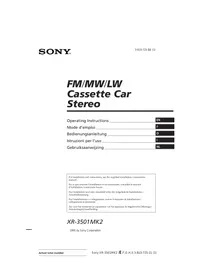
FM/MW/LW Cassette Car Stereo
Operating Instructions EN
Mode d'emploi F
For installation and connections, see the supplied installation/connections manual.
© 1995 by Sony Corporation
Features
General
- Detachable-front panel enables you to take the front panel away with you when you leave your car (page 4).
- Caution alarm will be activated if you turn off the ignition key without removing the front panel from the unit.
- Built-in power amplifier (max. output: 20 W × 4 ch) enables you to enjoy a 4-speaker system.
- Digital 24-hour clock provided (page 5).
Cassette player section
- ATA (Automatic Tuner Activation) for automatically turning on the tuner while fast-forwarding or rewinding a tape (page 6).
Tuner section
- Up to 30 stations can be preset: 18 stations on FM, 6 stations each of MW and LW. Automatic Memory function stores a total of 30 stations in memory quickly and easily (page 7).
Precautions
- If your car is parked in direct sunlight resulting in a considerable rise in temperature inside the car, allow the unit to cool off before operating it.
- If no power is being supplied to the unit, check the connections first. If everything is in order, check the fuse.
- If no sound comes from the speakers of a 2-speaker system, set the fader control to the center position.
- If your car is equipped with a power antenna, note that it will be automatically extended while the unit is operating.
If you have any questions or problems concerning your unit that are not covered in this manual, please consult your nearest Sony dealer.
Notes on Cassettes
Cassette care
- Do not touch the tape surface of a cassette, as any dirt or dust will contaminate the heads.
- Keep cassettes away from equipment with built-in magnets such as speakers and amplifiers, as erasure or distortion of the recorded tape could occur.
- Do not expose cassettes to direct sunlight, extremely cold temperatures, or moisture.
- When the tape is played back for a long period, the cassette shell may become warm because of the built-in power amplifier. This is not a sign of a malfunction.
Notes on Cassette Deck Tape Heads
- Long use of cassette tapes contaminates the tape head causing poor sound quality or complete sound dropout. Therefore, we recommend cleaning the tape head once a month or so with the separately available Sony Cassette Cleaning Set. If the sound does not improve after using a cleaning cassette, please consult your nearest Sony dealer.
- In case of old or inferior cassette tapes, the tape head gets contaminated much more quickly. Depending on the tape, one or two playbacks may cause poor sound.
Cassettes longer than 90 minutes
The use of cassettes longer than 90 minutes is not recommended except for long continuous play. The tapes used for these cassettes are very thin and tend to be stretched easily. Frequent playing and stopping of these tapes may cause them to be pulled into the cassette deck mechanism.
Table of Contents
Detaching and Attaching the Front Panel. 4 Setting the Clock 5
Cassette Player Operation
Listening to Tape Playback 5 Ejecting the Cassette 5 Fast-winding the Tape 6 Radio Reception during Fast-forwarding or Rewinding of a Tape — ATA (Automatic Tuner Activation) Function 6
Radio Reception
Searching for Stations Automatically Automatic Tuning 6 If FM Stereo Reception is Poor
— Monaural Mode 6 Tuning in by Adjusting the Frequency — Manual Tuning 7 Memorizing Stations Automatically — Automatic Memory Function 7 Memorizing Only the Desired Stations 7 Receiving the Memorized Stations 7
Other Functions
Adjusting the Sound Characteristics 8 Enjoying Bass and Treble at Low Volume - Loudness Function 8 Muting the Beep Tone 8
Maintenance 8 Dismounting the Unit 9 Button Locations 10 Specifications 11 Troubleshooting Guide 12
Detaching and Attaching the Front Panel
The front panel of this unit can be detached in order to prevent the unit from being stolen.
Detaching the Front Panel
Before detaching the front panel, be sure to press the button first. Then press the RELEASE button to open up the front panel and detach the panel by pulling it towards you as illustrated.
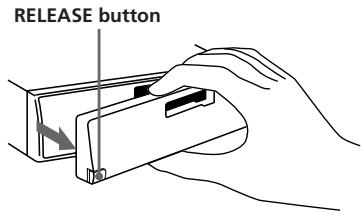
Be sure not to drop the panel after detaching it from the unit.
Attaching the Front Panel
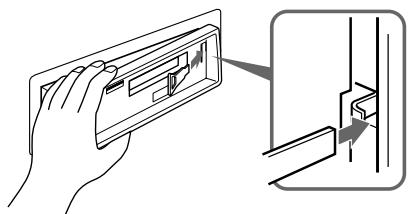
Apply the right side of the front panel to the unit by attaching part A of the front panel to part B of the unit as illustrated, then swing the left side into the unit until it clicks.
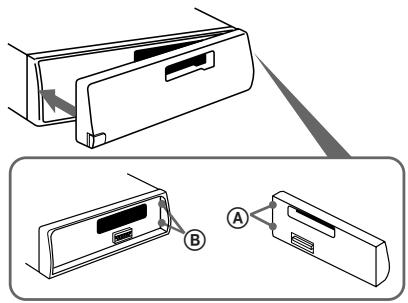
Notes
- Make sure that the front panel is the right way up when attaching it to the unit as it cannot be attached upside down.
- Do not press the front panel hard against the unit when attaching it to the unit. It can easily be attached by pressing it lightly against the unit.
- When you carry the front panel with you, put it in the supplied front panel case.
- Do not press hard or give excessive pressure to the display windows of the front panel.
- Before removing the front panel, be sure to turn the power off. However, if you press the RELEASE button to detach the panel while the unit is still turned on, the power will be automatically turned off in order to protect the speakers from being damaged.
- Do not expose the front panel to direct sunlight, heat sources such as hot air ducts or leave it in a humid place. Never leave it on the dashboard etc. of a car parked in direct sunlight where there may be a considerable rise in temperature inside the car.
Caution alarm
If you turn the ignition key to the OFF position without removing the front panel, the caution alarm will be activated and a beep tone will be heard for a few seconds.
Setting the Clock
The clock has a 24-hour digital indication.
For example, setting it to 10:08
1 Display the time. (Press the ○ button during unit operation.)
2 Press the ○ button for more than two seconds.
The hour digit(s) blinks.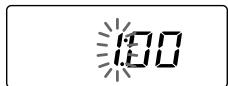
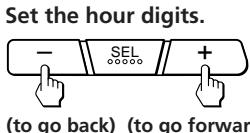
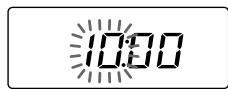
3 Press the SEL button momentarily.
The minute digits blink.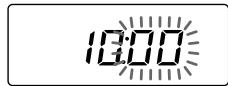
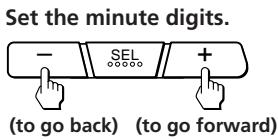
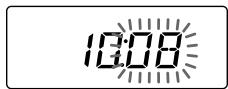
4 Press the DSPL button momentarily.
The clock activates.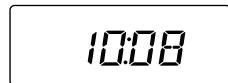
Note: The clock cannot be set unless the power is turned on. Set the clock after you turn on the radio, or during tape playback.
Cassette Player Operation
Listening to Tape Playback
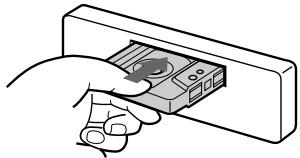
After inserting the cassette, playback will start automatically.
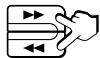
To change the tape direction, press both the ◀ and ▶ buttons at the same time.
Indication of Tape Transport Direction
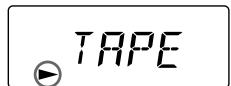
The side facing up is being played.
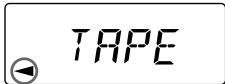
The side facing down is being played.
Tape playback automatically changes direction at the end of the tape.
Note: Before turning off the unit, eject the tape to avoid tape damage.
Ejecting the Cassette
Press the button to stop playback and eject the cassette.
Fast-winding the Tape
| Direction indicator* | To advance | To rewind |
| ▲ | | |
| ▲ | | |
To resume playback, press the other fast-winding button partially until the locked button is released.
- The or indicator will flash while fast-winding the tape.
Radio Reception during Fast-forwarding or Rewinding of a Tape
- ATA (Automatic Tuner Activation) Function
Press the ATA button during playback. → "ATA" appears on the display.
When fast-forwarding or rewinding with the or button, the tuner will turn on automatically.
Radio Reception
Searching for Stations Automatically
Automatic Tuning
1 Select the desired band.

FM1 → FM2 → FM3 → MW → LW → FM1
2 Press either side of the SEEK/MANU button momentarily to search for the next station (automatic tuning).
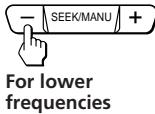
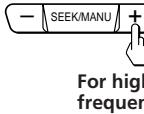
The scanning stops when a station is received. Press either side of the button repeatedly until the desired station is received.
When an FM stereo program with a sufficient signal strength is tuned in,
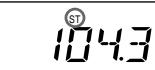
the "ST" indication will appear.
To avoid the automatic tuning from stopping on stations too frequently (local seek mode), press the SENS button momentarily to get the "LCL" indication.
Only the stations with relatively strong signals will be tuned in. The local seek mode functions only when the automatic tuning is in operation.
If FM Stereo Reception is
Poor — Monaural Mode
Press the SENS button momentarily. → "MONO" appears on the display.
The sound will improve, but it will become monaural.
Tuning in by Adjusting the Frequency - Manual Tuning
1 Select the desired band.

FM1 → FM2 → FM3 →
MW → LW → FM1
2 Press and hold either side of the SEEK/MANU button.
Release the button when the desired station is received.
For lower frequencies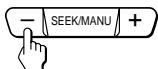
For higher frequencies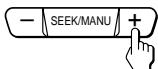
PREVENT ACCIDENTS!
When tuning in during driving, use the automatic tuning and the memory preset tuning instead of the manual tuning.
Memorizing Stations Automatically
Automatic Memory Function
Stations with the clearest reception are automatically searched and memorized on each band (FM1, FM2, FM3, MW and LW). Up to 6 stations on each band can be stored on the preset number buttons 1 to 6 in the order of band frequency.
1 Select the desired band.

FM1 → FM2 → FM3 →
MW → LW → FM1
2 Press the TUNER/A.MEM button for more than two seconds.

The unit will start scanning the selected band and memorize the tuned stations on the preset number buttons 1 through 6 automatically.
Memorizing Only the Desired Stations
1 Select the desired band.

FM1 → FM2 → FM3 →
MW → LW → FM1
2 Tune in the station which you wish to store on the preset number button. 3 Press and hold the desired preset number button (1 to 6) for about two seconds until you hear a beep tone.
The number of the pressed preset number button appears in the display window.
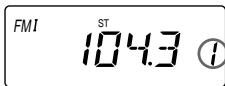
Up to 6 stations on each band (FM1, FM2, FM3, MW and LW) can be stored on the preset number buttons in the order of your choice. Therefore, 18 stations can be memorized on FM.
If you try to store another station on the same preset number button, the previously stored station will be erased.
Receiving the Memorized Stations
1 Select the desired band.

FM1 → FM2 → FM3 →
MW → LW → FM1
2 Press momentarily the preset number button on which the desired station is stored.
Note
If you press the preset number button for more than two seconds, the currently received station will be memorized. To receive the previously memorized station, make sure that the preset number button is pressed only momentarily.
Other Functions
Adjusting the Sound Characteristics
1 Select the item you want to adjust by pressing the SEL button repeatedly. VOL (volume) → BAS (bass) → TRE (treble) → BAL (balance) → FAD (fader) → VOL (volume) 2 Adjust the selected item by pressing either the − or + button.
Adjust within three seconds after selecting. (After three seconds the button will again serve as volume control button.)
Enjoying Bass and Treble at Low Volume
— Loudness Function
Press the button. → "LOUD" will appear on the display.
Bass and treble will be boosted. To cancel, press again.
Muting the Beep Tone
Press the 5 button while pressing the SE1 button.
To reactivate the beep tone, press these buttons once more.
Maintenance
Fuse Replacement
When replacing the fuse, be sure to use one matching the amperage rating stated on the fuse. If the fuse blows, check the power connection and replace the fuse. If the fuse blows again after replacement, there may be an internal malfunction. In such a case, consult your nearest Sony dealer.
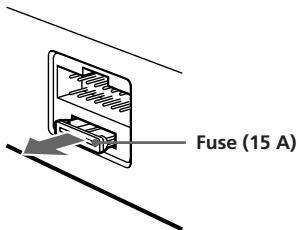
Warning
Never use a fuse with an amperage rating exceeding the one supplied with the unit as this could damage the unit.
Cleaning the Connectors
The unit may not function properly if the connectors between the unit and the front panel are not clean. In order to prevent this, open the front panel by pressing the RELEASE button, then detach it and clean with a cotton swab dipped in alcohol. Do not apply too much force. Otherwise, the connector may get damaged.
Main unit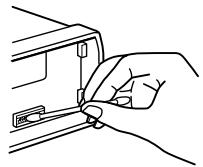
Back of the front panel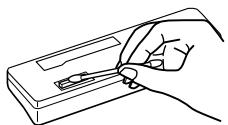
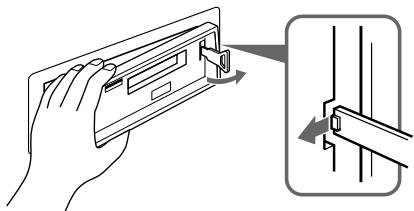
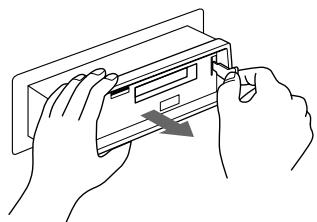
Dismounting the Unit
1
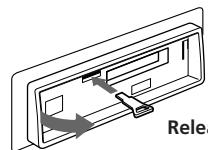
Release key (supplied)
2
3
4
EN
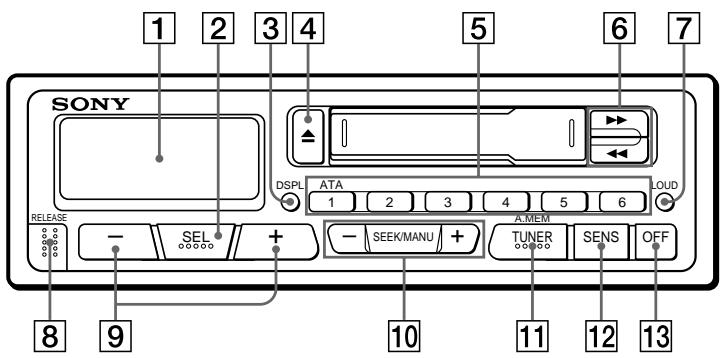
Refer to the pages in for details.
1 Display window 2 SEL (control mode select) button 3 DSPL (display mode change/time set) button 4 (eject) button 5 During radio reception: Preset number buttons
During tape playback: ATA (Automatic Tuner Activation) button 6
(fast winding)/DIR (tape transport direction change) buttons 7 LOUD (loudness) button 8
8 RELEASE (front panel release) button 9 - + (volume/bass/treble/balance/fader control) buttons 10 SEEK/MANU button 11 TUNER/A.MEM (radio on • band select/automatic memory) button 12 SENS (sensitivity adjust) button 13 OFF button
Specifications
Cassette player section
Tape track: 4-track 2-channel stereo
Wow and flutter: 0.13% (WRMS)
Frequency response: 30 - 15,000 Hz
Signal-to-noise ratio: 55 dB
Tuner section
FM
Tuning range: 87.5-108.0 MHz
Antenna terminal: External antenna connector
Intermediate frequency 10.7 MHz
12 dBf
Selectivity 70 dB at 400 kHz
Signal-to-noise ratio 65 dB (stereo),
68 dB (mono)
Harmonic distortion at 1 kHz
0.5% (stereo),
0.3% (mono)
35 dB at 1 kHz
Separation
Frequency response
Capture ratio
30 - 15,000 Hz
2 dB
General
Output lead Power amplifier control
Tone controls Bass ±8 dB at 100 Hz
Treble ±8 dB at 10 kHz
Power requirements 12 V DC car battery
Dimensions Approx. 186 × 57 × 170 mm
(w/h/d) not incl.
projecting parts and
controls
Mounting dimension Approx. 182 × 53 × 155 mm
(w/h/d) not incl.
projecting parts and
controls
Mass Approx. 1.2 kg
Supplied accessories Parts for installation and
connections (1 set)
Front panel case (1)
Design and specifications are subject to change without notice.
EN
MW/LW
Tuning range MW: 531-1,602 kHz
LW: 153-281 kHz
Antenna terminal External antenna connector
Intermediate frequency 450 kHz
Sensitivity
MW: 30 μV
LW: 50 μV
Power amplifier section
Outputs Speaker outputs
(sure seal connectors)
Speaker impedance 4-8 ohms
Maximum power output 20W× 4 (at 4 ohms)
Troubleshooting Guide
The following checklist will assist in the correction of most problems which you may encounter with your unit.
Before going through the checklist below, refer to the connection and operating procedures.
General
| Problem | Cause/Solution |
| No sound | • Adjust the volume with the + button.
• Set the fader control to the center position for 2-speaker systems. |
| Indications do not appear in the display window. | Remove the front panel and clean the connectors. See “Cleaning the Connectors” of “Maintenance” for details. |
Tape playback
| Problem | Cause/Solution |
| Playback sound is distorted. | Contamination of the tape head. → Clean the head. |
Radio reception
| Problem | Cause/Solution |
| Preset tuning is not possible. | • Memorize the correct frequency.
• The broadcast is too weak. |
| Automatic tuning is not possible. | The broadcast is too weak.→Use the manual tuning. |
| The "ST" indication flashes. | • Tune in precisely.
• The broadcast is too weak.→Press the SENS button to enter the MONO mode. |
Tuning range 87.5-108.0 MHz
GO: 153 - 281kHz
controls not included
Mounting dimensions approx. 182× 53× 155mm
(W/H/D)
controls not included
Weight approx. 1.2kg
Wow and flutter 0.13% (WRMS)