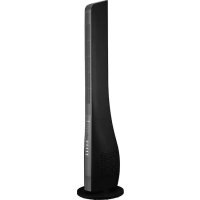
TFN44D - Fan Royal Sovereign - Free user manual and instructions
Find the device manual for free TFN44D Royal Sovereign in PDF.


| Brand | Royal Sovereign |
| Model | TFN-44D |
| Product Type | 45-inch Tower Fan |
| Dimensions (L x W x H) | 10.71 in x 10.71 in x 43.82 in (272 mm x 272 mm x 1113 mm) |
| Weight | 7.70 lb (3.50 kg) |
| Voltage/Frequency | 120 V, AC 60 Hz |
| Power | 50 watts |
| Speeds | 3 (Low, Medium, High) |
| Ventilation Modes | Normal, Natural, Sleep |
| Timer | 0.5 - 7.5 hours |
| Oscillation | Yes, button activation/deactivation |
| Remote Control | Yes, maximum range 5 m |
| Certification | cETL |
| Box Contents | Tower fan, remote control |
| Usage | Indoor only |
| Warranty | 1 year limited |
| Cleaning | Soft damp cloth with mild soap solution, dry thoroughly |
| Storage | In a cool, dry place, original packaging if possible |
| Material | Plastic (estimated) |
Frequently Asked Questions - TFN44D Royal Sovereign
User questions about TFN44D Royal Sovereign
0 question about this device. Answer the ones you know or ask your own.
Ask a new question about this device
Download the instructions for your Fan in PDF format for free! Find your manual TFN44D - Royal Sovereign and take your electronic device back in hand. On this page are published all the documents necessary for the use of your device. TFN44D by Royal Sovereign.
USER MANUAL TFN44D Royal Sovereign
Please read and retain these instructions. To register your product, please go to www.royalsovereign.com
Thank you for purchasing the Royal Sovereign 45" Tower Fan, TFN-44D. This manual will provide you with safety information, instructions for optimal use, and proper care and maintenance for your product. Please read this manual carefully before operating.
CONTENTS
SAFETYINSTRUCTIONS 3
BOX CONTENTS 4
PRODUCT VIEW 4
FAN ASSEMBLY 5
PRODUCT OPERATION 6
MACHINE MAINTENANCE. 7
SPECIFICATIONS 7
WARRANTY 8
SAFETY INSTRUCTIONS
When using this machine follow these safety precautions to reduce risk of fire, electric shock, or injury.
WARNING
Electrical
- The fan should be placed near an electrical outlet so that the outlet is easily accessible.
- Check to ensure that the electrical service being used is adequate for the model you've chosen. The electrical rating of your new fan is defined on the serial sticker of the unit. Please refer to the rating when checking electrical requirements to ensure they meet the electrical codes of your location.
- Do not operate if the electrical plug or power cord is damaged.
- Do not under any circumstances alter the electric plug in anyway.
- Do not pour water on the housing or control panel. Do not permit liquid to get inside the appliance.
- Ensure that the power cord is inserted properly into the electrical outlet.
- Do not run the cord under carpeting. Do not cover the cord with throw rugs, runners, or similar coverings. Arrange cord away from traffic areas and where it will not be tripped over.
- Do not use this appliance with any extension cords or adapter plugs.
- Do not use this appliance with any solid-state speed control devices.
- Do not pull on the cable to unplug.
- Turn off the power when unattended or not in use.
Operating
- Always place the fan on a stable, dry, and level surface when operating.
- Do not use this appliance if it malfunctions, is dropped, or damaged in any manner.
- Do not use outdoors.
- Do not place this appliance on or near a hot gas, an electric burner, a microwave, or a heated oven.
- Do not use the appliance in the immediate surrounding of water.
- Do not operate the appliance with wet hands.
- Do not turn over the appliance. Unplug the power supply if it is toppled over.
- Do not place heavy items or sit on the fan.
- Do not insert fingers, pencils, or any other objects into the product or block the airflow in any way.
- Do not block air outlets with any obstacles
- Do not modify any part of this product.
- Supervision of children when using is advised.
- Do not operate this fan without its base.
- Do not operate the machine for any other purpose other than its intended use.
BOX CONTENTS
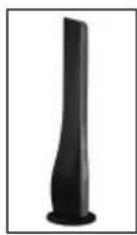
Tower Fan
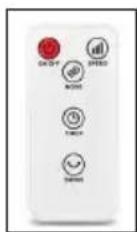
Remote Control
PRODUCT VIEW
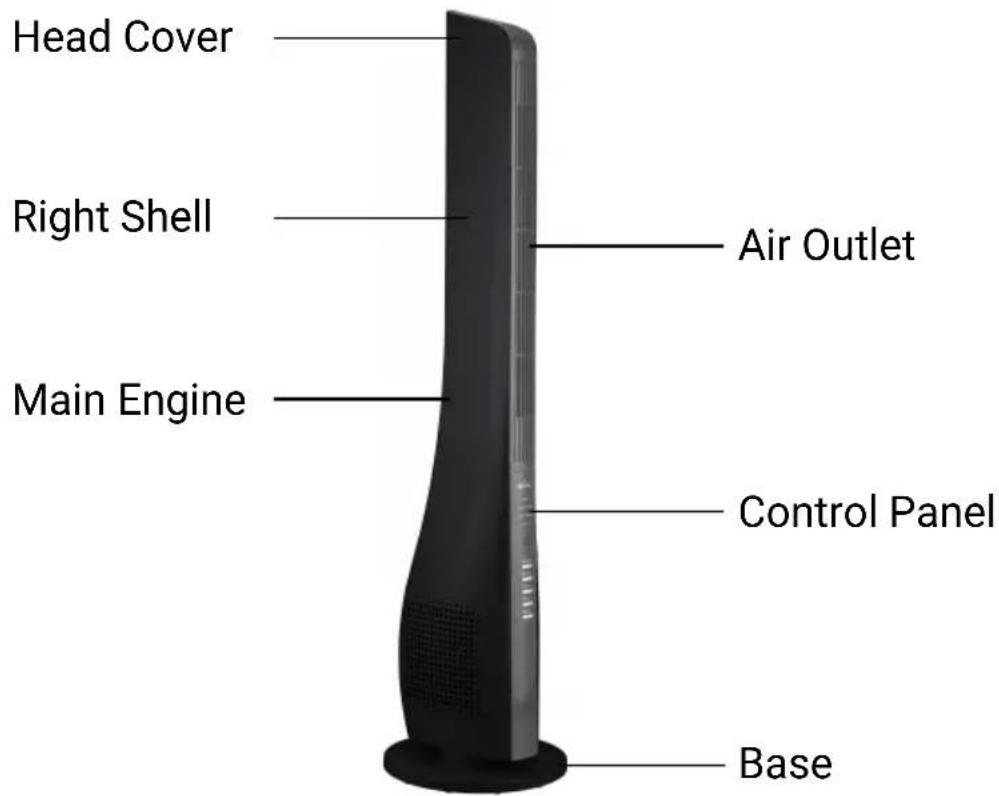
FAN ASSEMBLY
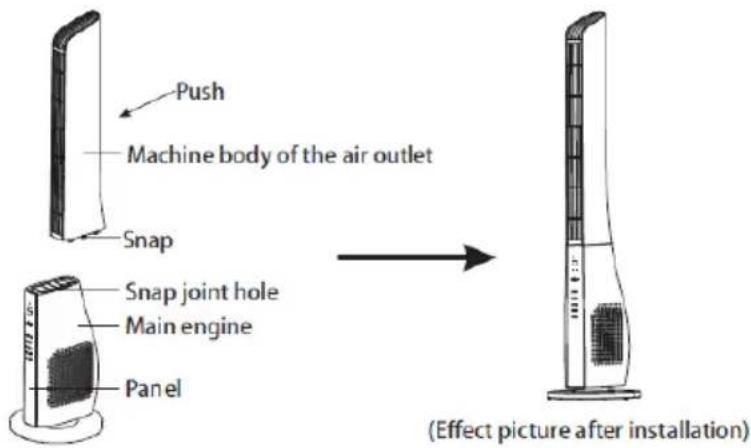
Installation of the Main Engine
-
Align the six snap joints on the machine body of the air outlet with the six snap joint holes on the machine engine. Push the air outlet toward the panel until it is aligned with the panel.
-
To dismantle the machine body, reverse step 1.
Base Installation
-
Thread the power line from the main engine through the nut and base. Screw the nut in a clockwise direction to tighten the nut to the bottom of the base. (shown in Figure 1)
-
To dismantle the base, reverse Step 1.
-
Organize the power line and put it into the base trunking according to its flat position direction. (shown in Figure 2)
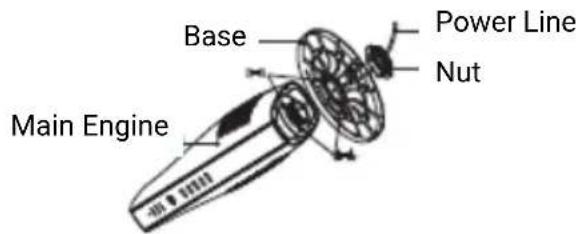
Figure 1
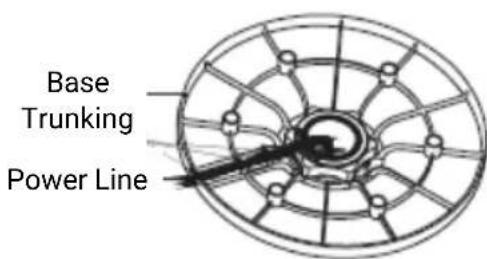
Figure 2
PRODUCT OPERATION
This unit can be operated by the control panel or by the remote control.
The fan has three modes and three types of wind speeds, as well as, oscillation and timing functions.
- On/Off: After the power supply is connected, press the "On/Off" button to turn on the unit. The wind type and wind speed indicators will light up. The fan will start at a medium speed and then immediately switch to a low speed. Press this button again to stop the fan and turn off the unit.
- Wind Speed: Press the "Speed" button to select the desired wind speed. Select between Low, Middle, and High levels.
-
Wind Type: Press the "Mode" button to select the type of wind. Select between, Normal, Natural, and Sleep.
-
Normal: For usual living space
Natural: Imitating the natural wind, blowing at different speeds
- Sleep: Provide wind/breeze that is less powerful and is quieter
- Oscillation: Press the "Swing" button for the fan to oscillate. The swing indicator light will be turned on while the unit is oscillating. Press again to stop oscillation.
- Timer: Use the "Timer" button to set the duration of operation. Continuously press this button to set the timer between 0.5hr. to 7.5hr.. The indicator lights highlighted will be 0.5hr., 1hr., 2hr., and 4hr., and these may be added together to show a cumulative total. The tower fan will stop operating when the set time has elapsed.
Remote Control Operation
- When the remote control is used for the first time, take out the insulation sheet from the back.
- The scope of application of the remote control is within 16.4 ft. (5 m) from the receiver. If the remote control does not face the receiver, its scope of application will be narrowed.
The remote control must face the receiver (the receiver is located in the product panel). - There shall be no barrier between the receiver and remote control.
- The remote control may be out of order if it is used in a room with high frequency machines (due to electromagnetic interference, the sensitivity of the remote control will be reduced).
- Please use the remote control properly. Do not misuse it or drop it.
MACHINE MAINTENANCE
- Always unplug the appliance from the power source when cleaning your fan.
- Light accumulated dust may be removed from the fan with a soft cloth.
- Wipe the exterior surface of the fan occasionally with a cloth moistened (not dripping wet) with a mild soap solution. Dry the case thoroughly with a soft dry cloth before operating the fan. Do not use solvents or abrasives.
- Avoid the use of gasoline, benzene, thinner, etc. as they may result in damage to the fan.
- Allow sufficient drying time before operating again.
- To prevent damage, do not attempt to dismantle the fan with a sharp instrument.
- We recommend that the fan be cleaned and packed in its original packaging and be stored in a cool, dry place when not in use.
Warning: Do not attempt to open or repair the unit yourself. Doing so could void the warranty and cause damage or personal injury.
SPECIFICATIONS
| MODEL TFN-44D | |
| Fan Type 45" Tower | |
| Fan Speeds 3 | |
| Timer 0.5 - 7.5 hours | |
| Voltage / Frequency AC 120V, 60 Hz | |
| Input Power 50 watts | |
| Certification cETL | |
| Unit Dimensions (W x D x H) | 10.71"W x 10.71"D x 43.82"H 272 mm x 272 mm x 1113 mm |
| Unit Weight 7.70 lbs. / 3.50 kgs. | |
ONE YEAR LIMITED WARRANTY
Royal Sovereign International, Inc. warranties this product to be free from defects in material and workmanship for a period of one (1) year. This warranty is extended to the original purchaser only.
This warranty only covers products that are properly installed, properly maintained, and properly operated in accordance with the instructions provided. This limited warranty does not cover any failures or operating difficulties due to normal wear and tear, accident, abuse, misuse, alteration, misapplication, improper installation, or improper maintenance and service by you or any third party.
Returned product will not be accepted without a Return Authorization number. To request a Return Authorization number, please visit us at www.royalsovereign.com. All transportation costs for the return of damaged product or parts will be the responsibility of the purchaser. Return defective product, in original packaging, to the address below.
Royal Sovereign International, Inc. requires reasonable proof of your date of purchase from an authorized retailer or distributor. Therefore, you should keep your receipt, invoice, or canceled check from the original purchase. The limited warranty shall be limited to the repair or replacement of parts which prove defective under normal use and service within the warranty period.
Royal Sovereign International, Inc. (and its affiliated companies) SHALL HAVE NO LIABILITY WHATSOEVER TO PURCHASER OR ANY THIRD PARTY FOR ANY SPECIAL, INDIRECT, PUNITIVE, INCIDENTAL,OR CONSEQUENTIAL DAMAGES. Some states do not allow the exclusion or limitation of incidental or consequential damages so the above exclusion and limitations may not apply to you.
ROYAL SOVEREIGN INTERNATIONAL, INC.
2 Volvo Dr., Rockleigh, NJ 07647 USA
Email: info@royalsovereign.com
RS INTERNATIONAL CANADA INC.
191 Superior Blvd, Mississauga Ontario L5T 2L6 CANADA
TEL:+1)905-461-1095TF#:+1)866-961-6673
FAX: +1) 905-461-1096
www.royalsovereign.ca
Guide d'utilisation

Email: info@royalsovereign.com
RS INTERNATIONAL CANADA INC.
191 Superior Blvd, Mississauga Ontario L5T 2L6 CANADA
TEL:+1)905-461-1095TF#:+1)866-961-6673
FAX: +1) 905-461-1096
www.royalsovereign.ca
- CONTENTS
- SAFETY INSTRUCTIONS
- WARNING
- Electrical
- Operating
- BOX CONTENTS
- PRODUCT VIEW
- FAN ASSEMBLY
- Installation of the Main Engine
- Base Installation
- PRODUCT OPERATION
- Remote Control Operation
- MACHINE MAINTENANCE
- SPECIFICATIONS
- ONE YEAR LIMITED WARRANTY
- ROYAL SOVEREIGN INTERNATIONAL, INC.
- RS INTERNATIONAL CANADA INC.
- Guide d'utilisation
Brand : Royal Sovereign
Model : TFN44D
Category : Fan