43900 - Computer and peripheral cables Lindy - Free user manual and instructions
Find the device manual for free 43900 Lindy in PDF.



User questions about 43900 Lindy
0 question about this device. Answer the ones you know or ask your own.
Ask a new question about this device
Download the instructions for your Computer and peripheral cables in PDF format for free! Find your manual 43900 - Lindy and take your electronic device back in hand. On this page are published all the documents necessary for the use of your device. 43900 by Lindy.
USER MANUAL 43900 Lindy
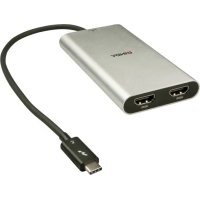
Thunderbolt 3 to Dual HDMI Adapter
User Manual English
Thank you for purchasing the Thunderbolt 3 to Dual HDMI Adapter. This product has been designed to provide trouble free, reliable operation. It benefits from both a LINDY 2 year warranty and free lifetime technical support. To ensure correct use, please read this manual carefully and retain it for future reference.
The Thunderbolt 3 to Dual HDMI 2.0 Adapter uses a single Type C port to attach two Ultra HD 4K HDMI monitors, giving you a simple way to experience an Ultra HD resolution desktop environment.
Please Note: A computer system which supports Thunderbolt 3 is required. Early Thunderbolt 3 PCs (2015 and early 2016) might require firmware and software updates before all adapters will work.
Package Contents
• Thunderbolt 3 to Dual HDMI Adapter
- This Manual
Features
- Compatible with all Thunderbolt 3 USB Type C equipped computers
• Input: Thunderbolt 3 USB Type C connector - male
• Outputs: 2x HDMI A female
• HDMI standard 2.0
• Max. resolution: 4K 3840 x 2160@60Hz
• Chipsets: Intel Alpine Ridge 4C, Parade PS176 (HDMI), TI TPS65983A (PD) - HDCP support
- Bus powered
Installation & Operation
When first connecting a Thunderbolt 3 device, it must be authenticated through Intel's Thunderbolt 3 software. Use the following instructions as a guide:
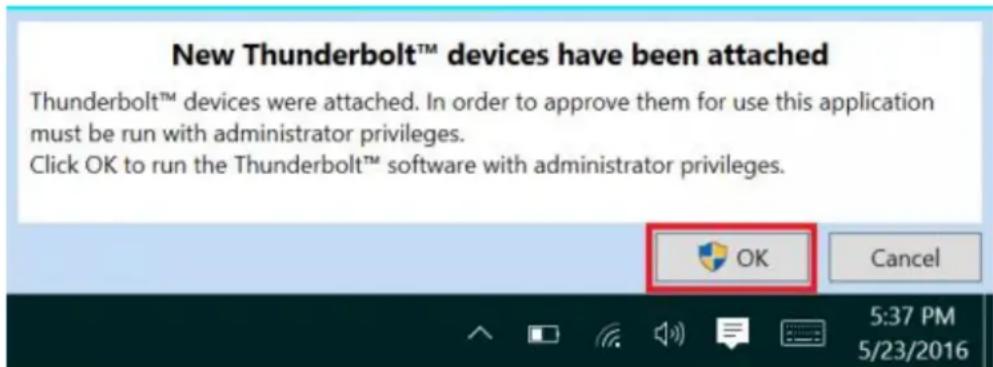
After connecting a Thunderbolt 3 device the first thing that you should see (assuming that the system NVM, BIOS, drivers, etc are up to date and compatible) is an automatic notification above the system tray notifying you that a new device has been attached. Please click OK:
text_image
New Thunderbolt™ devices have been attached Thunderbolt™ devices were attached. In order to approve them for use this application must be run with administrator privileges. Click OK to run the Thunderbolt™ software with administrator privileges.After clicking OK, you may get a Windows User Account Control (UAC) popup asking if you "want to allow this app to make changes to your PC?". Click Yes.
After clicking Yes a window will open, here you can approve the Thunderbolt 3 device that was just attached. Click on the drop down menu where it says "Do Not Connect" and select "Always Connect". Then click OK.
Identifying the NVM:
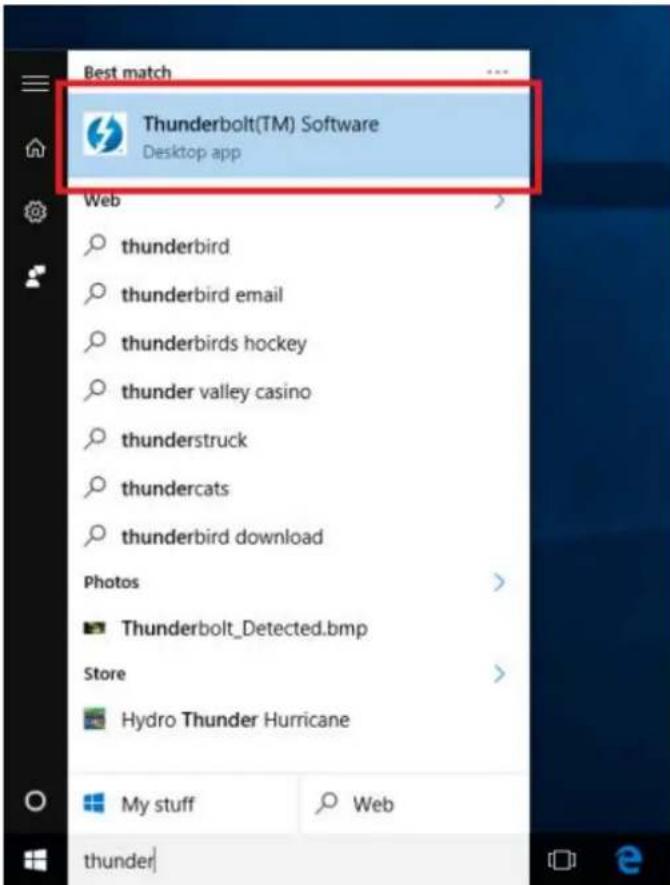
To find out what version of NVM firmware your system has, the first step is to ensure you have the latest Thunderbolt software version which varies depending on the system manufacturer. You should be able to download it from your system manufacturer's website. Once installed you can open the software by searching the start menu for Thunderbolt:
text_image
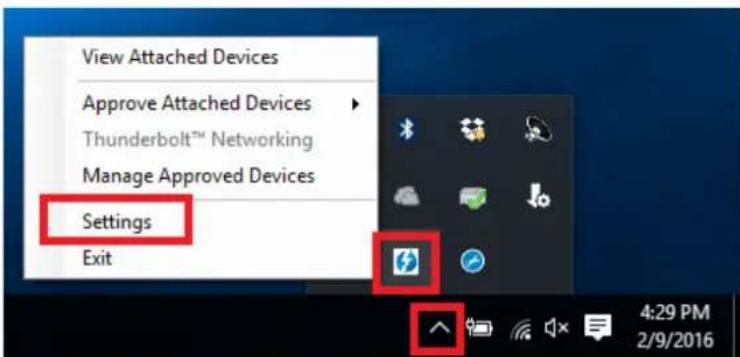
Best match Thunderbolt(TM) Software Desktop app Web thunderbird thunderbird email thunderbirds hockey thunder valley casino thunderstruck thundercats thunderbird download Photos Thunderbolt_Detected.bmp Store Hydro Thunder Hurricane My stuff Web thunderOnce open you can find the program sitting in the system tray. You may need to click the caret (up arrow icon) to show all of the running programs then right click on the Thunderbolt icon it and select Settings:
text_image
View Attached Devices Approve Attached Devices Thunderbolt™ Networking Manage Approved Devices Settings ExitNow you should see the settings window. Click on Details to find out all of the Thunderbolt software and controller information. Unfortunately if a Thunderbolt device has not yet been connected to the system, the information about the NVM firmware may not be available within the utility.
Dual Display Installation
- Power on your computer and connect the Thunderbolt Type C connector of the Adapter to a Thunderbolt 3 equipped port.
- Connect a standard HDMI A Male/Male cable (not included) to the HDMI outputs of the Adapter and to the input ports of your displays. If you are using 4K 60Hz graphics it is recommended to keep the cable distance to 2m maximum)
- Power on the displays and your computer will detect them as two separate displays which can be configured in Display Settings as usual.
Einführung
text_image
New Thunderbolt™ devices have been attached Thunderbolt™ devices were attached. In order to approve them for use this application must be run with administrator privileges. Click OK to run the Thunderbolt™ software with administrator privileges.text_image
View Attached Devices Approve Attached Devices Thunderbolt™ Networking Manage Approved Devices Settings Exittext_image
New Thunderbolt™ devices have been attached Thunderbolt™ devices were attached. In order to approve them for use this application must be run with administrator privileges. Click OK to run the Thunderbolt™ software with administrator privileges.text_image
View Attached Devices Approve Attached Devices Thunderbolt™ Networking Manage Approved Devices Settings ExitThe Thunderbolt 3 to Dual HDMI 2.0 Adapter uses a single Type C port to attach two Ultra HD 4K HDMI monitors, giving you a simple way to experience an Ultra HD resolution desktop environment.
Please Note: A computer system which supports Thunderbolt 3 is required. Early Thunderbolt 3 PCs (2015 and early 2016) might require firmware and software updates before all adapters will work.
text_image
New Thunderbolt™ devices have been attached Thunderbolt™ devices were attached. In order to approve them for use this application must be run with administrator privileges. Click OK to run the Thunderbolt™ software with administrator privileges.text_image
View Attached Devices Approve Attached Devices Thunderbolt™ Networking Manage Approved Devices Settings ExitManuale Italiano
This equipment complies with the requirements relating to Electromagnetic Compatibility Standards. It has been manufactured under the scope of RoHS compliance.
This equipment has been tested and found to comply with the limits for a Class B digital device, pursuant to part 15 of the FCC Rules. These limits are designed to provide reasonable protection against harmful interference in a residential installation.
You are cautioned that changes or modification not expressly approved by the party responsible for compliance could void your authority to operate the equipment.
This device complies with part 15 of the FCC Rules.
Operation is subject to the following two conditions:
-
This device may not cause harmful interference, and
-
This device must accept any interference received, including interference that may cause undesired operation.
WEEE (Waste of Electrical and Electronic Equipment), Recycling of Electronic Products
Europe, United Kingdom
In 2006 the European Union introduced regulations (WEEE) for the collection and recycling of all waste electrical and electronic equipment. It is no longer allowable to simply throw away electrical and electronic equipment. Instead, these products must enter the recycling process.
Each individual EU member state has implemented the WEEE regulations into national law in slightly different ways.
Please follow your national law when you want to dispose of any electrical or electronic products. More details can be obtained from your national WEEE recycling agency.
Tested to Comply with FCC Standards For Home and Office Use!
^st Edition, September 2017
www.lindy.com