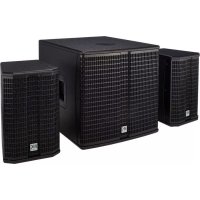
Lucas 2K15 - Hi-fi system HK AUDIO - Free user manual and instructions
Find the device manual for free Lucas 2K15 HK AUDIO in PDF.



| Product type | Active sound system 2.1 |
| Brand | HK Audio |
| Model | Lucas 2K15 |
| Category | Hi-fi system / Professional sound system |
| Amplification | Class D, 670 W RMS, 2000 W peak |
| DSP processor | FIR filtering, 24 dB subsonic filter, peak and RMS limiter |
| Frequency response (subwoofer) | 44 Hz – 130 Hz (±5 dB) |
| Frequency response (satellite) | 118 Hz – 18 kHz (±5 dB) |
| Subwoofer driver | 1 x 15" |
| Satellite speaker (mid/bass) | 1 x 8" |
| Compression driver (satellite) | 1" with CD horn 90° x 55° |
| Dispersion | 90° horizontal x 55° vertical |
| Inputs | 2 x combo XLR/jack balanced (L/R) |
| Outputs | 2 x XLR Thru (L/R), 2 x Speakon NL2 for satellites |
| Mains power | 100-240 V AC, 50-60 Hz |
| Power consumption (standby) | ~0.5 W (Auto Sleep activated) |
| Total weight | 53.0 kg |
| Subwoofer weight | 30.2 kg |
| Satellite weight (unit) | 11.4 kg |
| Subwoofer dimensions (L x H x P) | 48 x 48.5 x 59.5 cm |
| Satellite dimensions (L x H x P) | 26.5 x 41.5 x 29.5 cm |
| Materials | MDF cabinet, black acrylic lacquer, metal grille with acoustic foam |
| Optional accessories | Roller bag (LUCAS AS 2K ROLLER BAG), speaker stand kit (SPEAKER STAND ADD-ON), 100 mm casters |
| Additional features | Deactivatable Auto Sleep, Flat/Bass Boost switch, limiters, MonoTilt base 36 mm |
Frequently Asked Questions - Lucas 2K15 HK AUDIO
User questions about Lucas 2K15 HK AUDIO
0 question about this device. Answer the ones you know or ask your own.
Ask a new question about this device
Download the instructions for your Hi-fi system in PDF format for free! Find your manual Lucas 2K15 - HK AUDIO and take your electronic device back in hand. On this page are published all the documents necessary for the use of your device. Lucas 2K15 by HK AUDIO.
USER MANUAL Lucas 2K15 HK AUDIO
Important Safety Instructions! Read before connecting!
This product has been built by the manufacturer in accordance with IEC 60065 and left the factory in safe working order. To maintain this condition and ensure non-risk operation, the user must follow the advice and warning comments found in the operating instructions. If this product shall be used in vehicles, ships or aircraft or at altitudes exceeding 2000m above sea level, take care of the relevant safety regulations which may exceed the IEC 60065 requirements. WARNING: To prevent the risk of fire and shock hazard, do not expose this appliance to moisture or rain. Do not open case - no user serviceable parts inside. Refer service to qualified service personnel.

This symbol, wherever it appears, alerts you to the presence of undulated dangerous voltage inside the enclosure - voltage that is sufficient to constitute a risk of shock.

This symbol, wherever it appears, alerts you to the presence of a fully accessible hazardous voltage. External wiring connected to terminal marked with this symbol must be a "ready made complying with the manufacturers recommendations, or must being installed by instructed persons only.

This symbol, wherever it appears, alerts you to important aging and maintenance instructions in the accompanying text. Read the manual.

This symbol, wherever it appears, tells you: Take care! Hot To prevent burns you must not touch.

All electrical and electronic products including batteries be disposed of separately from the municipal waste stream via fixed collection facilities appointed by the government or the authorities.

Read these instructions. Keep these instructions. Follow all steps and instructions marked on the product and in this manual.
- Do not use this product near water. Do not place the product near water, baths, wash basins, kitchen sinks, wet areas, swimming pools or damp rooms.
- Do not place objects containing liquid on the product - vases, glasses, bottles etc.
Clean only with dry cloth. - Do not remove any covers or sections of the housing.
- The set operating voltage of the product must match the local mains supply voltage. If you are not sure of the type of power available consult your dealer or local power company.
- Before connecting the device, please ensure that the mains supply you are using is equipped with adequate protection against short circuiting and grounding faults when the device is plugged in.
To reduce the risk of electrical shock, the grounding of this product must be maintained. Use only the power supply cord provided with this product, and maintain the function of the center (grounding) pin of the mains connection at any time. Make sure the mains outlet used provides a proper protective ground connection. - Do not defeat the safety purpose of the polarized or grounding-type plug. A polarized plug has two blades with one wider than the other. A grounding type plug has two blades and a third grounding prong. The wide blade or the third prong are provided for your safety. If the provided plug does not fit into your outlet, consult an electrician for replacement of the obolete outlet.
- Protect the power cord from being walked on or pinched particularly at plugs, convenience receptacles, and the point where they exit from the device! Power supply cords should always be handled carefully. Periodically check cords for cuts or sign of stress,
especially at the plug and the point where the cord exits the device. - Never use a damaged power cord.
-
Unplug this product during lightning storms or when unused for long periods of time.
-
This product can be fully disconnected from mains only by pulling the mains plug at the unit or the wall socket. The product must be placed in such a way at any time, that disconnecting from mains is easily possible.
- Fuses: Replace with IEC127 (5x20mm) type and rated fuse for best performance only. It is prohibited to use "patched fuses" or to short the fuse-holder. Replacing any kind of fuses must only be carried out by qualified service personal.
Refer all servicing to qualified service personnel. Servicing is required when the unit has been damaged in any way, such as: - When the power cord or plug is damaged or frayed.
- If liquid has been spilled or objects have fallen into the product.
- If the product has been exposed to rain or moisture.
If the product does not operate normally when the operating instructions are followed. - If the product has been dropped or the cabinet has been damaged.
- Do not connect external speakers to this product with an impedance lower than the rated impedance given on the product or in this manual. Use only cables with sufficient cross section according to the local safety regulations.
- Keep away from direct sunlight.
- Do not install near heat sources such as radiators, heat registers, stoves or other devices that produce heat.
- This apparatus is for moderate climates areas use, not suitable for use in tropical climates countries.
- Do not block any ventilation openings. Install in accordance with manufacturer's instructions. This product must not be placed in a built-in installation such as a rack unless proper ventilation is provided.
- Always allow a cold device to warm up to ambient temperature, when being moved into a room. Condensation can form inside it and damage the product, when being used without warming up.
- Do not place naked flame sources, such as lighted candles on the product.
The device must be positioned at least 20~cm / 8^ away from walls. - Use only with the cart, stand, tripod, bracket or table specified by the manufacturer or sold with the product. When a cart is used, use caution when moving the cart/product combination to avoid injury from tip-over.
- Use only accessories recommended by the manufacturer, this applies for all kind of accessories, for example protective covers, transport bags, stands, wall or ceiling mounting equipment. In case of attaching any kind of accessories to the product, always follow the instructions for use, provided by the manufacturer. Never use fixing points on the product other than specified by the manufacturer.
- This appliance is NOT suitable to be used by any person or persons (including children) with limited physical, sensorical or mental ability, or by persons with insufficient experience and/or knowledge to operate such an appliance. Children under 4 years of age must be kept away from this appliance at all times.
- Never push objects of any kind into this product through cabinet slots as they may touch dangerous voltage points or short out parts that could result in risk of fire or electric shock.
- This product is capable of delivering sound pressure levels in excess of 90 dB, which may cause permanent hearing damage. Exposure to extremely high noise levels may cause a permanent hearing loss. Wear hearing protection if continuously exposed to such high levels.
- The manufacturer only guarantees the safety, reliability and efficiency of this product if:
Assembly, extension, re-adjustment, modifications or repairs are carried out by the manufacturer or by persons authorized to do so.
The electrical installation of the relevant area complies with the requirements of IEC (ANSI) specifications. - The unit is used in accordance with the operating instructions.
- This product is optimized for use with music and speech signals. Using this product with sine wave, square wave or other kind of measuring signals at higher level may lead to severe damage of the product.
General Notes on Safety for Loudspeaker Systems

Mounting systems may only be used for those loudspeaker
systems authorized by the manufacturer and only with the mounting accessories specified by the manufacturer in the installation instructions. Read and heed the manufacturer's installation instructions. The indicated load-bearing capacity cannot be guaranteed and the manufacturer will not be liable for damages in the event of improper installation or the use of unauthorized mounting accessories.
The system's load-bearing capacity cannot be guaranteed and the manufacturer will not be liable for damages in the event that loudspeakers, mounting accessories, and connecting and attaching components are modified in any way.
Components affecting safety may only be repaired by the manufacturer or authorized agents, otherwise the operating permit will be voided.

Installation may be performed qualified personnel only.
and then only at pick-points with sufficient load-carrying capacity and in compliance with local building regulations. Use only the mounting hardware specified by the manufacturer in the installation instructions (screws, anchors, etc.). Take all the precautions necessary to ensure bolted connections and other threaded locking devices will not loosen.

Fixed and portable installations (in this case, speakers mounting accessories) must be secured by two independent ties to prevent them from falling. Safeties must be able to accessories or parts that are loose or may become loose.
Ensure compliance with the given national regulations when using connecting, attaching, and rigging devices. Factor potential dynamic forces (jerk) into the equation when determining the proper size and load-bearing capacity of safeties.

1 Be sure to observe speaker stands' maximum load-bearing capacity. Note that for reasons of design and construction, most center stands are approved to bear centric loads only; that is, the speakers' mass has to be precisely centered and balanced. Ensure center stands are set up stably and securely. Take appropriate added measures to secure speaker stands, for example when:
- the floor or ground surface does not provide a stable, secure base.
-
they are extended to heights that impede stability.
-
high wind pressure may be expected.
-
there is the risk that they may be knocked over by people.
Special measures may become necessary as precautions against unsafe audience behavior. Do not set up speaker stands in evacuation routes and emergency exits. Ensure corridors are wide enough and put proper barriers and markings in place when setting speaker stands up in passageways. Mounting and dismounting are especially hazardous tasks. Use aids suitable for this purpose. Observe the given national regulations when doing so.


Wear proper protection (in particular, a helmet,
gloves, and safety shoes) and use only suitable means of ascent (ladders, scaffolds, etc.) during installation. Compliance with this requirement is the sole responsibility of the company performing the installation.

WARNING: After installation, inspect the system comprised mounting fixtures and loudspeakers to ensure it is properly d.
The operator of loudspeaker systems (fixed or portable) must regularly inspect or task a third party to regularly inspect all system components in accordance with the given country's regulations and have possible defects repaired immediately.
We also strongly recommend maintaining a logbook or the like to document all inspections.
When installing speakers for longer lasting or permanent outdoor operation, be sure to take into account the stability and load-bearing capacity of platforms and surfaces; loads and forces exerted by wind, snow, and ice; as well as thermal influences. Also be sure to provide sufficient safety margins for the rigging points used for flow systems. Observe the given national regulations when doing so.
- Ask the manufacturer if your product is allowed for outdoor usage!

Professional loudspeaker systems can produce harmful noise levels. Even prolonged exposure to seemingly harmless levels (e.g. at about 95 dB SPL) can cause permanent hearing damage. We therefore recommend that everyone who is exposed to high noise levels produced by loudspeaker systems wears professional hearing protection (earplugs or earmuffs).
Manufacturer: Stamer Musikanlagen GmbH, Magdeburger Str. 8, 66606 St. Wendel, Germany
LUCAS 2K15 / 2K18
Welcome to the HK Audio family!
Thank you for choosing a brand-name product made by our company. Rest assured, we engineered and built it with the greatest care so it will serve you well for many tomorrows to come.

Even if your experience with sound systems runs deep, some things about this product are sure to be new to you. This is why we ask that you do not set this manual aside without reading it first. Be sure to keep it in a safe place for later reference.
Here's wishing you the best sound at every occasion!
Your HK Audio team
Warranty
Use the convenient online registration option at www.hkaudio.com.

http://warranty.hkaudio.com
The registration is only valid if the device is registered within 30 days of the date of purchase.
HK AUDIO
Technischer Service
Postfach 1509
66595 St. Wendel, Germany
Fax:+496851905100

Strong electromagnetic interference or electrostatic discharge may prevent the product from functioning normally. If this happens, the product may be returned to normal operation by powering off and on again. Should this not result in the product functioning normally again, please move the product away from the source of disturbance and try again.
1 General Information
Unpacking and Inventorying
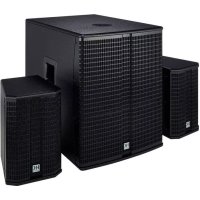
When you first unpack your LUCAS 2K15 or LUCAS 2K18, take a quick inventory to make sure the package comes complete with all the contents. LUCAS 2K consists of a subwoofer and two satellites. A mains cable is also included.
The System's Components
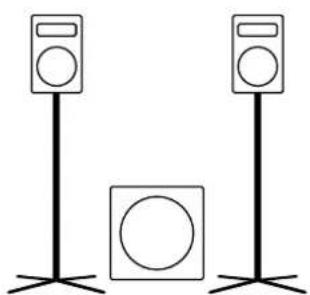
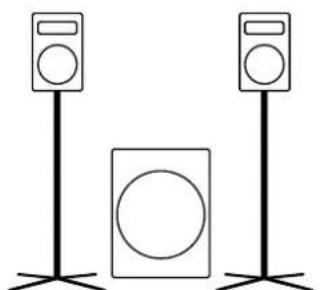
LUCAS 2K18LUCAS
The Subwoofer
The LUCAS 2K15 subwoofer is loaded with a 15" woofer; the LUCAS 2K18 with an 18" woofer. Each houses the system's active circuitry and the Class D power amplifiers. The connection and control panel is on the rear.
The Satellites
The two each LUCAS 2K15 and LUCAS 2K18 satellites are equipped with an 8^ midrange woofer and a 1^ compression driver with a 90^ × 55^ CD horn. A Speakon NL2 input is on the rear. The 3^ MonoTilt pole mount on the bottom serves to place the satellites on a speaker stand.
Heads up! The system's components are matched for the best possible audio performance and may only be operated in the specified configuration. The use of satellites other than these will not only degrade the sound; it may also damage the power amp as well as connected outboard devices.
2 Connectors and Controls
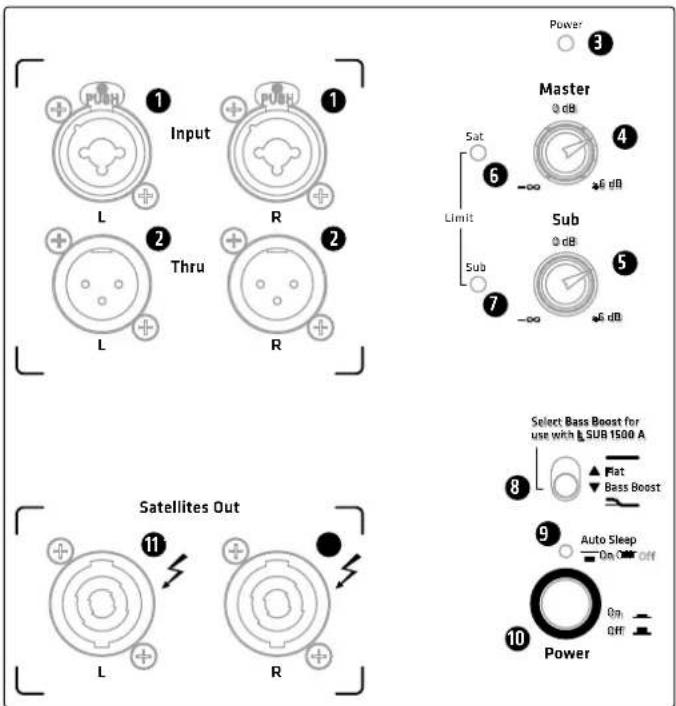
Input
Plug a cord equipped with an XLR connector or 1 / 4^ / 6.35 mm jack plug into this electronically balanced XLR/ 1 / 4^ / 6.35 mm combo input to send a L/R stereo line signal from your DJ controller, mixing console, keyboard or the like to the system.
2 Thru
These balanced parallel XLR outputs serve to send the L/R stereo signal routed into Input (1) through to other components such as powered monitors. The Thru jacks also connect the optional HK Audio LINEAR SUB series model L SUB 1500 or L SUB 1800 A subwoofer. These bass bins come highly recommended if you wish to boost your system's low-end performance.
Heads up! The two recommended subwoofer add-ons and the respective systems are matched to guarantee the best audio performance. We cannot guarantee that other components will interact properly with your system.
3 Power LED
This LED lights up green when the Power button (10) is set to On and the unit is getting mains power.
4 Master
The Master knob adjusts the gain and thus the volume for the entire LUCAS 2K system. Turn it all the way down—that is, as far left as it will go—before switching on the system.
Sub
The Sub knob adjusts the subwoofer's volume separately. The satellite and subwoofer's volume levels are relatively balanced when the knob is set to the 0 dB—that is, the center-notched 12 o'clock position.
Limit Sat
This LED tells you the limiter is operating in the satellites' frequency range. Heads up! If the Sat LED stays red while the system is up and running, it is being overloaded. Turn down the Master knob! If you are not feeding a signal into the system and the LED stays red, there has been malfunction. Contact our Technical Service.
7 Limit Sub
This LED tells you the limiter is operating in the subwoofer's low frequency range.
Heads up! If the Sub LED stays red while the system is up and running, it is being overloaded. Turn down the Master knob! If you are not feeding a signal into the system and the LED stays red, there has been malfunction. Contact our Technical Service.
Flat/Bass Boost Selector
This DSP-driven EQ optimizes the frequency response for the given application.
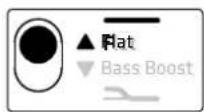
Flat: This is the default. When this switch is set to Flat, LUCAS 2K delivers a factory-tuned, balanced audio image.
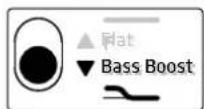
Bass Boost: If you want LUCAS 2K to pack a more powerful low-end punch, set the switch to Bass Boost to bring up the subwoofer's low frequencies.
This switch also serves to adapt the LUCAS 2K's frequency response when you've added an optional LINEAR SUB series subwoofer to your setup. For more on this, see section 5, "L SUB 1500 or L SUB 1800 Bass Extensions" and the configuration examples shown in the appendix starting on page 32.
9 Auto Sleep
LUCAS 2K's Auto Sleep mode is enabled when the button is set to On. If the system is left to idle for 350 minutes without receiving a signal, the amp switches to this power-saving mode where it consumes around 0.5 watts. To wake it up, first press the power button to switch the system off for five seconds. Then switch it on again to bring LUCAS 2K back on line. Set Auto Standby to the Off position if you wish to disable this function and ensure LUCAS 2K remains up and running.
10 Power
This is LUCAS 2K's on/off button. The power LED lights up green when it is engaged.
11 Satellites Out
Plug speaker cords no less than 1.5mm^2 thick and equipped with Speakon NL2-compatible +1/-1 connectors into these speaker outputs to connect the LUCAS 2K satellites. If you connect any other device, it and the LUCAS 2K subwoofer may be irreparably damaged.
Note: Be sure to rotate speaker connectors clockwise until they lock in place!
Heads up: This type of connector has to be turned clockwise until it engages. It also has to be disengaged before it can be unplugged. To this end, pull the bayonet catch towards the cord and turn the connector counter-clockwise.
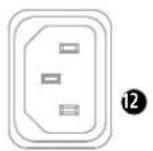
12 Mains
Use the factory-included mains cord to connect this socket to a wall outlet. Note: LUCAS 2K is equipped with a V-Lock mains socket. If you use a Volex locking power cord or another optionally available brand with the same design, you can fix the power cord in place to prevent accidental disconnection.

Caution! Make sure the local mains voltage matches the voltage specified on the LUCAS 2K subwoofer. Connecting it to the wrong mains voltage may destroy its electronic components.
Satellite Input
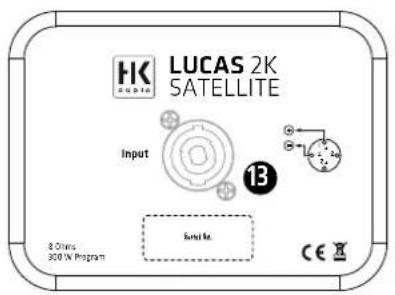
Plug speaker cords no less than 1.5mm^2 thick and equipped with Speakon NL2-compatible +1/-1 connectors into these speaker outputs to connect the satellites to the subwoofer's Satellites Out (11) ports.
3 Powering Up
- Make sure the mains cord is connected and the Power button 10) is set to Off.
- Turn the Master (4) knob all the way down to the far left.
- Connect the two satellites to the subwoofer.
- Switch on all components connected to LUCAS 2K.
- Then push the Power button (10) to switch on the system.
Heads up: Always switch LUCAS 2K on last-that is, after powering up all other components-and switch it off first before powering down all other connected devices.
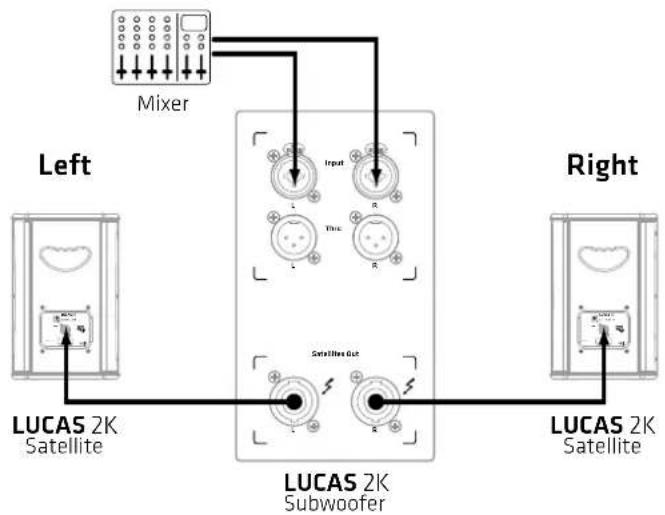
4 Setting Up
4.1 Placement
The subwoofer needs to be centered between the two satellites for the system to deliver a balanced stereo image.
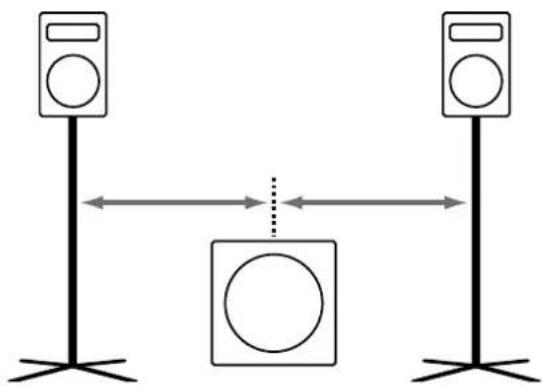
4.2 Vertical Alignment
The MonoTilt™ pole mount's 3^ angle ensures the satellites remain at their center of gravity. This slight tilt also serves to better align the speakers to the audience.
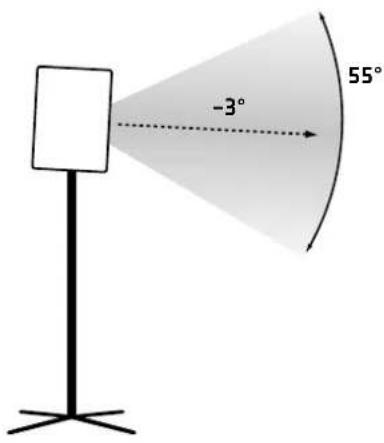
The MonoTilt pole mount's diameter is 36 mm so LUCAS 2K satellites can be mounted on any standard speaker stand.
Heads up! Always place speaker stands on a stable, sturdy surface and never exceed the manufacturer's load-bearing specifications.
Caution:
- Use only speaker stands that are stable enough to prevent accidental tipping after satellites are mounted. Ensure the speaker stand is designed to handle the satellite's weight. Adjustable stands' highest setting must be limited so as to prevent the combination of speaker stand and satellite from tipping. This applies when setting the stand on a fl at, horizontal surface.
- When setting up on an uneven or sloping surface, make sure the speaker stand's base is secured to prevent accidental tipping, either by attaching suitable weights to the base or taking other safety measures.
- The use of any other fixtures or fittings can result in instability that may cause injury.
4.3 Horizontal Alignment
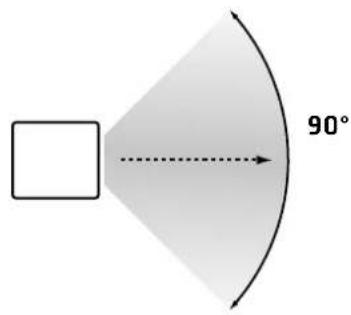
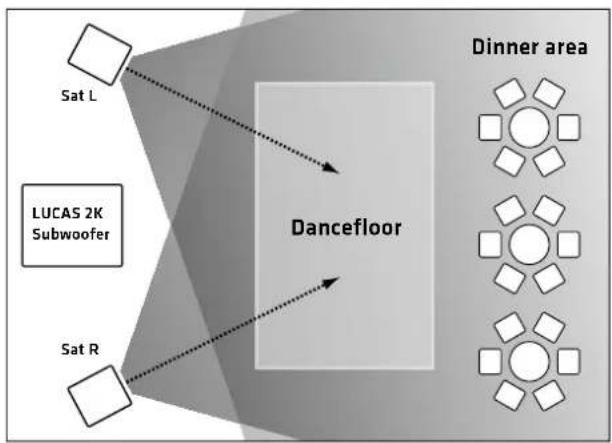
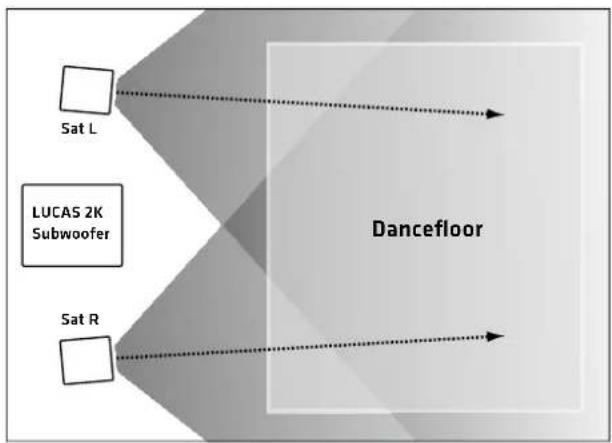
The satellites' horizontal directivity is around 90^ . Depending on the venue and room layout, you may want to turn the satellites inwards towards the audience area.
5 L SUB 1500 or L SUB 1800 Bass Extensions
You can also extend the LUCAS 2K system with an add-on subwoofer, either an L SUB 1500 A for LUCAS 2K15 or an L SUB 1800 A for LUCAS 2K18.
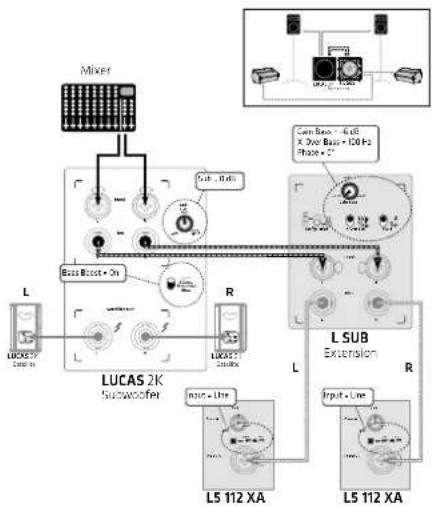
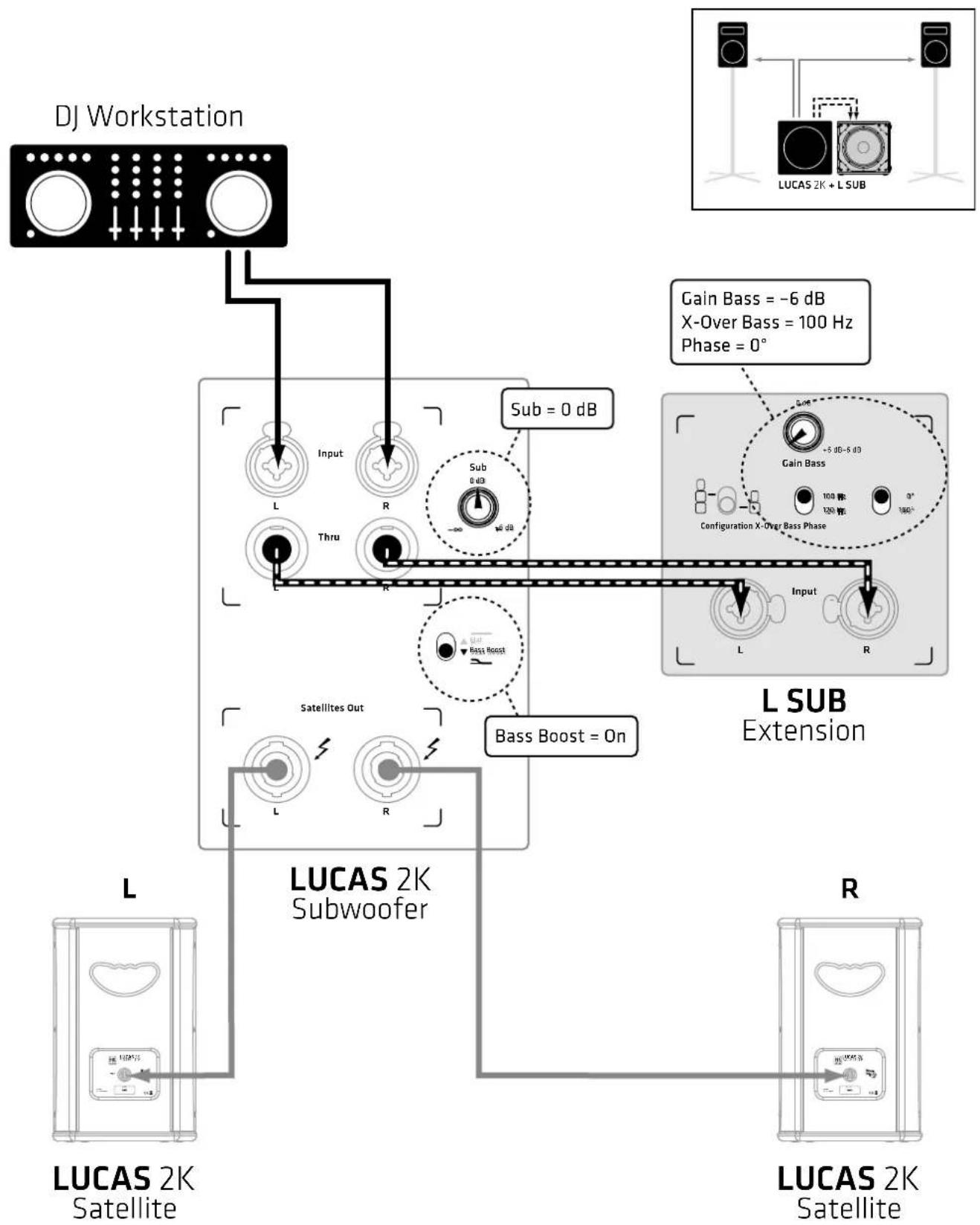
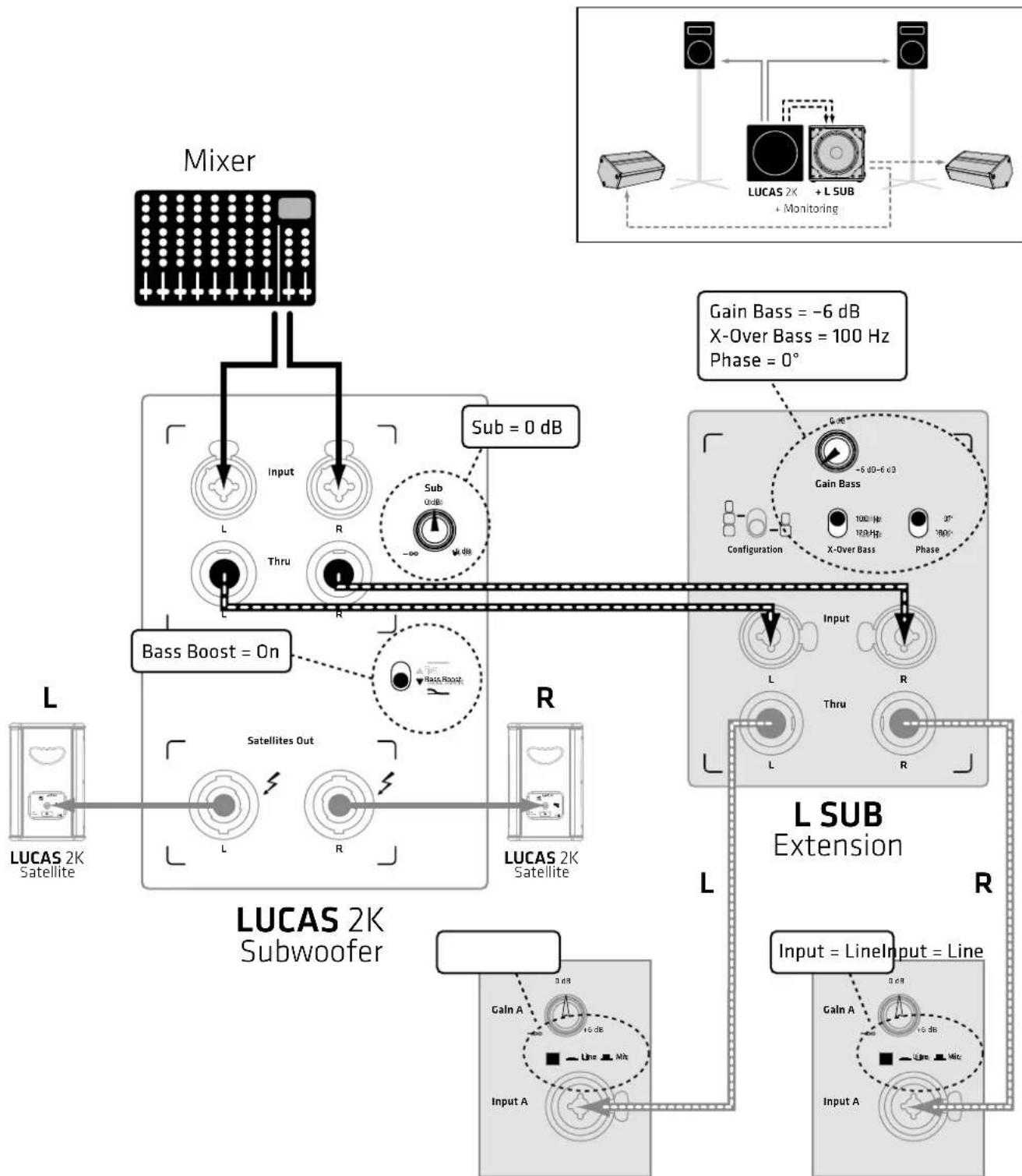
To do this, use two XLR-equipped cords to connect the LUCAS 2K subwoofer's L/R Thru ports (2) to the L SUB subwoofer's L/R Inputs.
- Set the LUCAS 2K subwoofer's Flat/Bass Boost selector (8) to Bass Boost and the Sub knob (5) to the 0 dB center-notched position. Set the connected L SUB unit's Sub-Gain to -6 dB, its X-Over to 100 Hz, and the Phase switch to 0^ .
Heads up: For more on this, see the configuration examples shown in the appendix starting on page 32.
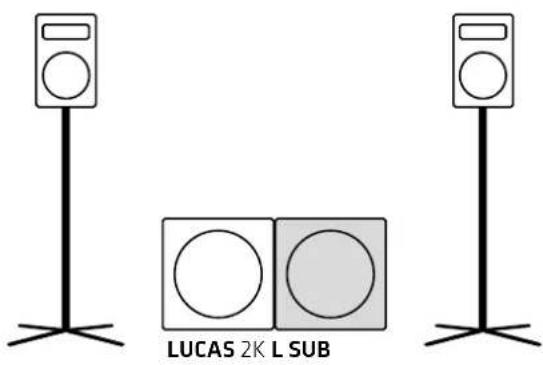
Place the two subwoofoers next to each other, preferably centered between the two satellites, for the system to deliver a balanced audio image.
6 Optional HK Audio Accessories
1. SPEAKER STAND ADD-ON
This package contains two height-adjustable aluminum tripod speaker stands (112 to 190 cm), two speaker cords, and one bag.
This package contains a three-piece set of dark grey soft cases, one with an integrated trolley board for the subwoofer and two for the satellite.
3.100 mm SWIVEL CASTERS blue
The optional swivel castors are mounted to the rear of the LUCAS 2K subwoofer using the self-locking screws at the corners.
Heads up! The subwoofer does fit in the LUCAS 2K Roller Bag with mounted swivel casters. However, it does fit in the padded cover for the L SUB 1500 A or L SUB 1800 A add-on subwoofer.
7 Technical Specifications
| LUCAS 2K System | |
| Total power output (RMS)1 | 570 W Class D |
| Calculated peak power 2000 | W |
| DSP features FIR Filtering, 2 | 4 dB Subsonic Filter, Peak and RMS Limiters |
| Housing MDF | |
| Finish Black acrylic enamel | |
| Front grille Metal grille backed | with black acoustic foam |
| Optional Accessories LUCAS | 2K ROLLER BAG, SPEAKER STAND ADD-ON, SPEAKER STAND STRETCH COVER (tripod cover) |
| Total weight (2K15) 53,0 kg | / 116,9 lbs. |
| Total weight (2K18) 65,4 kg | / 144,2 lbs. |
| LUCAS 2K15 Subwoofer | |
| Max SPL peak2 129 dB | |
| Frequency response +/-5 dB | 44 Hz - 130 Hz |
| Inputs 2x XLR/ 1/4" (6.35 mm) combo inputs | |
| Outputs | 2x XLR Thru, 2x Satellites Out (Speakon) |
| Woofer | 1x 15" |
| Pole mount | 1x M20 (KGM) |
| Grips | 2x HK Audio MultiGrip |
| Dimensions (WxHxD) | 48 x 48,5 x 59,5 cm |
| Weight | 30,2 kg / 66,6 lbs. |
| LUCAS 2K18 Subwoofer | |
| Max SPL peak2 128 dB | |
| Frequency response +/-5 dB | 39 Hz - 130 Hz |
| Inputs 2x XLR/ 1/4" (6.35 mm) combo inputs | |
| Outputs | 2x XLR Thru, 2x Satellites Out (Speakon) |
| Woofer | 1x 18" |
| Pole mount | 1x M20 (KGM) |
| Grips | 2x HK Audio MultiGrip |
| Dimensions (WxHxD) | 51 x 67 x 72,5 cm |
| Weight | 42,6 kg / 93,9 lbs. |
| LUCAS 2K Satellite | |
| Max SPL peak2 127 dB | |
| Frequency response +/- 5 dB | 118 Hz - 18 kHz |
| Midrange speaker | 1x 8" |
| HF driver | 1" |
| Horizontal/vertical direc-tivity | 90° x 55° |
| Inputs | Speaker In (Speakon) |
| Pole mount | HK Audio MonoTilt 3" |
| Grips | 1x routed HK Audio ErgoGripTM |
| Dimensions (WxHxD) | 26,5 x 41,5 x 29,5 cm |
| Weight | 11,4 kg / 25,1 lbs. |
| General Technical Specifications | |
| Peak current | 2,6 A / 100-120 V AC • 1,4 A / 220-240 V AC |
| Inrush current | 39 A at 120 V and 230 V |
Short-term RMS value measured using a sine burst signal with a 1/4 cycle rate and a resulting crest factor of 9 dB at a frequency that is representative of the system
^2 @10% THD,Halfspace
8 Applications
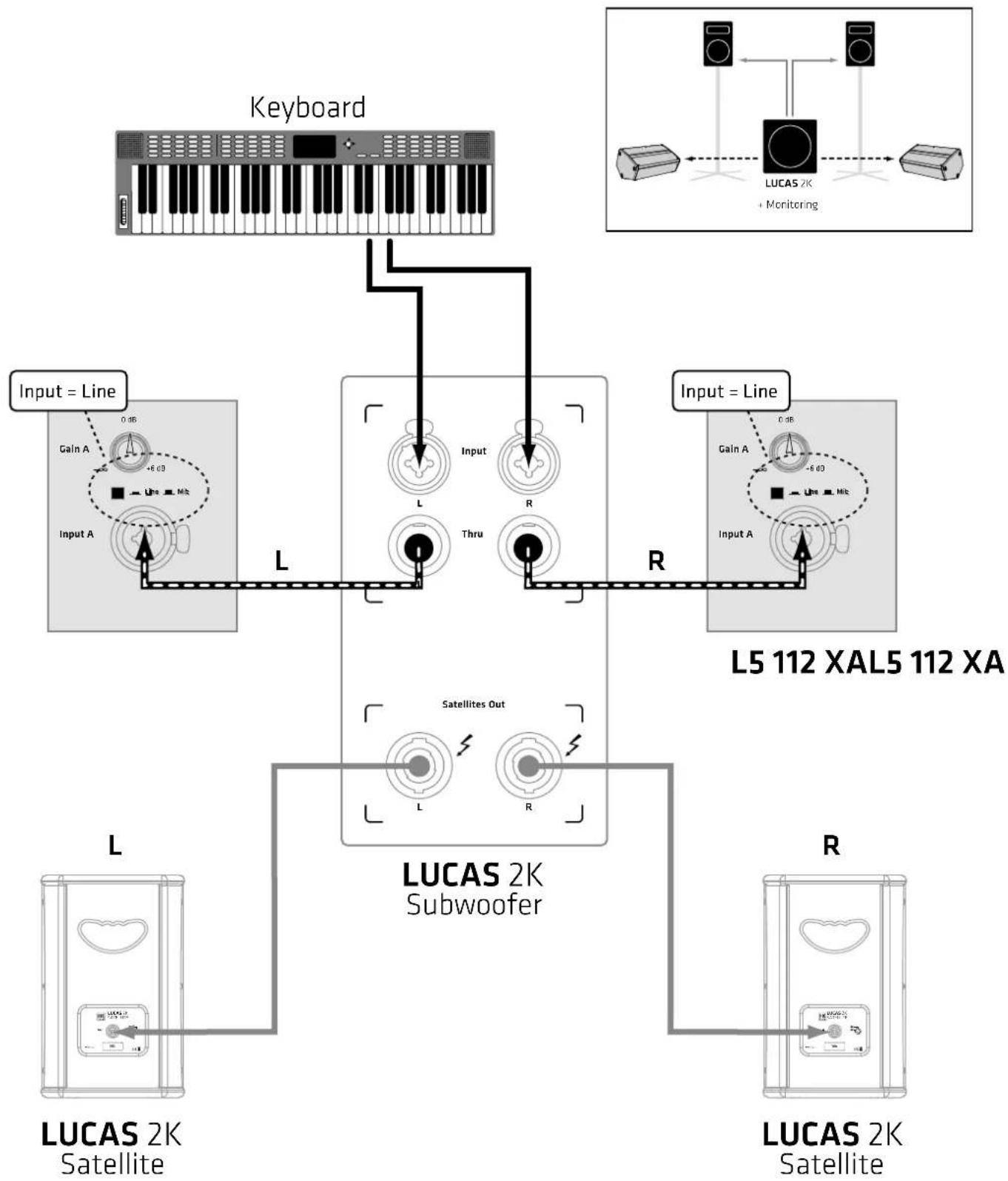
You'll find examples of how to connect components starting on page 32.
220-240V-+50-60W 1.4A rated current

8 Selector "Flat/Bass Boost"
- DJ + Bass Extension:
LUCAS 2K15 + L SUB 1500 / LUCAS 2K18 + L SUB 1800

3. Solo Entertainer + Monitoring:
LUCAS 2K15 / LUCAS 2K18
+2x Powered Monitor
(for example: L5 112 XA)

4. Band + Bass Extension + Monitoring:
LUCAS 2K15 + L SUB 1500 / LUCAS 2K18 + L SUB 1800
+2x Powered Monitor
(for example: L5 112 XA)
L5 112 XAL5 112XA
LUCAS 2K15 LUCAS 2K18

HK Audio* Postfach 1509 · 66595 St. Wendel · Germany · info@hkaudio.com · www.hkaudio.com International Inquiries: fax +49 - 68 51-905 215 · international@hkaudio.com
- Important Safety Instructions! Read before connecting!
- General Notes on Safety for Loudspeaker Systems
- LUCAS 2K15 / 2K18
- Welcome to the HK Audio family!
- Your HK Audio team
- Warranty
- HK AUDIO
- General Information
- Unpacking and Inventorying
- The System's Components
- The Subwoofer
- The Satellites
- Connectors and Controls
- Input
- Thru
- Power LED
- Master
- Sub
- Limit Sat
- Limit Sub
- Flat/Bass Boost Selector
- Auto Sleep
- Power
- Satellites Out
- Mains
- Satellite Input
- Powering Up
- Setting Up
- Placement
- Vertical Alignment
- Caution:
- Horizontal Alignment
- L SUB 1500 or L SUB 1800 Bass Extensions
- Optional HK Audio Accessories
- SPEAKER STAND ADD-ON
- mm SWIVEL CASTERS blue
- Technical Specifications
- Applications
- Selector "Flat/Bass Boost"
- Solo Entertainer + Monitoring:
- Band + Bass Extension + Monitoring:
- LUCAS 2K15 LUCAS 2K18
Brand : HK AUDIO
Model : Lucas 2K15
Category : Hi-fi system