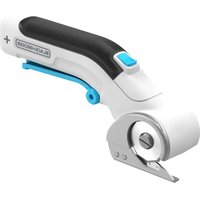
SZ360T - Scissors BLACK & DECKER - Free user manual and instructions
Find the device manual for free SZ360T BLACK & DECKER in PDF.


User questions about SZ360T BLACK & DECKER
0 question about this device. Answer the ones you know or ask your own.
Ask a new question about this device
Download the instructions for your Scissors in PDF format for free! Find your manual SZ360T - BLACK & DECKER and take your electronic device back in hand. On this page are published all the documents necessary for the use of your device. SZ360T by BLACK & DECKER.
USER MANUAL SZ360T BLACK & DECKER
SAVE THIS MANUAL FOR FUTURE REFERENCE.
VEA EL ESPANOL EN LA CONTRAPORTADA.
POUR LE FRANÇAIS, VOIR LA COUVERTURE ARRÊIRE.
INSTRUCTIVO DE OPERACION, CENTROS DE SERVICIO Y POLICA DE GARANTIA. ADVERTENCIA: LEASE ESTE INSTRUCTIVO ANTES DE USAR EL PRODUCTO.
Welcome to the Wonderful World of Black & Decker Craft Products.
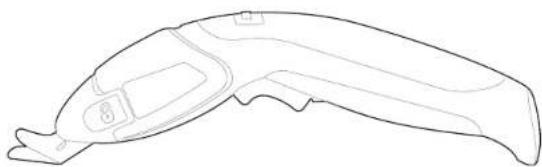
Your new Powered Scissors are designed to fit comfortably in your hand or conveniently clamped to a work surface. You'll find dozens of uses in the workshop and around the house for this versatile tool. For personal safety and for proper operation of your Cordless Powered Scissors, please take the time to carefully read and understand all of the safety rules and instructions in this booklet. Thank you for selecting Black & Decker!
IMPORTANT SAFETY RULES
WARNING: Read and understand all Instructions. Failure to follow all instructions listed below may result in electric shock, fire and/or serious personal injury.
SAVE THESE INSTRUCTIONS
WARNING: When using Electric Tools, basic safety precautions should always be followed to reduce the risk of fire, electric shock, and personal injury, including the following:
Work Area
- Keep your work area clean and well lit. Cluttered benches and dark areas invite accidents.
- Do not operate power tools in explosive atmospheres, such as in the presence of flammable liquids, gases, or dust. Power tools create sparks which may ignite the dust or fumes.
- Keep bystanders, children, and visitors away while operating a power tool. Distractions can cause you to lose control.
Electrical Safety
- A battery operated tool with integral batteries or a separate battery pack must be recharged only with the specified charger for the battery. A charger that may be suitable for one type of battery may create a risk of fire when used with another battery.
- Use battery operated tool only with specifically designated battery pack. Use of any other batteries may create a risk of fire. Personal Safety
-
Stay alert, watch what you are doing and use common sense when operating a power tool. Do not use tool while tired or under the influence of drugs, alcohol, or medication. A moment of inattention while operating power tools may result in serious personal injury,
-
Dress properly. Do not wear loose clothing or jewelry. Contain long hair. Keep your hair, clothing, and gloves away from moving parts. Loose clothes, jewelry, or long hair can be caught in moving parts.
- Avoid accidental starting. Be sure switch is in the locked or off position before inserting battery pack. Carrying tools with your finger on the switch or inserting the battery pack into a tool with the switch on invites accidents.
- Remove adjusting keys or wrenches before turning the tool on. A wrench or a key that is left attached to a rotating part of the tool may result in personal injury.
- Do not overreach. Keep proper footing and balance at all times. Proper footing and balance enable better control of the tool in unexpected situations.
- Use safety equipment. Always wear eye protection. Dust mask, non-skiid safety shoes, hard hat, or hearing protection must be used for appropriate conditions.
Tool Use and Care
- Use clamps or other practical way to secure and support the workpiece to a stable platform. Holding the work by hand or against your body is unstable and may lead to loss of control.
- Do not force tool. Use the correct tool for your application. The correct tool will do the job better and safer at the rate for which it is designed.
- Do not use tool if switch does not turn it on or off. A tool that cannot be controlled with the switch is dangerous and must be repaired.
- Disconnect battery pack from tool or place the switch in the locked or off position before making any adjustments, changing accessories, or storing the tool. Such preventive safety measures reduce the risk of starting the tool accidentally.
- Store idle tools out of reach of children and other untrained
persons. Tools are dangerous in the hands of untrained users. Supervise the use of this tool by children.
- When battery pack is not in use, keep it away from other metal objects like: paper clips, coins, keys, nails, screws or other small metal objects that can make a connection from one terminal to another. Shorting the battery terminals together may cause sparks, burns, or a fire.
- Maintain tools with care. Keep cutting tools sharp and clean. Properly maintained tools, with sharp cutting edge are less likely to bind and are easier to control.
- Check for misalignment or binding of moving parts, breakage of parts, and any other condition that may affect the tool's operation. If damaged, have the tool serviced before using. Many accidents are caused by poorly maintained tools.
- Use only accessories that are recommended by the manufacturer for your model. Accessories that may be suitable for one tool may create a risk of injury when used on another tool.
Service
- Tool service must be performed only by qualified repair personnel. Service or maintenance performed by unqualified personnel may result in a risk of injury.
- When servicing a tool, use only identical replacement parts.
Follow instructions in the Maintenance section of this manual. Use of unauthorized parts or failure to follow Maintenance Instructions may create a risk of shock or injury.
Specific Safety Rules
- Hold tool by insulated gripping surfaces when performing an operation where the cutting tool may contact hidden wiring. Contact with a "live" wire will also make exposed metal parts of the tool "live" and shock the operator.
SAVE THESE SAFETY RULES FOR FUTURE USE
SafetyWarningsand Instructions:Charging
- This manual contains important safety and operating instructions.
- Before using battery charger, read all instructions and cautionary warnings on battery charger and product using battery. CAUTION: To reduce the risk of injury, use charger only with this product. Batteries in other products may burst causing personal injury or damage.
- Do not expose charger to rain or snow.
- Use of an attachment not recommended or sold by Black & Decker may result in a risk of fire, electric shock, or injury to persons.
- To reduce risk of damage to electric plug and cord, pull by plug rather than cord when disconnecting charger.
- Make sure cord is located so that it will not be stepped on, tripped over, or otherwise subjected to damage or stress.
- An extension cord should not be used unless absolutely necessary. Use of improper extension cord could result in a risk of fire, electric shock or electrocution.
a. Two-wire cords can be used with 2-wire or 3-wire extension cords. Only round jacketed extension cords should be used, and we recommend that they be listed by Underwriters Laboratories (U.L.). If the extension is to be used outside, the cord must be suitable for outdoor use. Any cord marked for outdoor use can also be used for indoor work. The letters "W" or "WA" on the cord jacket indicate that the cord is suitable for outdoor use.
b. An extension cord must have adequate wire size (AW or American Wire Gauge) for safety, and to prevent loss of power and overheating. The smaller the gauge number of the wire, the greater the capacity of the cable; that is, 16 gauge has more capacity than 18 gauge. When using more than one extension to make up the total length, be sure each extension contains at least the minimum wire size.
| Minimum Gage for Cord Sets Volts Total Length of Cord in Feet | |||||
| 120V 0-25 26-50 51-100 101-150 | |||||
| 240V 0-50 51-100 101-200 201-300 | |||||
| Ampere Rating More Not more American Wire Gage Than Than | |||||
| 0 | - | 6 | 18 | 16 | 14 |
| 6 | - | 10 | 18 | 16 | 14 |
| 10 | - | 12 | 16 | 16 | 12 |
| 12 | - | 16 | 14 | 12 | Not Recommended |
- Use only the supplied charger when charging your tool. The use of any other charger could damage the tool or create a hazardous condition.
- Use only one charger when charging.
- Do not attempt to open the charger. There are no customer serviceable parts inside. Return to any authorized Black & Decker service center.
- DO NOT incinerate the tool or batteries even if they are severely damaged or completely worn out. The batteries can explode in a fire.
- A small leakage of liquid from the battery cells may occur under extreme usage, charging or temperature conditions. This does not indicate a failure. However, if the outer seal is broken and this leakage gets on your skin:
a. Wash quickly with soap and water.
b. Neutralize with a mild acid such as lemon juice or vinegar. c. If the battery liquid gets in your eyes, flush them with clean water for a minimum of 10 minutes and seek immediate medical attention. MEDICAL NOTE: The liquid is a 25 - 35% solution of potassium hydroxide.
Charging Procedure
THE BATTERIES IN YOUR SCISSORS ARE NOT FULY CHARGED AT THE FACTORY. BEFORE ATTEMPTING TO
CHARGE THEM, THOROUGHLY READ ALL OF THE SAFETY INSTRUCTIONS.
To make the batteries, follow the steps below. Make sure tool is in the "OFF" position before e
- Plug the output cord of the charger into the socket in the bottom half of the scissors handle as shown in figure 1.
- Plug the charger into any standard 120 Volt 60Hz electrical outlet.
- Let the tool charge for 12 hours. After the initial charge, under normal usage, your tool should be fully charged in 12 hours.
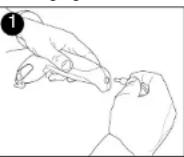
WARNING: When disconnecting from the charger, be sure to unplug the charger from the outlet first then disconnect the charger cord from the scissors. Do not use the scissors while it is connected to the charger. When plugged in unit becomes inoperable.
Important Charging Notes
- After normal usage, the scissors should be fully charged in 12 hours. Your tool was sent from the factory in an uncharged condition. Before attempting to use it, it must be charged for at least 12 hours.
- DO NOT charge the batteries in an air temperature below 40^ (4,5^) or above 105^ (+40,5^) . This is important and will prevent serious damage to the batteries. Longest life and best performance can be obtained if batteries are charged when air temperature is about 75^ .
- While charging, the charger may hum and become warm to touch. This is a normal condition and does not indicate a problem.
- If the batteries do not charge properly-1 Check current at receptacle by plugging in a lamp or other appliance. (2) Check to see if receptacle is connected to a light switch which turns power off when you turn out the lights. (3) Move charger and tool to a surrounding air temperature of 40^ (4,5^) of above 105^ (+40,5^) . (4) If the receptacle and temperature are OK, and
you do not get proper charging, take or send the tool and charger to your local Black & Decker service center. See Electric in yellow pages.
- The scissors should be recharged when it fails to produce sufficient power on jobs which were easily done previously. DO NOT CONTINUE using product with its batteries in a depleted condition.
- To prolong battery life, avoid leaving on charge for extended periods of time (over 30 days without use). Although overcharging is not a safety concern, it can significantly reduce overall battery life.
- The batteries will reach optimum performance after being cycled 5 times during normal usage. There is no need to run the batteries down completely before recharging. Normal usage is the best method of discharging and recharging the batteries.
Operation
Switch
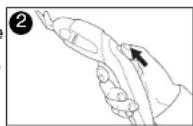
To turn the scissors ON, press the top section of the slider switch marked (I), then squeeze trigger as shown in figure 2 and the tool will run. Release pressure from the trigger and the tool will stop. Pull back on the slider switch to lock the trigger in the "OFF" (0) position.
Changing Cutting Heads
CAUTION: Separate the scissor blades and set top lock slider to OFF (0) position before removing heads.
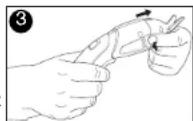
To exchange cutting heads, grasp the scissors as shown in figure 3, press in on the sides of the cutting head and pull straight out. To attach a cutting head, line it up with the body of the scissors and push it on until it cutting head does not line up easily, carefully from each other first then re-attach.
Shoe Blade
The shoe blade is recommended for cutting fabrics on a hard surface. The large flat surface helps guide the cutting head when following patterns.
Mounting to Table Clamp
CAUTION: Make sure switch is in the OFF (0) position before inserting in table clamp or before starting unit.
1.) Attach the table clamp to a secure work surface up to 2 inches thick. Do not overturnen.
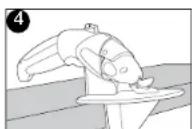
2.) Placing the scissors in the clamp automatically depresses the trigger (figure 4).
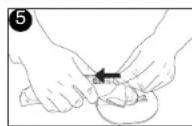
3.) Close clam shell halves (figure 5) and slide orange clamp lock forward.
4.) To operate scissors, push slider switch forward to ON (I). Scissors will run immediately because trigger is already pushed in.
Battery Removal
Before attempting to disassemble this tool, turn it on and run it until it stops to ensure a complete discharge of the batteries.
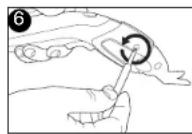
Remove the cutting head then using a phillips screwdriver, remove the 4 screws in the product housing shown in figure 6. Lift the batteries out and pull off the terminal clips. See "RBRC" section below for battery
The RBRC™ Seal
The RBRC™ (Rechargeable Battery Recycling Corporation) Seal on the nickel-cadmium battery (or battery pack) indicates that the costs to recycle the battery (or battery pack) at the end of its useful life have already been paid by Black & Decker. In some areas, it is illegal to place spent nickel-cadmium batteries in the

trash or municipal solid waste stream and the RBRC program provides an environmentally conscious alternative.
RBRC in cooperation with Black & Decker and other battery users, has established programs in the United States and Canada to facilitate the collection of spent nickel-cadmium batteries. Help protect our environment and conserve natural resources by returning the spent nickel-cadmium battery to an authorized Black & Decker service center or to your local retailer for recycling. You may also contact your local recycling center for information on where to drop off the spent battery, or call 1-800-8-BATTERY.
Cleaning
Use only mild soap and a damp cloth to clean the tool. Many household cleaners contain chemicals which could seriously damage the plastic. Also, do not use gasoline, turpentine, lacquer or paint thinner, dry cleaning fluids or similar products. Never let any liquid get inside the tool; never immerse any part of the tool into a liquid.
Important
To assure product SAFETY and RELIABILITY, repairs, maintenance and adjustments should be performed by Black & Decker Service Centers or other qualified personnel. This tool contains no customer serviceable components.
Accessories
Recommended accessories for use with your tool are available from your local retailer.
WARNING: The use of any accessory not recommended for use with this tool could be hazardous.
Service Information
Whether you need technical advice, repair, or genuine factory replacement parts, contact the Black & Decker location nearest you. To find your local service location, refer to the yellow page directory under "Tools-Electric" or call: 1-800-54-HOW TO (544-6986).
Full Two-Year Home Use Warranty
Black & Decker (U.S.) Inc. warrants this product for two years against any defects in material or workmanship. The defective product will be
replaced or repaired at no charge in either of two ways:
The first, which will result in exchanges only, is to return the product to the retailer from whom it was purchased (provided that the store is a participating retailer). Returns should be made within the time period of the retailer's policy for exchanges (usually 30 to 90 days after the sale). Proof of purchase may be required. Please check with the retailer for their specific return policy regarding returns that are beyond the time set for exchanges.
The second option is to take or send the product (prepaid) to a Black & Decker owned or authorized Service Center for repair or replacement at our option. Proof of purchase may be required. Black & Decker owned and authorized service centers are listed under "Tools-Electric" in the yellow pages of the phone directory.
This warranty does not apply to accessories. This warranty gives you specific legal rights and you may have other rights which vary from state to state. Should you have any questions, contact the manager of your nearest Black & Decker Service Center. This product is not intended for commercial use.
FREE WARNING LABEL REPLACEMENT: If your warning labels become illegible or are missing, call 1-800-544-6986 for a free replacement

Black & Decker (U.S.) Inc.,
701 E. Joppa Rd. Towson, MD 21286 U.S.A.
See 'Tools-Electric- Yellow Pages - for Service & Sales


BLACK&DECKER
SZ360TF-CISEAUX ELECTRIQUESDEE6VV
MODE D'EMPLOI
AVANT DE RETOURNER CE PRODUIT POUR
QUELQUE
RAISON QUI SOIT, VEUILLEZ APPELER AU
1-800-54-HOW-TO (544-6986)
REEMPLACEMENT Gratisuit DES ETIQUETTES
Cat.No. SZ360T Form No. 632899-00 JUNE 2005 Copyright: 2005 Black & Decker Printed in China