
CDX555XRF - Hi-Fi System SONY - Free user manual and instructions
Find the device manual for free CDX555XRF SONY in PDF.
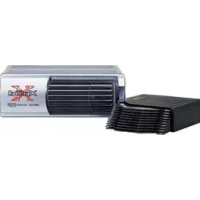


| Product Type | CD Changer for car radio with FM tuner |
| Brand | Sony |
| Model | CDX-555XRF (CDX555XRF) |
| CD changer dimensions | 262 × 90 × 185 mm (W × H × D) |
| CD changer weight | Approx. 2.1 kg |
| Relay box dimensions | 40 × 40 × 27 mm (W × H × D) |
| Relay box weight | Approx. 140 g |
| Wired remote control dimensions (RM-X80RF) | 122 × 36.5 × 15.5 mm (W × H × D) |
| Wired remote control weight | Approx. 255 g |
| Wireless remote control dimensions (RM-X81RF) | 52 × 8.5 × 90 mm (W × H × D) |
| Wireless remote control weight | Approx. 30 g (without battery) |
| Power supply | DC 12 V car battery (negative ground) |
| Current consumption | 800 mA (play), 800 mA (load/eject) |
| FM transmission frequency | 88.3 MHz to 89.9 MHz (adjustable in 0.2 MHz steps) |
| Playback functions | CD play, pause, stop, AMS (track search), manual search, disc selection, shuffle play (SHUF 1/2), repeat play (REP 1/2) |
| Bass boost | D-BASS (2 curve levels) |
| Disc memo | Custom labels up to 8 characters per disc, CD TEXT compatibility |
| Display | Disc number/name, track number/name, elapsed time, SHUF/REP/D-BASS indicators |
| Controls | Wired remote control (RM-X80RF) and infrared wireless remote control (RM-X81RF, CR2025 battery) |
| Supplied accessories | Disc magazine, mounting and connection parts, Velcro strips |
| Optional accessories | XA-250 disc magazine |
| Operating temperature | -10 °C to +55 °C |
| Maintenance | Clean discs with a soft cloth, replace fuse (correct amperage) |
| Disc compatibility | CD, CD-R (audio), CD-RW not read, no 8 cm CDs or special shapes |
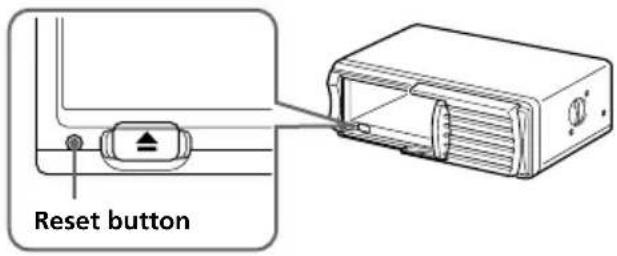
| Reset | Reset button on changer (pointed object) |
Frequently Asked Questions - CDX555XRF SONY
User questions about CDX555XRF SONY
0 question about this device. Answer the ones you know or ask your own.
Ask a new question about this device
Download the instructions for your Hi-Fi System in PDF format for free! Find your manual CDX555XRF - SONY and take your electronic device back in hand. On this page are published all the documents necessary for the use of your device. CDX555XRF by SONY.
USER MANUAL CDX555XRF SONY
Compact Disc Changer System
Operating Instructions GB
Mode d'emploi FR
The model and serial numbers are located at the rear of the CD changer. Record the serial number in the space provided below. Refer to these numbers whenever you call upon your Sony dealer regarding this product.
Model No. CDX-555RF Serial No. ____
For installation and connections, see the supplied installation/connections manual.
For the customers in the USA (CDX-555RF only)
WARNING
This equipment has been tested and found to comply with the limits for a Class B digital device, pursuant to Part 15 of the FCC Rules. These limits are designed to provide reasonable protection against harmful interference in a residential installation. This equipment generates, uses, and can radiate radio frequency energy and, if not installed and used in accordance with the instructions, may cause harmful interference to radio communications. However, there is no guarantee that interference will not occur in a particular installation. If this equipment does cause harmful interference to radio or television reception, which can be determined by turning the equipment off and on, the user is encouraged to try to correct the interference by one or more of the following measures:
— Reorient or relocate the receiving antenna. — Increase the separation between the equipment and receiver. — Connect the equipment into an outlet on a circuit different from that to which the receiver is connected. — Consult the dealer or an experienced radio/TV technician for help.
You are cautioned that any changes or modifications not expressly approved in this manual could void your authority to operate this equipment.
CAUTION
The use of optical instruments with this product will increase eye hazard.
Welcome!
Thank you for purchasing the Sony CD changer system. This unit lets you enjoy CD sound with the changer.
The CDX-555XRF/555RF is a compact disc changer system comprised of the wired and wireless remote commanders, the relay box, and the CD changer. The CD changer modulates the audio signal into the RF (Radio Frequency) signal so that it can be received by the existing FM tuner of your car audio. Therefore you will be able to enjoy CD play with your car audio even if it has no input terminals for a compact disc player.
- Compact and space saving CD changer for vertical, horizontal, suspended, or inclined installation in your car.
- Supplied wired remote enables you to control the CD changer installed in the trunk room of your car.
- Repeat play function for playing a track or a disc repeatedly.
- Shuffle play function for playing tracks of one disc or of all discs in random order.
- CD TEXT function* for displaying the CD TEXT information on the display of the supplied wired remote. • D-BASS function for dynamic bass boot.
- Supplied wireless remote (RM-X81RF) which can be operated almost like the wired remote (RM-X80RF).
* Only available when playing back a CD TEXT disc
Table of contents
Getting Started
Resetting the unit 4
Preparing the CD changer .... 4
Preparing the wireless remote.... 5
Changing the transmitting frequency ...... 6
CD Changer
Listening to a CD 6
Playing tracks in random order — Shuffle Play .... 7
Playing tracks repeatedly — Repeat Play .... 7
Labelling a CD — Disc Memo .... 8
Boosting the bass sound — D-bass .... 9
Changing the output level 9
Additional Information
Precautions 10
Notes on handling discs 10
Maintenance 11
Location of controls 12
Specifications 14
Troubleshooting guide 15
Getting Started
Resetting the unit
Before operating the unit for the first time or after replacing the car battery, you must reset the unit.
Press the reset button with a pointed object, such as a ball-point pen, etc.
Preparing the CD changer
1
Labelled surface up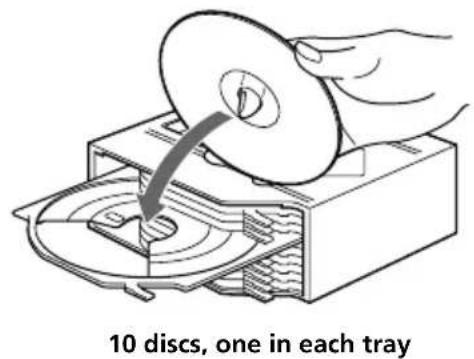
2
Push to unlock the door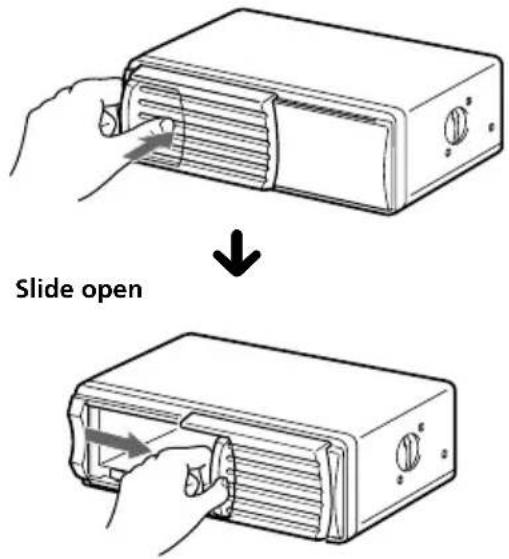
Note
To prevent injury, do not insert your hand in the CD changer.
3
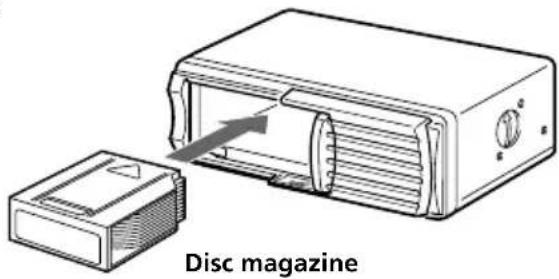
To remove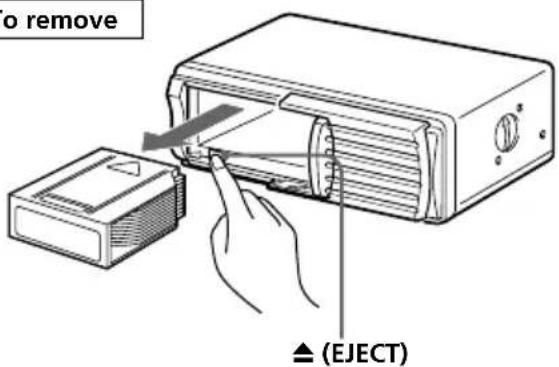
4
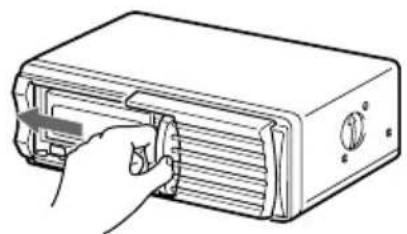
Use the supplied disc magazine or the disc magazine XA-250. The disc magazine XA-10B/XA-350 cannot be used with this unit. If you use any other disc magazine, it may cause a malfunction.
Note
You cannot play 8cm (3in.) CDs.
If the disc magazine does not lock properly, take out the disc magazine, press ▲, and re-insert it.
Use the unit with the door closed completely.
Otherwise, foreign matter may enter the unit and contaminate the lenses inside the CD changer.
Notes on the disc magazine
- Do not leave the disc magazine in locations with high temperature and high humidity, such as on a car dashboard or in the rear window where the disc magazine will be subject to direct sunlight.
- Do not place more than one disc at a time onto a tray, otherwise the CD changer and the discs may be damaged.
- Do not drop the disc magazine or subject it to a violent shock.
When the tray comes out
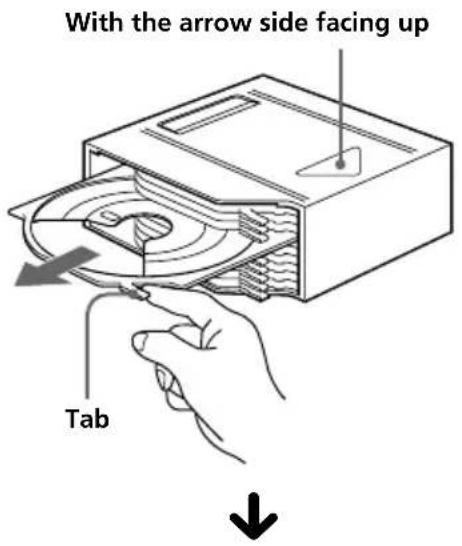
Normally, the trays will not come out of the disc magazine. However, if they are pulled out of the disc magazine, it is easy to re-insert them.
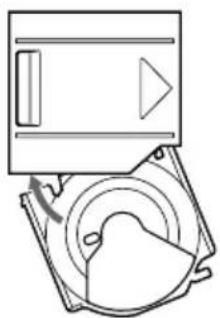
With the cut-away portion of the tray facing you, insert the right corner of the tray in the slot, then push in the left corner until it clicks.
Note
Do not insert the tray upside down or in the wrong direction.
Preparing the wireless remote
Mounting the wireless remote
Use the supplied hook and loop fastener and mount the wireless remote to a suitable location where it will not interfere with your driving.
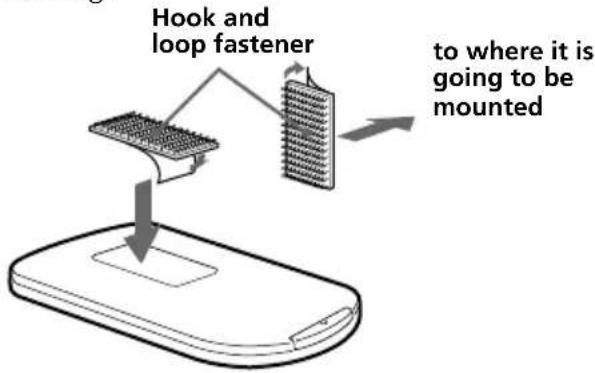
Changing the transmitting frequency
Because this unit processes CD playback sound through an FM tuner, there may be interference noise during CD playback. In such a case, change the frequency of the modulated RF signal transmitted from the unit. The initial setting is 88.3 MHz.
1 Press SHUF/REP for two seconds until frequency appears. 2 Press or repeatedly to select the frequency.
Each time you press ORSC+ DISC- the frequency changes as follows:
DISC- :
88.3 MHz → 89.9 MHz → 89.7 MHz →
89.5 MHz → 89.3 MHz → 89.1 MHz →
88.9 MHz → 88.7 MHz → 88.5 MHz →
88.3 MHz
DISC+ :
88.3 MHz → 88.5 MHz → 88.7 MHz →
88.9 MHz → 89.1 MHz → 89.3 MHz →
89.5 MHz → 89.7 MHz → 89.9 MHz →
88.3 MHz
3 Press SHUF/REP for two seconds.
Using the wireless remote
1 Press SHUF for two seconds until the frequency appears. 2 Press DISC+ or DISC- repeatedly to select the frequency. 3 Press SHUF for two seconds.
Notes
- When you change the transmitting frequency on the unit, be sure to tune your FM tuner to the newly selected one.
- Press ▶II on the wired remote before changing the frequency if the power to the unit is turned off.
CD Changer
Listening to a CD
1 Turn on the FM tuner of your car audio. 2 Tune in the selected transmitting frequency* with the FM tuner of your car audio.
* The frequency of the unit is set to 88.3 MHz at the factory.
You can change the frequency. (See "Changing the transmitting frequency" above.)
3 Press ▶II.
CD playback starts.
4 Adjust the volume with the volume control on your car audio.
All the tracks play from the beginning.
Stopping CD play
Press OFF.
Notes
- When CD playback stops, you may hear some noise from the speakers. To prevent this from happening, turn the volume down before stopping CD playback.
- If you turn off the ignition switch of your car without stopping CD playback, it will automatically resume CD playback from where it was stopped when you turn on the ignition switch again.
Locating a specific track
— Automatic Music Sensor (AMS)
During CD playback, push down either side of AMS once for each track you wish to skip.
To locate previous tracks
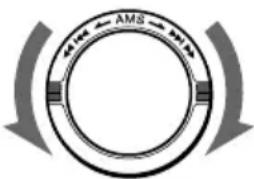
To locate succeeding tracks
Locating a specific point in a track
— Manual Search
During CD playback, push down and hold either side of AMS. Release the control when you have found the desired point.
To search backward
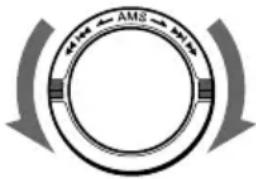
To search forward
Locating a specific disc
— Disc Select
During CD playback, press DISC+ or DISC- once for each disc you wish to skip.
To locate succeeding discs
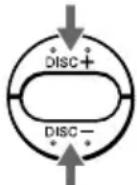
To locate previous discs
Listening to the radio or a tape
Be sure to stop CD playback before you start listening to the radio or a tape.
Note
Be sure to stop CD playback, otherwise there may be some interference with radio reception.
Playing tracks in random order — Shuffle Play
You can select:
- SHUF 1 to play the tracks on the current disc in random order.
- SHUF 2 to play all the discs in random order.
Press SHUF/REP repeatedly until the desired setting appears (SHUF 1 or SHUF 2).
After five seconds, the shuffle play starts.
Each time you press SHUF/REP, the display changes as follows:
![graph LR A["SHUF 1"] --> B["SHUF 2"] --> C["REP 1*"] --> D["REP 2*"] E["Cancel (SHUF off)"] <-- F](/content/2026/03/512291/images/e9d3d9503eac0dddde4252b8a60a8829fe281377e7a47e2751d1162a34566179.jpg)
* These indications do not appear in operation with the wireless remote.
To go back to the normal playback mode, press SHUF/REP repeatedly until "SHUF" or "REP" disappears.
Using on the wireless remote
Press SHUF repeatedly until the desired setting appears.
Playing tracks repeatedly
— Repeat Play
You can select:
- REP 1 to repeat the track.
- REP 2 to repeat the disc.
Press SHUF/REP repeatedly until the desired setting appears (REP 1 or REP 2).
After five seconds, the repeat play starts.
Each time you press SHUF/REP, the display changes as follows:
![graph LR A["SHUF 1*"] --> B["SHUF 2*"] B --> C["REP 1"] C --> D["REP 2"] D --> E["Cancel (REP off)"]](/content/2026/03/512291/images/9b5c8a38676c2525e226f4b8c34f2cc0333d4619926da005b28985126b489bb7.jpg)
* These indications do not appear in operation with the wireless remote.
To go back to the normal playback mode, press SHUF/REP repeatedly until "REP" or "SHUF" disappears.
Using on the wireless remote
Press REP repeatedly until the desired setting appears.
Labelling a CD — Disc Memo (CD changer with custom file function)
You can label each disc with a personalised label. Use the wireless remote to enter and erase the characters.
1 Press DSPL/-EDIT for two seconds until the first character flashes.
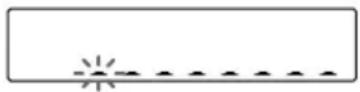
2 Input the characters.
① Press NAME+ or to select the desired characters.
(A → B → C → … Z → 0 → 1 → 2 → … 9 → + → - → * → / → \ → > → < → . → _ → …)
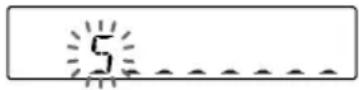
Press NAME to display the available characters. If you press NAME, the characters will appear in reverse order. If you wish to put a blank space after a character, select “_” (under-bar).
An alternative method to erase a title You can erase a title by selecting eight "_"s (under-bar).
2 Press ENTER/-DELETE after locating the desired character. The next character flashes.
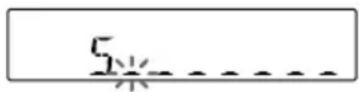
③ Repeat steps ① and ② to enter the entire title. Up to eight characters can be entered per disc.
3 To return to the normal CD playback mode, press DSPL/-EDIT for two seconds.
Displaying the disc memo
Press DSPL-SCRL during CD playback.
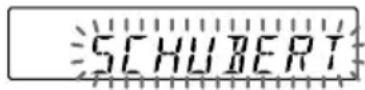
Each time you press DSPL-SCRL during CD playback, the display changes as follows:

Using on the wireless remote
Press DSPL/-EDIT to change the display.
Notes
- If a disc has not been assigned a personalised label, "*******" or "NO NAME" will appear on the display.
- The CD TEXT information appears only when a CD TEXT disc is played back.
- If you use personalised labels, they will always take priority over the original CD TEXT information when such information is displayed.
- "**WAIT**" appears in the display while the system is reading the data.
- The system shows the CD TEXT information with alphabetic characters, numbers, and symbols. (The lowercase characters contained in the CD TEXT disc are automatically converted to uppercase.)
Erasing the disc memo
1 Play the CD and press DSPL/-EDIT for two seconds.
2 Press ENTER/-DELETE for two seconds until DISC NAME indication flashes.
3 Press NAME or to select the title that you wish to erase.
4 Press ENTER/-DELETE to make DISC NAME indication and the disc name flash.
5 Press ENTER/-DELETE again. The title is erased. Repeat steps 2 through 4 if necessary.
6 Press DSPL/-EDIT for two seconds. The unit returns to the normal CD playback mode.
Boosting the bass sound
— D-bass
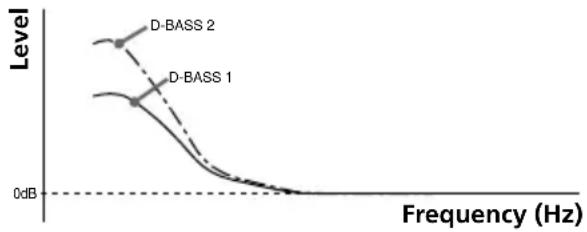
You can enjoy a powerful bass sound. The D-bass function boosts the low frequency signal. You can hear the bass line more clearly even while the vocal volume remains the same. You can emphasize and adjust the bass sound easily with the D-BASS button.
Adjusting the bass curve
Press D-BASS repeatedly to select the desired bass curve.
As the D-BASS number increases so does the effect.

Notes
- Setting the output level from 4 to 5 while using the D-bass function, the amount of bass boost decreases to avoid distortion; however, it's not a malfunction. Adjust the volume with your car audio.
- Selecting D-BASS 2, a distortion may occur depending on your CD. Should this occur, select D-BASS 1 or turn down the output level.
Changing the output level
You can select the output level from the unit. Normally the unit is used in the initial output level; change the level if necessary.
1 Press SHUF/REP for two seconds. 2 Press SHUF/REP momentarily.

3 Press or repeatedly to select the output level.
To decrease the output level

To increase the output level

4 Press SHUF/REP for two seconds.
Using on the wireless remote
1 Press SHUF for two seconds. 2 Press SHUF again momentarily. 3 Press or to select the output level. 4 Press SHUF for two seconds.
Note
When you select level 4 or 5, the CD playback sound may be distorted or you may hear some noise. In such a case, select a lower output level on the unit and turn down the overall volume on your car audio.
Additional Information
Precautions
- This unit cannot be used with a car audio without FM tuner.
- If your car was parked in direct sunlight resulting in a considerable rise in temperature inside the car, allow the unit to cool off before operating it.
- If no power is being supplied to the unit, check the connections first. If everything is in order, check the fuse.
- Avoid installing the CD changer, wireless remote, and wired remote in places: — subject to temperature exceeding 55°C (131°F). — subject to direct sunlight. — near heat sources (such as heaters). — exposed to rain or moisture. — exposed to excessive dust or dirt. — subject to excessive vibration.
If you have any questions or problems concerning your unit that are not covered in this manual, please consult your nearest Sony dealer.
Notes on handling discs
A dirty or defective disc may cause sound drop-outs during playback. To enjoy optimum sound, handle the disc as follows.
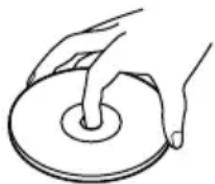
Handle the disc by its edge, and to keep the disc clean, do not touch the unlabelled surface.
This way
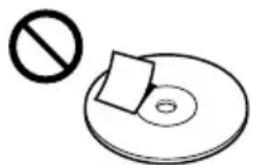
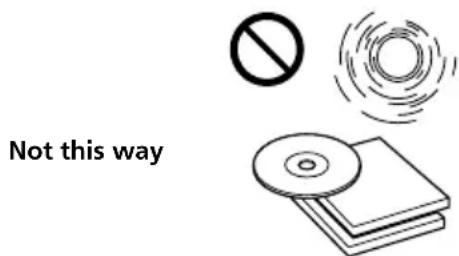
Do not stick paper or tape on the disc.
Not this way
Keep your discs in their cases or disc magazines when not in use.
Do not expose discs to direct sunlight or heat sources such as hot air-ducts. Do not leave discs in a car parked in direct sunlight where there can be a considerable rise in the temperature inside the car.
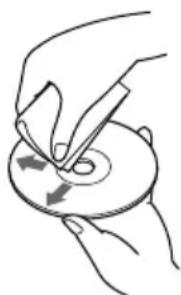
Before playing, clean the discs with an optional cleaning cloth. Wipe each disc in the direction of the arrows.
This way
Do not use solvents such as benzine, thinner, commercially available cleaners or antistatic spray intended for analog discs.
Discs with special shapes (heart-shaped discs, octagonal discs etc.) cannot be played on this unit. Attempting to do so may damage the unit. Do not use such discs.
Notes on discs
If you use the discs explained below, the sticky residue can cause the disc to stop spinning and may cause malfunction or ruin your discs.
Do not use second-hand or rental CDs that have a sticky residue on the surface (for example, from peeled-off stickers or from ink, or glue leaking from under the stickers).
There is paste residue. Ink is sticky.

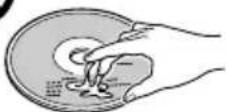
Do not use rental CDs with old labels that are beginning to peel off.
Stickers that are beginning to peel away, leaving a sticky residue.

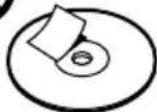
Do not use your discs with labels or stickers attached.
Labels are attached.

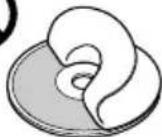
Do not use any discs with labels or stickers attached.
The following malfunctions may result from using such discs:
— Inability to eject a disc (due to a label or sticker peeling off and jamming the eject mechanism). — Inability to read audio data correctly (e.g., playback skipping, or no playback) due to heat shrinking of a sticker or label causing a disc to warp. — Damage to other discs in a disc magazine.
Notes on CD-R/CD-RW discs
You can play CD-Rs (recordable CDs) designed for audio use on this unit.
Look for this mark to distinguish CD-Rs for audio use.
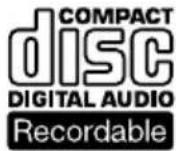
This mark denotes that a disc is not for audio use.


Some CD-Rs (depending on the equipment used for its recording or the condition of the disc) may not play on this unit.
You cannot play a CD-R that is not finalized*.
You cannot play CD-RWs (rewritable CDs).
* A process necessary for a recorded CD-R disc to be played on the audio CD player.
Moisture condensation
On a rainy day or in a very damp area, moisture may condense on the lenses inside the unit, and the unit will not operate properly. In such a case, remove the disc magazine and wait for about an hour until the moisture has evaporated.
Maintenance
Fuse replacement
If the fuse blows, check the power connection and replace the fuse. If the fuse blows again after replacement, there may be an internal malfunction. In such a case, consult your nearest Sony dealer.
Warning
Use the specified amperage fuse. Use of a higher amperage fuse may cause serious damage.
Location of controls
Wired remote (RM-X80RF)
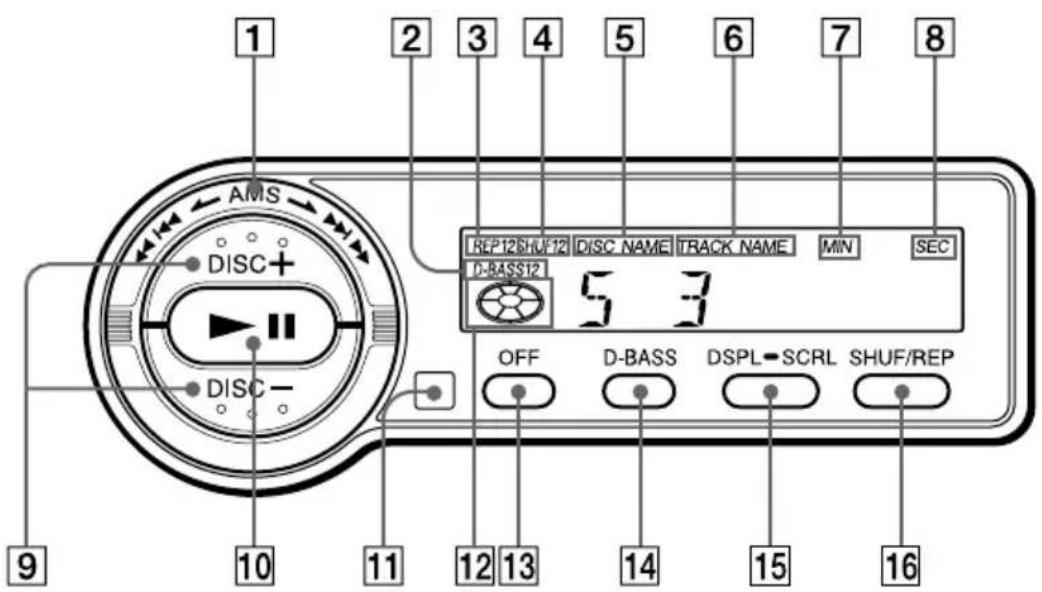
Refer to the pages for details.
1 AMS (Automatic Music Sensor/manual search) control 6, 7 ② D-BASS indication 9 3 REP (repeat play) indication 4 SHUF (shuffle play) indication 5 DISC NAME (disc number/disc name) indication The indicated disc number matches the disc number in the disc magazine. 6 TRACK NAME (track number/track name) indication 7 MIN (minute) indication 8 SEC (second) indication
9 DISC (disc select) buttons 6, 7, 9 10 ▶II (play/pause) button 6 If pressed during CD playback, the CD will pause. If pressed again, CD playback will continue. 11 Infrared receptor for the wireless remote 12 Play/pause indication Turns around during CD playback and flashes when the pause button is pressed. 13 OFF button 6 14 D-BASS button 9 15 DSPL-SCRL (indication change/name scroll) button 8 16 SHUF/REP (shuffle play/repeat play/control mode set) button 6, 7, 9
Wireless remote (RM-X81RF)
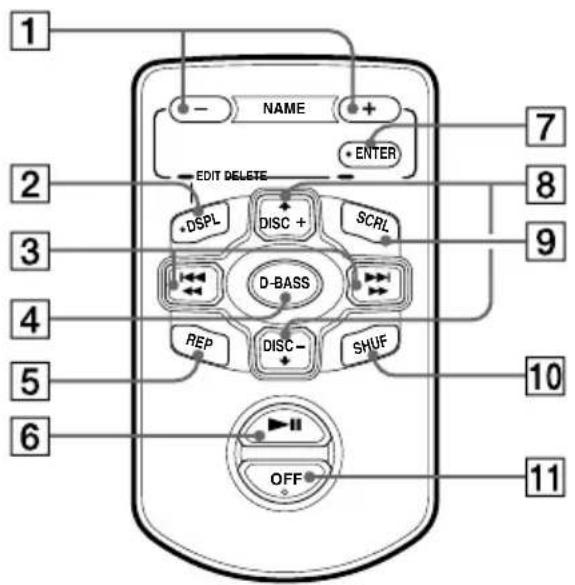
1 NAME (character select) buttons 8 2 DSPL/-EDIT (display/name edit) button 8 3 AMS/MANU (Automatic Music Sensor/manual search) buttons 4 D-BASS button 9 5 REP (repeat play) button 7
6 ▶II (play/pause) button 6 7 ENTER/-DELETE button 8 8 DISC (disc select) buttons 6, 7, 9 9 SCRL (scroll) button 10 SHUF (shuffle play) button 6, 7, 9 11 OFF button 6
Installing the battery
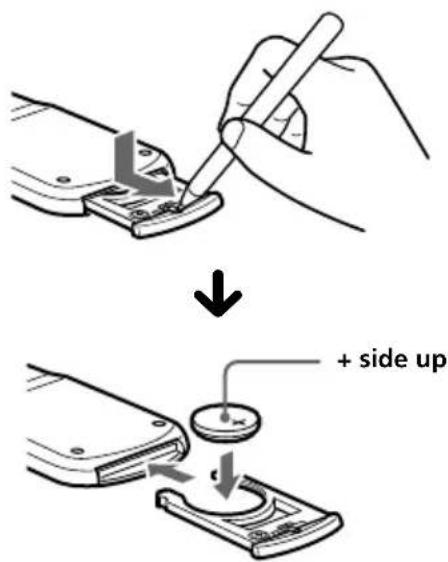
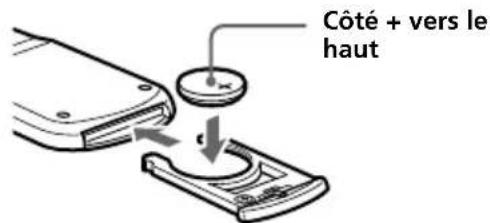
Replace the battery with a Sony CR2025 or Duracell DL-2025 lithium battery. Use of another battery may present a risk of fire or explosion.
Lithium battery life
When the battery becomes weak, you will not be able to operate the unit with the wireless remote.
Battery life is approx. six months depending on the conditions of use.
WARNING
Battery may explode if mistreated.
Do not recharge, disassemble or dispose of in fire.
Notes on the lithium battery
- Keep the lithium battery out of the reach of children. Should the battery be swallowed, immediately consult a doctor.
- Wipe the battery with a dry cloth to assure a good contact.
- Be sure to observe the correct polarity when installing the battery.
- Do not hold the battery with metallic tweezers, otherwise a short circuit may occur.
Specifications
CD changer (CDX-555XRF/555RF)
System: Compact disc digital audio system
| Transmitting frequency 88.3 MHz/88.5 MHz/ |
| 88.7 MHz/88.9 MHz/ |
| 89.1 MHz/89.3 MHz/ |
| 89.5 MHz/89.7 MHz/ |
| 89.9 MHz (switchable) |
Input/output terminals: Wired remote control (8 pin)
RF signal (FM) output Power input (3 pin)
Current drain 800 mA (at playback) 800 mA (at disc loading / ejecting)
Operating temperature -10°C to +55°C (14°F to 131°F)
Dimensions Approx. 262 × 90 × 185 mm (10 3/8 × 3 5/8 × 7 3/8 in.) (w/h/d)
Mass Approx. 2.1 kg (4 lb. 10 oz.)
Relay box
Input/output Aerial input terminal
Aerial output cord CD changer input cord
Dimensions Approx.
40 × 40 × 27 mm (1 5/8 × 1 5/8 × 1 1/8 in.) (w/h/d)
Mass Approx. 140 g (5 oz.)
Wired remote (RM-X80RF)
Dimensions Approx.
122 × 36.5 × 15.5 mm
(4 3/8 × 1 7/16 × 5/8 in.)
(w/h/d)
Mass Approx. 255 g (9 oz.)
Wireless remote (RM-X81RF)
Dimensions Approx.
52 x 8.5 x 90 mm
(2 1/16 x 3/8 x 3 9/16 in.)
(w/h/d)
Mass Approx. 30 g (1 oz.) not
incl. battery
Battery Lithium battery (CR2025)
General
Power requirement 12 V DC car battery
(negative ground)
Supplied accessories Disc magazine (1)
Parts for installation and connections (1 set)
Optional accessories: Disc magazine XA-250
Design and specifications are subject to change without notice.
Troubleshooting guide
The following checklist will assist in the correction of most problems which you may encounter with your unit.
Before going through the checklist below, refer to the connection and operating procedures.
General
| Problem | Cause/Solution |
| The unit does not function. | • The built-in micro computer has malfunctioned.→Press the reset button of the CD changer.• The connecting cords are not connected properly. |
| The sound skips. | • The CD changer is installed in an unstable location.→Re-install it in a stable location.• The CD is dirty or defective.→Clean or replace it. |
| The disc magazine is not locked in the CD changer. | Take out the disc magazine, press ▲, and re-insert the disc magazine until it is locked securely. |
Error displays
The following indication will flash for about five seconds.
| Display Cause | Solution | |
| NO MAG | The disc magazine is not inserted in the CD changer. | Insert the disc magazine with CDs into the CD changer. |
| NO DISC | No CD is inserted in the disc magazine. | Take out the disc magazine and insert CDs. |
| ERROR | The CD is dirty. | Clean the CD. |
| The CD is inserted upside down. | Insert the CD correctly. | |
| RESET | The CD changer cannot be operated because of some problem. | Press the reset button of the CD changer. |
| NO DISCS | One or more CDs from the CD changer will not play because of some problem. | Insert another CD. |
If the solutions mentioned above do not help to improve the situation, consult your nearest Sony dealer.
Welcome!
Bass enhancement — D-bass .... 9
Note
Notes
Bass curve adjustment
Approx. 40 × 40 × 27 mm
(an/al/prf)
Approx. weight 140 g
- COMPACT DISC CHANGER SYSTEM
- FOR THE CUSTOMERS IN THE USA (CDX-555RF ONLY)
- WARNING
- CAUTION
- WELCOME
- TABLE OF CONTENTS
- GETTING STARTED
- CD CHANGER
- ADDITIONAL INFORMATION
- RESETTING THE UNIT
- PREPARING THE CD CHANGER
- NOTE
- USE THE UNIT WITH THE DOOR CLOSED COMPLETELY
- NOTES ON THE DISC MAGAZINE
- WHEN THE TRAY COMES OUT
- PREPARING THE WIRELESS REMOTE
- MOUNTING THE WIRELESS REMOTE
- CHANGING THE TRANSMITTING FREQUENCY
- USING THE WIRELESS REMOTE
- NOTES
- LISTENING TO A CD
- STOPPING CD PLAY
- LOCATING A SPECIFIC TRACK
- AUTOMATIC MUSIC SENSOR (AMS)
- LOCATING A SPECIFIC POINT IN A TRACK
- MANUAL SEARCH
- LOCATING A SPECIFIC DISC
- DISC SELECT
- LISTENING TO THE RADIO OR A TAPE
- PLAYING TRACKS IN RANDOM ORDER — SHUFFLE PLAY
- USING ON THE WIRELESS REMOTE
- PLAYING TRACKS REPEATEDLY
- REPEAT PLAY
- LABELLING A CD — DISC MEMO (CD CHANGER WITH CUSTOM FILE FUNCTION)
- DISPLAYING THE DISC MEMO
- ERASING THE DISC MEMO
- BOOSTING THE BASS SOUND
- D-BASS
- ADJUSTING THE BASS CURVE
- CHANGING THE OUTPUT LEVEL
- PRECAUTIONS
- NOTES ON HANDLING DISCS
- NOTES ON DISCS
- DO NOT USE ANY DISCS WITH LABELS OR STICKERS ATTACHED
- NOTES ON CD-R/CD-RW DISCS
- MOISTURE CONDENSATION
- MAINTENANCE
- FUSE REPLACEMENT
- LOCATION OF CONTROLS
- WIRELESS REMOTE (RM-X81RF)
- INSTALLING THE BATTERY
- LITHIUM BATTERY LIFE
- NOTES ON THE LITHIUM BATTERY
- SPECIFICATIONS
- CD CHANGER (CDX-555XRF/555RF)
- RELAY BOX
- WIRED REMOTE (RM-X80RF)
- GENERAL
- TROUBLESHOOTING GUIDE
- ERROR DISPLAYS
- BASS CURVE ADJUSTMENT
Brand : SONY
Model : CDX555XRF
Category : Hi-Fi System