
PRS-600 - E-reader SONY - Free user manual and instructions
Find the device manual for free PRS-600 SONY in PDF.


| Product Type | E-reader |
| Brand | Sony |
| Model | PRS-600 |
| Screen | Touchscreen |
| Power supply | Charges via USB or optional AC adapter (AC-S5220E) |
| Connectivity | USB (USB connector, DC IN jack) |
| Navigation functions | Keys < > (page turn), Home button, OPTIONS button, Size button |
| Stylus | Provided for precise touchscreen operations |
| Management software | eBook Library for Windows and Mac |
| Book transfer | Via USB, drag and drop in the software |
| Charge indicator | Yes (red during charging, turns off when charged) |
| POWER switch | Yes |
| RESET button | Yes |
| Customer support | Website and phone (see manual) |
| Serial number | Printed on the back of the device, required for registration |
| Manual | 8 pages, PDF format, available in French |
| Usage precautions | Use with care, do not use for other purposes |
Frequently Asked Questions - PRS-600 SONY
User questions about PRS-600 SONY
0 question about this device. Answer the ones you know or ask your own.
Ask a new question about this device
Download the instructions for your E-reader in PDF format for free! Find your manual PRS-600 - SONY and take your electronic device back in hand. On this page are published all the documents necessary for the use of your device. PRS-600 by SONY.
USER MANUAL PRS-600 SONY
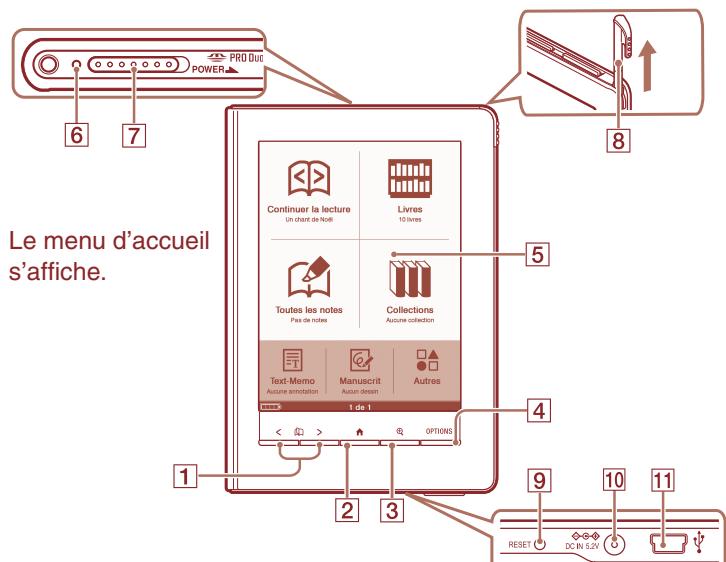
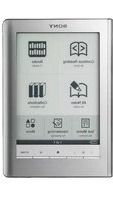
Provides simple commands by touching the screen.
Charge indicator
Lights up when the Reader is charging.
7 POWER switch 8 Stylus
Used for precise touch screen operations.
9 RESET button DC IN jack
Used to connect the AC Adapter for Reader (AC-S5220E) (optional).
USB connector
Getting Started
Connect to USB connector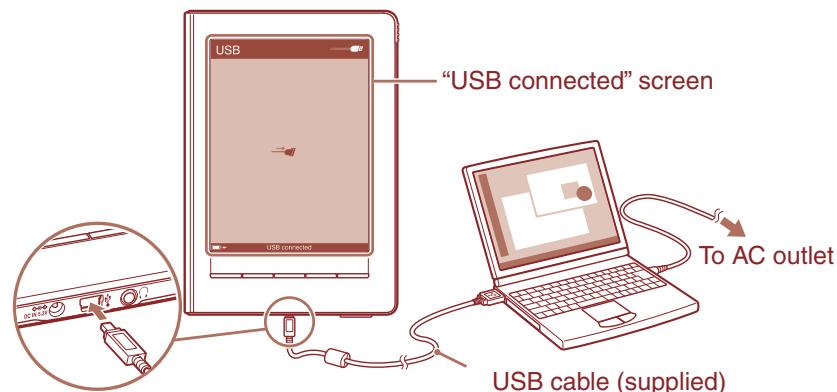
1 Charge the Reader via USB (as shown above) at least 5 minutes until "USB connected" appears on the Reader.
Keep your computer in an active mode while charging the Reader.
To fully charge the Reader, wait about 4 hours or less until the charge indicator (lights up in red while charging) goes off.
2 Disconnect the Reader from your computer, and then follow the on-screen instructions of the Reader to complete the initial settings.
To select an item on the touch screen, tap the item. To apply the setting, tap "OK."
Note
- You cannot operate the Reader while it is connected to your computer.
Reading eBooks
Home menu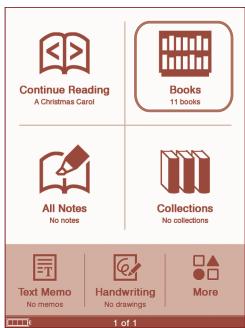
"Books" list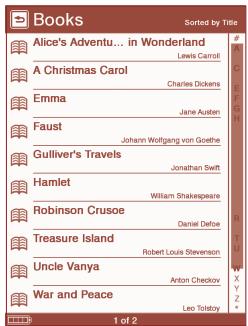
1 In the Home menu, tap (Books). 2 Tap the desired book in the "Books" list.
To turn pages, press the < 回 > (Page Turn) buttons.
To return to the "Books" list
Press the OPTIONS button, then tap "Return to List."
To return to the Home menu
Press the H (Home) button.
Getting eBooks
To purchase or download eBooks, install eBook Library software on your computer and register to the eBook store.
When the Reader is connected to your PC, the AutoPlay window appears on the screen.
1 Click "Install eBook Library" in the "Installer for Reader" window, and then follow the on-screen instructions.
AutoPlay window (in case of Windows Vista)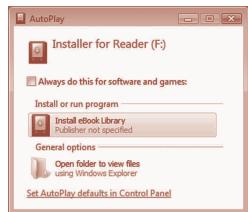
If the AutoPlay feature is disabled, start the installation launcher manually. From the Start menu, click the following: "My Computer" ("Computer" in the case of Vista) - "Installer for Reader" - "Windows" - "Setup eBook Library"
To install eBook Library on a Macintosh
When the Reader is connected to your Mac, "LAUNCHER" and "READER" appear on the desktop. Click the following, and then follow the on-screen instructions: "LAUNCHER" - "Mac" - "Setup eBook Library"
2 Start eBook Library, and then click "eBook Store."
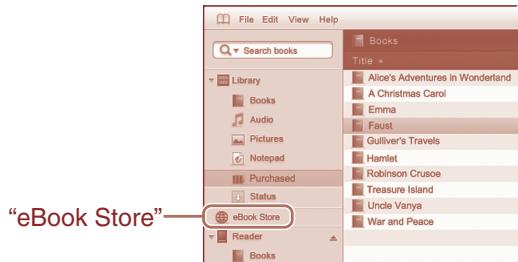
3 Create your account by following the store instructions.
Purchased eBooks will be downloaded to eBook Library.
Transferring eBooks to the Reader
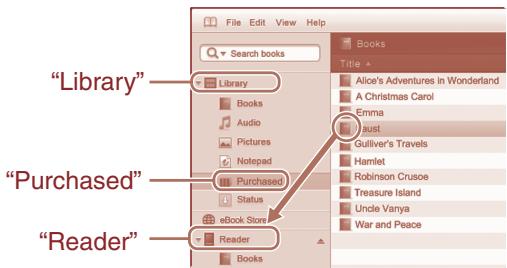
1 Click "Purchased" under "Library" to locate purchased eBooks. 2 Click an eBook to select, and then drag and drop it to "Reader."
The transferred eBook can be read on the Reader after disconnecting it from your computer.
Please refer to the eBook Library Help for further information.
Support
If you encounter an issue, resolve the issue in the following order.
1 Refer to the User's Guide or the eBook Library Help.
You can obtain the User's Guide in one of the following ways:
- Connect the Reader via USB, then access the zipped file (PRS600_UG) stored on the Reader.
Windows: from the Start menu, click the following: "My Computer" ("Computer" in the case of Vista) - "READER" - "Documents" - "PRS600_UG"
Drag and drop to your computer and unzip it.
Macintosh: click the following: "READER" - "Documents" - "PRS600_UG"
- Download the User's Guide from the support web site to your computer.
2 Visit the support site.
For customers in the USA: http://www.sony.com/readersupport
For customers in Canada: http://www.sony.ca/ElectronicsSupport/
For customers in Europe: http://support.sony-europe.com/eBook/PRS
3 Contact (call) Sony Support. (USA/Canada only)
For customers in the USA: 1-866-962-7669
For customers in Canada: 1-877-899-7669
About the serial number
The serial number provided for this unit is required for customer registration. The number is on a label on the back of the unit. Do not remove the label.
Owner's Record
The model and serial numbers are located on the back of the unit. Record them in the space provided below. Refer to these numbers whenever you call upon your Sony dealer regarding this product.
Model No.
Serial No.
Precautions
Notice for customers: the following information is only applicable to equipment sold in countries applying EU directives
The manufacturer of this product is Sony Corporation, 1-7-1 Konan, Minato-ku, Tokyo, Japan. The Authorized Representative for EMC and product safety is Sony Deutschland GmbH, Hedelfinger Strasse 61, 70327 Stuttgart, Germany. For any service or guarantee matters please refer to the addresses given in separate service or guarantee documents.
Note on use
Please use the Reader and the supplied stylus with only the originally intended purpose and care.
On Copyrights
The contents of each book pre-installed on this product are copyrighted works, edited with the cooperation of the publisher and editor hereto mentioned.
Copyright laws prohibit copying the data of this product or the contents of this manual (illustrations, related documents, etc.) in whole or in part without the permission of the copyright holder. Additionally, use of the data of this product or the contents of this manual is not allowed without Sony's permission except for personal use.
- SONY and the SONY logo are registered trademarks of Sony Corporation.
- BBeB, BBeB Book, and their logos are trademarks of Sony Corporation.
- "Memory Stick", "Memory Stick Duo", "Memory Stick PRO", and their logos are trademarks of Sony Corporation.
- Bitstream is a registered trademark, and Dutch, Font Fusion, and Swiss are
trademarks, of Bitstream Inc.
- Microsoft, Windows, Windows Vista and Windows Media are trademarks or registered trademarks of Microsoft Corporation in the United States and/or other countries.
- Macintosh and Mac OS are trademarks of Apple Inc., registered in the U.S. and other countries.
- Adobe, the Adobe logo, Reader and PDF are either registered trademarks or trademarks of Adobe Systems Incorporated in the United States and/or other countries.
- MPEG Layer-3 audio coding technology and patents licensed from Fraunhofer IIS and Thomson.
All other system names and product names appearing in this document are generally the registered trademarks or trademarks of their respective manufacturers. Further, the trademark ™ and registered trademark © symbols are not indicated throughout this document.
Notice for users
Before use, please read through the End User License Agreement (EULA) that is stored on the Reader.
To access the EULA, connect the Reader to your computer via USB, then follow the instructions below.
Windows; from the Start menu, click the following: "My Computer" ("Computer" in the case of Vista) - "READER" - "Documents" - "LICENSE"
Macintosh; click the following: "READER" on the desktop - "Documents" - "LICENSE"
Program ©2009 Sony Corporation Documentation ©2009 Sony Corporation
Navigation commands
Program ©2009 Sony Corporation
Documentation ©2009 Sony Corporation
- GETTING STARTED
- NOTE
- READING EBOOKS
- TO RETURN TO THE "BOOKS" LIST
- TO RETURN TO THE HOME MENU
- GETTING EBOOKS
- TO INSTALL EBOOK LIBRARY ON A MACINTOSH
- CREATE YOUR ACCOUNT BY FOLLOWING THE STORE INSTRUCTIONS
- TRANSFERRING EBOOKS TO THE READER
- SUPPORT
- REFER TO THE USER'S GUIDE OR THE EBOOK LIBRARY HELP
- VISIT THE SUPPORT SITE
- CONTACT (CALL) SONY SUPPORT. (USA/CANADA ONLY)
- ABOUT THE SERIAL NUMBER
- OWNER'S RECORD
- PRECAUTIONS
- NOTICE FOR CUSTOMERS: THE FOLLOWING INFORMATION IS ONLY APPLICABLE TO EQUIPMENT SOLD IN COUNTRIES APPLYING EU DIRECTIVES
- NOTE ON USE
- ON COPYRIGHTS
- NOTICE FOR USERS
- NAVIGATION COMMANDS
Brand : SONY
Model : PRS-600
Category : E-reader