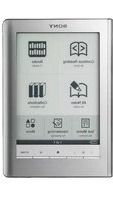
Reader PRS-900 - E-reader SONY - Free user manual and instructions
Find the device manual for free Reader PRS-900 SONY in PDF.


Pick your language and provide your email: we'll send you a specifically translated version.
| Product Type | E-reader |
| Brand | Sony |
| Model | Reader PRS-900 |
| Display | 6-inch E Ink touchscreen, 600x800 pixels |
| Storage | 2 GB internal memory, expandable via SD card |
| Supported Formats | PDF, EPUB, TXT, JPEG, BMP, GIF, MP3 |
| Connectivity | USB 2.0, SD card slot |
| Battery | Rechargeable lithium-ion, up to 2 weeks of reading |
| Dimensions | 175 x 122 x 10 mm |
| Weight | 260 g |
| Operating System | Linux-based proprietary |
| Touchscreen | Yes, infrared touch technology |
| Dictionary | Built-in English dictionary |
| Text-to-Speech | Available for text files |
| Notes and Highlights | Supported with stylus |
| Warranty | 1 year (depending on region) |
Frequently Asked Questions - Reader PRS-900 SONY
What file formats does the Sony Reader PRS-900 support?
The Sony Reader PRS-900 supports PDF, EPUB, TXT, image formats (JPEG, BMP, GIF), and MP3 audio.
How do I transfer e-books to the PRS-900?
Connect the device via USB to your computer. It will appear as an external drive; simply drag and drop supported files into the Books folder.
Can I expand the storage on the PRS-900?
Yes, the PRS-900 has a Secure Digital (SD) card slot for expandable storage up to 32 GB.
How long does the battery last?
The battery can last up to two weeks with regular reading (about 30 minutes per day) on a full charge.
Does the PRS-900 have a touch screen?
Yes, it features an infrared touch screen that supports finger and stylus input for notes and highlights.
How do I reset the Sony Reader PRS-900?
To perform a soft reset, press and hold the power button for 10 seconds. For a factory reset, go to Settings > Reset.
Can I listen to music while reading?
Yes, the PRS-900 supports MP3 playback in the background while you read.
Is the PRS-900 backlit?
No, it uses an E Ink screen which is not backlit. Reading requires an external light source.
How do I take notes on the PRS-900?
Use the included stylus to write directly on the screen. Notes are saved as annotations in the e-book.
What languages does the dictionary support?
The built-in dictionary is English only. It provides definitions for selected words.
User questions about Reader PRS-900 SONY
0 question about this device. Answer the ones you know or ask your own.
Ask a new question about this device
No questions yet. Be the first to ask one.
Download the instructions for your E-reader in PDF format for free! Find your manual Reader PRS-900 - SONY and take your electronic device back in hand. On this page are published all the documents necessary for the use of your device. Reader PRS-900 by SONY.
USER MANUAL Reader PRS-900 SONY
Manual assistant
Powered by Anthropic
Waiting for your message
Product information
Brand : SONY
Model : Reader PRS-900
Category : E-reader