ManualGo.com
Rampage IV ExtremeBATTLEFIELD 3 - Motherboard ASUS - Free user manual and instructions
Find the device manual for free Rampage IV ExtremeBATTLEFIELD 3 ASUS in PDF.


Download the instructions for your Motherboard in PDF format for free! Find your manual Rampage IV ExtremeBATTLEFIELD 3 - ASUS and take your electronic device back in hand. On this page are published all the documents necessary for the use of your device. Rampage IV ExtremeBATTLEFIELD 3 by ASUS.
USER MANUAL Rampage IV ExtremeBATTLEFIELD 3 ASUS
(2) for the cost of reproduction and shipment, which is dependent on the preferred carrier and the location where you want to have it shipped to, by sending a request to: ASUSTeK Computer Inc. Legal Compliance Dept. 15 Li Te Rd., Beitou, Taipei 112 Taiwan In your request please provide the name, model number and version, as stated in the About Box of the product for which you wish to obtain the corresponding source code and your contact details so that we can coordinate the terms and cost of shipment with you. The source code will be distributed WITHOUT ANY WARRANTY and licensed under the same license as the corresponding binary/object code. This offer is valid to anyone in receipt of this information. ASUSTeK is eager to duly provide complete source code as required under various Free Open Source Software licenses. If however you encounter any problems in obtaining the full corresponding source code we would be much obliged if you give us a notication to the email address gpl@asus.com, stating the product and describing the problem (please do NOT send large attachments such as source code archives etc to this email address).iii Table des matières Notes ........................................................................................................ vii Informations sur la sécurité ..................................................................... viii À propos de ce manuel .............................................................................. ix Résumé des spécications de la RAMPAGE IV EXTREME .................... xi
3.5.5 Onboard Devices Conguration
(24-pin EATXPWR; 4-pin EATX12V_1; 8-pin EATX12V_2) 2-32
2.2.3 Central Processing Unit (CPU)
DDR3 1866 MHz DDR3 2000 MHz Vendors Part No. Size S S /
C h i p Brand Chip NO. Timing Voltage DIMM socket support (Optional)
C h i p Brand Chip NO. Timing Voltage DIMM socket support (Optional)
DDR3 1800 MHz Vendors Part No. Size SS/ C h i p Brand Chip NO. Timing Voltage DIMM socket support (Optional)
Vendors Part No. Size S S /
Chip Brand Chip NO. Timing Voltage DIMM socket support (Optional)
Vendors Part No. Size S S /
Chip Brand Chip NO. Timing Voltage DIMM socket support (Optional)
Vendors Part No. Size S S /
Chip Brand Chip NO. Timing Voltage DIMM socket support (Optional)
Vendors Part No. Size S S /
Chip Brand Chip NO. Timing Voltage DIMM socket support (Optional)
DDR3 1067 MHz Vendors Part No. Size S S /
Chip Brand Chip NO. Timing Voltage DIMM socket support (Optional)
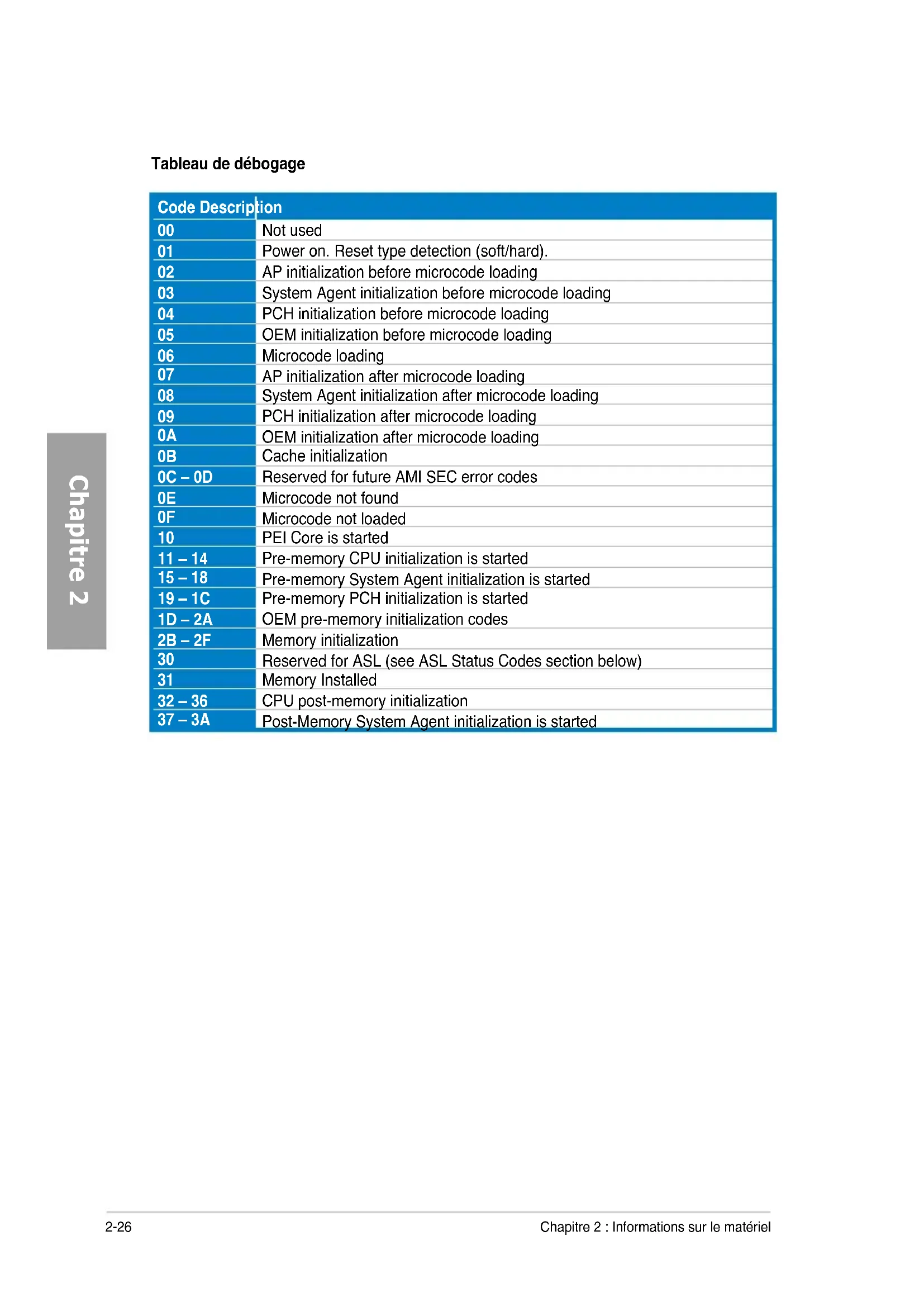
Power on. Reset type detection (soft/hard).
AP initialization before microcode loading
AP initialization after microcode loading
System Agent initialization after microcode loading
PCH initialization after microcode loading
OEM initialization after microcode loading
Cache initialization 0C – 0D Reserved for future AMI SEC error codes
PEI Core is started 11 – 14 Pre-memory CPU initialization is started 15 – 18 Pre-memory System Agent initialization is started 19 – 1C Pre-memory PCH initialization is started 1D – 2A OEM pre-memory initialization codes 2B – 2F Memory initialization
Reserved for ASL (see ASL Status Codes section below)
DXE IPL is started 50 – 53 Memory initialization error. Invalid memory type or incompatible memory speed
Memory not installed
CPU self test failed or possible CPU cache error
CPU micro-code is not found or micro-code update is failed
Reset PPI is not available 5C – 5F Reserved for future AMI error codes
S3 Resume is stared (S3 Resume PPI is called by the DXE IPL)
Recovery condition triggered by rmware (Auto recovery)
Recovery condition triggered by user (Forced recovery)
Recovery process started
Recovery rmware image is found
Recovery rmware image is loaded F5-F7 Reserved for future AMI progress codes
Recovery PPI is not available
Recovery capsule is not found
Installation of the PCH Runtime Services 63 – 67 CPU DXE initialization is started
PCI host bridge initialization
System Agent DXE initialization is started
System Agent DXE SMM initialization is started 6B – 6F System Agent DXE initialization (System Agent module specic)
PCH DXE SMM initialization is started
CSM initialization 7A – 7F Reserved for future AMI DXE codes 80 – 8F OEM DXE initialization codes
Boot Device Selection (BDS) phase is started
Driver connecting is started
PCI Bus initialization is started
PCI Bus Hot Plug Controller Initialization
Console Output devices connect
USB initialization is started
USB Enable 9E – 9F Reserved for future AMI codes
IDE initialization is started
SCSI initialization is started
Setup Verifying Password
Reserved for ASL (see ASL Status Codes section below)*
Reserved for ASL (see ASL Status Codes section below)
Exit Boot Services event
Legacy Option ROM Initialization
Some of the Architectural Protocols are not available
No Console Output Devices are found
No Console Input Devices are found
Boot Option is failed (StartImage returned error)
Flash update is failed
Reset protocol is not available Status Code Description
System is entering S1 sleep state
System is entering S2 sleep state
System is entering S3 sleep state
System is entering S4 sleep state
System is entering S5 sleep state
System is waking up from the S1 sleep state
System is waking up from the S2 sleep state
System is waking up from the S3 sleep state
System is waking up from the S4 sleep state
System has transitioned into ACPI mode. Interrupt controller is in PIC mode
IDE_LED POWER SW RESET SW
3.5.3 SATA Conguration (Conguration SATA)
3.5.4 USB Conguration (Conguration USB)
3.5.5 Onboard Devices Conguration
Please select boot device: SATA: XXXXXXXXXXXXXXXX USB XXXXXXXXXXXXXXXXX UEFI: XXXXXXXXXXXXXXXX Enter Setup ↑ and ↓ to move selection ENTER to select boot device ESC to boot using defaultsWelcome to FreeDOS (http://www.freedos.org)!C:\>d:D:\>
Note [Enter] Select or Load [Tab] Switch [V] Drive Info [Up/Down/Home/End] Move [B] Backup [Esc] Exit
4.4 CongurationsRAID
[ HELP ] Enter a unique volume name that has no special characters and is 16 characters or less. [↑↓]Change [TAB]-Next [ESC]-Previous Menu [ENTER]-Select Name: Volume0 RAID Level: RAID0(Stripe) Disks: Select Disks Strip Size: 128KB Capacity: 0.0 GB Sync: N/A Create Volume [ SELECT DISKS ] Port Drive Model Serial # Size Status 0 ST3160812AS 9LS0HJA4 149.0GB Non-RAID Disk 1 ST3160812AS 9LS0F4HL 149.0GB Non-RAID Disk 2 ST3160812AS 3LS0JYL8 149.0GB Non-RAID Disk 3 ST3160812AS 9LS0BJ5H 149.0GB Non-RAID Disk Select 2 to 6 disks to use in creating the volume.
Are you sure you want to create this volume? (Y/N):
2. Delete RAID Volume et
Are you sure you want to exit? (Y/N): [ CONFIRM EXIT ]
sur <N> pour retourner au menu DELETE VOLUME. ALL DATA IN THE VOLUME WILL BE LOST! (This does not apply to Recovery volumes) Are you sure you want to delete volume “Volume0”? (Y/N):
[ HELP ] Deleting a volume will reset the disks to non-RAID.
WARNING: ALL DISK DATA WILL BE DELETED.
(This does not apply to Recovery volumes) [↑↓]-Select [ESC]-Previous Menu [DEL]-Delete Volume Name Level Drives Capacity Status Bootable Volume0 RAID0(Stripe) 2 298.0GB Normal Yes4-28 Chapitre 4 : Support logiciel