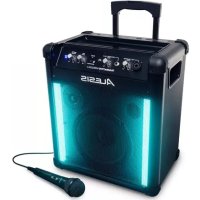
TransActive Wireless 2 - Speaker ALESIS - Free user manual and instructions
Find the device manual for free TransActive Wireless 2 ALESIS in PDF.



| Product Type | Portable amplified speaker (PA) |
| Brand | Alesis |
| Model | TransActive Wireless 2 |
| Power supply | Mains (via IEC cable) or rechargeable lead-acid battery |
| Bluetooth connectivity | Bluetooth 4.0, pairing code 0000 |
| Audio inputs | 1 XLR/TRS combo microphone input, 1 high-impedance 1/4" TS instrument input, 1 1/8" stereo auxiliary input |
| USB charging port | Yes, allows charging an external device (only when the speaker is on) |
| Built-in lighting | Single Color, Auto, Party, or Off mode |
| Indicator lights | Bluetooth pairing LED, power/charge LED, 4-LED battery level indicator |
| Fuse | Replaceable, use a fuse of appropriate rating |
| Box contents | Power cable, user guide, safety instructions |
| Safety | Mount on stand in compliance with applicable codes, avoid extreme temperatures (0-32°C), battery recycling |
Frequently Asked Questions - TransActive Wireless 2 ALESIS
User questions about TransActive Wireless 2 ALESIS
0 question about this device. Answer the ones you know or ask your own.
Ask a new question about this device
Download the instructions for your Speaker in PDF format for free! Find your manual TransActive Wireless 2 - ALESIS and take your electronic device back in hand. On this page are published all the documents necessary for the use of your device. TransActive Wireless 2 by ALESIS.
USER MANUAL TransActive Wireless 2 ALESIS
User Guide (English)
Introduction
Box Contents
TransActive Wireless 2
Microphone
Power Cable
User Guide
Safety & Warranty Manual
Support
For the latest information about this product (system requirements, compatibility information, etc.) and product registration, visit alesis.com.
For additional product support, visit alesis.com/support.
Stand-Mounting
Always install loudspeakers in accordance with applicable electrical and building codes.
- Install the loudspeaker according to its maximum weight. Check the specifications of your stand or pole to ensure it can support the loudspeaker's weight. Also, observe all safety precautions specified by the manufacturer.
- Do not mount multiple loudspeakers on the same stand or pole.
Always verify that the stand or pole is on a flat, level, and stable surface. Also, fully extend the legs of tripod-style stands, and ensure its legs do not present a trip hazard.
- Inspect the stand (or pole and associated hardware) before each use and do not use equipment with worn, damaged, or missing parts.
- Always be cautious in windy, outdoor conditions. You may need to place additional weight (e.g., sandbags) on stand's base to improve stability. Do not attach banners or similar items to any part of a loudspeaker system. Such attachments could act as a sail and topple the system.
Unless you are confident that you can handle the loudspeaker's weight, ask another person to help you lift it onto the stand or pole.
- Make sure your cables are out of the way of performers, production crew, and audience so they will not trip over them, pulling the loudspeaker off the stand or pole.
Rechargeable Batteries
Rechargeable lead-acid batteries are the same type used in automobiles. As with your car battery, how you use this battery has a significant impact on its lifespan. With proper use and treatment, a lead-acid battery can last for years. Here are some recommendations for getting the longest life from the internal battery.
General Usage Fully charge the battery before using it.
Charge the battery completely after each use.
Storage For best product longevity, do not store at exceedingly hot (greater than 90^/ 32^) or exceedingly cold (less than 32^ / 0^) temperatures.
It is acceptable to leave your sound system plugged in. This will not overcharge the battery.
If you leave the battery level low and do not charge it for 6 months, it may permanently lose capacity.
Repair If the battery fails to charge, contact Alesis at alesis.com.
Disposal Bring the unit to a recycling center or dispose of in accordance with local ordinances.
Quick Start
- Make sure all items listed in Introduction > Box Contents are included in the box.
- Read safety instruction booklet before using the product.
- Make sure that you have completely charged the battery prior to first use for maximum battery life.
- Study this setup diagram.
- Make sure all input devices such as microphones, CD players, or MP3 players are turned off and volume settings are set at "zero."
- Connect all devices as shown.
- Switch everything on in the following order:
audio input sources (i.e. microphones, instruments, CD/MP3 Players)
- TransActive Wireless 2
-
When turning off, always reverse this operation:
-
TransActive Wireless 2
- last, any input devices
Connection Diagram
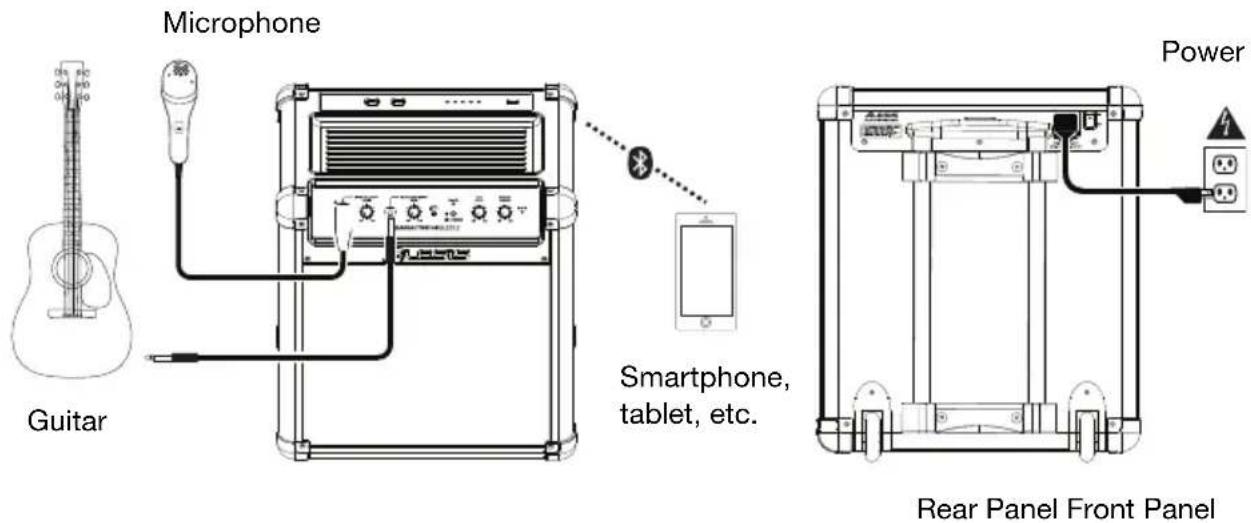
Items not listed in Introduction > Box Contents are sold separately.
Features
Front Panel
- Microphone Input with Volume Control (XLR-1/4"): This mono input accepts a XLR-1/4" (6.35 mm) input such as a microphone or other musical instrument.
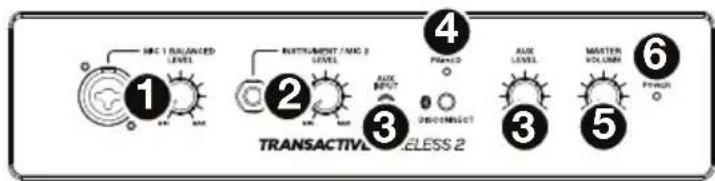
- Instrument/Microphone Input with Volume Control: 1/4" (6.35 mm) TS input, high-impedance for guitar.
- Auxiliary Input with Volume Control: This stereo 1/8 (3.5 mm) input can be used to connect a CD player, MP3 player, or other audio source. The volume control adjusts auxiliary input and Bluetooth volume.
- Bluetooth: The Paired LED will be lit when a device is paired to TransActive Wireless 2. This LED will not be lit when TransActive Wireless 2 is first powered on (unless it was previously paired with a device). Press the Disconnect button to disconnect a paired Bluetooth device.
- Master Volume Control: This adjusts the speaker's main mix volume, which includes Instrument/Microphone Inputs, Auxiliary Input, and the audio of a paired Bluetooth device.
- Power LED: Indicates whether TransActive Wireless 2 is on or off.
Top Panel
- Light Color: Press this button to set the color of the lights on the front panel. The color of the front-panel lights will change as you press it.

-
Light Mode: Press this button to select how the lights on the front panel function:
-
Single Color: The lights will light up solidly with one color (determined by the Light Color button).
- Auto: The lights change one color at a time (regardless of the music playing).
- Party: The audio signal will cause the lights to change color.
-
Off: The lights turn off.
-
Power/Charge LED: This light illuminates when the loudspeaker is charging.
- Battery Level Indicator: While the unit is powered on, these four lights indicate the power left in the battery. Battery life varies based on volume and usage.
- Device Charge: Connect your device's charge cable here to charge it. USB charging only functions when the unit's power is turned on.
Note: Users with iPad (3rd generation) may experience slower charging. We recommend charging with the screen locked when using iPad (3rd generation).
Rear Panel
- Power Cable Input (IEC): Insert the included power cable here to charge the unit. Note that the TransActive Wireless 2 can run off the power adapter while it simultaneously charges the battery. The charge indicator illuminates when the battery is charging.
- Fuse: If the unit's fuse is broken, lift this tab to replace the fuse. Replace it with a fuse with an appropriate rating. Using a fuse with an incorrect rating can damage the unit and/or fuse.
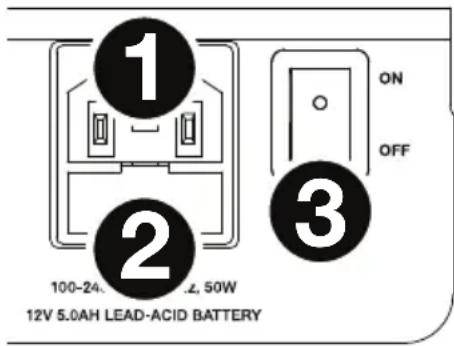
- Power On/Off Switch: Turns TransActive Wireless 2 on or off. Please note that while TransActive Wireless 2 is connected to a power source, it does not need to be powered on to charge the battery.
Pairing a Bluetooth Device
- Turn on your Bluetooth device.
- Power on TransActive Wireless 2 and it will automatically go into pairing mode to search for Bluetooth devices. You will know you are in pairing mode when the LED is blank.
- If your Bluetooth device is not able to pair to TransActive Wireless 2, press the Disconnect button on TransActive Wireless 2 to break previous Bluetooth connections and reset the Bluetooth module.
- Navigate to your Bluetooth device's setup screen, find "TAWIRELESS 2" and connect.
Note: If your Bluetooth device prompts for a pairing code, enter "0000".
- TransActive Wireless 2 Paired LED will light up solid when it is paired.
Note: Users should consider updating their OS if experiencing trouble with pairing or playing music.
- To disconnect pairing, press the Disconnect button on TransActive Wireless 2.
- To connect to another Bluetooth device, repeat steps 3-4.
Note: Maximum range will be achieved when using devices with Bluetooth 4.0.
Troubleshooting
If the sound is distorted: Try lowering the volume control of your sound source or musical instrument. Also, try to reduce the overall volume of TransActive Wireless 2.
If there is too much bass: Try adjusting the tone or EQ control on your sound source to lower the bass level. This will allow you to play the music louder before clipping (distortion) occurs.
If there is a high-pitched whistling noise when using microphones: This is probably feedback. Point the microphones away from the speaker.
If you can't hear the microphone over the music volume: Turn down the music volume from your source.
TransActive Wireless 2
Micrófono
TransActive Wireless 2
Microphone
TransActive Wireless 2
Microfono
TransActive Wireless 2
Mikrofon
Netzkabel
Benutzerhandbuch
Technical Specifications
| Connections | 1 XLR-1/4” (6.35 mm) TRS combination input 1 1/4” (6.35 mm) TS input 1 1/8” (3.5 mm) TRS/stereo input 1 IEC AC power connection |
| Microphone | Dynamic microphone recommended (included) |
| Light Type 38 tri-color (red-green-blue) high-intensity LEDs; 12W total | |
| Light Modes 4 modes: Single Color, Pulse, Auto, Party | |
| Light Controls | Mode selection button; color selection button |
| Bluetooth Profile | A2DP |
| Bluetooth Range | Up to 100 ft. / 30.5 m * |
| Battery Life | Up to 50 hours when fully charged ** |
| Power | Input: 100–240V AC, 50/60 Hz Consumption: 50 W |
| Dimensions (width x depth x height) | 14.75” x 10.5” x 17.4” 375 x 267 x 442 mm |
| Weight | 24.6 lbs. 11.2 kg |
Specifications are subject to change without notice.
- Available range is affected by walls, obstructions, and movement. For optimal performance, place the product so it is unobstructed by walls, furniture, etc.
** Battery life may vary based on temperature, age, and volume/light usage of product.
Trademarks & Licenses
Alesis is a trademark of inMusic Brands, Inc., registered in the U.S. and other countries.
The Bluetooth word mark and logos are owned by the Bluetooth SIG, Inc. and any use of such marks by Alesis is under license.
iPad is a registered trademark of Apple Inc., registered in the U.S. and other countries.
All other product or company names are trademarks or registered trademarks of their respective owners.