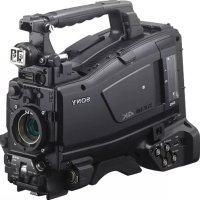
PXWZ450 - Camcorder SONY - Free user manual and instructions
Find the device manual for free PXWZ450 SONY in PDF.



| Product Type | Professional Camcorder |
| Brand | Sony |
| Model | PXW-Z450 |
| Dimensions (approx.) | 173 × 196 × 335 mm (without lens or accessories) |
| Weight (approx.) | 2.9 kg (body only, without lens or battery) |
| Power | BP-GL95B lithium-ion battery pack (approx. 185 min) or AC-DN10A AC adapter |
| Recording Formats | XAVC Intra/Long, MPEG HD422, MPEG IMX, DVCAM, proxy |
| Maximum Resolution | 4K (3840×2160) up to 59.94p |
| System Frequencies | 59.94i, 50i, 29.97p, 25p, 23.98p |
| Sensor | Exmor 3 CMOS 2/3 inch |
| Lens Mount | Special bayonet mount (2/3 inch) |
| Built-in ND Filters | 4 positions (1/4, 1/16, 1/64, Clear) |
| Video Connectors | 4 × SDI OUT (3G/HD/SD), 1 × SDI IN, 1 × HDMI, 1 × VIDEO OUT (BNC) |
| Audio Connectors | MIC IN (XLR 5-pin, +48V), 2 × AUDIO IN CH1/CH2 (XLR 3-pin), AUDIO OUT (XLR 5-pin), headphone (3.5 mm jack) |
| Network | Wireless LAN (via USB module), Wired LAN (RJ45), 3G/4G modem (optional), Built-in GPS |
| Main Features | 4K HDR recording (HLG/S-Log3), HD proxy, slow/fast motion, Picture Cache Rec, interval recording, dual SxS slots, live streaming, Wi-Fi remote control |
| Maintenance and Cleaning | Clean the viewfinder and LCD screen with a soft, dry cloth. Use a blower to remove dust from the sensor and lens mount. |
| Safety | Use only Sony recommended batteries and adapters. Do not expose to moisture or extreme temperatures. Turn off before connecting/disconnecting cables. |
| Spare Parts and Repairability | Consult an authorized Sony dealer for spare parts (battery, charger, adapter, cables). Repair must be performed by a qualified technician. |
| General Information | Manual available for PDF download. Software update possible via menu. Warranty: refer to local terms. |
Frequently Asked Questions - PXWZ450 SONY
User questions about PXWZ450 SONY
0 question about this device. Answer the ones you know or ask your own.
Ask a new question about this device
Download the instructions for your Camcorder in PDF format for free! Find your manual PXWZ450 - SONY and take your electronic device back in hand. On this page are published all the documents necessary for the use of your device. PXWZ450 by SONY.
USER MANUAL PXWZ450 SONY
Solid-State Memory Camcorder
Mode d'emploi
PXW-Z450 / PXW-Z450KC
| Camera Status | |||
| Gain | 18dB | Drops On (80%) | FIS 3.6 |
| Sniffer | ON | Covers ON (102%) | Fetal Lens 7.5mm |
| Camera STDS R/W | 4×1000 HU (Natural) | 4×1000 HU (Natural) | 4×1000 HU 4.3m |
| Write Preset | Depth Of View 2.5-5.5mm | ||
| Gain SNR | LO, M9, H18 | Zoom Speed 25 | |
Element affiche Description
Gain Niveau de gain en dB
Shutter Flat de I'obturator Electronique
| Level | Source | Ref | Wind Filter |
| c1 | Front Mic | 40dB | Off |
| c2 | CH2 Line | 4dB | Off |
| c3 | AES/EBU | --- | --- |
| c4 | AES/EBU | --- | --- |
Element affine Description
CH1/CH2
CH 3/C-4
| Anlageable Button Status | |
| ATW Hold | Zoom Wide |
| Zebra | Ctrl+QCS600K |
| Front Mic | Lena Ret Lens RET |
| Marker | |
| Zoom Tele | |
Ecran Battery Status
| Battery Status | |
| Detected Battery BR-0195 | Manufacturer Date Jan/18/2014 |
| Remaining 54% | |
| Charge Greet 52 | |
| Capacity 1.93Ah | Power Source DC in |
| Voltage 13.2V | Supply Voltage 12.8V |
Element affiche Description
onset on change rates
function.)
5x5B
09% a 0.00% remi placement
Type cie battery Indicatour
Bauie Aclon/ Caraciteesangie ci
Batteninindicaln
Aureus balleles levap denges
Position acceleration
Indicate of access to logement.
Operation >Rec Function >Picture Cache Rec >Off
Mode ECS (Extended Clear Scan)
59.94P60.00800060.008000
29.97630/001800030/0018000
23.956.23.60+6000.3001+6000
50.592017000=
50P50.00700050.007000
252.25.02a700030.00a7000
Front Bouton MIC LEVEL
Side2 Bouton LEVEL (C-2)
Front Bouton MIC LEVEL
I require a change to format ASCII but no change to format UTF-8. I would prefer to use utilises, let me copy the plan of format standard list utilise.
"assignment", class="original"
update=2016-11-30T15:00:00Z
modifiedBy='Chris'>
Title:usAsci-Football
Game'xmlang 'en'>
Football Game 30/11/2016</
Title>
<Meta name= 'ShotMark1' sp
content=‘Goal’
name='_ShotMark2'
content-‘Shoot/>
<Meta name= 'ShotMark3'
content=‘Corner Kick’/2
<Meta name=ShotMark4
content-Free Kid
<Meta name= 'ShotMarkS'
content="Goa Kick"/>
<Meta name=_ShotMark6
content-Fou*/>
<Meta name=`_ShotMark7*
content=PK>/
<Meta name= 'ShotMark8'
content=1stHalf/>
<Meta name='ShotMark2'
content=2ndHalf>/>
name='ShotMark0'
content= 'KickOff'/>
[Tab]