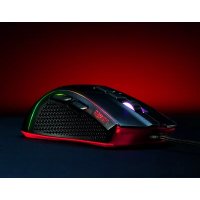
Primer - Mouse XPG - Free user manual and instructions
Find the device manual for free Primer XPG in PDF.


| Product type | Wired gaming mouse |
| Brand | XPG |
| Model | Primer |
| Dimensions (L x W x H) | 125 x 65 x 40 mm |
| Weight | 85 g |
| Power supply | Detachable USB cable |
| Cable length | 1.8 m |
| Sensor | Optical, adjustable up to 6200 DPI |
| Programmable buttons | 6 buttons |
| Backlighting | Customizable RGB |
| Polling rate | 1000 Hz |
| Material | ABS plastic with soft-touch coating |
| Care and cleaning | Clean with a damp cloth, no solvent or soap |
| Safety | Do not expose to liquids, steam or moisture; operating temperature 0-40°C |
| Warranty | 2-year limited by ADATA Technology |
| Compatibility | Windows, Mac OS |
| After-sales service | Online support at www.xpg.com |
| Package contents | Mouse, USB cable, quick start guide |
| General information | Indoor use only, do not attempt self-repair |
Frequently Asked Questions - Primer XPG
User questions about Primer XPG
0 question about this device. Answer the ones you know or ask your own.
Ask a new question about this device
Download the instructions for your Mouse in PDF format for free! Find your manual Primer - XPG and take your electronic device back in hand. On this page are published all the documents necessary for the use of your device. Primer by XPG.
USER MANUAL Primer XPG
ADATA Technology Co., Ltd.
2F, No. 258, Liancheng Rd., Zhonghe Dist., New Taipei City 235, Taiwan
Product Name: XPG PRIMER
Federal Communication Commission Interference Statement
This device complies with Part 15 of the FCC Rules. Operation is subject to the following two conditions: (1) This device may not cause harmful interference, and (2) this device must accept any interference received, including interference that may cause undesired operation.
This equipment has been tested and found to comply with the limits for a Class B digital device, pursuant to Part 15 of the FCC Rules. These limits are designed to provide reasonable protection against harmful interference in a residential installation. This equipment generates, uses and can radiate radio frequency energy and, if not installed and used in accordance with the instructions, may cause harmful interference to radio communications. However, there is no guarantee that interference will not occur in a particular installation. If this equipment does cause harmful interference to radio or television reception, which can be determined by turning the equipment off and on, the user is encouraged to try to correct the interference by one of the following measures:
- Reorient or relocate the receiving antenna.
- Increase the separation between the equipment and receiver.
- Connect the equipment into an outlet on a circuit different from that to which the receiver is connected.
- Consult the dealer or an experienced radio/TV technician for help.
FCC Caution: Any changes or modifications not expressly approved by the party responsible for compliance could void the user's authority to operate this equipment.
This transmitter must not be co-located or operating in conjunction with any other antenna or transmitter.
www.xpg.com
TC
清潔指南
CLEANING INSTRUCTIONS
Please use a clean damp cloth to clean the product properly.
Do not apply any soap or solvent agent on the surface to preserve its integrity.
SAFETY INSTRUCTIONS
For a proper use of the product, and to ensure your safety, please follow the following instructions:
- Keep the device away from liquids, excess humidity or moisture to avoid any shock hazards. Should the device come into contact with liquids, please make sure to unplug the device immediately, store it in a dry place, and contact support for assistance.
- Operate the device only within the specific temperature range of 0^ C ( 32^ F) to 40^ C ( 104^ F). Should the temperature exceed this range, unplug and/or switch off the device in order to let the temperature stabilize to an optimal level.
- Should you have any other trouble operating the device properly and normal troubleshooting does not work, please unplug the device and contact our service for support.
- Do not attempt to service or fix the device by yourself at any time.
DURATION OF WARRANTY
ADATA Technology Co., Ltd. provides a 2 year warranty period for this product unless regional laws and regulations state otherwise.
LIMITATION OF WARRANTY
This limited warranty covers only repairs or replacements of products manufactured by ADATA Technology Co. Ltd. and its authorized partners.
Please note that ADATA is responsible for providing free repairs except for the following reasons:
- The warranty label is altered, damaged or missing.
- Product serial number does not conform to our original system.
- Products purchased from an unauthorized agent.
- Damage caused by natural calamity
- Any abuse outside the intended product operation.
ONLINE CUSTOMER SERVICE
For frequently asked questions, additional information and service instruction please visit the product page at www.xpg.com
01
DE


Brand : XPG
Model : Primer
Category : Mouse