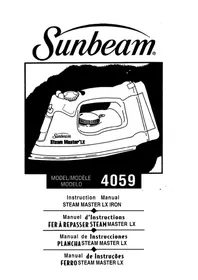
Steam Master LX 4059 - Iron SUNBEAM - Free user manual and instructions
Find the device manual for free Steam Master LX 4059 SUNBEAM in PDF.


| Product Type | Steam Iron |
| Brand | Sunbeam |
| Model | Steam Master LX 4059 |
| Supply Voltage (USA/Canada) | 120 V ~ |
| Power (USA/Canada) | 1200 W |
| Power (Mexico) | 1350 W (127 V ~) |
| Steam Function | Adjustable steam (normal, plus, ultra) |
| SHOT OF STEAM® Function | Yes, additional steam burst |
| SPRAY MIST® Function | Yes, fine mist for localized dampening (depending on model) |
| Safety Smart® Auto Shut-Off | Yes (depending on model) – 15 min in vertical position, 30 sec in ironing position |
| Soleplate Type | Soleplate with longitudinal grooves for buttons |
| Soleplate Coating | Non-stick (depending on model) |
| Power Cord | Retractable, swivel (FLEXCord®) |
| Steam Valve | Removable for cleaning deposits |
| Soleplate Cleaning | Soft cloth with vinegar solution |
| Recommended Water Type | Tap water; if very hard, use distilled or demineralized water |
| Warranty | 1 year limited (USA/Canada) |
| Cord Winding | Yes, with integrated rewind button |
| Auto Shut-Off Indicator | Yes (depending on model) – flashing red light |
Frequently Asked Questions - Steam Master LX 4059 SUNBEAM
User questions about Steam Master LX 4059 SUNBEAM
0 question about this device. Answer the ones you know or ask your own.
Ask a new question about this device
Download the instructions for your Iron in PDF format for free! Find your manual Steam Master LX 4059 - SUNBEAM and take your electronic device back in hand. On this page are published all the documents necessary for the use of your device. Steam Master LX 4059 by SUNBEAM.
USER MANUAL Steam Master LX 4059 SUNBEAM
MODEL/MODÈLE MODELO
4059
Instruction Manual STEAM MASTER LX IRON
Manuel d'Instructions FER À REPASSER STEAM MASTER LX
When using your flatiron, basic safety precautions should always be followed, including the following:
READ ALL INSTRUCTIONS BEFORE USING
- Use iron only for its intended use.
- To protect against risk of electric shock, do not immerse the iron in water or other liquids.
- The iron should always be turned to "OFF" before plugging or unplugging from outlet. Never yank cord to disconnect from outlet; instead, grasp plug and pull to disconnect.
- Do not allow cord to touch hot surfaces. Let iron cool completely before putting away. Retract cord into cord reel when storing.
- Always disconnect iron from electrical outlet when filling with water or emptying and when not in use.
- Do not operate iron with a damaged cord'or if the iron has been dropped or damaged. To avoid the risk of electric shock, do not disassemble the iron. Take it to a qualified serviceman for examination and repair. Incorrect reassembly can cause a risk of electric shock when the iron is used.
- Close supervision is necessary for any appliance being used by or near children. Do not leave iron unattended while connected or on an ironing board.
- Burns can occur from touching hot metal parts, hot water or steam. Use caution when you turn a steam iron upside down -there may be hot water in the reservoir.
- If the flatiron is not operating normally, disconnect from the power supply and have the flatiron serviced by qualified service personnel.
- Your Sunbeam" Iron is designed to rest on the heel rest. Do not leave the iron. unattended. Do not set the iron on an unprotected surface, even if it is on its heel rest.
SPECIAL INSTRUCTIONS
- This is a 1200 Watt appliance.* To avoid a circuit overload, do not operate another high wattage appliance on the same circuit.
- If an extension cord is absolutely necessary, a lo-ampere cord should be used. Cords rated for less amperage may overheat. Care should be taken to arrange the cord so that it cannot be pulled or tripped over.
SAVE THESE INSTRUCTIONS
FOR PRODUCTS PURCHASED IN THE U.S. AND CANADA ONLY
To reduce the risk of electrical shock, this appliance has a polarized plug (one blade is wider than the other). This plug fits a polarized outlet only one way; if the plug does not fit fully into the outlet, reverse the plug. If it still does not fit, contact a qualified electrician. Do not attempt to defeat this safety feature.
*In Mexico, the iron runs at 127 Volts, 1350 Watts. If an extension cord-is necessary, a 13 ampere cord should be used.
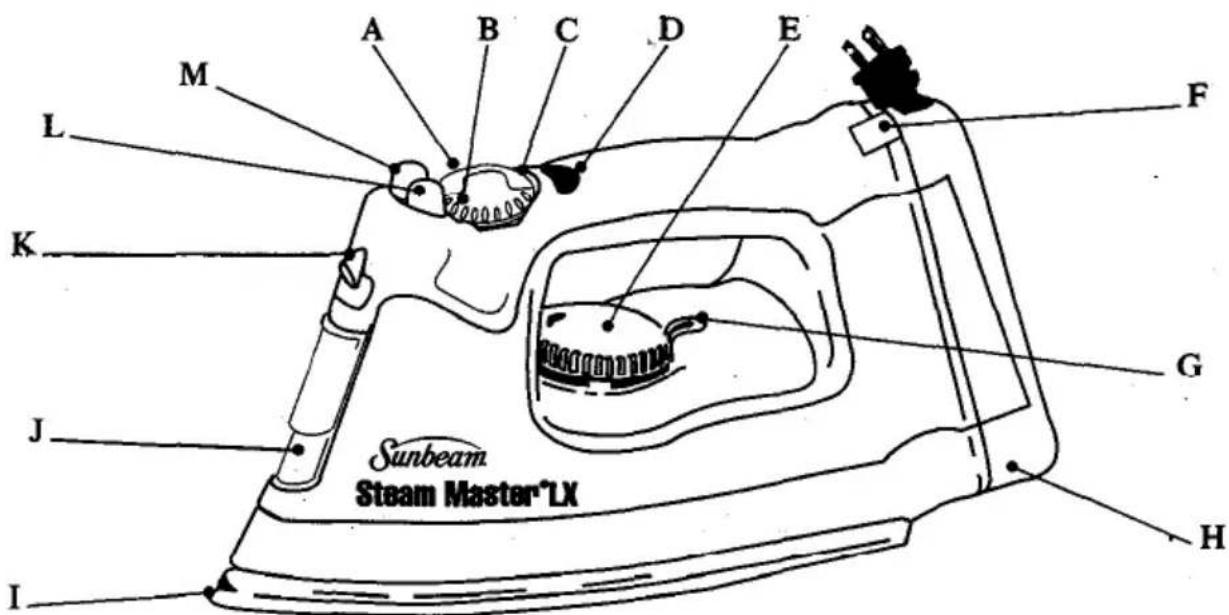
FEATURES
A. Variable Steam Dial -Adjusts steam level for different ironing needs. For dry ironing, turn dial to DRY. For steam ironing, turn dial to the 🎨For additional steam, turn dial to the 🎩 or 🎪. (Refer to ironing Guide do recommended settings).
B. Steam Valve (connected to the variable steam dial) - Removable to prevent scale build up.
C. Steam indicator Mark
D. Auto-Off Indicator (Some Models On/y)
E. Temperature Dial – Controls heat output of iron. Adjust dial according to ironing needs. For low temperatures, turn dial to first dot. For medium temperatures, turn dial to second set of dots. For high temperatures, turn dial to third set of dots. (Refer to Ironing Guide for recommended settings).
F. Winding Button - Retracts cord with a push of the button. (Refer to Using the Retractable Cord)
G. Temperature Indicator Mark
H. Cord Reel - Provides convenient cord storage. Allows for use of only the amount of cord needed, eliminating extra cord that gets in the way. Push button to automatically retract cord.
I. Soleplate - Has full length button grooves for added convenience when ironing shirts and blouses; some models have non-stick coating.
J. Sliding Water Reservoir Cover - Prevents dust and foreign matter from entering the water tank; resists water splashing during ironing.
K. SPRAY M IST Feature
L. SPRAY MIST Button - Provides a fine spray mist for spot dampening.
M.SHOT OF STEAM Button - Provides a powerful burst of steam for maximum steam power.
- SAFETY SMART® Automatic Shut-Off (Some Models Only) - Shuts off if iron is unmoved for 15 minutes in the upright position or 30 seconds in the ironing position,
USING THE RETRACTABLE CORD
- When winding the cord, hold the plug with one hand, and press the winding button with the other hand. (Failure to hold plug may cause plug to fly)
- The cord reel is compact for multi-layer winding of the cord. In case cord is not fully rewound, pull out the cord and steer cord evenly on the reel.
- In case the cord is not pulled out easily, pull cord firmly.
- Select the amount of cord desired before plugging in to an electrical outlet.
- Do not allow children to use retractable cord feature as the cord may cause injury.
BEFORE THE FIRST USE
- When turned on for the first time, your new iron may give off a slight odor for up to ten minutes. This is due to the initial heating of the materials used. It is safe, not detrimental to the performance of the product, and will not recur.
- Prior to first use, clean steam vents using the SHOT OF STEAM@ feature. After cleaning vents, run iron over an all-cotton cloth to remove any residue.
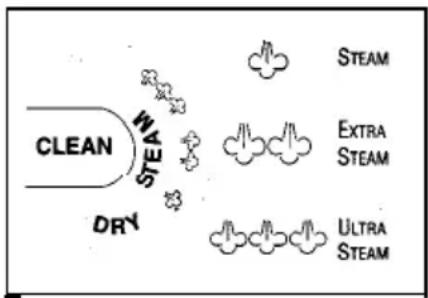
- When not ironing, always have steam dial turned to DRY. (See Diagram)
INSTRUCTIONS FOR USE
DRY IRONING
- Plug the cord into a 120 volt AC outlet. On units with automatic shut off: the auto off light will illuminate.
- Turn the temperature dial to the desired setting (refer o Ironing Guide for recommended settings). While iron is heating, place iron on heel rest on a stable, protected surface.
- Set the steam dial on DRY to prevent steam flow if water is in the tank.
STEAM IRONING
- Make sure the plug is removed from the wall socket before filling the iron with water.,
- Turn the steam dial to DRY.
- Place the iron on its heel and open the water reservoir cover. Pour water slowly into the water reservoir. Fill up to the maximum water level. To prevent the risk of burns, use caution when filling a hot iron with water. Burns can occur from touching hot metal parts, hot water or steam. Push firmly to close the cover. NOTE Tap water may be used due to the special design of this iron. However, in areas with very hard water, distilled or demineralized water is recommended.
- Turn the temperature dial to any of the temperatures within the steam band and allow the iron to heat for approximately 2 minutes before ironing. While heating, place iron on heel rest on a stable, protected surface.
- Turn steam dial to 🚗 for regular steam, or to 🚗 for extra steam or 🚗 for ultra steam. Note: When using extra or ultra steam, it may be necessary to fill the tank more often.
SHOT OF STEAM FEATURE

- The SHOT OF STEAM feature provides an extra burst of steam for deep penetration of stubborn wrinkles. The SHOT OF STEAM® feature can be used with dry or steam ironing provided the tank is at least 1/4 full of water and the temperature dial is set within the steam band.
- Allow the iron to heat for approximately two minutes.
- Press the white SHOT OF STEAM@ button several times to prime the pump.
- Pump SHOT OF STEAM® button another three to four times in order to clean the unit.
- The ® feature is now ready for use. The SHOT OF STEAM ® feature can be used continuously with just a short pause between shots. The SHOT OF STEAM ® feature is most effective with the iron held in a horizontal position just above the fabric being ironed.
- If the tank runs dry, unplug the iron and refill with water. The iron may be filled with water while it is hot. NOTE It may be necessary to re-prime the pump before using the SHOT OF STEAM feature again.
SPRAY MIST FEATURE

(Some Models On/y)
- Use the Spray Mist® feature to dampen fabrics with stubborn wrinkles.
- Press the gray Spray Mist button firmly to produce spray.
SAFETY SMART FEATURE AUTO SHUT-OFF
(Some Models On/y)
- When the iron is plugged into 120 volt AC electrical outlet, the steady red light signals that the iron is plugged in and is ready to be turned on.
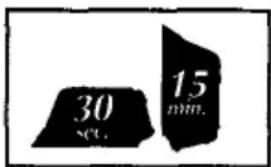
- If the iron is left on the heel rest unmoved the iron will stop heating in 15 minutes. The light on the handle will blink to indicate the iron has automatically shut off and will continue blinking until the iron is restarted or unplugged.
- If the iron is left unmoved in the ironing position or accidentally tipped over, the iron will stop heating in 30 seconds. Again, the light on the handle will blink to indicate the iron has automatically shut off and will continue blinking until the iron is restarted or unplugged.
- NOTE: If the temperature dial is turned to the Off position, the light will continue blinking and then go off.
- To restart the iron, move the iron back and forth. Allow the iron to heat and continue ironing as normal.
- NOTE: Although heat is no longer generated once the iron has automatically shut off, allow sufficient time for the iron to cool before touching the soleplate or storing the iron.
NON-STICK FINISH

(Some Models Only)
- The non-stick coating prevents sticking of fabrics and starch residue to the soleplate.
- To clean the soleplate, allow iron to cool and wipe with a soft cloth using a mild vinegar solution.
- Do not use scouring pads, abrasives or chemical cleaning solvents as they may damage the finish.
NOTE: Scratches in the non-stick soleplate do not affect the performance of the iron,
CARE AFTER EACH USE
- Turn the steam dial to DRY.
- Unplug the iron from the power outlet.
- Empty the water tank by opening the water reservoir cover and turning the iron upside down to allow water to flow from the opening. Shake the iron gently to remove trapped water drops.
- Close cover and allow the iron to cool.
- Retract cord into cord reel. Always store iron on its heel rest.
- When not ironing, always set steam dial to DRY.
CARE AND MAINTENANCE
STEAM VALVE
The steam valve (attached to the variable steam dial) is removable for easy cleaning of lint and scale build up. Cleaning the steam valve is only necessary if you notice a reduction in steam performance. To remove the steam valve, empty the water tank and place iron on the soleplate. Turn the variable steam dial to CLEAN. The valve will "pop-up!" Pull up to remove the steam valve fully. Wipe the tip gently with a damp cloth to clean. To replace, align CLEAN with the indicator mark. Push down and rotate clockwise to the DRY.
NOTE: Do not pour water into the steam valve hole.
SOLEPLATE
If starch or other material clings to the iron's soleplate, allow the iron to cool and wipe with a soft, damp cloth. Avoid ironing over snaps, zippers, rivets, etc., as they may scratch the soleplate.
STORAGE
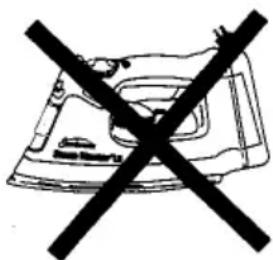
Always store your iron on the heel rest. Never store with the soleplate facing down or in the carton. Always store your iron with the steam dial turned to DRY. Retract cord into cord reel.
natural_image
Black crossed-out icon of a machine gun with no visible text or symbols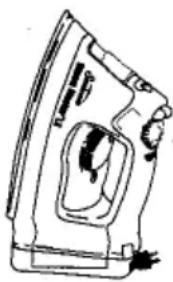
natural_image
Line drawing of a steam iron with handle and internal components (no text or symbols)MAINTENANCE
Other than the recommended instructions in this pamphlet, no further maintenance is necessary. However, following is a list of frequently asked questions and their resolutions. If for any reason your iron continues to exhibit one of these symptoms, or requires repair for another reason, send it to the Sunbeam Appliance Service Center or call our Consumer Hot Line I-800-597-5978.
| SYMPTOM | RESOLUTION |
| Iron emits an odor | Iron gives off an odor when turned on for the first timeAllow ten minutes for odor to disappear. |
| Iron does not heat | Iron should be plugged into a 120 volt, AC electrical outlet only.The temperature dial must be set at the desired temperature.The auto shut-off feature may have been activated (Some Models Only).Move the iron back and forth to restart. |
| Iron does not steam | The water tank may be empty. Turn steam valve to DRY and add water.Allow iron to heat, then set the steam dial to one of the steam settings.Use temperature settings within the steam band.There may be an obstruction. Remove steam valve by turning it to CLEAN. Replace and set the steam dial to one of the steam settings. |
| SHOT OF STEAM” feature does not work | The water tank must be at least I/4 full.Temperature must be set to steam position.Iron should be in the horizontal position.Prime pump briefly.Allow a short pause between shots.Be sure to fully deoress theSHOT OF STEAMbutton. |
| SPRAY MIST®feature does not work | The water tank must be at least I/4 full. |
| Iron is leaking | The variable steam dial must be set on DRY until the iron is hot.The temperature setting is too low to produce steam(See Ironing Guide) |
| Cord will not pull out | Pull cord firmly to unwind.Press winding button to reset device, then pull cord. |
| Cord does not retract | Pull out the cord once and wind cord evenly on the reel. |
I RONING TIPS
• Always read garment labels and follow the manufacturers ironing instructions.
- Sort the articles to be ironed according to the type of fabric.
- Garments requiring low temperature and steam should be ironed first to avoid damaging garments with a too-hot iron.
- If you are unsure of the fabric content of the garment, test a small area such as a seam or facing before ironing a visible area. Start with a low temperature and gradually increase the heat to find the best setting.
- When changing the temperature from a high setting to a low setting, allow approximately 5 minutes for the lower temperature to be reached.
- When steam ironing, use long slow glides. This will allow the steam to penetrate the fabric while it allows the heat of the soleplate to dry out the moisture.
- To iron linens, turn garment inside out. Be careful not to use a too-hot iron as lining may melt or stick to soleplate.
- To iron zippers, use an ironing cloth or make sure the zipper is closed and iron over the flap. Never iron directly over an unprotected zipper.
- Use the following chart to select the best setting and method for the fabric you plan to iron.
| FABRIC | TEMPERATURE SETTING | IRONING RECOMMENDATIONS | ||
| Acrylic | • | Dry iron inside out. | ||
| Acetate | • | Dry iron inside out while still damp. | ||
| Silk | •• | Iron inside out. Use an ironing cloth to prevent shine marks. | ||
| Nylon | •• | Iron inside out while still damp. | ||
| Polyester | •• | Iron inside out while still damp. | ||
| Rayon | •• | Iron inside out. | ||
| Viscose | •• | Dry ironing at any setting | Mainly dry iron. Steam can be used under manufacturer's instructions. | |
| Wool | •• | Steam iron inside out or use an ironing cloth. | ||
| Wool Blends | •• | Steam iron inside out or use an ironing cloth. | ||
| Cotton Blends | •• | Check label and follow manufacturer's instructions. Use setting for the fiber requiring the lowest setting. | ||
| Corduroy | ••• | Steam iron inside out or use ironing cloth and brush to raise the pile. | ||
| Cotton | ••• | Dry iron while still damp or use extra steam and/or SHOT OF STEAM® feature. Iron dark fabrics on wrong side to avoid shine. | ||
| Linen | ••• | Iron inside out or use an ironing cloth to prevent shine marks, especially with dark colors. Dry iron while still damp or use steam and/or SHOT OF STEAM® feature. Iron each section until entirely drv. | ||
| Denim | ••• | Use extra steam and/or SHOT OF STEAM® feature. | ||
I-YEAR LIMITED WARRANTY
Sunbeam Products, Inc. ("Sunbeam") warrants that for a period of ONE year from the date of purchase, this product will be free from defects in material and workmanship. Sunbeam, at its option, will repair or replace this product or any component of the product found to be defective during this warranty period. Replacement will be made with a new or remanufactured product or component. If the product is no longer available, replacement may be made with a similar product of equal or greater value. This is your exclusive warranty.
This warranty is valid for the original retail purchaser from the date of initial retail purchase and is not transferable. Keep the original sales receipt. Proof of purchase is required to obtain warranty performance. Sunbeam dealers, service centers or retail stores selling Sunbeam products do not have the right to alter, modify or any way change the terms and conditions of this warranty.
This warranty does not cover normal wear of parts or damage resulting from any of the following: negligent use or misuse of the product, use on improper voltage or current, use contrary to the operating instructions, disassembly, repair or alteration by anyone other than Sunbeam or an Authorized Service Center. Further, the warranty does not cover Acts of God, such as fire, flood, hurricanes and tornadoes.
Sunbeam shall not be liable for any incidental or consequential damages caused by the breach of any express or implied warranty. Except to the extent prohibited by applicable law, any implied warranty of merchantability or fitness for a particular purpose is limited in duration to the duration of the above warranty. Some states, provinces or jurisdictions do not allow the exclusion or limitation of incidental or consequential damages or limitations on how long an implied warranty lasts, so the above limitations of exclusion may not apply to you. This warranty gives you specific legal rights, and you may also have other rights that vary from state to state or province to province.
HOW TO OBTAIN WARRANTY SERVICE
Take the product to an Authorized Sunbeam Service Center. You can find the nearest Authorized Sunbeam, Service Center by calling 1 BOO 597-5978. If a Service Center is not conveniently located, attach a tag to the product that includes your name, address, daytime telephone number and description of the problem. Include a copy of the original sales receipt. Carefully package the product and send either by UPS or Parcel Post with shipping and insurance prepaid to:
For products purchased in the United States -
SUNBEAM APPLIANCE SERVICE STATION
Attention: Service Department
95 W.L. Runnels Industrial Drive
Hattiesburg, MS 39401
For products purchased in Canada -
SUNBEAM CANADA CORP., LTd.
c/o Service Tek
1351 Matheson Blvd. East, Units 5 & 6
Mississauga, ON L4W 2AI
DO NOT RETURN THIS PRODUCT TO THE PLACE OF PURCHASE.
If you have any questions regarding this warranty please call 1 800 597-5978.
PRÉCAUTIONS IMPORTANTES
CARACTERISTIQUES
SUNBEAM APPLIANCE SERVICE STATION
Attention: Service Department
95 W.L. Runnels Industrial Drive
Hattiesburg, MS 39401
1351 Matheson Blvd. East, Units 5 & 6.
Mississauga, ON L4W 2AI
NE PAS RETOURNER CE PRODUIT À SON EMPLACEMENT D'ACHAT.
SUNBEAM APPLIANCE SERVICE STATION
Attention: Service Department
95 W.L. Runnels Industrial Drive
Hattiesburg, MS 39401
1351 Matheson Blvd. East, Units 5 & 6
Mississauga, ON L4W 2AI
NO REGRESE ESTE PRODUCTO AL LUGAR DE COMPRA.
CARACTERÍSTICAS
CARACTERÍSTICAS
natural_image
Simple line drawing of a car with a crossed-out black cross symbol (no text or labels)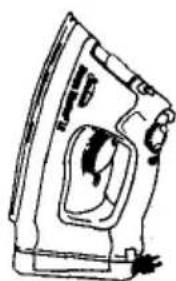
natural_image
Line drawing of a steam iron with handle and mounting bracket (no text or symbols)MANUTENÇÃO
SUNBEAM APPLIANCE SERVICE STATION
Attention: Service Department
95 W.L. Runnels Industrial Drive
Hattiesburg, MS 39401
1351 Matheson Blvd. East, Units 5 & 6
Mississauga, ON L4W 2A1
NÃO DEVOLVA ESTE PRODUTO AO LOCAL ONDE ELE FOI COMPRADO.
1999 Sunbeam Corporation or its affiliated companies. All rights reserved.
SUNBEAM: STEAM MASTER? SHOT OF STEAM®, SPRAY MIST® and SAFETY SMART®
are registered trademarks of Sunbeam Corporation or its affiliated companies.
FLEXCord" and SILK STEAM' are trademarks of Sunbeam Corporation or its affiliated companies.
Distributed by Sunbeam Products Inc., Boca Raton, Floiida 33431, oran affiliated company.
Foreign Patents Pending
P N. 103635-000
4,686,352 5,619,812 5621,989 5,787,615
- READ ALL INSTRUCTIONS BEFORE USING
- SPECIAL INSTRUCTIONS
- SAVE THESE INSTRUCTIONS
- FOR PRODUCTS PURCHASED IN THE U.S. AND CANADA ONLY
- FEATURES
- USING THE RETRACTABLE CORD
- BEFORE THE FIRST USE
- INSTRUCTIONS FOR USE
- DRY IRONING
- STEAM IRONING
- SHOT OF STEAM FEATURE
- SPRAY MIST FEATURE
- SAFETY SMART FEATURE AUTO SHUT-OFF
- NON-STICK FINISH
- (Some Models Only)
- CARE AFTER EACH USE
- CARE AND MAINTENANCE
- STEAM VALVE
- SOLEPLATE
- STORAGE
- MAINTENANCE
- I RONING TIPS
- I-YEAR LIMITED WARRANTY
- HOW TO OBTAIN WARRANTY SERVICE
- PRÉCAUTIONS IMPORTANTES
- CARACTERISTIQUES
- CARACTERÍSTICAS
- MANUTENÇÃO
Brand : SUNBEAM
Model : Steam Master LX 4059
Category : Iron