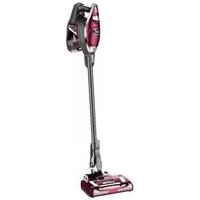
Rocket TruePet HV322 - Vacuum Cleaner SHARK - Free user manual and instructions
Find the device manual for free Rocket TruePet HV322 SHARK in PDF.



| Brand | Shark |
| Model | Rocket TruePet HV322 |
| Type | Upright vacuum |
| Rated Voltage | 120 V |
| Frequency | 60 Hz |
| Power Consumption | 500 W |
| Rated Current | 4.2 A |
| Number of Speeds | 2 (low/high) |
| Lighting | LED integrated (front and headlights) |
| Filtration System | Pre-motor filter (foam and felt) and post-motor filter |
| Filter Maintenance | Washable with water, complete drying required |
| Rotating Brush | Motorized, with blockage indicator |
| Included Accessories | Crevice tool, dusting brush, upholstery tool, Dust-Away |
| Dust-Away | Microfiber cloth for hard floors |
| Reach | Cleaning beyond the floor with wand |
| Portable Mode | Yes, detachable portable section |
| Warranty | 5 years limited (excluding accessories) |
| Safety | Polarized plug, motor protection thermostat |
| Automatic Shut-off | In case of overheating |
| Weight | Ultra-light (not specified) |
Frequently Asked Questions - Rocket TruePet HV322 SHARK
User questions about Rocket TruePet HV322 SHARK
0 question about this device. Answer the ones you know or ask your own.
Ask a new question about this device
Download the instructions for your Vacuum Cleaner in PDF format for free! Find your manual Rocket TruePet HV322 - SHARK and take your electronic device back in hand. On this page are published all the documents necessary for the use of your device. Rocket TruePet HV322 by SHARK.
USER MANUAL Rocket TruePet HV322 SHARK
Thank you for purchasing the Shark® Rocket® Ultra-Light Upright.
TECHNICAL SPECIFICATIONS:
Voltage: 120V, 60Hz
Watts: 500W
Amps: 4.2 A
Important Safeguards 3
Getting to know your Shark® Rocket® Ultra-Light Vacuum 4
Assembly. 5
Storage 5
Using the Motorized Floor Nozzle 6
Using the Dust-AwayTM 6
Above Floor Cleaning 7
Accessories 8
Maintenance 9
Trouble-Shooting Guide 10
Warranty 10
Table des matieres
When using an electrical appliance, basic safety precautions should always be observed, including the following:

WARNING
TO REDUCE THE RISK OF FIRE, ELECTRIC SHOCK OR INJURY:
1 DO NOT use outdoors or on wet surfaces.
2 Unplug from electrical outlet when not in use and before servicing.
3 DO NOT use vacuum cleaner with a damaged cord or plug. If vacuum cleaner is not working as it should, has been dropped, damaged, left outdoors, or dropped into water, return it to EURO-PRO Operating LLC for examination, repair, or adjustment.
4 DO NOT pull or carry vacuum cleaner by the cord or use the cord as a handle.
5 DO NOT unplug by pulling on cord; to unplug, grasp the plug, not the cord.
6 DO NOT handle plug or vacuum cleaner with wet hands.
7 DO NOT run the vacuum cleaner over the power cord, close a door on the cord or pull cord around sharp corners.
8 The use of an extension cord is not recommended.
9 DO NOT leave vacuum cleaner when plugged in.
10 Keep cord away from heated surfaces.
11 Turn off all controls before plugging or unplugging the vacuum cleaner.
12 Always turn off the vacuum cleaner before connecting or disconnecting motorized nozzle.
13 Store vacuum cleaner with the power cord secured around the two cord holders - as shown in the STORAGE section.
14 This vacuum does NOT stand upright on its own.
GENERALUSE
15 Use only as described in this manual.
16 DO NOT put any objects into openings. DO NOT use with any opening blocked; keep free of dust, lint, hair, and anything that may reduce airflow.
17 Keep your work area well lit.
18 Keep the vacuum cleaner moving over the carpet surface at all times to avoid damaging the carpet fibers.
19 DO NOT place vacuum cleaner on unstable surfaces such as chairs or tables.
20 DO NOT allow young children to operate the vacuum cleaner or use as a toy. Close attention is necessary when used near children.
21 DO NOT use without dust cup and/or filters in place.
WAND ATTACHMENTS
22 DO NOT use if airflow is restricted; if air paths, wand, or accessories become blocked, turn the vacuum cleaner off. Remove all obstructions before you turn on the unit again.
23 Keep the end of the wand and accessory openings away from face and body.
24 Keep cleaning tools and wand suction openings away from hair, face, fingers, uncovered feet, or loose clothing.
25 Use only manufacturer's recommended attachments.
DUST CUP/Filters/ACCESSORIES
Before turning on the vacuum:
26 Make sure all filters are thoroughly dry after routine cleaning.
27 Make sure dust cup and all filters are in place after routine maintenance. Refer to MAINTENANCE section for filter cleaning instructions.
28 Make sure accessories are free of blockages.
29 Use only filters and accessories provided by EURO-PRO Operating LLC. [Failure to do so will void the warranty.]
GENERAL CLEANING
30 DO NOT pick up large-sized objects.
31 DO NOT pick up hard or sharp objects such as glass, nails, screws, or coins that could damage the vacuum cleaner.
32 DO NOT pick up smoking or burning objects such as hot coals, cigarette butts, matches or fireplace ash. DO NOT pick up drywall dust.
33 DO NOT pick up flammable or combustible materials such as lighter fluid, gasoline, or kerosene or use vacuum in areas where they may be present.
34 DO NOT pick up toxic solutions such as chlorine bleach, ammonia, or drain cleaner.
35 DO NOT use in an enclosed space where vapors are present from paint, paint thinner, moth-proofing substances, flammable dust, or other explosive or toxic materials.
36 DO NOT vacuum up any liquids.
37 DO NOT immerse vacuum cleaner in water or other liquids.
38 DO NOT use outdoors or on wet surfaces; use only on dry surfaces.
39 Use extra care when cleaning on stairs.
SAVE THESE INSTRUCTIONS
POLARIZED PLUG
To reduce the risk of electric shock, this vacuum cleaner has a polarized plug (one blade is wider than the other). As a safety feature, this plug will fit into a polarized outlet only one way. If the plug does not fit fully into the outlet, reverse the plug. If it still does not fit, contact a qualified electrician. DO NOT force into outlet or try to modify to fit.
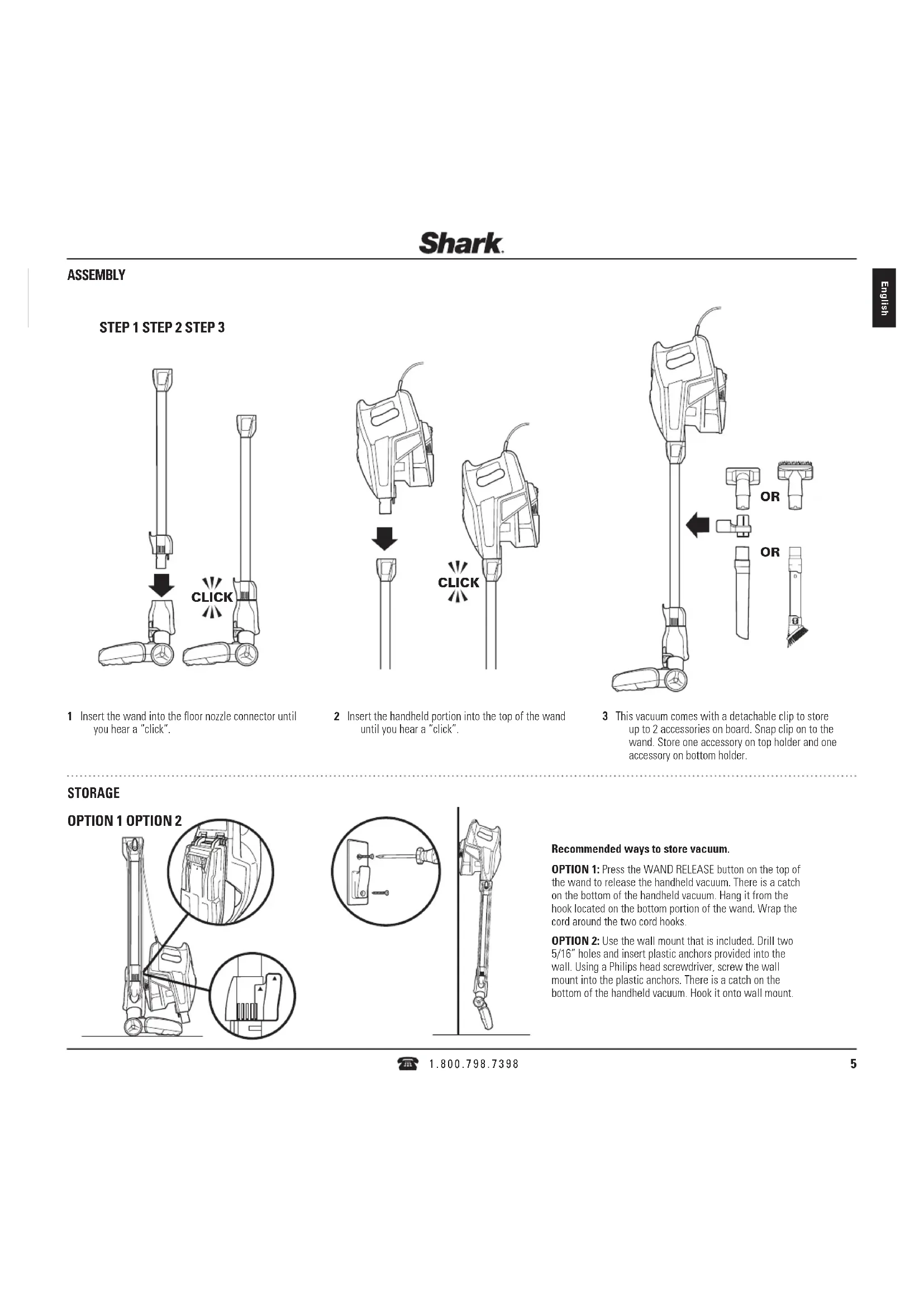
STEP1 STEP2 STEP3
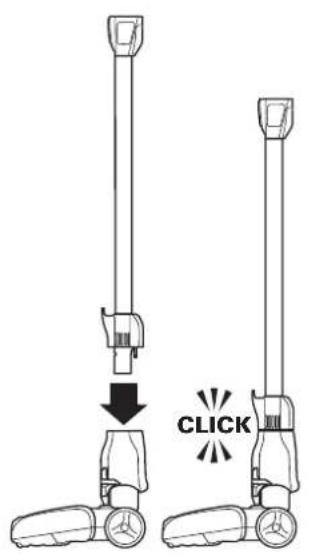
1 Insert the wand into the floor nozzle connector until you hear a "click".
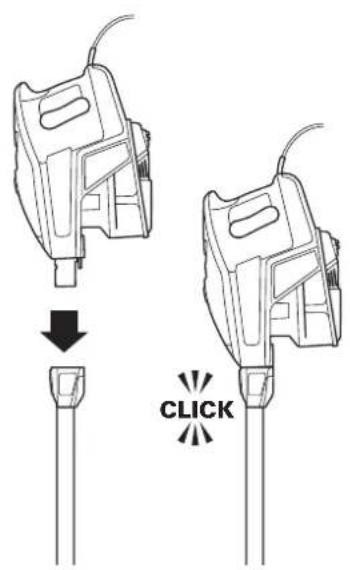
2 Insert the handheld portion into the top of the wand until you hear a "click".
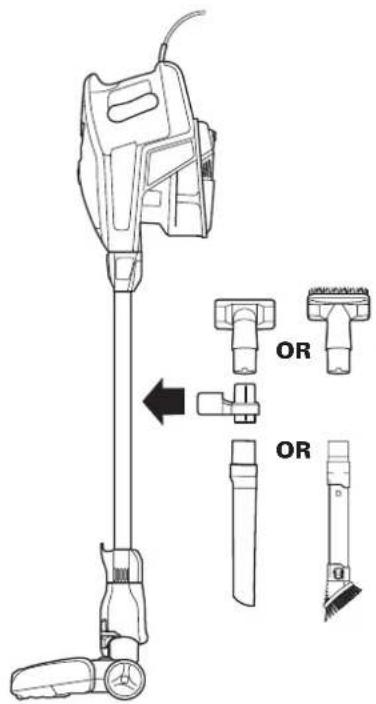
3 This vacuum comes with a detachable clip to store up to 2 accessories on board. Snap clip on to the wand. Store one accessory on top holder and one accessory on bottom holder.
STORAGE
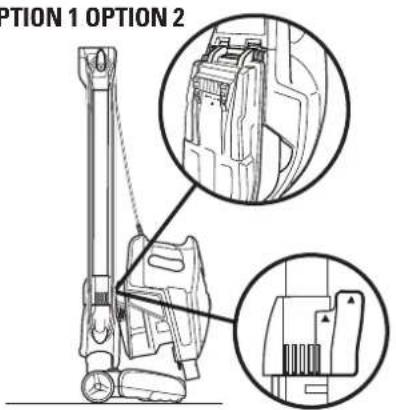
OPTION 1 OPTION 2
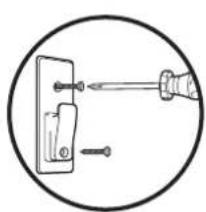
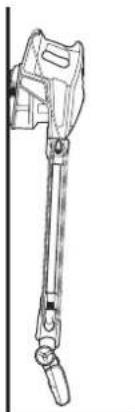
Recommended ways to store vacuum.
OPTION 1: Press the WAND RELEASE button on the top of the wand to release the handheld vacuum. There is a catch on the bottom of the handheld vacuum. Hang it from the hook located on the bottom portion of the wand. Wrap the cord around the two cord hooks.
OPTION 2: Use the wall mount that is included. Drill two 5 / 16^ holes and insert plastic anchors provided into the wall. Using a Philips head screwdriver, screw the wall mount into the plastic anchors. There is a catch on the bottom of the handheld vacuum. Hook it onto wall mount.
Shark.
USING THE MOTORIZED FLOOR NOZZLE
This vacuum has a 2-speed POWER slider switch, optimized for bare floor, delicate area rug and carpet cleaning. The floor nozzle has headlights that illuminate the floor surface. The lights turn on in either speed setting.
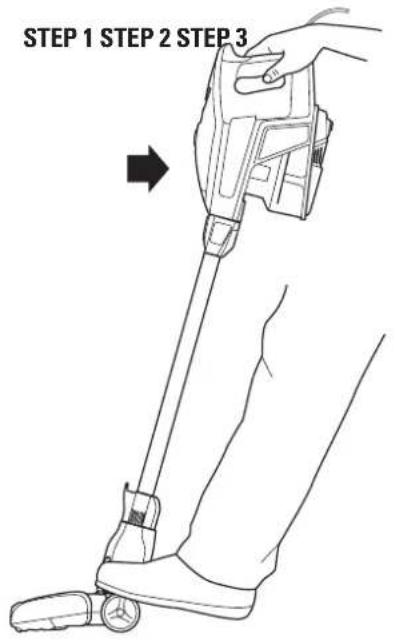
1 Plug the unit in and pull it back.

2 Slide the POWER switch to the first position to clean bare floor surfaces and delicate area rugs. The brush roll will spin slowly to help with debris pick-up.
3 Slide the POWER switch to the second position to clean carpets. The brush roll will spin faster to help pick up debris below the surface.
USING THE DUST-AWAY™ HARD FLOOR ATTACHMENT
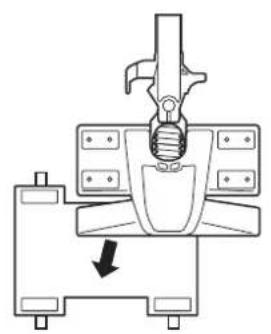
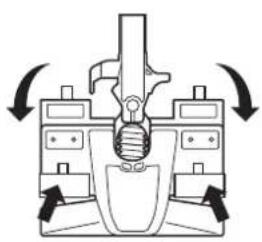
1 Slip two tabs between the nozzle and the duster base and attach them to the front fasteners. Then pull the other two tabs tightly around to the back fasteners. Ensure that the pad is flat against the bottom surface and tightly secured.
2 Slide the POWER switch to the first position and use the Dust-Away Hard Floor Attachment to clean hard floor surfaces. Do not use to clean damp floors or wet/sticky messes. Only use pads provided by Shark, which are designed to work with the Dust-Away Hard Floor Attachment.
MICROFIBER PAD CARE
Machine or hand wash the pads separately in warm water with liquid detergent. Do not use bleach or fabric softeners as they may damage or leave a coating that will reduce the cleaning performance of the pads.
Tumble dry low or line dry to extend the life of the microfiber fabric. For best results, we recommend replacing your microfiber pads every 3 to 4 months.
NOTE: This vacuum does not stand up on its own, so when taking a break, rest it against furniture, on the wall, or lay it flat on the floor.
ABOVE FLOOR CLEANING
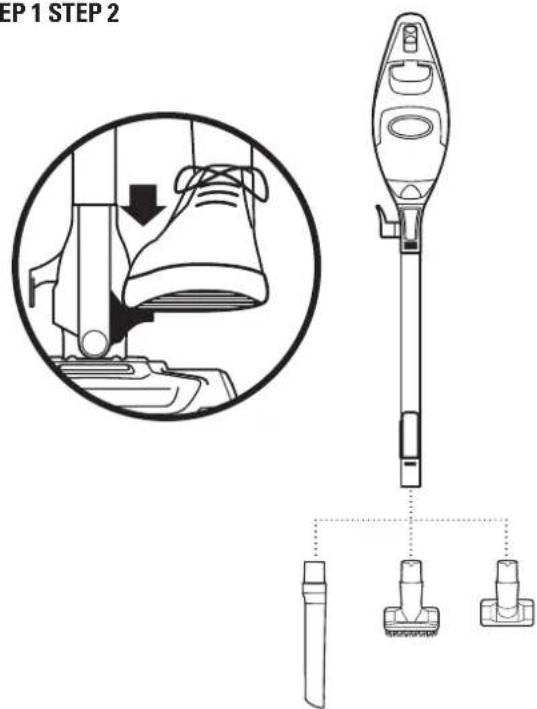
This vacuum has the reach to clean above floors or in tight spaces by using the wand.
It's also a convenient handheld vacuum when using it without the wand.
STEP1 STEP2
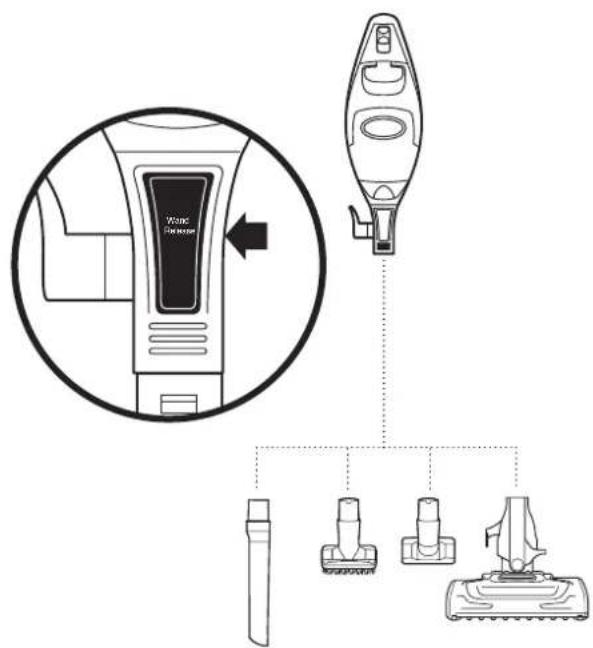
1 Stand the vacuum upright. Step on the foot pedal and pull the wand up to disconnect from the floor nozzle. Attach desired cleaning accessory.
NOTE: Both power settings provide the same suction power.
2 Press the WAND RELEASE button on the top of the wand to disconnect it from the handheld portion. Attach desired cleaning accessory. The LED light in the handheld vacuum turns on automatically when the power is on.
TIP: You can attach the handheld vacuum directly to the floor nozzle for convenient cleaning on stairs.
Videos of helpful tips on how to use accessories can be found in the Support section on www.sharkrocket.com
Shark.
ACCESSIONS
Select cleaning accessories are included.
LOCKING FOR MORE? To enhance your cleaning experience, additional accessories are available for purchase at www.sharkrocket.com or by calling 1.800.798.7398.
For a list of what is included with this model, refer to inside flap of box.
CREVICE TOOLS
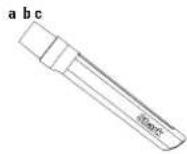
a-12" Crevice Tool
Clean in between tight spaces or reach baseboards and ceilings with this slim crevice tool. [163FLIH3]
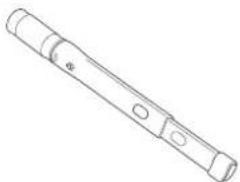
b-18" Flexible Crevice Tool
Extend and flex to an 18^ length to access corners, baseboards, tight spaces or ceilings. The rubberized tip prevents scratches on surfaces. [22BFJVF300]
c-Duster Crevice
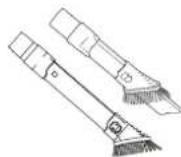
Two cleaning tools in one. The crevice tool gives you extended cleaning reach for small spaces, while the dusting brush cleans a multitude of surfaces. (164FLHV3) Perfect for grabbing pet hair and lint from furniture and other upholstered surfaces. (166FLHV3)
DUSTING BRUSHES
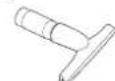
d - Upholstery Tool
Perfect for grabbing pet hair and lint from furniture and other upholstered surfaces. (165FLUH3)
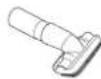
e-Wide Upholstery Tool
Perfect for grabbing pet hair and lint from furniture, mattresses and other upholstered surfaces. (165FUHV3)
f-Dusting Brush
Great for dusting a multitude of surfaces such as shelves, tables, baselboards, window/door frames, and much more. Turn the brush head to adjust the angle to the surface you're cleaning. (229FJW300)

d
e
1
Multi-Angle Dusting Brush
5-position soft dusting brush for cleaning shelves (straight out/ downward orientation), blinds, walls, ceiling fans and lights (upward and downward orientation). Adjust the angle of this brush to the desired cleaning surface. (137FLV300)
TruePet Motorized Brush
The power of a full size upright in the palm of your hand. Picks up pet hair, loose debris, and powerfully cleans dander out of upholstery and surfaces. (168FLV322B)
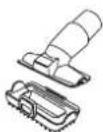
Pet Multi Tool
Two cleaning tools in one. The stiff bristle brush gets stuck on debris off a multitude of surfaces. Remove the bristles to reveal an upholstery tool for removing stubborn pet hair from upholstery and more. (1126FT323)
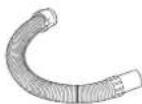
Flexible Hose
Stretch and flex this extension hose to clean around objects and get into hard to reach spaces. Attach the crevice tool or another accessory depending on what you are cleaning. (290FJ321)
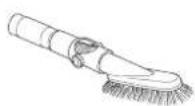
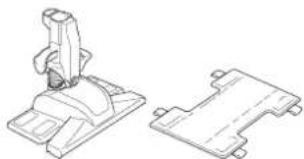
" Dust-Away" Hard Floor Attachment with Washable Microfiber Pad
Direct suction for big crumbs and debris while microfiber pad dusts hard wood and tile floors. OHFGYX32, P200W).
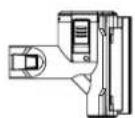
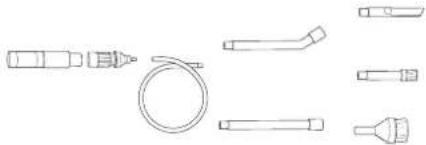
Home and Car Detail Kit
Extension wands and micro tools to clean the tightest spaces. (XCDV300)
Appliance Wand
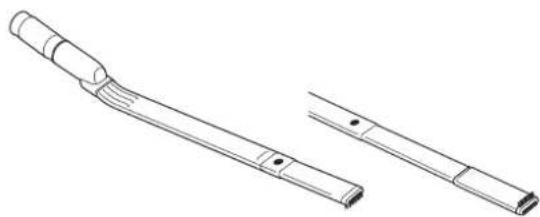
Clean under and behind hard to move appliances and furniture with this adjustable 38^ tool. Flip the extension piece over to clean the underside of appliances. (138FLV300)
MAINTENANCE
To keep your vacuum's suction power optimal, follow these instructions.
Make sure unit is off and cord unplugged.
EMPTY THE DUST CUP
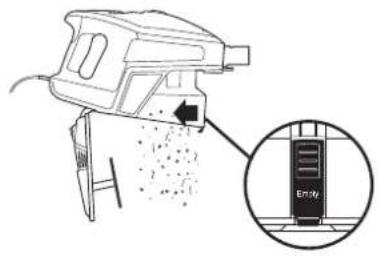
1 Press the WAND RELEASE button on the top of the wand to disconnect it from the handheld portion.
OR
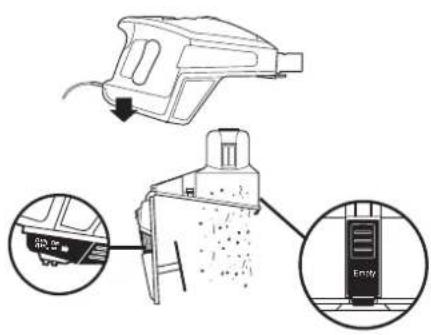
Remove the dust cup from the handheld vacuum by squeezing the two DUST CUP RELEASE buttons on both sides of the base at the same time and pulling it out.
2 Hold dust cup over a trash bin and press the EMPTY button on the front of the dust cup. The bottom lid will open, allowing the debris to fall out.
NOTE: Clean the dust screen inside the dust cup as required.
3 Once dust cup is empty, close the bottom lid and insert dust cup back into handheld and you will hear it click into place.
NOTE: Empty dust cup when debris reaches the MAX fill line.
CLEAN THE FILTERS
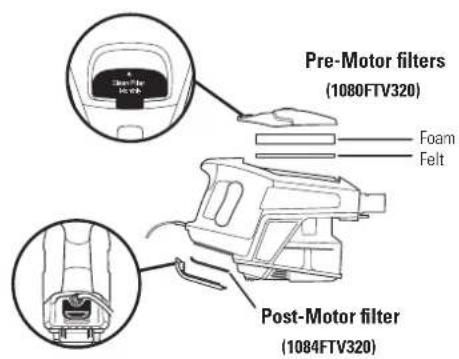
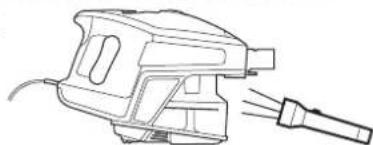
1 Access the Pre-Motor foam and felt filters by lifting the latch on the top of the handheld vacuum. Remove and hand wash them every month. Let air dry completely before replacing. Tap loose dirt off filters between washes as needed. Insert the felt filter first and then place the foam filter on top of it.
2 Access the Post-Motor filter under the handle. Remove and hand wash once a year. Let air dry completely before replacing.
STEP1

STEP2
TO CHECK FOR BLOCKAGES,REMOVE AND INSPECT: HANDHELD AND WAND
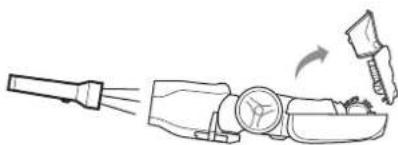
1 Remove the wand from the handheld portion and check all dust cup intake openings.
2 Remove the floor nozzle from the wand and check the wand for blockages.
BOTTOM OF FLOOR NOZZLE
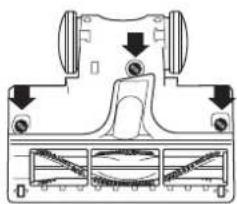
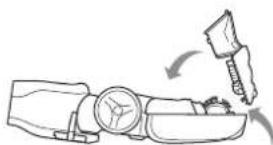
1 Use a coin to unlock the three locks on the bottom of the floor nozzle.
2 A portion of the base is removable to allow for better access to the brushroll and exposure to the airway. Shine a flashlight from the bottom to check for possible blockage in the airway.
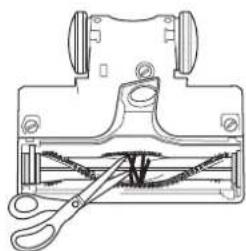
3 Remove any string, carpet fibers or hair that may be wrapped around the brushroll. There is a groove along the brush bar that allows a pair of scissors to cut across it to loosen up the debris.
4 To re-assemble, replace base by lining it up along the front of the nozzle. Push down to snap into place until you hear a click. Lock the three locks.
Shark.
TROUBLE-SHOOTING GUIDE
Vacuum is not picking up dirt. No suction or light suction
-
Check filters to see if they need cleaning. Follow instructions for rinsing and drying the filters before re-inserting back into the vacuum.
-
Dust cup may be full; empty dust cup.
- Check wand, wand connections, nozzles, and accessories for blockages; clear blockages if required.
- Remove any string, carpet fibers or hair that may be wrapped around the brushroll.
Vacuum lifts area rugs
-
Suction is powerful. Take care when vacuuming area rugs or rugs with delicately sewn edges.
-
Turn off the unit and disengage the area rug from the brushroll and restart the unit.
Brush roll does not spin
- If brush roll indicator light on the floor nozzle turns red, the brush roll has stopped spinning. Immediately turn off and unplug vacuum, disconnect the nozzle and remove blockage before reconnecting and turning vacuum back on.
- If brush roll indicator light on the floor nozzle is green, the blockage has been successfully cleared. If the light is still red, please contact customer service at 1.800.798.7398.
Vacuum turns off on its own
-
This vacuum cleaner is equipped with a motor protective thermostat. If for some reason your vacuum overheats, the thermostat will automatically turn the suction motor off. Should this occur, perform the following steps to restart the thermostat:
-
Turn the unit off.
- Unplug the vacuum
- Empty the dust cup and clean filters (see page previous page)
- Check for blockages in wand, accessories and inlet openings.
- Allow the unit to cool for a minimum of 45 minutes.
- Plug in the vacuum.
- Restart the unit by turning the power on.
FIVE-YEAR (5) LIMITED WARRANTY
EURO-PRO Operating LLC warrants this product to be free from material defects and workmanship for a period of five (5) years from the date of purchase when utilized for normal household use, subject to the following conditions, exclusions and exceptions.
The liability of EURO-PRO Operating LLC is limited solely to the cost of the repair or replacement of the unit at our option. This Limited Warranty does not cover normal wear of parts and does not apply to any unit that has been tampered with or used for commercial purposes. This Limited Warranty does not cover damage caused by misuse, abuse, negligent handling or damage due to faulty packaging or mishandling in transit. This Limited Warranty does not cover damage or defects caused by or resulting from damages from shipping or repairs, service or alteration to the product or any of its parts, which have been performed by a repair person not authorized by EURO-PRO Operating LLC.
f
If the appliance is found by EURO-PRO Operating LLC to be defective, in EURO-PRO Operating LLC's sole discretion, we will repair or replace it free of charge. Proof of purchase is required and a fee of $19.95 will apply to cover the cost of return freight.*
Non-durable parts including, without limitation, filters, brushes and electrical parts which normally require replacement are specifically excluded from warranty.
This Limited Warranty is extended to the original purchaser of the unit and excludes all other legal, implied and/or conventional warranties. The responsibility of EURO-PRO Operating LLC if any, is limited to the specific obligations expressly assumed by it under the terms of this Limited Warranty. In no event is EURO-PRO Operating LLC liable for incidental or consequential damages to anyone of any nature whatsoever. Some states do not permit the exclusion or limitation of incidental or consequential damages, so the above may not apply to you.
This Limited Warranty gives you specific legal rights, and you may also have other rights which vary from state to state or province to province.
*IMPORTANT: Carefully pack item to avoid damage in shipping. Be sure to include proof of purchase date and to attach a tag to item before packing including your name, complete address and phone number with a note giving purchase information, model number and what you believe is the problem with the item. We recommend you insure the package (as damage in shipping is not covered by your warranty). Mark the outside of your package "ATTENTION CUSTOMER SERVICE".
Euro-Pro, Shark and Rocket are registered trademarks of Euro-Pro Operating LLC.
TruePet and Dust-Away are trademarks of Euro-Pro Operating LLC.
CONSIGNES DE SECURITE IMPORTANTES
For Shark | Ninja U.S. Patent information visit http://www.europro.com/USPatents
Illustrations may differ from actual product. We are constantly striving to improve our products, therefore the specifications contained herein are subject to change without notice.
WE WANT TO HEAR FROM YOU!
NOUS VOULONS VOUS ENTENDRE!
QUEREMOS SABER DE USTED!

www.sharkrocket.com

1.800.798.7398
JOIN THE CONVERSATION
PARTICIPER À LA CONVERSATION
UNASE A LA CONVERSACION


@sharkcleaning
WATCH AND LEARN MORE