Alchemy DPA2 - Receiver ELAC - Free user manual and instructions
Find the device manual for free Alchemy DPA2 ELAC in PDF.



| Product Type | Stereo/Mono Amplifier (Receiver) |
| Brand | ELAC |
| Model | Alchemy DPA2 |
| Output Power (Stereo) | 325 W per channel into 4 ohms (1% THD+N, 1 kHz) |
| Output Power (Mono) | 625 W into 8 ohms (1% THD+N, 1 kHz) |
| Frequency Response | 5 Hz – 20 kHz ±0.2 dB |
| Total Harmonic Distortion (THD+N) | 0.003% nominal (1 W into 8 ohms) |
| Signal-to-Noise Ratio | 94 dB (stereo), 92 dB (mono) at 1 kHz |
| Input Impedance | RCA: 12 kΩ, XLR: 19 kΩ |
| Output Impedance | 0.03 ohms at 1 kHz |
| Channel Separation | 70 dB at 1 kHz |
| Gain | 24 dB / 30 dB (selectable) |
| Inputs | Unbalanced RCA, Balanced XLR |
| Speaker Outputs | 5-way binding posts (stereo or mono) |
| Mono Function | Yes, doubles power per channel |
| 12V Trigger | 3.5mm mini-jack input/output (auto switching) |
| Display | DELO Display (VU meter, status) |
| Dimensions (H x W x D) | 5.08 x 44.45 x 38.1 cm (2 x 17.5 x 15 in) |
| Weight | 6.35 kg (14 lbs) |
| Finishes | Black |
| Power Supply | Mains 120-240 V AC (50/60 Hz) |
Frequently Asked Questions - Alchemy DPA2 ELAC
User questions about Alchemy DPA2 ELAC
0 question about this device. Answer the ones you know or ask your own.
Ask a new question about this device
Download the instructions for your Receiver in PDF format for free! Find your manual Alchemy DPA2 - ELAC and take your electronic device back in hand. On this page are published all the documents necessary for the use of your device. Alchemy DPA2 by ELAC.
USER MANUAL Alchemy DPA2 ELAC
DPA-2 STEREO/MONO AMPLIFIER
OPERATING INSTRUCTIONS
Safety Instructions
1. General information
- Please read and follow these safety instructions.
- Keep them safe for future reference.
- Observe all warnings on the amplifier and in the manual. Please check the amplifier for damage before use. The amplifier must be in perfect working condition. Damaged parts may lead to personal injury.
2. Use only as directed
- Connect the amplifier according to the instructions in the manual.
3. Location
Install the amplifier on a level surface only
- When choosing the location of the amplifier do not place it in locations that are:
- In direct sunlight
- Very humid
- Prone to vibrations
Exceptionally hot or cold
WARNING! Please ensure the product is perfectly stable to avoid injury from tip-over. Do not install the amplifier near any heat sources such as radiators, heating valves, stoves, or other apparatus that produce heat, or in areas where there is a risk of explosion.
- Do not block any ventilation openings. Install in accordance with the instructions.
- Do not install the amplifier in a closed rack or in a closed cupboard.
- Do not put burning candles on or near the amplifier.
- Do not install the amplifier near transformers because electromagnetic stray fields can cause hum.
- In combination with certain materials / lacquers / material surfaces, anti-slip feet may cause colored imprints on the surfaces.
4. Overload
- Extreme overload of the device due to very high volume may cause damage to individual components. Because of the possible danger, you should never leave the amplifier under extreme overload conditions unattended.
5. Service
DANGER! Do not open the amplifier because there may be dangerous voltages inside. Servicing to be carried out by qualified service personnel only.
Servicing is required when the amplifier has been damaged in any way, such as damage to the power supply cord or the plug, or when liquid has been spilled or objects have fallen onto the amplifier, the amplifier has been exposed to rain or moisture, does not operate normally, or has been dropped. To reduce the risk of electric shock, do not open the amplifier. Servicing should be carried out by qualified service personnel only.

6. Cleaning
NOTE: Clean only with soft, smooth cloth or with dust brush. Do not use scouring agents, alcohol, benzene, furniture polish or other agents for cleaning! Modern furniture is often coated with multiple varnishes and plastics which can be treated with chemical agents. Some of these agents contain substances which degrade or soften the rubber feet. Therefore we advise that you place an anti-slip mat underneath the amplifier.
7. Volume
CAUTION! Continuous high volume may cause severe damage to your hearing. Please listen responsibly.
8. Disposal
- The packaging is made from recyclable materials. Dispose of this in an environmentally friendly manner. At end of life dispose of the amplifier as e-waste. The amplifier must be recycled in accordance with local legislation. Ask your local government for further information on recycling as the device contains valuable raw materials.
Philosophy
Thank you for purchasing this ELAC product.
Since the time we started (1926), ELAC has always striven to achieve the very best.
Your new ELAC amplifier is built to the highest standards using high-quality components that are carefully constructed to deliver the best-in-class sound quality. They are developed by a passionate group of individuals whose sole purpose is to bring a new dimension of sound quality into your home. Enjoy!
Before Use
Avoid damage to the amplifier and other components:
Carefully unbox the amplifier to avoid physically damaging your amplifier.
Ensure your equipment is turned off before connecting speakers.
Controls and Indicators
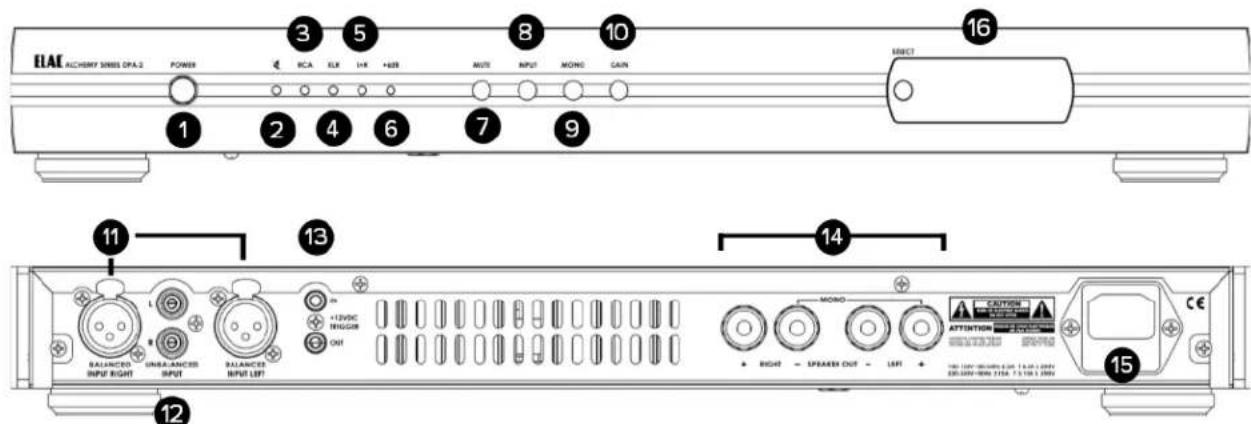
- POWER Button—Used to power the amplifier on and off
- MUTE Indicator - This LED will illuminate when the MUTE function is active
- RCA Input Indicator—This LED will illuminate when the RCA inputs are selected as the active inputs
- XLR Input Indicator—This LED will illuminate with the XLS inputs are selected as the active inputs
- L+R (Mono) Indicator—This LED will illuminate when the Mono function is active
- +6db Indicator—This LED will illuminate when the GAIN function is active
- MUTE Button-Used to activate the MUTE Function which will disable all output of the amplifier when active
- INPUT Button-Used to switch between the RCA and XLR Inputs on the rear of the amplifier
- MONO Button—Used to switch the amplifier from Stereo to Mono (Double the power). This mode requires a different wiring connection. Please refer to the diagram on the rear of the amplifier for more information
- GAIN Button-Used to put the amplifier in High Gain mode. Use this function if you are not getting the appropriate volume output from the amplifier.
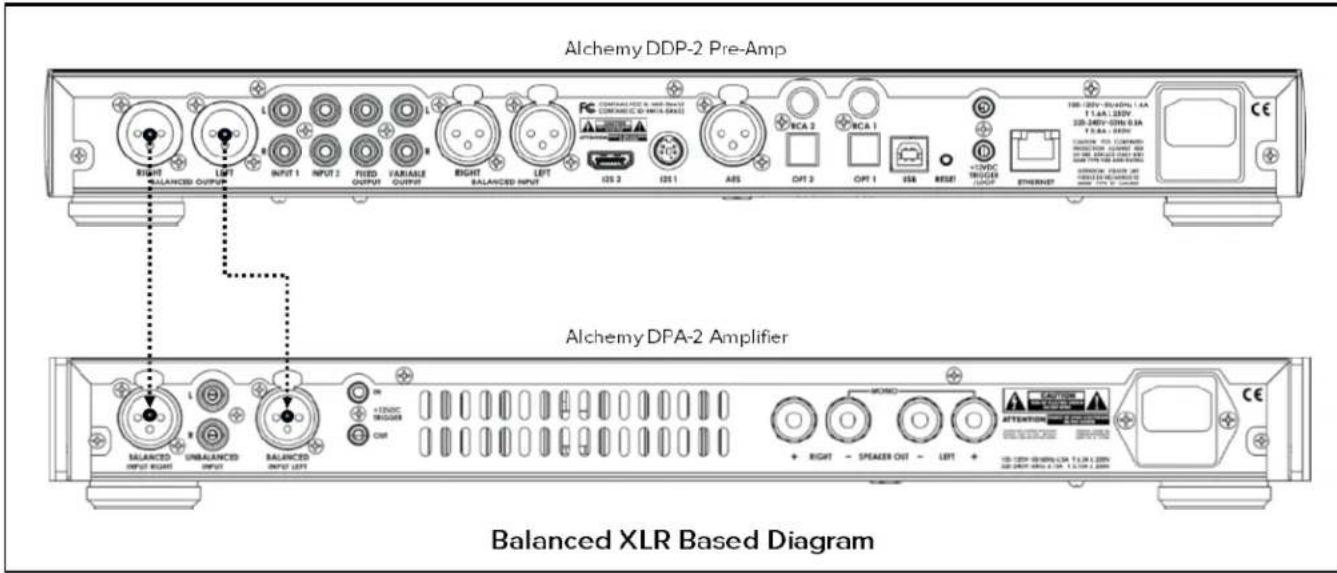
- XLR Inputs-Used when connecting a balanced XLR based Pre-Amplifier to the DPA-2 Amplifier
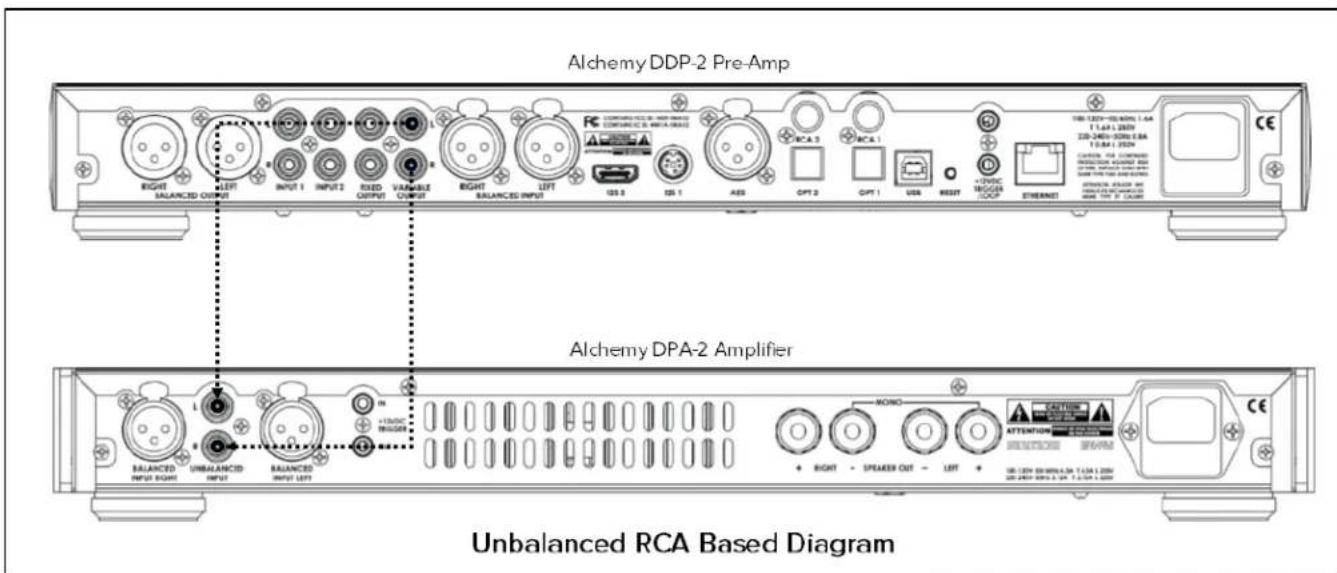
- RCA Inputs—Used when connecting an unbalanced RCA based Pre-Amplifier
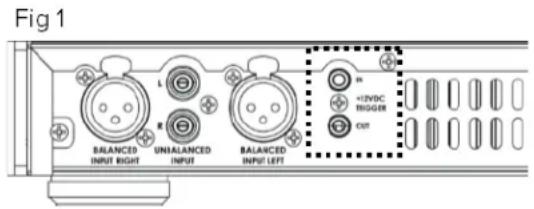
- 12 Volt Trigger In/Out—Used when you want another device to power on/off your DPA-2.
- Speaker Outputs—Used to connect the amplifier to your speakers. Please refer the diagram on the rear of the amplifier for correct speaker connection methods for both Mono and Stereo Setups.
- AC Inlet—Used to connect the amplifier to the main power
- OEL Display—Use to display various information for setup and usage
Wiring the Inputs
Connecting the Alchemy DPA-2 to a Pre-Amplifier
There are two different methods for connecting the amplifier to a pre-amp. Both balanced (XLR) and unbalanced (RCA) inputs are supported.
If you are connecting one DPA-2 for stereo operation carefully note which is the left input and which is the right so that you connect these cables to the correct outputs on your preamplifier.
For operation as a mono amplifier you can connect to either the left or right inputs - they become connected together internally when the amplifier is switched to mono mode and will work the same regardless of which one you use. What is important then is to be sure you have the left amplifier connected to the left output of your preamplifier and the right amplifier connected to the right output of the preamplifier.
Typically a balanced (XLR) connection will be more immune to hum, especially with longer cables, so it would be the preferred connection.
Whichever connection you choose, please use high quality cables for the best results.
Wiring the Outputs
Connecting the DPA-2 Amplifier to your Speakers
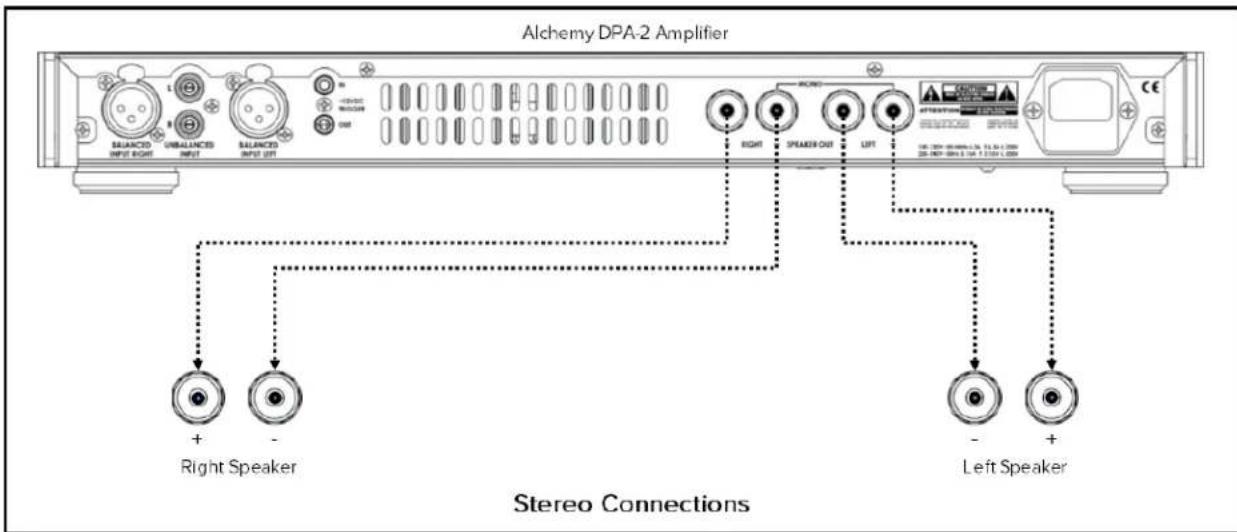
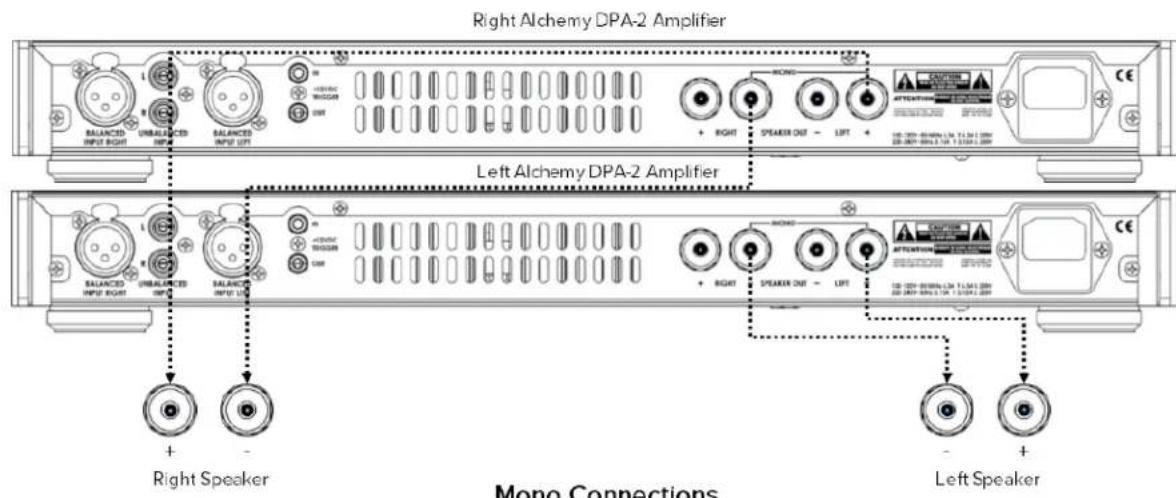
Wiring a DPA-2 as a STEREO amplifier is different from wiring it when in MONO. Please refer to the diagrams below for the correct connections.
When used as a STEREO amplifier, as viewed from the front, the left pair of binding posts wire to the left speaker and the right pair wire to the right speaker. As printed below the jacks, the RED binding post is the PLUS (+) polarity and the BLACK post is the MINUS (-) polarity. Be sure to keep the polarity correct at both the back of the amplifier and at the speakers. This will assure the speakers are in-phase and have the correct bass response and imaging. Out of phase speakers have significantly less bass and the image is very diffuse. These differences are very apparent, and important to your enjoyment, so take the time to get it right.
If you are using the DPA-2 in MONO mode the speaker wire connection is different, as printed above the jacks. Again, as viewed from the front, the left RED post (labeled "LEFT +") is the PLUS (+) lead to your speaker and the BLACK post (labeled "RIGHT -") from the other pair of jacks is the MINUS (-) connection. Your second amplifier would be wired exactly the same way and connected to the other speaker.
Speaker cables exist of many types and styles to provide you with abundant choice. Again, you are encouraged to try cables from a variety of manufacturers to get a sense of what you like.
12 Volt Trigger Wiring and Usage
Should you wish to have your DPA-2 power on via a trigger signal from the DDP-2 or other similarly equipped preamp, you will need to wire to the trigger jacks (Fig 1). The DPA-2 has trigger pass-thru so a trigger signal sent to the amplifier can then be output to the next product you wish to be controlled. In the case of mono DPA-2 the trigger output of one amplifier would be fed to the trigger input of the second to assure that both amplifiers power up upon powering the preamp. The correct trigger cable is a 3.5mm MONO mini jack, wired where Tip is (+) and Sleeve is (-) . A 3.5mm STEREO mini jack can also be used.
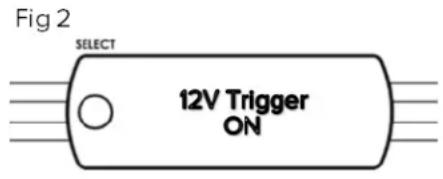
If you are planning on using the Trigger function you need to activate the Trigger mode from the display. Press and hold the SELECT button for 5 seconds to display this screen as shown in Fig 2. After a few seconds the display will change to "12V Trigger On", and then go blank. It will awaken upon application of +12Volts to the trigger input. If you wish to turn off the 12V Trigger, press and hold the SELECT button for 5 seconds and the display will read "12V Trigger Off".
Front Panel Display
The front panel display on the DPA-2 displays the current status of the amplifier along with other useful information. Key information is explained below.
At initial power on the DPA-2 will go through a brief warmup period during which it will be in mute. You will see the ELAC Alchemy Series Logo as the unit warms up.
If you are not using the Trigger function, the display will change to show "Power On". If, however, you are using the Trigger function the unit will not be POWERED ON until the trigger signal from the preamp tells the DPA-2 to come on.
The screen will go blank just before PPA-2 unmutes and restores the last known status condition of all functions; Input 1 or 2, Gain and Mode. The first time it comes on in your home it will be on Input 1, low gain and in stereo.
Select STEREO or MONO mode depending on how you have wired your DPA-2(s), the Input you wired to and assesses the need for higher gain by checking system volume (see below for details of the gain button.)
Should you be interested in monitoring your power output on the display screen, press the SELECT button. This screen will appear...
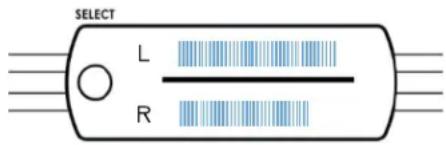
Left and right power will be displayed individually, or if in Mono mode, both bars will move simultaneously.
Special Messages - The DPA-2 is capable of producing substantial clean and undistorted power, certainly enough to be exceptionally loud or even damaging to some loudspeakers. Thus, there are a number of automatic protection systems built-in which are always operating in the background
Clipping monitor - Should the output level of DPA-2 approach the 1% Total Harmonic Distortion range (our threshold for the onset of clipping) a warning for the affected channel will show up in the display. This is a casual reminder to turn the level down a bit for continued safe operation.
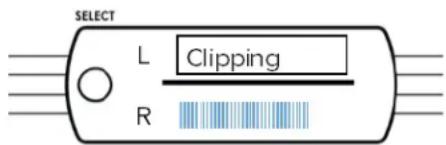
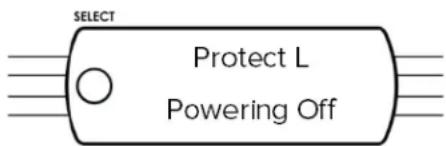
Over current - If either channel reaches the absolute maximum power output level the DPA-2 will self-protect, by shutting down. The display will show the below warning.
SPECIFICATIONS
| DPA-2 Stereo Mode DPA-2 Mono Mode | ||
| Power output/channel (1% THD+N, 1 kHz) | 325W/ch @ 4Ohms 625W @ 8Ohms | |
| Frequency response 5hz-20kHz +/- 0.2dB 5hz-20kHz +/- 0.2dB | ||
| Nominal THD+N (1 watt into 8Ω) 0.003% | ||
| Signal-to-noise ratio (1 kHz) 94dB 92 dB | ||
| Input impedance RCA=12K, XLR=19K | ||
| Output impedance 0.03 Ohms @ 1KHz 0.03 Ohms @ 1KHz | ||
| Channel separation (1 kHz) 70dB @ 1KHz n/a | ||
| Gain | 24dB/30dB | 18dB/24dB |
| Inputs | Unbalanced RCA, Balanced XLR | Unbalanced RCA, Balanced XLR |
| Outputs | 5-Way Binding Post | 5-Way Binding Post |
| Available finishes | Black | Black |
| Dimensions (HxWxD) | 2" x 17.5" x 15" including jacks and feet | 2" x 17.5" x 15" including jacks and feet |
| Weight | 14 lbs | 14 lbs |
ELAC Americas Inc. North America Limited Liability Warranty
Passive Speakers (No built-in amplifier)
ELAC Americas INC. warrants to the original purchaser that this product be free from defects and or workmanship for a period of 3 (Three) years from the original date of purchase. During this time period, repair or replacement of parts will be free of charge to the original owner (See below limitations). Shipping to and return from the repair center will be the responsibility of the original purchaser.
Powered Subwoofoers
ELAC Americas INC. warrants to the original purchaser that this product be free from defects and or workmanship for a period of 3 (Three) years on the cabinet and speaker driver and 1 (One) year on the amplifier from the original date of purchase. During this time period, repair or replacement of parts will be free of charge to the original owner (See below limitations). Shipping to and return from the repair center will be the responsibility of the original purchaser.
Electronics (Including Wireless Speakers)
ELAC Americas INC. warrants to the original purchaser that this product be free from defects and or workmanship for a period of 1 (One) years from the original date of purchase. During this time period, repair or replacement of parts will be free of charge to the original owner (See below limitations). Shipping to and return from the repair center will be the responsibility of the original purchaser.
B-Stock (Reconditioned/Open Box) Product Warranty
ELAC Americas INC. warrants to the original purchaser that this product be free from defects and or workmanship, unless otherwise stated in product description, for a period of 90 days from the original date of purchase. During this time period, repair or replacement of parts will be free of charge to the original owner (See below limitations). Shipping to and return from the repair center will be the responsibility of the original purchaser.
Limitations
Warranty begins on the date of original purchase from an authorized ELAC Americas Inc. dealer.
- Product is warranted only if used in home applications within the max power rating specified in this manual. Commercial use of this product is not warranted.
Product that has been modified or altered in anyway will not be warranted.
Product that has been abused or subjected to faulty equipment will not be warranted. - Products with defaced or removed serial numbers will not be warranted.
If service is required
In the event that service is required, please contact ELAC America at 888-541-0996 or at customerservice@elac.us to arrange for service or replacement. You will be responsible to provide proof of purchase (Copy or original sales receipt). Shipping to and from our repair center will be the responsibility of the original purchaser.
Warranty Outside of North America
This warranty applies to products purchased in the United States and Canada. For warranty claims outside of North America please contact the local dealer/distributor in the country of purchase.

DPA-2 AMPLIFICATEUR STÉRÉO / MONO
MODE D'EMPLOI