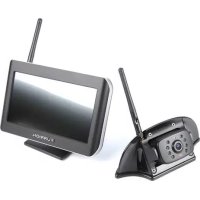
Furrion Vision S FOS07TASF - Rear Camera

Vision S FOS07TASF - Rear Camera Furrion - Free user manual and instructions

Find the device manual for free Vision S FOS07TASF Furrion in PDF.

English EN Download 💬 AI Question 10 questions ⚙️ Specs
📄

Document temporarily unavailable

The manual is currently being transferred to our new server. It will be accessible again in a few hours. Thank you for your patience.

View the manual : Français FR English EN Español ES
Pick your language and provide your email: we'll send you a specifically translated version.
Product Type Wireless Rear View Camera
Brand Furrion
Model Vision S FOS07TASF
Screen Size 7 inches (17.8 cm)
Screen Resolution 800 x 480 pixels
Aspect Ratio 16:9
Wireless Frequency 2.4 GHz
Wireless Range Over 150 m (open area)
Camera Viewing Angle 120° (rear), 65° (side)
Monitor Power Supply 8-30 V DC
Camera Power Supply 12-24 V DC
Monitor Consumption Less than 500 mA at 12 V (backlight on)
Operating Temperature -20°C to +60°C
Night Vision Yes, with automatic 850 nm infrared filter
Motion Detection Yes, adjustable (low, medium, high)
Multi-Camera Display Up to 4 cameras (quadrant mode)
Touch Screen Functions Camera selection, settings, parking guidelines
Maintenance Clean the screen with a microfiber cloth; lens with a damp cloth
Reparability No repairable parts; do not disassemble
Package Contents 7" monitor, power cable, suction cup/table mount, rear camera, mounting kit

Frequently Asked Questions - Vision S FOS07TASF Furrion

How to install the Furrion Vision S monitor?
Choose a clear location in the cab. Use the suction cup mount on the windshield or the table mount. Clean the surface, remove the protective film from the suction cup, place it and lower the locking arm. Connect the power cable to a cigarette lighter socket.
How to pair the camera with the monitor?
Make sure the monitor and camera are powered on. On the monitor, press MENU, select PAIRING, then choose the camera to pair. Press the MONITOR PAIRING button on the camera for 2 seconds. Check that the signal strength is good.
What is the screen resolution?
The 7-inch monitor has a resolution of 800 x 480 pixels with a 16:9 aspect ratio.
Does the camera work at night?
Yes, it is equipped with an automatic 850 nm infrared filter for night vision. In low light, the image becomes black and white.
What is the wireless range of the system?
The range is over 150 meters in an open area. Dense obstacles or interference may reduce the range.
Can I connect multiple cameras?
Yes, the monitor can handle up to 4 cameras. You can display a single view, tri-view, or quadrant. Use the touch screen to switch between cameras.
How to adjust the system volume?
Access the SETUP menu, select VOLUME, then use the ▲/▼ buttons or the touch screen to increase or decrease the volume. You can also mute.
What to do if the monitor does not turn on?
Check that the power cable is plugged in, the cigarette lighter socket is working, and check the fuses (including the 12V 1A inline fuse). Turn the system off and on again.
How to clean the screen and lens?
Use a microfiber cloth for the LCD screen. Do not use alcohol or ammonia-based products. For the camera lens, use a damp cloth to avoid scratches.
Is the system repairable?
No, the Furrion Vision S system contains no repairable parts. Do not disassemble or attempt repairs. Contact Furrion support for assistance.

User questions about Vision S FOS07TASF Furrion

0 question about this device. Answer the ones you know or ask your own.

Ask a new question about this device

The email remains private: it is only used to notify you if someone responds to your question.

No questions yet. Be the first to ask one.

Download the instructions for your Rear Camera in PDF format for free! Find your manual Vision S FOS07TASF - Furrion and take your electronic device back in hand. On this page are published all the documents necessary for the use of your device. Vision S FOS07TASF by Furrion.

USER MANUAL Vision S FOS07TASF Furrion

Manual assistant
Powered by Anthropic
Waiting for your message
Product information

Brand : Furrion

Model : Vision S FOS07TASF

Category : Rear Camera