
Lumix DMWBTC14 - Camera PANASONIC - Free user manual and instructions
Find the device manual for free Lumix DMWBTC14 PANASONIC in PDF.
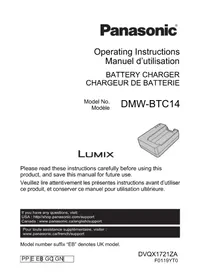



| Product type | Battery charger for Panasonic Lumix camera |
| Compatible battery models | Panasonic DMW-BLJ31 (Li-ion) |
| Input voltage (charger) | 9.0 V DC, 3.0 A |
| Output voltage (charger) | 8.4 V DC, 3.1 A |
| Input voltage (AC adapter) | 100-240 V AC, 50/60 Hz, 0.7 A |
| Dimensions (charger) | 72.0 x 30.5 x 92.0 mm |
| Weight (charger) | Approx. 92 g |
| Operating temperature | 0 °C to 40 °C |
| Charging time (DMW-BLJ31 battery) | Approx. 130 minutes |
| Charge indicator | LED [CHARGE]: flashing (0-49%), lit (50-99%), off (100%) |
| Supplied accessories | Charger, AC adapter, USB C-C cable, AC cable |
| Maintenance | Wipe terminals with a dry cloth; avoid moisture and foreign objects |
| Safety | Do not expose to rain; use only provided accessories; do not disassemble |
| Warranty (Canada) | 1 year parts and labor (digital cameras); 90 days for rechargeable batteries |
| Country of manufacture (estimated) | Japan or China (unspecified) |
Frequently Asked Questions - Lumix DMWBTC14 PANASONIC
User questions about Lumix DMWBTC14 PANASONIC
0 question about this device. Answer the ones you know or ask your own.
Ask a new question about this device
Download the instructions for your Camera in PDF format for free! Find your manual Lumix DMWBTC14 - PANASONIC and take your electronic device back in hand. On this page are published all the documents necessary for the use of your device. Lumix DMWBTC14 by PANASONIC.
USER MANUAL Lumix DMWBTC14 PANASONIC
Please read these instructions carefully before using this product, and save this manual for future use.
If you have any questions, visit: USA: http://shop.panasonic.com/support Canada: www.panasonic.ca/english/support
Operating Instructions
BATTERY CHARGER
Thank you for purchasing Panasonic product.
Please read these instructions carefully before using this product, and save this manual for future use.
Contents
Information for Your Safety 2
Precautions 6
Accessories....6
Charging the Battery 8
Cautions for Use 9
Specifications....10
Limited Warranty (ONLY FOR U.S.A.)....11
Limited Warranty (ONLY FOR CANADA) 14
Information for Your Safety
WARNING:
To reduce the risk of fire, electric shock or product damage,
- Do not expose this unit to rain, moisture, dripping or splashing.
- Use the recommended accessories.
- Do not remove covers.
- Do not repair this unit by yourself. Refer servicing to qualified service personnel.
The socket outlet shall be installed near the equipment and shall be easily accessible.
■ Product identification marking
| Product Location | |
| Battery charger Bottom |
CAUTION
Battery pack (Lithium ion battery pack)
- Use the specified unit to recharge the battery pack.
- Do not use the battery pack with equipment other than the specified unit.
- Do not get dirt, sand, liquids, or other foreign matter on the terminals.
- Do not touch the plug terminals (+ and -) with metal objects.
- Do not disassemble, remodel, heat or throw into fire.
If any electrolyte should come into contact with your hands or clothes, wash it off thoroughly with water.
If any electrolyte should come into contact with your eyes, never rub the eyes.
Rinse eyes thoroughly with water, and then consult a doctor.
CAUTION
- Danger of explosion if battery is incorrectly replaced. Replace only with the type recommended by the manufacturer.
- When disposing the batteries, please contact your local authorities or dealer and ask for the correct method of disposal.
- Do not heat or expose to flame.
- Do not leave the battery(ies) in a car exposed to direct sunlight for a long period of time with doors and windows closed.
Warning
Risk of fire, explosion and burns. Do not disassemble, heat above 60 °C (140 °F) or incinerate.
■ About the AC adaptor (supplied)
CAUTION!
To reduce the risk of fire, electric shock or product damage,
- Do not install or place this unit in a bookcase, built-in cabinet or in another confined space. Ensure this unit is well ventilated.
- The AC adaptor is in the standby condition when the mains plug is connected. The primary circuit is always “live” as long as the mains plug is connected to an electrical outlet.
(For the U.S.A. and CANADA)
AC adaptor
This AC adaptor operates on AC between 100 V and 240 V. But
- In the U.S.A. and Canada, the AC adaptor must be connected to a 120 V AC power supply only.
- When connecting to an AC supply outside of the U.S.A. or Canada, use a plug adaptor to suit the AC outlet configuration.
- When connecting to a supply of greater than AC 125 V, ensure the cord you use is suited to the voltage of the AC supply and the rated current of the AC adaptor.
- Contact an electrical parts distributor for assistance in selecting a suitable AC plug adaptor or AC cord set.
THE FOLLOWING APPLIES ONLY IN THE U.S.A.
FCC Note:
This equipment has been tested and found to comply with the limits for a Class B digital device, pursuant to Part 15 of the FCC Rules.
These limits are designed to provide reasonable protection against harmful interference in a residential installation. This equipment generates, uses, and can radiate radio frequency energy and, if not installed and used in accordance with the instructions, may cause harmful interference to radio communications. However, there is no guarantee that interference will not occur in a particular installation. If this equipment does cause harmful interference to radio or television reception, which can be determined by turning the equipment off and on, the user is encouraged to try to correct the interference by one or more of the following measures:
- Reorient or relocate the receiving antenna.
- Increase the separation between the equipment and receiver.
- Connect the equipment into an outlet on a circuit different from that to which the receiver is connected.
- Consult the dealer or an experienced radio/TV technician for help.
FCC Caution:
- Any unauthorized changes or modifications to this equipment would void the user's authority to operate this device.
- To assure continued compliance, follow the attached installation instructions and use only shielded interface cables with ferrite core when connecting to computer or peripheral devices.
This device complies with Part 15 of the FCC Rules. Operation is subject to the following two conditions: (1) This device may not cause harmful interference, and (2) this device must accept any interference received, including interference that may cause undesired operation.
Supplier's Declaration of Conformity
Trade Name: Panasonic
Model No.: DMW-BTC14
Responsible Party: Panasonic Corporation of North America
Two Riverfront Plaza, Newark, NJ 07102-5490
Support Contact: http://shop.panasonic.com/support
CAN ICES-3(B)/NMB-3(B)
For the AC mains plug of three pins
Caution for AC mains lead
For your safety, please read the following text carefully.
This appliance is supplied with a moulded three pin mains plug for your safety and convenience.
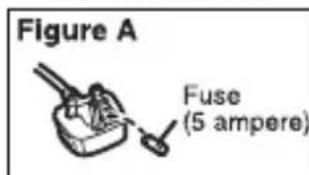
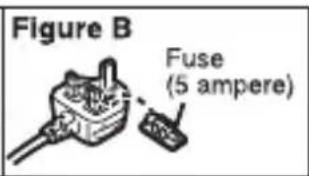
A 5-ampere fuse is fitted in this plug. Should the fuse need to be replaced please ensure that the replacement fuse has a rating of 5-ampere and that it is approved by ASTA or BSI to BS1362.
Check for the ASTA mark or the BSI mark on the body of the fuse.
If the plug contains a removable fuse cover you must ensure that it is refitted when the fuse is replaced.
If you lose the fuse cover the plug must not be used until a replacement cover is obtained.
A replacement fuse cover can be purchased from your local dealer.
Before use
Remove the connector cover.
■ How to replace the fuse
The location of the fuse differ according to the type of AC mains plug (figures A and B). Confirm the AC mains plug fitted and follow the instructions below.
Illustrations may differ from actual AC mains plug.
- Open the fuse cover with a screwdriver.
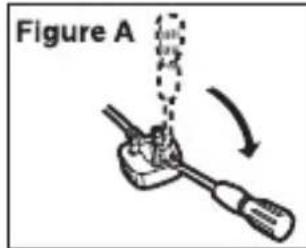
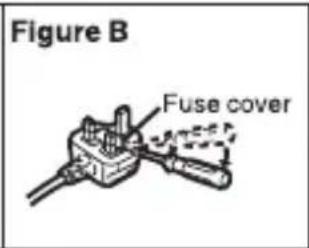
- Replace the fuse and close or attach the fuse cover.
-If you see this symbol-
Disposal of Old Equipment
Only for European Union and countries with recycling systems
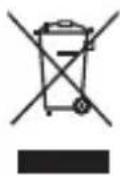
This symbol on the products, packaging, and/or accompanying documents means that used electrical and electronic products must not be mixed with general household waste.
For proper treatment, recovery and recycling of old products, please take them to applicable collection points in accordance with your national legislation.
By disposing of them correctly, you will help to save valuable resources and prevent any potential negative effects on human health and the environment.
For more information about collection and recycling, please contact your local authority.
Penalties may be applicable for incorrect disposal of this waste, in accordance with national legislation.
Precautions
- This battery charger is dedicated for Panasonic battery pack. Please use genuine Panasonic batteries. *1 Indicated as battery charger or charger in the text. *2 Indicated as battery pack or battery in the text.
- Please also read the manual of your digital camera. • Refer to our latest catalog or website for information about compatible batteries.
Accessories
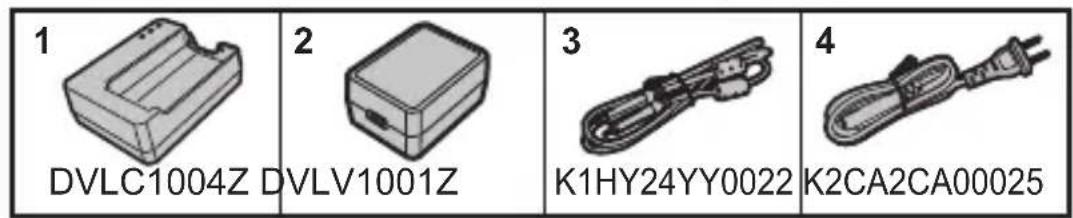
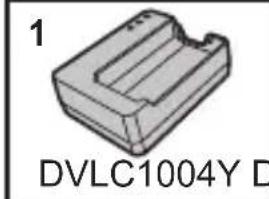
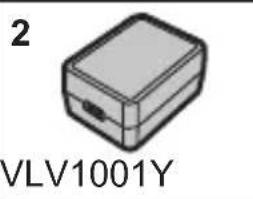
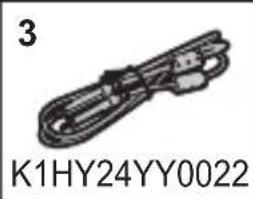
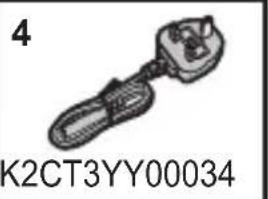
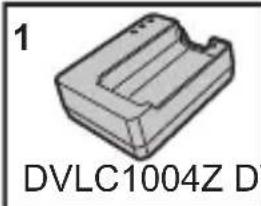
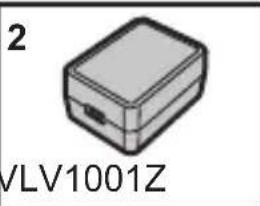
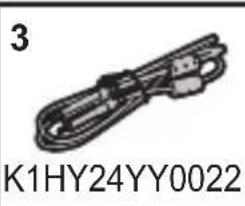
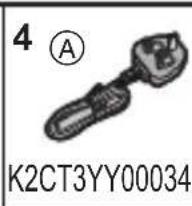
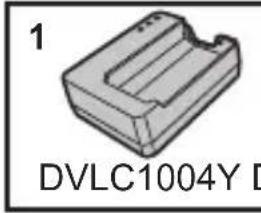
Check that all the accessories are supplied before using the product. Product numbers correct as of January 2019. These may be subject to change.
DMW-BTC14 PP
| 1 | Battery charger 3 USB connection cable (C-C) |
| 2 | AC adaptor 4 AC cable |
DMW-BTC14 E
| 1 | Battery charger 3 USB connection cable (C-C) |
| 2 | AC adaptor 4 AC cable |
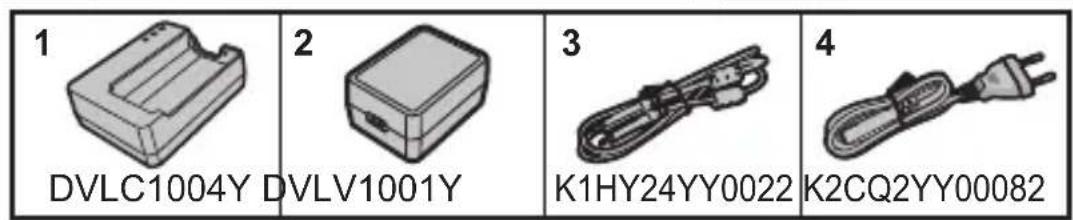
DMW-BTC14 EB
| 1 | Battery charger 3 USB connection cable (C-C) | |
| 2 | AC adaptor 4 AC mains lead | |
 |  |  |  |
DMW-BTC14 GC
| 1 | Battery charger 3 USB connection cable (C-C) | |
| 2 | AC adaptor 4 AC cable | |
 |  |  |  | 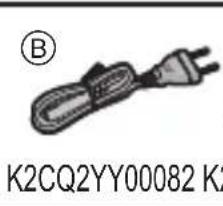 | 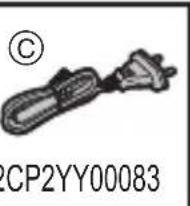 |
DMW-BTC14 GN
| 1 | Battery charger 3 USB connection cable (C-C) |
| 2 | AC adaptor 4 AC cable |
 | 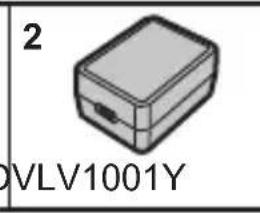 | 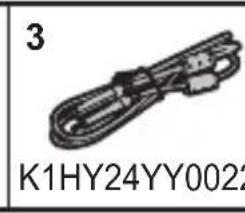 | 4K2CJ2YY00052 |
| 4 |
| K2CJ2YY00052 |
Charging the Battery
• Always use genuine Panasonic batteries (DMW-BLJ31). - If you use other batteries, we cannot guarantee the quality of this product.
![graph LR A["Device with cable"] --> B["Switch"] B --> C["Device with cable"] C --> D["Signal to device"] D --> E["Output"] style A fill:#f9f,stroke:#333 style B fill:#ccf,stroke:#333 style C fill:#cfc,stroke:#333 style D fill:#fcc,stroke:#333 style E fill:#ffc,stroke:#333](/content/2026/03/503147/images/0df2a069b1355ab0949296a34a55dfcecfd0590758882505297c08c2a2ab57b8.jpg)
A Battery charger C AC adaptor (supplied) B USB connection cable (C-C) (supplied) D AC cable (AC mains lead) (supplied)
1 Connect the battery charger and the AC adaptor with the USB connection cable (C-C).
- Hold the plugs and insert them straight. (Inserting these at an angle may cause deformation or malfunction)
2 Connect the AC cable (AC mains lead) to the AC adaptor and then insert into the electrical outlet Ⓔ.
- Do not use any other AC cables (AC mains leads) except the supplied one.
- The AC cable (AC mains lead) is dedicated for this unit. Do not use it with other devices.
3 Insert the battery.
- Insert the terminal end of the battery and push. • The [CHARGE] lamp ⬤ blinks and charging begins.
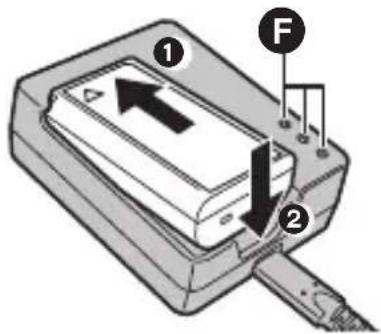
■ [CHARGE] Lamp
| Charging status | 0% to 49% 50% to 79% 80% to 99% 100% | |||
| [CHARGE] lamp | ||||
A Blinking
B Lit C Off
8 DVQX1721 (ENG)
• After charging, disconnect the power source connection and remove the battery. - If the [50%] lamp is blinking quickly, then charging is not occurring. —The temperature of the battery or surroundings is either too high or too low. Try charging at an ambient temperature between 10 °C and 30 °C (50 °F and 86 °F). —The terminals of the charger or the battery are dirty. Remove the connection to the power source, and wipe with a dry cloth.
■ Removing the battery
To remove the battery, follow the steps for inserting it in the reverse order.
■ Charging time
Battery Charging time
DMW-BLJ31 Approx. 130 min
- The indicated charging time is for when the battery has been discharged completely. The charging time may vary depending on how the battery has been used. The charging time for the battery in hot/cold environments or a battery that has not been used for a long time may be longer than normal.

Note
- Charging is not possible if the battery is inserted in a wrong way. In that case, remove the battery first, and then reinsert it by following the correct steps.
- Do not use any other USB connection cables except the supplied USB connection cable (C–C).
This may cause malfunction.
- Do not use any other AC adaptors except the supplied one. This may cause malfunction.
- Do not use any other AC cables (AC mains leads) except the supplied one. This may cause malfunction.
- Do not use USB extension cables or USB conversion adaptors.
- The AC adaptor, AC cable (AC mains lead) and the USB connection cable (C–C) are intended solely for use with this battery charger. Do not use them with other devices. This may cause malfunction.
- The battery becomes warm during and after charging. The charger also becomes warm during charging. This is not a malfunction.
- The battery can be recharged even when it still has some charge left, but it is not recommended that the battery charge be frequently topped up while the battery is fully charged. (Since characteristic swelling may occur.)
Cautions for Use
- The charger and AC adaptor may generate whirring sounds when they are being used. This is not a malfunction.
- Keep the charger and AC adaptor at least 1 m (3.3 feet) away from radios.
- Do not put heavy objects or step on the charger or AC adaptor.
Specifications
Specifications are subject to change without notice.
Battery charger
| Input: 9.0 V 3.0 A | --- |
| Output: 8.4 V 3.1 A | --- |
| Dimensions | Approx. 72.0 mm (W)×30.5 mm (H)×92.0 mm (D)[2.76" (W)×1.20"(H)×3.62" (D)](excluding the projecting parts) |
| Mass (weight) | Approx. 92 g/0.203 lb |
| Operating temperature | 0 °C to 40 °C (32 °F to 104 °F) |
AC adaptor
| Input: 100–240 V ~ 50/60 Hz 0.7 A | |||
| Output: 5 V 3.0 A, 9-V 3.0 A --- |
| Operating temperature | 0 °C to 40 °C (32 °F to 104 °F) |
The symbols on this product (including the accessories) represent the following:
| ~ | AC |
| --- | DC |
| ☐ | Class II equipment (The construction of the product is double-insulated.) |
For the U.S.A.
Panasonic Corporation of North America
Two Riverfront Plaza, Newark, NJ 07102-5490
http://shop.panasonic.com
For CANADA
Panasonic Canada Inc.
5770 Ambler Drive, Mississauga, Ontario L4W 2T3
www.panasonic.com
Printed in Japan
Panasonic Products Limited Warranty
Limited Warranty Coverage (For USA Only)
If your product does not work properly because of a defect in materials or workmanship, Panasonic Corporation of North America (referred to as “the warrantor”) will, for the length of the period indicated on the chart below, which starts with the date of original purchase (“warranty period”), at its option either (a) repair your product with new or refurbished parts, (b) replace it with a new or a refurbished equivalent value product, or (c) refund your purchase price. The decision to repair, replace or refund will be made by the warrantor.
| Product or Part Name Parts Labor | ||
| Digital Camera Peripherals 1 Year 1 Year | ||
| Digital Camera Accessories 90 Days 90 Days | ||
| Rechargeable Batteries 1 Year 1 Year |
During the “Labor” warranty period there will be no charge for labor. During the “Parts” warranty period, there will be no charge for parts. This Limited Warranty excludes both parts and labor for non-rechargeable batteries, antennas, and cosmetic parts (cabinet). This warranty only applies to products purchased and serviced in the United States. This warranty is extended only to the original purchaser of a new product which was not sold “as is”.
Mail-In Service--Online Repair Request
Online Repair Request
To submit a new repair request and for quick repair status visit our Web Site at http://shop.panasonic.com/support.
When shipping the unit, carefully pack, include all supplied accessories listed in the Owner's Manual, and send it prepaid, adequately insured and packed well in a carton box. When shipping Lithium Ion batteries please visit our Web Site at http://shop.panasonic.com/support as Panasonic is committed to providing the most up to date information. Include a letter detailing the complaint, a return address and provide a daytime phone number where you can be reached. A valid registered receipt is required under the Limited Warranty.
IF REPAIR IS NEEDED DURING THE WARRANTY PERIOD, THE PURCHASER WILL BE REQUIRED TO FURNISH A SALES RECEIPT/PROOF OF PURCHASE INDICATING DATE OF PURCHASE, AMOUNT PAID AND PLACE OF PURCHASE. CUSTOMER WILL BE CHARGED FOR THE REPAIR OF ANY UNIT RECEIVED WITHOUT SUCH PROOF OF PURCHASE.
Limited Warranty Limits and Exclusions
This warranty ONLY COVERS failures due to defects in materials or workmanship, and DOES NOT COVER normal wear and tear or cosmetic damage. The warranty ALSO DOES NOT COVER damages which occurred in shipment, or failures which are caused by products not supplied by the warrantor, or failures which result from accidents, misuse, abuse, neglect, mishandling, misapplication, alteration, faulty installation, set-up adjustments, misadjustment of consumer controls, improper maintenance, power line surge, lightning damage, modification, introduction of sand, humidity or liquids, commercial use such as hotel, office, restaurant, or other business or rental use of the product, or service by anyone other than a Factory Service Center or other Authorized Servicer, or damage that is attributable to acts of God.
THERE ARE NO EXPRESS WARRANTIES EXCEPT AS LISTED UNDER “LIMITED WARRANTY COVERAGE”.
THE WARRANTOR IS NOT LIABLE FOR INCIDENTAL OR CONSEQUENTIAL DAMAGES RESULTING FROM THE USE OF THIS PRODUCT, OR ARISING OUT OF ANY BREACH OF THIS WARRANTY.
(As examples, this excludes damages for lost time, travel to and from the servicer, loss of or damage to media or images, data or other memory or recorded content. The items listed are not exclusive, but for illustration only.)
ALL EXPRESS AND IMPLIED WARRANTIES, INCLUDING THE WARRANTY OF MERCHANTABILITY, ARE LIMITED TO THE PERIOD OF THE LIMITED WARRANTY.
Some states do not allow the exclusion or limitation of incidental or consequential damages, or limitations on how long an implied warranty lasts, so the exclusions may not apply to you. This warranty gives you specific legal rights and you may also have other rights which vary from state to state. If a problem with this product develops during or after the warranty period, you may contact your dealer or Service Center. If the problem is not handled to your satisfaction, then write to:
Consumer Affairs Department
Panasonic Corporation of North America
661 Independence Pkwy
Chesapeake, VA 23320
PARTS AND SERVICE, WHICH ARE NOT COVERED BY THIS LIMITED WARRANTY, ARE YOUR RESPONSIBILITY.
Shop
Accessories!
for all your Panasonic gear
Go to
http://shop.panasonic.com/support
Get everything you need to get the most out of your Panasonic products
Accessories & Parts for your Camera, Phone, A/V products, TV, Computers & Networking, Personal
Care, Home Appliances, Headphones, Batteries, Backup Chargers & more...
Customer Services Directory
For Product Information, Operating Assistance, Parts, Owner's Manuals, Dealer and Service info go to http://shop.panasonic.com/support
For the hearing or speech impaired TTY: 1-877-833-8855
As of March 2016
Limited Warranty (ONLY FOR CANADA)
Panasonic Canada Inc.
5770 Ambler Drive, Mississauga, Ontario L4W 2T3
PANASONIC PRODUCT – LIMITED WARRANTY
Panasonic Canada Inc. warrants this product to be free from defects in material and workmanship under normal use and for a period as stated below from the date of original purchase agrees to, at its option either (a) repair your product with new or refurbished parts, (b) replace it with a new or a refurbished equivalent value product, or (c) refund your purchase price. The decision to repair, replace or refund will be made by Panasonic Canada Inc.
| Digital Camera One (1) year, parts and labour | |
| Digital Camera Peripherals One (1) year, | parts and labour |
| Digital Camera Accessories Ninety (90) | days, parts and labour |
This warranty is given only to the original purchaser, or the person for whom it was purchased as a gift, of a Panasonic brand product mentioned above sold by an authorized Panasonic dealer in Canada and purchased and used in Canada, which product was not sold "as is", and which product was delivered to you in new condition in the original packaging.
IN ORDER TO BE ELIGIBLE TO RECEIVE WARRANTY SERVICE HEREUNDER, A PURCHASE RECEIPT OR OTHER PROOF OF DATE OF ORIGINAL PURCHASE, SHOWING AMOUNT PAID AND PLACE OF PURCHASE IS REQUIRED
LIMITATIONS AND EXCLUSIONS
This warranty ONLY COVERS failures due to defects in materials or workmanship, and DOES NOT COVER normal wear and tear or cosmetic damage. The warranty ALSO DOES NOT COVER damages which occurred in shipment, or failures which are caused by products not supplied by Panasonic Canada Inc., or failures which result from accidents, misuse, abuse, neglect, mishandling, misapplication, alteration, faulty installation, set-up adjustments, misadjustment of consumer controls, improper maintenance, improper batteries, power line surge, lightning damage, modification, introduction of sand, humidity or liquids, commercial use such as hotel, office, restaurant, or other business or rental use of the product, or service by anyone other than an Authorized Servicer, or damage that is attributable to acts of God.
Dry cell batteries, printer ink cartridge and paper are also excluded from coverage under this warranty.
Rechargeable batteries are warranted for ninety (90) days from date of original purchase.
THIS EXPRESS, LIMITED WARRANTY IS IN LIEU OF ALL OTHER WARRANTIES, EXPRESS OR IMPLIED, INCLUDING ANY IMPLIED WARRANTIES OF MERCHANTABILITY AND FITNESS FOR A PARTICULAR PURPOSE. IN NO EVENT WILL PANASONIC CANADA INC. BE LIABLE FOR ANY SPECIAL, INDIRECT OR CONSEQUENTIAL DAMAGES RESULTING FROM THE USE OF THIS PRODUCT OR ARISING OUT OF ANY BREACH OF ANY EXPRESS OR IMPLIED WARRANTY.
(As examples, this warranty excludes damages for lost time, travel to and from the Authorized Servicer, loss of or damage to media or images, data or other memory or recorded content. This list of items is not exhaustive, but for illustration only.)
In certain instances, some jurisdictions do not allow the exclusion or limitation of incidental or consequential damages, or the exclusion of implied warranties, so the above limitations and exclusions may not be applicable. This warranty gives you specific legal rights and you may have other rights which vary depending on your province or territory.
WARRANTY SERVICE
For product operation, repairs and information assistance, please visit our Support page:
www.panasonic.ca/english/support
■ [CHARGE] indicator
Panasonic Canada Inc.
5770 Ambler Drive, Mississauga, Ontario L4W 2T3
www.panasonic.com
Printed in Japan
FOR CANADA
Panasonic Canada Inc.
5770, Ambler Drive, Mississauga (Ontario) L4W 2T3
PANASONIC PRODUCT – LIMITED WARRANTY
■ [CHARGE] lamp
Responsible party: Panasonic Corporation of North America
Two Riverfront Plaza, Newark, NJ 07102-5490
■ [CHARGE] lamp
| Estado de carga | 0% a 49% 50% a 79% 80% a 99% 100% | |||
| Lámpara [CHARGE] | ![PANASONIC Lumix DMWBTC14 - ■ [CHARGE] lamp - 1](/content/2026/03/503147/images/2d03988f783cf91c224c310434dd667be377f9d9be490ce19dc837edfba5f832.jpg) | ![PANASONIC Lumix DMWBTC14 - ■ [CHARGE] lamp - 2](/content/2026/03/503147/images/7bcb4583f76193db532a06a606225f878d8582e91ac6bab57bdb48ceeb2fd0e4.jpg) | ![PANASONIC Lumix DMWBTC14 - ■ [CHARGE] lamp - 3](/content/2026/03/503147/images/b4d018ccd1d1195b7b5f0e994d79096207c7bbac3d6893dfa47fd5d604fdcf1a.jpg) | ![PANASONIC Lumix DMWBTC14 - ■ [CHARGE] lamp - 4](/content/2026/03/503147/images/8ede7c294a2f71e7947914eb7856a26cba5dfa8708a8d603017b08bbb4f90327.jpg) |
A Blinking
B Lit © Off
| Entrada: 9,0 V 3,0 A | --- |
| Salida: 8,4 V 3,1 A | --- |
| Dimensiones | Aproximadamente 72,0 mm (An)×30,5 mm (Alt)×92,0 mm (P)[2,76” (An)×1,20”(Alt)×3,62” (P)] (excluyendo las partes salientes) |
| Masa | Aproximadamente 92 g/0,203 lb |
| Temperatura de funcionamiento | 0 °C a 40 °C (32 °F a 104 °F) |
AC adapter
| Entrada: | 100–240 V ~ | 50/60 Hz | 0,7 A |
| Salida: 5 V 3 , 0 A , 9 V 3 ,0 A | --- | ||
| Temperatura de funcionamiento | 0 °C a 40 °C (32 °F a 104 °F) |
Panasonic Corporation of North America
Two Riverfront Plaza, Newark, NJ 07102-5490
http://shop.panasonic.com
Printed in Japan
[CHARGE] lamp
| Ingresso: 9,0 V 3,0 A | --- |
| Uscita: 8,4 V 3,1 A | --- |
| Dimensioni | Circa 72,0 mm (L)×30,5 mm (A)×92,0 mm (P)(escluse le parti sporgenti) |
| Massa Circa 92 g | |
| Temperatura operativa | 0 °C a 40 °C |
AC adapter
| Ingresso: | 100–240 V ~ | 50/60 Hz | 0,7 A |
| Uscita: 5 V 3 , 0 A , 9 V 3 , 0 A | —— |
| Temperatura operativa | 0 °C a 40 °C |
[CHARGE] indicator
| 充電狀態 | 0%至49% | 50%至79% | 80%至99% | 100% |
| [CHARGE]指示燈 | ![PANASONIC Lumix DMWBTC14 - [CHARGE] indicator - 1](/content/2026/03/503147/images/9d663c9027fc85fa31c36823c27ead7321aa26871118c9e946f6f1e4e980ce21.jpg) | ![PANASONIC Lumix DMWBTC14 - [CHARGE] indicator - 2](/content/2026/03/503147/images/05b473a74ea70cc737d69cadb0ed26f65270531da9bed0631c75ebc7498af9a0.jpg) | ![PANASONIC Lumix DMWBTC14 - [CHARGE] indicator - 3](/content/2026/03/503147/images/e4c5a8294af436d6947661fae042f680d6d39a9dc277f266d34f4b7d19ab434a.jpg) | ![PANASONIC Lumix DMWBTC14 - [CHARGE] indicator - 4](/content/2026/03/503147/images/8fe45731b4a773a0099b55145fdbe28a2bcf4e0285e9e2b6fe9fdd3b394468fa.jpg) |
A: Flashing
B: Lit
C: Off
[CHARGE] indicator
| Состояние зарядки | 0% до 49% 50% до 79% 80% до 99% 100% | |||
| Индикатор [CHARGE] | ||||
A: Flashing
B: Lit
C: Off
Manufactured by: Panasonic Corporation
Kadoma, Osaka, Japan
Importer for Europe: Panasonic Marketing Europe GmbH
Panasonic Testing Centre
Winsbergring 15, 22525 Hamburg, Germany
Panasonic Corporation
Web Site: http://www.panasonic.com
© Panasonic Corporation 2019
LUMIX
- OPERATING INSTRUCTIONS
- BATTERY CHARGER
- CONTENTS
- INFORMATION FOR YOUR SAFETY
- WARNING
- CAUTION
- ABOUT THE AC ADAPTOR (SUPPLIED)
- (FOR THE U.S.A. AND CANADA)
- AC ADAPTOR
- THE FOLLOWING APPLIES ONLY IN THE U.S.A
- FCC NOTE
- FCC CAUTION
- FOR THE AC MAINS PLUG OF THREE PINS
- CAUTION FOR AC MAINS LEAD
- BEFORE USE
- HOW TO REPLACE THE FUSE
- IF YOU SEE THIS SYMBOL
- DISPOSAL OF OLD EQUIPMENT
- ONLY FOR EUROPEAN UNION AND COUNTRIES WITH RECYCLING SYSTEMS
- PRECAUTIONS
- ACCESSORIES
- DMW-BTC14 EB
- DMW-BTC14 GC
- DMW-BTC14 GN
- CHARGING THE BATTERY
- [CHARGE] LAMP
- REMOVING THE BATTERY
- CHARGING TIME
- BATTERY CHARGING TIME
- DMW-BLJ31 APPROX. 130 MIN
- NOTE
- CAUTIONS FOR USE
- SPECIFICATIONS
- PANASONIC PRODUCTS LIMITED WARRANTY
- LIMITED WARRANTY COVERAGE (FOR USA ONLY)
- MAIL-IN SERVICE--ONLINE REPAIR REQUEST
- ONLINE REPAIR REQUEST
- IF REPAIR IS NEEDED DURING THE WARRANTY PERIOD, THE PURCHASER WILL BE REQUIRED TO FURNISH A SALES RECEIPT/PROOF OF PURCHASE INDICATING DATE OF PURCHASE, AMOUNT PAID AND PLACE OF PURCHASE. CUSTOMER WILL BE CHARGED FOR THE REPAIR OF ANY UNIT RECEIVED WITHOUT SUCH PROOF OF PURCHASE
- LIMITED WARRANTY LIMITS AND EXCLUSIONS
- THERE ARE NO EXPRESS WARRANTIES EXCEPT AS LISTED UNDER “LIMITED WARRANTY COVERAGE
- THE WARRANTOR IS NOT LIABLE FOR INCIDENTAL OR CONSEQUENTIAL DAMAGES RESULTING FROM THE USE OF THIS PRODUCT, OR ARISING OUT OF ANY BREACH OF THIS WARRANTY
- ALL EXPRESS AND IMPLIED WARRANTIES, INCLUDING THE WARRANTY OF MERCHANTABILITY, ARE LIMITED TO THE PERIOD OF THE LIMITED WARRANTY
- SHOP
- CUSTOMER SERVICES DIRECTORY
- LIMITED WARRANTY (ONLY FOR CANADA)
- PANASONIC CANADA INC
- PANASONIC PRODUCT – LIMITED WARRANTY
- LIMITATIONS AND EXCLUSIONS
- WARRANTY SERVICE
- FOR CANADA
- A BLINKING
- B LIT © OFF
- [CHARGE] INDICATOR
- A: FLASHING
- B: LIT
- C: OFF
Brand : PANASONIC
Model : Lumix DMWBTC14
Category : Camera