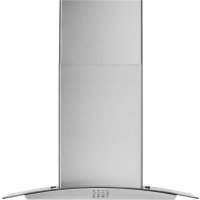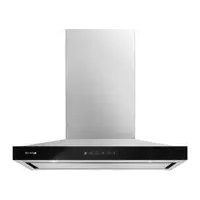
JXW8530HS - Basket JENN-AIR - Free user manual and instructions
Find the device manual for free JXW8530HS JENN-AIR in PDF.


User questions about JXW8530HS JENN-AIR
0 question about this device. Answer the ones you know or ask your own.
Ask a new question about this device
Download the instructions for your Basket in PDF format for free! Find your manual JXW8530HS - JENN-AIR and take your electronic device back in hand. On this page are published all the documents necessary for the use of your device. JXW8530HS by JENN-AIR.
USER MANUAL JXW8530HS JENN-AIR
JENNAIR ^® 30" AND 36" (76.2 CM AND 91.4 CM)
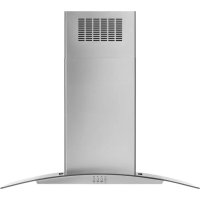
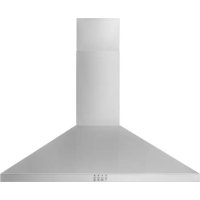
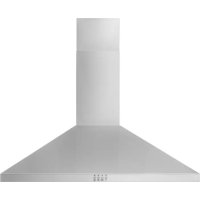
WALL-MOUNT CANOPY RANGE HOOD
HOTTE DE CUISINIÈRE JENNAIR® POUR
MONTAGE MURAL 30" ET 36"
(76,2 CM ET 91,4 CM)
Installation Instructions and Use & Care Guide
For questions about features, operation/performance, parts, accessories, or service in the U.S.A., call:
1-800-JENNAIR (1-800-536-6247) or visit our website at www.jennair.com.
In Canada, call: 1-800-JENNAIR (1-800-536-6247) or visit our website at www.jennair.ca.
IMPORTANT: READ AND SAVE THESE INSTRUCTIONS.
FOR RESIDENTIAL USE ONLY.
IMPORTANT : LIRE ET CONSERVER CES INSTRUCTIONS.
POUR UTILISATION RÉSIDENTIELLE UNIQUEMENT.

JENNAIR
LI316D/W11244200B
TABLE OF CONTENTS
RANGE HOOD SAFETY 2
INSTALLATION REQUIREMENTS....4
Tools and Parts....4
Location Requirements....4
Venting Requirements (vented models only)......5
Electrical Requirements 6
INSTALLATION INSTRUCTIONS....7
Prepare Location....7
Install Range Hood....8
Connect Vent System 8
Make Electrical Connection....9
Install Vent Covers....10
Complete Installation 10
RANGE HOOD USE....11
Controls and Features....11
RANGE HOOD CARE....12
Cleaning 12
WIRING DIAGRAM....13
ASSISTANCE OR SERVICE....14
In the U.S.A. 14
In Canada....14
Accessories....14
TABLE DES MATIÈRES
SÉCURITÉ DE LA HOTTE DE CUISINIÈRE .....15
EXIGENCES D'INSTALLATION ....17
INSTRUCTIONS D'INSTALLATION....20
ASSISTANCE OU SERVICE....28
Au Canada....28
Accessoires....28
RANGE HOOD SAFETY
Your safety and the safety of others are very important.
We have provided many important safety messages in this manual and on your appliance. Always read and obey all safety messages.

This is the safety alert symbol.
This symbol alerts you to potential hazards that can kill or hurt you and others.
All safety messages will follow the safety alert symbol and either the word "DANGER" or "WARNING."
These words mean:
DANGER
You can be killed or seriously injured if you don't immediately follow instructions.
WARNING
You can be killed or seriously injured if you don't follow instructions.
All safety messages will tell you what the potential hazard is, tell you how to reduce the chance of injury, and tell you what can happen if the instructions are not followed.
IMPORTANT SAFETY INSTRUCTIONS
WARNING: TO REDUCE THE RISK OF FIRE, ELECTRIC SHOCK, OR INJURY TO PERSONS, OBSERVE THE FOLLOWING:
■ Use this unit only in the manner intended by the manufacturer. If you have questions, contact the manufacturer.
■ Before servicing or cleaning unit, switch power off at service panel and lock the service disconnecting means to prevent power from being switched on accidentally. When the service disconnecting means cannot be locked, securely fasten a prominent warning device, such as a tag, to the service panel.
■ Installation work and electrical wiring must be done by qualified person(s) in accordance with all applicable codes and standards, including fire-rated construction.
■ Do not operate any fan with a damaged cord or plug. Discard fan or return to an authorized service facility for examination and/or repair.
■ Sufficient air is needed for proper combustion and exhausting of gases through the flue (chimney) of fuel burning equipment to prevent back drafting. Follow the heating equipment manufacturer's guideline and safety standards such as those published by the National Fire Protection Association (NFPA), and the American Society for Heating, Refrigeration and Air Conditioning Engineers (ASHRAE), and the local code authorities.
■ When cutting or drilling into wall or ceiling, do not damage electrical wiring and other hidden utilities.
■ Ducted fans must always be vented to the outdoors.
CAUTION: For General Ventilating Use Only. Do To Exhaust Hazardous Or Explosive Materials And Vapors.
CAUTION: To reduce risk of fire and to properly exhaust air, be sure to duct air outside - Do not vent exhaust air into spaces within walls or ceilings or into attics, crawl spaces, or garages.
WARNING: TO REDUCE THE RISK OF FIRE, USE ONLY METAL DUCTWORK.
WARNING: TO REDUCE THE RISK OF A RANGE TOP GREASE FIRE:
■ Never leave surface units unattended at high settings. Boilovers cause smoking and greasy spillovers that may ignite. Heat oils slowly on low or medium settings.
■ Always turn hood ON when cooking at high heat or when flambeing food (i.e. Crepes Suzette, Cherries Jubilee, Peppercorn Beef Flambé).
■ Clean ventilating fans frequently. Grease should not be allowed to accumulate on fan or filter.
■ Use proper pan size. Always use cookware appropriate for the size of the surface element.
WARNING: TO REDUCE THE RISK OF INJURY TO PERSONS IN THE EVENT OF A RANGE TOP GREASE FIRE, OBSERVE THE FOLLOWING ^a :
■ SMOTHER FLAMES with a close-fitting lid, cookie sheet, or metal tray, then turn off the burner. BE CAREFUL TO PREVENT BURNS. If the flames do not go out immediately, EVACUATE AND CALL THE FIRE DEPARTMENT.
■ NEVER PICK UP A FLAMING PAN - You may be burned.
■ DO NOT USE WATER, including wet dishcloths or towels - a violent steam explosion will result.
■ Use an extinguisher ONLY if: - You know you have a Class ABC extinguisher, and you already know how to operate it. - The fire is small and contained in the area where it started.
Use The fire department is being called.
- You can fight the fire with your back to an exit.
^a Based on "Kitchen Fire Safety Tips" published by NFPA.
■ WARNING: To Reduce The Risk Of Fire Or Electric Shock, Do Not Use This Fan With Any Solid-State Speed Control Device.
This appliance is not intended for use by people (including children) whose physical, sensory or mental capacities are different or impaired or who lack the necessary experience or knowledge/expertise to do so, unless such persons are supervised or are trained to operate the appliance by a person who accepts responsibility for their safety.
READ AND SAVE THESE INSTRUCTIONS
Tools and Parts
Gather the required tools and parts before starting installation. Read and follow the instructions provided with any tools listed here.
Tools Needed
Level
■ Drill with 1¼" (3 cm), 3/8" (9.5 mm) and 5/16" (7.9 mm) drill bits
■Pencil
■Wire stripper or utility knife
■Tape measure or ruler
■Pliers
■Caulking gun and weatherproof caulking compound
■Vent clamps
■Jigsaw or keyhole saw
■Flat-blade screwdriver
■Metal snips
■Phillips screwdriver
Parts Needed
■Home power supply cable
■1/2" (12.7 mm) UL listed or CSA approved strain relief
■3 UL listed wire connectors
For Vented Installations, you will also need:
■1 wall or roof cap
■Metal vent system
For Non-Vented (Recirculating) Installations, you will also need:
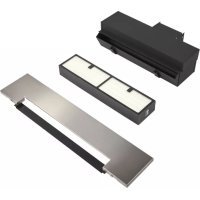
■Recirculation Kit for non-vented (recirculating) installations only. See “Assistance or Service” section to order.
■ 6" (15.2 cm) diameter round metal vent duct - length required is determined by ceiling height.
Parts supplied
Remove parts from packages. Check that all parts are included.
■Hood canopy assembly with ventilator and LED lights installed
■Vent transition with back draft dampers
■Metal grease filter - depending on model and size
■Vent cover support bracket
■Mounting template
■2-piece vent cover
■4 - 4.2 x 8 mm screws
■6 - 5 x 45 mm mounting screws
■2 - D6.4 x 18 mm washers
■2 - 8 x 40 mm wall anchors
■4 - 10 x 60 mm wall anchors
■4 - 5.4 x 75 mm screws (for 10 x 60 mm wall anchors)
■2 - 3.5 x 9.5 mm sheet metal screws
■T10 TORX ^® adapter
†®TORX is a registered trademarks of Acument Intellectual Properties, LLC.
Location Requirements
IMPORTANT: Observe all governing codes and ordinances.
Have a qualified technician install the range hood. It is the installer's responsibility to comply with installation clearances specified on the model/serial/rating plate. The model/serial/rating plate is located behind the left filter on the rear wall of the vent hood.
Canopy hood location should be away from strong draft areas, such as windows, doors and strong heating vents.
Cabinet opening dimensions that are shown must be used. Given dimensions provide minimum clearance.
This range hood is recommended for use with cooktops with a maximum total rating of 65,000 BTUs or less.
Grounded electrical outlet is required. See “Electrical Requirements” section.
The canopy hood is factory-set for venting through the roof or wall. For non-vented (recirculating) installation see “For Non-Vented (Recirculating) Installation Only” in the “Connect Vent System” section. Recirculation Kit Part Number W10692908 is available from your dealer or an authorized parts distributor.
All openings in ceiling and wall where canopy hood will be installed must be sealed.
For Mobile Home Installations
The installation of this range hood must conform to the Manufactured Home Construction Safety Standards, Title 24 CFR, Part 328 (formerly the Federal Standard for Mobile Home Construction and Safety, Title 24, HUD, Part 280) or when such standard is not applicable, the standard for Manufactured Home Installation 1982 (Manufactured Home Sites, Communities and Setups) ANSI A225.1/NFPA 501A, or latest edition, or with local codes.
Product Dimensions
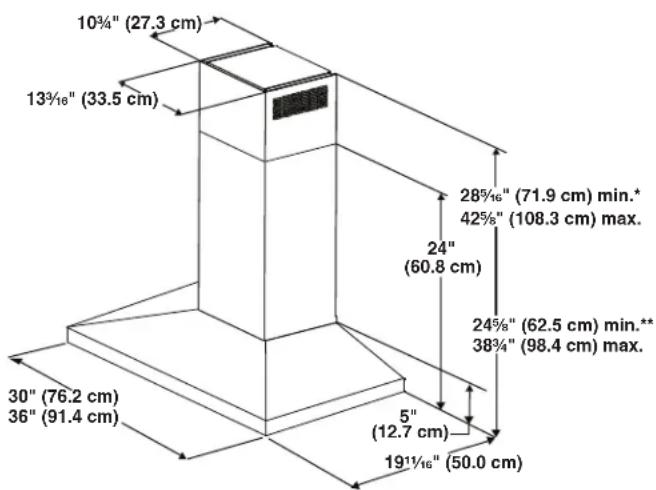
text_image
10¾" (27.3 cm) 13¾/₁₆" (33.5 cm) 28¾/₁₆" (71.9 cm) min.* 42¾/₈" (108.3 cm) max. 24" (60.8 cm) 24¾/₈" (62.5 cm) min.* 38¾/₄" (98.4 cm) max. 30" (76.2 cm) 36" (91.4 cm) 5" (12.7 cm) 19½/₁₆" (50.0 cm)*For non-vented (recirculating) installations
**For vented installations
Cabinet Dimensions
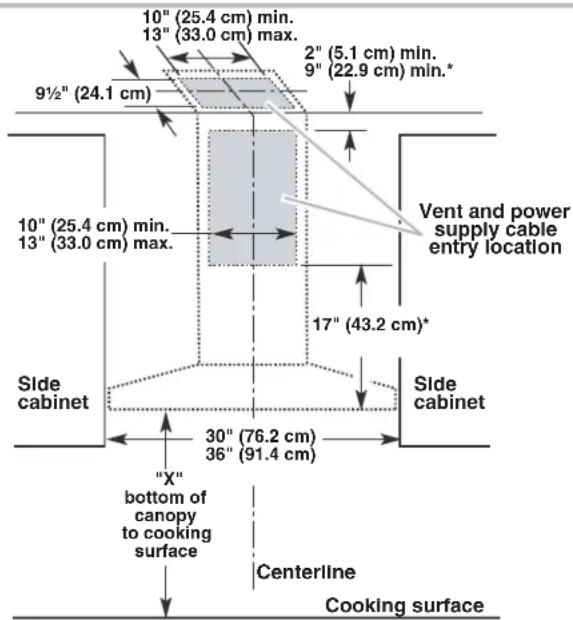
text_image
10" (25.4 cm) min. 13" (33.0 cm) max. 9½" (24.1 cm) 10" (25.4 cm) min. 13" (33.0 cm) max. 2" (5.1 cm) min. 9" (22.9 cm) min.* Vent and power supply cable entry location 17" (43.2 cm)* Side cabinet 30" (76.2 cm) 36" (91.4 cm) Side cabinet "X" bottom of canopy to cooking surface Centerline Cooking surface*For non-vented (recirculating) installations
IMPORTANT:
Minimum distance "X": 24" (61.0 cm) from electric cooking surface.
Minimum distance "X": 27" (68.6 cm) from gas cooking surfaces.
Suggested maximum distance "X": 36" (91.4 cm)
The chimneys can be adjusted for different ceiling heights. See the following chart.
| Vented Installations | |
| Min. ceiling height Max. ceiling height | |
| Electric cooking surface | 7' 1" (2.16 m) 9' 2" (2.79 m) |
| Gas cooking surface | 7' 4" (2.23 m) 9' 2" (2.79 m) |
Non-Vented (Recirculating) Installations
| Min. ceiling height Max. ceiling height | |
| Electric cooking surface | 7' 1" (2.16 m) 9' 6" (2.9 m) |
| Gas cooking surface | 7' 4" (2.23 m) 9' 6" (2.9 m) |
*NOTE: The range hood chimneys are adjustable and designed to meet varying ceiling or soffit heights depending on the distance "X" between the bottom of the range hood and the cooking surface. For higher ceilings, a Stainless Steel Chimney Extension Kit Part Number W10272075 is available from your dealer or an authorized parts distributor. The chimney extension replaces the chimney shipped with the range hood.
Venting Requirements (vented models only)
■Vent system must terminate to the outdoors, except for non-vented (recirculating) installations.
■Do not terminate the vent system in an attic or other enclosed area.
■Do not use 4" (10.2 cm) laundry-type wall cap.
■Use metal vent only. Rigid metal vent is recommended. Plastic or metal foil vent is not recommended.
■The length of vent system and number of elbows should be kept to a minimum to provide efficient performance.
For the most efficient and quiet operation:
■Use no more than three 90° elbows.
■ Make sure there is a minimum of 24" (61 cm) of straight vent between the elbows, if more than 1 elbow is used.
■Do not install 2 elbows together.
■Use clamps to seal all joints in the vent system.
■The vent system must have a damper. If the roof or wall cap has a damper, do not use the damper supplied with the range hood.
■Use caulking to seal exterior wall or roof opening around the cap.
■The size of the vent should be uniform.
Cold Weather Installations
An additional back draft damper should be installed to minimize backward cold airflow and a thermal break should be installed to minimize conduction of outside temperatures as part of the vent system. The damper should be on the cold air side of the thermal break.
The break should be as close as possible to where the vent system enters the heated portion of the house.
Makeup Air
Local building codes may require the use of makeup air systems when using ventilation systems greater than specified CFM of air movement. The specified CFM varies from locale to locale. Consult your HVAC professional for specific requirements in your area.
Venting Methods
This canopy hood is factory-set for venting through the roof or wall.
A 6" (15.2 cm) round vent system is needed for installation (not included). The hood exhaust opening is 6" (15.2 cm) round.
NOTE: Flexible vent is not recommended. Flexible vent creates back pressure and air turbulence that greatly reduce performance.
Vent system can terminate either through the roof or wall. To vent through a wall, a 90° elbow is needed.
Rear discharge
A 90° elbow may be installed immediately above the hood.
For Non-Vented (Recirculating) Installations
If it is not possible to vent cooking fumes and vapors to the outside, the hood can be used in the non-vented (recirculating) version, fitting a charcoal filter and the deflector. Fumes and vapors are recycled through the top grille.
Roof Venting Wall Venting
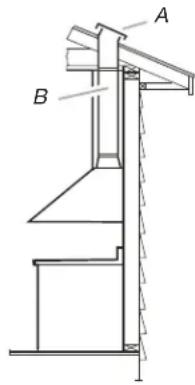
text_image
Technical diagram of a mechanical structure with labeled components A and BA. Roof cap
B. 6" (15.2 cm) round vent
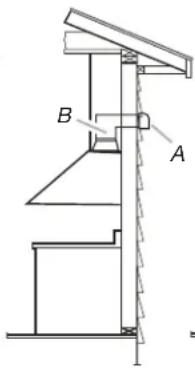
text_image
Technical diagram of a mechanical assembly with labeled components A and BA. Wall cap
B. 6" (15.2 cm) round vent
Non-Vented (Recirculating)
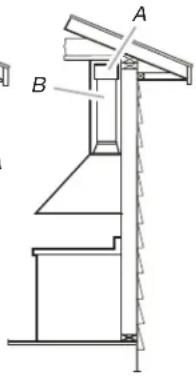
text_image
Technical diagram of a mechanical assembly with labeled components A and BA. Deflector
B. 6" (15.2 cm) round vent
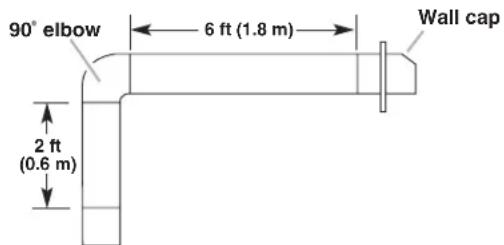
Calculating Vent System Length
To calculate the length of the system you need, add the equivalent feet (meters) for each vent piece used in the system.
Vent Piece 6" (15.2 cm) Round
| 45° elbow 2.5 ft (0.8 m) |
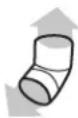
| 90° elbow 5.0 ft (1.5 m) |

Maximum equivalent vent length is 35 ft (10.7 m).
Example vent system
text_image
90° elbow 6 ft (1.8 m) Wall cap 2 ft (0.6 m)The following example falls within the maximum recommended vent length of 35 ft (10.7 m).
1 - 90° elbow = 5.0 ft (1.5 m)
1 - wall cap = 0.0 ft (0.0 m)
8 ft (2.4 m) straight = 8.0 ft (2.4 m)
Length of system = 13.0 ft (3.9 m)
Electrical Requirements
Observe all governing codes and ordinances.
Ensure that the electrical installation is adequate and in conformance with National Electrical Code, ANSI/NFPA 70 (latest edition), or CSA Standards C22.1-94, Canadian Electrical Code, Part 1 and C22.2 No. 0-M91 (latest edition) and all local codes and ordinances.
If codes permit and a separate ground wire is used, it is recommended that a qualified electrician determine that the ground path is adequate.
A copy of the above code standards can be obtained from:
National Fire Protection Association
1 Batterymarch Park
Quincy, MA 02169-7471
CSA International
8501 East Pleasant Valley Road
Cleveland, OH 44131-5575
■A 120 V, 60 Hz, AC only, 15 A, fused electrical circuit is required.
■If the house has aluminum wiring, follow the procedure below:
Connect the aluminum wiring using special connectors and/or tools designed and UL listed for joining copper to aluminum.
Follow the electrical connector manufacturer's recommended procedure. Aluminum/copper connection must conform with local codes and industry accepted wiring practices.
■Wire sizes and connections must conform with the rating of the appliance as specified on the model/serial/rating plate. The model/serial/rating plate is located behind the left filter on the rear wall of the range hood.
■Wire sizes must conform to the requirements of the National Electrical Code, ANSI/NFPA 70 (latest edition), or CSA Standards C22.1-94, Canadian Electrical Code, Part 1 and C22.2 No. 0-M91 (latest edition) and all local codes and ordinances.
INSTALLATION INSTRUCTIONS
Prepare Location
■It is recommended that the vent system be installed before hood is installed.
■Before making cutouts, make sure there is proper clearance within the ceiling or wall for exhaust vent.
■Check your ceiling height and the hood height maximum before you select your hood.
- Disconnect power.
- Determine which venting method to use: roof, wall, or non vented.
- Select a flat surface for assembling the range hood. Place covering over that surface.
WARNING
Excessive Weight Hazard
Use two or more people to move and install range hood.
Failure to do so can result in back or other injury.
- Using 2 or more people, lift range hood onto covered surface.
Range Hood Mounting Screws Installation
- Determine and mark the centerline on the wall where the canopy hood will be installed.
- Select a mounting height between a minimum of 24" (61.0 cm) for an electric cooking surface, a minimum of 27" (68.6 cm) for a gas cooking surface, and a suggested maximum of 36" (91.4 cm) above the range to the bottom of the hood. Mark a reference line on the wall.
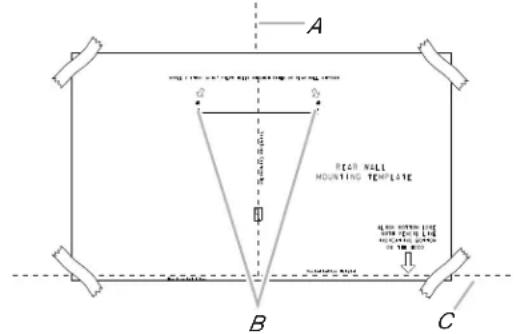
- Tape template in place, aligning the template centerline and bottom of template with hood bottom line and with the centerline marked on the wall.
text_image
A B C Rear Wall Mounting Template Solder Wall Mounting Template Solder WallA. Centerline
B. Fastener locations
C. Mounting height reference (hood bottom line)
- Mark centers of the fastener locations through the template to the wall.
IMPORTANT: All canopy mounting screws to be installed into wood where possible. If there is no wood to screw into, additional wall framing supports may be required or use the (4) 10 x 60 mm wall anchors and 5.4 x 75 mm screws.
Remove the template.
- a. For wood, drill 3/16" (4.8 mm) pilot holes at all locations where screws are being installed into wood.
b. For wall anchors, drill 7/16" (10 mm) holes at all locations where wall anchors are being used.
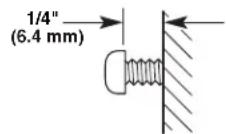
- a. For wood, install the 2 - 5 x 45 mm mounting screws. Leave a 1/4" (6.4 mm) gap between the wall and the back of the screw head to slide range hood into place.
b. For wall anchors, install the 10 x 60 mm wall anchors and install the 5.4 x 75 mm screws into the wall anchors. Tighten until wall anchors are secure. Back the screws out 1/4" (6.4 mm).
Vent Cover Bracket Installation
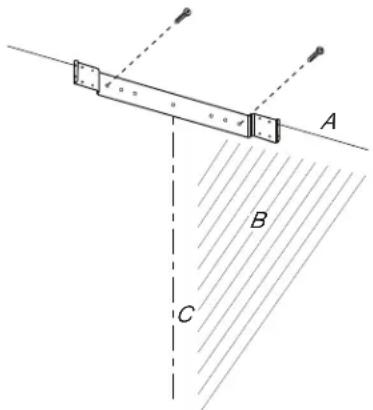
- Attach vent cover bracket to wall flush to the ceiling using 2 - 5 × 45 ~mm screws (use optional wall anchors if needed).
text_image
A B CA. Ceiling
B. Wall
C. Centerline
Complete Preparation
- Determine and make all necessary cuts in the wall for the vent system. Install the vent system before installing the hood. See "Venting Requirements" section.
- Determine the required height for the home power supply cable and drill a 1¼" (3.2 cm) hole at this location.
- Run the home power supply cable according to the National Electrical Code or CSA Standards and local codes and ordinances. There must be enough 1/2" conduit and wires from the fused disconnect (or circuit breaker) box to make the connection in the hood's electrical terminal box.
NOTE: Do not reconnect power until installation is complete.
- Use caulk to seal all openings.
Install In-Line Smart Kit - Optional
NOTE: Your range hood can work with either an internal or an inline (external) blower motor system. An optional In-Line Smart Kit (purchased separately) allows the blower motor that comes with this range hood to be installed in a location other than inside the range hood cavity.
CAUTION: To reduce the risk of fire and electric shock, install this range hood only with the In-Line Smart Kit manufactured by Whirlpool, Part Number W10692945.
For installation see the In-Line Smart Kit installation instructions. See the "Assistance or Service" section to order.
Install Range Hood
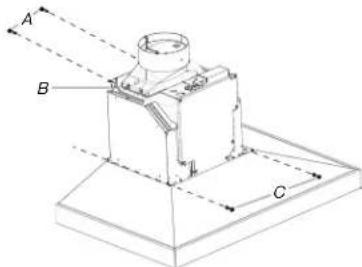
- Using 2 or more people, hang range hood on 2 mounting screws through the mounting slots on back of hood.
text_image
A B CA. Mounting screws
B. Mounting slots
C. Lower mounting screws and washers
-
Remove the grease filter. See "Range Hood Care" section.
-
Level the range hood and tighten upper mounting screws.
-
Install 2 - 5 x 45 mm lower mounting screws and 2 - D6.4 x 18 mm washers and tighten (use optional wall anchors if needed).
Connect Vent System
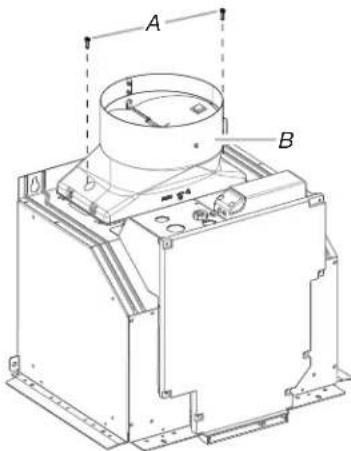
- Install transition on top of hood (if removed for shipping) with 2 - 3.5 x 9.5 mm sheet metal screws.
text_image
A BA. 3.5 x 9.5 mm screws (2)
B. Vent transition
For Vented Installations Only:
- Fit vent system over transition piece.
- Seal connection with clamps.
- Check that back draft dampers work properly.
For Non-Vented (Recirculating) Installations Only:
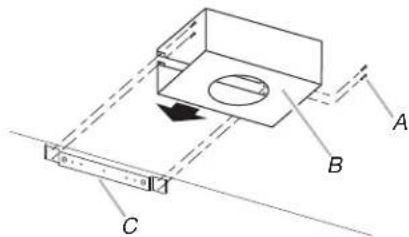
- Assemble the air deflector with the duct cover bracket with 4 assembly screws provided with the Recirculation Kit.
text_image
Technical diagram showing a mechanical assembly with labeled components A, B, and C, including a directional arrow indicating motion.A. Assembly screws
B. Air deflector
C. Duct cover bracket
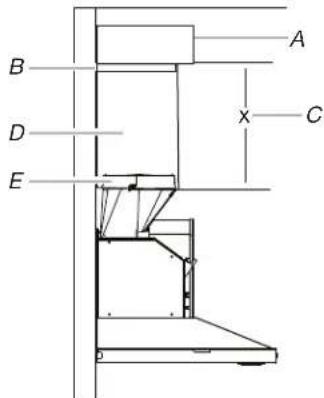
- Measure from the bottom of the air deflector to the bottom of the hood outlet.
text_image
A B D C EA. Air deflector
B. Vent clamp
C. X = length to cut vent duct
D. Vent duct
E. Exhaust outlet
- Cut the duct to the measured size "X".
- Remove the air deflector.
- Slide the duct onto the bottom of the air deflector.
- Place the assembled air deflector and duct over the exhaust outlet from the hood.
- Reassemble the air deflector to the duct cover bracket using 4 assembly screws.
- Seal connections with vent clamps.
Make Electrical Connection
WARNING

Electrical Shock Hazard
Disconnect power before servicing.
Replace all parts and panels before operating.
Failure to do so can result in death or electrical shock.
- Disconnect power.
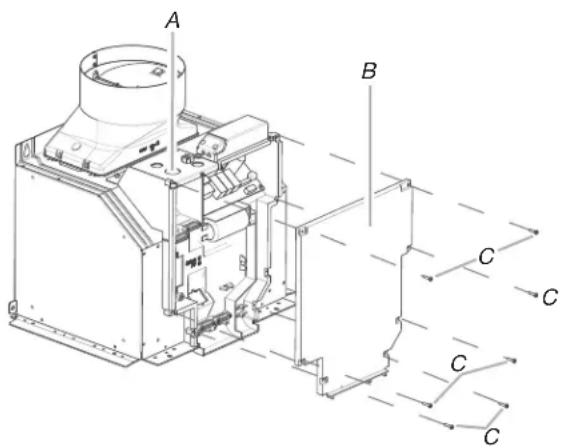
- Remove terminal box cover.
- Remove the knockout in the terminal box and install a UL listed or CSA approved 1/2" (12.7 mm) strain relief.
text_image
A B C C C CA. Knockout
B. Terminal box cover
C. Terminal box screws (7)
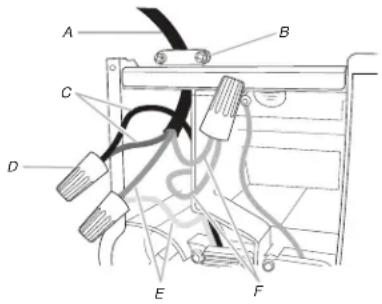
- Run home power supply cable through strain relief, into terminal box.
text_image
A B C D E FA. Home power supply cable
B. UL listed or CSA approved strain relief
C. Black wires
D. UL listed wire connectors
E. White wires
F. Green (or bare) and yellow-green ground wires
- Use UL listed wire connectors and connect black wires (C) together.
- Use UL listed wire connectors and connect white wires (E) together.
WARNING

Electrical Shock Hazard
Electrically ground blower.
Connect ground wire to green and yellow ground wire in terminal box.
Failure to do so can result in death or electrical shock.
- Connect green (or bare) ground wire from home power supply to yellow-green ground wire (F) in terminal box using UL listed wire connectors.
- Tighten strain relief screw.
- Install terminal box cover.
- Check that all light bulbs are secure in their sockets.
- Reconnect power.
Optional Power Cord Kit Installations
For optional power cord kit installations, follow the instructions supplied with the power cord kit. See the “Assistance or Service” section for information on ordering.
NOTE: Use only with range hood cord connection kits that have been investigated and found acceptable for use with this model range hood.
Install Vent Covers
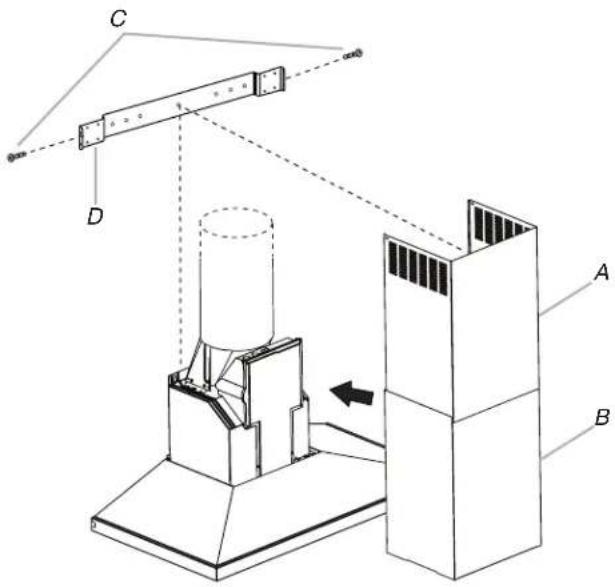
When using both upper and lower vent covers, push lower cover down onto hood and lift upper cover to ceiling and install with two 4.2 x 8 mm screws.
NOTE: For vented installations, the upper vent cover may be reversed to hide slots.
text_image
Technical diagram of a mechanical assembly with labeled components A, B, C, D and directional arrows indicating motion or force.A. Upper vent cover
C. 4.2 x 8 mm screws
B. Lower vent cover
D. Bracket
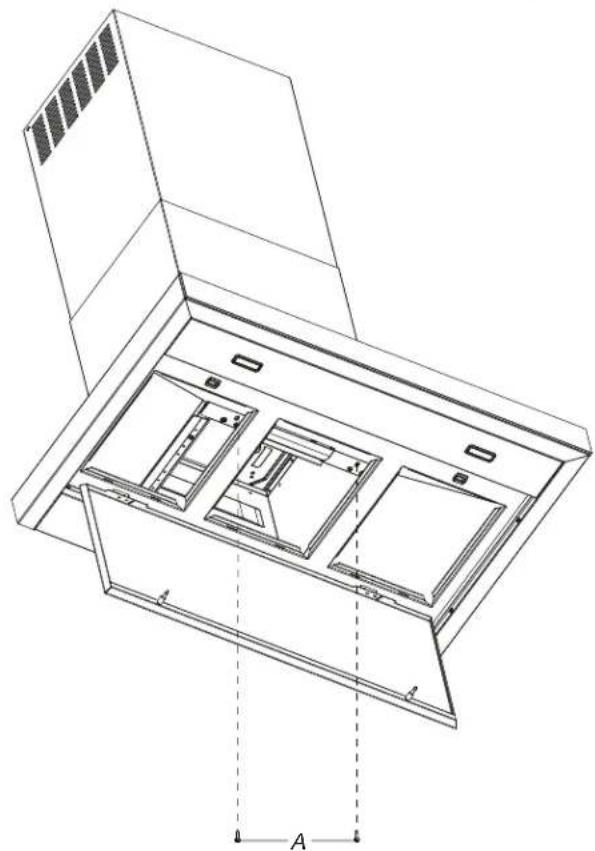
Secure the bottom of the duct with 2 - 4.2 x 8 mm screws.
natural_image
Technical line drawing of a cabinet or rack unit with internal compartments and mounting brackets (no text or symbols)A. 4.2 x 8 mm Screws (2)
Complete Installation
- For non-vented (recirculating) installations only, install charcoal filters over grille on blower housing. See the "Range Hood Care" section.
- Install metal filters. See the "Range Hood Care" section.
- Check the operation of the range hood blower and light. See the "Range Hood Use" section.
NOTE: To get the most efficient use from your new range hood, read the "Range Hood Use" section.
RANGE HOOD USE
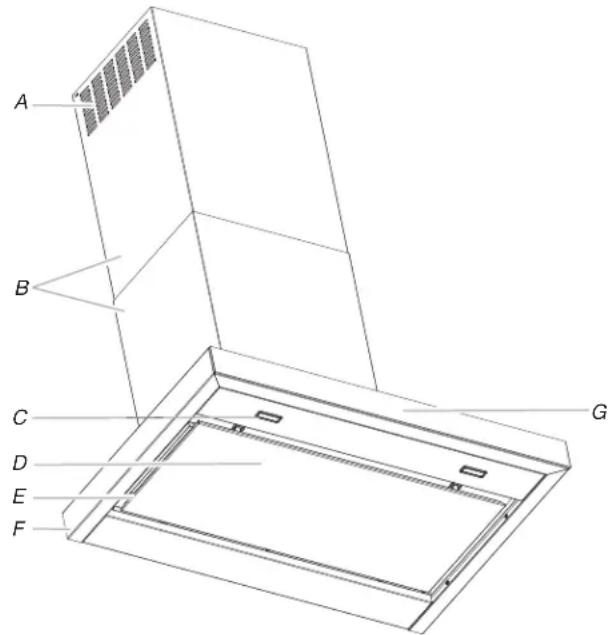
The range hood is designed to remove smoke, cooking vapors and odors from the cooktop area. For best results, start the hood before cooking and allow it to operate several minutes after the cooking is complete to clear all smoke and odors from the kitchen.
The range hood controls are located on the front side of the canopy.
text_image
A B C D E F GA. Louver holes (non-vented [recirculating] installations only)
B. Duct covers
C. LED lights (2)
D. Perimetic cover
E. Metal grease filters (located behind the perimetic cover)
F. Canopy
G. Control panel
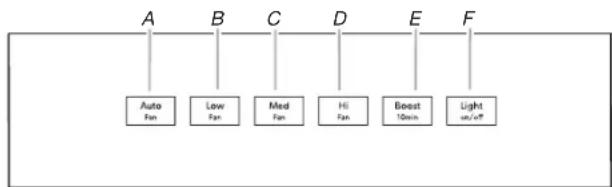
Control Panel
flowchart
graph TD
    A["Auto Fan"] --> B["Low Fan"]
    B --> C["Med Fan"]
    C --> D["Hi Fan"]
    D --> E["Boost 10min"]
    E --> F["Light on/off"]
A. Auto
B. Low
C. Medium
D. High
E. Boost
F. Light
Controls and Features
NOTES:
■To activate the controls, press and release the desired button.
■ The control feature button will be lit when a control feature is turned On.
Sleep Mode
The range hood automatically enters Sleep Mode when not in use. After 10 minutes of no range hood activity, all of the control button lights will turn Off. To deactivate Sleep Mode, press any button.
Auto Sense
Auto Sense allows the range hood fan to turn on automatically when it senses heat higher than its allowable temperature limit. When Auto Sense is On, the fan speed will increase or decrease based on the temperature Auto Sense is measuring.
Auto Sense can be manually increased by pressing a higher fan speed. The fan will run at the selected speed for 10 minutes before returning to the speed selected for Auto Sense.
If Auto Sense is On, the Auto button light will turn Off and go into Sleep Mode when the vent hood is not in use. If the vent hood is turned On by the consumer or by Auto Sense, the Auto button light will turn On.
To set Auto Sense:
Press AUTO.
To Select Auto Sense Cooktop Type:
NOTE: The range hood is factory-set for the gas cooktop mode.
Press and hold AUTO for 5 seconds to switch between the gas cooktop and electric cooktop modes.
The Auto button light will flash 5 times when the range hood is changed to the electric cooktop mode. Auto Sense is now set to work with electric cooktops and ranges.
The Auto button light will flash 3 times when the range hood is changed to the gas cooktop mode. Auto Sense is now set to work with gas cooktops and ranges.
Changing the cooktop type will change the temperature limit for Auto Sense to turn On. When the range hood senses a high enough temperature, the fan will start automatically. When the temperature drops below the set temperature limit, the fan will stop automatically. The Auto button light will turn Off after the range hood enters Sleep Mode, but Auto Sense is still active.
To Deactivate Auto Sense:
If the Auto button is lit, press AUTO once to deactivate Auto Sense. The Auto button light will turn Off.
If Auto Sense is in Sleep Mode, press AUTO once to deactivate Sleep Mode and turn on the Auto button light. Press AUTO again to deactivate Auto Sense and turn Off the Auto button light.
Auto Sense will turn off automatically after 2 hours of no activation of the Auto Sense system. To reset Auto Sense, press AUTO.
Manual Vent Functions
Fan Speeds
Low Press LOW to turn the fan on at Low speed.
Med Press MED to turn the fan on at Medium speed.
Hi Press HI to turn the fan on at High speed.
Boost Press BOOST to turn the fan on at the highest speed. Boost will automatically turn Off after 10 minutes and the fan will switch to High speed.
Timer
The range hood can be set to turn off automatically after 15 minutes.
-
Press and hold the desired fan speed button for 2 seconds. The fan will run on the chosen speed for 15 minutes and the fan speed button light will flash continuously. After 15 minutes, the fan will turn Off automatically.
-
Press the desired fan speed button again while the fan timer is running to cancel the fan timer.
NOTE: Changing the fan speed or turning Auto Sense On will also cancel the 15-minute timer.
Light
The range hood has both task and ambient lighting.
To operate the lights:
- Touch LIGHT once to turn the LED task lights On.
- Touch LIGHT again to turn LED task lights Off. The ambient lights will turn On.
- Touch LIGHT a third time to turn the ambient lights Off.
NOTE: To turn both the task and ambient lights on at the same time, touch and hold LIGHT for 2 seconds. Touch LIGHT again to turn the task and ambient lights Off.
RANGE HOOD CARE
Cleaning
IMPORTANT: Clean the hood and grease filters frequently according to the following instructions. Replace grease filters before operating hood.
Exterior Surfaces:
To avoid damage to the exterior surface, do not use steel wool or soap-filled scouring pads.
Always wipe dry to avoid water marks.
Cleaning Method:
■Liquid detergent soap and water, or all-purpose cleanser
■Wipe with damp soft cloth or nonabrasive sponge, and then rinse with clean water and wipe dry.
Metal Grease Filter
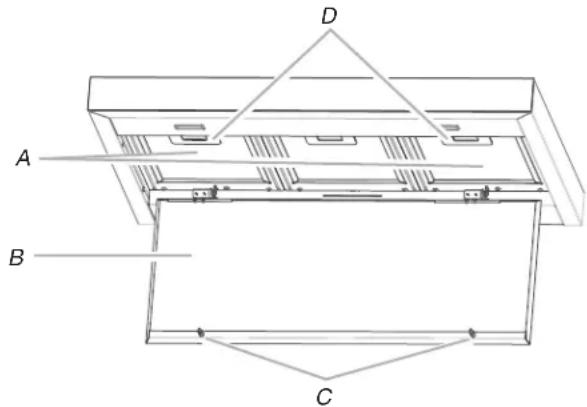
- Open the stainless steel panel. Grasp panel at the front corners and pull down to disengage the 2 catch pins from the spring catches. The panel is attached at the rear and will rotate down.
text_image
A B C DA. Metal filters
B. Stainless steel panel
C. Catch pins (2)
D. Spring catches (2)
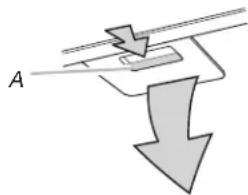
- Remove each filter by pulling the spring release handle and then pulling down the filter.
natural_image
Pure diagram of a mechanical or electrical component with no text, numbers, or symbolsA. Spring release handle
- Wash metal filters as needed in dishwasher or hot detergent solution.
- Reinstall the filter by making sure the spring release handles are toward the front. Insert aluminum filter into upper track.
- Push in spring release handle.
- Push up on metal filter and release handle to latch into place.
- Repeat steps 1 through 5 for the other filter.
- Close the stainless steel panel. Engage the (2) pins in the spring catches to secure.
Non-Vented (Recirculating) Installation Filters
The charcoal filter is not washable. It should last up to 6 months with normal use. Replace with Charcoal Filter Kit. See the "Accessories" section for information on ordering.
To replace charcoal filter:
- Remove metal grease filter from range hood. See "Metal Grease Filter" in this section.
- Bend spring clips away from metal grease filter.
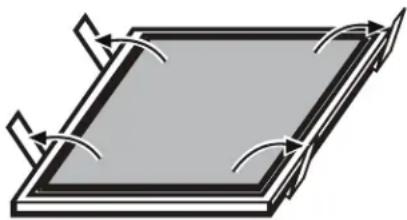
natural_image
Pure diagram of a rectangular plate with curved arrows indicating rotation or force direction (no text or symbols)-
Place charcoal filter into top side of metal filter.
-
Bend spring clips back into place to secure the charcoal filter to the metal filter.
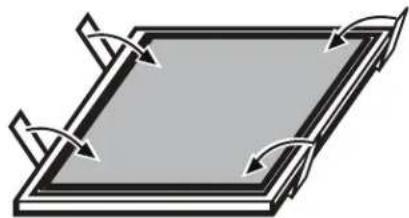
natural_image
Pure diagram of a rectangular plate with four curved arrows indicating rotation or force direction (no text or symbols)-
Replace metal grease filter. See "Metal Grease Filter" in this section.
-
Turn the charcoal filter clockwise to lock it. NOTE: When used in recirculation mode, to reduce the risk of fire and shock use only conversion kit model W10692910.
-
Repeat steps 1 and 2 on the other filter.
Replacing an LED Lamp
The LED lights are replaceable by a service technician only. See the Warranty for service contact information.
WIRING DIAGRAM
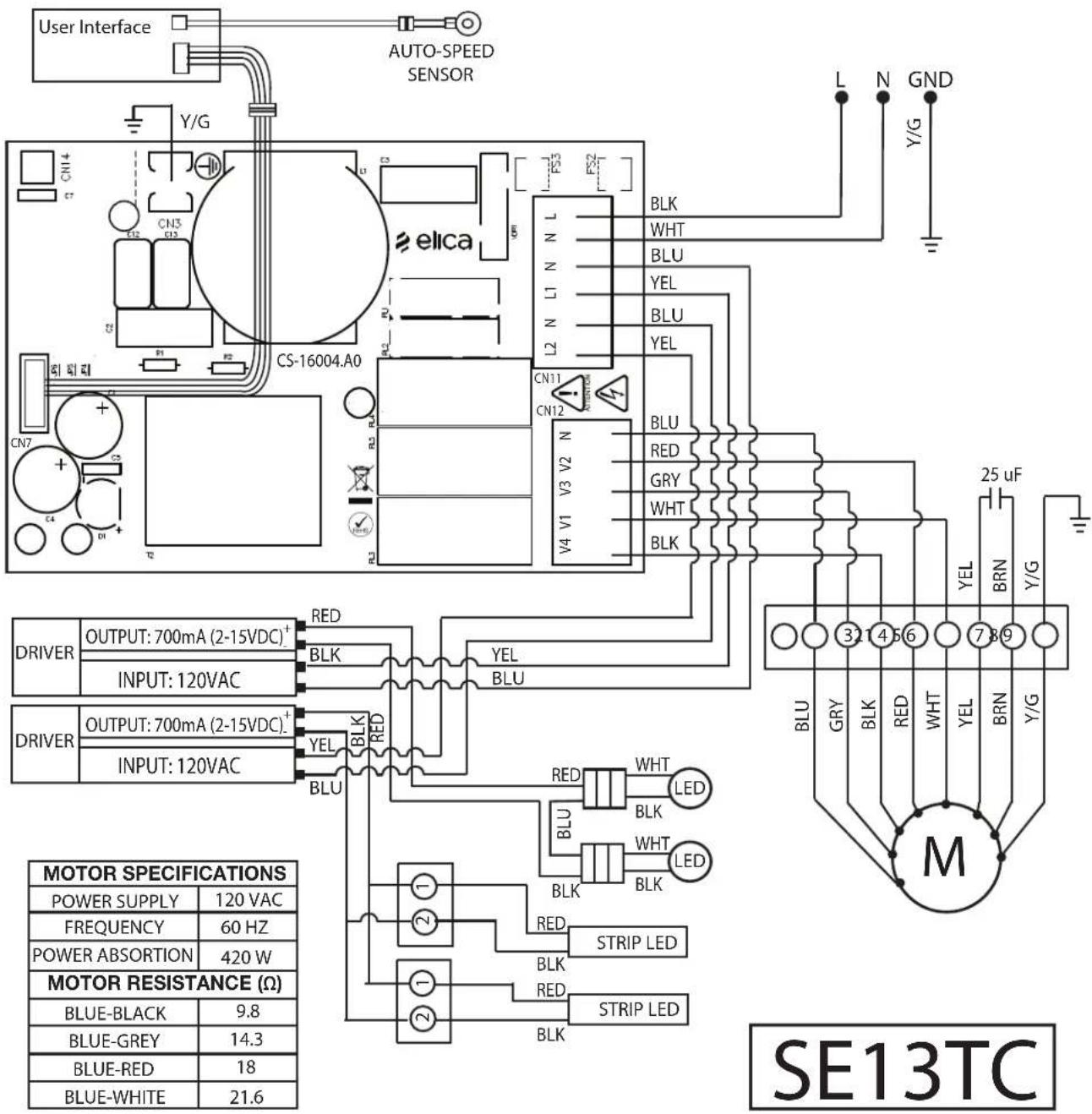
text_image
User Interface AUTO-SPEED SENSOR Y/G CN14 CN3 CN5 elica CS-16004.A0 CN7 CN2 CN1 R1 R2 R3 R4 R5 R6 R7 R8 R9 R10 R11 R12 R13 R14 R15 R16 R17 R18 R19 R20 R21 R22 R23 R24 R25 R26 R27 R28 R29 R30 R31 R32 R33 R34 R35 R36 R37 R38 R39 R40 R41 R42 R43 R44 R45 R46 R47 R48 R49 R50 R51 R52 R53 L1 N L N L N L N L N L N L N L N L N L N L N L N L N L N L N L N L N L N L N L N L N L N L N L N L N L N L N L N L N L N L N L N L N L N L N L N L N L N L N L N L N L N L N L N L N L N L N L N L N L N L N N L N L N L N L N L N L N L N L N L N L N L N L N L N L N L N L N L N L N L N L N L N L N L N L N L N L N L N L N L N L N L N L N L N L N L N L N L N L N L N L N L N L N L N L N L N L N L N L N L N M V4 V1 V2 V3 V4 V5 V6 V7 V8 V9 V10 V11 V12 V13 V14 V15 V16 V17 V18 V19 V20 V21 V22 V23 V24 V25 V26 V27 V28 V29 V30 V31 V32 V33 V34 V35 V36 V37 V38 V39 V40 V41 V42 V43 V44 V45 V46 V47 V48 V49 V50 V51 V52 V53 V54 V55 V56 V57 V58 V59 V60 V61 V62 V63 V64 V65 V66 V67 V68 V69 V70 V71 V72 V73 V74 V75 V76 V77 V78 V79 V80 V81 V82 V83 V84 V85 V86 V87 V88 V89 V90 V91 V92 V93 V94 V95 V96 V97 V98 V99 Y/G 25 uF BLN BRN Y/G 3.2 4.5 6 7.8 9 BLU GRY BLK RED WHT WHT WHT WHT WHT WHT WHT WHT WHT WHT WHT WHT WHT WHT WHT WHT WHT WHT WHT WHT WHT WHT WHT WHT WHT WHT WHT WHT WHT WHT WHT WHT WHT WHT WHT WHT WHT WHT WHT WHT WHT WHT WHT WHT WHT WHT WHT WHT WHT WHT W HT 3.2 4.5 6 7.8 9 BLU GRY BLK RED WHT WHT WHT WHT WHT WHT WHT WHT WHT WHT WHT WHT WHT WHT WHT WHT WHT WHT WHT WHT WHT WHT WHT WHT WHT WHT WHT WHT WHT WHT WHT WHT WHT WHT W HT 3.2 4.5 6 7.8 9 BLU GRY BLK RED WHT WHT WHTWHTWHTWHTWHTWHTWHTWHTWHTWHTWHTWHTWHTWHTWHTWHTWHTWHTWHTWHTWHTWHTWHTWHTWHTWHTWHTWHTWHTWHTWHTWHTWHTWHTWHTWHTWHTWHTWHTWHTWHTWHTWHTWHTWHTWHTWHTWHTWHTWHTWHTw HTEC SE13TC POWER SPECIFICATIONS POWER SUPPLY 120VAC FREQUENCY 60Hz POWER ABSORTION 420W MOTOR RESISTANCE (Ω) BLUE-BLACK 9.8 BLUE-GREY 14.3 BLUE-RED 18 BLUE-WHITE 21.6ASSISTANCE OR SERVICE
If you need service
Please refer to the warranty.
If you need replacement parts
If you need to order replacement parts, we recommend that you use only factory specified parts. Factory specified parts will fit right and work right because they are made with the same precision used to build every new appliance.
To locate factory specified replacement parts in your area, call the following customer assistance telephone number or your nearest designated service center.
In the U.S.A.
Call JennAir Customer eXperience Center toll free: 1-800-JENNAIR (1-800-536-6247) or visit our website at www.jennair.com.
Our consultants provide assistance with:
■Scheduling of service. JennAir ^® appliances designated service technicians are trained to fulfill the product warranty and provide after-warranty service anywhere in the United States.
■Features and specifications on our full line of appliances.
■Referrals to local JennAir ^® appliance dealers.
■Installation information.
■Use and maintenance procedures.
■Accessory and repair parts sales.
■Specialized customer assistance (Spanish speaking, hearing impaired, limited vision, etc.).
For further assistance
If you need further assistance, you can write to JennAir® Appliances with any questions or concerns at:
JennAir Brand Home Appliances Customer eXperience Center 553 Benson Road Benton Harbor, MI 49022-2692
Please include a daytime phone number in your correspondence.
In Canada
Call the Whirlpool Canada LP Customer eXperience Centre toll free at 1-800-JENNAIR (1-800-536-6247) or visit our website at www.jennair.ca.
Our consultants provide assistance with:
■Scheduling of service. JennAir ^® appliances designated service technicians are trained to fulfill the product warranty and provide after-warranty service anywhere in Canada.
■Features and specifications on our full line of appliances.
■Referrals to local JennAir ^® appliance dealers.
■Installation information.
■Use and maintenance procedures.
■Accessory and repair parts sales.
For further assistance:
If you need further assistance, you can write to JennAir® Appliances with any questions or concerns at:
JennAir Brand Home Appliances Customer eXperience Centre 200 - 6750 Century Ave. Mississauga, Ontario L5N 0B7
Please include a daytime phone number in your correspondence.
Accessories
Charcoal Filter Kit
(for non-vented installations only) Order Part Number W10692910
Recirculation Kit
(for non-vented installations only) Order Part Number W10692908
Chimney Extension Kit
Order Part Number EXTKIT12ES
6" (15.2 cm) Makeup Air Kit
(consult local building codes) Order Part Number W10446915
Power Cord Kit
Order Part Number W10613691
In-Line Smart Kit
Order Part Number W10692945
SÉCURITÉ DE LA HOTTE DE CUISINIÈRE
National Fire Protection Association
1 Batterymarch Park
Quincy, MA 02169-7471
CSA International
8501 East Pleasant Valley Road
Cleveland, OH 44131-5575
text_image
Technical diagram of a mechanical device with labeled components A and B, showing internal structure and mounting points.text_image
Diagram of a mechanical setup with labeled components A, B, and C, showing a rotating component and alignment lines.text_image
A B D C E Xtext_image
Technical diagram of a mechanical assembly with labeled components A, B, C, D and directional arrows indicating motion or force.natural_image
Technical line drawing of a cabinet or rack unit with internal compartments and mounting brackets (no text or symbols)text_image
A B C D E F Gnatural_image
Pure diagram of a mechanical or electrical component with downward arrow and labeled point A (no text or symbols beyond label)natural_image
Pure diagram of a rectangular plate with curved arrows indicating rotation or force direction (no text or symbols)natural_image
Pure diagram of a rectangular plate with curved arrows indicating rotation or force direction (no text or symbols)ASSISTANCE OU SERVICE
JennAir Brand Home Appliances
Customer eXperience Centre
200 - 6750 Century Ave.
Mississauga, Ontario L5N 0B7