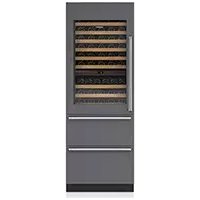
IW30CIRH - Fridge Sub-Zero - Free user manual and instructions
Find the device manual for free IW30CIRH Sub-Zero in PDF.



User questions about IW30CIRH Sub-Zero
0 question about this device. Answer the ones you know or ask your own.
Ask a new question about this device
Download the instructions for your Fridge in PDF format for free! Find your manual IW30CIRH - Sub-Zero and take your electronic device back in hand. On this page are published all the documents necessary for the use of your device. IW30CIRH by Sub-Zero.
USER MANUAL IW30CIRH Sub-Zero
4 Wine Storage Features
5 Interactive Control Panel
6 Storage
8 Operation
10 Care Recommendations
11 Technical Data
13 Troubleshooting
15 Sub-Zero Warranty
Customer Care
The model and serial number are printed on the enclosed product registration card. Both numbers are also listed on the product rating plate. Refer to page 4 for rating plate location. For warranty purposes, you will also need the date of installation and name of your authorized Sub-Zero dealer. Record this information below for future reference.
SERVICE INFORMATION
Model Number
Serial Number
Date of Installation
Certified Service Name
Certified Service Number
Authorized Dealer
Dealer Number
If your product ever needs attention, be sure to use a Sub-Zero Factory Certified Service provider recommended by our customer care center, or select one from our list of providers available at subzero.com/locator. All Factory Certified Service providers are carefully selected and thoroughly trained by us.
Important Note
To ensure this product is installed and operated as safely and efficiently as possible, take note of the following types of highlighted information throughout this guide:
IMPORTANT NOTE highlights information that is especially important.
CAUTION indicates a situation where minor injury or product damage may occur if instructions are not followed.
WARNING states a hazard that may cause serious injury or death if precautions are not followed.
IMPORTANT NOTE: Throughout this guide, dimensions in parentheses are millimeters unless otherwise specified.
WARNING
PROPOSITION 65 FOR CALIFORNIA RESIDENTS
Cancer and Reproductive Harm
www.P65Warnings.ca.gov
Wine Storage Features
FEATURES
1 Product Rating Plate
2 Interactive Control Panel
3 Wine Storage Racks
4 Display Rack
5 Full-View Glass Door
6 Home Security Connection
7 Refrigerator Storage Drawer
8 Freezer Storage Drawer
9 Water Filtration System
10 Automatic Ice Maker
Not available on all models.
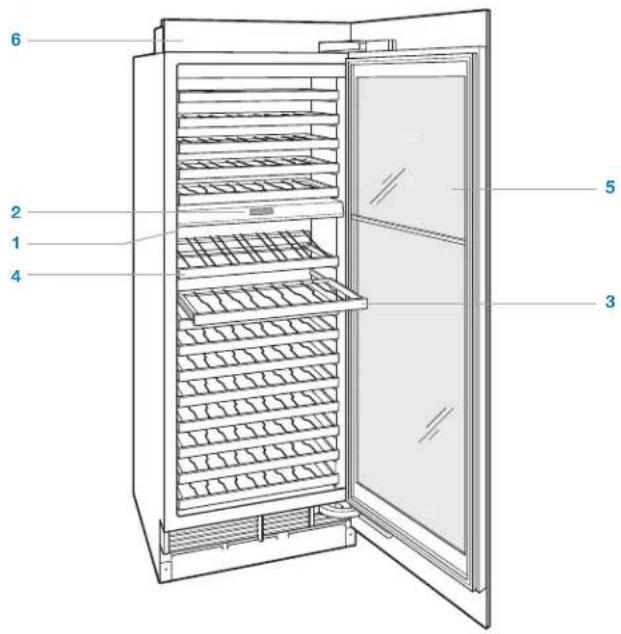
Column model
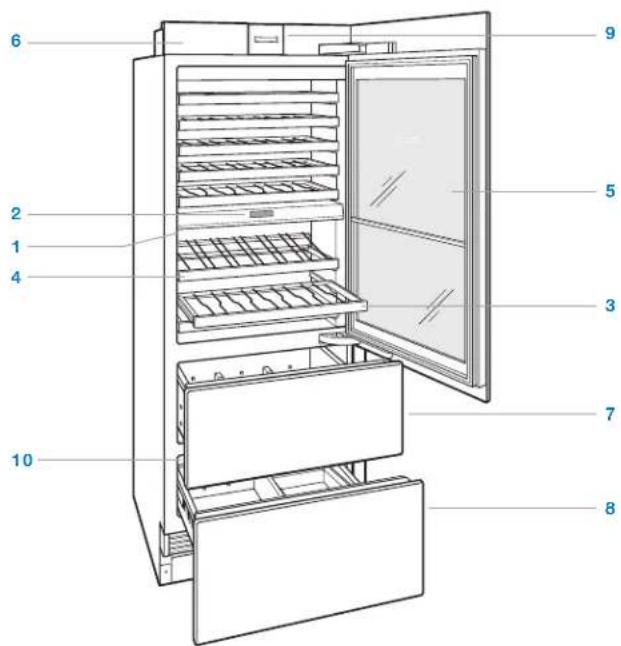
Tall model (IW-30CI shown)
Interactive Control Panel
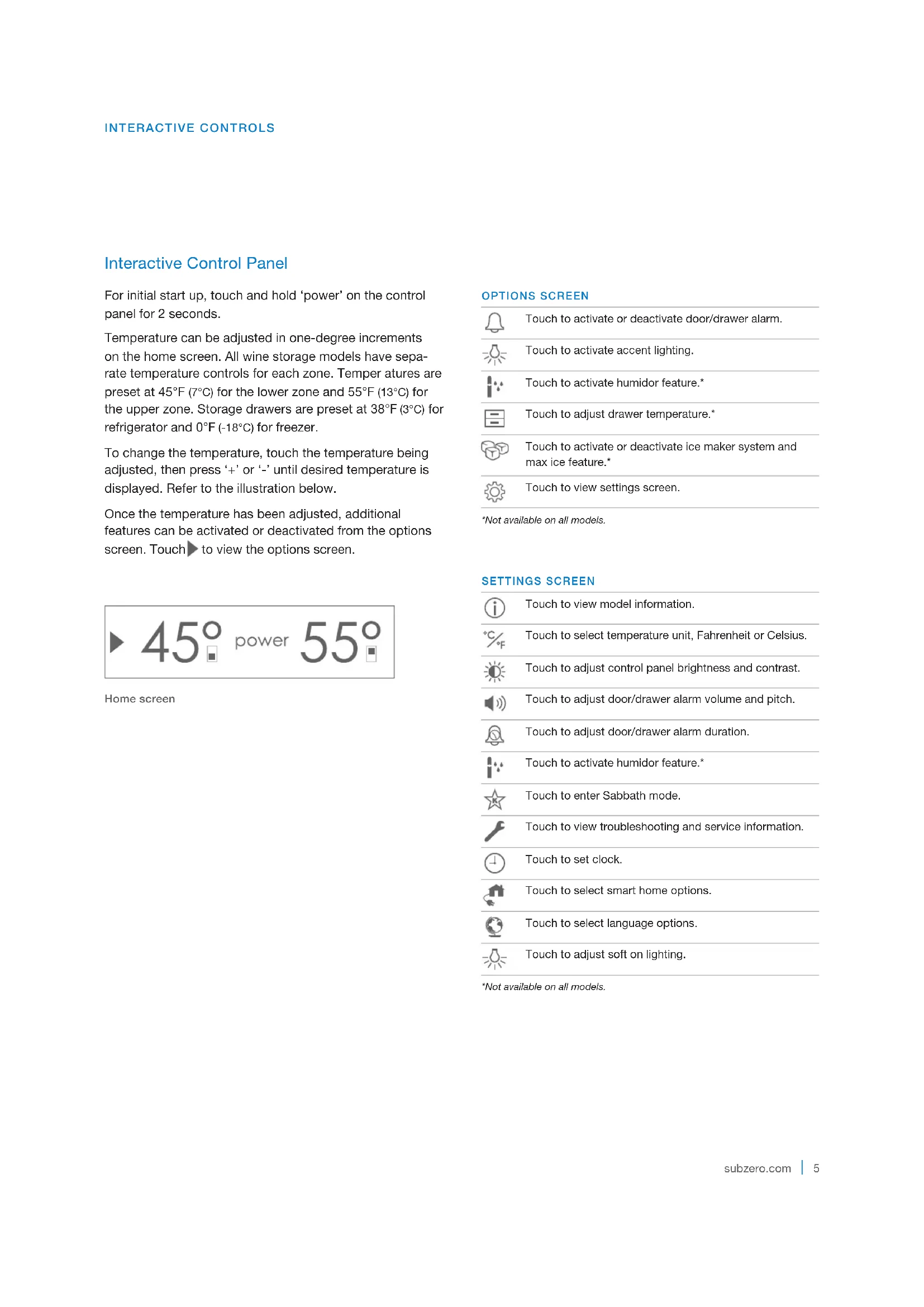
For initial start up, touch and hold 'power' on the control panel for 2 seconds.
Temperature can be adjusted in one-degree increments on the home screen. All wine storage models have separate temperature controls for each zone. Temper atures are preset at 45^ (7^) for the lower zone and 55^ (13^) for the upper zone. Storage drawers are preset at 38^ (3^) for refrigerator and 0^ (-18^) for freezer.
To change the temperature, touch the temperature being adjusted, then press +^ or - until desired temperature is displayed. Refer to the illustration below.
Once the temperature has been adjusted, additional features can be activated or deactivated from the options screen. Touch to view the options screen.
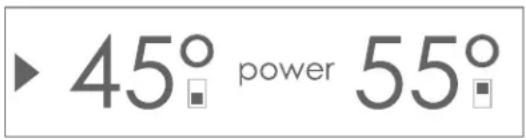
Home screen
OPTIONS SCREEN
| Touch to activate or deactivate door/drawer alarm. | |
| Touch to activate accent lighting. | |
| Touch to activate humidor feature.* | |
| Touch to adjust drawer temperature.* | |
| Touch to activate or deactivate ice maker system and max ice feature.* | |
| Touch to view settings screen. |
*Not available on all models.
SETTINGS SCREEN
| i | Touch to view model information. |
| °C | Touch to select temperature unit, Fahrenheit or Celsius. |
| °F | Touch to adjust control panel brightness and contrast. |
| Touch to adjust door/drawer alarm volume and pitch. | |
| Touch to adjust door/drawer alarm duration. | |
| Touch to activate humidor feature.* | |
| Touch to enter Sabbath mode. | |
| Touch to view troubleshooting and service information. | |
| Touch to set clock. | |
| Touch to select smart home options. | |
| Touch to select language options. | |
| Touch to adjust soft on lighting. |
*Not available on all models.
Wine Storage
WINE RACKS
The full-extension wine racks provide easy access to 750 ml, half-bottles and magnums. When storing magnums, the rack above must be removed.
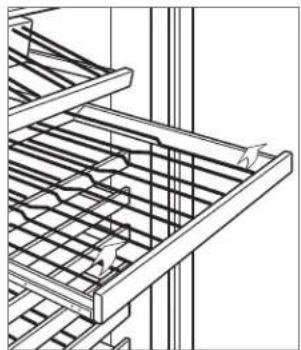
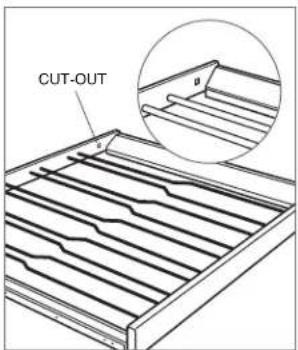
To remove a wine rack, pull out to full extension, tilt up, then lift up and out. Refer to the illustration below. The top two racks in the upper compartment and top rack (top two for tall model) in the lower compartment cannot be placed in any other position. These racks can be identified by the small square cut-out located in the right rear corner. Refer to the illustration below.
The natural cherrywood facing on wine racks can be stained or replaced with wood to compliment cabinetry. For more information, refer to the Sub-Zero design guide, visit our website at subzero.com or contact Sub-Zero customer care at 800-222-7820.
CAUTION
Remove all bottles from the wine rack before removal.
DISPLAY RACK
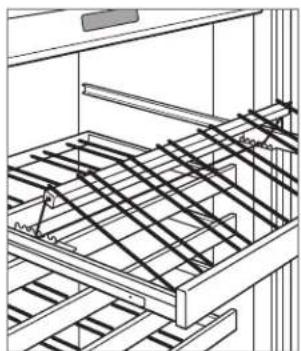
The adjustable display rack is designed for wine to stay in contact with the cork at any position. Refer to the illustration below.
To remove the display rack, pull out to full extension, tilt up, then lift up and out.
Display rack
Wine rack removal
Rack position indicator
Storage Drawers—Tall Model
DRAWER DIVIDERS
To remove or adjust a short divider, flex the long divider slightly, then pull upward. Refer to the illustration below.
To remove a long divider, the short dividers must be removed. Pull the divider up until it stops, rotate counterclockwise, then pull upward. To reinstall, align grooves with drawer tabs, rotate clockwise, then slide down.
DRAWER REMOVAL
To remove, pull open until the drawer stops. Raise the drawer front and pull out the drawer. To reinstall, raise the front of the drawer and place onto the slides. Align the back of the drawer with hooks on the slide, then align the white pegs at the front of the slide with holes at the front of the drawer. Refer to the illustration below.
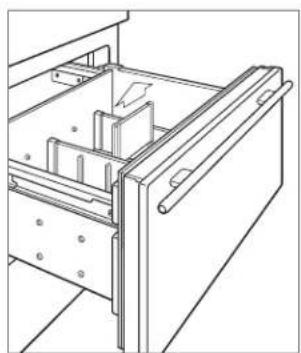
Drawer dividers
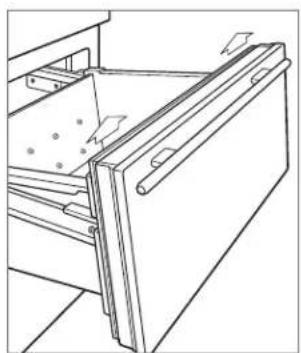
Drawer removal
ICE CONTAINER
To remove the ice container, pull the freezer drawer open until it stops, then lift the container out. Refer to the illustration below.
The ice maker must be turned off by touching when the ice container is removed. The unit is equipped with a 3-minute delay after the ice container has been removed, to ensure cubes are not ejected before the ice maker can be deactivated or ice container is reinstalled.
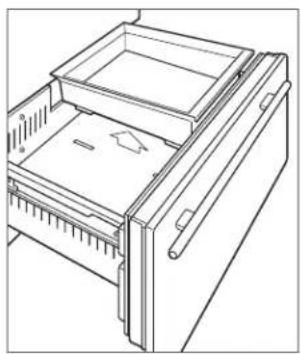
Ice container (IW-30CI)
Water Filtration System
For model IW-30CI, the water filtration system supplies filtered water to the ice maker.
IMPORTANT NOTE: When using the water filtration system for the first time and after filter replacement, it is necessary to clear any air from the system and allow the filter to assist in cleaning the water lines. Discard the first two full containers of ice.
If the water filtration system will not be utilized, it can be placed in water filter bypass mode by removing the filter.
The filter is rated for 750 gallons (2839 L) or one year, whichever comes first. 'Change Water Filter' will appear on the control panel when the cartridge needs to be replaced. Touch 'Snoopze' to delay reminder for 24 hours or until filter can be replaced.
Replacement Sub-Zero water filters can be ordered online at subzerowolfstore.com. For questions, contact Sub-Zero customer care at 800-222-7820.
WATER FILTER REPLACEMENT
1 To access the water filter, pull out on the bottom edge of the access door and rotate upward. Refer to the illustration below.
2 To remove the old filter, rotate counterclockwise one-quarter turn, then pull out. It is normal for a small amount of water to drip when the filter is removed. It should be wiped up with a paper towel or cloth.
3 Remove the new filter from packaging and remove plastic cap.
4 Insert the new filter into the manifold and turn clockwise.
5 Once the new filter has been installed, follow instructions on the control panel. The filter life cycle will reset for approximately one year.
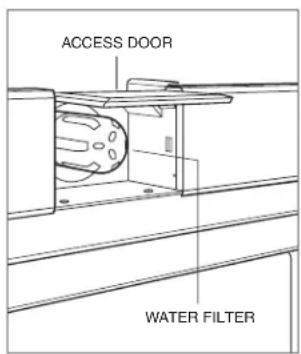
Water filter removal (IW-30CI)
Ice Maker Operation
For model IW-30CI, to initiate ice production, touch on the options screen. A single highlighted cube indicates the ice maker is active. Three highlighted cubes indicate the max ice feature is active. Max ice increases ice production up to 30% for a 24-hour period. During that period, some components may run at a higher speed resulting in a unique audible tone. This is typical and will revert back after 24 hours or when the ice container is full. To deactivate the ice maker, touch until no cubes are highlighted. After initial start-up, discard the first few batches of ice. The ice may contain impurities from new plumbing connections.
If ice is not used regularly it may fuse together. To avoid, discard ice and allow ice maker to replenish.
The ice maker must be turned off by touching when the ice container is removed. The unit is equipped with a 3-minute delay after the ice container has been removed, to ensure cubes are not ejected before the ice maker can be deactivated or ice container is reinstalled.
Sabbath
This appliance is certified by Star-K to meet strict religious regulations in conjunction with specific instructions found on www.star-k.org.
For Sabbath mode, from the settings screen, touch and follow instructions on the control panel.
Cleaning
INTERIOR CLEANING
To clean interior surfaces and all removable parts, wash with a mild solution of soap, water and baking soda. Rinse and dry thoroughly. Avoid getting water on lights, control panel and the cherrywood facing on wine racks.
Use a standard glass cleaner to clean the UV-resistant glass door.
CAUTION
Do not use vinegar, rubbing alcohol or other alcohol-based cleaners on any interior surface.
STAINLESS STEEL EXTERIOR
Use a nonabrasive stainless steel cleaner and apply with a soft lint-free cloth. To bring out the natural luster, lightly wipe surface with a water-dampened microfiber cloth followed by a dry polishing chamois. Always follow the grain of stainless steel.
CONDenser CLEANING
CAUTION
Before cleaning the condenser, turn power off at the control panel. Wear gloves to avoid injury from sharp condenser fins.
The condenser is located behind the grille. Remove the kickplate by extracting the two mounting screws. Refer to the illustration below. Use a soft bristle brush and vacuum to remove dust and lint from the condenser. Clean the condenser every three to six months.
IMPORTANT NOTE: To avoid damaging condenser fins, vacuum in the direction of the fins.
CAUTION
Failure to clean the condenser could result in temperature loss, mechanical failure or damage.
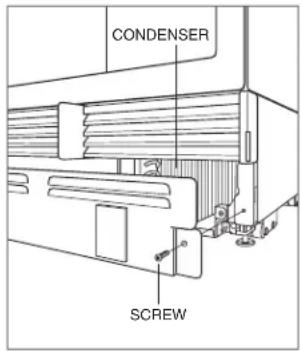
Condenser location
Sub-Zero Water Filtration System Data
REPLACEMENT CARTRIDGE (4204490)

SYSTEM
Tested and certified by NSF International against NSF/ANSI Standard 42 for the reduction of Chlorine Taste & Odor, Particulate Class I; and against NSF/ANSI Standard 53 for the reduction of Lead, Mercury, Atrazine, Benzene, Carbofuran, 1,4-dichlorobenzene, Lindane, Toxaphene, Turbidity, Cysts and Asbestos.
OPERATING SPECIFICATIONS
Capacity: certified for up to 750 gallons (2,838 L); up to twelve months
Pressure Requirement: 35 - 120 psi (2.8 - 8.2 bar)
Temperature: 33 - 100°F (0.6 - 38°C)
Flow Rate: 0.78 gpm (2.9 Lpm)
This system has been tested according to NSF/ANSI 42/53 for reduction of the substances listed below. The concentration of the indicated substances in water entering the system was reduced to a concentration less than or equal to the permissible limit for water leaving the system, as specified in NSF/ANSI 42/53.
| NSF Standard | Influent Challenge Concentration | Average Influent Concentration | Product Water Concentration % Reduction | Max Pammissable Product Water ConcentrationSubstance Average | ||||
| Chlorine, Taste & Odor | 42 | 2.0 mg/L ± 10% | 1.88 mg/L | 0.05 mg/L | 0.06 mg/L | 97.34% | 96.80% | ≥ 50% |
| Particulate 42 | At least 10,000 particles/ml | 5,700,000/ml | 30,583/ml | 69,000/ml | 99.46% | 98.78% | ≥ 85% | |
| Lead at pH 6.5 | 53 | 0.15 mg/L ± 10% | 0.153 mg/L | <0.001 mg/L | <0.001 mg/L | 99.34% | 99.34% | 0.010 mg/L |
| Lead at pH 8.5 | 53 | 0.15 mg/L ± 10% | 0.150 mg/L | <0.001 mg/L | <0.001 mg/L | 99.33% | 99.33% | 0.010 mg/L |
| Mercury at pH 6.5 | 53 | 0.006 mg/L ± 10% | 0.006 mg/L | 0.0003 mg/L | 0.0005 mg/L | 95.00% | 91.66% | 0.002 mg/L |
| Mercury at pH 8.5 | 53 | 0.006 mg/L ± 10% | 0.006 mg/L | 0.0008 mg/L | 0.0015 mg/L | 86.66% | 75.00% | 0.002 mg/L |
| Atrazine | 53 | 0.009 mg/L ± 10% | 0.009 mg/L | <0.002 mg/L | <0.002 mg/L | 77.77% | 77.77% | 0.003 mg/L |
| Benzene | 53 | 0.015 mg/L ± 10% | 0.014 mg/L | 0.0006 mg/L | 0.0011 mg/L | 95.71% | 92.14% | 0.005 mg/L |
| Carbofuran | 53 | 0.08 mg/L ± 10% | 0.081 mg/L | <0.001 mg/L | <0.001 mg/L | 98.76% | 98.76% | 0.04 mg/L |
| 1,4-dichlorobenzene | 53 | 0.225 mg/L ± 10% | 0.208 mg/L | <0.0005 mg/L | <0.0005 mg/L | 99.75% | 99.75% | 0.075 mg/L |
| Lindane | 53 | 0.002 mg/L ± 10% | 0.002 mg/L | 0.00003 mg/L | 0.00007 mg/L | 98.50% | 96.50% | 0.0002 mg/L |
| Toxaphene | 53 | 0.015 mg/L ± 10% | 0.015 mg/L | <0.001 mg/L | <0.001 mg/L | 93.33% | 93.33% | 0.003 mg/L |
| Turbidity | 53 | 11 ± 1 NTU | 10.7 NTU | 0.31 NTU | 0.49 NTU | 97.10% | 95.42% | 0.5 NTU |
| Cysts** | 53 | Minimum 50,000/L | 166,500/L | <1/L | <1/L | >99.99% | >99.99% | >99.95% |
| Asbestos | 53 | \( 10^7 \)to \( 10^8 \)fibers/L† | 155 MF/L | <1 MF/L | <1 MF/L | >99.99% | >99.99% | >99% |
*Based on the use of Cryptospondium Parvum oocysts Fibers greater than 10~ in length
SPECIAL NOTES
- Replacement Sub-Zero water filter cartridges can be ordered online at subzerowolfstore.com. For questions, contact Sub-Zero customer care at 800-222-7820.
- Change filter cartridge at least every twelve months. High sediment areas may require more frequent filter cartridge replacement.
- Installation and operation instructions, parts and service availability, and standard warranty are included with the product when shipped.
-
Replace water filter cartridge when the filter indicator is lit or when water flow becomes too low. Use replacement water filter cartridge part number 4204490. Replacement filter pricing information can be found at subzero.com.
-
Do not use with water that is microbiologically unsafe or of unknown water quality without adequate disinfection before or after the system.
- Systems certified for cyst reduction may be used on disinfected waters that may contain filterable cysts.
- This system must be installed, operated, maintained and filters replaced as required in order for the product to perform as advertised.
Note that while the testing was performed under standard laboratory conditions, actual performance may vary. The contaminants or other substances removed or reduced by this water treatment system are not necessarily in your water.
State of California
Department of Public Health
Water Treatment Device
Certificate Number
05-1708
Date Issued: April 18, 2010
Trademark/Model Designation
Sub-Zero 4290510
Replacement Elements
4204490
Manufacturer: 3M Purification Inc.
The water treatment device(s) listed on this certificate have met the testing requirements pursuant to Section 116830 of the Health and Safety Code for the following health related contaminants:
Microbiological Contaminants and Turbidity
Cysts
Turbidity
Inorganic/Radiological Contaminants
Asbestos
Lead
Mercury
Organic Contaminants
Atrazine
Benzene
Carbofuran
Lindane
p-dichlorobenzene
Toxaphene
Rated Service Capacity: 750 gals
Rated Service Flow: 0.78 gpm
Conditions of Certification:
Do not use where water is microbiologically unsafe or with water of unknown quality, except that systems certified for cyst reduction may be used on disinfected waters that may contain filterable cysts.
Troubleshooting
SERVICE INDICATOR

flashes in control panel display.
- Verify condenser is clean.
- Turn unit off at the control panel, then on. If indicator continues to flash, contact Sub-Zero Factory Certified Service.
UNIT OPERATION
No lights or cooling.
- Verify power is on.
- Verify electrical power to unit and home circuit breaker is on.
No lights.
- Door/drawer may have been left ajar which has disabled lights to eliminate excess heat. If lights are out, close door/drawer for one hour. If lights are still out, contact Sub-Zero Factory Certified Service.
- Cabinet lighting must be replaced by Sub-Zero Factory Certified Service.
Frost, condensation or ice build up inside unit.
- Verify condenser is clean.
- Verify door/drawer is closing properly.
- Verify door/drawer has not been left ajar.
- Verify door/drawer gasket does not have rips or tears. If it does, contact Sub-Zero Factory Certified Service.
- If icing is heavy, turn unit off and use a hair dryer to melt ice. Hair dryer should be set on low and kept moving at all times. Once ice has melted, wipe up water with a cloth or paper towel.
High temperatures, unit runs excessively or unit giving off too much heat.
- Verify condenser is clean.
- Verify door/drawer is closing properly.
- Verify door/drawer has not been left ajar.
- Increased ambient temperatures may cause compressors to run longer.
- If temperature display shows 45^ and 55^ , but is not cooling, unit may be in showroom mode. Contact Sub-Zero Customer Care at 800-222-7820.
ODOR
- Unit should be cleaned before using for the first time. This will clear any odors that may have been trapped during shipping.
- Uncovered food could create odor which may require cleaning.
Troubleshooting
ICE PRODUCTION
No ice.
- Verify ice cube indicator appears in control panel display.
- Verify ice maker has been on for at least 24 hours.
- Verify freezer temperature near 0^ .
- Verify ice container is properly installed.
- Verify ice maker arm in down position.
- Verify water is being supplied to unit.
- Verify water filter has been replaced within the last 12 months and installed properly.
- Verify water filter has been removed if a reverse osmosis filtration system is being utilized.
Blue or green ice.
Possible copper supply line corrosion. Contact plumber to clean or replace.
Black flecks in cubes.
- Stop use and contact Sub-Zero Factory Certified Service.
Bad taste.
- Defrost freezer and clean with soap and water.
- Place coffee grounds or charcoal briquettes in freezer to absorb odor.
Hollow cubes.
- Clean condenser. Contact Sub-Zero Factory Certified Service if unresolved.
SERVICE
- Maintain the quality built into your product by contacting Sub-Zero Factory Certified Service. For the name of the nearest Sub-Zero Factory Certified Service, check the Support and Service section of our website, subzero.com or call Sub-Zero customer care at 800-222-7820.
- When contacting service, you will need the model and serial number of your unit. Both numbers are listed on the product rating plate. Refer to page 4 for rating plate location.
- For warranty purposes, you will also need the date of installation and name of your authorized Sub-Zero dealer. This information should be recorded on page 3.
Sub-Zero, Sub-Zero & Design, Sub-Zero & Snowflake Design, Dual Refrigeration, The Living Kitchen, Great American Kitchens The Fine Art of Kitchen Design, Wolf, Wolf & Design, Wolf Gourmet, W & Design, red colored knobs, Cove, and Cove & Design are registered trademarks and service marks of Sub-Zero Group, Inc. and its subsidiaries. All other trademarks are property of their respective owners in the United States and other countries.
Sub-Zero Residential Limited Warranty
FOR RESIDENTIAL USE
FULL TWO YEAR WARRANTY*
For two years from the date of original installation, this Sub-Zero product warranty covers all parts and labor to repair or replace, under normal residential use, any part of the product that proves to be defective in materials or workmanship. All service provided by Sub-Zero under the above warranty must be performed by Sub-Zero factory certified service, unless otherwise specified by Sub-Zero, Inc. Service will be provided during normal business hours.
FULL FIVE YEAR SEATED SYSTEM WARRANTY
For five years from the date of original installation, this Sub-Zero product warranty covers all parts and labor to repair or replace, under normal residential use, these parts that prove to be defective in materials or workmanship: compressor, condenser, evaporator, drier and all connecting tubing. All service provided by Sub-Zero under the above warranty must be performed by Sub-Zero factory certified service, unless otherwise specified by Sub-Zero, Inc. Service will be provided during normal business hours.
LIMITED TWELVE YEAR SEATED SYSTEM WARRANTY
For twelve years from the date of original installation, Sub-Zero will repair or replace the following parts that prove to be defective in materials or workmanship: compressor, condenser, evaporator, drier and all connecting tubing. If the owner uses Sub-Zero factory certified service, the service provider will repair or replace these parts with the owner paying for all other costs, including labor. If the owner uses non-certified service, the owner must contact Sub-Zero, Inc. (using the information below) to receive repaired or replacement parts. Sub-Zero will not reimburse the owner for parts purchased from non-certified service or other sources.
TERMS APPLICABLE TO EACH WARRANTY
The warranty applies only to products installed for normal residential use. The warranty applies only to products installed in any one of the fifty states of the United States, the District of Columbia or the ten provinces of Canada. This warranty does not cover any parts or labor to correct any defect caused by negligence, accident or improper use, maintenance, installation, service or repair.
THE REMEDIES DESCRIBED ABOVE FOR EACH WARRANTY ARE THE ONLY ONES THAT SUB-ZERO, INC. WILL PROVIDE, EITHER UNDER THIS WARRANTY OR UNDER ANY WARRANTY ARISING BY OPERATION OF LAW. SUB-ZERO, INC. WILL NOT BE RESPONSIBLE FOR ANY CONSEQUENTIAL OR INCIDENTAL DAMAGES ARISING FROM THE BREACH OF THIS WARRANTY OR ANY OTHER WARRANTY, WHETHER EXPRESS, IMPLIED OR STATUTORY.
Some states do not allow the exclusion or limitation of incidental or consequential damages, so the above limitation or exclusion may not apply to you. This warranty gives you specific legal rights and you may also have other legal rights that vary from state to state.
To receive parts and/or service and the name of Sub-Zero factory certified service nearest you, contact Sub-Zero, Inc., P.O. Box 44848, Madison, WI 53744; check the contact & support section of our website, subzero.com, email us at customerservice@subzero.com or call 800-222-7820.
*Stainless steel (doors, panels, handles, product frames and interior surfaces) are covered by a limited 60-day parts and labor warranty for cosmetic defects.
*Replacement water filters and air purification cartridges are not covered by the product warranty.
SUBZERO
Contenido
Cancery Dano Reproductive www.P65Warnings.ca.gov
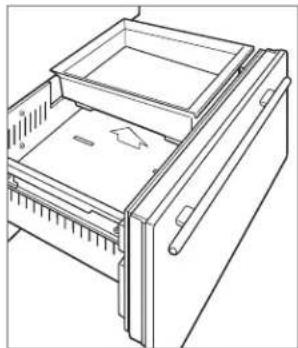
Conteditor de hielo (IW-30CI)
Department of Public Health
Water Treatment Device
Certificate Number
05-1708
Date Issued: April 18, 2010
Trademark/Model Designation
Sub-Zero 4290510
Replacement Elements
4204490
Manufacturer: 3M Purification Inc.
The water treatment device(s) listed on this certificate have met the testing requirements pursuant to Section 116830 of the Health and Safety Code for the following health related contaminants:
Microbiological Contaminants and Turbidity
Cysts
Turbidity
Inorganic/Radiological Contaminants
Asbestos
Lead
Mercury
Organic Contaminants
Atrazine
Benzene
Carbofuran
Lindane
p-dichlorobenzene
Toxaphene
Rated Service Capacity: 750 gals
Rated Service Flow: 0.78 gpm
Conditions of Certification:
Do not use where water is microbiologically unsafe or with water of unknown quality, except that systems certified for cyst reduction may be used on disinfected waters that may contain filterable cysts.
Department of Public Health
Water Treatment Device
Certificate Number
05-1708
Date Issued: April 18, 2010
Trademark/Model Designation
Sub-Zero 4290510
Replacement Elements
4204490
Manufacturer: 3M Purification Inc.
The water treatment device(s) listed on this certificate have met the testing requirements pursuant to Section 116830 of the Health and Safety Code for the following health related contaminants:
Microbiological Contaminants and Turbidity
Cysts
Turbidity
Inorganic/Radiological Contaminants
Asbestos
Lead
Mercury
Organic Contaminants
Atrazine
Benzene
Carbofuran
Lindane
p-dichlorobenzene
Toxaphene
Rated Service Capacity: 750 gals
Rated Service Flow: 0.78 gpm
Conditions of Certification:
Do not use where water is microbiologically unsafe or with water of unknown quality, except that systems certified for cyst reduction may be used on disinfected waters that may contain filterable cysts.
Dépannage
INDICATEUR DE SERVICE