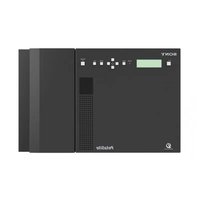
Discman DNS707F - Cd player/recorder SONY - Free user manual and instructions
Find the device manual for free Discman DNS707F SONY in PDF.


User questions about Discman DNS707F SONY
0 question about this device. Answer the ones you know or ask your own.
Ask a new question about this device
Download the instructions for your Cd player/recorder in PDF format for free! Find your manual Discman DNS707F - SONY and take your electronic device back in hand. On this page are published all the documents necessary for the use of your device. Discman DNS707F by SONY.
USER MANUAL Discman DNS707F SONY
FM/AM Portable CD Player
Operating Instructions GB
Mode d'emploi FR
Owner's Record
The model number and the serial number are located on the bottom of the CD player. Record the serial number in the space provided below. Refer to these numbers whenever you call upon your Sony dealer regarding this product. Model No. D-NS707F Serial No.
This manual describes how to use the CD player. For the supplied software SonicStage, please see "Installation/Operating Guide."
To prevent fire or shock hazard, do not expose the AC power adaptor to rain or moisture.
Do not install the appliance in a confined space, such as a bookcase or built-in cabinet.
To prevent fire, do not cover the ventilation of the apparatus with newspapers, tablecloths, curtains, etc. And don't place lighted candles on the apparatus.
To prevent fire or shock hazard, do not place objects filled with liquids, such as vases, on the apparatus.
CAUTION
The use of optical instruments with this product will increase eye hazard.
Certain countries may regulate disposal of the battery used to power this product. Please consult with your local authority.
CAUTION
- INVISIBLE LASER RADIATION WHEN OPEN
DO NOT STARE INTO BEAM OR VIEW DIRECTLY WITH OPTICAL INSTRUMENTS
CLASS 1M INVISIBLE LASER RADIATION WHEN OPEN
DO NOT VIEW DIRECTLY WITH OPTICAL INSTRUMENTS
The validity of the CE marking is restricted to only those countries where it is legally enforced, mainly in the countries EEA (European Economic Area).
ATRAC3plus and ATRAC3 are trademarks of Sony Corporation.
"WALKMAN" is a registered trademark of Sony Corporation to represent Headphone
Stereo products. is a trademark of Sony Corporation.
For customers who purchased this product in the USA
Product registration
Please register this product on line at www.sony.com/ walkmanreg http://www.sony.com/walkmanreg
Proper registration will enable us to send you periodic mailings about software upgrades, new products, services and other important announcements. Thank you.
If you have any questions about this product, you may call; Sony Customer Information Services Center 1-866-456-7669 or http://www.sony.com/
Declaration of Conformity
Trade Name: SONY
Model No.: D-NS707F
Responsible Party: Sony Electronics Inc.
Address: 16450 W. Bernardo Dr,
San Diego, CA 92127 U.S.A.
Telephone No.: 858-942-2230
This device complies with Part 15 of the FCC Rules.
Operation is subject to the following two conditions:
(1) This device may not cause harmful interference, and (2) this device must accept any interference received, including interference that may cause undesired operation.
This equipment has been tested and found to comply with the limits for a Class B digital device, pursuant to Part 15 of the FCC Rules. These limits are designed to provide reasonable protection against harmful interference in a residential installation. This equipment generates, uses, and can radiate radio frequency energy and, if not installed and used in accordance with the instructions, may cause harmful interference to radio communications. However, there is no guarantee that interference will not occur in a particular installation. If this equipment does cause harmful interference to radio or television reception, which can be determined by turning the equipment off and on, the user is encouraged to try to correct the interference by one or more of the following measures:
- Reorient or relocate the receiving antenna.
- Increase the separation between the equipment and receiver.
- Connect the equipment into an outlet on a circuit different from that to which the receiver is connected.
- Consult the dealer or an experienced radio/TV technician for help.
You are cautioned that any changes or modifications not expressly approved in this manual could void your authority to operate this equipment.
Table of Contents
Take Lots of Songs with You Wherever
You Go. 4
Which discs can you play on this CD
player? 5
Precautions 7
On safety 7
On the CD player 7
On handling CDs. 7
On headphones/earphones. 7
On the water resistance 8
Getting Started
Checking the Supplied Accessories.....9
Guide to Parts and Controls. 10
Preparing a Power Source
(Dry Batteries) 11
To remove the batteries 12
To check the remaining power of
the battery. 12
When using the AC power adaptor.13
Playback
Playing a CD. 14
Basic playback operations (Play, stop,
search) 15
Locking the controls (HOLD). 16
Checking CD information 16
Changing Playback Options
(PLAY MODE) 17
Playback options (PLAY MODE) 18
Playing your favorite tracks (Bookmark
track play). 19
Playing tracks in your favorite order
(PGM play). 19
Playing tracks repeatedly (Repeat play)...20
Changing Sound Quality and
Settings 20
SOUND item. 21
OPTION items 21
Using the Radio
Listening to the Radio 23
Turning off the radio 23
Tuning in the station quickly. 23
Improving broadcast reception. 23
If it is hard to hear the FM/TV/WB
broadcast. 23
Protecting your hearing 23
Turning off the radio automatically. 24
Preseting Radio Stations 24
Presetting stations manually. 25
Playing Preset Radio Stations 26
Changing the Tuning Interval 26
Additional Information
Troubleshooting 27
Maintenance 30
To clean the casing 30
To clean the headphones/earphones plug .30
To remove any dust or sand from
the rubber packing. 30
Specifications 30
CD player 30
Radio 30
Antenna 30
General 30
Optional Accessories 31
Index 32
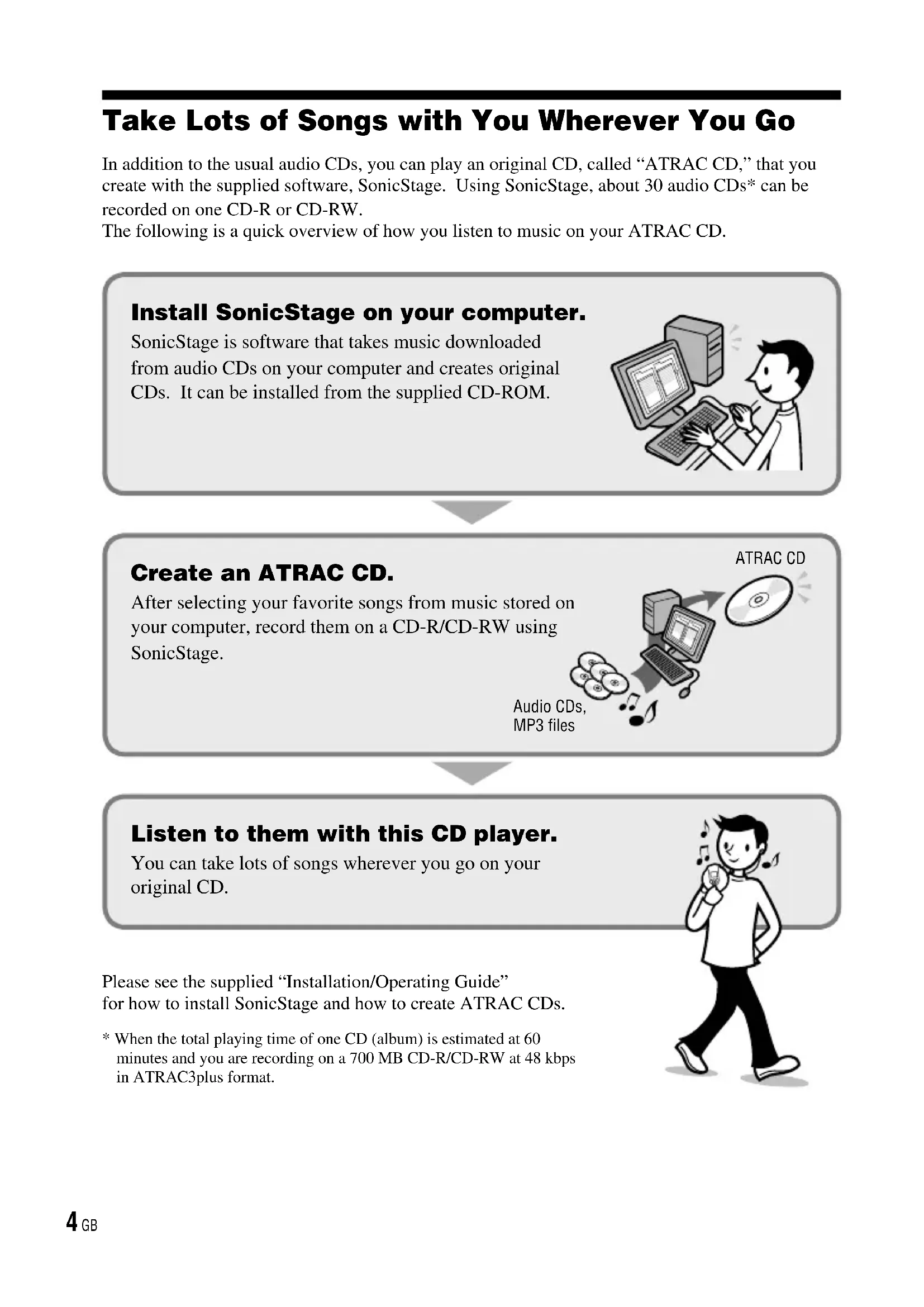
Take Lots of Songs with You Wherever You Go
In addition to the usual audio CDs, you can play an original CD, called "ATRAC CD," that you create with the supplied software, SonicStage. Using SonicStage, about 30 audio CDs* can be recorded on one CD-R or CD-RW.
The following is a quick overview of how you listen to music on your ATRAC CD.
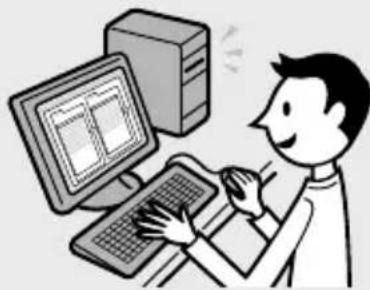
Install SonicStage on your computer.
SonicStage is software that takes music downloaded from audio CDs on your computer and creates original CDs. It can be installed from the supplied CD-ROM.
Create an ATRAC CD.
After selecting your favorite songs from music stored on your computer, record them on a CD-R/CD-RW using SonicStage.
Audio CDs, MP3 files
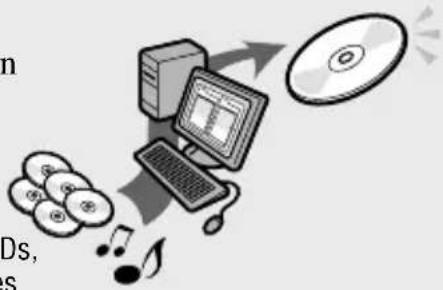
ATRAC CD
Listen to them with this CD player.
You can take lots of songs wherever you go on your original CD.
Please see the supplied "Installation/Operating Guide" for how to install SonicStage and how to create ATRAC CDs.
- When the total playing time of one CD (album) is estimated at 60 minutes and you are recording on a 700 MB CD-R/CD-RW at 48 kbps in ATRAC3plus format.

Which discs can you play on this CD player?

Audio CDs:
CDDA format CDs
CDDA (Compact Disc Digital Audio) is a recording standard used for Audio CDs.


ATRAC CDs:
CD-R/CD-RW on which audio data compressed in the ATRAC3plus or/and ATRAC3 format has been recorded*
ATRAC3 (Adaptive Transform Acoustic Coding3) is audio compression technology that satisfies the demand for high sound quality and high compression rates.
ATRAC3plus is audio compression technology developed from the ATRAC3 format and can compress audio files to about 1/20 of their original size at 64 kbps.
You can create an ATRAC CD using SonicStage.

MP3 CDs:
CD-R/CD-RW on which audio data compressed in the MP3 format has been recorded*
MP3 (MPEG-1 Audio Layer3) is audio compression technology that can compress audio files to about 1/10 of their original size.
CD-R/CD-RW on which mixed audio data compressed in the ATRAC3plus, ATRAC3, and/or MP3 formats has been recorded by using a software other than SonicStage can also be played. With SonicStage, you cannot create a CD on which mixed audio data is recorded.
- Only ISO 9660 Level 1/2 and Joliet extension format discs can be played.
Music discs encoded with copyright protection technologies
This product is designed to play back discs that conform to the Compact Disc (CD) standard. Recently, various music discs encoded with copyright protection technologies are marketed by some record companies. Please be aware that among those discs, there are some that do not conform to the CD standard and may not be playable by this product.
Continued
File structures of ATRAC CDs and MP3 CDs
ATRAC CDs and MP3 CDs consist of "files" and "groups." A "file" is equivalent to a "track" of an audio CD. A "group" is a bundle of files and is equivalent to an "album."
For MP3 CDs, this CD player recognizes an MP3 folder as a "group" so that ATRAC CDs and MP3 CDs can be operated in the same way.
The usable number of groups and files
maximum number of groups: 255
maximum number of files: 999
Playing order of ATRAC CDs and MP3 CDs
For ATRAC CDs, files are played in the order selected in SonicStage.
For MP3 CDs, the playing order may differ depending on the method used to record MP3 files on the disc. A "play list" which contains an MP3 file playing order can also be recorded. In the following example, files are played in order of ① to ⑦.
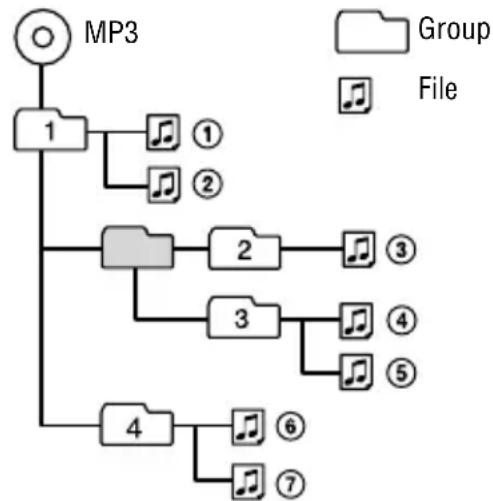
(Maximum directory levels: 8)
Notes
- If ATRAC3plus/ATRAC3 files and MP3 files are recorded on the same CD, this CD player plays the ATRAC3plus/ATRAC3 files first.
- The playback capability of this CD player may vary depending on the quality of the disc and the condition of the recording device.
- Acceptable characters are A to Z, a to z, 0 to 9, and _ (underscore).
- On a disc that has ATRAC3plus/ATRAC3/MP3 files, do not save files in other formats and do not make unnecessary folders.
About ATRAC CDs
- CD-Rs/CD-RWs recorded in the ATRAC3plus/ATRAC3 format cannot be played on your computer.
About MP3 CDs
- Be sure to add the file extension "mp3" to the file name. However, if you add the extension "mp3" to a file other than an MP3 file, the player will not be able to recognize the file properly.
- This CD player can play bit rates of 16 to 320 kbps and sampling frequencies of 32/44.1/48kHz . Variable Bit Rate (VBR) files can also be played.
- To compress a source in an MP3 file, we recommend setting the compression parameters to "44.1 kHz," "128 kbps," and "Constant Bit Rate."
- To record up to the maximum capacity, set the writing software to "halting of writing."
- To record up to the maximum capacity at one time on media that has nothing recorded on it, set the writing software to "Disc at Once."
Precautions
On safety
- Should any solid objects or liquid fall into the CD player, unplug it and have it checked by qualified personnel before operating it any further.
- Do not put any foreign objects in the DC IN 4.5V (external power input) jack.
On the CD player
- Keep the lens on the CD player clean and do not touch it. If you do so, the lens may be damaged and the CD player will not operate properly.
- Do not put any heavy object on top of the CD player. The CD player and the CD may be damaged.
- Do not leave the CD player in a location near heat sources, or in a place subject to direct sunlight, excessive dust or sand, moisture, rain, mechanical shock, unleveled surface, or in a car with its windows closed.
- If the CD player causes interference to the radio or television reception, turn off the CD player or move it away from the radio or television.
- Discs with non-standard shapes (e.g., heart, square, star) cannot be played on this CD player. Attempting to do so may damage the CD player. Do not use such discs.
On handling CDs
- To keep the CD clean, handle it by its edge. Do not touch the surface.
- Do not stick paper or tape onto the CD.
- Do not expose the CD to direct sunlight or heat sources such as hot air ducts. Do not leave the CD in a car parked under direct sunlight.
On headphones/earphones
Road safety
Do not use headphones/earphones while driving, cycling, or operating any motorized vehicle. It may create a traffic hazard and is illegal in some areas. It can also be potentially dangerous to play your headsets at high volume while walking, especially at pedestrian crossings. You should exercise extreme caution or discontinue use in potentially hazardous situations.
Preventing hearing damage
Avoid using headphones/earphones at high volume. Hearing experts advise against continuous, loud and extended play. If you experience a ringing in your ears, reduce volume or discontinue use.
Consideration for others
Keep the volume at a moderate level. This will allow you to hear outside sounds and to be considerate to the people around you.
On the water resistance
- Before you open the lid, be sure to wipe off water, dust or sand on the exterior of the unit. Open and close the lid where water or sand cannot fall in the unit, and make sure that your hands are dry. If water or sand falls in the unit, trouble may occur.
- When closing the lid, check that there is no dust or sand on the rubber packing around the lid. Then close the lid firmly.
- The supplied headphones are not meant to be immersed in water or come in continuous contact with water. If they are accidentally dropped into water or get wet, dry them with a soft cloth. Never use an electric hair dryer.
- The supplied AC power adaptor is not water resistant. To prevent shock hazard, avoid using the player near water during AC operation.
- Cover the DC IN 4.5 V jack and jack with the attached rubber caps when nothing is connected to these jacks. If the inside of the jacks are contaminated with water or sand, rust may develop and cause trouble.
Note
Since the unit is airtight, you may not be able to open the lid when there is a sudden change in air pressure inside the unit. This happens when the unit is transported on a plane or moved from a warm place to a cold place. In this case, open the rubber cap on the DC IN 4.5 V jack.
Checking the Supplied Accessories
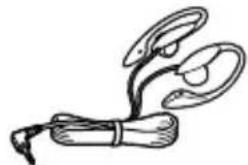
- Headphones
- CD-ROM (SonicStage)
Do not play this CD-ROM on an audio CD player including this player.
- Operating Instructions (This book)
- SonicStage Installation/Operating Guide
Wearing the supplied headphones
The following procedures are for wearing on the left car.
1 Hook the part over your left ear and the R part over your right ear as illustrated.
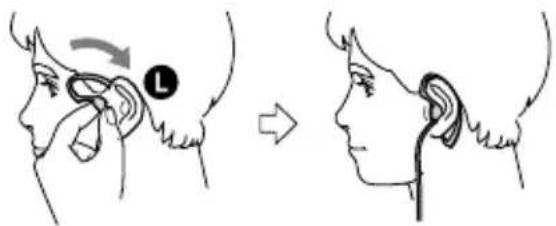
2 Hook the headphones around your ears, as you would with glasses.
3 Adjust the earpieces to comfortably fit your ears.
Note on handling the supplied headphones
Do not put weight or pressure on the headphones as it may cause the headphones to deform during long storage.
Guide to Parts and Controls
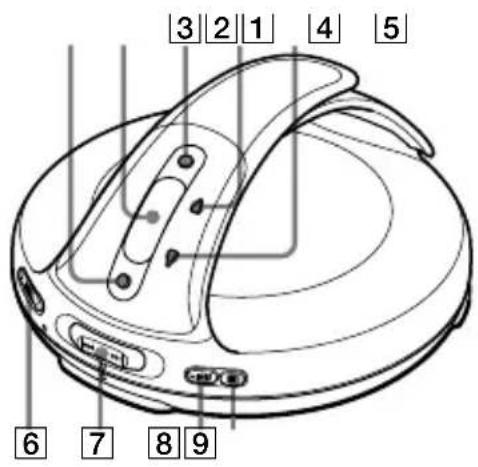
1 RADIO ON/BAND·MEMORY button (page 23 - 26)
2 Display ( page 11, 16 - 20, 23 - 25)
3 DISPLAY/MENU button ( page 16, 17, 19, 20, 23 - 26)
4 (group) TUNE button page 15, 19, 23, 25
(5) (group) <TUNE button (page 15, 19, 20, 23, 25)
6 VOL (volume) +^* / - buttons (page 14)
7I/PRESET-,P/PRESET+lever (page15,17-21,23-26)
8 (play/pause)*/ENTER button page 14, 15, 17 - 20, 23 - 26)
9 (stop)RADIO OFF button (page 15,23,25)
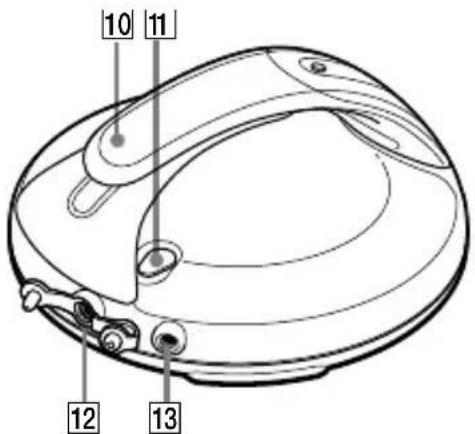
10 Hand strap
HOLD switch (page 16)
12 (headphones) jack (page 13, 14)
13 DC IN 4.5 V (external power input) jack (page 13)
- This button has a tactile dot.
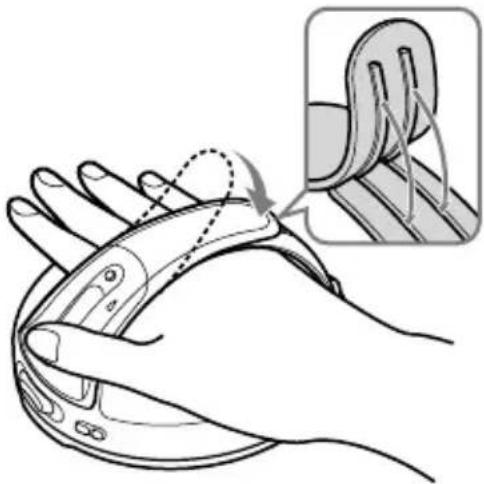
To use the hand strap
During active use, use the hand strap.
1 Adjust the length of the strap.
Insert the projecting part of the strap into the grooves firmly.
2 Put your hand between the player and the strap.
You can hold your player with either your right or left hand. You can invert the characters on the display according to which hand you use to hold the player (page 21).
Notes on the hand strap
- Do not push on the LCD and/or the parts around it forcibly.
- Do not twist or pull the hand strap strongly.
- Do not pull the hand strap up or down forcibly.
To open the lid
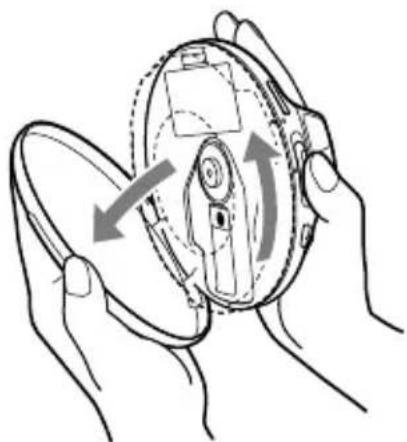
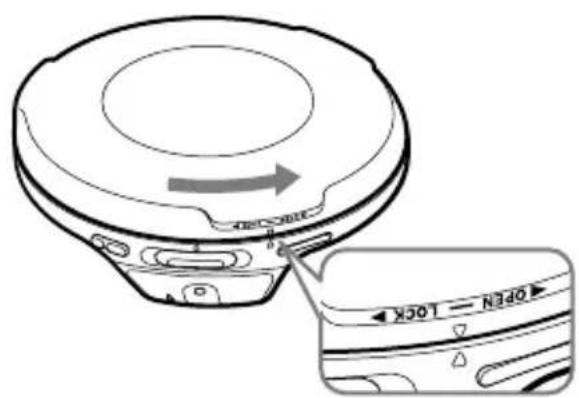
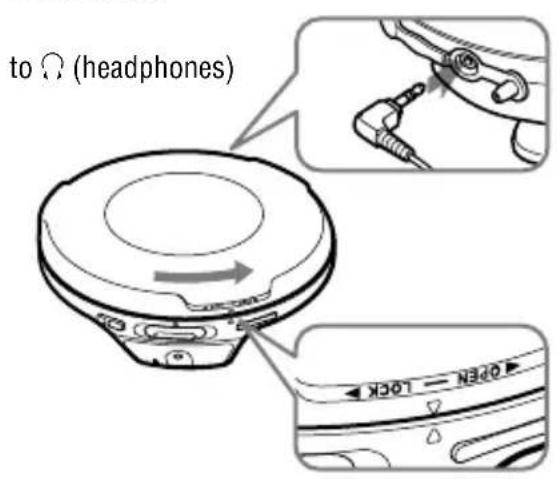
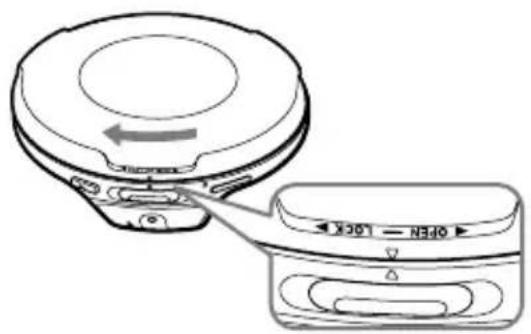
Hold the CD player with both hands as illustrated, and turn the lid toward OPEN until you hear a click. Open the lid when the mark and the mark are aligned. To close the lid, turn it toward LOCK until the mark and the mark are aligned.
When you open or close the lid, be careful not to pinch your fingers between the CD player and its lid.
Notes
- If you try to open the lid forcibly without the mark and the mark aligned correctly, the lid might be damaged.
- If the lid is not locked, the CD will not play.
Display
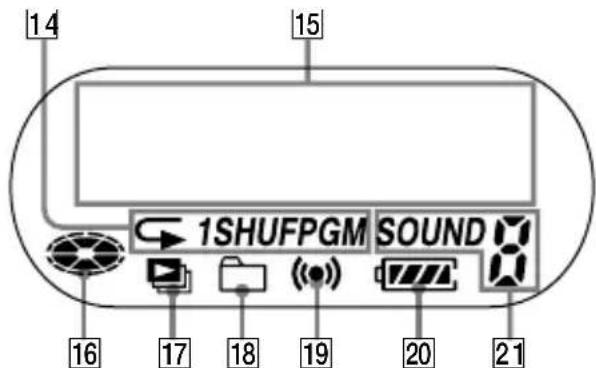
14 Play mode indicator (page 18)
15 Character information display ( page 16-20,23,24,25)
16 Disc indicator ( page 14)
17 Play list indicator ( page 18)
18 Group indicator (page 18)
19 Timer indicator ( page 21, 24)
20 Battery indicator ( page 12)
21 SOUND indicator (@ page 21)
Note
You can invert the characters on the display ( page 21).
Preparing a Power Source (Dry Batteries)
Use only the following dry battery type for your CD player:
- LR6 (size AA) alkaline batteries
1 Turn the lid of the CD player toward OPEN until the mark and the mark are aligned so that you can open the lid.
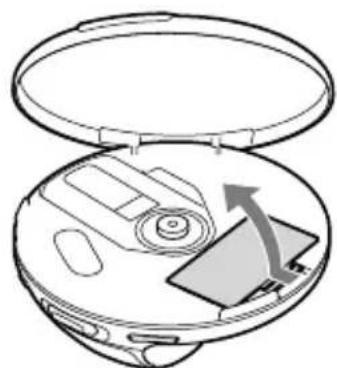
2 Open the lid of the battery compartment.
Continued
3 Insert two LR6 (size AA) batteries by matching the to the diagram in the battery compartment and close the lid until it clicks into place.
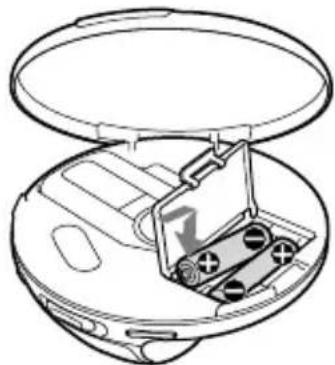
Insert the end first (for both batteries).
To remove the batteries
Remove the batteries as illustrated below.
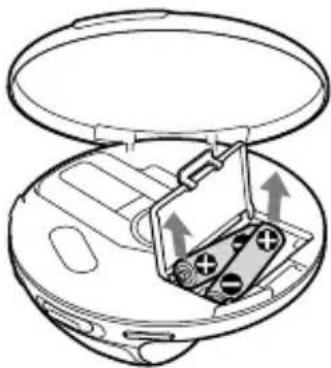
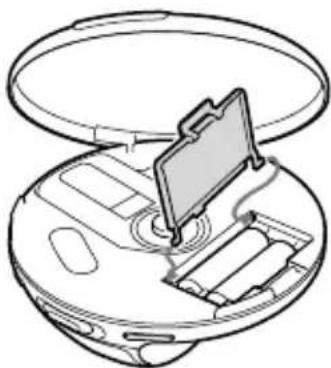
To attach the battery compartment lid
If the battery compartment lid is detached by an accidental drop, excessive force, etc., attach it as illustrated below.
To check the remaining power of the battery
The remaining power of the battery is indicated in the display as shown below. As the black indicator section decreases, the remaining power is depleted further.

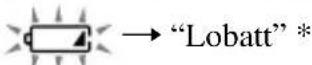
- Beep sounds.
When the batteries are depleted, replace both batteries with new ones.
Notes
- The display shows the approximate battery power remaining. For example, one section does not always indicate one-fourth of the battery power.
- Depending on the operating conditions, the display may increase or decrease relative to the actual power remaining.
Battery life 1)
Playing time shown is approximate hours, when you use the player on a flat and stable surface and "SOUND" is set to "OFF" (page 21). This value varies depending on how the player is used.
When using two Sony alkaline batteries LR6(SG) (produced in Japan)
| G-PROTECTION “G-PRO1” “G-PRO2” | |
| Audio CD | 47 43 |
| ATRAC CD2) | 75 75 |
| MP3 CD3) | 60 60 |
| RADIO ON | 65 |
1) Measured value using the JEITA standard (Japan Electronics and Information Technology Industries Association)
2) Recorded at 48 kbps
3) Recorded at 128 kbps
Notes on dry batteries
- Do not throw the batteries into a fire.
- Do not carry batteries in a pocket, etc. with coins or other metallic objects. The battery can generate heat if its positive and negative terminals are accidentally allowed to come into contact with a metallic object.
- Do not mix new batteries with old ones.
- Do not use different types of batteries together.
- When the batteries are not to be used for a long time, remove them.
- If battery leakage occurs, wipe off any deposit left in the battery compartment, and install new batteries. If the deposit adheres to your skin, wash it off thoroughly.
When using the AC power adaptor
You can use the player powered by the AC power adaptor (not supplied) without batteries.
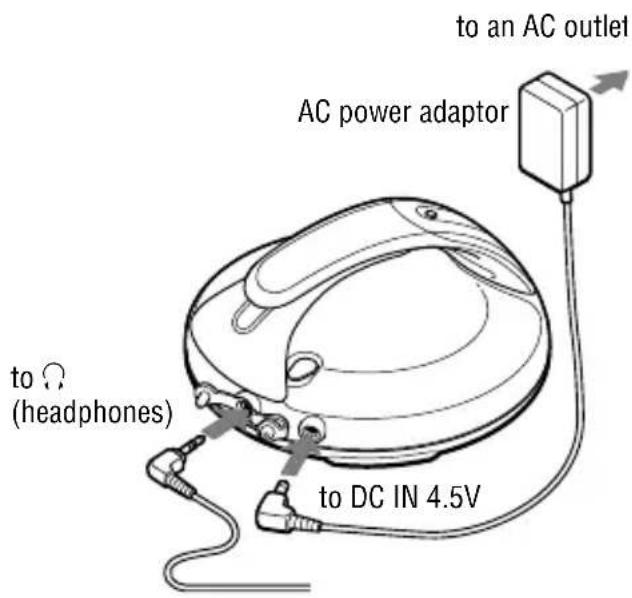
Notes on the AC power adaptor
- Disconnect all power sources when the player is not to be used for a long time.
- Use only the AC power adaptor supplied. If your player is not supplied with the one, use an AC-E45HG AC power adaptor. If you use any other AC power adaptor, malfunction may occur.
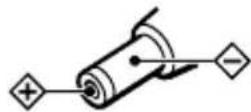
Polarity of the plug
- Do not touch the AC power adaptor with wet hands.
- Connect the AC power adaptor to an easily accessible AC outlet. Should you notice an abnormality in the AC power adaptor, disconnect it from the AC outlet immediately.
Playing a CD
1 Turn the lid of the CD player toward OPEN until the mark and the mark are aligned so that you can open the lid.
Connect the headphones to the player beforehand.
2 Place the CD on the tray.
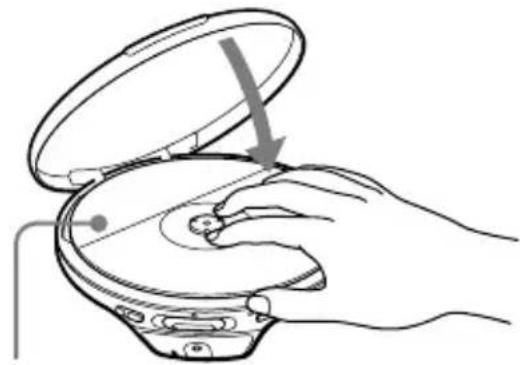
Label side up
3 Turn the lid of the CD player toward LOCK until the mark and the mark are aligned and the lid is locked.
4 Press II/ENTER.

disc) moves, and the player starts back.
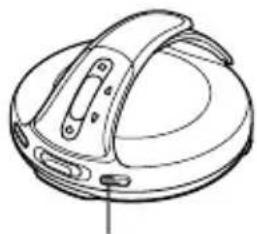
ENTER
5 Adjust the volume by pressing the VOL + / -
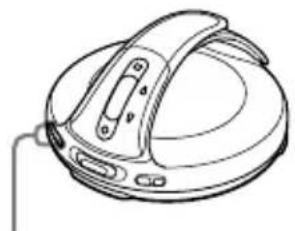
Vol + / - buttons
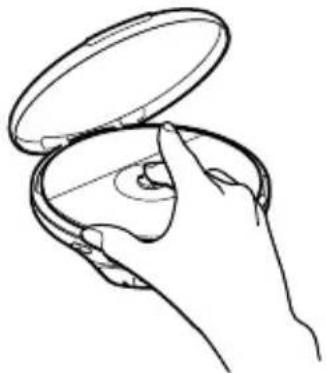
To remove the CD
Remove the CD while pressing the pivot in the center of the tray.
Basic playback operations (Play, stop, search)
| To Operation | ||
| Play | Play from a point where you stopped the player previously | Press ➔ ENTER. Playback starts from the point where you stopped. |
| Play from the first track | While the CD player is stopped, press and hold ➔ ENTER until the play of the first track starts. | |
| Stop | Pause/Resume play after pausing | Press ➔ ENTER. |
| Stop playback | Press ■. | |
| Search | Find the beginning of the current track 1) | Flick the lever toward ➔. |
| Find the beginning of previous tracks 1) | Flick the lever toward ➔ repeatedly. | |
| Find the beginning of the next track 1) | Flick the lever toward ➔. | |
| Find the beginning of succeeding tracks 1) | Flick the lever toward ➔ repeatedly. | |
| Go backwards quickly 1) 3) | Hold the lever toward ➔. | |
| Go forward quickly 1) 3) | Hold the lever toward ➔. | |
| Jump to succeeding groups 2) | Press (group) ➔ repeatedly. | |
| Jump to previous groups 2) | Press (group) ➔ repeatedly. | |
1) You can operate during both play and pause.
2) You can operate during play of ATRAC CDs/MP3 CDs only.
3) You cannot operate when using an MP3 file recorded on a CD-R/CD-RW in a packet write format.
Locking the controls (HOLD)
You can prevent accidental button presses while carrying the player by locking the controls. "HOLD" flashes on the display if you press any button when the HOLD function is activated.
1 Slide the HOLD switch in the direction of the arrow.
To unlock the controls
Slide the HOLD switch in the direction opposite to that of arrow.
Checking CD information
You can check CD information on the display. When you are playing an audio CD containing text information such as CD-TEXT, information in parentheses is displayed. When you are playing an MP3 CD containing files with an ID3 tag*, ID3 tag information is displayed. (When there is no ID3 tag information, "---" is displayed.)
- ID3 tag is a format for adding certain information (track name, album name, artist name, etc.) to MP3 files. This player conforms to Version 1.1/2.2/2.3 of the ID3 tag format (for MP3 files only).
Notes
The characters A-Z, a-z, 0-9, and can be displayed on this player.
- Before playing a file, the player reads all file and group (or folder) information on the CD. "READING" is displayed. Depending on the content of the CD, it may take some time to accomplish this reading.
- If the file does not belong to any group, the group name is displayed as "ROOT."
To check information on the display
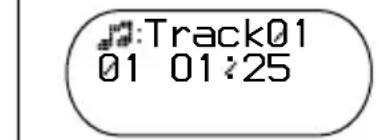
Press DISPLAY/MENU repeatedly.
Audio CD
Track number, elapsed playing time (Track name)
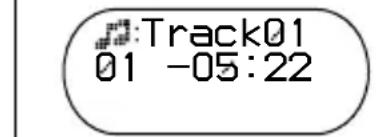
Track number, remaining time of the current track (Track name, artist name)
Number of tracks left 1), time remaining on the CD 1) (Album name, artist name)
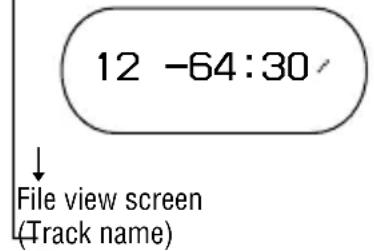
Track015
ATRAC CD/MP3 CD
File name 2), le number, elapsed playing time
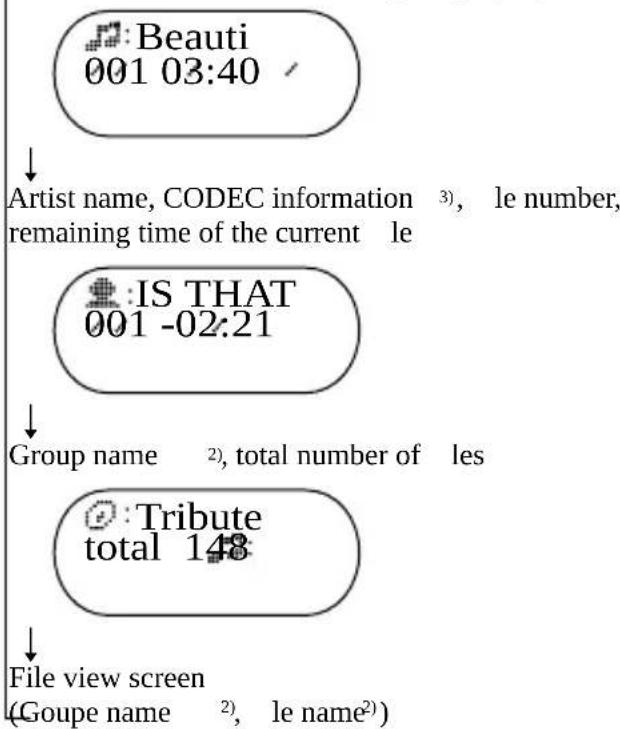
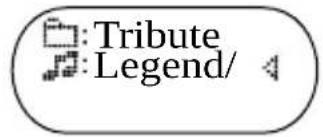
1) The displays appear only during normal play.
2) During play, "artist name" is not displayed if the disc does not have ID3 tag information. When the list of group names/file names appears on the display, "artist name" and "group name" are not displayed.
3) Bit rate and sampling frequencies are displayed. While an MP3 file made at VBR (variable bit rate) is being played, "VBR" appears on the display instead of a bit rate. In some cases, "VBR" appears halfway through playback, rather than from the beginning.
Changing Playback Options (PLAY MODE)
You can use various playback options such as selecting songs you want to listen to, and playing songs in your favorite order.
For details about playback options, see page 18.
You can also play songs repeatedly using the playback options you choose (repeat play, page 20).
1 Press DISPLAY/MENU until the MENU screen appears.
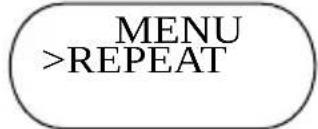
2 Flick the lever toward or to select "PLAY MODE," and then press I/ENTER*.
- You can also use DISPLAY/MENU to enter the selection as well as ▷/ ENTER.
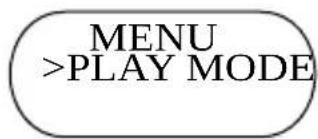
3 Flick the lever toward or to select the playback options.
The default setting is "ALL" (normal play).
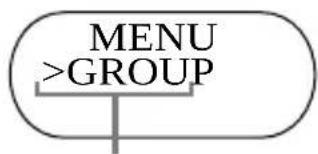
Playback options appear here.
To return to normal play
Select "ALL" in the PLAY MODE menu.
Playback options (PLAY MODE)
When you select Bookmark track play or PGM play, you need to select the songs you want to listen to. See page 19 for how to select tracks.
| Display Explanation | |
| ALL (Normal play) | All tracks on the CD are played in a track number order. |
| GROUP (Group play) | All tracks in the selected group are played (ATRAC CD/MP3 CD only). |
| 1 (Single play) | The current track is played once. |
| SHUFFLE (Shuffle play) | All tracks on the CD are played once in random order. |
| GP SHUF (Group shuffle play) | All tracks in the selected group are played once in random order (ATRAC CD/MP3 CD only). |
| PLAY LIST (m3u play list play) | Tracks in the selected m3u play list* are played (MP3 CD only). After selecting “PLAY LIST,” flick the lever toward ↓ or ▷ to select a play list, and then press ▷/ENTER. |
| BOOK MARK (Bookmark track play) | Tracks to which Bookmarks have been added are played (© page 19). |
| AUTO RANK (Auto ranking play) | The tracks you have played most frequently from the CD are played from the 10th to the first. After selecting “AUTO RANK,” press ▷/ENTER. |
| RANK SHUF (Auto ranking shuffle play) | Up to 32 tracks, which the player has automatically memorized as the most frequently played ones, are played in random order. After selecting “RANK SHUF,” press ▷/ENTER. |
| PROGRAM (PGM play) | Up to 64 tracks are played in your favorite order (© page 19). |
- An m3u play list is a file in which an MP3 file playing order has been encoded. To use the play list function, record MP3 files on a CD-R/CD-RW using encoding software that supports the m3u format.
Playing your favorite tracks (Bookmark track play)
1 During play of the track to where you want to add a Bookmark, press and hold I/ENTER until disappears and flashes instead.
2 If you want to add aBookmark to two or more tracks, repeat step 1. You can add Bookmarks to up to 10 CDs for audio CDs (up to 99 tracks for each CD) and up to 5 CDs for ATRAC CDs/ MP3 CDs (up to 999 tracks for each CD).
3 Press and hold DISPLAY/MENU until the MENU screen appears.
4 Flick the lever toward I or to select "PLAY MODE," then press II/ENTER.
5 Flick the lever toward I or to select "BOOK MARK," then press II/ENTER.
lights up, and the play of tracks with Bookmarks starts in track number order, not in the order you added the Bookmarks.
To remove Bookmarks
During play of a track with aBookmark, press and hold ENTER until disappears.
Notes
- If you try to add Bookmarks to tracks on an 11th CD (on a 6th CD when playing ATRAC CDs/MP3 CDs), the Bookmarks of the CD you played first will be erased.
- All Bookmarks stored in memory will be erased if you remove all power sources.
Playing tracks in your favorite order (PGM play)
1 While the player is stopped, select "PROGRAM" in step 3 of the player operation for "Changing Playback Options (PLAY MODE)" (page 17), and then press Enter.
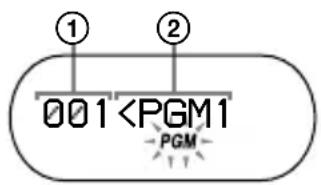
① Track number (audio CD/CD-TEXT) or playing order (ATRAC CD/MP3 CD)
② Playing order (audio CD/CD-TEXT) or file name (ATRAC CD/MP3 CD)
2 Flick the lever toward or to select the track and press DISPLAY/MENU to enter the selection.
You can also select a track in another group by pressing (group) < 1 / 1> when playing an ATRAC CD/MP3 CD.
3 Repeat step 2 to select tracks in your favorite order.
You can select up to 64 tracks.
When you finish entering the 64th track, the track number selected first (audio CD)/file name (ATRAC CD/MP3 CD) appears on the display.
If you select 65 tracks or more, the tracks selected first are erased one by one.
4 Press I/ENTER.
"PGM" lights up on the display and playback starts in the selected order.
To check the program
While programming, press DISPLAY/MENU repeatedly before step 4.
Playing tracks repeatedly (Repeat play)
1 Select the playback option you want to repeat ( page 18).
2 Press and hold DISPLAY/MENU until the MENU screen appears.
3 Flick the lever toward or to select "REPEAT," and then press I/ENTER.
4 Flick the lever toward or to select "ON," then press I/ENTER to enter the selection.
To return to normal play
Select "OFF" in step 4.
Changing Sound Quality and Settings
For details about various setting items, see page 21.
1 Press DISPLAY/MENU until the MENU screen appears.
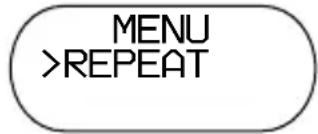
2 Flick the lever toward I or to select "SOUND" or "OPTION," and then press ENTER. If you select "OPTION," flick the lever toward I or to select the item you want to set up, and then press ENTER.
3 Flick the lever toward I or to select an option, and then press I/ENTER.
To return to the previous screen (except PGM play)
Press group)
To cancel set up
Press ■.
SOUND item
| Item | Options (●: Default setting) |
| SOUND (Sound setting) | ● OFF Normal sound quality |
| SOFT For vocal, stressing middle range audio | |
| ACTIVE Lively sounds, emphasizing high and low range audio | |
| HEAVY Powerful sounds, further emphasizing high and low ranges compared with ACTIVE sound |
OPTION items
| Items | Options (●: Default settings) | |
| DIRECTION 1) (Inverting the characters on the display) | ● NORMAL | The characters appear on the display in the normal direction. |
| REVERSE The characters appear on the display in the reverse direction so that you can read them from the opposite side. The ↓←, ➔ lever and the ←◇ buttons operate in the opposite direction. Play mode icons and indicators cannot be inverted. | ||
| G-PROTECTION (G-PRO SET) 1) (To prevent sound skipping) | ● G-PRO 1 | Protection against sound skipping is provided with high quality CD sound. |
| G-PRO 2 Enhanced protection against sound skipping is provided. | ||
| AVLS 2) (Limiting volume) | ON The maximum volume is limited to protect your hearing. | |
| ● OFF | The volume changes without limiting the volume level. | |
| TIMER (Off timer) | 1-99 min. | (●) lights up. You can check the remaining playback time by selecting this option during play. Flick the lever toward ↓← or ➔ repeatedly to increase or decrease the length of time by 5 minutes, or hold the lever toward ↓← or ➔ for 2 seconds or more to increase or decrease by 1 minute. The default setting is “10 min.” |
| ● OFF | The timer does not work. | |
1) You can set this up only while the player is stopped.
2) AVLS is an abbreviation of the Automatic Volume Limiter System.
| Items | Options (●: Default settings) | |
| BEEP(Sound of operation) | ● ON | The beep sounds when you operate the player. |
| OFF The beep is turned off. | ||
| SEAMLESS1)(Playing tracks continuously) | ON The CD is played without space between tracks. | |
| ● OFF | The CD is played as recorded on the disc, including spaces between tracks. | |
1) You can set this up only while the player is stopped. This function works only for ATRAC CDs.
Notes
-
Even if "G-PROTECTION" is activated, sound may skip:
-
when the CD player receives stronger continuous shock than expected,
- when a dirty or scratched CD is played, or
-
for CD-Rs/CD-RWs, when a poor-quality disc is played or there is a problem with the original recording device or application software.
-
Even if "SEAMLESS" is set to "ON," the tracks may not play continuously depending on how the source music was recorded.
Listening to the Radio
You can enjoy FM, AM, TV and WB programs.
1 Press RADIO ON/BAND to turn on the radio.
2 Press RADIO ON/BAND until the band you want appears.
Each time you press the button, the display changes as follows:

3 Press TUNE < or > to tune in the station you want and adjust the volume.
Note
If you connect the external power source plug to the DC IN 4.5V jack of your CD player, the CD player will turn off. Turn it on by pressing RADIO ON/BAND to continue listening to it.
Turning off the radio
Press RADI OFF.
Tuning in the station quickly
Hold down TUNE < or > in step 3 until the frequency digits begin to change in the display. The CD player automatically scans the radio frequencies and stops when it finds a clear station.
Improving broadcast reception
For FM, extend the headphones/earphones cord.
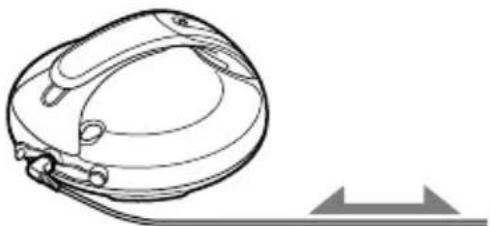
Headphones or earphones
For AM, reorient the CD player itself.
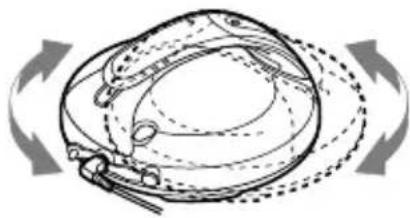
Note
Keep the headphones/earphones connected to the jack of the CD player. The headphones/earphones cord works as the FM antenna.
If it is hard to hear the FM/ TV/WB broadcast
1 While listening to the radio, press and hold DISPLAY/MENU until the display changes.
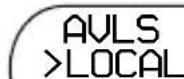
2 Flick the lever toward or to select "LOCAL," then press ENTER.
3 Flick the lever toward 1 or 2 to select "ON," then press ENTER to enter the selection.
Protecting your hearing
The AVLS (Automatic Volume Limiter System) function keeps the maximum volume down to protect your hearing.
1 While listening to the radio, press and hold DISPLAY/MENU until the display changes.
2 Flick the lever toward or to select "AVLS," then press /ENTER.
3 Flick the lever toward I I or to select "ON," then press /ENTER to enter the selection.
To cancel the AVLS function
Perform steps 1 - 3, changing the AVLS setting to "OFF."
Turning off the radio automatically
You can set the radio to turn off automatically within a range of 10 to 99 minutes at
10-minute intervals. While the timer function is working, () lights up on the display.
1 While listening to the radio, press and hold DISPLAY/MENU until the display changes.
2 Flick the lever toward or to select "TIMER," then press ENTER.
3 Flick the lever toward or to select the length of time you want to set from "10" to "99," then press /ENTER to enter the selection.
To check the length of time before the radio is automatically turned off
During play, perform steps 1 - 2.
To cancel the TIMER function
The TIMER function for the radio will be canceled:
- When you perform steps 1 - 3, changing the TIMER setting to "OFF."
- When you turn off the radio.
- When you start playing a CD.
Presetting Radio Stations
You can preset up to 51 stations: 7 for TV, 4 for WB, 30 for FM and 10 for AM.
1 Press RADIO ON/BAND to turn on the radio.
2 Press RADIO ON/BAND to select the band.
3 Press MEMORY for 2 seconds or more.
The preset number will flash in the display.
FM0187.50MHz
4 Press DISPLAY/MENU for 2 seconds or more.
The CD player starts scanning the stations from the lower frequencies and stops for about 3 seconds when a station is received.
5 If you want to preset the received station, press DISPLAY/MENU while the preset number is flashing.
The received station is preset on the preset number 1 and the CD player starts scanning for the next receivable station. If you do not press DISPLAY/MENU within the 3 seconds, the CD player will start scanning for the next receivable station without storing the station.
6 Repeat step 5 until all receivable stations are preset.
If the stations have already been stored, the newly preset stations will replace the old ones.
Presetting stations manually
1 Press RADIO ON/BAND to turn on the radio.
2 Press RADIO ON/BAND to select the band.
3 Press and hold MEMORY until the preset number flashes in the display.
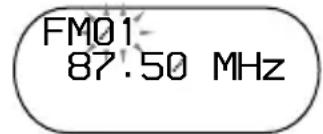
From this step on, start the next operation within 30 seconds after you finished the previous operation. If 30 seconds pass with nothing done, the preset number stops flashing which shows that the CD player has exited the preset memory standby mode. If this happens, start from step 3 again.
4 Flick the lever toward / P R E S T - o r /P R E S T + repeatedly to select the preset number you want to store the station on while the preset number flashes.
5 Press TUNE < or > to tune in the station you want while the preset number flashes.
6 Press DISPLAY/MENU. When the station is preset successfully, the beep sounds. The new station replaces the old one. The preset number increases by one and the CD player enters the preset memory standby mode.
7 Repeat steps 4 to 6 when you preset the stations in the same band. When you preset the stations in the different band, press and hold MEMORY to exit the preset memory standby mode. Repeat steps 2 to 6 after the preset number stops flashing.
To exit the preset memory standby mode
When the radio is turned on, you can exit the preset memory standby mode using one of the following procedures. Preset stations, however, will remain stored in the CD player's memory.
- Hold down MEMORY until the preset number stops flashing.
- Do not press any button for 30 seconds. The preset number stops flashing.
- Press ENTER. The CD player enters the CD playing mode.
- Press RADI OFF. The radio is turned off.
To cancel all preset stations
1 While the radio is turned off and CD play is stopped, press and hold DISPLAY/MENU until the MENU screen appears.
2 Flick the lever toward or to select "OPTION," then press /ENTER.
3 Flick the lever toward or to select "TU PRESET," then press / ENTER to enter the selection.
"Clear?" appears in the display. When you press ENTER, all the preset stations are canceled.
Playing Preset Radio Stations
You can tune in the station easily by flicking the lever toward 1 /P R E S T - or / PRESET ^+ button.
1 Press RADIO ON/BAND to select the band.
2 Flick the lever toward I/ PRESET - or I/PRESET + to tune in a stored station.
Changing the Tuning Interval
When using the CD player abroad, change the AM tuning interval on the menu, if necessary.
9 kHz area: Asia and Europe
10kHz area: the U.S.A., Canada and South America
Change it while the radio is turned off and CD play is stopped, as follows.
1 Press and hold DISPLAY/MENU until the MENU screen appears.
2 Flick the lever toward I<or to select "OPTION," then press II/ENTER.
3 Flick the lever toward I or to select "AM STEP," then press II/ENTER to enter the selection.
4 Flick the lever toward or to select "9 kHz" or "10 kHz," then press I/ENTER to enter the selection. The default setting is "10 kHz."
Note
After changing the tuning interval, you need to preset radio stations again.
Troubleshooting
Should any problem persist after you have checked these symptoms, consult your nearest Sony dealer.
Sound
| Symptom Cause and/or corrective action | |
| The volume does not increase even if you press VOL + repeatedly. | → “AVLS” is set to “ON.” Set it to “OFF” (6 page 21). |
| No sound, or noise is heard. | → Connect the headphones/earphones plugs firmly. → The plugs are dirty. Clean the headphones/earphones plugs with a dry soft cloth periodically. |
| A rustling noise is heard from the CD. | → Close the lid of the battery compartment firmly (6 page 12). |
Operation/Playback
| Symptom Cause and/or corrective action | |
| The playing time is too short. The CD does not play. | → Check that you are using alkaline batteries and not manganese batteries. → Replace the dry batteries with new LR6 (size AA) alkaline batteries (® page 11). |
| Certain tracks cannot be played. | → You tried to play files saved in a format that is not compatible with this player (® page 5, 6). |
| "Lobatt" appears on the display, and the CD does not play. | → Replace the dry batteries with new LR6 (size AA) alkaline batteries (® page 11). |
| "Hi DC in" appears on the display. | → An AC power adaptor which is rated higher than the one supplied or recommended is being used. Use only the supplied AC power adaptor or the car battery cord recommended in "Optional Accessories" (® page 31). |
Symptom Cause and/or corrective action
| The CD does not play, or “No disc” appears on the display when a CD is placed in the player. | → The CD is dirty or defective. Clean it or change it. → Check that the CD is inserted with the label side up (⑥ page 14). → Moisture condensation has occurred. Leave the CD player aside for several hours until the moisture evaporates. → Close the lid of the battery compartment firmly (⑤ page 12). → Make sure the batteries are inserted correctly (⑦ page 12). → Connect the AC power adaptor to an AC outlet securely (⑧ page 13). → Press ➔ ENTER after one second or more has passed since the AC power adaptor was connected. → The CD-R/CD-RW in the player is blank. → There is a problem with the quality of the CD-R/CD-RW, recording device, or application software. |
| "HOLD” flashes on the display when you press a button, and the CD does not play. | → The buttons are locked. Slide the HOLD switch back (⑥ page 16). |
| Playback starts from the point you stopped (resume function). | → The resume function is working. To start play from the first track, press and hold ➔ ENTER until the first track starts playing, or open the lid of the player (⑤ page 14). Or, remove all power sources, and then insert the batteries or connect the AC power adaptor again. |
| During playback of an ATRAC CD or MP3 CD, the CD does not rotate but you can hear the sound normally. | → This player is designed to stop the rotation of an ATRAC CD or MP3 CD during playback to reduce the power consumption. The player is not malfunctioning. |
| “NO FILE” appears on the display after you press ➔ ENTER or when the lid of the player is locked. | → There are no ATRAC3plus/ATRAC3/MP3 files on the CD. → A CD-RW from which the data has been erased is being used. → The CD is dirty. |
| The LCD display becomes hard to see or slows down. | → You are using your CD player at high temperatures (above 40°C/104°F) or at low temperatures (below 0°C/32°F). At room temperature, the display will return to its normal operating condition. |
| Play stopped abruptly. | → The off timer has been set. Change the setting of “TIMER” to “OFF” (⑥ page 21). → The dry batteries are used up completely. Replace the dry batteries with new LR6 (size AA) alkaline batteries (⑦ page 11). |
Radio
Symptom Cause and/or corrective action
The audio is weak or has poor quality.
Replace the batteries with new LR6 (size AA) alkaline batteries. (page 11)
Move the CD player away from electronic appliances (TVs, PCs, etc).
Keep the AC power adaptor away from the CD player.
Others
Symptom Cause and/or corrective action
When closing the lid of the CD player, the CD starts to rotate.
The player is reading the information on the CD, not malfunctioning.
Maintenance
To clean the casing
Use a soft cloth slightly moistened in water or a mild detergent solution. Do not use alcohol, benzine or thinner.
To clean the headphones/earphones plug
Keep the plug of your headphones/earphones clean to obtain optimum sound. Wipe it with a dry, soft cloth.
To remove any dust or sand from the rubber packing
Any sand or dust on the rubber packing will prevent the lid from shutting tightly, and water may leak in. Brush off the dust once in a while.
We recommend the replacement of the rubber packing every year which is available optionally at an authorized Sony service facility.
Specifications
CD player
System
Compact disc digital audio system
Laser diode properties
Material: GaAlAs
Wavelength: = 770 - 800nm
Emission duration: Continuous
Laser output: Less than 44.6 W
(This output is the value measured at a distance of 200mm from the objective lens surface on the optical pick-up block with 7mm aperture.)
D-A conversion
1-bit quartz time-axis control
Frequency response
20 - 20 000 Hz ^+1 dB (measured by JEITA)
Output (at 4.5 V input level)
Headphones (stereo minijack)
Approx. 5mW + Approx.5mW at 16
Radio
Frequency range
- 9kHz step:
TV: 2 - 13 ch
WB (weather band): 1 - 7 ch
FM: 87.5 - 108.0 MHz
AM: 531 - 1710 kHz
- 10kHz step:
TV: 2 - 13 ch
WB (weather band): 1 - 7 ch
FM: 87.5 - 108.0 MHz
AM: 530 - 1710 kHz
Antenna
FM: Headphones/earphones cord antenna
AM: Built-in ferrite bar antenna
General
Power requirements
-
LR6 (size AA) batteries: 1.5VDC × 2
-
AC power adaptor (DC IN 4.5 V jack): 120V , 60 Hz
Operating temperature
$$ 5 ^ {\circ} \mathrm {C} - 3 5 ^ {\circ} \mathrm {C} (4 1 ^ {\circ} \mathrm {F} - 9 5 ^ {\circ} \mathrm {F}) $$
Dimensions (w/h/d) (excluding projecting parts and controls)
Approx. 136 × 30.5 × 136 ~mm ( 5% × 1% × 5% in.)
Mass (excluding accessories)
Approx. 276g (9.8 oz.)
US and foreign patents licensed from Dolby Laboratories.
Design and specifications are subject to change without notice.
Optional Accessories
| AC power adaptor 1) | AC-E45HG |
| Active speaker system | SRS-Z1 SRS-Z30 |
| Car battery cord 2) | DCC-E345 |
| Car battery cord with car connecting pack 2) | DCC-E34CP |
| Car connecting pack 2) | CPA-9C |
| Connecting cord | RK-G129 RK-G136 |
| Earphones | MDR-E818LP MDR-J10 |
1) Specifications for AC power adaptors vary for each area. Check your local voltage and the shape of the plug before purchasing.
2) When listening to the radio using these accessories, noise may occur. We recommend only playing CDs when you use them.
Your dealer may not handle some of the accessories listed above. Please ask the dealer for detailed information about the accessories in your country/region.
Index
Symbols
(Battery) 12
(Bookmark track play) 18, 19
(Group play) 18
SHUF (Gourp shuffle play) 18
(m3u play list play) 18
PGM (program play) 18, 19
1 (Single play) 18
(10) (Timer) 21
A
a00 (Auto ranking play) 18
ACTIVE 21
AC power adaptor 13
ALL (Normal play) 17, 18
Antenna 23
ATRAC3plus/ATRAC3 5
ATRAC CD 5
Auto ranking play 18
Auto ranking shuffle play 18
AVLS 21
B
Battery life 12
BEEP 22
Bookmark track play 18, 19
C
CD-ROM (SonicStage) 9
CDDA format 5
D
Display 11, 16
G
G-PROTECTION 21
Group 6
Group play 18
Group shuffle play 18
H
Headphones 9
HEAVY 21
HOLD function 16
1
ID3 tag 16
M
m3u play list play 18
MP3 CD 5
N
Normal play 15, 18
0
OPTION 21
P
Pause 15
PLAY LIST (m3u play list play) 18
Preset 24
Program (PGM) play 18, 19
R
RANK SHUF (Auto ranking shuffle play) 18
Repeat play 20
s
SEAMLESS 22
Search 15
Shuffle play 18
Single play 18
SOFT 21
SonicStage 4
SOUND 21
Stop 15
T
TIMER 21
AVENTISSEMENT
ALL (lecture normale) 17, 18
Antenne 23
Arreter la lecture 15
ATRAC3plus/ATRAC3 5
ATRAC CD 5
Lecture normale 15, 18
Lectureprogrammee(PGM) 18,19
Lecture repeteee 20
M
Mettre en pause 15
0
OPTION 21
P
Portable Memory Stick Audio Player/ Portable MiniDisc Recorder/ Portable CD Player
Portable Audio
LIMITED WARRANTY
Sony Electronics Inc. ("Sony") warrants this Product (including any accessories) against defects in material or workmanship as follows:
- LABOR: For a period of 90 days from the date of purchase, if this Product is determined to be defective, Sony will repair or replace the Product, at its option, at no charge, or pay the labor charges to any Sony authorized service facility. After the Warranty Period, you must pay for all labor charges.
- PARTS: In addition, Sony will supply, at no charge, new or rebuilt replacements in exchange for defective parts for a period of one (1) year. After 90 days from the date of purchase, labor for removal and installation is available from Sony authorized service facilities or a Sony Service Center at your expense.
To obtain warranty service, you must take the Product, or deliver the Product freight prepaid, in either its original packaging or packaging affording an equal degree of protection, to any authorized Sony service facility.
This warranty does not cover customer instruction, installation, set up adjustments or signal reception problems.
This warranty does not cover cosmetic damage or damage due to acts of God, accident, misuse, abuse, negligence, commercial use, or modification of, or to any part of the Product, including the antenna. This warranty does not cover damage due to improper operation or maintenance, connection to improper voltage supply, or attempted repair by anyone other than a facility authorized by Sony to service the Product. This warranty does not cover Products sold AS IS or WITH ALL FAULTS, or consumables (such as fuses or batteries). This warranty is valid only in the United States.
Proof of purchase in the form of a bill of sale or receipted invoice which is evidence that the unit is within the Warranty period must be presented to obtain warranty service.
This warranty is invalid if the factory applied serial number has been altered or removed from the Product.
REPAIR OR REPLACEMENT AS PROVIDED UNDER THIS WARRANTY IS THE EXCLUSIVE REMEDY OF THE CONSUMER. SONY SHALL NOT BE LIABLE FOR ANY INCIDENTAL OR CONSEQUENTIAL DAMAGES FOR BREACH OF ANY EXPRESS OR IMPLIED WARRANTY ON THIS PRODUCT. EXCEPT TO THE EXTENT PROHIBITED BY APPLICABLE LAW, ANY IMPLIED WARRANTY OF MERCHANTABILITY OR FITNESS FOR A PARTICULAR PURPOSE ON THIS PRODUCT IS LIMITED IN DURATION TO THE DURATION OF THIS WARRANTY.
Some states do not allow the exclusion or limitation of incidental or consequential damages, or allow limitations on how long an implied warranty lasts, so the above limitations or exclusions may not apply to you. In addition, if you enter into a service contract with the Sony Partnership within 90 days of the date of sale, the limitation on how long an implied warranty lasts does not apply to you. This warranty gives you specific legal rights, and you may have other rights which vary from state to state.
For your convenience, Sony Electronics Inc. has established telephone numbers for frequently asked questions:
To locate the servicer or dealer nearest you, or for service assistance or resolution of a service problem, or for product information or operation, contact:
www.sony.com/walkmansupport
Sony Network Portable Audio Support Line 1-866-456-7669
For an accessory or part not available from your authorized dealer, call:
1-800-488-SONY(7669)
D 324343303