Profile PK7800SKSS - Microwave Oven GE - Free user manual and instructions
Find the device manual for free Profile PK7800SKSS GE in PDF.


User questions about Profile PK7800SKSS GE
0 question about this device. Answer the ones you know or ask your own.
Ask a new question about this device
Download the instructions for your Microwave Oven in PDF format for free! Find your manual Profile PK7800SKSS - GE and take your electronic device back in hand. On this page are published all the documents necessary for the use of your device. Profile PK7800SKSS by GE.
USER MANUAL Profile PK7800SKSS GE
SAFETY INFORMATION......3
USING THE COOKTOP
Cooktop Features 5
Radiant Glass Cooktop ....10
Home Canning Tips ....10
Cookware for Radiant Glass Cooktop.....11
Element Cycling 12
Turn Product On/Off 12
Operating The Cooking Elements .....12
How To Synchronize Left Elements .....13
Selecting Cooktop Settings ..... 13
Cooktop Lockout 14
Hot Light Indicator 14
Griddle (optional accessory)....15
CARE AND CLEANING
Cleaning the Glass Cooktop ..... 16
TROUBLESHOOTING TIPS ..... 18
LIMITED WARRANTY 22
ACCESSORIES 23
CONSUMER SUPPORT .... 24
OWNER'S MANUAL
JP3030
JP3036
JP3530
JP3536
PP7030
PP7036
CP9530
CP9536
ENGLISH/FRANÇAIS/ESPAÑOL
Write the model and serial numbers here:
Model # ____
Serial # ____
You can find them on a label under the cooktop.
THANK YOU FOR MAKING GE APPLIANCES A PART OF YOUR HOME.
Whether you grew up with GE Appliances, or this is your first, we're happy to have you in the family.
We take pride in the craftsmanship, innovation and design that goes into every GE Appliances product, and we think you will too. Among other things, registration of your appliance ensures that we can deliver important product information and warranty details when you need them.
Register your GE appliance now online. Helpful websites and phone numbers are available in the Consumer Support section of this Owner's Manual. You may also mail in the pre-printed registration card included in the packing material.

GE APPLIANCES
IMPORTANT SAFETY INFORMATION READ ALL INSTRUCTIONS BEFORE USING THE APPLIANCE
▲WARNING
Read all safety instructions before using the product. Failure to follow these instructions may result in fire, electrical shock, serious injury or death.
WARNING
GENERAL SAFETY INSTRUCTIONS
- Use this cooktop only for its intended purpose as described in this Owner's Manual.
■ Be sure your cooktop is properly installed and grounded by a qualified installer in accordance with the provided installation instructions. - Do not attempt to repair or replace any part of your cooktop unless it is specifically recommended in this manual. All other servicing should be performed by a qualified technician.
■ Before performing any service, unplug the cooktop or disconnect the power supply at the household distribution panel by removing the fuse or switching off the circuit breaker.
■ Do not leave children alone—children should not be left alone or unattended in an area where the cooktop is in use. They should never be allowed to climb, sit or stand on any part of the cooktop.
Do not store items of interest to the cooktop—children climbing on the items could be seriously injured.
CAUTION
■ Use only dry pot holders—moist or damp pot holders on hot surfaces may result in burns from steam. Do not let pot holders touch hot surface units or heating elements. Do not use a towel or other bulky cloth in place of pot holders.
■ Never use your cooktop for warming or heating the room.
- Do not touch surface elements. These surfaces may be hot enough to burn even though they are dark in color. During and after use, do not touch, or let clothing or other flammable materials contact the surface elements or areas nearby the surface elements; allow sufficient time for cooling first.
■ Potentially hot surfaces include the cooktop and areas facing the cooktop.
■ Do not heat unopened food containers. Pressure could build up and the container could burst, causing an injury.
- Cook meat and poultry thoroughly—meat to at least an internal temperature of 160°F and poultry to at least an internal temperature of 180°F. Cooking to these temperatures usually protects against foodborne illness.
WARNING
KEEP FLAMMABLE MATERIALS AWAY FROM THE COOKTOP
Failure to do so may result in fire or personal injury.
■DDo not store or use flammable materials near the cooktop, including paper, plastic, pot holders, linens, wall coverings, curtains, drapes and gasoline or other flammable vapors and liquids.
■ Never wear loose-fitting or hanging garments while using the cooktop. These garments may ignite if they contact hot surfaces causing severe burns.
■ Do not let cooking grease or other flammable materials accumulate in or near the cooktop. Grease on the cooktop may ignite.
READ AND SAVE THESE INSTRUCTIONS
IMPORTANT SAFETY INFORMATION READ ALL INSTRUCTIONS BEFORE USING THE APPLIANCE
WARNING
COOKTOP SAFETY INSTRUCTIONS
In the event of a fire, do not use water or grease on fires. Never pick up a flaming pan. Turn the controls off. Smother a flaming pan on a surface unit by covering the pan completely with a well-fitted lid, cookie sheet or flat tray. Use a multi-purpose dry chemical or a foam-type fire extinguisher.
■ Never leave the surface units unattended at medium or high heat settings. Boilovers cause smoking and greasy spillovers that may catch on fire.
■ Never leave oil unattended while frying. If allowed to heat beyond its smoking point, oil may ignite resulting in fire that may spread to surrounding cabinets. Use a deep fat thermometer whenever possible to monitor oil temperature.
■ To avoid spillover and fire, use a minimum amount of oil when shallow pan-frying and avoid cooking frozen foods with excessive amounts of ice.
■ Use the proper pan size - select cookware having flat bottoms large enough to cover the surface heating element. The use of undersized cookware will expose a portion of the surface unit to direct contact and may result in ignition of clothing. Proper relationship of cookware to surface unit will also improve efficiency.
■ To minimize the possibility of burns, ignition of flammable materials and spillage, the handle of a container should be turned toward the center of the range without extending over nearby surface units.
If power is lost to an electric cooktop while a surface unit is ON, the surface unit will turn back on as soon as power is restored. In the event of a power loss, failure to turn all surface unit knobs to the OFF position may result in ignition of items on or near the cooktop, leading to serious injury or death.
WARNING
RADIANT COOKTOP SAFETY INSTRUCTIONS
■ Only certain types of glass, glass/ceramic, earthenware or other glazed containers are suitable for cooktop service; others may break because of the sudden change in temperature.
■ Use care when touching the cooktop. The glass surface of the cooktop will retain heat after the controls have been turned off.
■ Do not cook on a broken cooktop. If the glass cooktop should break, cleaning solutions and spillovers may penetrate the broken cooktop and create a risk of electric shock. Contact a qualified technician immediately.
■ Avoid scratching the glass cooktop. The cooktop can be scratched with items such as knives, sharp instruments, rings or other jewelry, and rivets on clothing.
- Do not place or store items that can melt or catch fire on the glass cooktop, even when it is not being used. If the cooktop is inadvertently turned on, they may ignite. Heat from the cooktop or oven vent after it is turned off may cause them to ignite also.
Use CERAMA BRYTE® ceramic Cooktop Cleaner and CERAMA BRYTE® Cleaning Pad to clean the cooktop. Wait until the cooktop cools and the indicator light goes out before cleaning. A wet sponge or cloth on a hot surface can cause steam burns. Some cleaners can produce noxious fumes if applied to a hot surface. Read and follow all instructions and warnings on the cleaning cream label. NOTE: Sugary spills are an exception. They should be scraped off while still hot using an oven mitt and a scraper. See the Cleaning the glass cooktop section for detailed instructions.
How to Remove Protective Shipping Film and Packaging Tape
Carefully grasp a corner of the protective shipping film with your fingers and slowly peel it from the appliance surface. Do not use any sharp items to remove the film. Remove all of the film before using the appliance for the first time.
To assure no damage is done to the finish of the product, the safest way to remove the adhesive from packaging tape on new appliances is an application of a household liquid dishwashing detergent. Apply with a soft cloth and allow to soak.
NOTE: The adhesive must be removed from all parts. It cannot be removed if it is baked on.
READ AND SAVE THESE INSTRUCTIONS
Throughout this manual, features and appearance may vary from your model.
text_image
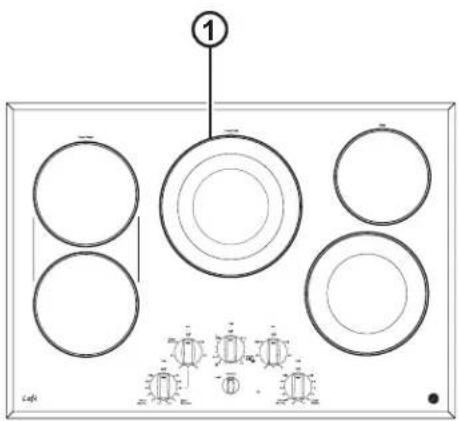
① ②CP9530 cooktop
flowchart
graph TD
    A["4 Front Burner"] --> B["2 Lo"]
    B --> C["4 Sync Burners"]
    D["3 Lock"] --> E["2 Lo"]
    E --> F["4 Sync Burners"]
    G["4 Lock"] --> H["2 Lo"]
    H --> I["4 Sync Burners"]
    J["4 Lock"] --> K["2 Lo"]
    K --> L["4 Sync Burners"]
    M["4 Lock"] --> N["2 Lo"]
    N --> O["4 Sync Burners"]
    P["4 Lock"] --> Q["2 Lo"]
    Q --> R["4 Sync Burners"]
    S["4 Lock"] --> T["2 Lo"]
    T --> U["4 Sync Burners"]
    V["4 Lock"] --> W["2 Lo"]
    W --> X["4 Sync Burners"]
    Y["4 Lock"] --> Z["2 Lo"]
    Z --> AA["4 Sync Burners"]
    AB["4 Lock"] --> AC["2 Lo"]
    AC --> AD["4 Sync Burners"]
    AE["4 Lock"] --> AF["2 Lo"]
    AF --> AG["4 Sync Burners"]
    AH["4 Lock"] --> AI["2 Lo"]
    AI --> AJ["4 Sync Burners"]
    AK["4 Lock"] --> AL["2 Lo"]
    AL --> AM["4 Sync Burners"]
    AN["4 Lock"] --> AO["2 Lo"]
    AO --> AP["4 Sync Burners"]
    AQ["4 Lock"] --> AR["2 Lo"]
    AR --> AS["4 Sync Burners"]
    AT["4 Lock"] --> AU["2 Lo"]
    AU --> AV["4 Sync Burners"]
    AW["4 Lock"] --> AX["2 Lo"]
    AX --> AY["4 Sync Burners"]
    AZ["4 Lock"] --> BA["2 Lo"]
    BA --> BB["4 Sync Burners"]
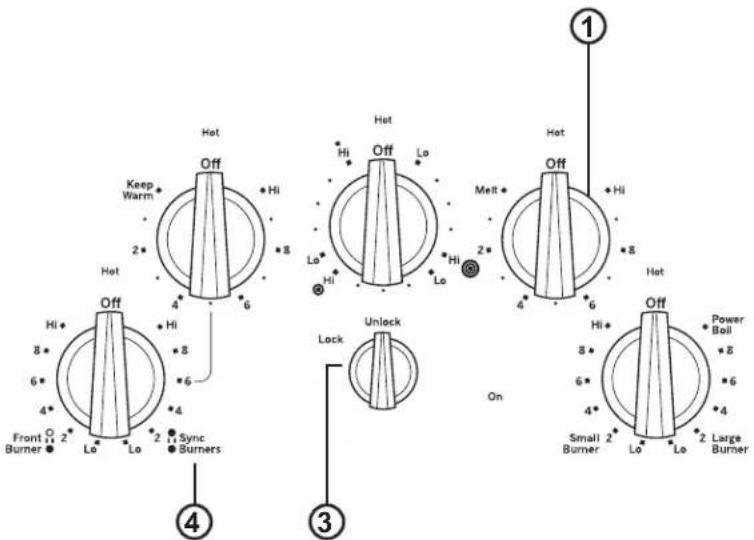
User Interface Controls
text_image
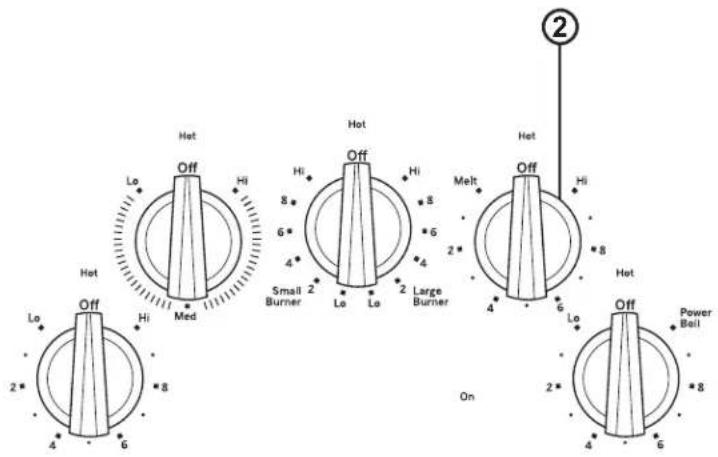
① ProfilePP7030 cooktop
text_image
Hot Keep Warm 2* Hot Off 4* 6* 8* Hi + Hi + 8 + 8 + 8 Small 2 Burner Lo Lo 2 Large Burner Melt 2* 4* 6 Hot Off 4* 6 Hi + Hi + 8 + 8 + 8 + 8 + 8 + 8 + 8 + 8 + 8 + 8 + 8 + 8 + 8 + 8 + 8 + 8 + 8 + 8 + 8 + 8 + 8 + 8 + 8 + 8 + 8 + 4* 4* 6* 8* 10* 4* 6* 8* 10* 4* 6* 8* 10* 4* 6* 8* 10* 4* 6* 8* 10* 4* 6* 8* 10* 4* 6* 2* Lo Lo Lo Lo Lo Lo Lo Lo Lo Lo Lo Lo Lo Lo Lo Lo Lo Lo Lo Lo Lo Lo Lo Lo Lo Lo Lo Lo Lo Lo Lo Lo Lo Lo Lo Lo Lo Lo Lo Lo Lo Lo Lo Lo Lo Lo Lo Lo Lo Lo Lo Lo Lo Lo Lo Lo Lo Lo Lo Lo Lo Lo Lo Lo Lo Lo Lo Lo Lo Lo Lo Lo Lo Lo Lo Lo Lo Lo Lo Lo Lo Lo Lo Lo Lo Lo Lo Lo Lo Lo Lo Lo Lo Lo Lo Lo Lo Lo Lo Lo La LLa LLa LLa LLa LLa LLa LLa LLa LLa LLa LLa LLa LLa LLa LLa LLa LLa LLa LLa LLa LLa LLa LLa LLa LLa LLa LLa LLa LLa LLa LLa LLa LLa LLa LLa LLa LLa LLa LLa LLa LLa LLa LLa LLa LLa LLa LLa LLa LLa LLa Lla Lla Lla Lla Lla Lla Lla Lla Lla Lla Lla Lla Lla Lla Lla Lla Lla Lla Lla Lla Lla Lla Lla Lla Lla Lla Lla Lla Lla Lla Lla Lla Lla Lla Lla Lla Lla Lla Lla Lla Lla Lla Lla Lla Lla Lla Lla Lla Lla Lla Lva Lla Lla Lla Lla Lla Lla Lla Lla Lla Lla Lla Lla Lla Lla Lla Lla Lla Lla Lla Lla Lla Lla Lla Lla Lla Lla Lla Lla Lla Lla Lla Lla Lla Lla Lla Lla Lla Lla Lla Lla Lla Lla Lla Lla Lla Lla La La La La La La La La La La La La La La La La La La La La La La La La La La La La La La La La La La La La La La La La La La La La La La La La La La La La La La La La La La La La La La La La La La La La La La La La La La La La La La La La La La La La La La La La La La La La La La La La La La La La Lea Lea Lea Lea Lea Lea Lea Lea Lea Lea Lea Lea Lea Lea Lea Lea Lea Lea Lea Lea Lea Lea Lea Lea Lea Lea Lea Lea Lea Lea Lea Lea Lea Lea Lea Lea Lea Lea Lea Lea Lea Lea Lea Lea Lea Lea Lea Lea Lea Lea Leaa Lea Lea Lea Lea Lea Lea Lea Lea Lea Lea Lea Lea Lea Lea Lea Lea Lea Lea Lea Lea Lea Lea Lea Lea Lea Lea Lea Lea Lea Lea Lea Lea Lea Lea Lea Lea Lea Lea Lea Lea Lea Lea Lea Lea Lea Lea Lea Lea Lea LealLealLealLealLealLealLealLealLealLealLealLealLealLealLealLealLealLealLealLealLealLealLealLealLealLealLealLealLealLealLealLealLealLealLealLealLealLealLealLealLealLealLealLealLealLealLealLealLealLealLealLearLearLearLearLearLearLearLearLearLearLearLearLearLearLearLearLearLearLearLearLearLearLearLearLearLearLearLearLearLearLearLearLearLearLearLearLearLearLearLearLearLearLearLearLearLearLearLearLearLearLlearLearLearLearLearLearLearLearLearLearLearLearLearLearLearLearLearLearLearLearLearLearLearLearLearLearLearLearLearLearLearLearLearLearLearLearLearLearLearLearLearLearLearLearLearLearLearLearLearLearLrearLearLearLearLearLearLearLearLearLearLearLearLearLearLearLearLearLearLearLearLearLearLearLearLearLearLearLearLearLearLearLearLearLearLearLearLearLearLearLearLearLearLearLearLearLearLearLearLearLearLairLearLearLearLearLearLearLearLearLearLearLearLearLearLearLearLearLearLearLearLearLearLearLearLearLearLearLearLearLearLearLearLearLearLearLearLearLearLearLearLearLearLearLearLearLearLearLearLearLearLearLeamUser Interface Controls
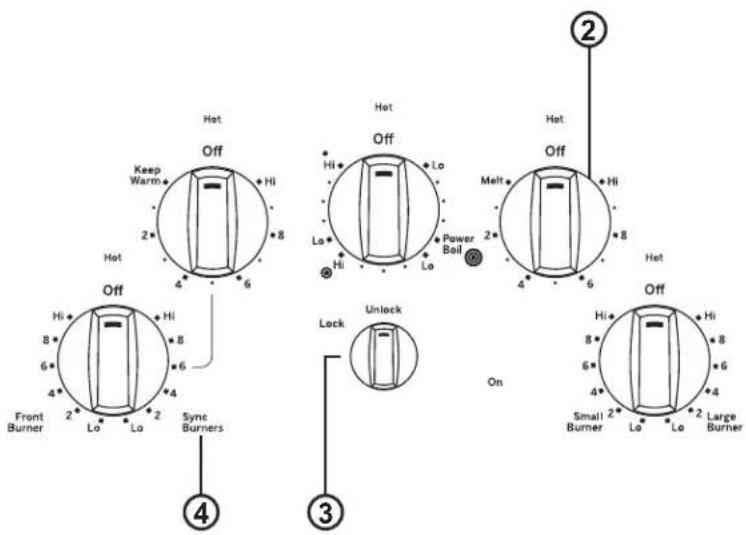
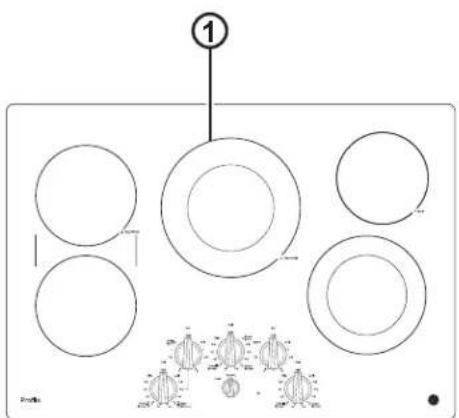
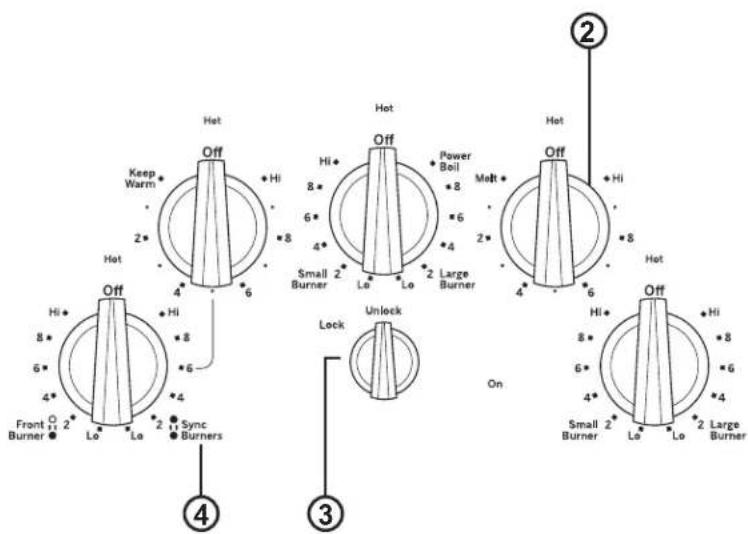
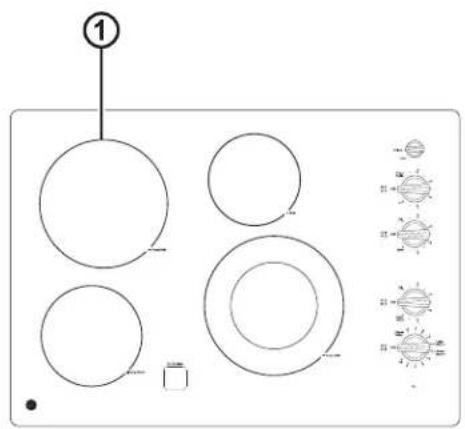
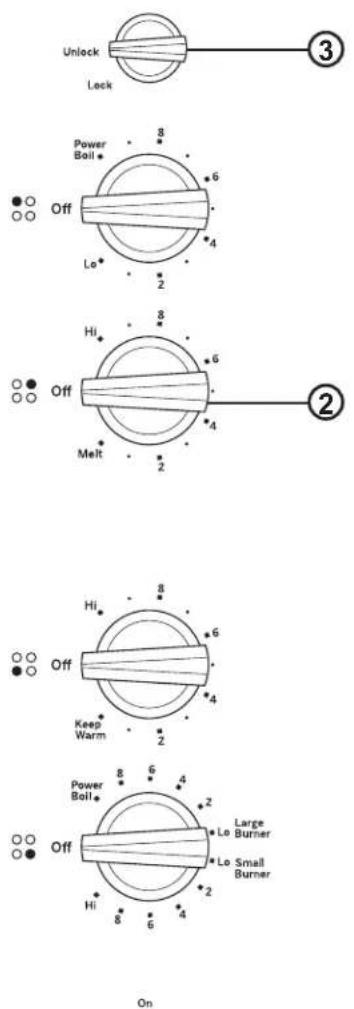
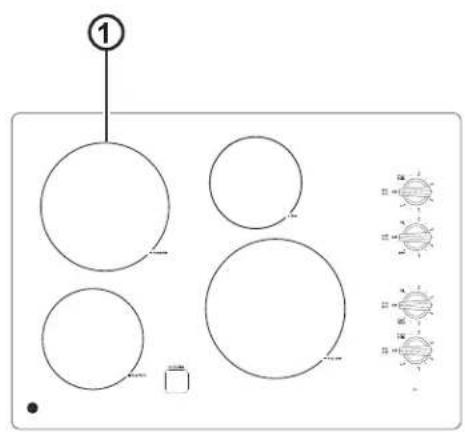
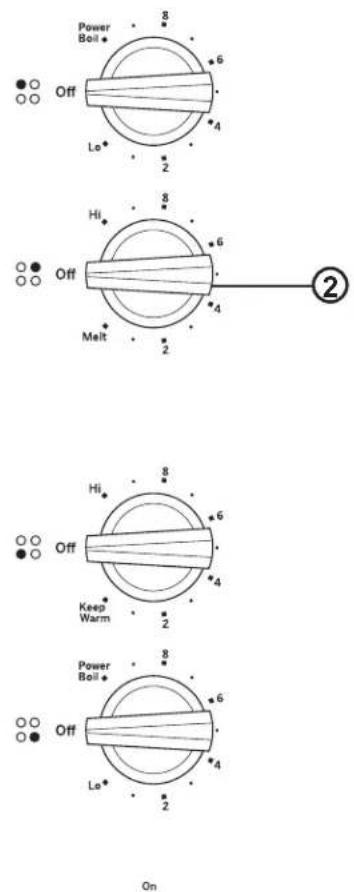
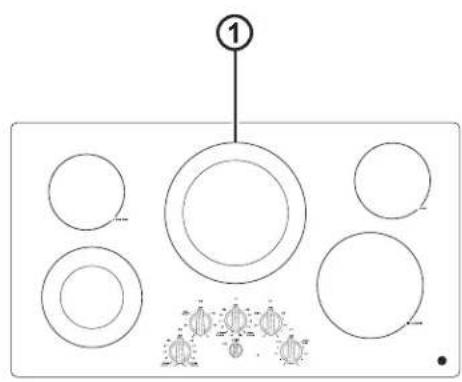
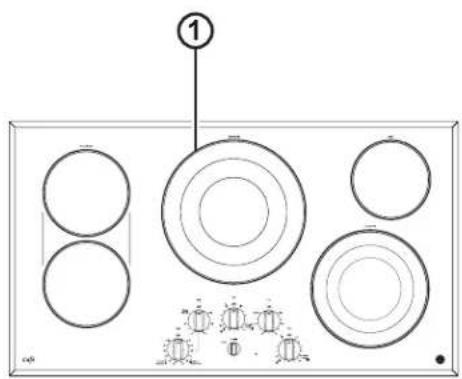
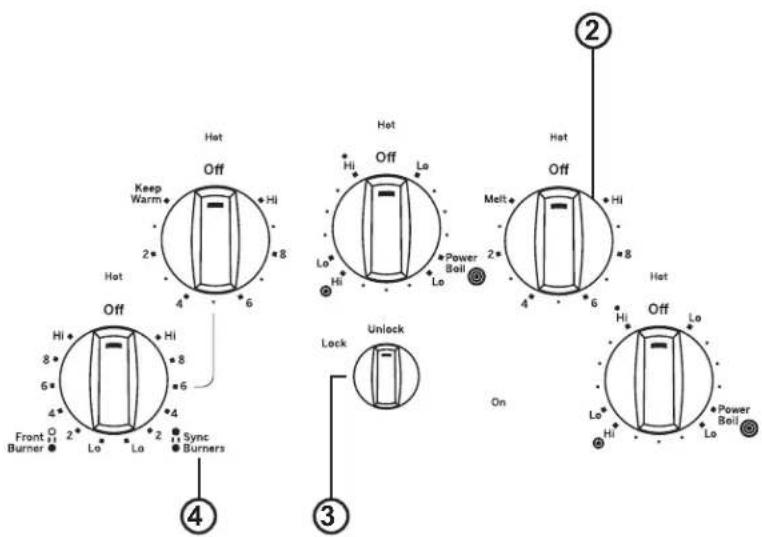
- Cooking Element(s): See page 12.
- Control Knob(s): See page 12.
- Lock: See page 14.
- Sync Burners: See page 13.
Throughout this manual, features and appearance may vary from your model.
text_image
① 1JP3530 cooktop
User Interface Controls
- Cooking Element(s): See page 12.
- Control Knob(s): See page 12.
- Lock: See page 14.
Throughout this manual, features and appearance may vary from your model.
text_image
① 1JP3030 cooktop
User Interface Controls
- Cooking Element(s): See page 12.
- Control Knob(s): See page 12.
Throughout this manual, features and appearance may vary from your model.
text_image
①JP3036 cooktop

text_image
Hot Off Hi Lo Med Hot Off Hi 8* 6* 4 Small Burner 2 Lo Lo 2 Large Burner 2 Melt Off Hi 4 6 Hot Lo 2* 4 Power Ball 6 OnUser Interface Controls
text_image
① ②JP3536 cooktop
text_image
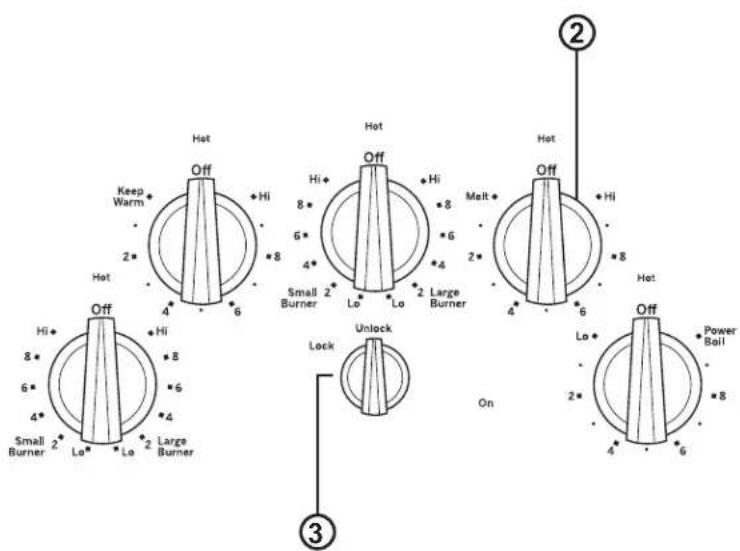
Hot Keep Warm 2* Hot Off 4* 6* Hi 8* 5* 4* Small Burner 2 Lo Lo 2 Large Burner 3 Lock Unlock Malt 2* 4* 6 Hot Off 4* 6 On 2* 4* 6 Power Boil 2* 8* 8 2* 8 ② ③User Interface Controls
- Cooking Element(s): See page 12.
- Control Knob(s): See page 12.
- Lock: See page 14.
- Sync Burners: See page 13.
Throughout this manual, features and appearance may vary from your model.
text_image
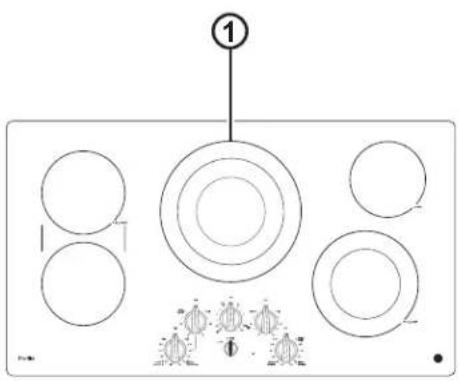
①PP7036 cooktop
text_image
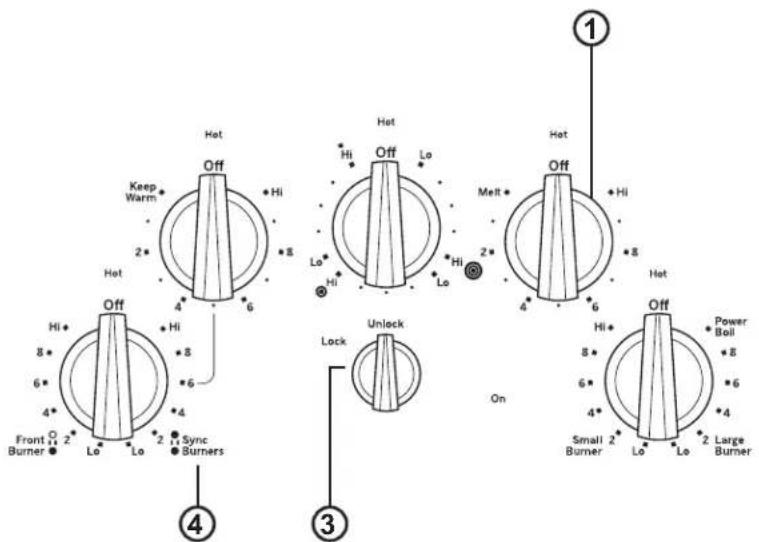
Hot Keep Warm 2* Hot 4* 6 Hi + Hi + 8 Hi + 8 + 6 Front ○ 2* Burner ● Lo Lo Lo Sync ● Burners 4 3 Lock Unlock On 1 Hot Melt 2* 4 6 Hot Hi 8* 6 4* Small 2* Lo Lo 2 Large Burner ● Lo ● Lo ● 2 Power Boil 8* 8 * 6 * 4User Interface Controls
natural_image
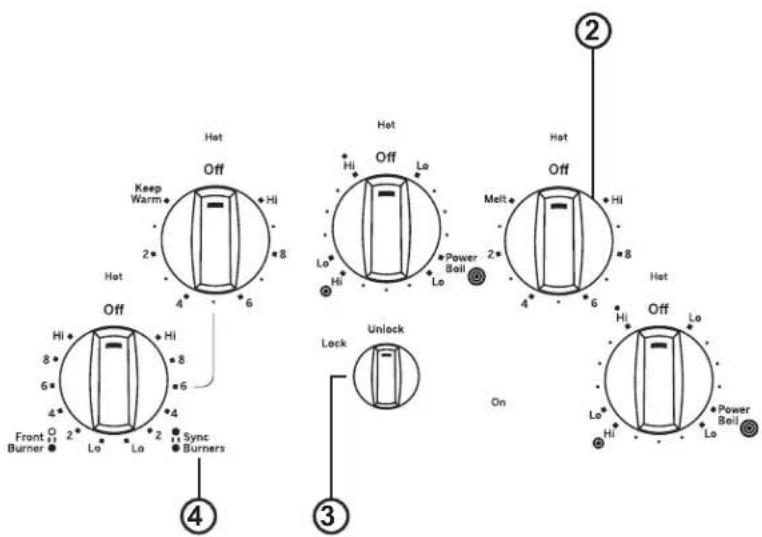
Diagram of a device with circular components and labeled parts (no readable text or symbols)CP9536 cooktop
text_image
Hot Off Keep Warm 2* 8 4 6 Hot Off Hi Hi Hi Hi Hi Hi Hi Hi Hi Hi Hi Hi Hi Hi Hi Hi Hi Hi Hi Hi 4 6 4 2 Lo Lo Lo Lo Lo Lock Unlock Lock On 2 Melt Off Hi Hi Hi Hi Hi Hi Hi Hi Hi 4 6 4 2 Sync Burners 3 Off Lo Power Boil Lo Lo LoUser Interface Controls
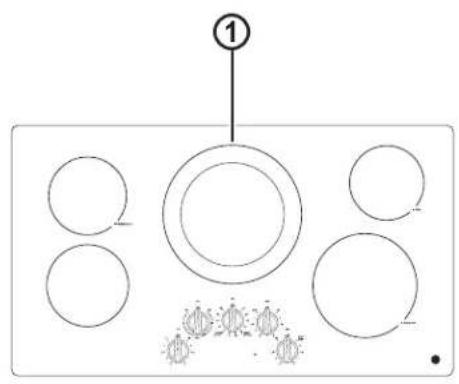
- Cooking Element(s): See page 12.
- Control Knob(s): See page 12.
- Lock: See page 14.
- Sync Burners: See page 13.
Radiant Glass Cooktop
The radiant cooktop features heating units beneath a smooth glass surface.
NOTE: A slight odor is normal when a new cooktop is used for the first time. It is caused by the heating of new parts and insulating materials and will disappear in a short time.
NOTE: This cooktop has Rapid Response surface units. The cooktop will automatically heat up or cool down to the desired power level setting in the quickest time possible. While the surface units are on, you may not see them glow red during certain heat up or cool down conditions.
Cooktop temperatures increase with the number of surface units that are on. With 3 or 4 units turned on, surface temperatures are high. Always use caution when touching the cooktop.
text_image
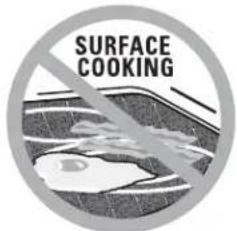
SURFACE COOKINGNever cook directly on the glass. Always use cookware.
text_image
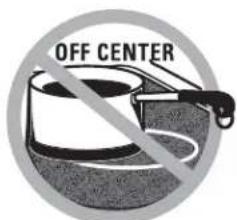
OFF CENTERAlways place the pan in the center of the surface unit you are cooking on.
text_image
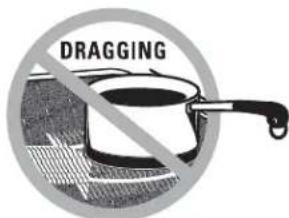
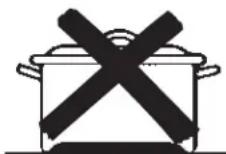
DRAGGINGDo not slide cookware across the cooktop because it can scratch the glass—the glass is scratch-resistant, not scratch proof.
Home Canning Tips
Be sure the canner is centered over the surface unit.
Make sure the canner is flat on the bottom.
To prevent burns from steam or heat, use caution when canning.
Use recipes and procedures from reputable sources. These are available from manufacturers such as Ball ^® and Keri ^® and the Department of Agriculture Extension Service.
Flat-bottomed canners are recommended. Use of water bath canners with rippled bottoms may extend the time required to bring the water to a boil.
The following information will help you choose cookware which will give good performance on glass cooktops.
NOTE: Follow all cookware manufacturer's recommendations when using any type of cookware on the ceramic cooktop.
Recommended
Stainless Steel
Aluminum:
heavy weight recommended
Good conductivity. Aluminum residues sometimes appear as scratches on the cooktop but can be removed if cleaned immediately. Because of its low melting point, thin weight aluminum should not be used.
Copper Bottom:
Copper may leave residues which can appear as scratches. The residues can be removed, as long as the cooktop is cleaned immediately. However, do not let these pots boil dry. Overheated metal can bond to glass cooktops. An overheated copper bottom pot will leave a residue that will permanently stain the cooktop if not removed immediately.
Enamel (painted) on Cast Iron: recommended if bottom of pan is coated
Avoid/Not Recommended
Enamel (painted) on Steel: Heating empty pans can cause permanent damage to cooktop glass. The enamel can melt and bond to the ceramic cooktop.
Glass-ceramic:
Poor performance. Will scratch the surface.
Stoneware:
Poor performance. May scratch the surface.
Cast Iron:
not recommended—unless designed specifically for glass cooktops
Poor conductivity and slow to absorb heat. Will scratch the cooktop surface.
natural_image
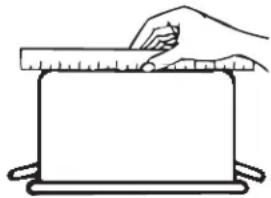
Simple line drawing of a hand holding a ruler above a blank rectangular object (no text or symbols)Check pans for flat bottoms by using a straight edge.
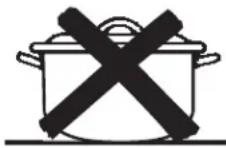
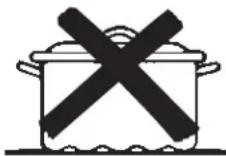
Pans with rounded, curved, ridged or warped bottoms are not recommended.
For Best Results
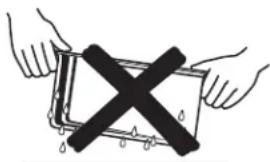
■ Place only dry pans on the surface elements. Do not place lids on the surface elements, particularly wet lids. Wet pans and lids may stick to the surface when cool.
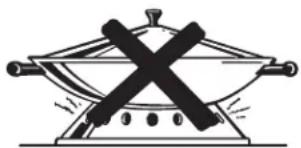
■ Do not use woks that have support rings. This type of wok will not heat on glass surface elements.
■ We recommend that you use only a flat-bottomed wok. They are available at your local retail store. The bottom of the wok should have the same diameter as the surface element to ensure proper contact.
■ Some special cooking procedures require specific cookware such as pressure cookers or deep-fat fryers. All cookware must have flat bottoms and be the correct size.
natural_image
Illustration of two hands holding a rectangular object with a black X symbol crossed out, no text or symbols present.Do not place wet pans on the glass cooktop.
natural_image
Simple line drawing of a pan with crossed black lines indicating resistance or explosion (no text or symbols)Do not use woks with support rings on the glass cooktop.
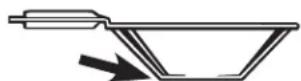
Use flat-bottomed woks on the glass cooktop.
Element Cycling
Surface elements will cycle on and off to maintain the temperature you have selected. All radiant surface elements have a temperature limiter that protects the glass cooktop from getting too hot, this is normal. The temperature limiter may cycle the elements off more frequently if:
■ The pan boils dry.
■ The pan bottom is not flat.
■ The pan is off-center.
■ There is no pan on the element.
Turn Product On/Off
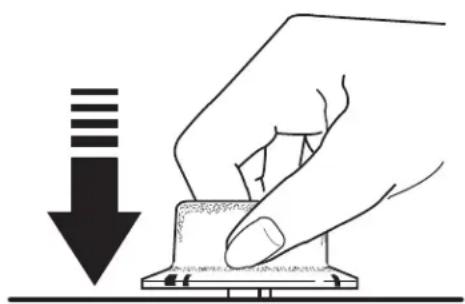
■ Push the knob down and turn in either direction to the setting you want. When the control is in any position other than Off, it may be rotated without pushing it down. You may feel a slight bump when it is rotated through the Lo or Hi positions. You may hear slight clicking sounds during cooking, indicating the control is keeping the power level you set.
A HOT SURFACE indicator light will glow when any radiant element is turned on and will remain on until the surface is cooled to approximately 150^ F.
■ Be sure you turn the control knob to Off when you finish cooking. It will snap into the Off position.
natural_image
Hand pressing down on a small electronic component with a downward arrow (no text or symbols)Operating The Cooking Elements
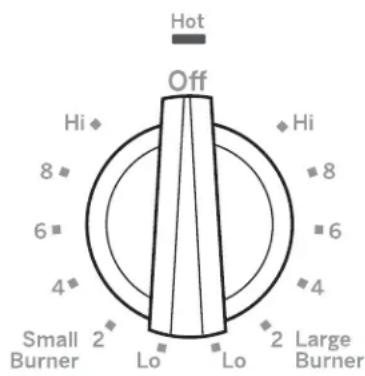
Dual Surface Element
■ To use the small surface element, turn the control knob to the Small Burner settings.
■ To use the large surface element, turn the control knob to the Large Burner settings.
text_image
Hot Off Hi 8 6 4 Small Burner 2 Lo Lo 2 Large Burner Hi 8 6 4Tri-Ring Surface Element
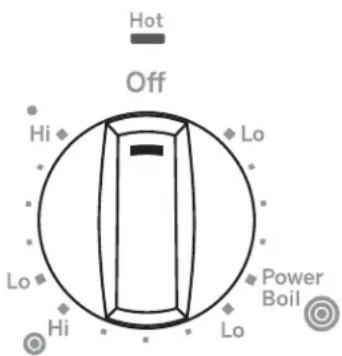
■ To use the large surface element, push and turn the center control knob clockwise to Ⓞ, stopping at the desired setting. This will activate the entire heating area.
■ To use the medium surface element, push and turn the center control knob clockwise to ●stopping at the desired setting. This will activate the medium-size heating area.
■ To use the smallest surface element, push and turn the center control knob clockwise to • stopping at the desired setting. This will activate the smallest, inside heating area.
text_image
Hot Off Hi Lo Power Boil Hi LoHow To Synchronize Left Burners
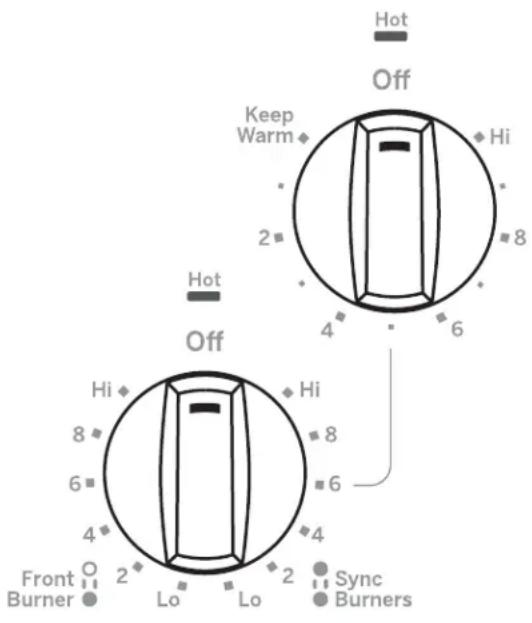
■ Make sure the pan rests flat on the glass cooktop. Choose pans that match the circle/bridge area as closely as possible.
■ To use both left elements at the same setting, push and turn the control knob to Sync Burners, stopping at the desired settings. It is normal to hear a clicking noise when the elements are in sync mode.
■ To use the left front surface element only, push and turn the control knob to B-stopping at the desired settings.
Content just for the following models: CP9530, CP9536 and JP7030, JP7036 – Backlit Knobs.
When using Sync Burner the left rear knob lighting will slightly flicker. The rear element is controlled by the front element and briefly lights the knob as the two elements heat. This is normal.
text_image
Hot Off Keep Warm Hi 2 4 6 8 Hot Off Hi 8 6 4 4 2 Lo Lo Sync BurnersSelecting Cooktop Settings
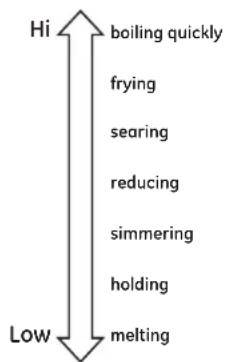
Choose the element/burner that is the best fit to the cookware size. Each element/burner on your new cooktop has its own power levels ranging from low to high. Power level settings necessary for cooking will vary depending on the cookware being used, the type and quantity of food, and the desired outcome.
In general:
■ Use lower settings for melting, holding, and simmering.
■ Use higher settings for heating quickly, searing, and frying.
■ For "Warming Zone" elements intended for holding (some models), use the Med-Hi settings.
When keeping foods warm confirm selected setting is sufficient to maintain food temperature above 140^ F. Larger elements are not recommended for melting. Power boil elements are best suited for boiling water, particularly with pots that are 9" or larger.
text_image
Hi boiling quickly frying searing reducing simmering holding melting LowCooktop Lockout (on some models)
To lock the cooktop and prevent unwanted use, turn the control lock knob to Lock. An indicator light will glow to show that the cooktop is locked. To unlock, press and turn the knob to Unlock. In the locked position, the cooktop will produce an audible sound if any control knob is set to a position other than Off.

Lock
Unlock

Hot Light Indicator
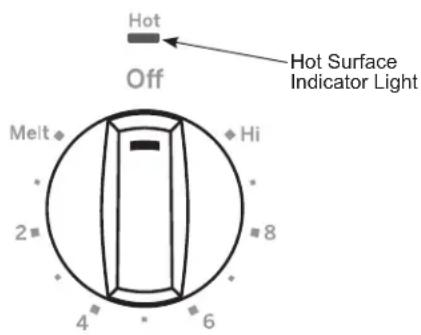
A hot surface indicator light (one for each cooking element) will glow when the glass surface is hot and will remain on until the surface has cooled to temperature that is safe to touch.
text_image
Hot Off Hot Surface Indicator Light Melt Hi 2 8 4 6Using the Griddle
CAUTION
Burn Hazard
- Griddle surfaces may be hot enough to cause burns during and after use. Place and remove the griddle when it is cool and all surface units are off. Use oven mitts if you will touch the griddle while hot. Failure to do so can result in burns.
■ Place and remove the griddle only when griddle is cool and all surface burners are turned Off.
Before using this cookware for the first time, wash it to make sure it is clean. Then season it lightly, rubbing cooking oil onto the cooking surface.
How To Place The Griddle
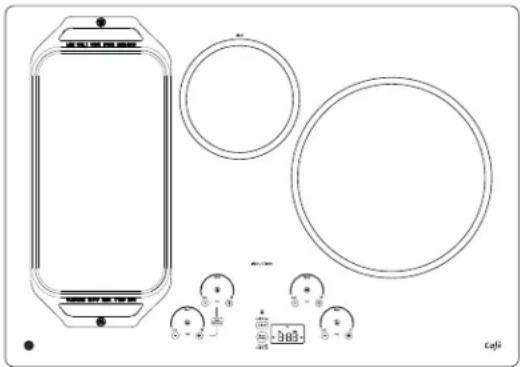
IMPORTANT: Always place and use your griddle at the designated location on the cooktop.
natural_image
Technical line drawing of a device casing with circular components and measurement scales (no text or symbols)IMPORTANT NOTES:
■ Clean the griddle with a sponge and mild detergent in warm water. DO NOT use blue or green scrubbing pads or steel wool.
■ Avoid cooking extremely greasy foods and be careful of grease spillover while cooking.
■ Never place or store any items on the griddle, even when it is not in use. The griddle can become heated when using the surrounding surface units.
■ Avoid using metal utensils with sharp points or rough edges, which might damage the griddle. Do not cut foods on the griddle.
■ Do not use cookware as a storage container for food or oil. Permanent staining and/or craze lines could result.
■ Your griddle will discolor over time with use.
■ Do not clean the griddle in a self-cleaning oven.
■ Always allow the cookware to cool before immersing in water.
■ Do not overheat the griddle.
| Type of Food Cook Setting | |
| Warming Tortillas Med-Lo | |
| Pancakes Med-Lo | |
| Hamburgers Med | |
| Fried Eggs Med-Lo | |
| Breakfast Sausage Links Med | |
| Hot Sandwiches (such as Grilled Cheese) Med-Lo | |
Griddle settings are intended to be a guideline and may need to be adjusted based on individual cooking preferences.
Griddle Operation
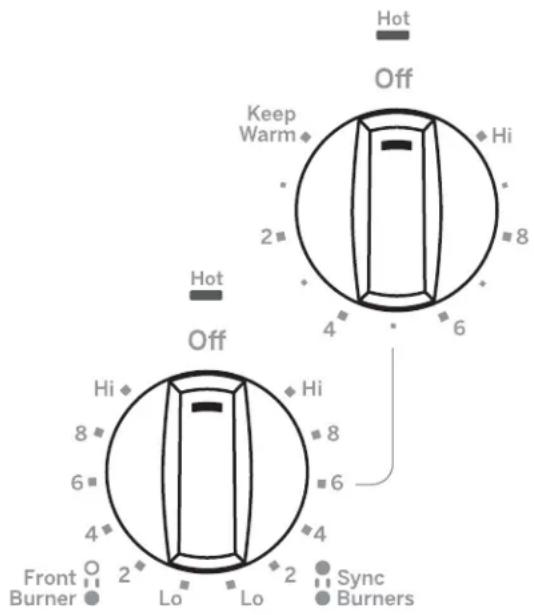
To turn on the surface units for the entire griddle, use the Sync Burner control feature. Touch the Sync Burner pad and then adjust power level to desired setting as described on page 11.
text_image
Hot Off Keep Warm Hi 2 4 6 8 Hot Off Hi 8 6 8 4 4 Front O 2 Lo Lo Sync Bumers BurnerCleaning the Glass Cooktop
Normal Daily Use Cleaning
ONLY use CERAMA BRYTE® Ceramic Cooktop Cleaner on the glass cooktop. Other creams may not be as effective.
To maintain and protect the surface of your glass cooktop, follow these steps:
- Before using the cooktop for the first time, clean it with CERAMA BRYTE® Ceramic Cooktop Cleaner. This helps protect the top and makes cleanup easier.
- Daily use of CERAMA BRYTE Ceramic Cooktop Cleaner will help keep the cooktop looking new.
-
Shake the cleaning cream well. Apply a few drops of CERAMA BRYTE® Ceramic Cooktop Cleaner directly to the cooktop.
-
Use a paper towel or CERAMA BRYTE® Cleaning Pad for Ceramic Cooktops to clean the entire cooktop surface.
- Use a dry cloth or paper towel to remove all cleaning residue. No need to rinse.
NOTE: It is very important that you DO NOT heat the cooktop until it has been cleaned thoroughly.
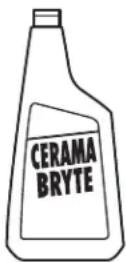
Clean your cooktop after each spill. Use CERAMA BRYTE® Ceramic Cooktop Cleaner.
Burned-On Residue
NOTE: DAMAGE to your glass surface may occur if you use scrub pads other than those recommended.
- Allow the cooktop to cool.
- Spread a few drops of CERAMA BRYTE Ceramic Cooktop Cleaner on the entire burned residue area.
- Using the included CERAMA BRYTE Cleaning Pad for Ceramic Cooktops, rub the residue area, applying pressure as needed.
-
If any residue remains, repeat the steps listed above as needed.
-
For additional protection, after all residue has been removed, polish the entire surface with CERAMA BRYTE® Ceramic Cooktop Cleaner and a paper towel.
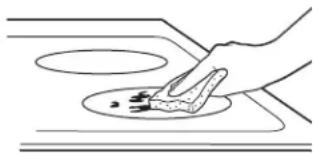
natural_image
Simple line drawing of a hand using a tool to clean or store items on a circular surface (no text or symbols)Use a CERAMA BRYTE® Cleaning Pad for Ceramic Cooktops.
Heavy, Burned-On Residue
- Allow the cooktop to cool.
- Use a single-edge razor blade scraper at approximately a 45^ angle against the glass surface and scrape the soil. It will be necessary to apply pressure to the razor scraper in order to remove the residue.
- After scraping with the razor scraper, spread a few drops of CERAMA BRYTE® Ceramic Cooktop Cleaner on the entire burned residue area. Use the CERAMA BRYTE® Cleaning Pad to remove any remaining residue.
- For additional protection, after all residue has been removed, polish the entire surface with CERAMA BRYTE® Ceramic Cooktop Cleaner and a paper towel.
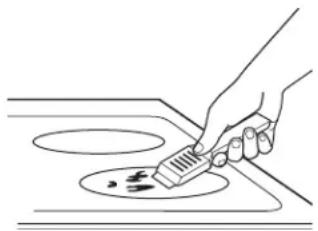
natural_image
Line drawing of a hand using a tool to clean or store food on a stove (no text or symbols)The CERAMA BRYTE® Ceramic Cooktop Scraper and all recommended supplies are available through our Parts Center. See instructions under "Assistance / Accessories" section.
NOTE: Do not use a dull or nicked blade.
Cleaning the Glass Cooktop
Metal Marks and Scratches
- Be careful not to slide pots and pans across your cooktop. It will leave metal markings on the cooktop surface.
These marks are removable using the CERAMA BRYTE® Ceramic Cooktop Cleaner with the CERAMA BRYTE® Cleaning Pad for Ceramic Cooktops.
- If pots with a thin overlay of aluminum or copper are allowed to boil dry, the overlay may leave black discoloration on the cooktop.
This should be removed immediately before heating again or the discoloration may be permanent.
NOTE: Carefully check the bottom of pans for roughness that would scratch the cooktop.
Damage from Sugary Spills and Melted Plastic
Special care should be taken when removing hot substances to avoid permanent damage of the glass surface. Sugary spillovers (such as jellies, fudge, candy, syrups) or melted plastics can cause pitting of the surface of your cooktop (not covered by the warranty) unless the spill is removed while still hot. Special care should be taken when removing hot substances.
Be sure to use a new, sharp razor scraper.
Do not use a dull or nicked blade.
-
Turn off all surface units. Remove hot pans.
-
Wearing an oven mitt:
a. Use a single-edge razor blade scraper to move the spill to a cool area on the cooktop.
b. Remove the spill with paper towels.
- Any remaining spillover should be left until the surface of the cooktop has cooled.
- Don't use the surface units again until all of the residue has been completely removed.
NOTE: If pitting or indentation in the glass surface has already occurred, the cooktop glass will have to be replaced. In this case, service will be necessary.
Cleaning Trim
Do not use a steel wool or green pad; it will scratch the surface.
To clean the stainless steel surface, use warm sudsy water or a stainless steel cleaner or polish. Always wipe the surface in the direction of the grain. Follow the cleaner instructions for cleaning the stainless steel surface. To inquire about purchasing stainless steel appliance cleaner or polish, or to find the location of a dealer nearest you, please call our toll-free number: National Parts Center: 1.800.626.2002 (GEAppliances.com)
Cleaning Knobs
The control knobs may be removed for easier cleaning. Make sure the knobs are in the Off positions and pull them straight off the stems for cleaning. The knobs can be cleaned in a dishwasher or they may also be washed with soap and water. Make sure the insides of the knobs are dry before replacing. Replace the knobs in the Off position to ensure proper placement.
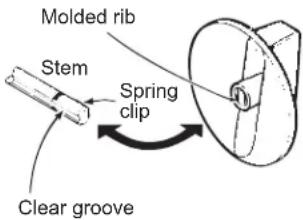
text_image
Molded rib Stem Spring clip Clear grooveTroubleshooting Tips ... Before you call for service
Save time and money! Review the charts on the following pages first and you may not need to call for service. If an error occurs in the control operation, a fault code will flash in the display. Record the error code and call for service.
| Problem Possible Cause | Use What To Do | |
| Surface elements will not maintain a rolling boil or cooking is slow | Improper cookware being used. Use pans that are absolutely flat and match the diameter of the surface unit selected. | |
| Surface elements do not work properly | Cooktop controls improperly set. Check to be sure the correct control is set for the surface element you are using. | |
| Scratches on cooktop glass surface | Incorrect cleaning methods being used. Use recommended cleaning procedures. See the Cleaning the glass cooktop section. | |
| Cookware with rough bottoms being used or coarse particles (salt or sand) were between the cookware and the surface of the cooktop. Cookware has been slid across the cooktop surface. | To avoid scratches, use the recommended cleaning procedures. Make sure bottoms of cookware are clean before use, and use cookware with smooth bottoms. | |
| Areas of discoloration on the cooktop | Food spillovers not cleaned before next use. See the Cleaning the glass cooktop section. | |
| Hot surface on a model with a light-colored glass cooktop. | This is normal. The surface may appear discolored when it is hot. This is temporary and will disappear as the glass cools. | |
| Plastic melted to the surface | Hot cooktop came into contact with plastic placed on the hot cooktop. | See the Glass surface – potential for permanent damage section in the Cleaning the glass cooktop section. |
| Pitting (or indentation) of the cooktop | Hot sugar mixture spilled on the cooktop. Call a qualified technician for replacement. | |
GE Appliances Limited Warranty
GEAppliances.com
All warranty service is provided by our Factory Service Centers, or an authorized Customer Care® technician. To schedule service online, visit us at GEAppliances.com/service, or call GE Appliances at 800.GE.CARES (800.432.2737). Please have your serial number and your model number available when calling for service.
Servicing your appliance may require the use of the onboard data port for diagnostics. This gives a GE Appliances factory service technician the ability to quickly diagnose any issues with your appliance and helps GE Appliances improve its products by providing GE Appliances with information on your appliance. If you do not want your appliance data to be sent to GE Appliances, please advise your technician not to submit the data to GE Appliances at the time of service.
| For the period of GE | Appliances will replace |
| One yearFrom the date of the original purchase | Any part of the cooktop which fails due to a defect in materials or workmanship. During this limited one-year warranty, GE Appliances will provide, free of charge, all labor and in-home service to replace the defective part. |
What GE Appliances will not cover:
■ Service trips to your home to teach you how to use the product.
■ Improper installation, delivery or maintenance.
■ Failure of the product if it is abused, misused, modified or used for other than the intended purpose or used commercially.
■ Damage to the glass cooktop caused by use of cleaners other than the recommended cleaning creams and pads.
- Damage to the glass cooktop caused by hardened spills of sugary materials or melted plastic that are not cleaned according to the directions in the Owner's Manual.
■ Replacement of house fuses or resetting of circuit breakers.
■ Damage to the product caused by accident, fire, floods or acts of God.
■ Incidental or consequential damage caused by possible defects with this appliance.
■ Damage caused after delivery.
■ Product not accessible to provide required service.
■ Service to repair or replace light bulbs, except for LED lamps.
EXCLUSION OF IMPLIED WARRANTIES
Your sole and exclusive remedy is product repair as provided in this Limited Warranty. Any implied warranties, including the implied warranties of merchantability or fitness for a particular purpose, are limited to one year or the shortest period allowed by law.
This limited warranty is extended to the original purchaser and any succeeding owner for products purchased for home use within the USA. If the product is located in an area where service by a GE Appliances Authorized Servicer is not available, you may be responsible for a trip charge or you may be required to bring the product to an Authorized GE Appliances Service location for service. In Alaska, the limited warranty excludes the cost of shipping or service calls to your home.
Some states do not allow the exclusion or limitation of incidental or consequential damages. This limited warranty gives you specific legal rights, and you may also have other rights which vary from state to state. To know what your legal rights are, consult your local or state consumer affairs office or your state's Attorney General.
Warrantor: GE Appliances, a Haier company
Louisville, KY 40225
Warrantor in Canada: MC Commercial
Burlington, ON, L7R 5B6
Extended Warranties: Purchase a GE Appliances extended warranty and learn about special discounts that are available while your warranty is still in effect. You can purchase it online anytime at
GEAppliances.com/extended-warranty
or call 800.626.2224 during normal business hours. GE Appliances Service will still be there after your warranty expires.
Looking For Something More?
GE Appliances offers a variety of accessories to improve your cooking and maintenance experiences!
Refer to the Consumer Support page for phone numbers and website information.
The following products and more are available:
Parts
Griddle
Stainless Steel Cleaner and Polisher
Consumer Support
GE Appliances Website
Have a question or need assistance with your appliance? Try the GE Appliances Website 24 hours a day, any day of the year! You can also shop for more great GE Appliances products and take advantage of all our on-line support services designed for your convenience. In the US: GEAppliances.com In Canada: GEAppliances.ca
Register Your Appliance
Register your new appliance on-line at your convenience! Timely product registration will allow for enhanced communication and prompt service under the terms of your warranty, should the need arise. You may also mail in the pre-printed registration card included in the packing material.
In the US: GEAppliances.com/register
In Canada: Prodsupport.mabe.ca/crm/Products/ProductRegistration.aspx
Schedule Service
Expert GE Appliances repair service is only one step away from your door. Get on-line and schedule your service at your convenience any day of the year.
In the US: GEAppliances.com/service or call 800.432.2737 during normal business hours.
In Canada: GEAppliances.ca/en/support/service-request or call 800.561.3344
Extended Warranties
Purchase a GE Appliances extended warranty and learn about special discounts that are available while your warranty is still in effect. You can purchase it on-line anytime. GE Appliances Services will still be there after your warranty expires.
In the US: GEAppliances.com/extended-warranty or call 800.626.2224 during normal business hours.
In Canada: GEAppliances.ca/en/support/purchase-extended-warranty or call 800.290.9029
Remote Connectivity
For assistance with wireless network connectivity (for models with remote enable), visit our website at GEAppliances.com/connect or call 800.220.6899 in the US only.
Parts and Accessories
Individuals qualified to service their own appliances can have parts or accessories sent directly to their homes (VISA, MasterCard and Discover cards are accepted). Order on-line today 24 hours every day.
In the US: GEApplianceparts.com or by phone at 877.959.8688 during normal business hours.
Instructions contained in this manual cover procedures to be performed by any user. Other servicing generally should be referred to qualified service personnel. Caution must be exercised, since improper servicing may cause unsafe operation.
Customers in Canada should consult the yellow pages for the nearest Mabe service center, visit our website at GEAppliances.ca/en/products/parts-filters-accessories or call 800.661.1616.
Contact Us
If you are not satisfied with the service you receive from GE Appliances, contact us on our Website with all the details including your phone number, or write to:
In the US: General Manager, Customer Relations | GE Appliances, Appliance Park | Louisville, KY 40225
GEAppliances.com/contact
In Canada: Director, Consumer Relations, Mabe Canada Inc. | Suite 310, 1 Factory Lane | Moncton, N.B. E1C 9M3
GEAppliances.ca/en/contact-us
Radiante TABLE DE CUISSON
CONSIGNES DE SÉCURITÉ ..... 3
UTILISATION DE LA TABLE DE CUISSON
text_image
Diagram showing a circular layout with labeled components and a central circle, possibly representing a mechanical or electronic component.Table de cuisson JP3036
text_image
Hot Off Lo Hi Med Hot Off Hi 8 6* 4 Small Burner 2 Lo Lo 2 Large Burner 2 Melt Off Hi 8 4 6 Hot Lo 2* 4 Power Boil 6 Ontext_image
Diagram of a device with labeled components and circular elements, including a numbered point and symbolic icons below.Table de cuisson PP7036
text_image
1 2 3 4 5 6 7 8 9 10 11 12 13 14 15 16 17 18 19 20 21 22 23 24 25 26 27 28 29 30 31 32 33 34 35 36 37 38 39 40 41 42 43 44 45 46 47 48 49 50 51 52 53 54 55 56 57 58 59 60 61 62 63 64 65 66 67 68 69 70 71 72 73 74 75 76 77 78 79 80 81 82 83 84 85 86 87 88 89 90 91 92 93 94 95 96 97 98 99 100natural_image
Technical diagram of a mechanical assembly with circular components and mounting holes (no text or labels)Table de cuisson CP9536
text_image
Hot Off Keep Warm 2* 8 4 6 Hot Off Hi Hi Hi Hi Hi Hi Hi Hi Hi Hi Hi Hi Hi Hi Hi Hi Hi Hi Hi 4 6 4 2 Lo Lo Lo Lo Lo Lock Unlock Lock On 2 Melt Off Off Hi Hi Hi Hi Hi Hi Hi Hi 4 6 4 2 Sync Burners 3 Off Lo Power Boil Lo Power Boil Lonatural_image
Simple line drawing of a hand holding a ruler above a blank rectangular object (no text or symbols)natural_image
Illustration of two hands holding a rectangular object with a black X symbol crossed out, no text or symbols present.natural_image
Simple line drawing of a pan with crossed x-shaped bars on top (no text or symbols)natural_image
Hand pressing down on a small component with a downward arrow and three horizontal stripes (no text or symbols)text_image
Hot Off Hi Lo Power Boil Hi Lonatural_image
Line drawing of a hand using a tool to clean or store items on a surface (no text or symbols)natural_image
Line drawing of a hand using a brush to clean or store food on a stove (no text or symbols)What GE Appliances will not cover:
Garant : GE Appliances, a Haier company
Louisville, KY 40225
Burlington, ON, L7R 5B6
GEAppliances.com/extended-warranty
Au Canada : Prodsupport.mabe.ca/crm/Products/ProductRegistration.aspx
Au Canada : GEAppliances.ca/en/support/service-request ou composez le 800.561.3344
Prolongation de garantie
Au Canada : GEAppliances.ca/en/support/purchase-extended-warranty ou composez le 800.290.9029
GEAppliances.com/contact
Au Canada : Director, Consumer Relations, Mabe Canada Inc. | Suite 310, 1 Factory Lane | Moncton, N.B. E1C 9M3
GEAppliances.ca/en/contact-us
Radiante ESTUFA
text_image
Diagram showing a circular layout with labeled components and a central circle, possibly representing a mechanical or electronic component.text_image
Diagram of a device with labeled components and circular elements, including a numbered point and symbolic icons below.natural_image
Technical diagram of a mechanical assembly with circular components and mounting holes (no text or labels)natural_image
Simple line drawing of a hand using a ruler to cut a rectangular object (no text or symbols)natural_image
Illustration of two hands holding a rectangular object with a black X symbol crossed out, no text or symbols present.natural_image
Simple line drawing of a pan with two crossed x-marks on top, no text or symbols presentnatural_image
Hand pressing down on a mechanical component with a downward arrow and three horizontal stripes (no text or symbols)text_image
Hot Off Hi Lo Power Boil Hi Lonatural_image
Technical diagram of a device with circular components and measurement scales (no readable text or symbols)NOTAS IMPORTANTES:
natural_image
Line drawing of a hand using a tool to clean or store food on a surface (no text or symbols)natural_image
Line drawing of a hand using a brush to clean or paint on a stove (no text or symbols)Louisville, KY 40225
Burlington, ON, L7R 5B6
GEAppliances.com/extended-warranty
En Canadá: Director, Consumer Relations, Mabe Canada Inc. | Suite 310, 1 Factory Lane | Moncton, N.B. E1C 9M3 GEAppliances.ca/en/contact-us