
RVRF3361SS - Fridge VIKING - Free user manual and instructions
Find the device manual for free RVRF3361SS VIKING in PDF.


| Product Type | French door refrigerator with bottom freezer |
| Brand | Viking |
| Model | RVRF3361SS |
| Power supply | 115 V AC, 60 Hz, 15 A |
| Ice production | 0.9 to 1.1 kg per 24h |
| Ice bin capacity | 3.2 kg |
| Water filter | Replacement cartridge RWFVRF1 (capacity 473 L, max pressure 100 psi) |
| Air filter | Replacement cartridge RAFVRF |
| Interior lighting | LED, maintenance-free |
| Control panel | TruTouch touchscreen |
| Special functions | Sabbath mode, Energy saver, Quick freeze, Fast Ice |
| Alarms | Door ajar, high temperature, power failure |
| Cold Zone drawer | Adjustable temperature from -2°C to +3°C |
| Defrost | Automatic |
| Cleaning and maintenance | Soapy water or baking soda; avoid abrasive cleaners |
| Finish | Stainless steel |
| Installation type | Freestanding or built-in |
| Warranty | 1 year full, 6 years sealed refrigeration system, 12 years limited |
Frequently Asked Questions - RVRF3361SS VIKING
User questions about RVRF3361SS VIKING
0 question about this device. Answer the ones you know or ask your own.
Ask a new question about this device
Download the instructions for your Fridge in PDF format for free! Find your manual RVRF3361SS - VIKING and take your electronic device back in hand. On this page are published all the documents necessary for the use of your device. RVRF3361SS by VIKING.
USER MANUAL RVRF3361SS VIKING
Please read and save this guide
We hope you will enjoy and appreciate the care and attention we have put into every detail of your new, state-of-the-art refrigerator.
Your appliance is designed to offer years of reliable service. This Use and Care Guide will provide you with the information you need to become familiar with your refrigerator's care and operation.
We appreciate your choice of our refrigerator and hope that you will again select our products for your other major appliance needs.

NOTE
Registering your product with Viking Range, LLC enhances our ability to serve you. You can register online at www.vikingrange.com or by sending your Product Registration Card in the mail.
Questions?
Your complete satisfaction is our ultimate goal. If you have any questions or comments about this product, please contact the dealer from whom you purchased it, or contact our Consumer Support Center at 1-888-845-4641.
For online support and product information visit www. vikingrange.com in the US or brigade.ca in Canada
Table of contents
Finding Information 2
Safety. 3
Feature Overview 5
Installation 6
Removing the Doors 9
Installing the Door Handles 11
Connecting the Water Supply 12
Controls. 13
Automatic Ice Maker 15
Storage Features 16
Storing Food and Saving Energy 20
Normal Operating Sounds & Sights 21
Changing the Water and Air Filters 22
Care and Cleaning 24
Solutions to Common Problems 26
Service Information 29
Warranty 30
Installation Checklist
Doors
□ Handles are secure and tight
Door seals completely to cabinet on all sides
Leveling
Refrigerator is level, side-to-side and tilted 1/4'' (6 mm) front-to-back
Toe grille is properly attached to refrigerator
Cabinet is sitting solid on all corners
Electrical Power
House power turned on
Refrigerator plugged in
Ice Maker
House water supply connected to refrigerator
No water leaks present at all connections - recheck in 24 hours
Ice maker is turned ON
- Front filter must be flush with filter housing (select models)
Final Checks
Shipping material removed
Fresh food and freezer temperatures set
Crisper humidity controls set
Registration card sent in
Important safety instructions
Safety Precautions
Do not attempt to install or operate your unit until you have read the safety precautions in this manual. Safety items throughout this manual are labeled with a Danger, Warning, or Caution based on the risk type.
Definitions
This is the safety alert symbol. It is used to alert you to potential personal injury hazards. Obey all safety messages that follow this symbol to avoid possible injury or death.

DANGER
DANGER indicates an imminently hazardous situation which, if not avoided, will result in death or serious injury.

WARNING
WARNING indicates a potentially hazardous situation which, if not avoided, could result in death or serious injury.

CAUTION
CAUTION indicates a potentially hazardous situation which, if not avoided, may result in minor or moderate injury.

IMPORTANT
Indicates installation, operation, or maintenance information which is important but not hazard-related.
General Safety

WARNING
Please read all safety instructions before using your new refrigerator.
- Do not store or use gasoline or other flammable liquids near this or any other appliance. Read product labels for warnings regarding flammability and other hazards.
- Do not operate the refrigerator in the presence of explosive fumes.
- Avoid contact with any moving parts of the automatic ice maker.
- Remove all staples from the carton to avoid injury. Staples can also damage fi nishes if they come in contact with other appliances or furniture.
Child Safety
Packing Materials:
- Packing cartons covered with rugs, bedspreads, plastic sheets, or stretch wrap may become airtight chambers and can quickly cause suffocation.
- Destroy or recycle the product's carton, plastic bags, and any other exterior wrapping material immediately after the refrigerator is unpacked. Children should never play with these items.
Child Entrapment and Suffocation:
- These problems are not limited to the past. Whether junked, abandoned, or temporarily stored (even for a few hours), unattended refrigerators and freezers are dangerous. Please take the precautions listed below.
Proper Disposal of Refrigerators/Freezers
We strongly encourage responsible appliance recycling/ disposal methods. Check with your utility company or visit www.energystar.gov/recycle for more information on recycling your old refrigerator.
Before you recycle or dispose of your old refrigerator/freezer:
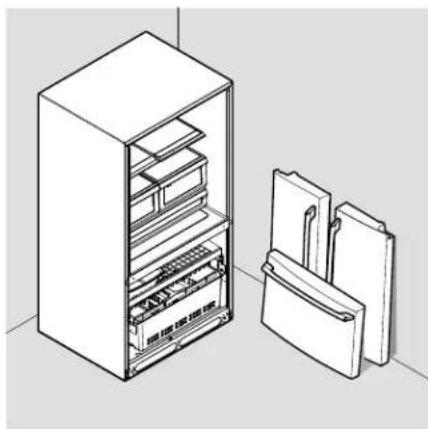
- Remove the doors.
- Leave the shelves and baskets in place so children may not easily climb inside.
- Have refrigerant and compressor oil removed by a qualifi ed service technician.

IMPORTANT
CFC/HCFC DISPOSAL
Your old refrigerator may have a cooling system that used CFCs or HCFCs (chlorofl uorocarbons or hydrochlorofl uorocarbons). CFCs and HCFCs are believed to harm stratospheric ozone if released to the atmosphere. Other refrigerants may also cause harm to the environment if released to the atmosphere.
If you are throwing away your old refrigerator, make sure the refrigerant is removed for proper disposal by a qualified technician. If you intentionally release refrigerant, you may be subject to fines and imprisonment under provisions of environmental legislation.
Electrical information

WARNING
You must follow these guidelines to ensure that your refrigerator's safety mechanisms are operating correctly.
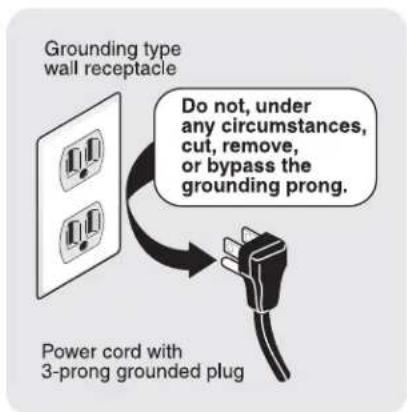
- The refrigerator must be plugged into its own dedicated 115 Volt, 60Hz , AC-only non-GFCI electric outlet. The power cord of the appliance is equipped with a three-prong grounding plug for your protection against electrical shock hazards. It must be plugged directly into a properly grounded three-prong receptacle. The receptacle must be installed in accordance with local codes and ordinances. Consult a qualified electrician. Do not use an extension cord or adapter plug.
- If the power cord is damaged, it should be replaced by the manufacturer, service technician, or a qualified person.
- Never unplug the refrigerator by pulling on the power cord. Always grip the plug firmly and pull straight out from the receptacle to prevent damaging the power cord.
- To avoid electrical shock, unplug the refrigerator before cleaning and before replacing a light bulb or LED light.
- Performance may be affected if the voltage varies by 10% or more. Operating the refrigerator with insufficient power can damage the compressor. Such damage is not covered under your warranty.
- Do not plug the unit into an outlet controlled by a wall switch or pull cord to prevent the refrigerator from being turned off accidentally.

IMPORTANT
To turn off power to your refrigerator, unplug the power cord from the wall outlet.
Understanding features and terms
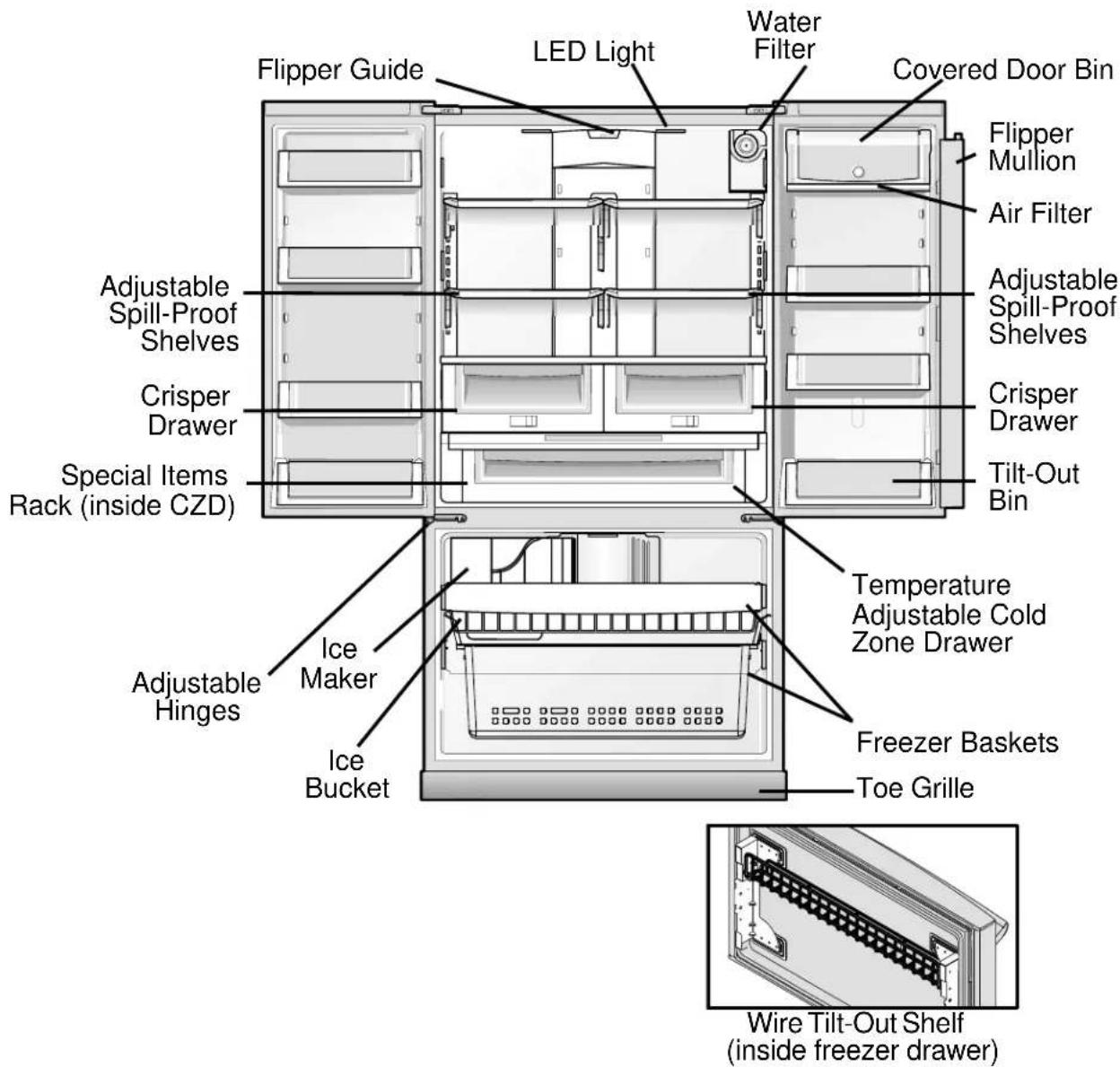
Your refrigerator is designed for optimal convenience and storage flexibility. The illustration below is provided to assist you with familiarizing yourself with product features and terminology.

NOTE
Features may vary according to model. Model is shown without freezer drawer cover.

IMPORTANT
Features not included with your refrigerator can be purchased at www.vikingrange.com in the US or brigade.ca in Canada or by calling 1-888-845-4641.
Required Tools
You will need the following tools:
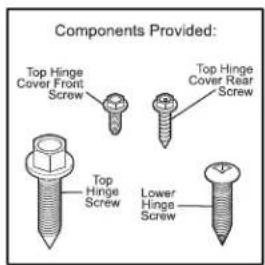
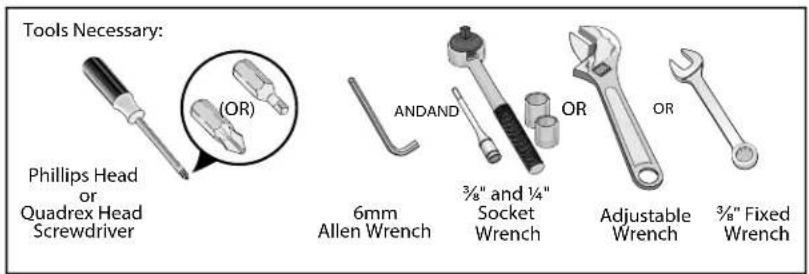
This Use & Care Guide provides general installation and operating instructions for your model. We recommend using a service or kitchen contracting professional to install your refrigerator. Use the refrigerator only as instructed in this Use & Care Guide. Before starting the refrigerator, follow these important first steps.
Location
- Choose a place that is near a grounded, non-GFCI, electrical outlet. Do Not use an extension cord or an adapter plug.
- If possible, place the refrigerator out of direct sunlight and away from the range, dishwasher, or other heat sources.
- The refrigerator must be installed on a floor that is level and strong enough to support a fully loaded refrigerator.
- Consider water supply availability for models equipped with an automatic ice maker.
Installation

CAUTION
DO NOT install the refrigerator where the temperature will drop below 55^ (13^) or rise above 110^ (43^) . The compressor will not be able to maintain proper temperatures inside the refrigerator.
DO NOT block the toe grille on the lower front of your refrigerator. Suffi cients air circulation is essential for the proper operation of your refrigerator.
- Allow the following clearances for ease of installation, proper air circulation, and plumbing and electrical connections:
Sides & Top
318 inch (9.5 mm)
Back 1 inch (25.4 mm)
Door opening

NOTE
If your refrigerator is placed with the door hinge against a wall, you may have to allow additional space so the door can be opened wider.

NOTE
The refrigerator doors are designed to shut by themselves within a 20 degree opening.
Your refrigerator should be positioned to allow easy access to a counter when removing food. For best use of refrigerator drawers and freezer baskets, the refrigerator should be in a position where both can be fully opened.

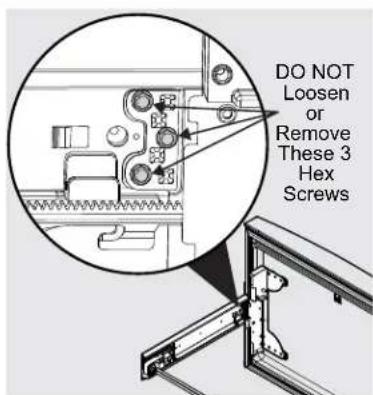
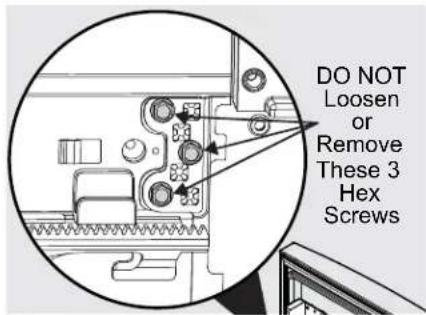
CAUTION
Do Not loosen or remove these (3) hex head screws.
Level Refrigerator & Adjust Doors (if necessary)
Guidelines for final positioning of your refrigerator:
- All four corners of the cabinet must rest firmly on the floor.
- The sides should tilt 14 inch (6 mm) from front to back (to ensure that doors close and seal properly).
- Doors should align with each other and be level.
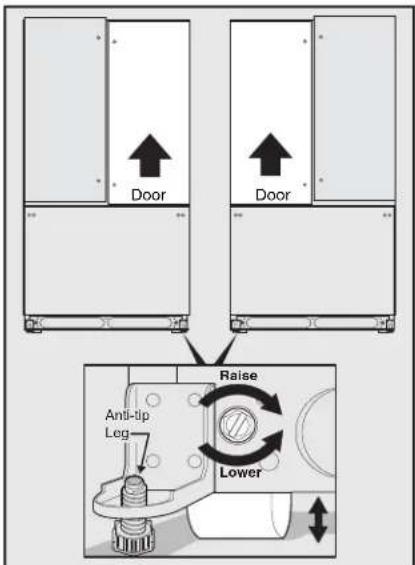
Most of these conditions can be met by raising or lowering the adjustable front rollers.
To level the cabinet using the front rollers:
- Slightly open freezer drawer if the toe grill is installed. Lift the toe grille and gently pull forward.
- Make initial cabinet adjustments by using the front roller height adjusting screws. Use a 3/8 inch socket wrench to turn the adjustment screws (1 per side).
To raise: turn adjustment screw clockwise.
To lower: turn adjustment screw counterclockwise.
- Ensure both doors are bind-free with their seals touching the cabinet on all four sides and that cabinet is stable.
- After unit is leveled, lower anti-tip leg using a 3/8 inch socket wrench until it firmly contacts the floor.
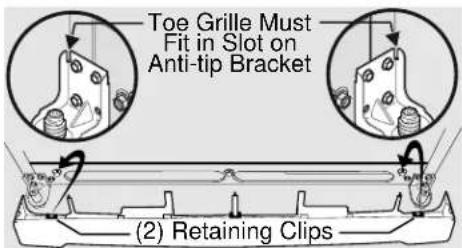
- Install the toe grill by fitting into place.
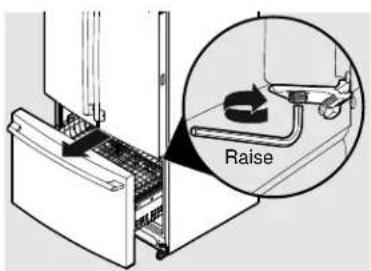
To make final door height adjustments:
- Open freezer drawer to make lower hinge visible.
- Insert 6mm Allen wrench into the shaft of the lower hinge.
- Adjust the height by turning clockwise or counterclockwise. Turning clockwise will lower the door. Turning counterclockwise will raise the door. Default setting is to the lowest height when you receive your appliance
To adjust the flipper mullion:
- Loosen the screw located on the flipper mullion hinge.
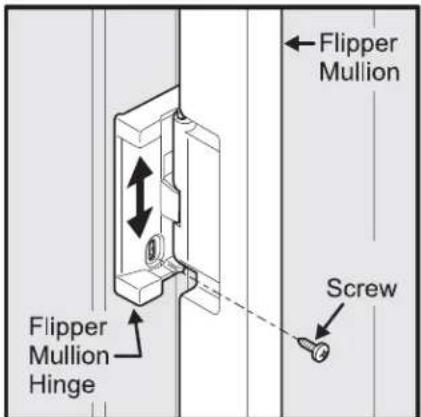
Adjusting Flipper Mullion Screw
- Adjust fl iper mullion height. For proper connection with the fl iper mullion guide, there should be a separation about the thickness of a coin (0.060 inches, or 1.5mm ) between the guide and fl iper mullion.
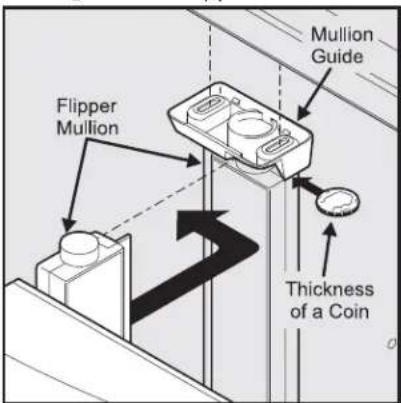
Adjusting Flipper Mullion Height
- Re-tighten screw.
Shelf features (Select Models)

CAUTION
Shelves must be removed prior to moving the refrigerator.

CAUTION
To avoid injury from breakage, handle tempered glass shelves carefully.

NOTE
Features may vary according to model.
Your refrigerator includes glass shelves that are designed to catch and hold accidental spills.
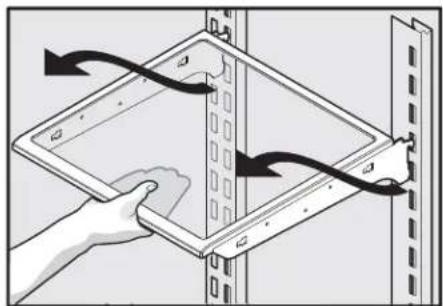
You can easily adjust shelf positions in the fresh food compartments to suit your needs. The shelves have mounting brackets that attach to slotted supports at the rear of each compartment.
To change the position of a shelf:
- Before adjusting a shelf, remove all food.
- Lift the front edge up and pull the shelf out.
- Replace by inserting the mounting bracket hooks into the desired support slots.
- Lower the shelf and lock into position.
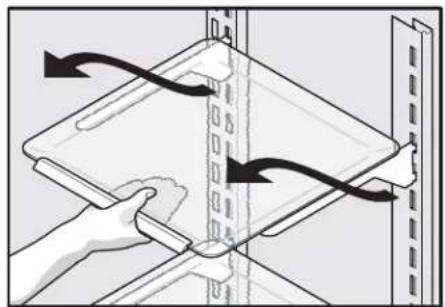
Full Custom-DesignTM Shelf
or
Reposition the Air Seal
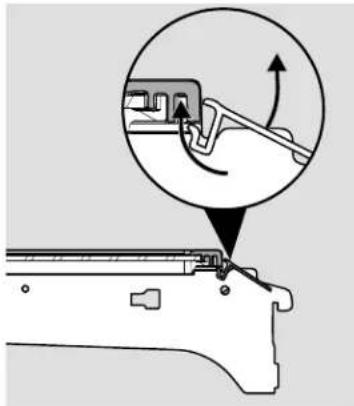
(Slide-out Shelves)
- Remove air seal by pushing down on the flap with a downward rotation.
- Position the air seal towards the outside end of the shelf to avoid the air tower when shelf is pushed back into place.
- Install seal by sliding lower tab of seal up into bottom rear slot of shelf with seal at a downward angle then pulling up on seal fl ap until seal sits snug on back of shelf and fl ap sits at about a 10 degree angle from shelf surface.
Reposition the Air Seal
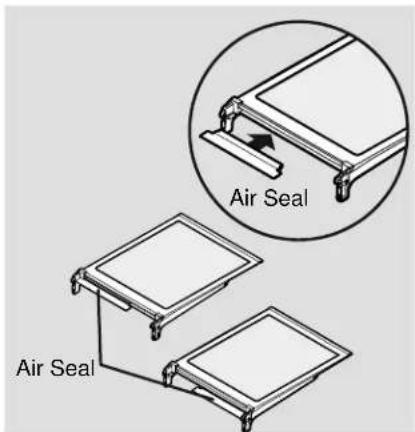
(Channel in rear)
- Remove air seal by pushing seal straight back.
- Position the air seal towards the outside edge of the shelf to avoid the air tower when shelf is pushed back into place.
- Install seal by sliding the open channel end of the seal onto back edge of shelf until seal sits snug on back of shelf and fl ap sits at about a 10 degree angle from shelf surface.
Removing the Doors
Getting through narrow spaces
If your refrigerator will not fit through an entrance area, before installing the door handles, you can remove the doors. Check first by measuring the entrance.
To prepare for removing the doors:
- Make sure the electrical power cord is unplugged from the wall outlet.
- Open the freezer drawer and remove the toe grille (see "Installation" section).
- Remove any food from the door shelves and close the doors.
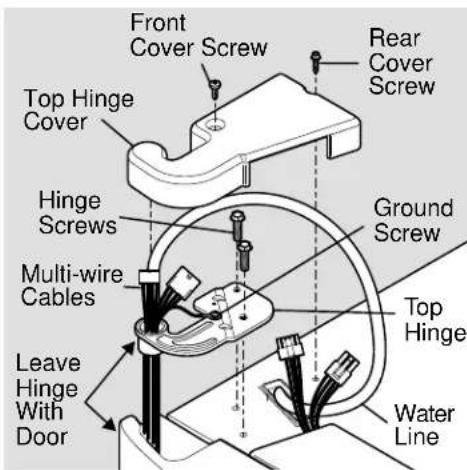
To remove the top hinge covers:
- Remove the two screws from each cover over the top door hinges.
- Lift inside edge of hinge cover and tilt back.
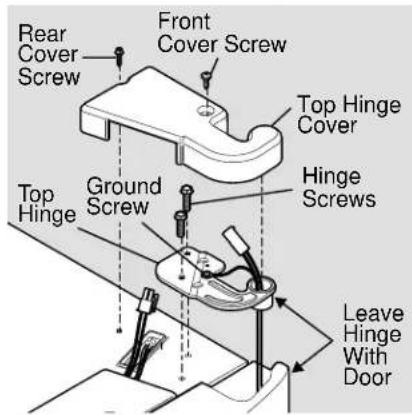

NOTE
DO NOT remove the ground screw from hinge.
To remove the refrigerator doors:
- Trace lightly around the door's top hinges with a pencil. This makes reinstallation easier.
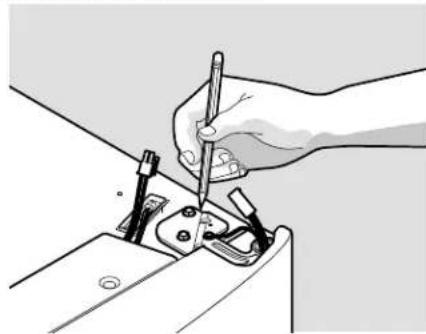
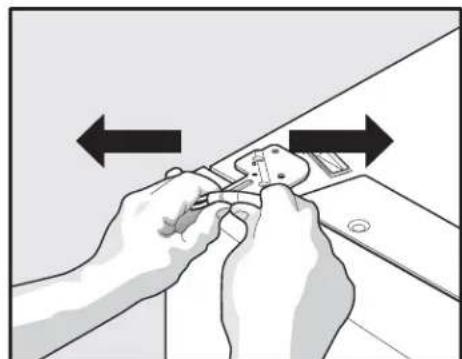
- Disconnect the harness by grasping both sides of the connector firmly, depress the latch, and pull apart. Remove the two screws from the top hinge. Lift the door off of the bottom hinge and set it aside.
- Detach the water tube from the connector located behind the refrigerator and pull the tube back out to the front of the unit. The connector releases when you press inward on the outer sleeve while pushing the tube toward the connector then while continuing to hold in the sleeve, pull the tube away.

NOTE
Use care while pulling the water tube from the unit to be sure that you do not kink the tube.
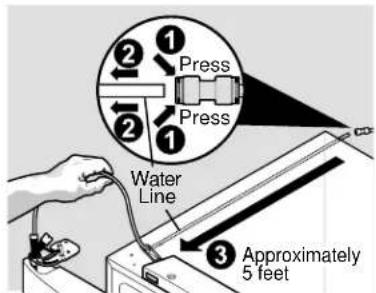

NOTE
You will be pulling approximately five feet of water tube from the back of the refrigerator.
Removing the Doors
- Unscrew the three lower hinge screws and slide the hinge inwards.
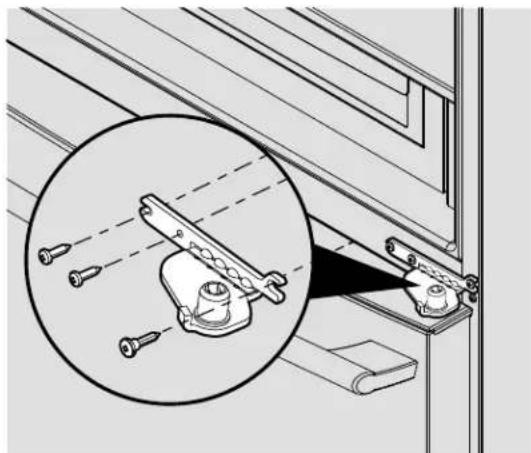
Lower Hinge Removal
To reinstall the refrigerator doors:
Reverse the above steps.

NOTE
Upon replacement, the tube needs to be fully inserted up the marking line.
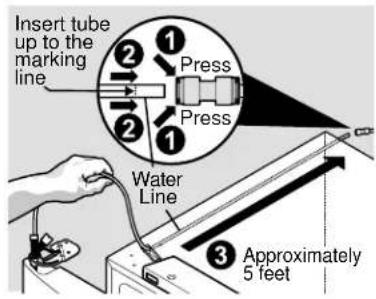

NOTE
When reinserting the water tube and replacing the top hinge cover, be sure that you do not kink the tube.
Once both doors are in place, ensure they are aligned with each other and level (Please see the Installation section for more details), and replace the top hinge cover.
Removal and Installation of lower Freezer Drawer

CAUTION
Drawer is heavy. Use caution when lifting
Removing Freezer Drawer:
- Remove (4) hex head drawer screws.
- Lift up drawer to remove.
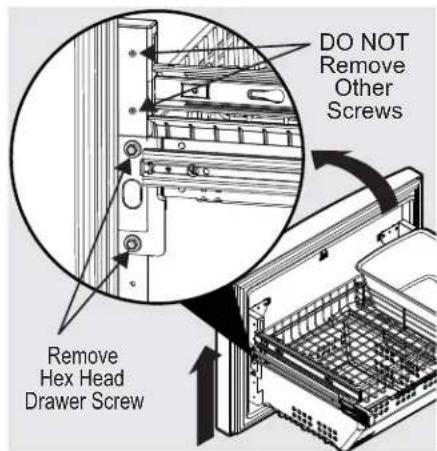
Replacing Freezer Drawer:
- Lower drawer back into place.
- Replace (4) hex head drawer screws and tighten.
Installing the Door Handles
- There are 6 handle studs on the refrigerator.
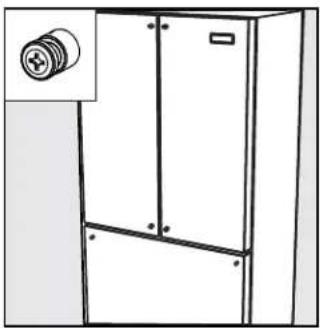
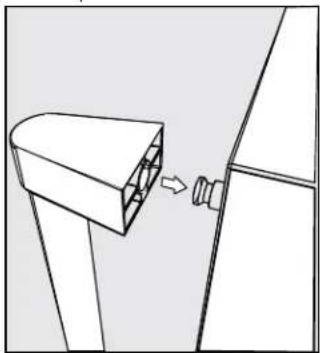
- Slide handle endcaps over door stud.
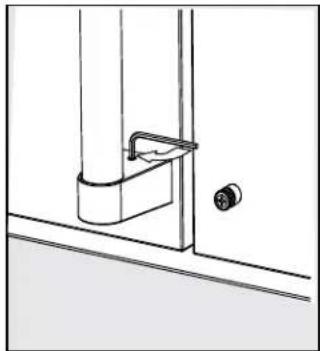
- Tighten the set screw. There are 2 set screws per handle assembly.
- Repeat with all 3 handle assemblies.
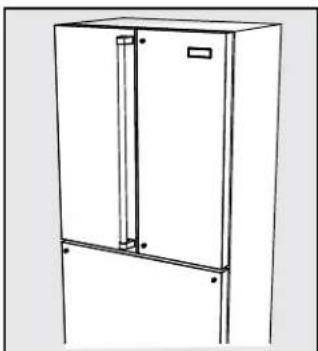
Connecting the Water Supply

WARNING
To avoid electric shock, which can cause death or severe personal injury, disconnect the refrigerator from electrical power before connecting a water supply line to the refrigerator.

CAUTION
To Avoid Property Damage:
- Copper or Stainless Steel braided tubing is recommended for the water supply line. Water supply tubing made of 14 inch plastic is not recommended to be used. Plastic tubing greatly increases the potential for water leaks, and the manufacturer will not be responsible for any damage if plastic tubing is used for the supply line.
- DO NOT install water supply tubing in areas where temperatures fall below freezing.
Chemicals from a malfunctioning softener can damage the ice maker. If the ice maker is connected to soft water, ensure that the softener is maintained and working properly.

IMPORTANT
Ensure that your water supply line connections comply with all local plumbing codes.
Before Installing The Water Supply Line, You Will Need:
- Basic Tools: adjustable wrench, fl at-blade screwdriver, and Phillips™ screwdriver
- Access to a household cold water line with water pressure between 30 and 100 psi.
- A water supply line made of 14 inch (6.4 mm) OD, copper or stainless steel tubing. To determine the length of tubing needed, measure the distance from the ice maker inlet valve at the back of the refrigerator to your cold water pipe. Then add approximately 7 feet (2.1 meters), so the refrigerator can be moved out for cleaning (as shown).
- A shutoff valve to connect the water supply line to your household water system. DO NOT use a self-piercing type shutoff valve.
- Do not reuse compression fitting or use thread seal tape.
- A compression nut and ferrule (sleeve) for connecting a copper water supply line to the ice maker inlet valve.

NOTE
Check with your local building authority for recommendations on water lines and associated materials prior to installing your new refrigerator. Depending on your local/state building codes, Viking Range, LLC recommends for homes with existing valves its water line kit 054414-000 (with a 6 ft. Stainless Steel Water Line) and for homes without an existing valve, Viking Range, LLC recommends its water line kit 054415-000 (with a 20 ft. Copper Water Line with self-tapping saddle valve). Please refer to www.vikingrange.com for more information.
To Connect Water Supply Line To Ice Maker Inlet Valve
- Disconnect refrigerator from electric power source.
- Place end of water supply line into sink or bucket. Turn ON water supply and flush supply line until water is clear. Turn OFF water supply at shutoff valve.
- Remove plastic cap from water valve inlet and discard cap.
- If you use copper tubing - Slide brass compression nut, then ferrule (sleeve) onto water supply line. Push water supply line into water valve inlet as far as it will go (1/4 inch / 6.4 mm). Slide ferrule (sleeve) into valve inlet and fi nger tighten compression nut onto valve. Tighten another half turn with a wrench; DO NOT over tighten. See Figure 1.
If you use braided fl exible stainless steel tubing - The nut and ferrule are already assembled on the tubing. Slide compression nut onto valve inlet and finger tighten compression nut onto valve. Tighten another half turn with a wrench; DO NOT over tighten. See Figure 2.
- With steel clamp and screw, secure water supply line (copper tubing only) to rear panel of refrigerator as shown.
- Coil excess water supply line (copper tubing only), about 21/2 turns, behind refrigerator as shown and arrange coils so they do not vibrate or wear against any other surface.
- Turn ON water supply at shutoff valve and tighten any connections that leak.
- Reconnect refrigerator to electrical power source.
- To turn ice maker on, lower wire signal arm (freeze ice maker) or set the ice maker's On/Off power switch to the "On" position (fresh food ice maker).
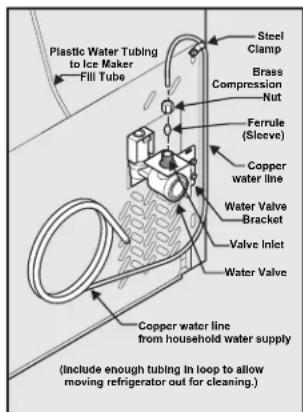
Figure 1
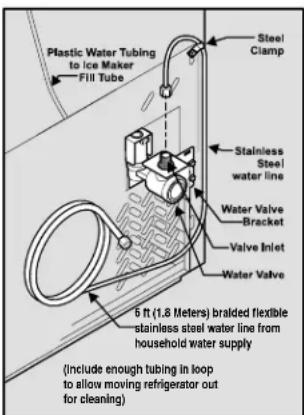
Figure 2
TruTouch Controls

An indicator light will be illuminated above most active features.
Touch the icon to activate the options below.
on off Press and hold for three seconds to turn off the cooling system to clean the
refrigerator. It also turns off the ice maker. The temperature displays will read OFF.
default settings Resets all refrigerator settings such as temp, temp display and tones to their factory default settings.
Setting cooling temperatures
Press the + or - indicator to adjust the temperature to the desired setting. The temperature display will begin to blink with the first touch. The display will time out after 10 seconds and return to the basic display.
energy saver Keep this switch set on energy saver (light on) for lowest energy usage. If
moisture appears on the cabinet between the doors, pressing this button will turn the light off and enable an electric heater used to reduce moisture on the cabinet between the doors.
temp mode Touch to toggle display from Fahrenheit to Celsius.
fast freeze Activates a faster rate for freezing food.
fast ice Increases the production of ice.
water fi tter Press and hold for three seconds to reset after fi tter change.
air filter
Filter condition status is always displayed when door is open. Press and hold for three seconds to reset after fi iter change.
mute sounds
Tones emitted by each key press can be turned off based on user preference. The sounds are muted when the red indicator is lit. Warning signals will stay active.

IMPORTANT
Pressing the power on/off icon does not turn off power to your refrigerator. You must unplug the power cord from the wall outlet.
Alarms
Door Ajar
If the door has been left open for an extended period of time, an alarm will sound and the door ajar indicator will display on the bottom display of the control panel. The alarm is turned off by closing the door. The mute sounds key will blink to prompt the reset of any active alarms. Press this key to reset any system alarms.
High Temp
In the event of a high temperature condition, the temperature display will blink and display "HI". After 20 minutes, the alarm will sound and the high temp indicator will be red on the bottom of the control panel. The mute sounds icon will illuminate until pressed, acknowledging the alarm, at which time the highest temperature reached will be displayed and the refrigerator will resume normal operation. In case the high temp alarm is not acknowledged at the fi rst alarm sound time out, when the door is fi rst opened, the alarm sound will be repeated.
Power Fail
In the event of a power failure, the power fail alert will be displayed and the temperature display will blink until the mute sounds icon is pressed, acknowledging the alarm. Other modes may be turned off until the alarm is acknowledged. The power fail alert is turned off and the refrigerator will resume normal operation. The high temp alarm may also be illuminated until a safe operating range temperature has been reached.
TruTouch Controls
Sabbath Mode
The Sabbath Mode is a feature that disables portions of the refrigerator and its controls in accordance with observance of the weekly Sabbath and religious holidays within the Orthodox Jewish community.
Sabbath Mode is turned ON and OFF by pressing and holding the freezer temp - and the refrigerator temp + + indicators for five seconds. The display shows "Sb" while in Sabbath mode.
In the Sabbath Mode, the High Temp alarm is active for health reasons. For example, if the door is left ajar the High Temp alarm is activated. The refrigerator will function normally once the door is closed, without any violation of the Sabbath/Holidays. The High Temp alarm is permitted when cabinet temperature is outside the safe zone for 20 minutes. The alarm silences itself after 10 minutes while the High Temp icon stays lit until the Sabbath mode is exited.
For further assistance, guidelines for proper usage and a complete list of models with the Sabbath feature, please visit the web at http://www.star-k.org.


NOTE
While in Sabbath Mode, neither the lights nor the control panel will work until Sabbath Mode is deactivated.
Refrigerator stays in Sabbath Mode after power failure recovery. It must be deactivated with the buttons on the control panel.

NOTE
During Sabbath Mode, the ice maker is turned off by main control board.
Sabbath Mode and the Temperature Adjustable Cold Zone Printer
The Temperature Adjustable Cold Zone Printer should be turned off for the Sabbath/Holidays. Before putting the refrigerator into the Sabbath mode, turn the Cold Zone printer off by pressing the printer on/off button. The display will show "OFF" and the printer will turn off. Then enter the Sabbath mode function on the main refrigerator display. See the "TruTouch Sabbath Mode" section. When in Sabbath mode, the display will not illuminate and the printer will remain off. The printer can still be used as a non-temp controlled printer in this mode. When the refrigerator is taken out of Sabbath mode, the Cold Zone printer will have to be turned back on.

NOTE
If the Temperature Adjustable Cold Zone Printer is not turned off prior to putting the unit into Sabbath Mode, it will continue to adjust itself to maintain the set point even if the display does not illuminate to show that it is still on.

NOTE
The recommended settings for a product installed in a kitchen is 37^ for the fresh food compartment and 0^ for the freezer.

IMPORTANT
If your product has food freezing in the fresh food compartment, increase the temperature setting 1 or 2 degrees.

IMPORTANT
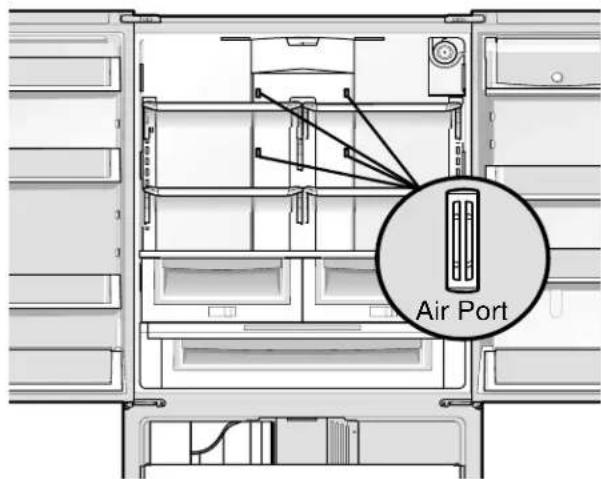
If you place food within 1 inch in front of the air ports, there may be the chance of freezing food.
Automatic Ice Maker
Ice maker operation & care
After the refrigerator is installed properly, the ice maker can produce ice within 24 hours. It can completely fill an ice bin in about three days.
When using the ice maker for the first time and in order for the ice maker to work properly, it is necessary to clear air from water filter tubing. Once ice maker begins making ice, allow the bucket to fill completely, then discard the first TWO FULL buckets of ice. It will take at least two days to completely fill the bucket on regular ice making mode or 1/2 days on fast ice mode.
The ice maker produces approximately 2 to 2.5 lbs (0.9 to 1.1 kg) of ice every 24 hours depending on usage conditions. The ice bin will hold approximately 7 lbs (3.2 kg) of ice.

IMPORTANT
Your ice maker is turned on at the factory so it can work as soon as you install your refrigerator. If you cannot connect a water supply, lift the ice maker's wire signal arm to turn it off. Otherwise, the ice maker's fi ll valve may make a loud chattering noise when it attempts to operate without water.
Turning the ice maker on and off
Ice production is controlled by lifting/lowering the ice maker's wire signal arm. To gain access to the ice maker, pull the freezer drawer out. Lift the wire signal arm to turn the ice maker OFF and lower the wire signal arm to turn it ON.
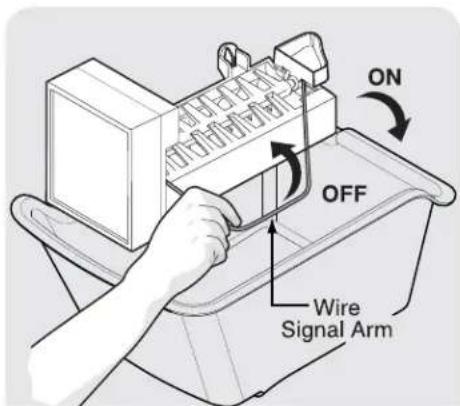
Ice maker tips
If your refrigerator is not connected to a water supply or the water supply is turned off, turn off the ice maker by lifting wire signal arm.
The following sounds are normal when the ice maker is operating:
-
Motor running
-
Ice dropping into ice bin
Water valve opening or closing
Running water
- Ice cubes stored too long may develop an odd flavor. Empty the ice bin as explained below.
Fast Ice Function
Your refrigerator is equipped with a Fast Ice Function, that will, if activated at your user interface, allow an increase in ice production. You do not need to deactivate it, if not needed, your refrigerator will operate on normal conditions.

CAUTION
If the water supply to your refrigerator is softened, be sure the softener is properly maintained. Chemicals from a water softener can damage the ice maker.
Cleaning the ice maker
Clean the ice maker and ice bin at regular intervals, especially prior to vacation or moving.
- Turn off the ice maker.
- Remove the ice bin.
- Empty and carefully clean the ice bin with mild detergent. Do not use harsh or abrasive cleaners. Rinse with clean water.
- Allow the ice bin to dry completely before replacing in the freezer.
- Replace the ice bin. Turn the ice maker on.
Remove and empty the ice bin if:
- An extended power failure (one hour or longer) causes ice cubes in the ice bin to melt and freeze together.
Remove the ice bin and shake to loosen the cubes or clean as explained above.

CAUTION
NEVER use an ice pick or similar sharp instrument to break up the ice. This could damage the ice bin.
To loosen stuck ice, use warm water. Before replacing the ice bin, make sure it is completely dry.
Storage Features
Shelf features

CAUTION
To avoid injury from breakage, handle tempered glass shelves carefully.

NOTE
Features may vary according to model.
Your refrigerator includes glass shelves that are designed to catch and hold accidental spills.
You can easily adjust shelf positions in the fresh food compartments to suit your needs. The shelves have mounting brackets that attach to slotted supports at the rear of each compartment.
To change the position of a shelf:
- Before adjusting a shelf, remove all food.
- Lift the front edge up and pull the shelf out.
- Replace by inserting the mounting bracket hooks into the desired support slots.
- Lower the shelf and lock into position.
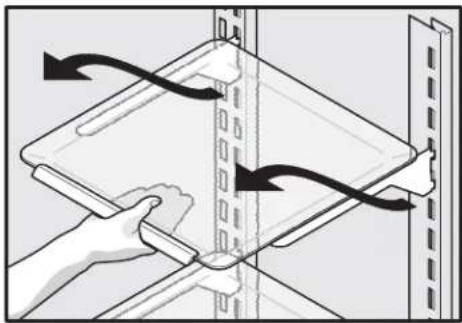
Full Custom-DesignTM Shelf
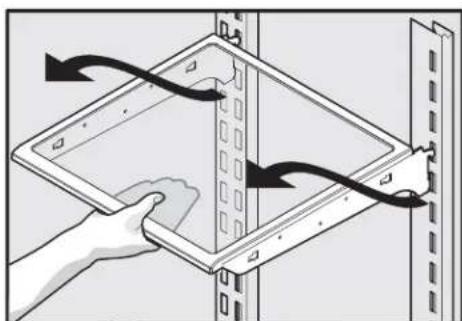
or
Drawers
Your refrigerator includes a variety of storage drawers. These drawers are located in fixed positions at the bottom of the fresh food compartment.
Crispers
Crisper drawers are designed for storing fruits, vegetables, and other fresh produce.
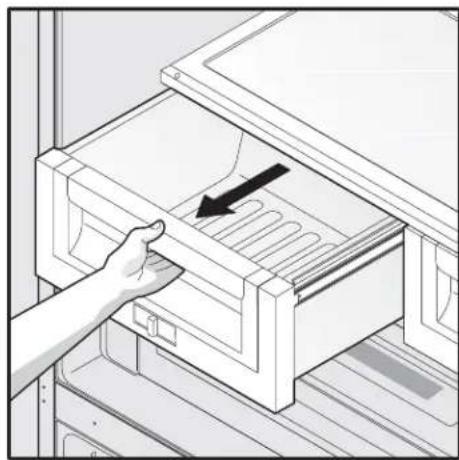
Opening Crisper Printer
Crisper humidity control
Crisper drawers include a sliding control for adjusting the humidity inside the risper. Leafy vegetables keep best when stored with the Humidity Control set on Higher Humidity. Fresh fruits keep best when stored with the Humidity Control set on Lower Humidity.
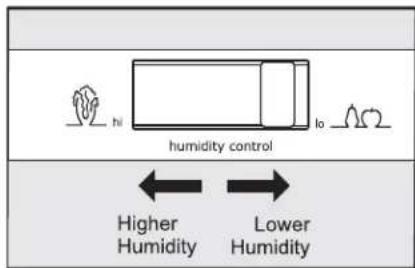
Adjusting Crisper Humidity
Storage Features
To remove the Crisper Diagram for cleaning:
1 Pull the drawer out until it stops.
2 Lift the front slightly and remove the drawer.
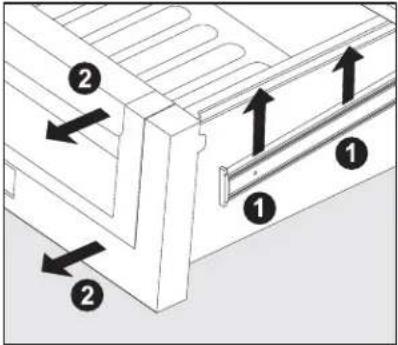
Removing Crisper
Drawer
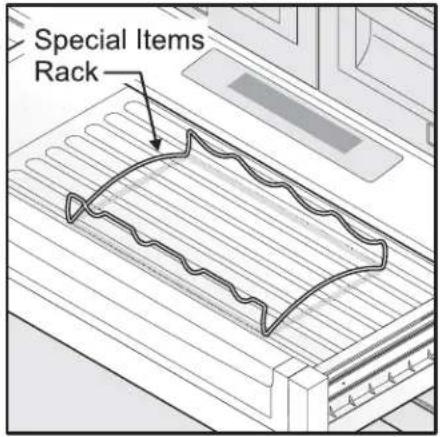
Special items rack
The innovative design of the special items rack allows you to store four bottles of wine or soft drink bottles.
Temperature Adjustable Cold Zone Printer

The Temperature Adjustable Cold Zone Printer is designed to keep food items at a precise temperature whether cooler, warmer, or the same as the fresh food section of the refrigerator. The thaw setting holds a temperature for thawing frozen foods for 12 hours. At the end of that time, it then switches to the mixed items setting to store the thawed food.
To operate:
- To turn on and off, press the drawer's On/Off button. The numeric display will show a temperature between "28°F and 38°F" when on and "OFF" when off.
- Press F/C if you prefer to display Fahrenheit "F," or Celsius "C".
- Press either the up or down scroll buttons to illuminate the desired item.
- Once an option is selected, the drawer will adjust and maintain the temperature for the setting selected.
- When turned off, the Cold Zone drawer functions as a standard meat pan. The Cold Zone drawer is best used for packaged food products. Leafy vegetables and unpackaged fruits are best kept in one of the crispers drawers.
- The three favorite selections provide fl flexibility to set and store personal temperature selections. The temperature is adjusted up by pressing the + or - buttons. The drawer will store the selected temperature setting until it is changed.
- The control buttons can be locked to prevent accidental changes by pressing the control lock button for three seconds. Deactivate by pressing for three seconds again.
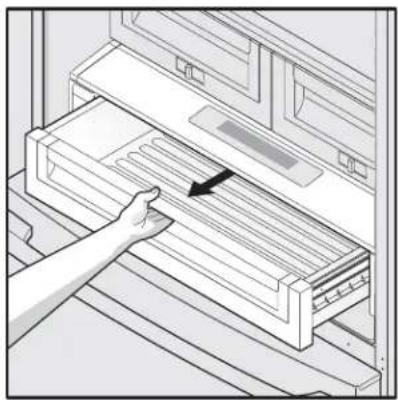
Opening the Printer
Storage Features

IMPORTANT
DO NOT clean the display area of the Custom Temp™.
Drawer with abrasive or caustic cleaners. Wipe clean with a moist sponge.

CAUTION
The Temperature Adjustable Cold Zone Printer and cover can be removed for cleaning but the control unit, attached to the right side of the fridge, cannot be removed. Do not immerse the Cold Zone printer cover in water or put it in a dishwasher. Clean with a damp cloth or sponge.
To remove the Temperature Adjustable Cold Zone. Drawer for cleaning:
1 Pull the drawer out until it stops.
2 Lift the front slightly and remove the drawer.
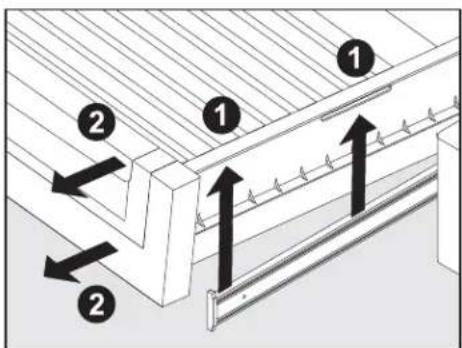
Removing the Drawer

NOTE
When the refrigerator is turned off by pressing the main TruTouch Conotrol on/off button, the Temperature Adjustable Cold Zone drawer will also be turned off. When the refrigerator is turned back on, the Cold Zone drawer will resume operations at the temp setting that was set before the refrigerator was turned off.
Doors
Storage bins
The doors to your fresh food compartment use a system of modular storage bins. All of these bins are removable for easy cleaning. Some of them have fixed positions, while others can be adjusted to your needs.
Door bins are ideal for storing jars, bottles, cans, and large drink containers. They also enable quick selection of frequently used items.
To change the position of an adjustable door bin:
- Before adjusting a bin, remove all food.
- Grip the bin firmly with both hands and lift it upward.
- Remove the bin.
- Place the bin just above desired position.
- Lower the bin onto supports until locked in place.
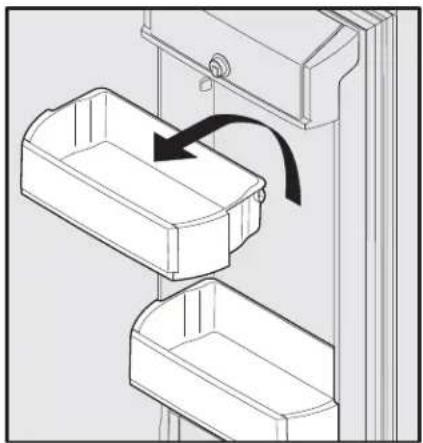
Adjustable Door Bin
Tilt can bins
The can bins allow you to effi ciently and securely store up to eight 12-ounce canned beverages.
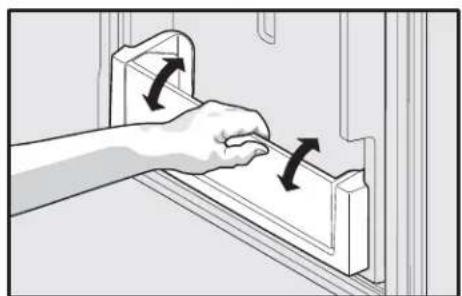
Tilt Can Bin
Covered Door Bin
Use the covered door bin, at the top of the fresh food compartment door, for short-term storage of cheese, spreads, or butter. The covered door bin is designed to be warmer than the open area and includes a lift-up cover that may be locked and a dairy divider.

Covered Door Bin
Storage Features
Freezer Features
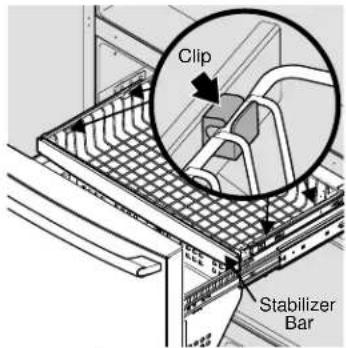
Freezer Baskets
To Remove Upper Freezer Basket
- Find the side where the basket frame is aligned to the clip opening. The basket frame should be aligned to both front and rear clips on the same side (either left or right side).
- If the basket frame is not aligned to the left or right side, push the basket sideways (to either side) until it is aligned.
- By grabbing the basket wire frame close to the frontal clip, pull up to take the basket frame out.
- Grab the basket frame close to the rear clip and pull up until it comes out of the clip.
- Once one side of the basket is off the clips or retainers, slide the basket sideways until the other side of the frame is aligned with the clip openings on the opposite side of the freezer.
- In the same way, pull up the basket frame from the frontal and rear clips until it is out of the clips.
- Remove the basket.
Reverse the steps to reinstall the basket.

NOTE
If basket is not resting on stabilizer bar retainer clips, the drawer will not close properly.
Removing Lower Freezer Basket Instructions
- Locate the basket clips in the rear corners of the basket and pull them out to remove.
- Open fresh food doors completely.
- Lift the basket up and remove.
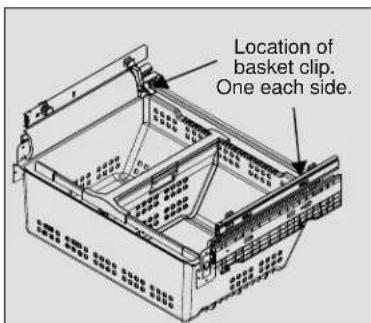
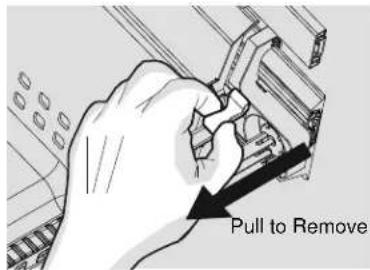
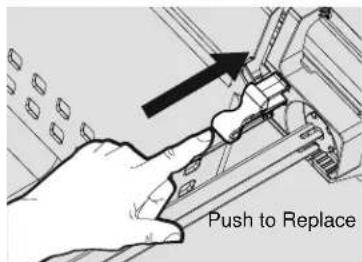
Replacing Lower Freezer Basket Instructions
- Place freezer basket back inside the freezer drawer.
- Replace clips by sliding them back into the slots.
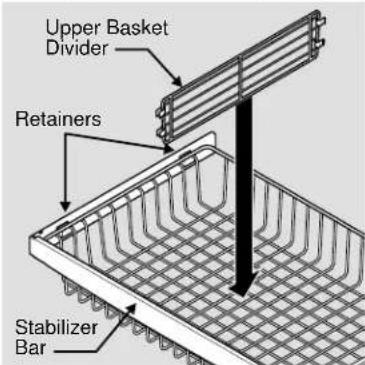
Dividers Removal
Lift up on the front of the upper divider and pull out.
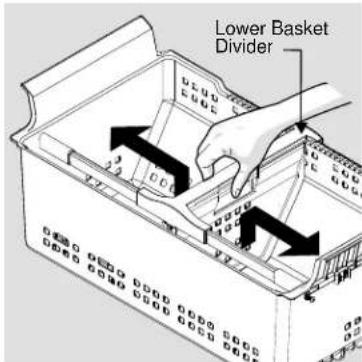
Squeeze handle and lift up in the center of the divider to move it side-to-side. (The divider cannot be removed.)
Tilt Wire Shelf
The freezer tilt wire shelf (located on the inside of the freezer drawer) is not designed to be removed.
Storing Food and Saving Energy
Ideas for storing foods
Fresh food storage
- Keep the fresh food compartment between 34^ and 40^ with an optimum temperature of 37^ .
- Avoid overcrowding the refrigerator shelves, which reduces air circulation and causes uneven cooling.
Fruits and vegetables
- Store fruits and vegetables in crisper drawers, where trapped moisture helps preserve food quality for longer time periods.
- Wash items and remove excess water.
- Wrap any items that have strong odors or high moisture content.
Meat
- Wrap raw meat and poultry separately and securely to prevent leaks and contamination of other foods or surfaces.
- Use the Temperature Adjustable Cold Zone drawer and set to meat/poultry setting for short-term storage. Any meat to be kept longer than two days should be frozen.
Frozen food storage
- Keep the freezer compartment at 0^ or lower.
- A freezer operates most efficiently when it is at least 2/3 full.
Packaging foods for freezing
-
To minimize food dehydration and quality deterioration, use aluminum foil, freezer wrap, freezer bags, or airtight containers. Force as much air out of the packages as possible and seal them tightly. Trapped air can cause food to dry out, change color, and develop an off-flavor (freezer burn).
-
Wrap fresh meats and poultry with suitable freezer wrap prior to freezing.
- Do not refreeze meat that has completely thawed.
Loading the freezer
- Prior to grocery shopping, activate "fast freeze" so that on your return you can ensure your newly purchased food designated for the freezer will be preserved as quickly as possible.
- Activating "fast freeze" also will help your freezer more effi cientsly maintain the selected temperature after placing new purchases with pre-existing frozen foods.
- Avoid adding too much warm food to the freezer at one time. This overloads the freezer, slows the rate of freezing, and can raise the temperature of frozen foods.
- Leave a space between packages, so cold air can circulate freely, allowing food to freeze as quickly as possible.
Ideas for saving energy
Installation
- Locate the refrigerator in the coolest part of the room, out of direct sunlight, and away from heating ducts or registers.
- Do not place the refrigerator next to heat-producing appliances such as a range, oven, or dishwasher. If this is not possible, a section of cabinetry or an added layer of insulation between the two appliances will help the refrigerator operate more effi cientsly.
- Level the refrigerator so that the doors close tightly.
Temperature settings
Refer to the "Controls" section for procedures on temperature settings.
Food storage
- Avoid overcrowding the refrigerator or blocking cold air vents. Doing so causes the refrigerator to run longer and use more energy.
- Cover foods and wipe containers dry before placing them in the refrigerator. This cuts down on moisture build-up inside the unit.
- Organize the refrigerator to reduce door openings. Remove as many items as needed at one time and close the door as soon as possible.
- Do not place a hot container directly on a cold shelf. Remember, such an extreme temperature change may damage the glass.
Normal Operating Sounds
Understanding the sounds you may hear
Your new, high-efficiency refrigerator may introduce unfamiliar sounds. These sounds normally indicate your refrigerator is operating correctly. Some surfaces on fl oors, walls, and kitchen cabinets may make these sounds more noticeable.
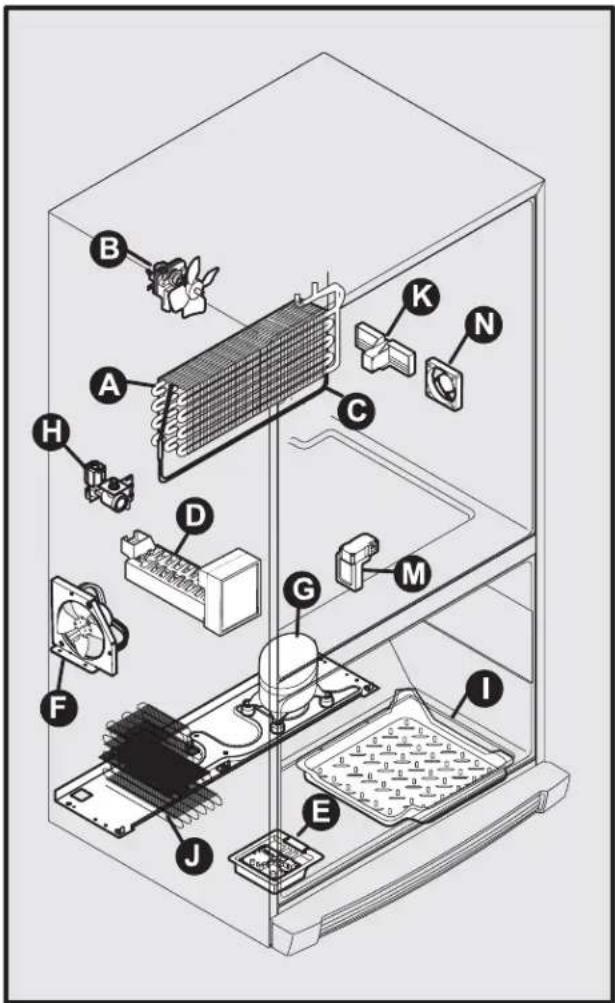
The following is a list of major components in your refrigerator and the sounds they can cause:
A Evaporator Refrigerant through the evaporator may create a boiling or gurgling sound.
B Evaporator fan You may hear air being forced through the refrigerator by the evaporator fan.
C Defrost heater During defrost cycles, water dripping onto the defrost heater may cause a hissing or sizzling sound. After defrosting, a popping sound may occur.
D Automatic ice maker When ice has been produced, you will hear ice cubes falling into the ice bin. Ice maker fan, water valve activation, and refrigerant gas fluid may create sounds from its operation.
E Electronic control & automatic defrost control These parts can produce a snapping or clicking sound when turning the cooling system on and off.
F Condenser fan You may hear air being forced through the condenser.
G Compressor Modern, high-efficiency compressors run much faster than older models. The compressor may have a high-pitched hum or pulsating sound.
H Water valve Makes a buzzing sound each time it opens to fill the ice maker.
I Drain pan (not removable) You may hear water dripping into the drain pan during the defrost cycle.
J Condenser May create minimal sounds from forced air.
K Motorized Temperature Adjustable Cold Zone drawer
M Motorized damper May produce a light humming during operation.
N Temperature Adjustable Cold Zone drawer fan Turns off when door opens or the Cold Zone drawer is turned off.

NOTE
Energy effi cien foam in your refrigerator is not a sound insulator.

NOTE
During automatic defrost cycle, a red glow in the back wall vents of your freezer compartment is normal.
Changing The Water and Air Filters
Your refrigerator is equipped with separate water and air filtering systems. The water filter system filters all the water used to produce ice. The air filter removes odors and impurities from the refrigerator compartment.
About your advanced water fi I ter
NSF
The ProChill fi tter system is tested and certified by NSF International to NSF/ANSI Standards 42,53 and 401 for the reduction of claims specified on the performance data sheet.
Do not use with water that is microbiologically unsafe or of unknown quality without adequate disinfection before or after the system. Systems certifi ed for cyst reduction may be used on disinfected waters that may contain fi Iterable cysts.
- Rated Capacity - 125 gallons/473 liters
- Rated service flow - .65 gallons per minute
Maximum Rated Pressure - 100 pounds per square inch
Recommended Minimum Operating Pressure: 30 pounds per square inch - Operating Temp.: Min. 33^ , Max. 100^

NOTE
When ordering your replacement fi tter, please reorder the same fi tter type that is currently in your refrigerator.
Water fi I ter
The water filter is located at the top right side of the fresh food compartment.
Replacing your ProChill water fi Iter
In general, you should change the water fi liter every six months to ensure the highest possible water quality. The Water Filter Status light on the Touch Panel prompts you to replace the fi liter after a standard amount of water (125 gallons/473 liters) has flowed through the system.
If your refrigerator has not been used for a period of time (during moving for example), change the fi tter before reinstalling the refrigerator.
It is not necessary to turn the water supply off to change the fi iter. Be ready to wipe up any small amounts of water released during the fi iter replacement.
To replace your water fi liter
- Turn Off the ice maker power switch.
- Remove the old fi lter by rotating it counter-clockwise (to the left) 90 degrees to release it.
- Slide the old fi Iter cartridge straight out of the housing and discard it.
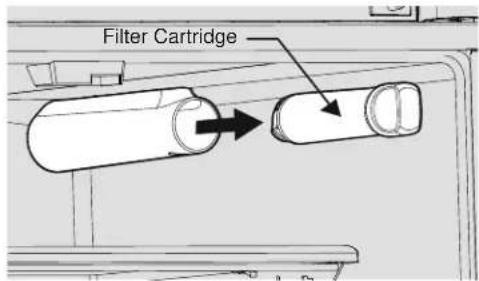
- Unpackage the new fil ter cartridge. Slide it into the fil ter housing as far as it will go with the grip end horizontal.
- Push lightly inward on the filter while rotating it clockwise (to the right). The fi iter will then pull itself inward as it is rotated. Rotate the fi iter 90 degrees until it stops and the grip end is vertical. You may be able to feel a very light click as the fi iter locks into place.
- Press a drinking glass against the water dispenser while checking for any leaks at the fi liter housing. Any spurts and sputters that occur as the system purges air out of the dispenser system are normal.
- Continue dispensing water for 3-4 minutes or until 1.5 gallons of water has fl owed through the system. You will likely need to empty and refill your glass several times.
- Turn On the ice maker.
- Press and hold the Water Filter reset button on the control panel for three seconds. When the display changes from Red to Green, the status has been reset.
Changing The Water and Air Filters
Air fi I ter
The air filter is located under the utility bin.
Replacing your TruAir air fi ler
To ensure optimal filtering of refrigerator odors, you should change the air fi iter every six months (the fi iter status light on the Touch Panel prompts you to replace the fi iter after six months).
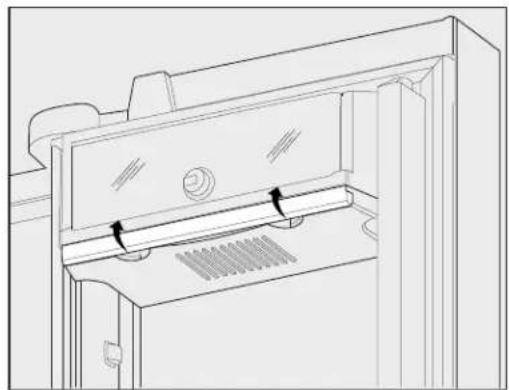
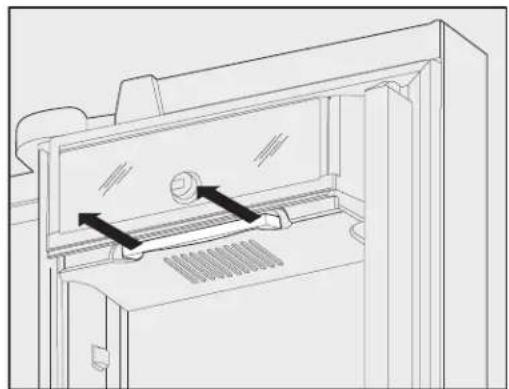
- Open the air filter door.
- Remove the old filter and discard it.
- Unpack the new fi liter and slide it into the housing.
- To close the air fi liter door, push the top and bottom to lock the door closed.
- Press and hold the Air Filter Reset button on the control panel for three seconds. When the display changes from "Replace" to "Good," the status has been reset.
- The Air Filter Reset will turn itself off after a few seconds.
Ordering replacement filters
Order new fi liters by calling 888-845-4641, online at www. vikingrange.com in the US or brigade.ca in Canada, or through the dealer where you bought your refrigerator. You may want to consider ordering extra fi liters when you first install your refrigerator.
Water Filter Replacement Cartridge #RWFVRF1
Air Filter Replacement Cartridge #RAFVRF
Protecting your investment
Keeping your refrigerator clean maintains its appearance and prevents odor build-up. Wipe up any spills immediately and clean the freezer and fresh food compartments at least twice a year.

NOTE
Do not use abrasive cleaners such as window sprays, scouring cleansers, flammable fluids, cleaning waxes, concentrated detergents, bleaches, or cleansers containing petroleum products on plastic parts, interior doors, gaskets, or cabinet liners. Do not use paper towels, scouring pads, or other abrasive cleaning materials.
- Never use metallic scouring pads, brushes, abrasive cleaners, or strong alkaline solutions on any surface.
- Never use CHLORIDE or cleaners with bleach to clean stainless steel.
- Do not wash any removable parts in a dishwasher.
- Always unplug the electrical power cord from the wall outlet before cleaning.

NOTE
If you set your temperature controls to turn off cooling, power to lights and other electrical components will continue until you unplug the power cord from the wall outlet.
- Remove adhesive labels by hand. Do not use razor blades or other sharp instruments which can scratch the appliance surface.
- Do not remove the serial plate. Removal of your serial plate voids your warranty.
- Before moving your refrigerator, raise the anti-tip brackets so the rollers will work correctly. This will prevent the floor from being damaged.

CAUTION
- Pull the refrigerator straight out to move it. Shifting it from side to side may damage flooring. Be careful not to move the refrigerator beyond the plumbing connections.
- Damp objects stick to cold metal surfaces. Do not touch refrigerated surfaces with wet or damp hands.

IMPORTANT
If you store or move your refrigerator in freezing temperatures, be sure to completely drain the water supply system. Failure to do so could result in water leaks when the refrigerator is put back into service. Contact a service representative to perform this operation.
Refer to the guide on the next page for details on caring and cleaning specific areas of your refrigerator.
Care and Cleaning
Care and cleaning tips
| Part Cleaning Agents Tips and Precautions | ||
| Interior & Door Liners | Soap and waterBaking soda and water | Use two tablespoons of baking soda in one quart of warm water.Be sure to wring excess water out of sponge or cloth before cleaning around controls, LED lights or any electrical part. |
| Door Gaskets | Soap and water | Wipe gaskets with a clean soft cloth. |
| Drawers & Bins | Soap and water | Use a soft cloth to clean drawer runners and tracks.Do not wash any removable items (bins, drawers, etc.) in dishwasher. |
| Glass Shelves | Soap and waterGlass cleanerMild liquid sprays | Allow glass to warm to room temperature before immersing in warm water. |
| Toe Grille • | Soap and waterMild liquid spraysVacuum | Remove toe grille (see Installation Instructions).Vacuum both sides and wipe with sudsy cloth or sponge. Rinse and dry. |
| Exterior & Handles | Soap and waterNon abrasive glass cleaner | Do not use commercial household cleaners containing ammonia, bleach or alcohol to clean handles.Use a soft cloth to clean smooth handles.Do not use a dry cloth to clean smooth doors. |
| Exterior & Handles (Stainless Steel Models Only) | Soap and waterStainless steel cleaners | Never use CHLORIDE or cleaners with bleach to clean stainless steel.Clean stainless steel front and handles with non-abrasive soapy water and a dishcloth. Rinse with clean water and a soft cloth.Use a non-abrasive stainless steell创新型. These cleaners can be purchased at most home improvement or major department stores. Always follow manufacturer's instruction. Do not use household cleaners containing ammonia or bleach.NOTE: Always clean, wipe and dry with grain to prevent scratching.Wash the rest of the cabinet with warm water and mild liquid detergent.Rinse well and wipe dry with a clean soft cloth. |
Vacation and moving tips
Occasion Tips
Short Vacations - Leave refrigerator operating during vacations of three weeks or less.
Use all perishable items from refrigerator compartment.
- Turn automatic ice maker off and empty ice bucket, even if you will only be gone a few days.
Long Vacations - Remove all food and ice if you will be gone one month or more.
- Turn the cooling system off (see "Controls" section for location of On/Off button) and disconnect power cord.
- Turn water supply valve to closed position.
Clean interior thoroughly. - Leave doors open to prevent odors and mold build-up. Block doors open if necessary.
Moving. Remove all food and ice.
If using a handcart, load from the side.
- Adjust rollers all the way up to protect them during sliding or moving.
- Pad cabinet to avoid scratching surface.
Replacing LED Lights
Both the freezer and fresh food compartments of your refrigerator include maintenance-free LED lights. To replace, contact an authorized service technician or call Customer Service at 1-888-845-4641.
Solutions to Common Problems
Before you call...
If you experience a concern with your refrigerator or notice a product behavior or condition that you do not understand, you can usually avoid a call to your service representative by referring to this section for an answer. Beginning with the following table, this information includes concerns, potential causes, and common solutions.
| Automatic Ice Maker | ||
| Concern Potential Cause | Common Solution | |
| Ice maker is not making any ice. | Ice maker is turned off.Refrigerator is not connected to water line or water valve is not open.The water supply line is kinked.The water fi lter is not seated properly.The water fi lter may be clogged with foreign material.Saddle valve on cold water pipe is clogged or restricted by foreign material. | Tum on ice maker by lowering the wire signal armConnect the unit to the household water supply and ensure the supply valve is open.Encase that the supply line does not kink when the refrigerator is pushed into place against the wall.Remove and re-install the water fi lter. Be sure to push the fi lter fi mly so that you hear it lock solidly into position.If water dispenses slowly or not at all, or if the fi lter is six months old or older, it should be replaced.Turn off household water line valve. Remove valve.Ensure that valve is not a self-piercing saddle valve.Clean valve. Replace valve if necessary. |
| Ice maker is not making enough ice. | Ice maker is producing less ice than you expect.The water fi lter may be clogged with foreign material.The water supply line is kinked.Saddle valve on cold water pipe is clogged or restricted by foreign material.Heavy traffic c, opening or closing of the doors excessively.Freezer control is set too warmWater pressure is extremely low. Cut-off and cut-on pressures are to low.(well system only)Reverse osmosis sytem is in regenerative phrase | The ice maker will produce approximately 2 to 2.5 lbs (0.9 to 1.1 kg) of ice every 24 hours depending on usage conditions.If the fi lter is six months old or older, it should be replaced.Encase that the supply line does not kink when the refrigerator is pushed into place against the wall.Turn off household water line valve. Remove valve.Ensure that valve is not a self-piercing saddle valve. Clean valve. Replace valve if necessary.Press Fast Freeze to temporarily increase ice production rate.Set freezer control to colder setting to improve performance of the ice maker. Allow 24 hours for temperature to stabilize.Have someone turn up the cut-off and cut-on pressure on the water pump system (well system only).It is normal for a reverse osmosis system to be below 20 psi during the regenerative phase. |
| Freezer ice maker will not stop making ice. | Ice maker wire signal arm is being held down by some package in the freezer that has fallen against the ice maker. | Move the item and release wire signal arm. Remove any ice cubes that may have frozen together over the wire signal arm. |
| Ice cubes are freezing together. | Ice cubes are not being used frequently enough.Ice cubes are hollow (shells of ice with water inside). The hollow cubes break open in the bin and leak their water onto existing ice, which causes it to freeze together. | Remove ice container and discard ice. The ice maker will produce fresh supply. Ice should be used at least twice weekly to keep the cubes separated.This generally occurs when the ice maker does not get enough water. This is usually the result of a clogged water fi lter. Replace the water fi lter. |
Odors In Refrigerator
| Concern Potential Cause | Common Solution | |
| Interior is dirty. Odors | · Interior needs to be cleaned. · Food with strong odors is stored in refrigerator. | · See Care & Cleaning Tips. · Cover food tightly. Air filter may need to be changed more frequently if foods with strong odors are routinely stored in refrigerator. |
Solutions to Common Problems
| Opening/Closing Of Doors/Drawers | ||
| Concern Potential Cause | Common Solution | |
| Door(s) will not close. • Door was closed too hard, causing other door to open slightly • Refrigerator is not level. It rocks on the floor when moved slightly. • An object has fallen from the baskets blocking the door from closing. | • Close both doors gently • Ensure floor is level and solid, and can adequately support the refrigerator. Contact a carpenter to correct a sagging or sloping floor. • Check for ice or food items blocking drawer. | |
| Drawers are difficult to move. • Food is touching shelf on top of drawer. • Drawer is overloaded | • Keep less food in drawer. • Remove or redistribute food. | |
| Refrigerator Operations | ||
| Concern Potential Cause | Common Solution | |
| Compressor does not run. | Freezer control is set to "OFF" Refrigerator is in defrost cycle Plug at wall outlet is disconnected. House fuse is blown or a tripped circuit breaker. Power outage. | Set freezer control This is normal for a fully automatic defrost refrigerator. The defrost cycle occurs periodically, lasting about 30 minutes. Ensure plug is tightly pushed into outlet. Check/replace fuse with a 15 amp time-delay fuse. Reset circuit breaker. Check house lights. Call local Electric Company. |
| Refrigerator runs too much or too long. | Your variable speed compressor is designed to run 100% of the time except during the defrost cycle. At times it will run faster, such as after a defrost cycle | It is normal for the compressor to run continuously except during defrost mode. |
| Digital temperature displays are fl ashing. | Electronic control system has detected a performance problem. | Call your local service representative, who can interpret any messages or number codes fl ashing on the digital displays. |
| Temperatures Are Too Cold | ||
| Concern Potential Cause | Common Solution | |
| Freezer temperature too cold. Refrigerator temperature is satisfactory. | • Fast Freeze function is activated. • Freezer control is set too cold. • Ice maker is on. • Fast Ice function is activated. | • Deactivate Fast Freeze function. • Set freezer control to a warmer setting. Allow 24 hours for temperature to stabilize. • It is normal for the freezer compartment to over cool while automatic ice maker is on. • Deactivate Fast Ice function. |
| Refrigerator temperature too cold. Freezer temperature is satisfactory. | • Refrigerator control is set too cold. | • Set refrigerator control to a warmer setting. Allow 24 hours for temperature to stabilize. |
| Food stored in drawers freezes. | • Refrigerator control is set too cold. • See soluton above. | |
| Food stored in Temperature Adjustable Cold Zone freezes | • Temperature Adjustable Cold Zone control is set too cold. | • Adjust Temperature Adjustable Cold Zone control to a warmer setting. Meat should be stored at a temperature just below the freezing point for maximum fresh storage time. It is normal for ice crystals to form due to the moisture content of meat. |
Solutions to Common Problems
| Temperatures Are Too Warm | ||
| Concern Potential Cause | Common Solution | |
| Freezer/Refrigerator temperature is too warm. | • Doors are opened too frequently or too long. • Door is slightly open. | • Warm air enters the refrigerator whenever the door is opened. Open the door less often. • See Concern section, Opening/Closing of Doors/Drawers. |
| Freezer temperature is too warm. Refrigerator temperature is satisfactory. | • Freezer control is set too warm. | • Set freezer control to a colder setting. Allow 24 hours for temperature to stabilize. |
| Refrigerator temperature is too warm. Freezer temperature is satisfactory. | • Refrigerator control is set too warm. | • Set refrigerator control to a colder setting. Allow 24 hours for temperature to stabilize. |
| Temperature in the Adjustable Cold ZoneDrawer is too warm | • Temperature control is set too warm. | • Adjust temperature control to a colder setting. |
| Water/Moisture/Frost Inside Refrigerator | ||
| Concern Potential Cause | Common Solution | |
| Moisture collects on inside of refrigerator walls. | • Weather is hot and humid. • Door is slightly open. • Door is opened too often or too long. • Flipper Muillion | • The rate of frost buildup and internal sweating increases. • See Concern section, Opening/Closing of Doors/Drawers. • Open door less often to allow internal temperature to stabilize. • Adjust flipper muillion. (See page 8) |
| Water collects on bottom side of drawer cover. | • Vegetables contain and give off moisture. | • Moisture on the bottom side of the cover is not unusual. • Move humidity control (select models) to lower setting. |
| Moisture collects in bottom of drawer. | • Washed vegetables and fruit drain while in the drawer. • Fruits and vegetables are kept past their prime. | • Dry items before putting them in the drawer. Water collecting in bottom of drawer is normal. • Routinely clean out old fruits and vegetables especially if they begin to break down. |
| Moisture collects on outside of refrigerator or between doors. | • Weather is humid. • Door is slightly open, causing cold air from inside refrigerator to meet warm air from outside. | • This is normal in humid weather. When humidity is lower, the moisture should disappear. • See Concern section, Opening/Closing of Doors/Drawers. |
Service Information
If service is required, call your dealer or authorized service agency. The name of the authorized service agency can be obtained from the dealer or distributor in your area.
Have the following information readily available:
- Model number
- Serial number
- Date purchased
Name of dealer from whom purchased
Clearly describe the problem that you are having. If you are unable to obtain the name of an authorized service agency, or if you continue to have service problems, contact Viking Range at (888) 845-4641 or write to:
VIKING RANGE, LLC
PREFERRED SERVICE
111 Front Street
Greenwood, Mississippi 38930 USA
Record the information indicated below. You will need it if service is ever required. The serial number and model numbers for your refrigerator are located on the upper wall, behind the lighting:
Model No. Serial No.
Date of Purchase Date Installed
Dealer's Name
Address
If service requires installation of parts, use only authorized parts to insure protection under the warranty.
FREETANDING FRENCH DOOR REFRIGERATOR/FREEZER WARRANTY
ONE YEAR FULL WARRANTY
Freestanding french door refrigerator/freezers and all of their component parts, except as detailed below*, are warranted to be free from defective materials or workmanship in normal residential use for a period of one (1) year from the date of original retail purchase. Viking Range, LLC, warrantor, agrees to repair or replace, at its option, any part which fails or is found to be defective during the warranty period.
*FULL NINETY (90) DAY COSMETIC WARRANTY: Product is warranted to be free from cosmetic defects in materials or workmanship (such as scratches on stainless steel, paint/porcelain blemishes, etc.) for a period of ninety (90) days from the date of original retail purchase or closing date for new construction, whichever period is longer. Any defects must be reported to the selling dealer within ninety (90) days from date of original retail purchase. Viking Range, LLC uses high quality processes and materials available to produce all color finishes. However, slight color variation may be noticed because of the inherent differences in painted parts and porcelain parts as well as differences in kitchen lighting, product locations, and other factors. Therefore, this warranty does not apply to color variation attributable to such factors.
†FULL NINETY (90) DAY WARRANTY IN “RESIDENTIAL PLUS” APPLICATIONS: This full warranty applies to applications where use of the product extends beyond normal residential use, but the warranty period for products used in such applications is ninety (90) days. Examples of applications covered by this warranty are bed and breakfasts, fire stations, private clubs, churches, yachts, etc. Under this “Residential Plus” warranty, the product, its components and accessories are warranted to be free from defective material or workmanship for a period of ninety (90) days from the date of original retail purchase. This warranty excludes use of the product in all commercial locations such as restaurants, food service locations and institutional food service locations.
SIX YEAR FULL WARRANTY ON SEATED REFRIGERATION PARTS AS LISTED
Any sealed refrigeration system component, as listed below, is warranted to be free from defective materials or workmanship in normal household use during the fourth through the sixth year from the date of original retail purchase. Viking Range, LLC, warrantor, agrees to repair or replace, at its option, any part which fails or is found to be defective during the warranty period. Sealed Refrigeration System Components: Compressor, Evaporator, Condenser, Connecting Tubing, Dryer/Strainer
TWELVE YEAR LIMITED WARRANTY ON SEATED REFRIGERATION PARTS AS LISTED
Any sealed refrigeration system component, as listed above, which fails due to defective materials or workmanship in normal household use during the seventh through the twelfth year from the date of original retail purchase will be repaired or replaced, free of charge for the part itself, with the owner paying all other costs, including labor.
TERMS AND CONDITIONS
This warranty extends to the original purchaser of the product warranted hereunder and to each transferee owner of the product during the term of the warranty and applies to products purchased and located in the United States, Canada, Mexico, and the Caribbean (excluding Cuba, Dominican Republic, and Haiti). Products must be purchased in the country where service is requested. If the product or one of its component parts contains a defect or malfunction during the full warranty period after a reasonable number of attempts by the warrantor to remedy the defect or malfunction, the owner is entitled to either a refund or replacement of the product or its component part or parts. Replacement of a component part includes its free installation, except as specified under the limited warranty. Under the terms of this warranty, service must be performed by a factory authorized Viking Range, LLC service agent or representative. Service will be provided during normal business hours, and labor performed at overtime or premium rates shall not be covered by this warranty.
Owner shall be responsible for proper installation, providing reasonable and necessary maintenance, providing proof of purchase upon request, and making the appliance reasonably accessible for service. The return of the Owner Registration Card is not a condition of warranty coverage. You should, however, return the Owner Registration Card so that Viking Range, LLC can contact you should any question of safety arise which could affect you.
This warranty gives you specific legal rights, and you may also have other rights which may vary from jurisdiction to jurisdiction.
WHAT IS NOT COVERED BY THIS WARRANTY: This warranty shall not apply to damage resulting from abuse, failure to provide reasonable and necessary maintenance, accident, delivery, negligence, natural disaster, loss of electrical power to the product for any reason, alteration, outdoor use, improper installation, improper operation, or repair or service of the product by anyone other than an authorized Viking Range, LLC service agency or representative. This warranty does not apply to commercial usage.
LIMITATION OF REMEDIES AND DURATION OF IMPLIED WARRANTY
OWNER'S SOLE AND EXCLUSIVE REMEDY FOR A CLAIM OF ANY KIND WITH RESPECT TO THIS PRODUCT SHALL BE THE REMEDIES SET FORTH ABOVE. VIKING RANGE IS NOT RESPONSIBLE FOR CONSEQUENTIAL OR INCIDENTAL DAMAGE, INCLUDING BUT NOT LIMITED TO FOOD OR MEDICINE LOSS, DUE TO PRODUCT FAILURE, WHETHER ARISING OUT OF BREACH OF WARRANTY, BREACH OF CONTRACT OR OTHERWISE. Some jurisdictions do not allow the exclusion or limitation of incidental or consequential damages, so the above limitation or exclusions may not apply to you. Any implied warranties of merchantability or fitness for a particular purpose applicable to this product are limited in duration to the period of coverage of the applicable express written limited warranties set forth above. Some states do not allow limitations on how long an implied warranty lasts, so the above limitation may not apply to you.
WARRANTY SERVICE
To obtain warranty service, contact an authorized Viking Range, LLC service agent, or Viking Range, LLC, 111 Front Street, Greenwood, Mississippi 38930, (888) 845-4641. Provide model and serial number and date of original purchase or closing date for a new construction. For the name of your nearest authorized Viking Range, LLC service agency, call Viking Range, LLC. IMPORTANT: Retain proof of original purchase to establish warranty period.
Specific cations subject to change without notice
Renseignements
or visit our web site at vikingrange.com in the US or brigade.ca in Canada