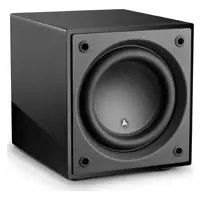
Dominion d110 - Subwoofer JL Audio - Free user manual and instructions
Find the device manual for free Dominion d110 JL Audio in PDF.



| Product type | Powered subwoofer |
| Brand | JL Audio |
| Model | Dominion d110 |
| Dimensions (H x W x D) | 340 mm x 305 mm x 403 mm |
| Net weight | 17.3 kg |
| Enclosure type | Sealed |
| Speaker driver | Single 25 cm (10 in.) |
| Amplifier power | 750 watts RMS continuous |
| Frequency response (anechoic) | 27 to 111 Hz (±1.5 dB) |
| Effective piston area | 0.0314 m² |
| Effective displacement | 2.08 liters |
| Line inputs | Stereo or Mono (2 RCA jacks) |
| Speaker inputs | Stereo or Mono (removable connector) |
| Low-pass filter | 24 dB/octave, Linkwitz-Riley, 25 to 130 Hz, defeatable |
| Phase adjustment | Variable from 0 to 280 degrees (ref. 80 Hz) |
| Polarity | 0 or 180 degrees |
| Power supply | 120 V or 240 V (depending on model) |
| Standby power consumption | Less than 0.5 watt |
| Fuse (120 V model) | 6.3 A, 250 V, fast-acting, 5 x 31.75 mm |
| Fuse (240 V model) | 4 A, 250 V, fast-acting, 5 x 20 mm |
| Wireless connector | For TRX JLink system (sold separately) |
| Cleaning | Microfiber cloth, auto wax for gloss finish |
| Warranty | Limited warranty (see manual) |
Frequently Asked Questions - Dominion d110 JL Audio
User questions about Dominion d110 JL Audio
0 question about this device. Answer the ones you know or ask your own.
Ask a new question about this device
Download the instructions for your Subwoofer in PDF format for free! Find your manual Dominion d110 - JL Audio and take your electronic device back in hand. On this page are published all the documents necessary for the use of your device. Dominion d110 by JL Audio.
USER MANUAL Dominion d110 JL Audio
Dominion® Powered Subwoofer
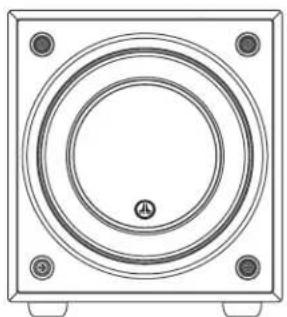
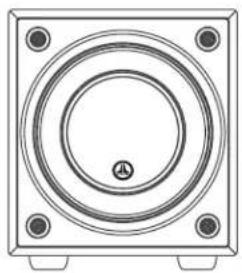
d10d108
IMPORTANT SAFETY INSTRUCTIONS
WARNING: TO REDUCE THE RISK OF FIRE OR ELECTRIC SHOCK, DO NOT EXPOSE THIS PRODUCT TO RAIN OR MOISTURE.



CAUTION: TO REDUCE THE RISK OF ELECTRIC SHOCK, DO NOT REMOVE COVER. NO USER SERVICEABLE PARTS INSIDE. REFER SERVICING TO QUALIFIED PERSONNEL.
- Read the Instructions - All safety and operating instructions should be read before the subwoofer is operated.
- Retain the Instructions - The safety and operating instructions should be retained for future reference.
- HeedWarnings - All warnings on the subwoofer and in the operating instructions should be followed.
- Follow Instructions - All operating and use instructions should be followed.
- Water and Moisture — The subwoofer should NOT be used near water – for example, near a bathtub, washbowl, sink, laundry tub, in a wet basement, near a swimming pool, etc.
- Ventilation - The subwoofer should be situated so that its location or position does not interfere with its proper ventilation. For example, the subwoofer should not be situated on a bed, sofa, rug, or similar surface that may block airflow over the heatsink's fins. If placing the subwoofer in a "built-in" installation, ensure that airflow to the heat sink at the rear of the subwoofer is not impeded. Do not cover the subwoofer heatsink with tablecloths, curtains, etc.
- Heat and Flames - The subwoofer should be situated away from heat sources such as radiators, heat registers, stoves, fireplaces, or other devices that produce heat. Do not place candles on top of or near the subwoofer.
- Power sources — The subwoofer should only be connected to a power supply of the type described in the operating instructions or as marked on the subwoofer.
- Power Cord Protection — Power-supply cords should be routed so that they are not likely to be walked on or pinched by items placed upon or against them, paying particular attention to cords at plugs, convenience receptacles, and the point where they exit the subwoofer.
- Cleaning - The subwoofer should be cleaned only as recommended in the operating instructions.
- Nonuse Periods - The power cord of the subwoofer should be unplugged from the outlet when the subwoofer is left unused for long periods of time.
- Lightning and Power Surges - We recommend that you disconnect the subwoofer from the electrical outlet during electrical storms and/or recurring power interruptions to prevent damage due to power surges.

The lightning flash with arrowhead symbol within an equilateral triangle is intended to alert the user to the presence of uninsulated "dangerous voltage" within the product's enclosure that may be of sufficient magnitude to constitute a risk of electric shock to persons.

The exclamation point within an equilateral triangle is intended to alert the user to the presence of important operating and maintenance instructions in the literature accompanying the product.
WARNING

-
Object or Liquid Entry — Care should be taken so that objects do not fall into and liquids are not spilled onto the subwoofer enclosure. Do not expose the subwoofer to dripping or splashing from liquids. Do not place objects filled with liquids on top of or near the subwoofer. For example: flower vases, beverages, liquid-fueled lamps, etc.
-
Damage Requiring Service - The subwoofer should be serviced by qualified service personnel when:
a. the power-supply cord or plug has been damaged
b. objects have fallen or liquid has been spilled into the subwoofer
c. the subwoofer has been exposed to rain
d. the subwoofer does not appear to operate normally or exhibits a marked change in performance
e. the subwoofer has been dropped or the cabinet has been damaged
f. the subwoofer driver's cone and/or suspension has been physically damaged
- Servicing — The user should not attempt to service the subwoofer beyond what is described in the operating instructions. All other servicing should be referred to qualified service personnel.
- Overloading — Do not overload wall outlets, extension cords, or outlet strips as this can result in a risk of fire or electric shock.
- Grounding — This subwoofer is supplied with a three-prong, grounded power cord. Precautions should be taken so that the grounding means of the subwoofer are not defeated. Defeating the grounding prong on the subwoofer power cord could increase the risk of electric shock and could result in permanent damage to the subwoofer's electronics.
THIS SUBWOOFER IS CAPABLE OF PRODUCING VERY HIGH SOUND PRESSURE LEVELS. PLEASE EXERCISE RESTRAINT IN ITS OPERATION TO PROTECT YOUR HEARING FROM PERMANENT DAMAGE.
FCC COMPLIANCE STATEMENT
NOTE: This equipment has been tested and found to comply with the limits of Part 15 of the FCC Rules. These limits are designed to provide reasonable protection against harmful interference in a residential installation. This equipment generates, uses and can radiate radio frequency energy and, if not installed in accordance with the instructions, may cause harmful interference to radio communications. However, there is no guarantee that interference will not occur in a particular installation. If this equipment does cause harmful interference to radio or television reception, which can be determined by turning the equipment off and on, the user is encouraged to try to correct the interference by one or more of the following measures:
- Reorient or relocate the receiving antenna.
- Increase the separation between the equipment and receiver.
- Connect the equipment into an outlet on a circuit different from that to which the receiver is connected.
- Consult the dealer or an experienced radio/TV technician for help.
TABLE OF CONTENTS
Important Safety Instructions: 2-3
Introduction: 4
Product Overview: 5
Placing your Dominion in Your Listening Room: 6-10
Unpacking your Dominion*: 11
Rear Control Panel Layout: 12
Dominion® Controls in Detail: 14-15
Connecting your Dominion 16-23
Recommended Setup Procedure: 24-26
Frequently Asked Questions: 27
Cleaning Your Dominion®. 28
Troubleshooting: 28
Limited Warranty / Service Information: 31
Specifications: 32
INTRODUCTION
Congratulations on your purchase of a JL Audio Dominion* powered subwoofer system. This product has been critically engineered to deliver exceptional performance in your home theater or audio system for many years to come.
As a company, we are intensely committed to core research into high-performance loudspeaker and amplifier technologies. JL Audio's long-excursion subwoofer driver designs are widely considered as reference standards for linear behavior and high output. We have also focused our efforts to create powerful amplifier and signal-processing technologies specifically aimed at delivering exceptional low-frequency performance. Your Dominion® subwoofer combines these core disciplines within a compact, beautifully crafted package to deliver an unparalleled listening experience.
We sincerely thank you for your purchase and invite you to read this manual thoroughly in order to achieve the highest level of performance with your Dominion subwoofer system. Enjoy.
JL AUDIO TECHNOLOGIES INCLUDED IN Dominion* SUBWOOFERS
DMA-Optimized Motor System
DMA is JL Audio's innovative Dynamic Motor Analysis system aimed at improving dynamic motor behavior. As a result of DMA optimization, loudspeaker motors remain linear in force over an extreme range of excursion and also maintain a highly stable fixed magnetic field over a wide power range. This leads to vastly reduced distortion and faithfully reproduced transients... or put simply: tight, clean, articulate bass.
VRC-Vented Reinforcement Collar
JL Audio's Vented Reinforcement Collar improves the rigidity and stability of the cone/spider/voice coil junction and directs airflow over the voice coil windings for improved thermal performance.
Floating-Cone™ Attach Method
This assembly technique ensures proper surround geometry in the assembled speaker for better excursion control and dynamic voice coil alignment.
Engineered Lead-Wire System (U.S. Patent #7,356,157)
Carefully engineered lead-wire design and attachments ensure controlled, quiet leadwire behavior under the most extreme excursion demands, resulting in reduced distortion, reduced mechanical noise and improved reliability.
PRODUCT OVERVIEW
JL Audio Dominion® subwoofer combinetha state-of-the-art JL Audio subwoofer driver and electronics/amplifier package within a highly optimized enclosure to deliver an exceptional listening experience in your home theater or home audio system.
The subwoofer driver in your Dominion® subwoofer system is capable of outstanding linear excursion without distress or audible distortion. This purpose-engineered driver enables your Dominion® subwoofer to reproduce powerful low-frequency events with stunning impact and outstanding accuracy. The Dominion® drivers offer peak-to-peak excursion capabilities well in excess of 2.5 inches (63 mm - d108), and 2.7 inches (68 mm - d110) to comfortably handle the dynamics of the most demanding program material.
To get the most from this long excursion driver platform, your Dominion incorporates a precisely engineered switching amplifier. The Dominion amplifiers are capable of unclipped output voltages equivalent to 500 watts (d108), and 750 watts (d110) of RMS power when referenced to the nominal loudspeaker impedance, allowing us to take full advantage of each driver's full excursion envelope.
The beautiful cabinet enclosing the workings of your Dominion is also the result of careful engineering. To contain the pressures created by the Dominion driver, we utilize solid, CNC-cut, MDF material with extensive internal bracing features and advanced assembly techniques.
The Dominion subwoofoers also include an on-board low-pass active crossover, a polarity switch, and phase control to aid in achieving an optimal acoustic transition between the subwoofer(s) and main speakers. Inputs are via a pair of line level stereo RCA inputs or via a removable plug for speaker level inputs.
As you can see from this brief introduction, there is a lot of technology in this compact subwoofer. The contents of this manual will explain the features and guide you through the setup and tuning of your Dominion to help achieve an outstanding low-frequency listening experience.
If you require assistance, we urge you to contact your authorized JL Audio retailer for expert setup advice and service.
IMPORTANT

IMPORTANT! IT IS A VERY GOOD IDEA TO READ THE NEXT SECTION BEFORE UNPACKING YOUR Dominion® SUBWOOFER. UNPACKING THE SUBWOOFER NEAR ITS FINAL LOCATION IS RECOMMENDED.
PLACING YOUR DOMINION® SUBWOOFER IN YOUR LISTENING ROOM:
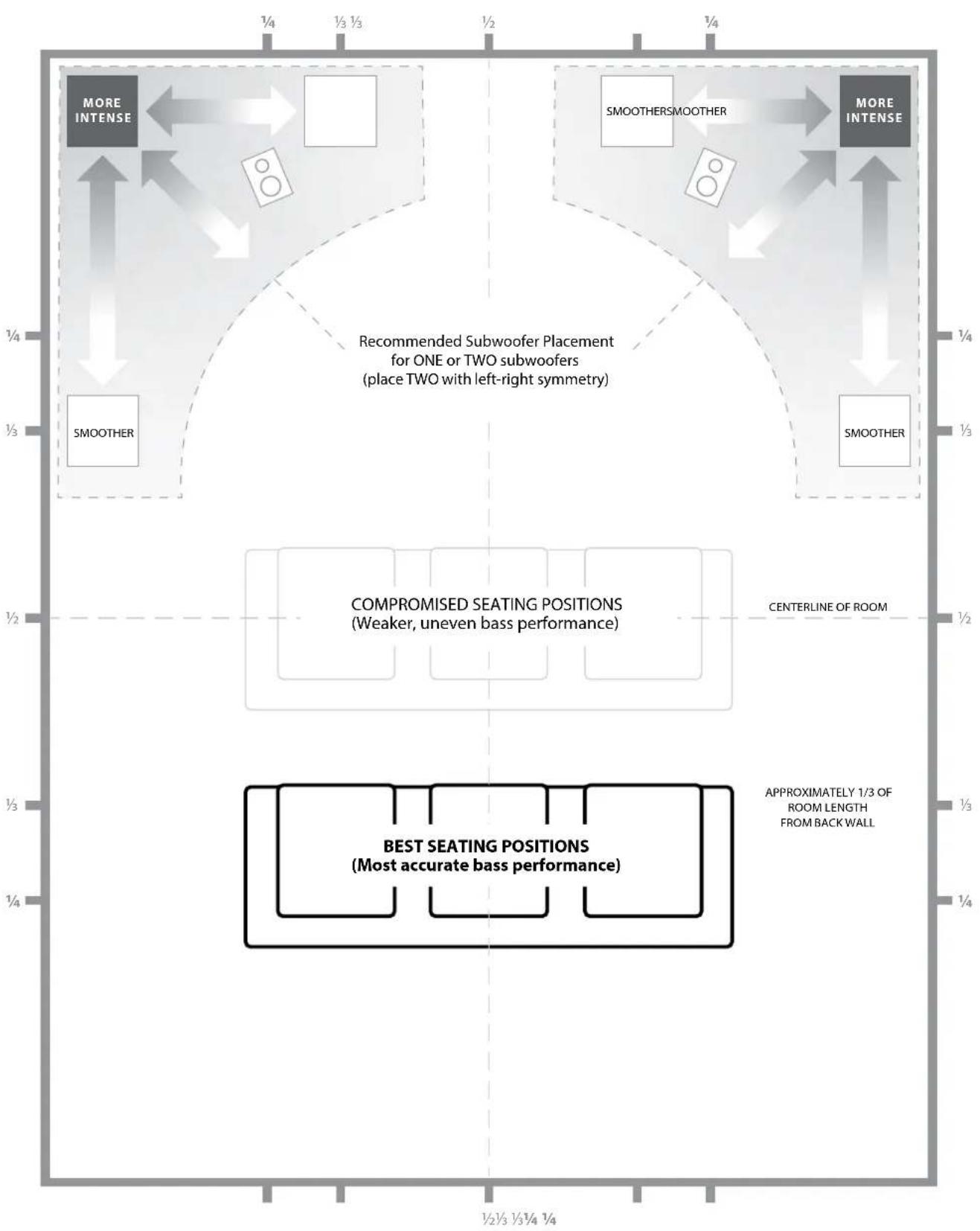
Your listening room or theater is an integral part of your sound reproduction system. The physical dimensions of the room and its furnishings, materials, doors and windows play an important role in defining how your system sounds.
When you place a sound source in an enclosed rectangular space, "standing waves" are created, resulting from the relationship between the sound's wavelength and your room's dimensions. In other words, standing waves result from sound energy that is trapped in the room as it bounces back and forth between opposing walls. Standing waves in the room create acoustic peaks and dips where the sound is either louder or softer, based solely on your physical position in the room. Energy also "builds up" at the room's boundaries, creating exaggerated bass response at certain frequencies. These fundamental room resonances are called room "modes."
The moral of this mode story is to try and avoid seating positions in standing wave peak or dip regions. It is highly recommended that you place your listening chairs in areas where modal peaks and dips are moderate and do not reinforce one another. The two most obvious areas to avoid are those near the exact center of the room and those close to any of the room's walls.
Just as your listening seat can be in a peak or dip region, so can your subwoofer. When placed in a room corner, a subwoofer maximally excites the room's mode structure, creating the strongest output with the fewest dips. When the subwoofer is pulled away from a corner or wall, the room modes are excited less, which can alter the sound at your listening seat.
Be sure to experiment with both your listening seat position and subwoofer position to find the best solution. Careful experimentation usually leads to a superior sounding system. Use our setup suggestions (illustrated on the opposing page and the following pages) to get you started.
We recommend that you begin by placing your Dominion in the front of the room, on the floor, near the front left or right speaker. Placing the Dominion near solid walls will reinforce bass response and pulling it away from solid walls will decrease bass. Increasing the distance between the subwoofer and the walls may help to smooth upper bass response in some rooms.
We recommend that you avoid placing the Dominion near windows to prevent rattling and sound transmission to the outside world.

If you are planning to install your Dominion inside a cabinet, please refer to the guidelines on page 8.
SPECIAL CONSIDERATIONS FOR BUILT-IN INSTALLATIONS
The Dominion subwoofer can be integrated into custom cabinetry by following a few simple guidelines.
1) Allow 4 inches (10 cm) of clear space behind the amp panel of your Dominion® for adequate cooling and connector clearance.
2) On all other sides (except the bottom), allow at least 2 inches (5cm) clearance for adequate ventilation.
3) While the Dominion generally runs only warm during spirited operation, we do recommend that adequate heat vents are included in any custom cabinet that encloses the Dominion. A pair of 3 inch (7.5 cm) diameter vents near the bottom of the cabinet and near the top of the cabinet, will allow cool air to circulate over the amp panel of your Dominion subwoofer system, keeping it cool and happy.
4) Your Dominion subwoofer is capable of moving substantial quantities of air. If the front of the Dominion is covered by a custom grille, the grille size must be AT LEAST equal to the woofer cone area for each model to ensure the output is not choked by the custom cabinet. Refer to the chart below for recommended vent areas for each model.
| Model Recommended Custom Grille Vent Area | |
| d108 ≥ 33 in | 2 (213 cm-2) |
| d110 ≥ 49 in | 2 (316 cm-2) |
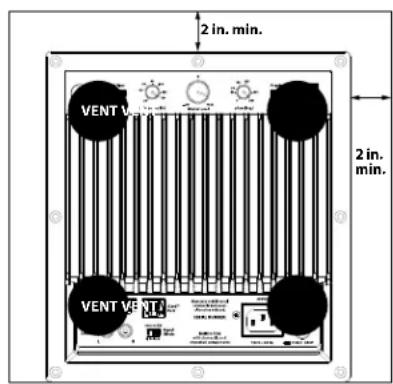
Rear-view of cabinet install:
Using Two Dominion Subs
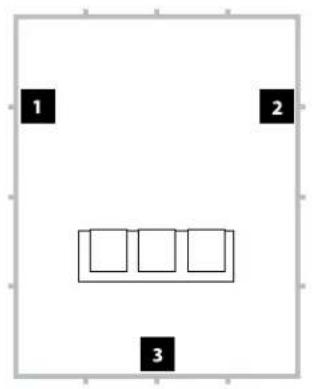
When using two Dominionirc subwoofoers, try placement near the front corners of the room, at diagonally-opposite corners of the room, or at the center points of opposing walls as shown at right.
Experimentation with subwoofer and listener placement is recommended to achieve the best results - the benefits can be substantial.
High-resolution measurements and professional system calibration are recommended for the best possible results and system performance.
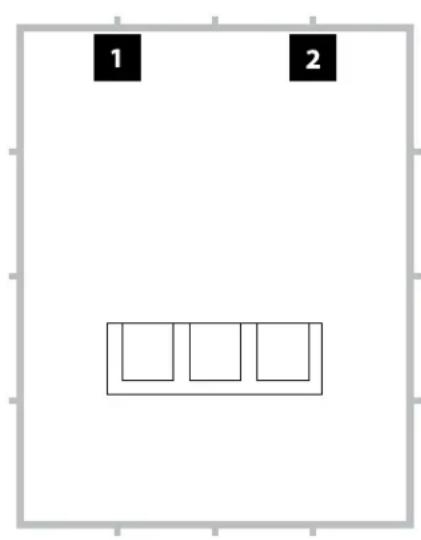
Recommended Subwoofer Placement for Two Dominion® Subwoofer
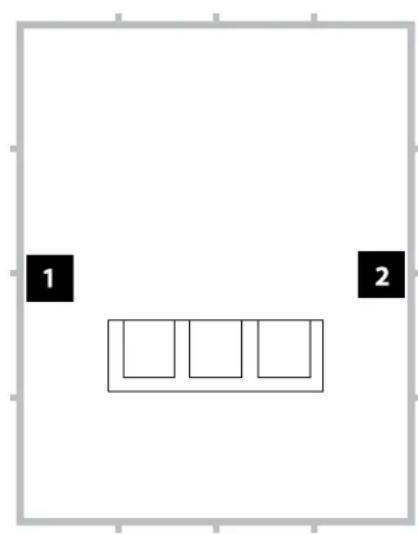
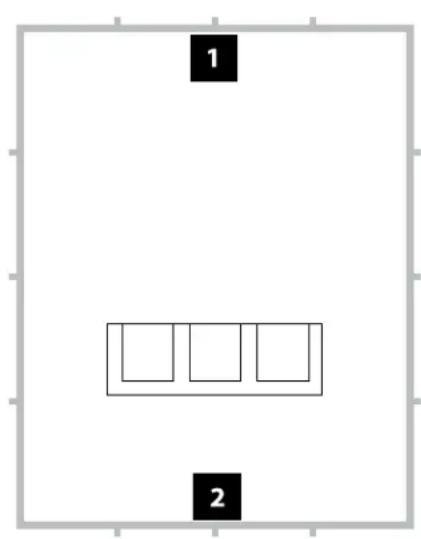
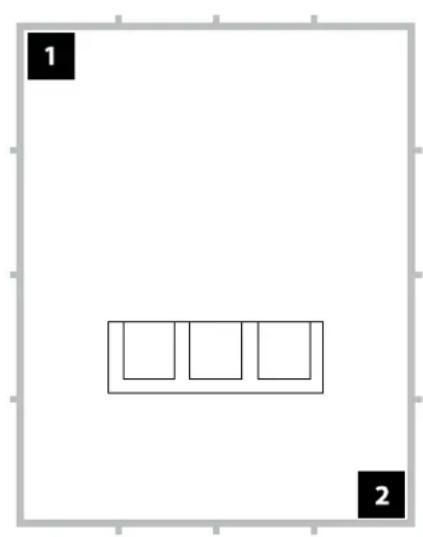
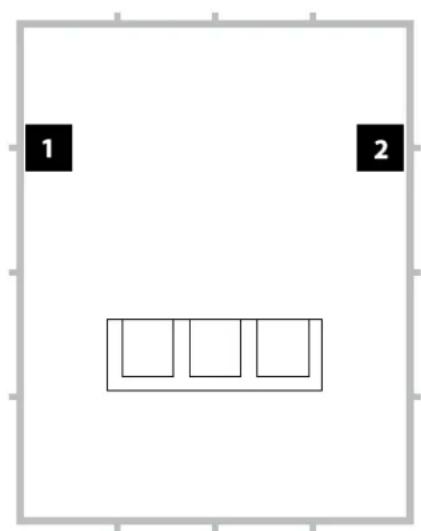
Recommended Subwoofer Placement for Three Dominion® Subwoofer
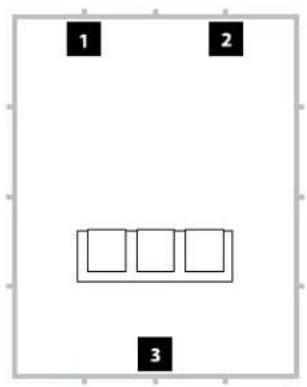
Recommended Subwoofer Placement for Four Dominion® Subwoofer
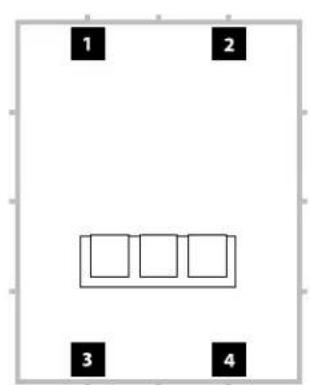
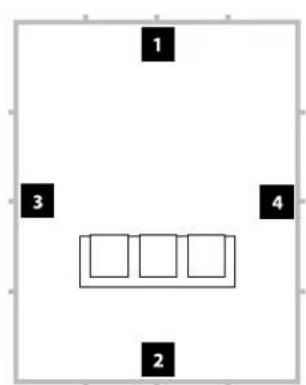
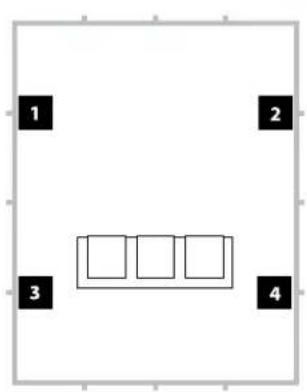
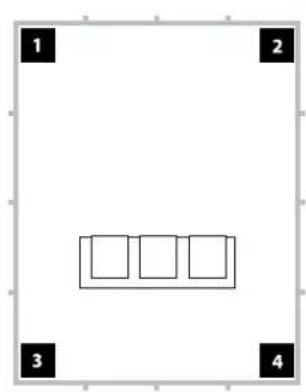
Using Three or Four Dominion Subwoo
Research indicates that the smoothest bass response for a large listening area can be achieved using four subwoofoers, placing one at the midpoint of each of the four walls (although using two or three subwoofoers can be almost as good).
Experimentation with subwoofer and listener placement is recommended to achieve the best results - the benefits can be substantial.
High-resolution measurements and professional system calibration are recommended for the best possible results and system performance.
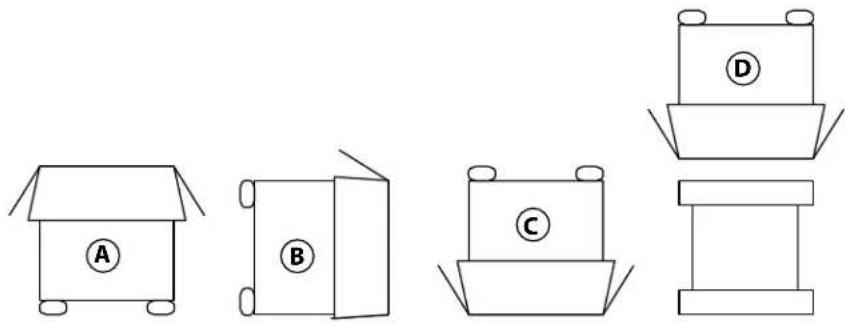
Unpack this box close to where the subwoofer will be placed. The subwoofer is PACKED upside down. This box must be flipped over CAREFULLY to remove the subwoofer and minimize effort.
UNPACKING YOUR Dominion®
Now that you have determined the position of your Dominion on the floor of your room, you can proceed with unpacking it near its intended location.
IMPORTANT

IMPORTANT! DUE TO THE WEIGHT OF THE Dominion® SUBWOOFER, PLEASE EXERCISE CAUTION WHILE UNPACKING AND POSITIONING IT TO PREVENT INJURY. IF POSSIBLE, ENLIST THE HELP OF A SECOND PERSON TO FACILITATE THE PROCESS. TO MINIMIZE THE RISK OF INJURY, BEND YOUR KNEES AND LIFT WITH YOUR LEGS, NOT YOUR BACK.
Detailed instructions on unpacking the subwoofer:
- Place the carton on the floor near its intended location in the room.
- Open the top of the carton (observe markings on carton) and remove the manual and power cord.
- The subwoofer is packed upside down. Lift the styrofoam cap off the bottom of the subwoofer.
- Loosen the protective cloth cover to allow for easy removal later on (do not remove at this time). When you open the cloth cover, you are looking at the bottom of the subwoofer cabinet.
- Replace the styrofoam cap you removed in Step 3 to protect the subwoofer's cabinet while flipping and unpacking the subwoofer in the following steps.
- Gently flip the box on its side, folding back the carton flaps to the outside.
- Holding the carton flaps back, gently flip the carton onto its top (open end).
- Pull the carton straight up until it clears the subwoofer and place to one side.
- Remove the top-most styrofoam cap and place this cap in the carton.
- Remove the plastic bag and place in the carton.
- Lift the subwoofer off the remaining styrofoam cap and place this cap in the carton.
- Remove the protective cloth cover and place in the carton.
IMPORTANT

IMPORTANT! PLEASE RETAIN ALL PACKAGING FOR SAFE TRANSPORTATION OF THE SUBWOOFER AND FOR ANY FUTURE SERVICE NEEDS.
Rear Control Panel (120V Model Shown)
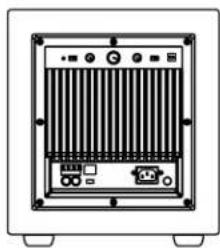
The labeled figure below depicts the rear panel of a Dominion subwoofer.
The d108 and d110 have identical layouts.
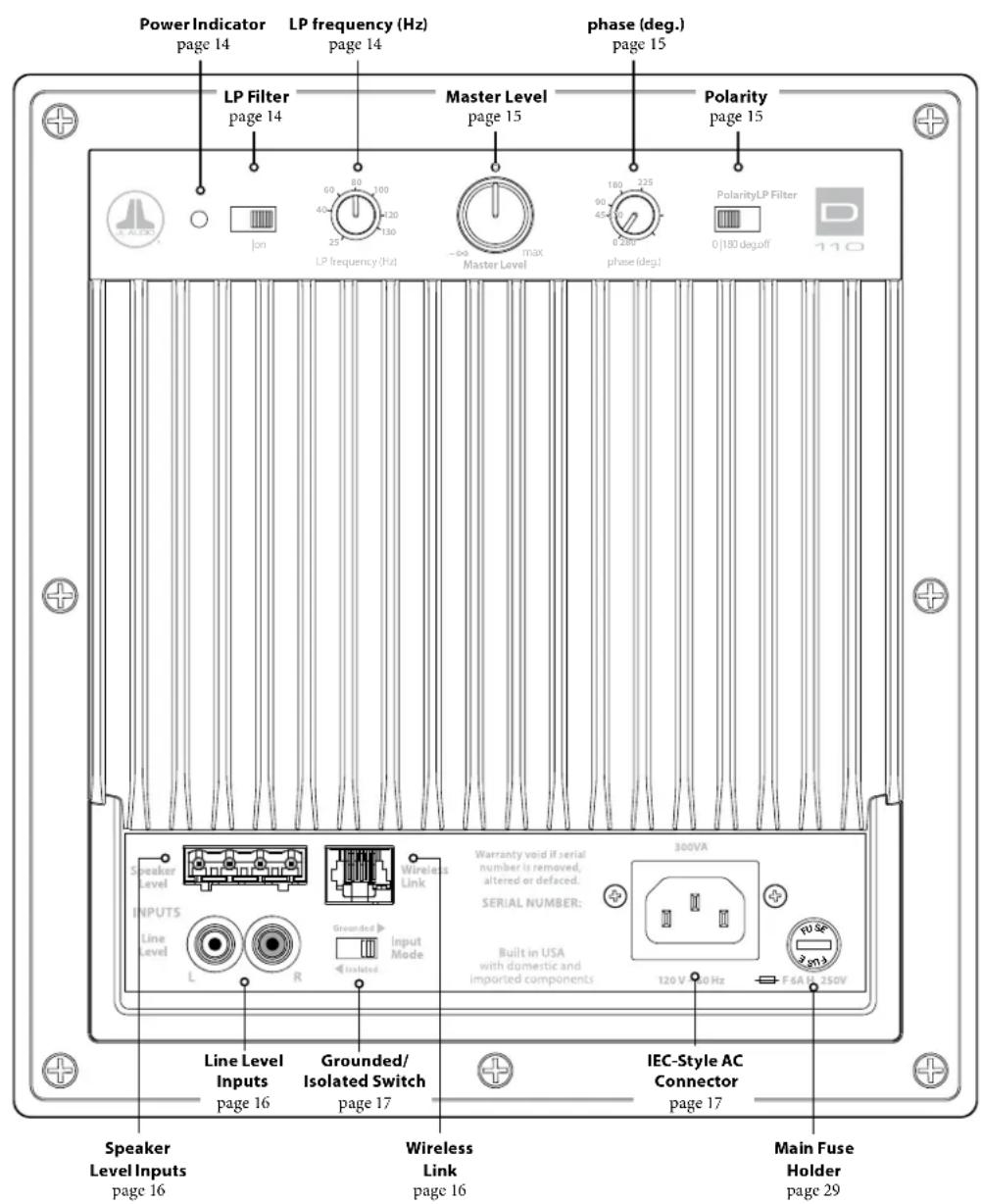
DOMINION\* CONTROLS IN DETAIL
Power Indicator LED
The indicator LED on the control panel shows the operational readiness of the Dominion subwoofer. Note: Dominion subwoofer DO NOT have a Power Switch. Instead, the Dominion will automatically power up its internal amplifier when it detects audio at any of its inputs and will power down the internal amplifier if no signal has been detected for approximately thirty (30) minutes. While dormant in this "Low Power Standby" mode, the Dominion consumes only a tiny amount of power (<0.5 watt). Refer to the chart below for the LED's function and meaning.
| LED Color Mode | Condition | |
| Green On Audio signal detected | ||
| Red Low Power Standby | When first connected to power or 30 minutes after loss of audio signal | |
In the unlikely event that the Auto Turn-On feature is not sensitive enough for a particular system, use a Y-adaptor cable (one female to two male RCA type connectors) to split the incoming signal into both RCA inputs on the Dominion. This will increase the input level by 6dB. Please be aware that if there is any significant noise entering the subwoofer's input, it may not turn off as desired. If this happens, remove the Y-adaptor cable and/or look for the noise source in upstream components.
The only way to completely power down a Dominion® subwoofer is to unplug its AC Power Cord. Do not use a switched outlet, power strip switch, or any other external switch to interrupt or engage power to a Dominion®, as this can result in undesirable and potentially damaging transient pops.
LP Filter Switch
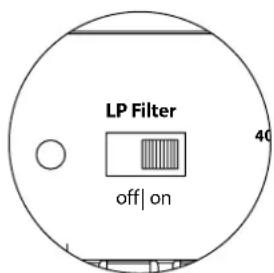
The "LP Filter" selector switch determines the operating mode of the built-in active crossover of your Dominion*.
"Off" defeats the crossover filter, completely removing this circuit from the signal path and is most useful when using a receiver or preamp/processor's filters and bass-management features.
"On" activates the on-board active crossover. This crossover consists of a 24 dB/octave low-pass filter for signals feeding the internal amplifier.
LP Frequency Knob
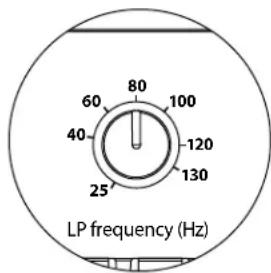
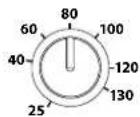
The "LP frequency (Hz)" selector knob allows the user to choose the crossover frequency of the built-in active crossover of your Dominion. It has no effect when the "LP Filter" switch is in the "off" position. The frequency is variable from 25 Hz (full counter-clockwise) to 130Hz (full clockwise). 80Hz is a commonly used filter frequency and usually serves as a good starting point for adjustments.

IMPORTANT


Master Level Knob
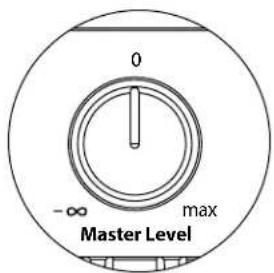
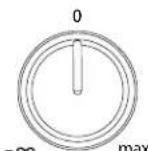
The "Master Level" Knob is used to set the output level of the Dominion, relative to the rest of the audio system.
When rotated fully counter-clockwise, the subwoofer's output will be completely muted. When at the "0" or vertical position, the level is at reference gain. When turned fully clockwise, the subwoofer's level is at maximum sensitivity (loudest).
phase (deg.) Knob
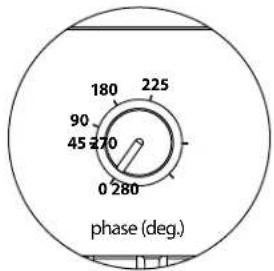
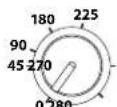
The "phase (deg.)" control knob allows the user to adjust the timing of the subwoofer output relative to the main speakers. The "phase (deg.)" control will primarily affect the small frequency range around the crossover point between your subwoofer and satellite speakers. The "phase (deg.)" control's degree labeling is referenced to 80Hz , since this is the most common crossover point between satellite speakers and a subwoofer. Phase settings between 0 degrees (full counterclockwise rotation) and 280 degrees (full clockwise rotation) are possible.
Speaker, subwoofer, and listening seat positions vary greatly in home theater installations. Since physical positioning of speakers relative to the room boundaries and each other greatly affects the perceived quality of sound output, sometimes it is helpful to delay the subwoofer output. This is exactly what occurs when you turn the "phase (deg.)" control beyond 0 degrees.
Once your Dominion® has been placed in your listening room to give you the smoothest overall sound, and after you have determined the optimum "Polarity" switch position (see following section), experiment with the position of the "phase (deg.)" control. Using familiar source material with good mid and upper bass content, adjust the "phase (deg.)" control and listen for better defined mid-bass and a smoother transition between the subwoofer and satellite speaker systems. If no single setting sounds better than another, leave the "phase (deg.)" control at 0 degrees.
Polarity Switch
The "Polarity" switch allows the user to select between normal (0 deg) and reversed (180 deg) signal polarity. The "Polarity" switch will primarily affect the small frequency range around the crossover point between your subwoofer and satellite speakers.
Unlike the "phase (deg.)" control, which effectively adds time delay, the "Polarity" switch produces an instantaneous reversal of the signal's amplitude peaks. For example if, at a given reference point, a sine wave has an amplitude peak, by flipping the "phase (deg.)" switch you instantly convert that peak into a trough or amplitude dip. Because the effect of the "Polarity" switch is immediate, it compliments the operation of the "phase (deg.)" control and cannot be replaced by it.
When placing your subwoofer in the room, experiment with the "Polarity" switch before adjusting the "phase (deg.)" control. Either position of the "Polarity" switch may provide a smoother transition between your Dominion* and the satellite speakers. Use source material with good mid and upper bass content for evaluation.
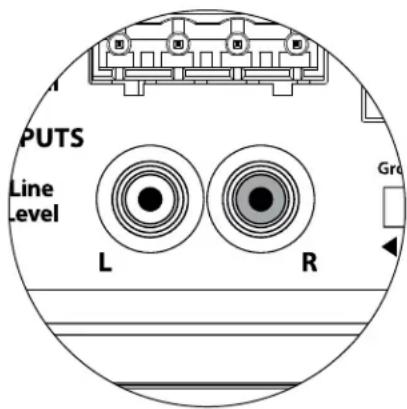
The Dominion® features individual, left and right, unbalanced RCA-type input connectors. These are the most commonly used connectors for home audio applications.
For systems with a mono subwoofer or "LFE" channel connection, only one RCA-type jack will be used (Left or Right). This method applies to most modern multi-channel receivers and preamplifier / processors.
Separate left and right RCA-type input jacks are provided for systems without a dedicated mono subwoofer connection. This typically applies to two-channel audio equipment. The Dominion* will automatically sum the left and right inputs to feed its internal subwoofer amplifier.
RCA-type connectors (one for each channel):
Tip: Positive
Sleeve: Negative
Input Impedance: 10kΩ
Speaker Level Inputs
This feature is included for convenience when needing to connect the Dominion to a receiver or integrated amplifier that only offers speaker level outputs. The use of this feature is only recommended when no suitable line-level signal is available.
To use the "Speaker Level" inputs feature, simply connect the full-range speaker outputs of your receiver or integrated amplifier to the "Speaker Level" plug of the Dominion®, in parallel with the main speakers. In this application, the main speakers will remain full-range and their sound will not be affected by the connection to the Dominion®.
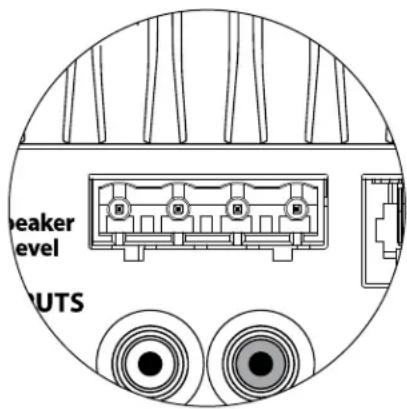
The "Speaker Level" input consists of an input connector and removable plug with captured-wire receptacles. Standard speaker cable, up to 12 AWG (3mm2) , can be used and connected to the removable plug by backing out each set screw, inserting the bare end of each speaker wire, taking care not to short any wire to another, and tightening the set screw. Connections are as follows:
"Speaker Level" Connector (from left to right):
1: Left Channel Positive
2: Left Channel Negative
3: Right Channel Positive
4: Right Channel Negative
Input Impedance: 4.3kΩ
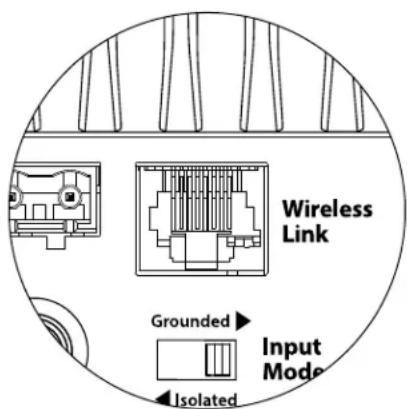
Wireless Link Connector
Your Dominion® includes a "Wireless Link" receptacle that can be used with a JL Audio JLink™ TRX system (sold separately). The JLink™ TRX is a high-fidelity audio transmitter & receiver system, capable of wirelessly sending audio signals up to 100 feet away (30 meters). Using a JLink™ TRX will eliminate the need to run physical signal cables from your receiver or preamp/processor's line-level outputs to the line-level inputs of your Dominion®. Instead, the Dominion® will wirelessly receive audio signals into its "Wireless Link" port directly from the JLINK™ receiver's cable connection.
Note: Use of the JLINK TRX system requires line-level outputs from your receiver or amplifier. Speaker level outputs are not compatible.
The Left and Right inputs on the Dominion are internally summed to a single mono channel.

JLINK∞TRX (sold separately)
"Grounded / Isolated" Switch
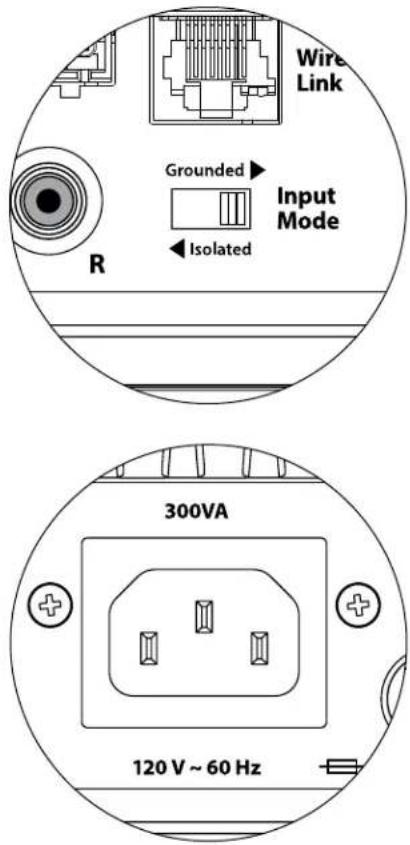
This feature is included to address signal grounding issues often encountered in home theater systems when several components from different manufacturers are interconnected. The "Grounded / Isolated" Input Mode switch on the rear connection panel alters only the "RCA Inputs" and is designed to facilitate a quiet, hum-free connection to your audio or home theater system. This switch has no effect on signals connected to the "Speaker Level" inputs.
The Dominion® ships with this switch in the "Isolated" position. If, with all system components connected and turned on (but no source material playing), you hear a continuous low-frequency hum through your Dominion®, flip this switch to the "Grounded" position and evaluate the difference in the noise level. Use whichever switch position provides the least hum or noise.
IEC-Style AC Power Connector
The IEC-style AC cord receptacle receives the heavy-gauge, 6 ft. (1.8 m) long, power cord included with your Dominion. Subwoofoers sold in different parts of the world are configured for each market's electrical system and include appropriate plugs on their power cords. Please note the voltage markings next to the AC Connector and make sure you are only powering the Dominion from a receptacle that matches these markings. Do not use any AC power cord other than the one supplied with the Dominion*. For information about the Main Fuse Holder, please see the Troubleshooting section of this manual.
The Dominion* subwoofer is a powerful device and can draw a lot of current. If too many components are connected with a Dominion to one electrical outlet, you risk tripping a household circuit breaker during very demanding program material. If this happens, split the Dominion and other components between two AC electrical circuits.
RECEIVER/PROCESSOR
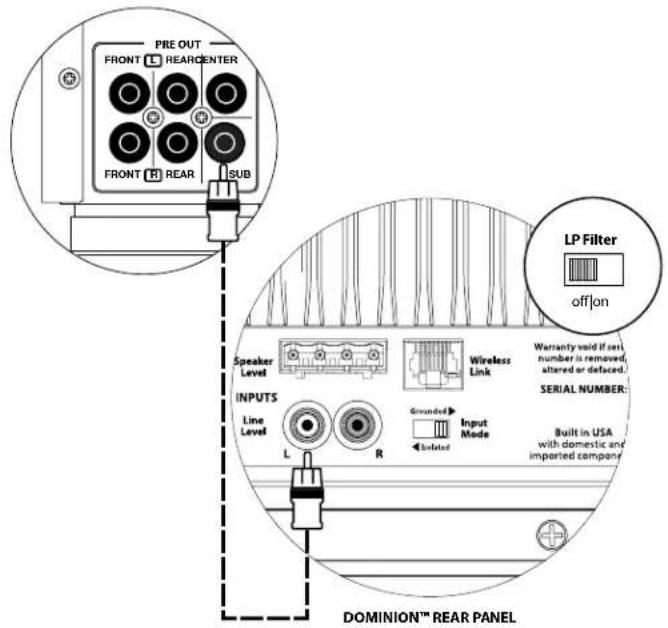
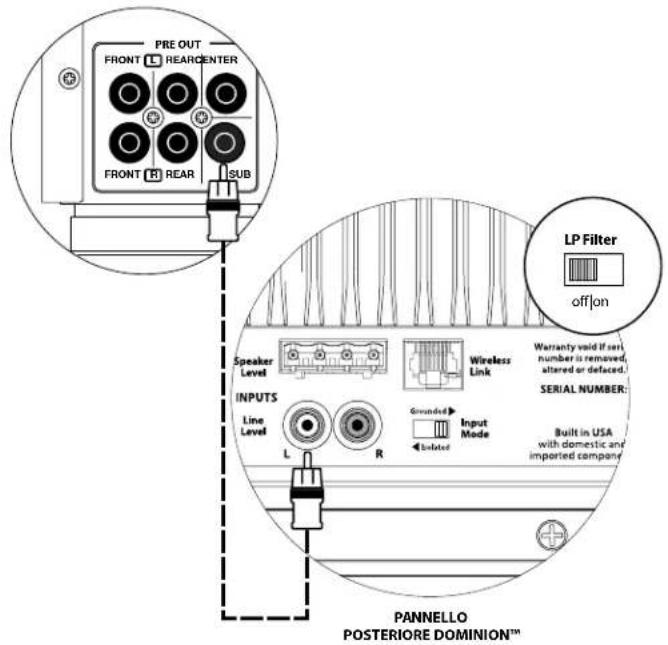
SYSTEM CONNECTION DIAGRAM 1: One Dominion to Home Theater Receiver or Home Theater Preamp/ Processor
Most home theater receivers and preamp/processors provide a single (mono) subwoofer line-level output.
When connecting a mono subwoofer output to your Dominion, you only need to connect to one of the subwoofer's "Line Inputs" (Left or Right). Use a good-quality audio interconnect cable with RCA-type connectors.
In most cases, you will use the bass management/crossover features of the receiver or preamp/ processor. This requires that the "LP Filter" switch of your Dominion is placed in the "Off" position.
WARNING! TURN OFF THE DOMINION®(S) AND ALL OTHER EQUIPMENT IN THE SYSTEM BEFORE MAKING OR CHANGING ANY CONNECTIONS!

WARNING
SYSTEM CONNECTION DIAGRAM 2: Multiple Dominion* Subwooferst oHome Theater Receiver or Home Theater Preamp/Processor
Most home theater receivers and preamp/processors provide a single (mono) subwoofer line-level output.
When connecting a mono subwoofer output to more than one Dominion, use a Y-adaptor cable (splitter) to split the output signal to multiple audio interconnect cables, each feeding a separate Dominion subwoofer. Use a good-quality audio interconnect cable with RCA-type connectors.
In most cases, you will use the bass management/crossover features of the receiver or preamp/ processor. This requires that the "LP Filter" switch of your Dominion* is placed in the "Off" position.
Some receivers and preamp/ processors offer multiple subwoofer outputs, which can be used to connect multiple Dominion* subwoofoers. Refer to the manual of your receiver/pre-pro for details.
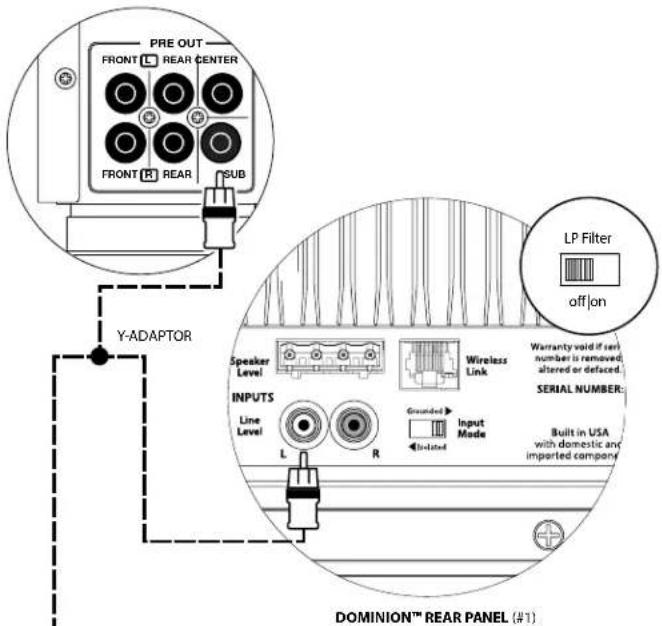
RECEIVER/PROCESSOR
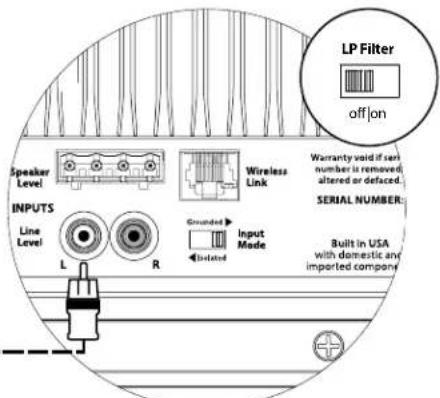
DOMINIONTM REAR PANEL (#2)
WARNING

WARNING! TURN OFF THE DOMINION®(S) AND ALL OTHER EQUIPMENT IN THE SYSTEM BEFORE MAKING OR CHANGING ANY CONNECTIONS!
PRE-AMPLIFIER
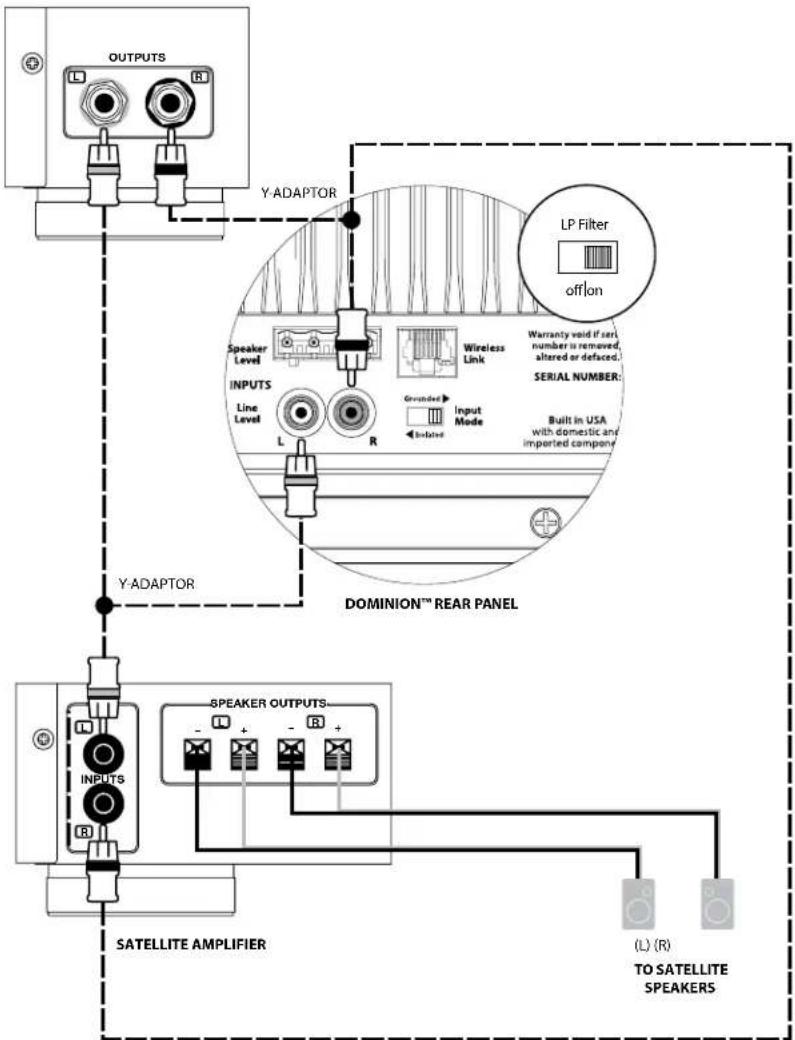
SYSTEM CONNECTION DIAGRAM 3: One Dominion in Mono to a Two-Channel Audio System
When connecting a single Dominion in mono to a two-channel audio system, you will use both the "Left" and the "Right" "Line Inputs" of the Dominion.
Ideally, you will employ bass management (crossover) features built into your preamplifier (if available), or a dedicated active crossover (like the JL Audio CR-1) to split the left and right signals between your subwoofer and main speaker amplifier. In these scenarios, the subwoofer will connect to the dedicated subwoofer output(s) of the active crossover or preamplifier. Use good-quality audio interconnect cables with RCA-type connectors to make these connections.
If you are not using an external active crossover or bass management built into your preamplifier, you can simply split the audio signals at the outputs of your preamplifier using Y-adaptor cables (splitters). Then, run a two-channel audio cable to the subwoofer from these Y-adaptors, and connect this cable to the Left and Right Line Inputs of the subwoofer.
In this scenario, you should engage the low-pass filter on the Dominion to apply low-pass filtering to the signal feeding the subwoofer's internal amplifier. The signal to the main speaker amplifier will remain full-range.
WARNING! TURN OFF THE DOMINION®(S) AND ALL OTHER EQUIPMENT IN THE SYSTEM BEFORE MAKING OR CHANGING ANY CONNECTIONS!
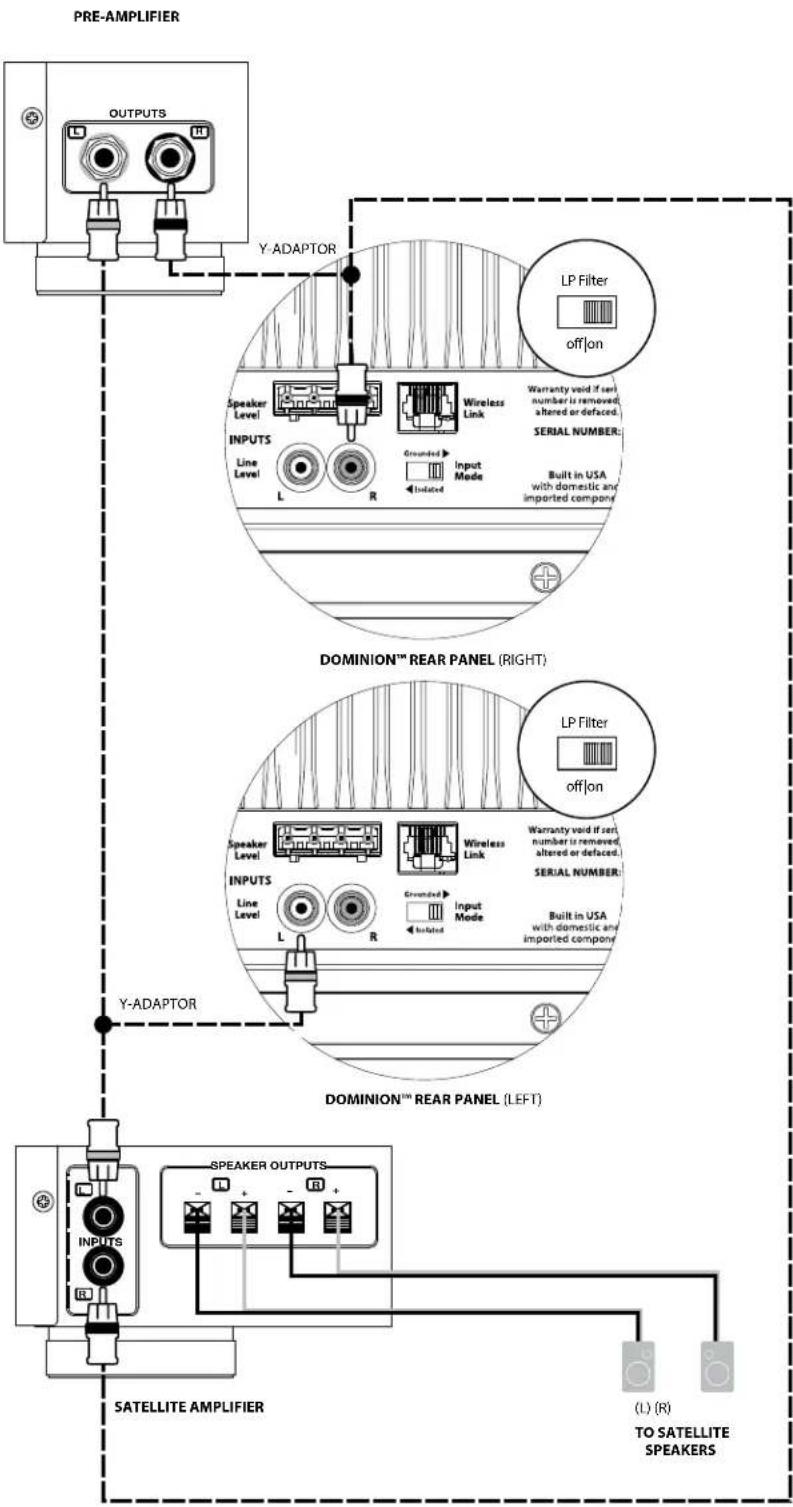
SYSTEM CONNECTION DIAGRAM 4: Two Dominion® Subwoofer in Stereo to a Two-Channel Audio System
When connecting two Dominion® subwoofoers in stereo to a two-channel audio system, you will assign one Dominion to the left channel and the other Dominion to the right channel.
Ideally, you will employ bass management (crossover) features built into your preamplifier (if available), or a dedicated active crossover (like the JL Audio CR-1) to split the left and right signals between your subwooers and main speaker amplifier. In these scenarios, the subwooers will connect to the dedicated subwoofer outputs of the active crossover or preamplifier. Connect the left output of your preamplifier to the "Line Input" of the Dominion designated as the left subwoofer. Then, connect the right output of your preamplifier to the "Line Input" of the Dominion designated as the right subwoofer. Use good-quality audio interconnect cables with RCA-type connectors to make these connections.
If you are not using an external active crossover or bass management built into your preamplifier, you can simply split the audio signals at the outputs of your preamplifier, Y-adaptor cables (splitters). Then run an audio cable to each subwoofer from these Y-adaptors. You will only use one "Line Input" on each Dominion* (left or right).
In this scenario, you should engage the low-pass filter on each Dominion to apply low-pass filtering to the signal feeding each subwoofer's internal amplifier. The signal to the main speaker amplifier will remain full-range.
WARNING

WARNING! TURN OFF THE DOMINION®(S) AND ALL OTHER EQUIPMENT IN THE SYSTEM BEFORE MAKING OR CHANGING ANY CONNECTIONS!
DOMINION™ REAR PANEL
DOMINIONREAR PANEL
WARNING! TURN OFF THE Dominion®(s) AND ALL OTHER EQUIPMENT IN THE SYSTEM BEFORE MAKING OR CHANGING ANY CONNECTIONS!
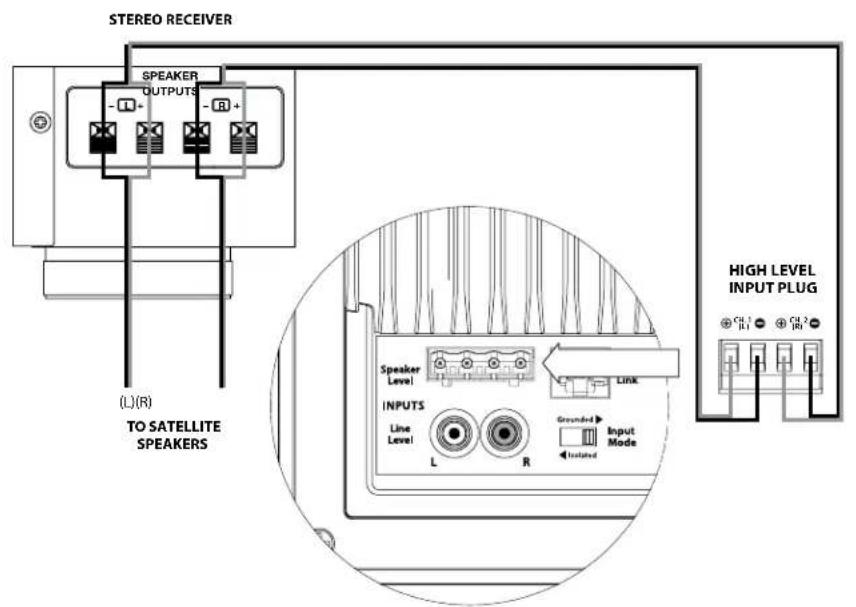
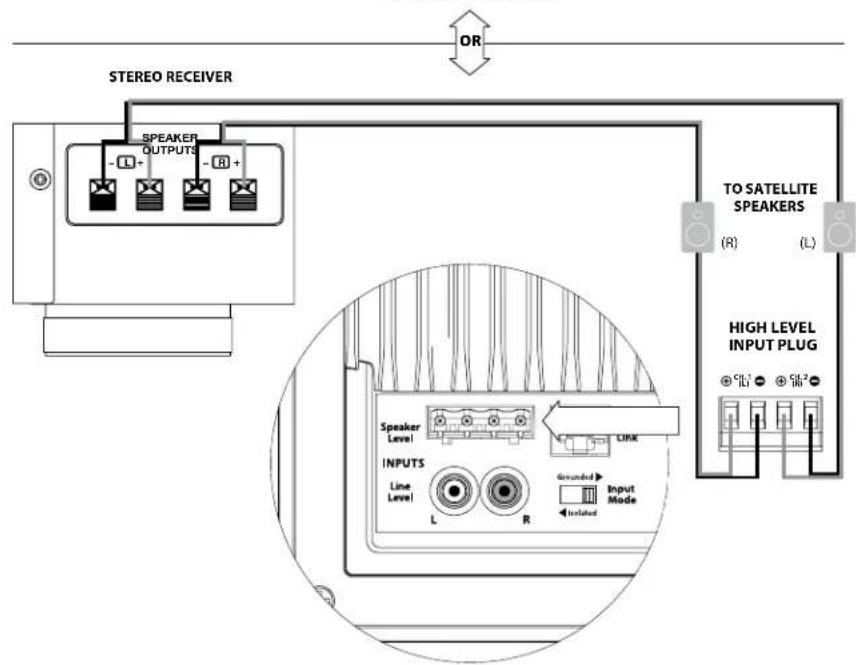
SYSTEM CONNECTION DIAGRAM 5: Connecting one Dominion to a Receiver via the Speaker Level Inputs
The Dominion* features speaker level inputs designed to accept the output of an amplified source, such as a stereo receiver's speaker outputs. The use of this feature is only recommended when no suitable line-level signal is available.
When connecting a single Dominion in mono to a two-channel receiver's speaker outputs, you will use both the Left and Right connections on the "Speaker Level" inputs plug of the Dominion. Use good-quality speaker cables (up to 12 AWG/3 mm²) to make these connections. Make sure you capture all the wire strands in each connector port and do not allow any of these wires to short together.
You can make the connections to the Dominion subwoofer's inputs at the receiver's output terminals, or at the main speakers, whichever is more convenient. On receivers with A/B speaker circuit selectors, you can connect the Dominion to the "B" outputs, giving you the ability to easily switch the subwoofer's signal on and off with the receiver's speaker circuit selector switch.
The input section of your Dominion will sum the left and right inputs to mono and apply low-pass filtering to feed the subwoofer's internal amplifier when the "LP Filter" of your Dominion is switched "on."
Because the main speakers are being fed in parallel with the inputs of the Dominion, they continue to operate as full-range speakers. Any adjustment of the "LP frequency (Hz)" knob will only affect the sound of the Dominion, not the main speakers.

WARNING
RECOMMENDED SETUP PROCEDURES
1.Preparation for Setup Process: 24-25
2. Level Setting: 26
3. Polarity/Phase Adjustment: 26
4. Experiment with Location: 26
PREPARATION FOR SETUP:
Please confirm the following system settings before beginning the setup process. This will ensure a neutral starting point and an effective setup of your subwoofer system.
On your Home Theater Receiver or Preamp/Processor:
Before beginning setup of your Dominion* subwoofer system, we recommend that you set your receiver or preamp/processor as follows:
1. Speaker Size
In the speaker setup menu of your receiver or preamp/processor, set up all of your high-frequency speakers as "small" with a crossover point of 80Hz . This will send ALL bass, from all channels, to the subwoofoers and is the recommended method for best performance, regardless of the actual size of your main speakers (big or small).
2. Speaker Distance
In the speaker setup menu, properly set all speaker distances to the primary listening seat, including the subwoofer's distance. Use a tape measure to determine these distances (time coherence is important.) If multiple Dominion* subwoofer are being used, average their distances to the primary listening seat and use that number to set the subwoofer distance.
3. Subwoofer Level
Set the "subwoofer level" in the receiver or preamp/processor to "0" or its middle position.
4. Tone Controls / Equalizers
Set all tone controls (bass, treble, etc.) to "0" and defeat all equalizer features.
On your Active Crossover or Bass Management Processor:
If you are using an active crossover or bass-management processor, we recommend that you set it as follows before beginning setup of your Dominion® subwoofer system (please turn off all Dominion® subwoofer in the system prior to making these adjustments):
1. Crossover Filter Frequency
Select a low-pass filter frequency of 80Hz (24dB/octave slope, if given an option)
2. Subwoofer Output Level
Set the subwoofer output level to "0" or its middle position.

O

on
LP frequency (Hz)
Master Level
phase (deg.)

PolarityLP Filter
0|180 deg.off

110
On the Dominion® Control Panel:
- "LP Filter" Switch and "LP frequency (Hz)" Knob
If your home theater receiver/processor is handling bass management (speakers set on "small"), or if you are using an outboard crossover/bass-management processor, flip the "LP Filter" switch of your Dominion to "off." If your application requires the use of the built-in low-pass filter of your Dominion, select the "on" position and set the "LP frequency (Hz)" knob to "80 Hz".
- "Polarity" Switch
Flip the "Polarity" switch to "0."
- "phase (deg.)" Knob
Rotate the "phase (deg.)" knob to "0" degrees
RECOMMENDED SETUP PROCEDURES
Subwoofer System Setup:
Once you have set the controls on your home theater receiver or preamp/ processor and your subwoofer to the settings recommended on pages 24 and 25, you are ready to begin setting up your Dominion* for optimum performance.
1. Level Setting
Using familiar music or movie material with deep bass content, adjust the subwoofer level to blend with the other speakers using your receiver or preamp/processor's subwoofer level control.
In the unlikely event that the subwoofer level control in your receiver or preamp/processor cannot be turned up enough to level match the Dominion, return that control to "0." Instead, use the "Master Level" control on your Dominion to level match the subwoofer with the other speakers.
For more detailed information on level setting controls of your Dominion*, please refer to the "Master Level" section on page 14 of this manual.
2. Polarity and Phase Adjustment
It is often helpful to have a second person operating these controls so that you can easily hear the changes from the primary listening seat.
Listening to familiar source material (preferably music with good upper bass and midbass response), flip the "Polarity" switch from "0" to "180" and listen for differences. The correct setting will sound most natural with the best upper bass punch and articulation. If both sound similar, choose "0."
Once Polarity is set, use the same music material to audition different "phase (deg.)" control settings and choose the one that further enhances the upper and midbass response. If you cannot hear a difference, set the control to "0."
3. Experiment with alternative subwoofer locations (if necessary).
If you are satisfied with the basic performance of your subwoofer, you are ready to move on to the next step. If not, we recommend that you experiment with the position of your subwoofer until you are pleased with its basic performance. Experimenting with placement is KEY to a superior sounding system. Moving the subwoofer just a few feet can have a significant effect on the smoothness of the bass. For each new position, start with the "Polarity" and "phase (deg.)" controls at "0" and repeat the setup process beginning with Step 1.
This completes the basic setup process! You can achieve further improvements through the correct use of processing built into your receiver or preamp/processor. Consult with your Authorized JL Audio Retailer if you require further setup assistance.
IMPORTANT! WRITE DOWN ALL SETTINGS PERFORMED IN STEPS 1-3 FOR FUTURE REFERENCE. PAGE 30 IS PROVIDED FOR INSTALLATION NOTES.

IMPORTANT
FREQUENTLY ASKED QUESTIONS
Can I place objects on my subwoofer?
We do not recommend placing any items on the subwoofer cabinet as they may vibrate, causing undesirable noise and possible damage to the finish. Under no circumstances should any object containing liquid be placed on the cabinet.
Will my electric bill be high if I leave the subwoofer plugged in?
Whenever it is plugged into AC power, the Dominion amplifier is only powered up when a significant signal is detected at the inputs. When in low power standby, only "housekeeping" circuits remain on, which draw negligible amounts of power from the outlet (less than 0.5 watt).
Should I unplug the subwoofer during a thunderstorm or extended absence?
YES. You should unplug your subwoofer during (or before) thunderstorms. This will prevent any possible damage from voltage spikes due to lightning. In these conditions, it's a good idea to unplug all of your audio/video components. Unplugging your audio/video equipment before an extended absence is highly recommended, in the event that a storm event occurs during that absence.
Is it safe to use my Dominion® outdoors, in a sauna or on a pool deck?
NO. The Dominion* is only designed for operation in dry, indoor environments.
Is the Dominion magnetically shielded?
NO. To avoid magnetic distortion with certain television types, place the subwoofer at least 3-4 feet (1 - 1.5m) from your screen. If you notice any discoloration in the picture, try moving the subwoofer further away until these artifacts disappear.
CLEANING YOUR DOMINION
Dust your Dominion subwoofer's cabinet using a clean, soft microfiber cloth or feather duster. Microfiber cloths are commonly available where automotive detailing supplies are sold.
Gloss-Black models:
Light smudges can generally be wiped off with a clean microfiber cloth. For more stubborn smudges, polish and protect the finish using a high-quality automotive wax and a microfiber cloth, both available wherever automotive detailing supplies are sold.
Vinyl-Veneer models:
Light smudges can generally be wiped off with a clean microfiber cloth. For more stubborn stains, clean the cabinet's surface with a damp cloth.
Never use a polish that contains harsh solvents or abrasives, as these may permanently damage the finish. Never use furniture polish or any oil-based product on your Dominion. Never use solvents or aggressive cleaning agents on your Dominion. When in doubt, test the cleaning product on the underside of the cabinet and let it sit for several days before committing to its use on visible portions of the cabinet.
TROUBLESHOOTING
No sound from subwoofer.
- Verify that your Dominion is plugged in and that the control panel LED is green. Remember that the Dominion only turns "on" if audio signals are present on the sub's inputs. If the Dominion will not power up (no red or green LED), check the circuit breaker that feeds its outlet or the AC power cord. If your AC outlet has power but the LEDs still do not come on, you may need to inspect/replace the main power fuse. Refer to the "Main Fuse Holder" section on the next page.
- Verify that your receiver's subwoofer settings have not changed.
- If your other speakers play, but the Dominion does not, try changing the cable that connects the Dominion to the system.
- If the problem persists, call your Authorized JL Audio Retailer or JL Audio Technical Support for assistance.
The bass level has changed.
Make sure your level settings on the Dominion* "Master Level" knob and in your receiver/preamp/processor have not changed.
Hums or other unusual noises from your subwoofer
- See discussion of "Grounded/Isolated" switch on page 17 of this manual, especially if any upstream components, cables, etc., have recently changed.
- Turn off the subwoofer, disconnect all its input and output signal cables; then turn the subwoofer back on. If the noise disappears, the noise is being caused elsewhere in your system.
TROUBLESHOOTING - continued
Bass sounds "muddy" or "too heavy."
- Decrease the overall subwoofer level.
- Verify your receiver's subwoofer settings.
- Try a different subwoofer location or main listening seat location. Changing one or the other can have a HUGE effect on how your system sounds. See the placement discussion on pages 6-10 of this manual.
Your Dominion is clearly audible outside of your house.
- Revisit the "Master Level" setting on your Dominion or your home theater receiver/preamp/processor.
- Inquire with your Authorized JL Audio Retailer about noise isolation strategies.
- Move the Dominion away from windows.
Angry neighbors knocking at your door.
Invite them in and offer them a beverage.
MAIN FUSE HOLDER
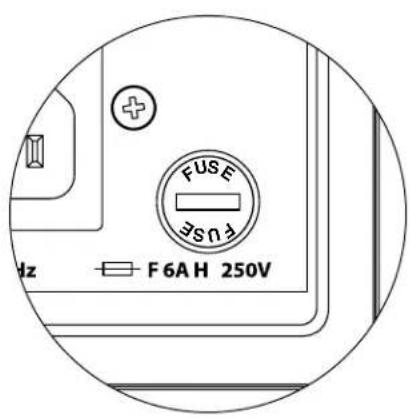
Located on the rear panel, next to the AC cord receptacle is the main fuse holder's cover. This small spring-loaded cap may be removed, allowing access to inspect or replace the main power fuse. If your AC outlet has power but the Dominion subwoofer's LEDs do not come on, the main power fuse may be blown.
To Remove - Unplug the subwoofer's AC power cord. Insert a small flathead screwdriver into the cap's slot and turn counter-clockwise slowly until the fuse holder is released. Once removed, the fuse can be inspected and, if necessary, replaced. Refer to the chart below for fuse values for your specific Dominion® model.
To Reinstall - Note that the fuse holder's body is keyed to the opening and must be aligned to fit properly. Insert the fuse holder into the opening and gently turn clockwise (about 1/8 turn) to lock in place. Pressing the cap and feeling for the spring to compress will help to locate the correct position. Reconnect the AC power cord.
If the replacement fuse blows immediately after a fuse replacement, the subwoofer's amplifier may require service. Please contact your Authorized JL Audio Retailer or Distributor.
| Fuse Ratings, 120V Models Only | ||
| Model Fuse Type Fuse Size | ||
| d108 (120V) | 0.25 x 1.25 | inch, fast-acting 6A, 250V |
| d110 (120V) | 0.25 x 1.25 | inch, fast-acting 6A, 250V |
| Fuse Ratings, 240V Models Only | ||
| Model Fuse Type Fuse Size | ||
| d108 (240V) 5mm x 20mm | mm, fast acting 4A, 250V | |
| d110 (240V) | 5mm x 20mm, fast acting | 4A, 250V |

TOP

BOTTOM
B A C K
FRONT
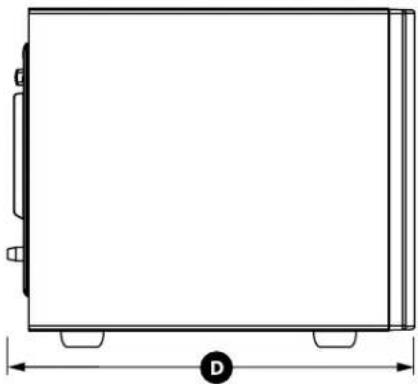
SIDE WITH GRILLE
| Specifications | d108 Dominion* powered subwoofer | d110 Dominion* powered subwoofer |
| Enclosure Type: Sealed Sealed | ||
| Driver: Single 8-inch (nominal diameter) Single 1 | 0-inch (nominal diameter) | |
| Frequency Response (anechoic): | 31 - 12 Hz (-1.5dB) -3 dB at 29 Hz / 119 Hz -10 dB at 21 Hz/143 Hz | 27 - 111 Hz (L1.5dB) -3 dB at 25 Hz / 118 Hz -10 dB at 21 Hz/143 Hz |
| Effective Piston Area: | 32.18 sq. in. (0.0208 sq. m) | 48.71 sq. in. (0.0314 sq. m) |
| Effective Displacement: | 80 cu. in. (1.3 liters) | 127 cu. in. (2.08 liters) |
| Amplifier Power: | 500 watts RWS short-term | 750 watts RMS short-term |
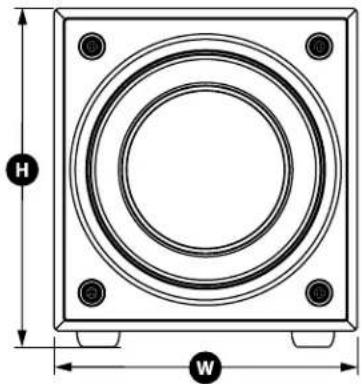
| Dimensions: (H) Height x (W) Width x (D) Depth Height Dimensions include feet. | 11.37 in. x 10 in. x 13.23 in. 288 mm x 254 mm x 336 mm | 13.4 in. x 12 in. x 15.86 in. 340 mm x 305 mm x 403 mm |
| Net Weight: | 26.4 lbs. (12 kg) 38.2 lbs. (17.3 kg) | |
FEATURES
Unbalanced Inputs:
Stereo or Mono (two RCA jacks)
Speaker Level Inputs:
Stereo or Mono (removable plug)
Input Grounding:
Selectable (Isolated or Grounded)
Level Control:
Variable: full mute to +15 dB over reference gain
Power On/Off:
Automatic Signal-Sensing only
Low-Pass Filter (defeatable):
24 dB per octave with Linkwitz-Riley alignment
Low-Pass Cutoff Frequency Range:
Variable: 25Hz - 130Hz
Polarity:
0 or 180 degrees
Phase:
Variable from 0-280 degrees, referenced to 80Hz

JL AUDIO
Subwoofer amplifie Dominion
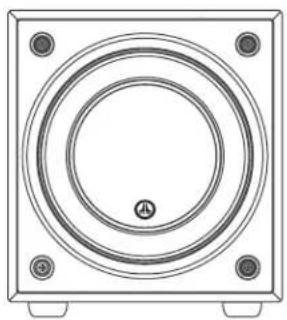
d10d108
Frequence dcoupure pass-bas:
- Interruption "Polarity"
VRC-Vented Reinforcement Collar
Engineered Lead-Wire System
1. Crossover-Filterfrequency
TECNOLOGIE JL AUDIO INCLUDE NEI SUBWOOFER Dominion
RICEVITORE/PROCESSOR
- IMPORTANT SAFETY INSTRUCTIONS
- FCC COMPLIANCE STATEMENT
- TABLE OF CONTENTS
- INTRODUCTION
- JL AUDIO TECHNOLOGIES INCLUDED IN Dominion* SUBWOOFERS
- DMA-Optimized Motor System
- VRC-Vented Reinforcement Collar
- Floating-Cone™ Attach Method
- Engineered Lead-Wire System (U.S. Patent #7,356,157)
- PRODUCT OVERVIEW
- PLACING YOUR DOMINION® SUBWOOFER IN YOUR LISTENING ROOM:
- SPECIAL CONSIDERATIONS FOR BUILT-IN INSTALLATIONS
- Using Two Dominion Subs
- Recommended Subwoofer Placement for Three Dominion® Subwoofer
- Recommended Subwoofer Placement for Four Dominion® Subwoofer
- Using Three or Four Dominion Subwoo
- UNPACKING YOUR Dominion®
- Detailed instructions on unpacking the subwoofer:
- Rear Control Panel (120V Model Shown)
- DOMINION\* CONTROLS IN DETAIL
- Power Indicator LED
- LP Filter Switch
- LP Frequency Knob
- Master Level Knob
- phase (deg.) Knob
- Polarity Switch
- Speaker Level Inputs
- "Speaker Level" Connector (from left to right):
- Wireless Link Connector
- "Grounded / Isolated" Switch
- IEC-Style AC Power Connector
- SYSTEM CONNECTION DIAGRAM 1: One Dominion to Home Theater Receiver or Home Theater Preamp/ Processor
- SYSTEM CONNECTION DIAGRAM 2: Multiple Dominion* Subwooferst oHome Theater Receiver or Home Theater Preamp/Processor
- SYSTEM CONNECTION DIAGRAM 3: One Dominion in Mono to a Two-Channel Audio System
- SYSTEM CONNECTION DIAGRAM 4: Two Dominion® Subwoofer in Stereo to a Two-Channel Audio System
- SYSTEM CONNECTION DIAGRAM 5: Connecting one Dominion to a Receiver via the Speaker Level Inputs
- RECOMMENDED SETUP PROCEDURES
- PREPARATION FOR SETUP:
- On your Home Theater Receiver or Preamp/Processor:
- Speaker Size
- Speaker Distance
- Subwoofer Level
- Tone Controls / Equalizers
- On your Active Crossover or Bass Management Processor:
- Crossover Filter Frequency
- Subwoofer Output Level
- On the Dominion® Control Panel:
- Subwoofer System Setup:
- Level Setting
- Polarity and Phase Adjustment
- Experiment with alternative subwoofer locations (if necessary).
- FREQUENTLY ASKED QUESTIONS
- Can I place objects on my subwoofer?
- Will my electric bill be high if I leave the subwoofer plugged in?
- Should I unplug the subwoofer during a thunderstorm or extended absence?
- Is it safe to use my Dominion® outdoors, in a sauna or on a pool deck?
- Is the Dominion magnetically shielded?
- CLEANING YOUR DOMINION
- Gloss-Black models:
- Vinyl-Veneer models:
- TROUBLESHOOTING
- No sound from subwoofer.
- The bass level has changed.
- Hums or other unusual noises from your subwoofer
- TROUBLESHOOTING - continued
- Bass sounds "muddy" or "too heavy."
- Your Dominion is clearly audible outside of your house.
- MAIN FUSE HOLDER
- FEATURES
- JL AUDIO
- Engineered Lead-Wire System
- Crossover-Filterfrequency
- TECNOLOGIE JL AUDIO INCLUDE NEI SUBWOOFER Dominion
Brand : JL Audio
Model : Dominion d110
Category : Subwoofer