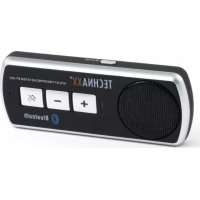
BTX22 - Built-in kit TECHNAXX - Free user manual and instructions
Find the device manual for free BTX22 TECHNAXX in PDF.

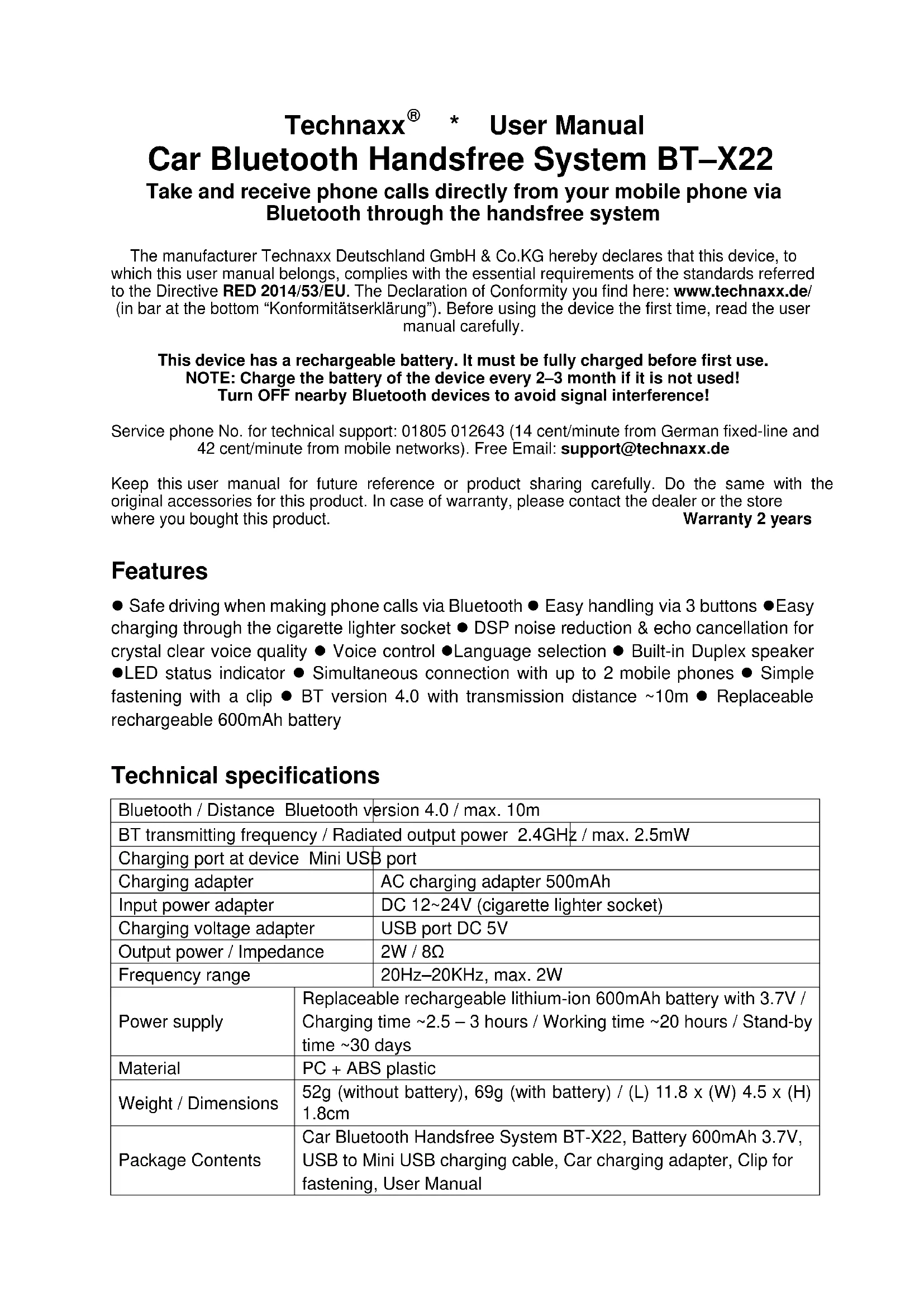


| Product type | Bluetooth hands-free kit for car |
| Brand | Technaxx |
| Model | BTX22 |
| Bluetooth version | 4.0 |
| Bluetooth range | Up to 10 meters |
| Transmission frequency | 2.4 GHz |
| RF output power | Max. 2.5 mW |
| Power supply | Rechargeable lithium-ion battery 600 mAh, 3.7 V |
| Charging time | Approximately 2.5 to 3 hours |
| Playback battery life | Approximately 20 hours |
| Standby battery life | Approximately 30 days |
| Audio output power | 2 W (built-in speaker) |
| Speaker impedance | 8 Ω |
| Frequency response | 20 Hz - 20 kHz |
| Charging port | Mini USB (cable included) |
| Power adapter included | Yes, 12-24 V cigarette lighter adapter |
| Dimensions (L x W x H) | 11.8 x 4.5 x 1.8 cm |
| Weight with battery | 69 g |
| Material | PC + ABS plastic |
| Main functions | Hands-free calling, DSP noise reduction, voice command, audio streaming, simultaneous connection of 2 phones, language selection (FR, EN, DE, IT, TR) |
| LED indicator | Yes, bicolor (red/blue) |
| Mounting | Windshield mounting clip |
| Box contents | BT-X22, 600 mAh battery, Mini USB cable, cigarette lighter adapter, mounting clip, user manual |
| Care and cleaning | Wipe with a soft dry cloth; do not use solvents or harsh cleaners |
| Safety | Do not expose to water, high temperatures or sunlight; keep out of reach of children; do not disassemble |
| Warranty | 2 years |
| Technical support | Tel. 01805 012643 (rate in Germany); email support@technaxx.de |
Frequently Asked Questions - BTX22 TECHNAXX
User questions about BTX22 TECHNAXX
0 question about this device. Answer the ones you know or ask your own.
Ask a new question about this device
Download the instructions for your Built-in kit in PDF format for free! Find your manual BTX22 - TECHNAXX and take your electronic device back in hand. On this page are published all the documents necessary for the use of your device. BTX22 by TECHNAXX.
USER MANUAL BTX22 TECHNAXX
Take and receive phone calls directly from your mobile phone via Bluetooth through the handsfree system
The manufacturer Technaxx Deutschland GmbH & Co.KG hereby declares that this device, to which this user manual belongs, complies with the essential requirements of the standards referred to the Directive RED 2014/53/EU. The Declaration of Conformity you find here: www.technaxx.de/ (in bar at the bottom "Konformitätserklärung"). Before using the device the first time, read the user manual carefully.
This device has a rechargeable battery. It must be fully charged before first use. NOTE: Charge the battery of the device every 2-3 month if it is not used! Turn OFF nearby Bluetooth devices to avoid signal interference!
Service phone No. for technical support: 01805 012643 (14 cent/minute from German fixed-line and 42 cent/minute from mobile networks). Free Email: support@technaxx.de
Keep this user manual for future reference or product sharing carefully. Do the same with the original accessories for this product. In case of warranty, please contact the dealer or the store where you bought this product. Warranty 2 years
Features
- Safe driving when making phone calls via Bluetooth - Easy handling via 3 buttons -Easy charging through the cigarette lighter socket - DSP noise reduction & echo cancellation for crystal clear voice quality - Voice control - Language selection - Built-in Duplex speaker -LED status indicator - Simultaneous connection with up to 2 mobile phones - Simple fastening with a clip - BT version 4.0 with transmission distance 10m - Replaceable rechargeable 600mAh battery
Technical specifications
| Bluetooth / Distance Bluetooth version 4.0 / max. 10m | |
| BT transmitting frequency / Radiated output power 2.4GHz / max. 2.5mW | |
| Charging port at device Mini USB port | |
| Charging adapter | AC charging adapter 500mAh |
| Input power adapter | DC 12~24V (cigarette lighter socket) |
| Charging voltage adapter | USB port DC 5V |
| Output power / Impedance | 2W / 8Ω |
| Frequency range | 20Hz-20KHz, max. 2W |
| Power supply | Replaceable rechargeable lithium-ion 600mAh battery with 3.7V / Charging time ~2.5 – 3 hours / Working time ~20 hours / Stand-by time ~30 days |
| Material | PC + ABS plastic |
| Weight / Dimensions | 52g (without battery), 69g (with battery) / (L) 11.8 x (W) 4.5 x (H) 1.8cm |
| Package Contents | Car Bluetooth Handsfree System BT-X22, Battery 600mAh 3.7V, USB to Mini USB charging cable, Car charging adapter, Clip for fastening, User Manual |
Product View
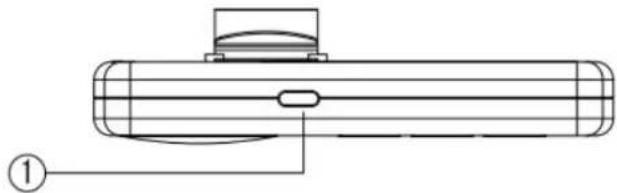
| 1 | Mute; Language selection | ● Press short 1x to deactivate microphone and speaker during a call. ● Press and hold 1–2 sec. for language selection (English, German, Italian, French, Turkish). Note: Not possible during a call. |
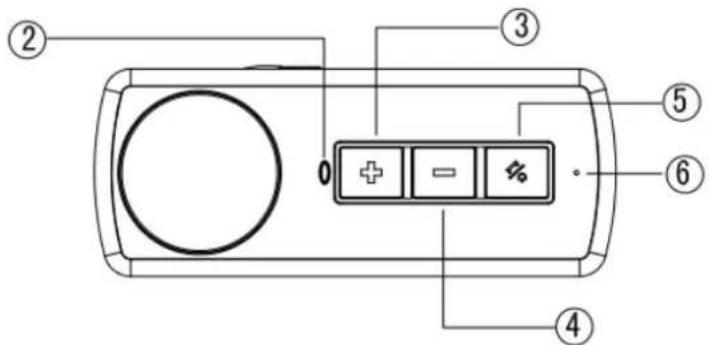
| 2 | LED Status lamp |
| 3 | Next track / VOL (+) |
| 4 | Last track / VOL (-) |
| 5 | Multifunction button |
| 6 | Microphone Microphone for handsfree function |
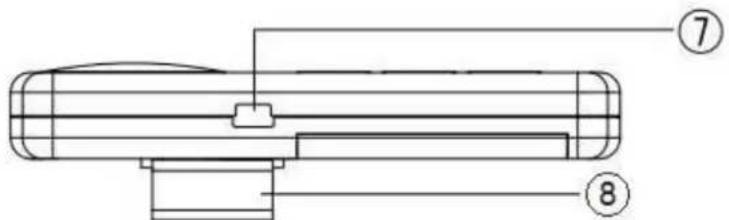
| 7 | Mini USB charging port | To charge the device plug the Mini USB charging cable* (*included in delivery) in the Mini USB charging port, and the other side plug into the car USB charging adapter*. Then plug the adapter into the cigarette lighter socket of your vehicle. Charging time ~2-3 hours. During charging the LED shines in RED. When the battery is fully charged, the LED turns off. Then disconnect the device from the charging cable. |
| 8 | Clip for fastening | This clip is for secure fastening of the device, e.g. to the sun visor of a vehicle. |
Inserting the battery
This device has a replaceable rechargeable 600mAh battery. The battery is inserted at the back of the device into the battery compartment by removing the cover in direction of the arrow. Take attention to the correct polarity when inserting the battery. Then close the battery compartment. Only use the original battery to maintain the operability of the device.
Checking the power supply
First, check whether the output voltage of the external power supply matches the specifications of the product rating label of the device. Disconnect from the power supply during thunderstorms, any malfunction during use and before each cleaning, in order to protect the electronics from overvoltage and destruction. Disconnect the USB cable from the USB port by the plug only (never pull on the cable itself!).
Charging Before first use charge the battery fully!
For charging (~2-3 hours) use the enclosed Mini USB charging cable (see description under No. 7). We recommend to fully charge the batter at least every 2-3 month, even if the device is not used.
Switch ON and OFF
To turn ON the device press and hold long the Multifunction button (5). You will hear the activation sound. If the BT-X22 was already connected to a Smartphone, you will hear after 1 second the announcement with which Smartphone (1 or 2). The device is now in standby mode. If a Smartphone has not yet been connected, the pairing mode is activated automatically. The BT-X22 says „Pairing". The device is now in the pairing mode. To turn OFF the devicee press and hold long (5-6 seconds) the Multifunction button (5).
Bluetooth Mode Connect the BT-X22 with a mobile phone
a) For a successful Bluetooth connection between a mobile phone and the handsfree system, first make sure that your mobile phone is Bluetooth capable.
b) If yes, you first have to activate the Bluetooth function on your mobile phone. Then switch ON the handsfree system. The LED (2) will now start to flash BLUE and RED alternatively. Your device is now ready for connection. If the LED (2) alternately flashes BLUE and RED, your device is ready for connection.
c) Search with your mobile phone for Bluetooth enabled devices. Then choose the device with the name "TECHNAXX BT-X22" from the list. (If you are asked for a password type in the original password,0000). Now the Bluetooth connection will start.
d) After a successful connection, the LED flashes BLUE every 3 seconds. The BT-X22 now is in Standby mode.
e) In case the Bluetooth connections fail, switch OFF the handsfree system and try again from No. b).
Bluetooth distance
The Bluetooth connection has a distance of 10m . Upon further distance the sound quality becomes poor and the Bluetooth connection is lost. As soon as the mobil phone is again in the Bluetooth radius of the switched on BT-X22, it is connected automatically. The BT-X22 turns OFF automatically after 5 minutes when no mobil phone is connected.
Note: The sound quality is also dependent on the Bluetooth enabled device which is connected to the BT-X22.
Incoming Calls
The ring tone set under iOS is played on incoming calls via the BT-X22 loudspeaker. Android only tells you that an "Incoming Call" is done. To take the call press short the multifunction button (5). To end the call press the multifunction button (5) again. If you want to reject the call, press and hold the multifunction button (5) for 2-3 seconds.
Voice Control The voice control on your mobile phone must be activated!
With iOS activate Siri. With Android activate the Google Voice Assistant.
By pressing briefly the multifunction button (5), the voice control for the connected phone1 is activated. By pressing briefly the + key (3), the voice control for the connected phone2 is activated. Corresponding commands e.g. „Call Mr. XY“ are dependent on the operating system (iOS or Android; please see the voice control of the respective mobile phone).
Hint: Activate the voice assistant of the mobile phone and say "Help" then a list with possible voice commands appears.
Connect further mobile phones
This handsfree system can be connected with up to 2 mobile phones simultaneously. For connecting further mobile phones, press and hold the Multifunction button (5) approx. 3 seconds. If the LED starts flashing BLUE and RED alternately, the handsfree system is ready to connect. Then activate the Bluetooth function on your mobile phone and select the handsfree system with the name "TECHNAXX BT-X22" from the list to connect.
Language Selection
You can activate 5 languages (English, German, French, Italian, Turkish). By pressing the MUTE button for 1 - 2 seconds, the BT-X22 says the voice options. The desired language can be selected by pressing the MUTE button. Is this done, the BT-X22 says in the corresponding language which function/action is currently being executed.
There are these messages: Low battery power, Incoming call (Android), Pairing, Phone1 connected, Phone2 connected, Phone not connected, Switch on, Switch off, Voice control.
Troubleshooting
Q: My handsfree system can not be charged.
A: Make sure if all cables and connections are properly connected and the battery is inserted.
Q: My handsfree system can not be connected to my mobile phone.
A: Make sure that the Bluetooth function is activated on your mobile phone. There should be not more than 10m distance between the handsfree system and your mobile phone.
Q: OK, I checked everything, but my handsfree system is still not responding.
A: Switch OFF the handsfree system, remove the battery, insert the battery again and switch ON the handsfree system again. In case the device still shows no response, please call our Hotline telephone number.

Warnings for use in a vehicle
The handsfree system is not allowed to interfere secure driving. You as a driver are solely responsible for your traffic safety. Therefore, note the following safety instructions: Fix the device securely in the vehicle that it cannot slip, e.g. when breaking or driving curvy roads. Place the device in a way that there will be no risk for the road traffic if you use it. Adjust the volume while driving in a level that outside noises remain audible. In case outside noises are inaudible while driving, it may cause a traffic accident.
Additional safety hints &Warnings
- Do not attempt to disassemble the device, it may result in short-circuit or even damage.
- Do not bump, shake, drop or disassemble the device, it may break internal circuit boards or mechanics.
- The device is not waterproof. Therefore only keep the device in dry and ventilated environment. Avoid high temperature and direct sunlight, humidity and moisture. Also batteries should not be exposed to excessive heat or direct sunlight.
- Keep the surface of the device clean, but do not use organic solvents.
- Keep the device away from little children.

Security and Disposal Hints for Batteries: Hold children off batteries. When a child swallowed a battery go to a doctors place or bring the child into a hospital promptly! Look for the right polarity (+) and (-) of batteries! Always change all batteries. Never use old and new batteries or batteries of different types together. Never short, open, deform or load up batteries! Risk of injury! Never throw batteries into fire! Risk of explosion!
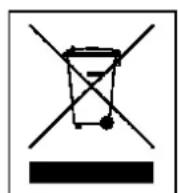
Hints for Environment Protection: Packages materials are raw materials and can be recycled. Do not disposal old devices or batteries into the domestic waste. Cleaning: Protect the device from contamination and pollution (use a clean drapery). Avoid using rough, coarse-grained materials or solvents/aggressive cleaner. Wipe the cleaned device accurately. Important Notice: Should battery fluid leak from a battery, wipe the battery case with a soft cloth dry. Distributor: Technaxx Deutschland GmbH & Co.KG, Kruppstr. 105, 60388 Frankfurt a.M. Germany
Enjoy your product * Share your experience and opinion on one of the well-known internet portals.