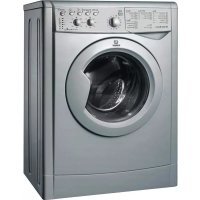
WIL 166 (NL) - Washing machine INDESIT - Free user manual and instructions
Find the device manual for free WIL 166 (NL) INDESIT in PDF.


| Product type | Washing machine |
| Brand | Indesit |
| Model | WIL 166 (NL) |
| Dimensions (W x H x D) | 59,5 x 85 x 53,5 cm |
| Washing capacity | 1 to 5 kg |
| Power supply | 220-230 V / 50 Hz |
| Maximum absorbed power | 1850 W |
| Water pressure | 0,05 - 1 MPa (0,5 - 10 bar) |
| Drum volume | 46 liters |
| Maximum spin speed | 1600 rpm |
| Number of programs | 13 main + partial programs |
| Main functions | Delayed start, Easy ironing, Extra rinse, Reduced spin speed |
| Maintenance and cleaning | Cleaning detergent drawer, pump, water inlet hose, door |
| Safety | Door lock, child safety (not specified but child recommendations) |
| Spare parts and repairability | Authorized after-sales service, rating plate at the back |
| General information | Compliant with EC directives, energy class not specified |
Frequently Asked Questions - WIL 166 (NL) INDESIT
User questions about WIL 166 (NL) INDESIT
0 question about this device. Answer the ones you know or ask your own.
Ask a new question about this device
Download the instructions for your Washing machine in PDF format for free! Find your manual WIL 166 (NL) - INDESIT and take your electronic device back in hand. On this page are published all the documents necessary for the use of your device. WIL 166 (NL) by INDESIT.
USER MANUAL WIL 166 (NL) INDESIT
natural_image
Pure technical diagram of a mechanical or electrical component with no text, numbers, or symbolsnatural_image
Line drawing of a car door corner with a scroll wheel and directional arrow (no text or symbols)natural_image
Diagram of a mechanical valve or pump assembly with directional arrow (no text or symbols)natural_image
Diagram of a pipe connection with a connector, showing fluid flow and support structure (no text or labels)natural_image
Diagram of a car interior drawer with a downward arrow indicating flow or movement (no text or symbols)natural_image
Technical line drawing of a mechanical assembly with a screwdriver and directional arrows (no text or symbols)natural_image
Pure technical diagram of a mechanical component with no text or symbolsnatural_image
Technical line drawing of a mechanical or electrical component with concentric circular and oval shapes, no visible text or symbols.natural_image
Line drawing of a car door corner with a scroll wheel and directional arrow (no text or symbols)natural_image
Technical diagram of a mechanical component with labeled section A (no text or symbols present)natural_image
Diagram of a mechanical device with a valve and handle, showing rotational motion (no text or symbols)natural_image
Diagram of a pipe connection with a connector, showing fluid flow and support structure (no text or labels)natural_image
Line drawing of a car interior with a directional arrow indicating flow or movement (no text or symbols)natural_image
Technical line drawing of a mechanical assembly with a screw and directional arrows (no text or symbols)natural_image
Pure technical line drawing of a mechanical component with no text or symbolsUnpacking and levelling, 26
Electric and water connections, 26-27
The first wash cycle, 27
Technical details, 27
Washing machine description, 28-29
Control panel, 28
Leds, 29
Starting and Programmes, 30
Briefly: how to start a programme, 30
Programme table, 30
Personalisations, 31
Setting the temperature, 31
Functions, 31
WIL 166
Detergents and laundry, 32
Detergent dispenser, 32
Preparing your laundry, 32
Special items, 32
Precautions and advice, 33
General safety, 33
Disposal, 33
Saving energy and respecting the environment, 33
Care and maintenance, 34
Cutting off the water or electricity supply, 34
Cleaning your appliance, 34
Cleaning the detergent dispenser, 34
Caring for your appliance door and drum, 34
Cleaning the pump, 34
Checking the water inlet hose, 34
Troubleshooting, 35
Service, 36
Before calling for Assistance, 36

indesit
!Keep this instruction manual in a safe place for future reference. Should the appliance be sold, transferred or moved, make sure the instruction manual accompanies the washing machine to inform the new owner as to its operation and features.
!Read these instructions carefully: they contain vital information on installation, use and safety.
Unpacking and levelling
Unpacking
- Unpack the washing machine.
- Check whether the washing machine has been damaged during transport. If this is the case, do not install it and contact your retailer.
natural_image
Pure technical diagram of a mechanical or electrical component with no visible text, numbers, or symbols.-
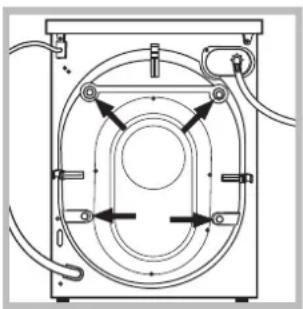
Remove the 4 protective screws and the rubber washer with the respective spacer, situated on the rear of the appliance (see figure).
-
Seal the gaps using the plastic plugs provided.
- Keep all the parts: you will need them again if the washing machine needs to be moved to another location.
!Packaging materials are not children's toys.
Levelling
- Install the washing machine on a flat sturdy floor, without resting it up against walls, furniture cabinets or other.
natural_image
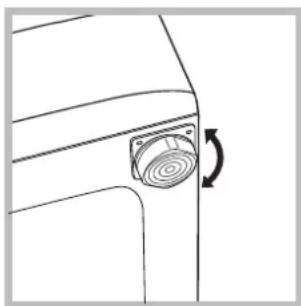
Line drawing of a car door corner with a circular button and directional arrow (no text or symbols)- If the floor is not perfectly level, compensate for any unevenness by tightening or loosening the adjustable front feet (see figure); the angle of inclination, measured according to the worktop, must not exceed 2^ .
Levelling your appliance correctly will provide it with stability and avoid any vibrations, noise and shifting during operation. If it is placed on a fitted or loose carpet, adjust the feet in such a way as to allow enough room for ventilation beneath the washing machine.
Electric and water connections
Connecting the water inlet hose
natural_image
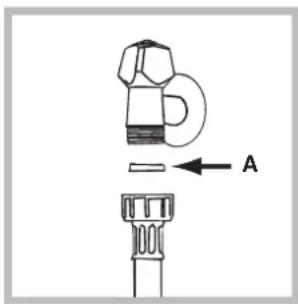
Diagram of a mechanical component with a labeled arrow pointing to a small part, no text or symbols present.- Insert seal A into the end of the inlet hose and screw the latter onto a cold water tap with a 3/4 gas threaded mouth (see figure). Before making the connection, allow the water to run freely until it is perfectly clear.
natural_image
Diagram of a mechanical device with a valve and handle, showing rotational motion (no text or symbols)-
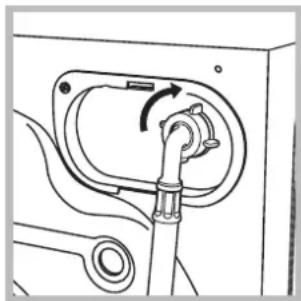
Connect the other end of the water inlet hose to the washing machine, screwing it onto the appliance's cold water inlet, situated on the top right-hand side on the rear of the appliance (see figure).
-
Make sure there are no kinks or bends in the hose.
!The water pressure at the tap must be within the values indicated in the Technical details table (on the next page).
!If the water inlet hose is not long enough, contact a specialist store or an authorised serviceman.
Connecting the drain hose
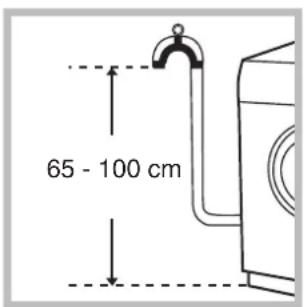
Connect the drain hose, without bending it, to a draining duct or a wall drain situated between 65 and 100 cm from the floor;
natural_image
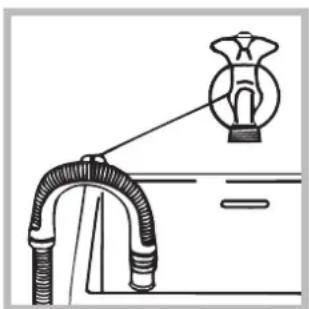
Diagram of a pipe connection with a magnified inset showing a connector (no text or symbols)alternatively, place it over the edge of a basin, sink or tub, fastening the duct supplied to the tap (see figure). The free end of the hose should not be underwater.
! We advise against the use of hose extensions; in case of absolute need, the extension must have the same diameter as the original hose and must not exceed 150 cm in length.
Electric connection
Before plugging the appliance into the mains socket, make sure that:
- the socket is earthed and in compliance with the applicable law;
- the socket is able to sustain the appliance's maximum power load indicated in the Technical details table (on the right);
- the supply voltage is included within the values indicated on the Technical details table (on the right);
- the socket is compatible with the washing machine's plug. If this is not the case, replace the socket or the plug.
! The washing machine should not be installed in an outdoor environment, not even when the area is sheltered, because it may be very dangerous to leave it exposed to rain and thunderstorms.
! When the washing machine is installed, the mains socket must be within easy reach.
! Do not use extensions or multiple sockets.
! The power supply cable must never be bent or dangerously compressed.
! The power supply cable must only be replaced by an authorised serviceman.
Warning! The company denies all liability if and when these norms are not respected.
The first wash cycle
Once the appliance has been installed, and before you use it for the first time, run a wash cycle with detergent and no laundry, setting the 90^ C programme without a pre-wash cycle.
| Technical details | |
| Model | WIL 166 |
| Dimensions | 59.5 cm wide85 cm high53.5 cm deep |
| Capacity | from 1 to 5 kg |
| Electric connections | voltage 220/230 Volts 50 Hzmaximum absorbed power 1850 W |
| Water connections | maximum pressure 1 MPa (10 bar)minimum pressure 0.05 MPa (0.5 bar)drum capacity 46 litres |
| Spin speed | up to 1600 rpm |
| Control programmes according to IEC456 directive | programme 2; temperature 60°C;run with a load of 5 kg. |
| This appliance is compliant with the following European Community Directives:- 73/23/CEE of 19/02/73 (Low Voltage) and subsequent amendments- 89/336/CEE of 03/05/89(Electromagnetic Compatibility) and subsequent amendments- 2002/96/CE | |
Washing machine description
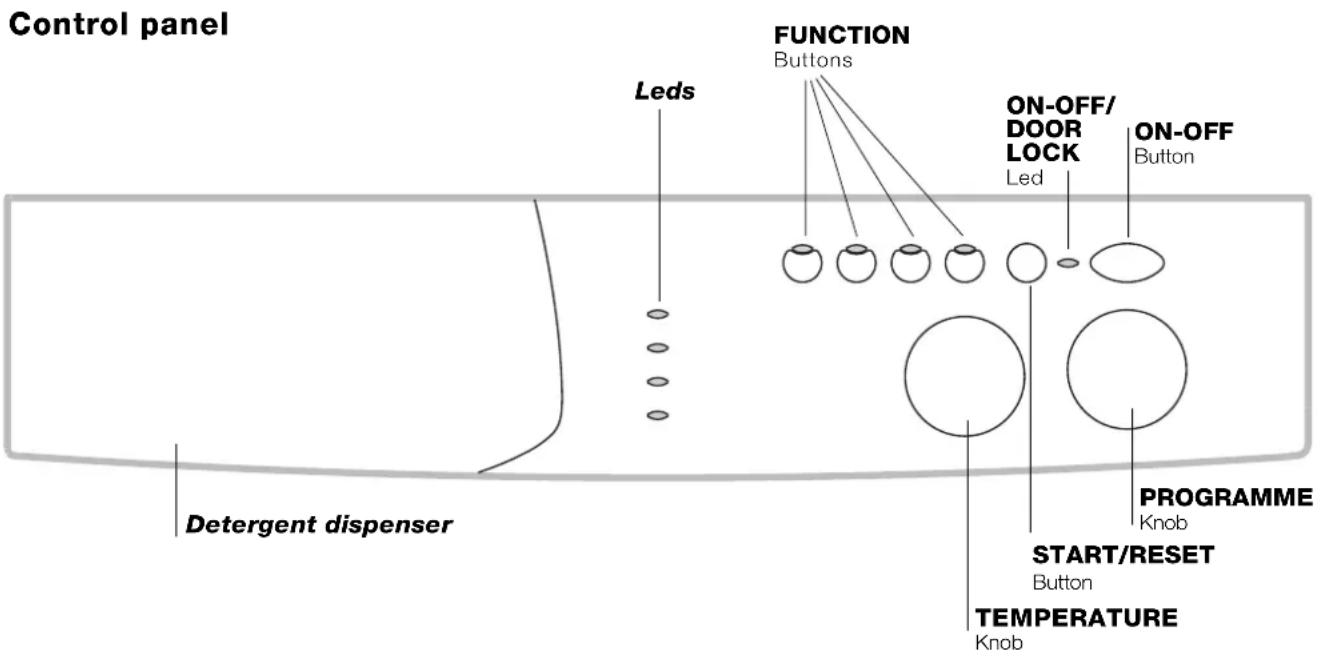
Detergent dispenser: to add detergent and fabric softener (see page 32).
LEDS: to find out which wash cycle phase is under way. If the Delay Timer function has been set, the time left until the programme starts will be indicated (see page 29).
FUNCTION buttons: to select the functions available. The button corresponding to the function selected will remain on.
TEMPERATURE knob: to set the temperature or the cold wash cycle (see page 31).
START/RESET button: to start the programmes or cancel any incorrect settings.
ON-OFF/DOOR LOCK Led: to find out whether the washing machine is on and if the appliance door can be opened (see page 29).
ON/OFF button: to turn the washing machine on and off.
PROGRAMME knob: to select the wash programmes. The knob stays still during the cycle.
Leds
The LEDS provide important information.
This is what they can tell you:
Delay set:
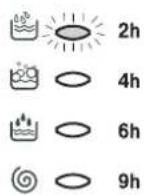
If the Delay Timer function has been enabled (see page. 31), once you have started the programme, the LED corresponding to the delay set will begin to flash:
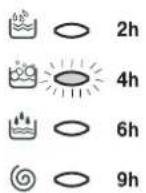
As time passes, the remaining delay will be displayed, and the corresponding LED will flash:
Once the set delay is complete, the flashing LED will turn off and the programme set will start.
Cycle phase under way:
During the wash cycle, the LEDs gradually illuminate on to indicate the cycle phase under way:
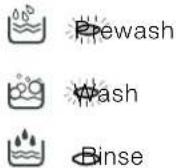

Note: during draining, the LED corresponding to the Spin cycle phase will be turned on.
Function buttons
The FUNCTION BUTTONS also act like LEDS.
When a function is selected, the corresponding button is illuminated.
If the function selected is incompatible with the programme set, the button will flash and the function will not be enabled.
If you set a function that is incompatible with another function you selected previously, only the last one selected will be enabled.
ON-OFF/DOOR LOCK led:
If this LED is on, the appliance door is locked to prevent it from being opened accidentally; to avoid any damages, wait for the LED to flash before you open the appliance door.
! The rapid flashing of the ON-OFF/DOOR LOCK Led together with the flashing of at least one other LED indicates there is an abnormality. Call for Technical Assistance.
Starting and Programmes
Briefly: starting a programme
- Switch the washing machine on by pressing button (I). All the LEDS will light up for a few seconds and the ON-OFF/DOOR LOCK Led will begin to flash.
- Load your laundry into the washing machine and shut the appliance door.
- Set the PROGRAMME knob to the programme required.
-
Set the wash temperature (see page 31).
-
Add the detergent and any fabric softener (see page 32).
- Start the programme by pressing the START/RESET button. To cancel it, keep the START/RESET button pressed for at least 2 seconds.
- When the programme is finished, the ON-OFF/DOOR LOCK Led will flash to indicate that the appliance door can be opened. Take out your laundry and leave the appliance door ajar to allow the drum to dry thoroughly. Turn the washing machine off by pressing button (1).
Programme table
| Type of fabric and degree of soil | Programmes | Temperature | Detergent | Fabric softener | Cycle length (minutes) | Description of wash cycle | |
| pre-wash | wash | ||||||
| Standard | |||||||
| Extremely soiled whites (sheets, tablecloths, etc.) | 1 | 90°C | • • | 135 | Pre-wash, wash cycle, rinse cycles, intermediate and final spin cycles | ||
| Extremely soiled whites (sheets, tablecloths, etc.) | 2 | 90°C | • | 125 | Wash cycle, rinse cycles, intermediate and final spin cycles | ||
| Heavily soiled whites and fast colours | 2 | 60°C | • | 110 | Wash cycle, rinse cycles, intermediate and final spin cycles | ||
| Heavily soiled whites and delicate colours | 2 | 40°C | • | 105 | Wash cycle, rinse cycles, intermediate and final spin cycles | ||
| Slightly soiled whites and delicate colours (shirts, jumpers, etc.) | 3 | 40°C | • | 70 | Wash cycle, rinse cycles, intermediate and final spin cycles | ||
| Heavily soiled fast colours (baby linen, etc.) | 4 | 60°C | • | 75 | Wash cycle, rinse cycles, anti-crease or delicate spin cycle | ||
| Heavily soiled fast colours (baby linen, etc.) | 4 | 40°C | • | 60 | Wash cycle, rinse cycles, anti-crease or delicate spin cycle | ||
| Delicate colours (all types of slightly soiled garments) | 5 | 40°C | • | 60 | Wash cycle, rinse cycles, anti-crease or delicate spin cycle | ||
| Wool | 6 | 40°C | • | 50 | Wash cycle, rinse cycles, anti-crease and delicate spin cycle | ||
| Very delicate fabrics (curtains, silk, viscose, etc.) | 7 | 30°C | • | 45 | Wash cycle, rinse cycles, anti-crease or draining cycle | ||
| Time 4 you | |||||||
| Heavily soiled whites and fast colours | 8 | 60°C | • | 60 | Wash cycle, rinse cycles, intermediate and final spin cycles | ||
| Slightly soiled whites and delicate colours (shirts, jumpers, etc.) | 9 | 40°C | • | 50 | Wash cycle, rinse cycles, intermediate and final spin cycles | ||
| Delicate colours (all types of slightly soiled garments) | 10 | 40°C | • | • | 40 | Wash cycle, rinse cycles, delicate spin cycle | |
| Delicate colours (all types of slightly soiled garments) | 11 | 30°C | • 30 | Wash cycle, rinse cycles and delicate spin cycle | |||
| Sports | |||||||
| Sports shoes (MAX. 2 pairs) | 12 | 30°C | • | • | Cold wash (without detergents), wash cycle, rinse cycles, and delicate spin cycle | ||
| Fabrics for sportswear (Tracksuits, shorts, etc.) | 13 | 30°C | • 60 | Wash cycle, rinse cycles, intermediate and final spin cycles | |||
| PARTIAL PROGRAMMES | |||||||
| Rinse • Rinse cycles and spin cycle | |||||||
| Spin cycle | Draining and spin cycle | ||||||
| Drain | Draining | ||||||
Notes
-For programmes 8 and 9, we advise against exceeding a wash load of 3.5 kg.
-For programme 13 we advise against exceeding a wash load of 2 kg.
-For the anti-crease function: see Easy iron, opposite page. The information contained in the table is purely indicative.
Special programme
Daily (programme 11 for Synthetics) is designed to wash lightly soiled garments in a short amount of time: it only lasts 30 minutes and allows you to save on both time and energy. By setting this programme (11 at 30^ C), you can wash different fabrics together (except for woollen and silk items), with a maximum load of 3 kg. We recommend the use of liquid detergent.

Setting the temperature
Turn the TEMPERATURE knob to set the wash temperature (see Programme table on page 30).
The temperature can be lowered, or even set to a cold wash ( ☑).
Functions
To enable a function:
- press the button corresponding to the desired function, according to the table below;
- the function is enabled when the corresponding button is illuminated.
Note: The rapid flashing of the button indicates that the corresponding function cannot be selected for the programme set.
| Function Effect Comments | Enabled with programmes: | ||
| (DY24)Delay Timer | Delays the start of the wash by up to 9 hours. | Press the button repeatedly until the LED corresponding to the desired delay is turned on.The fifth time the button is pressed, the function will be disabled.N.B.: Once you have pressed the Start/Reset button, the delay can only be decreased if you wish to modify it. | All |
| (H2CH)Easy iron | This option reduces the amount of creasing on fabrics, making them easier to iron. | When this function is set, programmes 4, 5, 6, 7 will end with the laundry left to soak (Anti-crease) and the Rinse cycle phase LED 🎨 will flash.- to conclude the cycle, press the START/RESET button;- to run the draining cycle alone, set the knob to the relative symbol 🎨 and press the START/RESET button. | 3, 4, 5, 6, 7,8, 9, 10,Rinse cycle. |
| (YXDT)Extra Rinse | Increases the efficiency of the rinse. | Recommended when the appliance has a full load or with large quantities of detergent. | 1, 2, 3, 4, 5,8, 9, 10, 12,13, Rinsecycle. |
| 1600800 | Reduces the spin speed. | All programmes except for 7 and draining. | |
Detergents and laundry
Detergent dispenser
Good washing results also depend on the correct dose of detergent: adding too much detergent won't necessarily make for a more efficient wash, and may in fact cause build up on the interior of your appliance and even pollute the environment.
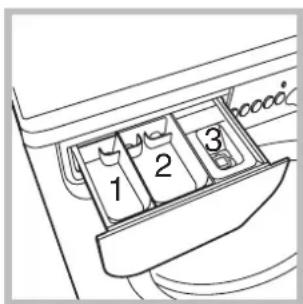
Open up the detergent dispenser and pour in the detergent and fabric softener, as follows.
compartment 1: Detergent for pre-wash (powder)
compartment 2: Detergent for the wash cycle (powder or liquid)
Liquid detergent should only be poured in immediately prior to the wash cycle start.
compartment 3: Additives (fabric softeners, etc.)
The fabric softener should not overflow from the grid.
! Do not use hand wash detergent because it may form too much foam.
Preparing your laundry
- Divide your laundry according to:
- the type of fabric/the symbol on the label.
- the colours: separate coloured garments from whites.
- Empty all pockets and check for loose buttons.
- Do not exceed the weight limits stated below, which refer to the weight when dry:
Sturdy fabrics: max 5 kg
Synthetic fabrics: max 2.5 kg
Delicate fabrics: max 2 kg
Wool: max 1 kg
How much does your laundry weigh?
1 sheet 400-500 g
1 pillow case 150-200 g
1 tablecloth 400-500 g
1 bathrobe 900-1,200 g
1 towel 150-250 g
Special items
Curtains: fold curtains and place them in a pillow case or mesh bag. Wash them separately without exceeding half the appliance load. Use programme 7 which excludes the spin cycle automatically.
Quilted coats and windbreakers: if they are padded with goose or duck down, they can be machine-washed. Turn the garments inside out and load a maximum of 2-3 kg, repeating the rinse cycle once or twice and using the delicate spin cycle.
Wool: for best results, use a specific detergent, taking care not to exceed a load of 1 kg.
! The washing machine was designed and built in compliance with the applicable international safety regulations. The following information is provided for your safety and should consequently be read carefully.
General safety
- This appliance has been designed for non-professional, household use and its functions must not be changed.
- This washing machine should only be used by adults and in accordance with the instructions provided in this manual.
- Never touch the washing machine when barefoot or with wet or damp hands or feet.
- Do not pull on the power supply cable to unplug the appliance from the electricity socket. Pull the plug out yourself.
- Do not open the detergent dispenser while the appliance is in operation.
- Do not touch the drain water as it could reach very high temperatures.
- Never force the washing machine door: this could damage the safety lock mechanism designed to prevent any accidental openings.
- In the event of a malfunction, do not under any circumstances touch internal parts in order to attempt repairs.
• Always keep children well away from the appliance while in operation. - The appliance door tends to get quite hot during the wash cycle.
- Should it have to be moved, proceed with the help of two or three people and handle it with the utmost care. Never try to do this alone, because the appliance is very heavy.
- Before loading your laundry into the washing machine, make sure the drum is empty.
Disposal
- Disposing of the packaging material: observe local regulations, so the packaging can be re-used.
- The European Directive 2002/96/EC on Waste Electrical and Electronic Equipment, requires that old household electrical appliances must not be disposed of in the normal unsorted municipal waste stream. Old appliances must be collected separately in order to optimise the recovery and recycling of the materials they contain and reduce
the impact on human health and the environment. The crossed out "wheeled bin" symbol on the product reminds you of your obligation, that when you dispose of the appliance it must be separately collected.
Consumers should contact their local authority or retailer for information concerning the correct disposal of their old appliance.
Saving energy and respecting the environment
Environmentally-friendly technology
If you only see a little water through your appliance door, this is because thanks to the latest Indesit technology, your washing machine only needs less than half the amount of water to get the best results: an objective reached to respect the environment.
Saving on detergent, water, energy and time
- To avoid wasting resources, the washing machine should be used with a full load. A full load instead of two half loads allows you to save up to 50% on energy.
- The pre-wash cycle is only necessary on extremely soiled garments. Avoiding it will save on detergent, time, water and between 5 and 15% energy.
- Treating stains with a stain remover or leaving them to soak before washing will cut down the need to wash them at high temperatures. A programme at 60^ instead of 90^ or one at 40^ instead of 60^ will save up to 50% on energy.
- Use the correct quantity of detergent depending on the water hardness, how soiled the garments are and the amount of laundry you have, to avoid wastage and to protect the environment: despite being biodegradable, detergents do contain ingredients that alter the natural balance of the environment. In addition, avoid using fabric softener as much as possible.
- If you use your washing machine from late in the afternoon until the early hours of the morning, you will help reduce the electricity board's peak load. The Delay Timer option (see page 31) helps to organise your wash cycles accordingly.
- If your laundry has to be dried in a tumble dryer, select a high spin speed. Having the least water possible in your laundry will save you time and energy in the drying process.
Cutting off the water or electricity supply
- Turn off the water tap after every wash. This will limit the wear of your appliance's water system and also prevent leaks.
- Unplug your appliance when cleaning it and during all maintenance operations.
Cleaning your appliance
The exterior and rubber parts of your appliance can be cleaned with a soft cloth soaked in lukewarm soapy water. Do not use solvents or abrasives.
Cleaning the detergent dispenser
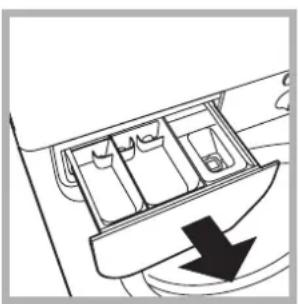
natural_image
Diagram of a car interior with compartments and a downward arrow indicating flow or movement (no text or symbols)Remove the dispenser by pulling it out (see figure).
Wash it under running water; this operation should be repeated frequently.
Caring for your appliance door and drum
• Always leave the appliance door ajar to prevent unpleasant odours from forming.
Cleaning the pump
The washing machine is fitted with a self-cleaning pump that does not require any maintenance. Sometimes, small items (such as coins or buttons) may fall into the pre-chamber that protects the pump, situated in the lower part of the same.
! Make sure the wash cycle has ended and unplug the appliance.
To access the pre-chamber:
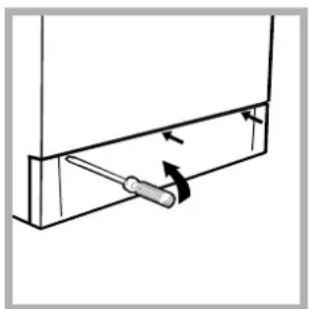
natural_image
Technical line drawing of a screwdriver inserted into a bracket (no text or symbols)- using a screwdriver, remove the cover panel on the lower front of the washing machine (see figure);
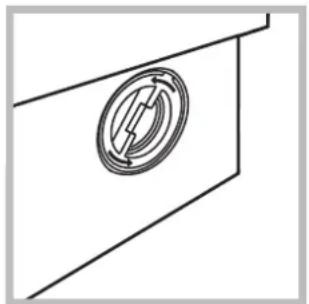
natural_image
Pure technical line drawing of a mechanical component with no text or symbols-
unscrew the lid rotating it anti-clockwise (see figure): a little water may trickle out. This is perfectly normal;
-
clean the interior thoroughly;
- screw the lid back on;
- reposition the panel, making sure the hooks are securely in place before you push it onto the appliance.
Checking the water inlet hose
Check the water inlet hose at least once a year. If you see any cracks, replace it immediately: during the wash cycles, water pressure is very strong and a cracked hose could easily split open.
! Never use hoses that have already been used.
Your washing machine could fail to work. Before calling for Assistance (see page 36), make sure the problem can't easily be solved by consulting the following list.
Problem
The washing machine won't start.
The wash cycle won't start.
The washing machine fails to load water.
The washing machine continuously loads and unloads water.
The washing machine does not drain or spin.
The washing machine vibrates too much during the spin cycle.
The ON-OFF/DOOR LOCK Led flashes rapidly at the same time as at least one other LED.
There is too much foam.
Possible causes/Solution:
- The appliance is not plugged into the socket, or not enough to make contact.
• There has been a power failure. - The appliance door is not shut properly.
- The ⏻ button has not been pressed.
- The START/RESET button has not been pressed.
- The water tap is not turned on.
- A delayed start has been set (using the Delay Timer, see page 31).
- The water inlet hose is not connected to the tap.
- The hose is bent.
- The water tap is not turned on.
• There is a water shortage. - The water pressure is insufficient.
- The START/RESET button has not been pressed.
- The drain hose is not fitted between 65 and 100cm from the floor (see page 27).
- The free end of the hose is underwater (see page 27).
- The wall drainage system doesn't have a breather pipe. If the problem persists even after these checks, turn off the water tap, switch the appliance off and call for Assistance. If the dwelling is on one of the upper floors of a building, there may be drain trap problems causing the washing machine to load and unload water continuously. In order to avoid such an inconvenience, special anti-drain trap valves are available in shops.
- The programme does not foresee the draining: some programmes require enabling the draining manually (see page 30).
- The Easy iron option is enabled: to complete the programme, press the START/RESET button (see page 31).
• The drain hose is bent (see page 27).
- The drain duct is clogged.
- The drum was not unblocked correctly during installation (see page 26).
- The washing machine is not level (see page 26).
- The washing machine is closed in between furniture cabinets and the wall (see page 26).
- The water inlet hose is not screwed on correctly (see page 26).
- The detergent dispenser is obstructed (to clean it, see page 34).
- The drain hose is not secured properly (see page 27).
- Call for Assistance because this means there is an abnormality.
- The detergent is not suitable for machine washing (it should bear the definition "for washing machines" or "hand and machine wash", or the like).
- You used too much detergent.
Before calling for Assistance:
- Check whether you can solve the problem on your own (see page 35);
- Restart the programme to check whether the problem has been solved;
- If this is not the case, contact an authorised Technical Service Centre on the telephone number provided on the guarantee certificate.
!Always request the assistance of authorised servicemen.
Notify the operator of:
• the type of problem;
• the appliance model (Mod.);
• the serial number (S/N).
This information can be found on the data plate situated on the rear of the washing machine.

Deutsch
INHALTSVERZEICHNIS
Installation, 38-39
natural_image
Technical diagram of a mechanical or electrical component with concentric circular and oval shapes, no visible text or symbols.natural_image
Line drawing of a car door corner with a circular vent or scroll symbol and an arrow indicating rotation (no text or labels)natural_image
Technical diagram of a mechanical component with labeled section A (no text or symbols beyond label)natural_image
Diagram of a mechanical device with a valve and handle, showing rotational motion (no text or symbols)natural_image
Diagram of a pipe connection with a connector, showing fluid flow and support structure (no text or labels)natural_image
Diagram of a car interior with a directional arrow indicating flow or movement (no text or symbols)natural_image
Technical line drawing of a mechanical assembly with a screwdriver inserted into a bracket (no text or symbols)natural_image
Simple line drawing of a circular mechanical component mounted on a rectangular base (no text or symbols)
- Washing machine description, 28-29
- Starting and Programmes, 30
- Personalisations, 31
- Detergents and laundry, 32
- Precautions and advice, 33
- Care and maintenance, 34
- Troubleshooting, 35
- Service, 36
- Unpacking and levelling
- Unpacking
- Levelling
- Electric and water connections
- Connecting the water inlet hose
- Connecting the drain hose
- Electric connection
- The first wash cycle
- Washing machine description
- Leds
- Delay set:
- Cycle phase under way:
- Function buttons
- ON-OFF/DOOR LOCK led:
- Starting and Programmes
- Briefly: starting a programme
- Notes
- Special programme
- Setting the temperature
- Functions
- Detergents and laundry
- Detergent dispenser
- compartment 1: Detergent for pre-wash (powder)
- compartment 2: Detergent for the wash cycle (powder or liquid)
- compartment 3: Additives (fabric softeners, etc.)
- Preparing your laundry
- How much does your laundry weigh?
- Special items
- General safety
- Disposal
- Saving energy and respecting the environment
- Environmentally-friendly technology
- Saving on detergent, water, energy and time
- Cutting off the water or electricity supply
- Cleaning your appliance
- Cleaning the detergent dispenser
- Caring for your appliance door and drum
- Cleaning the pump
- Checking the water inlet hose
- Before calling for Assistance:
- Notify the operator of:
- INHALTSVERZEICHNIS
- Installation, 38-39
Brand : INDESIT
Model : WIL 166 (NL)
Category : Washing machine