EasyManual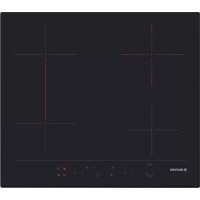
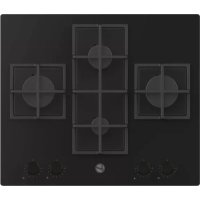
HH64DBB3P - Cooker HOOVER - Free user manual and instructions
Find the device manual for free HH64DBB3P HOOVER in PDF.


User questions about HH64DBB3P HOOVER
0 question about this device. Answer the ones you know or ask your own.
Ask a new question about this device
Download the instructions for your Cooker in PDF format for free! Find your manual HH64DBB3P - HOOVER and take your electronic device back in hand. On this page are published all the documents necessary for the use of your device. HH64DBB3P by HOOVER.
USER MANUAL HH64DBB3P HOOVER
SAFETY INSTRUCTIONS ....03
- General warnings ....04
- Protection of the environment ....04
- Installation 04
- Electrical connection 05
- Hob cookware advice ....06
- Use 07
- Cleaning and maintenance 09
- Problem solving 09
- Aftercare ....10
INDICE
IT
ISTRUZIONI DI SICUREZZA .... 11...
We recommend you keep the instructions for installation and use for later reference, and before installing the hob, note its serial number in case you need to get help from the after sales service.
WARNING: the appliance and its accessible parts become hot during use. Care should be taken to avoid touching heating elements. Children under 8 years of age must be kept away from the appliance unless they are continuously supervised.
WARNING: use only hob guards designed by the Manufacturer of the cooking appliance or indicated by the Manufacturer of the appliance in the instructions for use as suitable or hob guards incorporated in the appliance. The use of inappropriate guards can cause accidents.
WARNING: unattended cooking on a hob with fat or oil can be dangerous and may result in fire.
NEVER try to extinguish a fire with water, but switch off the appliance and then cover flame e.g. with a lid or a fire blanket.
WARNING: danger of fire: do not store items on the cooking surfaces.
WARNING: if the surface is cracked, do not touch the glass and switch off the appliance to avoid the possibility of electric shock.
This appliance can be used by children aged from 8 years and above and people with reduced physical, sensory or mental capabilities or lack of experience and knowledge if they have been given supervision or instruction concerning use of the appliance in a safe way and understand the hazards involved. Children should be supervised to ensure that they do not play with the appliance. Cleaning and user maintenance shall not be made by children without supervision.
CAUTION: the cooking process must be supervised. A short term cooking process has to be supervised continuously.
It is strongly recommended to keep children away from the cooking zones while they are in operation or when they are switched off, so long as the residual heat indicator is on, in order to prevent the risks of serious burns.
This appliance is not intended to be operated by means of an external timer or separate remote control system.
If present do not to stare into halogen lamp hob elements.
Connect a plug to the supply cable that is able to bear the voltage, current and load indicated on the tag and having the earth contact. The socket must be suitable for the load indicated on the tag and must be having the earth contact connected and in operation. The earth conductor is yellow-green in color. This operation should be carried out by a suitably qualified professional. In case of incompatibility between the socket and the appliance plug, ask a qualified electrician to substitute the socket with another suitable type.
The plug and the socket must be conformed to the current norms of the installation country.
Connection to the power source can also be made by placing an omnipolar breaker between the appliance and the power source that can bear the maximum connected load and that is in line with current legislation.
The yellow-green earth cable should not be interrupted by the breaker. The socket or omnipolar breaker used for the connection should be easily accessible when the appliance is installed.
The disconnection may be achieved by having the plug accessible or by incorporating a switch in the fixed wiring in accordance with the wiring rules.
If the supply cord is damaged, it must be replaced by Manufacturer, its service agent or similarly qualified people in order to avoid a hazard. The earth conductor (yellow-green) must be longer than 10 mm on the terminal block side. The internal conductors section should be appropriate to the power absorbed by the hob (indicated on the tag). The type of power cable must be HO5V2V2-F.
Do not put metallic objects such as knives, forks, spoons or lids on the hob. They could heat up.
Aluminum foil and plastic pans must not be placed on heating zones.
After every use, some cleaning of the hob is necessary to prevent the build-up of dirt and grease. If left, this is recooked when the hob is used and burns giving off smoke and unpleasant smells, not to mention the risks of fire propagation.
Never use a steam or high pressure spray to clean the appliance.
Do not touch the heat zones during operation or for a while after use.
Never cook food directly on the glass ceramic hob.
Always use the appropriate cookware. Always place the pan in the center of the unit that you are cooking on.
Do not place anything on control panel.
Do not use the hob as a working surface.
Do not use the surface as a cutting board.
Do not store heavy items above the hob. If they drop onto the hob, they may cause damage.
Do not use the hob for storage of any items.
Do not slide cookware across the hob.
Identification Plate (located under the hob's bottom casing)
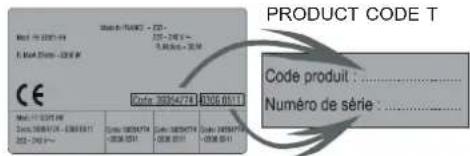
By placing the CE mark on this appliance we are assuring compliance to all European Safety, Health and Environment requirements which are applicable for this product category.
2. PROTECTION OF THE ENVIRONMENT
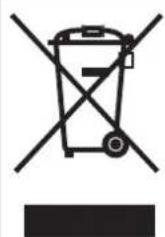
This appliance is marked according to European Directive 2012/19/EU on Waste Electrical and Electronic Equipment (WEEE).
WEEE contains both polluting substances (which can cause negative consequences for the environment) and basic components which can be reused. It is important to have WEEE subjected to specific treatments, in order to remove and dispose properly all pollutants and recover and recycle all materials.
Individuals can play an important role in ensuring that the WEEE does not become an environmental issue; it is essential to follow some basic rules:
- WEEE shall not be threatened as household waste.
- WEEE shall be handled over to the relevant collection points managed by the municipality or by registered companies. In many Countries, for large WEEE, home collection could be present.
• In many Countries, when you buy a new appliance, the old one may be returned to the retailer who has to collect it free of charge on a one-to-one basis, as long as the appliance is of equivalent typology and has the same functions as the supplied one.
3. INSTALLATION
Installing a domestic appliance it is a complicated operation which, if not carried out correctly, can seriously have impact on safety of goods, properties or people. For this reason, it should be carried out by a professionally qualified person in accordance with technical regulations.
In the event that this advice it is ignored and installation is carried out by an unqualified person, the Manufacturer declines all responsibility for any technical failure of the appliance whether or not it results in damage of goods or properties or in injury of people or animals.
After having removed the packaging please be sure that the appliance it is not damaged, otherwise contact the Retailer or Manufacturer After Sales Service.
Make sure that the furniture in which the appliance will be fitted and all other furniture in the nearby are made with materi Is which can withstand high temperatures (min 100 °C).
In addition, all decorative laminates should be fixed with high-resistance glue.
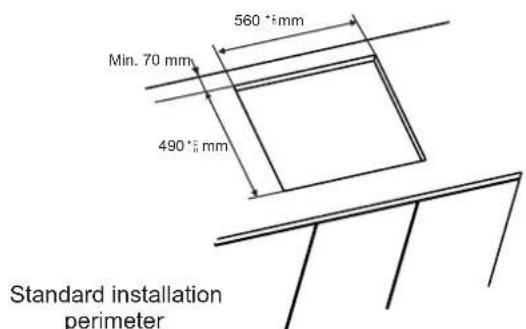
Appliance can be installed in a Built-in furniture in "Standard" or "Flush" mode.
Worktop thickness should be between 25 and 45 mm.
text_image
560°±mm Min. 70 mm 490°±mm Standard installation perimeter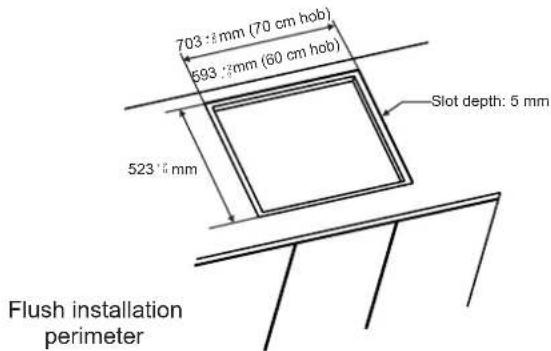
text_image
703 mm (70 cm hob) 693 mm (60 cm hob) 523 mm Slot depth: 5 mm Flush installation perimeterNote: Inner perimeter dimensions are same with standard installation
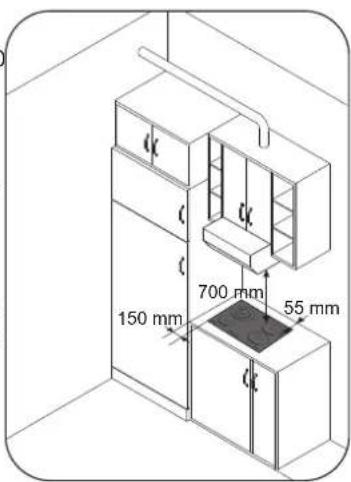
Leave a distance of at least 55 mm between the hob and the back wall and of at least 150 mm between the hob and the vertical furniture or walls in the lateral side. If a furniture is installed above the hob, the minimum distance required is 700 mm.
When installing a hood above the hob, please consult the installation requirements specified for the hood but, in any case, the distance between the hob and the hood must not be lower than 700 mm.
text_image
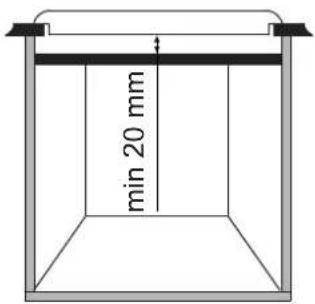
150 mm 700 mm 55 mmIf the bottom part of the hob is adjacent to an area normally accessible for handling or cleaning operations, a separator it must be put 20 mm below the bottom part of the hob.
text_image
min 20 mmWhen installing an oven under the hob, separator must not be put and the minimum distance between the bottom part of the hob and the oven must not be lower than 10 mm. Do not install not cooled oven under this hob and install the oven following its own installation requirements.
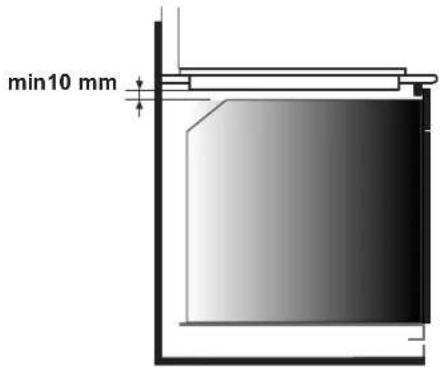
text_image
min10 mmA watertight seal gasket is supplied with the hob. Fit the seal gasket around the bottom hob as described and make sure that it is properly fitted to avoid any leakage into the supporting furniture.
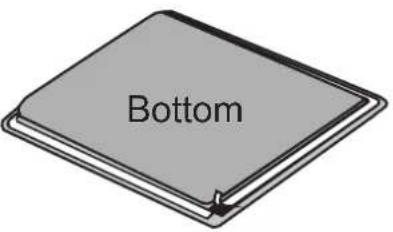
text_image
BottomNormal Fixing:
- Get the fixing clips from accessory bag and screw them into the position shown on bottom box. (Do not tighten the screws to block clips, they should move freely)
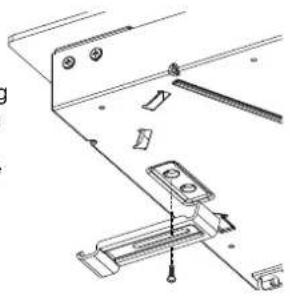
natural_image
Technical line drawing of a mechanical assembly with no visible text or symbols- Insert the hob in center position of cut out. - Turn the clips and tighten them fully.
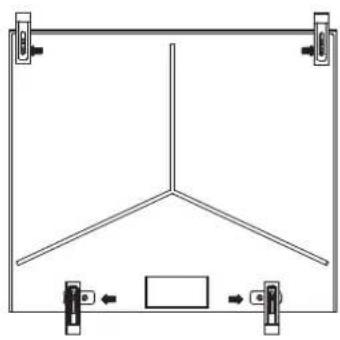
natural_image
Pure technical line drawing of a Y-shaped structural frame with mounting clips (no text or symbols)Quick Fixing: (Depending on model)
Get four springs form accesory bag and screw them onto bottom box as shown in figure.
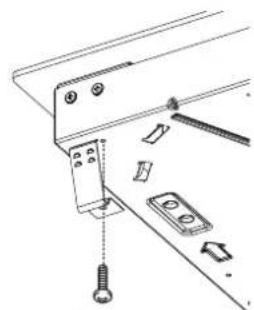
natural_image
Technical line drawing of a mechanical assembly with screws and components (no text or symbols)Center and insert the hob. Press the sides of hob until it is supported around its entire perimeter.
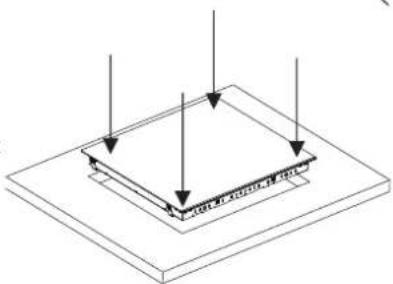
natural_image
Isometric diagram of a layered structure with arrows indicating direction (no text or symbols)FLUSH INSTALLATION
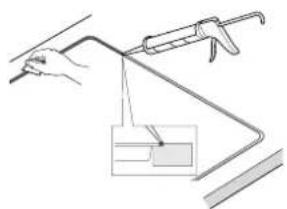
After checking that the position of the hob is correct fill the gap between the worktop and the hob with silicone adhesive. Flatten the silicone layer with a scraper or with wet finger damped with water and soap before it forms.
Do not use the hob until the silicone layer it is completely dry.
natural_image
Simple line drawing of a hand holding a tool, with a magnified inset showing a small rectangular object (no text or symbols)4. ELECTRICAL CONNECTION
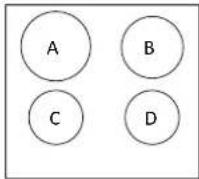
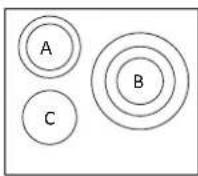
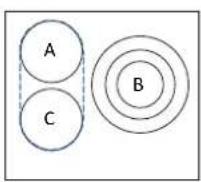
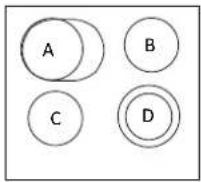
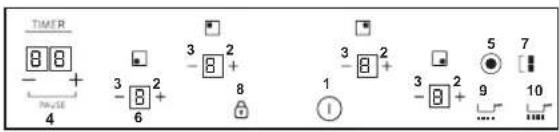
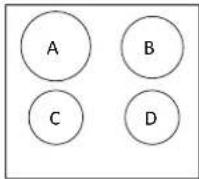
LAY OUT 1
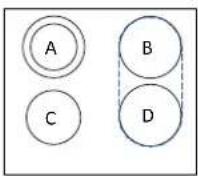
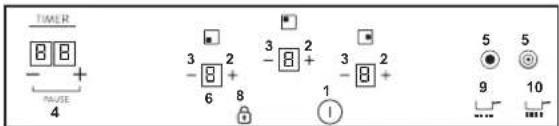
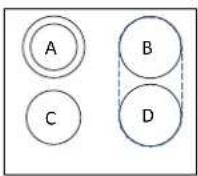
LAY OUT 2
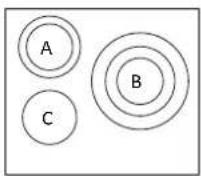
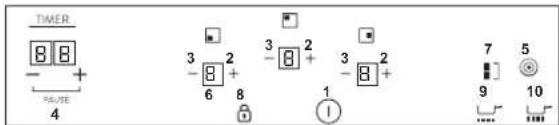
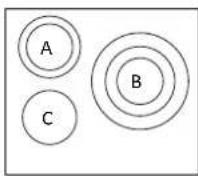
LAY OUT 3
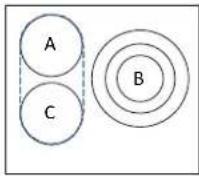
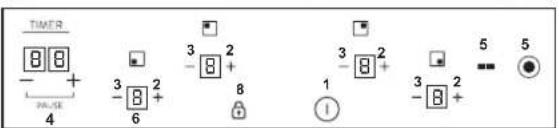
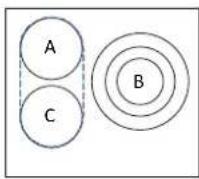
LAY OUT 4
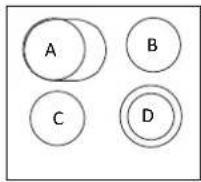
LAY OUT 5
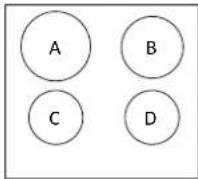
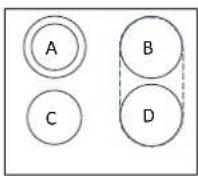
| A | B | C | D | |
| LAYOUT 1 | 2300W | 1800 W | 1200 W | 1200 W |
| LAYOUT 2 | 1000+700 W | 1800 W | 1200 W | 1800 W |
| LAYOUT 3 | 1000+700 W | 1050+900+750 W | 1200 W | - |
| LAYOUT 4 | 1800W | 1050+900+750 W | 1800 W | - |
| LAYOUT 5 | 1500+900 W | 1200 W | 1200 W | 1000+700 W |
LAYOUT
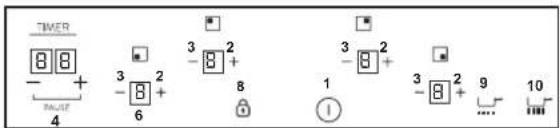
text_image
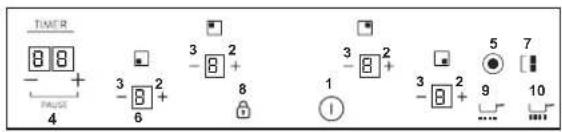
TIMER - + - 4 - +8 3 2 - 8 + 6 - 1 - 8 + 9 ... 101
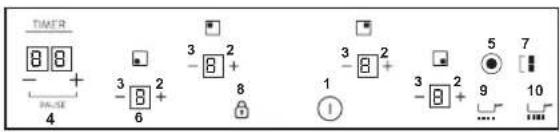
text_image
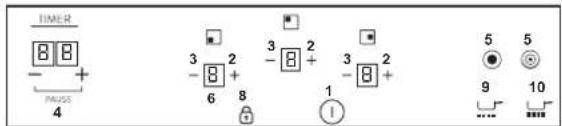
TIMER 8 8 - + PA-SE 4 3 2 -8 + 6 3 2 - 8 + 8 1 5 7 - - 3 2 - 8 + 9 10 ...2
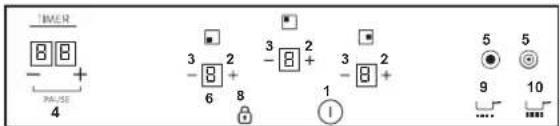
text_image
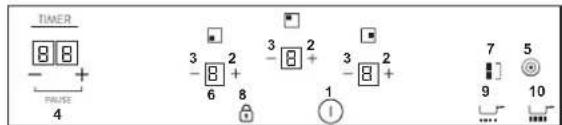
I/MCR 8 8 - + PA-SE 4 3 2 -8 + 6 8 3 2 -8 + 3 2 - 1 5 5 9 10 ...3
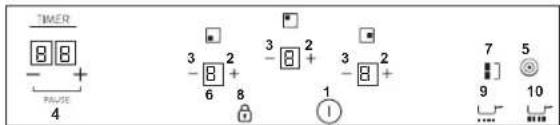
text_image
TIMER 88 - + PULSE 4 3 2 - 8 + 6 8 3 2 - 8 + 3 2 - 8 + 3 2 - 8 + 1 ! 7 5 9 10 ... ...4
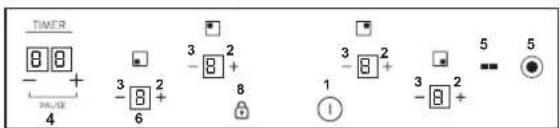
text_image
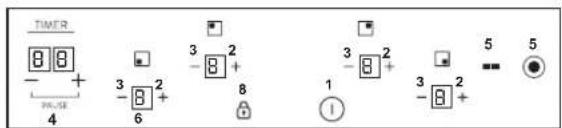
TIMER 8 8 - + PALSE 4 3 2 - 8 + 3 2 - 8 + 1 3 2 - 8 + 5 5 - - ●5
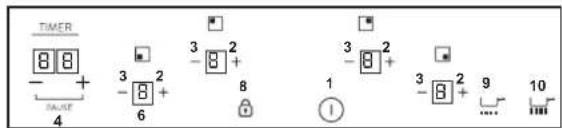
According to model
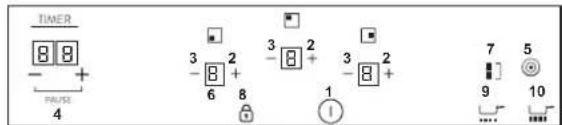
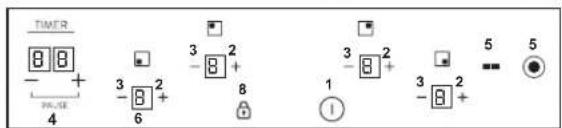
- ON/OFF
2." + "
3." - " - TIMER
- Additional cooking zone led
- Cooking zone programming indicator
- Bridge
- Child lock
- Melting
- Boiling
"Installation must conform to the standards & directives." Manufacturer declines all responsibility for any damage that might be caused by unsuitable or unreasonable use.
WARNING: Manufacturer cannot be held responsible for any incident or its consequences that may arise during the use of an appliance not linked to the earth, or linked to an earth whose continuity is defective. Before any electrical operation, please check the supply tension shown on the electricity meter, the adjustment of the circuit-breaker, the continuity of the connection to earth to the installation and that the fuse is suitable. The electrical connection to the installation should be made according to the rated power of the Appliance; this should be made via an Omni pole cut-out switch.
If the appliance has a socket outlet, it must be installed so that the socket outlet is accessible.
The yellow/green wire of the power supply cable must be connected to the earth of both power supply and appliance terminals.
For any questions regarding power supply cord refer to After Sales Service or a qualified technician.
If the hob is fitted with power supply cord, this shall be connected only to a power supply of 220-240 V between phase and neutral.
It is however possible to connect the hob to:
Three Phase 220-240 V3
Three Phase 380-415 V2N
To proceed to the new connection, please follow below instructions:
Before making the connection, make sure that the installation is protected by a suitable fuse, and that it is fitted with wires of a large enough section to supply the appliance normally.
Turn over the hob, glass side against the working top, taking care to protect the glass.
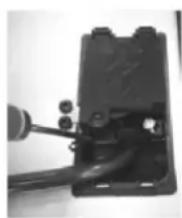
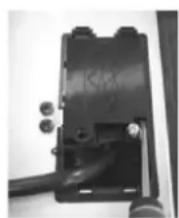
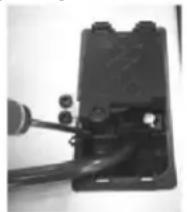
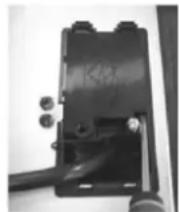
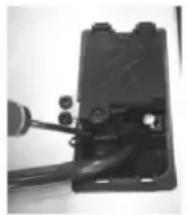
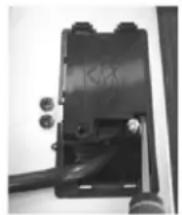
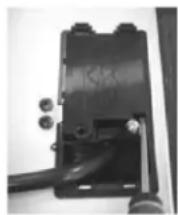
Open the cover in the following sequence:
1
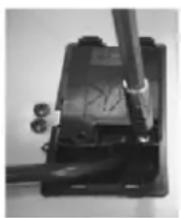
natural_image
Close-up of a mechanical device with a cylindrical component inserted, no visible text or symbols2
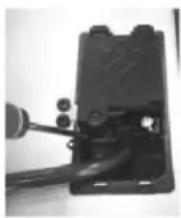
natural_image
Close-up of a black mechanical component with wires and connectors (no visible text or symbols)3
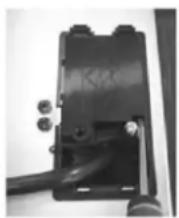
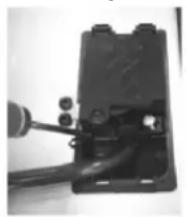
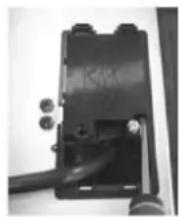
- unscrew the cable clamp "1";
- find the two tabs located on the sides;
- put the blade of a flat screw-driver in front of each tab "2" e
"3", push in and press; - remove the cover.
To release the power supply cord:
- Remove the screws retaining the terminal block which contains
the shunt bars and the conductors of the supply cord; - Pull out the supply cord.
Operations to be carried out to make a new connection:
- Choose the power supply cable in accordance with the recommendations in the table;
- Pass the power supply cable into the clamp;
- Strip the end of each conductor of the supply cord on a 10 mm length, by taking in account the requested length of the cord for the connection to the terminal block;
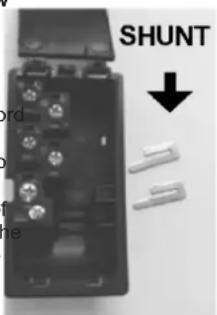
- According to the installation and with the help of shunt bars which you should have recovered in the first operation, fix the conductor as shown on the chart;
- Fix the cover;
- Screw the cable clamp.
Note: make sure the terminal board screws are tight.
Operations to be carried out to make a new connection:
- Choose the power supply cable in accordance with the recommendations in the table;
- Pass the power supply cable into the clamp;
- Strip the end of each conductor of the supply co on a 10 mm length, by taking in account the requested length of the cord for the connection to the terminal block;
- According to the installation and with the help of shunt bars which you should have recovered in the first operation, fix the conductor as shown on the chart;
- Fix the cover;
- Screw the cable clamp.
text_image
SHUNT ord o f heATTENTION:
If it should be necessary to replace the power supply cord, connect the wire in accordance with following colors/codes:
| BLUE | Neutral | (N) |
| BROWN | Live | (L) |
| YELLOW-GREEN | Earth | (⊕) |
Connection to the terminals on the terminal block
| LAY OUT"1-3" | LAY OUT"2-4" | |
| MONOPHASE or TWO PHASES 220-240 V~ | ||
| Cable HO5V2V2F | 3 × 2,5 mm^2 | 3 × 4 mm^2 |
| THREE PHASES 220-240 V3~ | ||
| Cable HO5V2V2F | 4 × 1,5 mm^2 | 4 × 1,5 mm^2 |
| THREE PHASES 380-415 V2N~ | ||
| Cable HO5V2V2F | 4 × 1,5 mm^2 | 4 × 1,5 mm^2 |
| Monophase 220-240 V~ | Two phases 220-240 V2~ | ||||||||
| 1 | 2 | 3 | 4 | 1 | 2 | 3 | 4 | ||
| T | Ph | N | T | Ph | Ph | ||||
| Three phases 220-240 V3~ | ||||
| 1 | 2 | 3 | 4 | |
| Ph | Ph | Ph | Ph | |
Ph = Phase N = Neutral T = Earth
5. HOB COOKWARE ADVICE
Using good quality cookware is critical for setting the best performance from your hob.

natural_image
Three identical illustrations of cooking utensils crossed out, no text or symbols present• Always use good quality cookware with perfectly flat and thick bases: using this type of cookware will prevent hot spots that cause food to stick. Thick metal pots and pans will provide an even distribution of heat.
- Ensure that the base of the pot or pan is dry: when filling pans with liquid or using one that has been stored in the refrigerator, ensure that the base of the pan is completely dry before placing it on the hob. This will help to avoid staining the hob.
- Use pans whose diameter is wide enough to completely cover the surface unit: the size of the pan should be no smaller than the heating area. If it is slightly wider the energy will be used at its maximum efficiency.
THE CHOICE OF COOKWARE - The following information will help you to choose cookware which will give good performance.
Stainless Steel : highly recommended. Especially good with a sandwich clad base. The sandwich base combines the benefits of stainless steel (appearance, durability and stability) with the advantages of aluminium or copper (heat conduction, even heat distribution).
Aluminium : heavy weight recommended. Good conductivity.
Aluminium residues sometimes appear as scratches on the hob, but can be removed if cleaned immediately.
Because of its low melting point, thin aluminium should not be used. Cast Iron : usable, but not recommended. Poor performance. May scratch the surface.
Copper Bottom / stoneware: heavy weight recommended. Good performance, but copper may leave residues which can appear as scratches. The residues can be removed, as long as the hob is cleaned immediately. However, do not let these pots boil dry. Overheated metal can bond to glass hobs. An overheated copper pot will leave a residue that will permanently stain the hob.
Porcelain/enamel: Good performance only with a thiny smooth, flat base. Glass-ceramic: not recommended. Poor performance. May scratch the surface.
6. USE
How to choose power management level
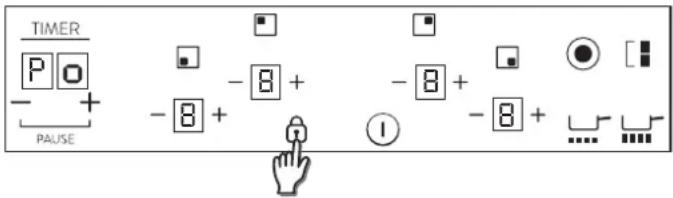
Through the "Power management" function, the user can set the maximum power that can be reached by the hob. Power management function is only available during first 30 seconds after switch on the hob. There is even the possibility to repeat this setting switching off and on the power plug. By setting the desired maximum power, the hob automatically adjusts the distribution in the various cooking zones so that this limit is never exceeded; with the added advantage of being able to simultaneously manage all the zones without overload problems. The customer can set the maximum power of hob between 2.5kW and the maximum related power of the hob (this can change according to the model). For example if the maximum power of the hob is 7kW , the maximum power level for setting is between 2.5kW and 7kW . After connecting the appliance to the electrical power, within 30 seconds you can set the power level based on the points shown below:
1.- Switch on hob.
2.- Let touch control finish its initialization process.
3.- Unlock the control.
text_image
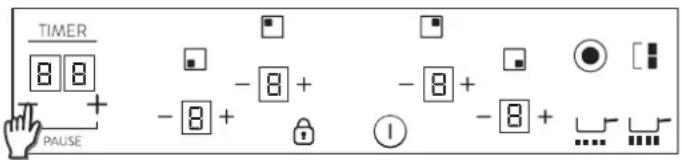
TIMER + - 8 + - 8 + PAUSE - 8 + - 8 + I4.- Before pass 30 seconds after switch on the hob; touch for 5 seconds "-" key of timer.
text_image
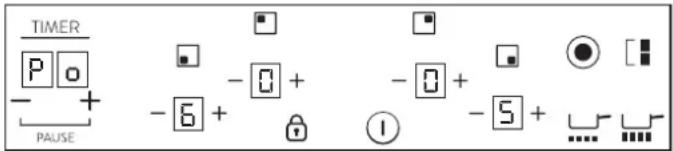
TIMER 8 8 + - 8 + - 8 + PAUSE - 8 + - 8 + ...5.- After this moment, this message will appear on display, Po on timer display. Power level divided by 100 in heater displays.
text_image
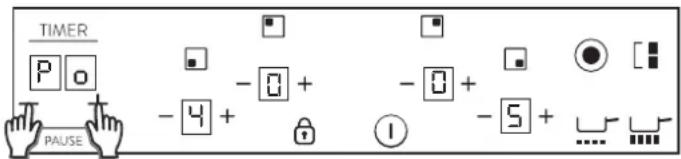
TIMER Po + - PAUSE -6 + -0 + -0 + -5 + ...6.- Using '+' and '-' of Timer keys, Power Management value can be adjusted. When required value is selected, touch at the same time "+" and "-" keys during 5 seconds.
text_image
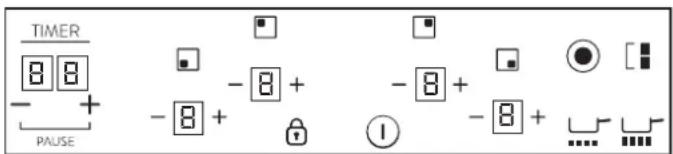
TIMER P o PAUSE - 4 + - 0 + - 0 + - 5 + ...7.- When this process is finished, a long beep is heard and a reset is produced. Start-up process will be generated again.
text_image
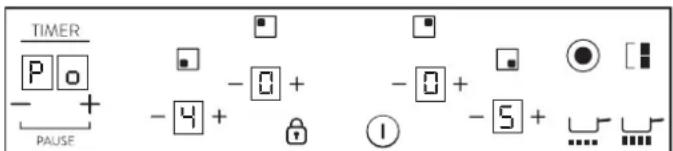
TIMER 8 8 - + PAUSE - 8 + - 8 + - 8 + - 8 + ①8.- After start-up process, in timer display power management will be showed.
text_image
TIMER P o - + PAUSE - 0 + - 0 + - 5 + ...After that, touch control won't allow any combination which can exceed this limit.
Notes:
a) This power management is only available during first 30 seconds after switch on the hob.
b) If this power management selection is ON, if more than 90 seconds after switch on the hob this process will be finish without any new power value were recorded.
c) If this power management selection is ON, if any key is touched except the combination of timer “+” and “−”, process will be finish without any new power value were recorded and touch control will start working as usual, without reset.
d) If this power management selection is ON, if any key is touched the combination of timer “+” and “−”, process will be finish with a new power value were recorded, reset and touch control will start working as usual.
Switch ON/OFF a heater zone
text_image
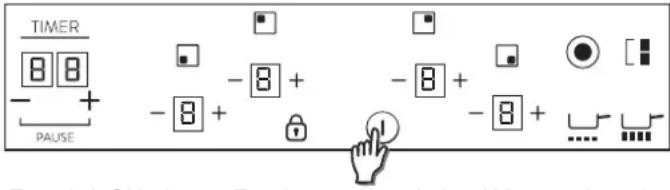
TIMER + 8 8 - + PAUSE - 8 + - 8 + - 8 + - 8 + ....To switch ON a heater Touch power key during 400 msec. Long beep will be heard and "0" value will appear in target zone digit, indicating power level.
1) If any cooking stage is in position 0, this display will switch OFF automatically after 10 seconds and the zone OFF sequence will sound.
2) If there is residual heat indication in the display which is ON but in 0 power, "0" will appear changing over.
3) If lock function is active you cannot switch ON a zone.
To switch OFF a heater Touch power key during 1,2 sec. 3 Short beeps will be heard and nothing or "H" value will appear in target zone digit if residual heat exists. Zone will be OFF.
1) If any cooking stage is in position 0, this display will switch OFF automatically after 10 seconds and the zone OFF sequence will sound.
2) If there is residual heat indication in the display which is OFF, "H" will be displayed.
3) Even lock function is active you can switch OFF a zone.
4) If only one heater is active and this one is switched off, 4 Short beep will be heard indicating all cook top is Off.
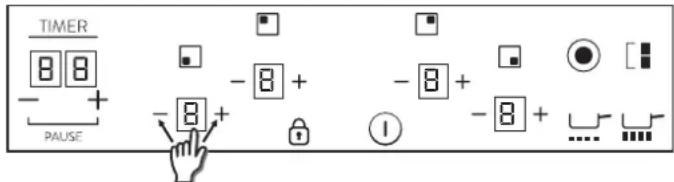
Increase / Decrease power level
text_image
TIMER 8 8 - + PAUSE -8 + -8 + -8 + -8 + 1With a short press on '+' or '-' keys, Increase or decrease power in the selected zones digit: 0-1-2-3...9-P
- For Long Presses in + or - keys, power level increases /decreases continuously. With a fast increase, power stops at level 9, and for a higher power another short press is needed on the + key. No beep sound is heard with fast increase / decrease.
- Once arrived to P power level, pressing + key again does not change power level to 0. Once arrived to 0 power level, pressing - key again does not change power level to P.
-
With a zone ON at 0 power level, if the zone is hot, 0 will blink alternatively. After 10 seconds, 0 will disappear an 'H' letter will appear fixed on display.
-
When a heater is selected and '+' & '-' keys are touched at the same time, power level will go to '0' but heater will maintain selected during 10 seconds. If heater was temporized, timer will go to Off. This action can only be developed in several cases depending touch control configuration. The following examples are for information only. Personal experience should then let you adapt these settings to your taste and habits.
Child Lock
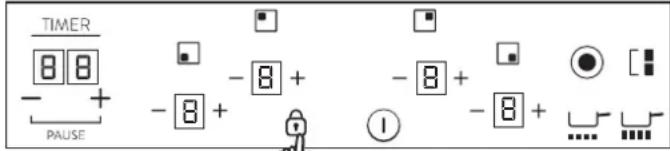
text_image
TIMER 8 8 - + - 8 + - 8 + - 8 + - PAUSE 1 ● [■] - 8 + - 8 + ...The action will be done when lock key is touched
Then, any time when a key will be touched, displays will show "L" during 2sec. heating remains at the same state.
To deactivate Child Lock, follow the same process explained before.
Then Short beep will be heard and displays will show "n" letter. Hob will remain unlocked.
Note: An automatic child lock will produce in 15 minutes after total Switch OFF of the hob.
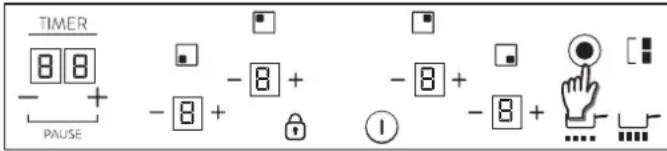
Double / Triple zones
text_image
TIMER 8 8 - + PAUSE - 8 + - 8 + - 8 + - 8 + ①To switch ON double extension ring, associated main zone must be already ON and Indicating power level must be higher than 0.
8.1- Double zone ON
1st Short Press on extension key Switches ON extension ring. LED over extension key turns ON if Extension ring is ON.
2nd Short Press on extension key Switches OFF extension ring
Short beep each press on extension key.
8.2- Triple zone ON
1st Short Press on extension key Switches ON 1st extension ring. 1 LED over extension key turns ON if 1st extension ring is ON (left LED in case of triple zone, middle and only LED in case of double zone) 2nd Short Press on extension key Switches ON 2nd extension ring. 2 LEDs over extension key turn ON if 1st and 2nd extension rings are ON
3rd Short Press on extension key. Switches OFF 1st and 2nd extension rings.
Short beep each press on extension key.
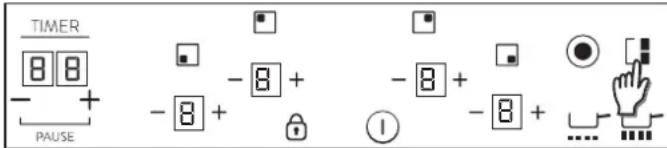
Bridge function
text_image
TIMER 8 8 + - PAUSE - 8 + - 8 + - 8 + - 8 + ①The bridge can be enabled only when both heaters are off. One heater of the bridge has been selected, to activate bridge function touch bridge key.
A beep sounds and the zone LED is switched on if the zone is enabled. Both bridge heaters will be selected at the same time.
Once the heaters selected, if the power level is not the desired power level, by the + - keys.
Both bridge heater displays will show same power level.
The function will finish:
- If the bridge key is touched in setting mode
- If user selects power level "0"
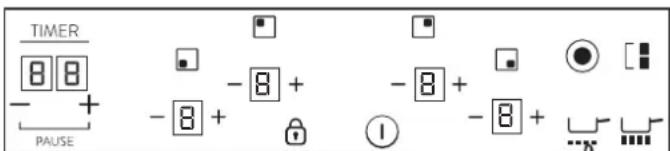
Melting function
text_image
TIMER 8 8 - + PAUSE - 8 + - 8 + - 8 + - 8 + 1After a heater has been selected, to activate melting function:
- Select melting key
A tone sounds and heater display shows "U"
The heater will work at power level "2"
Being the heater selected, Melting function will finish
- If switched off
- If it is selected to other power level.
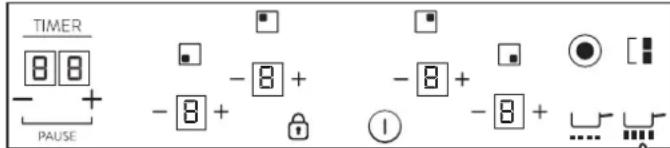
Boiling Function:
text_image
TIMER 8 8 - + PAUSE - 8 + - 8 + - 8 + - 8 + ①After a heater has been selected, to activate Boiling function:
- Select Boiling key
A tone sounds and heater display shows "P"
The heater will work at maximum power level for 10 minutes.
After these 10 minutes a tone sounds heater will return to level "9"
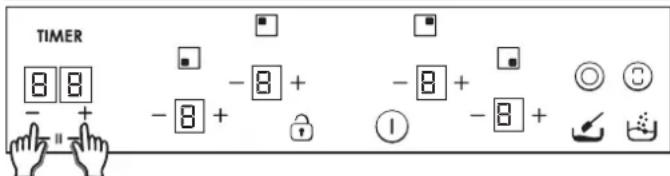
Pause function
text_image
TIMER 8 8 - + - 8 + - 8 + - 8 + - 8 + ①The Pause function allows temporary pausing of the cooking process, allowing the users to answer the door or the telephone without worrying that the water is boiling over. This function is also useful to clean the user interface surface without changing the cooking set up. To select this functio, the user should touch "timer +/- keys" together. If the "timer +/- keys" are touched for 12 seconds:
A beep sounds and the cooktop is stopped,
The heaters actual power setting is stored and all the active heaters power is set to power level 0,
The heaters auto-switch off time is paused,
All the timers running count downs are paused,
All keys are locked except "timer +/- keys" and "on/off key" (Timer keys can only be active if they are used together to deactivate pause function),
Timer displays nothing, and all the heaters displays are getting on and putting out "0", switching on segment by segment in left direction, and after that switching off segment by segment in right direction, continuously.
The stop function will finish:
if the "timer +/- keys" (together) are touched for more than 12 second a beep sounds and the heaters actual power setting and timer countdowns are restored, or if the cooktop is stopped for more than 10 minutes the cooktop is switched off automatically.
Overflow security
Something (an object or a liquid) is pressing any key during more than 5s. 2 Short Beep + 1 Long beep every 30s while the key is pressed. Cook-top will turn Off. — This symbol will maintain blinking while the matter persist.
Timer
To activate timer, heater must be selected and its power level must be greater than "0";
Select the zone to be timed. Power level of the zone greater than 0. Static [t.] is displayed in the zone being timed. "0 0" in the digits reserved for the timer.
1) With "+" or "-" keys, timer time can be chosen. No Beeps at time change.
2) Pressing simultaneously timer "+/-" keys the timer is cancelled (goes to 00).
3) If timer "+" or "-" keys is maintained pressed during TBD time, there is quick setting.
4) When setting timer time, it is possible to go from "00" to "99" with "-" key, and from "99" to "00" with "+" key.
5) Maximum time 99 minutes.
6) When the time is elapsed and the hob is beeping, press any key and the alarm and digit sequence will end.
To activate timer, heater must be selected and its power level must be greater than "0";
Select the zone to be timed. Power level of the zone greater than 0. Static is displayed in the zone being timed. "0 0" in the digits reserved for the timer.
1) With "+" or "-" keys, timer time can be chosen. No Beeps at time change.
2) Pressing simultaneously timer "+/-" keys the timer is cancelled (goes to 00).
3) If timer "+" or "-" keys is maintained pressed during TBD time, there is quick setting.
4) When setting timer time, it is possible to go from "00" to "99" with "-" key, and from "99" to "00" with "+" key.
5) Maximum time 99 minutes.
6) When the time is elapsed and the hob is beeping, press any key and the alarm and digit sequence will end.
7) It is possible to adjust the timer time while the timer is previously running.
8) Power of timed zone can be modified without consequences on the timer programming.
9) Last minute will be displayed by seconds (For Variants only visible if we enter the timer programming while the last minute of the countdown)
10) Pressing the Timer key without any selected zone and when no zone is being timed, does nothing.
11) Pressing the Timer key without any selected zone and when many zones are being timed, the time shown in time digits changes in a rotatory way, and shows the time whose power display has the decimal point ON.
12) Alternatively Power (5s) and (0,5s) is displayed in the zone being timed.
Remaining time is displayed in the digits reserved for the timer. If multiple zones are timed, the smallest remaining time is displayed, and the decimal point is displayed in the corresponding zone.
Residual Heat Indicator (In radiant heaters-> calculated)
The same indicators can be used for "residual heat" indication as well. A time table must be defined on this purpose: Rest Heat time=f (power level, working time).
While a temperature on the cook top glass surface is above 65°Cb(theory value), this condition will be shown in the associated display, by means of an "H".
To generate a temperature above 65 C a heating element has to be in operation for certain time, this time depends on the power level. Once this time has expired, the residual heat warning will be shown when the heating element is switched off.
Automatic Safety Off
If the power level is not changed during a preset time, the corresponding heater turns off automatically.
The maximum time a heater can stay on, depends on the selected cooking level.
| Power level | Max. time on (hours) |
| 1 | 10 |
| 2 | 5 |
| 3 | 5 |
| 4 | 4 |
| 5 | 3 |
| 6 | 2 |
| 7 | 2 |
| 8 | 2 |
| 9 | 2 |
NOTE: while an overheating situation should occur during the operation of the highest power levels, the Hob control will automatically adjust the power level in order to protect the hob from overheating.
7. CLEANING AND MAINTENANCE
. Before carrying out any maintenance work on the hob, allow it to cool down.
. Only products, (creams and scrapers) specifically designed for aglass ceramic surfaces should be used. They are obtainable from hardware stores.
. Avoid spillages, as anything which falls on to the hob surface will quickly burn and will make cleaning more difficult.
. It is advisable to keep away from the hob all substances which are liable to melt, such as plastic items, sugar, or sugar-based products.
.MAINTENANCE:
- Place a few drops of the specialised cleaning product on the hob surface.
- Rub any stubborn stains with a soft cloth or with slightly damp kitchen paper.
- Wipe with a soft cloth or dry kitchen paper until the surface is clean.
If there are still some stubborn stains:
- Place a few more drops of specialised cleaning fluid on the surface.
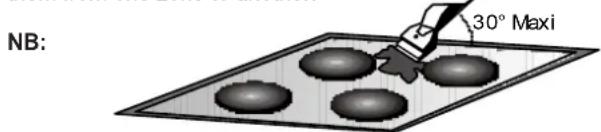
- Scrape with a scraper, holding it at an angle of 30^ to the hob, until the stains disappear.
- Wipe with a soft cloth or dry kitchen paper until the surface is clean.
- Repeat the operation if necessary.
A FEW HINTS:
Frequent cleaning leaves a protective layer which is essential to prevent scratches and wear. Make sure that the surface is clean before using the hob again. To remove marks left by water, use a few drops of white vinegar or lemon juice. Then wipe with absorbent paper and a few drops of specialised cleaning fluid.
The glass ceramic surface will withstand scraping from flat-bottomed cooking vessels, however, it is always better to lift them when moving them from one zone to another.
text_image
NB: 30° MaxiDo not use a sponge which is too wet.
Never use a knife or a screwdriver.
A scraper with a razor blade will not damage the surface, as long as it is kept at an angle of 30^ .
Never leave a scraper with a razor blade within the reach of children.
Never use abrasive products or scouring powders.
. The metal surround : to safely clean the metal surround wash with soap and water, rinse, then dry with a soft cloth.
Any change in the colour of the glass-ceramic surface does not affect its operation or the stability of the surface. Such discolorations are mostly a result of burnt food residues or use of cookware made of materials such as aluminium or copper; these stains are difficult to remove.
8. PROBLEM SOLVING
The cooking zones do not simmer or only fry gently
Only use flat-bottomed pans. If light is visible between the pan and the hob, the zone is not transmitting heat correctly.
The pan bottom should fully cover the diameter of the selected zone.
The cooking is too slow
Unsuitable pans are being used. Only use flatbottomed utensils, that are heavy and have a diameter at least the same as the cooking zone.
Small scratches or abrasions on the hob's glass surface
Incorrect cleaning or rough-bottomed pans are used; particles like grains of sand or salt get between the hob and the bottom of the pan. Refer to the "CLEANING" section; make sure that pan bottoms are clean before use and only use smooth bottomed pans. Scratches can be lessened only the cleaning is done correctly.
The cooking zones do not simmer or only fry gently
Only use flat-bottomed pans. If light is visible between the pan and the hob, the zone is not transmitting heat correctly.
The pan bottom should fully cover the diameter of the selected zone.
The cooking is too slow
Unsuitable pans are being used. Only use flatbottomed utensils, that are heavy and have a diameter at least the same as the cooking zone.
Small scratches or abrasions on the hob's glass surface
Incorrect cleaning or rough-bottomed pans are used; particles like grains of sand or salt get between the hob and the bottom of the pan. Refer to the "CLEANING" section; make sure that pan bottoms are clean before use and only use smooth bottomed pans. Scratches can be lessened only the cleaning is done correctly.
Metal marks
Do not slide aluminium pans on the hob. Refer to the cleaning recommendations.
You use the correct materials, but the stains persist.
Use a razor blade and follow the "CLEANING" section.
Dark stains
Use a razor blade and follow the "CLEANING" section.
Light surfaces on the hob
Marks from an aluminium or copper pan, but also mineral, water or food deposits; they can be removed using the cream cleaner.
Caramelisation or melted plastic on the hob.
Refer to the "CLEANING" section.
The hob does not operate or certain zones don't work
The shunts are not positioned correctly on the terminal board.
Have a check made that the connection is done he control panel is locked. Unlock the hob.
The hob does not cut off.
The control panel is locked. Unlock the hob.
Frequency of on/off operations for cooking zones
The on-off cycles vary according to the required heat level:
- low level: short operating time,
- high level: long operating time.
The cooktop is not working.
Check the condition of the fuses / circuit breakers at your location. Check to see if you are experiencing a power failure.
The cooktop has turned itself off.
The main switch (ON/OFF key) was accidentally touched or there is any object above any key. Turn the unit on again without any object about the keyboard. Enter your settings again.
Display F and numbers
If F and numbers appears in the display, your unit has detected a fault.
The following table list actions you can take to correct the problem.
9. AFTERCARE
Before calling out a Service Engineer please check the following: — that the plug is correctly inserted and fused;
If the fault cannot be identified switch off the appliance — do not tamper with it — call the Aftercare Service Centre. The appliance is supplied with a guarantee certificate that ensures that it will be repaired free of charge at the Service Centre.
Heater display Fault Action
| F0 | Touch control software error. | If error has occurred disconnected and connect again the cooktop to the power supply. If error persist, call after-sales service. If error appears suddenly in a normal operation, call after-sales service. |
| Fc | Touch control zone is too hot and has turned off all the heaters. | Wait until temperature goes down, Cook-top will be recovered when temperature reaches a normal value. When the message disappears, the hob may be used again. |
| Ft | Touch control temperature sensor can be damaged. | Wait until temperature goes down. If message persist when temperature reaches an environment value, call after-sales service. |
| FE | Touch control temperature sensor can be damaged. | Wait until temperature goes down. If message persist when temperature reaches an environment value, call after-sales service. |
| Fb | Excessive sensitivity on any key. | See if cook-top is mounted correctly. Be sure that keys touch correctly the glass surface. |
| FU / FJ | Security keyboard error | This error is a keyboard auto-check. It disappears when autocheck return to secure value. If error persist, call after-sale service. |
| FA | Security software error | This error is a software auto-check. It disappears when auto-check return to secure value. If error persist, call after-sale service. |
| FC / Fd | Security software error | This error is a software auto-check. It disappears when auto-check return to secure value. If error persist, call after-sale service. |
| Fr | Relays security error | Any relay driver can have any problemn. Remove cook-top from the power supply, wait a minute and switch on again. If error persist, call after-sale service. |
natural_image
Technical line drawing of a mechanical assembly with no visible text or symbolsnatural_image
Pure technical diagram of a Y-shaped structural frame with mounting clips and directional arrows, no text or symbols present.natural_image
Technical diagram of a mechanical assembly with labeled parts (no text or symbols)natural_image
Isometric diagram of a layered structure with arrows indicating direction (no text or symbols)natural_image
Simple line drawing of a hand holding a tool with a bracket and a small inset box, no text or symbols present.natural_image
Close-up of a mechanical device with a tool and screw base (no visible text or symbols)2
natural_image
Close-up of a black mechanical component with a tool inserted, no visible text or symbols3
natural_image
Close-up of a black electronic device with a cable and adjustment knob (no visible text or symbols)| BLU | Neutro | (N) |
| MARRONE | Fase | (L) |
| GIALLO VERDE | Terra | (⊕) |
natural_image
Three identical illustrations of cooking utensils with crossed marks, no text or symbols presentnatural_image
Technical line drawing of a mechanical assembly with no visible text or symbolsnatural_image
Pure technical line drawing of a Y-shaped structural frame with mounting clips (no text or symbols)natural_image
Simple line drawing of a hand holding a tool with a bracket and a magnified inset showing a small object (no text or symbols)4. RACCORDEMENT ÉLECTRIQUE
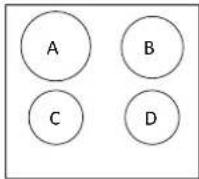
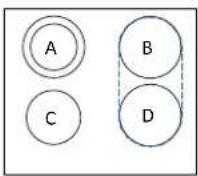
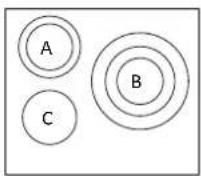
SCHÉMA 1 SCHÉMA 2 SCHÉMA 3
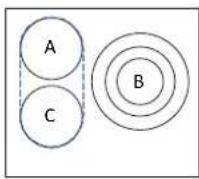
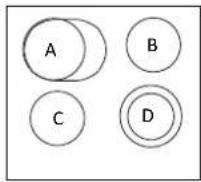
SCHÉMA 4 SCHÉMA 5
| A | B | C | D | |
| SCHÉMA 1 | 2300W | 1800 W | 1200 W | 1200 W |
| SCHÉMA 2 | 1000+700 W | 1800 W | 1200 W | 1800 W |
| SCHÉMA 3 | 1000+700 W | 1050+900+750 W | 1200 W | - |
| SCHÉMA 4 | 1800W | 1050+900+750 W | 1800 W | - |
| SCHÉMA 5 | 1500+900 W | 1200 W | 1200 W | 1000+700 W |
SCHÉMA
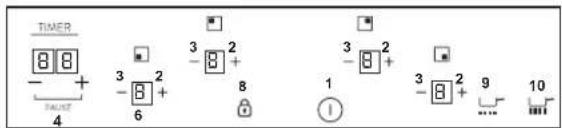
text_image
TIMER 4 FACER 3 2 -8 + 6 3 2 -8 + 8 1 3 2 -8 + 9 ... 101
text_image
TIMER - + PAGE 4 3 2 6 3 2 - 8 + 8 1 5 7 - - 2 9 102
text_image
TIMER 8 8 - + PAGE 4 3 2 -8 6 8 3 2 -8 2 3 2 1 1 5 5 9 10 ...3
text_image
TIMER 8 8 - + PULSE 4 3 2 -8 + 6 8 3 2 -8 + 3 2 -8 + 1 7 5 9 10 ...4
text_image
TIMER - + PAGE 4 3 2 -8 + 6 3 2 - 8 + 8 1 5 - 5 -8 + 5 -8 +5
Selon le modèle
natural_image
Close-up of a mechanical component with a tool inserted, showing no visible text or symbols2
natural_image
Close-up of a black mechanical component with attached wires and connectors (no visible text or symbols)3
natural_image
Interior view of a device showing internal components and a labeled arrow pointing to a feature (no readable text or symbols)ATTENTION :
natural_image
Three identical illustrations of cooking utensils with crossed-out X marks, no text or symbols presentnatural_image
Technical line drawing of a mechanical assembly with no visible text or symbolsnatural_image
Pure technical diagram of a Y-shaped structural frame with mounting clips and directional arrows (no text or symbols)natural_image
Technical line drawing of a mechanical assembly with no visible text or symbolsZarovnejte a vložte varnou desku.
natural_image
Isometric diagram of a layered structure with arrows indicating force or direction (no text or symbols)INSTALACE FLUSH
natural_image
Line drawing of a hand using a tool to lift a curved pipe or wire (no text or symbols present)4. ELEKTRICKÉ PŘIPOJENÍ
USPOŘÁDÁNÍ 1 USPOŘÁDÁNÍ 2 USPOŘÁDÁNÍ 3
USPOŘÁDÁNÍ 4 USPOŘÁDÁNÍ 5
| A | B | C | D | |
| USPOŘÁDÁNÍ 1 | 2300W | 1800 W | 1200 W | 1200 W |
| USPOŘÁDÁNÍ 2 | 1000+700 W | 1800 W | 1200 W | 1800 W |
| USPOŘÁDÁNÍ 3 | 1000+700 W | 1050+900+750 W | 1200 W | - |
| USPOŘÁDÁNÍ 4 | 1800W | 1050+900+750 W | 1800 W | - |
| USPOŘÁDÁNÍ 5 | 1500+900 W | 1200 W | 1200 W | 1000+700 W |
USPOŘÁDÁNÍ
text_image
TIMER 8 8 + - + 4 3 2 - 8 + 6 3 2 - 8 + 8 1 3 2 - 8 + 9 ... 101
text_image
TIMER 8 8 - + - PAGE 4 3 2 -8 + 6 3 2 - 8 + 8 1 5 7 -8 + 3 2 -8 + 9 ... 102
text_image
TIMER 4 + - #ASE 3 2 -8 + 6 8 3 2 -8 + 1 2 -8 + 5 5 9 10 ...3
text_image
TIMER 8 8 - + 4 - minus 3 2 -8 + 6 8 3 2 -8 + 3 2 -8 + 1 ! 7 5 9 104
text_image
TIMER - + 4 - 5 - 6 3 2 - 8 + 3 2 - 8 + 1 2 - 8 + 5 55
natural_image
Close-up of a mechanical device with a cylindrical component and a handle, no visible text or symbols2
natural_image
Close-up of a black mechanical component with attached tubing and mounting holes (no visible text or symbols)3
text_image
TIMER P - + -6 - 0 + - 0 + - 5 + ◎ ©natural_image
Technical line drawing of a mechanical assembly with no visible text or symbolsnatural_image
Pure technical line drawing of a Y-shaped structural frame with mounting clips (no text or symbols)natural_image
Simple line drawing of a hand using a tool to lift a curved object, with no text or symbols present.natural_image
Close-up of a mechanical device with a handle and mounting bracket (no visible text or symbols)2
natural_image
Close-up of a black electronic device with wires and connectors (no visible text or symbols)3
natural_image
Close-up of a black electronic device with connectors and a cable (no visible text or symbols)Ph = Phase N = Nullleiter T = Masse
natural_image
Three identical illustrations of cooking utensils crossed out, no text or symbols presentnatural_image
Technical line drawing of a mechanical assembly with no visible text or symbolsnatural_image
Pure technical diagram of a Y-shaped structural frame with mounting clips and directional arrows, no text or symbols present.natural_image
Technical diagram of a mechanical assembly with screws and components (no text or labels)natural_image
Isometric diagram of a layered structure with arrows indicating direction (no text or symbols)GÖMME KURULUM
natural_image
Simple line drawing of a hand holding a tool, with a magnified inset showing a small rectangular object (no text or symbols)4. ELEKTRİK BAĞLANTISI
YERLEŞİM 1
YERLEŞİM 2
YERLEŞİM 3
YERLEŞİM 4
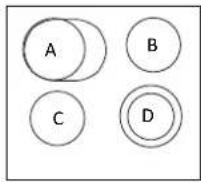
YERLEŞİM 5
| A | B | C | D | |
| YERLEŞİM 1 | 2300W | 1800 W | 1200 W | 1200 W |
| YERLEŞİM 2 | 1000+700 W | 1800 W | 1200 W | 1800 W |
| YERLEŞİM 3 | 1000+700 W | 1050+900+750 W | 1200 W | - |
| YERLEŞİM 4 | 1800W | 1050+900+750 W | 1800 W | - |
| YERLEŞİM 5 | 1500+900 W | 1200 W | 1200 W | 1000+700 W |
YERLEŞİM
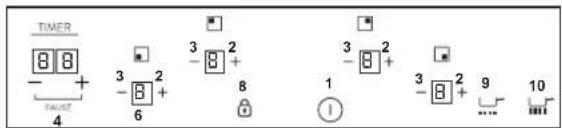
text_image
TIMER - + - 4 3 2 - 6 3 2 - 8 + 8 1 3 2 - 8 + 9 ... 101
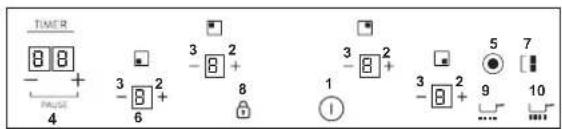
text_image
TIMER 8 8 + - PAUSE 4 3 2 -8 + 6 3 2 -8 + 8 1 5 7 -8 + 9 10 ...2
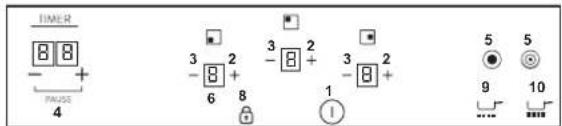
text_image
TIMER 8 8 - + FALSE 4 3 2 -8 2 6 8 3 2 -8 2 1 2 - - 5 5 9 10 ...3
text_image
TIMER 8 8 - + PULSE 4 3 2 -8 + 6 8 3 2 -8 + 3 2 -8 + 1 7 5 9 10 ...4
text_image
TIMER 8 8 + PAGE 4 3 2 -8 + 3 2 -8 + 1 3 2 -8 + 5 5 -8 +5
Modele Göre
natural_image
Close-up of a black mechanical component with wires and connectors (no visible text or symbols)3
natural_image
Three identical illustrations of cooking utensils marked with 'X' symbols, no text or labels present.text_image
TIMER + - + -8 + -8 + -8 + -8 + -8 + PULSE Pin return: AC/6 durums, retimetric in some frames, but dropsTel: 039.2086.1 • Fax: 039.2086.403
www.candy-group.com

HOOVER
GARANTI BELGESI
ANKASTRE OCAK
The manufacturer will not be responsible for any inaccuracy resulting from printing or transcript errors contained in this brochure. We reserve the right to carry out modifications to products as required, including the interests of con sumption, without prejudice to the characteri stics relating to safety or function.