91Xi Total Body Trainer - Elliptical bike Life Fitness - Free user manual and instructions
Find the device manual for free 91Xi Total Body Trainer Life Fitness in PDF.



| Product Type | Elliptical Bike |
| Brand | Life Fitness |
| Model | 91Xi Total Body Trainer |
| Intended Use | Intensive / Commercial |
| Maximum User Weight | 160 kg |
| Power Supply | Self-powered (rechargeable 6V battery) |
| Dimensions (L x W x H) | 211 x 71 x 155 cm |
| Weight | 106.5 kg |
| Console | Message center with arrow keys and numeric keypad |
| Displays | Time, speed, level, calories, heart rate, distance |
| Exercise Programs | Quick Start, Manual, Random, Hill, Aerobic Cross-training, Reverse Cross-training, Fat Burn, Cardio, Around the World, Waterfalls, Foothills, Kilimanjaro, Interval, Speed Training |
| Resistance Levels | 25 |
| Heart Rate Monitor | Lifepulse™ system (hand grip sensors) and Polar® (optional chest strap) |
| Accessory Tray | Yes, with bottle holder |
| Reading Rack | Integrated |
| Pedaling Speed Range | 3.5 to 20 km/h |
| Maintenance | Clean with a cotton cloth and mild detergent. Regularly inspect wear parts. |
| Safety Instructions | Read the manual fully. Consult a physician before any program. Maintain 30 cm clearance. Do not use without shoes. |
| Repairability | Repair by authorized technician. Contact Life Fitness after-sales service. |
| Warranty | Any modification voids the warranty. |
Frequently Asked Questions - 91Xi Total Body Trainer Life Fitness
User questions about 91Xi Total Body Trainer Life Fitness
0 question about this device. Answer the ones you know or ask your own.
Ask a new question about this device
Download the instructions for your Elliptical bike in PDF format for free! Find your manual 91Xi Total Body Trainer - Life Fitness and take your electronic device back in hand. On this page are published all the documents necessary for the use of your device. 91Xi Total Body Trainer by Life Fitness.
USER MANUAL 91Xi Total Body Trainer Life Fitness
91Xi Total Body Trainer
OPERATION MANUAL
Total Body Trainer 91Xi
MODE D'EMPLOI
5100 North River Road
Schiller Park, Illinois 60176 • U.S.A.
847.288.3300 • FAX: 847.288.3703
800.735.3867 (Toll-free within U.S.A., Canada)
www.lifefitness.com
INTERNATIONAL OFFICES
LIFE FITNESS ASIA PACIFIC LTD
Room 2610, Miramar Tower
132 Nathan Road
Tsimshatsui, Kowloon
HONG KONG
Telephone: (+852) 2891.6677
FAX: (+852) 2575.6001
LIFE FITNESS ATLANTIC BV LIFE FITNESS BENELUX
Bijdorpplein 25-31
2992 LB Barendrecht
THE NETHERLANDS
Telephone: (+31) 180.646.666
FAX: (+31) 180.646.699
Telephone: (+32) 87.300.942
FAX: (+32) 87.300.943
LIFE FITNESS DO BRAZIL
Av. Dr. Dib Sauaia Neto 1478
Alphaville, Barueri, SP
06465-140
BRAZIL
Telephone (+55) 11.4193.8282
FAX: (+55) 11.4193.8283
LIFE FITNESS VERTRIEBS GMBH
Dückegasse 7-9/3/36
1220 Vienna
AUSTRIA
Telephone: (+43) 1.61 57 198
FAX: (+43) 1.61 57 198.20
LIFE FITNESS IBERIA
LIFE FITNESS EUROPE GMBH
Siemensstrasse 3
LIFE FITNESS ITALIA S.R.L.
Via Vittorio Veneto, 57/A
39042 Bressanone (Bolzano)
ITALY
Telephone: (+39) 0472.835 470
FAX: (+39) 0472.833 150
LIFE FITNESS LATIN AMERICA and CARIBBEAN
5100 North River Road
Schiller Park, Illinois 60176
U.S.A.
Telephone: (+1) 847.288.3300
FAX:(+1) 847.288.3886
LIFE FITNESS UK LTD
Queen Adelaide
Ely, Cambs CB7 4UB
UNITED KINGDOM
Telephone: (+44) 1353.666017
FAX: (+44) 1353.666018
LIFE FITNESS JAPAN
Nippon Brunswick Bldg., #8F
5-27-7 Sendagaya
Shibuya-Ku, Tokyo
JAPAN 151-0051
Telephone: (+81) 3.3359.4309
FAX: (+81) 3.3359.4307
M051-00K61-A111
03/06
Before using this product, it is essential that this ENTIRE operation manual and ALL installation instructions be read.
This will help in setting up the equipment quickly and in instructing others on how to use it correctly and safely.
NOTE: This equipment has been tested and found to comply with the limits for a Class A digital device, pursuant to part 15 of the FCC rules. These limits are designed to provide reasonable protection against harmful interference when the equipment is operated in a commercial environment. This equipment generates, uses and can radiate radio frequency energy, and if not installed and used in accordance with the operation manual, may cause harmful interference to radio communications. Operation of this equipment in a residential area is likely to cause harmful interference in which case the user will be required to correct the interference at his own expense.
Class S (Studio): Professional and / or commercial use.

CAUTION: Any changes or modifications to this equipment could void the product warranty.

Any service, other than cleaning or user maintenance, must be performed by an authorized service representative. There are no user serviceable parts.
TABLE OF CONTENTS
Section Description Page
- Getting Started ....5
1.1 Important Safety Instructions ....5
1.2 Setup 7
Where to Place the Life Fitness® Total Body Trainer // How to Stabilize the Life Fitness Total Body Trainer // Check for Power // Fitness and Entertainment Networking
- The Display Console ....8
2.1 Display Console Overview .....8
2.2 Display Console Descriptions 8
2.3 The Accessory Tray / Reading Rack 11
- Heart Rate Zone Training Exercise 12
3.1 Why Heart Rate Zone Training Exercise 12
3.2 Heart Rate Monitoring 13
The Lifepulse™ Digital Heart Rate Monitoring System // The Polar® Telemetry Heart Rate Monitoring Chest Strap
- The Workouts 15
4.1 Workout Overviews 15
4.2 Using the Workouts ..... 16
To Begin a Workout // Select and Using Quick Start // Selecting a Workout // Entering Weight // Entering Age // Entering Time // Selecting and Adjusting the Resistance Level //Selecting a Workout Mode // Switching Workouts “On-the-fly” // Pausing Workouts // Ending Workouts Early // Life Fitness Total Body Trainer Workout Setup Steps (chart)
4.3 Workout Descriptions .....20
Quick Start // Manual // Random // Fat Burn // Cardio // Hill // Six Pre-set Workouts // Cross-train Aerobics // Cross-train Reverse
- Optional Settings 23
5.1 Entering and Using the Optional Settings Feature .....23
- Service And Technical Data .....24
6.1 Preventive Maintenance Tips .....24
6.2 Preventive Maintenance Schedule .....25
6.3 Troubleshooting the Polar Heart Rate Chest Strap . . . . . . . . . . . . . . . . . . . . . . . . . . . . . . . . . . . . . . . . . . . . . . . . . 25
Heart Rate Reading Is Erratic or Absent Entirely // Heart Rate Reading Is Erratic or Extremely High
6.4 Troubleshooting the Lifepulse System Sensors 26
6.5 How to Obtain Product Service .....26
- Specifications 27
7.1 Life Fitness 91Xi Total Body Trainer Specifications .....27
© 2006 Life Fitness, a division of Brunswick Corporation. All rights reserved. Life Fitness, Heart Rate Zone Training, and Lifepulse are registered trademarks of Brunswick Corporation. Heart Rate Zone Training+ is a trademark of Brunswick Corporation. Polar is a registered trademark of Polar Electro, Inc. Cardio Theater is a registered trademark of the Cardio Theater Holdings. FitLinxx is a registered trademark of the Integrated Fitness Corp. Any use of these trademarks, without the express written consent of Life Fitness or the corresponding companies is forbidden.
This Operation Manual describes the functions of the following product:
Life Fitness Classic Stride Total Body Trainer
91Xi
See "Specifications" page in this manual for product specific features.
Statement of Purpose: The Life Fitness Total Body Trainer is an exercise machine that combines low-impact elliptical pedaling with push/pull arm motion to provide an efficient, effective total body workout.

CAUTION: Life Fitness STRONGLY recommends seeing a physician for a complete medical exam before undertaking an exercise program, particularly if the user has a family history of high blood pressure or heart disease, or is over the age of 45, or smokes, has high cholesterol, is obese, or has not exercised regularly in the past year.
If, at any time while exercising, the user experiences faintness, dizziness, pain, or shortness of breath, he or she must stop immediately.

1.1 IMPORTANT SAFETY INSTRUCTIONS

SAFETY WARNING: The safety of the product can be maintained only if it is examined regularly for damage and wear. See Preventative Maintenance section for details.
- If this Life Fitness product does not function properly after it has been dropped, damaged, or even partially immersed in water, contact Life Fitness Customer Support Services for assistance.
- Always follow the console instructions for proper operation.
- Close supervision is necessary when used by children, invalids or disabled persons.
- Do not use this product outdoors, near swimming pools or in areas of high humidity.
- Never operate a Life Fitness product with the air openings blocked. Keep air openings free of lint, hair or any obstructing material.
- Never insert objects into any opening in this product. If an object should drop inside, carefully retrieve it. If the item cannot be reached, contact Life Fitness Customer Support Services.
- Never place liquids of any type directly on the unit, except in the accessory tray water bottle holder. Containers with lids are recommended.
- Wear shoes with rubber or high-traction soles. Do not use shoes with heels, leather soles, cleats or spikes. Make sure no stones are embedded in the soles.
- Keep all loose clothing, shoelaces and towels away from moving parts.
- Do not use this product in bare feet.
- Do not tip the unit on its side during operation.
- Keep the area around the Life Fitness product clear of any obstructions, including walls and furniture. Ensure that there is at least one foot of clearance in front of the Life Fitness Total Body Trainer.
- Use caution when mounting or dismounting the Life Fitness Total Body Trainer. Use the stationary handlebars whenever additional stability is required. While exercising, hold onto the moving arms.
- Never use the Life Fitness Total Body Trainer while facing backward.
SAVE THESE INSTRUCTIONS FOR FUTURE REFERENCE.
1
POINT DE DÉPART
1.1 CONSIGNES DE SÉCURITÉ IMPORTANTES

Read the Operation Manual before setting up the Life Fitness Total Body Trainer.
WHERE TO PLACE THE LIFE FITNESS® TOTAL BODY TRAINER
Following all safety instructions in Section 1.1, move the Life Fitness Total Body Trainer to the location in which it will be used. See Section 7, titled Specifications, for the dimensions of the footprint. Allow one foot of clearance in front of the Life Fitness Total Body Trainer to allow for movement of the pedal levers. It should be easy to mount the Life Fitness Total Body Trainer from the side.
HOW TO STABILIZE THE LIFE FITNESS TOTAL BODY TRAINER
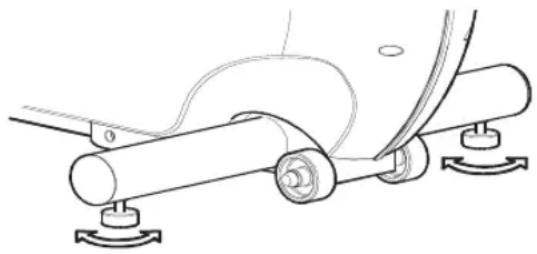
After placing the Life Fitness Total Body Trainer in position, check the unit's stability by attempting to rock it. Any slight rocking indicates that the unit must be leveled. Check the stabilizing feet to determine which foot does not rest fully on the floor. Rotate the foot counter-clockwise to lower it. Recheck the stability and adjust again as needed until the Life Fitness Total Body Trainer is stable and no longer rocks. Lock the adjustment into position by tightening the jam nut against the stabilizer bar with an open end 9/16 inch wrench.
natural_image
Technical line drawing of a mechanical assembly with rollers and mounting feet (no text or symbols)CHECK FOR POWER
The console is powered by a rechargeable 6-volt battery. Check the battery by pressing the START key. The console should light up, and the MESSAGE CENTER should display a prompt to set up a workout. If this does not occur, mount the Life Fitness Total Body Trainer and begin pedaling. The console should then light up, making it possible to program a workout. Pedal for 10 to 20 minutes at 1.5 mph (2.4 km/h) or faster during a workout to charge the battery. Afterwards, the pedal action during workouts keeps the battery charged. If the console still does not light, contact Life Fitness Customer Service. See section 6.5, titled How to Obtain Product Service, for more information.
FITNESS AND ENTERTAINMENT NETWORKING
Two interchangeable network ports allow the Life Fitness Total Body Trainer to be connected to a fitness entertainment system and/or a network, such as FitLinxx™ interactive fitness network.
- Fitness network: The network connection enables the console to upload user workout statistics to a fitness network database or to download remotely stored information, such a pre-set workout program. See Section 4.2, titled Using the Workouts, for information on logging onto a network.
- Entertainment: The network connection enables the console to power a third-party receiver for use with a service such as the Cardio Theater® entertainment system or the BroadcastVision™ entertainment system.
These ports are located on the back of the console and are enclosed by a removable cover. Any use of the ports for other than their intended purpose could void the product warranty.
2 THE DISPLAY CONSOLE
2.1 DISPLAY CONSOLE OVERVIEW
The computerized display console allows the user to tailor a workout to personal fitness abilities and goals and to monitor progress. With this easy-to-use console, the user can track fitness improvement from one workout to the next.
text_image
Life Fitness Heart Rate Distance Speed Calories Zone Training Fat Burn = Low Intensity Cardio = High Intensity Age 65% 80% 10 136 168 20 130 160 30 123 152 40 117 144 50 110 136 60 104 128 70 97 120 80 91 112 90 84 104 100 78 96 Begin pedaling. Select workout or press Quick Start below. CAUTION: Consult a physician before using this equipment. Stop exercising if you feel pain, heart, allergy or short of breath. ATENOM: One bar on maximum speed shoulder on guard. Another exercise is not to do lunch, sit above, or ridge on Cross-Bars. Clear 0 Enter Life Time: 1200-1500-1800 Life Time: 95-1140-1440-170 Life Time: 1200-1500-1800-210 Life Time: 1200-1500-1800-240 Life Time: 1200-1500-1800-270 Life Time: 1200-1500-1800-290 Life Time: 1200-1500-1800-320 Life Time: 1200-1500-1800-350 Start Cool Down Enter A S N B O G H I J F E B Select workout or press Quick Start. Polar. K L M D2.2 DISPLAY CONSOLE DESCRIPTIONS
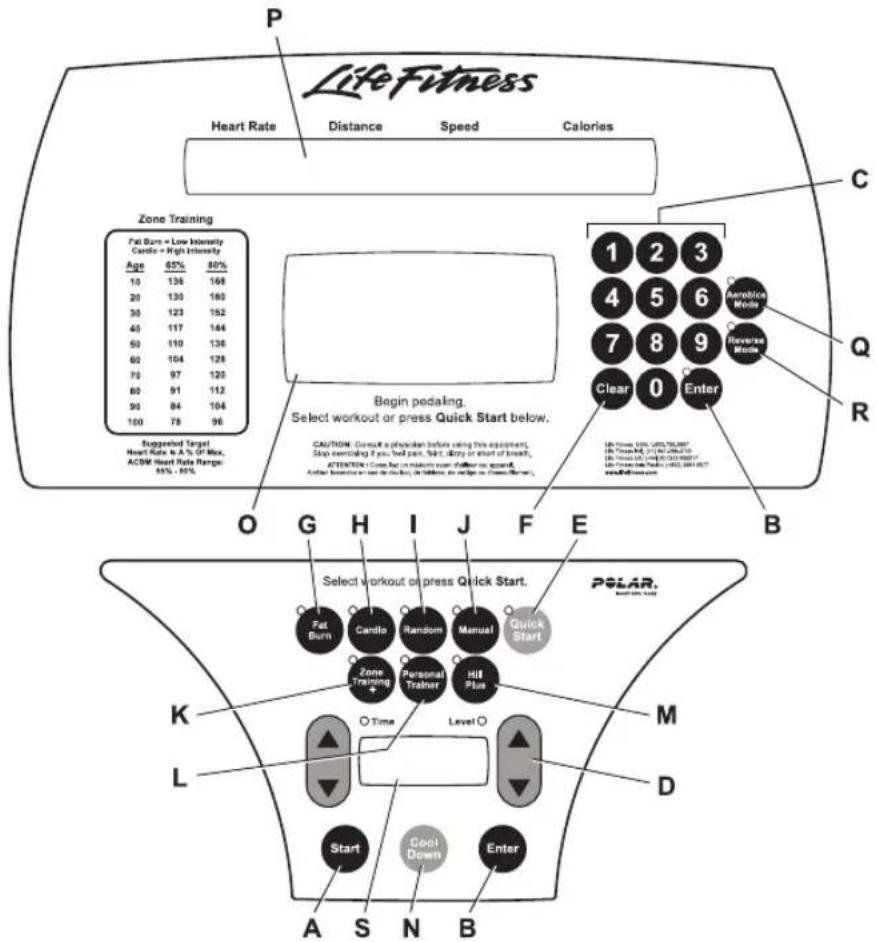
This section lists and describes the functions for the keys and display windows on the console. See Section 4, titled The Workouts, for detailed information on using the console to set up workouts.
A START: Press this key to activate the console for programming a new workout. The activated console lights up and displays "SELECT WORKOUT OR PRESS QUICK START". If no key is pressed for 15 seconds and the user stops pedaling, the console shuts down again.
NOTE: The Life Fitness Total Body Trainer's AutoStart feature also activates the console when the user steps on the pedals and begins pedaling.
B ENTER: Press this key after entering each value, such as weight or workout time, when prompted by console display messages.
C NUMERIC keypad: Use these keys to enter values, such as length of workout, weight, age, target heart rate*, and intensity level. While a workout is in progress, numeric keys can be used to set new intensity levels or change the target heart rate* in the FAT BURN and CARDIO workouts. The ARROW keys have a similar function, except that they change workout parameters by single increments.
D ARROW keys: A pair of UP and DOWN arrows is located on either side of the TIME/LEVEL window. When setting up a workout, use either set of arrows to change workout parameters displayed on the console, such as length of workout, weight, age, target heart rate*, and intensity level. During a workout, pressing the ARROWS on the right (LEVEL) side of display changes the target heart rate for FAT BURN and CARDIO workouts or the intensity level for other workouts.
Pressing the ARROWS on the left (TIME) side increases or decreases the workout duration. Pressing the arrows on the right (LEVEL) side increases or decreases the intensity level.
NOTE: Whenever an arrow key is pressed during a workout, an increase (up arrow key) or decrease (down arrow key) is made to the corresponding parameter (level). The number that appears reflects that change. For example, if the user is at level 6 and presses the right up arrow key, the number 7 will appear, reflecting that the user has chosen a new level. If the change is desired, press Enter to accept. If the change is not desired, the user has ten seconds to reset the level to the desired parameter, before the unit accepts the changed value and makes the appropriate adjustments.
E QUICK START: Press this key to begin a manual workout immediately, without having to select a workout program. Once the workout is in progress, use the ARROW KEYS or the NUMERIC KEYPAD to change the intensity level or workout duration as desired.
F CLEAR: When programming a workout, press this key to clear incorrect data, such as weight or age, before pressing the ENTER key. Pressing CLEAR during a workout stops it immediately, at which point the MESSAGE CENTER displays a summary of the workout, including total time elapsed, total distance traveled, and total calories burned. Pressing CLEAR a second time causes the MESSAGE CENTER to prompt the user for a new workout setup.
G FAT BURN: Press this key to select the FAT BURN program, which is a low-intensity workout for burning fat.
H CARDIO: Press this key to select the CARDIO program, which is a higher intensity workout for more fit users, emphasizing cardiovascular benefits and maximum fat burning.
I RANDOM: Press this key to select the RANDOM program, which is a workout of constantly changing intensity levels that occur in no regular pattern or progression.
J MANUAL: Press this key to select the MANUAL program, in which the intensity level remains the same unless it is manually changed.
K ZONE TRAINING+: Press this key to select one of the workouts that target specific ranges, or zones, for maintaining a heart rate to achieve maximum exercise results. The following options may be accessed with this key:
• FAT BURN (also accessible with FAT BURN key)
• CARDIO (also accessible with CARDIO key)
L PERSONAL TRAINER: Press this key to access additional workouts. The following options may be accessed with this key.
• CROSS-TRAIN AEROBICS
• CROSS-TRAIN REVERSE
M HILL PLUS: Press this key to select HILL PLUS workouts, in which intensity levels increase and decrease in set patterns. The following workouts may be accessed with this key:
• HILL • CASCADES
• AROUND THE WORLD • SPEED TRAINING
• KILIMANJARO • FOOTHILLS
• INTERVAL
N COOLDOWN: Workout programs end automatically in a Cooldown mode, which lowers the intensity level. Press the COOLDOWN key at any desired point during a workout to go immediately into Cooldown mode. In this phase of a workout the body begins to remove lactic acid and other accumulated by-products of exercise, which build up in muscles during a workout and contribute to muscle soreness. The console automatically adjusts each workout's Cooldown level according to the individual user's performance.
O WORKOUT PROFILE window: This window displays shapes, made of columns of lights, that represent the levels of intensity in a workout-in-progress. The height of the first column on the left side of the window is proportional to the current level of intensity.
During a FAT BURN or CARDIO workout, which requires the use of a Polar® heart rate chest strap or the Lifepulse system sensors, the WORKOUT PROFILE window displays a flashing heart shape to request the user's heart rate signal. If the console does not detect a signal, the MESSAGE CENTER displays the prompt "NEED HEART RATE - PLACE HANDS ON SENSORS OR USE TELEMETRY STRAP". If the console does not receive the signal within three minutes, the workout automatically is converted to a MANUAL program.
P MESSAGE CENTER: This window displays step-by-step instructions for setting up a workout. During a workout, it displays statistics about the progress of the workout:
• Heart Rate: the detected heart rate if the user is wearing the chest strap or grasping the Lifepulse system sensors.
• Distance: the total distance traveled in miles (or kilometers if enabled).
• Speed: the pedaling speed or rate in miles per hour (or kilometers per hour if enabled).
- Calories: the number of calories burned since beginning the workout.
If programmed to do so, the MESSAGE CENTER displays any or all of these three values each time the intensity level changes during the workout:
• Calories per Hour: the rate of calories burned per hour.
- Watts: effort level in Watts. The Watt is a unit of power output or the expression of the mechanical rate of work.
• METs: effort level in METs. The MET is an expression of the rate of work for the human body at rest, or a metabolic equivalent; one MET is approximately equal to the metabolism of a person at rest.
See Chapter 5, titled Internal Settings for information about enabling the MESSAGE CENTER to display these additional settings.
Q AEROBICS MODE: Press this key to activate a workout mode in which the MESSAGE CENTER displays prompts that vary the workload and emphasize different muscle groups during the workout. It can be used with any workout, except for Fat Burn and Cardio.
R REVERSE MODE: Press this key to activate a workout mode that alternates five minutes of forward motion with two minutes of reverse motion. It can be used with any workout, except for Fat Burn and Cardio.
S LEVEL/TIME WINDOW: This window displays the programmed intensity level and the time elapsed since the start of the program.
For more information about Aerobics Mode and Reverse Mode, see the topic Using the Two Workout Modes in Section 4.2, titled, the Using the Workouts.
2.3 T HE ACCESSORY TRAY / READING RACK
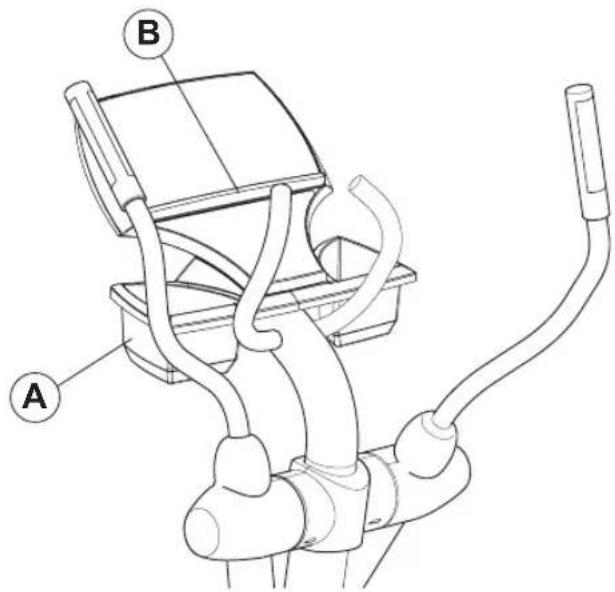
The accessory tray (A), which is mounted near the base of the console, provides dual storage trays with space for items such as water bottles, personal stereos, and cell phones. Additionally, an integrated reading rack (B) for supporting a book or magazine is located at the base of the upper panel of the console.
text_image
A B3 HEART RATE ZONE TRAINING EXERCISE
3.1 WHY HEART RATE ZONE TRAINING EXERCISE?
Research shows that maintaining a specific heart rate while exercising is the optimal way to monitor the intensity of a workout and to achieve maximum results. That is the idea behind the Life Fitness heart rate zone training approach to exercise.
Zone training identifies an exerciser's ideal heart rate range, or zone, for burning fat or increasing cardiovascular fitness. The values within the zone depend on the workout.
NOTE: Consulting a fitness trainer is recommended for defining specific fitness goals and designing a workout program.
| ZONE TRAINING | ||
| FAT BURN = LOW INTENSITY CARDIO = HIGH INTENSITY | ||
| AGE | 65% | 80% |
| 10 | 136 | 168 |
| 20 | 130 | 160 |
| 30 | 123 | 152 |
| 40 | 117 | 144 |
| 50 | 110 | 136 |
| 60 | 104 | 128 |
| 70 | 97 | 120 |
| 80 | 91 | 112 |
| 90 | 84 | 104 |
| 100 | 78 | 96 |
| SUGGESTED TARGET HEART RATE AS % OF MAX ACSM HEART RATE RANGE: 55% - 90% | ||
The Life Fitness Total Body Trainer features exclusive workouts designed to take full advantage of the benefits of heart rate zone training exercise: FAT BURN and CARDIO. For detailed information about the workouts, see Section 4, titled The Workouts.
During one of these workouts, grasp the Lifepulse system sensors continuously, or wear the Polar® heart rate chest strap to enable the on-board computer to monitor the heart rate during a workout. The computer automatically adjusts the resistance level to maintain the target heart rate* based on the actual heart rate. To change the target heart rate during a workout, use the LEVEL ARROW keys.
3.2 H EART RATE MONITORING
THE LIFEPULSE™ DIGITAL HEART RATE MONITORING SYSTEM
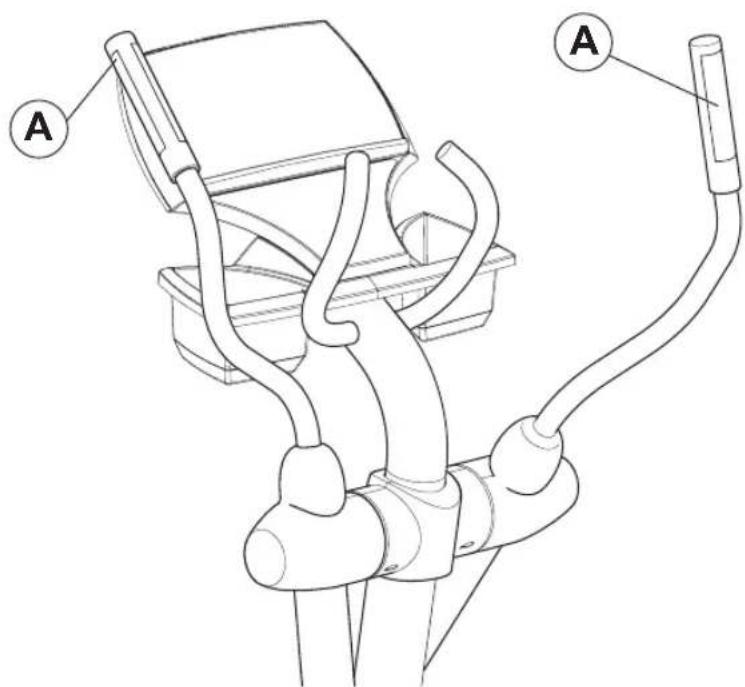
The patented Lifepulse system sensors are the built-in heart rate monitoring system on the Life Fitness Total Body Trainer. For the most accurate reading possible, during a workout:
- Grasp the sensors (A) firmly.
- Hold each sensors at the vertical midpoint.
- Keep hands steady and in place.
The console displays the heart rate within 10 to 40 seconds after the user grasps the sensors.
text_image
Technical diagram of a mechanical device with labeled components A and B, showing internal tubing and housing.THE POLAR® TELEMETRY HEART RATE MONITORING CHEST STRAP
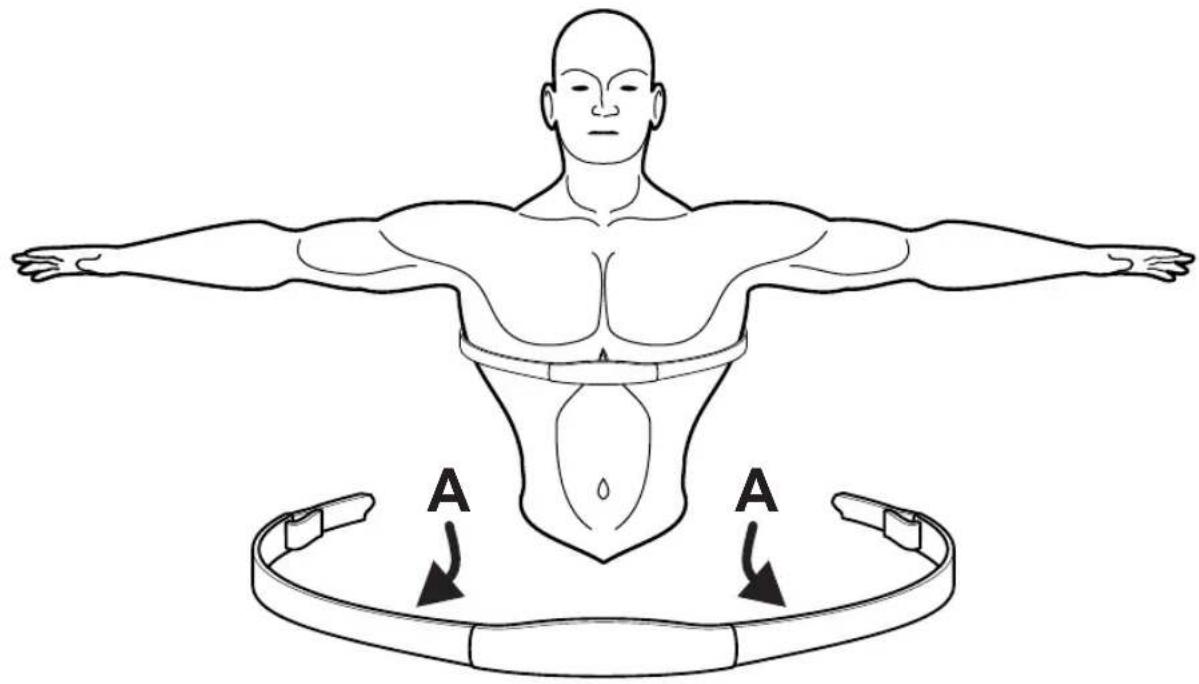
The Life Fitness Total Body Trainer is equipped with Polar heart rate monitoring system in which electrodes, pressed against the skin, transfer heart rate signals to the console. These electrodes are attached to a chest strap that the user wears during the workout. The chest strap is optional. To order it, call Life Fitness Customer Support Services. See Section 6.5, titled How to Obtain Product Service.
See the diagram below for correct positioning of the strap. The electrodes (A), which are the two grooved surfaces on the underside of the strap, must remain wet to transmit accurately the electrical impulses of the heart back to the receiver. Moisten the electrodes. Then, secure the strap as high under the chest muscles as possible. The strap should be snug, but comfortable enough to allow for normal breathing.
The transmitter strap delivers an optimal heart rate reading when the electrodes are in direct contact with skin. However, it also functions properly through a thin layer of wet clothing.
If it becomes necessary to re-moisten the chest strap electrodes, grasp the center of the strap, pull it away from the chest to expose the two electrodes, and moisten them.
NOTE: If the Lifepulse system sensors are grasped while the chest strap is worn, and if the signals from the sensors are valid, the on-board computer uses the sensor signals for calculating the heart rate instead of those transmitted with the chest strap.
text_image
A A4 THE WORKOUTS
4.1 WORKOUT OVERVIEWS
This section lists the Life Fitness Total Body Trainer's pre-programmed workouts. For more detailed information, see Section 4.2, titled Using the Workouts.
QUICK START is the fastest way to begin exercising and bypasses the steps involved in selecting a specific workout program. After the QUICK START key is pressed, a constant-level workout begins. The intensity level does not change automatically.
MANUAL is a workout in which the intensity level does not change automatically. It is accessed with the MANUAL key.
RANDOM is an interval training workout of constantly changing intensity levels that occur in no regular pattern or progression. It is accessed with the RANDOM key.
FAT BURN is a low-intensity workout for burning the body's fat reserves. The user must wear a heart rate chest strap or grasp the Lifepulse system sensors continuously. The workout program automatically adjusts the intensity level, based on the actual heart rate, to maintain the rate at 65 percent of the theoretical maximum ^† . It is accessed with the FAT BURN key.
CARDIO is a higher intensity workout for more fit users, emphasizing cardiovascular benefits and maximum fat burning. The user must wear a heart rate chest strap or grasp the Lifepulse system sensors continuously. The workout program automatically adjusts the intensity level, based on the actual heart rate, to maintain the rate at 80 percent of the theoretical maximum. It is accessed with the CARDIO key.
The following workouts are accessed by pressing the HILL PLUS key:
HILL is an interval-training workout combining “hills” and “valleys” of different intensity levels, which is proven to provide effective, time-efficient cardiovascular results.
AROUND THE WORLD is an interval-training workout in which the hills resemble scenes of various geographical areas.
CASCADES is a two-peak workout in which intensity levels gradually increase and decrease.
FOOTHILLS is a rolling hill workout with low intensity levels.
INTERVAL is a Hill workout in which intensity levels rise and fall. The higher levels gradually incline toward a peak and then gradually decline.
KILIMANJARO is a Hill workout in which the intensity levels gradually incline toward one ultimate peak and then gradually decline.
SPEED TRAINING is a Hill workout in which the intensity level alternates between high and low levels very quickly to simulate a typical speed training workout.
The following workouts are accessed by pressing the PERSONAL TRAINER key:
CROSS-TRAIN AEROBICS simulates the experience of working with a personal trainer. The MESSAGE CENTER displays prompts at different times to emphasize pushing, pulling, total body, lower body, speed changes, and forward/reverse motion. This versatile workout promotes maximum cross-training benefits.
CROSS-TRAIN REVERSE continuously alternates five minutes of forward motion with two minutes of backward motion to cross-train different muscle groups.
4.2 USING THE WORKOUTS
This section provides detailed information on setting up and using workouts. For quick-reference setup steps, see the chart at the end of the section.
To Begin a Workout
To mount the Life Fitness Total Body Trainer, grasp the handles and carefully step on the pedals. To dismount, step off the pedals while still holding the handles. Then let go of the handles.
Without networking, press START or begin pedaling to activate the console. The MESSAGE CENTER displays, "SELECT WORKOUT OR PRESS ENTER TO BEGIN." If it displays a different message, press the CLEAR key twice in rapid succession.
With optional networking enabled, press START or begin pedaling to activate the console. The MESSAGE CENTER displays, "SELECT WORKOUT OR ENTER ID USING ENTER KEY". Either select a workout as described below, or log on to the networked exercise database, and then select a workout. To log onto the network, key in the user ID number with the numeric keypad.
SELECTING AND USING QUICK START
QUICK START is the fastest way to begin exercising and bypasses the steps of selecting a specific workout program. At the MESSAGE CENTER prompt to select a workout, press the QUICK START key. The workout begins at an intensity level that remains the same unless manually changed. After 12 seconds, the MESSAGE CENTER displays a prompt to enter weight, which the computer requires to calculate total calories burned.
SELECTING A WORKOUT
For MANUAL, FAT BURN, CARDIO, and RANDOM: When prompted to select a workout, press the key labeled with the name of the desired workout.
For CROSS-TRAIN REVERSE and CROSS-TRAIN AEROBICS: When prompted by the MES-SAGE CENTER to select a workout, press the PERSONAL TRAINER key. The MESSAGE CEN-TER displays the name a workout. Press ENTER to select the displayed workout or continue to press the PERSONAL TRAINER key to display each of the other options. Press ENTER to select the desired workout.
For HILL, AROUND THE WORLD, FOOTHILLS, INTERVAL, KILIMANJARO, CASCADES, and SPEED TRAINING: When prompted by the MESSAGE CENTER to select a workout, press the HILL PLUS key. The MESSAGE CENTER then displays the name of the one of these workouts. Press ENTER to select the displayed workout or continue to press the HILL PLUS key to display each of the other options. Press ENTER to select the desired program.
ENTERING WEIGHT
When prompted by the MESSAGE CENTER to enter weight, use the ARROW KEYS to increase or decrease the displayed weight to the correct value (or key in the correct value with the NUMERIC KEYPAD) and press ENTER. The default weight is 150 pounds or 68 kilograms. The on-board computer calculates the number and rate of calories burned using the entered weight as well as the pedaling speed.
ENTERING AGE
When prompted by the MESSAGE CENTER to enter age, use the ARROW KEYS to increase or decrease the displayed age to the correct value (or key in the correct value with the NUMERIC KEYPAD) and press ENTER.
Life Fitness Total Body Trainer workout programs that set a target heart rate* zone first calculate the user's theoretical maximum heart rate† by subtracting the user's age from the number 220. The programs then calculate the target zone as a percentage of the theoretical maximum.
ENTERING TIME
When prompted by the MESSAGE CENTER to enter a time, use the ARROW KEYS to increase or decrease the displayed time to the desired value (or key in the desired value with the NUMERIC KEYPAD) and press ENTER.
SELECTING AND ADJUSTING THE RESISTANCE LEVEL
When prompted by the MESSAGE CENTER, use the ARROW KEYS to increase or decrease the displayed intensity level or target heart rate* to the desired value (or key in the desired value with the NUMERIC keypad) and press ENTER. Adjust the level as needed or desired during the workout.
- Resistance level: The Life Fitness Total Body Trainer provides a selection of 25 resistance levels. The resistance level appears in the WORKOUT PROFILE window as rows of lights arranged in columns. Selecting a low intensity level at first is recommended. As physical conditioning improves, the levels can increase.
- Target heart rate: Programs that calculate a target heart rate base this number on the age of the user and the type of workout. The user accepts or adjusts the rate when setting up the workout. During the workout itself, the program reads the heart rate, which is transmitted via the heart rate chest strap or the Lifepulse system sensors; it uses this data to adjust the resistance. Manually raising the rate increases the intensity of the cardiovascular exercise.
SELECTING A WORKOUT MODE
Two workout mode options on the Life Fitness Total Body Trainer feature alternate ways to vary workouts.
- Aerobics Mode: This workout mode simulates the experience of working out with a trainer. Throughout the workout, the MESSAGE CENTER displays prompts to vary the workload and emphasize different muscle groups, such as upper- and lower-body. This feature can be used with any workout (except for Fat Burn, Cardio, Heart Rate Hill, Heart Rate Interval or Extreme Heart Rate). To select it, press AEROBICS MODE key.
- Reverse Mode: This workout mode continuously alternates five minutes of forward motion with two minutes of reverse motion, to exercise different leg muscles. This feature can be used with any workout (except for Fat Burn, Cardio, Heart Rate Hill, Heart Rate Interval or Extreme Heart Rate). To select it, press the REVERSE MODE key.
SWITCHING WORKOUTS "ON-THE-FLY"
It is possible, during a workout, to switch to another workout program. After a switch, the console retains all the progress information about the workout since its beginning. To change workouts “on the fly,” simply press the key for the desired new workout. This feature is available for all workouts except for Around the World, Kilimanjaro, Interval, Cascades, Speed Training, Foothills, and Personal Trainer workouts.
PAUSING WORKOUTS
To pause a workout, simply stop pedaling. To continue the workout, resume pedaling. The pause duration lasts 60 seconds, after which the console automatically shuts down.
ENDING WORKOUTS EARLY
To end a workout before the pre-set duration expires, press CLEAR once. The MESSAGE CENTER then displays a workout summary, which includes the distance travelled, the total calories burned, and other statistics. Press CLEAR a second time and the MESSAGE CENTER displays “SELECT WORK-OUT OR PRESS QUICK START” for a new workout.
LIFE FITNESS TOTAL BODY TRAINER WORKOUT SETUP STEPS
QUICK START
Press QUICK START
Begin workout
MANUAL
Press MANUAL
Enter weight
Enter time
Select level
Begin workout
RANDOM
Press RANDOM
Enter weight
Enter time
Select level
Begin workout
FAT BURN\*
Press FAT BURN
Enter weight
Enter time
Enter age
Accept THR**
Begin workout
CARDIO\*
Press CARDIO
Enter weight
Enter time
Enter age
Accept THR**
Begin workout
HILL
Press HILL PLUS repeatedly until HILL appears, press ENTER
Enter weight
Enter time
Select level
Begin workout
AROUND THE WORLD
Press HILL PLUS repeatedly until AROUND THE WORLD appears; press ENTER
Enter weight
Enter time
Select level
Begin workout
CASCADES
Press HILL PLUS repeatedly until CASCADES appears; press ENTER
Enter weight
Enter time
Select level
Begin workout
FOOTHILLS
Press HILL PLUS repeatedly until FOOTHILLS appears; press ENTER
Enter weight
Enter time
Select level
Begin workout
INTERVAL
Press HILL PLUS repeatedly until INTERVAL appears; press ENTER
Enter weight
Enter time
Select level
Begin workout
KILIMANJARO
Press HILL PLUS repeatedly until KILIMANJARO appears; press ENTER
Enter weight
Enter time
Select level
Begin workout
SPEED TRAINING
Press HILL PLUS repeatedly until SPEED TRAINING appears; press ENTER
Enter weight
Enter time
Select level
Begin workout
CROSS-TRAIN REVERSE
Press PERSONAL TRAINER repeatedly until X-TRAIN REVERSE appears; press ENTER
Enter weight
Enter time
Select level
Begin workout
CROSS-TRAIN
AEROBICS
Press PERSONAL TRAIN-
ER repeatedly until X-
TRAIN AEROBICS
appears; press ENTER
Enter weight
Enter time
Select level
Begin workout
* This workout requires the user to wear the telemetry chest strap or to grip the Lifepulse system sensors.
** Target Heart Rate (THR) is a percentage of the theoretical maximum. For example, a 40-year-old user's THR for the FAT BURN workout is 117. This workout targets 65 percent of the maximum, so the equation would be (220 - 40)^*.65 = 117 . When the MESSAGE CENTER displays a Target Heart Rate, either accept it by pressing ENTER, or change the value with the LEVEL ARROW key, and then press ENTER.
4.3 W WORKOUT DESCRIPTIONS
QUICK START
QUICK START is the fastest way to begin exercising and bypasses the steps of selecting a specific workout program. The intensity level for the workout is set automatically and remains the same unless manually changed. To change the level, use the LEVEL ARROW keys or use the NUMERIC KEYPAD to enter a higher or lower level number. After the workout has been in progress for 12 seconds, the MESSAGE CENTER displays "ENTER WEIGHT", which the computer requires to calculate total calories. Using the ARROW KEYS, increase or decrease the displayed weight to the correct value (or enter the weight using the NUMERIC keypad).
MANUAL WORKOUT
The MANUAL program sets an intensity level that does not change automatically. While the workout is in progress, increase or lower the intensity level as desired using the ARROW keys.
RANDOM WORKOUT
The RANDOM program creates a terrain of hills and valleys that varies with each workout. More than one million different patterns are possible. Because workout levels are greater in this workout than in the HILL workout, it is recommended that the RANDOM workout be set one or two levels lower than the workout level which would normally be selected in the HILL workout.
FAT BURN
The FAT BURN workout is designed to maintain a user's heart rate at 65 percent of the theoretical maximum ^† for optimal results. Throughout the workout, the user wears a chest strap or grips the Lifepulse system sensors. If the user is not wearing a chest strap, the WORKOUT PROFILE window displays a heart shape and the MESSAGE CENTER displays a prompt to grip the sensors. The console continuously monitors and displays the heart rate, adjusting the intensity level of the Life Fitness Total Body Trainer to reach and maintain the target*. This system eliminates over- and under-training and maximizes the aerobic benefits of exercise by using the body's fat stores for fuel.
CARDIO
The CARDIO workout is virtually identical to FAT BURN, except the target heart rate is calculated at 80 percent of the theoretical maximum. As with FAT BURN, the user wears a chest strap or grips the Lifepulse system sensors throughout the CARDIO workout. The higher target promotes cardiovascular improvement by placing a heavier workload on the heart muscle.
Hill
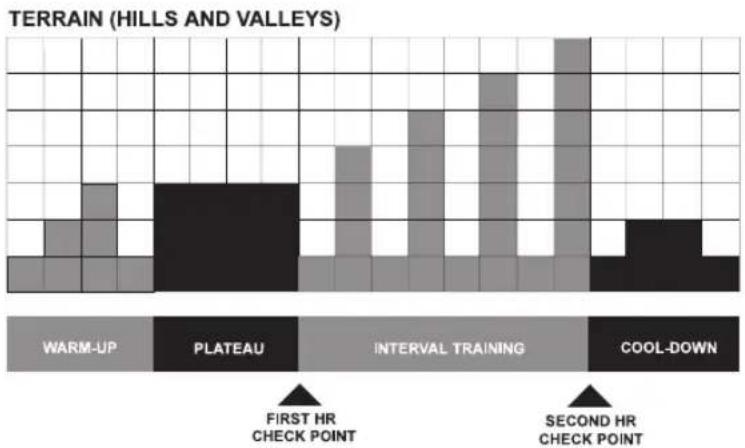
The Life Fitness-patented HILL workout offers a variety of configurations for interval training. Intervals are periods of intense aerobic exercise separated by regular periods of lower-intensity exercise. The WORK-OUT PROFILE window represents these high and low intervals as columns of light, which together have the appearance of hills and valleys. The computerized interval training workout has been scientifically demonstrated to promote greater cardio-respiratory improvement than steady-pace training.
Each HILL workout goes through four phases, each marked by different intensity levels. The WORKOUT PROFILE window displays the progress of these phases, as seen in the chart following these descriptions below. As noted in the descriptions, the heart rate should be measured at two stages in the workout to gauge its effectiveness. To do so, wear the chest strap or continuously grip the Lifepulse system sensors. Note that the MESSAGE CENTER does not display a request for a heart rate measurement during a HILL workout.
1 Warm-up is a phase of low, gradually-rising resistance, which brings the heart rate into the lower end of the target zone and increases respiration and blood flow to working muscles.
2 Plateau increases the intensity slightly, and keeps it steady, to bring the heart rate to the low end of the target zone. Check the heart rate at the end of this phase.
3 Interval Training is a series of increasingly steeper hills, alternating with valleys (or periods of recovery). The heart rate should rise to the high end of the target zone. Check the heart rate at the end of this phase.
4 Cool-down is a low-intensity phase that allows the body to begin removing lactic acid and other exercise by-products, which build up in muscles and contribute to soreness.
bar
TERRAIN (HILLS AND VALLEYS) | Category | Value | |---|---| | WARM-UP | 10 | | PLATEAU | 25 | | INTERVAL TRAINING | 40 | | COOL-DOWN | 30 | First HR CHECK POINT: First HR Second HR CHECK POINT: Second HREach column, as seen in the WORKOUT PROFILE window and the chart above, represents one interval. The overall duration of the workout determines the length of each interval. Each workout is made up of 20 intervals, so the duration of each interval is equal to the duration of the entire workout divided by 20.
10 to 19 minutes: The interval durations initially are set at 30 seconds for a 10-minute workout. For every minute added by the user "on the fly," each interval increases by three seconds. A 15-minute workout consists of 20 intervals at 45 seconds each.
20 to 99 minutes: All intervals last 60 seconds. If the user adds minutes to the pre-set duration while the workout is in progress, the program adds hills and valleys that are identical to the first eight intervals of the Interval Training phase. This pattern repeats until the workout is completed.
Six Pre-Set Workouts
AROUND THE WORLD, CASCADES, FOOTHILLS, INTERVAL, KILIMANJARO, and SPEED TRAINING are variations of the HILL workout. These workouts cannot be changed "on the fly."
AROUND THE WORLD is an interval-training workout in which the hills resemble scenes of various geographical areas.
CASCADES is a two-peak workout in which intensity levels gradually increase and decrease.
FOOTHILLS is a rolling hill workout with low intensity levels.
INTERVAL is a Hill workout in which intensity levels rise and fall. The higher levels gradually incline toward a peak and then gradually decline.
KILIMANJARO is a Hill workout in which the intensity levels gradually incline toward one ultimate peak and then gradually decline.
SPEED TRAINING is a Hill workout in which the intensity level alternates between high and low levels very quickly to simulate a typical speed training workout.
CROSS-TRAIN AEROBICS
During this workout, the MESSAGE CENTER displays prompts to emphasize different muscle groups. To emphasize upper-body muscles, the MESSAGE CENTER displays prompts to focus on pushing and pulling the moving arms at various times. To emphasize lower-body muscles, the MESSAGE CENTER displays prompts to rest the hands on the stationary handlebar, thus forcing the legs to do all the work. The program also alternates between forward and reverse motion as well as different speeds.
Ten seconds after prompting the user to change pedaling direction, the workout applies “braking resistance,” that is, a high resistance level that essentially forces the user to stop pedaling. Once the user stops pedaling, the workout resumes the normal resistance level. The actual level of braking resistance depends on the user’s pedaling speed. If the user is pedaling at a rate equal to, or faster than 6.2 mph (10.0 km/h), the workout applies the maximum level of braking resistance. If the user is pedaling at a speed below 6.2 mph (10.0 km/h), the workout applies 92 percent of the maximum.
CROSS-TRAIN AEROBICS is a constant-resistance workout. However, for a similar experience with a variable-resistance-level workout, the user can start any workout (except for Fat Burn and Cardio) and then press the AEROBICS MODE key.
CROSS-TRAIN REVERSE
This workout features alternating periods of pedaling forward and pedaling backwards. If the user chooses a workout duration 14 minutes or above, the unit displays alternating prompts to pedal forward for five minutes and then backward for two minutes. If the user selects a goal of 13 minutes or below, the display prompts the user to pedal forward for two minutes and then backward for one minute. If the user selects a goal other than time (distance or calorie), the program uses the default setting of prompting forward motion for five minutes and reverse for two minutes.
This feature varies the emphasis on different leg muscles. Ten seconds after prompting the user to change pedaling direction, the workout applies “braking resistance,” that is, a high resistance level that essentially forces the user to stop pedaling. Once the user stops pedaling, the workout resumes the normal resistance level. The actual level of braking resistance depends on the user’s pedaling SPEED. If the user is pedaling at a rate equal to, or faster than, 6.2 mph (10.0 km/h), the workout applies the maximum level of braking resistance. If the user is pedaling at a speed below 6.2 mph (10.0 km/h), the workout applies 92 percent of the maximum.
CROSS-TRAIN REVERSE is a constant-resistance workout. However, for a similar experience with a variable-resistance-level workout, the user can start any workout (except for Fat Burn and Cardio) and then press the REVERSE MODE key.
5
OPTIONAL SETTINGS
5.1 ENTERING AND USING THE OPTIONAL SETTINGS FEATURE
Fitness club managers and other authorized personnel can use the Optional Settings feature to change default settings or to enable or disable certain workouts or displays on the Total Body Trainer console.
| OPTIONAL SETTINGSSetting Default Value Description | ||
| MAX WORKOUT 60 minutes This is the maximum possible duration for a DURATION workout. The value can range from 10 to 99. | ||
| ENGLISH/METRIC UNITS | ENGLISH | This option determines the units used for entering weight and measuring distance. |
| WATTS DISPLAY ENABLE/ DISABLE | DISABLED If this option is enabled, the MESSAGE CENTER displays the Watts equivalent of the pedaling rate. | |
| METS DISPLAY ENABLE/ DISABLE | DISABLED If this option is enabled, the MESSAGE CENTER displays the METs equivalent of the pedaling rate. | |
| CAL/HR DISPLAY ENABLE/ DISABLE | DISABLED If this option is enabled, the MESSAGE CENTER displays the number of calories burned per hour during the workout. | |
| USER LANGUAGE SELECT | DISABLED This option, if enabled, gives users the ability to select a language for use during a workout. See the topic entitled User Language Select, in this section. | |
To enter the Optional Settings, while the unit is on, hold down the UP ARROW key and press CLEAR twice. The MESSAGE CENTER displays OPTIONAL SETTINGS and then the first configuration option. Scroll forward through the options using the ENTER key or backward using the CLEAR key. For each feature or setting option, the MESSAGE CENTER displays the default setting. To change the default, press the UP or DOWN ARROW key for the desired value. Press ENTER to select the new value or setting.
To exit Optional Settings, press the CLEAR key repeatedly until the MESSAGE CENTER displays "SELECT WORKOUT USING ARROW KEYS OR PRESS QUICK START".
USER LANGUAGE SELECT
If enabled, this option allows users to select the language by which to interact with the unit during a workout.
To use the option, enable User Language Select (see below).
Begin pedalling. The console will display the message “SELECT LANGUAGE USING ARROW KEYS”. The user can select from a list of available languages using any of the arrow keys. Press enter when the desired language appears to select that language. A workout can now be started using the selected language. Selecting a language is not necessary to begin a workout. Simply press the Quick Start key to start a workout or any of the program keys to begin workout programming using the default language.
The user may select from the following languages:
English, French, Spanish, and Portuguese
To enable the User Language Select option, enter the Optional Settings (see section 5.1). Scroll forward through the options using the ENTER key, or backward, using the CLEAR key until LANGUAGE SEL appears. Once LANGUAGE SEL appears in the Message Center, press any of the UP/DOWN ARROW KEYS to toggle the mode from OFF to ON.
6
SERVICE AND TECHNICAL DATA
6.1 PREVENTIVE MAINTENANCE TIPS
The Total Body Trainer is backed by the engineering excellence of Life Fitness and is one of the most rugged and trouble-free pieces of exercise equipment on the market today. Commercial Life Fitness products have proven to be durable in health clubs, colleges, and military facilities the world over. This same technology, engineering expertise, and reliability have gone into the Total Body Trainer.
NOTE: The safety of the equipment can be maintained only if the equipment is examined regularly for damage or wear. Keep the equipment out of use until defective parts are repaired or replaced. Pay special attention to parts that are subject to wear as outlined in the Preventive Maintenance Schedule.
The following preventive maintenance tips will keep your Life Fitness Total Body Trainer operating at peak performance:
- Locate the Life Fitness Total Body Trainer in a cool, dry place.
- Clean the top surface of the pedals regularly.
- Keep the display console free of fingerprints and salt build-up caused by sweat.
- Use a 100% cotton cloth, lightly moistened with water and mild liquid detergent, to clean the Total Body Trainer. Other fabrics, including paper towels, may scratch the surface. Do not use ammonia, chlorine, or acid-based cleaners.
- Long fingernails may damage or scratch the surface of the console; use the pad of the finger to press the selection buttons on the console.
- Clean the housing and moving arms thoroughly on a regular basis.

NOTE: When cleaning the exterior of the unit, a non-abrasive cleaner and soft cotton cloth are strongly recommended. At no time should cleaner be applied directly to any part of the equipment; apply the non-abrasive cleaner on a soft cloth and then wipe the unit.
6.2 P REVENTIVE MAINTENANCE SCHEDULE
Follow the schedule below to ensure proper operation of the product.
| ITEM WEEKLY MONTHLY | BI-ANNUALLY ANNUALLY | ||
| Display Console Clean Inspect | |||
| Console Mounting Bolts Inspect | |||
| Accessory Tray Clean Inspect | |||
| Frame Clean Inspect | |||
| Plastic Covers Clean Inspect |
6.3 T ROUBLESHOOTING THE POLAR® HEART RATE CHEST STRAP
| Malfunction | Probable Cause | Corrective Action |
| Heart rate reading is erratic or absent entirely | Belt transmitter electrodes are not wet enough to pick up accurate heart rate readings. | Wet the belt transmitter elec-trodes (see section 3.2). |
| Belt transmitter electrodes are not laying flat against the skin. | Ensure the belt transmitter elec-trodes are laying flat against the skin (see section 3.2). | |
| Belt transmitter needs cleaning. | Wash the belt transmitter with mild soap and water. | |
| Belt transmitter is not within 3 feet (one meter) of the heart rate receiver. | Make sure the chest strap trans-mitter is within three feet (one meter) of the heart rate receiver. | |
| Chest strap battery is depleted. | Contact Life Fitness Customer Support Services* for instructions on how to have the chest strap replaced. | |
| Abnormally elevated heart rate readings | Electromagnetic interference from television sets and/or antennas. | Move the Total Body Trainer a few inches away from the probable cause, or move the probable cause a few inches away from the Total Body Trainer, until the heart rate readings are accurate. |
| Electromagnetic interference from cell phones. | ||
| Electromagnetic interference from computers. | ||
| Electromagnetic interference from cars. | ||
| Electromagnetic interference from high voltage power lines. | ||
| Electromagnetic interference from motor driven exercise equipment. | ||
| Electromagnetic interference from another heart rate transmitter with-in three feet (one meter). |
* See Section 6.6 "How to Obtain Product Service" for contact information.
6.4 T ROUBLESHOOTING THE LIFEPULSE SYSTEM SENSORS
If the heart rate reading is erratic or missing, do the following:
- Dry the hands if necessary to prevent slipping.
- Apply hands to all four sensors; two in each hand.
- Grasp the sensors firmly.
- Apply constant pressure around the sensors.
6.5 How to OBTAIN PRODUCT SERVICE
- Verify the symptom and review the operating instructions. The problem may be unfamiliarity with the product and its features and workouts.
- Locate the serial number plate, which is at the back end of the unit. Document the serial number, which consists of three letters followed by six numerals.
- Contact Life Fitness Customer Support Services via the Web at: www.lifefitness.com, or call the nearest Life Fitness Customer Support Services group:
For Product Service within
the United States and Canada:
Telephone: (+1) 847.451.0036 FAX: (+1) 847.288.3702 Toll-free telephone: 800.351.3737
For Product Service Internationally:
Life Fitness Europe GmbH (Germany) Telephone: (+49) 089.317.751.66 FAX: (+49) 089.317.751.38
Life Fitness (UK) LTD Telephone: (+44) 1353.665.507 FAX: (+44) 1353.666.719
Life Fitness Atlantic BV (Europe, Middle East & Africa, except local LF offices) Life Fitness Benelux Telephone: +31 180.646.666 FAX: +31 180.646.699
Life Fitness Italia S.R.L. Telephone: 800.438.836 FAX: (+39) 0457.238.197
Life Fitness Austria Vertriebs GmbH Telephone: (+43) 1615.7198 FAX: (+43) 1615.7198.20
Life Fitness Asia Pacific Ltd (Asia & Australia, except local LF offices) Telephone: (+852) 2891.6677 FAX: (+852) 2575.6001
Life Fitness Latin America and Caribbean Telephone: (+1) 847.288.3964 FAX: (+1) 847 288.3886
Life Fitness Brazil Telephone: (+55) 11.4193.8282 FAX: (+55) 11.4193.8283
Life Fitness Japan Telephone: (+81) 3.3359.4309 FAX: (+81) 3.3359.4307
Life Fitness Iberia (Spain) Telephone: (+34) 93.672.4660 FAX: (+34) 93.672.4670
7
SPECIFICATIONS
7.1 LIFE FITNESS 91Xi TOTAL BODY TRAINER SPECIFICATIONS
Designed use: Heavy/Commercial
Maximum user weight: 350 pounds / 160 kilograms
Power requirements: None.
Console:
Type: MESSAGE CENTER with NUMERIC keypad and ARROW keys
Displays: Elapsed time, speed, level, calories, heart rate, distance When enabled: calories burned per hour, METS, and watts
Summaries: Total elapsed time of workout, total calories burned, total distance
Character size: 0.54 inches
Workouts and Goals: Quick Start, Manual, Random, Hill, Cross-Train Aerobics, Cross-Train Reverse, Fat Burn, Cardio, Around the World, Cascades, Foothills, Kilimanjaro, Interval and Speed Training
Modes: Aerobics and Reverse modes during all workouts except for Fat Burn and Cardio
Heart rate monitor: Polar telemetry heart rate monitoring system
Lifepulse system sensors Polar heart rate chest strap: optional
Resistance Levels: 25
Pedal speed range: 2.2 - 12.7 MPH
Drive type: Belt/alternator
Accessory Tray: Standard
Integrated Reading Rack: Standard
Color: Silver with gray accents
PHYSICAL DIMENSIONS:
Length: 83 inches / 211 centimeters
Width: 28 inches / 71 centimeters
Height: 61 inches / 155 centimeters
Weight: 235 pounds / 106.5 kilograms
SHIPPING DIMENSIONS:
Length: 81.3 inches / 206.5 centimeters
Width: 29.6 inches / 75 centimeters
Height: 47 inches / 119.3 centimeters
Weight: 250 pounds / 113.4 kilograms
Total Body Trainer 91Xi
MODE D'EMPLOI
SIÈGE SOCIAL
5100 North River Road
Tsimshatsui, Kowloon
HONG KONG
Alphaville, Barueri, SP
06465-140
BRÉSIL
Téléphone : (+55) 11.4193.8282
LIFE FITNESS EUROPE GMBH
Siemensstrasse 3
LIFE FITNESS ITALIA S.R.L.
Via Vittorio Veneto, 57/A
39042 Bressanone (Bolzano)
ITALIE
5100 North River Road
Schiller Park, Illinois 60176
États-Unis
Téléphone : (+1) 847.288.3300
Télécopie : (+1) 847.288.3886
LIFE FITNESS UK LTD
Queen Adelaide
Ely, Cambs CB7 4UB
GRANDE-BRETAGNE
Nippon Brunswick Bldg., #8F
5-27-7 Sendagaya
Shibuya-Ku, Tokyo
JAPON 151-0051
Téléphone : (+81) 3.3359.4309
Télécopie : (+81) 3.3359.4307
Section Description Page
natural_image
Pure mechanical diagram showing a curved pipe or wheel with rotating components and no text or symbolsVÉRIFICATION DE L'ALIMENTATION
text_image
Life Fitness Heart Rate Distance Speed Calories Zone Training Fat Burn = Low Intensity Cards = High Intensity Age 65% 80% 10 136 168 20 130 163 30 123 152 40 117 144 50 110 136 60 104 128 70 97 120 80 91 112 90 84 104 100 76 96 Begin pedaling. Select workout or press Quick Start below. CAUTION: Consult a physician before using the equipment, Stop exercising if you had pain, pain, duality or staff of breath, AFYMPIN: Consult on motor room after door or seat. Other measures are used to check, do NOT use as well as when it is necessary. Clear 0 Enter Life Time: 14:55:26:56:1 Life Time: 14:55:26:56:1 Life Time: 14:55:26:56:1 Life Time: 14:55:26:56:1 Life Time: 14:55:26:56:1 Life Time: 14:55:26:56:1 Select workout or press Quick Start. Polar. K L A S N B M D2.2 DESCRIPTIONS DES ÉLÉMENTS DE LA CONSOLE D'AFFICHAGE
text_image
Technical diagram of a mechanical device with labeled parts A and B, showing hoses and components.3
EXERCICE HEART RATE ZONE TRAINING
3.1 OBJECTIF DE L'EXERCICE HEART RATE ZONE TRAINING
text_image
Technical diagram of a mechanical device with labeled components A and B, showing internal tubing and housing.CEINTURE THORACIQUE POLAR® DE CONTRÔLE DE LA FRÉQUENCE CARDIAQUE PAR TÉLÉMESURE
Life Fitness Europe GmbH (Germany)
Téléphone : (+49) 089.317.751.66
Life Fitness (UK) LTD
Téléphone : (+44) 1353.665.507
Télécopie : (+44) 1353.666.719
Life Fitness Atlantic BV (Europe, Middle East &
Africa, except local LF offices)
Life Fitness Benelux
Téléphone : +31 180.646.666
Télécopie : +31 180.646.699
Life Fitness Italia S.R.L.
Téléphone : 800.438.836
Life Fitness Latin America and Caribbean
Téléphone : (+1) 847.288.3964
Télécopie : (+1) 847 288.3886
Life Fitness Brazil
Téléphone : (+55) 11.4193.8282
DIMENSIONS HORS TOUT
5100 North River Road
Schiller Park, Illinois 60176 • U.S.A.
847.288.3300 • FAX: 847.288.3703
Tsimshatsui, Kowloon
HONG KONG
Alphaville, Barueri, SP
06465-140
BRASIL
FAX: (+43) 1.61 57 198.20
LIFE FITNESS IBERIA
LIFE FITNESS ITALIA S.R.L.
Via Vittorio Veneto, 57/A
39042 Bressanone (Bolzano)
ITALIA
5100 North River Road
Schiller Park, Illinois 60176
EE.UU.
Nippon Brunswick Bldg., #8F
5-27-7 Sendagaya
Shibuya-Ku, Tokyo
JAPÓN 151-0051
natural_image
Pure mechanical diagram showing curved components and motion lines without any text or symbolsREVISE LA ELECTRICIDAD
text_image
Life Fitness Heart Rate Distance Speed Calories Zone Training Fat Burn = Low Intensity Cardio = High Intensity Age 65% 80% 10 136 168 20 130 160 30 123 152 40 117 144 50 110 136 60 104 128 70 97 120 80 91 112 90 84 104 100 78 96 Begin pedaling. Select workout or press Quick Start below. CAUTION: Consult a physician before using this equipment. Stop walking if you feel part, but, diary or onset of heart, ATTENTION: Come for your own patient shoulder on guard. Further assistance is used to block the button, do better or less clearly. Clear 0 Enter Life Time: 100-245.56min Life Time: 245-365 min Life Time: 365-485 min Life Time: 585-705 min Life Time: 705-805 min Life Time: 805-905 min www.jhall.com.com Select workout or press Quick Start. Polar Fat Burn Cardio Random Manual Quick Zone Training Personal Trainer Hill Plus O Time Level O L Start Cool Down Enter A S N Btext_image
Technical diagram of a mechanical device with labeled parts A and B, showing hoses and components.3 EJERCICIO DE ENTRENAMIENTO HEART RATE ZONE
text_image
Technical diagram of a mechanical device with labeled components A and B, showing tubing and housing connections.BANDA DE TELEMETRÍA PARA EL PECHO PARA MONITOREAR EL RITMO CARDÍACO DE POLAR®
FAX: (+43) 1615.7198.20
natural_image
Line drawing of an outdoor fitness bike with levers and control panel (no text or symbols)Customer Support Services PARTS MANUAL revised 4 March 2016
| MANUAL: OPER; 91X; ENG X M051-00K61-A093 | |
| MANUAL: SERVICE; 91X | M051-00K61-A097 |
| ARCTIC SILVER TOUCH UP PAINT:SPRAY CAN.5 OZ BOTTLE W/APPLICATOR.33 OZ PEN | 0017-00008-02040017-00008-02050017-00008-0206 |
| STEALTH GRAY TOUCH UP PAINT(FOR ROCKER ARMS):SPRAY CAN.5 OZ BOTTLE W/APPLICATOR | 0017-00008-01990017-00008-0198 |
| HARDWARE BAG AK61-00181-0000 | |
| UNLABELED PARTS | |
| DESCRIPTION | PART |
| BATTERY: 6V; 2.5AH C 0017-00003-0685 | |
| 1/4 -20X 5 HXL NO L CUP ST BO B 0017-0010 | 1-0333 |
| SHAFT: PEDAL-LEVER; CLEVIS B OK61-0107 | 76-0000 |
| KIT: SERV; POLAR-RCVR; TESTED BM SK40 | 00045-0001 |
The 91X-0XXX-01 has both Telemetry and LifePulse sensors for Heart Rate.
Page
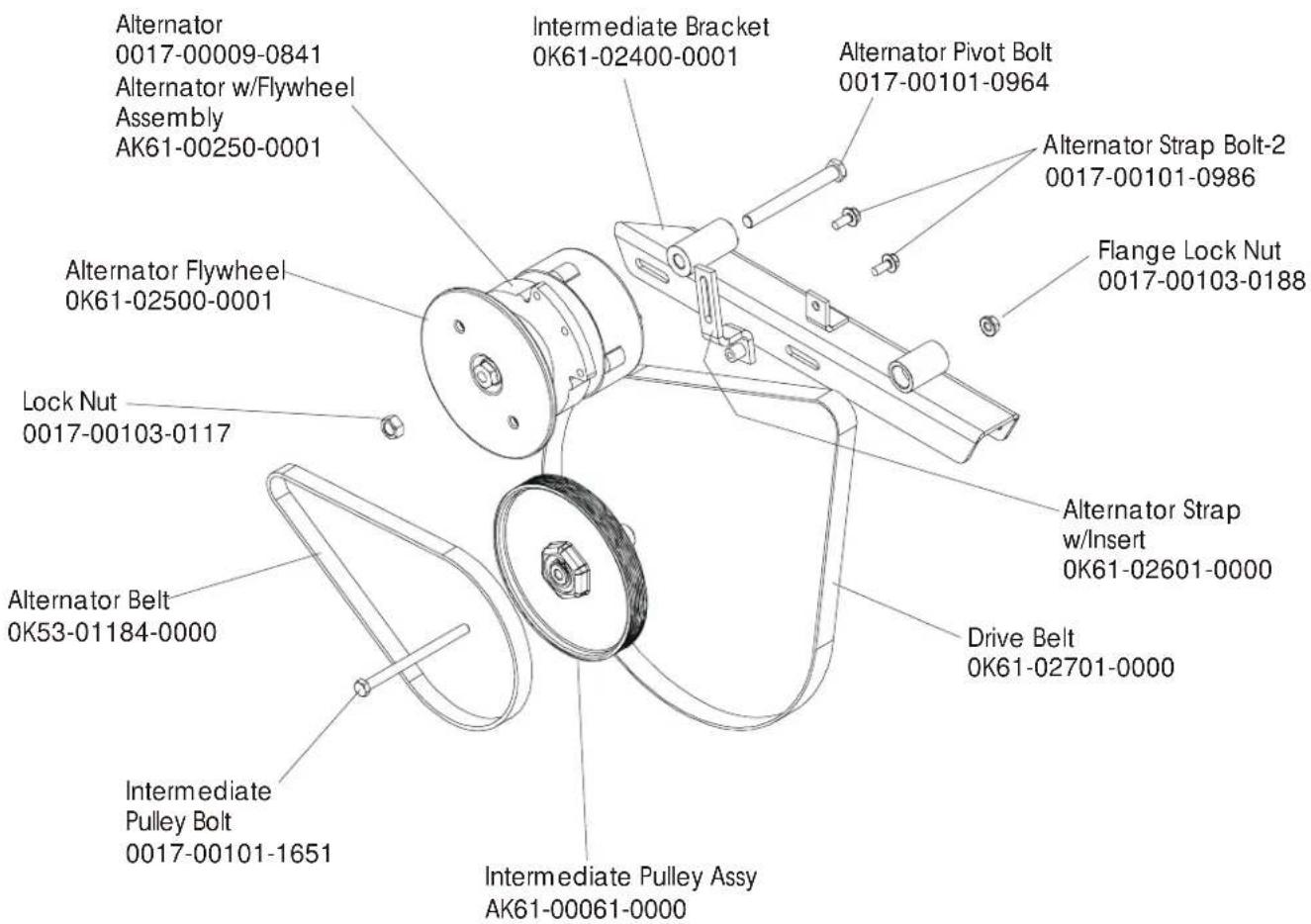
DRIVE BELTS AND ALTERNATOR....4
CONSOLE SUPPORT ASSEMBLY....5
CONSOLE ASSEMBLY....6
CRANKSHAFT ASSEMBLY 8
DRIVE LINKAGE ASSEMBLY....9
ANTI-LIFT BRACKET AND OUTER PEDAL COVERS....10
FRAME ASSEMBLY 11
CLEVIS AND FRONT FRAME COVERS 12
PEDAL LEVER ASSEMBLY....13
ROCKER ARM COVERS 14
ROCKER ARM ASSEMBLY 15
REAR DRIVE SHROUDS W/DECALS....16
UPPER ARM / HEART RATE ASSEMBLY 17
CABLES....18
text_image
Alternator 0017-00009-0841 Alternator w/Flywheel Assembly AK61-00250-0001 Alternator Flywheel 0K61-02500-0001 Lock Nut 0017-00103-0117 Alternator Belt 0K53-01184-0000 Intermediate Pulley Bolt 0017-00101-1651 Intermediate Bracket 0K61-02400-0001 Alternate Pivot Bolt 0017-00101-0964 Alternate Strap Bolt-2 0017-00101-0986 Flange Lock Nut 0017-00103-0188 Alternate Strap w/Insert 0K61-02601-0000 Drive Belt 0K61-02701-0000 Intermediate Pulley Assy AK61-00061-0000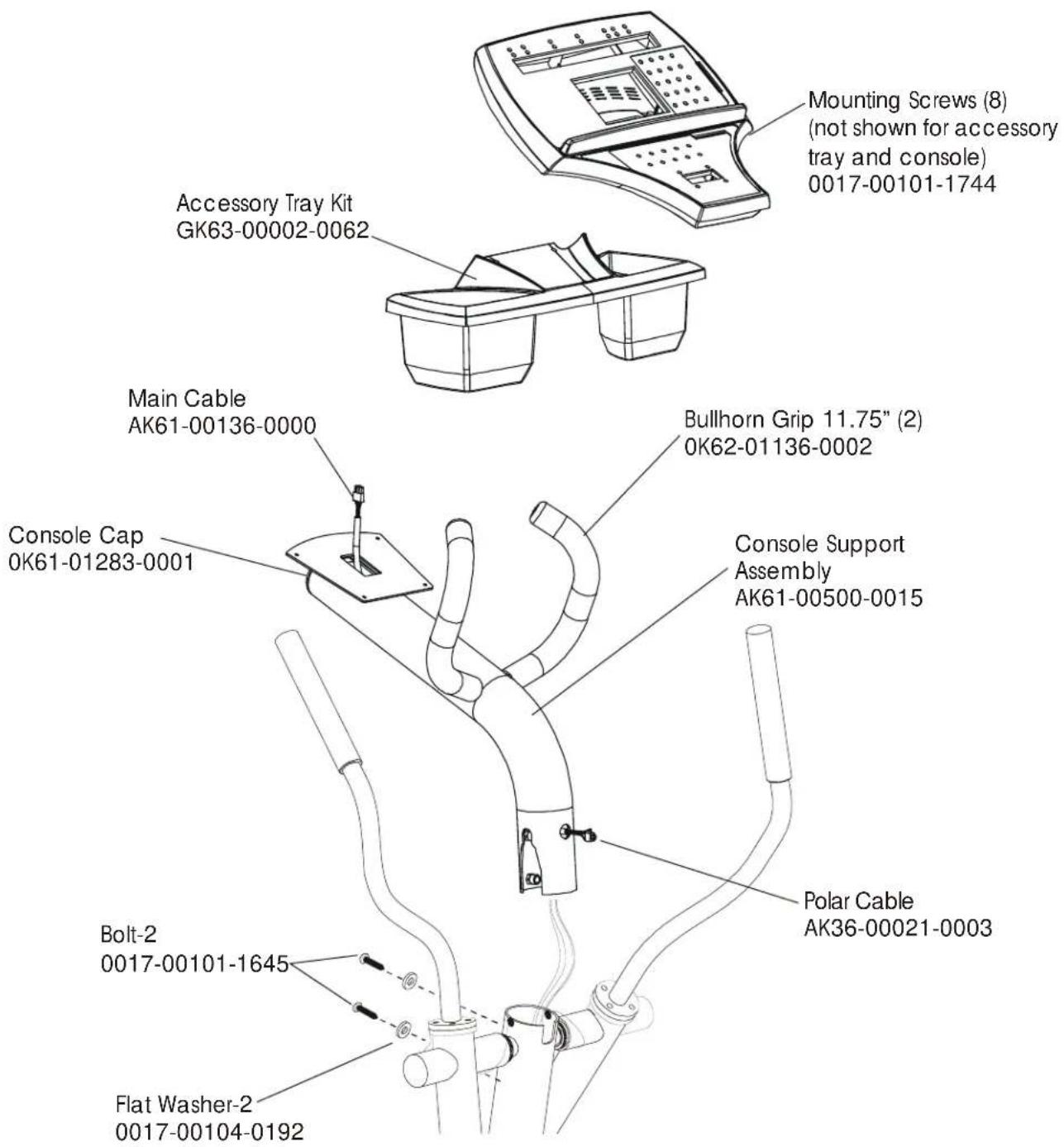
text_image
Mounting Screws (8) (not shown for accessory tray and console) 0017-00101-1744 Accessory Tray Kit GK63-00002-0062 Main Cable AK61-00136-0000 Bullhorn Grip 11.75" (2) 0K62-01136-0002 Console Cap 0K61-01283-0001 Console Support Assembly AK61-00500-0015 Polar Cable AK36-00021-0003 Bolt-2 0017-00101-1645 Flat Washer-2 0017-00104-0192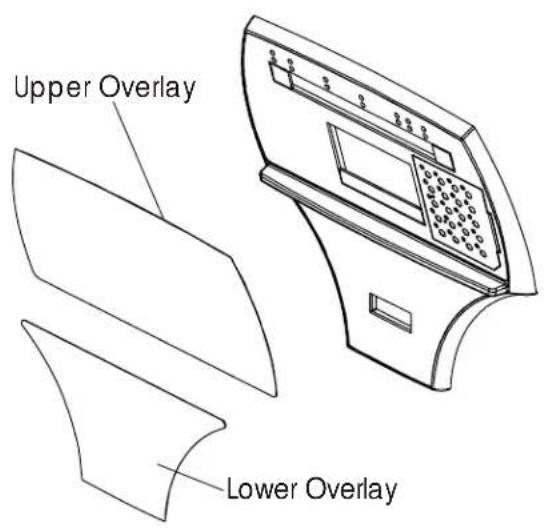
text_image
Upper Overlay Lower Overlay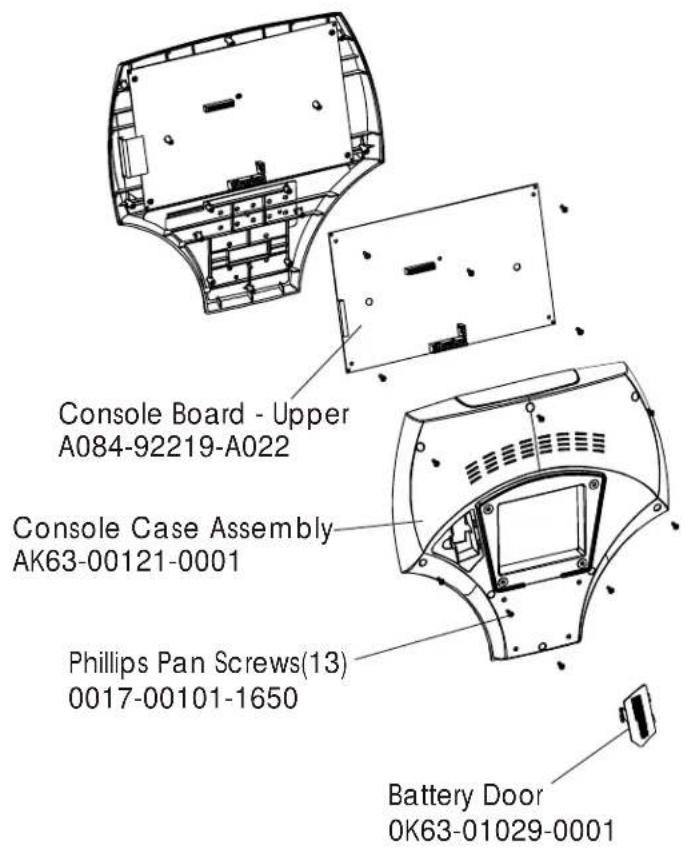
text_image
Console Board - Upper A084-92219-A022 Console Case Assembly AK63-00121-0001 Phillips Pan Screws(13) 0017-00101-1650 Battery Door 0K63-01029-0001| Console Assembly Overlay/Bezel/Switch Assembly | |
| AK61-00203-0001 Eng/Eng | AK61-00183-0001 |
| AK61-00203-0002 Eng/Met | AK61-00183-0001 |
| AK61-00203-0004 Spn/Met | AK61-00183-0004 |
| AK61-00203-0007 Frn/Met | AK61-00183-0007 |
| AK61-00203-0010 Por/Met | AK61-00183-0010 |
text_image
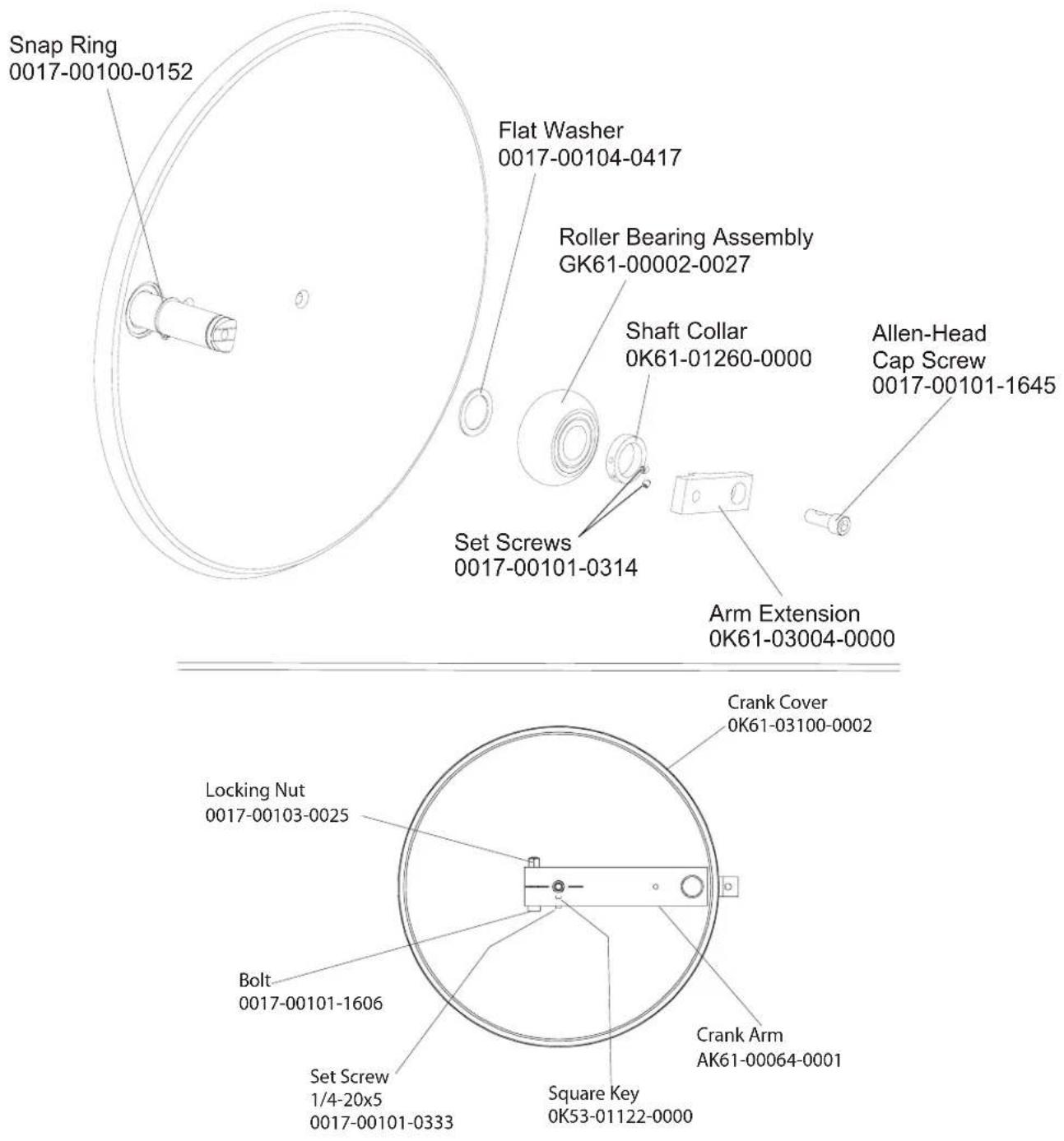
Snap Ring 0017-00100-0152 Flat Washer 0017-00104-0417 Roller Bearing Assembly GK61-00002-0027 Shaft Collar 0K61-01260-0000 Allen-Head Cap Screw 0017-00101-1645 Set Screws 0017-00101-0314 Arm Extension 0K61-03004-0000 Crank Cover 0K61-03100-0002 Locking Nut 0017-00103-0025 Bolt 0017-00101-1606 Set Screw 1/4-20x5 0017-00101-0333 Square Key 0K53-01122-0000 Crank Arm AK61-00064-0001CRANKSHAFT ASSEMBLY - AK61-00157-0002 S/N XTF100000 and UP
text_image
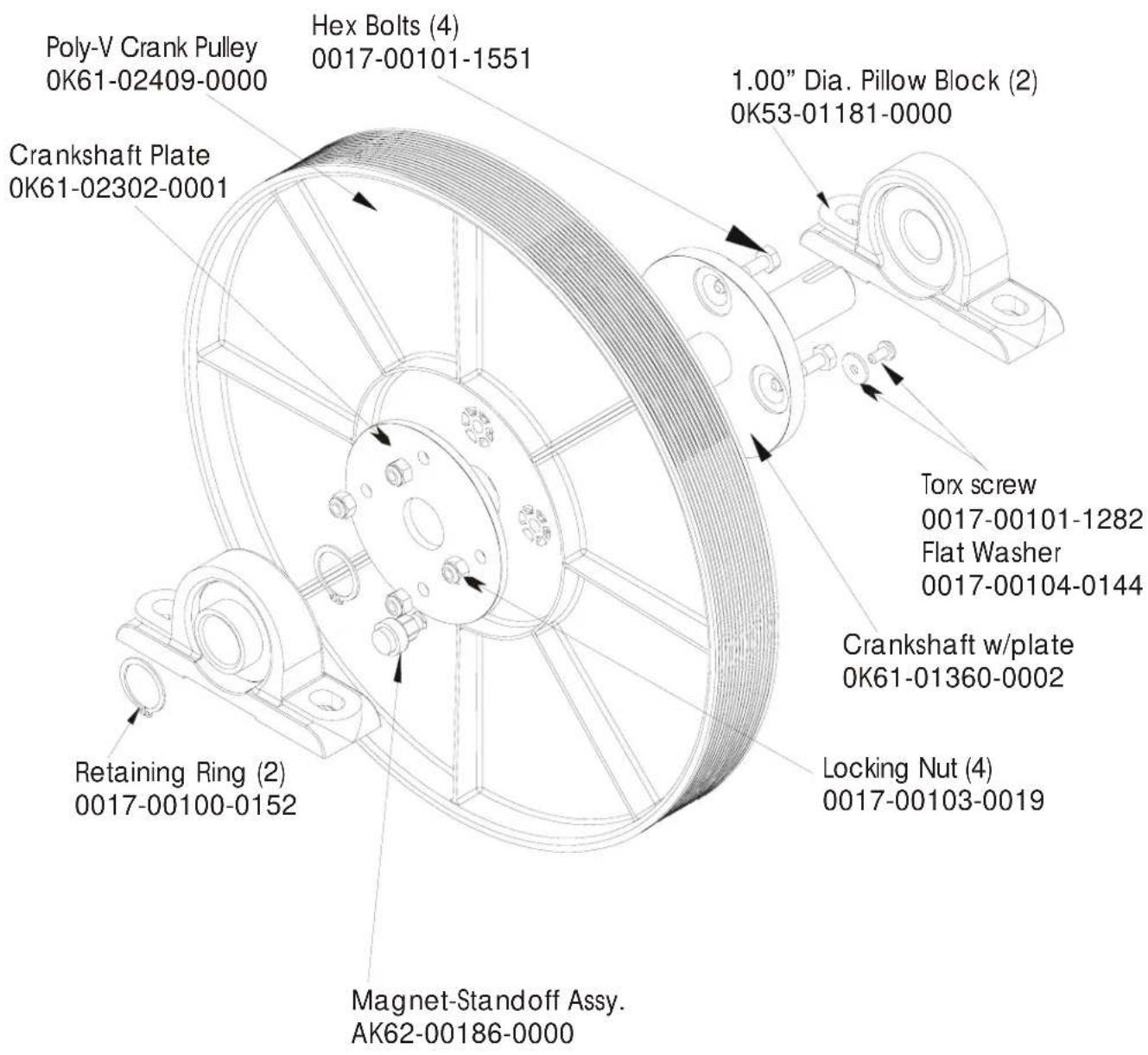
Poly-V Crank Pulley 0K61-02409-0000 Crankshaft Plate 0K61-02302-0001 Hex Bolts (4) 0017-00101-1551 1.00" Dia. Pillow Block (2) 0K53-01181-0000 Torx screw 0017-00101-1282 Flat Washer 0017-00104-0144 Crankshaft w/plate 0K61-01360-0002 Locking Nut (4) 0017-00103-0019 Retaining Ring (2) 0017-00100-0152 Magnet-Standoff Assy. AK62-00186-0000Tie Rod Kit – GK61-00002-0020 S/N XTF100000 and UP
text_image
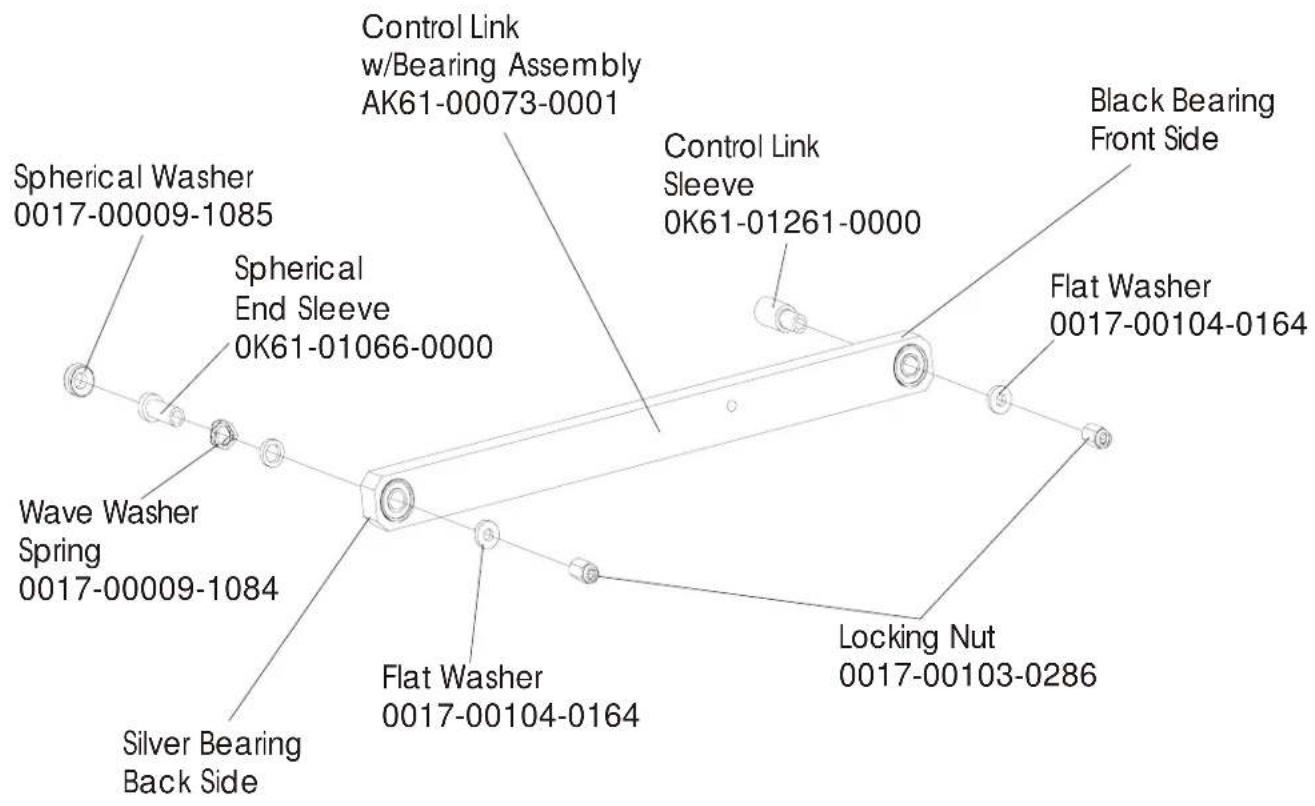
Control Link w/Bearing Assembly AK61-00073-0001 Spherical Washer 0017-00009-1085 Spherical End Sleeve 0K61-01066-0000 Wave Washer Spring 0017-00009-1084 Silver Bearing Back Side Control Link Sleeve 0K61-01261-0000 Flat Washer 0017-00104-0164 Locking Nut 0017-00103-0286 Black Bearing Front SideANTI LIFT BRACKET & OUTER PEDAL COVERS S/N XTF100000 and UP
text_image
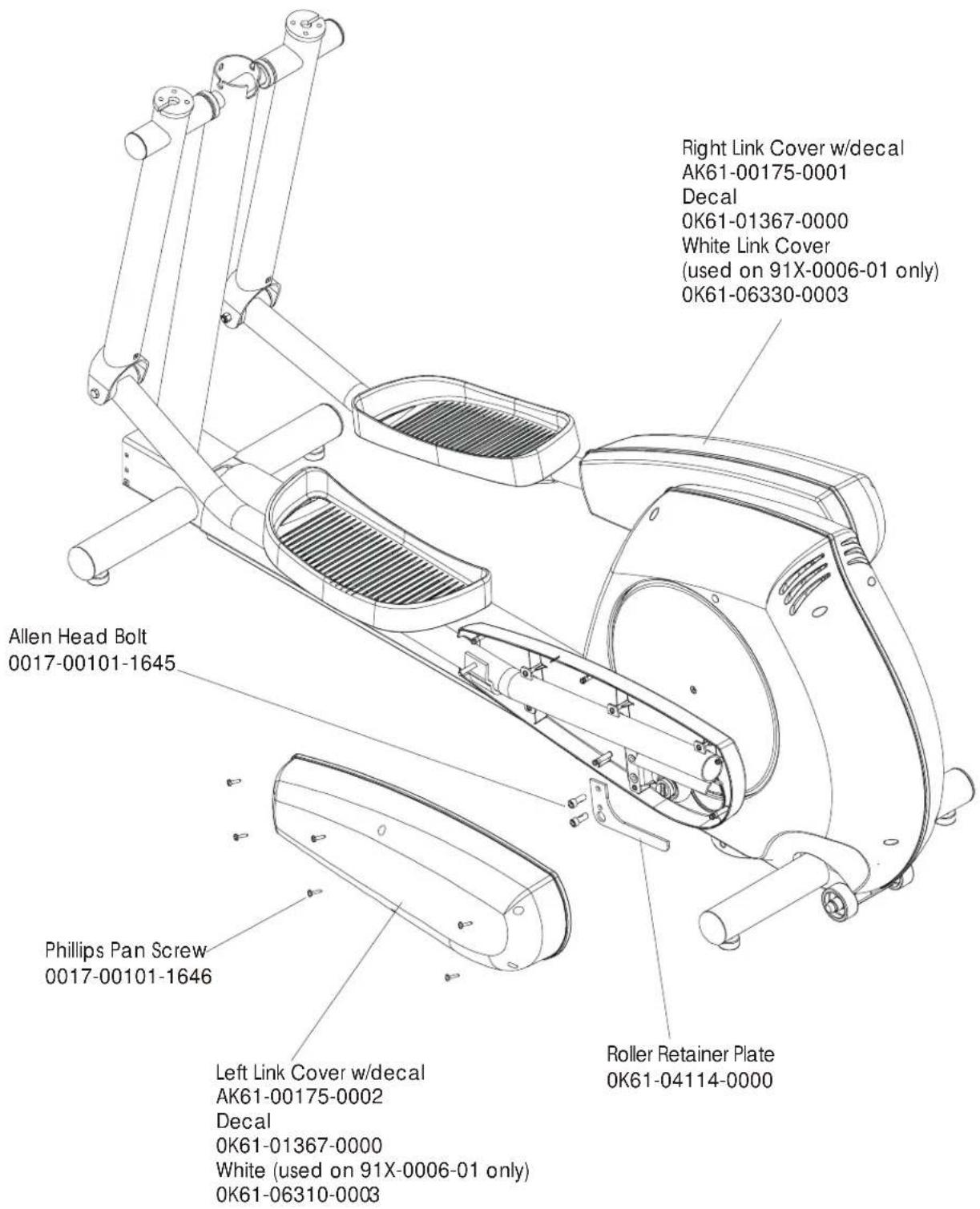
Right Link Cover w/decal AK61-00175-0001 Decal 0K61-01367-0000 White Link Cover (used on 91X-0006-01 only) 0K61-06330-0003 Allen Head Bolt 0017-00101-1645 Phillips Pan Screw 0017-00101-1646 Left Link Cover w/decal AK61-00175-0002 Decal 0K61-01367-0000 White (used on 91X-0006-01 only) 0K61-06310-0003 Roller Retainer Plate 0K61-04114-0000FRAME ASSEMBLY S/N XTF100000 and UP
text_image
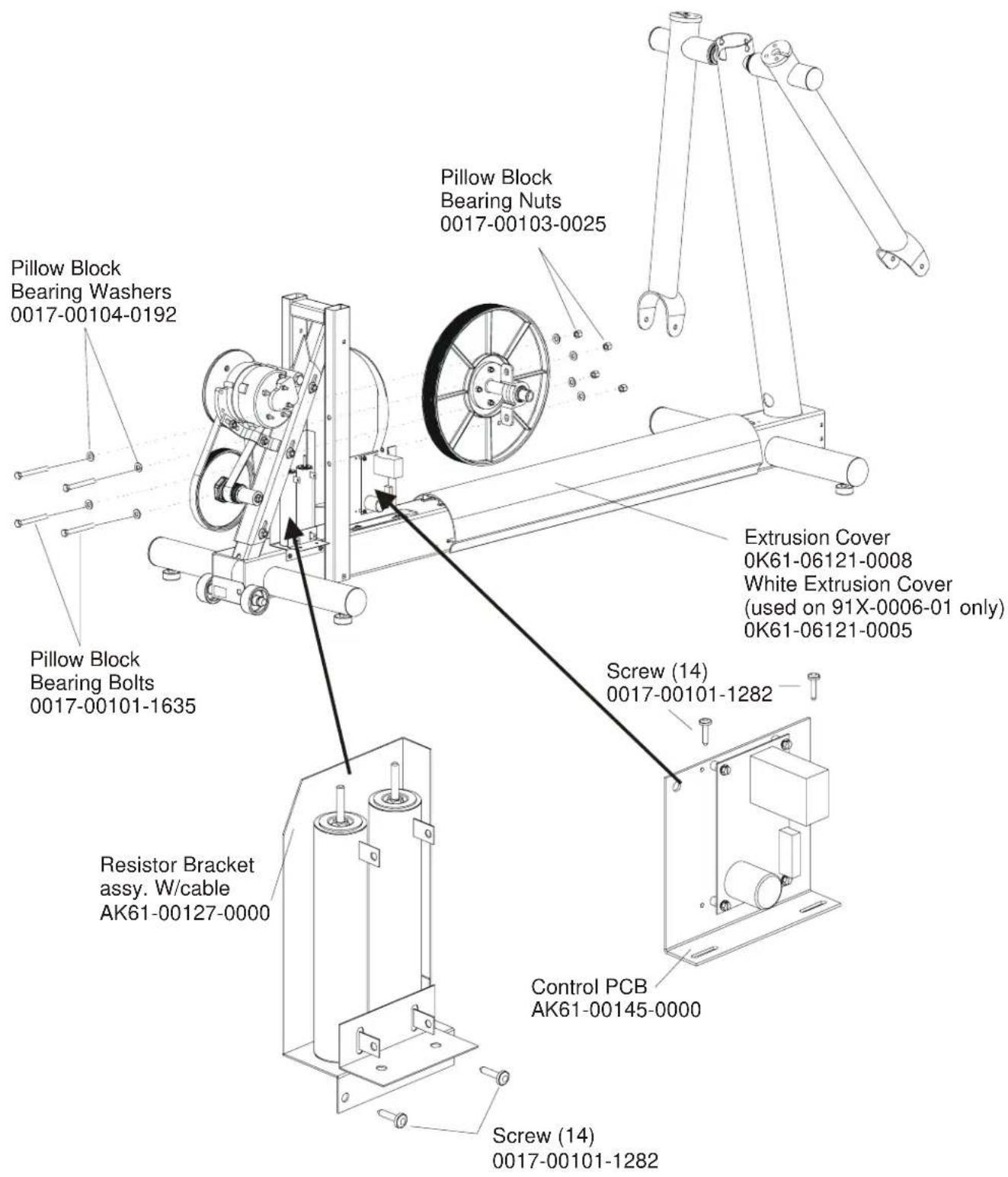
Pillow Block Bearing Washers 0017-00104-0192 Pillow Block Bearing Bolts 0017-00101-1635 Resistor Bracket assy. W/cable AK61-00127-0000 Screw (14) 0017-00101-1282 Pillow Block Bearing Nuts 0017-00103-0025 Extrusion Cover 0K61-06121-0008 White Extrusion Cover (used on 91X-0006-01 only) 0K61-06121-0005 Screw (14) 0017-00101-1282 Control PCB AK61-00145-0000 Screw (14) 0017-00101-1282CLEVIS & FRONT FRAME COVERS S/N XTF100000 and UP
text_image
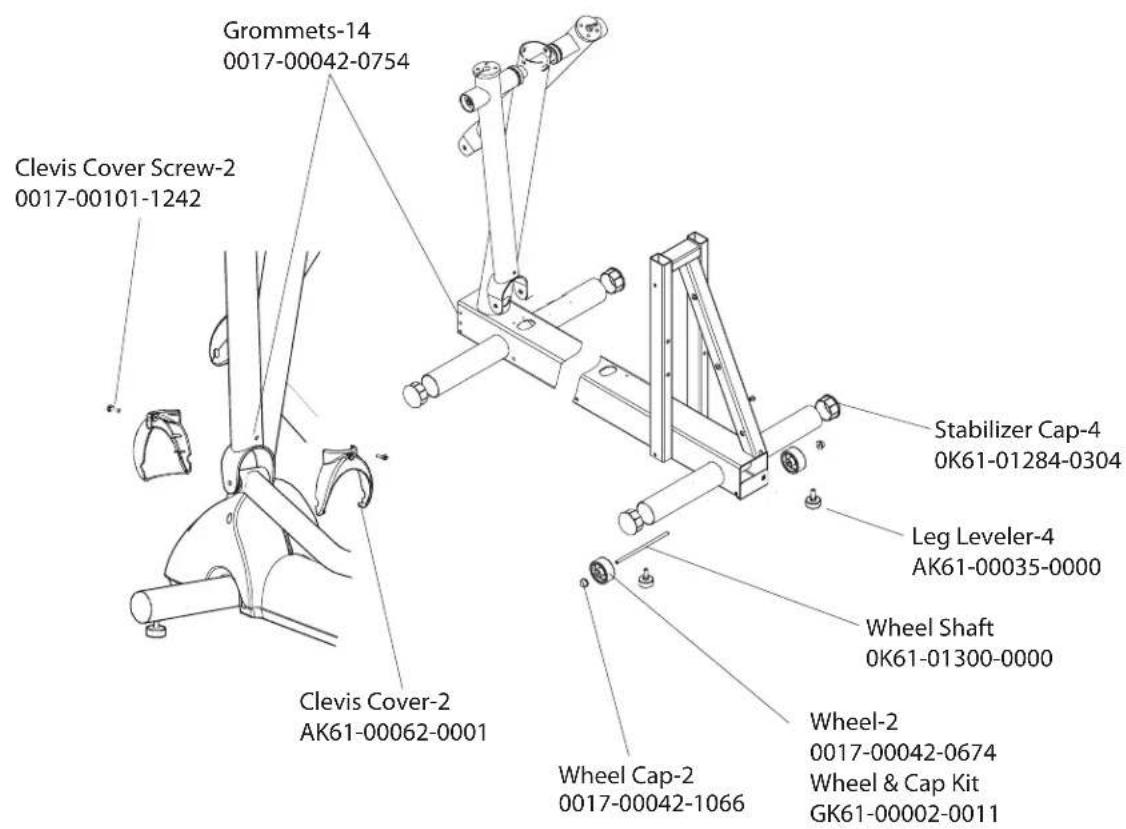
Grommets-14 0017-00042-0754 Clevis Cover Screw-2 0017-00101-1242 Clevis Cover-2 AK61-00062-0001 Stabilizer Cap-4 0K61-01284-0304 Leg Leveler-4 AK61-00035-0000 Wheel Shaft 0K61-01300-0000 Wheel Cap-2 0017-00042-1066 Wheel & Cap Kit GK61-00002-0011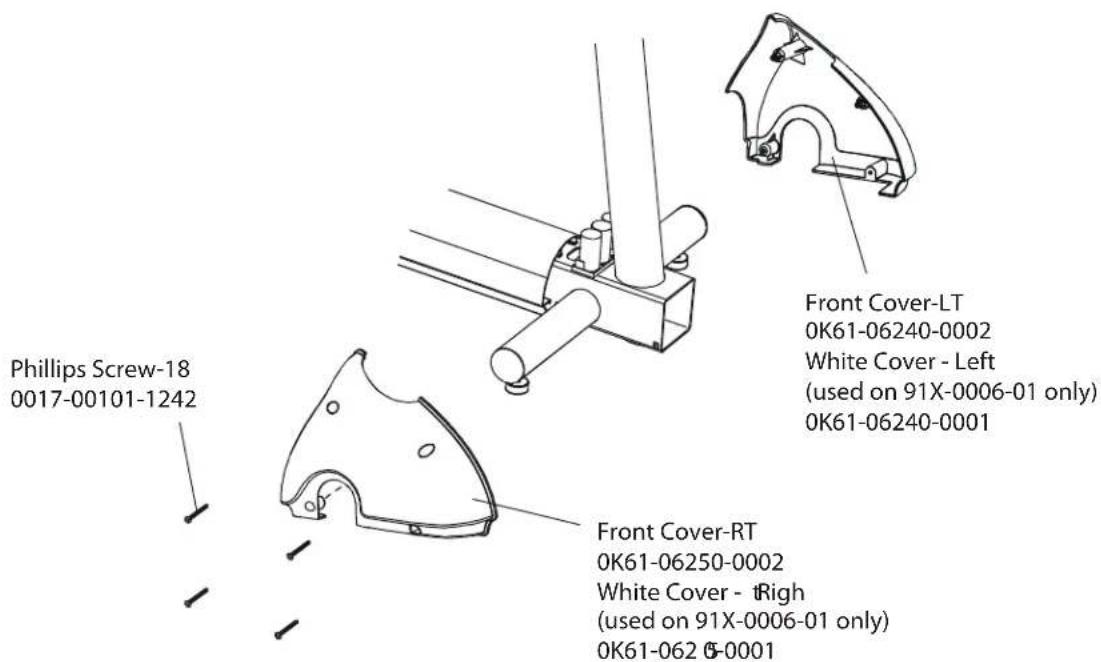
text_image
Phillips Screw-18 0017-00101-1242 Front Cover-LT 0K61-06240-0002 White Cover - Left (used on 91X-0006-01 only) 0K61-06240-0001 Front Cover-RT 0K61-06250-0002 White Cover - Right (used on 91X-0006-01 only) 0K61-062 6-0001PU dna 0
text_image
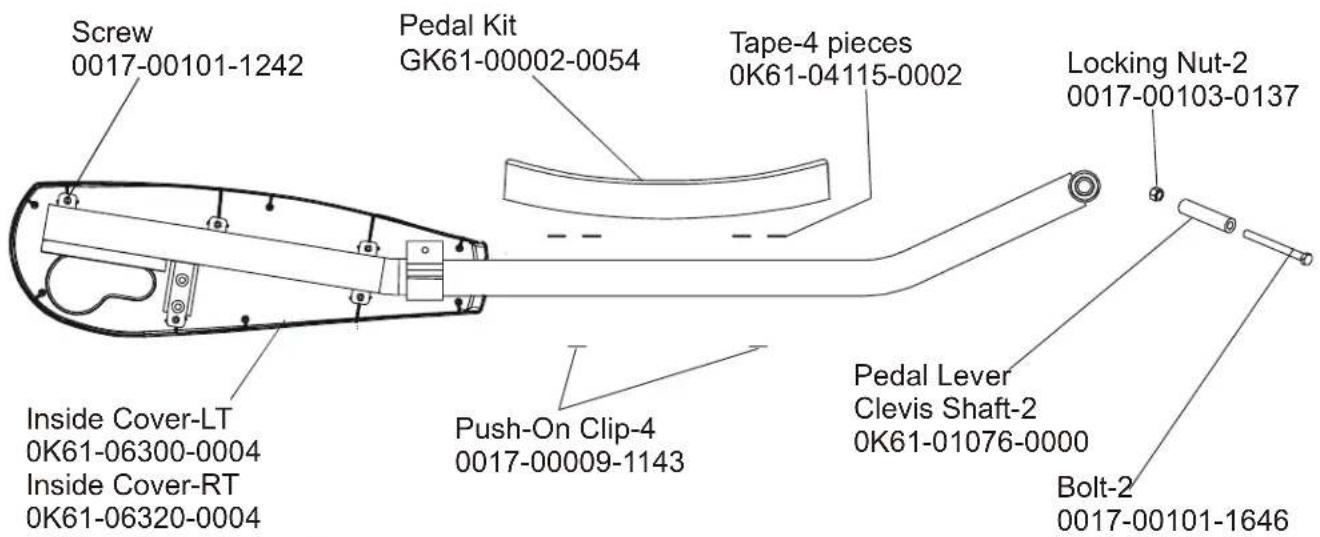
Screw 0017-00101-1242 Pedal Kit GK61-00002-0054 Tape-4 pieces 0K61-04115-0002 Locking Nut-2 0017-00103-0137 Inside Cover-LT 0K61-06300-0004 Inside Cover-RT 0K61-06320-0004 Push-On Clip-4 0017-00009-1143 Pedal Lever Clevis Shaft-2 0K61-01076-0000 Bolt-2 0017-00101-1646Left Pedal Assembly AK61-00172-0002 Right Pedal Assembly AK61-00172-0001
White Inside Cover, Right
0K61-06320-0003
(white covers used on
91X-0006-01 only)
text_image
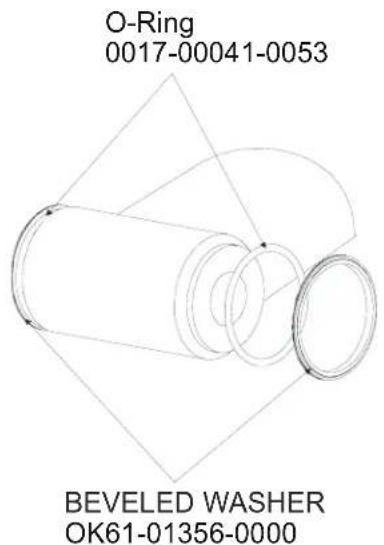
O-Ring 0017-00041-0053 BEVELED WASHER OK61-01356-0000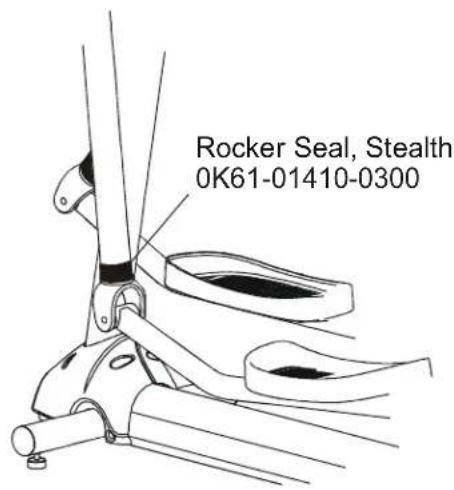
text_image
Rocker Seal, Stealth 0K61-01410-0300ROCKER ARM COVERS S/N XTF100000 and UP
text_image
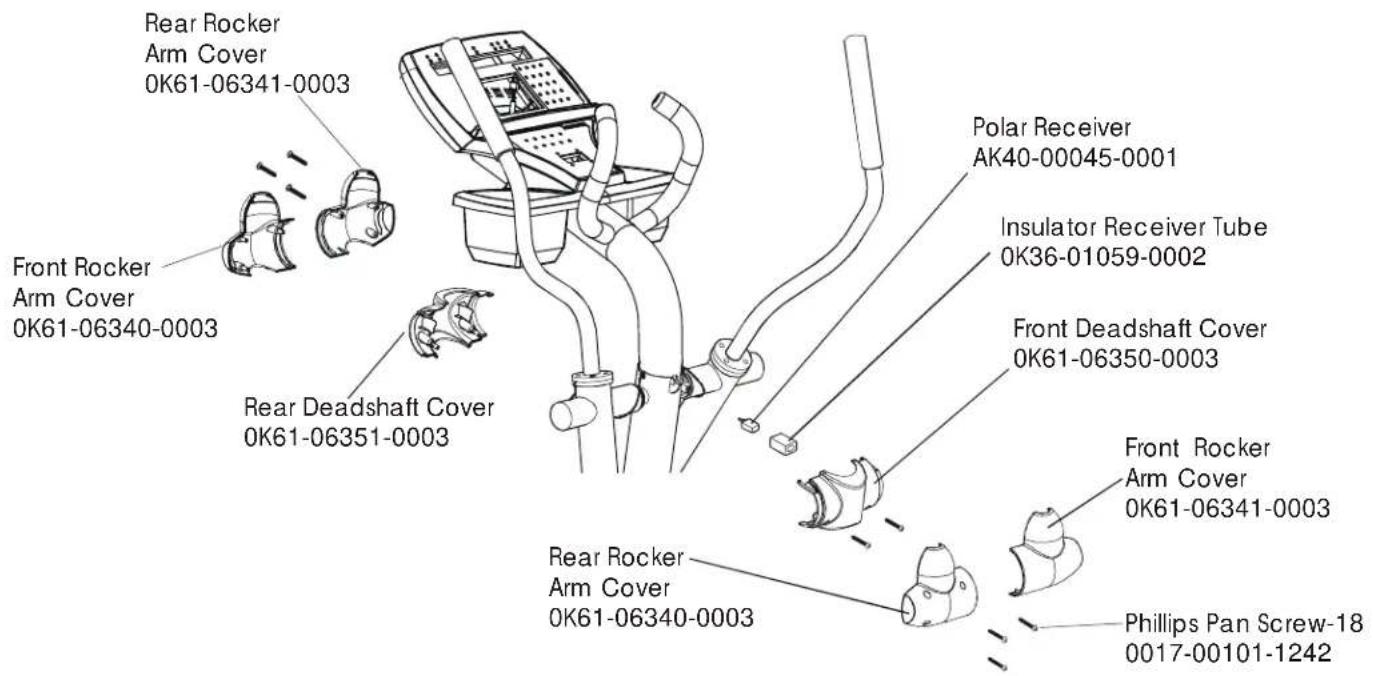
Rear Rocker Arm Cover 0K61-06341-0003 Front Rocker Arm Cover 0K61-06340-0003 Rear Deadshaft Cover 0K61-06351-0003 Polar Receiver AK40-00045-0001 Insulator Receiver Tube 0K36-01059-0002 Front Deadshaft Cover 0K61-06350-0003 Front Rocker Arm Cover 0K61-06341-0003 Rear Rocker Arm Cover 0K61-06340-0003 Phillips Pan Screw-18 0017-00101-1242ROCKER ARM ASSEMBLY S/N XTF100000 and UP
text_image
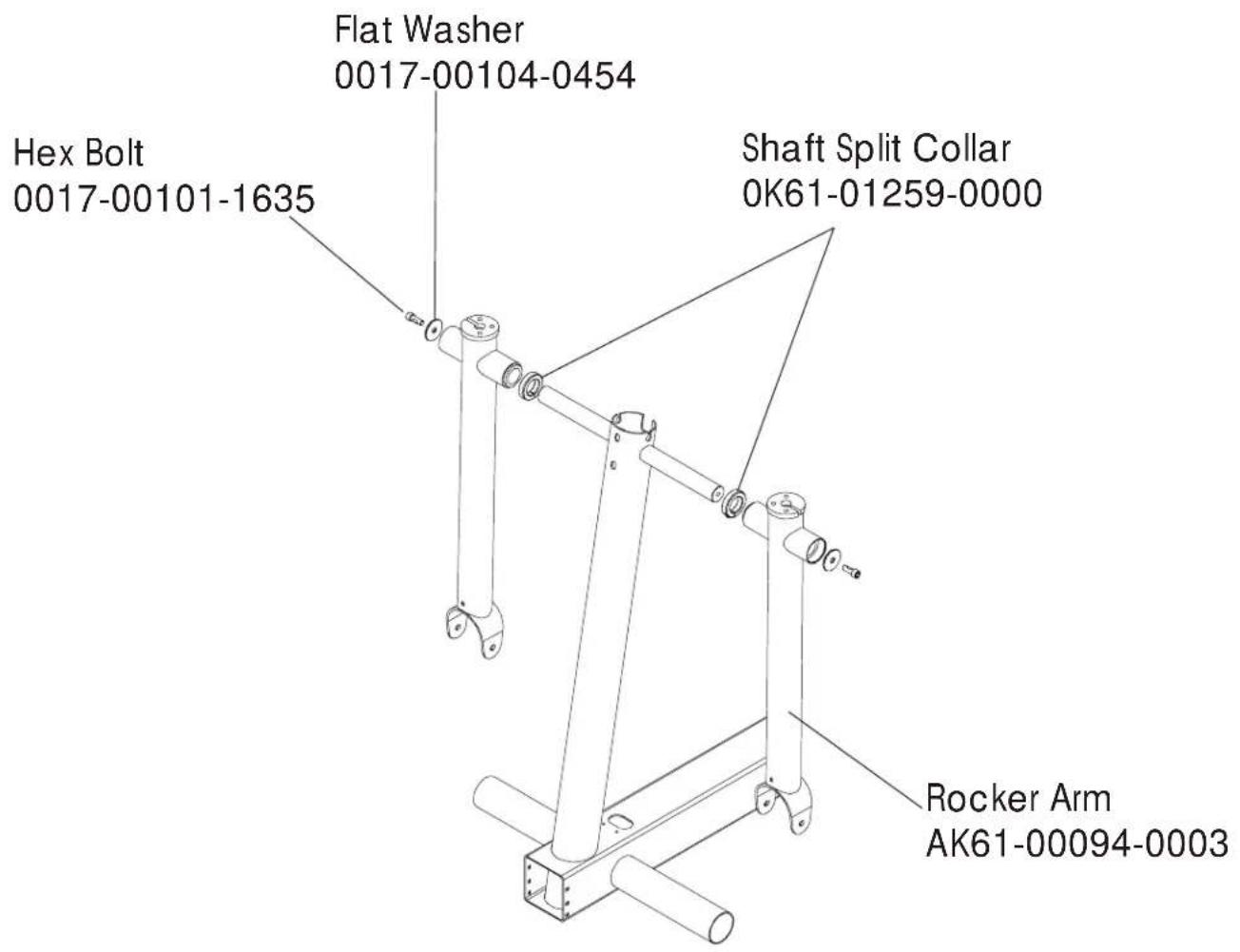
Hex Bolt 0017-00101-1635 Flat Washer 0017-00104-0454 Shaft Split Collar 0K61-01259-0000 Rocker Arm AK61-00094-0003REAR DRIVE SHROUDS W/DECALS S/N XTF100000 and UP
text_image
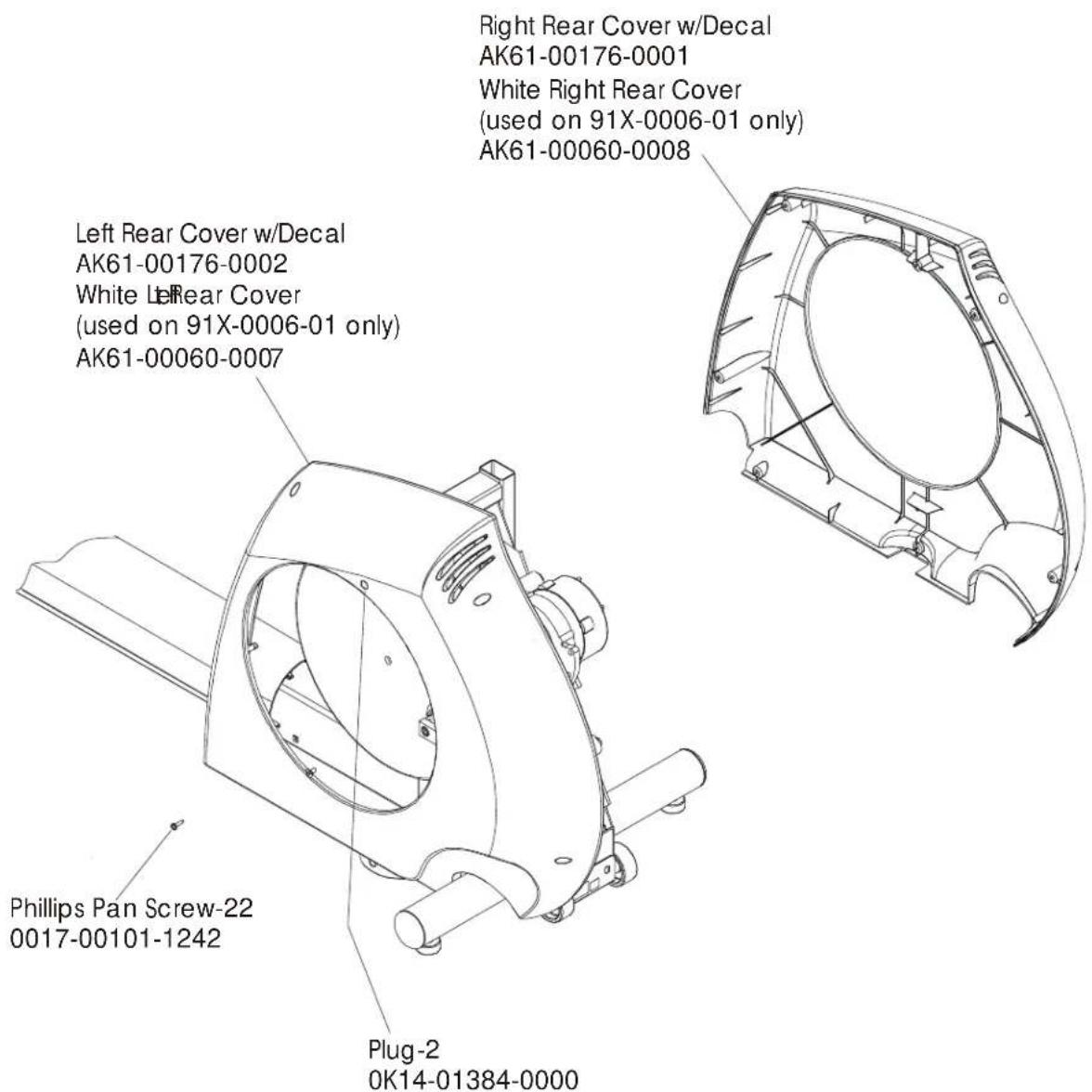
Right Rear Cover w/Decal AK61-00176-0001 White Right Rear Cover (used on 91X-0006-01 only) AK61-00060-0008 Left Rear Cover w/Decal AK61-00176-0002 White Left Rear Cover (used on 91X-0006-01 only) AK61-00060-0007 Phillips Pan Screw-22 0017-00101-1242 Plug-2 0K14-01384-0000UPPER ARM/HEART RATE ASSEMBLY S/N XTF100000 and UP
text_image
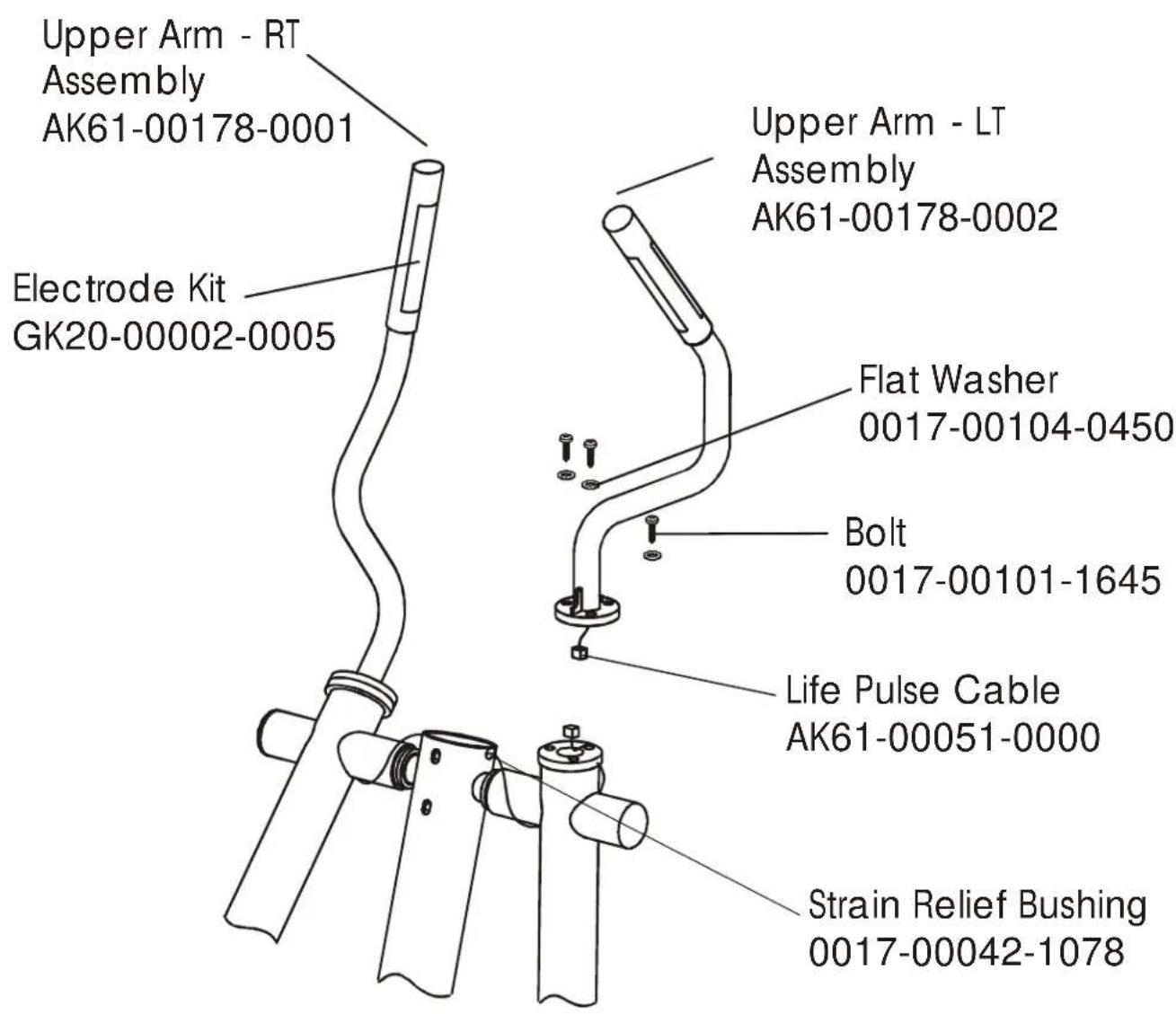
Upper Arm - RT Assembly AK61-00178-0001 Electrode Kit GK20-00002-0005 Upper Arm - LT Assembly AK61-00178-0002 Flat Washer 0017-00104-0450 Bolt 0017-00101-1645 Life Pulse Cable AK61-00051-0000 Strain Relief Bushing 0017-00042-1078CABLES S/N XTF100000 and UP