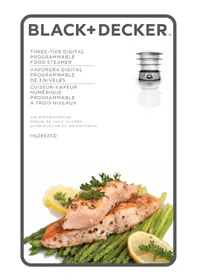
HS1300 - Steamer BLACK & DECKER - Free user manual and instructions
Find the device manual for free HS1300 BLACK & DECKER in PDF.


| Product type | Digital food steamer |
| Brand | Black & Decker |
| Model | HS1300 |
| Power supply | 120 V ~ 60 Hz |
| Power | 900 W |
| Water tank capacity | 8 oz (min) to 42 oz (max) |
| Rice cooking bowl capacity | 5 cups (1.25 L) / up to 1 ½ cups (375 ml) uncooked white rice |
| Number of cooking baskets | 3 (upper, middle, lower) with built-in egg holders |
| Pre-programmed cooking cycles | Eggs (24 min), Fish/seafood (18 min), Vegetables (10 min), Meat/chicken (30 min), Rice (35 min) |
| Maximum timer | 90 minutes, adjustable in 1-minute increments |
| Auto-start function | Yes, up to 3 hours delay (recommended for rice and vegetables) |
| Keep warm function | Yes, approximately 12 minutes after cooking ends |
| Basket and accessory material | Heat-resistant plastic (removable parts dishwasher safe) |
| Care of removable parts | Dishwasher safe (top rack) or wash in warm soapy water |
| Recommended descaling | Every 3 months with white vinegar (25-minute cycle) |
| Safety | Auto shut-off, polarized plug, hot surfaces indicated |
| Replacement parts available | Lid (HS1300-01), rice bowl (HS1300-02), baskets (HS1300-03/04/05), drip tray (HS1300-06), Flavor Scenter strainer |
| Warranty | 1-year limited (US and Canada) |
| Use | Household use only |
Frequently Asked Questions - HS1300 BLACK & DECKER
User questions about HS1300 BLACK & DECKER
0 question about this device. Answer the ones you know or ask your own.
Ask a new question about this device
Download the instructions for your Steamer in PDF format for free! Find your manual HS1300 - BLACK & DECKER and take your electronic device back in hand. On this page are published all the documents necessary for the use of your device. HS1300 by BLACK & DECKER.
USER MANUAL HS1300 BLACK & DECKER
Please Read and Save this Use and Care Book
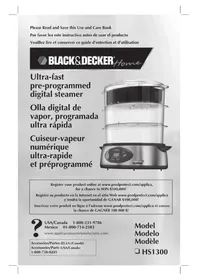
Ultra-fast pre-programmed digital steamer
Olla digital de vapor, programada ultra rápida
natural_image
Exterior view of a modern kitchen steamer with digital display and control panel (no visible text or symbols)Register your product online at www.prodprotect.com/applica, for a chance to WIN \$100,000!
Accessories/Parts (USA/Canada)
1-800-738-0245
Model
Modelo
Modèle

HS1300
IMPORTANT SAFEGUARDS
When using electrical appliances, basic safety precautions should always be followed, including the following:
Read all instructions.
☐ Do not touch hot surfaces. Use handles or knobs.
☐ To protect against a risk of electric shock, do not immerse cord, plug, or base unit in water or other liquid.
☐ Close supervision is necessary when any appliance is used by or near children.
☐ Unplug from outlet when not in use and before cleaning. Allow to cool before putting on or taking off parts or cleaning.
☐ Do not operate any appliance with a damaged cord or plug or after the appliance malfunctions or is dropped or damaged in any manner. Return the appliance to the nearest authorized service facility for examination, repair, or electrical or mechanical adjustment. Or, call the appropriate toll-free number listed on the cover of this manual.
☐ The use of accessory attachments not recommended by the appliance manufacturer may cause injuries.
☐ Do not use outdoors.
☐ Do not let cord hang over the edge of table or counter or touch hot surfaces.
☐ Do not place on or near a hot gas or electric burner or in microwave or heated oven.
☐ Extreme caution must be used when moving an appliance containing hot food, water, or other hot liquids.
☐ To disconnect, turn any control to "off", then remove plug from wall outlet.
☐ Do not use appliance for other than intended use.
☐ To reduce the risk of electric shock, cook only in removable container.
SAVE THESE INSTRUCTIONS.
POLARIZED PLUG (120V Models Only)
This appliance has a polarized plug (one blade is wider than the other). To reduce the risk of electric shock, this plug is intended to fit into a polarized outlet only one way. If the plug does not fit fully into the outlet, reverse the plug. If it still does not fit, contact a qualified electrician. Do not attempt to modify the plug in any way.
ELECTRICAL CORD
a) A short power-supply cord (or detachable power-supply cord) is to be provided to reduce the risk resulting from becoming entangled in or tripping over a longer cord.
b) Longer detachable power-supply cords or extension cords are available and may be used if care is exercised in their use.
c) If a long detachable power-supply cord or extension cord is used,
1) The marked electrical rating of the detachable power-supply cord or extension cord should be at least as great as the electrical rating of the appliance,
2) If the appliance is of the grounded type, the extension cord should be a grounding-type 3-wire cord, and
3) The longer cord should be arranged so that it will not drape over the countertop or tabletop where it can be pulled on by children or tripped over.
Note: If the power supply cord is damaged, it should be replaced by qualified personnel or in Latin America by an authorized service center.
TABLE OF CONTENTS
Pages
GETTING FAMILIAR WITH YOUR UNIT 3
CONTROL PANEL 5
INTRODUCTION 6
HOW TO USE 6
GETTING STARTED 6
FILLING WATER RESERVOIR 6
PUTTING DRIP TRAY IN PLACE 6
USING STEAMING BASKETS 7
USING RICE BOWL 8
SETTING COOKING TIME 8
TO BEGIN COOKING 9
USING THE DELAY START 10
COOKING CHART 10, 11, 12
CARE AND CLEANING 13
STORING YOUR UNIT 13
GETTING FAMILIAR WITH YOUR UNIT
Main Features

HIGH SPEED
COOKING

DELAY\START AUTO OFF

EXTERNAL WATER FILL

PRE-PROGRAMMED FUNCTIONS

WATER LEVEL
INDICATOR

FRONT WATER
WINDOW
A
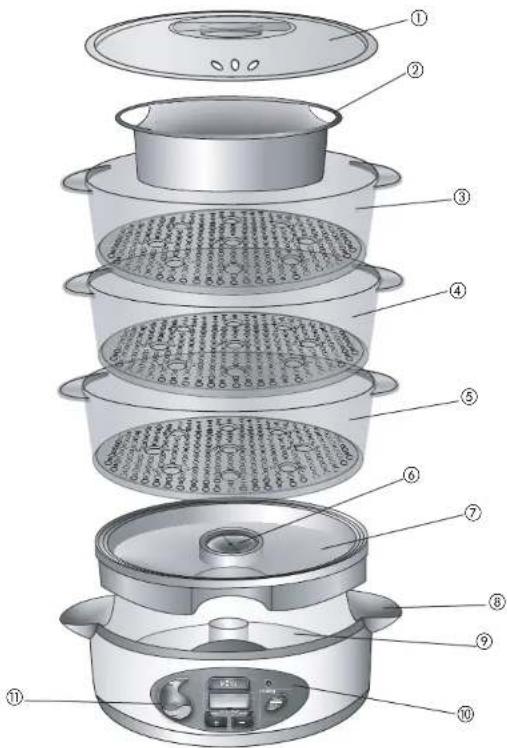
† 1. Lid with steam vents (Part # HS1300-01)
† 2.5-cup rice bowl (Part # HS1300-02)
+ 3. Top steaming basket with built-in egg holders (Part # HS1300-03)
+ 4.Middle steaming basket with built-in egg holders (Part # HS1300-04)
† 5. Bottom steaming basket with built-in egg holders (Part # HS1300-05)
† 6. Flavor Scenter® screen
7. Drip tray (Part # HS1300-06)
8. Water-fill inlets/handles
9. Water reservoir with MIN/MAX markings
10. Control panel (see B)
11. Water Window
Consumer replaceable/removable parts
Product may vary slightly from what is illustrated.
CONTROL PANEL
B
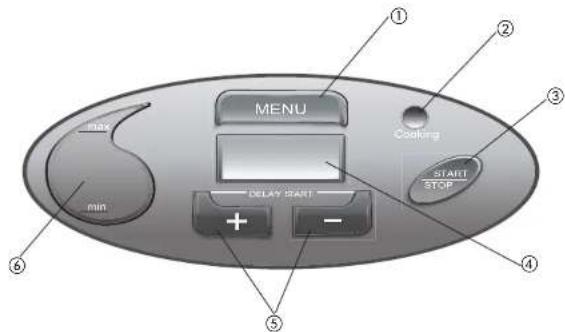
- MENU button – Use to select food to be cooked.
- Power indicator light – Lights up when cooking cycle starts.
- START/STOP button - Press to activate and end all functions.
4. Backlit LCD display
Shows:
- Selection of food categories with preset cooking times
• Active function (Cooking, Keep Warm, Water Refill) - - Timer countdown in one-minute increments
• Selected delay-start time - (+) and (-) buttons - Use to change preset cooking time. Use (+) button to set a delay-start cooking time.
- Water window with Min/Max water level indicators – Lets you easily monitor the water level in the reservoir
5
INTRODUCTION
Thank you for choosing the new Black&Decker® Digital Steamer. You will soon be creating mouth-watering, healthy meals—with minimum effort. With five pre-programmed cooking settings, it's easy to steam your favorite dishes in minutes—from vegetables and rice to chicken, seafood and more. Three large-capacity nesting baskets designed with built-in egg holders will give you the flexibility to cook three different dishes or an entire meal at the same time—right on your countertop!
How to Use
This unit is for household use only.
GETTING STARTED
- Remove all packing material and any stickers from the product.
- Wash all removable parts as instructed in Care and Cleaning section of this manual.
- Select a location where this unit is to be used allowing enough space for steam to escape without damage to counters, cabinets and walls.
FILLING WATER RESERVOIR
- Use cold tap water to fill water reservoir. Minimum fill is 8 oz.; maximum fill is 42 oz.
Do not exceed maximum fill.
NOTE: Do not use any other liquid in water reservoir in place of water. Do not add herbs or seasoning.
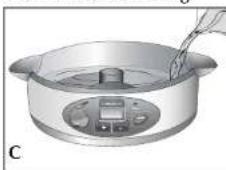
- You have 2 ways to fill the reservoir. a. Pour water directly into reservoir (C). OR
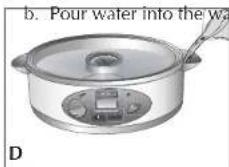
ter-fill inlets (D).
natural_image
Illustration of a two-tiered rice cooker with lid and cooling fan (no text or symbols)PUTTING DRIP TRAY IN PLACE
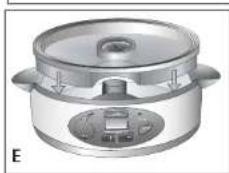
- Place the drip tray over the reservoir; be sure it fits securely (E).
- If desired, add up to 14 cup broth, wine or fruit juice to drip tray to enhance flavor.
natural_image
Illustration of a hand stirring a pot with a digital display (no text or symbols)Flavor Scenter
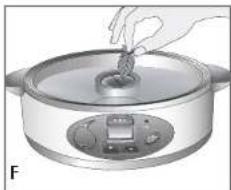
- Place herbs, spices, garlic or citrus slices on Flavor Scenter® screen to give food to be cooked added flavor (F). (See Flavor Scenter® tips.)
Tips for using the Flavor Scenter® screen
- Wet screen before adding seasonings
• Use whole or coarsely chopped herbs - Use small whole cloves or slices of garlic
- Use thin sliced of lemon or lime cut to fit on ^® screen.
Using Steaming Baskets (G)
This unit comes with 3 steaming baskets and a rice bowl and is designed to cook a variety of foods:
Almost any Vegetable
Soft or hard cooked Eggs
Fish fillets, steaks and small whole fish and Seafood
Boneless chicken and turkey breast
Hot dogs
White and brown Rice
Each basket can hold up to 9 eggs in the built-in egg holders.
The rice bowl can hold up to 1 ½ cups uncooked white rice.
CAUTION: Always use pot holders or oven mitts when removing the lid, steaming baskets, rice bowl or drip tray from a hot unit. Lift the lid away from your face or body to avoid escaping steam.
Foods
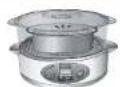
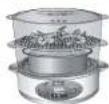
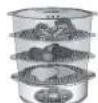
Rice Always cook rice Always cook rice Always cook rice in bowl in basket in bowl in bottom in bowl in basket bottom basket
Eggs Cook up to 9 eggs Cook up to 9 eggs Cook up to 9 eggs
in holders in basket in holders in in holders in
bottom basket
bottom basket
Poultry, Fish,
Cook in bottom
Cook in bottom
Seafood and
basket unless basket unless
Meat
cooking rice
cooking rice
Vegetables
Cook in basket
ok in top basket.
Cook in top
If cooking 2 or more 2 baskets if
vegetables place cooking rice,
longer cooking eggs, meat
vegetables in or fish.
G bottom basket
natural_image
Illustration of a multi-tiered food processor with a digital display and control panel (no text or symbols)USING RICE BOWL (H)
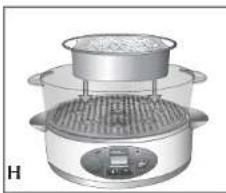
- Put water or broth, rice and any desired seasonings into the rice bowl.
- Place bottom basket over drip tray. Place filled rice bowl into bottom basket.
natural_image
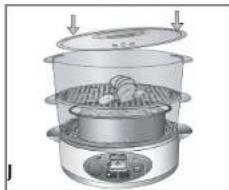
Illustration of a multi-tiered steamer with food inside, showing steam rising from the top (no text or symbols)- Place lid on steaming basket (J).
NOTE: If using more than one steaming basket, cook rice in lowest basket.
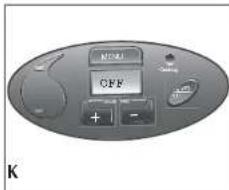
SETTING COOKING TIME (K)
- Place filled steaming baskets on appliance.
- Cover top steaming basket with lid.
- Plug in the appliance and press button.
- The LCD digital display lights up and OFF appears on the screen.
- Press and release the 📂 button until desired food appears on the screen with preset cooking time.
| Display | Food | Preset Time |
| E6 | Eggs | 24 minutes |
| F11 | Fish and Seafood | 18 minutes |
| UG | Vegetables | 10 minutes |
| PO | Poultry and Meat | 30 minutes |
| AC | Rice | 35 minutes |
natural_image
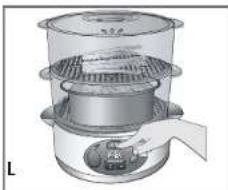
Illustration of a multi-tiered steamer with a handle and lid, no text or symbols present- If no selection is made within 10 seconds the unit will display OFF. Press MENU button and make selection (L).
- Once food selection is made, press and hold + or - button to change the time. There is a 90 minute timer on the appliance.
NOTE: Press and hold the button down for the minutes to change rapidly or press and release for time to change at one minute intervals.
-
If time is changed from the preset time the changed time will begin to flash; press the button, power indicator light comes on and cooking begins.
-
LCD shows food and time remaining; timer counts down and displays time remaining in cooking cycle.
- When cooking multiple foods, add foods with shorter cooking times later or set the timer for the food with the shortest cooking time and check for doneness. Reset time for remaining foods and continue cooking.
TO BEGIN COOKING
- Once food and time selection have been made press 📄 button. The appliance beeps and begins cooking.
- The timer counts down in one minute increments. And beeps again when cooking is complete.
- Cooking time can be changed anytime during the cooking cycle.
natural_image
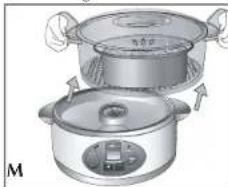
Illustration of two cooking pots with arrows indicating heating direction (no text or symbols)- To avoid overcooking, remove food immediately. ALWAYS USE POTHOLDERS WHEN REMOVING STEAMING BASKETS FROM APPLIANCE (M).
natural_image
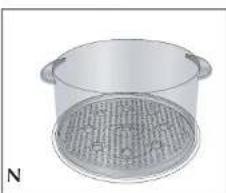
Illustration of a cylindrical container with a mesh lid, labeled 'N' in the corner (no text or symbols on the object itself)- Use the inverted cover or a platter to hold the steaming baskets (N).
- When cooking is complete, power indicator light goes off, the LCD reads 00:00 and the appliance switches to a Keep Warm mode for about 12 minutes. There is a beep and the appliance turns off.
- NOTE: During this time the steamer will cycle on and off. Use caution when removing the steaming baskets.
IMPORTANT: When cooking large amounts of food or foods that take a long time watch the water level. Water may be added at any time through the water fill inlet. This unit will beep 3 times when the water level is below the minimum fill level.
USING THE DELAY START
Recommended only for rice and vegetables
- This function may be used to delay cooking time up to 3 hours.
NOTE: This function should not be used for any perishable foods, such as eggs, poultry, dairy, or fish.
- Press followed by the MENU button.
- Select the food and desired cooking time.
natural_image
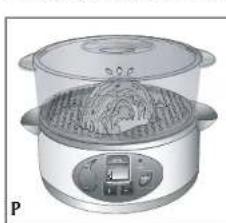
Illustration of a two-tiered steamer with lid and control panel (no text or symbols)- Press the + or - buttons at the same time. The letter "d" will appear on the screen. When you release the buttons the "d" will flash for 10 seconds (P).
- Press the + button to select the delay time desired. The time will change in 30 minute increments.
- Press . The power indicator light starts blinking and the LCD alternates between the set delay time to the food selected.
NOTE: Once the delay function is set no changes can be made.
COOKING CHART
HELPFUL TIPS:
- Condensation will drip for upper baskets so make sure flavors are compatible.
- Liquid remaining in the drip tray may be used for soups, stock or sauces.
- The rice bowl may be used to cook any foods in a sauce or liquid (such as poaching fish or cooking vegetables in sauce).
- Stir vegetables or large amounts of food half way through the cooking cycle for even cooking.
- Foods cut in similar size will cook more evenly.
- Place solid and longer cooking foods in the lower baskets.
- When using multiple baskets remember:
- Place the longest cooking foods in the bottom basket.
- Foods cooked in the higher baskets will take longer than the times listed on the chart below.
- Use this chart as a guide; increase or decrease time to your personal preference.
| Food | Amount | Suggested Seasoning | Time |
| EGGS | |||
| Soft cooked eggs | 9 eggs | 8 minutes | |
| Hard cooked eggs | 9 eggs | 20 minutes | |
| Food Amount Suggested Time Seasoning | |||
| RICE | |||
| White 1 cup rice with salt, pepper, 30 minutes 114 cups water butter, olive oil | |||
| with 1 | 112 cups rice 40 minutes 12 cups water | ||
| Brown 1 cup rice with salt, pepper 50 minutes 112 cups water butter, olive oil | |||
| FRESH VEGETABLES | |||
| Asparagus | 8 oz. trimmed fresh | chervil or savory | 10 to 12 minutes |
| Broccoli1 lb. fresh florets) | 1 bunch (about | basil or dill | 8 to 10 minutes |
| Cabbageabout 1 | 1 small head, 12 lbs. | oreganoand basil | 16 to 18 minutes |
| Carrots | 1 lb. peeled and sliced | tarragon or mint | 12 to 14 minutes |
| Cauliflower 1 head (about coriander or 12 to 14 minutes1 lb. fresh florets) celery seeds | |||
| Corn on the cobears of corncut into 3-inch pieces | 3 medium sized freshmarjoram | dill or | 11 to 13 minutes |
| Green beanswhole beans | 1 lb. trimmed savory | thyme and/or | 10 to 12 minutes |
| Red or brown skinpotatoes mediumpotatoes, quartered | 112 lbs.or dill | rosemary | 22 to 24 minutes |
| Snow peasfresh wholegarlic | 1/2 lb. trimmedginger and | sliced fresh | 7 to 9 minutes |
| Spinachwhole spinach | 8 ounces fresh parsley | garlic and | 4 to 6 minutes |
| Squash, Zucchini orYellow squash | 112 lbs. cut into1-inch chunks garlic | basil and/or | 18 to 20 minutes |
| Sweet potatoes | 112 lbs., cut into 112 -inch chunks | ginger orwhole cloves | 24 to 26 minutes |
| FROZEN VEGETABLES | |||
| Frozen peas 1 lb. rosemary | thyme and/or | 6 to 8 minutes | |
| Frozen mixedvegetables | 1 lb.oregano | garlic or | 8 to 10 minutes |
| Food Amount Suggested Time Seasoning | |||
| REHEATING | |||
| Reheat baked dish or frozen entree cooked frozen entree | Cold baked lasagna 4 x 4-inch piece; | 18 to 20 minutes | |
| POULTRY | |||
| Boneless chicken breasts | 112 lb. or thyme | fresh sage | 30 minutes |
| MEAT | |||
| I lot dogs 1 lb. package | 14 to 16 minutes | ||
| FISH | |||
| Fish Fillets fillets about 1 lb. | Salmon - 3 garlic | dill and/or | 14 to 16 minutes |
| Tilapia - 3 fillets about 1 | chervil and 12 lbs. | 12 to 14 minutes dill | |
| Salmon steaks weight 1 | 2 steaks, total 14 lbs. | dill and 18 to 20 minutes garlic | |
| SHELLFISH | |||
| Crab about 1 lb. | King crab legs, | lemon slices | 20 to 22 minutes |
| Snow crab clusters, about 1 | lemon and 12 lbs. | 16 to 18 minutes marjoram | |
| Clams neck clams garlic | 2 dozen little | lemon and/or | 12 to 14 minutes |
| Lobster tails | 3 tails, about 112 lbs. | lemon slices or wedges | 19 to 21 minutes |
| Shrimp and deveined, garlic | 112 lbs. shelled | lemon and | 14 to 16 minutes |
Care and Cleaning
This appliance contains no user-serviceable parts. Refer service to qualified service personnel.
IMPORTANT: Unplug the unit and allow to cool completely before cleaning.
CLEANING
Steaming Baskets, Rice Bowl, Lid and Drip Tray
Immerse in warm, sudsy water. Rinse and dry thoroughly. These parts can also be washed in the dishwasher, top rack only.
Water Reservoir
natural_image
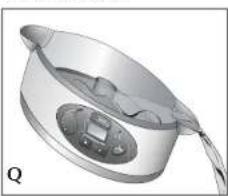
3D rendered image of a metallic bowl with a handle and internal components (no text or symbols visible)- To empty the water reservoir, tilt the unit to the right or left and let water flow out the water-fill inlets (Q).
- Clean the inside of the reservoir with warm, sudsly water.
- Use a non-abrasive plastic brush or mesh scouring pad to clean the interior.
- Rinse thoroughly with clean, warm water.
- Wipe exterior with a damp cloth and dry
thoroughly. Never immerse water reservoir in water or place in the dishwasher.
Important: Do not use bleach, abrasive pads or cleaners to clean any part of the unit.
MAINTAINING YOUR UNIT
Mineral deposits left by hard water can clog your unit and cause steam to stop before food is cooked. Cleaning is recommended every 3 months. The frequency of flushing out deposits is affected by your usage and water hardness.
- Fill water reservoir with vinegar to the Max marking.
IMPORTANT: Do not use any other chemical or commercial descaler.
-
Make sure the drip tray, steaming bowl and lid are in place.
-
Plug unit into wall outlet.
-
Set timer to 25 minutes.
IMPORTANT: If vinegar begins to boil over the edge of the unit base, unplug the unit and turn off the timer. Reduce amount of vinegar.
-
Once you hear the signal bell ring, unplug the unit and let it cool completely.
-
Pour out vinegar from water reservoir and rinse reservoir several times with warm, sudsy water.
STORING YOUR UNIT
natural_image
3D rendering of a steamer with mesh insulation and a small container (no text or symbols visible)The steaming baskets are collapsible for compact storage.
-
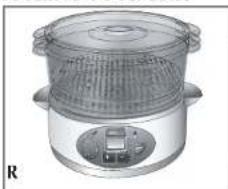
To store, first insert the middle basket inside the top basket, then insert bottom basket inside the middle basket. Place the lid on the basket in the inverted position (R).
-
Unplug unit from wall outlet and let it cool completely before removing the drip dray for storage.
natural_image
Illustration of a rice cooker with a lid and control panel (no text or symbols)natural_image
Illustration of a hand pouring liquid into a cooking pot with a digital display (no text or symbols)natural_image
Illustration of a multi-tiered steamer with cooling fins and heat exchanger (no text or symbols)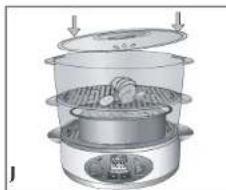
natural_image
Illustration of a steamer with lid and base, showing internal components (no text or symbols)USO DEL RECIPIENTE DEL ARROZ (H)
natural_image
Illustration of a multi-tiered industrial or kitchen appliance with a handle and cooling unit (no text or symbols visible)natural_image
Illustration of two cooking pots with handles and a lid, no text or symbols presentnatural_image
Illustration of a cylindrical container with a mesh lid, no text or symbols presentnatural_image
Illustration of a two-tiered steamer with a digital display and control panel (no text or symbols)natural_image
3D rendered image of a stainless steel cooking pot with a handle and control knob (no text or symbols visible)natural_image
3D rendering of a multi-tiered kitchen or oven with a mesh fan and control panel (no text or symbols visible)A
natural_image
Illustration of a cooking pot with a side bowl and a handle, no text or symbols presentnatural_image
Illustration of a hand placing a small object into a large pot with a digital display (no text or symbols)natural_image
3D diagram of a multi-tiered steamer or filter unit with cooling fins and heat sinks (no text or symbols)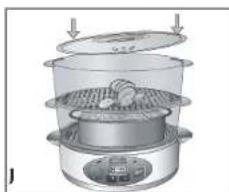
natural_image
Illustration of a steamer with a lid and side panel, showing food inside (no text or symbols)UTILISATION DU BOL DE CUISSON DU RIZ (H)
RÉGLAGE DU TEMPS DE CUISSON (K)
natural_image
Illustration of a multi-tiered steamer with a handle and lid, showing internal structure without any text or symbols.natural_image
Illustration of two cooking pots with steamers, no text or symbols presentnatural_image
Illustration of a metal cooking pot with a circular filter or lid (no text or symbols)natural_image
3D rendered image of a metallic bowl with a handle and internal components (no text or symbols)Réservoir d'eau
natural_image
3D rendering of a stainless steel steamer with mesh insulation and control panel (no text or symbols visible)RANGEMENT DE L'APPAREIL
For service, repair or any questions regarding your appliance, call the appropriate "800" number on the cover of this book. Do not return the product to the place of purchase.
Do not mail the product back to the manufacturer nor bring it to a service center. You may also want to consult the website listed on the cover of this manual.
One-Year Limited Warranty
(Applies only in the United States and Canada)
What does it cover?
- Any defect in material or workmanship; provided; however, Applica's liability will not exceed the purchase price of the product.
For how long?
• One year after the date of original purchase.
What will we do to help you?
- Provide you with a reasonably similar replacement product that is either new or factory refurbished.
How do you get service?
- Save your receipt as proof of the date of sale.
- Check our on-line service site at www.prodprotect.com/applica, or call our toll-free number, 1-800-231-9786, for general warranty service.
- If you need parts or accessories, please call 1-800-738-0245.
What does your warranty not cover?
• Damage from commercial use
• Damage from misuse, abuse or neglect
• Products that have been modified in any way
- Products used or serviced outside the country of purchase
- Glass parts and other accessory items that are packed with the unit
- Shipping and handling costs associated with the replacement of the unit
- Consequential or incidental damages (Please note, however, that some states do not allow the exclusion or limitation of consequential or incidental damages, so this limitation may not apply to you.)
How does state law relate to this warranty?
- This warranty gives you specific legal rights, and you may also have other rights that vary from state to state or province to province.
¡NECESITA AYUDA?
San Jose, Costa Rica
Tel.: (506) 257-5716/223-0136
Ecuador
Servicio Master Ecuador
33 Independence Square,
Port of Spain
Trinidad, W.I.
Tel.: (868) 623-4696
Venezuela
Inversiones BDR CA
Av. Casanova C.C. City Market
Nivel Plaza Local 153,
Diagonal Hotel Melia.
Caracas
Tel. (582) 324 0969
Col. Chapultepec Morales, Mexico D.F
Deleg. Miguel Hidalgo
CP 11570
MEXICO.
Col. Centro, Mexico D. F., CP 06050
BLACK&DECKER. is a trademark of The Black & Decker Corporation, Towson, Maryland, USA
Marca registrada de The Black & Decker Corporation, Towson, Maryland, E.U.
Copyright © 2007 Applica Consumer Products, Inc.
Made in People's Republic of China
Printed in People's Republic of China
Importado por:
APPLICA DE MEXICO, S. DE R. L. DE C.V.
Col. Chapultepec Morales, Mexico D.F
Deleg. Miguel Hidalgo
CP 11570
MEXICO.