EasyManual
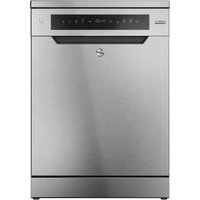
HDS 2D62X - Dishwasher HOOVER - Free user manual and instructions
Find the device manual for free HDS 2D62X HOOVER in PDF.



Questions des utilisateurs sur HDS 2D62X HOOVER
0 question sur cet appareil. Repondez a celles que vous connaissez ou posez la votre.
Poser une nouvelle question sur cet appareil
Download the instructions for your Dishwasher in PDF format for free! Find your manual HDS 2D62X - HOOVER and take your electronic device back in hand. On this page are published all the documents necessary for the use of your device. HDS 2D62X by HOOVER.
USER MANUAL HDS 2D62X HOOVER
| ● | ● | ●● | ○ | ● | 75°C | ○ | ○ | ○ | 130 | SIS | SI | |||
| ● | ●● | ●○ | 60°C | ○ | ○ | 120 | SIS | SI | ||||||
| ● | ●● | ●○ | 55°C | ○ | ○ | 80 | SIS | SI | ||||||
| ● | ● | ●● | ●○ | 45°C | ○ | 190 | SIS | SI | ||||||
| ● | ●● | ●○ | 45°C | ○ | ○ | 85 | SIS | SI | ||||||
| ● | ● | ●● | ○ | ● | 65°C | ○ | 59 | SIS | SI | |||||
| ● | ●● | ● | 50°C | ○ | 24 | SIS | N.D. | |||||||
| ● | ●● | ●○ | 55°C | ○ | ○ | 240 | SIS | SI | ||||||
| ● | ○ | 5 | SI | N.D. | ||||||||||
| 70°C | ○ | 45 | SI |
- CON ACQUA CALDA IL TEMPO RESIDUO AL TERMINE DEL PROGRAMMA SI AGGIORNA AUTOMATICAMENTE DURANTE LO SVOLGIMENTO DELLO STESSO.
AQUASTOP- DISPOSITIVO DI BLOCCAGGIO DELL'ACQUA
| DIMENSIONS | ||
| Width x Height x Depth (cm) | 59,8 x 81,8 ÷ 89,8 x 57 | |
| Depth with door open (cm) | 117 | |
| TECHNICAL DATA | ||
| EN 50242 place load | 16 | |
| Capacity with pans and dishes | 9 persons | |
| Water supply pressure (MPa) | Min. 0,08 - Max. 0,8 | |
| Fuse / Power input / Supply voltage | See rating plate | |
| CONSUMPTION (main programmes)* | ||
| Programme Energy (kWh) Water (L) | ||
| STEAM | 2,07 | 21 |
| UNIVERSAL | 1,46 | 15 |
| ECO | 0,95 | 10 |
| RAPID 24' | 0,59 | 9 |
| Power consumption of the off-mode and of the left-on mode: 0,45 W / 0,45 W | ||
| *Values are measured in a laboratory according to European Standard EN 50242 (consumption may vary according to conditions of usage). | ||
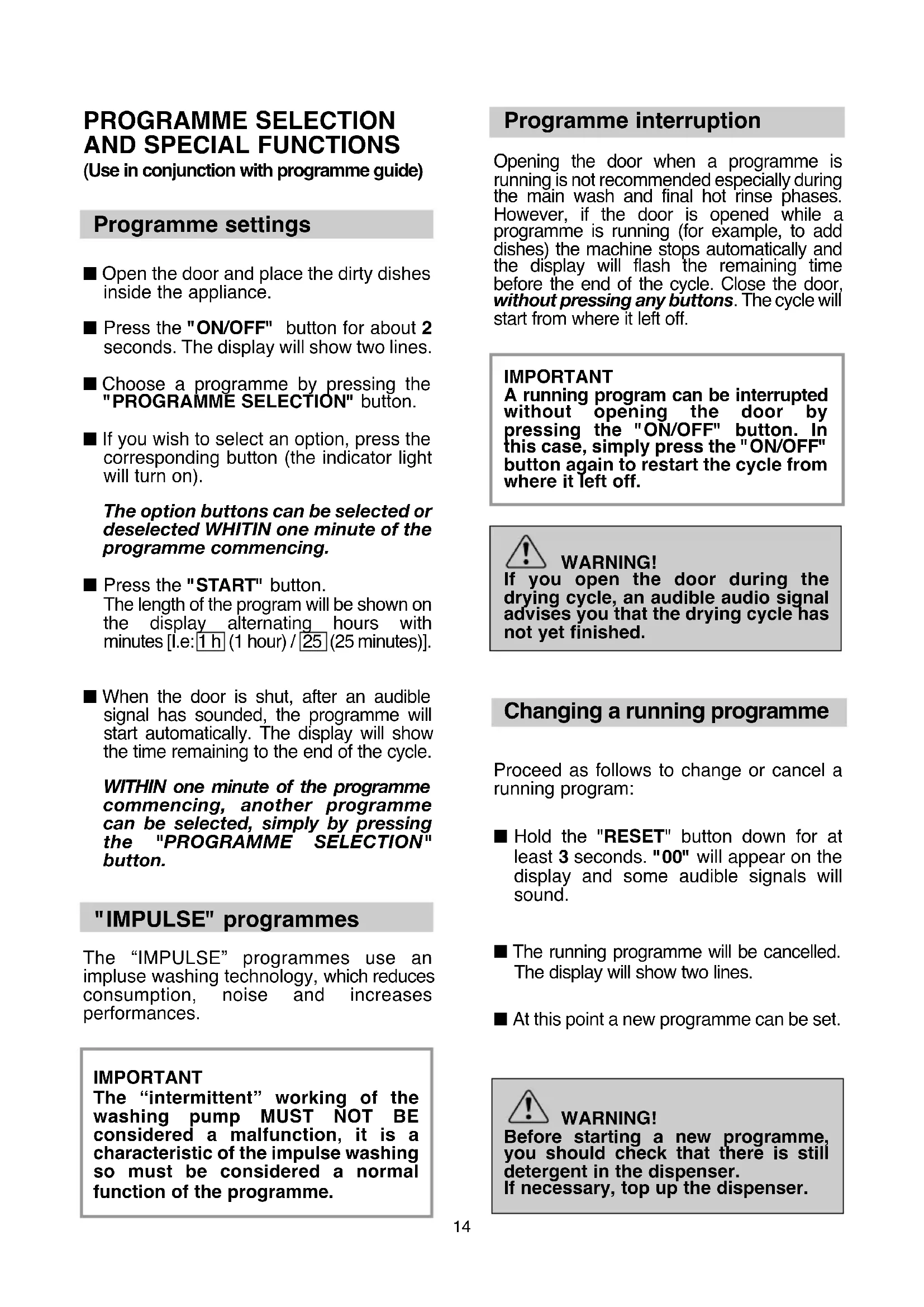
PROGRAMME SELECTION AND SPECIAL FUNCTIONS
(Use in conjunction with programme guide)
Programme settings
- Open the door and place the dirty dishes inside the appliance.
Press the "ON/OFF" button for about 2 seconds. The display will show two lines.
Choose a programme by pressing the "PROGRAMME SELECTION" button.
If you wish to select an option, press the corresponding button (the indicator light will turn on).
The option buttons can be selected or deselected WHITIN one minute of the programme commencing.
Press the "START" button.
The length of the program will be shown on the display alternating hours with minutes [I.e:1 h (1 hour) / 25 (25 minutes)].
- When the door is shut, after an audible signal has sounded, the programme will start automatically. The display will show the time remaining to the end of the cycle.
WITHIN one minute of the programme commencing, another programme can be selected, simply by pressing the "PROGRAMME SELECTION" button.
"IMPULSE" programmes
The "IMPULSE" programmes use an impulse washing technology, which reduces consumption, noise and increases performances.
IMPORTANT
The "intermittent" working of the washing pump MUST NOT BE considered a malfunction, it is a characteristic of the impulse washing so must be considered a normal function of the programme.
Programme interruption
Opening the door when a programme is running is not recommended especially during the main wash and final hot rinse phases. However, if the door is opened while a programme is running (for example, to add dishes) the machine stops automatically and the display will flash the remaining time before the end of the cycle. Close the door, without pressing any buttons. The cycle will start from where it left off.
IMPORTANT
A running program can be interrupted without opening the door by pressing the "ON/OFF" button. In this case, simply press the "ON/OFF" button again to restart the cycle from where it left off.

WARNING!
If you open the door during the drying cycle, an audible audio signal advises you that the drying cycle has not yet finished.
Changing a running programme
Proceed as follows to change or cancel a running program:
Hold the "RESET" button down for at least 3 seconds. "00" will appear on the display and some audible signals will sound.
The running programme will be cancelled. The display will show two lines.
At this point a new programme can be set.

WARNING!
Before starting a new programme, you should check that there is still detergent in the dispenser. If necessary, top up the dispenser.
Programme operations
Whilst a programme is running, the display shows the time remaining to the end of the cycle, which is automatically updated.
If there is any break in the power supply while the dishwasher is operating, a special memory stores the selected programme and, when the power is restored, it continues where it left off.
Programme end
A 5 second alarm will sound (if not muted) 3 times at 30 second intervals to signal that the programme has ended.
The dishwasher will automatically switch off.
Option buttons
"SUPER ECO" button

This button provides an energy and time saving of 25% on average (according to the select cycle) reducing the wash water temperature and the drying time during the final rinse.
This programme is recommended for light soil washes, and for slightly wet dishes that are not fully dry, & improved drying results. We advise you to leave the door of the Dishwasher half-open at the end of the cycle, to allow for a natural circulation of air inside the dishwasher.
"ALL IN 1" button

This option optimises the use of "ALL in 1" ("3 in 1"/4 in 1"/5 in 1", ecc.) combined detergents.
By pressing this button, the selected washing programme is modified to get best performance from combined detergents (furthermore, the salt empty alert will be de-activated).

WARNING!
Once selected, this option keeps being on (light on) also for next washing cycles and it can be de-activate (light off) only by pressing the button once again.
IMPORTANT
This option is recommended when using the RAPID 24' program, the duration of which will be extended for about 15 minutes, allowing the detergent tablets to achieve a better performance.
Salt empty alert
If your dishwasher requires filling with salt, the display will show and flash "SL" when the dishwasher is switched on.
The appearance of white stains on dishes is generally a warning sign that the salt container needs filling.
"DELAY START" button

Dishwasher start time can be set with this button, delaying start from 1 to 23 hours.
Proceed as follows to set a delayed start:
Press the "DELAY START" button ("00" will appear on the display).
Press the button again to increase the delay in hours (each time the button is pressed the delay is increased by 1 hour to a maximum of 23).
To start the countdown, press the "START" button.
The display will show the time remaining to the begin of the programme.
At the end of the countdown, the programme will automatically start and the length of the selected cycle will be shown in the display.
Proceed as follows to cancel a delayed start:
Hold the "RESET" button down for at least 3 seconds. "00" will appear on the display and some audible signals will sound.
The delayed start and the selected programme will be cancelled. The display will show two lines.
At this point, a new programme and option buttons must be set to start a new programme as indicated in the "PROGRAMME SETTINGS" section.
Alarm mute for the PROGRAMME END
The alarm for the programme end may be muted as follows:
IMPORTANT The dishwasher must ALWAYS be off before start of this procedure.
- Hold down the "PROGRAMME SELECTION" button and at the same time switch on the dishwasher by pressing the "ON/OFF" button (a brief audible signal will sound).
- Keep the "PROGRAMME SELECTION" button pressed for at least 15 seconds (during this time 2 audible signals will sound).
- Release the button when the second audible signal sounds ("b1" will appear on the display to indicate that the alarm is on).
- Press the same button again ("b0" will appear on the display to indicate that the alarm is off).
- Turn off the dishwasher by pressing the "ON/OFF" button to confirm the new setting.
To turn the alarm on again, follow the same procedure.
Memorization of the last programme used
The last programme used can be memorized by following the below:
IMPORTANT The dishwasher must ALWAYS be off before start of this procedure.
- Hold down the "PROGRAMME SELECTION" button and at the same time switch on the dishwasher by pressing the "ON/OFF" button (a brief audible signal will sound).
- Keep the "PROGRAMME SELECTION" button pressed for at least 30 seconds (during this time, 3 audible signals will sound).
- Release the button when the THIRD audible signal sounds ("A0" will appear on the display to indicate that the memorization is off).
- Press the same button again ("A1" will appear on the display to indicate that the memorization is on).
- Turn off the dishwasher by pressing the "ON/OFF" button to confirm the new setting.
To disable the memorization, follow the same procedure.
IMPORTANT
This dishwasher is equipped with an anti-overflow safety device which will automatically discharge any excess water should a problem occur.

WARNING!
To ensure the correct operation of the anti-overflow safety device, we recommend that the dishwasher is not moved or tilted during operation. If however it is necessary to tilt or move the dishwasher, please ensure that the washing cycle is complete and that there is no remaining water inside the dishwasher.
The dishwasher is able to signal a series of faults in the display.
AUTOMATIC FAULT SIGNALS
| FAULTS CAUSE SOLUTION | ||
| E2 appears on the display and the alarm sounds. | No water (inlet hose closed). | Turn off the dishwasher, open the inlet hose and reset the cycle. |
| E3 appears on the display and the alarm sounds. | The machine cannot drain water. | Check if the drain tube is bent or if the siphon or filters are clogged. If the problem persists, contact Customer Service. |
| E4 appears on the display and the alarm sounds. | Water leak | Check if the drain tube is bent or if the siphon or filters are clogged. If the problem persists, contact Customer Service. |
| E5,E6,E7,Ef or EL appears on the display and the alarm sounds. | Electronic control fault. | Contact Customer Service. |
| E8 or Ei appear on the display and the alarm sounds. | The water heating element is not working correctly or the filter plate is clogged. | Clean the filter plate. If the problem persists, contact Customer Service. |
PROGRAMME GUIDE
Wash with prewash
For wash programmes with prewash, it is advisable to add a second dose of detergent (max. 10 g) directly in the machine.
| Programme | Description |
| P1 | Q | Steam 75°C | Cycle with alternated action of water jets and steam. Effective in softening and removing dried up soil and bacteria, with no need to pre-wash pots and dishes. |
| P2 | Universal 60°C | Once a day - for normal soiled pans and any other items that have been left all day for washing. | |
| P3 | ≈ | Daily 55°C | Fast cycle, for “normally” dirty dishes - intended for frequent washes and normal loads. |
| P4 | eco | Eco 45°C | Programme for normally soiled tableware (the most efficient in terms of its combined energy and water consumption for that type of tableware). Programme standardised to EN 50242. |
| P5 | V | Cristal 45°C | Suitable for delicate crockery and glassware. Also for less soiled items excluding pans. |
| P6 | =R59' | Rapid 59' 65°C | Suitable for heavily soiled items that are to be washed straight after a meal (Max 8 place load). |
| P7 | =R24' | Rapid 24' 50°C | Quick wash for dishes which are to be washed immediately after the meal. Wash load of 6 persons. |
| P8 | Night 55°C | Quietest washing cycle. Ideal for functioning by night and for taking advantage of reduced energy fares. | |
| P9 | Refresh | Short cold pre-wash for items that are stored in the dishwasher until you are ready to wash a full load. | |
| #70°C | Dishwasher Cleaner P4+wide | This programme should be used periodically with specialist dishwasher cleaning products. For all cleaning operations the dishwasher must be empty. | |
■ = "IMPULSE" programmes
N/A = OPTION NOT AVAILABLE
| Check list | Programme contents | Avarage duration in minutes | Special function buttons available | ||||||||||
| Detergent for soaking (Prewash) | Detergent for washing | Clean filter | Check rinse aid dispenser | Hot pre-wash | Cold pre-wash | Main wash | First cold rinse | Second cold rinse | Hot rinse with rinse aid | With cold water (15℃)*Tolerance ±10%- | "DELAY START" button | "SUPER ECO" button | "All IN 1" button |
| ● | ● | ●● | ○ | ● | 75°C | ○ | ○ | ○ | 130 | YES | YES | YES | ||
| ● | ●● | ●○ | 60°C | ○ | ○ | 120 | YES | YES | YES | |||||
| ● | ●● | ●○ | 55°C | ○ | ○ | 80 | YES | YES | YES | |||||
| ● | ● | ●● | ●○ | 45°C | ○ | 190 | YES | YES | YES | |||||
| ● | ●● | ●○ | 45°C | ○ | ○ | 85 | YES | YES | YES | |||||
| ● | ● | ●● | ○ | ● | 65°C | ○ | 59 | YES | YES | YES | ||||
| ● | ●● | ● | 50°C | ○ | 24 | YES | N/A | YES | ||||||
| ● | ●● | ●○ | 55°C | ○ | ○ | 240 | YES | YES | YES | |||||
| ● | ○ | 5 | YES | N/A | ||||||||||
| 70°C | ○ | 45 | YES |
- WITH HOT WATER THE TIME REMAINING UNTIL THE END OF THE PROGRAMME IS AUTOMATICALLY DISPLAYED WHILE THE PROGRAMME IS RUNNING.
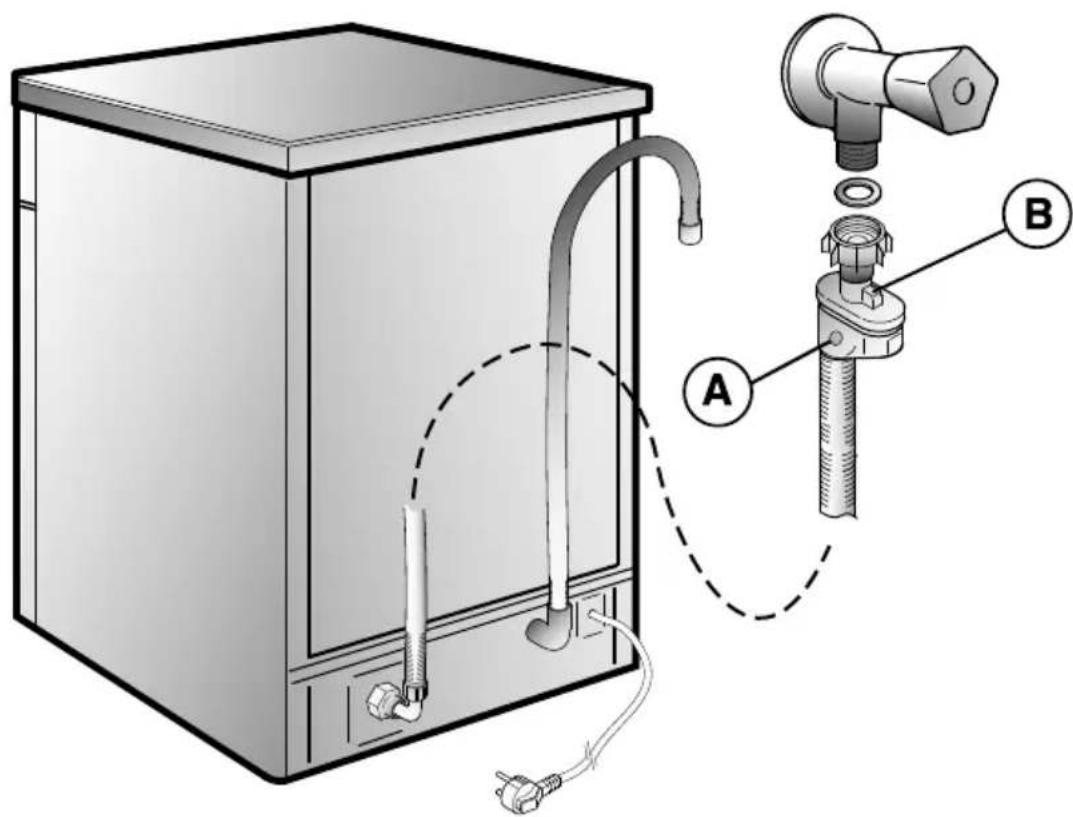
AQUASTOP-SYSTEM
The water-stop device protects against water damages caused by leaks on the fill hose which could develop due to natural ageing of the hose.
In the water-stop system the leaking water fills the corrugated hose and activates a stop valve which cuts off the water supply to the machine.
This fault is shown by a red sector on the window A
Would this occur, please refer to your Service Agent.
If the hose is not long enough for correct connection, it must be replaced with a longer one. The hose can be obtained from your Service Agent.
B Safety antitwist device (press and twist to remove the washer).
WATER SOFTENER UNIT
Depending on the source of the supply, water contains varying amounts of limestone and minerals which are deposited on the dishes leaving whitish stains and marks. The higher the level of these minerals present in the water, the harder the water is. The dishwasher is fitted with a water softener unit which, through the use of special regenerating salt, supplies softened water for washing the dishes. The degree of hardness of your water can be obtained from your water supply company.
Regulating the water softener with electronic programmer
The water softener can treat water with a hardness level of up to 90^ (French grading) or 50^ (German grading) through 8 settings.
The settings are listed in the table below:
| Level | Water hardness | Use of regenerating salt | Water softener setting | |
| TH (French) | dH (German) | |||
| 0 | 0-5 | 0-3 | NO | d0 |
| 1 | 6-10 | 4-6 | YES | d1 |
| 2 | 11-20 | 7-11 | YES | d2 |
| 3 | 21-30 | 12-16 | YES | d3 |
| *4 | 31-40 | 17-22 | YES | d4 |
| 5 | 41-50 | 23-27 | YES | d5 |
| 6 | 51-60 | 28-33 | YES | d6 |
| 7 | 61-90 | 34-50 | YES | d7 |
- The softener unit is set in the factory at level 4 (d4) as this satisfies the requirements of the majority of users.
Regulate the setting of your water softener unit according to the degree of hardness of your water as follows:
IMPORTANT
The dishwasher must ALWAYS be off before start of this procedure.
- Hold down the "PROGRAMME SELECTION" button and at the same time switch on the dishwasher by pressing the "ON/OFF" button (a brief audible signal will sound).
- Keep the "PROGRAMME SELECTION" button pressed for at least 5 seconds, UNTIL an audible signal sounds. The current water softener setting level will be shown on the display.
- Press the same button again to select the required water softener level: each time the button is pressed, the setting will increase by one level. When you have reached "d7", the display will go back to "d0".
- Turn off the dishwasher by pressing the "ON/OFF" button to confirm the new setting.

WARNING!
If any problem occurs, turn the dishwasher off by pressing the "ON/OFF" button and start the procedure again from the beginning (STEP 1).
DESCRIPTION DE LA MACHINE
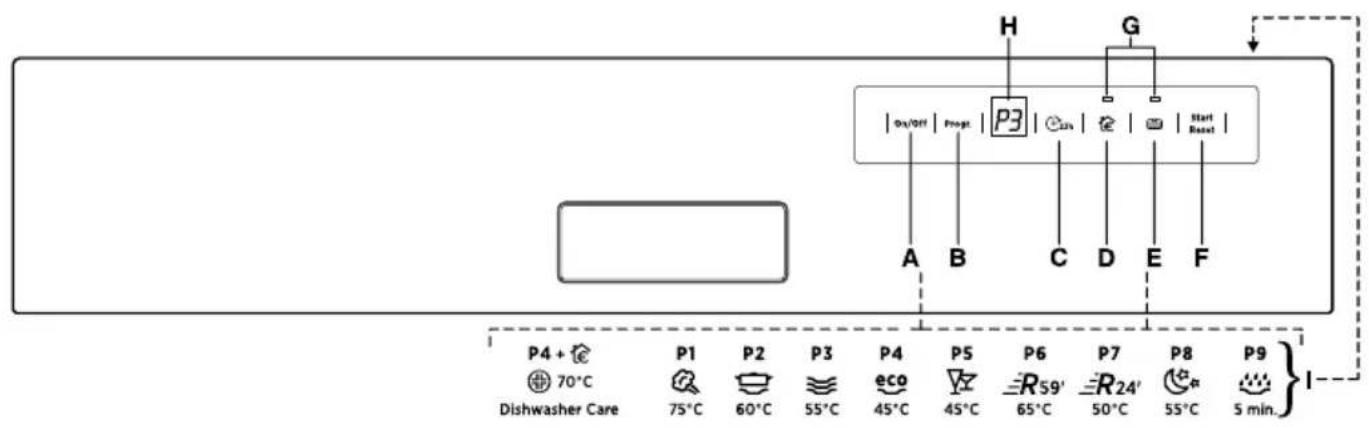
A Touche "ON/OFF" ("MARCHE/ARRÉT")
B Touche "PROGRAMMES"
C Touche "DEPART DIFFERE"
D Touche option "SUPER ECO"
E Touche option "ALL IN 1" ("TOUT EN UN")
F Touche "START"/"RESET" (départ/annulation programme)
G Voyants "SELECTION D'OPTION"
H AFFICHEUR
Description des programmes
Programmes "IMPULSE"
Touche "DEPART DIFFERE"

| Programme | Description |
■ = Programmes “IMPULSE”
N/A = OPTION NON DISPONIBLE
Programas "IMPULSE"
N/A = OPÇA O INDISPONÍVEL
The manufacturer declines all responsibility in the event of any printing mistakes in this booklet. The manufacturer also reserves the right to make appropriate modifications to its products without changing the essential characteristics.
To consult the product fiche, please refer to the manufacturer website.