10112 - Watch Lotus - Free user manual and instructions
Find the device manual for free 10112 Lotus in PDF.



| Product type | Wristwatch |
| Brand | Lotus |
| Model | 10112 |
| Movement | Quartz chronograph |
| Display | Analog: hour, minute, second hands, date, chronograph |
| Main functions | Hour, minute, second, date, 1/20th second chronograph (up to 59 min 59 sec) |
| Calendar | Date display by window |
| Winding crown | 3 positions: normal, 1st click (date setting), 2nd click (time setting / chrono reset) |
| Push buttons | Two buttons (A and B) for chronograph control |
| Power source | Battery (type not specified, probably SR626SW or equivalent) |
| Case diameter | Approximately 40 mm (estimate) |
| Case thickness | Approximately 12 mm (estimate) |
| Weight | Approximately 100 g (estimate) |
| Case material | Stainless steel (estimate) |
| Glass | Mineral (estimate) |
| Strap | Not specified (leather or steel depending on version) |
| Care and cleaning | Clean with a soft dry cloth. Avoid shocks, water, and chemicals. |
| Safety | Do not immerse. Keep out of reach of young children. Remove battery if not used for a long time. |
| Spare parts and repairability | Battery replacement possible by a watchmaker. Chronograph reset after battery change (see manual). |
| General information | Quartz timepiece. Respect selective collection of WEEE at end of life. |
Frequently Asked Questions - 10112 Lotus
User questions about 10112 Lotus
0 question about this device. Answer the ones you know or ask your own.
Ask a new question about this device
Download the instructions for your Watch in PDF format for free! Find your manual 10112 - Lotus and take your electronic device back in hand. On this page are published all the documents necessary for the use of your device. 10112 by Lotus.
USER MANUAL 10112 Lotus
text_image
LOTUS LOTUS LOTUS LOTUS LOTUS LOTUS LOTUS LOTUS LOTUS LOTUS LOTUS LOTUS LOTUS LOTUS LOTUS LOTUS LOTUSILM6S30
CRONOGRAPH
CALENDAR
■ MANUAL DE INSTRUCCIONES ____ 5
■ INSTRUCTION MANUAL ____ 13
■ MANUEL D'INSTRUCTION____ 21
■ BETRIEBSANLEITUNG ____ 29
■ MANUALE DI FUNZIONAMENTO ____ 37
LOTUS
LOTUS
ILM6S30
Chronograph Reset (Inc. After Replacing Battery) 18
ILM6S30
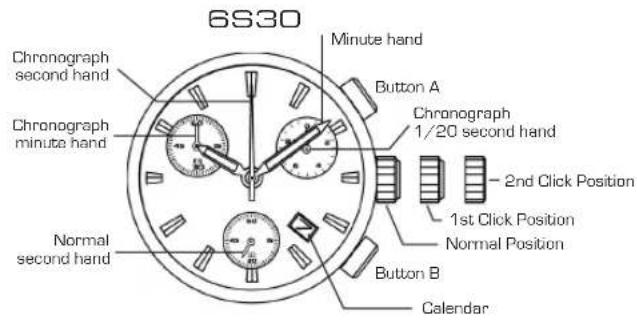
DISPLAYS AND BUTTONS
text_image
6S30 Chronograph second hand Chronograph minute hand Normal second hand Minute hand Button A Chronograph 1/20 second hand 2nd Click Position 1st Click Position Normal Position Button B CalendarILM6S30
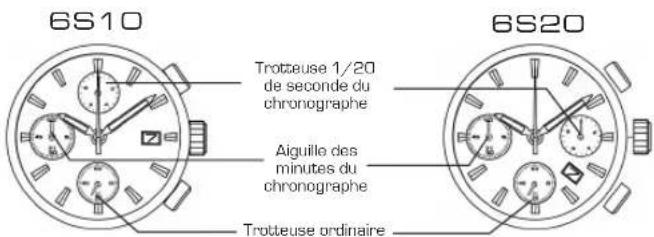
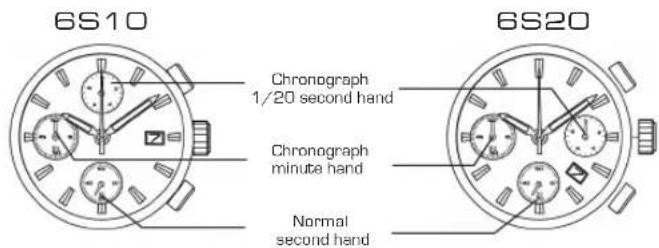
DISPLAYS AND BUTTONS
text_image
6S10 Chronograph 1/20 second hand Chronograph minute hand Normal second hand 6S20ILM6S30
SETTING THE TIME
Pull the crown out to the 2nd Click Position.1.
Turn the crown clockwise to set hour and minute hands.2.
After the time has been set, push the crown back to the Normal position.3.
SETTING THE DATE
Pull the crown out to the 1st Click Position.1.
Turn the crown clockwise to set the date. 2.
* If the date is set between the hours of around 9:00 PM and 1:00 AM, the date may not change on the following day.
After the date has been set, push the crown back to the Normal position.3.
ILM6S30
USING THE CHRONOGRAPH
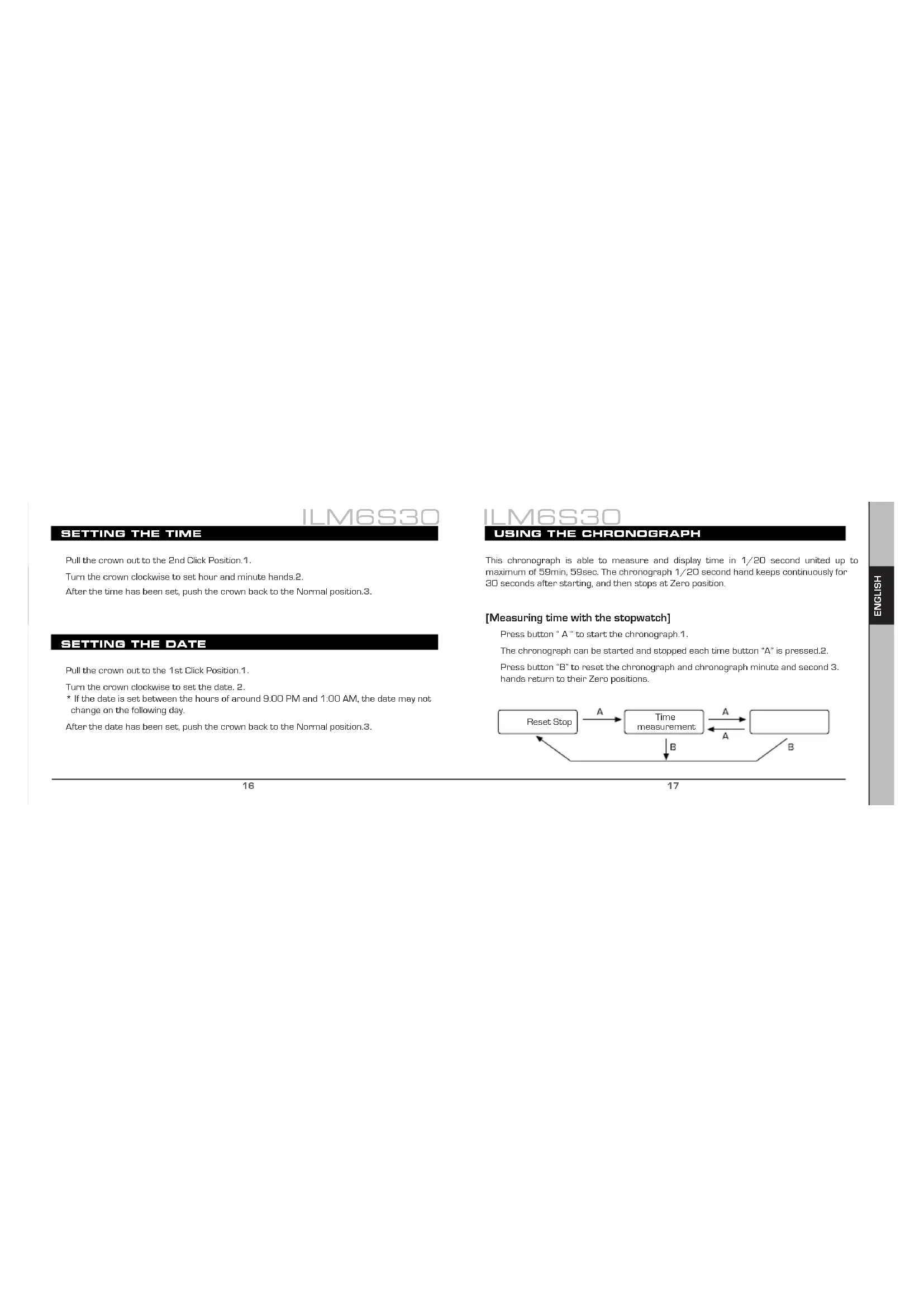
This chronograph is able to measure and display time in 1/20 second united up to maximum of 59min, 59sec. The chronograph 1/20 second hand keeps continuously for 30 seconds after starting, and then stops at Zero position.
[Measuring time with the stopwatch]
Press button "A" to start the chronograph.1.
The chronograph can be started and stopped each time button "A" is pressed.2.
Press button "B" to reset the chronograph and chronograph minute and second 3. hands return to their Zero positions.
![Lotus 10112 - [Measuring time with the stopwatch] - 1](/content/2026/03/498052/images/8f161557b53ba2020c3524a30ef675029d856228a29a7c8dde3c0f0b80c3cdfb.jpg)
flowchart
graph TD
    A["Reset Stop"] -->|A| B["Time measurement"]
    B -->|A| C["End"]
    B -->|B| A
CHRONOGRAPH RESET (incl. after replacing battery)
This procedure should be performed when the chronograph second hand does not return to the Zero position.
Pull the crown out to the 2nd Click Position.1.
Press the button "A" once to set the chronograph second hand to the Zero position.2.
Press the button "B" once to set the chronograph 1/20 second hand to the Zero position. 3.
* The chronograph hands can be advanced rapidly by continuously pressing button "A" or "B".
- Once the hands are set at Zero position, reset the time and return the crown to its normal position.

By virtue of the regulations pursuant to the handling of waste products deriving from electronic and electrical equipment, end of lifecycle watch making products must be selectively collected for processing. You may therefore dispose of your
quartz watch making products at any of our retail outlets or any other authorized collection point. The selective collection, processing, rating and recycling of these products helps contribute to safeguarding the environment and protecting our health.
LOTUS
ILM6S30
MANUEL D'INSTRUCTION
CHRONOGRAPHE
INDICATIONS ET BOUTONS
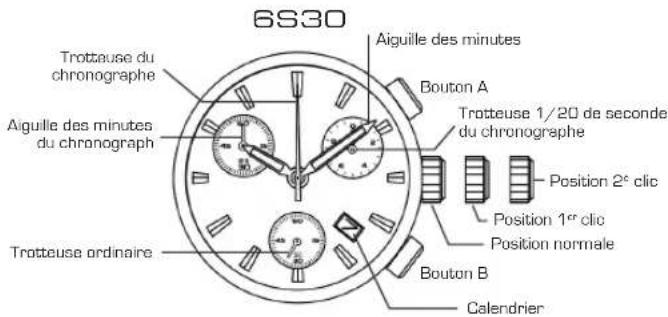
INDICATIONS ET BOUTONS