T30BB910SS - Freezer THERMADOR - Free user manual and instructions
Find the device manual for free T30BB910SS THERMADOR in PDF.


User questions about T30BB910SS THERMADOR
0 question about this device. Answer the ones you know or ask your own.
Ask a new question about this device
Download the instructions for your Freezer in PDF format for free! Find your manual T30BB910SS - THERMADOR and take your electronic device back in hand. On this page are published all the documents necessary for the use of your device. T30BB910SS by THERMADOR.
USER MANUAL T30BB910SS THERMADOR
Important safety instructions 3
Definitions 3
About these instructions 3
Introduction 3
Risk of explosion. 3
Risk of electric shock 3
Risk of cold burns 4
Risk of Injury 4
Avoiding placing children and
vulnerable people at risk 4
Damage 4
Weight 4
State of California Proposition 65Warnings. 4

Intended use 5

Environmental protection 5
Packaging 5
Old appliances 5

Installation and connection 5
Contents of package. 5
Technical data. 5
Installing the appliance 5
Check built-in cut-out. 5
Side-by-side installation 5
Saving energy 6
Before using for the first time. 7
Water connection 7
Electrical connection 7

Getting to know your appliance 8
2-door appliance 8
3-door appliance 9
Operating controls. 10
Interior fittings 10

Operating the appliance 14
Switching the appliance on. 14
Switching off and disconnecting the appliance . . . 14
Setting the language 14
Setting the temperature unit 14
Setting the temperature. 14
Super cooling. 15
Super freezing 15
Clean lock 15
Vacation mode 15
Switching ice cube production on and off . 16
Reset water filter counter. 16
Eco mode 16
Self-test 16
Setting the brightness of the control panel .16
Switching key press sound on or off 16
Setting the key volume 17
Setting the signal tone volume 17
Automatic clean lock 17
Automatic door opening 17
Switching the water filter counter on and off. 18
Switching on or switching off condensation
protection 18
Theater mode 18
Resetting to the factory settings 18
Switching demo mode on or off 18
Sabbath mode 19

Alarm. 19
Door alarm 19

Refrigerator compartment. 19
Note when storing food 19
Note the chill zones in the refrigerator
compartment 19
Vegetable container with humidity controller 20
Chill compartment 20

Freezer compartment. 20
Fully utilizing the freezer volume. 20
Purchasing frozen food. 20
When loading products 20
Freezing fresh food. 21
Thawing frozen food 21

Defrosting 22
Freezer compartment 22

Cleaning 22
Cleaning the display 22
Cleaning the appliance interior. 22
Cleaning the fittings 22
Care instructions for stainless steel surfaces . . . 22

Odors. 23
Changing the odor filter 23

Lighting. 23

Noises 23
Normal noises 23
Preventing noises 23

Faults - what to do? 24
Appliance 24
ice maker 25

Customer service. 26
Appliance self-test 26
Repair order and advice on faults 26

Important safety instructions
READ INSTRUCTIONS - DO NOT DISCARD!
Definitions

WARNING
Non-observance of this warning could result in death or serious injuries.

CAUTION!
Non-observation of this warning could result in slight or moderately serious injuries.
NOTICE: Non-observation of this information could damage the appliance.
Note: This indicates important information and/or tips.
About these instructions
- Read and follow the operating and installation instructions. They contain important information on how to install, use and maintain the appliance.
The manufacturer is not liable if you disregard the instructions and warnings in the operating and installation instructions. - Retain all documents for subsequent use or for the next owner.
Introduction
This appliance complies with the relevant safety regulations for electrical appliances.
- The refrigeration circuit has been checked for leaks.
Risk of explosion
- Never use electric devices inside the appliance (e.g. heaters or electric ice makers).
- Do not store products which contain flammable propellants (e.g. spray cans) or explosive substances in the appliance.
Only store high-proof alcohol tightly closed and standing up.
Risk of electric shock
Improper installations and repairs may put the user at considerable risk.
If the power cord is damaged: Immediately disconnect the appliance from the power supply.
- Do not use multiple outlets, extension leads or adapters.
Before servicing or modifying the appliance, pull out the power plug or switch off the circuit breaker. Before cleaning the appliance, press the main On/Off switch to switch the appliance off. Glass shelves or other fittings can be safely moved while the appliance is switched on.
- Never cut through or remove the third (ground) conductor of the power cord.
- Never defrost or clean the appliance with a steam cleaner. The steam may penetrate electrical parts and cause a short circuit.
- Have the appliance, cable and accessories repaired or replaced by the manufacturer, Customer Service or a similarly qualified person only.
Use original parts supplied by the manufacturer only. The manufacturer guarantees that these parts satisfy the safety requirements.

Important safety instructions
READ INSTRUCTIONS - DO NOT DISCARD!
Risk of cold burns
- Never put frozen food straight from the freezer compartment into your mouth.
- Avoid prolonged contact of skin with frozen food, ice and the tubes in the freezer compartment.
Risk of Injury
Containers which contain carbonated drinks may burst.
Do not store containers which contain carbonated drinks in the freezer compartment.
Avoiding placing children and vulnerable people at risk
At risk are:
Children,
People who have limited physical, mental or sensory abilities,
People who have inadequate knowledge concerning safe operation of the appliance.
Measures:
- Never allow children to play with the appliance.
- Ensure that children and vulnerable people have understood the hazards.
Supervise children who are cleaning and maintaining the appliance.
Risk of suffocation
If the appliance features a door lock: keep the key out of the reach of children.
- Keep children away from the packaging and its parts.
Damage
To prevent damage:
- Do not stand or support yourself on the base, runners or doors.
- Keep plastic parts and door seals free of oil and grease.
- Pull the power cord plug - not the power cord.
Weight
The appliance is very heavy. The appliance should always be transported and set up by at least 2 people.
"Installation and connection" on page 5
State of California Proposition 65 Warnings

WARNING
This product contains chemicals known to the State of California to cause cancer, birth defects or other reproductive harm.

Intended use
Use this appliance
only for cooling and freezing food and for making ice.
only in the home and in the home environment.
only according to these operating instructions.
This appliance is intended for use at an elevation of no more than 2000 meters above sea level.

Environmental protection
Packaging
All materials are environmentally safe and recyclable:
- Dispose of packaging in an environmentally responsible manner.
Please ask your dealer or inquire at your local authority about current means of disposal.
Old appliances
Valuable raw materials can be reclaimed by recycling old appliances.

WARNING
CHILDREN MAY BECOME LOCKED IN THE APPLIANCE AND SUFFOCATE!
Before disposing of your old appliance:
Remove the door.
- Leave shelves and containers in the appliance to prevent children from climbing in.
- Keep children away from the discarded appliance.

CAUTION!
REFRIGERANT AND HARMFUL GASES MAY ESCAPE.
Do not damage the tubes of the refrigeration circuit and insulation.
- Pull out the power cord plug.
- Cut through the power cord.
- Have the appliance disposed of properly.

Installation and connection
Contents of package
After unpacking all parts, check for any damage during transport.
If you have any complaints, please contact the dealer from whom you purchased the appliance or our customer service.
"Customer service" on page 26
The delivery consists of the following parts:
Built-in appliance
Interior fittings (depending on model)
Installation material
Instruction manual
Installation instructions
Customer service booklet
Guarantee enclosure
Information on the energy consumption and noises
Technical data
Refrigerant, cubic capacity and further technical specifications can be found on the rating plate. "Getting to know your appliance" on page 8
Installing the appliance
Installation location
The weight of the appliance may be up to 460kg depending on the model. The base must be sufficiently stable and should not give. If necessary, reinforce the bottom.
Check built-in cut-out
The cut-out must fulfill these criteria:
Anti-tilt bracket must be fitted
Cut-out depth min. 24" (610 mm), for flush installation 25" (635 mm)
rectangular
stable - the side panels and the top must be min. 5 / 8'' (16 mm) thick and securely attached to the floor or wall
Depth of shortest side panels min. 4" (100 mm)
Side-by-side installation
Observe the specifications in the installation instructions for a side-by-side installation.
If a partition wall is required between the appliances it must be at least 5 / 8'' (16 mm) wide.
Saving energy
If you follow the instructions below, your appliance will use less power.
Note: The arrangement of the fittings does not affect the energy consumption of the appliance.
| Installing the appliance | |
| Keep the appliance out of direct sunlight. The appliance needs to cool less frequently at low ambient temperatures and therefore consumes less power. | |
| Install the appliance as far away as possible from heating elements, cooker and other heat sources:At least 1¼" (3 cm) from electric or gas cookers.At least 11¾" (30 cm) from oil or solid-fuel cookers.NOTICE: If this is not possible, attach an insulating plate between the appliance and heat source. | |
| Select an installation location at a room temperature of approx. 68 °F (20 °C). | |
| Do not cover or block the ventilation openings. The appliance needs to cool less frequently if the warm air can escape and therefore consumes less power. | |
| Ventilate the room daily. | |
| Using the appliance | |
| Open the appliance door only briefly. | The air in the appliance does not warm up so intensely. The appliance needs to cool less frequently and therefore consumes less power. |
| Transport purchased food in a cool bag and place in the appliance quickly. | |
| Allow warm food and drinks to cool down before placing in the appliance. | |
| Thaw frozen food in the refrigerator compartment to utilize the low temperature of the frozen food. | |
| Always leave a space between the food and the back panel. | The air can circulate and the humidity will remain constant. The appliance needs to cool less frequently and therefore consumes less power. |
| Pack food airtight. | |
| Do not cover or block the ventilation openings. The appliance consumes less power if the warm air can escape. | |
| Vacuum the ventilation openings once a year. | |
Before using for the first time
- Remove information material, adhesive tape and protective foil.
- Clean the appliance.
"Cleaning" on page 22
Water connection

CAUTION!
Installation and connection of the appliance must be carried out by authorized technicians according to the installation instructions supplied.
To avoid damage to the appliance and to ensure its proper functioning, it should only be connected to a drinking water system.
To avoid water damage, a shut-off valve must be installed.
Water pressure of drinking water system

CAUTION!
To avoid damage to the appliance, a pressure relief valve must be installed between the drinking water connection and the tubing, should the water pressure exceed the maximum value.
Note: If the water pressure is too low, this will impair the relevant functions of the appliance.
Min. 0.2 Mpa (2 bar / 29 psi)
Max. 0.8 Mpa (8 bar / 116 psi)
Electrical connection

CAUTION!
Do not connect the appliance to electronic energy saver plugs.
Note: You can connect the appliance to mains-controlled and sine-controlled inverters.
Mains-controlled inverters are used for photovoltaic systems which are connected directly to the national grid. Sine-controlled inverters must be used for isolated applications. Isolated applications, e.g. on ships or in mountain lodges, are not directly connected to the national grid.
- After installing the appliance, wait at least 1 hour before connecting it to prevent damaging the compressor.
- Connect the appliance via a correctly installed outlet.

WARNING
RISK OF ELECTRIC SHOCK!
Never use multiple outlets, extension leads or adapters.
The appliance must be correctly grounded. Never cut through or remove the third (ground) conductor of the power cord.
Requirements for outlets
Outlet with 110 V ... 120 V
Protective conductor 60 Hz
Fuse 10 A ... 16 A
Maximum simultaneous load
Appliance 6 A
- Connect the appliance to an outlet near the appliance.
The outlet must also be freely accessible following installation of the appliance.

WARNING
RISK OF ELECTRIC SHOCK!
If the length of the power cord is inadequate, never use multiple outlets or extension leads. Instead, please contact Customer Service for alternatives.

Getting to know your appliance
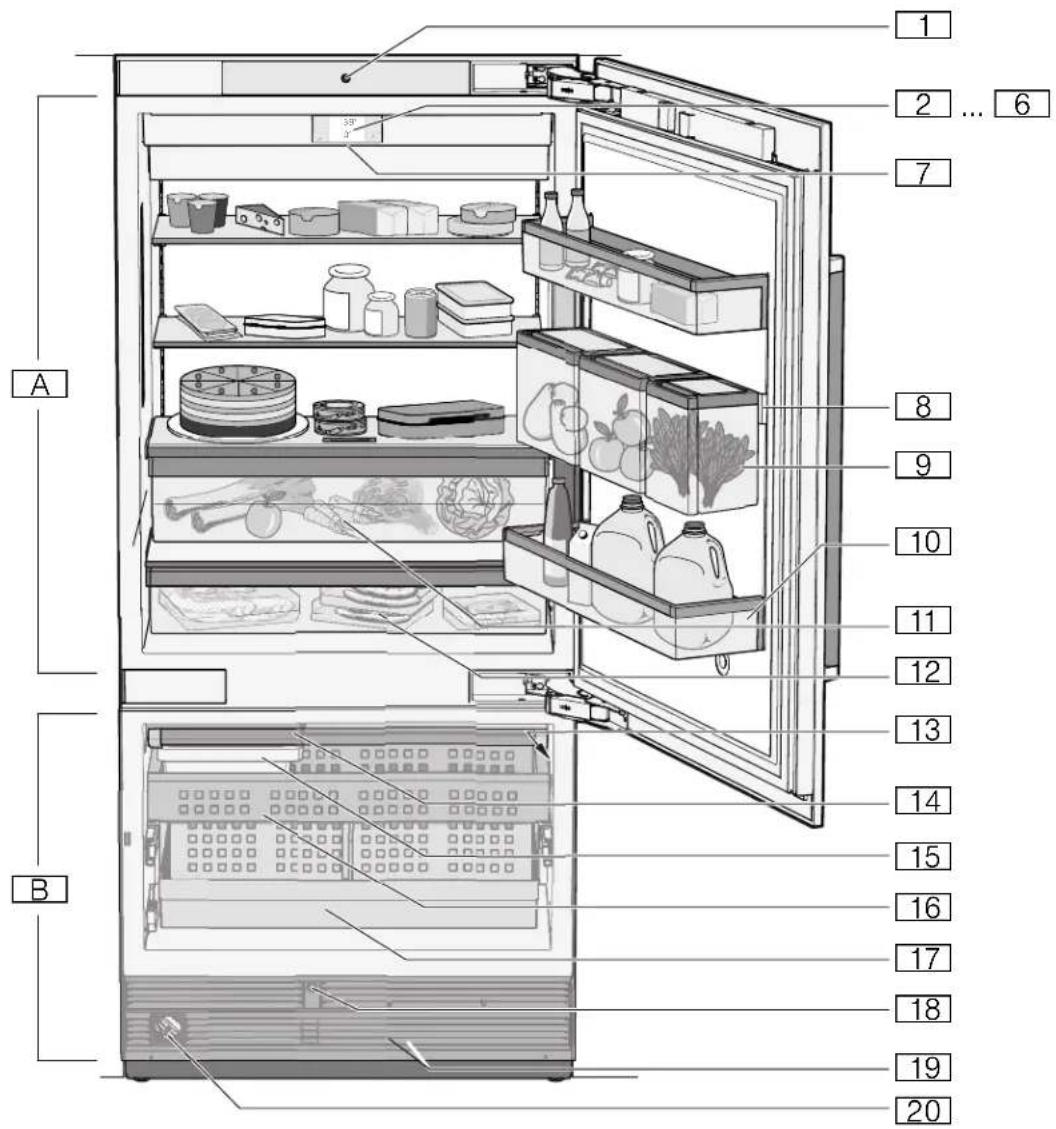
2-door appliance
A Refrigerator compartment
Freezer compartment
Automatic door opening refrigerator compartment
2...6Operating controls
7Main On/Off switch
Rail for suspending the Produce Bin
9 Produce Bin
10 Shelf for large bottles
Vegetable container with humidity controller
12Chiller compartment
13Rating plate
14 Ice maker
15 Ice cube container
16 Frozen food container
17 Frozen food container (large)
Automatic door opening freezer compartment
19 Ventilation opening
20Water filter
3-door appliance
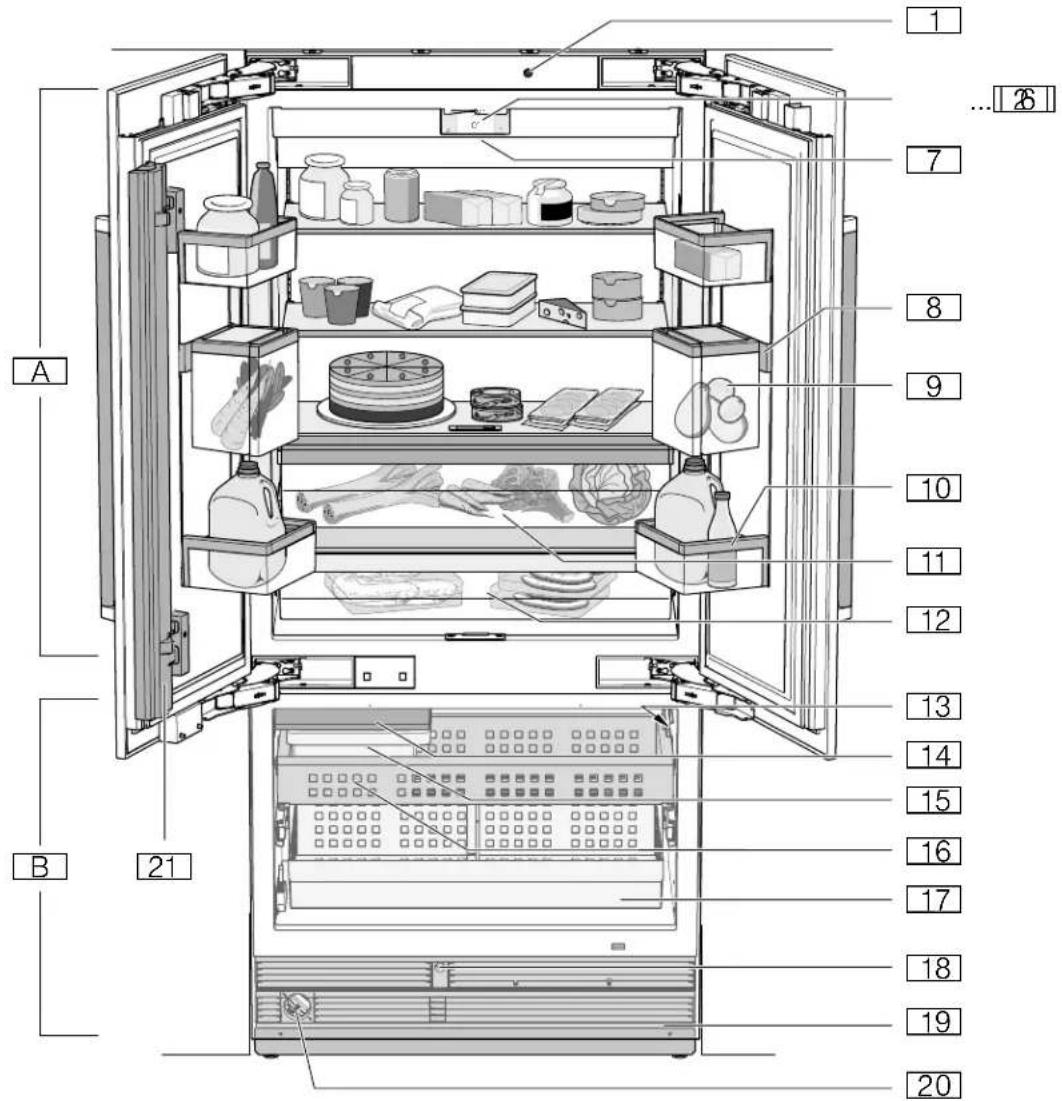
A Refrigerator compartment
Freezer compartment
19 Ventilation opening
20Water filter
21Door pillar with condensation protection
1Automatic door opening
2 ... 6 Operating controls
7MainOn/Off switch
Rail for suspending the Produce Bin
9 Produce Bin
10 Shelf for large bottles
11Vegetable container with humidity controller
12Chiller compartment
13Rating plate
14 Ice maker
15 Ice cube container
16 Frozen food container
17 Frozen food container (large)
18Automatic door opening freezer compartment
Operating controls
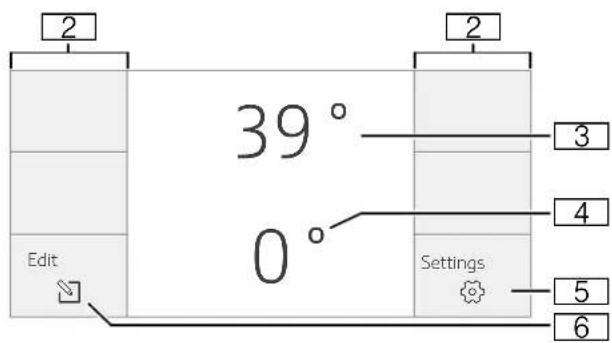
2 Touch fields
There are sensors under the touch fields.
Touching the symbol calls up the respective function.
3 Refrigerator compartment temperature display
Indicates the set temperature in ^ C / ^ F
4 Freezer compartment temperature display Indicates the set temperature in ^ C / ^
5 bulton
Opens the Settings menu.
"Settings menu" on page 10
6 button
Opens the menu for changing the temperature.
Settings menu
Press the button to open the menu.
In the Settings menu, you will find:
Appliance settings
Cleaning mode
Vacation mode
Ice cube production
Reset water filter counter
Eco mode
Self-test
Sabbath mode (if activated)
"Operating the appliance" on page 14
Appliance settings menu
This is how to navigate to the Appliance settings menu:
- Press the button.
- Scroll to the left to the Appliance settings menu.
- Open the menu using the × button.
In the Appliance settings menu, you will find the following sub-menus and setting options:
Brightness
Key press sound
Key volume
Signal tone volume
Automatic clean lock
Automatic door opening refrigerator compartment
Automatic door opening freezer compartment
Reset water filter
Prevent condensation (only on 3-door appliance)
Theater mode
Temperature unit
Language
Factory settings
Demo mode
Sabbath mode
"Operating the appliance" on page 14
Interior fittings
(not all models)
Storage compartment
You can remove and adjust the height of the storage compartments:
- Lift up the storage compartment and remove.
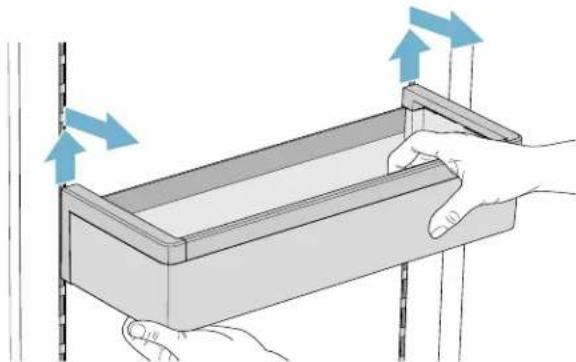
- When re-inserting, insert hooks on back of storage compartment at same height to make it level.
Note: Insert the storage compartment carefully to avoid scratching the appliance.
Shelf
You can remove and adjust the shelf:
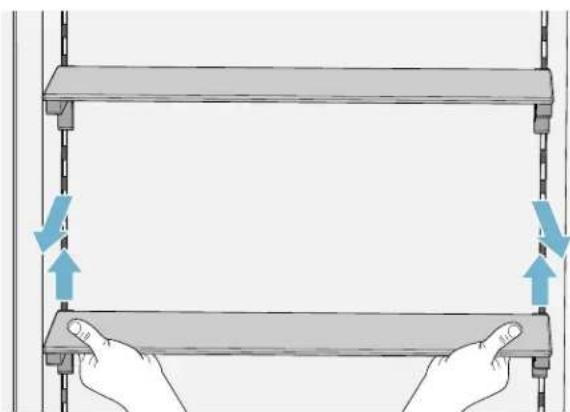
- Lift shelf and remove.
- When re-inserting, insert hooks on back of shelf at same height to make it level.
Note: Insert shelf carefully to avoid scratching the appliance.
Produce Bin
You can remove the inner container:
- Open the inner container just a gap.
- Lift the inner container and remove it.
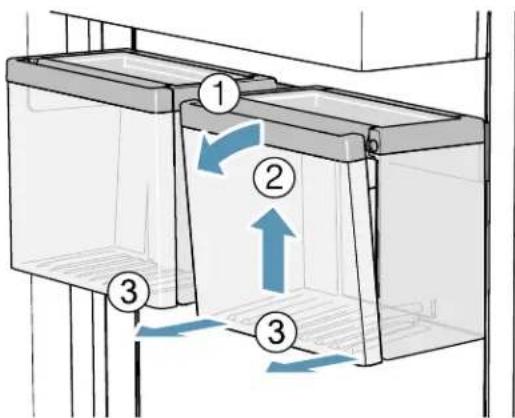
You can insert the inner container:
Guide the suspension of the inner container into the openings of the outer container.
- Fold the inner container shut.
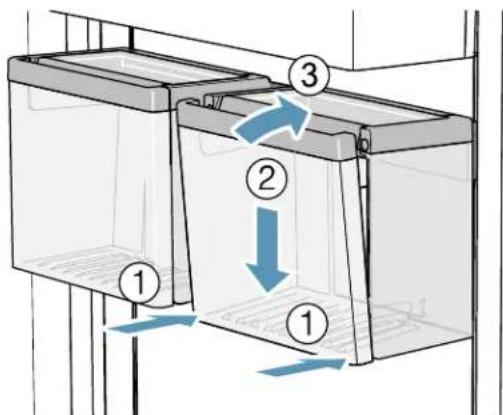
You can remove the Produce Bin:
Lift the Produce Bin.
- Lift the rail for suspending the Produce Bin and remove it.
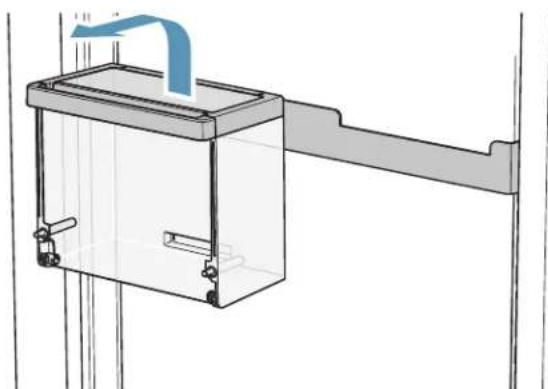
You can insert the Produce Bin:
Insert the rail for suspending the Produce Bin in the desired position.
Note: Insert the rail carefully to avoid scratches to the appliance.
Insert the Produce Bin into the rail recesses provided for this purpose.
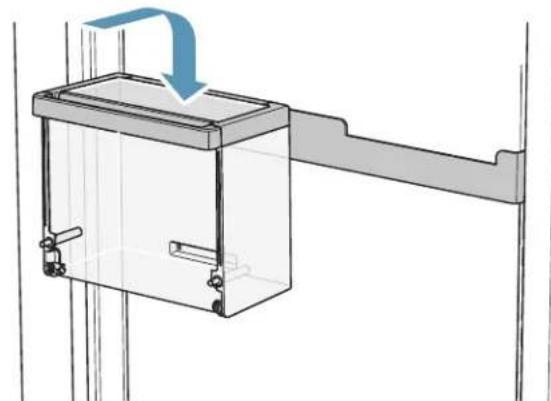
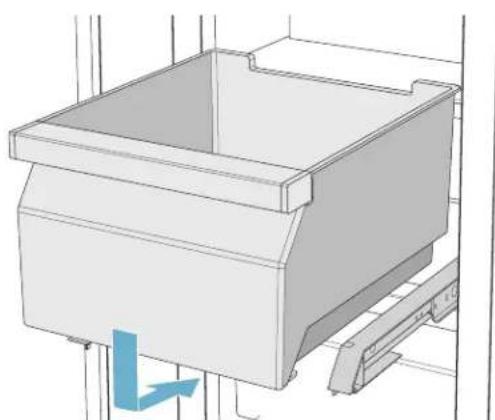
Container
You can remove the container:
Press container to the rear,
- lift the container at the rear and remove.
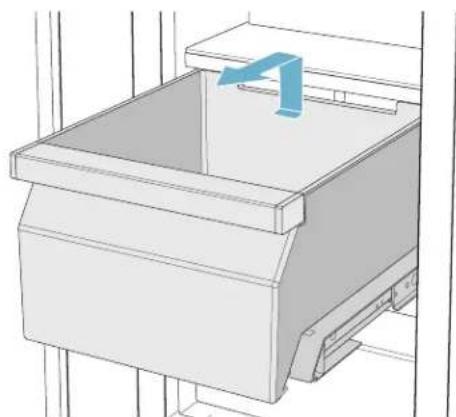
You can insert the container:
Pull out telescopic rails all the way
- Place the container on the telescopic rails and push into the appliance until it engages.
Ice pack
In the event of a power failure or a fault:
The ice pack delays the warming of stored frozen food.
Note: The longest storage time is obtained by placing the ice pack on the food in the top compartment.
You can take out the ice pack to temporarily keep food cool, e.g. in a cool bag.
Ice maker

CAUTION!
DAMAGE TO THE APPLIANCE!
Never store bottles or food in the ice cube container, even for short periods. This can block and damage the ice maker.
Ice cube production starts as soon as the appliance has reached the set temperature.
Note: Ice cube production stops automatically when the ice cube container is full.
Information about switching ice cube production on and off
"Switching ice cube production on and off" on page 16
Water filter
The water filter must be replaced after 6 months at the latest.
If the ice tastes stale, discard the rest of the ice cubes and the ones produced over the next 24 hours. If the ice still tastes stale, change the water filter.
A new water filter or a particle filter can be obtained from customer service or a specialist dealer.
Note: You can also use the appliance without a water filter. Replace the water filter with a particle filter and switch the water filter counter off. There is no need to change the particle filter.
Changing the water filter or replacing with a particle filter
You can change the water filter, or replace it with a particle filter. The particle filter can remain in the appliance permanently: it does not need to be changed.
Note: After installing a new water filter, discard all ice cubes produced over the first 24 hours.
- Turn the cap of the water filter clockwise.
- Take the water filter out.
- Remove the protective cap of the new filter.
- Take off the cap of the old water filter and put it on the new filter.
- Slide the new filter to the stop in the filter opening.
Note: The cap must be horizontal here.
- Turn the water filter counterclockwise to the stop.
- When using a water filter: Reset water filter counter.
"Reset water filter counter" on page 16
When using a particle filter: Switch off the water filter counter.
"Switching the water filter counter on and off" on page 16 - Discard the ice cubes produced over the first 24 hours.
- Drain the water out of the old water filter.
Note: You can dispose of the old water filter with your household garbage.
Specification and Performance Data Sheet
Only for appliances with filter model: 9000 777 508
When using replacement cartridge: 9000 674 655
The concentration of the indicated substances dissolved in water entering the system was reduced to a concentration less than or equal to the permissible limit for water leaving the system as specified in ANSI/NSF Standard 42 and Standard 53.

System tested and certified by NSF International against ANSI/NSF Standard 53 and Standard 42 for the reduction of the claims specified on this Specification and Performance Data Sheet.
Capacity: 739.68 gallons/2,800 liters
Contaminant Reduction Determined by NSF testing.
| Contaminant Reduction Chlorine Taste and Odor | Nominal Particulate Class 1, >/-0.5 to <1.0 μm | Cysts* Turbidity | ||
| Average Influent | 2.1 mg/L | 9,100,000 pts/mL | 170,000 cysts/L | 11 NTU |
| NSF specified Challenge Concentration 2.0 mg/L +/- 10% At least 10,000 particles/mL Minimum | 50,000 cysts/L | 11 +/- 1 NTU | ||
| Avg. % Reduction 97.6% 98.8% 99.99% 98.1% | ||||
| Average Product Water Concentration | 0.05 mg/L | 111,817 pts/mL | 0.001 cyst/L | <1 NTU |
| Max. Permissible Product Water Concen- tration | N/A | N/A | N/A | 0.5 NTU |
| NSF Reduction Requirements | >/-50% | >/-85% | >/-99.95% | 95% |
| NSF Test Report | J-00121313 | J-00099871 | J-00109715 | J-00099885 |
- Based on the use of Cryptosporidium parvum oocysts.
| Application Guidelines/Water Supply Parameters | |
| Service Flow | 0.75 gpm (2.83 lpm) |
| Water Supply | Potable Water |
| Water Pressure | 30 ... 120 psi 207 ... 827 kPa |
| Water Temperature* | 33 °F ... 100 °F 0.6 °C ... 38 °C |
It is essential that the manufacturer's recommended installation, maintenance and filter replacement requirements are carried out as specified. See manufacturer's documentation for warranty information.
Note: While the testing was performed under standard laboratory conditions, actual performance may vary.
More detailed information on the prices of spare parts is available from your local appliance dealer or parts vendor.

WARNING
TO REDUCE THE RISK ASSOCIATED WITH INGESTION OF CONTAMINANTS:
Do not use with water that is microbiologically unsafe or of unknown quality without adequate disinfection before and after connection to the system. Systems certified for cyst reduction may be used on disinfected water that may contain filterable cysts. EPA Establishment Number 10350-MN-005

CAUTION!
To reduce the risks associated with property damage due to water leakage:
- Read and follow user instructions before installation and use of this system.
Installation and use must comply with all state and local plumbing codes.
Do not install if water pressure exceeds 120 psi/827 kPa. If your water pressure exceeds 80 psi, you must install a pressure limiting valve. - Contact a plumbing professional if you are uncertain how to check your water pressure.
- Do not install where water hammer conditions may occur. If water hammer conditions exist, you must install a water hammer arrester. Contact a plumbing professional if you are uncertain how to check for this condition.
- Do not install on hot water supply lines. The maximum operating water temperature of this filter system is 100^ (38 °C).
- Protect filter from freezing. Drain filter when temperatures drop below 33^ (1^) .
The disposable filter cartridge must be replaced no later than every 6 months at the rated capacity, or if a noticeable reduction in flow rate occurs.
Manufactured by:
3M Purification Inc.
400 Research Parkway Meriden, Ct 06450
Tel. (800) 222-7880
Tel. (203) 237-5541
3M is a trademark of 3M Company used under license. NSF is a trademark of NSF International.
© 2013 3M Company. All rights reserved.

Operating the appliance
Switching the appliance on
- Press the main On/Off switch.
The appliance starts cooling and the light is switched on when the door is open.
- Set the required temperature.
"Setting the temperature" on page 14
Operating tips
- When the appliance has been switched on, it may take several hours until the set temperatures have been reached. Do not put in any food until the selected temperature has been reached.
The fully automatic NoFrost system ensures that the freezer compartment remains free of ice. Defrosting is not required.
The front sides of the housing are partly heated slightly. This prevents condensation in the area of the door seal.
If the freezer compartment door cannot be immediately re-opened after it has been closed, wait until the resulting low pressure has equalized.
Switching off and disconnecting the appliance
Switching off the appliance
Press the main On/Off switch.
The appliance is no longer cooling.
Disconnecting the appliance

CAUTION!
Deterioration in water quality The water supply must be turned off 3 hours before disconnecting. This prevents mold forming with any unused water.
If you do not use the appliance for a prolonged period:
- Turn off the water supply to the appliance and wait 3 hours.
- Remove groceries.
- Press the main On/Off switch.
- Pull out the mains plug or switch off the fuse. The appliance is no longer cooling.
- Empty the ice cube container and clean the appliance. "Cleaning" on page 22
- Leave appliance open.
Setting the language
- Press button to open the Settings menu.
- Press < button to move to the menu item Appliance settings.
- Press l button.
- Press < button to move to the menu item Language.
- Press button.
- Use buttons to move to the required language.
- Press × button. The display restarts, and the start screen is displayed.
Setting the temperature unit
You can choose between the unit ^ C and ^ F .
1^ < > 1^
1^≤slant 1^
- Press button to open the Settings menu.
- Press < button to move to the menu item Appliance settings.
- Press × button.
- Use < button to move to the menu item Temperature unit.
- Press button.
- Use buttons to move to the required unit.
- Press button.
The unit will be changed.
- Press button to exit the menu.
Setting the temperature
Recommended temperature
Cooling compartment: +39^ F (+4^ C)
Freezer compartment: 0^ (-18^)
Setting the refrigerator and freezer compartment temperature
- To open the menu for setting the temperature, press the button.
- Use the button to select the desired compartment.
- Keep pressing the ± button until the display indicates the required temperature.
- Confirm the selection by pressing the × button. If the button is not pressed, the appliance stores the setting and automatically returns to the main screen after a few seconds.
Super cooling
Super cooling cools the refrigerator compartment as cold as possible.
Switch on super cooling, e.g.:
Before placing large quantities of food into the compartment
For cooling drinks quickly
Note: When super cooling is switched on, increased operating noises may occur.
After approx. 6 hours, the appliance switches to normal operation.
Switching on super cooling:
- To open the menu for setting the temperature, press the button.
- Press the 8 button.
When super cooling is switched on, the symbol appears on the display.
3. Confirm the selection by pressing the × button. If the button is not pressed, the appliance stores the setting and automatically returns to the main screen after a few seconds.
Switching off super cooling:
- To open the menu for setting the temperature, press the button.
- Press the % button.
When super cooling is switched off, the symbol disappears from the display.
3. Confirm the selection by pressing the × button. If the button is not pressed, the appliance stores the setting and automatically returns to the main screen after a few seconds.
Super freezing
Super freezing cools the freezer compartment as cold as possible.
Switch on super freezing, e.g.:
to freeze food solid as quickly as possible
4 ... 6 hours before freezing food weighing 2kg or more
to use the max. freezing capacity
Note: When super freezing is switched on, increased operating noises may occur.
After approx. 212 days the appliance switches to normal operation.
Switching on super freezing:
- To open the menu for setting the temperature, press the button.
- Use the button to select the desired compartment.
- Press the button.
When super freezing is switched on, the symbol 喜 appears on the display.
- Confirm the selection by pressing the × button. If the button is not pressed, the appliance stores the setting and automatically returns to the main screen after a few seconds.
Switching off super freezing
- To open the menu for setting the temperature, press the button.
- Use the button to select the desired compartment.
- Press the button.
When super cooling is switched off, the symbol disappears from the display.
- Confirm the selection by pressing the × button. If the button is not pressed, the appliance stores the setting and automatically returns to the main screen after a few seconds.
Clean lock
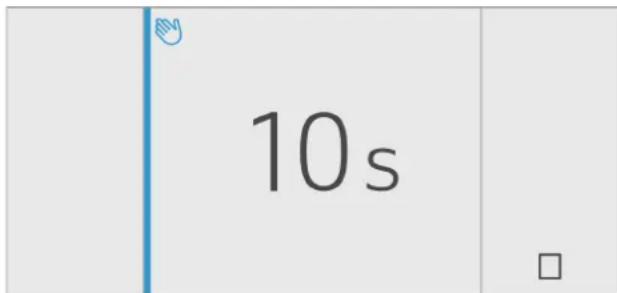
You can use this function to switch off the touch function of the controls for 10 seconds. During this time you can clean the display.
"Cleaning the display" on page 22
-
Press button to open the Settings menu.
-
Press button.
The cleaning display appears, and the countdown starts.
Automatic clean lock
You can use this function to select whether the automatic clean lock is switched on automatically when the door is opened.
- Press button to open the Settings menu.
- Press < button to move to the menu item Appliance settings.
- Press button.
- Press > button to move to the menu item Automatic clean lock.
- To change the setting, press button.
Vacation mode
If leaving the appliance for a long period of time, you can switch it over to energy-saving Vacation mode.
Note: The refrigerator compartment temperature is switched to +57^ F (+14^ C). Do not store any food in the refrigerator compartment during this time.
The appliance automatically sets the following temperatures:
Refrigerator compartment: +57^ F (+14^ C)
Freezer compartment: unchanged
Ice cube production is deactivated.
Switching Eco mode on or off
- Press the 念 button to open the Settings menu.
- Use the > button to move to the menu item Eco mode.
- Press the / button.
The temperature is changed, and the display shows the new temperature.
Note: You can also switch Eco mode on or off by adjusting the temperature with the +/- buttons.
Switching ice cube production on and off

CAUTION!
Damage to the appliance! Never store bottles or food in the ice cube container, even for short periods. This can block and damage the ice maker.
Ice cube production starts as soon as the appliance has reached the set temperature.
Note: Ice cube production stops automatically when the ice cube container is full.
Switching ice maker on or off
- Press button to open the Settings menu.
- Use > button to move to the menu item Ice cube production.
- Press / button.
Reset water filter counter
After replacing the water filter, you have to reset the water filter counter.
- Press button to open the Settings menu.
- Press > button to move to the menu item Reset water filter counter.
- Press × button to confirm, and confirm the query again with × button.
Note: The water filter counter will not be reset if you abort the query or take longer than 10 seconds to make an input.
Switching the water filter counter on and off
If you have replaced the water filter with a particle filter, switch the water filter counter off. It is not needed in this case as the particle filter does not have to be replaced.
- Press button to open the Settings menu.
- Scroll to the left to the Appliance settings menu.
- Press × button.
- Press > button to move to the menu item Water filter counter.
- To change the setting, press button.
Eco mode
Eco mode switches the appliance to energy-saving operation.
The appliance automatically sets the following temperatures:
Refrigerator compartment: +43^ F (6^)
Freezer compartment: +3^ F (-16^)
Switching Eco mode on or off
- Press the button to open the Settings menu.
- Use > button to move to the menu item Eco mode.
- Press / button.
The temperature is changed, and the display shows the new temperature. When Eco mode is switched off, the recommended temperature is set.
Note: You can also switch Eco mode on or off by adjusting the temperature with the +/- buttons.
Self-test
This function can be used to start fault analysis on your appliance.
"Appliance self-test" on page 26
Setting the brightness of the control panel
- Press button to open the Settings menu.
- Press < button to move to the menu item
Appliance settings. - Press l button.
- Press button to open the menu item Brightness.
- Use < > buttons to set the required brightness.
- Press × button.
The setting is saved.
- Press button to exit the menu.
Switching key press sound on or off
You can switch the sounds generated when pressing keys off and back on again.
- Press button to open the Settings menu.
- Press < button to move to the menu item
Appliance settings. - Press × button to open the menu item.
- Press > button to move to the menu item Key press sound.
- Press button to open the menu item.
- Use < > buttons to select the required setting.
- Press × button.
The setting is saved.
- Press button to exit the menu.
Setting the key volume
You can adjust the volume level of the sounds generated when pressing keys.
- Press button to open the Settings menu.
- Press < button to move to the menu item Appliance settings.
- Press button to open the menu item.
- Press > button to move to the menu item Key volume.
- Press button to open the menu item.
- Use <≥ buttons to select the required setting.
- Press × button. The setting is saved.
- Press button to exit the menu.
Setting the signal tone volume
You can adjust the volume level of the signal tones generated e.g. with alarms.
- Press button to open the Settings menu.
- Press < button to move to the menu item Appliance settings.
- Press × button to open the menu item.
- Use > button to move to the menu item Signal tone volume.
- Press button to open the menu item.
- Use buttons to select the required setting.
- Press × button.
The setting is saved.
- Press button to exit the menu.
Automatic clean lock
You can use this function to select whether the automatic clean lock is switched on automatically when the door is opened.
- Press button to open the Settings menu.
- Press < button to move to the menu item Appliance settings.
- Press button.
- Press > button to move to the menu item Automatic clean lock.
- To change the setting, press button.
Automatic door opening

CAUTION!
Repeatedly closing the door too early will cause automatic door opening to fail or wear out. Do not close the door as long as automatic door opening is still moved out.
If you have however closed the door, leave it closed for 5 minutes. Automatic door opening will re-adjust itself.
The automatic door opening function supports you in opening the door. As soon as you activate this function, automatic door opening moves out and supports you in opening the door.
Open menu item Aut. door opening of refrigerator compartment:
- Press the 念 button to open the Settings menu.
- Press < button to move to the Appliance settings menu.
- Press × button.
- Press > button to move to menu item Autdoor opening D.
- To change the setting, press the button.
Open menu item Aut. door opening of freezer compartment:
- Press the 念 button to open the Settings menu.
- Press < button to move to the Appliance settings menu.
- Press × button.
- Press > button to move to menu item Autdoor opening
- To change the setting, press the button.
Switching on Push-to-open system
In an installation situation without handles you can select the Push-to-open system. Your appliance will then open a crack if you press lightly on the door.
- Open menu item Aut. door opening of refrigerator compartment or freezer compartment.
- Select menu item Push-to-open system.
- Press l button.
- Select menu item Opening force. Here you can select the level of force required to activate automatic door opening.
- Select menu item Opening duration. Here you can select how long the door should remain open a crack before it closes again automatically.
Note: If the door only remains open a crack, the appliance checks once a second whether the door is still ajar. After the selected opening time elapses, the appliance will close the door automatically.
Switching on Pull-to-open system
In an installation situation with handles you can select the Pull-to-open system. Your appliance will support you in opening the door as soon as you pull on the handle.
- Open menu item Aut. door opening of refrigerator compartment or freezer compartment.
- Select menu item Pull-to-open system.
- Press × button.
- Select menu item Opening force. Here you can select the level of force required to activate automatic door opening.
Switching off automatic door opening
- Open menu item Aut. door opening.
- Select menu item Off.
- Press button.
Switching the water filter counter on and off
If you have replaced the water filter with a particle filter, switch the water filter counter off. It is not needed in this case as the particle filter does not have to be replaced.
- Press button to open the Settings menu.
- Scroll to the left to the Appliance settings menu.
- Press button.
- Press > button to move to the menu item Water filter counter.
- To change the setting, press button.
Switching on or switching off condensation protection
This function is only available with 3-door appliances. 3-door appliances are equipped with a door pillar with condensation protection.
You can open the left-hand door of the refrigerator compartment without opening the right-hand door beforehand.

CAUTION!
Never unfold the door pillar when the door is open! It will get jammed when the door is closed and be damaged or the front panels of the right-hand door will be damaged.
A heater is built into the pillar to prevent condensation. This can be switched on or off.
- Press the button to open the Settings menu.
- Use the < button to move to the menu item Appliance settings.
- Press × button.
- Press the > button to move to the menu item Prevent condensation.
- To change the setting, press the button.
Theater mode
If Theater mode is switched on, the light will slowly become brighter when the appliance is opened, and then slowly darker when it is closed.
Switching Theater mode on or off
- Press button to open the Settings menu.
- Press < button to move to the menu item Appliance settings.
- Press × button to open the menu item.
- Use > button to move to the menu item Theater mode.
- Press button to open the menu item.
- Use > button to move to the menu item On or Off.
- Press l button.
The setting is saved.
- Press button to exit the menu.
Resetting to the factory settings
- Press button to open the Settings menu.
- Press < button to move to the menu item Appliance settings.
- Press button.
- Use < button to move to the menu item Factory settings.
- Press button.
A signal tone sounds, and a message to confirm reset appears.
- Press × button.
All settings are reset to the factory settings. - Press button to exit the menu.
Switching demo mode on or off
The cooling function of the appliance is switched off. All other functions can be used.
Note: Do not store any food items in demo mode as the appliance remains at room temperature.
- Press button to open the Settings menu.
- Press < button to move to the menu item
Appliance settings. - Press button.
- Use < button to move to the menu item Demo mode.
- Press button.
- Use buttons to select the setting On or Off
- Press l button.
The setting is saved.
- Press button to exit the menu.
Sabbath mode
The appliance switches off the following:
Automatic door opening
Ice maker
Audible signals
Interior light
Messages on the control panel
Background illumination of control panel is reduced
Switching Sabbath mode on or off
Displaying Sabbath mode in the Settings menu
To use Sabbath mode, you first have to display the function in the Settings menu:
- Press button to open the Settings menu.
- Press < button to move to the menu item Appliance settings.
- Press × button.
- Press < button to move to the menu item Sabbath mode. Press button.
- Press < button to move to the menu item Available. Confirm by pressing button. The function is added to the Settings menu.
Switching on Sabbath mode
- Press button to open the Settings menu.
- Press button to open the view Duration Sabbath mode.
- Select one of the preset settings or change the duration with the +/- buttons.
- Press button to start. The appliance switches all listed functions off.
Switching Sabbath mode off
After the selected time elapses, the appliance switches over to normal operation.
To end Sabbath mode before expiry of the selected time, press button.

Alarm
Door alarm
If the appliance door is open for a long time, the door alarm (continuous audible signal) switches on.
Close door.
The audible warning signal is switched off.
Refrigerator compartment
The refrigerator compartment is suitable for storing meat, sausages, fish, dairy products, eggs, ready meals and pastries.
The temperature can be set from +36^(+2^) +46^(+8^).
The refrigerator compartment can also be used to store highly perishable groceries in the short to medium term. The lower the selected temperature, the slower the enzymatic and chemical processes and deterioration by microorganisms. A temperature of +37^ (+4^) or lower ensures optimum freshness and safety of the stored groceries.
Note when storing food
Note: Avoid contact between food and the back panel.
Otherwise, the air circulation will be impaired and food or packaging may freeze to the back panel.
Store fresh, undamaged food.
The quality and freshness will then be retained for longer.
In the case of ready products and bottled goods, do not exceed the minimum sell-by date or use-by date indicated by the manufacturer.
To retain aroma, color and freshness, pack or cover food well before placing it into the appliance.
This will prevent flavors being transferred between foods and the plastic parts from becoming discolored.
Leave warm food and drinks to cool down before placing them into the refrigerator compartment.
Note the chill zones in the refrigerator compartment
The air circulation in the refrigerator compartment creates different chill zones.
Coldest zone
The coldest zone is in the interior at the back panel and in the chill compartment.
Note: Store delicate food (e.g. fish, sausages and meat) in the coldest zone.
Warmest zone
The warmest zone is at the very top of the door.
Note: Store e.g. hard cheese and butter in the warmest zone. Cheese can continue to release its aroma and the butter will still be easy to spread.
Vegetable container with humidity controller
The vegetable container is the optimum storage location for fresh fruit and vegetables. You can adjust the humidity in the vegetable container via the humidity controller and a special seal. This allows fresh fruit and vegetables to be stored up to twice as long as with conventional storage.
The humidity in the vegetable container can be set according to the type and quantity of products to be stored:
Mainly fruit as well as for a large load - set lower humidity with controller position FRUIT
Mainly vegetables as well as for a mixed or small load - set higher humidity with controller position VEGETABLES
Notes
For optimum preservation of quality and flavor store fruit sensitive to cold (e.g. pineapple, banana, papaya and citrus fruit) and vegetables sensitive to cold (e.g. eggplant, cucumbers, zucchini, peppers, tomatoes and potatoes) outside of the appliance at temperatures of approx. +46^(+8^) +54^(+12^)
- Condensation may form in the vegetable container depending on the type and quantity of products stored.
Remove condensation with a dry cloth and adjust the humidity in the vegetable container with the humidity controller.
Chill compartment
The chill compartment has lower temperatures than the refrigerator compartment. Temperatures below +32^ (0^) may occur.
Ideal for storing fish, meat and sausage. Not suitable for salads, vegetables and groceries sensitive to cold.
The temperature in the chill compartment can be adjusted.

Freezer compartment
The freezer compartment is suitable for:
storing frozen food
making ice cubes
freezing food
The temperature can be set from -11^(-24^) +7^(-14^)
The freezer compartment can be used to store perishable foods long-term almost without any noticeable reduction in quality, as the low temperatures considerably slow down or stop deterioration. Appearance, flavor and all valuable ingredients are largely retained.
The time between putting fresh food in the freezer compartment and it freezing solid depends on the following factors:
temperature set
type of food
amount of food in the freezer compartment
quantity and type of storage
Fully utilizing the freezer volume
To place the maximum quantity of frozen food in the freezer compartment:
Remove all fittings.
Store food directly on the shelves and on the floor of the freezer compartment.
Purchasing frozen food
Ensure the packaging is not damaged.
Do not exceed the sell-by date.
Temperature in the supermarket freezer must be 0^(-18^) or lower.
If possible, transport frozen food in a cool bag and place quickly in the freezer compartment.
When loading products
- Freeze large quantities of food in the top compartment.
This is where it will freeze especially quickly and gently. - Distribute food in the compartments or frozen food containers.
- Do not bring food which is to be frozen into contact with frozen food. If required, restack frozen food in the frozen food containers.
- Important for unrestricted air circulation in the appliance: push in frozen food containers up to the limit stop.
Freezing fresh food
Freeze only fresh and undamaged food.
Food which is boiled, fried or baked is more suitable for freezing than food which is eaten raw.
Before freezing food, make preparations appropriate to the food in order to retain the best possible nutritional value, flavor and color:
Vegetables: wash, chop, blanch.
Fruit: wash, pit and perhaps peel, possibly add sugar or ascorbic acid solution.
Information on how to do this can be found in relevant literature.
Suitable for freezing
Baked goods
Fish and seafood
Meat
Poultry and game
Vegetables, fruit and herbs
Eggs without shells
Dairy products, e.g. cheese, butter and quark
Ready meals and leftovers, e.g. soups, stews, cooked meat and fish, potato dishes, souffles and desserts
Not suitable for freezing
Types of vegetables which are usually eaten raw, e.g. lettuce or radishes
Unpeeled or hard-boiled eggs
Grapes
Whole apples, pears and peaches
Yoghurt, soured milk, sour cream, creme fraiche and mayonnaise
Packing frozen food
The correct type of packaging and material selection are decisive factors in the retention of the product quality and prevent the development of freezer burn.
- Place food in packaging.
- Remove air.
- Pack food airtight to prevent it from losing flavor or drying out.
- Label packaging with contents and date of freezing.
Suitable packaging:
Plastic foil
Tubular foil made of polyethylene (PE)
Aluminum foil
Freezer containers
Suitable closures:
Rubber bands
Plastic clips
Cold-resistant adhesive tape
Unsuitable packaging:
Wrapping paper
Greaseproof paper
Cellophane
Garbage bags and used grocery bags
Shelf life of frozen food at 0^ (-18^)
Fish, sausage, ready meals, and cakes up to 6 months and pastries:
Meat, poultry: up to 8 months
Vegetables, fruit: up to 12 months
Thawing frozen food
The thawing method must be adjusted to the food and application in order to retain the best possible product quality.
Thawing methods:
in the refrigerator compartment (especially suitable for animal-based foods such as fish, meat, cheese, quark)
at room temperature (bread)
in the microwave (food for immediate consumption or immediate preparation)
in the oven/cooker (food for immediate consumption or immediate preparation)
CAUTION!
Do not refreeze partly or completely thawed food. You can only refreeze food once it has been cooked (boiled or fried).
The frozen food can no longer be stored for the maximum duration.

Defrosting
Freezer compartment
The fully automatic NoFrost system ensures that the freezer compartment remains free of ice. Defrosting is no longer required.

Cleaning

CAUTION!
AVOID DAMAGING THE APPLIANCE AND THE FITTINGS.
- Do not use abrasive, chloride or acidic cleaning agents or solvents.
- Do not use scouring or abrasive sponges. The metallic surfaces may corrode.
- Never clean the shelves or containers in the dishwasher. The parts may become deformed.
Cleaning the display
The change in temperature and humidity can cause the controls to steam up.
Switch the clean lock on before cleaning.
"Clean lock" on page 15
Use a clean micro-fiber cloth for cleaning.
Cleaning the appliance interior
Proceed as follows:
- Press the main On/Off switch.
- Take out food and store in a cool location. Place ice pack (if available) on the food.
- Clean the appliance with a soft cloth, lukewarm water and a little pH-neutral washing-up liquid.

CAUTION!
The rinsing water must not run into the light or through the drainage hole into the evaporation area.
- Wipe door seal with clear water and dry thoroughly with a cloth.
- Switch appliance back on and put in food.
Cleaning the fittings
To clean, take the variable parts out of the appliance.
"Interior fittings" on page 10
Care instructions for stainless steel surfaces
When taking care of and cleaning stainless steel surfaces, use only cleaning agents suitable for stainless steel and a stainless steel cleaning cloth.
You can purchase a suitable stainless steel cleaning cloth from customer service.
To prevent visible scratches, clean the stainless steel surface in the direction of the structure.
Odors
If you experience unpleasant odors:
- Switch off the appliance with the main On/Off switch.
- Take all food out of the appliance.
- Clean the inside.
"Cleaning" on page 22
- Clean all packaging.
- Seal strong-smelling food in order to prevent odors from forming.
- Switch the appliance on again.
- Store food in the appliance.
- Check whether the formation of odors is still occurring after 24 hours.
- Change the odor filter. "Changing the odor filter" on page 23
Changing the odor filter
Replacement filters are available from your customer service.
- Open the filter holder with a slotted screwdriver.

- Remove the used odor filter and replace with a new odor filter.
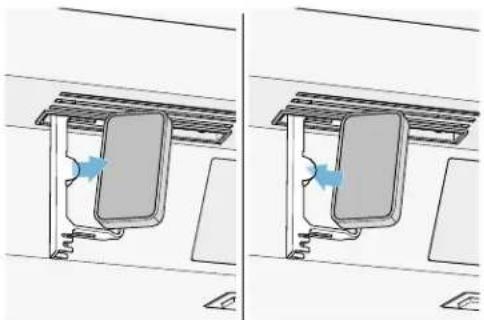
- Close the filter holder.
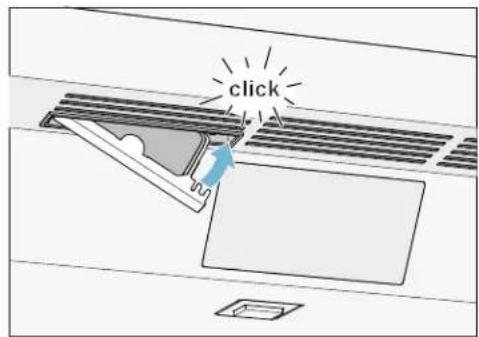
Lighting
Your appliance features a maintenance-free LED light.
Only customer service or authorized technicians may repair the light.
Noises
Normal noises
Droning: A motor is running, e.g. refrigerating unit, ventilator.
Bubbling, buzzing or gurgling: Refrigerant is flowing through the tubes.
Clicking: Motor, switches or solenoid valves are switching on or off.
Cracking: Automatic defrosting is running.
Preventing noises
Appliance is not level: Align appliance using a water level. If required, place a little packing underneath.
Containers, shelves or storage compartments wobble or stick: Check the removable fittings and re-insert if required.

Faults - what to do?
Before you call customer service, use this table to check whether you can rectify the fault yourself.
Appliance
Temperature differs greatly from the set value.
Switch off appliance for 5 minutes.
"Switching off and disconnecting the appliance" on page 14
If the temperature is too warm, check temperature again after a couple of hours.
If the temperature is too cold, check temperature again on the following day.
Displays do not illuminate.
The mains plug has not been inserted properly. Connect the mains plug.
The fuse has tripped. Check the fuses.
The power has failed. Check whether the power is on.
The refrigeration unit is switching on more frequently and for longer.
The appliance was opened frequently. Do not open the appliance unnecessarily.
The ventilation openings are covered up. Remove obstacles.
Large quantities of fresh food have been put in. Switch on Super Freeze in good time.
Appliance is not cooling, display and lighting are lit.
Showroom mode switched on. Start the appliance self-test.
"Appliance self-test" on page 26
When the program has ended, the appliance switches over to normal operation.
Ice maker
| The ice maker is not functioning. | |
| Ice cube production is switched off. Switch on ice cube production. | |
| Freezer compartment is too warm. Set the temperature lower. → "Operating the appliance" on page 14 | |
| Ice cube container is not properly inserted. Insert ice cube container fully. | |
| Ice maker without power. Call customer service. → "Customer service" on page 26 | |
| Ice cubes may freeze together and block the dispenser or the ice maker. | 1. Open the door. Check inside whether ice cubes are stuck in the ice and water dispenser.2. If the ice and water dispenser is not blocked, carefully pull the ice cube container out.CAUTION!A full ice cube container is heavy! Use both hands and proceed slowly. |
| 3. Remove the ice cubes which are frozen together. | |
| No water supply. Check water connection and contact technician if necessary. | |
| Low water pressure. Only connect appliance to pipes with sufficient water pressure. | |
| Kink in water hose. Turn off water supply, straighten out kink. Replace water hose, if necessary. | |
| Too few or deformed ice cubes, water pressure lower than usual. | |
| After switching on or removing many ice cubes, there will be too few in the ice cube container. | It takes around 24 hours for an empty ice cube container to fill up. |
| Ice cube production stops even though the ice cube container is still not full. | Do not store the ice shovel on the ice in the ice cube container. Otherwise, the sensor will not detect the actual fill level of the container. |
| Low water pressure. Only connect appliance to pipes with sufficient water pressure. | |
| The water filter is blocked or needs to be replaced. Replace water filter. | |
| Freezer compartment is too warm. Set the temperature lower. → "Operating the appliance" on page 14 | |
| Water is leaking out of the appliance. | |
| Water connection is not tight. Check if the connections are fastened firmly.Replace water hose if it is damaged. Use original parts supplied by the manufacturer only. | |

Customer service
If you are unable to rectify the fault, please contact our customer service. We will always find an appropriate solution in order to avoid unnecessary visits by engineers.
The contact information for your nearest customer service can be found here or on the enclosed customer service list.
When calling, please state the product number (ENr.) and the production number (FD), which can be found on the rating plate.
"Getting to know your appliance" on page 8
Trust the expertise of the manufacturer. You can therefore be sure that the repair is carried out by trained service engineers who carry original spare parts for your home appliances.
Appliance self-test
Your appliance features a self-test program which displays the fault your customer service can rectify.
- Press button to open the Settings menu.
- Press > button to move to the menu item Self-test.
- Press button to start the self-test. The self-test starts.
- If faults are present, they will be displayed. In this case follow the instructions.
- The appliance restarts.
- The message that the self-test has finished is displayed for 10 seconds.
When the self-test has ended, the appliance switches over to normal operation.
Repair order and advice on faults
Contact information for all countries can be found on the enclosed customer service list.
USA 1-800-735-4328 Toll-free in the USA
CA1-800-735-4328
fr Table des matieres

Installation juxtaposing 32
Economiser de I'energie 33
Compartment froid. 50

fr-ca Customer service

Installation juxtaposing
automatique compartment
réfrigerateur
2...6Etlements de commande
automatique compartment
congélateur
3 M Purification Inc.
400 Research Parkway
Meriden, Ct 06450
TéI (800) 222-7880
Tel (203) 237-5541
Compartment congélateur
Le compartmentengélateur sertà:
Instalacion side by side. 62
Ahorrar energia. 63
Compartmento refrigerator 78
Compartmento fresco 79

Congelador 80
3 M Purification Inc. 400 Research Parkway
Meriden, Ct 06450
Tel (800) 222-7880
Tel (203) 237-5541
1^ < > 1^
1^≤slant 1^