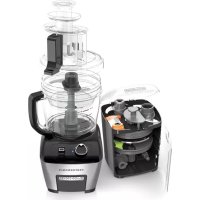
FP6000 - Food Processor BLACK & DECKER - Free user manual and instructions
Find the device manual for free FP6000 BLACK & DECKER in PDF.



| Product type | Food processor |
| Brand | Black & Decker |
| Model | FP6000 |
| Power | 120 V ~ 60 Hz |
| Large bowl capacity | 2.3 L (dry ingredients) / 1 L (liquids) |
| Small bowl capacity | 750 ml (3 cups) |
| Bowl material | Plastic |
| Blade material | Stainless steel |
| Functions | Chop, slice, shred, dice, knead, mix |
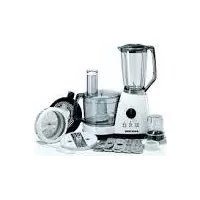
| Included accessories | S-blade, mini S-blade, kneading blade, adjustable slicing disc, reversible shredding disc, dicing disc, rods, cleaning tool, storage case |
| Controls | Variable speed dial + on/off/pulse switch |
| Speeds | Variable (low, medium, high) + pulse mode |
| Safety | Bowl and lid locking, automatic stop if large pusher is ejected, motor protection |
| Cleaning | Removable parts dishwasher safe (top rack), except dicing rod |
| Warranty | 3-year limited (United States and Canada) |
| Country of origin | China |
Frequently Asked Questions - FP6000 BLACK & DECKER
User questions about FP6000 BLACK & DECKER
0 question about this device. Answer the ones you know or ask your own.
Ask a new question about this device
Download the instructions for your Food Processor in PDF format for free! Find your manual FP6000 - BLACK & DECKER and take your electronic device back in hand. On this page are published all the documents necessary for the use of your device. FP6000 by BLACK & DECKER.
USER MANUAL FP6000 BLACK & DECKER
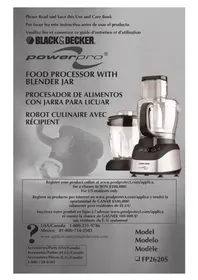
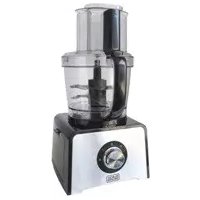
DICING FOOD PROCESSOR
natural_image
Product photo of a kitchen blender with open lid and side dish (no visible text or labels)FP6000
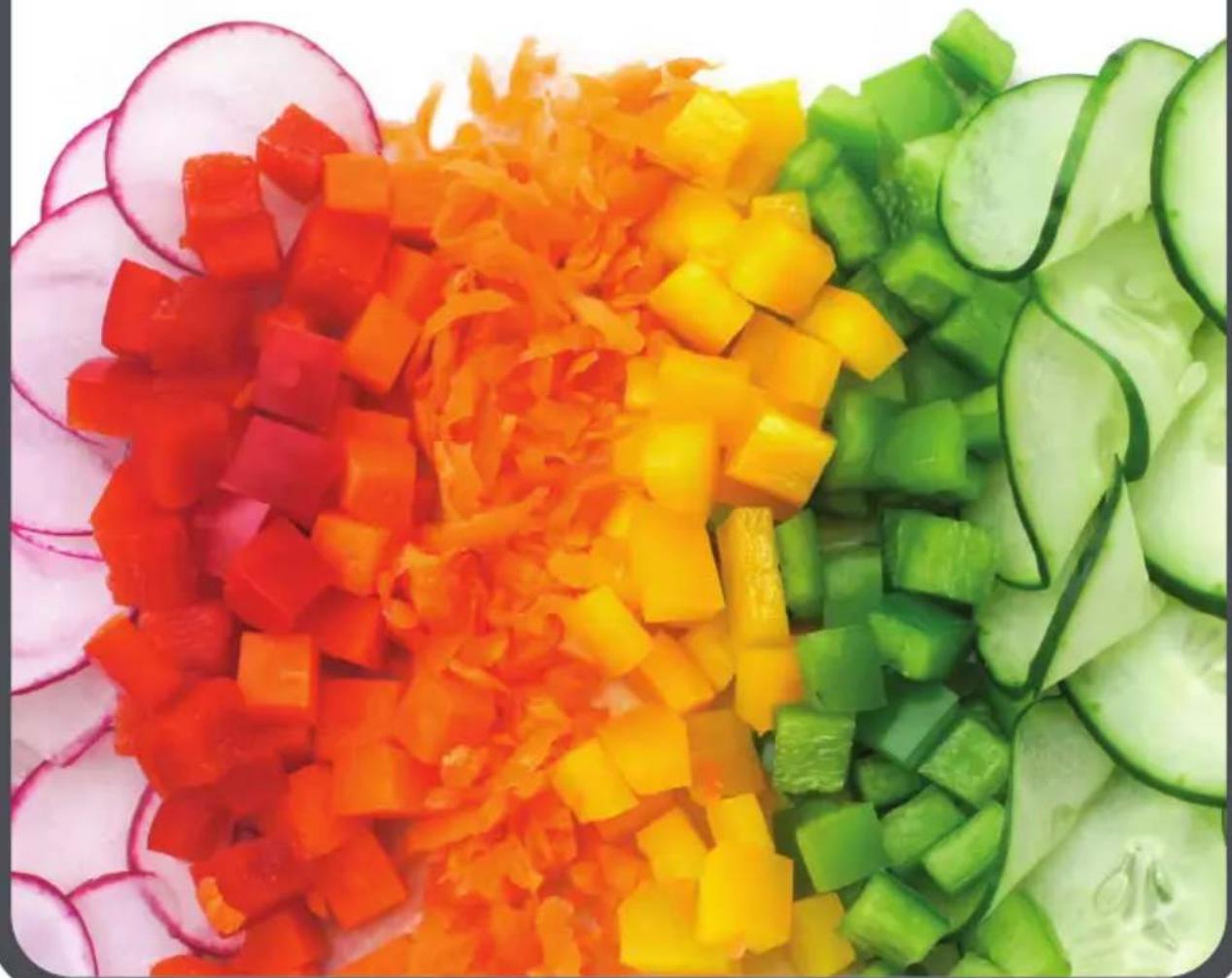
natural_image
Colorful vegetable salad arranged on a plate, including carrots, peppers, and cucumbers (no text or symbols visible)Thank you for your purchase!
Rate and review your products at
Share your pictures & stories with us online
Should you have any questions or concerns with your new product, please call our Customer Service Line at 1-800-231-9786 (US and Canada). Please do not return to the store.
Congratulations on your purchase of the Black + Decker™ Performance Food Processor. We have developed this use and care guide to ensure optimal performance and your satisfaction. Save this use and care book and register your appliance online at www.prodprotect.com/applica.
CONTENTS
IMPORTANT SAFEGUARDS....4
GETTING TO KNOW YOUR PERFORMANCE FOOD PROCESSOR....5
GETTING STARTED 6
USING YOUR FOOD PROCESSOR....6
USING THE FEED CHUTE AND PUSHERS....7
USING THE SPEED CONTROLS....8
ADJUSTABLE SPEED DIAL 8
USING THE DICING DISK. 9
HELPFUL TIPS WHEN USING THE DICING DISK .....10
USING THE SLICING DISK 10
USING THE SHREDDING DISK IN THE LARGE WORKBOWL....11
USING THE SHREDDING DISK IN THE SMALL WORKBOWL....12
HELPFUL TIPS WHEN SLICING OR SHREDDING....12
USING THE S BLADE IN THE LARGE WORKBOWL 13
USING THE MINI S BLADE IN THE SMALL WORKBOWL ....14
HELPFUL TIPS FOR USING THE S BLADE 14
USING THE DOUGH BLADE 14
HELPFUL TIPS WHEN USING THE DOUGH BLADE .....15
GENERAL TIPS FOR USING THE PROCESSOR .....15
CARE AND CLEANING 16
STORAGE....17
TROUBLESHOOTING....18
RECIPIES 19
WARRANTY INFORMATION 22
SAVE THESE INSTRUCTIONS.
This product is for household use only.
PLEASE READ AND SAVE THIS USE AND CARE BOOK.
IMPORTANT SAFEGUARDS.
When using electrical appliances, always follow basic safety precautions to reduce the risk of fire, electric shock, and/or injury, including the following:
- Read all instructions.
- Unit has a motor protection system. If the largest food pusher in the feed chute comes out of the food processor lid, the machine will shut off.
- To protect against risk of electrical shock, do not put food processor base, cord or plug in water or other liquid.
- Close supervision is necessary when any appliance is used by or near children.
- Unplug from outlet when not in use, before putting on or taking off parts, and before cleaning.
- Avoid contacting blades and moving parts.
- Do not operate any appliance with a damaged cord or plug, or after the appliance malfunctions, or has been dropped or damaged in any manner. Contact the consumer service number listed in this manual.
- The use of attachments not recommended by the appliance manufacturer may cause fire, electric shock or injury.
- Do not use outdoors.
- Do not let cord hang over the edge of table or counter, or touch hot surfaces.
- Keep hands and utensils out of container while processing to reduce the risk of severe injury to persons or damage to the food processor. A scraper may be used but must be used only when the processor is not running.
-
Never feed food by hand. Always use food pusher.
-
Blades are sharp. Handle carefully.
- To reduce the risk of injury, never place blades or disks on base without first putting workbowl properly in place.
- Be certain the lid is securely locked in place before operating appliance.
- Unit has a protection system. The unit will not operate unless the work bowl is securely locked onto base and the lid is securely locked onto workbowl.
- Do not place on or near a hot gas or electric burner or in a heated oven.
- Do not attempt to defeat the lid interlock mechanism.
- Do not use appliance for other than intended use.
• This product is designed for household use only. - Do not open lid until blade or disk stops completely.
- The maximum rated wattage for this product was obtained with the dough-blade.
- This appliance is not intended for use by persons (including children) with reduced physical, sensory or mental capabilities, or lack of experience and knowledge, unless they have been given supervision or instruction concerning use of the appliance by a person responsible for their safety.
- Children should be supervised to ensure that they do not play with the appliance.
- It is not recommended to dice frozen cheese or other frozen products.
SAVE THESE INSTRUCTIONS.
This product is for household use only.
POLARIZED PLUG (120V models only)
This appliance has a polarized plug (one blade is wider than the other). To reduce the risk of electric shock, this plug is intended to fit into a polarized outlet only one way. If the plug does not fit fully into the outlet, reverse the plug. If it still does not fit, contact a qualified electrician. Do not attempt to modify the plug in any way.
TAMPER-RESISTANT SCREW
Warning: This appliance is equipped with a tamper-resistant screw to prevent removal of the outer cover. To reduce the risk of fire or electric shock, do not attempt to remove the outer cover. There are no user-serviceable parts inside. Repair should be done only by authorized service personnel.
ELECTRICAL CORD
1) A short power-supply cord is provided to reduce the risk resulting from becoming entangled in or tripping over a longer cord.
2) Longer detachable power cords or extension cords are available and may be used if care is exercised in their use.
3) If a long detachable power-supply cord or extension cord is used,
a) The marked electrical rating of the extension cord should be at least as great as the electrical rating of the appliance,
b) If the appliance is of the grounded type, the extension cord should be a grounding-type 3-wire cord, and
c) The longer cord should be arranged so that it will not drape over the countertop or tabletop where it can be pulled on by children or tripped over unintentionally.
Note: If the power cord is damaged, please contact the warranty department listed in these instructions.
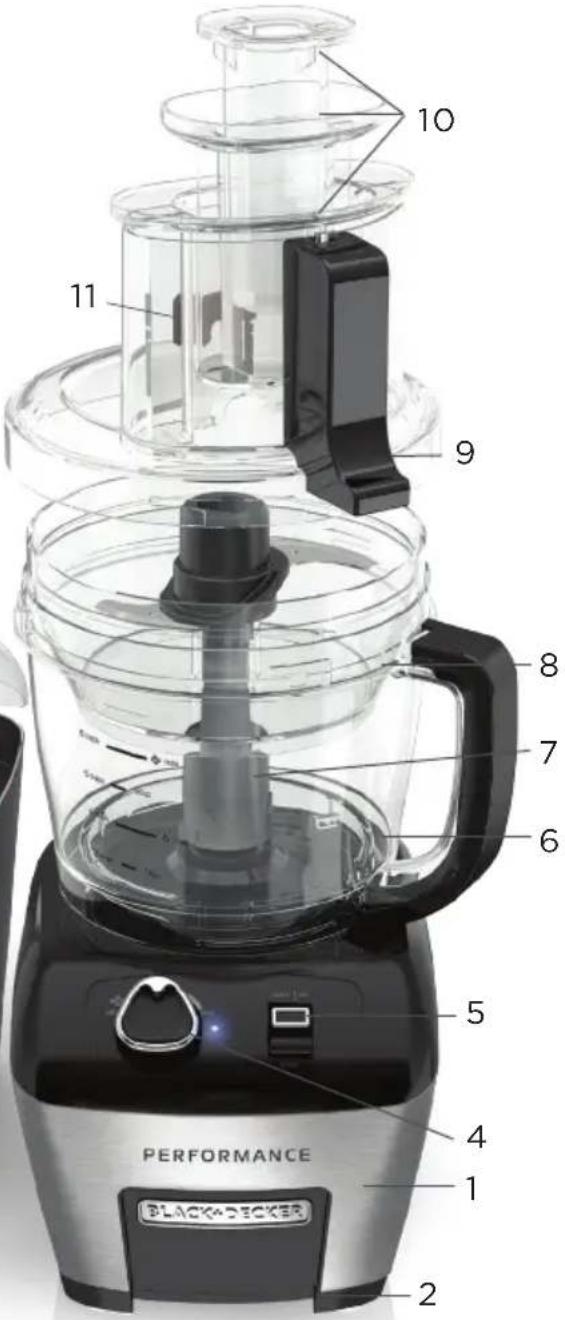
GETTING TO KNOW YOUR
PERFORMANCE
FOOD PROCESSOR

17
16
18
13

14 15

-
Motor base
-
Suction Cup Feet
-
Power Cord (not shown)
-
Adjustable Speed Dial
-
START|OFF toggle
-
Large 11-cup workbowl (Part # FP6010-01)
-
Center Post
-
Small 4-cup workbowl (Part # FP6010-02)
-
Lid with Wide Mouth Feed Chute (Part # FP6010-03)
-
Multifunctional 3 piece food pusher (small: part # FP6010-04; medium part # FP6010-05; large: part # FP6010-06)
-
Externally adjustable slicing control
-
Removable blade shaft (Part # FP6010-07)
-
S blade (Chopping Blade) (Part # FP6010-08)
-
Mini S Blade (for small workbowl) (Part # FP6010-09)
-
Dough blade (Part # FP6010-10)
-
Reversible shredding disk (coarse and fine) (Part # FP6010-11)
-
Externally adjustable (thin to thick) slicing disk (Part # FP6010-12)
-
Dicing disk (Part # FP6010-13)
-
Dicing blade (Part # FP6010-14)
-
Dicing shaft (Part # FP6010-15)
-
Dicing disk cleanout tool (Part # FP6010-16)
-
Storage Case (Part # FP6010-17)
HOW TO USE
This product is for household use only.
GETTING STARTED
- Remove all packing material, any stickers, and the plastic band around the power plug.
- Remove and save literature.
- Please visit www.prodprotect.com/applica to register your warranty.
- Wash all removable parts as instructed in CARE AND CLEANING section of this manual.
- CAUTION: Handle blades and disks very carefully. They are very sharp.
- Select a level dry countertop where the appliance is to be used allowing air space on all sides to provide proper ventilation for the motor.
USING YOUR FOOD PROCESSOR
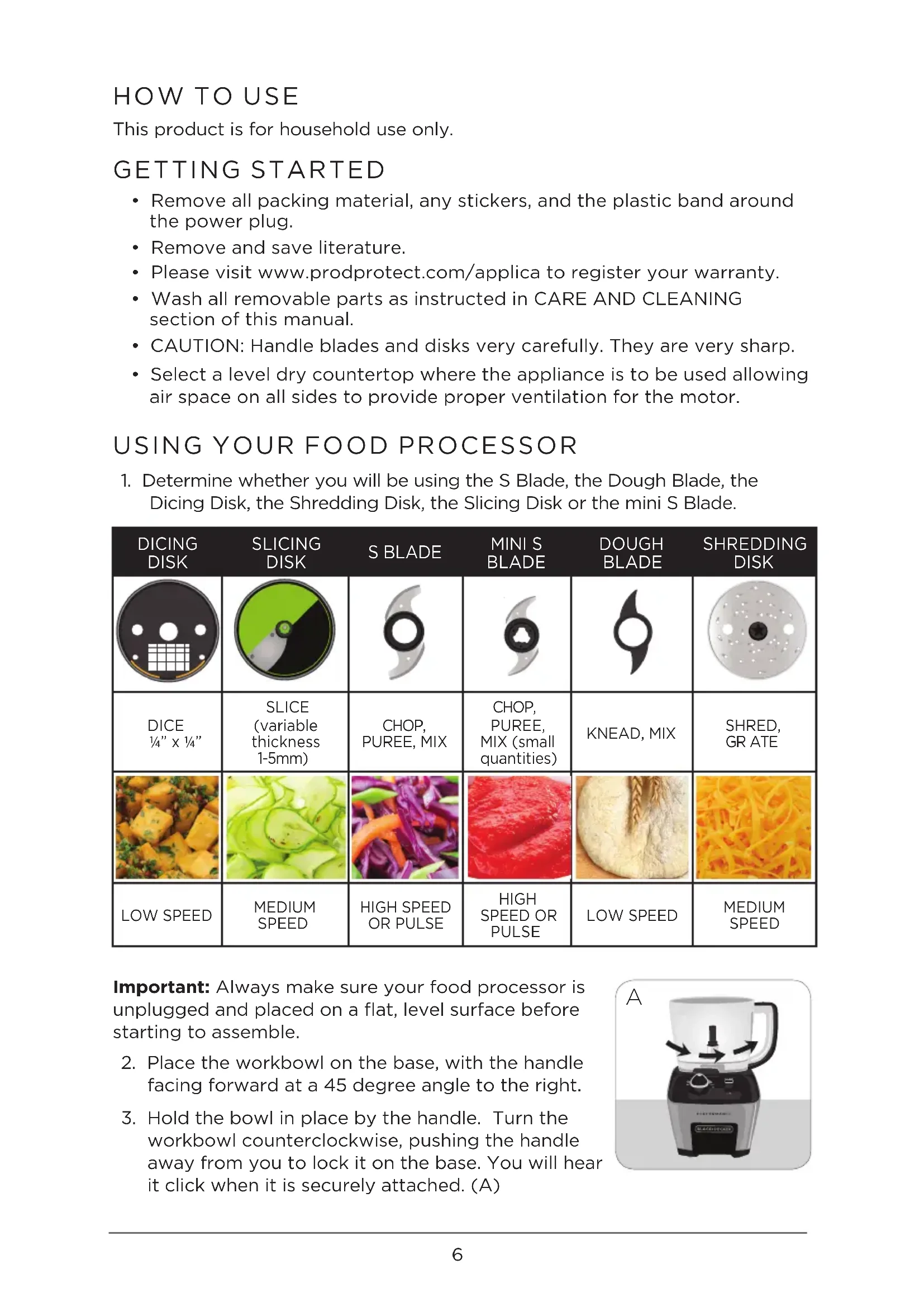
- Determine whether you will be using the S Blade, the Dough Blade, the Dicing Disk, the Shredding Disk, the Slicing Disk or the mini S Blade.
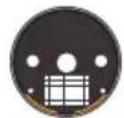
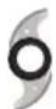
| DICING DISK | SLICING DISK | S BLADE | MINI S BLADE | DOUGH BLADE | SHREDDING DISK |
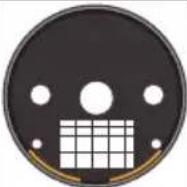 |  | 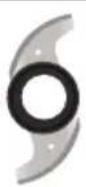 |  |  | 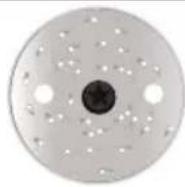 |
| DICE 1⁄4" x 1⁄4" | SLICE (variable thickness 1-5mm) | CHOP, PUREE, MIX | CHOP, PUREE, MIX (small quantities) | KNEAD, MIX | SHRED, GR ATE |
 |  |  |  |  |  |
| LOW SPEED | MEDIUM SPEED | HIGH SPEED OR PULSE | HIGH SPEED OR PULSE | LOW SPEED | MEDIUM SPEED |
Important: Always make sure your food processor is unplugged and placed on a flat, level surface before starting to assemble.
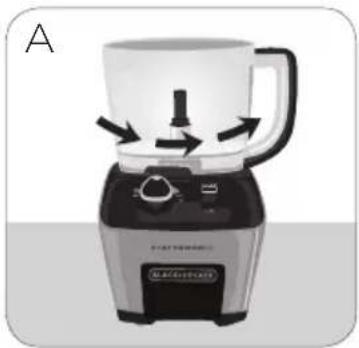
- Place the workbowl on the base, with the handle facing forward at a 45 degree angle to the right.
- Hold the bowl in place by the handle. Turn the workbowl counterclockwise, pushing the handle away from you to lock it on the base. You will hear it click when it is securely attached. (A)
natural_image
Illustration of a blender with a handle and control panel, showing motion arrows (no text or symbols)- Attach your selected blade or disk to the center post in the bottom of the large workbowl (instructions for individual disks/blades follow in this manual).
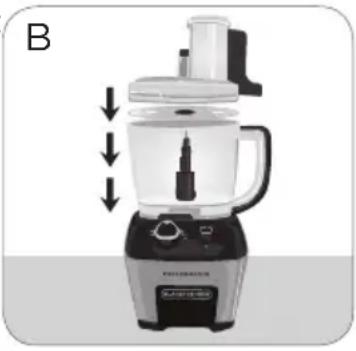
- Place the workbowl lid on top of the workbowl, aligning the tabs and locking it into place by turning counterclockwise. The workbowl lid is locked when it clicks firmly into place. The lid will always and only lock when the feed chute is aligned with the workbowl handle. (B)
Note: Be sure to lock the workbowl in place before attaching the blades or disks and lid.
- Insert the large food pusher into the feed chute of the lid. Push down until the pusher clicks into place and rests at the bottom of the feed chute. (C)
- Plug in the appliance. If the appliance is properly assembled, the light will illuminate. If it does not, the interlocks are not properly engaged.
natural_image
Illustration of a kitchen blender with a side panel and control buttons (no text or symbols)
natural_image
Illustration of a hand using a blender to lift a cup, with arrows indicating compression or lifting process (no text or symbols)Important: For your protection this appliance has an interlock system. The processor will not operate unless the lid and large pusher are properly locked in place. The light will illuminate when the base, lid and large pusher are in the proper position.
USING THE FEED CHUTE AND PUSHERS
Note: Before operating the food processor, be sure the workbowl, blades and workbowl lid are properly assembled on the food processor base.
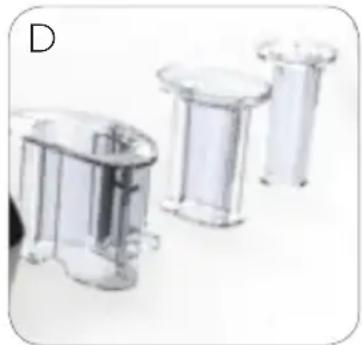
- Insert the large food pusher into the wide mouth feed chute. Insert the medium pusher inside the large pusher and the small food pusher inside the medium pusher. The food pushers are used to guide ingredients through the feed chute. The small and medium food pushers can be removed to add liquid or additional foods. (D)
natural_image
Three transparent plastic cylindrical containers arranged horizontally (no text or symbols visible)Note: The large pusher must remain in the feed chute in order for the processor to operate. The unit will continue to operate if the medium or small pushers are removed from the large pusher.
- Place food to be processed in the opening of the large pusher. Use the medium pusher to guide food through the large pusher and feed chute.
- Use the small food pusher to guide smaller diameter foods through the medium pusher.
- Use the small food pusher as a measuring cup to add liquids during processing.
USING THE SPEED CONTROLS
Note: If the food processor does not run, make sure the workbowl and lid are properly locked on the base and the large food pusher is fully in place. There is an automatic safety lock that causes the food processor to stop working if the large food pusher pops out and/or the lid and workbowl are not properly locked in place.
ADJUSTABLE SPEED DIAL
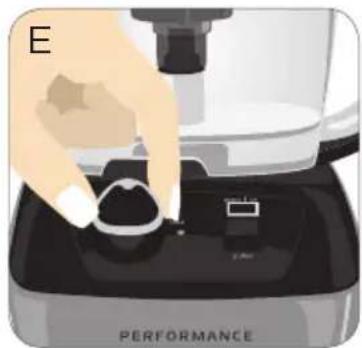
The controls are located on the front of the base. This food processor uses an adjustable speed dial to control the processing speed. (E) The lowest speed is when the dial is turned all the way to the left (counterclockwise.) The highest speed is when the dial is turned all the way to the right (clockwise.) The adjustable speed dial allows you full control of your food processor. The following speed chart contains recommendations for speeds and functions.
natural_image
Illustration of a hand using a microscope to press a button on a device labeled 'PERFORMANCE' (no text beyond label)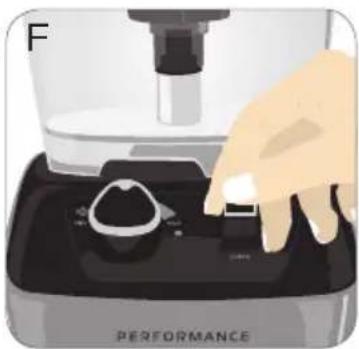
natural_image
Illustration of a hand pressing down on a black digital kitchen device labeled 'PERFORMANCE' (no text beyond label)- Plug in the appliance to turn it on.
- Press the toggle upwards towards START|OFF to start the food processor. (F)
- Turn the speed dial clockwise to increase speed and counterclockwise to decrease speed.
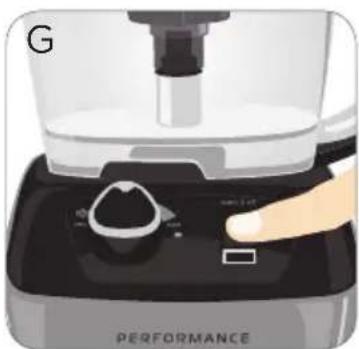
- To pulse, press and release the toggle downwards towards PULSE. (G)
- Press toggle upwards towards START|OFF to stop the food processor. (F)
natural_image
Close-up of a kitchen appliance with a hand pressing a button labeled 'PERFORMANCE' (no visible text beyond label)- Always unplug the appliance when not in use.
| LOW MEDIUM HIGH | |||
| Mixing Dough and Dicing | Slicing and Shredding | Chopping, Mixing, and Pureeing | |
Vegetables includingpotatoesonionscucumbersFruit  DoughPlace dry ingredients into workbowl and add liquids, with the food processor running, through the feed tube. DoughPlace dry ingredients into workbowl and add liquids, with the food processor running, through the feed tube. | Vegetables includingpotatoesonionscucumberscabbagecarrots 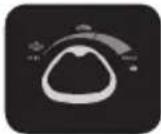 FruitCheese (freeze 20 min. prior)Chocolate FruitCheese (freeze 20 min. prior)Chocolate | VegetablesFruitFresh herbsNutsBread crumbs MeatSauces Batters Dips 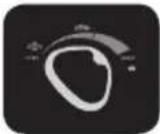 | |
USING THE DICING DISK (ORANGE)

Important: The dicing disk can only be used with the large workbowl. Only run the processor on LOW speed when using the dicing disk. DO NOT use dicing disk with small workbowl.
- Lock workbowl onto base.
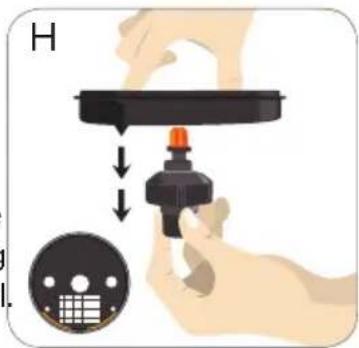
- Place the dicing shaft into the bottom of the dicing disk and turn clockwise to lock it into place. (H)
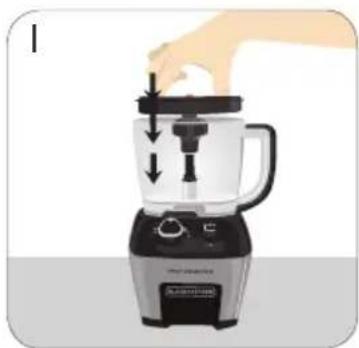
- Carefully pick up the dicing assembly using the finger holes in the top of the disk and place in the workbowl over the center post. (I)
- Place the dicing disk with the grid facing the workbowl handle (facing right) into the workbowl.
Note: Dicing disk can only be properly installed when grid faces the processor handle.
- Push the dicing disk down, making sure it is secure in the work bowl.
- Grasp dicing blade by the center using the finger grips. Insert the curved plastic edge under the outer edge of the dicing disk. (J) Place center of blade down onto the top of the visible dicing shaft in the center of the dicing disk. You may need to rotate the center of the blade slightly to find the fit.
Important: Be sure to only handle blade with the safe finger grips.
Important: Always place the curved end of the blade under the lip of the dicing disk FIRST and then place the center of the blade on the center post of disk.
- Place the lid on the food processor and lock into place. Place the ingredients to be diced into the feed chute.
- Turn the dial to the left (counterclockwise) to a LOW speed setting. Press the toggle up towards start. Use the food pusher to guide ingredients down.
Important: Do not use the dicing disk on MEDIUM or HIGH speed. Only use LOW speed for best results.
-
After dicing and turning the processor off, unplug. Then remove the lid and carefully lift the blade off the center post by lifting center of blade first, then pulling the curved edge up and away from the work bowl lip. (K)
-
Prior to removing the dicing disk from the workbowl, place the dicing cleanout tool in the holes on the dicing disk, aligning the outer posts with the outer notches (L). The curved edge of the cleanout tool aligns with the curved edge
natural_image
Illustration of a blender with a hand pressing down on the lid (no text or symbols visible)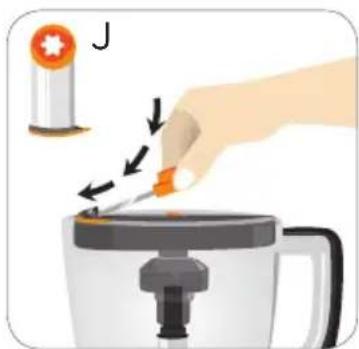
natural_image
Illustration of a hand using a pipette to press or brush into a coffee maker (no text or symbols present)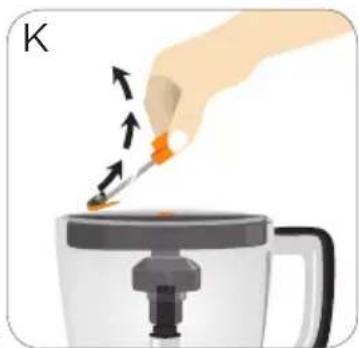
natural_image
Illustration of a hand pouring liquid from a container into a steaming cup (no text or symbols)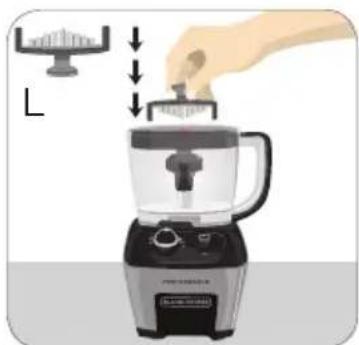
natural_image
Illustration of a hand using a blender to press down a surface, with no text or symbols present.of the disk. Push cleanout tool down into the dicing grid. This will push remaining food out of the grid, enabling you to wash the dicing disk more efficiently.
Note: Hard foods like carrots may require more force to remove with the dicing cleanout tool. It is normal for some foods to remain in the grid until grid is washed.
Important: You must remove dicing blade from the dicing disk before using the dicing cleanout tool. Do not use the cleanout tool if the dicing disk is not in the workbowl.
natural_image
Illustration of a blender with a hand pressing down on the top pan (no text or symbols)-
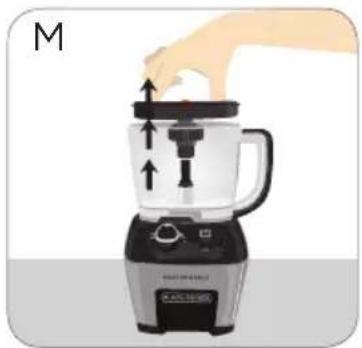
Using the finger holes in the top of the dicing disk, lift the disk straight up to remove the disk from the food processor. Empty workbowl. (M)
-
Remove the dicing shaft from the dicing disk by turning counterclockwise.
HELPFUL TIPS WHEN USING THE DICING DISK
- Operate the dicing disk on LOW speed. - Make sure the curved plastic edge of the dicing blade is under the edge of the dicing disk.
- It is recommended to stop dicing when workbowl is 60% full.
- Blade must be removed from the top of the disk before using the cleanout tool.
- Cut the ends of food to be diced off for most uniform dice.
- For small and soft foods, such as strawberries, use the smallest feed chute for best results.
- When dicing multiple ingredients, dice softer foods first and end with hardest food.
- When dicing soft cheese, chill cheese prior to dicing.
- Not recommended for dicing corned beef, raw meat, sweet potatoes, frozen cheese, or raw chicken.
- When dicing tomatoes, it is recommended to seed and peel them first.
• Firm, seedless cucumbers work best.
USING THE SLICING DISK (GREEN)
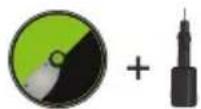
Important: The slicing disk can only be used with the large workbowl. Only run the processor on MEDIUM or LOW speed when using the slicing disk. DO NOT use slicing disk with small workbowl.
natural_image
Illustration of a hand pressing down on a small electronic device with directional arrows indicating motion (no text or symbols)- Lock the large workbowl into position on base.
- Carefully place the slicing disk onto center post in workbowl. You may need to rotate disk slightly until it fits onto post.
- Place lid on workbowl and lock into place by rotating counterclockwise. Place the food pushers into the feed chute. Put ingredients in the feed chute and guide food down towards blade with the food pusher. Use the small feed chute for small diameter foods such as carrots, green onions, etc.
Note: Position slicing disk just to the right of the feed chute. This allows the blade a full rotation before contacting the food.
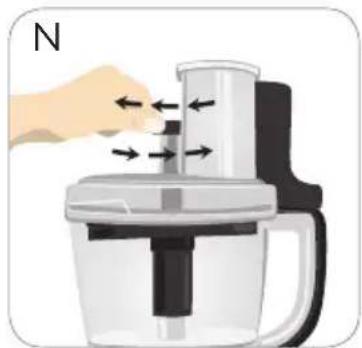
- To adjust the slicing thickness, move the lever at the base of feed chute forward and backwards to desired thickness setting (1-5mm). Turn the lever counterclockwise towards the front of the food processor for thicker slices and clockwise towards the back of the food processor for thinner slices. You are able to adjust thickness while the processor is running. (N)
- Turn the speed control dial to a MEDIUM (straight up) or LOW (pointing to the left) speed setting to slice. Press toggle up towards START|OFF to start the food processor. Press lightly but firmly on food pusher to guide food through slicing blade.
Note: Heavy pressure on the pusher does not speed the work; use the pusher only as a guide. Let the processor do the work. Pushing too hard may result in inconsistent slicing thickness.
Note: It is possible to change the thickness of your slices by changing pressure on the food item when guiding it into the feed tube. Use more pressure for a thicker slice and less pressure for a thinner slice.
Note: Changing thickness settings with other disks or blades installed will have no effect on the operation.
- When finished, press the toggle up towards START|OFF and allow the disk to stop revolving completely. Unplug the appliance and turn lid clockwise to remove.
- Carefully remove slicing disk by lifting straight up off center post.
- Unlock workbowl by turning it clockwise and lift off base.
- Empty workbowl and unplug appliance when not in use.
USING THE SHREDDING DISK IN THE LARGE WORKBOWL
natural_image
Illustration of a blender with a hand pressing down on the lid (no text or symbols)- Lock the large workbowl into position.
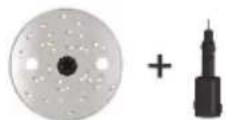
- Place blade shaft onto center post in large workbowl.
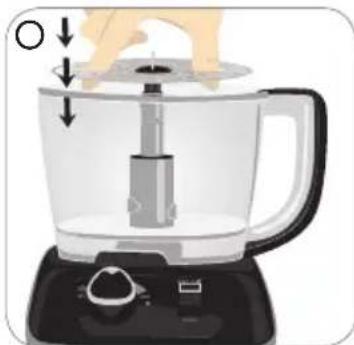
- Insert your fingers into the 2 large holes on the disk with the desired side up (small holes for fine
shredding and large holes for coarse shredding). Place shredding disk onto blade shaft in workbowl (O). You may need to rotate disk slightly until it fits onto post.
- Place lid on workbowl and lock into place by rotating counterclockwise.
- Place food in feed chute and use food pusher to guide foods towards shredding disk.
- Turn the speed control dial to a MEDIUM (straight up). Press lightly but firmly on food pusher to guide food through processor.
Note: Heavy pressure on the pusher does not speed the work; use the pusher only as a guide. Let the processor do the work.
- When finished, press toggle upwards towards START|OFF and allow the disk to stop revolving and unplug appliance before removing lid. Twist lid clockwise toward unlock to remove.
- Carefully remove shredding disk using the finger holes to lift straight up. Pull shaft out of the workbowl. Unlock workbowl by turning it clockwise and lift off base.
- Empty workbowl.
- Unplug appliance when not in use.
USING THE SHREDDING DISK IN THE SMALL WORKBOWL
- Lock large workbowl into position on food processor base.
- Place small workbowl in large workbowl, fitting the tabs on the outside of the small bowl into the notches on the large workbowl. This will hold the small bowl firmly in place.
natural_image
Illustration of a blender with a hand pressing down on top, showing liquid level and control buttons (no text or symbols)-
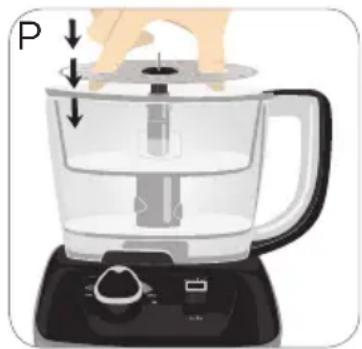
Carefully place the shredding disk on blade shaft in bottom of workbowl. (P)
-
Place lid on workbowl and lock into place by rotating lid counterclockwise
-
Follow remaining steps as indicated in USING THE SHREDDING DISK IN THE LARGE WORKBOWL.
HELPFUL TIPS WHEN SLICING OR SHREDDING
- Before slicing round fruits and vegetables through the processor cut a thin slice from the bottom so food will be more stable. Place food cut side down in the feed chute.
• Always remove seeds, core and pits before processing - Select foods that are firm and not over ripe.
- Remove the core from hard vegetables, such as cabbage.
- To shred lettuce or cabbage use the slicing blade. Slice against the grain using your desired thickness setting.
- When slicing thinner vegetables cut them just short of the length of the feed chute; stand them vertically in the feed chute so they are solidly packed and cannot turn or tilt.
- A few large pieces of food may remain on top of the disk after slicing or shredding. If desired, cut these by hand and add to mixture.
- Soft and semi hard cheeses should be well chilled before shredding. For best results with soft cheeses such as mozzarella, freeze 15-20 minutes before processing. Cut to fit feed tube and process using even pressure.
- To slice uncooked meat, cut or roll food to fit feed tube. Remove all visible fat. Wrap and freeze food until hard to the touch but not solidly frozen, 30 minutes to 2 hours depending on the thickness of the food. Check to be sure you can still pierce the food with the tip of a sharp knife. If not, allow to thaw slightly and process using even pressure.
- To slice cooked meat, including salami and pepperoni, food should be very cold. Cut in pieces to fit feed tube and process food using firm, even pressure.
- Remove the slicing/shredding disk before removing the workbowl from the processor.
USING THE S BLADE IN THE LARGE WORKBOWL
-
Lock workbowl in place on base.
-
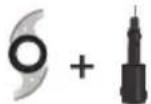
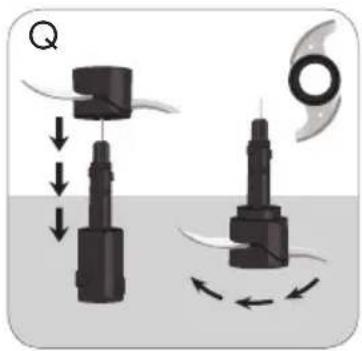
Carefully insert the blade shaft into the S blade. When the S blade gets to the bottom of the shaft, turn clockwise to lock (Q). You will feel it lock into place.
-
Place blade and shaft attachment in work bowl on center post.
natural_image
Diagram showing two mechanical components with directional arrows indicating motion, no text or symbols presentNote: The blade attachments are very sharp. Use caution when handling and storing.
-
Place food in workbowl.
-
Place lid on workbowl and lock into place by rotating lid counterclockwise.
-
Make sure food pushers are securely in place in feed chute. Never use your fingers to direct food through chute.
-
Turn the speed control dial to select your speed. Press toggle up towards START|OFF to start the food processor.
-
To add food or liquid while processor is running, remove food pusher and insert through the feed chute. Replace food pusher in chute.
-
When finished, press the toggle up towards START|OFF and allow blades to stop revolving before removing lid. Twist lid clockwise to remove from the workbowl.
Note: Press toggle down towards PULSE to chop items such as nuts,
onions, bread crumbs and cracker crumbs. Press and hold the toggle downward towards PULSE for several seconds, then release. Repeat until food reaches desired consistency.
Important: Be sure S blade has completely stopped spinning and unplug appliance before removing lid from processor.
-
To unlock workbowl, turn it clockwise and lift off base.
-
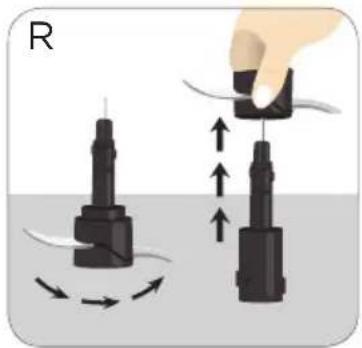
Carefully remove S blade by pulling shaft straight up and empty workbowl.
natural_image
Illustration of two mechanical components with directional arrows indicating motion or force (no text or symbols)Note: To remove S Blade from blade shaft, turn counterclockwise and pull blade shaft out from bottom. (R)
- Unplug appliance when not in use.
USING THE MINI S BLADE IN THE SMALL WORKBOWL
natural_image
Illustration of a kitchen blender with a handle and control panel (no text or symbols)- Lock large workbowl into position on food processor base.
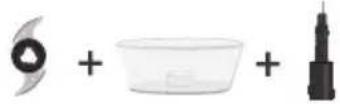
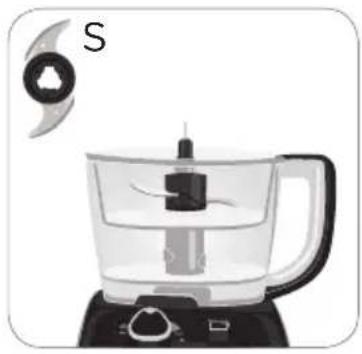
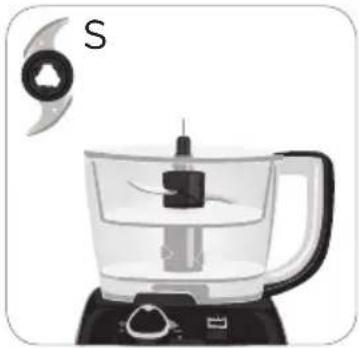
- Place small workbowl in large workbowl, fitting the tabs on the outside of the small bowl into the notches on the large workbowl. This will hold the small bowl firmly in place. (S)
- Carefully place the mini S blade on blade shaft in bottom of workbowl.
- Place lid on workbowl and lock into place by rotating lid counterclockwise.
- Follow remaining steps as outlined in USING THE S BLADE IN THE LARGE WORKBOWL.
Important: Disks and blades must be removed before removing small workbowl.
- To remove small workbowl from large workbowl, use the two finger grips to lift up.
HELPFUL TIPS FOR USING THE S BLADE
- The processor works very quickly, watch carefully to avoid over-processing foods.
- For best results, process foods that are about the same size.
- When chopping cooked or raw meat, the food should be very cold.
- Processing nuts or other hard foods may scratch the surface finish on the inside of the bowl.
- Do not overfill the bowl.
- Never walk away from the processor while it is on.
- Use hot but never boiling liquids.
- The large workbowl has a capacity of 4 cups (32 oz) for liquid and 10 cups (80 oz.) for dry foods; the small workbowl can process up to 3 cups.
- To mince garlic, drop garlic cloves through the feed tube opening while the processor is running.
USING THE DOUGH BLADE
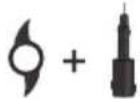
Important: The dough blade can only be used with the large workbowl. Only run the processor on LOW speed when using the dough blade.
natural_image
Diagram showing mechanical components with arrows indicating motion or force direction (no text or symbols)-
Lock workbowl onto base.
-
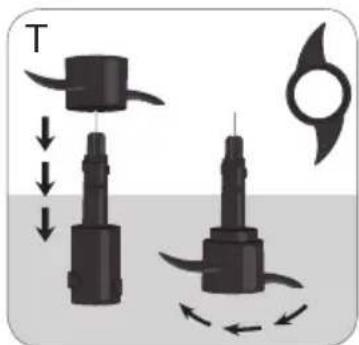
Place dough blade on blade shaft and turn it clockwise to lock it onto bottom of shaft. You will feel it lock into place. Push dough blade and shaft down onto center post in workbowl until it is fully seated. (T)
-
Insert all the dry ingredients into the workbowl.
- Place cover on workbowl. Secure food pushers in feed chute and process on LOW speed.
- With appliance running, add liquids through the food pusher. When finished, press toggle up towards START|OFF to stop the blade. Twist lid clockwise to remove.
Important: Allow the blade to stop revolving completely and unplug before removing lid.
- To unlock workbowl, turn it clockwise and lift off base.
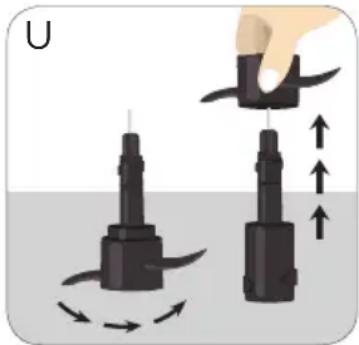
- Carefully remove dough blade by pulling shaft straight up and empty workbowl. To remove dough blade from shaft, turn blade counterclockwise and lift off the shaft. (U)
- Unplug appliance when not in use.
HELPFUL TIPS WHEN USING THE DOUGH BLADE
natural_image
Illustration of two mechanical components with directional arrows indicating motion or force (no text or symbols)- For best results do not prepare recipes using more than 3 12 cups flour.
- Begin with 1 cup less than the maximum amount of flour and add additional flour, as needed, once mixture is well blended.
- Pour liquid through feed chute in a slow steady stream.
- Knead dough no longer than one minute.
- Do not leave processor unattended during operation.
GENERAL TIPS FOR USING THE PROCESSOR
- Organize processing tasks to avoid multiple cleanups of the bowl; process dry before wet.
- The processor will be more efficient if filled no more than 1/2 to 2/3 full.
- If shredded, sliced or diced food piles up on one side of the bowl, stop the processor and redistribute the food using a spatula.
- To take advantage of the speed of the processor, drop foods through the feed chute with the processor running.
- To minimize slender foods, such as carrots or celery, from falling over in the feed chute, cut food into several pieces and pack the feed chute with the food.
- Apply light pressure on the pusher for soft foods (berries and tomatoes) and slightly more pressure for hard foods (onions and potatoes).
- Do not process foods that are so frozen or hard that the tip of a knife cannot be inserted into the food.
- If a piece of hard food, such as a carrot, becomes wedged or stuck on the blade, stop the processor and unplug, then remove the blade. Carefully remove food from the blade.
- When chopping sticky dried fruits, place the fruits in the freezer for about 10 minutes and add a little flour or sugar to keep the pieces from sticking together.
- When preparing cake or cookie batter, use the S blade to cream fat and sugar first and add dry ingredients last. Place nuts and fruit on top of
flour mixture to prevent over chopping. Process nuts and fruits using short pulses to blend with other ingredients.
- When using the slicing, shredding or dicing disk, do not let the food accumulate too high (over 2/3 full); stop and empty the workbowl.
-
Do not use the processor to:
-
Grind coffee beans, bones, grains or hard spices
- Liquefy fruits and vegetables
- Slice or chop warm meat
CARE AND CLEANING
This product contains no user serviceable parts. Refer service to qualified service professional.
Important: Always unplug your processor from the outlet before cleaning.
CLEANING
Important: blades are sharp. Handle blades and disks carefully.
- Completely disassemble processor parts before washing.
- Rinse parts immediately after processing for easier cleaning.
- Wipe base and feet with a damp cloth and dry thoroughly. Stubborn spots can be removed by rubbing with a damp cloth and a mild, nonabrasive cleaner. Do not immerse base in liquid.
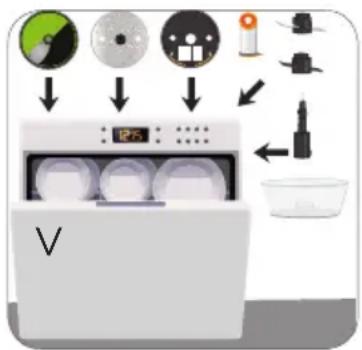
- All removable parts can be washed by hand. The removable parts, except for the dicing shaft, can be washed in the dishwasher, top rack only (V). Hand-washing of plastic parts will help to maintain the food processor's appearance.
- Some staining of parts may occur. If so, make a paste of 2 tablespoons of baking soda and 1 tablespoon of water. Apply to stains and let stand overnight. Rinse and dry.
- Do not use rough scouring pads or cleansers on any plastic or metal parts to clean.
- Do not allow blades or disks to soak in water for long periods of time.
- Remember to clean the internal shaft of the chopping blade. Use a brush to remove any residual food particles.
- If you are having trouble closing the lid over the workbowl, apply a small amount of vegetable oil to the rim of the cover and workbowl. This should make the pieces work smoother when attaching the cover to the bowl.
CLEANING TIPS:
- For quick clean up, combine 1 cup warm water and a drop of liquid dish soap in the food processor workbowl.
- Cover and process on medium speed for about 30 seconds.
• Discard liquid and rinse thoroughly.
Important: do not place the processor parts in boiling liquids.
STORAGE:
Caution: Blades are sharp. Handle carefully.
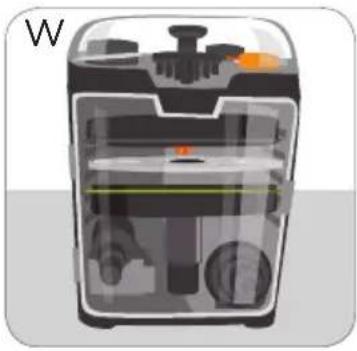
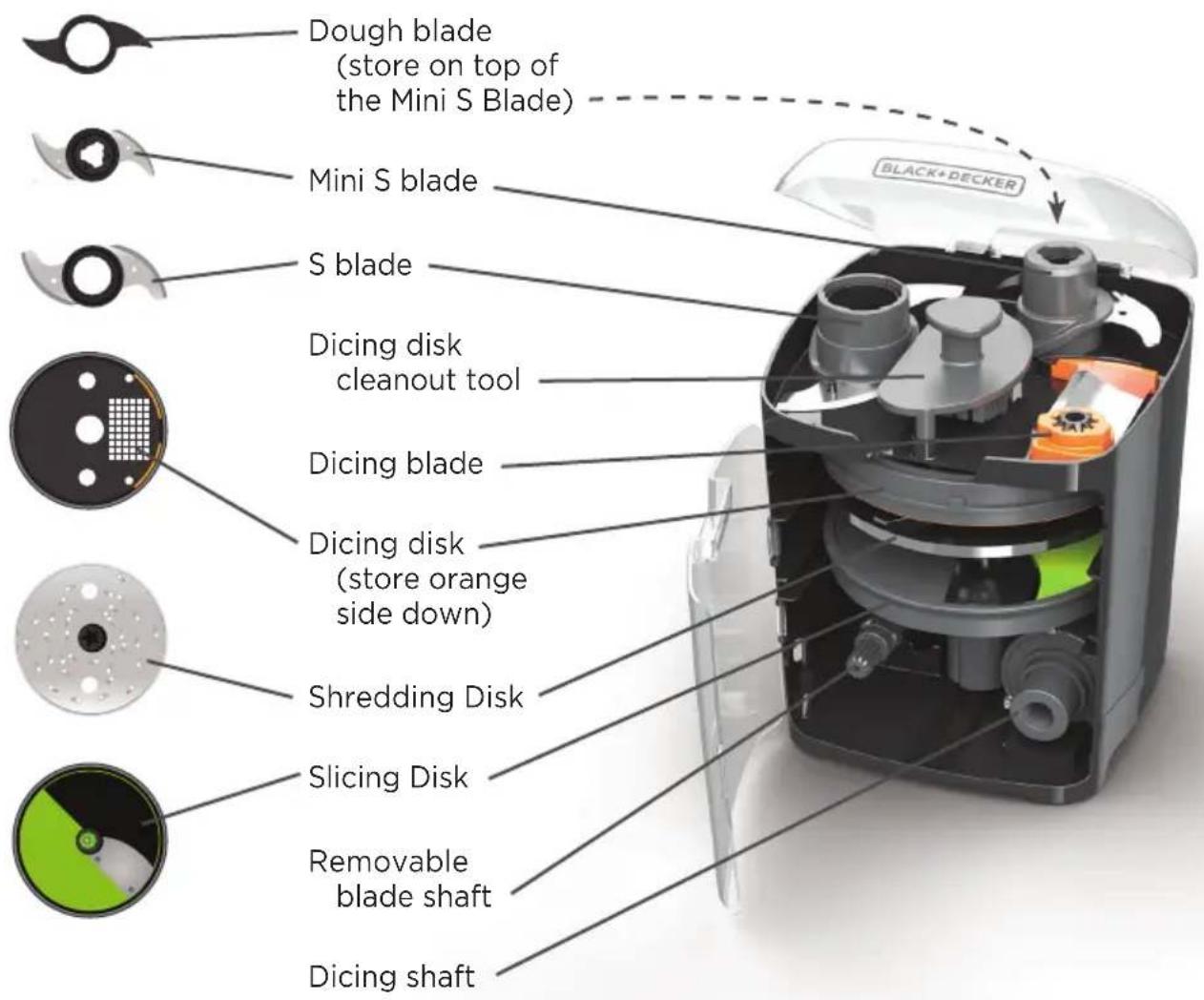
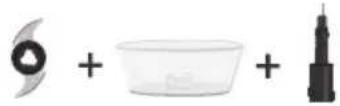
Store all the accessories in the convenient storage case (W). The S blade, mini S blade, dough blade, dicing blade and grid cleanout tool sit in the top of the storage case, as indicated by outlined shapes that correspond with each individual accessory.
natural_image
Cross-sectional diagram of a smart appliance showing internal components and housing (no text or symbols)Slide the disks and blade shafts into the front of the storage case in the following order, top to bottom:
• Dicing Disk (store orange side down, blade towards back of storage case)
- Shredding Disk
- Slicing Disk (store with blade facing back of storage case)
- Blade shaft on the lower left
• Dicing shaft on the lower right
Important: store storage case in a location out of the reach of children. Store the small workbowl in the large workbowl.
TROUBLESHOOTING:
| PROBLEM SOLUTION | |
| Food Processor doesn't run | Make sure the bowl and lid are properly aligned and locked in place and the large food pusher is inserted in the feed chute.Check to make sure the food processor is plugged in.If you have a circuit breaker box, be sure the circuit is closed.Unplug the food processor, and then plug it back into the outlet. |
| Food processor not shredding or slicing properly | Make sure the disk is installed properly.If using the adjustable slicing blade, make sure it is set to the correct thickness.Make sure ingredients are suitable for slicing or shredding. |
| If workbowl cover won't close | Make sure the disk is installed correctly.Try to close again with the large food pusher removed.Make sure there is no food or other object blocking the interlock system. |
| If you are getting an inconsistent dice | Make sure the bowl and lid are properly aligned and locked in place and the large food pusher is inserted in the feed chute.Ensure there are no clogs in dicing grid, food is lined up evenly with flat ends, and you are using low speed. |
| LED light is flashing rapidly | Motor is overheated. Unplug unit and let cool down for at least 20 minutes before use. |
If the problem is not due to one of the above items, see the “Warranty and Service” section of this Use and Care Manual. Do not return the Food processor to the retailer. Retailers do not provide service.
RECIPES
CUCUMBER VINEGAR SALAD
2 cucumbers 14 tsp. black pepper
1 small white onion 1 dash cayenne pepper
12 tsp. salt
14 cup vinegar
14 cup water
1 Tbsp. sugar
12 tsp. dill weed
Insert slicing disk into workbowl and adjust external slicing lever to thin slice.
Process the cucumbers and onion on low speed. When finished slicing, place sliced cucumbers and onions into a bowl and sprinkle with salt.
Mix remaining ingredients in a separate bowl with a fork. Pour over cucumber/onion mixture and toss lightly.
Refrigerate for 30 minutes, stir before serving.
MANGO SALSA
2 mangos, peeled, pits removed Juice of 1 lime
1 red bell pepper, 2 Tbsp. fresh, chopped cilantro stem and seeds removed Salt and pepper to taste
1 Roma tomato
1 medium Jalapeno pepper
1 small red onion, quartered
Cut ingredients to fit food processor feed chute.
Attach dicing disk. Using LOW speed, dice mango, bell pepper, tomato, jalapeno pepper and onion.
Squeeze lime juice onto the diced ingredients.
Stir in cilantro and season with salt and pepper.
Cover and refrigerate.
SPINACH ARTICHOKE DIP
1 can (14 oz.) artichoke hearts, drained
1 (10 oz.) pkg. chopped spinach, defrosted and well drained
1 garlic clove
1 cup grated Parmesan cheese
2/3 cup sour cream
1/3 cup mayonnaise
Place artichoke hearts, spinach and garlic in large work bowl with S blade. Pulse chop until artichokes are coarsely chopped and mixture is blended.
Scrape sides of bowl and add remaining ingredients. Mix until well blended.
Spoon dip into a 9-inch pie plate or quiche dish. Bake in 375^ F oven 20 to 30 minutes or until hot.
Makes 2 2/3 cups
TIPS:
Dip may be made ahead, covered and store in refrigerator up to 24 hours before baking. Add extra baking time to make sure dip is heated through. Serve with tortilla chips, bread cubes or assorted cut up raw vegetables.
BASIC FOOD PROCESSOR PIZZA CRUST
1 pkg. active dry yeast
1 tsp. sugar
2/3 cup warm water
1 2/3 cups all-purpose flour
1 tsp. salt
1/4 cup vegetable oil
Stir yeast and sugar into warm water; let stand until foamy about 10 min.
Insert S blade into work bowl; add flour and salt. With processor running, pour yeast mixture through feed chute and process 45 seconds or until dough pulls away from sides of bowl. Add oil through feed chute and run an additional minute.
NOTE: If dough sticks to sides of bowl, add more flour 1 Tbsp. at a time and process 10 seconds after each addition.
HOMEMADE COOKIE BUTTER
25 chocolate chip cookies, (3-inch diameter)
12 stick butter
12 cup sweetened condensed milk
14 cup evaporated milk
Water as needed
PLACE cookies in large work bowl with S-Blade. Pulse chop 4-5 times, then run continuously on MEDIUM speed until cookies form a fine powder.
NOTE: You should have approximately 2 cups of fine crumbs.
Melt butter on low heat in medium sauce pan. Add condensed and evaporated milk; stir until well mixed.
ADD butter mixture to cookie crumbs; process until creamy (about the same consistency as peanut butter). Add water as needed to reach your desired texture.
POUR cookie butter into an air tight container. Cover and refrigerate 1-2 hours to allow mixture to cool.
Makes: approximately 1 ½ cups
TIPS: Serve with pretzels, crackers, apples and strawberries. Can be stored in the refrigerator up to 2 weeks. Substitute other cookie varieties for chocolate chip cookies.
WARRANTY AND CUSTOMER SERVICE INFORMATION
For support or any questions regarding your appliance, call the appropriate 800 number listed within this section. Please DO NOT return the product to the place of purchase. Also, please DO NOT mail product back to manufacturer, nor bring it to a service center. You may also want to consult our Product Protection Center at www.prodprotect.com/applica.
Three-Year Limited Warranty (Applies only in the United States and Canada)
What does my warranty cover?
- Your warranty covers any defect in material or workmanship provided; however, the liability of Spectrum Brands Inc. will not exceed the purchase price of product.
How long is the warranty period?
- Your warranty extends three years from the date of original purchase with proof of purchase.
What support does my warranty provide?
- Your warranty provides you with a reasonably similar replacement product that is either new or factory refurbished.
How do you get support?
- Save your receipt as proof of date of sale.
- Visit the online service website at www.prodprotect.com/applica, or call toll-free 1-800-231-9786, for general warranty service.
- If you need parts or accessories, please call 1-800-738-0245.
What does my warranty not cover?
• Damage from commercial use
- Damage from misuse, abuse or neglect
- Products that have been modified in any way
- Products used or serviced outside the country of purchase
- Glass parts and other accessory items that are packed with the unit
- Shipping and handling costs associated with the replacement of the unit
- Consequential or incidental damages (Please note, however, that some states do not allow the exclusion or limitation of consequential or incidental damages, so this limitation may not apply to you.)
How does state law affect my warranty?
- This warranty gives you specific legal rights. You may also have other rights that vary from state to state or province to province.
¡BIENVENIDO!
natural_image
Illustration of a black-and-white kitchen blender with handle and control panel (no text or symbols)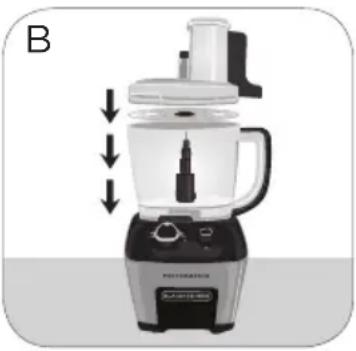
natural_image
Illustration of a kitchen blender with a side panel and control buttons (no text or symbols)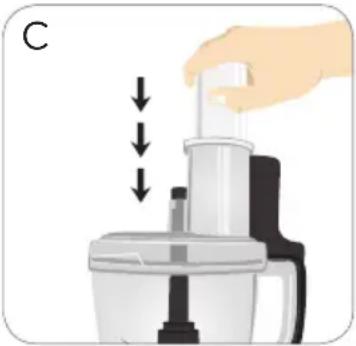
natural_image
Illustration of a hand using a blender to lift a cup, with arrows indicating compression or lifting process (no text or symbols)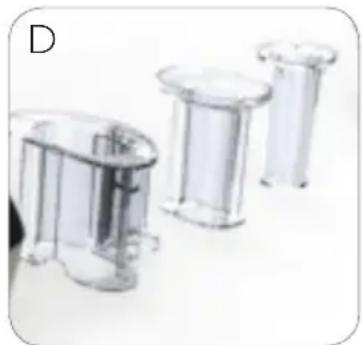
natural_image
Three transparent plastic cylindrical objects arranged horizontally on a white background (no text or symbols visible)natural_image
Illustration of a hand pressing down on a microscope's screen with a button labeled 'E' and 'PERFORMANCE' at the bottom (no other text or symbols)natural_image
Illustration of a hand operating a kitchen appliance with a labeled control panel (no text or symbols on the device itself)natural_image
Illustration of a kitchen appliance with a hand pressing a button labeled 'PERFORMANCE' (no text beyond label)natural_image
Illustration of a hand using a blender to press down a cup (no text or symbols visible)natural_image
Illustration of a hand using a pipette to press or brush into a coffee maker (no text or symbols present)natural_image
Illustration of a hand pouring liquid into a coffee maker with arrows indicating flow direction (no text or symbols)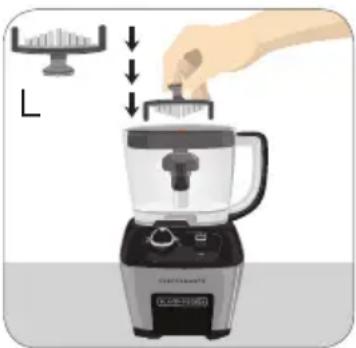
natural_image
Illustration of a blender with a hand pressing down on top, showing a small scale and control panel (no text or symbols)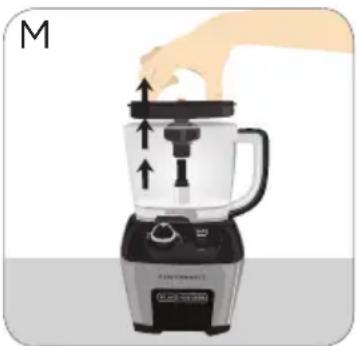
natural_image
Illustration of a blender with a hand pressing down on the top pan (no text or symbols)natural_image
Illustration of a hand using a micrometer to lift a cup, with arrows indicating motion direction (no text or symbols)natural_image
Illustration of a kitchen blender with handle and control panel (no text or symbols)natural_image
Illustration of a blender with a hand pressing down on the lid (no text or symbols)natural_image
Diagram showing mechanical components with arrows indicating motion or force direction (no text or symbols)natural_image
Illustration of two mechanical components with directional arrows indicating motion or force (no text or symbols)
natural_image
Illustration of a kitchen blender with a handle and control panel (no text or symbols)natural_image
Diagram showing mechanical components with arrows indicating motion or force direction (no text or symbols)natural_image
Illustration of two mechanical components with directional arrows indicating motion or force (no text or symbols)natural_image
Cross-sectional diagram of a device showing internal components and casing (no text or symbols)MISES EN GARDE IMPORTANTES.
natural_image
Illustration of a black-and-white blender with a handle and control panel, no text or symbols present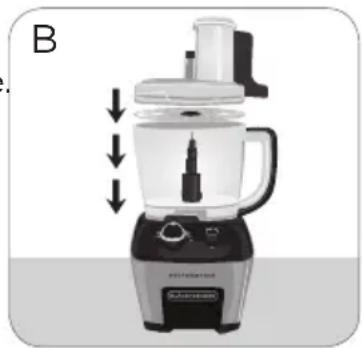
natural_image
Illustration of a kitchen blender with a side panel and control buttons (no text or symbols)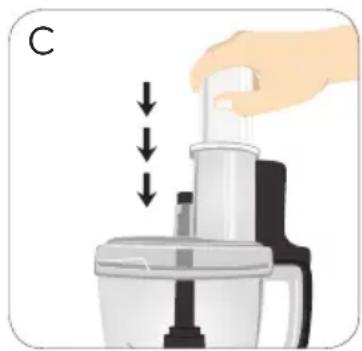
natural_image
Illustration of a hand using a blender with liquid level indicator (no text or symbols)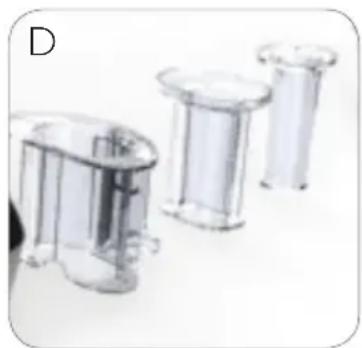
natural_image
Three transparent plastic containers arranged horizontally on a white surface (no text or symbols visible)natural_image
Illustration of a hand using a microscope to press a button on a device labeled 'PERFORMANCE' (no text beyond label)natural_image
Illustration of a hand operating a microscope on a device labeled 'PERFORMANCE' (no text beyond label)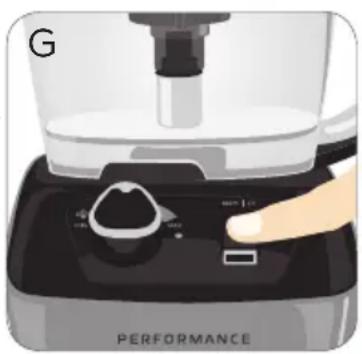
natural_image
Close-up of a hand operating the kitchen top of a digital kitchen brush (no visible text or symbols)natural_image
Illustration of a blender with a hand operating the top pan (no text or symbols visible)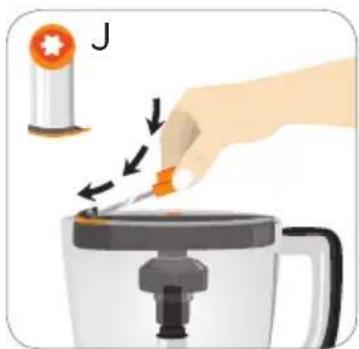
natural_image
Illustration of a hand using a pipette to press or brush into a coffee pot (no text or symbols present)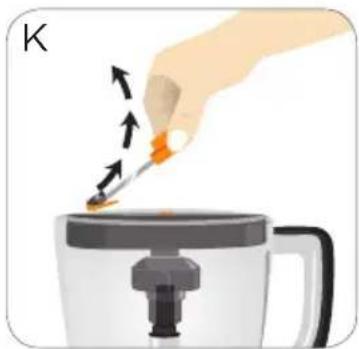
natural_image
Illustration of a hand using a tool to press or brush into a steaming cup (no text or symbols visible)natural_image
Illustration of a blender being processed with a hand using a tool (no text or symbols visible)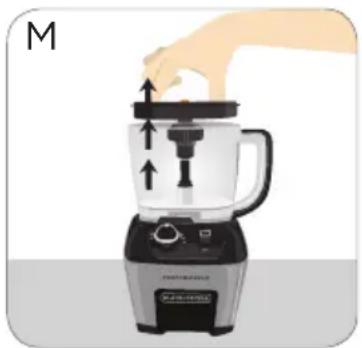
natural_image
Illustration of a kitchen blender with a hand adjusting the lid (no text or symbols)natural_image
Illustration of a hand pressing down on a small mechanical device with directional arrows indicating motion (no text or symbols)natural_image
Illustration of a blender with a hand pressing down on the lid (no text or symbols)natural_image
Illustration of a kitchen blender with a hand pressing down on the lid (no text or symbols)CONSEILS PRATIQUES POUR ÉMINCER OU DÉCHIQUETER
natural_image
Illustration of two mechanical components with directional arrows indicating motion or force (no text or symbols)UTILISATION DE LA MINI-LAME EN S DANS LE PETIT BOL
natural_image
Illustration of a kitchen blender with a handle and control panel (no text or symbols)natural_image
Diagram showing mechanical components with arrows indicating motion or force direction (no text or symbols)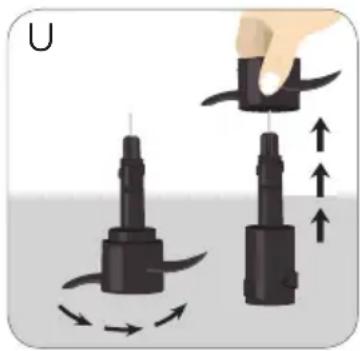
natural_image
Illustration of two mechanical components with directional arrows indicating motion (no text or symbols)natural_image
Cross-sectional diagram of a device showing internal components and casing (no text or symbols)160 ml (2/3 tasse) de crème sure
Col. Centro, Cuauhtemoc,
México, D.F.
Tel. 01 800 714 2503
Nicaragua
LRM ELECTRONICA
Managua - Sinsa Altamira 1.5
kilómetros al norte
Nicaragua
Tel. (505) 2270-2684
Panamá
Supermarcas
Plaza Dorado, Local 2.
Panama
Tel. (507) 392-6231
Perú
Servicio Central Fast Service
City Market Nivel Plaza Local 153
Diagonal Hotel Melia,
Caracas
Tel. (582) 324-0969
www.applicaservice.com
servicio@applicamail.com


natural_image
Close-up of a white bowl filled with red sauce, showing glossy texture and no visible text or symbols.FP6010 - 6.78A 120V 60Hz.
© 2015 The Black & Decker Corporation
and Spectrum Brands, Inc.,
Middleton, WI 53562
Made in People's Republic of China
BLACK + DECKER and the BLACK + DECKER logo are trademarks of The Black & Decker
Corporation and are used under license. All rights reserved.
- Thank you for your purchase!
- CONTENTS
- PLEASE READ AND SAVE THIS USE AND CARE BOOK.
- IMPORTANT SAFEGUARDS.
- SAVE THESE INSTRUCTIONS.
- This product is for household use only.
- POLARIZED PLUG (120V models only)
- TAMPER-RESISTANT SCREW
- ELECTRICAL CORD
- PERFORMANCE
- HOW TO USE
- GETTING STARTED
- USING YOUR FOOD PROCESSOR
- USING THE FEED CHUTE AND PUSHERS
- USING THE SPEED CONTROLS
- ADJUSTABLE SPEED DIAL
- USING THE DICING DISK (ORANGE)
- HELPFUL TIPS WHEN USING THE DICING DISK
- USING THE SLICING DISK (GREEN)
- USING THE SHREDDING DISK IN THE LARGE WORKBOWL
- USING THE SHREDDING DISK IN THE SMALL WORKBOWL
- HELPFUL TIPS WHEN SLICING OR SHREDDING
- USING THE S BLADE IN THE LARGE WORKBOWL
- USING THE MINI S BLADE IN THE SMALL WORKBOWL
- HELPFUL TIPS FOR USING THE S BLADE
- USING THE DOUGH BLADE
- HELPFUL TIPS WHEN USING THE DOUGH BLADE
- GENERAL TIPS FOR USING THE PROCESSOR
- CARE AND CLEANING
- CLEANING
- CLEANING TIPS:
- STORAGE:
- TROUBLESHOOTING:
- RECIPES
- CUCUMBER VINEGAR SALAD
- MANGO SALSA
- SPINACH ARTICHOKE DIP
- TIPS:
- BASIC FOOD PROCESSOR PIZZA CRUST
- HOMEMADE COOKIE BUTTER
- WARRANTY AND CUSTOMER SERVICE INFORMATION
- ¡BIENVENIDO!
- MISES EN GARDE IMPORTANTES.
- CONSEILS PRATIQUES POUR ÉMINCER OU DÉCHIQUETER
- UTILISATION DE LA MINI-LAME EN S DANS LE PETIT BOL
- Nicaragua
- Panamá
- Perú
Brand : BLACK & DECKER
Model : FP6000
Category : Food Processor