
X86474MV01 - Refrigerator AEG - Free user manual and instructions
Find the device manual for free X86474MV01 AEG in PDF.



| Product type | Refrigerator |
| Brand | AEG |
| Model | X86474MV01 |
| Total net capacity | 350 L |
| Net refrigerator capacity | 270 L |
| Net freezer capacity | 80 L |
| Energy class | A++ |
| Noise level | 42 dB |
| Dimensions (H x W x D) | 1850 x 600 x 650 mm |
| Weight | 70 kg |
| Power supply | 230 V, 50 Hz |
| Main functions | Electronic temperature control, LED lighting, cold air distribution, door alarm |
| Maintenance and cleaning | Regular cleaning of the interior with a damp cloth and mild detergent |
| Safety | Child lock, wall mounting recommended |
| Spare parts and repairability | Original spare parts available from AEG after-sales service |
| General information | Domestic use, freestanding or built-in installation |
Frequently Asked Questions - X86474MV01 AEG
User questions about X86474MV01 AEG
0 question about this device. Answer the ones you know or ask your own.
Ask a new question about this device
Download the instructions for your Refrigerator in PDF format for free! Find your manual X86474MV01 - AEG and take your electronic device back in hand. On this page are published all the documents necessary for the use of your device. X86474MV01 by AEG.
USER MANUAL X86474MV01 AEG
FOR PERFECT RESULTS
Thank you for choosing this AEG product. We have created it to give you impeccable performance for many years, with innovative technologies that help make life simpler – features you might not find on ordinary appliances. Please spend a few minutes reading to get the very best from it.
ACCESSORIES AND CONSUMABLES
In the AEG webshop, you'll find everything you need to keep all your AEG appliances looking spotless and working perfectly. Along with a wide range of accessories designed and built to the high quality standards you would expect, from specialist cookware to cutlery baskets, from bottle holders to delicate laundry bags...

Visit the webshop at: www.aeg.com/shop
ENVIRONMENT CONCERNS
Recycle the materials with the symbol ☑. Put the packaging in applicable containers to recycle it.
Help protect the environment and human health and to recycle waste of electrical and electronic appliances. Do not dispose appliances marked with the symbol ☒ with the household waste. Return the product to your local recycling facility or contact your municipal office.
CUSTOMER CARE AND SERVICE
We recommend the use of original spare parts.
When contacting Service, ensure that you have the following data available. The information can be found on the rating plate.
Model
PNC ____
Serial Number ____
1. RECOMMENDATIONS AND SUGGESTIONS
- The Instructions for Use apply to several versions of this appliance. Accordingly, you may find descriptions of individual features that do not apply to your specific appliance.
- The manufacturer will not be held liable for any damages resulting from incorrect or improper installation.
- The minimum safety distance between the cooker top and the extractor hood is 650 mm (some models can be installed at a lower height, please refer to the paragraphs on working dimensions and installation).
- Check that the mains voltage corresponds to that indicated on the rating plate fixed to the inside of the hood.
- For Class I appliances, check that the domestic power supply guarantees adequate earthing. Connect the extractor to the exhaust flue through a pipe of minimum diameter 120 mm. The route of the flue must be as short as possible.
- Do not connect the extractor hood to exhaust ducts carrying combustion fumes (boilers, fireplaces, etc.).
- If the extractor is used in conjunction with non-electrical appliances (e.g. gas burning appliances), a sufficient degree of aeration must be guaranteed in the room in or-
to prevent the backflow of exhaust gas. The kitchen must have an opening communicating directly with the open air in order to guarantee the entry of clean air. When the cooker hood is used in conjunction with appliances supplied with energy other than electric, the negative pressure in the room must not exceed 0.04 mbar to prevent fumes being drawn back into the room by the cooker hood.
- In the event of damage to the power cable, it must be replaced by the manufacturer or by the technical service department, in order to prevent any risks.
- If the installation instructions for the gas hob specify a greater distance than that mentioned above, this must be taken into account. Regulations concerning the discharge of air must be fulfilled.
- Use only screws and small parts in support of the hood.
Warning: Failure to install the screws or fixing device in accordance with these instructions may result in electrical hazards.
- Connect the hood to the mains through a two-pole switch having a contact gap of at least 3 mm.
- The extractor hood has been designed exclusively for domestic use.
- The extractor hood has been designed exclusively for domestic use.
mestic use to eliminate kitchen smells.
- Never use the hood for purposes other than for which it has been designed.
- Never leave high naked flames under the hood when it is in operation.
- Adjust the flame intensity to direct it onto the bottom of the pan only, making sure that it does not engulf the sides.
- Deep fat fryers must be continuously monitored during use: overheated oil can burst into flames.
- Do not flambè under the range hood; risk of fire.
- This appliance can be used by children aged from 8 years and above and persons with reduced physical, sensory or mental capabilities or lack of experience and knowledge if they have been given supervision or instruction concerning use of the appliance in a safe way and understand the hazards involved. Children shall not play with the appliance. Cleaning and user maintenance shall not be made by children without supervision.
- “CAUTION: Accessible parts may become hot when used with cooking appliances.”
3. MAINTENANCE
- Switch off or unplug the appliance from the mains supply before carrying out any
maintenance work.
- Clean and/or replace the Filters after the specified time period (Fire hazard).
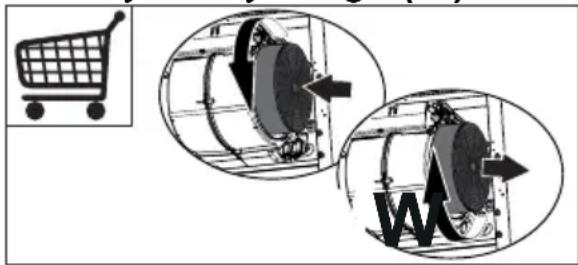
- The Activated charcoal filter is not washable and cannot be regenerated, and must be replaced approximately every 4 months of operation, or more frequently for particularly heavy usage (W).
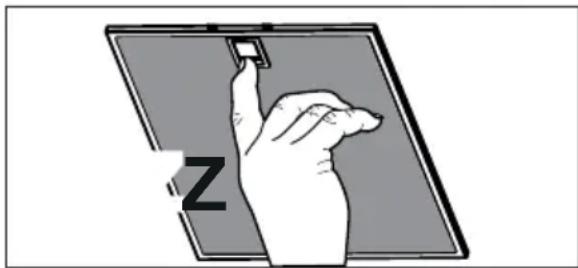
- The Grease filters must be cleaned every 2 months of operation, or more frequently for particularly heavy usage, and can be washed in a dish-washer (Z).
- Control lights, if present.
- Clean the hood using a damp cloth and a neutral liquid detergent.
4. CONTROLS
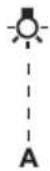 | [9C34] | 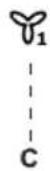 | 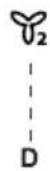 | 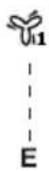 | 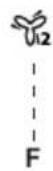 | 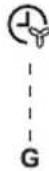 | ### | |
| Button | Function Led | |||||||
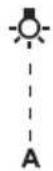
| A Changes the intensity of the Lighting each time the Button is pressed, in cycle, passing via Off. | - | |||||||
| B Motor off. The Leds indicating the Speed of the motor | turn off. | |||||||
| Enables / Disables Keyboard Lock mode if pres-sed and held for 5 seconds. | All the Leds light up in cycle and run a start-up sequence. | |||||||
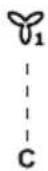
| C Activates speed one. The Leds indicating Speed one and MotorOff turn on. | ||||||||
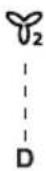
| D Activates speed two. The Leds indicating Speed two and MotorOff turn on. | ||||||||
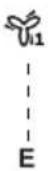
| E Activates the speed Intensive 1. This speed is ti-med to run for 10 minutes. At the end of this time the system will return to the speed set previously. It is disabled by pressing the Button or turning the Motor off. | ||||||||
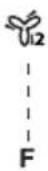
| F Activates the speed Intensive 2. This speed is timed to run for 8 minutes. At the end of this time the system will return to the speed set previously. It is disabled by pressing the Button or turning the Motor off. | ||||||||
| G Activates / Deactivates Delay mode, with automa-tic shutdown of the Motor and the Lighting after 15 minutes. It is disabled by pressing the button or turning the motor off. | ||||||||
| H | With the filter alarm triggered, press the button to Reset the alarm. These indications are only visible when the motor is turned off. | |||||||
5. LIGHTING
Warning: This appliance is fitted with a white LED lamp classed as 1M according to EN 60825-1:1994 + A1:2002 + A2:2001 standards; maximum optical power emitted @439nm: 7μW. Do not look directly at the light through optical devices (binoculars, magnifying glasses...).
- For replacement contact technical support ("To purchase contact technical support").
 |  |  |  |  |  |  | d = 0.01 |
- Indicator lights if installed.
PRODUCT NO. (PNC) ____
Serial number ____
1. ADVICE AND INSTRUCTIONS
- Any indicator lights.
 |  |  |  |  |  |  | [647+1] |
| A | B | C | D | E | F | G | H |
- Lighting instructions where present.
- Clean the hood using a damp cloth and a neutral liquid detergent.
4. CONTROLS
![graph TD A["A"] --> B["B"] B --> C["C"] C --> D["D"] D --> E["E"] E --> F["F"] F --> G["G"] G --> H["H"] style A fill:#fff,stroke:#000 style B fill:#fff,stroke:#000 style C fill:#fff,stroke:#000 style D fill:#fff,stroke:#000 style E fill:#fff,stroke:#000 style F fill:#fff,stroke:#000 style G fill:#f…](/content/2026/03/495475/images/535a7b85c55f48a5d07b60137f23fdd79e800774d59528ce9102d37e5368692d.jpg)
| Tipka F | Funkcija Led | |
| A Mijenja intenzitet rasvjete svakim pritiskom na tipku na ciklički način preko funkcije Off. | - | |
| B Off | motor. Indikacijski ledovi brzine motora se isključe. | |
| Pritisnuta 5 sekundi aktivira /deaktivira način blokiranja tipkovnice. | Svi ledovi se uključuju ciklički i obave jed sekvencu uključivanja. | |
| C | Aktivira prvu brzinu. | Ledovi prve brzine i motor Off se uključe. |
| D | Aktivira drugu brzinu. | Ledovi druge brzine i motor Off se uključe. |
| E Aktivira brzinu Intenzivna 1. Takva brzina je tempirana na 10 minuta. Po isteku tog vremena, sustav se vraća na prethodno postavljenu brzinu. Deaktivira se pritiskom na istu tipku ili isključivanjem motora. | Led bljeska. | |
| F Aktivira brzinu Intenzivna 2. Takva brzina je tempi-rana na 8 minuta. Po isteku tog vremena, sustav se vraća na prethodno postavljenu brzinu. De-aktivira se pritiskom na istu tipku ili isključivanjem motora. | Led bljeska. | |
| G Aktivira/deaktivira funkciju Delay, automatsko isključivanje motora i rasvjetnog uređaja odgođeno za 15 minuta. Deaktivira se pritiskom na istu tipku ili isključivanjem motora. | Led je uključen. | |
| Držeći tipku 5 sekundi aktivira se daljinski upravljač i funkcija H2H.Držeći tipku 5 sekundi deaktivira se daljinski upravljač i funkcija H2H. | ||
| H S | pokrenutim alarmima filtara, pritiskom na tipku obavlja se resetiranje alarma. Takve signalizacije vidljive su samo s isključenim motorom. | Po završetku postupka isključuje se pre-thodno prikazana signalizacija:Led H uključen = označava potrebu da se operu metalni filtri protiv masnoće. Alarm se aktivira nakon 100 sati efektivnog rada nape.Led H bljeskajući = označava potrebu da se zamijene filtri s aktivnim ugljenom i moraju se također oprati metalni filtri protiv masnoće. Alarm se aktivira nakon 200 sati efektivnog rada nape. |
| Držeći pritisnutu tipku oko 5 sekundi, kad su sve naredbe isključene (motor + svjetla), aktivira/de-aktivira se alarm filtara s aktivnim ugljenom. | 2 bljeskaja tipki B+H = alarm filtra s aktivnim ugljenom aktiviran.1 bljeskaj tipki B+H = alarm filtra s aktivnim ugljenom deaktiviran. | |
5. LIGHTING
Caution: This appliance has a white LED light class 1M according to standard EN 60825-1: 1994
+ A1:2002 + A2:2001; maximum optical radiated power @439nm: 7μW. Do not view directly with optical instruments (binoculars, magnifying glass...).
- For replacement, contact technical support ("For purchase, contact technical support").
FOR EXCELLENT RESULTS
- Check lamp, if present.
- Control
![graph TD A["A"] --> B["B"] B --> C["C"] C --> D["D"] D --> E["E"] E --> F["F"] F --> G["G"] G --> H["H"] style A fill:#fff,stroke:#000 style H fill:#fff,stroke:#000 style B fill:#fff,stroke:#000 style C fill:#fff,stroke:#000 style D fill:#fff,stroke:#000 style E fill:#fff,stroke:#000 style F fill:#f…](/content/2026/03/495475/images/93311af4e4f1a03cf40a1dcec1d884b20d643232081592a4d82d7cdb84d0bdca.jpg)
Control panel
Brand : AEG
Model : X86474MV01
Category : Refrigerator