
K5692 Digital - Wristwatch Calypso - Free user manual and instructions
Find the device manual for free K5692 Digital Calypso in PDF.



| Product type | Digital watch |
| Brand | Calypso |
| Model | K5692 Digital |
| Display | Digital with electroluminescent (EL) backlight |
| Main functions | Hours, minutes, seconds, month, date, day of the week, AM/PM, alarm, stopwatch with lap measurement, hourly chime, timer, second time zone |
| Time format | 12h/24h selectable |
| Accuracy | ±30 seconds per month at normal temperature (25°C) |
| Operating temperature | 10°C to 40°C |
| Power supply | CR2032 battery (or equivalent) |
| Battery life | Approximately 2 years |
| Water resistance | Splash resistant, do not operate buttons underwater |
| Case material | Resin |
| Dimensions | Approximately 40 mm diameter |
| Weight | Approximately 50 g |
| Color | Black (standard model) |
| Maintenance | Clean with a soft cloth and clean water; avoid chemicals, especially soap |
| Safety | Do not open the case; avoid strong shocks, extreme temperatures, and static electricity exposure |
| Recycling | Product subject to WEEE directive – selective collection at authorized points of sale |
| Included accessories | User manual |
Frequently Asked Questions - K5692 Digital Calypso
User questions about K5692 Digital Calypso
0 question about this device. Answer the ones you know or ask your own.
Ask a new question about this device
Download the instructions for your Wristwatch in PDF format for free! Find your manual K5692 Digital - Calypso and take your electronic device back in hand. On this page are published all the documents necessary for the use of your device. K5692 Digital by Calypso.
USER MANUAL K5692 Digital Calypso
4. HOW TO SET NORMAL TIME

5. HOW TO SET ALARM TIME
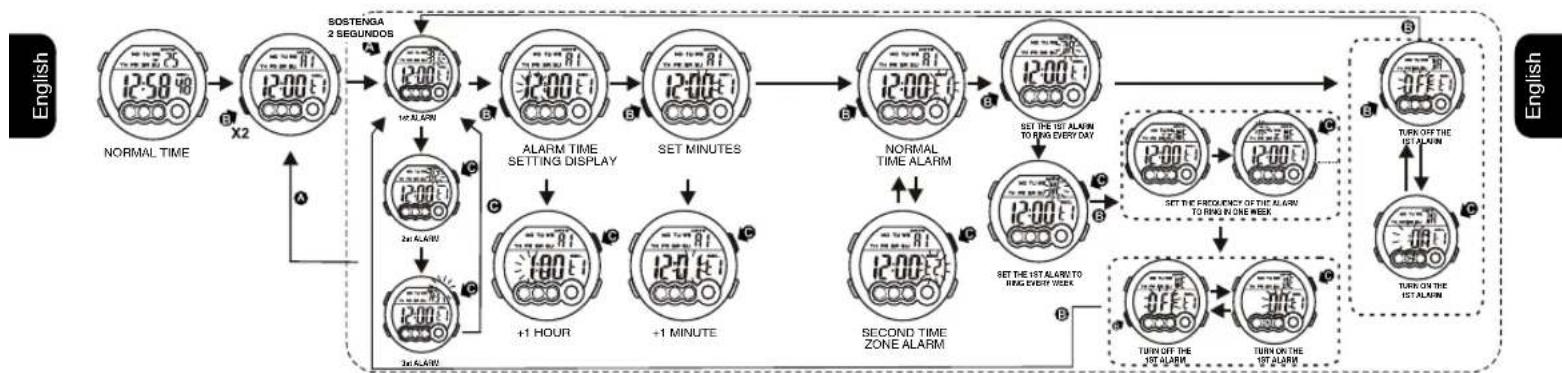
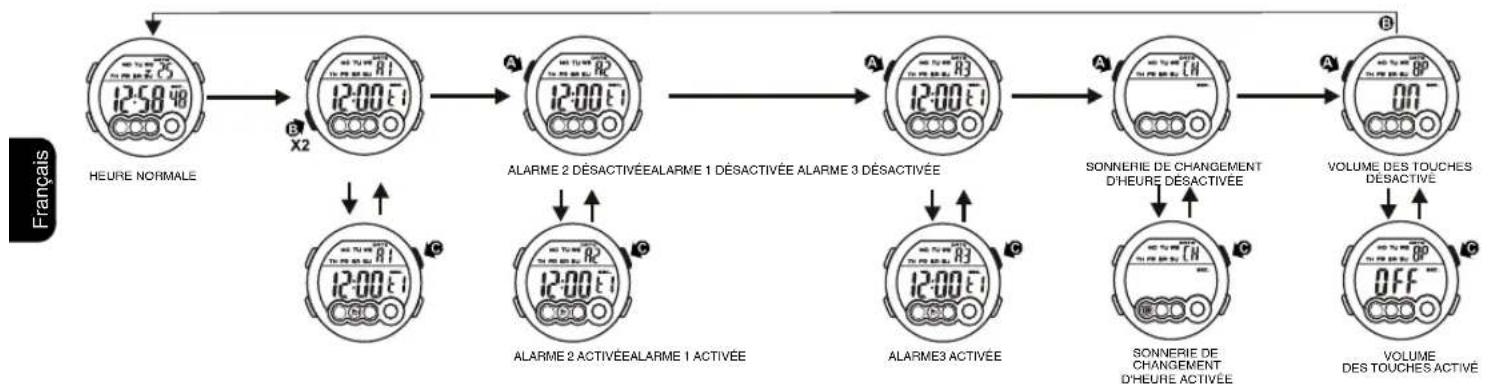
6. HOW TO SET THE ALARM, RINGING ON THE HOUR AND KEY TONE
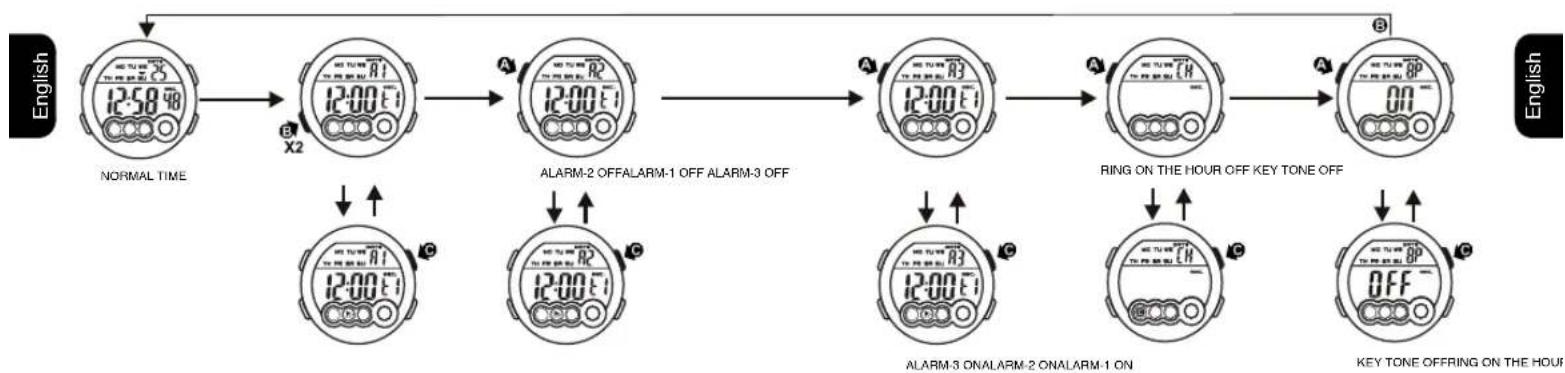
7. HOW TO USE THE CHRONOGRAPH
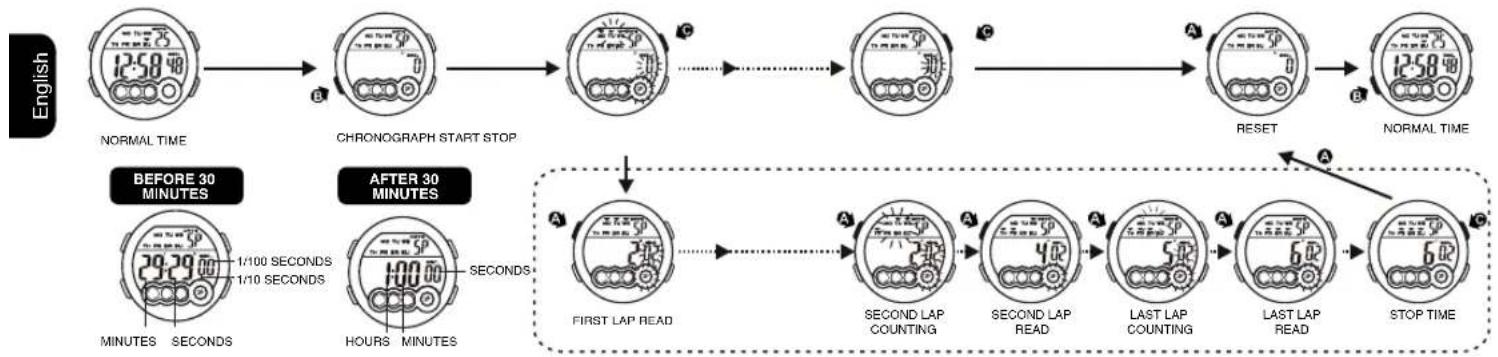
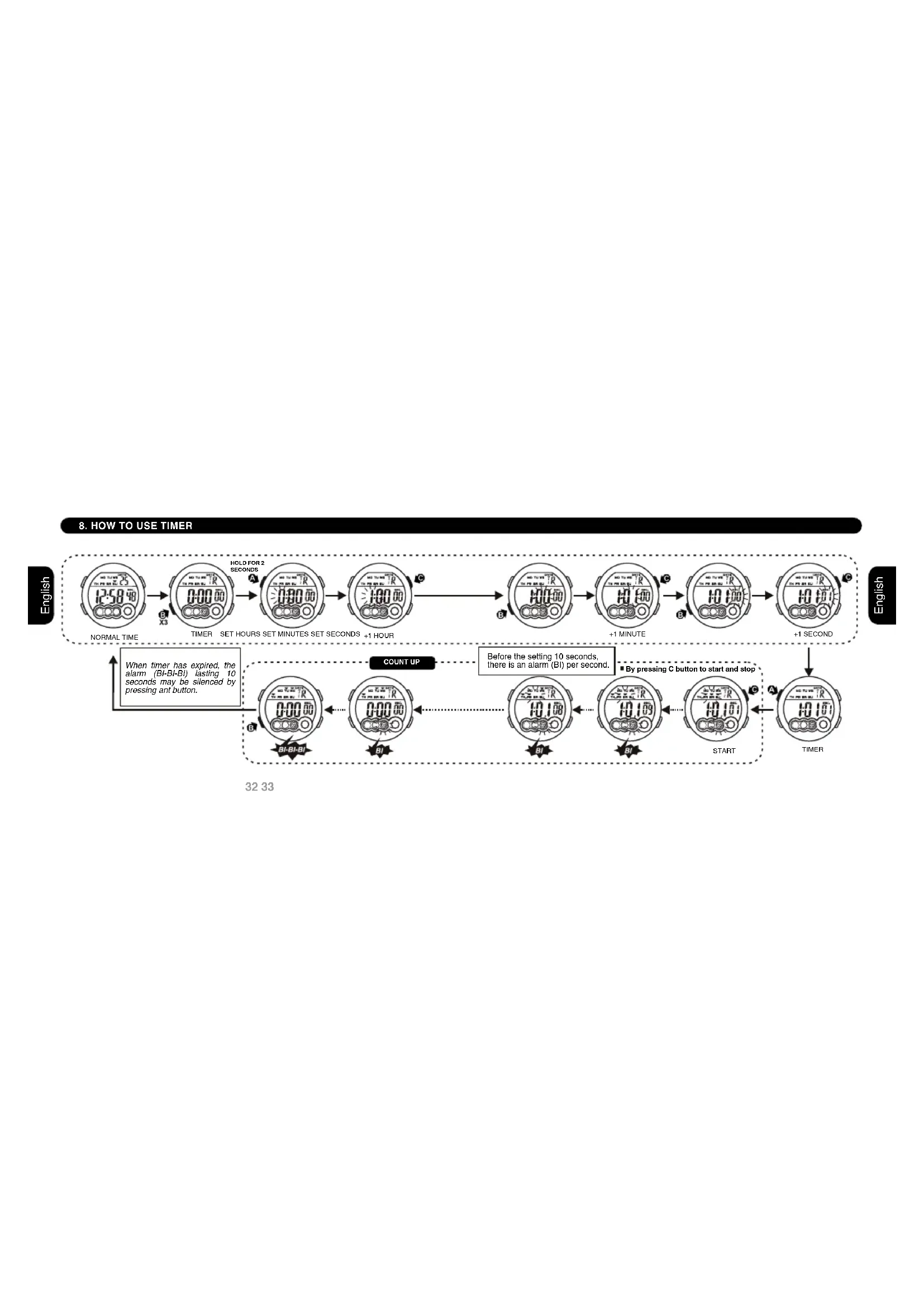
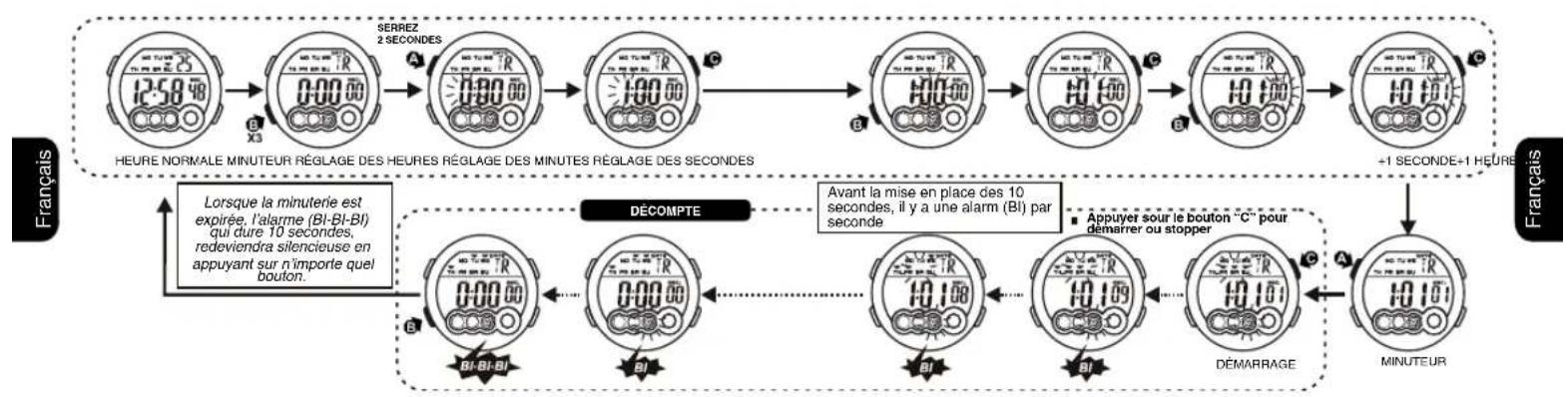
8. HOW TO USE TIMER

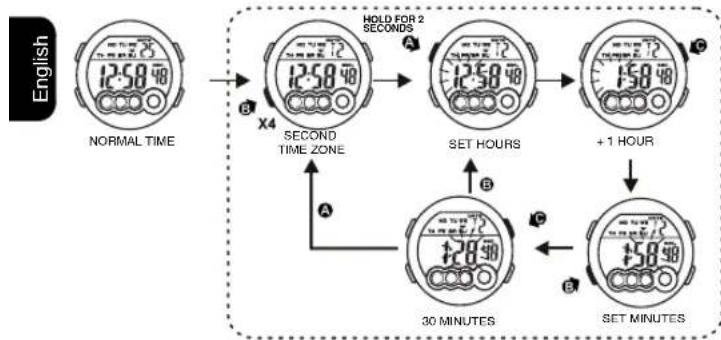
9. HOW TO SET SECOND TIME ZONE
10. HOW TO USE EL LIGHT
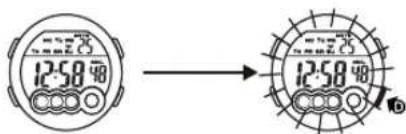
NOTE:
1. This watch features an electro-luminescent (EL) backlight, which tends to lose illuminating power after very long use.
2. The illumination provided by backlight may be hard to see under direct sunlight.
11. CARE OF YOUR WATCH
12. FEATURES AND SPECIFICATIONS

- This watch contains electronic components. Never attempt to open the case or remove the back cover.
- Do not operate push buttons below the surface of the water while swimming or diving.
- Should water or condensation appear in the watch, have the watch checked immediately. Corrosion of electronic parts can occur inside the case.
- Avoid severe impact. The watch is designed to withstand impact under normal use. It is inadvisable to subject it to severe impact of rough usage.
- Avoid exposing the watch to extreme temperature.
- Clean the watch with soft cloth and clean water only. Avoid using chemicals.
-
Keep your watch away from the conditions of strong electric field and static electricity.
-
Standard display mode: Hour, minutes, seconds, month, day of the week.
Function:
Year, Month, date AM/PM and Electro-Luminiscent light.
- Alarm function with buzzer signal output.
- Chronograph function with lap operation.
- Hourly chime.
- 12/24 hour format switch option.
Second time zone.
- Accuracy at normal temperature (25^) : + - 30 seconds a month.
- Normal operating temperature range: 10^ - 40^

By virtue of the regulations pursuant to the handling of waste products deriving from electronic and electrical equipment, end of lifecycle watch making products must be selectively collected for processing. You may therefore dispose of your
quartz watch making products at any of our retail outlets or any other authorized collection point. The selective collection, processing, rating and recycling of these products helps contribute to safeguarding the environment and protecting our health.
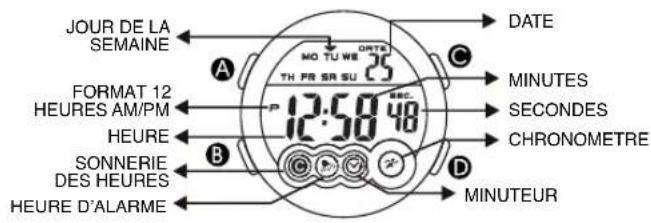
1.AFFICHAGE NORMALE ET BOUTON D'UTILISATION
BOUTONS D'UTILISATION
REGLAGE
ADJUSTMENT, MARCHE/ARRETE
MODE
LUMIÈRE

2.COMMENT CHANGER LE MODE D'AFFICHAGE
3.COMMENT AFFICHER LE MOIS, LA DATE

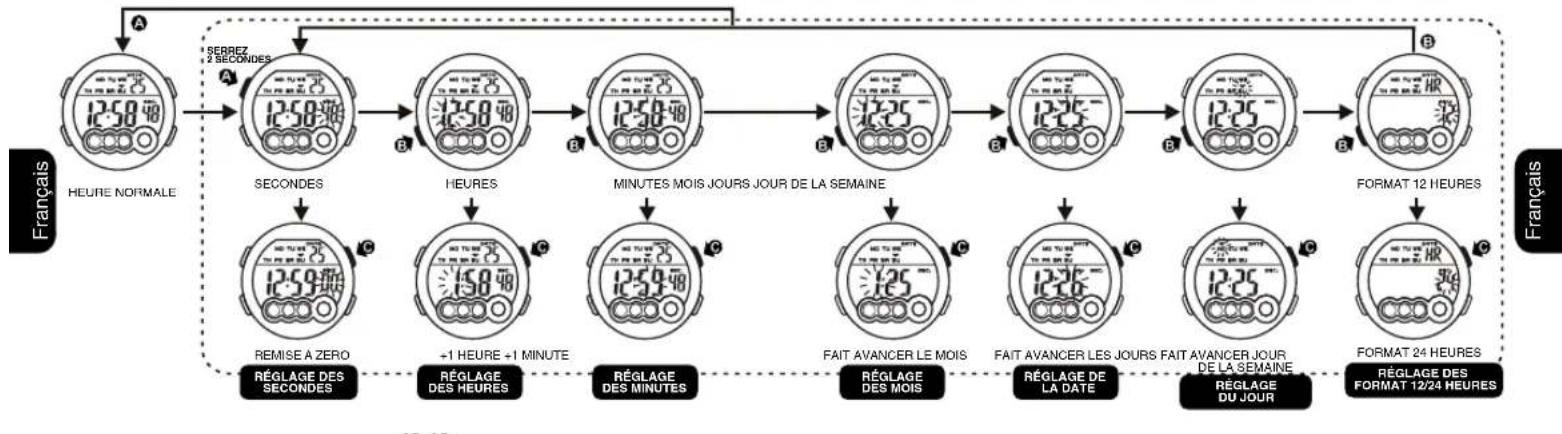
4.COMMENT RÉGLER L'HEURE NORMALE
5.COMMENT REGLER L'ALARME

6.COMMENT REGLER L'ALARME, LA SONNERIE DE CHANGEMENT D'HEURE ET LE VOLUME DES TOUCHES
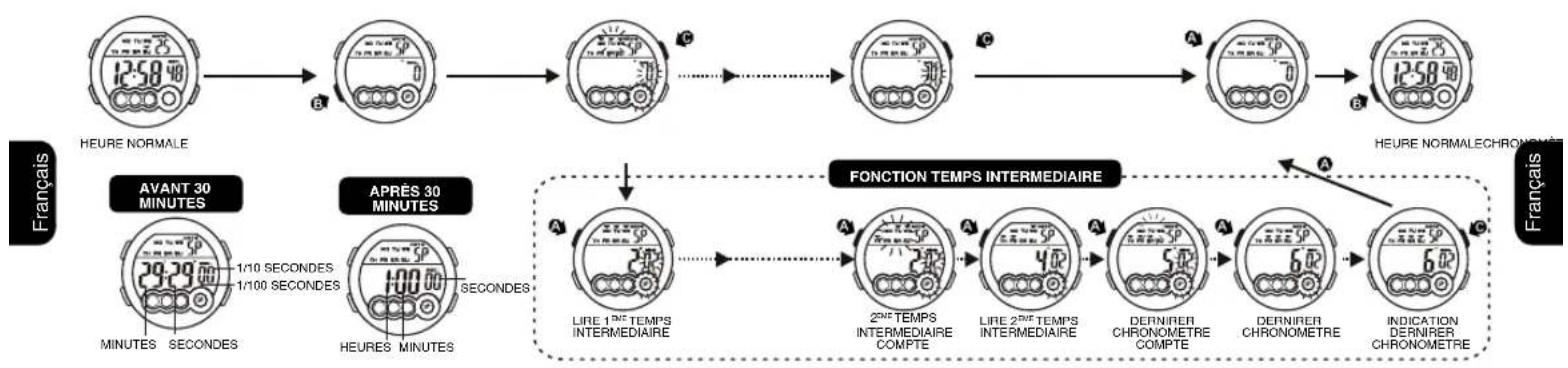
7. COMMENT UTILISER LE CHRONOMÉTURE
8. POUR UTILISER LE MINUTEUR DU COMPTE A REBOURS

9.COMMENT REGLER L'HEURE D'UNE DEUXIEME ZONE
10.COMMENT ALLUMER LA LUMIÈRE ÉLECTRO-LUMINISCENTE

NOTE:
- HOW TO SET NORMAL TIME
- HOW TO SET ALARM TIME
- HOW TO SET THE ALARM, RINGING ON THE HOUR AND KEY TONE
- HOW TO USE THE CHRONOGRAPH
- HOW TO USE TIMER
- HOW TO SET SECOND TIME ZONE
- HOW TO USE EL LIGHT
- CARE OF YOUR WATCH
- FEATURES AND SPECIFICATIONS
- BOUTONS D'UTILISATION
- 5.COMMENT REGLER L'ALARME
- 6.COMMENT REGLER L'ALARME, LA SONNERIE DE CHANGEMENT D'HEURE ET LE VOLUME DES TOUCHES
- POUR UTILISER LE MINUTEUR DU COMPTE A REBOURS
- NOTE:
Brand : Calypso
Model : K5692 Digital
Category : Wristwatch