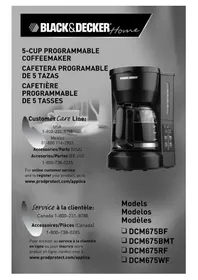
DCM675RF - Coffee machine BLACK & DECKER - Free user manual and instructions
Find the device manual for free DCM675RF BLACK & DECKER in PDF.



| Brand | Black & Decker |
| Model | DCM675RF |
| Product Type | Drip Coffee Maker |
| Capacity | 5 cups (740 ml) |
| Carafe Type | Red glass |
| Power | 120 V, 60 Hz, AC |
| Main Functions | Programmable clock, delayed brew, automatic shut-off after 2 hours, keep warm |
| Included Filter | Permanent filter (ref. PF75) |
| Filter Basket | Removable, compatible with 4-12 cup basket paper filters |
| Water Level Indicator | Yes, with cup markings |
| Body Material | Plastic |
| Warming Plate Material | Non-stick coating |
| Safety | Polarized plug, automatic shut-off |
| Maintenance | Vinegar cleaning recommended every 3 months |
| Replacement Parts | Carafe (DCM675RF-02), permanent filter (PF75), filter basket (DCM800-01) |
| Warranty | 2 years |
| Country of Manufacture | China |
| Indicator Light | Green power indicator |
| Digital Clock | Yes, with hour/minute setting |
| Use | Household only |
| Body Color | Black |
| Customer Service (Canada) | 1-800-231-9786 |
Frequently Asked Questions - DCM675RF BLACK & DECKER
User questions about DCM675RF BLACK & DECKER
0 question about this device. Answer the ones you know or ask your own.
Ask a new question about this device
Download the instructions for your Coffee machine in PDF format for free! Find your manual DCM675RF - BLACK & DECKER and take your electronic device back in hand. On this page are published all the documents necessary for the use of your device. DCM675RF by BLACK & DECKER.
USER MANUAL DCM675RF BLACK & DECKER
Mexico 01-800714-2503
Accessories/Parts (USA)
For online customer service and to register your product, go to
www.prodprotect.com/applica
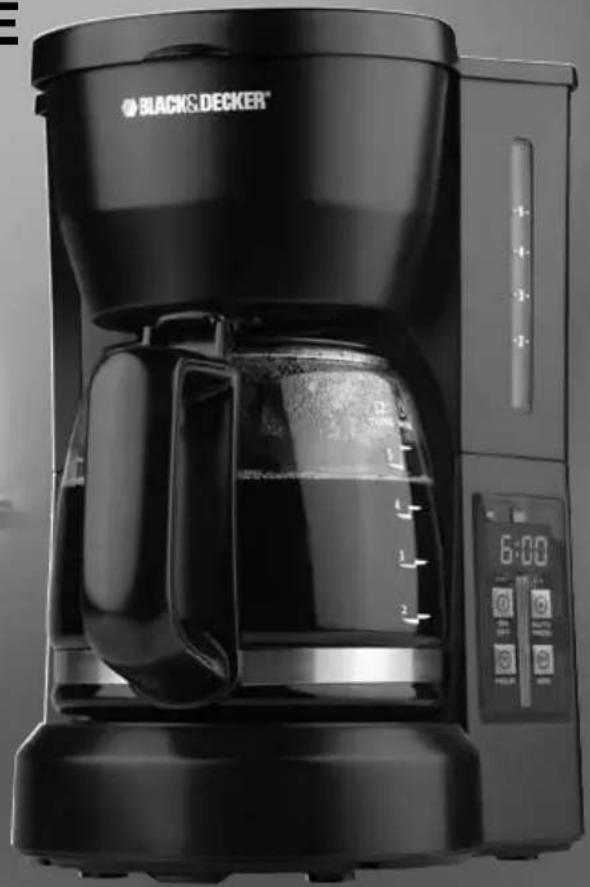
Please Read and Save this Use and Care Book
IMPORTANT SAFEGUARDS
When using electrical appliances, basic safety precautions should always be followed to reduce the risk of fire, electric shock, and/or injury to persons, including the following:
Read all instructions.
Do not touch hot surfaces. Use handle or knobs.
To protect against electric shock, do not place cord, plug or appliance in water or other liquids.
- Close supervision is necessary when any appliance is used by or near children.
Unplug from outlet when not in use and before cleaning. Allow to cool before putting on or taking off parts and before cleaning the appliance.
Do not operate any appliance with a damaged cord or plug or after the appliance malfunctions, or has been damaged in any manner. Return the appliance to the nearest authorized service facility for examination, repair, or adjustment. Or, call the appropriate toll-free number on the cover of this manual.
The use of an accessory not evaluated for use with this appliance may cause injuries.
Do not use outdoors.
- Do not let cord hang over the edge of table or counter, touch with hot surfaces.
Do not place on or near a hot gas or electric burner or in a heated oven.
To disconnect, turn any control to "off" then remove plug from wall outlet.
- Keep the lid on the carafe when in use.
The carafe is designed for use with the appliance. It must never be used on a range top.
Do not set a hot carafe down on a wet or cold surface.
Do not use the carafe if the glass is cracked or has a loose or weakened handle.
Do not clean the carafe with abrasive cleansers, steel wool, or other abrasive material.
Do not use this appliance for anything other than intended use.
Scalding may occur if the lid is removed during the brewing cycles.
SAVE THESE INSTRUCTIONS.
This product is for household use only.
POLARIZED PLUG (120V Models Only)
This appliance has a polarized plug (one blade is wider than the other). To reduce the risk of electric shock, this plug is intended to fit into a polarized outlet only one way. If the plug does not fit fully into the outlet, reverse the plug. If it still does not fit, contact a qualified electrician. Do not attempt to modify the plug in any way.
TAMPER-RESISTANT SCREW
Warning : This appliance is equipped with a tamper-resistant screw to prevent removal of the outer cover. To reduce the risk of fire or electric shock, do not attempt to remove the outer cover. There are no user-serviceable parts inside. Repair should be done only by authorized service personnel.
ELECTRICAL CORD
a) A short power-supply cord (or detachable power-supply cord) is to be provided to reduce the risk resulting from becoming entangled in or tripping over a longer cord.
b) Longer detachable power-supply cords or extension cords are available and may be used if care is exercised in their use.
c) If a long detachable power-supply cord or extension cord is used,
1) The marked electrical rating of the detachable power-supply cord or extension cord should be at least as great as the electrical rating of the appliance.
2) If the appliance is of the grounded type, the extension cord should be a grounding-type 3-wire cord, and
31 The longer cord should be arranged so that it will not drape over the countertop or tabletop where it can be pulled on by children or tripped over.
Note: If the power supply cord is damaged, it should be replaced by qualified personnel; in Latin America by an authorized service center.
Product may vary slightly from what is illustrated.
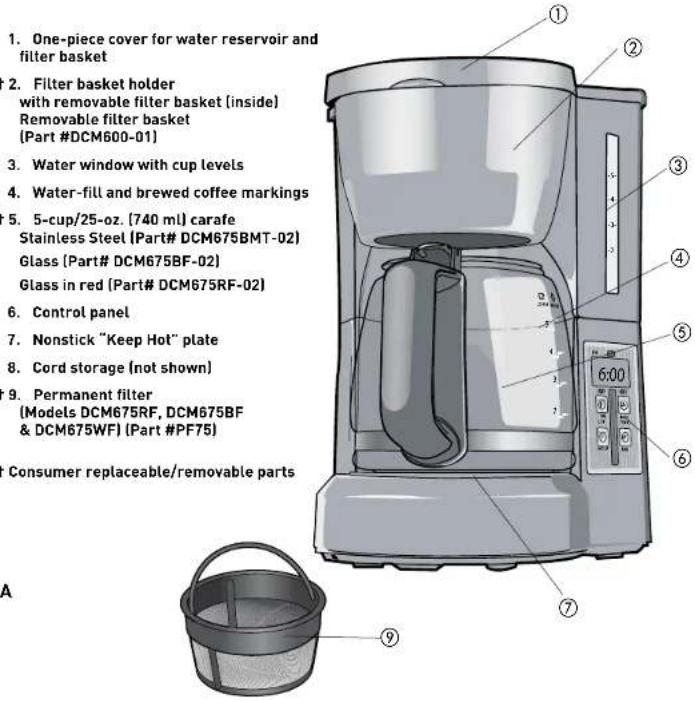
How to Use
This unit is for household use only.
GETTING STARTED
- Remove all packing materials and any stickers from the product.
- Remove and save literature.
- Wash all removable parts as instructed in Care and Cleaning section of this manual.
- Open one-piece cover for water reservoir and filter basket.
- Pour fresh cold water up to 5-cup level mark into the water reservoir.
- Place empty permanent filter (if included) or 4-cup or 8 to 12-cup basket style paper filter into removable filter basket.
- Place basket into filter basket holder.
- Uncoil power cord and plug into standard electrical outlet.
- Brew water through appliance without adding coffee grounds. This removes any dust or residue that may remain in the system during the manufacturing process.
- Discard the water from the carafe and paper filter from filter basket.
- Turn off the appliance; unplig it and allow appliance to cool down.
BREWING COFFEE:
- Open one-piece cover for water reservoir and filter basket.
-
Pour fresh cold water up to desired level mark into water reservoir.
-
Place empty permanent filter [if included] or 4-cup or 8 to 12-cup basket style paper
filter into the removable filter basket
- Insert filter basket into filter basket holder.
5.Add desired amount of ground coffee.
Note: Not sure how much coffee to use? Begin by using 1 level tablespoon of medium grind coffee for each cup of coffee to be brewed.
-
Close lid securely.
-
Place empty carafe on the "Keep Hot" plate.
- Plug cord into standard electrical outlet.
- Press ON/OFF button; green light comes on and brewing begins. (There is no need to set the clock.)
Note: Do not remove the carafe while coffee is brewing. Wait until brewing cycle is finished before removing the carafe to serve coffee.
- Replace the carafe on the "Keep Hot" plate when not serving to keep coffee hot.
- The coffeemaker automatically shuts off after 2 hours.
- Unplug appliance when not in use.
SETTING THE CLOCK
- Plug appliance into standard electrical outlet.
- The digital clock display flashes 12:00 A.M
- To set the time: Press HOUR button until the correct time appears on the display. Small green dot in top left corner of digital display indicates P.M.
- Press the MIN button to select the minutes.
TIP: Holding the button down makes the hours and minutes change rapidly after a short delay; tapping changes the time in 1 hour or 1 minute increments.
Note: If the unit is unplugged or power is interrupted even momentarily, the time will need to be reset.
- The time can be changed at any time simply by repeating procedure above.
SETTING THE AUTO BREW TIME
- Press the AUTO/PROG button and the green light above starts flashing.
- Quickly press the HOUR then the minute buttons to select the time you'd like the automatic brewing to begin (for example 7:15 A.M. Make sure the P.M. light is not on.)
- Press the AUTO/PROG button again holding it down for several seconds until the AUTO/PROG light stops flashing. This indicates the timer is activated.
- Prepare the coffee maker for brewing following the directions for BREWING COFFEE but don't press the ON/OFF button.
- To check the preset auto time, press the AUTO/PROG button and the preset auto time will be displayed.
- When the clock returns to the current time of day, press AUTO/PROG to reactivate the timer.
- To automatically brew coffee at the same time the next day, prepare coffeemaker for brewing coffee and press the AUTO/PROG button.
Note: The Auto-Brew function can be canceled at any time:
- Press the AUTO/PROG button a second time or
- Press the ON/OFF button twice.
- All lights go off.
COFFEE BREWING TIPS
- Stir coffee in carafe before serving to evenly distribute the flavor.
- For variety add a 1-inch piece of lemon or orange peel to the coffee grounds before brewing.
- Add a 2-inch piece of vanilla bean to the sugar bowl. You'll be surprised at how good it tastes.
- Keep your coffee maker very clean; you'll be pleased with the flavor.
- If coffee is left on the hot plate, be sure to remove the coffee grounds from the filter basket as soon as they have cooled slightly.
- Ground coffee can be stored in an airtight container in the refrigerator up to 2 weeks and still make fresh tasting coffee.
- Use cold tap water; hot tap water that has been sitting in a water heater may give your coffee a metallic taste.
Care and Cleaning
This appliance contains no user-serviceable parts. Refer service to qualified service personnel.
CLEANING
- Be sure the unit is unplugged and cooled.
- Open the one-piece cover, remove the filter basket [lift straight up], and discard the paper filter/grounds.
- Discard the paper filter from the filter basket.
- Wash the filter basket, carafe and carafe lid in the dishwasher, top-rack only or hand-wash in warm, sudsy water.
- To clean inside of reservoir cover, open the one-piece cover allowing it to rest in the open position.
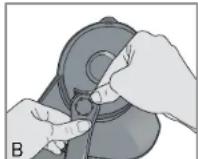
- Pull water showerhead out from under the guide, wipe surfaces with a damp cloth, then place water spreader under guide and close the cover [B].
Mineral deposits left by hard water can clog your coffeemaker. Cleaning with vinegar is recommended every 3 months.
USING VINEGAR
- Pour white vinegar into water reservoir up to 2-cup level on water window.
2.Add cold water up to 5-cup line. - Place a paper filter in the filter basket and close the cover.
- Set empty carafe on the "Keep Hot" plate.
- Turn on coffeemaker and let half the cleaning solution brew into carafe (till water level goes down to around "3"). Turn off coffeemaker and let it soak for at least 15 minutes to soften the deposits.
- Turn on coffeemaker and brew remaining cleaning solution into carafe.
- Turn off coffeemaker, empty carafe and discard filter.
- Fill reservoir with cold water to 5-cup line, replace empty carafe, then turn on coffeemaker for a complete brew cycle to flush out remaining cleaning solution. You may have to repeat this to eliminate the vinegar smell/taste.
- Wash the brew basket and carafe as instructed in "CLEANING."
CLEANING TIPS
- Excessive steaming or a prolonged brewing cycle is a sign that a cleaning is needed.
- The frequency of flushing out deposits is determined by your usage and water hardness.
- During cleaning, more steaming occurs than when brewing coffee and there may be some spitting.
IMPORTANT MISES EN GARDE
For service, repair or any questions regarding your appliance, call the appropriate 800 number on cover of this book. Please DO NOT return the product to the place of purchase. Also, please DO NOT mail product back to manufacturer, nor bring it to a service center. You may also want to consult the website listed on the cover of this manual.
Two-Year Limited Warranty
(Appplies only in the United States and Canada)
What does it cover?
- Any defect in material or workmanship provided; however, Applica's liability will not exceed the purchase price of product.
For how long?
Two years after date of purchase.
What will we do to help you?
- Provide you with a reasonably similar replacement product that is either new or factory refurbished.
How do you get service?
Save your receipt as proof of date of sale.
- Visit the online service website at www.prodprotect.com/applica, or call toll-free 1-800-231-9786, for general warranty service.
If you need parts or accessories, please call 1-800-738-0245.
What does your warranty not cover?
- Damage from commercial use
- Damage from misuse, abuse or neglect
- Products that have been modified in any way
- Products used or serviced outside the country of purchase
Glass parts and other accessory items that are packed with the unit - Shipping and handling costs associated with the replacement of the unit
- Consequential or incidental damages [Please note, however, that some states do not allow the exclusion or limitation of consequential or incidental damages, so this limitation may not apply to you.]
How does state law relate to this warranty?
- This warranty gives you specific legal rights. You may also have other rights that vary from state to state or province to province.
NECESITA AYUDA?
Col. Chapultepec Morales, Mexico D.F
Deleg. Miguel Hidalgo
CP 11570
MEXICO
The lightning symbol refers to "dangerous voltage"; the exclamation symbol refers to maintenance instructions. See below.
WARNING: To reduce the risk of fire or electric shock, do not remove the cover of the coffeemaker. There are no user-serviceable parts inside. Repair should be done by authorized service personnel only.
BLACK&DECKER is a trademark of The Black & Decker Corporation, Towson, Maryland, USA
Marca registrada de The Black & Decker Corporation, Towson, Maryland, E.U.
Copyright © 2010 Applica Consumer Products, Inc.
Made in People's Republic of China
Printed in People's Republic of China
C.U.I.T No. 30-69729892-0
Importado por / Imported by:
APPLICA MANUFACTURING, S. DE R. L. DE C. V.
Presidente Mazarik No111, 1er Piso
Col. Chapultepec Morales, Mexico D.F
Deleg. Miguel Hidalgo
CP 11570
MEXICO
Applica Consumer Products, Inc.
2010/1-25-55E/S/F

- Please Read and Save this Use and Care Book
- IMPORTANT SAFEGUARDS
- SAVE THESE INSTRUCTIONS.
- This product is for household use only.
- POLARIZED PLUG (120V Models Only)
- TAMPER-RESISTANT SCREW
- ELECTRICAL CORD
- How to Use
- GETTING STARTED
- BREWING COFFEE:
- SETTING THE CLOCK
- SETTING THE AUTO BREW TIME
- COFFEE BREWING TIPS
- Care and Cleaning
- CLEANING
- USING VINEGAR
- CLEANING TIPS
- IMPORTANT MISES EN GARDE
- Two-Year Limited Warranty
- (Appplies only in the United States and Canada)
- What does it cover?
- For how long?
- How do you get service?
- What does your warranty not cover?
- How does state law relate to this warranty?
- NECESITA AYUDA?
Brand : BLACK & DECKER
Model : DCM675RF
Category : Coffee machine