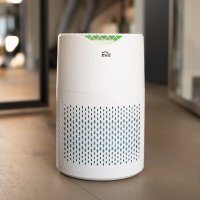
150 Basic - Air purifier Livn - Free user manual and instructions
Find the device manual for free 150 Basic Livn in PDF.


| Product Type | Air Purifier |
| Brand | Livn |
| Model | 150 Basic |
| Dimensions (L x D x H) | 203 x 203 x 327 mm |
| Weight | 2.3 kg |
| Power Supply | 230 V / 50 Hz |
| Nominal Power | 28 W |
| CADR (particles) | 150 m³/h |
| Noise Level | 30 - 50 dB |
| Application Area | 10 - 18 m² |
| Material | ABS |
| Filter Type | Composite: antibacterial cloth, activated carbon, HEPA H13 |
| Number of Speeds | 3 manual speeds + automatic mode + sleep mode |
| Timer | 1 to 12 hours |
| Air Quality Indicator | Green (good), blue (average), red (poor) |
| Child Lock | Yes, simultaneous press of filter replacement and speed buttons for 3 s |
| Light Mode | Yes, activate/deactivate by pressing and holding the light mode button for 3 s |
| Filter Replacement Indicator | White (normal), flashing (near), red (replacement needed) |
| Filter Replacement Frequency | Every 12 months (based on 8 h/day usage at low speed) |
| Maintenance and Cleaning | Clean the body with a slightly damp cloth; do not use abrasive substances; do not wash the filter |
| Safety | Double insulation (class II), do not use outdoors, do not place near heat sources or flammable materials |
| Replacement Parts Available | Composite filter (antibacterial cloth, activated carbon, HEPA H13) |
| General Information | Indoor use only; place on a stable surface, at least 50 cm from obstacles |
Frequently Asked Questions - 150 Basic Livn
User questions about 150 Basic Livn
0 question about this device. Answer the ones you know or ask your own.
Ask a new question about this device
Download the instructions for your Air purifier in PDF format for free! Find your manual 150 Basic - Livn and take your electronic device back in hand. On this page are published all the documents necessary for the use of your device. 150 Basic by Livn.
USER MANUAL 150 Basic Livn
EN Instruction manual
NL Handleiding
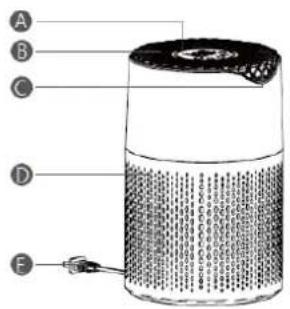
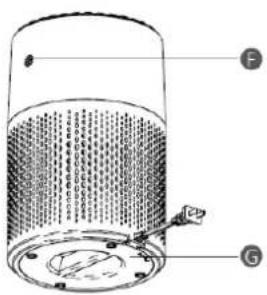
A Control panel B Air outlet C Air quality indicator D Air inlet E Power cord F Sensor G Rear case
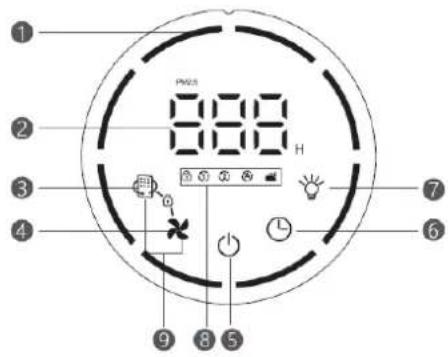
Control buttons
1 Circular air speed indicator 2 Digital display
3 Filter reset 4 Air speed adjustment
5 On / off button 6 Timer icon 7 Light button
8 Child lock function, Air speed gear, auto function, sleep function indicator
9 Child lock button
SAFETY PRECAUTIONS
Please read this manual carefully before using the product, and keep this manual in a safe place.
You must read these instructions carefully and follow the suggestions:
-
For your safety, this product complies with applicable standards and regulations (low voltage, electromagnetic compatibility, environmental protection, etc.):
-
This product is not suitable for persons with physical, sensory or mental disorders (including children), or those who lack experience or relevant knowledge, unless a responsible person supervises their safety or provides prior guidance about using the machine;
Children should be supervised to make sure that they do not play with the product;
-
This product is not intended for use by children under the age of eight; persons without relevant experience and knowledge; or persons with physical, sensory or mental disabilities, unless they have been trained or instructed on how to use the product safely and know the dangers involved with the product;
-
If the power cord is damaged, please do not use this product. If the power cord is damaged, it must be repaired by the service department of manufacturer, or be replaced by specialized personnel in a similar department;
Children must not clean and maintain the product without supervision;
-
Please refer to the "Maintenance" section of the manual when performing maintenance on this product;
-
Keep the power cord out of the reach of children under eight years of age;
This product is designed for indoor use and should not be used in industrial applications;
The warranty will be invalid if the product is damaged due to improper operation;
-
Do not operate the product in dusty, humid or fire-hazardous areas:
-
Before using the product, always make sure that the electrical plug and power cord are in good condition:
-
Do not insert foreign objects (such as needles) into the device;
- Do not pull the power cord to move the device or to remove the plug from the outlet;
- Extend the power cord to a suitable length before moving the product.
IMPORTANT MATTERS
- Do not cover the air inlet or outlet.
- Do not touch the appliance with wet hands.
- Do not allow any liquids to enter the product.
- Do not use the product in humid places.
- Do not place the product near heat sources.
- Do not place anything on, or insert foreign objects into, this product.
- Please do not place the product near flammable items or products (such as curtains, aerosols, organic solvents, etc.)
- Place the product on a stable surface and do not use it on its side or when tilted;
- When not using the product for a long time: Use the button (5) to turn off the device and unplug the power plug.
- Turn off the device and unplug it before moving it.
- Remove the plug when assembling or cleaning the device.
WORKING PRINCIPLE
The filter system in this machine filters large particles of dust, hair, PM2.5, formaldehyde, allergens, etc. in order to remove odours and purify air pollution.
The device also offers you fresh air and protects your health and that of your family.
Anti-bacterial Cloth, Activated carbon and H13 HEPA composite filter
- Volatile organic gases (VOCs)
Odour
Second-hand smoke - Fine particles (PM2.5)
- Pollen
Mites - Allergens
- Bacteria / viruses
INSTRUCTIONS BEFORE USE
Select the room where the air needs to be purified, and place the purifier on a stable surface or table inside the room.
To ensure free air circulation, avoid placing the purifier behind curtains, under windows, near furniture or shelves, or near any other obstacles; at least 50cm of free space should be reserved on each side of the purifier.
Please make sure that the filter bag inside the device has been removed before using it for the first time.
Please also make sure that:
- The voltage in your home matches the voltage marked on the device;
-
Your device can be connected to an unearthed power plug. This device is a Class II appliance (double insulation);
-
The air inlet and outlet are completely unobstructed;
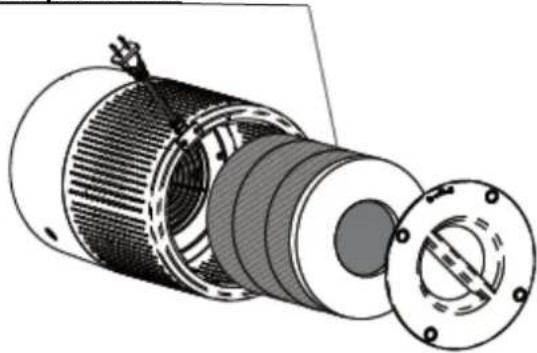
The strainer and bottom cover are installed correctly (see as below):
If the bottom cover is not installed properly, the device will not function effectively.
- You read the instructions for removing the filter packaging and replacing the filter after the first use (see images 1 - 6 below).
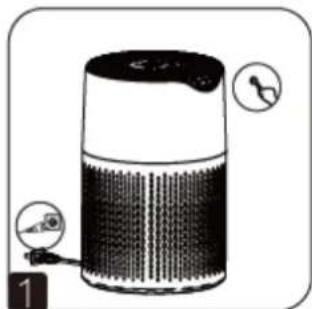
Turn off the power by pressing the power button.
Rotate the bottom cover to the left; remove the bottom cover after opening the lock.
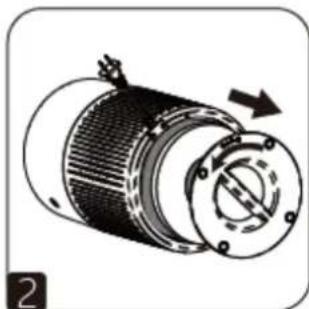
Remove the filter.
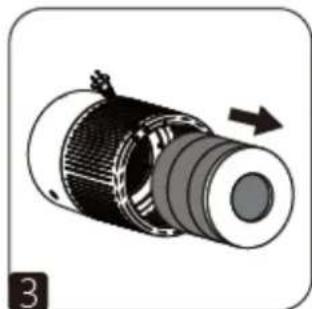
Remove the plastic bag from the new filter.
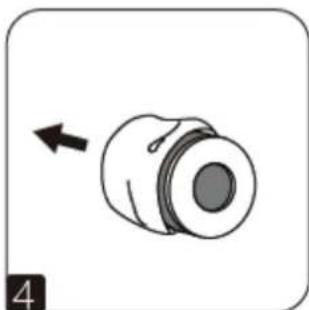
Re-insert the filter once the bag has been removed.
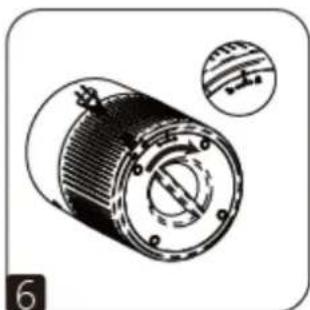
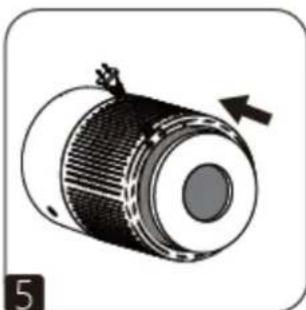
Place the base of the casing in its original position and rotate it to the right to align the arrow of the lock. You can now use the device normally.
INSTRUCTIONS FOR USE

Power switch
Connect the power supply. The red power indicator light will switch on and the purifier can be turned on or off. Activate the purifier's air quality detection system. The air quality detection system will complete its detection cycle once the digital frame of the operating panel has flashed for approximately 30 seconds. The digital display on the operating panel uses green, blue and red air quality indicators to inform you about the quality of indoor air.
| Digital Display | Colour | Air quality |
| 1-100 | Green | Very good |
| 101-200 | Blue | Good |
| 201 or more | Red | Poor |

Timer function
When the air purifier is operational, press the button to select the required operating time (1 ~12h), and the purifier will automatically stop working after the set time.

Air speed adjustment
In this mode, you can press the air speed adjustment key to select the purification speed and operation mode.
1st gear: The first air speed gear indicator will light up, the purification air speed is low, and the outer ring will flash slowly;
② 2^nd gear: The second air speed gear indicator will light up, the purification air speed has increased slightly, which makes it suitable for slightly better air quality. The outer ring will flash at medium speed;
①② 3^rd gear: The first and second air speed gear indicator will light up simultaneously, the purification air speed is high, and the outer ring will flash at high speed.
Auto mode: The Auto indicator will light up, and the device will automatically adjust the air speed based on the air quality detected by the sensor; this is suitable for most purposes.
Sleep mode: The purifier runs at 1st speed. Besides the sleep indicator and the air speed key, which will be half-lit, all the lights will be off.

: button
Press the light button for 3 seconds to turn on/off the light button function. By default, this function is turned on when the power is turned on. When the light button is turned on, the light indicator is always on, and other indicators are normally displayed; the light indicator is turned off when the light button is turned off. The indicator light is half-lit, and the other lights are all off, but the other operating status of the machine remains unchanged. This means the machine can be operated normally. It will remain active for another 2 seconds after operation.

Filter reset
When the machine is operating normally, the filter button will always be white. When the service life of the filter is about to expire, the filter reset button will start to flash. When the filter life has expired, the filter reset button will turn red, prompting to replace the filter. Once the filter has been replaced, you can reset the filter service life by pressing this button for 3 seconds until the red light goes out and the white light comes on.

Child Lock button
Press and hold the filter reset button + air speed button for 3 seconds while the unit is on; the child lock indicator will light up and the purifier will beep 3 times to enter child lock mode, None of the buttons (including ON / OFF button) will work. No matter which button is pressed, the child lock indicator will blink 3 times silently to remind you that the device is in child lock mode. To exit this mode, please press and hold the filter reset button and air speed button together for 3 seconds. The child lock indicator will turn off, and the device will beep once. All buttons will function normally again.
PRODUCT CONFIGURATION AND PARAMETERS
| Rated voltage: | 230V/50Hz | CADR (particulate matter): | 150m3/h |
| Rated power: | 28W | Noise: | 30-50dB |
| Material: | ABS | Application area: | 10-18㎡ |
| Product size: | 203*203*327 mm | Product weight: | 2.3KG |
MAINTENANCE
Before performing maintenance, make sure that you have turned off the power and turned off the device by pressing the button (5).
You can use a slightly damp cloth to clean the product body.
Important tips: Do not use any abrasive materials in order to avoid damaging the surface of the device.
Filter replacement
| Filter operating frequency | Operation | Frequency |
| Anti-bacterial cloth, Activated carbon and H13 HEPA composite filter | Replace | Composite filter change every 12 months |
This data is calculated based on low-speed air purification, and 8 operating hours a day; The recommended filter replacement frequency will vary depending on the operating duration and the working environment. The corresponding indicator will light up when the filter needs to be replaced.
Attention! If your purifier stops working, please check if the filter needs to be replaced.
- If filter indicator light is on, the activated carbon and HEPA composite filters will need to be replaced;
Please note:
- Activated carbon and HEPA filters cannot be washed or used repeatedly. Do not wash them with water.
- Replace the filters one by one. Please refer to "Before Use" and the "Instructions for removing the filter package before first use and replacing the filter after the service life of the filter has expired".
Useful Tips
If you are allergic or have asthma, avoid touching the used filters;
- Wear gloves when replacing the filter, or wash your hands after replacement;
- Put the used filter in a sealed bag and throw it away to prevent the spread of pollutants.
STORAGE
When not using the purifier for a long time, please store it in a dry, cool place.
COMMON MALFUNCTIONS
Do not disassemble the machine without permission; improper repair may cause danger to the user!
Before contacting the after-sales service center, please check the following troubleshooting table:
| Malfunction | Examination | Approach |
| Does not start | Is the power supply plugged in? | Plug in the power supply at the correct voltage. |
| Are all the indicators not lit? | Press the button to select the desired function. | |
| Is there a power outage? | Device will be available once power is restored. | |
| Is the rear case closed? | Install the rear case properly. | |
| Airflow is much weaker than before | Does the filter need to be replaced? | Check if the filter is approaching the end of its service life and replace the filter if necessary. |
| Odour from the air outlet | Does the filter need to be replaced? | |
| Air speed cannot be changed automatically | Is it in manual mode? | Select the correct operating mode. |
NL HANDLEIDING
BESCHRIJVING
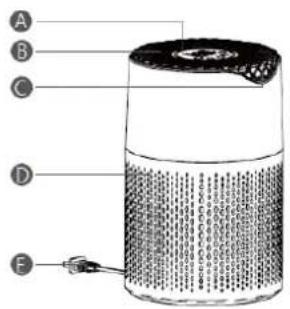
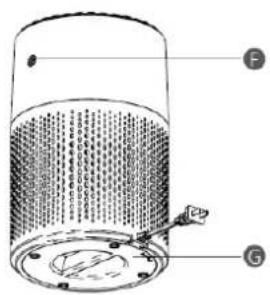
Productbeschrijving
PRODUCTCONFIGURATIE EN PARAMETERS
| Nominale spanning: | 230 V/50 Hz | CADR (deeltjes): | 150 m3/h |
| Nominal vermogen: | 28 W | Geluidsniveau: | 30-50 dB |
| Material: | ABS | Toepassingsbereik: | 10-18 m² |
| Productafmetingen: | 203x203x327 mm | Productgewicht: | 2,3 kg |
ONDERHOUD
FR MANUEL D'INSTRUCTIONS
DESCRIPTION
- Control buttons
- SAFETY PRECAUTIONS
- IMPORTANT MATTERS
- WORKING PRINCIPLE
- Anti-bacterial Cloth, Activated carbon and H13 HEPA composite filter
- INSTRUCTIONS BEFORE USE
- Please make sure that the filter bag inside the device has been removed before using it for the first time.
- INSTRUCTIONS FOR USE
- Power switch
- Timer function
- Air speed adjustment
- : button
- Filter reset
- Child Lock button
- MAINTENANCE
- Please note:
- Useful Tips
- STORAGE
- COMMON MALFUNCTIONS
- NL HANDLEIDING
- BESCHRIJVING
- Productbeschrijving
- ONDERHOUD
- FR MANUEL D'INSTRUCTIONS
- DESCRIPTION
Brand : Livn
Model : 150 Basic
Category : Air purifier