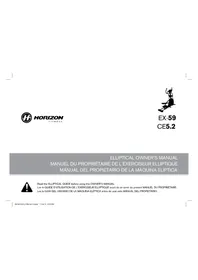
CE5.2 - Elliptical bike Horizon Fitness - Free user manual and instructions
Find the device manual for free CE5.2 Horizon Fitness in PDF.



| Product Type | Elliptical Trainer |
| Brand | Horizon Fitness |
| Model | CE5.2 |
| Maximum User Weight | 125 kg (275 lb) |
| Power Supply | AC Power Cord |
| Frame Warranty | Lifetime |
| Brake Warranty | 15 years |
| Electronic Components Warranty | 1 year |
| Labor Warranty | 1 year |
| Display | LED Windows: Time, Distance, Calories, Heart Rate, Speed, Resistance Level |
| Exercise Programs | Variable Resistance, Weight Loss, Intervals |
| Customizable Targets | Time (300 to 900 units), Distance (0.25 to 26.25 miles), Calories (200 to 880) |
| Heart Rate Monitor | Grip Heart Rate Sensors |
| Fan | Built-in, Push-button Control |
| Speakers | Built-in, Audio Jack for MP3 Player |
| Headphone Jack | Yes, for Private Listening |
| MP3 Player Holder | Dedicated Slot |
| Reading Rack | For Magazine or Book |
| Resistance Adjustment | +/- Keys and Quick Adjust |
| Stabilizers | Front with Leveling |
| Customer Service | Technical Support by Phone, Email, or Website |
| Maintenance | Clean the console and surfaces regularly |
Frequently Asked Questions - CE5.2 Horizon Fitness
User questions about CE5.2 Horizon Fitness
0 question about this device. Answer the ones you know or ask your own.
Ask a new question about this device
Download the instructions for your Elliptical bike in PDF format for free! Find your manual CE5.2 - Horizon Fitness and take your electronic device back in hand. On this page are published all the documents necessary for the use of your device. CE5.2 by Horizon Fitness.
USER MANUAL CE5.2 Horizon Fitness
ELLiptical OWNER'S MANUAL
MANUEL DU PROPRIÉTAIRE DE L'EXERCISEUR ELLIPTIQUE
MANUAL DEL PROPIETARIO DE LA MAQUINA ELIPTICA

Read the ELLIPTICAL GUIDE before using this OWNER'S MANUAL.
Lire le GUIDE D'UTILISATION DE L'EXERCISEUR ELLIPTIQUE avant de se servir du presente MANUEL DU PROPRIÉTAIRE.
There are several areas during the assembly process that special attention must be paid. It is very important: to follow the assembly instructions correctly and to make sure all parts are firmly tightened. If the assembly instructions are not followed correctly, the elliptical could have frame parts that are not tightened and will seem loose and may cause irritating noises. To prevent damage to the elliptical, the assembly instructions must be reviewed and corrective actions should be taken.
Before proceeding, find your ellipse's serial number located on a white barcode sticker on the front stabilizer tube and enter it in the space provided below.
ENTER YOUR SERIAL NUMBER AND MODEL NAME IN THE BOXES BELOW:


SERIAL NUMBER LOCATION

TooLS INCLUDED:
□Soredivsir
5mmWench
□□
□A
PARTS INCLUDED:
□1MainFrames
2 Lower Link Anna With Footpads
1 Top Cap
□Lonsola Meat
□LcosoleMeatBoat
1.
□A
□2
1 Water Bottle Holder
1 Audio Adap
PowerCard
1 Hardwarese Kit
PRE ASSEMBLY
UNPACKING
Unpack the product where you will be using it. Place the elliptical carton on a level flat surface. It is recommended that you place a protective covering on your floor. Never open box when it is on its side.
NOTE: During each assembly step, ensure that ALL nuts and bolts are in place and partially threaded in before completely tightening any ONE bolt.
NOTE: A light application of grease may aid in the installation of hardware. Any grease, such as lithium bike grease is recommended.

NEED HELP?
If you have questions or if
there are any missing parts.
contact Customer Tech
Support Contact information:
0


ASSEMBLY STEP 1


HARDWARE BAG 1 CONTENTS


A. Open HARDWARE BAG 1.
B Attach the STABILIZER TUBE to the MAIN FRAME using 4 BOLTS (A), 4 SPRING WASHERS (B) and 4 ARC WASHERS (C).
ASSEMBLY STEP 2
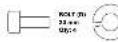
HARDWARE BAG 2 CONTENTS:


A Open HARDWARE BAG 2.
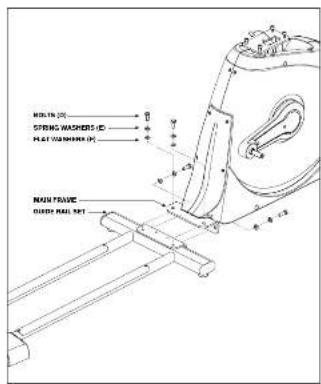
Align GUIDE RAIL SET with MAIN FRAME as shown.
C Attach the GUIDE RAIL SET to the MAIN FRAME using 4 BOLTS (D). 4 SPRING WASHERS (E) and 4 FLAT WASHERS (F).


ASSEMBLY STEP 3 ASSEMBLY STEP 4
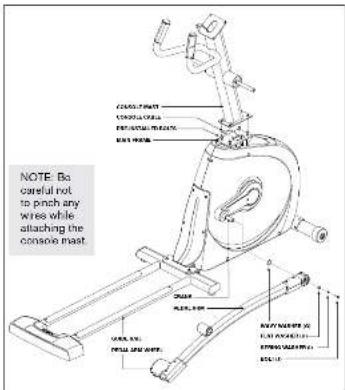

HARDWARE BAG 3 CONTENTS
A. Open HARDWARE BAG 3
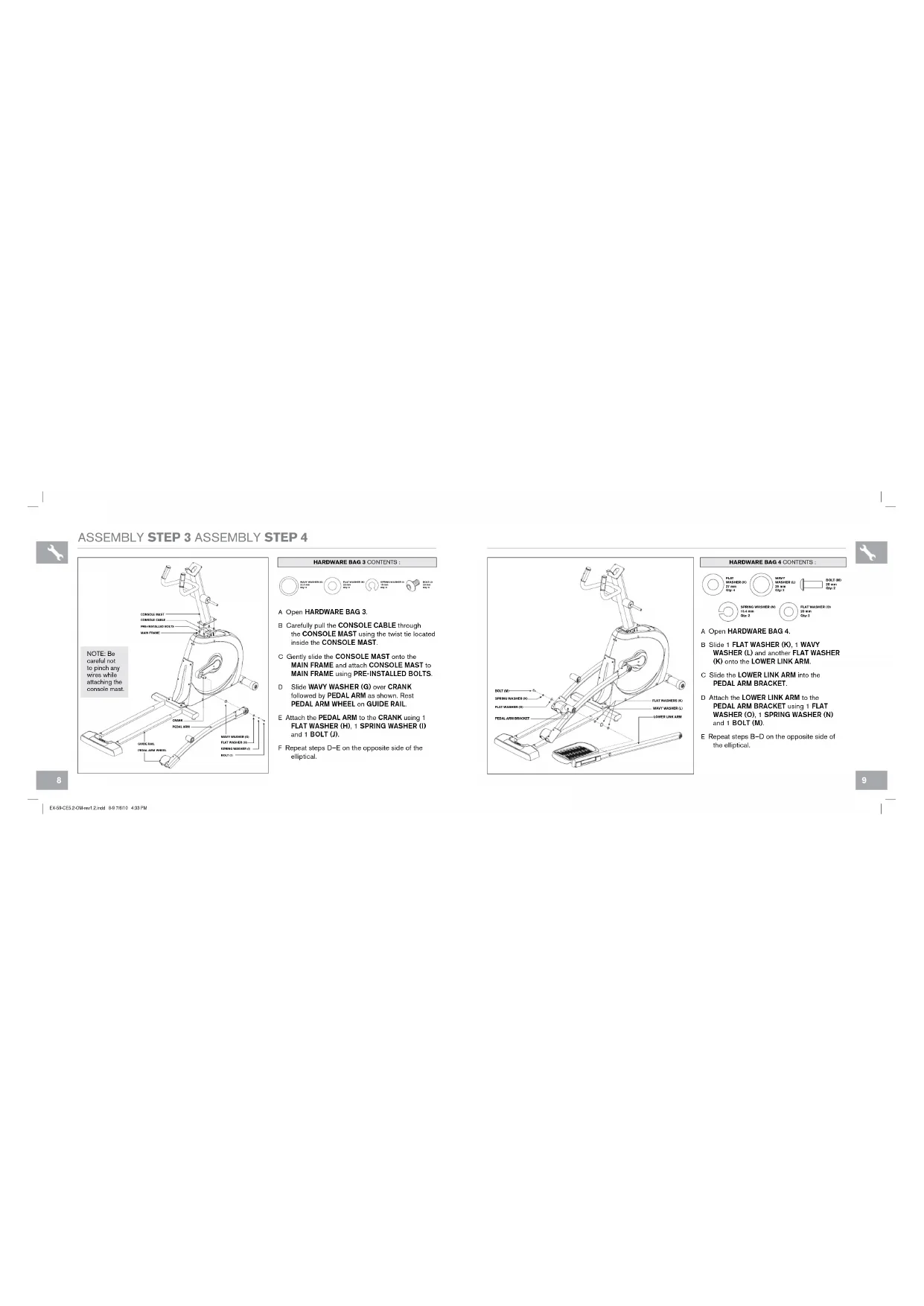
B Carefully pull the CONSOLE CABLE through the CONSOLE MAST using the twist tie located inside the CONSOLE MAST.
C. Gently slide the CONSOLE MAST onto the MAIN FRAME and attach CONSOLE MAST to MAIN FRAME using PRE-INSTALLED BOLTS.
D Slide WAVY WASHER (G) over CRANK followed by PEDAL ARM as shown. Rest PEDAL ARM WHEEL on GUIDE RAIL.
E Attach the PEDAL ARM to the CRANK using 1 FLAT WASHER (H), 1 SPRING WASHER (I) and 1 BOLT (J).
F. Re-post steps D-E on the opposite side of the elliptical.

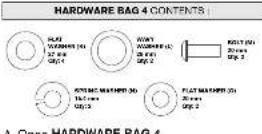
A Open HARDWARE BAG 4
B Slide 1 FLAT WASHER (K).1 WAVY WASHER (L) and another FLAT WASHER (K) onto the LOWER LINK ARM.
Slide the LOWER LINK ARM into the PEDAL ARM BRACKET.
D Attach the LOWER LINK ARM to the PEDAL ARM BRACKET using 1 FLAT WASHER (O). 1 SPRING WASHER (N) and 1 BOLT (M).
Repeat steps B-D on the opposite side of the elliptical.


ASSEMBLY STEP 5
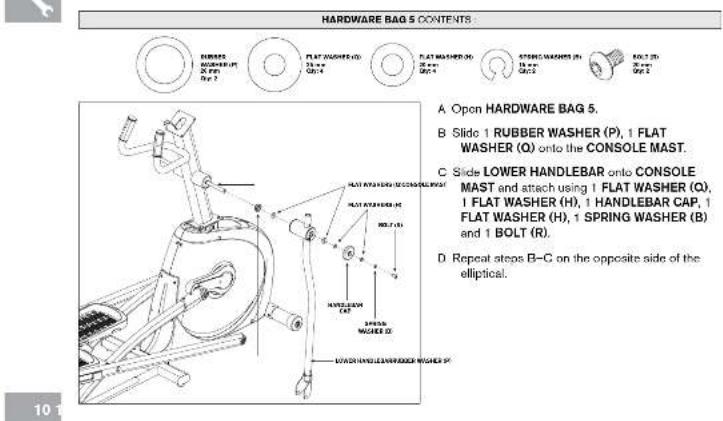
EX-0C2E2OAMrT2and 10-1188104395
ASSEMBLY STEP 6
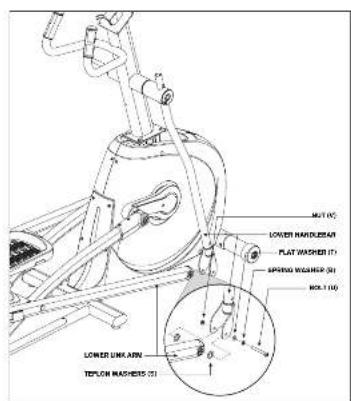


ASSEMBLY STEP 7
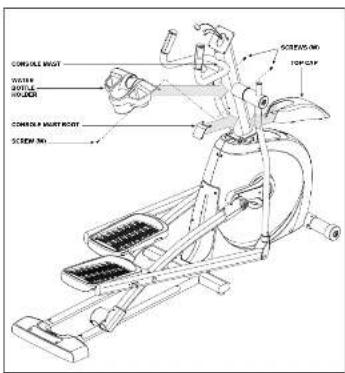

HARDWARE BAG 7 CONTENTS
A Open HARDWARE BAG 7
B Slide TOP CAP over CONSOLE MAST and snap into place.
C Insert CONSOLE MAST BOOT over TOP CAP and anep into place.
D Slide WATER BOTTLE HOLDER over CONSOLE MAST and attach using 3 SCREWS (W).
ASSEMBLY STEP 8


HARDWARE BAG & CONTENTS
A Open HARDWARE BAG 8.
B Attach the ConSoLE CABLES to the ConSoLE
C Carefully tick the CoSole CABLES into the CoSole MAST before attaching the CoSole. Attach CoSole to CoSole MAST using 4 BoLTS (X).
D Slide UPPER HANDLEBARS onto LOWER HANDLEBARS making sure HANDLEbars are properly positioned on the screen. Apply UPPER HANDLEBARS to LOWER HANDLEBARS using PRE-ATTACHED SET SREWS.
Make sure upper handbuckle are as far down as possible.
E Repeat step D on the opposite side of the elliptical.
YOU ARE FINISHED!
This section explains how to use your allipical's console and programming.
The BASIC OPERATION section in the ELLIPTICAL GUIDE has instructions for the following
- LOCATION OF THE ELLIPTICAL
POwER/GRoUNDINGINSRcHIONSE
FooT PoSIToNING - MOVING THE ELLIPTICAL
LEVELING THE ELLIPTICAL
. POWER/MANUAL INLINE operation
USING THE HEART RATE FUNCTION


16
EX9CEE204c12a18-7
ConSoLE oPERATION
Note: There is a thin protective sheet of clear plastic on the overlay of the console that should be removed before use.
A)LED DISPLAY WINDoWS:time,distance,calories,heart rate,speed and resistance level
B) TARGET LED INDICATORS: indicate what target (if any) is set for the current program.
C) WORKOUT LED INDICATORS: indicate what workout fit any, is set for the current program.
D) SELECT TARGET: press to select your desired target.
E) SELECT Workout: press to select your desired workload.
F) START: press to begin exercising, start your workout, or resume exercising after pause.
G) SToP: press to pause/end your workout. Hold for 8 seconds to reset the console.
H) +/− KEys: used to adjust resistance level.
D) QUICK KEYs: used to reach desired resistance level more quickly.
J) ENTER: used to confirm a selection.
K) CHANGE DISPLAY: press to change display feedback during workout.
L) FAN KEY: press to turn fan on and off.
M) FAN: personal workout fan.
N) SPEAKERS: music plays through speakers when your CD / MP3 player is connected to the console.
a) AUDIO IN JACK: plug your CD / MP3 player into the console using the included audio adaptor cable.
P) AUDIO OUT / HEADPHONE JACK: plug your headphones into this jack to listen to your music through the headphones. Note: when headphones are plugged into the headphone jack, the sound will no longer come out through the speakers.
Q) MP3 PLAYER POCKET: used to store your MP3 player.
R) READING RACK: holds reading material
- TIME: Shown as minutes : seconds. View the time remaining or the time elapsed in your workout.
- DISTANCE: Shown as miles. Indicates distance traveled or distance remaining during your workout.
- SPEED: Shown as MPH. Indicates how fast the foot pads are moving.
CALORIES: Total calories burned per calorie remaining left to burn during your workout.
HEART RATE: Shown as EPM (beats per minute). Used to monitor your heart rate (displayed when contact is made with both pulse grip).
LEVEL: Shows the current level of resistance.
TARGETS:
LED lights up next to currently selected target. If no LED is lit, no target is activated.
·WoRkOuTIs
LED lights up next to currently selected workout. If no LED is lit, no workout is activated.
PROGRAM INFORATION
TARGET 1 - TIME: Allows user to set a target based on how long they would like to workout. Time targets can range from 5:00 - 99:00 TIME will count down. DISTANCE and CALORIBES will count up from zero.
TARGET 2 - DISTANCE: Allows user to set a target based on distance they would like to complete. Distance target can range from 0.20 - 26.25 miles. DISTANCE will count down. TIME and CALORIES will count up from zero.
TARGET 3 - CALORIES. Allows user to set a target based on the number of calories they would like to burn. Calories target can range from 20 - 980 calories. CALORIES will count down. TIME and DISTANCE will count up from zero.
NO TARGET: Allows user to select a workout profile that has no specified time, distance, or calorie target. TIME, DISTANCE, and CALORIES will all count up from zero.
WoRkUT 1 - Rolling Resistance program. Minics the feeling of moving up and down hills by gradually increasing and decreasing the resistance.
WORKOUT 2 - WEIGHT LOSS Promotes weight loss by increasing and decreasing the resistance, while keeping you in your fat burning zone.
WORKOUT 3 - INTERVALS: Improves your strength, speed and endurance by increasing and decreasing the resistance throughout your workout to involve your heart and other muscles.

GETTING STARTED
1) Check to make sure no objects are nearby that will hinder the movement of the object.
2) Plug in the power cord and turn the elliptical ON. (Switch is located at the bottom-front of the elliptical.) NOTE: Some elliptical ONs are located at the bottom front and will turn on when power is supplied.
A) QUICK START UP
Simply press the START key to begin working out. The time will count up from 0:00, the resistance level will default to low 1, OR...
B) SELECT A TARGET
1) Select a TARGET using the SELECT TARGET key.
2) Adjust the TARGET settings using the ARROW keys.
3) Press ENTER to advance.
4) Select a WORKOUT using the SELECT WORKOUT key.
5) Press START to begin workout.
NOTE: It is no TARGET nor WORKOUT is selected; the program will function as a MANUAL program. All changes in this program are not required to be from the user in this setting.
To RESET THE ConSoLE
Hold STOP key for 3 seconds.
FINISHING yoUR Workout
When your workout is complete, the monitor display will flash
HNISHD and beep. Your workout information will eay
eepayed on the consol for 30 seconds and then rescc
CLEAR CURRENT SELECTION
To clear the current program selection or screen, hold the STOP button for 3 seconds.
USING yoUR CD / MP3 PLAYER

1) Connect the included AUDIO ADAPTOR CABLE to the AUDIO IN JACK on the top right of the console and the headphones jack on your CD / MP3 player.
2) Use your CD / MP3 player buttons to adjust song settings.
3) Remove the AUDIO ADAPTOR CABLE when not in use.
4) If you don't want to use the SPEAKERS, you can plug your headphones into the AUDIO OUT JACK at the bottom of the console.
LIMITED HOME-USE WARRANTY


WEIGHT CAPACITY = 275 lbs (125 kilograms).
FRAME·LIFETIME
Horizon Fitness warrants the frame against defects in workmanship and materials for the lifetime of the original owner, so long as the device remains in the possession of the original owner. (The frame is defined as the welded metal base of the unit and does not include any parts that can be removed.)
BRAKE · CE5.2:15 YEARS
EX-39:20YEARS
Horizon Fitness warrants the brake against defects in workmanship and materials for the period specified above from the date of original purchase, so long as the device remains in the possession of the original owner. Labor or installation of brake is not covered under the motor warranty
ELECTRONICS & PARTS·1 YEAR
Horizon Fitness warrants the electronic components, finish and all original parts for a period of one year from the date of the original purchase, so long as the device remains in the possession of the original owner.
LABOR·1 YEAR
Horizon Fitness shall cover the labor cost for the repair of the device for a period of one year from the date of the original purchase, so long as the device remains in the possession of the original owner.
EXCLUSIONS AND LIMITATIONS
Who is covered?
The original owner and is not transfereble.
What IS covered:
Repair or replacement of a defective motor, electronic component, or defective part and is the sole remedy of the warranty.
What IS NOT covered:
Normal wear and tear, improper assembly or maintenance, or installation of parts or accessories not originally intended or compatible with the equipment as sold.
- Damage or failure due to accident, abuse, corrosion, discoloration of paint or plastic, neglect, theft, vandalism, fire, flood, wind, lightning, freezing, or other natural disasters of any kind, power reduction, fluctuation or failure from whatever cause, unusual atmospheric conditions, collision, introduction of foreign objects into the covered unit, or modifications that are unauthorized or not recommended by Horizon Fitness.
- Incidental or consequential damages. Horizon Fitness is not responsible or liable for indirect, special or consequential damages, economic loss, loss of property, or profits. Loss of enjoyment or use, or other consequential damages of whatsoever nature in connection with the purchase, use, repair or maintenance of the equipment. Horizon Fitness does not provide mandatory or other compensation for any such repairs or replacement parts
costs, including but not limited to gym membership fees, work time lost, diagnostic visits, maintenance visits or transportation.
Equipment used for commercial purposes or any use other than a single family or Household, unless endorsed by Horizon Fitness for coverage.
Equipment owned or operated outside the US and Canada.
- Delivery, assembly, installation, setup for original or replacement of the covered unit (or associated with removal or replacement of the covered unit).
- Any attempt to repair this equipment creates a risk of injury. Horizon Fitness is not responsible or liable for any damage, loss or liability arising from any personal injury incurred during the course of, or as a result of any repair or attempted repair of your fitness equipment by other than an authorized service technician. All repairs attempted by you will be subject to the terms of the Terms and Conditions of OWN, RISK and Horizon Fitness shall have no liability for any injury to the person or property arising from such repairs.
If you are out of the manufacturer's warranty but have an extended warranty, refer to your extended warranty contract for contact information regarding requests for extended warranty service or repair.
SERVICE/RETURN
In-home service is available within 150 miles of the nearest authorized Service Provider (Mileage beyond 150 miles from an authorized service center is the responsibility of the consumer).
All returns must be preauthorized by Horizon Fitness.
- Horizon Fitness' obligation under this warranty is limited to restating or repairing, at Horizon Fitness' option, the same as the original contract.
- Horizon Fitness may request defective components be returned to Horizon Fitness upon completion of warranty by using a pre-owned or "pre-ordered" shipping box. If you have been advised that items parts and/or not receive a label please contact Customer Tech Support.
Replacement units, parts and electronic components reconditioned to as-new condition by Horizon Fitness or its vendors may sometimes be supplied as warranty replacement and constitute fulfillment of warranty terms.
- This warranty gives you specific legal rights, and your rights may vary from state to state.
FRANÇAIS
ASSEMBLAGE
A VERTISSEMENT
Cite a transmem L to 5 mm Cite a manne L to 6 mm
Ck pala de 1817 mm
PIECES INCLUSES :
EX-0C8E2CMuy12mm 38-91
INFoRMATIONS RELATIVES AUX PROGRAMMES
if you have any problems during assembly or if parts are missing.
For fast and friendly service, please contact one of our trained customer technicians via phone, email or our website.
We want to know if you have a problem and we want to have an opportunity to correct it for you.
NOTE: Please read the TROUBLESHOOTING section in the ELLIPTICAL GUIDE before contacting Customer Tech Support. Additional product information is available on our website.
ATTENTION
SERVICE DE SOUTIEN TECHNIQUE A LA CLIENTÉLE
www.horizonfitness.com
Horizon Fitness
1600 Landmark Drive,
Cottage Grove WI, 53527
EX-59, CES.2 Rev. 1.2 © 2010 Horizon Fitness
- TooLS INCLUDED:
- PARTS INCLUDED:
- PRE ASSEMBLY
- UNPACKING
- NEED HELP?
- ASSEMBLY STEP 1
- ASSEMBLY STEP 2
- ASSEMBLY STEP 3 ASSEMBLY STEP 4
- ASSEMBLY STEP 5
- ASSEMBLY STEP 6
- ASSEMBLY STEP 7
- ASSEMBLY STEP 8
- ConSoLE oPERATION
- PROGRAM INFORATION
- GETTING STARTED
- A) QUICK START UP
- B) SELECT A TARGET
- To RESET THE ConSoLE
- FINISHING yoUR Workout
- CLEAR CURRENT SELECTION
- USING yoUR CD / MP3 PLAYER
- LIMITED HOME-USE WARRANTY
- WEIGHT CAPACITY = 275 lbs (125 kilograms).
- FRAME·LIFETIME
- BRAKE · CE5.2:15 YEARS
- EX-39:20YEARS
- ELECTRONICS & PARTS·1 YEAR
- LABOR·1 YEAR
- EXCLUSIONS AND LIMITATIONS
- SERVICE/RETURN
- FRANÇAIS
- ASSEMBLAGE
- A VERTISSEMENT
- PIECES INCLUSES :
- INFoRMATIONS RELATIVES AUX PROGRAMMES
- ATTENTION
- SERVICE DE SOUTIEN TECHNIQUE A LA CLIENTÉLE
Brand : Horizon Fitness
Model : CE5.2
Category : Elliptical bike