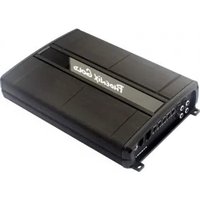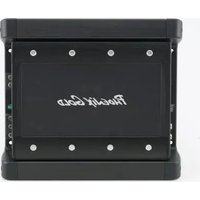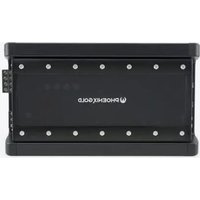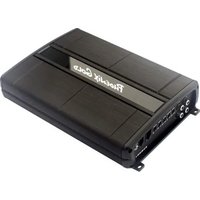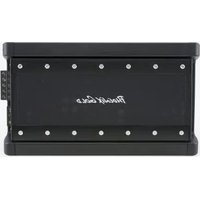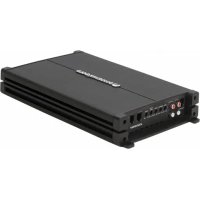
Z1000.1 - Receiver PHOENIX GOLD - Free user manual and instructions
Find the device manual for free Z1000.1 PHOENIX GOLD in PDF.



User questions about Z1000.1 PHOENIX GOLD
0 question about this device. Answer the ones you know or ask your own.
Ask a new question about this device
Download the instructions for your Receiver in PDF format for free! Find your manual Z1000.1 - PHOENIX GOLD and take your electronic device back in hand. On this page are published all the documents necessary for the use of your device. Z1000.1 by PHOENIX GOLD.
USER MANUAL Z1000.1 PHOENIX GOLD
Models: Z150.2 - Z300.1 - Z300.4 - Z600.5 - Z1000.1
FEATURES
Integrated Cooling Fan - Regulates amplifier temperature for sustained performance
High & Low Level Inputs - Versatile connectivity to suit any vehicle (ZRHC High Level Adaptor required) - sold separately
OEM Connection Ready - Compatible with aftermarket or original fit source units
High Level Auto-Turn On - Powers on the amplifier when an audio signal is supplied (via the ZRHC High Level Adaptor)
Remote Bass Ready - Control the Bass Level with the ZRBC (sold separately)
4-Way Protection Circuit - Thermal / Reversed Power and Speaker Polarity / Low Voltage
Heavy Duty Connector Block - Enables Maximum Current Supply
CARACTÉRISTIQUES
| Z300.4 Z150.2 Z300.1 Z600.5 Z1000.1 | |||||
| Class Class A/B Class A/B Class A/B Class D | |||||
| Power (MAX) 1200 Watts | 600 Watts 1200 Watts | 2400 Watts 2000 Watts | |||
| Frequency Response | 20Hz-20KHz 20Hz | 20KHz 20Hz-400Hz 20Hz-20KHz 20Hz-300MHz | |||
| Dimensions (mm) | 312x186x49 | 232x186x49 | 312x186x49 | 372x186x49 | 312x186x49 |
| RMS Power Ratings | 60W x 4 @ 4ohm75W x 4 @ 2ohm150W x 2 @ 4ohm bridged | 60W x 2 @ 4ohm75W x 2 @ 2ohm150W x 1 @ 4ohm bridged | 200W x 1 @ 4ohm300W x 1 @ 2ohm | 60W x 4 @ 4ohm+1 x 200W @ 4ohm75W x 4 @ 2ohm+1 x 300W @2ohm150 x 2 @ 4ohm bridged+1 x 300 @ 2ohm | 400w x1 @ 4 ohm700w x 1 @ 2 ohm1000w x 1 @ 1 ohm |
| Signal to Noise Ratio | >50dB >50dB | >50dB | >50dB | >90dB | |
| High & Low Pass Crossover | 12dB per Octave | 12dB per Octave | 12dB per Octave | 12dB per Octave | 12dB per Octave |
| Subsonic Filter | N/A | N/A | 12dB per Octave | 12dB per Octave | 12dB per Octave |
| Crossover Range | 50Hz-250Hz 50Hz | 50Hz-400MHz | 50Hz-250Hz (CH1,2,3,4)50Hz-400Hz (Subwoofer) | 30Hz to 300Hz | |
| Subsonic Crossover Range | N/A | N/A | 10Hz-40Hz | 10Hz-40Hz | 10Hz to 55Hz |
| Bass Boost @ 45Hz | N/A | N/A | 0 to +18dB | 0 to +18dB | 0 to +18dB |
| Low Level Input Range | 0.35 Volts to 10 Volts | 0.35Volts to 10 Volts | 0.35 Volts to 10 Volts | 0.35 Volts to 10 Volts | 200 millivolts to 8 volts |
| High Level Input Range | 1 Volt to 30 Volts | 1 Volt to 30 Volts | 1 Volt to 30 Volts | 1 Volt to 30 Volts | 200 millivolts to 20 volts |
| Minimum Load Impedance | 2 ohm Stereo & 4 ohm bridged | 2 ohm Stereo & 4 ohm bridged | 2 ohm 2 ohm | Stereo & 4 ohm bridged | 1 Ohm |
Note:
Phoenix Gold Amplifiers have a minimum load impedance of 2ohm per channel 4ohm bridged (except Z1000.1 - which is 1 Ohm)
Installation Warnings
- Ensure the +12V lead is disconnected from the battery before you connect any new equipment
- Ensure that the amplifier mounting location and holes will not interfere with the petrol tank, brake lines or electrical wiring.
- Ensure the amplifier is securely fastened to the vehicle to prevent the amplifier moving and causing damage in the event of an accident
- Ensure all wiring is protected from sharp objects and from pinching or crushing which could result in damage to the audio system
- Ensure the mounting location has sufficient air flow around the amplifier. If the amplifier is mounted in an enclosed space a 3" fan with ducting should be used to assist with cooling.
- Do not mount any amplifier on a subwoofer enclosure as extended exposure to vibration may cause damage to the amplifier.
- Ensure the minimum recommended gauge wire/cable or larger for all amplifier connections
- Appropriate mounting is very important for prolonged life expectancy of any amplifier. Select a location that provides protection from moisture. Keep in mind that an amplifier should never be mounted upside down. Upside down mounting will compromise heat dissipation through the heat sink and could engage the thermal protection circuit.
Connection
Ensure the audio system is turned off before making any connections to the amplifier, speakers or source unit. Failure to do so could result in permanent damage to the audio system.
Ensure the correct gauge cable is used for all connections; consult the cable calculator diagram below for the correct gauge cable for your installation.
| Total Amps | Cable Length > | M 0-1 1-2 2-3 | 3-4 4-5 | 5-6 6-7 7-9 | |||||
| FT 0-4 4-7 7-10 | 0 10-13 | 13-16 16-19 | 19 19-22 | 22-28 | |||||
| 0-20 | 14 | 12 | 12 | 10 | 10 | 8 | 8 | 8 | |
| 20-35 | 12 | 10 | 8 | 8 | 6 | 6 | 6 | 4 | |
| 35-50 | 10 | 8 | 8 | 6 | 4 | 4 | 4 | 4 | |
| 50-65 | 8 | 8 | 6 | 4 | 4 | 4 | 4 | 2 | |
| 65-85 | 6 | 6 | 4 | 4 | 2 | 2 | 2 | 0 | |
| 85-105 | 6 | 6 | 4 | 2 | 2 | 2 | 2 | 0 | |
| 105-125 | 4 | 4 | 4 | 2 | 0 | 0 | 0 | 0 | |
| 125-150 | 2 | 2 | 2 | 0 | 0 | 0 | 0 | 0 | |
The above chart shows cable gauges to be used, if no less than a 0.5 volt drop is acceptable. If aluminium wire is used, the gauges should be of an even larger size to compensate. Cable gauge size calculation takes into account terminal connection resistance.
AMPLIFIER CONNECTION
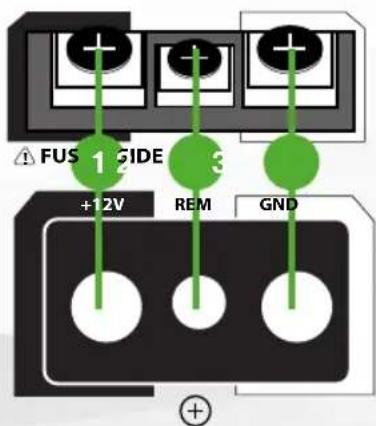
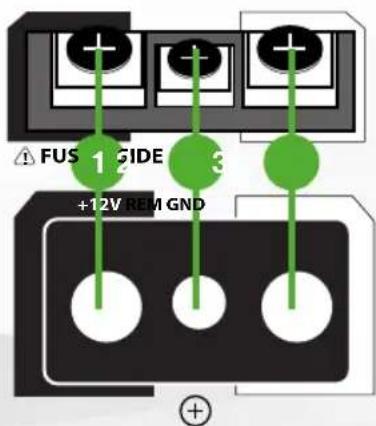
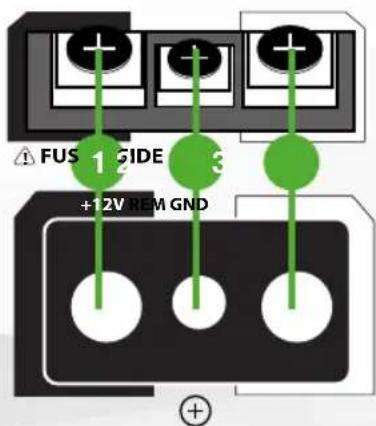
Z150.2 - Z300.4 - Z300.1 - Z600.5 1. +12Volt Power
text_image
FUS 1 GIDE +12V REM GNDEnsure ALL other cable connections are completed before connecting this cable to the battery. PHOENIX GOLD amplifiers should be connected directly to the 12v battery terminal using the appropriate gauge cable. Start at the vehicles battery and run the cable through to the amplifier. PHOENIX GOLD recommends the use of rubber grommets when passing any cable through metal panels to avoid sharp corners or panels that could cut through the insulation of the cable. An inline fuse or circuit breaker MUST be used within 30cm (12") of your battery; this will prevent the potential
risk of a fire caused by a short in your power cable (see specifications table for recommended inline fuse/circuit breaker ratings). Connect the other end of your power cable to the battery, but remember to leave the fuse out or circuit breaker off until all other cable connections are made.
2. Remote Turn-On
This connection turns the amplifier on and should be connected to the 'Remote Turn on' wire from the Head Unit. If one is not available a switched +12v source must be used, such as a power antenna wire or ACC +12v.
If you are using high level (speaker) inputs and a remote turn on wire is not available, then instead the 'Auto Turn-On' switch must be set to ON
3. Ground
Connect the Ground/Earth cable for your amplifier first. Ensure that the location is a good source of ground (preferably the chassis/floor pan). Investigate the area you wish to use to ensure it is free of wiring, vacuum lines, brake and fuel lines. Use either a wire brush or sandpaper to expose bare metal, this will provide a high current contact for your ground connection. Use the same gauge cable for the ground cable as you did for the power cable. Secure the ground cable to the ground point with a bolt, star washer and nut. Apply some neutral cure silicon to the bolt and bare metal to prevent possible water leaks and rust. Connect the other end of your ground cable to the amplifier.
text_image
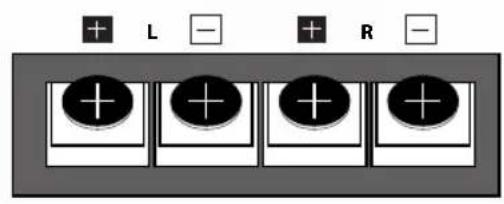
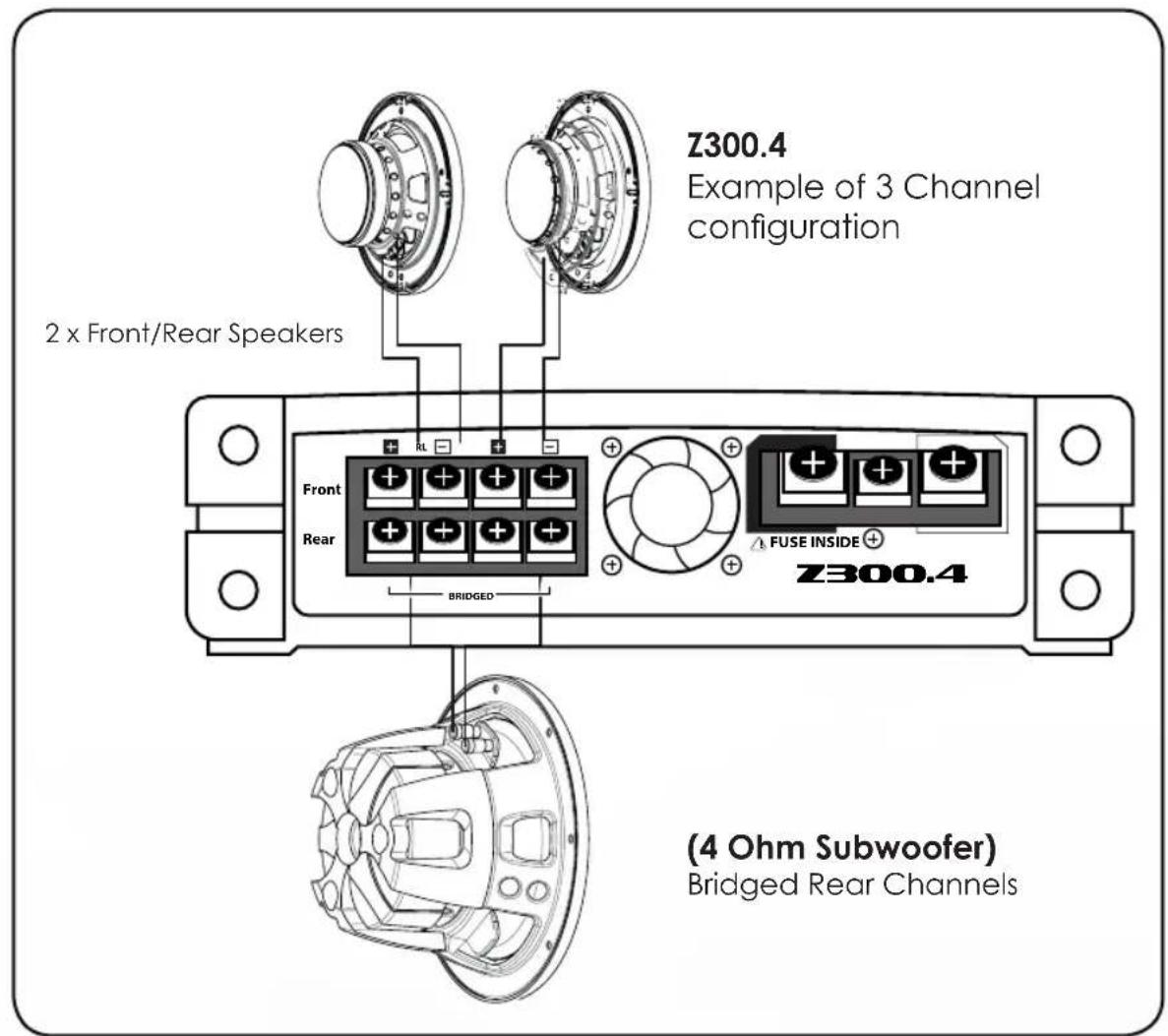
+ L - + R -4. Speaker Output Connection (Z300.4 - Z150.2 - Z600.5)
Ensure the correct polarity is observed when connecting speakers/subwoofers.
2 Ohm minimum speaker impedance for stereo operation (per channel).
4 Ohm minimum speaker impedance for bridged operation.

text_image
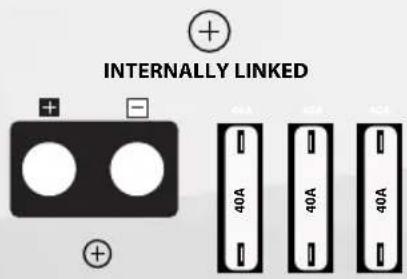
+ L - + R -4B. Internally Linked Output (Z300.1 ONLY)
The Z300.1 Monoblock amplifier provides dual output connections to simplify wiring when using 2 subwoofers or a dual voice coil subwoofer. Both positive and negative terminals and internally connected or linked in parallel. For dual coil (2 x 4ohm) or two single coil (4 ohm) subwoofers connect each coil to positive or negative terminal. For a standard single coil subwoofer connect to either positive and either negative terminal.
text_image
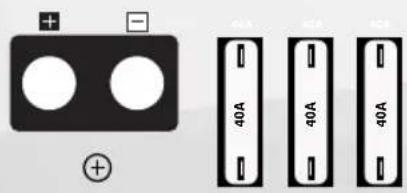
INTERNALLY LINKED 40A 40A 40A4C. Single Channel Output (Z1000.1 ONLY) (1 Ohm minimum)
text_image
Z300.4 Example of 3 Channel configuration 2 x Front/Rear Speakers Front Rear FUSE INSIDE Z300.4 BRIDGED (4 Ohm Subwoofer) Bridged Rear ChannelsZ150.2
text_image
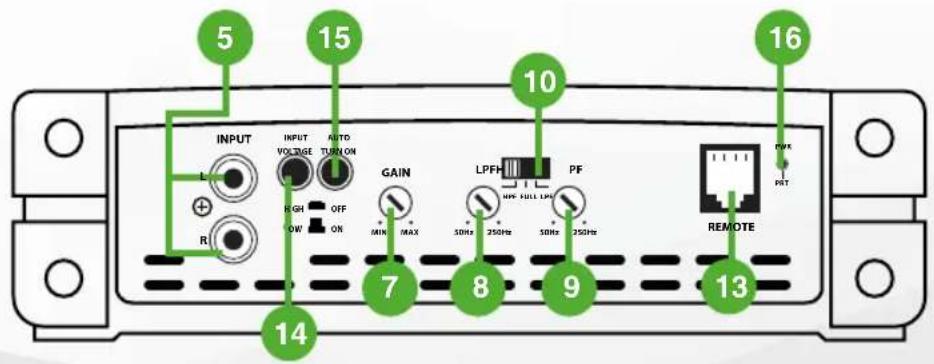
5 15 10 16 INPUT VOLTAGE AUTO TURN ON GAIN LPFH PF MAX 30Hz 250Hz 30Hz 250Hz R REMOTE PWR PBT 7 8 9 13 14Z150.2 - Z300.1 - Z300.4 - Z600.5 - Z1000.1
Z300.4
text_image
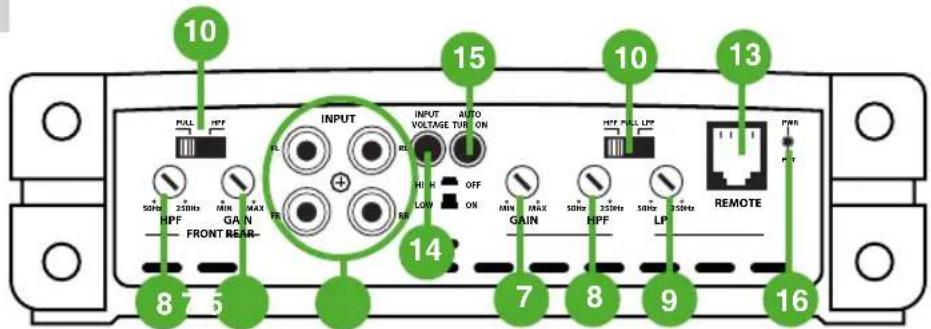
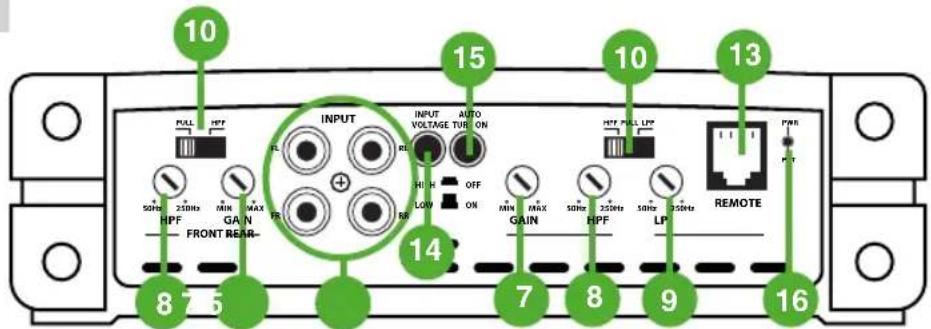
10 FULL HPF 15 INPUT AUTO VOLTAGE TUBE ON 10 HFP FULL LPE 13 MIN MAX OFF MAX 50Hz 350Hz 50Hz 350Hz REMOTE HPF GAIN HPF LP FR FR FR FR FR 8 7 5 14 7 8 9 16Z300.1
text_image
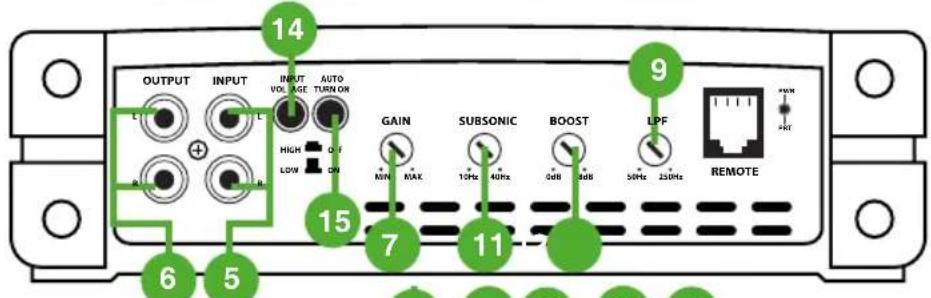
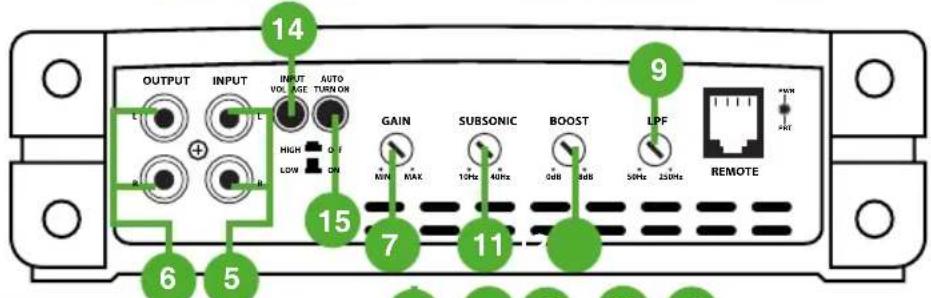
OUTPUT INPUT INPUT VOLTAGE AUTO TURN ON HIGH LOW GAIN SUBSONIC BOOST LPF REMOTE 14 9 15 7 11 6 5Z600.5
text_image
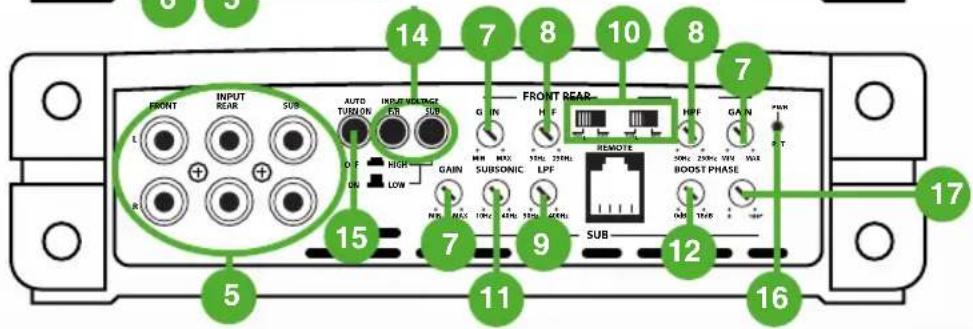
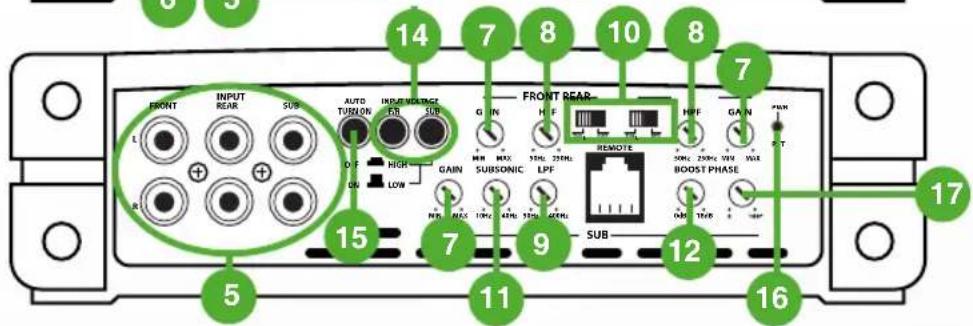
14 7 8 10 8 7 5 15 11 9 SUB 12 16 17 FRONT REAR H F HFF GAIN PWR REMOE 50Hz 250Hz 35Hz 5Hz BOOST PHASE ON GAIN SUBSONIC LPF SUBZ1000.1
text_image
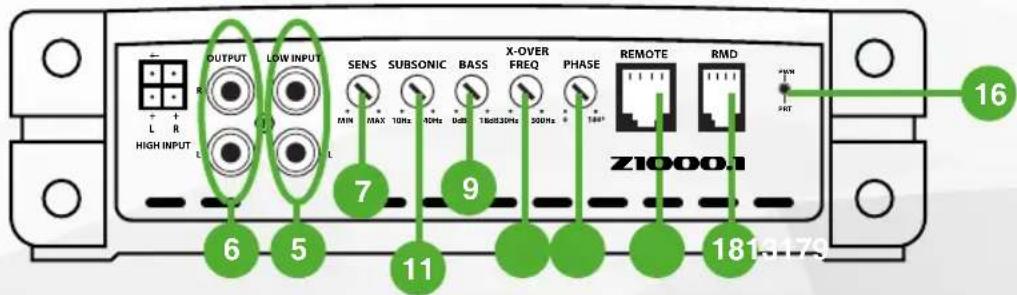
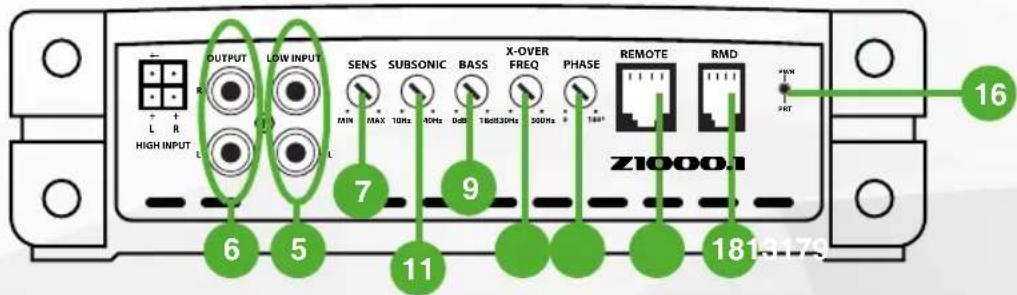
OUTPUT LOW INPUT SENS SUBSONIC BASS X-OVER FREQ PHASE REMOTE RMD Z1000.1 6 5 7 9 11 18 16 HAPP HAPP5. RCA Inputs Front-Rear-Subwoofer
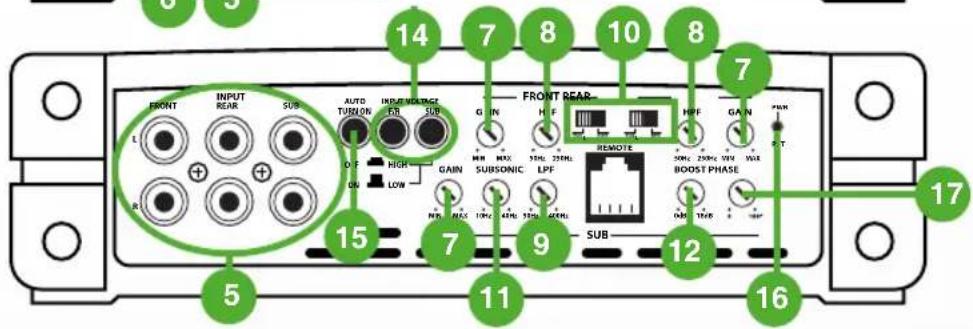
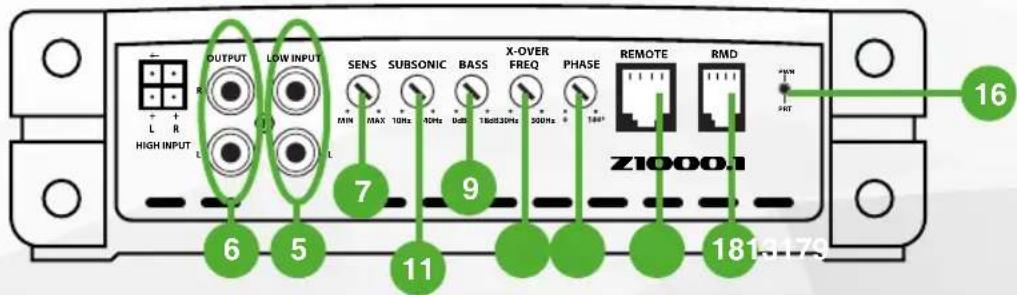
Choose the correct length RCA cables to connect the RCA outputs of the source/head unit, to the input connectors of the amplifier. Run the RCA cables on the opposite side of the vehicle, to the power cable and vehicle wiring loom. Avoid the electric fan motor and wiring. Ensure you follow the correct balance. (L LEFT = White or Black. R Right = Red)
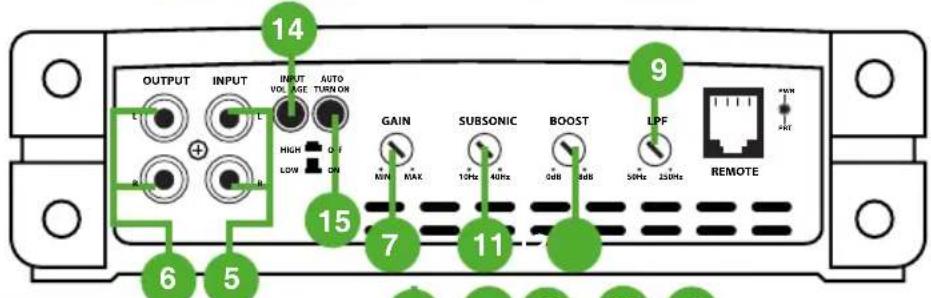
6. Low Level RCA outputs (Z300.1 + Z1000.1 only)
Use these RCA connectors to connect to a secondary amplifier. This output is a pass-thru connection from the RCA input connectors so that the signal level and frequency response is the same as the original input signal.
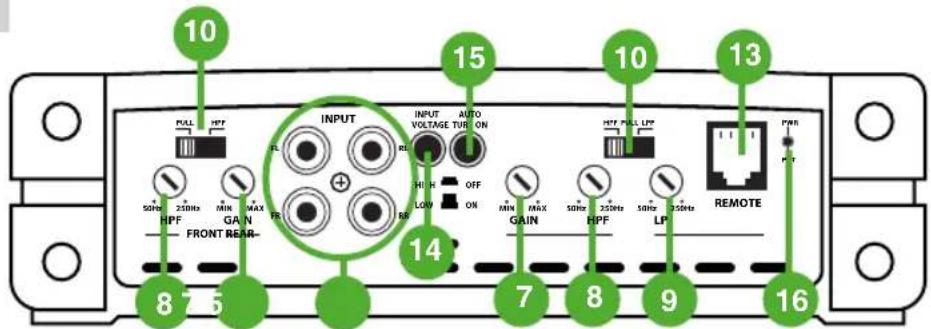
7. Gain/Level Control (Sub/Front/Rear)
This control is used to match the input level of the amplifier to the output level of your head unit. We recommend the method below, as failure to follow these steps may damage the audio system.
- Turn the amplifier Gain to zero
- Turn the volume of the head unit to 34 and the bass and treble to zero
- Adjust the amplifier Gain/Level control until the desired maximum volume is achieved without distortion.
- Make fine adjustments to tune your install.
8. High Pass Crossover Filter
Set the crossover switch to HP and turn this control to 65Hz or above when using speaker's smaller than 6 x 9". When a subwoofer is used in the system, this feature is designed to filter out all low bass frequencies that only subwoofers should produce. See specification table for adjustable frequency range
9. Low Pass Crossover Filter
Ensure the crossover frequency is set at 100Hz or below. This feature must be used with a subwoofer to filter out all mid to high frequencies that only full range speakers should produce. See specification table for adjustable frequency range
10. Crossover Switch
Full - This setting is for large speakers (e.g. 6 X 9") or speakers when a sub woofer is not included in the system. The amplified audio signal is not filtered so the full range audio signal is sent to the speakers.
Low - This setting is used when using a subwoofer and will only allow frequencies below the low pass filter setting to pass through.
High - Used to run mid-range speakers when a spearate subwoofer is connected. This etting will only allow frequencies above the set high pass filter setting to pass through.
11. Subsonic Filter (Z300.1 + Z1000.1)
This is a variable control that filters out all subsonic bass frequencies below the set point. These are frequencies that are not audible. These frequencies can damage subwoofers. See specification table for adjustable frequency range.
12. Bass Boost (Z300.1 + Z1000.1)
This control adjusts the bass boost at 45Hz, from 0 to +18dB. Start from 0 and slowly increase to the desired level. Use this control with extreme care as failure to do so may result in damage to the subwoofers.
13. Remote Bass Controller Port
This connection should be used with the optional remote control (ZRBC - sold separately) to adjust the bass level from any location within the vehicle.
text_image
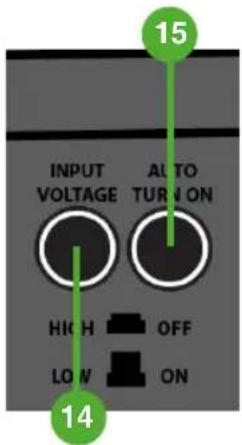
15 INPUT VOLTAGE AUTO TURN ON HIGH OFF LOW ON 1414. Input Voltage
This function switches the amplifier input between Low level (RCA cable) and High level (speaker wire) connection. Where possible RCA (Low Level) connections are preferable.
High
The High setting is selected when the Phoenix Gold High Level adaptor (sold separately) is used to connect a full range signal from the source (head) unit speaker connections to the amplifier. Simply connect the speaker wires to the input connections observing polarity and then connect the PHOENIX GOLD ZRHC to the RCA inputs on the Amplifier.
Low
The Low setting is for RCA connection from the source (head) unit to the amplifier. Connect the RCA interconnects to the appropriate Line Out connectors on the source head unit and connect to the RCA inputs of the Amplifier. This is the preferred installation method, as this provides a higher quality audio signal.
15. Auto Turn-On
Auto Turn on switch = 12V
If you are using a 12V switched supply to the remote terminal of the amplifier this switch should be in the off position. If you are not using a switched supply and the amplifier is connected to high level inputs this switch should be in the on position
16. Power / Protect LED
- When illuminated Green, indicates normal operation. Amplifier is powered on with no faults detected
- When illuminated Red, indicates the amplifier is in protection mode / fault state. See troubleshooting section on the next page.
17. Phase (Z1000.1 ONLY)
This adjusts the phase of the subwoofer relative to the rest of the system. 0-180°
18. RMD (Z1000.1 ONLY)
Use this port to connect to the optional Remote Voltage Display (RMD-1)
| PROBLEM POSSIBLE REASON SOLUTION | ||
| Amplifier not switching ON LED = OFF (not ‘Red or Green’) | No 12V to power wire C | Check fuses and connections to battery |
| No power to remote wire | Check remote turn on connections to head unit | |
| Blown Fuse Replace | fuse with correct type and amperage | |
| No ground connection C | Check ground cable is correctly connected to the amplifier and vehicle / body chassis | |
| Amplifier not working, status LED = RED | Amplifier too hot Move | amplifier to vented area. Turn head unit down |
| Speaker wires shorted C | check that there are no speaker wires shorted to another wire or to the vehicle chassis | |
| No Sound LED = Green | RCA Signal Check | RCA connection to head unit |
| Gain control not set up E | Ensure you have set up the amplifier gain level control | |
| Head unit Check | head unit volume | |
| Amplifier Check all power, remote on and ground connections | ||
| Speakers Check | speakers are correctly connected Check speakers for shorts | |
Models: Z150.2 - Z300.1 - Z300.4 - Z600.5 - Z1000.1
FEATURES
Integrated Cooling Fan - Regulates amplifier temperature for sustained performance
High & Low Level Inputs - Versatile connectivity to suit any vehicle (ZRHC High Level Adaptor required) - sold separately
OEM Connection Ready - Compatible with aftermarket or original fit source units
High Level Auto-Turn On - Powers on the amplifier when an audio signal is supplied (via the ZRHC High Level Adaptor)
Remote Bass Ready - Control the Bass Level with the ZRBC (sold separately)
4-Way Protection Circuit - Thermal / Reversed Power and Speaker Polarity / Low Voltage
Heavy Duty Connector Block - Enables Maximum Current Supply
CARACTÉRISTIQUES
Z150.2 - Z300.4 - Z300.1 - Z600.5
text_image
FUS 1 GIDE +12V REM GNDtext_image
+ L - + R -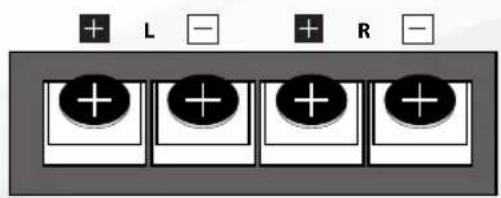
text_image
+ L - + R -INTERNALLY LINKED
text_image
+ - 40A 40A 40A +Z150.2 - Z300.1 - Z300.4 - Z600.5 - Z1000.1
Z300.4
text_image
10 FULL HPT 15 INPUT AUTO VOLTAGE TUR ON 10 HPT FULL LPT 13 PWR 8 7 5 MAX MAX GAIN FR REF OFF LOW ON MIN MAX GAIN 50Hz 350Hz HPF 50Hz 350Hz LP REMOTE 14 7 8 9 16Z300.1
text_image
OUTPUT INPUT INPUT VOLTAGE AUTO TURN OR HIGH LOW GAIN SUBSONIC BOOST LPF REMOTE 6 5 14 9 15 7 11Z600.5
text_image
14 7 8 10 8 7 5 15 11 9 SUB 12 16 17 FRONT REAR H F HFF GAIN PWR REMOE 50Hz 250Hz 35Hz 5Hz BOOST PHASE ON GAIN SUBSONIC LPF SUBZ1000.1
text_image
OUTPUT LOW INPUT SENS SUBSONIC BASS X-OVER FREQ PHASE REMOTE RMD Z1000.1 6 5 7 9 11 18 16 HAPP HAPPModels: Z150.2 - Z300.1 - Z300.4 - Z600.5 - Z1000.1
FEATURES
Integrated Cooling Fan - Regulates amplifier temperature for sustained performance
High & Low Level Inputs - Versatile connectivity to suit any vehicle (ZRHC High Level Adaptor required) - sold separately
OEM Connection Ready - Compatible with aftermarket or original fit source units
High Level Auto-Turn On - Powers on the amplifier when an audio signal is supplied (via the ZRHC High Level Adaptor)
Remote Bass Ready - Control the Bass Level with the ZRBC (sold separately)
4-Way Protection Circuit - Thermal / Reversed Power and Speaker Polarity / Low Voltage
Heavy Duty Connector Block - Enables Maximum Current Supply
CARACTÉRISTIQUES
Z150.2 - Z300.4 - Z300.1 - Z600.5
text_image
FUS 1 GIDE +12V REM GND1. Poder de +12 Voltios
text_image
+ L - + R -text_image
+ L - + R -4B. Salida Unida Internamente (SOLO Z300.1)
Z150.2 - Z300.1 - Z300.4 - Z600.5 - Z1000.1
Z300.4
text_image
10 FULL HPF 15 INPUT AUTO VOLTAGE TUBE ON 14 MIN MAX OFF MAX 320Hz 320Hz HPF GFP LFP PWR 8 7 5 MAX GAIN 7 8 9 GAIN 320Hz 320Hz HPF LP REMOTE 16Z300.1
text_image
OUTPUT INPUT INPUT VOLTAGE AUTO TURN ON L L HIGH LOW ON GAIN MAX SUBSONIC BOOST LPF REMOTE 14 9 15 7 11 6 5Z600.5
text_image
14 7 8 10 8 7 FRONT REAR H F H OFF G IN MAX 50Hz 250Hz REMOTE 50Hz 250Hz 30Hz 30Hz BOOST PHASE SUB SUBSONIC LPF GAIN NON NHL MAX 10Hz 40Hz 15Hz 20Hz D F H NCR ON LOW R L INPUT REAR SUB AUTO TURION INLET/OUTLET SUB 5 15 7 9 11 16 17Z1000.1
text_image
OUTPUT LOW INPUT SENS SUBSONIC BASS X-OVER FREQ PHASE REMOTE RMD + - + - L R HIGH INPUT L 7 9 6 5 11 1813176 Z1000.1 + - - - MIN MAX 10Hz 20Hz DdB 30bit320Hz 200Hz TBI*Z150.2 - Z300.1 - Z300.4 - Z600.5 - Z1000.1
Phoenix Gold Product Warranty
LIMITED WARRANTY
Phoenix Gold warrants this product to be free of defects in materials and workmanship for a period of one (1) years from the original date of purchase. This warranty is not transferable and applies only to the original purchaser from an authorized Phoenix Gold dealer in the United States of America only. Should service be necessary under this warranty for any reason due to manufacturing defect or malfunction, Phoenix Gold will (at its discretion), repair or replace the defective product with new or remanufactured product at no charge. Damage caused by the following is not covered under warranty: accident, misuse, abuse, product modification or neglect, failure to follow installation instructions, unauthorized repair attempts, misrepresentations by the seller. This warranty does not cover incidental or consequential damages and does not cover the cost of removing or reinstalling the unit(s). Cosmetic damage due to accident or normal wear and tear is not covered under warranty.
INTERNATIONAL WARRANTIES:
Products purchased outside the United States of America are covered only by that country's Authorized Phoenix Gold reseller and not by Phoenix Gold. Consumers needing service or warranty information for these products must contact that country's reseller for information.
email - support@phoenixgold.com (US)
tel - 1-800-477-2267 (East Coast)
email - technical.eu@aampglobal.com (Europe)
15500 Lightwave Drive, Suite 202
Clearwater, Florida 33760
Woolmer Way, Bordon, Hampshire,
GU35 9QE, United Kingdom
Phoenix Gold is a Power Brand of AAMP Global