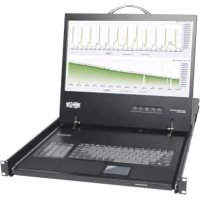
B02100017 - Switch Tripp Lite - Free user manual and instructions
Find the device manual for free B02100017 Tripp Lite in PDF.


| Product Type | Console with LCD screen, keyboard and touchpad |
| Brand | Tripp Lite |
| Model | B021-000-17 |
| Mounting Format | 1U, 19-inch rack (48.3 cm) |
| Dimensions (W x D x H) | 71.1 x 48.3 x 6.7 cm |
| Weight | 16.3 kg |
| Power Supply | 100-240 V ~ 50/60 Hz |
| Screen Resolution | 1366 x 768 pixels (WXGA) |
| Console Connectors | 1 x HD-15 (VGA), 2 x PS/2, 1 x USB (intercommunication) |
| Included Adapter | PS/2 to USB |
| Sleep Mode | Automatic when screen is closed |
| Operating Temperature | 0°C to +40°C |
| Storage Temperature | -20°C to +60°C |
| Relative Humidity | 0 to 80% non-condensing |
| Housing Material | Metal |
| Package Contents | Console, VGA/PS/2 cables, PS/2 to USB adapter, power cord, mounting brackets, manual |
| Warranty | 1 year limited |
Frequently Asked Questions - B02100017 Tripp Lite
User questions about B02100017 Tripp Lite
0 question about this device. Answer the ones you know or ask your own.
Ask a new question about this device
Download the instructions for your Switch in PDF format for free! Find your manual B02100017 - Tripp Lite and take your electronic device back in hand. On this page are published all the documents necessary for the use of your device. B02100017 by Tripp Lite.
USER MANUAL B02100017 Tripp Lite
- 1U Rackmount Console
KVM Cable Kit (VGA, PS/2) -
PS/2 to USB Adapter
-
AC Power Cord
- Owner's Manual
- Mounting Brackets
Overview
Tripp Lite's 1U Rackmount Console features an integrated LCD monitor, full keyboard and touch pad in a 1U rackmountable housing. This console is designed for use with a server or a KVM switch with PS/2 console connectors. A PS/2 to USB adapter is included to connect to a USB KVM or server.
Features
- Rackmount console (LCD monitor, keyboard, touch pad) in an integrated 1U rackmountable housing
- Sleep mode when the monitor cover is closed
- Rackmountable in standard 19-inch rack (1U)
- Includes rackmount brackets
Supports resolutions up to 1366 x 768 pixels - Includes a USB 2.0 Pass-Through port which can be used to provide easy access to a USB port on a connected device (KVM switch or computer)
SAVE THESE INSTRUCTIONS
This manual contains important instructions that should be followed during the installation and operation of the rackmount console described in this manual. Read all instructions thoroughly before attempting to install or operate the rackmount console. Failure to comply will void the warranty and could damage the rackmount console or connected equipment.
WARNING:
Use of this equipment in life support applications where failure of this equipment can reasonably be expected to cause the failure of the life support equipment or to significantly affect its safety or effectiveness is not recommended. Do not use this equipment in the presence of a flammable anesthetic mixture with air, oxygen or nitrous oxide.
PROTECT YOUR INVESTMENT!
Register your product for quicker service and ultimate peace of mind.
You could also win an ISOBAR6ULTRA surge protector—a $100 value!
www.triplite.com/warranty

1111 West 35th Street, Chicago, IL 60609 USA • www.triplite.com/support
Copyright © 2018 Tripp Lite. All rights reserved. All trademarks are the property of their respective owners. The policy of Tripp Lite is one of continuous improvement. Specifications are subject to change without notice.
Introduction
Front View
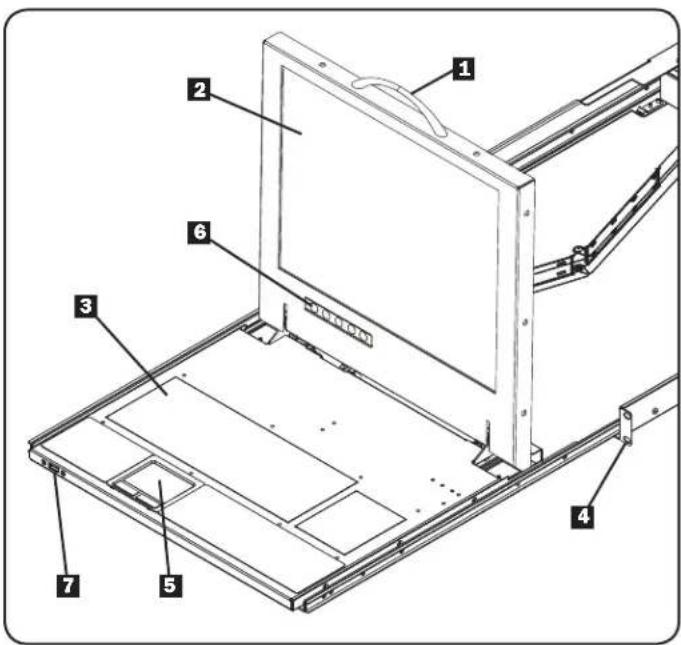
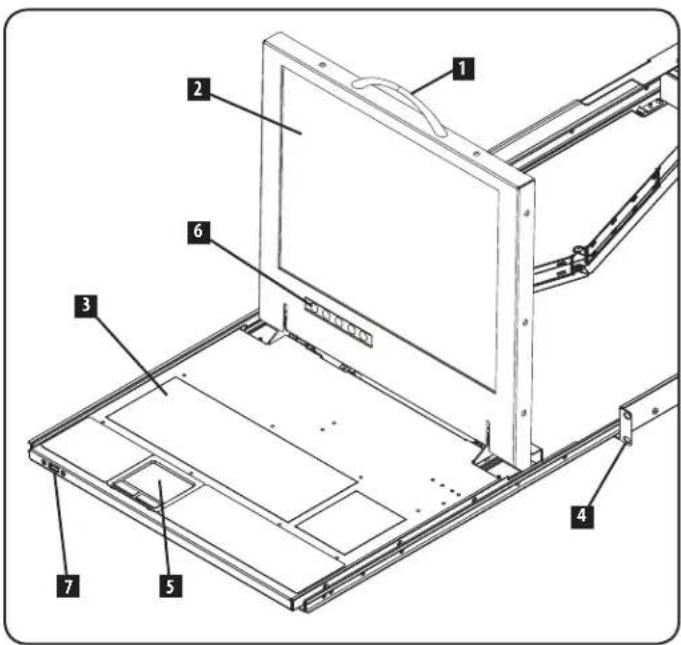
1 Handle: Pull to slide the module out; push to slide the module in.
2 LCDMonitor:After sliding the module out, flip up the cover to access the LCD monitor, keyboard and touch pad.
3Keyboard
4RackmountingBrackets:The brackets secure the chassis to a standard 19-inch rack or rack enclosure.
32-ButtonTouchpad:Press the left button to left-click, press the right button to right-click. Scroll up and down the screen by running finger up or down the far right side of the touchpad.
3 Console and LCD Controls: The controls located here include the console power On/Off button, and the buttons used to control the position and picture setting of the LCD display.
Pass-Through USB Port: This port is inactive until a USB A Male/Male cable (Tripp Lite model UR020-Series) is used to connect the Pass-Through port on the back of the console to a USB port on a computer or KVM switch. When active, a USB device connected to the front of the console will then be available for use with the connected computer or KVM switch.
Rear View
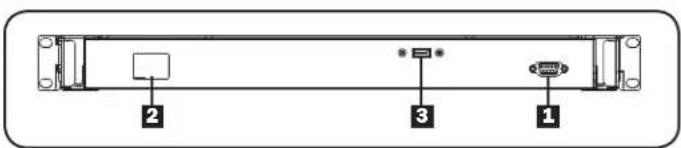
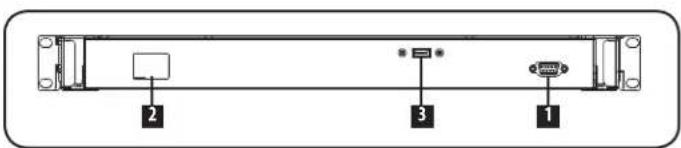
Console Port Section: Connects the console to your server or KVM switch with the included KVM cable kit.
2 Power Socket: The AC power cord plugs in here.
3 Pass-Through USB Port: This port is connected to the PassThrough USB port on the front of the console. The front PassThrough port is active when a USB A Male/Male cable (Tripp Lite model URO20-Series) is connected between the Pass-Through port on the back and a USB port on a KVM or server.
Rackmounting
Tripp Lite's 1U Rackmount Console is designed for mounting in a 1U rack system. The various mounting options are explained in the sections that follow.
Standard 4-Post Rackmounting
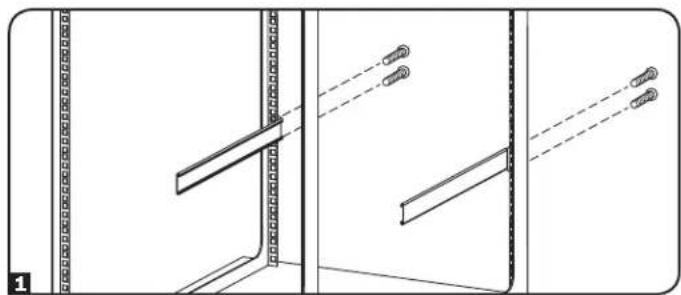
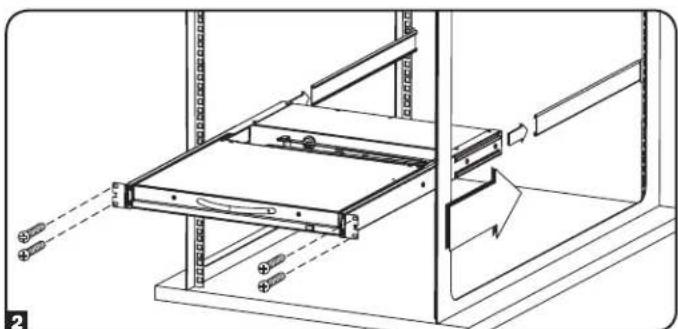
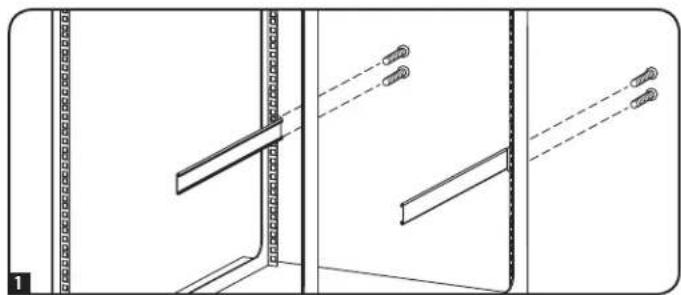
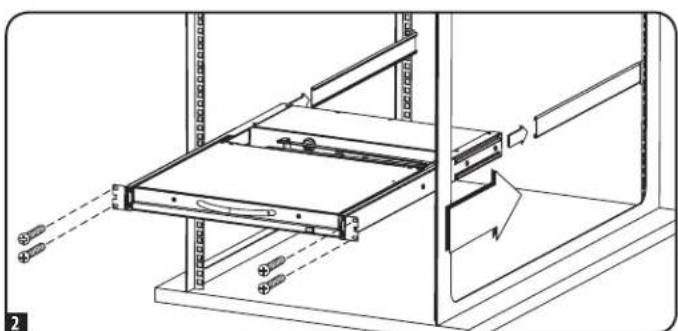
The standard rackmounting brackets that come attached to the unit allow it to be installed in standard 1U racks by a single individual.
1 Slide out the rear mounting brackets from the console and mount both brackets (separate from the console) to the inside rear of a standard 1U rack system using user-supplied screws.
Take the console and gently slide it into the two rear-mounted brackets in the rack and secure the console in place by inserting user-supplied screws.
2-Post Rackmounting
The console can also be mounted in a 2-post rack using the optional 2-Post Rackmount Kit (Tripp Lite model B019-000). The mounting hardware allows for the console to be opened with the drawer in any position. The kit provides added stability and prevents the console frame from twisting. See the B019-000 Owner's Manual for detailed mounting instructions.
Installation
Refer to the installation diagrams below as you perform these steps.
Note: Make sure that the power to the computer or KVM switch being connected to the console is powered off before proceeding with the installation.
1 Connect the Black VGA connector on the included cable kit to the VGA port on the back of the console.
2 Connect the Blue VGA connector on the other side of the cable kit to the VGA port on the back of your computer or KVM switch.
3 Connect the PS/2 keyboard and mouse connectors, on the same side of the cable kit as the Blue VGA connector, to the PS/2 keyboard and mouse ports on the back of your computer or KVM switch. If you have a computer or KVM switch with USB connectors, connect the PS/2 keyboard and mouse connectors on the cable kit to the connectors on the included PS/2 to USB adapter, and then plug the USB connector on the adapter into an available USB port on your computer or KVM switch.
Note: Although KVM switches will contain two USB console ports for keyboard and mouse, you can plug the single USB connector on the adapter into either port.
4 Remove the USB covers from each of the Pass-Through USB ports. Connect the Pass-Through USB port on the back of the console to a USB port on a computer or KVM switch using a USB A Male/Male cable, such as Tripp Lite's UR020-Series. Connect a USB device to the Pass-Through USB port on the front of the console.
Note: The Pass-Through ports do not connect to the internal components in the console (the keyboard, the touchpad or the console).
Connect the power cord to the socket on the back of the console, and then plug it into a Tripp Lite Surge Protector, Power Distribution Unit (PDU), or Uninterruptible Power Supply (UPS).
6 Power on the connected computer or KVM switch.
7 Turn on the LCD screen by pressing the On/Off button on the control panel of the built-in monitor.
Computer Installation
Note: The diagram below shows the connection of a computer with PS/2 keyboard and mouse ports. To connect to a USB computer, use the PS/2 to USB adapter provided with the console.

KVM Installation
Note: The diagram below shows the connection of a B042-016 KVM switch, using PS/2 connections. The console ports of different model KVM switches may be located elsewhere on the unit. To connect to the USB console port on a KVM switch, use the PS/2 to USB adapter provided with the console.

Specifications
Function Specification
| Connectors | Console 1 x HD-15 female | |
| Cable Kit 1 x HD-15 male to 1 x HD-15 male, 2 x PS/2 male | ||
| Power 1 x IEC-60320-C14 AC socket (100-240V~, 50/60Hz) | ||
| Comm. 1 x USB Type A to Type A) | ||
| LCD Resolution 1366 x 768; DDC2B | ||
| Environment | Operating Temperature: 32°- 104°F | |
| Storage Temperature: -4°- 140°F | ||
| Humidity: 0 - 80% RH Noncondensing | ||
| Housing Metal | ||
| Weight 36 pounds | ||
| Dimensions (L x W x H) | 28 x 19 x 1.7 inches | |
Warranty and Product Registration
1-YEAR LIMITED WARRANTY
TRIPP LITE warrants its products to be free from defects in materials and workmanship for a period of one (1) year from the date of initial purchase. TRIPP LITE's obligation under this warranty is limited to repairing or replacing (at its sole option) any such defective products. To obtain service under this warranty, you must obtain a Returned Material Authorization (RMA) number from TRIPP LITE or an authorized TRIPP LITE service center. Products must be returned to TRIPP LITE or an authorized TRIPP LITE service center with transportation charges prepaid and must be accompanied by a brief description of the problem encountered and proof of date and place of purchase. This warranty does not apply to equipment which has been damaged by accident, negligence or misapplication or has been altered or modified in any way.
EXCEPT AS PROVIDED HEREIN, TRIPP LITE MAKES NO WARRANTYES, EXPRESS OR IMPLIED, INCLUDING WARRANTYES OF MERCHANTABILITY AND FITNESS FOR A PARTICULAR PURPOSE. Some states do not permit limitation or exclusion of implied warranties; therefore, the aforesaid limitation(s) or exclusion(s) may not apply to the purchaser.
EXCEPT AS PROVIDED ABOVE, IN NO EVENT WILL TRIPP LITE BE LIABLE FOR DIRECT, INDIRECT, SPECIAL, INCIDENTAL OR CONSEQUENTIAL DAMAGESARISING OUT OF THE USE OF THIS PRODUCT, EVEN IF ADVISED OF THE POSSIBILITY OF SUCH DAMAGE. Specifically, TRIPP LITE is not liable for any costs, such as lost profits or revenue, loss of equipment, loss of use of equipment, loss of software, loss of data, costs of substitutes, claims by third parties, or otherwise.
Product Registration
Visit www.triplite.com/warranty today to register your new Tripp Lite product. You'll be automatically entered into a drawing for a chance to win a FREE Tripp Lite product! *
- No purchase necessary. Void where prohibited. Some restrictions apply. See website for details.
FCC Notice, Class A
This device complies with part 15 of the FCC Rules. Operation is subject to the following two conditions: (1) This device may not cause harmful interference, and (2) this device must accept any interference received, including interference that may cause undesired operation.
Note: This equipment has been tested and found to comply with the limits for a Class A digital device, pursuant to part 15 of the FCC Rules. These limits are designed to provide reasonable protection against harmful interference when the equipment is operated in a commercial environment. This equipment generates, uses, and can radiate radio frequency energy and, if not installed and used in accordance with the instruction manual, may cause harmful interference to radio communications. Operation of this equipment in a residential area is likely to cause harmful interference in which case the user will be required to correct the interference at his own expense. The user must use shielded cables and connectors with this equipment. Any changes or modifications to this equipment not expressly approved by Tripp Lite could void the user's authority to operate this equipment.
Regulatory Compliance Identification Numbers
For the purpose of regulatory compliance certifications and identification, your Tripp Lite product has been assigned a unique series number. The series number can be found on the product nameplate label, along with all required approval markings and information. When requesting compliance information for this product, always refer to the series number. The series number should not be confused with the marking name or model number of the product.
WEEE Compliance Information for Tripp Lite Customers and Recyclers (European Union)

Under the Waste Electrical and Electronic Equipment (WEEE) Directive and implementing regulations, when customers buy new electrical and electronic equipment from Tripp Lite they are entitled to:
- Send old equipment for recycling on a one-for-one, like-for-like basis (this varies depending on the country)
- Send the new equipment back for recycling when this ultimately becomes waste
Tripp Lite follows a policy of continuous improvement. Product specifications are subject to change without notice.


1111 West 35th Street, Chicago, IL 60609 USA • www.triplite.com/support
1111 West 35th Street, Chicago, IL 60609 USA • www.triplite.com/support
1111 West 35th Street, Chicago, IL 60609 USA • www.triplite.com/support
1111 West 35th Street, Chicago, IL 60609 USA • www.triplite.com/support
PykoBODCTBO n0Ib30BaTeJIa
CtoeHaKaHcOJIb BblcOToU
(KBM-nepeknoyate na cepbepa)
Moden:
B021-000-17 u B021-000-19
Homep cepm:
AGCB6533
English 1 - Espanol 5 - Français 9
Copexmoe ynaKobkn
CToeuHaKaHCoNb BbICOTOn1U
KOMIIeK T KBM-Ka6eNe (cpa3beMaVGA,PS/2)
-ПекхоДнИКPS/2—USB
- UHyp nITaHHa NepeMeHHoro ToKa
- RykoBODCTBO NOJb30BaTeJIa
- MohtaxhBiKe KPOHJTeHbI
KpaTkoe onmcaHne
CtoeHna KOHcNl Tripp Lte BicToTl UOchauTeBCToehnHbIM KK-MOHHTOpM, NOHOHyHKIOHaHbN KNaBAItpm HceHCOPH naHeIbO, pa3MeaEBIM COBMcTHO B KOpYCe, MOHTpyEMOM BOdHy
yHky CTanapThOn CTOnKn (1U). 3Ta KOHcNl PpeHa3HaueHa IIN CIOh3OBaHnC cepBepom INKBM-NepeKIOHateTEM C KOHcOHBIM pa3bEAMn PS/2. KmIIeKT NocTabk BkIOHaET B c68a NepeXoHNK
PS/2 - USB, o6ceuHbaoum nOdkHoueHme KOHcNl K KBM-NepeKIOHateIIO IIN cepBep, ochaueHHom y npTOM USB.
1111 West 35th Street, Chicago, IL 60609 USA - www.triplite.com/support
Oxpanetca ABtopcKm npabom 2018 Tripp Lite. IepenetaKa 3anpeaaetc. Bce Tropobbe 3nAkn ABnHOTc COBCTeHHOCBO CBOON COOTBECTBYoXIN bnaDneJIbEe.
KOMHnTRippIle noctoHHNO COBepuehCTByet CBOIO npOpykua.TexmHeckme XapakTePCHM MOrT 3MeHHTbc 6e3 npDabpntbHO yBeDMHn.
BVeIeHne
BnCpeepu
PyuKa: npn noaue Ha ce6a Moynb BblBnraeTc HpyKy; npn TOnKaHHN OT ce6a 3aDbnaetc BHTpb.
2KK-MOHHTOP:NocBHe BbDnKHeHMAOyNAOTKNHbTe BBePx KpbuKy JINONUeHNA DOCTyNa KK-MOHHTOp,KnABMaType N cencopHO naneHynypaBneHNA
3 Knabnatypa
KpohTeHbI JnMOHTaBA CToKy:3TN KpOHTeHbI 06ecneuBaOT KpenneHne Kopnyca K cTaNapThoi 19-IOMOBOI CTOKe IIN Ukafoy.
2-KhONOHa cHcOpHa naHEn ynpabHeHa HxatHe Ha neByo KhoNKy nane HAnorHHO hakATMO HA neByo KHONKY Mblu; HaxatHe Ha npabyO KHONKY aHnHn HAnorHNO HAKATMO HA npabyO KHONKY Mblu. IpnpOKpyTKn 3o6paKeHHa EKpaHE BBePx-BHN CneIeYET POBECTN B COOTBETCTBYUeM HApBaNEHM NaJIbCeM B npABOM dJIbHEm yTIy cEHcOPHO nAHE mYPaBHeHn.
3nemtbyynpaBneHnHa KOHcnnn HK-dncnee:3decbpaccnoaraotc TaKHe nEmtbyynpaBneHn, KAK BbKnOaTeNb NtAHnOnnOnnKn, HcNoIbSyEmble dpeRynpOBKn NoJoxeHn npAmeTpoN 306paXeHn Ha KK-dncnee.
7PpOxOHOHUSB-nopT:OTnOpT,paCOnIOXeHHbHa TbIbHOCTopoHE KOHCONH, yHKnUHOHPyET ToBko npu CoaINHeHHc USB-NoPToM KOMNBoTePA HKN KBMnepeKIOUChATEAuepe3 Ka6enb CpazbEMAMU USB A (Utekep/UTkep) (HAnpHMeP, Ka6enb TrippLite cepHH UR020).KorDa DaHbNb NopT HaxOHTCB PabOCHm COCTOHN, USB-yctpoCTBO, NOkHPOeHHoe CInueBoH CTopoHb KOHCONH, 6yEt DOCTYHNO DnHNCnlo3OBAHn C NoKlnOHeHHBM KomNbTOpePM INN KBM-NepeKIOUATenEM.
BnC3aDn
1 Ceknja KOHcOnbHbX NOPTOB: o6ceNueHbAe TIOKIIHOueHHe KOHcONH K cepbepy NIK KBM-nepeKIOUOATEIIO CINONb3OBaHmE HabOpA ka6enei, BXoJraero B KOMNKeT.
2 Pa3bem mHTaHn: MeTo pIoKlOHeHn pa3bEmoB lHypa nTAtHa NpeMeHHoro ToKa.
3 npoxoHOBUSB-nopT:TOPTOOPCoeINHRETCnPPOxOHBIM USB-nopTOM HaIINeBOB CTOPOE KOHCOJI. PPOxOHOH nOpT HA INeBOB CTOPOE fHyHKUONHPyET pN HANmHc COeHNHeHH MEXdy PPOxOHBIM NOPTOM Ha TBInbHOB CTOPOE h USB-nopTOM KBM- nepeKIOuHTaTeI IIN CepBaepa qeE3 Ka6eBc PcA3bEmAMM USB A (WTEKeP/WTeKeP) (HanpImep, Ka6eB Tripp Lite MoJ. UR020).
MOnTaK B CToIky
CtoeHnKoHb TriPLe BbIcToI U npEHa3HauHa nJr MOHTaKa B CTOeHry cTcEmy pa3MePoM 1U. Pa3nHbE BapHaNTb MoHTaKa OINCbIAoTcB NocNeDyUHX pa3dEnax.
MoTaN B CTaHapTHyO DByxpaMHyO CToiKy
CTaHdapTHbIe KPOHHTeHbI dIg MoHTaKa B CTOky, NOCTabIeMbIe B KOMPiKeTc C MOnyIeM, oBecneuMaIOT Bo3MOxHOCTb erO yCTaHOBKn B CTaHdAPTHbIe CToKl/IIkaΦbI pa3MePOM 1U 6e3 noCTOpOHHe I NOMOJI.
1BbDnHbTe 3aHHe MOHTXhHe KPOHITHe N KOHcONn INpKpeHteO6a KPOHtHeHa (OTEnbHO OT KOHcONn) C BYTpHeHH CTOpOBH B3dHe qACTn CToeHOr cCTeMbI pa3MePOM 1U pNn NOMOnu BNHTOB(B KOMPiKeTn NOCTaBKn He BXoTaT).
2 CnKHM YCNHmEBBnHBTe KOHcOB B NpOCTPAHCTBO MEJy DByMa KPOHHTeHAMM 3aKepeHHbIMB 3aDHe HACTM CTOKN, H 3aHkCpyte KOHcOB pN NOMOu BNHTOB (B KOMNEKT NOCTABKN HE BXODT).
MOHTAX B ONDhopamHyIO CToiKy
KoHcB TaKx MoKet MOHTnPoBaTcB OODHpAmHyO CToKy C NOMOuB OTOeJIbHO npNo6petaEMrO KOMnEKeTA OChACTKn Dn MOHTaKa B ODHopAMHyO CToKy (Tripp Lite MoD, B019-000).3aMOHTaKHaO ChAcTKa No3BOJnET COxPAnrB KOHCoB OTKpBtOn PnIHO6m NOIOKeHH BvDBXHXHO MExAHN3Ma. DaHHb KOMnEeO bcceueYMaET DOONIHTeBHyO yCTOHBOCTb N ppeoTbpaaet cKpyUbaHHe KOHCOBHO paMbI. IOpno6bHe yka3aHmno MOHTaKy npedctabneHb BY PykoBOCTBe nOB3OBaTey cTpoCTBa B019-000.
YCTaHOBKa
No Mepe BbIOnHeHn yKa3aHHbx DeIcTBu CbeepTcB C npEctBaJIeHHbIMM HIXe XeMaMm YCTaHOBKn.
PnmeHne. Nepd BbnoJHeHMe yctahOBKn y6eIntcB TOM, 70 nTtAHme KOMNbItepa Hm KBM-NepeKJIouaTeHa, noKDJIouaemOrK KOHCOm, OTKIOueHO.
1 PoiKIOHHTe pa3bem VGA uehoro Ubeta nOCTaBnE moR BO KOMIIeKe T ha6oRa Ka6eNei K npTy VGA c TbIbHOI CTOpBOH KoHcON.
2IopKIOHHTpe pa3bem VGA cHero zBeta,paONIOXeHNbHa npyrom KOHe Ha6oja Ka6eJe,KnoptyVGA CTbInbHO CTOpOHe KOMbIoTepe Hn KBM-nepeKIOUaTeJIa.
3 PnKIOHHe pa3bEmbPS/2 dna KNaBAtpyb H Mblu, paCNOJOeHHBe Ha Tom JKe KOHe Ha6oBa Ka6ene, YTO n pa3bem VGA CnHrO Ubeta, KnpTAM PS/2 dna KNaBAtpyb H Mblu, paONIOXeHHbIM CTbHbOH CTOpBOH KOMlbTepea nn KBM-nepeKIOUaTeIa. EcnN KOMlbTeep nn KBM-nepeKIOUaTeIb IMeET pa3bemb USB, noKnIOHTe HMeOUIMeCB H a6ope Ka6ene Pa3bEmbPS/2 dna KNaBAtpyb H Mblu Kpa3bEmaM NoCTaBmero B KOMIIeke TnepeoxDnka PS/2 — USB, a 3aTeM BCTabte USB-pa3bempexOdnka B Cbo6Onh b USB-nopt KOMlbTepea nn KBM-nepeKIOUaTeIa.
PnmeHne. Hecmptra Ha to tTO KBM-nepeKIOUATEEN HMeOT DBA KOHCobhBix nopTa USB nla noKIOHcHn KnaBbATpyb H MbIi, eINHCTBeHHb USB-pa3bem nepeXoHNKa MoKet 6bITb BKNOeH B IHO60nopt.
4BbHbTE USB-3aIpyuMn 3606x npOoDhX USB-npTOB. CoEHNHTe npOxoHoi USB-npT ha Tblho CTOpOE KOHcOni c USB-npTOM KOMNbTepe HIN KBM-nepeKnoate pnn nmoou Kaebn pa3BeMaMn USB A (wTekeP/tekeP) (Haepmep, Kabena Tripp Lite cepnr UR020). PIOKnIOHTe USB-yctpoCTBO KnpoxOHOy USB-npTBy Ha Nueboi CTOpOE KOHcOni.
PnmeHne. Poxhne npbte Hne noKIOUeHb K BHTpeHHM KOMIOHeTAM KOHCOJI (KNAIbAType, ceHCOPHO naHEn mKOHcOJI).
BCTABTE OINKHOUH NHTAHN B pa3bEM CTbNbHOI CTOPOHIO KOHCOH, a Dpyro KHeu - B po3eTKy CETEBORO 6noka paCnpedeENH NHTAHN (PDU) INN NCTOHNKA 6ecnepeboHOro NHTAHN (MBII) Tripp Lite.
6 IpoaIte nHTaHHe Na oNDKIOUeHNb KOMNbIoTeP INN KBM-nepeKnIOuATEnb.
7 Bknohyte KK-kaan npytem haxatn KhoKOn Off (Bkn/Byk)Ha naaneyn ynpabJeHn BCTpoEHoro MOHITOPa.
YCTAHOBKA KOMNbIOTepa
PnmeHHe. HnpeTcABHeHnHKe cxMe nOKa3AH npAIOK noKnIOueHn KOMNbIepe c npTaM P5/2 dNn KnaBHaTybH MbiH. DnnoKnIOueHn K KomMbIepe C USB-npToM HcNoB3yTe nepeXoHnK PS/2 -USB, NOCTABnREmB b KOMnEKe T c KOHCoBtio.

UctahOBka KBM-KoHcONI
PnmeHHe. Na npeCTaBnEHNO HmKHe cMeE NOk3aH NoPnOIO KBN-NepeKnOHTeNn KBM-NepeKnOHTeNn MOJ. B042-016 C NcNoIb3oBAnHE m pa3bEmoPS/2. KOhCOnblhe npotb KBM-NepeKnOHTeNn DpyTHx MoNEH MOrTy pAcONarATBCBa B DpyTHx MeCTax YcTPOCTBA. JnnoNkIOUeHn K KOhCoNBHOmy npOTy USB Ha KBM-NepeKnOHTeNc MOnOB3yTe nepeXoHNPS/2-USB, noCTabnAeMbY B KOMnNEKeTc KOHcONbIO.

TexnueckxapaKTepeCTNk
ФункциХapakTepeNTka
IeHTnFknaHnhbIe Homepa COOTBcTCTBnH HopMaTHBbIM Tpe6oBaHHM
BceJX cepTnKauHm H cooTBcTBHe HOpMaTHbHbIM Tpe6OBAHm H ono3HaBaHm H pno6pereHHomy BAMn H3dJIeH M apKn Tripp Lite npncBOeH yNkaHbHm cepnHbHm HOpE. CepnHbHm HOpE paONaRaetc H 3aBodckoi TaBnue BMeTe Co BceMn HeobxOaHbMn O tMeKam O pnoeM KnpoeH HphiopMauei. Pn H3apoc E HphiopMaun O c0oTBcTbHn DaHHOrO HOpMaTHbHm Tpe6OBAHm Oba3aTeNbHO yka3bIaIe er o cepHbHm HOpE. CepnHbHm HOpE He cJeYET PytaB C HAmeHoBaHm MaPkn H3dJIeH NnH OmePOM er MoJIeN.
Hfopmaa no BbnoJHeHIO Tpe6obAHn DnpeKTHBb WEEE nIPOynateneu nepepa6OTyKOB npOdyKun KOMNaHm Tripp Lite (AIBNIOUxXcpe3NDentAMn EBponeckoro co103a)
Cornacno nooeknma Dnpekmbb 6ytnnnaaonxodob 3nekpckocoro n3neptponhoro o6opydabnna (WEE) mnonnntelbhex paonopkehno no ee npmehenno, npn noynke notpe6ntanmHOBOrO 3neKpueckoro nn 3neKpHORo 60pDobnna npOnBcTBKa KOMnAn Tripp LcOnnnyaHt npaboHa
IpoJdAky CTaporo 6obopyoBANHn no pnnuynny"OINH 3a OINH n/Inn H na KKBNAChTHOH OCHOBE (B 3aBNCMOCHT OT KOHNPCTHOH CTPAhB)
- Otnpabky HOBORO obopydobAHnHa nepepa60TKy noce oKOHnatelbHoi Bbypa60TKn erocpcypca
KoMaHn Tripp Lite noctoHHo COBepueHCTBye CBOIO npOdyuKuHIO. B cBa3N 3TMM BO3MOKHO H3MeHeHneTexHnueckHX XapaKeTpeNTMK H3dENH6e3 ppeDpaHTbHO rHOyBeOMtHnHn


1111 West 35th Street, Chicago, IL 60609 USA - www.triplite.com/support
- Overview
- Features
- SAVE THESE INSTRUCTIONS
- WARNING:
- PROTECT YOUR INVESTMENT!
- Introduction
- Front View
- 3Keyboard
- Rear View
- Rackmounting
- Standard 4-Post Rackmounting
- 2-Post Rackmounting
- Installation
- Computer Installation
- KVM Installation
- Specifications
- Warranty and Product Registration
- 1-YEAR LIMITED WARRANTY
- Product Registration
- FCC Notice, Class A
- Regulatory Compliance Identification Numbers
- WEEE Compliance Information for Tripp Lite Customers and Recyclers (European Union)
- PykoBODCTBO n0Ib30BaTeJIa
- CtoeHaKaHcOJIb BblcOToU
- (KBM-nepeknoyate na cepbepa)
- English 1 - Espanol 5 - Français 9
- Copexmoe ynaKobkn
- KpaTkoe onmcaHne
- BVeIeHne
- BnCpeepu
- BnC3aDn
- MOnTaK B CToIky
- MoTaN B CTaHapTHyO DByxpaMHyO CToiKy
- MOHTAX B ONDhopamHyIO CToiKy
- YCTaHOBKa
- YCTAHOBKA KOMNbIOTepa
- UctahOBka KBM-KoHcONI
- TexnueckxapaKTepeCTNk
- IeHTnFknaHnhbIe Homepa COOTBcTCTBnH HopMaTHBbIM Tpe6oBaHHM
- Hfopmaa no BbnoJHeHIO Tpe6obAHn DnpeKTHBb WEEE nIPOynateneu nepepa6OTyKOB npOdyKun KOMNaHm Tripp Lite (AIBNIOUxXcpe3NDentAMn EBponeckoro co103a)
Brand : Tripp Lite
Model : B02100017
Category : Switch