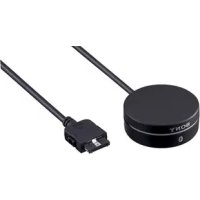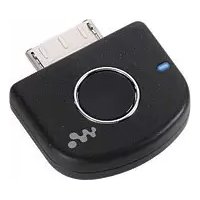
WLANWB1 - Bluetooth Receiver SONY - Free user manual and instructions
Find the device manual for free WLANWB1 SONY in PDF.


| Product Type | Bluetooth Receiver |
| Brand | Sony |
| Model | WLANWB1 |
| Dimensions (L x H x D) | Approx. 28.1 × 29.1 × 7.8 mm |
| Weight | Approx. 5 g |
| Power Supply | Powered by Walkman via WM-PORT (22 pin) |
| Bluetooth Version | Bluetooth version 2.0 |
| Supported Bluetooth Profiles | A2DP, AVRCP |
| Supported Audio Codecs | SBC |
| Maximum Range | Approx. 10 m (line of sight) |
| Maximum Number of Paired Devices | 8 |
| Connector | WM-PORT (22 pin) for connection to Walkman |
| MODE Switch | MODE 1 (sound quality priority) / MODE 2 (stability priority) |
| Operating Temperature | 5 °C to 35 °C |
| Supplied Accessories | Instruction manual (1) |
| Maintenance and Cleaning | Clean with a soft, dry cloth. Do not use solvents. |
| Safety Precautions | Do not expose to moisture, excessive heat or shocks. Do not disassemble. |
| General Information | Complies with directive 1999/5/EC. Bluetooth trademark licensed to Sony. |
Frequently Asked Questions - WLANWB1 SONY
User questions about WLANWB1 SONY
0 question about this device. Answer the ones you know or ask your own.
Ask a new question about this device
Download the instructions for your Bluetooth Receiver in PDF format for free! Find your manual WLANWB1 - SONY and take your electronic device back in hand. On this page are published all the documents necessary for the use of your device. WLANWB1 by SONY.
USER MANUAL WLANWB1 SONY
Operating Instructions GB
Mode d'emploi FR
© 2006 Sony Corporation
WARNING
To reduce the risk of fire or electric shock, do not expose this apparatus to rain or moisture.
Do not install the appliance in a confined space, such as a bookcase or built-in cabinet.
To reduce the risk of fire, do not cover the ventilation of the apparatus with newspapers, tablecloths, curtains, etc. And do not place lighted candles on the apparatus.
To reduce the risk of fire or electric shock, do not place objects filled with liquids, such as vases, on the apparatus.
CE
Hereby, Sony Corp., declares that this equipment is in compliance with the essential requirements and other relevant provisions of Directive 1999/5/EC.
For details, please access the following URL: http://www.compliance.sony.de/
The Bluetooth word mark and logos are owned by the Bluetooth SIG, Inc. and any use of such marks by Sony Corporation is under license.
Other trademarks and trade names are those of their respective owners.
In order to comply with FCC radio-frequency radiation exposure guidelines for an uncontrolled exposure, this device and its antenna must not be co-located or operating in conjunction with any other antenna or transmitter.
Disposal of Old Electrical & Electronic Equipment (Applicable in the European Union and other European countries with separate collection systems)
natural_image
Symbol of a trash bin crossed with a diagonal line and a black rectangular block below (no text or labels)This symbol on the product or on its packaging indicates that this product shall not be treated as household waste. Instead it shall be handed over to the applicable collection point for the recycling of electrical and electronic equipment. By ensuring this product is disposed of correctly, you will help prevent potential negative consequences for the environment and human health, which could otherwise be caused by inappropriate waste handling of this product. The recycling of materials will help to conserve natural resources. For more detailed information about recycling of this product, please contact your local Civic Office, your household waste disposal service or the shop where you purchased the product.
For Customers in the USA
INFORMATION:
This equipment has been tested and found to comply with the limits for a Class B digital device, pursuant to Part 15 of the FCC Rules. These limits are designed to provide reasonable protection against harmful interference in a residential installation. This equipment generates, uses, and can radiate radio frequency energy and, if not installed and used in accordance with the instructions, may cause harmful interference to radio communications. However, there is no guarantee that interference will not occur in a particular installation. If this equipment does cause harmful interference to radio or television reception, which can be determined by turning the equipment off and on, the user is encouraged to try to correct the interference by one or more of the following measures:
- Reorient or relocate the receiving antenna.
- Increase the separation between the equipment and receiver.
- Connect the equipment into an outlet on a circuit different from that to which the receiver is connected.
- Consult the dealer or an experienced radio/TV technician for help.
You are cautioned that any changes or modifications not expressly approved in this manual could void your authority to operate this equipment.
This device complies with Part 15 of the FCC Rules. Operation is subject to the following two conditions: (1) this device may not cause harmful interference, and (2) this device must accept any interference received, including interference that may cause undesired operation.
This equipment complies with FCC radiation exposure limits set forth for uncontrolled equipment and meets the FCC radio frequency (RF) Exposure Guidelines in Supplement C to OET65. This equipment has very low levels of RF energy that it is deemed to comply without testing of specific absorption ratio (SAR).
For Customers in CANADA
This Class B digital apparatus complies with Canadian ICES-003.
Operation is subject to the following two conditions: (1) this device may not cause interference, and (2) this device must accept any interference, including interference that may cause undesired operation of the device.
The installer of this radio equipment must ensure that the antenna is located or pointed such that it does not emit RF field in excess of Health Canada limits for the general population; consult Safety Code 6, obtainable from Health Canada's website www.hc-sc.gc.ca/rpb.
Table of Contents
Features 4
Basic operation of Bluetooth devices ....5
Getting Started
Location and Function of Parts ...... 6
Connecting to a Walkman ..... 7
Pairing ....8 What is pairing? ....8 Pairing procedures....8
On Indicators 10
Listening to music
Bluetooth Connecting / Playing back ...... 11
Controlling by the Remote .... 13
Additional Information
What is Bluetooth technology? 14
Precautions 14
Troubleshooting 16
Initializing this unit ...... 18
Specifications 19
Features
This unit is an audio transmitter using Bluetooth ^® technology.
You can enjoy music wirelessly by transmitting the audio signals to a Bluetooth receiving device (headset, car stereo, speaker, stereo component system, etc.) ^1 , if you connect this unit to the Walkman with the WM-PORT ^2 (22 pin).
*1 Bluetooth receiving devices are required to support A2DP (Advanced Audio Distribution Profile).
^*2 WM-PORT is a dedicated multiple connector for connecting accessories to your Walkman.
This unit's features are as follows:
• Audio transmission using Bluetooth wireless technology.
- Can be used with any Walkman with a WM-PORT (22 pin).
• AVRCP (Audio/Video Remote Control Profile) supported
- Allows basic operation of a Walkman by Bluetooth headsets ^3 , etc. - Allows volume control (+/-) operation of Bluetooth speakers ^4 , etc., by a Walkman.
^3 AVRCP compatibility required ^4 AVRCP (Vol +/-) compatibility required
- No need to charge; receives power from Walkman.
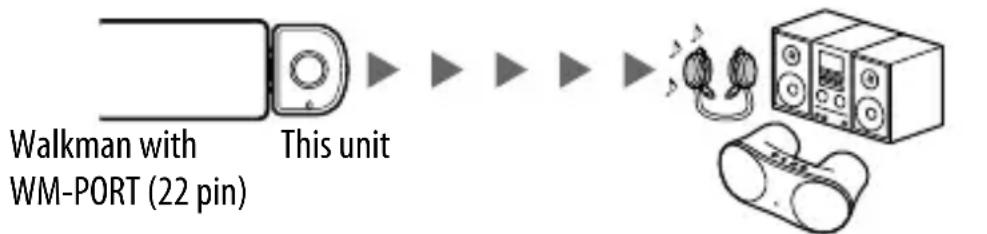
flowchart
graph LR
    A["Walkman with WM-PORT (22 pin)"] --> B["This unit"]
    B --> C["Audio waveform"]
    C --> D["Device with two speakers"]
Bluetooth headset, etc.

Tip
For details on Bluetooth technology, see page 14.
For details on available Bluetooth devices, visit the following web sites:
USA: http://www.sony.com/walkmansupport/
Canada: http://www.sony.ca/ElectronicsSupport/
Europe: http://www.sonydigital-link.com/DNA/
China: http://service.sony.com.cn/KB/
Taiwan: http://www.twsupport.css.ap.sony.com/
Korea: http://scs.sony.co.kr/walkman/
Other countries or areas: http://www.css.ap.sony.com/
Basic operation of Bluetooth devices
The following example describes how you can transmit music played on a Walkman connected to this unit, and listen on a Bluetooth receiving device (headset).
Pairing
Enables a Bluetooth receiving device and this unit to recognize one another. You do not need to recognize one another next time if you did once.
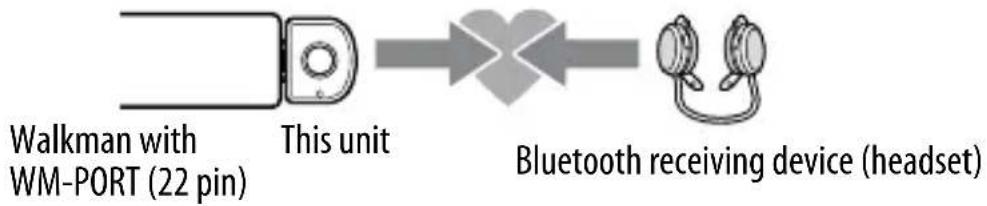
flowchart
graph LR
    A["Walkman with WM-PORT (22 pin)"] --> B["This unit"]
    B --> C["Bluetooth receiving device (headset)"]
For more details, see page 8.
Bluetooth connecting
Turn on the Bluetooth receiving device and play the Walkman. Bluetooth connection is established automatically.
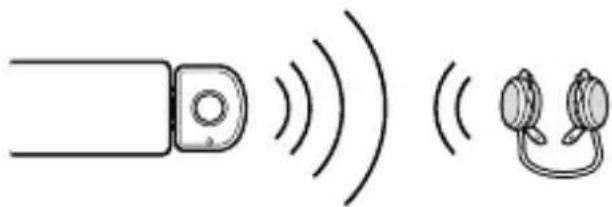
natural_image
Simple line drawing of a device emitting sound waves, with no text or symbols present.For more details, see page 11.
Listening to music
You can enjoy listening to music played on your Walkman connected to this unit through the Bluetooth receiving device.
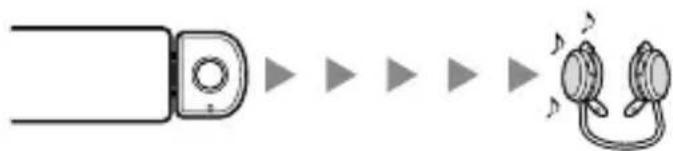
flowchart
graph LR
    A["Input"] --> B["Conversion"]
    B --> C["Output"]
    style A fill:#f9f,stroke:#333
    style C fill:#bbf,stroke:#333
For more details, see page 11.
Location and Function of Parts
Front Rear
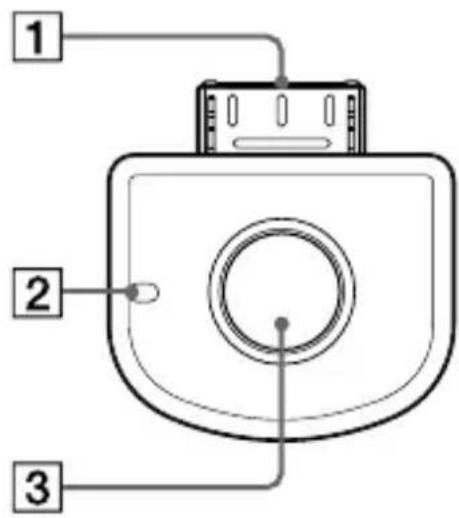
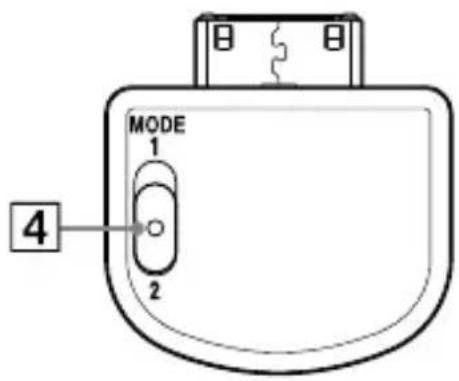
1 WM-PORT (22 pin)
Connects to the WM-PORT of a Walkman (page 7).
2 Indicator
Indicates this unit's status (page 10).
3 Power button
Performs the following:
- Turning on/off of this unit (page 7).
- Pairing (page 8).
- Initializing this unit (page 18).
4 MODE switch
Selects the transmission mode by sliding the switch to 1 or 2 (page 12).
Connecting to a Walkman
Connect this unit to the WM-PORT of a Walkman firmly.
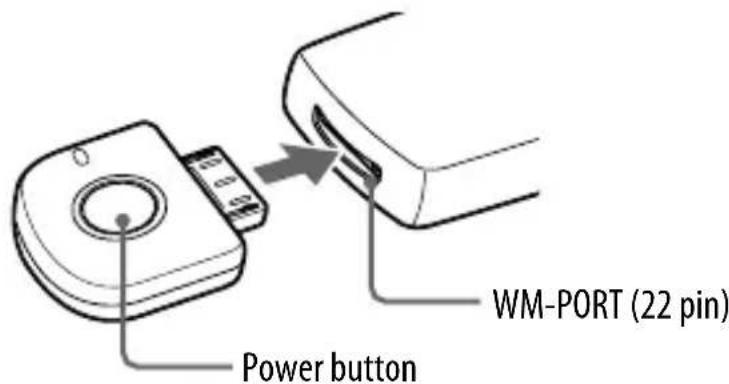
To turn on this unit
Connect this unit to the Walkman, then the power of this unit will turn on automatically. If the power of this unit is off while the unit is connected to the Walkman, press and hold the unit's power button for about 2 seconds to turn it on. When this unit turns on, the indicator flashes twice.
To turn off this unit
To turn off this unit, press and hold this unit's power button for about 2 seconds. The indicator flashes once and this unit turns off.

Tip
Maximum Communication time or standby time may vary depending on your Walkman. For details, visit the following web sites:
USA: http://www.sony.com/walkmansupport/
Canada: http://www.sony.ca/ElectronicsSupport/
Europe: http://www.sonydigital-link.com/DNA/
China: http://service.sony.com.cn/KB/
Taiwan: http://www.twsupport.css.ap.sony.com/
Korea: http://scs.sony.co.kr/walkman/
Other countries or areas: http://www.css.ap.sony.com/
Notes
- To listen to music from the headphone jack of the Walkman, disconnect this unit from the Walkman.
- While this unit is turned on, it consumes power from the Walkman. We recommend turning off this unit when not using the Bluetooth function.
- If you turn off this unit while the Walkman is playing back, playback will stop.
- There is no need to charge this unit as it will receive power from the connected Walkman. It is recommended to check the Walkman's remaining battery before using.
- Depending on the Walkman model, you may not be able to connect the headphone to it when this unit is connected to the Walkman.
Pairing
What is pairing?
Bluetooth devices need to be “paired” with each other beforehand. Once Bluetooth devices are paired, there is no need for pairing again, except in the following cases:
- Pairing information is deleted after repair, etc.
- This unit is paired with 9 or more receiving devices.
This unit can be paired with up to 8 Bluetooth receiving device. If a new device is paired after 8 devices have been paired, the device whose latest connection time is the oldest among the 8 paired devices is replaced by the new one.
- This unit is initialized.
All pairing information is deleted (page 18).
Pairing procedures
1 Connect this unit to the Walkman (page 7).
The power of this unit turns on.
2 Press and hold the power button of this unit for about 2 seconds to turn it off.
3 Place this unit and the Bluetooth receiving device to be paired together within 1 m.
4 Set the Bluetooth receiving device to enter "Pairing in process."
(See the operating instructions supplied with the Bluetooth receiving device.)
Note
Passcode* of this unit is fixed at “0000.” Depending on the Bluetooth receiving device, it may be necessary to input the passcode (in this case, “0000”). This unit cannot be paired with a Bluetooth receiving device whose passcode is not “0000.”
* Passcode may be called “Passkey,” “PIN code,” “PIN number,” or “Password.”
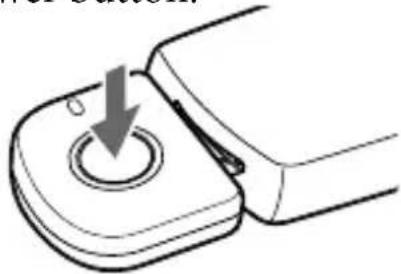
5 Press and hold the power button of this unit for more than about 7 seconds to enter "Pairing in process."
After about 2 seconds, the indicator will flash twice but keep pressing the power button.
natural_image
Diagram of a mechanical switch or knob with a downward arrow indicating rotation (no text or symbols present)When the indicator of this unit flashes quickly, stop pressing it. This unit enters “Pairing in process.”
This unit's indicator status will vary as follows, and pairing is established with the Bluetooth receiving device.
Indicator flashes quickly: Pairing in process

Indicator flashes when responding to the Bluetooth receiving device. (Paring successful)

Indicator flashes (at about 5-second intervals): Connectable
Notes
- “Pairing in process” of this unit is released after about 5 minutes. If pairing is not established within about 5 minutes, repeat the above procedure from step4.
- To enter "Pairing in process," you need to turn off the power of this unit first.
When not completed paring
Repeat the procedure from step 2.
To quit "Pairing in process"
Press and hold the power button of this unit for about 2 seconds to turn off this unit.

Tip
When paring this unit with a number of Bluetooth receiving devices, repeat steps 2 and 5 for each device individually.
Note
Depending on the Bluetooth receiving device, the unit may not enter “Connectable” automatically. In this case, see the operating instructions supplied with the device.
On Indicators
| Status Indicator | |
| Power on Flashes twice | |
| Power off Flashes once | |
| Pairing in process Flashes quickly | |
| Paring successful Flashes twice | |
| Connecting in process Flashes (at about 1-second intervals) | |
| Connecting successful Flashes twice | |
| Connecting | Flashes slowly (at about 5-second intervals) |
| Connectable Flashes | (at about 5-second intervals) |
Bluetooth Connecting / Playing back
You can listen to music of the Walkman connected to this unit on the Bluetooth receiving device (headset, etc.).
Before starting operation, complete pairing this unit and the Bluetooth receiving device (page 8).
1 Set the Bluetooth receiving device to "Connectable" for the
Bluetooth connection. (See the operating instructions supplied with the Bluetooth receiving device.)
2 Connect this unit to the Walkman then turn on the Walkman.
This unit's indicator status will vary as follows, and the Bluetooth connection between this unit and the Bluetooth receiving device is established.
Indicator flashes twice: Power is on

Indicator flashes (at about 1-second intervals): Connecting in process

Indicator flashes twice: Connecting successful

Indicator flashes slowly (at about 5-second intervals): Connecting If the Bluetooth connection is not established within 5 minutes, this unit automatically turns itself off. In this case, turn it on again by pressing and holding the power button for about 2 seconds.
Note
If you want to establish the Bluetooth connection with a Bluetooth device that is paired before either of the last two devices recognized, turn on the unit and establish the Bluetooth connection from the Bluetooth device while the unit's indicator flashes slowly from 10 to 13 times (for about 10-13 seconds). If the problem persists, pair the devices again.
3 Start playback on the Walkman connected to this unit.
The music of the Walkman is played back on the Bluetooth receiving device.

Tip
You can control the volume on the Bluetooth receiving device.
Notes
- Depending on your Walkman, when the Walkman is in Sleep status, you may need to keep pressing the play button in order to start playback.
- Even if you control the volume on the Walkman, sound from the Bluetooth receiving device will not change. If the Bluetooth receiving device is supported by AVRCP (Vol +/-), you can control its volume. (For more details, see page 13.)
- When this unit establishes the Bluetooth connection with the Walkman, AVLS (Automatic Volume Limiter System) is deactivated and beep sounds are not emitted.
- If this unit and the Bluetooth receiving device become out of range and the Bluetooth connection terminates, repeat the procedure from step 1. Note, however, that if the unit and the Bluetooth receiving device come into connectable range again within about 10 minutes, Bluetooth connection will be reestablished automatically.
- When you listen to FM broadcast received by a Walkman with a built-in FM tuner through the Bluetooth receiving device, make sure to connect the headphone to the Walkman, as the headphone cord works as an antenna, otherwise FM signals cannot be received.
- If the recording level of audio data on the Walkman is too high, the output sound quality from the Bluetooth receiving device, may not meet the user customized settings, e.g., “Equalizer” etc.
- Playback through a Bluetooth connection may cause noise, sound break, or playback speed change depending on the location and the usage (page 14).
About the MODE switch
You can select the sound quality or wireless communication stability preferentially.
MODE 1: Sound quality takes priority.
MODE 2: Reception stability takes priority.
Notes
- When you set the MODE switch to MODE 1, and experience sound breaks, set to MODE 2.
- Sound break may occur depending on your Bluetooth receiving device when switching between MODE 1 and 2.
Controlling by the Remote
When connecting (Bluetooth connecting) to devices that support AVRCP (Audio/Video Remote Control Profile)
You can control the Walkman using the control button of the Bluetooth headset, also adjust the volume of the Bluetooth speaker using the control button of the Walkman. For details, see the operating instructions supplied with the Bluetooth devices.
Before starting remote control operation, check that step 1 and 2 of "Bluetooth Connecting / Playing back" are completed (page 11).
Remote control for the Walkman by the Bluetooth receiving device.
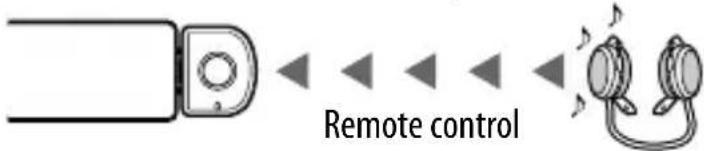
( play, stop., etc.)
Headset with AVRCP

Tip
When you stop playing back the Walkman, this unit enters “Connectable.” While in “Connectable,” you can turn on the Walkman by using the Bluetooth receiving device.
Remote control for the Bluetooth receiving device by the Walkman.

flowchart
graph LR
    A["Device"] --> B["Process Step"]
    B --> C["Step 1"]
    C --> D["Step 2"]
    D --> E["Step 3"]
    E --> F["Step 4"]
    F --> G["Step 5"]
Speaker with AVRCPRemote control
Notes
- You may not be able to control the Bluetooth receiving device by the remote control depending on the state of the Walkman.
- Even if you control the volume on the Walkman, the volume of the Bluetooth receiving device, such as a headset, does not change.
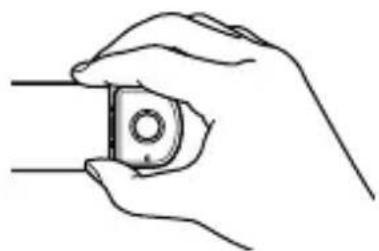
- When operating the Walkman by remote control, do not cover this unit with hands.
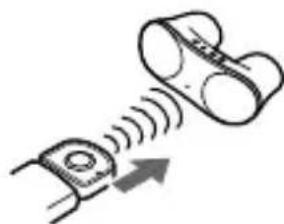
- When operating the Walkman for the Bluetooth receiving device remote control, point this unit toward the Bluetooth receiving device.
- You may not be able to change the volume by the remote control from the Walkman depending on your Bluetooth receiving device.
Do not cover this unit with hands.
natural_image
Line drawing of a hand holding a small mechanical component (no text or symbols)Point this unit toward the Bluetooth receiving device.
natural_image
Diagram showing two cylindrical objects with a sensor or signal wave interacting, no text or symbols presentWhat is Bluetooth technology?
Bluetooth wireless technology is a short-range wireless technology that enables wireless data communication between digital devices, such as a computer or digital camera. Bluetooth wireless technology operates within a range of about 10 meters (about 30 feet).
You do not need to use a cable for connection since Bluetooth technology is a wireless technology, nor is it necessary for the devices to face one another, such is the case with infrared technology. For example, you can use such a device in a bag or pocket.
Bluetooth technology is an international standard supported by thousands of companies all over the world, and employed by various companies worldwide.
Communication System and Compatible Bluetooth Profile of this unit
Profile is standardization of the function for each Bluetooth device specification.
This unit supports the following Bluetooth version and profiles:
Communication System: Bluetooth Specification version 2.0
Compatible Bluetooth Profile:
- A2DP (Advanced Audio Distribution Profile)
- AVRCP (Audio/Video Remote Control Profile)
Precautions On Bluetooth communication
- Bluetooth wireless technologyBluetooth wireless t operates within a range of about 10 meters (about 30 feet). Maximum communication range may vary depending on obstacles (person, metal, wall, etc.) or electromagnetic environment.
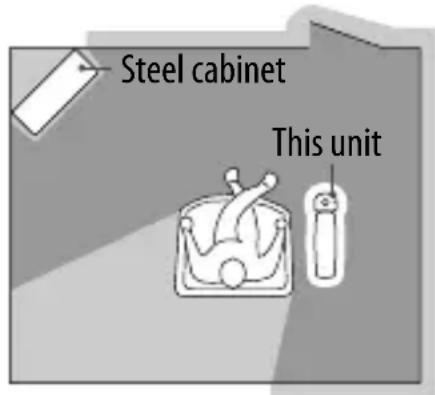
- Optimal performance
- Limited performance
- The following conditions may cause noise, sound break or playback speed change.
- When using inside the metal bag.
- When using inside the backpack or shoulder bag.
- A device using 2.4 GHz frequency, such as a wireless LAN device, cordless telephone, or microwave oven, is in use near this unit.
- Because Bluetooth devices and wireless LAN (IEEE802.11b/g) use the same frequency, microwave interference may occur and resulting in communication speed deterioration, noise, or invalid connection if this unit is used near a wireless LAN device. In such a case, perform the following.
- Install this unit and Bluetooth device as near to each other as possible.
- If this unit is used within about 10 meters (about 30 feet) of a wireless LAN device, turn off the wireless LAN device.
- Due to the characteristic of Bluetooth wireless technology, the sound played on the Bluetooth device is slightly delayed from the sound played on the Walkman.
- We do not take any responsibility for leakage of information during Bluetooth communication.
- Connection with all Bluetooth devices cannot be guaranteed.
- A device featuring Bluetooth function is required to conform to the Bluetooth standard specified by Bluetooth SIG, and be authenticated.
- Even if the connected device conforms to the above mentioned Bluetooth standard, some devices may not be connected or work correctly, depending on the features or specifications of the device.
- Depending on the device to be connected, communication may take some time.
On safety
- Do not drop, hit, or otherwise expose the unit to strong shock of any kind. This could damage the product.
- Do not disassemble or attempt to open any parts of the unit.
On placement
- Do not place the unit in any of the following locations.
- Direct sunlight, near a heater, or other extremely high-temperature location
– Dusty locationDusty location - An unsteady or inclined surface
- Location exposed to large amounts of vibration
- Bathroom or other high-humidity location
- In a car subject to the direct rays of the sun
Notes on using in a car
Do not attempt to connect this unit, or to operate this unit, an audio output device or a car radio while driving or waiting at a traffic signal.
Cleaning
Clean the unit with a soft, dry cloth, or a soft cloth lightly moistened with a mild detergent solution. Do not use any type of solvent, such as alcohol or benzene, which may damage the finish.
Others
If you have any questions or problems concerning this unit that are not covered in this manual, please consult your nearest Sony dealer.
Troubleshooting
If you run into any problem using this unit, disconnect the unit from the Walkman, then reconnect it after a while (reset). Furthermore, turn off the Walkman and the Bluetooth receiving device then turn them on again. (For details on how to operate, see the operating instructions supplied with either device.) Also check the following list. Should any problem persist, consult your nearest Sony dealer.
| Symptom Cause / Remedy | |
| This unit is not turned on.(or turns off shortly after turning on.) | →Press and hold the units power button for about 2 seconds.→Check the remaining battery of the Walkman. If the remaining battery is not enough, charge the Walkman. |
| No sound | →Check the connection between this unit and the Walkman.→Check that both this unit and the Bluetooth receiving device are turned on.→Ensure that this unit is not too far from the Bluetooth receiving device, or this unit is not receiving interference from a wireless LAN, other 2.4 GHz wireless device, or microwave oven.→Pair this unit and the Bluetooth receiving device again. |
| Low sound level | →Turn up the volume of the Bluetooth receiving device as high as possible to the extent that sound is not distorted. For details on volume adjustment, refer to the operating instructions supplied with the Bluetooth receiving device. |
| Cannot change the volume. | →Change the volume on the Bluetooth receiving device. |
| Distorted sound | → Turn down the volume of the Bluetooth receiving device to the point where the sound is no longer distorted. For details on volume adjustment, refer to the operating instructions supplied with the Bluetooth receiving device. |
| Sound break, noise or playback speed change | → Set the MODE switch to MODE 2.→ If a device that generates electromagnetic radiation, such as a wireless LAN, other Bluetooth device(s), or a microwave oven is nearby, move away from such sources.→ Remove any obstacle between this unit and other Bluetooth device or move away from the obstacle.→ Locate this unit and other Bluetooth device(s) as near as possible.→ Re-position or re-orient this unit.→ Re-position or re-orient other Bluetooth device. |
| Pairing cannot be established. | → Locate this unit and other Bluetooth device(s) as near as possible.→ Check if you input correct passcode (page 8). |
| Bluetooth connection cannot be established with a device that has been “paired” before. | → This unit tries to connect with either of the last two devices recognized before.If you want to establish the Bluetooth connection with a Bluetooth device that is paired before either of the last two devices recognized, turn on the unit and establish the Bluetooth connection from the Bluetooth device while the unit’s indicator flashes slowly from 10 to 13 times (for about 10-13 seconds). If the problem persists, pair the devices again.→ Pairing information may be deleted. Pair the device again. |
Initializing this unit
You can reset this unit to its default and delete all pairing information.
1 Connect the unit to the Walkman while pressing and holding the power button on the unit.
2 Continue to press and hold the power button for more than about 15 seconds.
The indicator flashes 4 times, and this unit is reset to the default setting. All pairing information is deleted.
Specifications
General
Communication System
Bluetooth Specification version 2.0
Output
Bluetooth Specification Power Class 2
Maximum communication range
Line of sight approx. 10 m (30 ft) ^*1
Frequency band
2.4 GHz band (2.4000 GHz - 2.4835 GHz)
Modulation method
FHSS
Compatible Bluetooth Profile ^*2
A2DP (Advanced Audio Distribution Profile)
AVRCP (Audio/Video Remote Control Profile)
Supported Codecs ^*3
SBC ^*4
Terminals
WM-PORT (22 pin)
Operating temperature
5^ to 35^ (67°F to 95°F)
Dimensions
Approx. 28.1 × 29.1 × 7.8 ~mm
(1^1 / 8× 1^1 / 8× ^1 / _4 in.) (w/h/d)
(including protruding parts)
Mass
Approx. 5 g (0.2 oz)
*1 The actual range will vary depending on factors such as obstacles between devices, magnetic fields around a microwave oven, static electricity, reception sensitivity, aerial's performance, operating system, software application, etc.
*2 Bluetooth standard profiles indicate the purpose of Bluetooth communication between devices.
^*3 Codec: Audio signal compression and conversion format
*4 Subband Codec
Supplied accessories
Operating instructions (1)
"WALKMAN" and "WALKMAN" logo are registered trademarks of Sony Corporation.
Design and specifications are subject to change without notice.
AVERTISSEMENT
natural_image
Simple line drawing of a device emitting sound waves, with no text or symbols present.natural_image
Diagram of a mechanical switch or knob with a downward arrow indicating rotation (no text or symbols present)natural_image
Diagram showing a device connected to a speaker with sound waves, no text or symbols presentnatural_image
Line drawing of a hand holding a small object with a circular hole, no text or symbols presentnatural_image
Diagram showing two cylindrical objects with a sensor or signal flow arrow, no text or symbols presentflowchart
graph LR
    A["Device Icon"] --> B["Transformation Arrow"]
    B --> C["Connector Icon"]
natural_image
Simple line drawing of a device with sound waves and earphones (no text or symbols)natural_image
Diagram of a mechanical switch or knob with a downward arrow indicating rotation (no text or symbols present)natural_image
Diagram showing a remote control unit connected to a speaker with sound waves (no text or symbols)Fernsteuerung
Headset mit AVRCP

Tippipp
(Wiedergabe, Stopp usw.)
natural_image
Line drawing of a hand holding a small mechanical component (no text or symbols)natural_image
Diagram showing two devices with sound waves and an upward arrow, no text or symbols present- A2DP (Advanced Audio Distribution Profile)
- AVRCP (Audio/Video Remote Control Profile)
(2,4000 GHz - 2,4835 GHz)
A2DP (Advanced Audio Distribution Profile)
AVRCP (Audio/Video Remote Control Profile)
5^ C - 35^ C
Abmessungen
ca. 28,1 × 29,1 × 7,8 ~mm (B/H/T)
natural_image
Simple line drawing of a device emitting sound waves, with no text or symbols present.natural_image
Simple line drawing of a mechanical knob or dial with a downward arrow indicating rotation (no text or symbols)natural_image
Diagram showing a remote control unit connected to a speaker emitting sound waves (no text or symbols)natural_image
Line drawing of a hand holding a small mechanical component (no text or symbols)natural_image
Diagram showing a sensor emitting signals from a device (no text or symbols present)- A2DP (Advanced Audio Distribution Profile)
- AVRCP (Audio/Video Remote Control Profile)
A2DP (Advanced Audio Distribution Profile)
AVRCP (Audio/Video Remote Control Profile)
natural_image
Illustration of a cassette player with headphones connected to a speaker and a cylindrical device (no text or symbols)natural_image
Simple line drawing of a device emitting sound waves, with no text or symbols present.natural_image
Simple line drawing of a mechanical component with a downward arrow indicating a point on the circular base (no text or symbols)natural_image
Line drawing of a hand holding a small mechanical component (no text or symbols)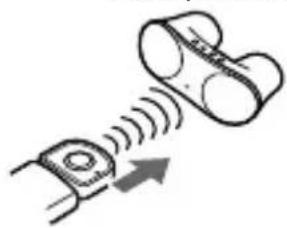
natural_image
Diagram showing a sensor emitting signals from a device (no text or symbols present)Tecnologia Bluetooth
Specifica Bluetooth Power Class 2
(2,4000 GHz - 2,4835 GHz)