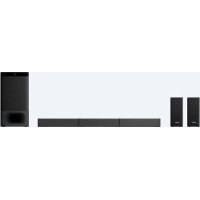
HTS500RF - Home Theater System SONY - Free user manual and instructions
Find the device manual for free HTS500RF SONY in PDF.


User questions about HTS500RF SONY
0 question about this device. Answer the ones you know or ask your own.
Ask a new question about this device
Download the instructions for your Home Theater System in PDF format for free! Find your manual HTS500RF - SONY and take your electronic device back in hand. On this page are published all the documents necessary for the use of your device. HTS500RF by SONY.
USER MANUAL HTS500RF SONY
- S lsl S I S J S J S J S J
Home Theatre System
Home Theatre System
Operating Instructions
GB
©2018 Sony Corporation Printed in China
HT-S500RF/S700RF
HT-S500RF/S700RF
WARNING
Do not install the appliance in a confined space, such as a bookcase or built-in cabinet.
To reduce the risk of fire, do not cover the ventilation opening of the appliance with newspapers, tablecloths, curtains, etc.
Do not expose the appliance to naked flame sources (for example, lighted candles).
To reduce the risk of fire or electric shock, do not expose this appliance to dripping or splashing, and do not place objects filled with liquids, such as vases, on the appliance.
The unit is not disconnected from the mains as long as it is connected to the AC outlet, even if the unit itself has been turned off.
As the main plug is used to disconnect the unit from the mains, connect the unit to an easily accessible AC outlet.
Should you notice an abnormality in the unit, disconnect the main plug from the AC outlet immediately.
Do not expose batteries or appliances with battery-installed to excessive heat, such as sunshine and fire.
Indoor use only.
Recommended cables
Properly shielded and grounded cables and connectors must be used for connection to host computers and/or peripherals.
For the Bar Speaker
The nameplate is located on the bottom of the Bar Speaker.
Table of Contents
About These Operating Instructions 4
What's in the Box 5
What You Can Do with the System 6
Guide to Parts and Controls 7
Connecting to a TV or Audio Device
Connecting a TV with an HDMI Cable and/or Optical Cable
Startup Guide (separate document)
Connecting an Audio Device with an Analog Audio Cable 11
Preparing for Using the System
Mounting the Bar Speaker and Surround Speakers on a Wall 12
Operating the System Using the Remote Control 15
When the TV Remote Control does not Work 15
Listening to the Sound
Listening to a TV and Other Devices 16
Listening to Music on a USB Device 17
Selecting the Sound Effect
Adjusting the Sound 19
Adjusting the Volume of the Subwoofer 20
Listening to Music/Sound with the BLUETOOTH®
Function
Listening to Music from a Mobile Device 21
Listening to Music on the Mobile Device with Sony | Music Center 23
Using the Various Functions
Using the Setup Display 24
Using the Control for HDMI Function 27
Notes on HDMI Connections 28
Saving Power Consumption 29
Troubleshooting
Troubleshooting 30
Resetting the System 35
Additional Information
Specifications 36
Playable Types of Files (USB Input) 38
Supported Input Audio Formats (HDMI OUT (TV (ARC)) or TV IN (OPTICAL)) 38
On BLUETOOTH Communication 39
Precautions 40
About These Operating Instructions
The instructions in these Operating Instructions describe the controls on the remote control.
- Some illustrations are presented as conceptual drawings, and may be different from the actual products.
The default settings are underlined on each feature description.
- The text enclosed in double quotation mark ("--") appears in the front panel display.
What's in the Box
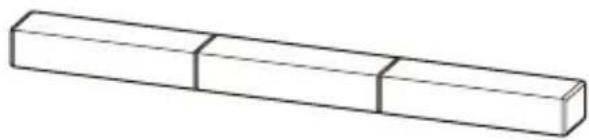
- Bar Speaker (1)
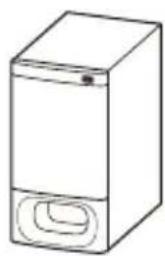
- Subwoofer(1)
- Surround speaker (HT-S500RF only) (2)
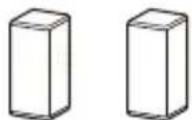
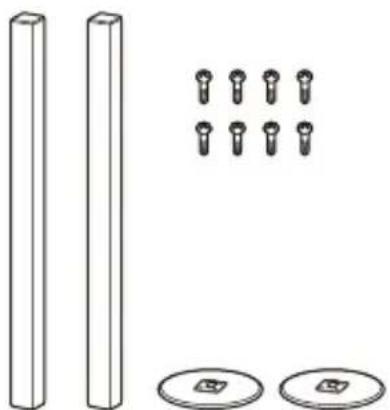
- Surround speaker (2), speaker base (2), and screw (8) (HT-S700RF only)
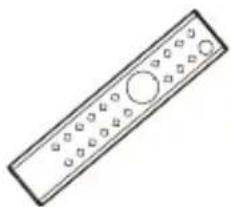
- Remote control (1)
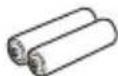
- R03 (size AAA) battery (2)
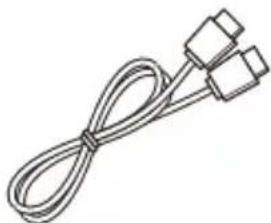
HDMl cable (1)
WALL MOUNT TEMPLATE (1)

- Startup Guide
- Operating Instructions
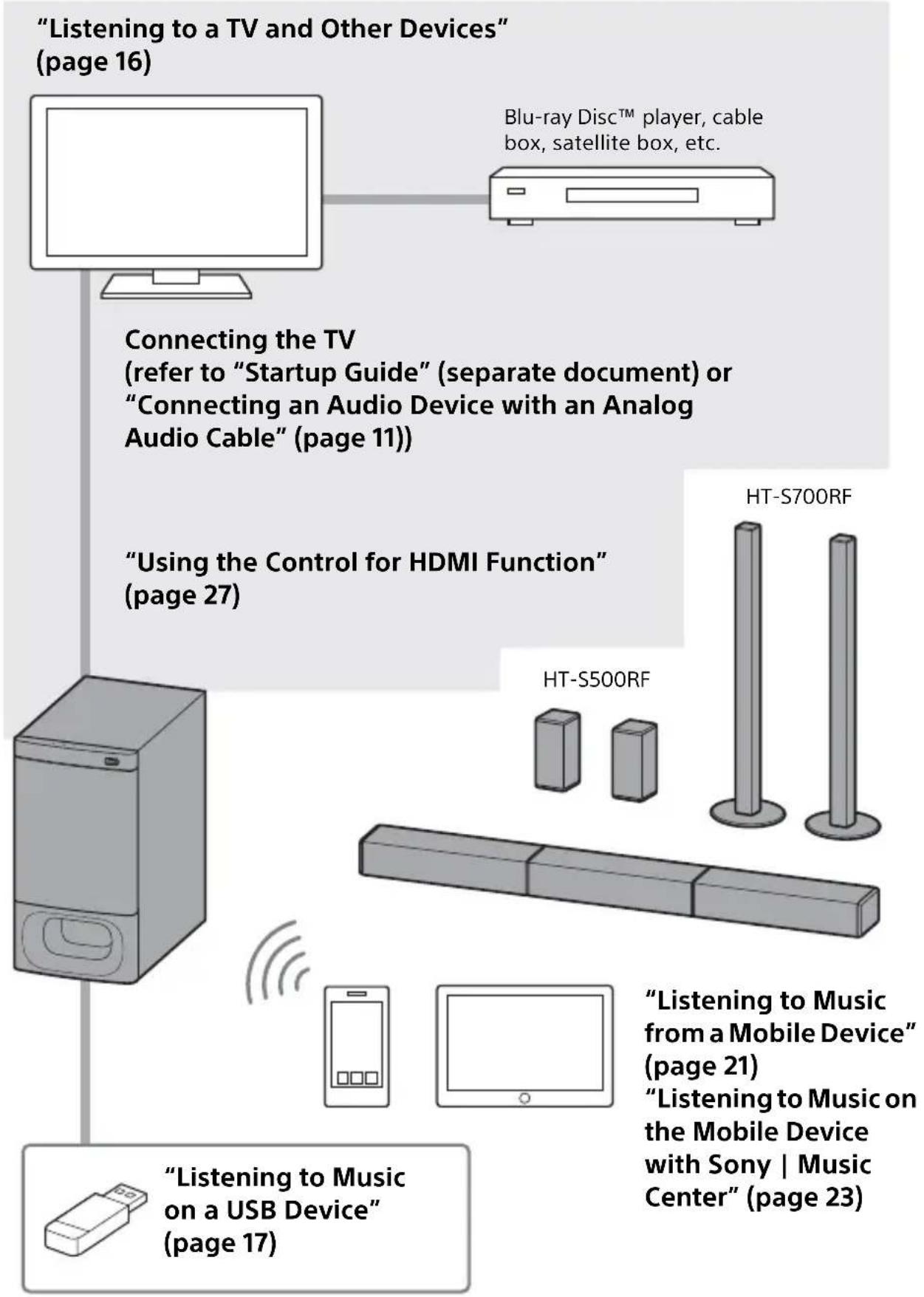
What You Can Do with the System
Guide to Parts and Controls
Details are omitted from the illustrations.
Subwoofer
Front
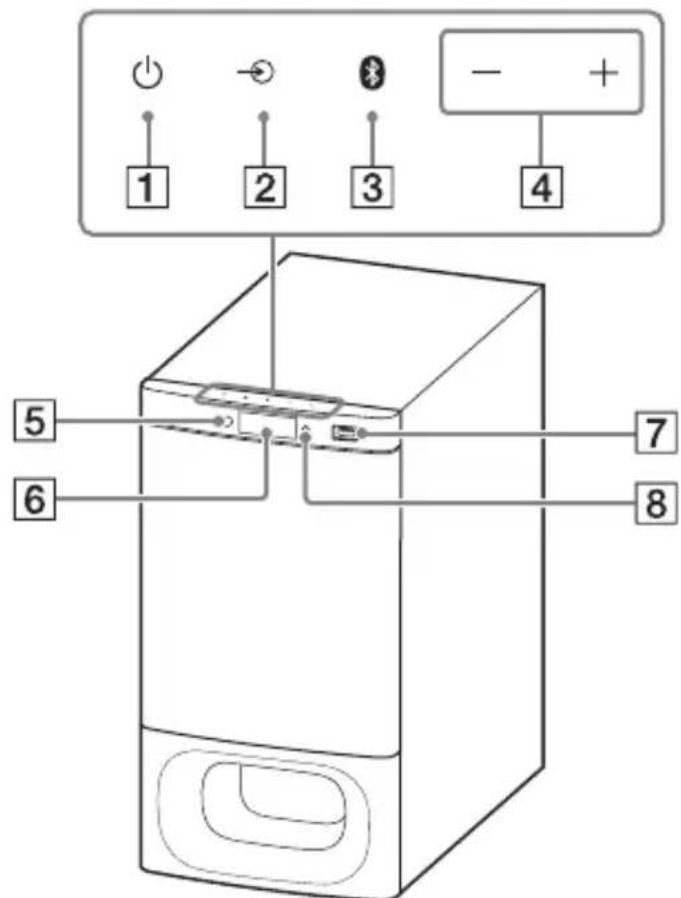
1 (power) button
Turns on the system or sets it to standby mode.
2 input select) button (page 16)
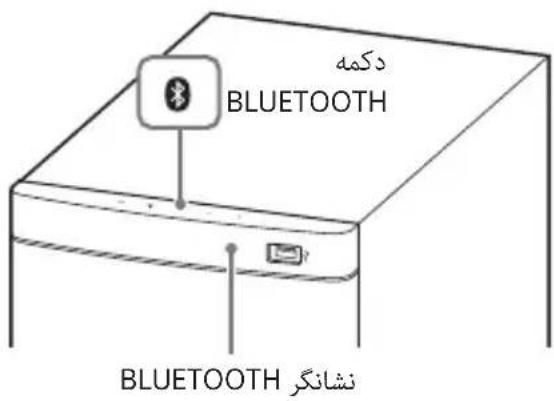
3 BLUETOOTH button (page 21)
4 +/- (volume) buttons
Remote control sensor (page 15)
Point the remote control at the remote control sensor to operate the system.
6 Front panel display
7 (USB) port (page 17)
8 BLUETOOTH indicator
- Lights in blue: BLUETOOTH connection is established (the BLUETOOTH input is selected).
- Flashes quickly in blue: While waiting for connection with a device.
- Flashes in blue: While reconnecting or performing pairing.
Rear
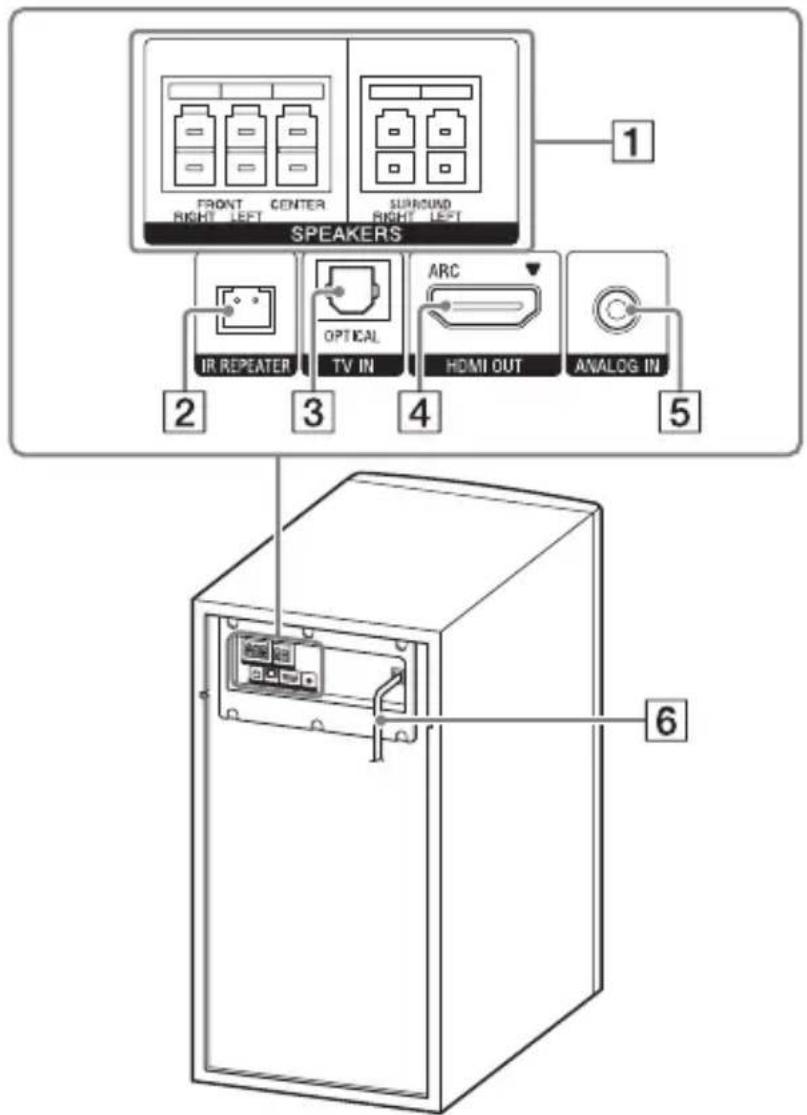
1 SPEAKERSjacks
2 IR REPEATER jack
3 TV IN (OPTICAL) jack
4 HDMI OUT (ARC) jack Connect a TV that has an HDMI input jack with an HDMI cable. The system is compatible with Audio Return Channel (ARC). ARC is the function that sends TV sound to an AV device such as the system from the TV's HDMI jack.
5 ANALOG IN jack (page 11)
6 AC power cord (mains lead)
Remote Control
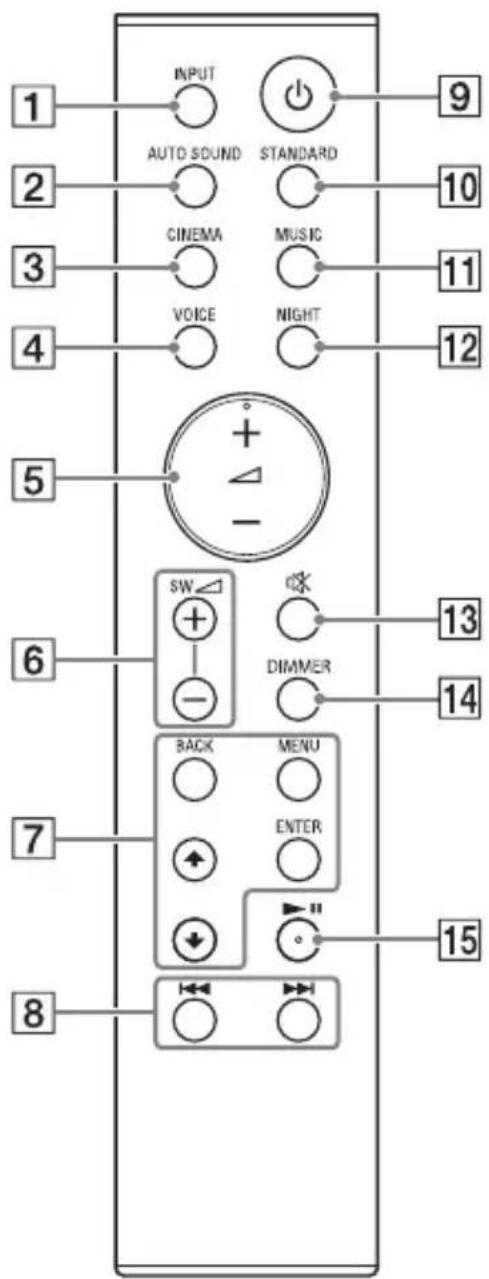
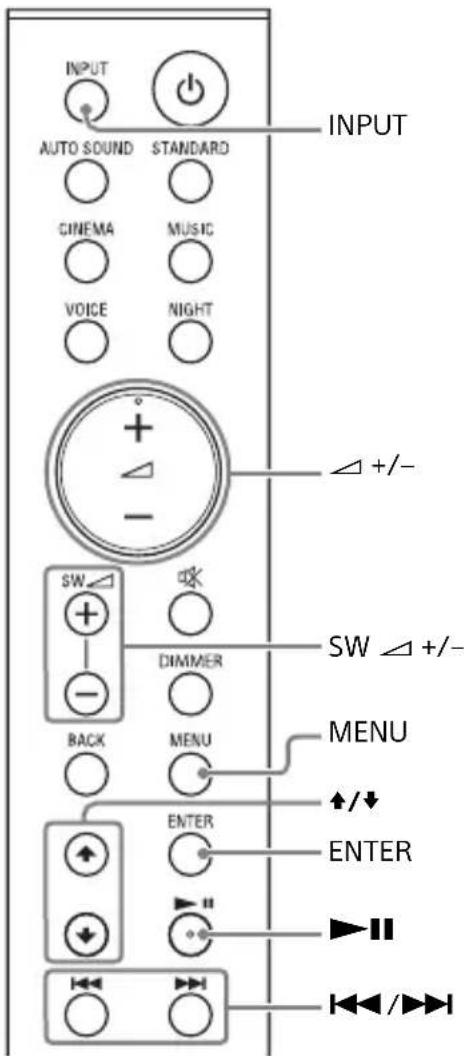
1 INPUT (page 16)
Selects the input source.
2 AUTO SOUND (page 19)
Selects AUTO SOUND for the sound effect.
3 CINEMA (page 19)
Selects CINEMA for the sound effect.
4 VOICE (page 19)
Turns on/off the voice mode.
5 (volume) +^* / -
Adjusts the volume.
Turns on/off the menu in the front panel display.
/ (page 17, 24)
Selects the menu items.
Selects the content on the TV screen for USB playback.
ENTER (page 17, 24)
Enters the selection.
Plays the content that is selected by
/ for USB playback.
BACK (page 17, 24)
Returns to the previous display.
Stops USB playback.
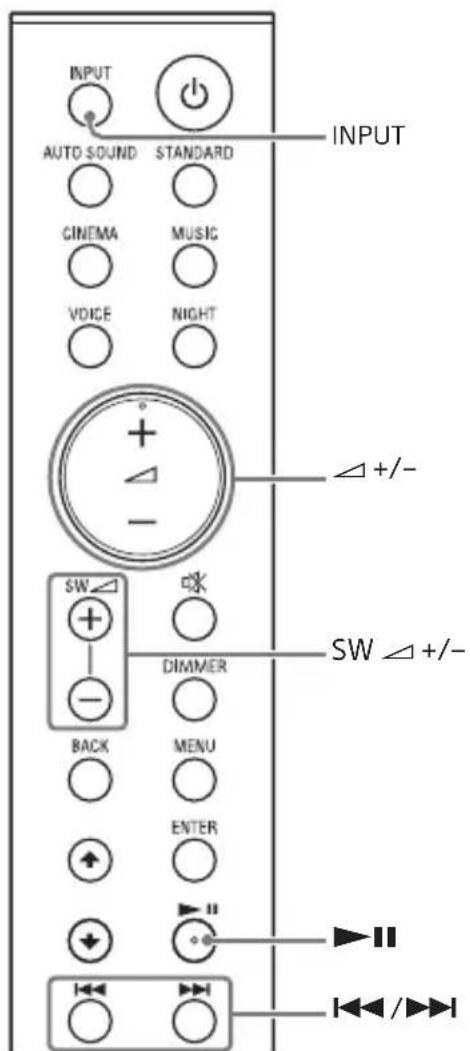
8 /previous/next) (page 17, 21)
Press to select the previous/next track or file.
Hold down to search backward or forward.
9 (power)
Turns on the system or sets it to standby mode.
10 STANDARD (page 19)
Selects STANDARD for the sound effect.
11 MUSIC (page 19)
Selects MUSIC for the sound effect.
12 NIGHT (page 19)
Turns on/off the night mode.
13 (muting)
Mutes the sound temporarily. Pressing the button while muting cancels muting.
14 DIMMER
Adjusts the brightness of the front panel display. "BRGHT" "DARK" "OFF"
- The front panel display is turned off when "OFF" is selected. It turns on automatically when you operate the system, then turns off again if you do not operate the system for several seconds. However, in some cases, the front panel display may not turn off. In this case, the brightness of the front panel display is same as "DARK."
15 II (play/pause)* (page 17, 21)
Plays, pauses, or resumes playback.
- The and buttons have a tactile dot. Use it as a guide during operation.
About the replacement of batteries for the remote control
When the system does not respond by operating with the remote control, replace two batteries with new batteries. Use R03 (size AAA) manganese batteries for replacement.
Connecting to a TV or Audio Device
Connecting a TV with an HDMI Cable and/or Optical Cable
Refer to Startup Guide (separate document).
Connecting an Audio Device with an Analog Audio Cable
To connect portable audio devices such as smartphones and WALKMAN® to the system, connect them via the ANALOG IN jack on the system.
For listening to the connected device, see "Listening to a TV and Other Devices" (page 16).
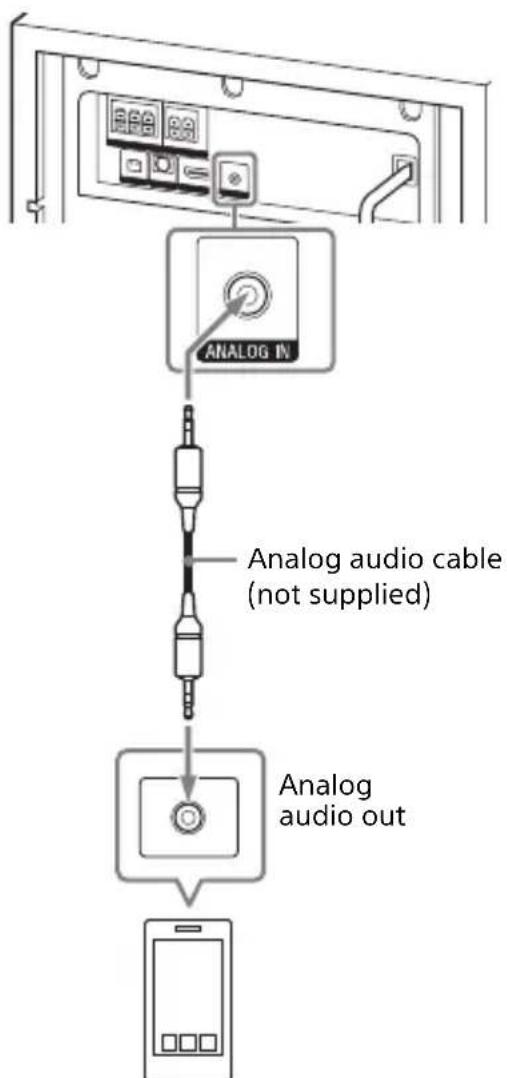
Smartphone, WALKMAN®, other audio devices, etc.
Preparing for Using the System
Mounting the Bar Speaker and Surround Speakers on a Wall
You can mount the Bar Speaker and surround speakers on a wall.
HT-S500RF
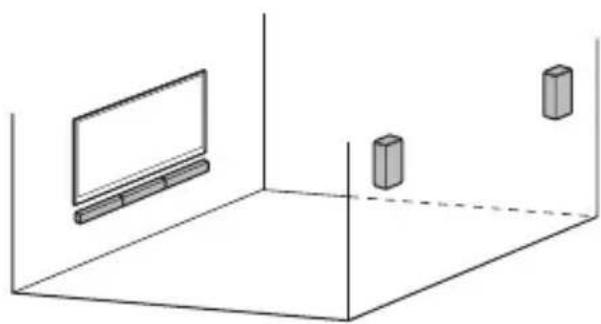
HT-S700RF
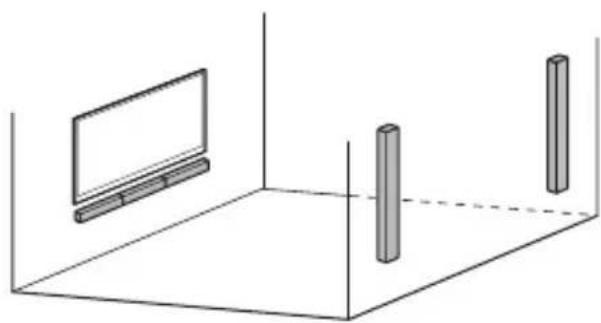
Notes
- Prepare screws (not supplied) that are suitable for the wall material and strength. As a plasterboard wall is especially fragile, attach the screws securely in the wall beam. Install the speakers horizontally, hung by screws in studs in a continuous flat section of the wall.
- Have the installation done by a Sony dealer or licensed contractor and pay special attention to safety during the installation.
- Sony shall not be held responsible for accidents or damage caused by improper
installation, insufficient wall strength, improper screw installation or natural disaster, etc.
Mounting the Bar Speaker on a Wall
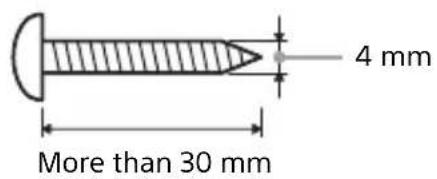
1 Prepare two screws (not supplied) that are suitable for the wall mount holes on the rear of the Bar Speaker.
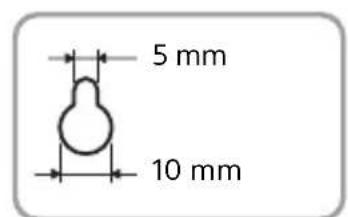
Hole on the rear of the Bar Speaker
2 Stick WALL MOUNT TEMPLATE (supplied) on a wall.
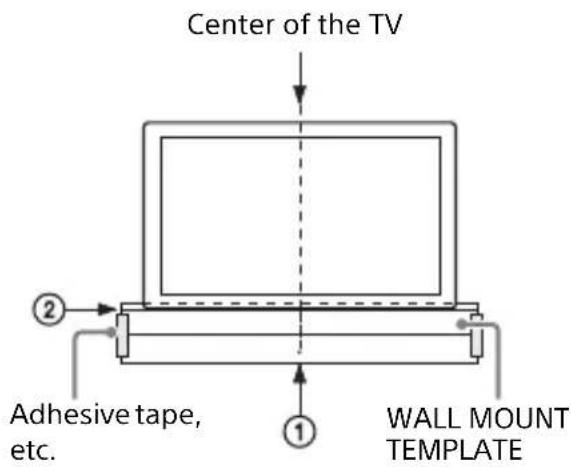
1 Align TV CENTER LINE (①) of WALL MOUNT TEMPLATE with the center line of your TV.
2 Align TV BOTTOM LINE (②) of WALL MOUNT TEMPLATE with the bottom of your TV, then stick
WALL MOUNT TEMPLATE on a wall by using a commercially available adhesive tape, etc.
3 Fasten the screws into the marks on SCREW LINE (③) of WALL MOUNT TEMPLATE as the illustration below.
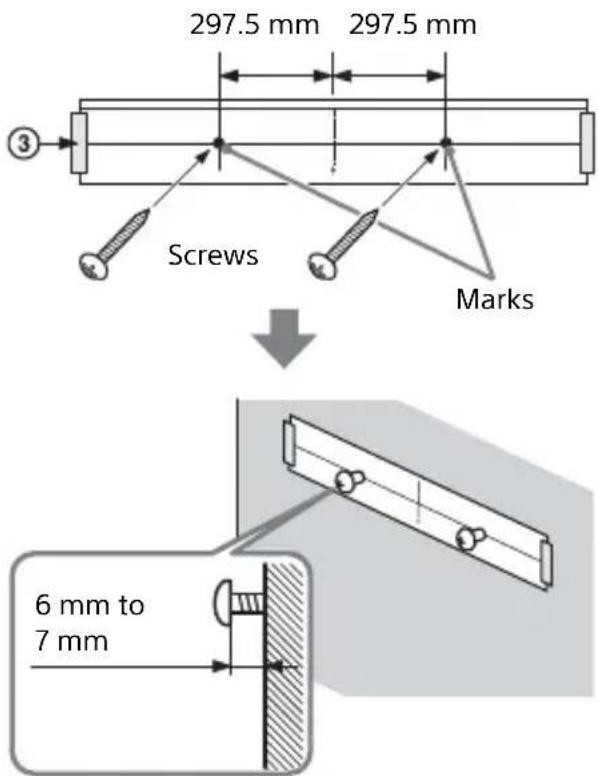
4 Remove WALL MOUNT TEMPLATE.
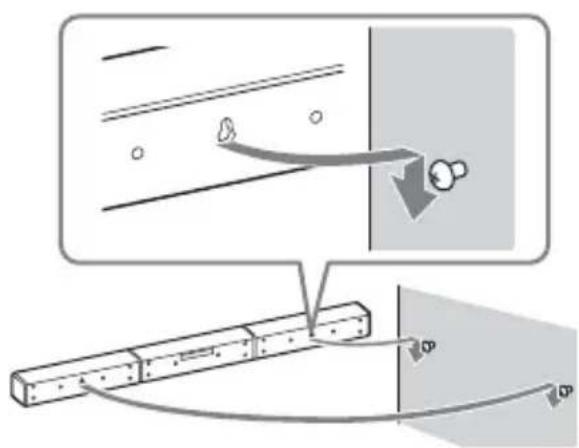
5 Hang the Bar Speaker on the screws.
Align the holes of the rear of the Bar Speaker with the screws, then hang the Bar Speaker on the two screws.
Note
When sticking WALL MOUNT TEMPLATE, smooth it out fully.
Mounting the Surround Speakers on a Wall
For HT-S500RF
1 Prepare a screw (not supplied) for each speaker that is suitable for the wall mount hole on the rear of the surround speaker.
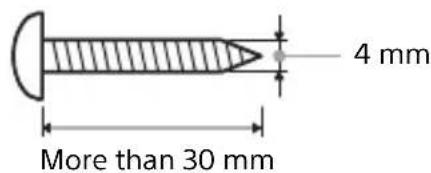
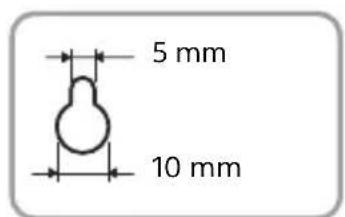
Hole on the rear of the surround speaker
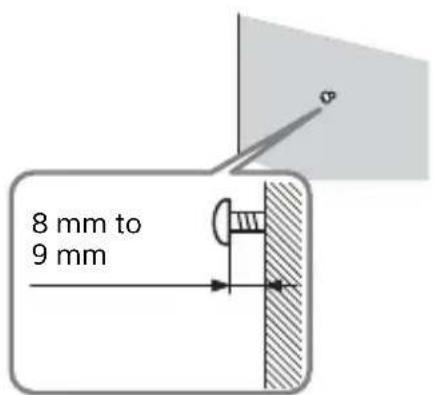
2 Fasten the screw in the wall.
The screw should protrude as illustration.
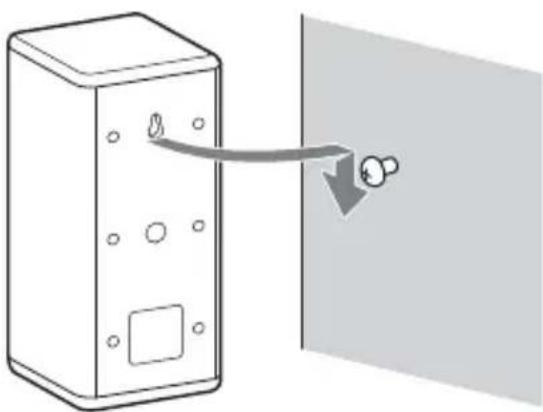
3 Hang the surround speaker on the screw.
Align the hole of the rear of the surround speaker with the screw, then hang the surround speaker on the screw.
For HT-S700RF
1 Prepare two screws (not supplied) for each speaker that are suitable for the wall mount holes on the rear of the surround speaker.
More than 30~mm
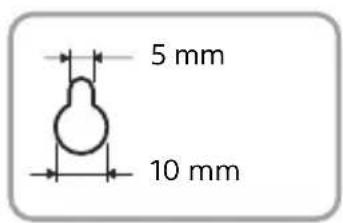
Hole on the rear of the surround speaker
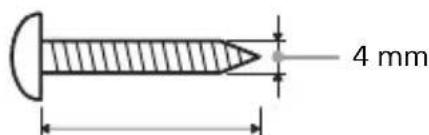
2 Fasten the screws in the wall.
The screw should protrude as illustration.
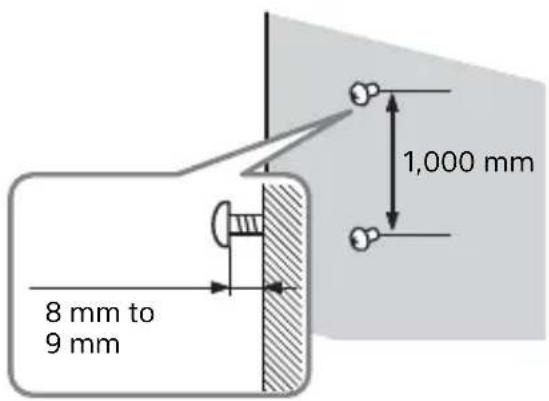
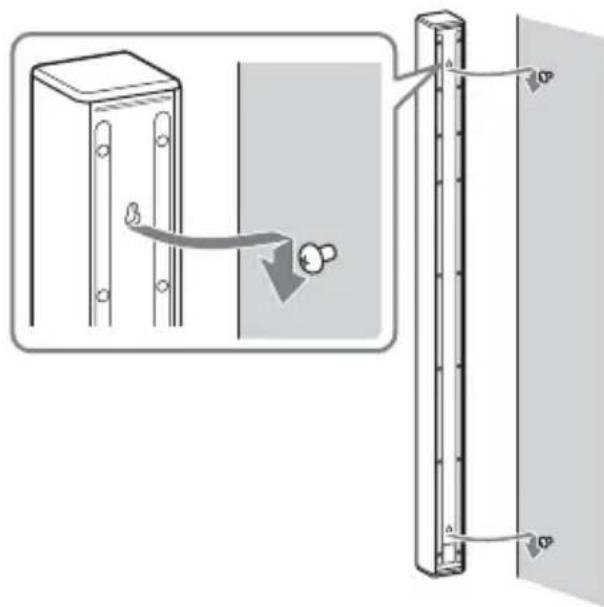
3 Hang the surround speaker on the screws.
Align the holes of the rear of the surround speaker with the screws, then hang the surround speaker on the screws.
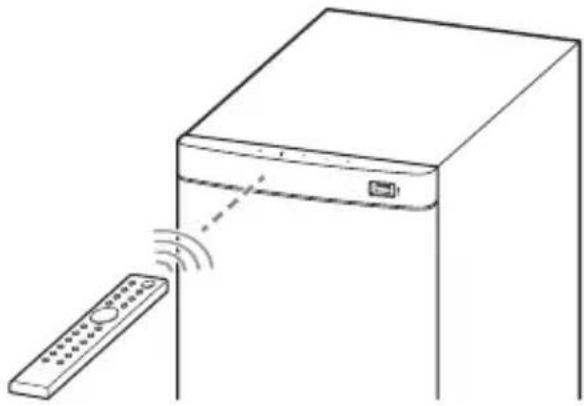
Operating the System Using the Remote Control
Point the remote control at the subwoofer's remote control sensor.
When the TV Remote Control does not Work
When the Bar Speaker obstructs the remote control sensor of the TV, the TV remote control may not work. In that case, enable the IR repeater function of the system.
You can control the TV with the TV remote control by sending the remote signal from the rear of the Bar Speaker.
1 Connect the IR repeater cord to the subwoofer.
Refer to Startup Guide (separate document).
2 Press MENU.
The menu item appears in the front panel display.
3 Select "SYS >" - "IRRPT" by using / ENTER.
4 Select "ON" by using / ENTER. To turn off the IR repeater function, select "OFF."
5 Press MENU to turn off the menu.
Notes
- Be sure to check that the TV remote control cannot control the TV, and then set the IR repeater function to on. If it is set to on when the remote control can control the TV, appropriate operation may not be obtained because of the interference between the direct command from the remote control and the command via the Bar Speaker.
- On some TVs, this function may not work correctly. In this case, place the Bar Speaker slightly further away from the TV.
Listening to the Sound
Listening to a TV and Other Devices
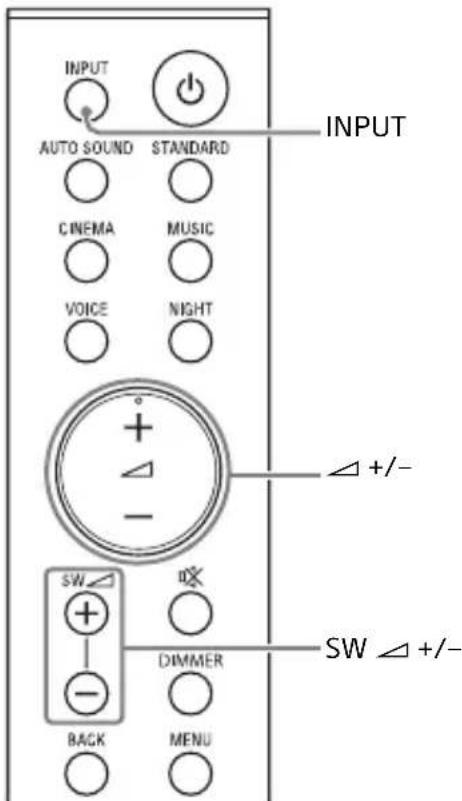
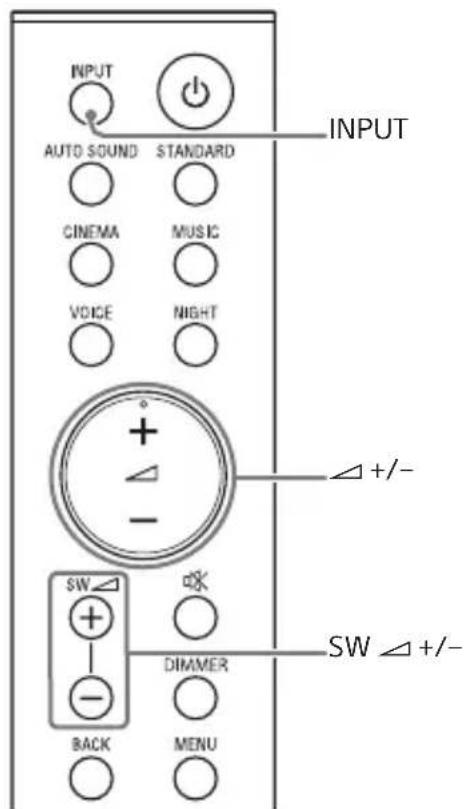
1 Press INPUT repeatedly.
When you press INPUT once, the input source is changed and the selected input source appears in the front panel display.
Each time you press INPUT, the input source changes cyclically as follows.
$$ " T V " \rightarrow " A N A L G " \rightarrow " B T " \rightarrow " U S B " $$
"TV"
- TV compatible with the Audio Return Channel (ARC) function that is connected to the HDMI OUT (ARC) jack
- TV that is connected to the TV IN (OPTICAL) jack When you connect the TV to both the HDMI OUT (ARC) and TV IN (OPTICAL) jacks, the input of the HDMI OUT (ARC) jack has priority.
"ANALG"
Audio device (smartphone, WALKMAN® etc.) that is connected to the ANALOG IN jack
"BT"
BLUETOOTH device that supports A2DP For details, see "Listening to Music/ Sound with the BLUETOOTH® Function" (page 21).
"USB"
USB device that is connected to the (USB) port For details, see "Listening to Music on a USB Device" (page 17).
2 Adjust the volume.
- Adjust the volume by pressing + / - on the remote control.
- Adjust the subwoofer volume by pressing SW + / - on the remote control (page 20).
Tip
You can also select the input by pressing on the subwoofer.
Listening to Music on a USB Device
You can play music files stored on a connected USB device.
For playable types of files, see "Playable Types of Files (USB Input)" (page 38).
Notes
- To view the USB content list on the TV screen, make sure you connect the system to the TV using an HDMI cable.
- Change the input of the TV to the input to which the system is connected.
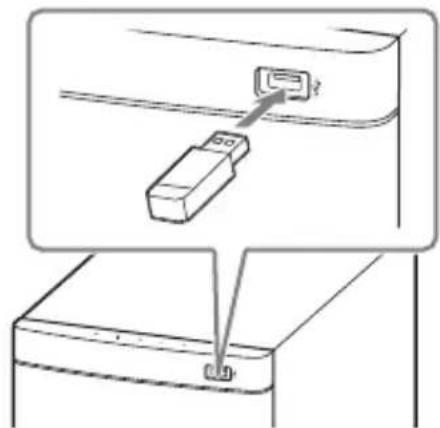
1 Connect the USB device to the (USB) port.
2 Press INPUT repeatedly to select "USB" in the front panel display.
"READ" appears in the front panel display and the system starts reading data of the USB device.
When the reading of data is completed, the USB content list appears on the TV screen.
3 Press to select the content you want, then press ENTER.
The selected content starts playing.
4 Adjust the volume.
- Adjust the volume by pressing + / - on the remote control.
- Adjust the subwoofer volume by pressing SW + / - on the remote control (page 20).
To select the play mode
You can select the play mode for USB playback, such as repeat play or random play, from the menu.
1 Press MENU.
The menu item appears in the front panel display.
2 Select "USB >" - "REPT" by using / ENTER.
3 Select the play mode by using / ENTER.
- "NONE:"Plays back all tracks under the current folder.
"ONE": Repeats one track. - "FLDER": Repeats all tracks in a folder.
- "SHFFL": Repeats all tracks in a folder in random order.
4 Press MENU to turn off the menu.
Other operations
| To Do this | |
| Pause or resume playback | Press▶II. |
| Select the previous or next track | Press▶/▶I. |
| Search backward or forward (rewind/fast forward) | Press and hold▶/▶I. |
Notes
- Do not remove the USB device during operation. To avoid data corruption or damage to the USB device, turn the system off before connecting or removing the USB device.
- "NOUSB" flashes in the front panel display if you connect an unsupported or broken USB device.
Depending on the file format, rewind and fast forward do not work.
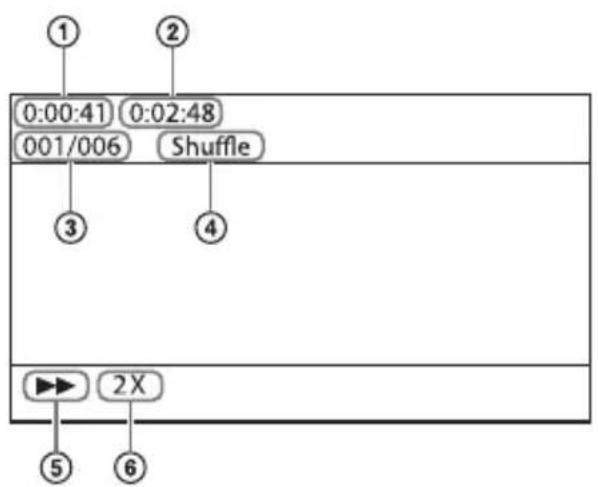
Information of USB Device on the TV Screen
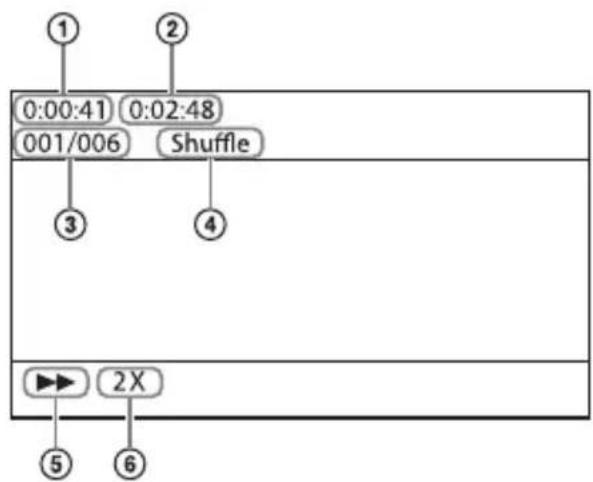
① Playing time
② Total playing time
(3) Selected file index/Total files in the folder
④ Play mode
⑤ Playback status
⑥ Rewind/fast forward speed
The following messages appear on the TV screen depending on the status of the USB device.
- [No USB] No USB device is inserted.
- [Waiting] The system is searching a USB device.
Notes
- Depending on the playback source, some information may not be displayed.
Depending on the play mode, the information displayed may be different.
Selecting the Sound Effect
Adjusting the Sound
Enjoying the Sound Effect that is Tailored to Sound Sources (Sound Mode)
You can easily enjoy pre-programmed sound effects that are tailored to different kinds of sound sources.
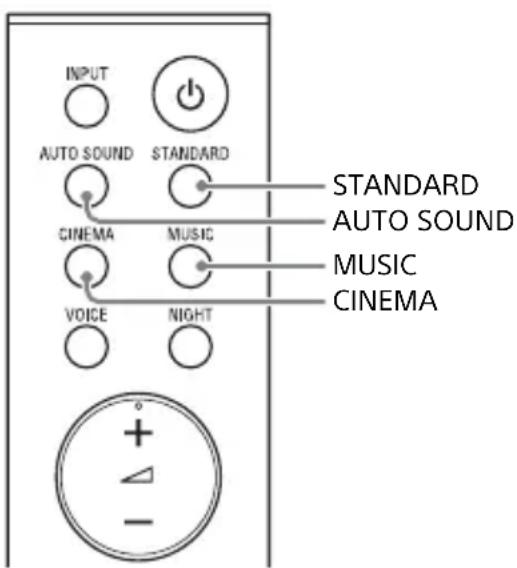
Press AUTO SOUND, CINEMA, MUSIC, or STANDARD to select the sound mode.
The selected sound mode appears in the front panel display.
"AUTO SOUND"
You can enjoy the sound with Sony-recommended sound mode. The sound mode is automatically optimized according to playback content and function.
"CINEMA"
Sounds are played back with surround effects, and they are realistic and powerful, making them suitable for movies.
"MUSIC"
Sound effects are optimized for listening to music.
"STANDARD"
Sound effects are optimized for the individual source.
Enjoying Clear Sound with Low Volume at Midnight (NIGHT)
You can compress sound in accordance with the information contained in the content by setting the night mode to on. Sound is output at low volume with minimum loss of fidelity and clarity of dialog.
Press NIGHT to set the function to on or off.
Night mode on
"N.ON" appears in the front panel display.
Night mode off
"N.OFF" appears in the front panel display.
Note
When you turn the system off, the night mode is set to off automatically.
Making Dialogs Clearer (VOICE)
You can make dialogs clearer by setting the voice mode to on.
Press VOICE to set the function to on or off.
Voice mode on
"V.ON" appears in the front panel display.
Voice mode off
"V.OFF" appears in the front panel display.
Adjusting the Volume of the Subwoofer
The subwoofer is designed for playback of bass or low frequency sound.
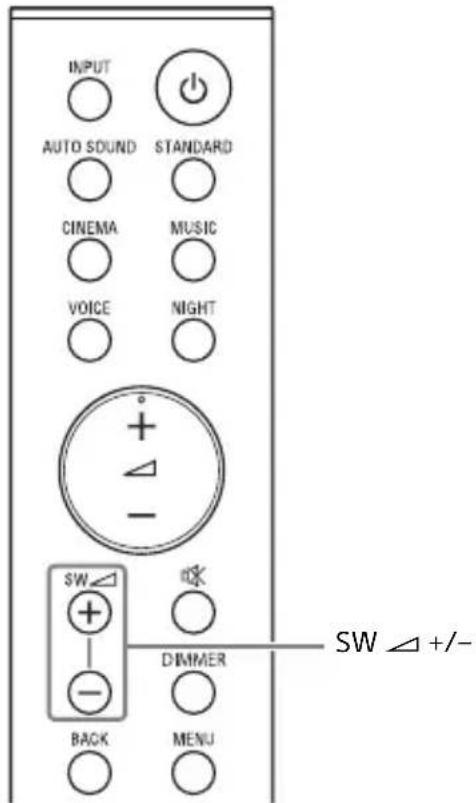
Press SW (subwoofer volume) + / - to adjust the volume of the subwoofer.
Note
When the input source does not contain much bass sound, such as in TV programs, the bass sound from the subwoofer may be difficult to hear.
Listening to Music/Sound with the BLUETOOTH® Function
Listening to Music from a Mobile Device
You can listen to music stored on a mobile device such as a smartphone or tablet via a wireless connection by connecting the system and the mobile device with the BLUETOOTH function. When connecting to the mobile device with the BLUETOOTH function, you can operate by simply using the supplied remote control without turning the TV on.
Listening to Music by Pairing with a Mobile Device
1 Press and hold the BLUETOOTH button on the subwoofer for 2 seconds.
The system enters the pairing mode and the BLUETOOTH indicator flashes quickly.
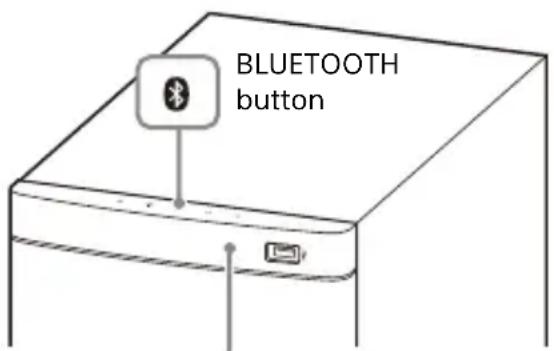
BLUETOOTH indicator
2 On the mobile device, search for the system by performing the pairing operation.
The list of the BLUETOOTH devices that are searched appears on the screen of the mobile device. For the operation method to pair the BLUETOOTH device to the mobile device, refer to the operating instructions of the mobile device.
3 Pair the system and mobile device by selecting "HT-S500RF" or "HT-S700RF" from the list on the screen of the mobile device.
If a Passkey is requested, enter "0000."
Make sure that the BLUETOOTH indicator on the subwoofer lights in blue.
A connection between the system and mobile device has been established.
5 Start audio playback with the music app on the connected mobile device.
Sound is output from the system.
6 Adjust the volume.
- Adjust the volume by pressing + / - on the remote control.
- Adjust the subwoofer volume by pressing SW + / - on the remote control (page 20).
- and on the remote control can be used for the BLUETOOTH function. (Searching backward or forward by holding down does not work.)
Notes
- You can pair up to 8 BLUETOOTH devices. If a 9th BLUETOOTH device is paired, the least recently connected device will be replaced by the new one.
Perform pairing for the second and subsequent mobile devices.
Tips
- You can check the connection status of the BLUETOOTH function by checking the BLUETOOTH indicator status (page 7).
- While the BLUETOOTH input is being selected, the system enters the pairing mode by pressing the BLUETOOTH button on the subwoofer shortly.
Listening to Music from the Paired Mobile Device
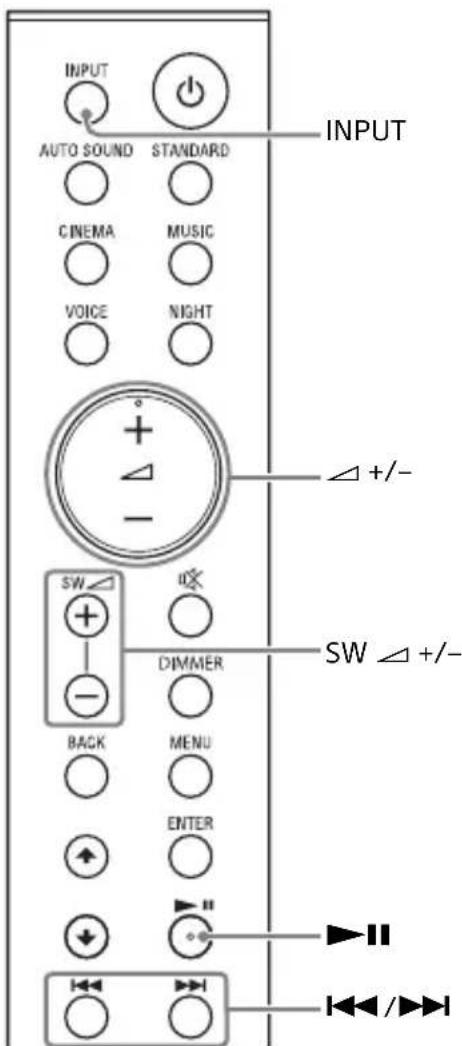
1 Turn the BLUETOOTH function of the mobile device to on.
2 Press INPUT repeatedly to select "BT" or press the BLUETOOTH button on the subwoofer shortly.
The BLUETOOTH indicator flashes and the system automatically
reconnects to the BLUETOOTH device it was most recently connected to.
3 Make sure that the BLUETOOTH indicator lights in blue.
A connection between the system and mobile device has been established.
4 Start audio playback with the music app on the connected mobile device.
Sound is output from the system.
5 Adjust the volume.
- Adjust the volume by pressing + / - on the remote control.
- Adjust the subwoofer volume by pressing SW + / - on the remote control (page 20).
- and on the remote control can be used for the BLUETOOTH function. (Searching backward or forward by holding down does not work.)
Listening to Music on the Mobile Device with Sony | Music Center
What You can Do with Sony | Music Center
Sony | Music Center is an application for controlling compatible Sony audio devices using the mobile device such as a smartphone or tablet.
For details about Sony | Music Center, refer to the following URL. http://www.sony.net/smcqa/
Sony | Music Center allows you to:
- enjoy music at home seamlessly.
- change commonly used settings, select the input of the system, and adjust the volume.
- enjoy music content stored on a smartphone with the system.
- enjoy music visually with your smartphone display.
Notes
- Before using Sony | Music Center with the BLUETOOTH function, be sure to set "BT >" - "BT PW" on the system to "ON" (page 26).
- What you can control with Sony | Music Center varies depending on the connected device. The specification and design of the application may change without notice.
Using Sony | Music Center
1 Install the free Sony | Music Center app to the mobile device. Search for Sony | Music Center at Google Play or the App Store and install it onto your mobile device.
2 Connect the system and mobile device with the BLUETOOTH function (page 21).
3 Start Sony | Music Center.
4 Operate by following the Sony | Music Center screen.
Notes
- Use Sony | Music Center of the latest version. For details about Sony | Music Center, refer to Google Play or the App Store. If you cannot connect the system and a BLUETOOTH device via the BLUETOOTH function, uninstall Sony | Music Center and try to connect via the BLUETOOTH function again.
Using the Setup Display
You can set the following items with the menu.
Your settings are retained even if you disconnect the AC power cord (mains lead).
1 Press MENU to turn on the menu in the front panel display.
2 Press BACK/4/ENTER repeatedly to select the item and setting you want.
3 Press MENU to turn off the menu.
Note
You can also turn off the menu by performing an operation other than a menu operation such as pressing + / - , SW + / - , 叹 _ 心 etc.
Menu List
The default settings are underlined. They may differ depending on the area.
| Menu items Function | ||
| "LVL>" (Level) | "SUR.L"/"SUR.R" (Surround left/right speaker level) | "0.0": Adjusts the sound level of the surround speakers from -6.0 dB to +6.0 dB (0.5 dB interval). Note Be sure to set "TTONE" to "ON" for easy adjustment. |
| "DRC" (Dynamic range control) | Useful for enjoying movies at low sound volume. DRC applies to Dolby Digital sources. "ON": Compresses sound according to the information in the content. "OFF": Sound is not compressed. | |
| "TTONE" (Test tone) | "ON": The test tone is output from each speaker in sequence. "OFF": Turns off the test tone. | |
| "SPK>" (Speaker) | "MULTI" (Multi Speaker Mode) | You can set the output of the speakers of the system. "ON": The sound is output from all the speakers, regardless of the number of audio channels for the playback source. "OFF": The sound is output from the speakers that correspond to the audio channel for the playback source. |
| "SUR.L"/"SUR.R" (Surround left/right speaker distance) | "3.0M": Adjusts the distance from the seating position to the surround speakers from 1.0 meter to 6.0 meters (0.1 meter interval). | |
Menu items Function
| "AUD >" (Audio) | "DUAL" (Dual mono) | You can enjoy multiplex broadcast sound when the system receives a Dolby Digital multiplex broadcast signal. "MAIN": Sound of the main language will be output. "SUB": Sound of the sub language will be output. "M/S": Mixed sound of both the main and sub languages will be output. |
| Note To receive a Dolby Digital signal, you need to connect a TV or other device to the HDMI OUT (ARC) jack with the HDMI cable (supplied) or the TV IN (OPTICAL) jack with an optical digital cable (not supplied). | ||
| "STRM" (Stream) | Shows the current audio stream information. For details of the supported audio formats, see "Supported Input Audio Formats (HDMI OUT (TV (ARC)) or TV IN (OPTICAL))" (page 38). | |
| "HDMI>": "CTRL" | (Control for HDMI) | "ON": The Control for HDMI function is enabled. Devices connected with an HDMI cable can control each other. "OFF": Off. |
| "TVSTB" (Standby Linked to TV) | This function is available when you set "CTRL" to "ON." "AUTO": If the input of the system is "TV", the system turns off automatically when you turn off the TV. "ON": The system turns off automatically when you turn off the TV, regardless of the input. "OFF": The system does not turn off when you turn off the TV. | |
| Menu items Function | ||
| "BT>" (BLUETOOTH) | "BT PW" (BLUETOOTH power) | You can turn the BLUETOOTH function on or off. "ON": Turns the BLUETOOTH function on. "OFF": Turns the BLUETOOTH function off. |
| Note When the BLUETOOTH function is set to off, the BLUETOOTH input is skipped while selecting input by pressing INPUT. | ||
| "BTAAC" (BLUETOOTH codec - AAC) | You can enjoy high-quality sound if AAC codec is enabled and your device supports AAC codec. "ON": Enables AAC codec. "OFF": Enables AAC codec. | |
| Note If changing this setting, the changed setting is reflected after the next BLUETOOTH connection. | ||
| "BTSTB" (BLUETOOTH standby) | When the system has pairing information, you can turn the system on and listen to music from a BLUETOOTH device, even when the system is in standby mode, by setting the BLUETOOTH standby mode to on. "ON": BLUETOOTH standby mode is enabled. "OFF": BLUETOOTH standby mode is disabled. | |
| Note While the BLUETOOTH standby mode is on, standby power consumption increases. | ||
| "INFO" (BLUETOOTH device information) | The detected BLUETOOTH device name and address appear in the front panel display. "NO DEVICE" appears if the system is not connected to a BLUETOOTH device. | |
| "USB >" "REPT" (Play mode) | "NONE": Plays back all tracks under the current folder. "ONE": Repeats one track. "FLDER": Repeats all tracks in a folder. "SHFFL": Repeats all tracks in a folder in random order. | |
| "SYS >" (System) | "ASTBY" (Auto standby) | "ON": Turns on the auto standby function. When you do not operate the system for about 20 minutes, the system enters standby mode automatically. "OFF": Off. |
| "IRRPT" (IR repeater) | You can control the TV with the TV remote control via the Bar Speaker. For details, see "When the TV Remote Control does not Work" (page 15). | |
| "VER" (Version) | The current firmware version information appears in the front panel display. | |
Using the Control for HDMI Function
Connecting a device such as a TV or Blu-ray Disc player compatible with the Control for HDMI function* by an HDMI cable (High Speed HDMI Cable, supplied) enables you to easily operate the device by a TV remote control. The following functions can be used with the Control for HDMI function.
- System Power Off function
- System Audio Control function
Audio Return Channel (ARC) - One-Touch Play function
- Control for HDMI is a standard used by CEC (Consumer Electronics Control) for allowing HDMI (High-Definition Multimedia Interface) devices to control each other.
Note
These functions may work with devices other than those manufactured by Sony, but operation is not guaranteed.
Preparing to Use the Control for HDMI Function
Set "HDMI> - "CTRL" on the system to "ON" (page 25). The default setting is "ON".
Enable the Control for HDMI function settings for the TV and other device connected to the system.
Tip
If you enable the Control for HDMI function when using a TV manufactured by Sony, the Control for HDMI function of the system is also enabled automatically. When "HDMI> - "CTRL" on the system is changed to "ON," "DONE" appears in the front panel display.
System Power Off Function
When you turn off the TV, the system will turn off automatically.
Set "HDMI> - "TVSTB" on the system to "ON" or "AUTO" (page 25). The default setting is "AUTO".
System Audio Control Function
If you turn on the system while you are watching the TV, the TV sound will be output from the speakers of the system. The volume of the system can be adjusted using the TV remote control. If the TV sound was output from the speakers of the system the previous time you watched the TV, the system will be turned on automatically when you turn on the TV again.
Operations can also be made by the TV's menu. For details, refer to the operating instructions of your TV.
Notes
- Sound is only output from the TV if other than "TV" input is selected when using the Twin Picture function on the TV. When you disable the Twin Picture function, the sound is output from the system.
- The number for the system's volume level is displayed on the TV screen depending on the TV. The volume number displayed on the TV may differ from the number on the front panel display of the system.
- Depending on the settings of the TV, the System Audio Control function may not be available. For details, refer to the operating instructions of your TV.
- Depending on the TV, if the TV sound was output from the speakers of the TV the previous time you watched the TV, the system may not turn on by interlocking with the TV power even if the TV is turned on.
Audio Return Channel (ARC)
If the system is connected to a TV's HDMI IN jack compatible with Audio Return Channel, you can listen to TV sound from the speakers of the system without connecting an optical digital cable.
Note
If the TV is not compatible with Audio Return Channel, an optical digital cable needs to be connected (refer to the supplied Startup Guide).
One-Touch Play Function
When you play content on a device (Blu-ray Disc player, "PlayStation®4", etc.) connected to the TV, the system and TV are turned on automatically, the input of the system is switched to the input for the TV, and sound is output from the speakers of the system.
Notes
- If the TV sound was output from the speakers of the TV the previous time you watched the TV, the system may not turn on and the sound and picture may be output from the TV even if device content is played.
Depending on the TV, the beginning part of content being played may not play correctly.
Notes on HDMI Connections
- Use an HDMI-authorized cable or the supplied HDMI cable.
- Use a Sony High Speed HDMI cable with the Cable Type Logo.
- We do not recommend using an HDMI-DVI conversion cable.
- Check the setup of the connected device if an image is poor or the sound does not come out of the device connected via the HDMI cable.
- Audio signals (sampling frequency, bit length, etc.) transmitted from an HDMI jack may be suppressed by the connected device.
Saving Power Consumption
To use the system while saving power consumption, change the following settings.
Turn the System Off by Detecting the Using State
When you set the auto standby function to on, the system enters standby mode automatically when you do not operate the system for about 20 minutes and the system is not receiving an input signal.
Set "SYS >" - "ASTBY" on the system to "ON" (page 26).
The default setting is "OFF."
Saving Power in Standby Mode
To save power consumption during the standby mode, set "BTSTB" (BLUETOOTH standby) (page 26) and "CTRL" (Control for HDMI) (page 25) to "OFF." The default settings for them are "ON."
Troubleshooting
Troubleshooting
If you experience any of the following difficulties while using the system, use this troubleshooting guide to help remedy the problem before requesting repairs. Should any problem persist, consult your nearest Sony dealer.
Power
The system does not power up.
Check that the AC power cord (mains lead) is connected securely.
Disconnect the AC power cord (mains lead) from the wall outlet (mains), and then reconnect after several minutes.
The system is turned off automatically.
The auto standby function is working. Set "SYS >" - "ASTBY" to "OFF" (page 26).
The system does not turn on even when the TV is turned on.
Set "HDMI> - "CTRL" to "ON" (page 25). The TV must support the Control for HDMI function (page 27). For details, refer to the operating instructions of your TV.
Check the speaker settings of the TV. The system power syncs with the speaker settings of the TV. For details, refer to the operating instructions of your TV.
Depending on the TV, if the sound was output from the speakers of the TV the previous time, the system may not turn on by interlocking with the TV even when the TV is turned on.
The system turns off when the TV is turned off.
Check the setting of "HDMI>" - "TVSTB" (page 25). When "TVSTB" is set to "ON" or "AUTO," the system turns off automatically when you turn off the TV.
The system does not turn off even when the TV is turned off.
Check the setting of "HDMI>" - "TVSTB" (page 25). To turn off the system automatically regardless of the input when you turn off the TV, set "TVSTB" to "ON." The TV must support the Control for HDMI function (page 27). For details, refer to the operating instructions of your TV.
Picture
There is no picture or the picture is not output correctly.
Select the appropriate input (page 16).
When there is no picture while TV input is selected, select the TV channel that you want using the TV remote control.
Disconnect the HDMI cable, then connect it again. Make sure that the cable is firmly inserted.
Sound
No TV sound is output from the system.
Check the type and connection of the HDMI cable or optical digital cable that is connected to the system and the TV (refer to the supplied Startup Guide).
Disconnect the cables that are connected between the TV and the system, then connect them firmly again. Disconnect the AC power cords (mains leads) of the TV and the
system from the AC outlets (mains), then connect them again.
When the system and TV are connected with the HDMI cable, check the following.
- The HDMI jack of the connected TV is labeled with "ARC."
- The Control for HDMI function of the TV is set to on.
- On the system, the Control for HDMI function is set to on (page 27).
If your TV is not compatible with Audio Return Channel, connect the optical digital cable (not supplied) (refer to the supplied Startup Guide). If the TV is not compatible with Audio Return Channel, TV sound will not be output from the system even if the system is connected to the TV's HDMI IN jack.
If the sound of the device that is connected to the optical input jack of the TV is not output, try the following.
- Connect the cable box or satellite box directly to the TV IN (OPTICAL) jack of the system.
Press INPUT repeatedly to select the TV input (page 16).
Increase the volume on the TV or cancel muting.
Depending on the order in which you connect the TV and the system, the system may be muted. If this happens, turn on the TV first, then the system.
Set the speakers setting of the TV (BRAVIA) to Audio System. Refer to the operating instructions of your TV regarding how to set the TV.
Check the sound output of the TV. Refer to the operating instructions of the TV for the TV settings.
The system supports the Dolby Digital, DTS, and PCM audio formats (page 38). When you play back unsupported format, set the digital audio out setting of the TV (BRAVIA) to "PCM." For details, refer to the operating instructions of your TV.
The sound is output from both the system and the TV.
Mute the sound of the system or the TV.
No sound or only a very low-level sound is heard from the subwoofer.
Make sure the AC power cord (mains lead) of the subwoofer is connected properly (refer to the supplied Startup Guide).
Press SW + to increase the subwoofer volume (page 20).
A subwoofer is for reproducing bass sound. If the input sources contain very little bass sound components (i.e., a TV broadcast), the sound from the subwoofer may be difficult to hear.
When you play content compatible with copyright protection technology (HDCP), it is not output from the subwoofer.
No sound or only a very low-level sound of the device connected to the system is heard from the system.
Press + and check the volume level (page 9).
Pres or + to cancel the muting function (page 9).
Make sure the input source is selected correctly. You should try other input sources by pressing INPUT repeatedly (page 16).
Check that all the cables and cords of the system and the connected device are firmly inserted.
If the connected device supports the up-sampling feature, you need to turn it off.
No sound or only very low-level sound is heard from the surround speakers.
Make sure that the cables of the surround speakers are connected
properly to the subwoofer (refer to the supplied Startup Guide).
Check that "SPK >" - "MULTI" is set to "ON" (page 24). If "SPK >" - "MULTI" is set to "OFF," the sound is not output from the surround speakers when playing the sound of 2-channel source.
Multi-channel sound which has not been recorded as surround sound is not output from the surround speakers.
The surround effect cannot be obtained.
Depending on the input signal and the sound mode setting, surround sound processing may not work effectively. The surround effect may be subtle, depending on the program or disc.
To play multi channel audio, check the digital audio output setting on the device connected to the system. For details, refer to the operating instructions supplied with the connected device.
USB Device Connection
The USB device is not recognized.
Try the following:
① Turn the system off.
② Remove and reconnect the USB device.
③ Turn the system on.
Make sure that the USB device is securely connected to the (USB) port (page 17).
Check to see if the USB device or a cable is damaged.
Make sure that the USB device is on.
If the USB device is connected via a USB hub, disconnect it and connect the USB device directly to the subwoofer.
Mobile Device Connection
BLUETOOTH connection cannot be completed.
Make sure that the BLUETOOTH indicator on the subwoofer is lit (page 7).
Make sure the BLUETOOTH device to be connected is turned on and the BLUETOOTH function is enabled.
Bring the BLUETOOTH device close to the subwoofer.
Pair this system and the BLUETOOTH device again. You may need to cancel the pairing with this system using your BLUETOOTH device first.
If "BT > " - "BT PW" is set to "OFF," set to "ON" (page 26).
Pairing cannot be achieved.
Bring the BLUETOOTH device close to the subwoofer.
Make sure this system is not receiving interference from a wireless LAN device, other 2.4 GHz wireless devices, or a microwave oven. If a device that generates electromagnetic radiation is nearby, move the device away from this system.
Pairing may not be possible if other BLUETOOTH devices are present around the system. In this case, turn off the other BLUETOOTH devices.
Sound of the connected BLUETOOTH mobile device is not output from the system.
Make sure that the BLUETOOTH indicator on the subwoofer is lit (page 7).
Bring the BLUETOOTH device close to the subwoofer.
If a device that generates electromagnetic radiation, such as a wireless LAN device, other BLUETOOTH devices, or a microwave
oven is nearby, move the device away from this system.
Move the USB 3.0 device and its cable away from this system.
Remove any obstacle between this system and the BLUETOOTH device or move this system away from the obstacle.
Reposition the connected BLUETOOTH device.
Switch the wireless LAN frequency of any nearby wireless LAN router or PC to 5 GHz range.
Increase the volume on the connected BLUETOOTH device.
The sound is not in sync with the image.
When you are watching movies, you may hear the sound with a slight delay from the image.
Remote Control
The remote control of this system does not function.
Point the remote control at the remote control sensor on the subwoofer (page 7).
Remove any obstacles in the path between the remote control and the subwoofer.
Replace both batteries in the remote control with new ones, if they are weak.
Make sure you are pressing the correct button on the remote control (page 9).
The TV remote control does not work.
Install the Bar Speaker so that it does not obstruct the remote control sensor of the TV.
This problem might be solved by enabling the IR repeater function (page 15).
Others
The Control for HDMI function does not work properly.
Check the connection with the system (refer to the supplied Startup Guide).
Enable the Control for HDMI function on the TV. For details, refer to the operating instructions of your TV.
Wait a while, and then try again. If you unplug the system, it will take a while before operations can be made. Wait for 15 seconds or longer, and then try again.
Make sure the devices connected to the system support the Control for HDMI function.
Enable the Control for HDMI function of the devices connected to the system. For details, refer to the operating instructions of your device.
The type and number of devices that can be controlled by the Control for HDMI function is restricted by the HDMI CEC standard as follows:
- Recording devices (Blu-ray Disc recorder, DVD recorder, etc.): up to 3 devices
-Playback devices (Blu-ray Disc player, DVD player, etc.):up to 3 devices
-Tuner-related devices:up to 4 devices
Audio system (receiver/ headphone):up to 1 device (used by this system)
"PRTCT" appears in the front panel display of the subwoofer, the sound is muted, and buttons on the remote control or subwoofer other than (power) do not work.
The protection feature is activated. Press (power) to turn the system off and disconnect the AC power cord (mains lead) and check the items below.
- Make sure that the ventilations of the subwoofer are not covered and turn on the system after a while.
- When the system is using the USB connection, remove the USB device and turn on the system. If the system operates properly, the current of the connected USB device is over the maximum output current of the system 500mA , or the USB device may have an abnormality.
The front panel display of the subwoofer is not lit.
Press DIMMER to set the brightness to "BRIGHT" or "DARK" if set to "OFF" (page 9).
Sensors of the TV do not work properly.
The Bar Speaker may block some sensors (such as the brightness sensor), the remote control receiver of your TV or the emitter for 3D glasses (infrared transmission) of a 3D TV that supports the infrared 3D glass system, or wireless communication. Move the Bar Speaker away from the TV within a range that allows those parts to operate properly. For the locations of the sensors and remote control receiver, refer to the operating instructions supplied with the TV.
The system does not work properly ("DEMO" appears in the front panel display).
The system is in demo mode. To cancel demo mode, reset the system. Press and hold (power), + , and on the subwoofer for more than 5 seconds (page 35).
When you change to the TV input from the USB input by pressing INPUT, the message appears.
-
Please select the desired TV channels with the TV's remote control.
-
This screen is an example for English.
Select the TV program by using the TV remote control.
Resetting the System
If the system still does not operate properly, reset the system as follows.
1 Press and hold , + , and on the subwoofer for more than 5 seconds.
"INIT" appears in the front panel display, and the settings of the menu and sound mode, etc. return to their initial status.
2 Disconnect the AC power cord (mains lead).
3 Connect the AC power cord (mains lead), then press to turn on the system.
Tip
The default settings are underlined on each feature description.
Additional Information
Specifications
Subwoofer (SA-WS500RF/SA-WS700RF)
Amplifier section
POWER OUTPUT (rated)
Front L + Front R: 85 W + 85 W (at 5.5 ohms, 1 kHz, 1% THD)
POWER OUTPUT (reference)
Front L/Front R/Surround L/Surround R/Center: 152 W (per channel at 5.5 ohms, 1 kHz)
Subwoofer: 240 W (at 3.3 ohms, 100 Hz)
Inputs TV IN (OPTICAL) USB HDMI OUT (ARC) ANALOG IN
Output HDMI OUT (ARC)
HDMI section
Connector Type A (19pin)
USB section

(USB) port: Type A
BLUETOOTH section
Communication system BLUETOOTH Specification version 4.2
Output BLUETOOTH Specification Power Class 2
Maximum communication range Line of sight approx. 10m^1)
Frequency band 2.4 GHz band (2.4000 GHz - 2.4835 GHz)
Modulation method FHSS (Freq Hopping Spread Spectrum)
Compatible BLUETOOTH profiles2) A2DP (Advanced Audio Distribution Profile) AVRCP (Audio Video Remote Control Profile) Supported Codec^3) SBC4),AAC5)
Transmission range (A2DP) 20 Hz - 20,000 Hz (Sampling frequency 32 kHz, 44.1 kHz, 48 kHz)
1) The actual range will vary depending on factors such as obstacles between devices, magnetic fields around a microwave oven, static electricity, cordless phone use, reception sensitivity, the operating system, software applications, etc.
2) BLUETOOTH standard profiles indicate the purpose of BLUETOOTH communication between devices.
3) Codec: Audio signal compression and conversion format
4) Abbreviation for Subband Codec
5) Abbreviation for Advanced Audio Coding
Speaker section
Speaker system Subwoofer system, Bass reflex
Speaker HT-S500RF:180 mm cone type HT-S700RF:200 mm cone type
General
Power requirements 220 V - 240 V AC, 50 Hz/60 Hz
Power consumption On: 140 W Standby: 0.5 W or less (Power Saving mode) (When "CTRL" in "HDMI>" and "BTSTB" in "BT>" are set to "OFF")
Dimensions* (approx.) (w / h / d) HT-S500RF: 207~mm× 402~mm× 330 mm HT-S700RF: 231~mm× 438~mm× 378 mm
- Including projection portion
Mass (approx.)
HT-S500RF: 9.0 kg
HT-S700RF: 10.2 kg
Compatible iPhone/iPod models
The compatible iPhone/iPod models are as follows. Update your iPhone/iPod with the latest software before using with the system.
Made for:
iPhone X/iPhone 8/iPhone 8 Plus/iPhone 7/iPhone 7 Plus/iPhone SE/iPhone 6s/ iPhone 6s Plus/iPhone 6/iPhone 6 Plus/ iPhone 5s/iPhone 5c/iPhone 5 iPod touch (6th generation)
Bar Speaker (SS-S500RF/SS-S700RF)
Front L/ Front R speaker blocks
Speaker system
2-Way speaker system, Bass reflex
Speaker
Woofer: 48mm× 90mm cone type
Tweeter: 25 mm balanced dome type
Center speaker block
Speaker system
Full range speaker system, Bass reflex
Speaker
Woofer: 48mm× 90mm cone type
General
Dimensions (w/h/d) (approx.)
900mm× 64mm× 90mm
Mass (approx.)
3.0kg
Surround Speakers (SS-SS500RF)
Speaker system
Full range speaker system, Bass reflex
Speaker
48 mm x 90 mm cone type
Dimensions (w/h/d) (approx.)
91 mm × 216 mm × 91 mm
Mass (approx.)
1.0 kg
Surround Speakers (SS-SS700RF)
Speaker system
2-Way speaker system, Bass reflex
Speaker
Woofer: 48mm× 90 mm cone type
Tweeter: 25mm balanced dome type Dimensions (w / h / d) (approx.)
78mm× 1200mm× 78mm
Mass (approx.)
3.6 kg
Design and specifications are subject to change without notice.
Playable Types of Files (USB Input)
| Codec Extension | |
| MP3 (MPEG-1 Audio Layer III) | .mp3 |
| WMA9 Standard .wma | |
| LPCM (2ch) .wav | |
Notes
- Some files may not play or may play with no sound depending on the file format, the file encoding, or the recording condition.
- Some files edited on a PC may not play.
- The system does not play coded files such as DRM and Lossless.
-
The system can recognize the following files or folders in USB devices:
-
up to 200 folders (including empty folder and root folder)
- up to 150 tracks in one folder
-
up to folders in the 8th layer (including the root folder)
-
Some USB devices may not work with this system.
- The system can recognize Mass Storage Class (MSC) devices.
Supported Input Audio Formats (HDMI OUT (TV (ARC)) or TV IN (OPTICAL))
Audio formats supported by this system are as follows.
Dolby Digital
DTS
- Linear PCM 2ch
On BLUETOOTH Communication
-
BLUETOOTH devices should be used within approximately 10 meters (33 feet) (unobstructed distance) of each other. The effective communication range may become shorter under the following conditions.
-
When a person, metal object, wall or other obstruction is between the devices with a BLUETOOTH connection
- Locations where a wireless LAN is installed
- Around microwave ovens that are in use
-
Locations where other electromagnetic waves occur
-
BLUETOOTH devices and wireless LAN (IEEE 802.11b/g/n) use the same frequency band (2.4 GHz). When using your BLUETOOTH device near a device with wireless LAN capability, electromagnetic interference may occur. This could result in lower data transfer rates, noise, or inability to connect. If this happens, try the following remedies:
-
Use this system at least 10 meters (33 feet) away from the wireless LAN device.
- Turn off the power to the wireless LAN device when using your BLUETOOTH device within 10 meters (33 feet).
-
Install this system and BLUETOOTH device as closer to each other as possible.
-
The radio waves broadcast by this system may interfere with the operation of some medical devices. Since this interference may result in malfunction, always turn off the power on this system and BLUETOOTH device in the following locations:
-
In hospitals, on trains, in airplanes, at gas stations, and any place where flammable gasses may be present
- Near automatic doors or fire alarms
- This system supports security functions that comply with the BLUETOOTH specification to ensure secure connection during communication using BLUETOOTH technology. However, this security may be insufficient depending on the setting contents and other factors, so always be careful when performing communication using BLUETOOTH technology.
- Sony cannot be held liable in any way for damages or other loss resulting from information leaks during communication using BLUETOOTH technology.
- BLUETOOTH communication is not necessarily guaranteed with all BLUETOOTH devices that have the same profile as this system.
- BLUETOOTH devices connected with this system must comply with the BLUETOOTH specification prescribed by the Bluetooth SIG, Inc., and must be certified to comply. However, even when a device complies with the BLUETOOTH specification, there may be cases where the characteristics or specifications of the BLUETOOTH device make it impossible to connect, or may result in different control methods, display or operation.
- Noise may occur or the audio may cut off depending on the BLUETOOTH device connected with this system, the communications environment, or surrounding conditions.
If you have any questions or problems concerning your system, please consult your nearest Sony dealer.
Precautions
On safety
- Should any solid object or liquid fall into the system, unplug the system and have it checked by qualified personnel before operating it any further.
- Do not touch the AC power cord (mains lead) with wet hands. Doing so may cause an electric shock.
- Do not climb on the Bar Speaker, subwoofer and surround speakers as you may fall down and injure yourself, or system damage may result.
On power sources
- Before operating the system, check that the operating voltage is identical to your local power supply. The operating voltage is indicated on the nameplate at the rear of the subwoofer.
- If you are not going to use the system for a long time, be sure to disconnect the system from the wall outlet (mains). To disconnect the AC power cord (mains lead), grasp the plug itself; never pull the cord.
- AC power cord (mains lead) must be changed only at a qualified service shop.
On heat buildup
Although the system heats up during operation, this is not a malfunction. If you continuously use this system at high volume, the system temperature rises considerably. To avoid burning yourself, do not touch the system.
On placement
- Place the system in a location with adequate ventilation to prevent heat buildup and prolong the life of the system.
-
Do not place the system near heat sources or in a place subject to direct sunlight, excessive dust, or mechanical shock.
-
Do not place the Bar Speaker, subwoofer and surround speakers on a soft surface (rugs, blankets, etc.) or place anything at the rear of the Bar Speaker, subwoofer and surround speakers that might block the ventilation holes and cause malfunctions.
- If the system is being used in combination with a TV, VCR, or tape deck, noise may result and picture quality may be affected. In this case, place the system away from the TV, VCR, or tape deck.
- Use caution when placing the system on a surface that has been specially treated (with wax, oil, polish, etc.), as staining or discoloration of the surface may result.
- Take care to avoid any possible injury from the corners of the Bar Speaker, subwoofer and surround speakers.
- Keep 3 cm or more space under the Bar Speaker and surround speakers when you hang it on a wall.
On operation
Before connecting other device, be sure to turn off and unplug the system.
If you encounter color irregularity on a nearby TV screen
Color irregularities may be observed on certain types of TV.
- If color irregularity is observed...
Turn off the TV, then turn it on again after 15 to 30 minutes. - If color irregularity is observed again... Place the system further away from the TV.
On cleaning
Clean the system with a soft, dry cloth. Do not use any type of abrasive pad, scouring powder, or solvent such as alcohol or benzine.
If you have any question or problem concerning your system, please consult your nearest Sony dealer.
On handling the subwoofer
Do not place your hand into the slit of the subwoofer when lifting it. The speaker driver may be damaged. When lifting it, hold the bottom of the subwoofer.
Copyrights and Trademarks
This system incorporates Dolby Digital and the DTS* Digital Surround System.
- Manufactured under license from Dolby Laboratories. Dolby, Dolby Audio and the double-D symbol are trademarks of Dolby Laboratories.
**For DTS patents, see http:// patents.dts.com. Manufactured under license from DTS Licensing Limited. DTS, the Symbol, & DTS and the Symbol together are registered trademarks, and DTS Digital Surround is a trademark of DTS, Inc. © DTS, Inc. All Rights Reserved.
This system incorporates High-Definition Multimedia Interface (HDMI™) technology. The terms HDMI and HDMI High-Definition Multimedia Interface, and the HDMI Logo are trademarks or registered trademarks of HDMI Licensing Administrator, Inc. in the United States and other countries.
The BLUETOOTH word mark and logos are registered trademarks owned by Bluetooth SIG, Inc. and any use of such marks by Sony Corporation is under license. Other trademarks and trade names are those of their respective owners.
Google Play is a trademark of Google LLC.
Apple, iPhone, iPod, and iPod touch are trademarks of Apple Inc., registered in the U.S. and other countries. App Store is a service mark of Apple Inc., registered in the U.S. and other countries.
Use of the Made for Apple badge means that an accessory has been designed to connect specifically to the Apple product(s) identified in the badge, and has been certified by the developer to meet Apple performance standards. Apple is not responsible for the operation of this device or its compliance with safety and regulatory standards.
"BRAVIA" logo is a trademark of Sony Corporation.
"PlayStation" is a registered trademark or trademark of Sony Interactive Entertainment Inc.
MPEG Layer-3 audio coding technology and patents licensed from Fraunhofer IIS and Thomson.
Windows Media is either a registered trademark or trademark of Microsoft Corporation in the United States and/or other countries.
This product is protected by certain intellectual property rights of Microsoft Corporation. Use or distribution of such technology outside of this product is prohibited without a license from Microsoft or an authorized Microsoft subsidiary.
All other trademarks are trademarks of their respective owners.
AVERTISSEMENT
Validate la selection.
15 II (lecture/pause)* (page 18, 22)
Dispositif audio (smartphone,
Audio Return Channel (ARC)
Avant G/Avant D/Surround G/
Surround D/Centre:152W (par canal a
5,5 ohms, 1 kHz)
Specification BLUETOOTH version 4.2
Sortie
Specification BLUETOOTH Classe de
puissance 2
Porte de communication maximale
FHSS (Freq Hopping Spread Spectrum)
Profils BLUETOOTH compatibles 2)
A2DP (Advanced Audio Distribution Profile)
AVRCP (Audio Video Remote Control Profile)
Dimensions* (approximatives) (l/h/p)
HT-S500RF : 207 mm × 402 mm ×
330 mm
Masse (approximative)
HT-S500RF:9,0kg
HT-S700RF : 10,2 kg
Masse (approximative) 3,0kg
Enceintes surround (SS-SS500RF)
Système d'enceintes
Dimensions (approximatives) (1 / h / p)
91 mm × 216 mm × 91 mm
Masse (approximative)
1,0 kg
Enceintes surround (SS-SS700RF)
Système d'enceintes
Dimensions (approximatives) (1 / h / p)
78mm× 1200mm× 78mm
Masse (approximative)
3,6 kg
J 1 J 1 J 1 J 1 J 1 J 1 J 1 J 1 J 1 J 1 J 1 J 1 J 1 J 1 J 1 J 1 J 1 J 1 J 1 J 1 J 1 J 1 J 1 J 1 J 1 J 1 J 1 J 1 J 1 J 1 J 1 J 1 J 1 J 1 J
s j 1 (0)g 9 g 2 d l) u w j p j b w
j s glg y g gglw s g g u c w j
9 005 0g 1g 4g g g g 45 u j i j
.og 35uoc o a
G 10000000000000000000000000000000000000000000000000000000000000
00000000)
.
JgSgRjIaJlajIgSglgSdIgSg
sJlwl 0
gol 1 puaa o sdo olw d jl Jd S
j 10000000000000000000000000000000000000000000000000000
jolg jol jss sss gla j 0g ooloo o jy jgl ...oolao jolbi j
3015jgogosr gol 1 j 1
. 1
...oalauo jraa j 1
. 1
0000000
j1. jS jai S 9 p j 4j y j S y l j p a
j j j j j j j j j j j j j j j j j j j j j j j j j j j j j j j j j j j j j j
L abu 10000000000000000000000000000000000000000000000000000000000000
bla 1 lo
2001 200 200
S
J 15
·
0g 00
·s154sabwssgrrjypsuwwn jnddlaqpa ¥b yj g
- 5jg sgl ysl aog c oos jduydo ggo
-2jgo jUg4
. 000000000000000000000000000000
1
1
1
1 11111111111111111111111111111111111
- yjgb jloj
.
J 1
aai jn o g w y p 5 j5 jgb jdo paaas aai ly .Cui j Dsloc do q
ybl sdo yd l rpsw n jn dssw bgsb lao y
ybl abdo lglg bspsg sdo olae
.dujci cws pssw dy jn gsw jl lijol sl
j50 2j50 j
l_2 : y = - 9x + 3 ( 2 < l = - 32 > )
j1j1 jolkiwdo jcbgdu wio 494
S_ OBC = 12 · BO · CD = 12 × BO × CD = 14
Sjik So gwh ly slj S1g 0s j
L
L
L
L
L
L
L
L
L
L
L
L
L
L
L
L
L
L
L
L
L
L
L
L
L
L
L
L
L
L
L
L
L
L
L
L
L
L
L
L
L
L
L
L
L
L
L
L
L
L
L
L
L
L
L
L
L
L
L
L
L
L
L
L
L
L
L
L
L
L
L
L
L
L
L
L
L
L
BLUETOOTH drarabat
BLUETOOTH
oJai jj 1 (glo gdu dol) gio 10
joo jgogabjolooogduo yj bulw .
JyjgS CwI
$$ - e ^ {2 \pi i} g o r d l w l $$
JBLUETOOTH Jlalr
LdSdSd
$$ - \partial g \dot {\bar {w}} \omega \omega \mathrm {l i n e} $$
$$ - \omega l a w J b $$
$$ - 2 \times 1 0 0 g > g C $$
LAN BLUETOOTH 10 (2.4 Lw wJy jI (IEEE 802.11b/g/n)
olss j0oalai p5ia .iis (ooa)j8sL 5
CLB Lkss sds jdo gbluETOOTH
LAL
j1.0g juaai pdu L Cui jui jiu
$$ - o l \overline {{S}} \omega \partial j 1 S $$
LAN
jD BLUETOOTH oLsiws jOlaaiol p
gol 1 LAN 0s 10 dol
1, BLUETOOTH 05200 g 10000000000000000000000000000000000000000000
S OBC = S BOC + S_ BOC
JdU Sjy jol oS J j y dr sLac Jo 0g oJl JdU jn dI j. dS J 0s 9 pss q pr aas .og sLac J 1s Wgol jz jk J BLUETOOTH
jko jg jji clawlgs jbs jwla 50
213 29 9
山
s0gog
Oo
HDMI OUT (TV (ARC)) TV IN (OPTICAL))
j4 4
.
Dolby Digital
DTS
U152bPCM
(USB
| mp3 | MP3 (MPEG-1 Audio (Layer III) |
| wma | WMA9 Standard |
| wav | (Äus 2) LPCM |
4
山l
100 100
( 59) ÷ 0.2 =
wui
DRM
Lossless
j0j0 = g_0s
:UUSUBSglO
(a)aa+gJb aagda0-1)aa2006
- 4.12.12S1 = 12S2
-(a)△
Puuu u
S OBC = S BOC + S_ BOC
(MSC) 0gj0 gds gls glg j
.
(SS-SS700RF)
5u1y wksj dbsg sdsdy
90x joo 48 sbg: g0g
25 Jdo sgs: ygi (j) (gac/1/6s) 78 7200 x 78 (j) p3
3.6
Cui jao jia jxclj guy blaa a 1b
j5jI iPhone/iPod
Ji j i j i j i j i j i j i j i j i j i j i j i j i j i j i j i j i j i j i j i j i j i j i j i j i j i j i j i j i j i j i j i j i j i j i j i j i j i j i j i j i j i j i j i j i j i j i j i j i j i j i j
山
(SS-S500RF/SS-S700RF)
Jg/ gglg sglg
5u1y u 48 25
sS 80g8uui Sgl
5uyl puiu u 100 wly wksj lal5 oogdo sglul yu u 5u 90x yoo 48 bgyg:
A2DP (Advanced Audio Distribution
Profile)
AVRCP (Audio Video Remote Control
Profile)
(3)
^( 5) AAC, ^( 4) SBC
(A2DP)
20,000-20
(jggl48jjggl44.1jjggl32
olkiw jy gilgo lilo Iolgc dy aaiy g0og
gggglolgljblbolo
.
wol gla 0g jjdoJolj Jolo
bljlrdsuJlauBLUETOOTH(2
BLUETOOTH
JU W J G JGJUSSJLW0S
j 4
45
5u
sill
1wU wUwUkZl, 6g5u
5u
180 g:HT-S500RF
200 j:HT-S700RF
Gogoc
jy slu siojlu
/jz50. 240-220
60
3 20
140:
(g)ofo 0.5:140
"BTSTB" 念 "HDMI ^ 念 "CTRL" 45
"OFF" JR "BT>
(goc/1eaij/,)()
x品 402×207:HT-S500RF
joo 330
x0 438× 0 231 :HT-S700RF
joo 378
oljj cws Jolw
()
9.0:HT-S500RF
HL 10.2:HT-S700RF
gys
(SA-WS500RF/SA-WS700RF)
jla
(0)
85+g85:glgla+
(THD 1%, 5 1.5)
(g)
/wwj j/(wj jj/(wj glg/(ggl
5.5 0 J15 (y) 152:
(jjg1≤1
(j0 100 3.3)240:g
l_( 2) ( 50 + 3) ( 2)
TV IN (OPTICAL)
USB
HDMIOUT (ARC)
ANALOGIN
9
HDMI OUT (ARC)
HDMI
由
(19) A g
USB
:USB)
A
BLUETOOTH
山b1j
4.2Bluetooth
9
2 w BLUETOOTH
100g 510
(1) 10
wslj
- jz152.4000) jz152.4 1
(j2.4835
gWg20 (20
FHSS (Freq Hopping Spread Spectrum)
1j pww. di j Jss jwJg 5
J5 jzjz j 4
5j 1
.1Jds4g0oJd
"INIT"
4.2019 1980 1980 1980 1980 1980
.oo jg 4g
.1uS 1u1 uglue g y
1
3
w g 1s w s s s s s s s s s s s s s s s s
1 1
45
j 105 j 105
.
"DEMO") 15
.
()①.
5j1sbsyBrySgysg+
.(35)
jU USB g jTV 4oJ
.
- Please select the desired TV channels with the TV's remote control.
1
4oljbrn jyjgglj 0d j Jss j olaa l
S ACD = S COD + S BDO - S CDA
PRTCT"
Jus 5 gssgogg 0 g bduoog 0
oo s y jy
. 15
()①.
gwhogol 1u0000
1j j 5 1 j gglg
S OBC = S COD + S_ BOC
= ( x - 6) + ( x + 6)
joo 1 j 1 pssg uol
= 2
-oooolowU
J 1 JUUB
dai dai 10 wioo 25ao 51.
JU JU UU USB
500
LkssuUsBokws
.
SgRJrDIMMER
"DARK" "BRGHT"
(9 aoo) cwl ab "OFF"
.5 100
uilo) 1oSoo
j01jUjusouuS 乌g(
JU)3D sL o uuS gblw Lj
Sicg j3D jjgl 5 (jogdo
3D
sdu 1 sglg g5uily. uyl o0s gdool
lo cww j1 000 ojgl 45 0000000000000000
Loo j 1ybl s J. dss
J 1 J
a.s 429100gjgjgl y ouu 41y Slae
Jw
Control for HDMI
. i.s.o.i
ol (slois, 4)
(1) S do 1| 0,0| | 0,1| ,| 0,j|
JLgDgul Control for HDMI
JssjrgwsdyjwcbcXbI cSgys
S EBC = S BCA + S CEA - S BOC
- 125 jlaol oJgD wW g. d5 wS
10035oc 45j1 jL 1uS 1u2 3j1 j1
15 15
15 150000000000000
. Control for HDMI
sloolowControl for HDMI
Lb1 51j.1s Jx
gfoolwosJfLasSloJooJIgwoD 4
1.25 < g ≤ 3
u Control for HDMI s
OoHgJoo JooHDMICEC
:
Blu-ray ouiS bfo iilo) bfo slo kwo
05w3:(oDVDoD. Disc
Blu-ray oiiis iio)
3:DVD Dis
olwo 4 i jg a b g y s o olwo
()05:(jg/0)
()
psssssssssssssssssssssssssssssssssssssssssssssssssssss
1.
← obw s
j j j j j j j j j j j j j j j j j j j j j j j j j j j j j j j j j j j j j j j j j j j j j j j j j j j j j j j j j
a1 < b1
BLUETOOTH
.
LAN slg jL sW LAN wsl
500g 41
..
BLUETOOTH 100000000000000000000000000000000000000
1000 100
L
jipuww 4 juaa gls olswd 1gwh jiaho
←
.
jgdojl j1
.15 go 15
bWgi WiliGi 45 wloolw dwi g Egi
< 9001
(7a)
←
.
← sls
.1111 1
←olj1Jj
(940) 10000
.15 15 jj jj jj j j j
← jUjS
.0g
←
.(15 aoo) 0o
oloo
.
BLUETOOTH SiiSdS uoo
(7a)
9 JIoBLOUETOHO 45 jg jio
BLUETOOTH 2
SssjgogwLdBLUETOOTH oKsw
BLUETOOTH 0000
oLaiw ly uay yu Jxoo.uy
jI yJzJwJzJzJzJzJz
S AOB = S COD + S_ BDO
"OFF" "BT PW" - "BT >" s1
.(2640) "ON" 1
.0g
Sssjssjgowu 1 BLUETOOTH oks
LAN 05200 j1 45 uu uo
2.4 000000000000
S. S1. dS G a c bdo ddo
jI jI gui bliagjgl slgji ouiS uji olus
. 15 j00 pss w j1 j1 o0s s j .
bl BLUETOOTH 100
i000000000000000000000000000000000000000
假设 c = 15
← slw s
wpspspspspspspspspspspspspspspspspspspspspspspspspspspspspspspspspspspspspspsps
Dssgdoos
aLdS aol ooloo
USB
.0000000000000000000000000000000000000000000000
← :uS jua
.15 1
.10g0jgsJU USB ②
S AOB = S COD + S BOC - S BOC
15 4 4 USB
.(17 aoo) ooo (USB)
G
1.
←.wj
USB 10 USB
jU8B 0000000000000000
Lg 10g 10g2 Lw 4
gluo 1u u 1u 1u 1u 1u 1u 1u 1u
.00000000000000000000000000000000000000
J 1sglgulglu5
41j j 101
S OBC = S COD + S_ BOC
HDMI 5y y jy jyj
L
= 12( ( 2m - 1) ^2 + m^2) + ( m + 1) ^2 - 4m + 3
"ARC"
Control for HDMI -
.5
Control for HDMI
(27 4a) Cw1 o1 wabj wg
Audio Return Channel
()gj jL 15 JlJ L
0u 1
Audio Return L.
JJJJJJJJJJJChannel
HDMI 4
UN
s g s g 8g 8g 8g 8g 8g 8g 8g 8g 8g 8g 8g 8g
-
-
-
-
-
-
-
-
-
-
-
-
-
-
-
-
-
-
-
-
-
-
-
-
-
-
-
- 1.
-
-
-
-
-
-
-
-
-
-
-
-
-
-
-
-
-
-
-
-
-
-
-
-
-
-
laaiuio 1 ojgalo dgl jls d
LIS JAO TV IN (OPTICAL)
JrTV 1I INPUT<
(16 400)
←100s
1.5 < g ≤ 1
go log
j0.0g1w0pww wJ5
1
( BRAVIA)
pabii Sg5 290 1.15 pabii g0 paaew
jglsl 51s gla lssllgdo jygl
S_ ACD = 100
←
Jus 1s Jus Jus Jus Jus Jus Jus Jus Jus Jus
- S ACD = S COD + S_ CDA
DTS.Dolby Digital
j0j (38 ) PCM9
a 5
1(BRAVIA) jJyj
cIeIbI cIeS I JrJ S"PCM" s
g jyj yjgl 2s lsl s1s lssgdd
5
paaa aagw gawgol jyjgl 45 jao
.ogw go wgo
"TVSTB"- "HDMI> "
"ON" "TVSTB" (25
"AUTO"
wgo15g0ggbpaasssss
.0g
jg jgl 4 jao j gwh gwhgol
.
"TVSTB"- "HDMI> "
psu w 15g jduw golc y(2540
gol 1 j j j gdi d5 glj sgsg4 a
"ON" 1 rVSTB"
1 Control for HDMI
27 1
"OFF" "ASTBY" - "SYS >"
(26 40-20)
j jg 45 jio j g
.
"ON" "CTRL"- "HDMI>
Control 5e.25
(27 for HDMI
slos lssllgws 4, jbi bclb
- S ACD = S COD + S_ CDA
sJw pKss jgjgl gS uL L a
JaaJIgwoD JiaWu CcXbI WsuS 1y.og
S木弟形 COBD = S COD + S BDO = S BOC +
Lalol
i 1
.0gai j 0gj ggl dy Juaill paew
#
. 1
1pwwoslaowgwlwliu
S_ OBC = 12 · OB · BC = 12 × CD × 5
20 51.
j5 o l
.15
"ON" "ASTBY" - "SYS >"
.(26400)
"OFF"
15 400001 16 20 20 20
15 40000
(BLUETOOTH) "BTSTB"
"CTRL" (Control for HDMI) 9 (26400)
"OFF" (2540)
"ON" 1aJy
HDMI 1
HDMI HDMI jj
.
b Sony HDMI 15
.
HDMI-DVI 1
.
HDMI Jb j
- i5 (wyy) 1. jiaoo
()
SooHJHDMI j
Lj5
Audio Return Channel (ARC)
Audio 45 HDMIN
Jy JyjL Return Channel
gss sglgdlj jyjzgl glu yd jlg
J 1 J 1 J 1 J 1 J 1
.

Audio Return Channel
- 15
( 1.25,45,| 2,0| = 0,| 3,0| = 0,| 4,1| = 0,| 5,1| = 0)
Ss
"ON" 1000 "TVSTB" - "HDMI>
25400"AUTO
"AUTO"
pww w slw Jjis 3slac
jw 1 w
a 1
jUjS jOlaWl puiu w gdu JJoo. dolg
山
sLwDgLoLaaJyjzJgI 45 Jy
4olies 10 jy pnnn 5og yj jg jgl
j5g j8b paaa aas
.120 1
ba 100 100 100 100 "TV" (s0g)g j0y s0g
gag gaa 51
CEC (Consumer Electronics Control)
HDMI (High-Definition
Multimedia Interface)
.ogw 00olai
47
Jooa oJ 0s Jg 0s Jg 0s Jg 0s Jg 0s Jg 0s Jg 0s Jg 0s
.
slos jolaoi wosol Control for HDMI
"ON" "CTRL"- "HDMI>
"ON".(page 25)
.
Control for HDMI 05000000000000000000000000000000000000000000000000000
45
jol J Control for HDMI 5
Control for 25Los J5 Sony L
Joo Joo joo Joo Joo HDMI
.000000000000000000000000000000000000000000000000000000000
| BLUETOOTH BLUETOOTH BLUETOOTH BLUETOOTH BLUETOOTH BLUETOOTH BLUETOOTH BLUETOOTH BLUETOOTH BLUETOOTH BLUETOOTH BLUETOOTH BLUETOOTH BLUETOOTH BLUETOOTH BLUETOOTH BLUETOOTH BLUETOOTH BLUETOOTH BLUETOOTH BLUETOOTH | "BT PW" (BLUETOOTH) | "BT >" (BLUETOOTH) |
| "BAAC" (BLUETOOTH) | ||
| "AAC -" | ||
| BLUETOOTH BLUETOOTH BLUETOOTH BLUETOOTH BLUETOOTH BLUETOOTH BLUETOOTH BLUETOOTH BLUETOOTH BLUETOOTH BLUETOOTH BLUETOOTH BLUETOOTH BLUETOOTH BLUETOOTH BLUETOOTH BLUETOOTH BLUETOOTH BLUETOOTH BLUETOoth BLUETOOTH BLUETOOTH BLUETOOTH BLUETOOTH BLUETOOTH BLUETOOTH BLUETOOTH BLUETOOTH BLUETOOTH BLUETOOTH BLUETOOTH BLUETOOTH BLUETOOTH BLUETOOTH BLUETOOTH BLUETOOTH BLUETOOTH BLUETOOTH BLUETOOTH BLUETOoth | "BTSTB" (BlUETOOTH) | |
| "BLUETOOTH" | ||
| Dolby Digital dolby Digital Dolby Digital Dolby Digital Dolby Digital Dolby Digital Dolby Digital Dolby Digital Dolby Digital Dolby Digital Dolby Digital Dolby Digital Dolby Digital Dolby Digital Dolby Digital Dolby Digital Dolby Digital Dolby Digital Dolby Digital Dolby Digital Dolby Digital Dolby Digital Digital Digital Digital Digital Digital Digital Digital Digital Digital Digital Digital Digital Digital Digital Digital Digital Digital Digital Digital Digital Digital Digital Digital Digital Digital Digital Digital Digital Digital Digital Digital Digital Digital Digital Digital Digital Digital Digital Digital Digital Digital Digital Digital Digital Digital Digital Digital Digital Digital Digital Dolby Digital dolby Digital dolby Digital dolby Digital dolby Digital dolby Digital dolby Digital dolby Digital dolby Digital dolby Digital dolby Digital dolby Digital dolby Digital dolby Digital dolby Digital dolby Digital dolby Digital dolby Digital dolby Digital dolby Digital dolby Digital Digital Digital Digital Digital Digital Digital Digital Digital Digital Digital Digital Digital Digital Digital Digital Digital Digital Digital Digital Digital Digital Digital Digital Digital Digital Digital Digital Digital Digital Digital Digital Digital Digital Digital Digital Digital Digital Digital Digital Digital Digital Digital Digital Digital Digital Digital Digital Digital |
aai jaij 0alai
uui j 11j j 1g u
Sony | Music Center ly
JzS Sony | Music Center olkws jolalawlyj5jw Sony gos oolkws .cwl dbl y wgs jnl wilo
Sony | Music Center j
Sony | Music Center
Rajkun
Google J Sony | Music Center
J Song App Store Play
000000000000000000000000000000000000000000000000000000
0g
3 BLUETOOTH 5
0.1 1 0.2 0.3 0.4 0.5 0.6 0.7 0.8 0.9 1.0
olgoo 050000000000000000000000000000000000000000
0g 00j
15 1100
j00j1jssg+/-j0ds
ai = 12,bi = 14,c_i = 18
jUJSSW+/-j01sL
15 1 1 1 1 1 1 1 1 1 1 1 1 1 1 1 1 1 1 1 1 1 1 1 1 1 1 1 1 1 1 1 1 1 1 1 1 1 1 1 1 1 1
1000000000000000000000000000000000000000000000000000000000000000
45j 1y y 1 1 4
(.
山
BLUETOOTH 1JL JI BLUETOOTH 7
BLUETOOTH 45
BLUETOOTH 40
sJw Jg w g
01r00000000000000000000000000000000000000000
J 10000000000000000000000000000000000000000000000000000
m = 5
"BT" INPUT 2
1000 jolg5 10
BLUETOOTH
0500 400g0150g
sJL W J 10000000000000000000000000000000000000000000000000000000000000000000000000000
alj 1r0olg w g sww
"HT-S700RF" "HT-S500RF" .s jw oolgdoo y 0000" .u w g d 5
sBLUETOOTH 45 1000000000000000000000000000000000000000000000000
.155 p 1 100
j j j j j j j j j j j j j j j j j j j j j j j j j j j j j j j j j j j j j j j j j j j j j j j j j j j j j j j j j j j j j j j j j j j j j j j j j j j j j j j j j j j j j j j j j j
j Jj S W A +- - J J J J J J J J J J J J J J J J J J J J J J J J J J J J J J J J J J J J J J J J J J J J J J J J J J J J J J J J J J J
J.JJJJJJJJJJJJJJJJJJJJJJJJJJJJJJJJJJJJJ
1BLUETOOTH 8 1u g
BLUETOOTH 00
00000000000000000000000000000000000000000000000000

5j j 0g0 dJd gS 0r00
05kss S y dr d o w s g a b i jg
jllal qj b j l dl aiaaog a n jilol
o kss L o al o kss 9 pss Jlal b p ss
. BLUETOOTH
sLae b olraos o kss dy jllal jol
oalaa l b c r l r jnBLUETOOTH
JdS g d d d d d d j
j 1 j000000000000000000000000000000000000000000000
L 1sBLUETOOTH 45
.2 g00
Sjg0g jw sJg Jg BLUETOOTH
1
jgglw gl0 jzoo
aiy aagg yds gslg sglg
J 1
jolj ①
jolos ②
sla jla pao/odwabla slaaol
=
Sui jy Saa gla Jily Suai jy "NOUSB"
.0g 00r8b gJ jIy Jai Jgio 00
/√/j0oJzLJI"REPT"- "USB>2
ENTER
1
Sj j 4d Js USB
Sg o 0o
Jla sL Jla g" 4. jIJI JJI JJI JJI JJI JJI JJI JJI JJI (38 a)"(USB)

a 100000000000000000000000000000000000000000000000000000
Jao 4 p aasw dS s2g2g 10g2ggl g3g
- 1.2.3.4.5.6.7.8.9.10

"ANALG"
(,) WALKMAN (a)
ANALOG IN
"BT"
ss gA2DP jS BLUETOOTH s
1/0/2gog4j0s0g"4jzjjz
"DLsDy (21 400) "BLUETOOTH
"USB"
Laao(USB)05,ds USB
Sj jgws 4 j01 g" 4. jzjj
.5 100 (17 aioo) "USB oB
2
1100 0
j0j1 jssg+/-j0d
1.5 a.b.c.1,1a0 j1j
jUJSSW+/-j0la
15 15
( 20 ÷ 20) ÷ 20
45
()
L
1u 4y jds
w 8 w
lo5
IINPUT1
gio.120 5IJ INPUT 4
j0 15231 (s9g9g 24 9 g 9 9
.
45 5999999999999999999999999999999999999999999999999999999999
- 15 20
"USB"←"BT"←"ANALG"←"TV"
"TV"
Audio Return 351oc b 15jw jg jz
HDMI OUT (ARC) Channel (ARC)
Culio
LaTAVIN(OPTICAL)
HDMIOUT 0g 12
SSS S 10 TV IN (OPTICAL) g (ARC)
.1.HDMI OUT (ARC)
J 15 J 15
0j jUus 1o sJg sSul4s oLs
Csw nss Jyjygl 0o j Uus .gwhjyjygl
IR OUs Sj Dsl .gog j. dSi j5
Jg jgs 000000000000000000000000000000000000000000000000000
1 1
MENU2
gao yao hgljy jao jao
j001"IRRPT"- "SYS>3 .s/ENTER
A/ENTER"ON" 4
IR ois jss sloso golg . "OFF"
5

J 1 J 1 J 1 J 1 J 1 J 1 J 1 J 1 J 1 J 1 J 1 J 1 J 1 J 1 J 1 J 1 J 1 J 1 J 1 J 1 J 1 J 1 J 1 J 1 J 1 J 1 J 1 J 1 J 1 J 1 J 1 J 1 J 1 J 1 J
j0laaiw1pwwg jdlol j00000
001 jU 5 S 5 g001 jU 5
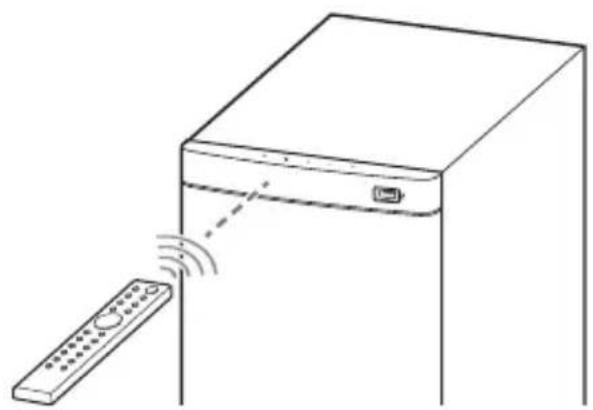
2 1
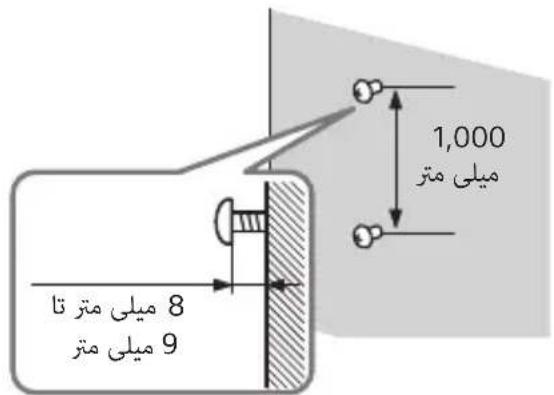
3 1
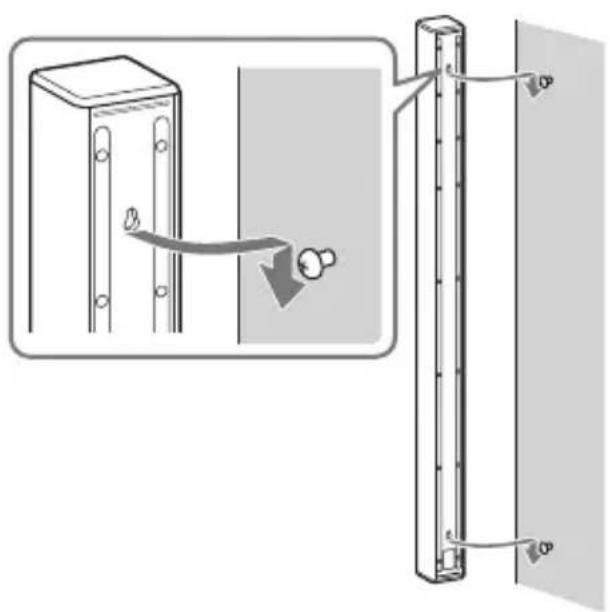
. 155
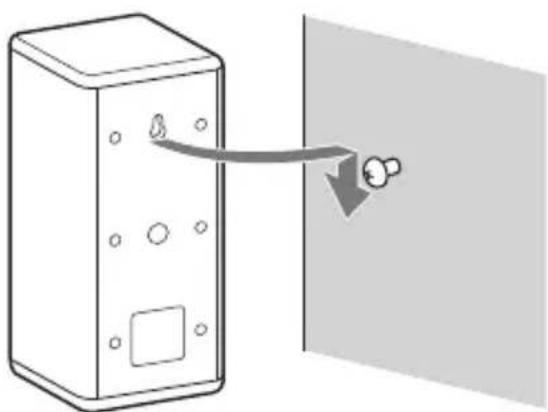
HT-S700RF
"OFF"←"DARK"←"BRGHT"
JJI JI JI JI JI JI JI JI JI JI JI JI JI JI JI JI JI JI JI JI JI JI JI JI JI JI JI JI JI JI JI JI JI JI JI JI JI JI JI JI JI JI
olj jpssw 45 gloj.ogw o wgal gl
( g + b) = a + b
o1 1 1 1 1 1 1
jLaiui ly.ogw go wgal oJgdo
golj jly kai J 500.50
gla jai kai loa lii g. 1j Jd .gai
"DARK"
(21.17ω) ( /) 15
00s 18goo 0go 0gb. 00s go pao 1
.
J. . 12 aabaa Sg + glaas
LssolzaiIlaiaSjIgisa jI sJdlal o
0000 0000
a 100000000000000000000000000000000000000000000000
a
R03 (AAA oJ) jS s
Lolololol
(19 4
150
+*/(100j)
.uis 1,1uio
+/-()SW 6
15 0 p 1 j gglw gl 0
(24 40) MENU 7
0gol/2ggljy
S = - S^
(24.17 a.o.)
.15 go 15 1j gio 1jgo
USB
.
(24.17) ENTER
0g 0015g
S = - S^
(1940) MUSIC 11
MUSIC
(19 40) NIGHT 12
.5 5
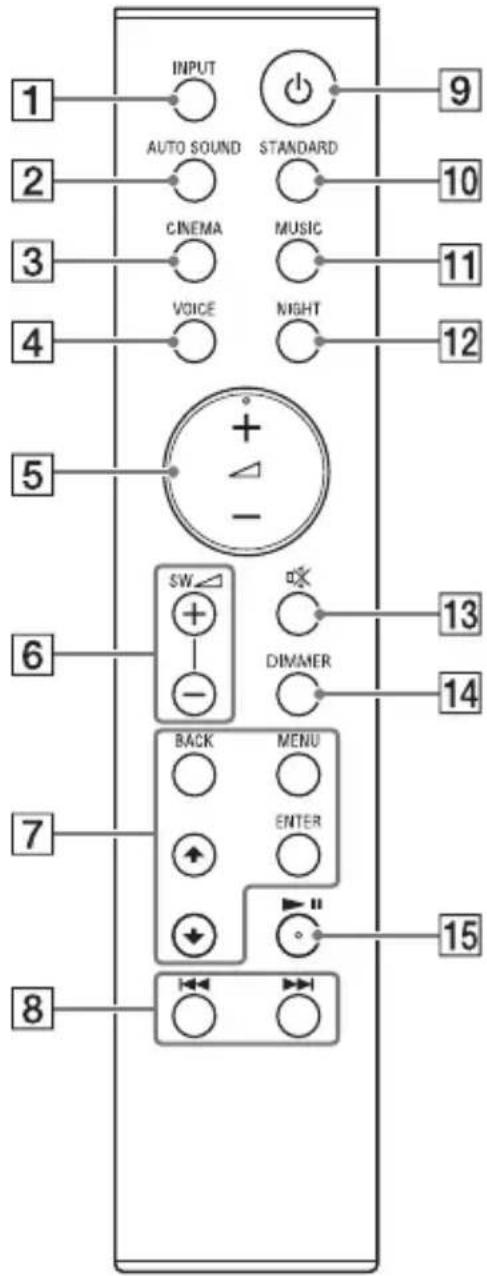
(164) INPUT 1
.5 1
(1940) AUTO SOUND 2
AUTOSOUND
S OBC = S COD + S_ BOC
(1940)CINEMA 3
CINEMA
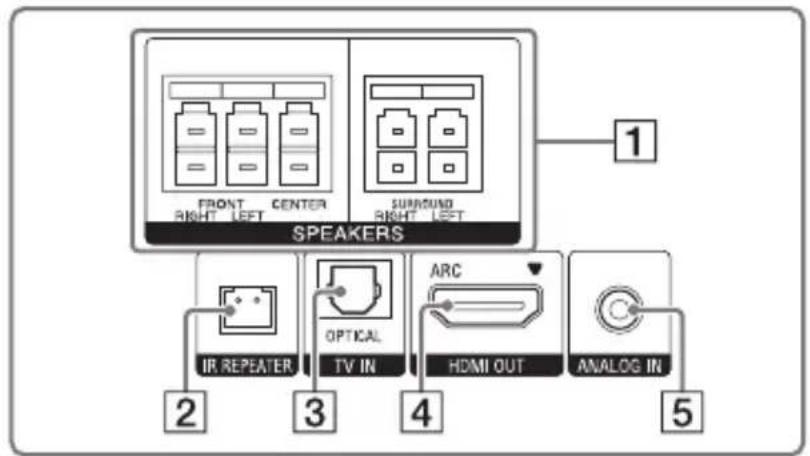
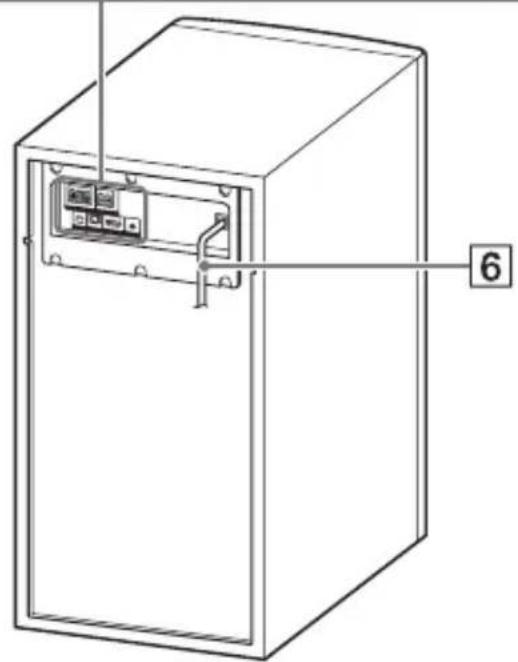
(11) ANALOG IN 5
6
SPEAKERS 1
IR REPEATER 2
TV IN (OPTICAL) 3
HDMI OUT (ARC) 4
(20 15
HDMI HDMI
Audio Return Channel (ARC)
slo45 cunosJLacARC.
A AV 1
HDMI
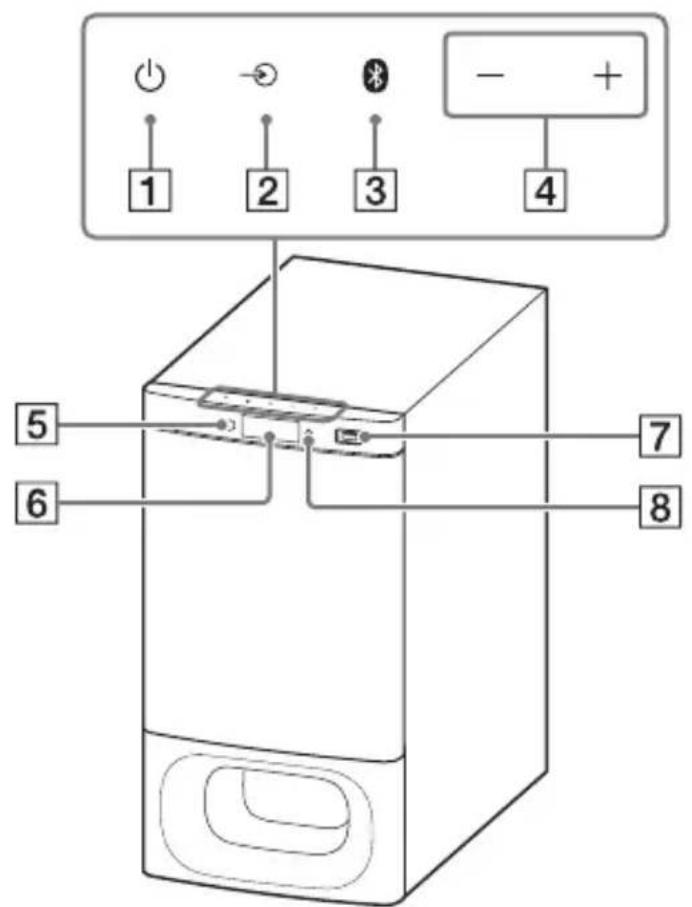
BLUETOOTH 8
Jlai:gsw g w y rwr BLUETOOTH
g) Cw d w BRJAR BLUETOOTH
Cw D w BLUETOOTH
J6:JJ W Ss Jy Bcws -
.0kss S y b JlaI jy I
JlaI J6:JJ W Ss Jy 4-
.Sjw Cw plj l du
()
15 15
(16 )(gwr)
(2140) BLUETOOTH 4050 3
()+/-s40
(1540) 000000000000000000000000000000000000000000
01 j1 JjS S 6b 41 r90 o1 j1 Jj5 .g s glol p
6
(17 )(USB)
L 100 pIJI IJIgG G SJS 4 Paaew L
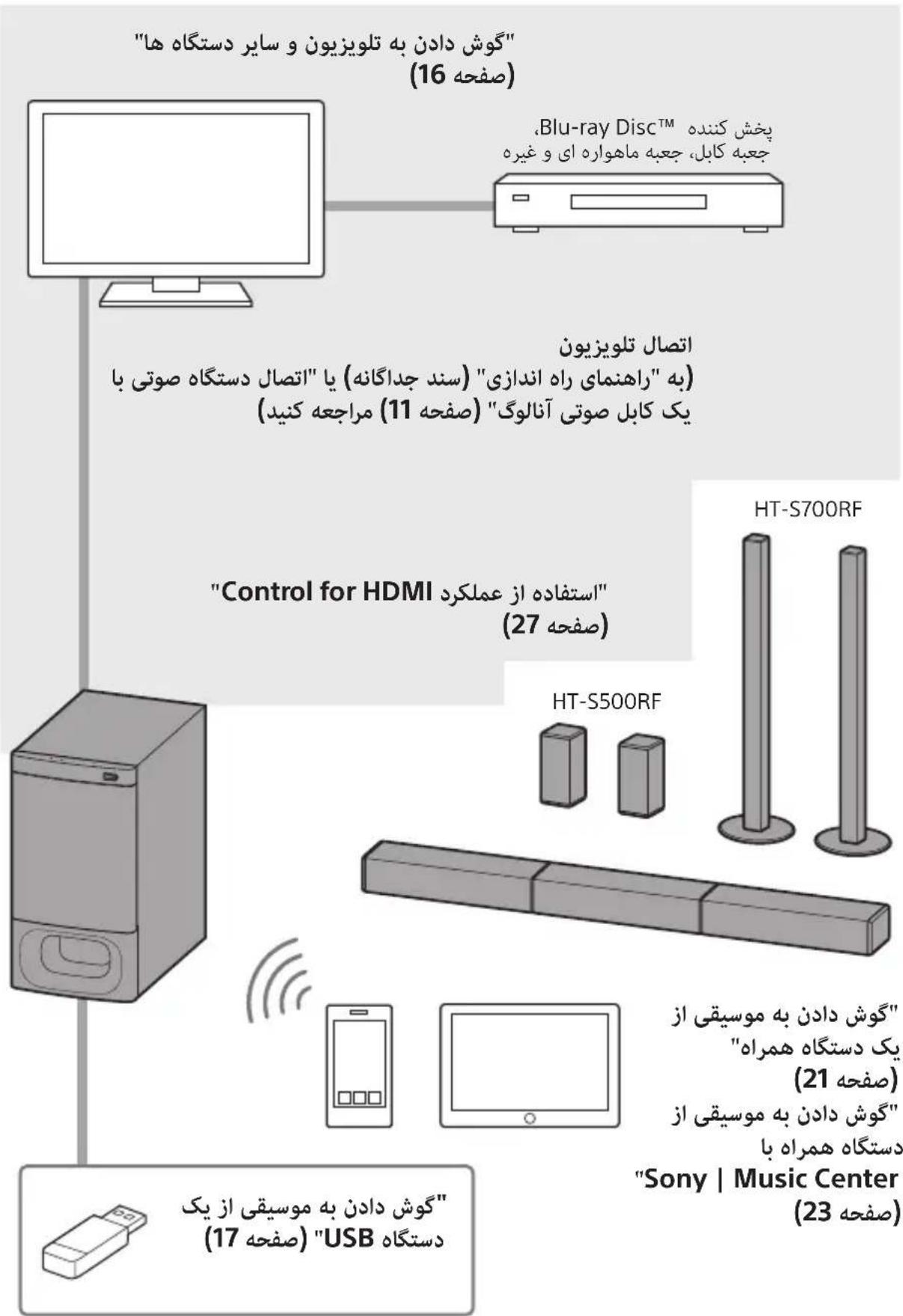
(2)RO3(AAA)
d 40
(1)
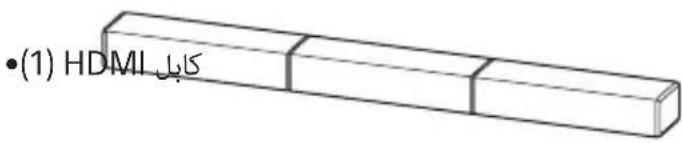
(1)
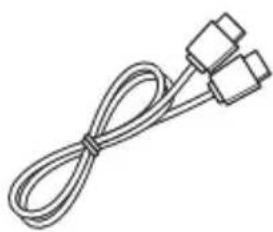
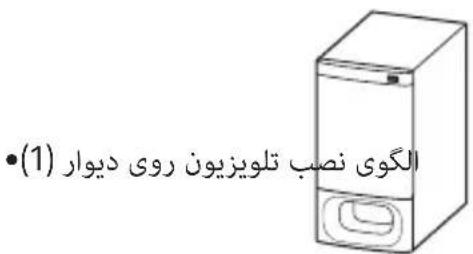
(2) (HT-S500RF b)

s1uol s(8)g (2)suiy (2)suiy (HT-S700RF
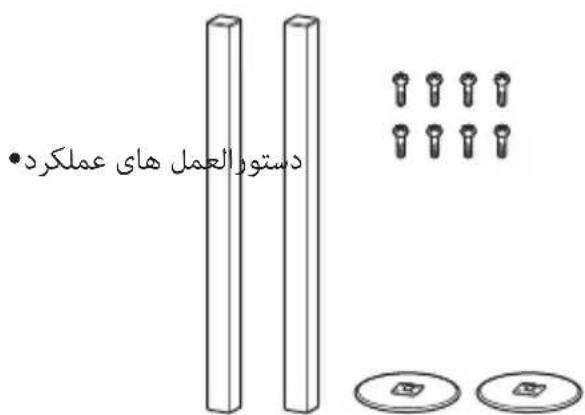
(1)
sla Jaojgwsd jyds
sLac sL JaoJgwoo ggo gao jwgo
. 1000000000000000000000000000000000000000000000000000000000000000000000000000000000000000000000000
2510/8wgo4jds
BLUETOOTH®
21....oloofoofofofofofofofofo
yolooj0o jaoosgdo
23............Sony | Music Center
oloo glooslao j0laai
24
27.....Control for HDMI 5e j
28.HDMI
29 1
30.
35.
36.
jglg jglg
38..(USB
HDMI Licensing Administrator, Inc.
LgbluBLOUeBLUETOOTH aSLIaOe Bluetooth SIG, Inc. 453202000000000000000000000000000000000000000000000000000000000000000000000000000000000000000000000
Google LLC aJ GooGle Play
iPod touch, iPod, iPhone, Apple
Apple Inc. J App Store .Apple Inc.
Apple Jn no gio jw pld
()joo Jkuiuui Uo
Olaic Apple
Apple y.Apple 1JyUuUuUuUuUuUuUuUuUuUuUuUuUuUuUuUuUuUuUuUuUuUuUuUuUuUuUuUuUuUuUuUuUuUuUuUuUuUuUuUuUuUuUuUuUuUuUuUuUuUuUuu
1 1
Jb
ydd.abbadl abrJI Jolag(VCR) gdl 1 0000000000000000000000000000000000000000000000000000000000000
ydd:(j!dgaabl cllalglg jyjjg gss)
gall lgsog gall gall gall
gall poao laol g 3 aLoo jol . bilal de aaii iic ababci gall lSog
J 10
pblll jiai i 100
yj jyj jyj yj yj yj yj yj yj yj yj yj yj yj yj yj yj yj yj yj yj yj yj yj yj yj yj yj yj yj yj yj yj yj yj yj yj yj yj yj yj yj yj yj yj yj yj yj yj yj yj yj yj
15 30 1
. 1
. 1
.
a. b. c. d. e
Josu y. aIg acl 1a oab ay bll 1bui p
algl g 1 aIbI I gcoo g abkll dU U jg j
jzjj JgSJJ Jta
y J 151
山
- 1
Jolj j
Lululululul
Jus Jus Jus Jus Jus Jus Jus Jus Jus Jus Jus
- jss
1
-
S OBC = S COD + S_ BOC
.
aaljao j
$$ - a s L W L A N $$
$$ - \dot {J} \dot {z} \dot {z} \dot {z} \dot {z} $$
$$ - S _ {2} \dot {z} ^ {\dagger} \ddot {a} _ {z z z z} b $$
LAN as w9 BLUETOOTH 1
(IEEE802.11b/g/n)
jglpluicwlic.)jolq (2.4
aikoljgjo jzjblu
JdUa dAeLwLAN aee
$$ . a S L W N I L A N a S \dots j _ {A} $$
$$ - \operatorname {i} a c \overline {{a}} \leq L w x $$
10 aLw gblj BLUETOOTH jg
$$ . j i o l $$
Jc BLUETOOTH jg g pblj1
.
$$ \bullet \mathrm {s i c} _ {\mathrm {p l u t}} $$
g 10 koy jig. aalj
Jus de los yor Jusull liu
BLUETOOTH jg 9
$$ : \therefore \mathrm {d} \text {l l l} \mathrm {j s l o l l} $$
$$ - \Delta g g g \cup \cup b _ {2} $$
Jusu u 1jie jg jk
J 1 J 1 J 1 J 1 J 1 J 1 J 1 J 1 J 1
20 10
LJI JILI JI BLUETOOTH 1
uis gog.BLUETOOTH aaii plxuljaiy
Igab1 aag 15 jia jaoj ggiin
i 1
. BLUETOOTH
$$ \bullet \mathrm {d} 5 _ {\mathrm {j}} \mathrm {d} J _ {\mathrm {a}} $$
aaii g jil g jyj yg Sory
a a 1
.BLUETOOTH
aogcbljdyyoo
(HDMI OUT (TV (ARC))
(TV IN (OPTICAL))
.111 111 111 111 111 111 111
Dolby Digital
DTS
Linear PCM
J 1
(USB)
| mp3 | MPEG-1) MP3 (III US) |
| wma | WMA9 US |
| wav | (الترجمة)LPCM |
#
心 z0 = z1y_0
- jgsss
.
文:y·gDRM
.Lossless
-1111111
:USB 8
200 1
(j)ii 1
jLwO 150 JJ Loo-olg JIoo
- diolii d.
(j)
·pulil 1
-
.(MSC)
glulso plz
GwSgwlsl,clalglywlgl Gwall So
a.bj 0
80
90x48gjg61gill:go
a:1gabla aall ggi 25:1g261
()(/gaijy/)
78×1200×78
()
3.6
Jzj j 100
ps.1aLo a@go a@sliPhone/iPod j
JiPiip
:goLoguUauua
iPhone X/iPhone 8/iPhone 8 Plus/iPhone
7/iPhone 7 Plus/iPhone SE/iPhone 6s/
iPhone 6s Plus/iPhone 6/iPhone 6 Plus/
iPhone 5s/iPhone 5c/iPhone 5
( ) iP o d t o u c h
Jg
(SS-S500RF/SS-S700RF)
y 1 y
i
S OBC = S BOC + S_ CBA
g0 wksil cllal y slw gall slo pblz
aabjjiaeio
S OBC = S BOC + S_ BOC
90x48bgoj6gill:go
a:jjgab 25:
aJ5bU GgAul UxSo aegao
gall So
golksjglbll Jolkso gals so
aabbjao
S OBC = S BOC + S_ BOC
90x48bgsb1gill:goo
()(g/(/j)
90×64×900
()aS
3.0
aababab
(SS-SS500RF)
Gall So
ooolkei. qulil Jolksoo gall so p
a.bjia
S OBC = S BOC + S_ BOC
90x48g
()(/1/)
91x216x91
()aL
cos 1.0
(2aaa)BLUETOOTH
A2DP (Advanced Audio Distribution
Profile)
AVRCP (Audio Video Remote Control
Profile)
(3) a^2 + 1,0
^( 5) AAC ^( 4) SBC
(A2DP)JLZ
32 a 20,000-20
(j48, j44.1
1
g 20 g 20 aablisb1 yLb9
aLwog SLWU1 aIg pIzwi g diSLWUg
"BTSTB" "HDMI> " CTRL"
("OFF" 念 08 d s^ T > ^
(goc/()
330×402207:HT-S500RF
378 × 438 × 231 :HT-S700RF
jUJ eJdAolu
(,)aL
9.0:HT-S500RF
10.2:HT-S700RF
a#llo!logso
(SA-WS500RF/SA-WS700RF)
gall poiao
(ja)ab1
85+85:laol+JLol
(15)1% 15.5 aogla
(20 )
jboo/ jboo/ jolol
15.5 aoglaoyoljU) 152:ssr/
( j : j ≥ 0) 151
3.3 aogla) 240:
(j100
x1 = - 2,x2 = 4
TV IN (OPTICAL)
USB
HDMI OUT (ARC)
ANALOG IN
② 2b^21^1
HDMI OUT (ARC)
HDMI
(19) 1
USB
:USB)
1g
BLUETOOTH
山
4.2 BLUETOOTH
2^j · ( 2 + 12) ^j
2 aIbl BLUETOOTH
y
(1)
- 与 3
-2.4000) 2.4
(jao 2.4835
juaàdià
FHSS (Freq Hopping Spread Spectrum)
pIi I b.o oIe!
paae Jaaa Jaaa aai iis
.
g+9 1
.5 5 y
aolal aWbJgRell AawLwIe "INIT"
1 log gallgogg aallll 1s
.
2
3
. p111 1
zai
J5 aog dgsaoljyll lolluyll bdo g p
.
"DEMO"
(aol)a0uUy

e 1
()
(35 aoo) 5 oo
usb USB 10 TV
.
- Please select the desired TV channels with the TV's remote control.
.
jjjll 1
"PRTCT"
Joo yg oagall pss g yg aal
g0g11 1
()①y
()
333 1111 1111 1111 1111
olil yolizl 200g
- pao o
pI 1
S OBC = S COD + S_ BOC
- USB Jua
pIaill Joc Is! pIbll Jueus USB jg
USB jj j j 1
500 111111111111111111
.1J USB jg jg
gall aolal y gully
.
G
0000000000000000000000000000000000000000000
(9 aoo) "OFF"
J 1
1
0g jjaiw j4g(gbswJ)
1
()3D
J3D 3D jyj
Jai.
jbi jjjjlll j 1 jgall
golgbuill. 1000 JooJooJoo
a 1
.0000000000000000000000000000000000000
Control for HDMI
.
J 1 J 1
()
Cortrol for HDMI 2
Lolalj gol.Jolalil gl e xlbU.
jzjall
Jg 1
15 15
.
aag aaii iiaai 1
Control for HDMI
Cortrol for HDMI 4
gJ.10aIJI 15bU .pIJIy IaIbI oJy
jgljll jxw wlaed
L
Control for HDMI
HDMICEC
Jlu-ray Disc Jus)
3DVD
Jlu-rayDisc Jzoo)
3DVD
4 111111
:(wJzclaw/)gallpbi
(p1i11iabwglpaic)jolg jla
USB3.0
←.p12j1i
j4 > gP_l
j 1 j 1111111111111111111111111111111
.
JBLUETOOTH jggo
←
490 g 5y 4sLwU LAN 4s 33
←
5 5 LAN
jol
BLUETOOTH jLgJgss
←
< 13g.5j0Jgl0 (gll j
.8gall 20 joo
S ACD = S COD + S_ DCE
12
.
←
g 10000000000000000000000000000
(7a)
a 1
←
.
S OBC = S COD + S_ BOC
(9 10x0)
Joo Joo jolal aolol 00
y 1000000000000000
jziiu
.1jzall lol 10g
a0.b0 ②
(15 a)
Jgoo J4o Joo
.BLUETOOTH JJLJLS!
BLUETOOTH
(7aa)
BLUETOOTH
. BLUETOOTH aabg jSooaog
BLUETOOTH
.
BLUETOOTH jgj g jj
pI 110 g o j jj y Jg J j J 1
ybluETOOTH jgl
"BTPW"-"BT>" b
(26 aoo) "ON" g0g 1e abo, "OFF"
| x,y| = | x,y| = 1
BLUETOOTH
.
.1
"TVSTB"- "HDMI> " 25
0g "TVSTB" b. (25)
pbll l fA AUTO" ON
.1
.1
"TVSTB"- "HDMI> " 25
(25
"ON"g ON"TVSTB"
) Control for HDMI g
L27
#
.2000 16 a00) cslb1 dab1 10
TV 1000000000000000000000000000000000000000000000000000000000000000000000000
#
HDMI JsJg gJn q
()JyjB jLjS
.()Jz
JxJxJxJxJxJxJxJxJxJxJxJxJxJxJxJxJxJxJxJxJxJxJxJxJxJxJxJxJxJxJxJxJxJxJxJxJxJxJxJxJxJxJxJx
40xolg [b]
pI 111111111111111111111111111111111111111111111111111111
aIbJ
pIiJoo
← JS 300
p5 = 0
jui jlo
LJIaJI pIJI JJ 1J 1J 1J 1J 1J 1J 1J 1J 1J 1J 1J 1J 1J 1J 1J 1J 1J 1J 1J 1J 1J 1J 1J 1J 1J 1J 1J 1J 1J 1J 1J 1J 1J 1
.0ON"gCG "CTRL"-HDMI> H 25 a
(27 a) Control for HDMI .
<
gall lolgl 10 plll aIb jolj
pI IaIy JgJgJgJgJgJgJgJgJgJgJgJgJgJgJgJgJgJgJgJgJgJgJgJgJgJgJgJgJgJgJgJgJgJgJgJgJgJgJgJgJgJgJgJgJgJgJgJgJgJgJg
← 1
aal
y
.
JlL
1
Jg 15 JdI I dI a b g b
paa y lae lalal suaaay gog pblil jdu
pI 20
.1.2.3.4.5.6.7.8.9
"ASTBY"- "SYS>
.(2640) "ON"
"OFF" 1
J 1
b01 1111111111
(26 aoo) (BLUETOOTH 1aou) "BTSTB"
(25 a) "CTRL" (Control for HDMI),
"OFF"
"ON"
JUOGOJUUGOJUOJUHDMI
Audio Return Channel (ARC)
HDMIN 15
Audio Return Channel
HDMI
Sony 45
S_ S = 12 · SA · PD = 12 × 2t × 5
HDM
J 1
四边形 AOBC 为正方形
HDMI-DVAuB Bautg
Channel
(2) AD = AQ, DQ = AQ
J5 JaaJI jaiJI Jn JuaY Cgall g
.HDMI
log.1gbg 2000000000000000000000000000000000000000000
jIJIHDMI JJ
.
aolg aolly
jLgSgoo
"PlayStation®4" 9, Blu-ray Disc
pI 1Jz Jy jyjLl Joo (UJ lo
Jus Jl jll Jus y g. 5alj jzalilg
.1111 0000000000000000000000000000000000000000000
goo 120000000000000
(Consumer Electronics Control)
HDMI (High-Definition
Multimedia Interface)
边
aiaaa aie 0jao joo iibgol oio Joo
.
Control
for HDMI
Sony | Music | Audio | Audio Center
Sony | Music | Audio | Audio Center
App Store | Google Play | Audio Center
No BLUETOOTH | Audio Center
BLUETOOTH | Audio Center
No BLUETOOTH | Audio Center
No BLUETOOTH | Audio Center
jLj j no gob! !e
puiuui Jgoo
Sony | Music Center
puiuwl alg elao lo
Sony | Music Center
Ssulg Sory | Music Center
jgl pluotwly aolgbl Sony 00 oJ
yJgSgJy
Sony | Music Center
URL
http://www.sony.net/smcqa/
:Sony | Music Center
gbaio Jjui Ujjl Jds gawgbly eliaow
.
Jds Juaaog oale aouuuiu bI sUy I
gall ginaa bgaal
Sill sall do jzobligo
p111111
aaiia aaii Jxj no aayb jwgbgbl gio
.
山
Sony | Music Center
JL
"ON" "BPTW"-BT>
(26
aaii iiaii 4 aaii aiisao lo aiio
dd.jaibjglssy | Music Center
J 1 Jgdu aaaag g uabll cIaolgo
Sony | Music Center
Sony | Music Center
Jgobbl 1
Sony | Music Center
App Store Google Play
Jgabl lalde d
BLUETOOTH 3
jglg pblll jy JlaI Lai I pJgS Uji .Jgao61
4
pIiJoo 0g0e1r!
.
+/- 100
S_ OBC = 12 · OB · BC = 12 × CD × 5
g jll gall paa Goo
ai + 1bi = 12
(20 aaaa)
14/11p1s
. BLUETOOTH aabg j gss
jssss sasbsa 1000
.
BLUETOOTH 1
(7 a) BLUETOOTH
BLLIILBLUETOOTHJL
BLUETOOTH 2
.0jg jzjgl 0gall
"HT-S700RF" g"HT-S500RF"
Jgobbl jlaaI aIle aogabla aaljoo
Jds 10000
BLUETOOTH 100000000000000000000000000000000000000000
jglg pblil jy Jlaal slw! jgS WJ. Jgao61
gglj 1uusy u gall JwJ .laib Ugab jqjUggb
.1511 20 80 21
.
+/- 1e b20ally gall sgaio
S OBC = S BOC + S BOC - S BOC
gall gall poos oog gssb
= S_1 = SW T + - FC
(20 ① ) s : s
1/10 1
. BLUETOOTH aBgl jg Soll
jaiy jaoa aal yaiu gaiy
(JyI/
#
BLUETOOTH 8
.0000000000000000000000000000000000
jzjzjz jzjz
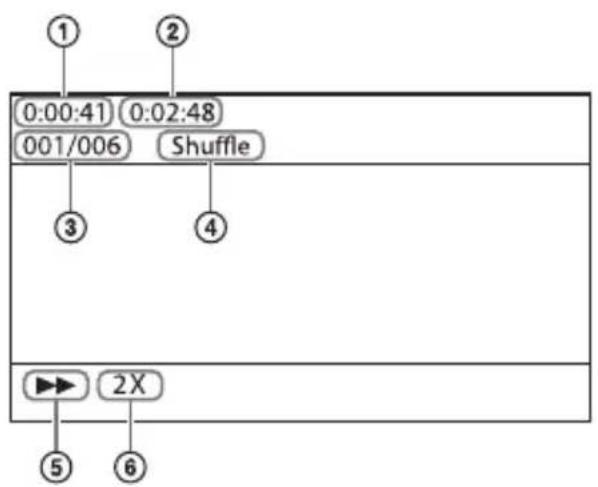
1
L
00gjgl lalb1 jlo/ooaol 1o100 ③
山
⑤
6
a
.USB
[No USB]
.USB jla Jld
[Waiting]
.USB j4j 1
#
3t = - 3t( 0 < t < 1)
S OBC = S COD + S_ BOC
·0g0g61 1Jlu
g 1
AosalJyMENU 4
s
jouie
aolal aagul yasrll aLw gl "NOUSB"
.0gfo jgs Jb2o USB jgs Jooogy Coo3 13!
Egi yjllg jy
.
.(USB) USB
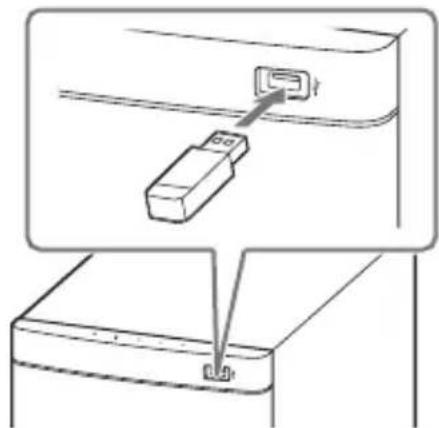
1
2
. 1
. "USB"
. "READ"
. USB .
. USB .
3 1. ENTER 15
.ooall gssb 1
+/- 1e b2dally cogall gssb 1
. 12y jc pksll o0g 3
yol all gao 000 gssb 1
pssll o0g 8 SW +/ - dc b2dally
.(20 aao) 12y jc
Jusu 1
aagully jerrll aolw de aolal yas .aolal
pluxuwly "REPT" - "USB >" s. / ENTER
oogobgol gogol 1eaiwU USB jgs
jJg jzjzbl gwbl clalol Jxu USB 1111111111111111111111111111111111111111111111111
山
J 1500000000000000000000000000000000000000000000000000000000000
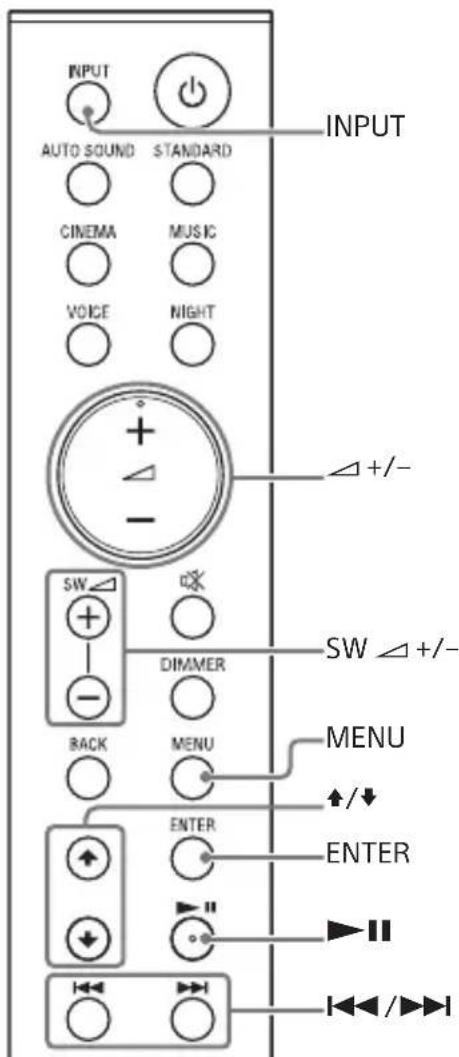
"ANALG"
. WALKMAN 5
ANALOG IN
"BT"
A2DP BLUETOOTH j
/aaawgblglaowy 100000000000000000000000000000
(21 aaaa) BLUETOOTH a.bg pduwly gall
"USB"
(USB) 1000 USB j12
gab1 1eaiy1> de gbl Jolal joo
(17 aio) USB jgs do osg sbl
2
+/-de bixally gall sinnb.
S OBC = S BOC + S BOC - S BOC
gall gall pssuoo sguo buiol
S_木弟形 COBD = 12 · CO · BD
(20 4 0 0)
2
gall 1e
joo
s

.
yoo 1000000000000000000000000000000000000000000000000
"USB"←"BT"←"ANALG"←"TV"
"TV"
Audio Return aag
HDMI OUT (ARC) Channel
(ARC)
TV IN (OPTICAL)
aTVIN (OPTICAL)OUT (ARC)
HDMI OUT (ARC)
J 5001 0000000000000000000000000000000000000000000000
sall o10g jgbll gll ylo ldd
oill oog lssy d. njgjzlly baoiell 2e jc
aagb g jkso aalll oio g.njgjzlll 2e jc
pall alrall caiy rsk
ooll oog plxwbyn jgjzlll g poall elk
no ooljol yll Jw! qybp nqn jgjzlll 2e jc
. lglbll ogall kay
1 1
.(alaoaag)Jzai Jyj J
.MENU 2
a gUy jorll aLw Jc aall yac .aol
pluxily "IRRPT" - "SYS >" sio 3. 一 /一 / ENTER
. / + ENTER "ON" 4
100 all a25y y 100
. OFF" 5
山
jyjbjlll aolll jn jn J 15
aagb g jnnn yg jalil g jbi y
p11.12eall g0 g 1rnnn 2k
jok laic lgl gog g agabg oia b
jzj jngjajtlg pkslll jg
jol n nn jw wbl jx
jg jall g jn jg ax
Jgbll gall
o jz jgsu w k ay abgll oia Joz
Jg jglgall gao .aioll oio .ogjiall
.ogjiall no yla
oog pduwolpbljll j
00g jaiu aolj jc 5011 00g 40g jy 5011
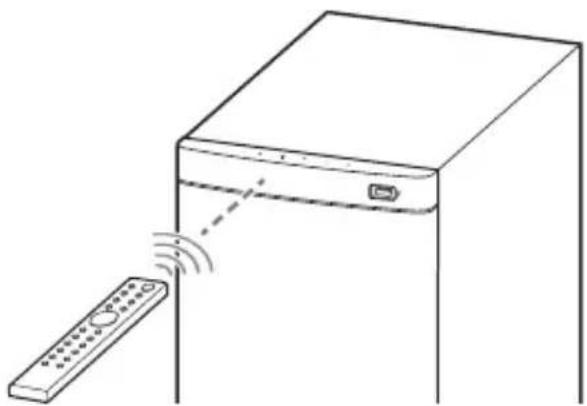
2 1
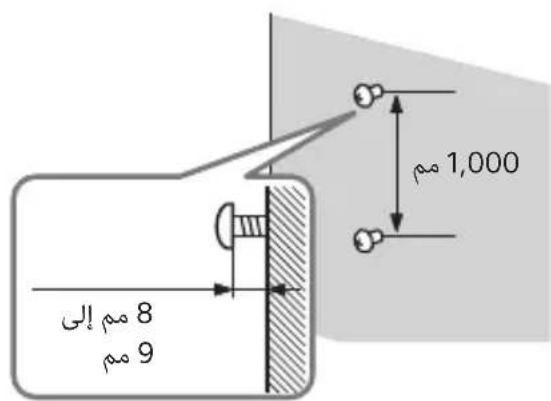
3
3
3
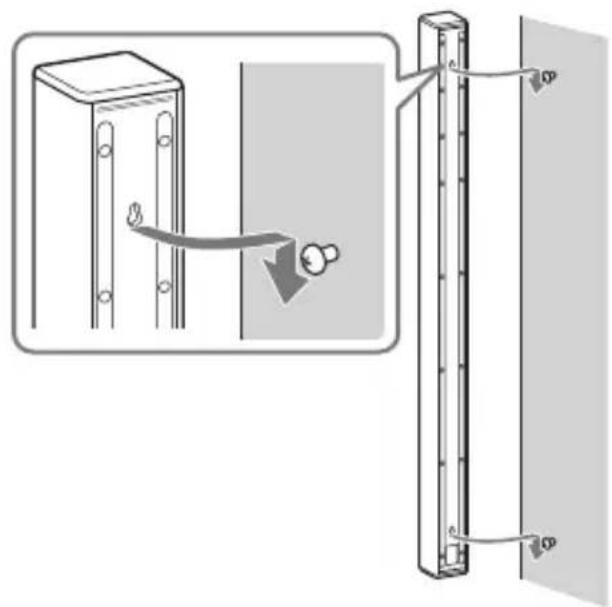
3 1
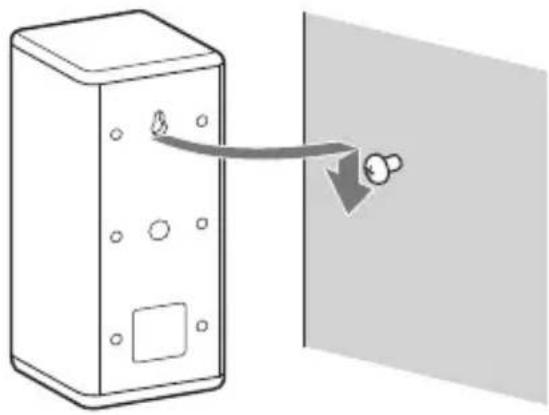
HT-S700RFJ
J 15000000000000000000000000000000000000000000
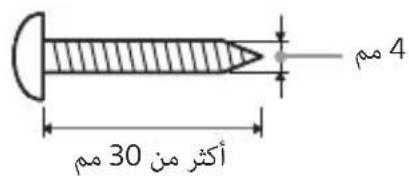
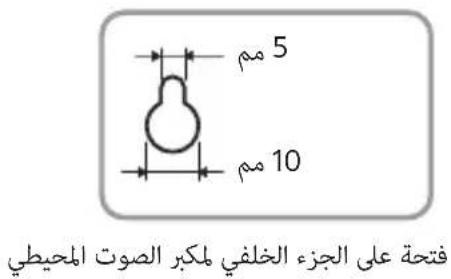
#
J 1
bila 1e baa61 aagai jso
HT-S500RF
1
jolj jggl jll g
yabob1 2gol
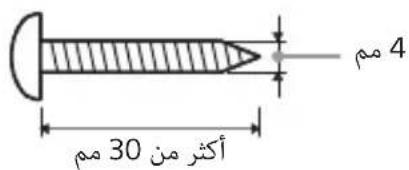
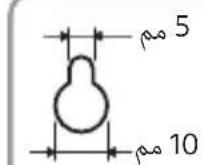
2
3 1
.
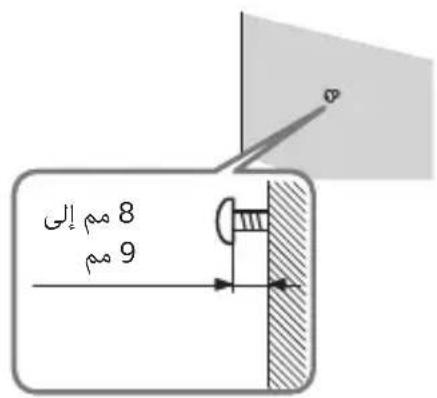
"OFF"←"DARK"←"BRGHT"
aolal 1000u y 10000
"OFF"
aagaae g aaii jao
oJpIJI JxOoJ 1s
yddydlal ydsd yds
Joo 10000000000000000000000000000000000000
aai 1
.DARK" 1
*(/)15
(21.17
. · 1 g LjEeU U
g
J.
Joo 0000000000000000000000000000000000000
aaa R03 1
U
(19 a) VOICE 4
$$ . \dot {c} g a l l g o g \ddot {a} g / j _ {2} $$
$$ + ^ {*} / - (\ddot {s} g \dot {a} \dot {s} s g \ddot {s} m) \Delta $$
$$ \therefore g a l l g i x u s b. d $$
5
$$ \left. \right.\left. \right.\left. \right.\left. \right.\left. \right.\left. \right.\left. \right.\left. \right.\left. \right.\left. \right.\left. \right.\left. \right.\left. \right.\left. \right.\left. \right.\left.\left.\left.\left.\left.\left.\left.\left.\left.\left.\left.\left.\left.\left.\left.\left.\left.\left.\left. \text {g} ^ {\prime} g ^ {\prime} g ^ {\prime} g ^ {\prime} g ^ {\prime} g ^ {\prime} g ^ {\prime} g ^ {\prime} g ^ {\prime} g ^ {\prime} g ^ {\prime} g ^ {\prime} g ^ {\prime} g ^ {\prime} g ^ {\prime} g ^ {\prime} g ^ {\prime} g ^ {\prime} g ^ {\prime} g ^ {\prime} g ^ {\prime} \right)\right)\right)\right)\right)\right)\right)\right)\right) S W \right.\right.\right.\right.\right.\right.\right.\right.\right.\right. $$
$$ + / - \left(\frac {1}{2} + \frac {1}{2}\right) $$
$$ . \ddot {c} _ {\text {工}} \text {S T A N D A R D} $$
(19 40) MUSIC 11
$$ \therefore g a l l j _ {j} ^ {s} M U S I C $$
(19 a) NIGHT 12
$$ \therefore \text {L} _ {\text {L}} \text {L} _ {\text {L}} \text {L} _ {\text {L}} \text {L} _ {\text {L}} \text {L} _ {\text {L}} \text {L} _ {\text {L}} \text {L} _ {\text {L}} \text {L} _ {\text {L}} \text {L} _ {\text {L}} \text {L} _ {\text {L}} $$
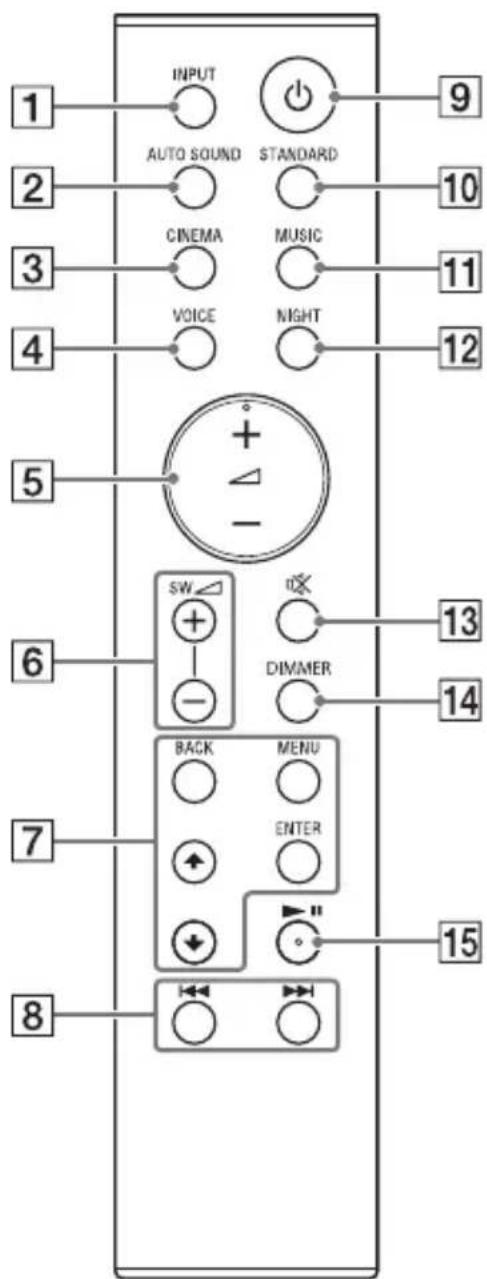
(16 a) INPUT 1
矛盾
(19) AUTO SOUND 2
AUTO SOUND
(19 a) CINEMA 3
CINEMA
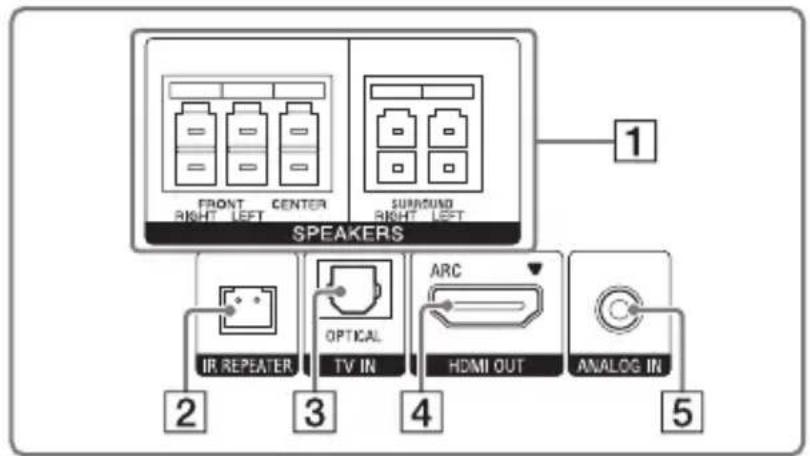
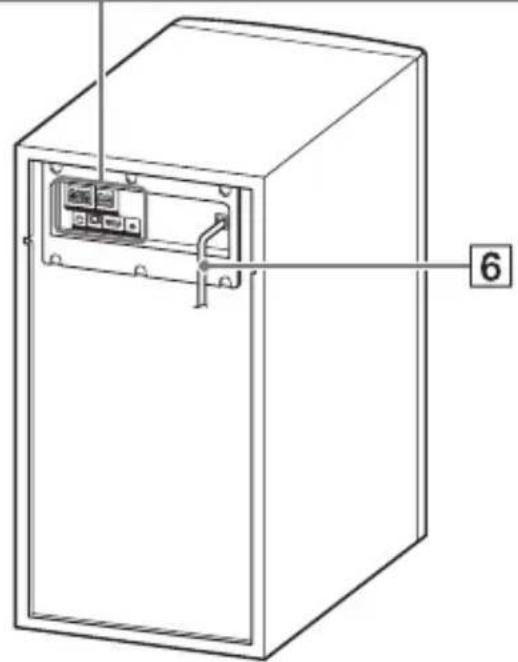
(11) ANALOG IN 5
6
SPEAKERS 1
IR REPEATER 2
TV IN (OPTICAL) 3
HDMI OUT (ARC) 4
HDMI 10000000000000000000000000000000000000
.HDMI
Audio Return Channel
ARC.(ARC)
pI 1000000000000000000000000000000000
HDMI
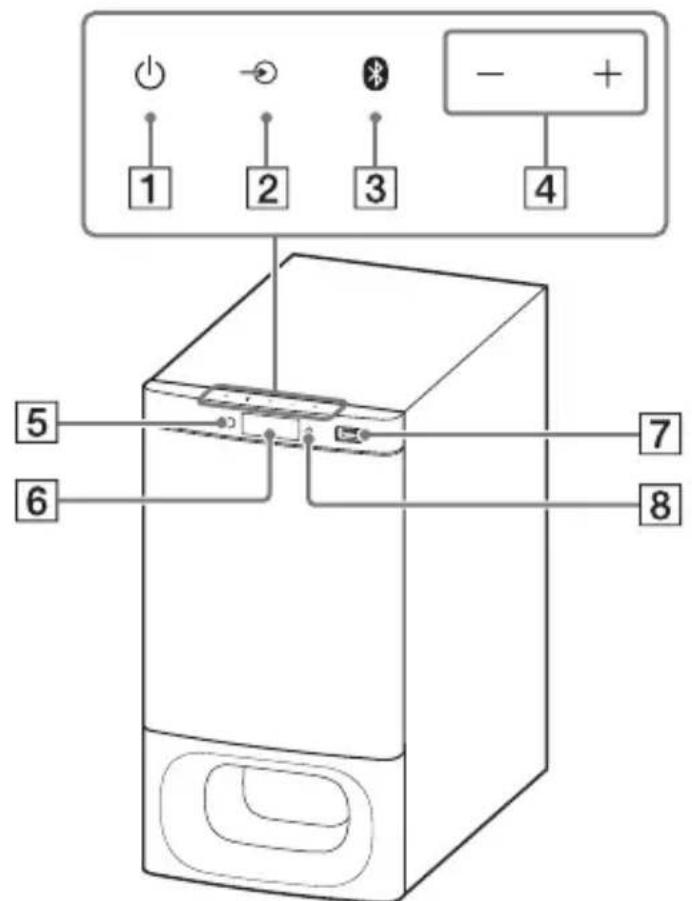
BLUETOOTH 8
JLALI J:QRRJUuBLUO BLUETOOTH) BLUETOOTH
(3)
Jl:gjUy
gJUyI IooI e:QjI Uu 100- .JzI
()①j 1
.1J 11 20 g Jc 4b 9g p 1
(16a)()-jj2
(21 a) BLUETOOTH 3
()+/-
(15 aao) 5
jaii jai jie pao 100g ggy
6
(17 a) (USB) 7
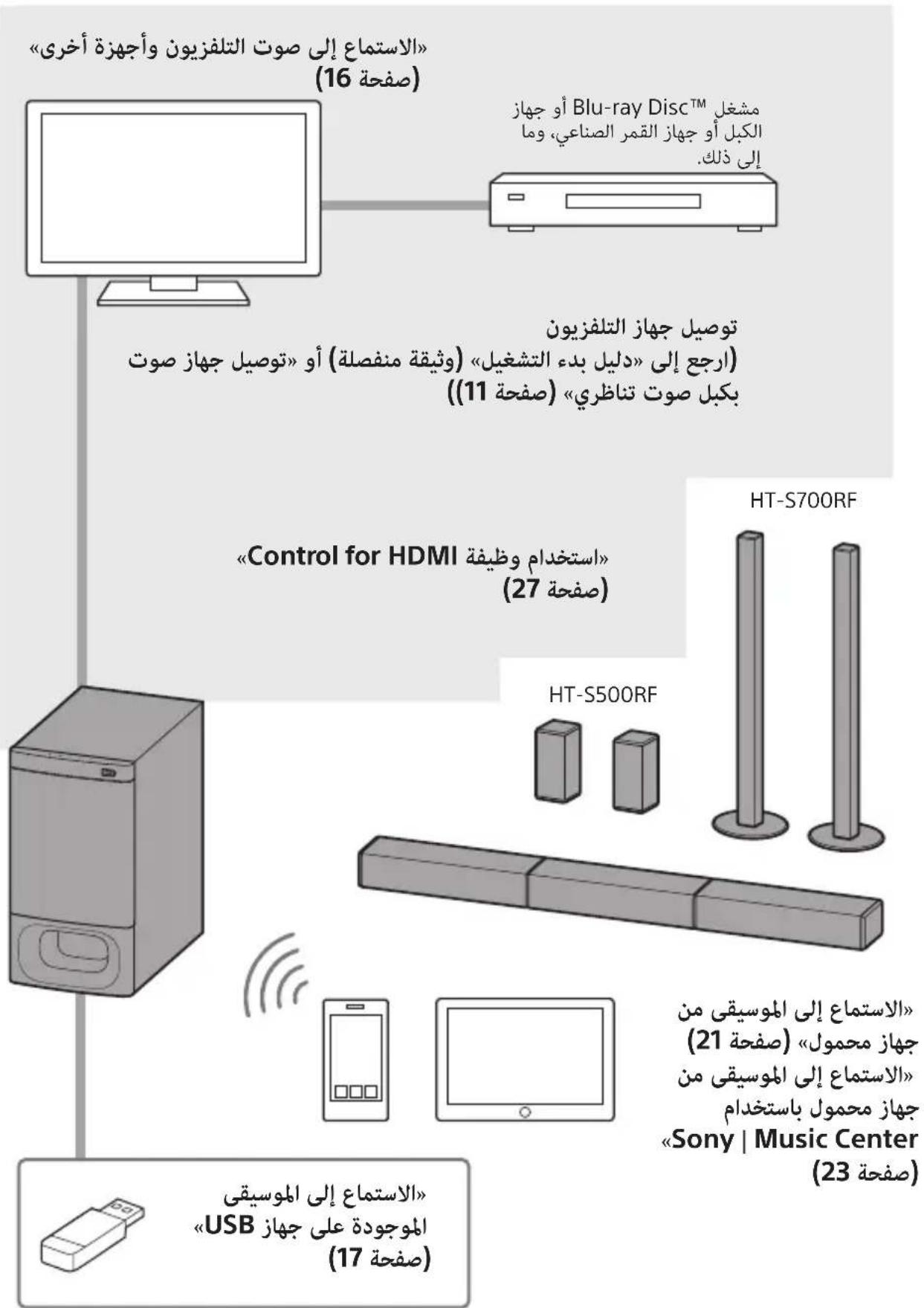
pI11 pIuswly alq slkoy lo
(2) (AAA) R03
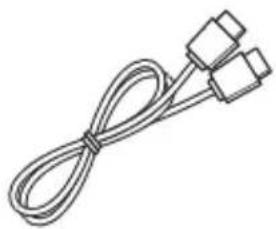
a#jbl lalb1
(1)
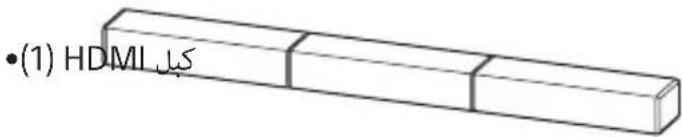
(1)
(1)
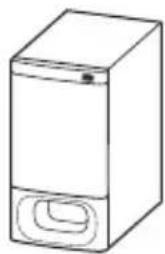
(2) (bod HT-S500RF)
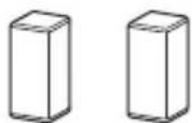
J
HT-S700RF)82

J
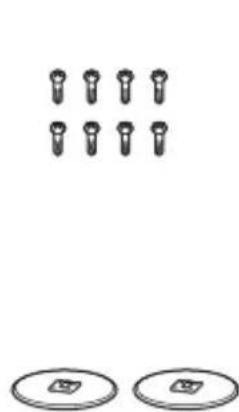
(1)
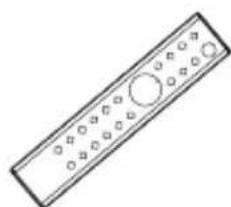
0j 1j
aJzll clalj 30gll claljll
050500000000000000000000000000000000000
aagss s gssgill gss
.
aog 1e aoljyI sUyI c0s gog
OE BC
1e ( c c - - & " )
aolal aogull yjell aLw
pIeewyI/
BLUETOOTH®
(HDMI OUT (TV (ARC))
38.....(TV IN (OPTICAL)) 9
39.. BLUETOOTH JJ
40.
Ugogol
- .
- 7 5
oo jg jn jjll
J 100 (aiao aag)

TVjjzaiu
HDMI
10 × 9
11.
pIiI pIiIy
gall sog gall So
- bilal jde ababai
pssll oog pluowl pblil J
15
aolal joc oolil oog Jaoy Lalic
15.
gall 1eaa
16 1
d d ggbg 1
17 USB
gall jgo
- 20....gall gao sgo sga b
g1 1111 jj Joo 0000 j0000
a1b1 = a0b0
Jxj 40g 40000000000000000000000000
oo 1gVg adab61 jgsssu ooo y
.
Jb
Jgblgall 50 Jn jyI yjyI y