PLM-A35 - Earphones SONY - Free user manual and instructions
Find the device manual for free PLM-A35 SONY in PDF.


User questions about PLM-A35 SONY
0 question about this device. Answer the ones you know or ask your own.
Ask a new question about this device
Download the instructions for your Earphones in PDF format for free! Find your manual PLM-A35 - SONY and take your electronic device back in hand. On this page are published all the documents necessary for the use of your device. PLM-A35 by SONY.
USER MANUAL PLM-A35 SONY
Operating Instructions
Mode d'emploi
WARNING
YOUR FAILURE TO FOLLOW THESE OPERATING INSTRUCTIONS MAY RESULT IN EYE FATIGUE, EYE DAMAGE, OR OTHER INJURY.
CAREFULLY READ THIS INSTRUCTION MANUAL AND BECOME FAMILIAR WITH ALL SAFETY INSTRUCTIONS FOR THIS PRODUCT.
THIS PRODUCT SHOULD NOT BE USED BY CHILDREN AGE 15 OR YOUNGER. IF YOU HAVE BEEN DIAGNOSED WITH EYE DISEASE OR EYE INJURY, CONSULT YOUR DOCTOR BEFORE USE AND DO NOT USE WITHOUT YOUR DOCTOR'S APPROVAL.
AVERTISSEMENT
LE NON-RESPECT DES PRESENTES INSTRUCTIONS D'UTILISATION IMPLIQUE DES RISQUES DE FATIGUE, DE BLESSURE OU AUTRES AUX YEUX.
LISEZ ATTENTIVEMENT LE PRESENT MODE D'EMPLOI ET FAMILIARISEZ-VOUS AVEC TOUTES LES INSTRUCTIONS DE SECURITE AFFERENTES.
CET APPAREIL NE POT ETRE UTILISE PAR DES ENFANTS AGES DE 15 ANS OU MOINS. SI VOUS SOUFFREZ DE MALADIES OU D'AFFECTIONS OCULAIRES, CONSULTEZ VOTRE MEDECIN AVANT D'UTILISER CET APPAREIL ET NE L'UTILISEZ PAS SANS L'AUTORISATION DE VOTRE MEDECIN.
Personal LCD Monitor Glasstron
PLM-A35
To prevent fire or shock hazard, do not expose the unit to rain or moisture.
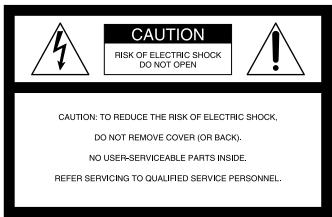
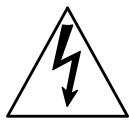
This symbol is intended to alert the user to the presence of uninsulated "dangerous voltage" within the product's enclosure that may be of sufficient magnitude to constitute a risk of electric shock to persons.

This symbol is intended to alert the user to the presence of important operating and maintenance (servicing) instructions in the literature accompanying the appliance.
WARNING
The AC power cord must be changed only at qualified service shop.
CAUTION
To prevent electric shock, match wide blade of plug to wide slot, fully insert.
The supplied interface cable must be used with the equipment in order to comply with the limits for a digital device pursuant to Subpart B of Part 15 of FCC Rules.
Precautions
- One blade of the plug is wider than the other for the purpose of safety and will fit into the power outlet only one way. If you are unable to insert the plug fully into the outlet, contact your dealer.
- You can use your Glasstron in any country or area with the supplied AC power adaptor within 100V to 240V AC, 50/60Hz . Use a commercially available AC plug adaptor [a], if necessary, depending on the design of the wall outlet [b].

INFORMATION
This equipment has been tested and found to comply with the limits for a Class B digital device, pursuant to Part 15 of the FCC Rules. These limits are designed to provide reasonable protection against harmful interference in a residential installation. This equipment generates, uses, and can radiate radio frequency energy and, if not installed and used in accordance with the instructions, may cause harmful interference to radio communications. However, there is no guarantee that interference will not occur in a particular installation. If this equipment does cause harmful interference to radio or television reception, which can be determined by turning the equipment off and on, the user is encouraged to try to correct the interference by one or more of the following measures:
- Reorient or relocate the receiving antenna.
- Increase the separation between the equipment and receiver.
- Connect the equipment into an outlet on a circuit different from that to which the receiver is connected.
- Consult the dealer or an experienced radio/TV technician for help.
CAUTION
You are cautioned that any changes or modifications not expressly approved in this manual could void your authority to operate this equipment.
Owner's record
The model and serial numbers are located at the rear of the power supply box. Record these numbers in the spaces provided below. Refer to them whenever you call upon your Sony dealer regarding this product.
Model No.
Serial No.
DISPOSAL OF LITHIUM ION BATTERY.
LITHIUM ION BATTERY. DISPOSE OF PROPERLY.
You can return your unwanted lithium ion batteries to your nearest Sony Service Center or Factory Service Center.
NOTE: In some areas the disposal of lithium ion batteries in household or business trash may be prohibited.
For the Sony Service Center nearest you call 1-800-222-SONY (United States only)
For the Sony Factory Service Center nearest you call 416-499-SONY (Canada only)
Caution: Do not handle damaged or leaking lithium ion batteries.
Glasstron is a brand-new concept in visual display
Congratulations on your purchase of a Sony Glasstron Personal Viewer. The Glasstron, using current technology in small, lightweight visual displays, provides a television viewing experience similar to watching a 52-inch television from a distance of approximately 6.6 feet (2 m). (Viewing experience may differ according to individual perception.)
The Glasstron Personal Viewer creates an image through two separate liquid crystal displays, in close proximity to your eyes. To insure your safe use of the Glasstron, please become familiar with its basic operations, including proper fitting instructions, and be aware of any symptoms of eye fatigue or other discomfort you may experience.
WARNING
YOUR FAILURE TO FOLLOW THESE OPERATING INSTRUCTIONS MAY RESULT IN EYE FATIGUE, EYE IMPAIRMENT, OR OTHER EYE INJURY, PROPERTY DAMAGE OR DEATH.
WARNING
THIS PRODUCT SHOULD NOT BE USED BY CHILDREN AGE 15 OR YOUNGER. THE EYES OF CHILDREN ARE STILL DEVELOPING AND MAY BE ADVERSELY AFFECTED FROM USE OF THIS PRODUCT.
Note on the LCD (Liquid Crystal Display)
The LCD screen is made with high-precision technology. However, black points or bright points of light (red, blue, or green) may appear constantly on the LCD screen. This is not malfunction. (Effective dots: more than 99.99% )
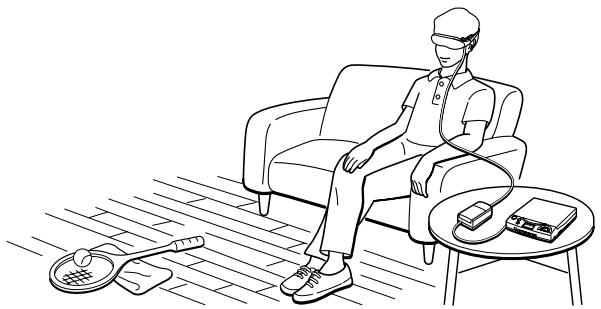
Table of Contents
SAFETY INSTRUCTIONS 6
About the Glasstron 11
Getting Started
Checking the supplied accessories 12
Locating the parts and controls 13
Connecting the Glasstron 14
Connecting video equipment 14
Connecting other equipment 15
Connecting the power source 17
Wearing the Glasstron 18
Operations
Using the Glasstron 21
Setting the user lock 25
Using an optional battery pack 26
Additional Information
Precautions 28
Troubleshooting 30
Specifications 31
Index 31
THE SONY GLASSTRON PERSONAL VIEWER SHOULD BE USED IN STRICT ACCORDANCE WITH ALL INSTRUCTIONS TO PREVENT EYE OR OTHER INJURY, LOSS OF VISUAL FUNCTIONS, PROPERTY DAMAGE, OR DEATH.
USE RESTRICTIONS
Warning: No Use by Children Age 15 or Younger.
This product is designed for adult use.
The eyes of children are still developing and may be adversely affected by use of this product, and it may cause eye fatigue, eye damage, or loss of visual functions.
In addition, this product may not be adjusted to fit a child's head.
User lock: To prevent use by children age 15 or younger, this product is equipped with a locking system. For instructions on the use of the user lock system, see page 25.
Warning: Eye Disease/Eye Injury/Glaucoma.
If you have been diagnosed with or are susceptible to eye disease, eye injury, or glaucoma, consult your doctor before use and do not use without your doctor's approval. Use of this product by individuals with conditions such as glaucoma may cause these conditions to worsen.
Caution: Heart Disease/High Blood Pressure.
If you have a history of heart disease or high blood pressure, consult your doctor before use and do not use without your doctor's approval. Use of this product allows the viewer to feel they are in the action, which may result in increased anxiety or heart injury. If during viewing any increased anxiety is experienced, stop using the product immediately and rest. If the symptoms persist after rest, consult your doctor.
Caution: Seizures.
If you have a history of temporary spasms, unconsciousness, or epileptic seizures from light stimulation, consult your doctor before use and do not use without your doctor's approval. Use of this product by such individuals may cause spasms, unconsciousness, or seizures. If you experience such symptoms during use, stop using the product immediately and consult your doctor.
ADDITIONAL SAFETY INFORMATION.
A. Health Concerns. See pages 7 through 8.
B. Instructions for Safe Fit. See page 9.
C.Warnings for Electronic Products.See page 10.
Health Concerns
Warning: Eye Fatigue/Eye Damage/Loss of Visual Functions.
Misuse or overuse of this product may result in eye fatigue, eye damage, or loss of visual functions. Stop using if you feel tired or experience headaches or discomfort.
Warning: No Use by Children Age 15 or Younger.
This product is designed for adult use.
The eyes of children are still developing and may be adversely affected by use of this product, and it may cause eye fatigue, eye damage, or loss of visual functions.
In addition, this product may not be adjusted to fit a child's head.
Caution: Sickness/Headache/Nausea.
If during use you experience any of the following symptoms, stop using this product immediately and rest. These symptoms may indicate that you are misusing or overusing the product (see "Instructions for Safe Fit," page 9) or that you should not use the product for health reasons. If the following symptoms persist after rest, consult your doctor.
- sore eyes, eye fatigue, or double vision
- headache
- inability to focus on the screen
- nausea or motion sickness
- stiff or sore shoulders or neck
After three hours of continuous use the product automatically turns off to prevent eye fatigue or eye damage. For instructions on these functions, see page 24.
Caution: Motion Sickness from Viewing Programs.
Some viewers may experience motion sickness, headache, or nausea from viewing movies or video programs, especially those with intense action and movement. If you feel any of these symptoms, stop using the product immediately. To avoid personal injury or injury to others, do not drive a car or motorcycle, nor do anything that requires concentration until the symptoms disappear.
Health Concerns
Caution: Motion Sickness from External Motion.
Do not use this product while subject to external motion -- for example, as a passenger in a car. Use of this product under these conditions may cause motion sickness.
Caution: Accidents.
Do not use this product while walking, skating, bicycling, operating a motor vehicle or other power equipment, or while engaged in any other similar activity.
Use of this product under these conditions may result in an accident, injury, or death to yourself or others.
Caution: Sound Volume.
Avoid using headphones at high volume. Hearing experts advise against continuous, loud, and extended play. If you experience a ringing in your ears, reduce volume or discontinue use.
Instructions for Safe Fit
Warning: Proper Fit.
Each time this product is used, adjustment screens will appear requiring the viewer to properly fit the product. Failure to properly fit the product each time may result in eye fatigue, eye damage, or loss of visual functions and may result in accident or injury. For instructions on how to properly fit this product, see pages 18 through 23.
Warning: No Use by Children Age 15 or Younger.
This product is designed for adult use.
The eyes of children are still developing and may be adversely affected by use of this product, and it may cause eye fatigue, eye damage, or loss of visual functions.
In addition, this product may not be adjusted to fit a child's head.
User lock: To prevent use by children age 15 or younger, this product is equipped with a locking system. For instructions on the use of the user lock system, see page 25.
Warnings for Electronic Products
Caution: Electric Shock.
Failure to observe all operating and maintenance instructions may cause damage to your product and may result in property damage or injury or death from electric shock, fire, or other cause.
Caution: Do Not Disassemble.
Any required service on this product should be performed by an authorized service technician. Failure to comply with this warning may result in property damage or personal injury or death from electric shock, fire, or other cause.
Caution: Avoid Wet, Humid, Dusty and Smoky Environments.
This product may be adversely affected by wet, humid, dusty, and smoky conditions which may result in property damage, personal injury or death. Do not use this product near or around water. Avoid using or storing this product under these conditions.
Caution: Avoid High Temperature and Direct Sunlight/Avoid Mechanical Shock.
This product may be deformed by high temperature or direct sunlight and also by dropping the product or other mechanical shock. Avoid these conditions, as the screens may loose proper alignment and it may cause eye fatigue or eye damage.
Caution: Unplug the Product When Not in Use.
Always unplug this product when it will not be in use for extended periods of time or during vacations.
Caution: Do not Swing the Product by the Side pieces.
The side piece may become disconnected and cause a malfunction. If the side piece becomes disconnected, reattach it (page 29).
About the Glasstron
Caution: The screen is always right in front of you.
The Glasstron is a face-mounted display. With this type of display, the screen is always in front of you, even if you move your head. Because of this feature, you can concentrate on the screen more easily compared with ordinary TVs, and you have a sense of being in the action.
- It is easy to adjust the Glasstron to your eyes. You can use the display unit even while wearing glasses.
- Every time you use the Glasstron, the adjustment screen appears to help you adjust the display unit properly. You can also check whether the left and right screen positions are properly aligned or not.
- If you keep using the Glasstron continuously for three hours, a warning appears on the screen and the power will turn off automatically.
The Glasstron consists of the following items:
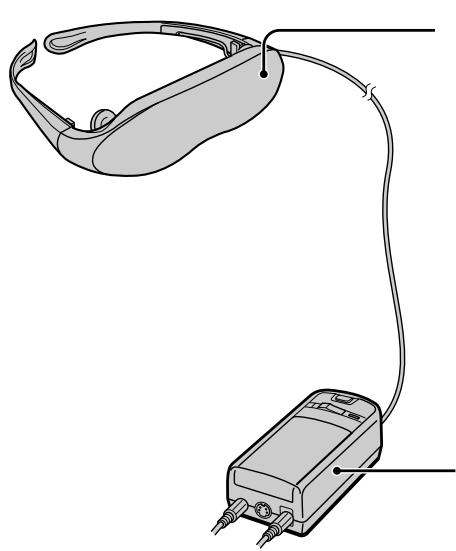
Display unit
The display unit is equipped with two small (left and right) LCDs.
Power supply box
You can use Sony's recommended optional battery pack. You can also use the house current. To use the Glasstron, connect your video equipment to A/V IN on the power supply box.
Features
- A powerful, big screen experience comparable to watching a 52-inch screen from approximately 6.6 feet (2 m) away.
- Handy portable folding display.
- The display unit weighs only 3.4 oz (95g).
- Approximate continuous use for up to seven hours with Sony's recommended battery pack, NP-F550.
Checking the supplied accessories
Check that the following accessories are supplied with your Glasstron. If any item is not supplied, contact your Sony dealer or local authorized Sony service facility.
- Display unit/Power supply box (1)
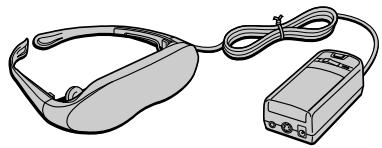
- Nose piece (black) (1)

- AC power adaptor AC-PLM2 (1)
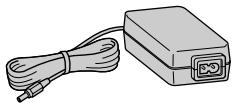
- Side piece pads (2)

- AC power cord (1)
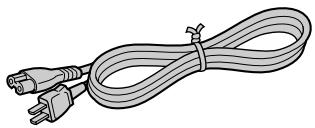
- Operating instructions manual (1)
Warranty (1)
Audio/video cable (special miniplug phono plug) (1)
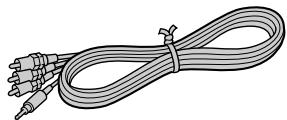
Plug adaptors (phono jack phono jack) (3)
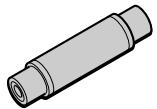
Locating the parts and controls
Refer to the pages indicated in parentheses ( ) for details.
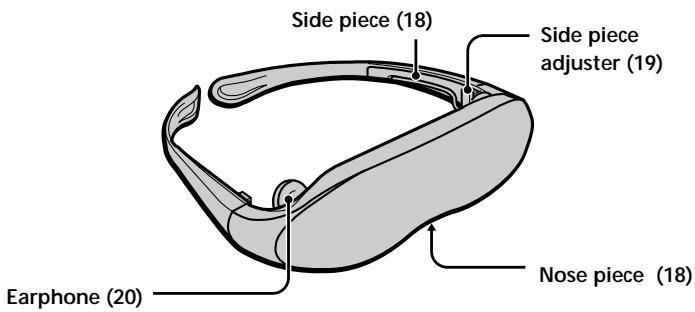
Display unit
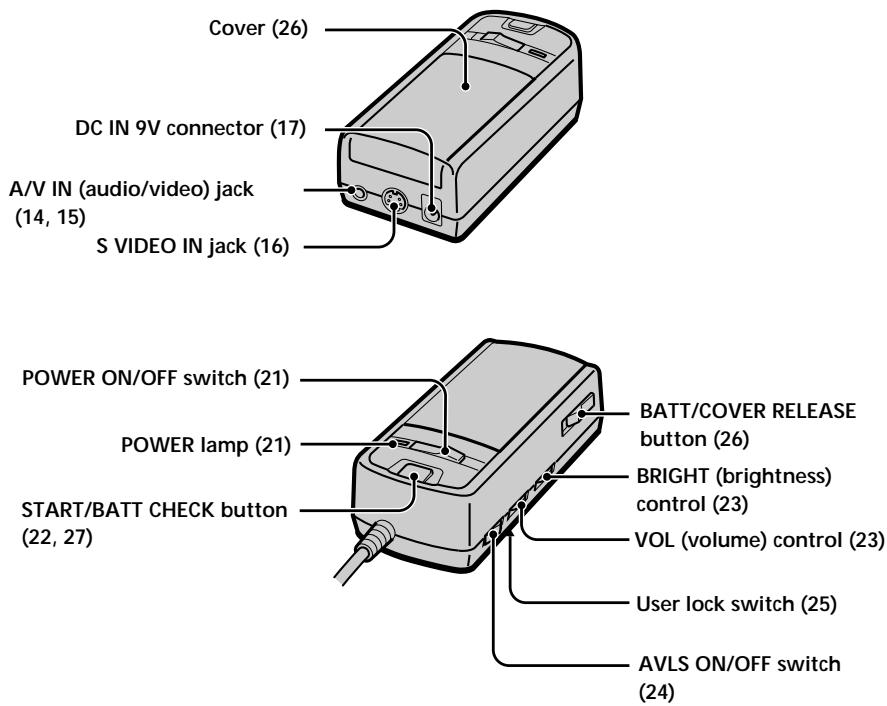
Power supply box
Connecting the Glasstron
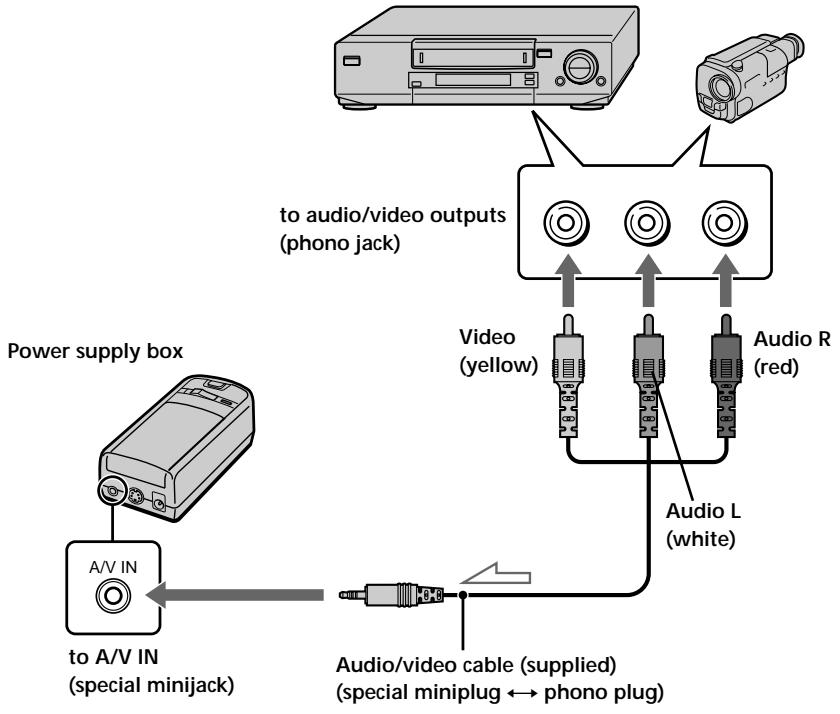
Connecting video equipment
Connect a VCR, laser disc player, DVD player, or camcorder to the power supply box as shown below.
VCR, laser disc player, DVD player, camcorder, etc.

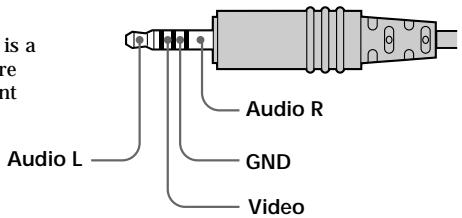
About the audio/video input jack
The audio/video input jack of the Glasstron is a special minijack, and the signal connections are aligned as shown on the right. This alignment may differ depending on the equipment.
Connecting other equipment
The plug adaptor (phONOJACK phONOJACK) is supplied. Use the plug adaptor according to the equipment you want to connect.
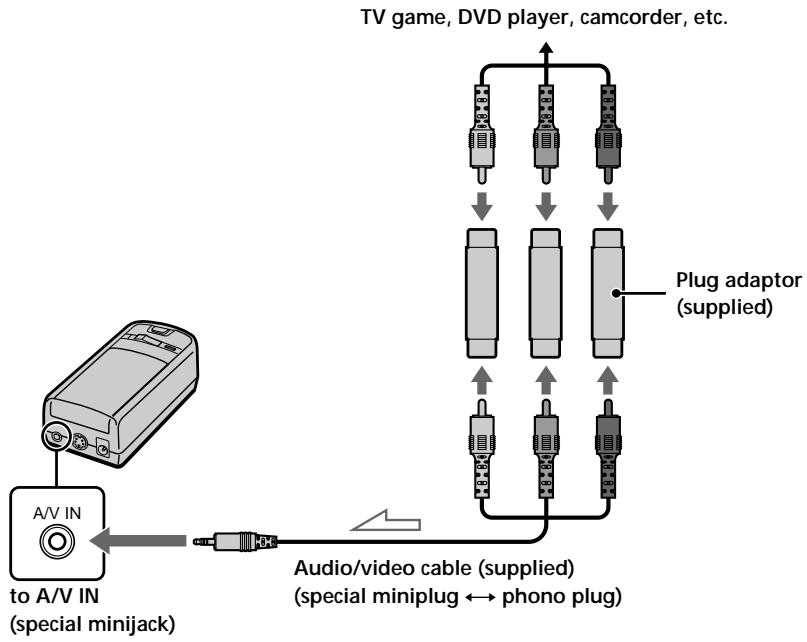
: Signal flow
Connecting the Glasstron (continued)
If your video equipment has an S video jack
We recommend connecting the Glasstron to your video equipment using an S video cable and the audio/video cable to enjoy the highest quality pictures. In this case, you do not need to connect the video (yellow) plug. If you connect both the S video and video plugs, the S video signal is automatically selected.
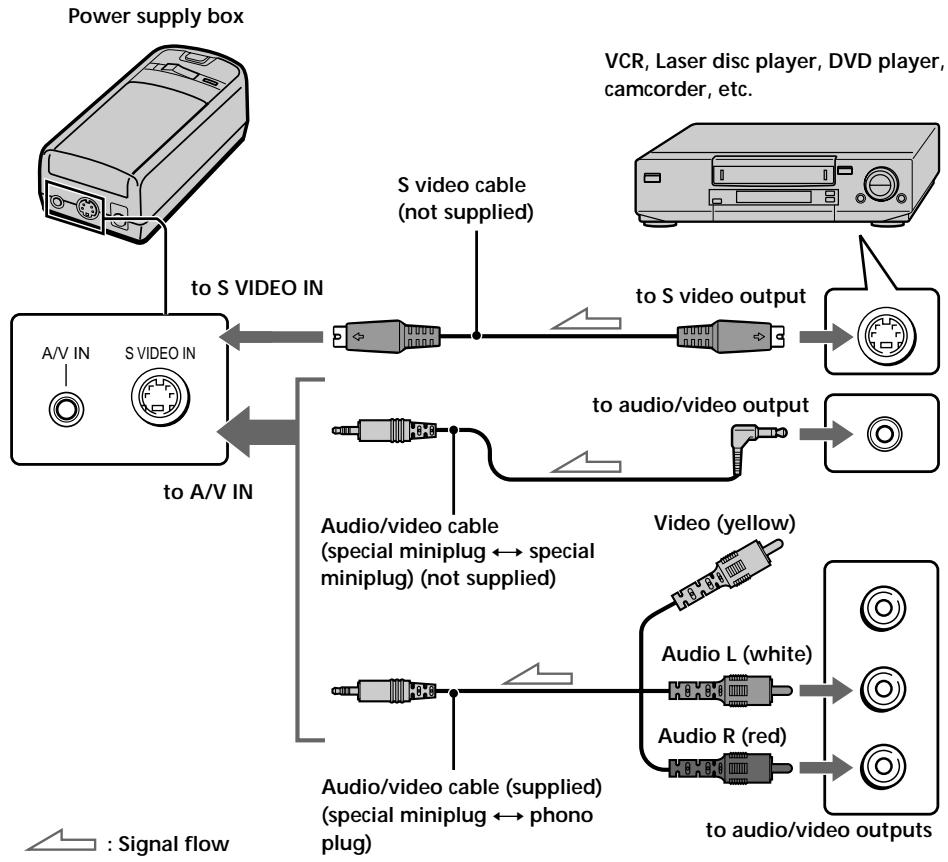
Notes
-
Even if you use the supplied audio/video cable, the audio and video signals may not be carried to the Glasstron depending on the video source. In this case, contact your Sony dealer or local authorized Sony service facility.
-
When you connect the Glasstron to the audio output jacks (phono jacks) of your video equipment, connect the Glasstron to both the right and left audio output jacks. If you connect the Glasstron to just one audio output jack, you will hear sound from only one of the stereo earphones.
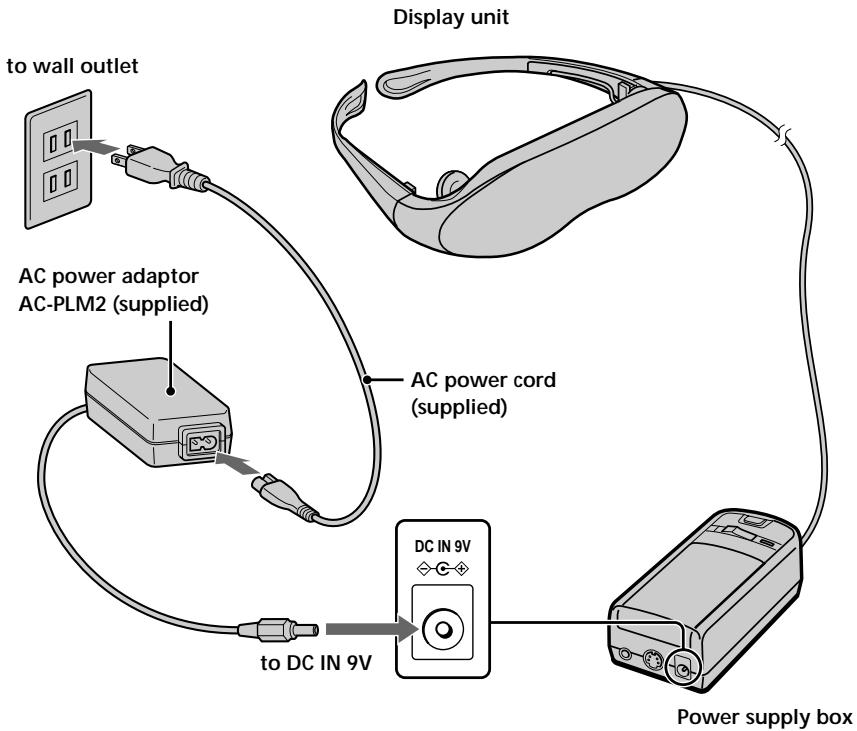
Connecting the power source
Connect the AC power adaptor AC-PLM2 (supplied) to a wall outlet. Do not connect the power source until all other connections are complete.
Wearing the Glasstron
WARNING
- Failure to properly fit the product (see "Proper Fit," page 9) each time may result in eye fatigue, eye damage, or loss of visual functions and may result in accident or injury.
- This product should not be used by children age 15 or younger. The eyes of children are still developing and may be adversely affected by use of this product, and it may cause eye fatigue, eye damage, or loss of visual functions. In addition, this product may not be adjusted to fit a child's head.
If you normally wear glasses while watching TV, you can use the Glasstron while wearing glasses. When you take the Glasstron off, be careful that your regular glasses not get caught on the Glasstron.
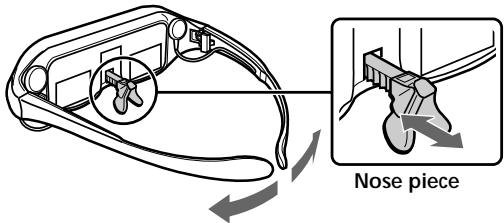
1 Adjust the nose piece and put on the Glasstron.
Pull out the nose piece if you wear glasses.
Open the side pieces by grasping the side piece tips and put on the Glasstron.
Caution:
Be careful not to poke your eyes with the side piece tips when putting the Glasstron on or off.
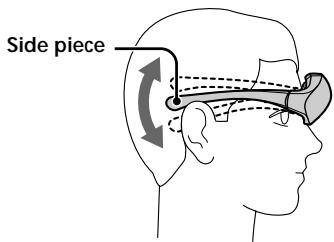
2 Adjust the angle of the display unit.
Adjust the angle of the side pieces by grasping the side piece tips to adjust the display unit to the most suitable viewing position.
You do not necessarily have to rest the side pieces on your ears.
To use the supplied nose piece
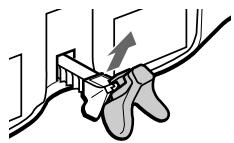
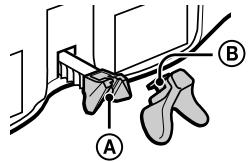
If you are still unable to have a full view of the screen or clear picture color on the Glasstron after performing step 2 above, replace the nose piece with the supplied nose piece (black).
1 Remove the nose piece in an upward direction while grasping the nose piece support.
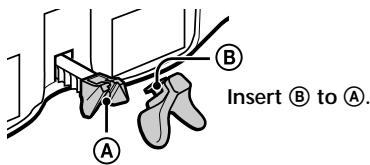
2 Insert ⑧ of the supplied nose piece (black) into the round notch A.
3
Adjust the width of the side pieces.
There are two settings for the side piece width adjustment.
If the fit seems loose, insert the side piece adjusters to the hinges of the left and right side pieces.
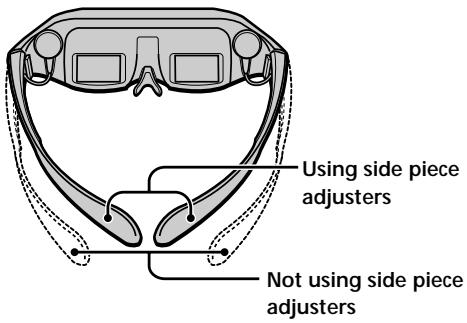
To use the side piece adjusters
This is the original position. Normally keep adjusters here.
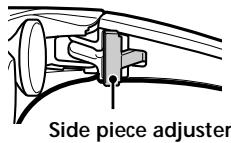
Turn the side pieces inside slightly then gently squeeze the top and bottom of the side piece adjuster and pull out to release.
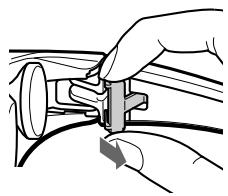
Slide the side piece adjuster toward the display unit.
4 Reinsert the side piece adjuster tines into the hinge area between the side piece and display unit. Repeat the procedure for the other side piece.
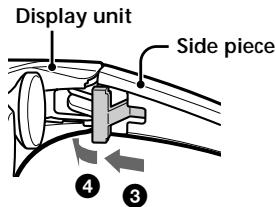
To reset the side piece adjusters, turn the side pieces inside slightly and reverse the above procedure.
To put the side piece adjuster back, press ④ to the illustrated direction until it "clicks" into place.
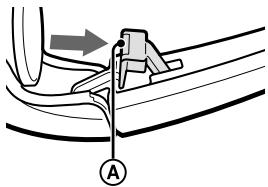
Wearing the Glasstron (continued)
For increased comfort while wearing Glasstron
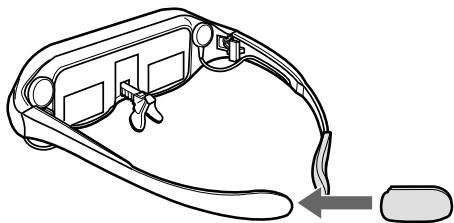
If the Glasstron fit is loose or uncomfortable, place the supplied side piece pads onto the tip of each side piece.
Note
Use the side peace pads pocket-side inward.
4
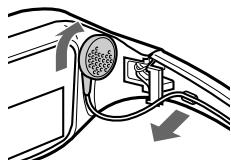
Wear the stereo earphones.
Detach the stereo earphones from the display unit and put them in your ears.
Notes
- If the stereo earphones are loose, we recommend using the spare ear-pads (not supplied).
- If your head is small, you may not be able to use the Glasstron.
Depending on your eyesight, you may not be able to focus on the picture properly. In such a case, it is not a malfunction.
Using the Glasstron
If you set the user lock, unlock it (page 25).
Before you start...
Be sure to follow the procedures in "Connecting the Glasstron" (pages 14-17) and "Wearing the Glasstron" (pages 18-20).
WARNING
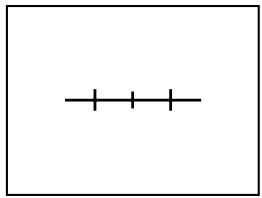
Each time this product is used, adjustment screens will appear, requiring the viewer to properly fit the product. To prevent eye damage, do not use this product if the vertical lines do not cross the horizontal line on the next screen.
The Glasstron includes two small (left and right) LCDs. You are watching a combined picture created from these two screens. Although the screen position is properly aligned at the factory, it may become misaligned if the Glasstron is deformed or damaged. Check the screen position alignment every time you turn on the Glasstron. If you cannot have correct screen alignment, stop using the Glasstron immediately.
1
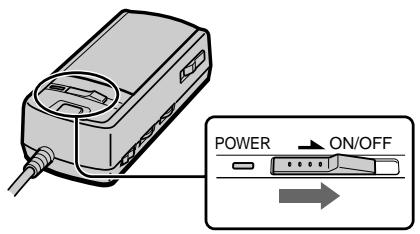
Turn on the Glasstron using the POWER ON/OFF switch.
The POWER lamp lights up.
Screen
2
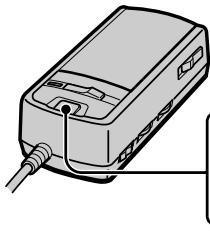
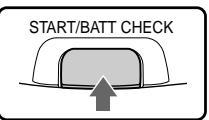
If the screens are aligned, press the START/BATT CHECK button.
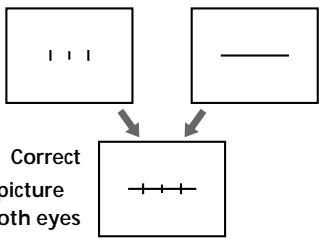
Left screen
Right screen
You may see a horizontal line on the left screen rather than the right screen and vertical lines on the right screen rather than the left screen. This is not a malfunction.
The combined picture you see with both eyes
If the image you see matches one of the pictures below, you have correct screen alignment.
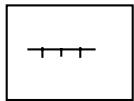
Correct
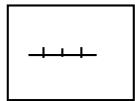
Correct
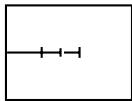
Correct
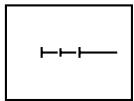
Correct
If the image you see matches one of the pictures below, stop using the Glasstron immediately.
Use of the Glasstron under such conditions may cause eye fatigue or eye damage.
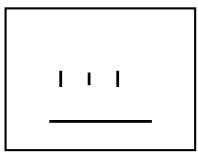
Incorrect
When no vertical lines cross the horizontal line.
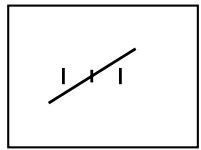
Incorrect
When the horizontal line appears as a diagonal line.
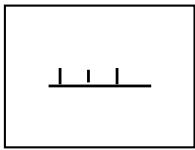
Incorrect
When the center vertical line does not cross the horizontal line.
If you cannot see a proper arrangement of these lines even after resting your eyes for a few hours, the Glasstron may not be operating correctly. Contact your Sony dealer or local authorized Sony service facility.
3
Start playback on the video equipment connected to the Glasstron.
4
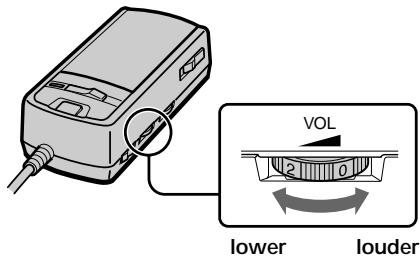
Adjust the volume by turning the VOL control.
When you set the AVLS ON/OFF switch to ON, you cannot turn up the volume beyond the defined limit (see page 24).
5
Check that the four corners of the screen are clear.
If the four corners of the screen are not clear, do the step 2 (page 22) to check the screen position alignment again.
6
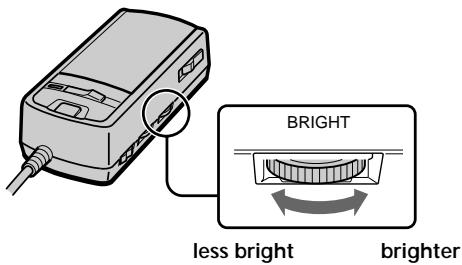
Adjust the brightness by turning the BRIGHT control.
Using the Glasstron (continued)
After you finish using the Glasstron
Take off the Glasstron, and turn off the power.
Note on the LCDs
The LCD screen is made with high-precision technology. However, black points or bright points of light (red, blue, or green) may appear constantly on the LCD screen. This is not malfunction. (Effective dots: more than 99.99% )
Preventing sound from escaping through the stereo headphones
-- AVLS(Auto Volume Limiter System):
Keeps down the maximum volume to protect your ear. You cannot turn up the volume beyond the defined limit even if you try to turn it up.
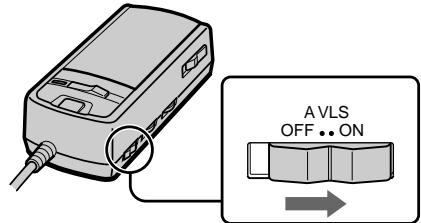
Set the AVLS ON/OFF switch to ON.
To turn the AVLS off
Set the AVLS ON/OFF switch to OFF.
Screen warnings against overuse of the Glasstron
To prevent eye fatigue or eye damage, after you use the Glasstron for three hours the following caution appears on the screen and the power turns off automatically.
TIME OUT
TEMPS DEPASS
Caution: Motion sickness from viewing programs.
Some viewers may experience motion sickness, headache or nausea from viewing movies or video programs, especially those with intense action and movement. If you feel any of these symptoms, stop using the product immediately. To avoid personal injury or injury to others, do not drive a car or motorcycle, nor do anything that requires concentration until the symptoms disappear.
Caution: Motion sickness from external motion.
Do not use the product while subject to external motion—for example, as a passenger in a car. Use of this product under these conditions may cause motion sickness.
Setting the user lock
WARNING
This product should not be used by children age 15 or younger. The eyes of children are still developing and may be adversely affected by use of this product. To prevent such use, this product is equipped with the user lock system.
When the user lock is on, audio and video signals are not input and all operations except power on/off are disabled.
To use the Glasstron, unlock the user lock.
1 Set the user lock switch as shown in the illustration.
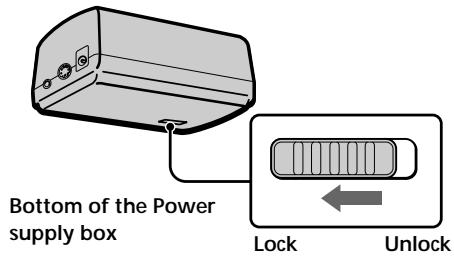
USER LOCK
VERR.UTILIS
To unlock the user lock
Set the user lock switch to the opposite position.
Using an optional battery pack
If you use a battery pack such as the NP-F550, you can use the Glasstron without connecting to a wall outlet.
Charge the battery pack before use by using the optional battery charger, BC-V615. You cannot charge the battery pack while it is on the unit.
1 Slide the BATT/COVER RELEASE button to remove the cover.
When not using the unit, keep the cover on the power supply box.
BATT/COVER RELEASE button
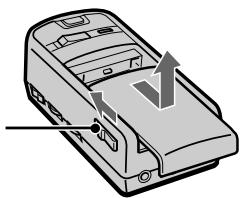
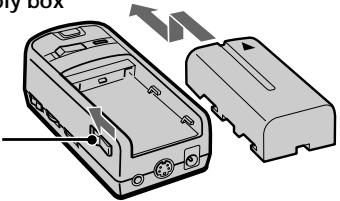
2 Attach the battery pack to the power supply box.
Install the battery pack properly making sure it is not crooked against the power supply box.
To remove the battery pack, slide and hold the BATT/COVER RELEASE button and pull the battery pack off.
Power supply box
Battery pack
BATT/COVER RELEASE button
| Battery pack | Battery life |
| NP-F550 | Approx. 7 hours |
- The above indications are for fully charged batteries.
- Actual battery life depends on conditions of use.
- You can also use a battery pack such as the NP-F530 (not supplied) with the Glasstron.
- You can use an "InfoLITHIUM™" battery pack with the Glasstron. When using such a battery pack, the estimated remaining battery life is displayed with the indicator instead of the time counter.
Notes
- While using the battery pack, if you connect or disconnect the AC power adaptor, the power turns off. To turn the power on, press the POWER ON/OFF switch again.
- If the POWER lamp flashes while using the battery pack, replace the battery pack with a fresh one.
- Battery life may be shorter in a cold environment. This is a typical battery characteristic.
"InfoLITHIUM" is a trademark of Sony Corporation.
Checking the remaining battery life
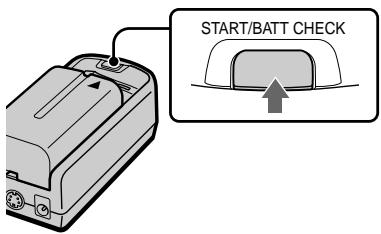
When no indication or caution appears on the screen, press the START/ BATT CHECK button.
The remaining battery life appears and the picture disappears.
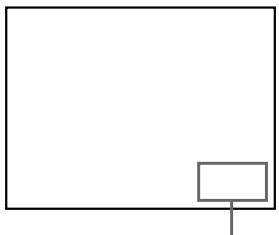
Remaining battery life
Fully charged dead


When the battery pack is weak, the following message appears on the screen. Replace the battery pack with a charged one.
BATTERY DOWN
PILE PLATE
When using the AC power adaptor, the "mark appears on the screen.
Precautions
Use
- Operate the product only with the supplied AC power adaptor (AC-PLM2). If you use a different AC power adaptor, it may cause a malfunction.

Unified polarity plug
- Should any liquid or solid object fall into the cabinet, unplug the product and have it checked by qualified personnel before operating it further.
Always turn the product off when you do not use it. Unplug the product from the wall outlet if you are not going to use it for several days or more. To disconnect the cord, pull it out by the plug. Never pull the cord itself. - Do not overload wall outlets, extension cords, or convenience receptacles beyond their capacity, since this can result in fire or electric shock.
- Do not use attachments not recommended by the manufacturer, as they may cause hazards.
- Avoid using earphones at high volume. Hearing experts advise against continuous, loud, and extended play. If you experience a ringing in your ears, reduce volume or discontinue use.
- Do not touch the AC power adaptor or power supply box with wet hands. If you fail to observe this, it may cause electric shock.
- Do not drop or give a mechanical shock to the product.
Installation
- To prevent internal heat buildup, do not block the ventilation openings.
- Avoid operating the product at temperatures below 41^ ( 5^ ).
- Do not subject the product to high temperature or direct sunlight. If you do not observe the above instructions, the product may become deformed and the screens may become impossible to align. If you keep watching misaligned screens, you may develop eye fatigue. Follow the instructions in "Using the Glasstron" (pages 21-24), to be sure the screens are aligned. If you find the screens misaligned, have the product repaired at your Sony dealer or local authorized Sony service facility.
- Do not place the product in locations where it is wet, humid, dusty, smoky, or steamy. Do not use this product near or around water. It may cause fire or electric shock. Especially, do not use the product in the bathroom.
- If the product is transported directly from a cold to a warm location, or if the room temperature has changed suddenly, the picture may be blurred or show poor color. This is because moisture has condensed on the lenses inside. If this happens, let the moisture evaporate before using the product.
- Do not place the product on an unstable cart, stand, table, or shelf. The product may fall, causing serious injury to a child or an adult, and serious damage to the product.
- Do not allow anything to rest on or roll over the power cord, and do not place the product where the power cord is subject to wear or abuse.
Others
-
Unplug the product from the wall outlet and refer servicing to qualified service personnel under the following conditions:
-
When the power cord or plug is damaged or frayed.
-
If liquid has been spilled into the product.
-
If the product has been exposed to rain or water.
- If the product has been subject to excessive shock by being dropped, or the cabinet has been damaged.
- If the product does not operate normally when following the operating instructions. Adjust only those controls that are specified in the operating instructions. Improper adjustment of other controls may result in damage and will often require extensive work by a qualified technician to restore the product to normal operation.
-
When the product exhibits a distinct change in performance -- this indicates a need for service.
-
Do not disassemble or modify the product. It may cause fire or electric shock. Have the product checked and repaired at your Sony dealer or local authorized Sony service facility.
- Do not attempt to service the product yourself since opening the cabinet may expose you to dangerous voltage or other hazards. Refer all servicing to qualified service personnel.
- When replacement parts are required, be sure the service technician certifies in writing that he has used replacement parts specified by the manufacturer that have the same characteristics as the original parts. Unauthorized substitutions may result in fire, electric shock, or other hazards.
- Upon completion of any service or repairs to the product, ask the service technician to perform routine safety checks (as specified by the manufacturer) to determine that the product is in safe operating condition, and to so certify.
- Unplug the product from the wall outlet before cleaning. Clean the product gently with a dry, soft cloth, or a soft cloth slightly moistened with a mild detergent solution. Do not use any type of solvent, such as alcohol or benzine.
If the nose piece is disconnected Reinsert the nose piece to its position.
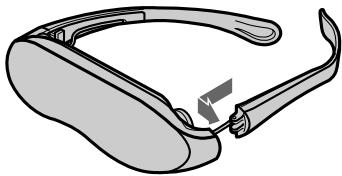
If the side pieces are disconnected
You can reattach the side piece.
Insert the side piece to the inner side of the display unit. Gently push until it clicks into position.
However, reattaching the side pieces may cause a malfunction. Be careful not to reattach them too often.
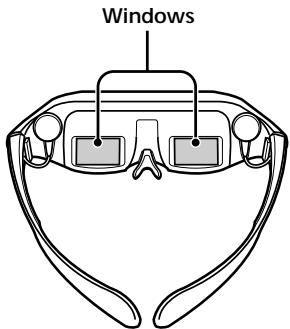
Window coating
To avoid reflection, the windows are coated. Do not place the product in locations subject to sudden temperature changes, or where it is excessively hot (above 96^ / 60^ ). For example, inside a car parked in direct sunlight.
The coating may develop cracks.
For detailed safety precautions, see the leaflet "IMPORTANT SAFEGUARDS" included with this manual in the vinyl bag.
Troubleshooting
If you have any questions or problems not listed below, contact your Sony dealer or local authorized Sony service facility.
| Symptom | Cause | Remedy |
| The playback picture does not appear. | Connections are incorrect. | Connect the equipment correctly (pages 14 - 17). |
| The user lock is set. | Unlock the user lock (page 25). | |
| The picture is dark or dim. | You are not wearing the Glasstron correctly. | Put on the Glasstron correctly (pages 18 - 20). |
| Horizontal stripes appear. | — | Adjust the brightness (page 23). |
| The window (where the picture is displayed) is dirty. | Clean the display unit with a soft, dry cloth (page 29). | |
| The picture suddenly disappears. | You continued using the Glasstron for three hours. (The Glasstron turns off automatically after three hours to prevent eye fatigue.) | — |
| The battery pack is dead. | Replace the battery pack (page 26). | |
| Picture and/or sound has noise. | The plugs of the audio/video cable are dirty. | Clean the plugs of the audio/video cable. |
| The picture has no sound. | — | Adjust the volume with the VOL control (page 23). |
| The sound is noisy. | ||
| The volume does not become louder. | The AVLS function is on. | Set the AVLS ON/OFF switch to OFF (page 24). |
| The battery pack discharges quickly. | The battery pack is not charged enough. The battery pack is completely dead. | Charge the battery pack fully or use a new one (page 26). |
| The black, red, and green dots do not disappear. | The LCD is made with high-precision technology. However, black points or bright points of light (red, blue, or green) may appear constantly on the LCD screen. This is not malfunction. (Effective dots: more than 99.99%) | — |
| The POWER ON/OFF switch does not function. | — | Disconnect the AC power cord from the wall outlet. After three minutes, reconnect the AC power cord. |
Specifications
Power supply
AC power adaptor: AC-PLM2
100-240 V AC, 50/60 Hz, 16 W
Output voltage 9 V, 1.3 A
Battery pack: NP-F550 (not supplied)
Power consumption
1.7 W Approx.
Operating temperature
41^ to 95^ (5^ to 35^)
Storage temperature
14^ to 140^ (-10^ to 60^)
Dimensions
Display unit:
Approx. 6^7 / 8 × 2^1 / 8 × 2^1 / 4 inches
(Approx. 173× 53× 56mm )
(w/h/d, folded up)
Power supply box:
Approx. 2^1 / 8 × 1^9 / 16 × 4^1 / 8 inches
(Approx. 53 × 39 × 104 ~mm )
(w/h/d)
not including projecting parts and controls
Mass
Display unit: Approx. 3.4 oz (95 g)
Power supply box: Approx. 3.2 oz (90 g)
Video signal
NTSC color, EIA standards
Audio/video input
Special minijack
1 Vp-p, 75 ohms, unbalanced, sync
negative
S video input
4-pin mini DIN
Y: 1 Vp-p, 75 ohms, unbalanced, sync negative
C: 0.286 Vp-p, 75 ohms, unbalanced, sync negative
Supplied accessories
AC power adaptor AC-PLM2 (1)
AC power cord (1)
Audio/video cable (special miniplug phono plug) (3m) 1
Plug adaptors
(phono jack phono jack) (3)
Nose piece (black)(1)
Side piece pads (2)
Operating instructions manual (1)
Warranty (1)
Design and specifications are subject to change without notice.
Index
A
Accessories supplied 12
AC power adaptor 17
Adjusting
brightness 23
nose piece 18
side pieces' width 19
volume 23
AVLS 24
B
Battery pack 26
C, D, E, F, G,
Checking the screen position alignment 22
Connection
battery pack 26
power 17
video equipment 14-16
H
Health concerns 7,8
I, J, K, L, M, N, O
Instructions for safe fit 9
P, Q
Precautions 28
R
Remaining battery life 27
S, T
Safety instructions 6-10
Screen alignment 22
Stereo earphones 20
U, V
User lock 25
W,X,Y,Z
Warnings for electronic products 10
Wearing the Glasstron 18-20